1
英华家电维修资料专用 QQ:505966338
17" CDT Color Monitor
4-3 Adjustment Method
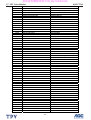
Display Mode
IBM, 720 x 400
VGA, 640 x 480
VESA, 640 x 480
VESA, 800 x 600
VESA, 1024 x 768
VESA, 1280 x 1024
AOC FT720
Horizontal
Frequency (kHz)
31.5
31.5
43.3
53.7
68.7
64
Vertical
Frequency (Hz)
70
60
85
85
85
60
Pixel Clock
(MHz)
28.3
25.2
36
56.3
94.5
108
Sync Polarity
(Horizontal /Vertical)
-/+
-/-/+/+
+/+
+/+
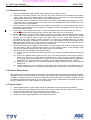
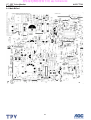
1. TP901, B + & HV voltage adjustment:
A. Chroma-2000 Signal generator or PC equivalent set mode 6, UVGA 1024X768 pattern 1.0 .
B. Connect a DC Volt meter between D922“-” and ground, then adjust VR903 to be 14VDC for CPT CRT.
C. Connect a DC Volt meter between D925“-”and ground, then adjust VR902 to be 154.5 VDC for CPT
CRT.
2. Factory preset Timings Adjustment:
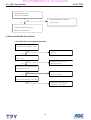
A. Press MENU Key to show OSD window press Up or Down Key to switch the functional controls.
B. Press the Up Key to select the "ZOOM" function, then press the MENU Key. While do not release the
MENU Key until the OSD window changed to the Factory preset window.
C. The Factory preset window contains the following functional controls. Select one of the control. Then
press the Up/Down Key to adjust its value for the optimum picture.
TM
CONTRAST
H-MOIRE REDUCE
BRIGHTNESS
V-MOIRE REDUCE
H-CENTER
R-GAIN
H-SIZE
G-GAIN
V-CENTER
B-GAIN
V-SIZE
R-BIAS
BURN IN TIME
G-BIAS
PINCUSHION
R-BIAS
TRAPEZOID
DEGAUSS
PIN-BALANCE
OSD EXIT
10