1
eliminates the need for the navigator to mentally calculate how much
water is under his keel.
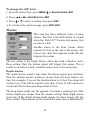
Keel Offset lets you calibrate the digital depth: chart depth scale, chart
cursor depth and fish symbol depth displayed on the screen. To calibrate
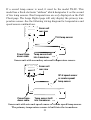
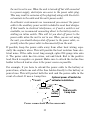
the depth indicators, first measure the distance from the face of the
transducer to the lowest part of the boat. In this example, we will use 3.5
feet. This will entered as a negative 3.5 feet, which makes the depth indicators perform as if the transducer's lower in the water than it really is.
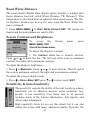
1. Press MENU|MENU|↓ to SET KEEL OFFSET|ENT.
2. The Keel Offset dialog box appears. Press ↓ to change the plus (+)
sign to a minus (–) sign.
3. Press → to the first number, then press ↑ to change the number to 3
4. Press → to the second number, then press ↑ to change the number to
5, then press EXIT. The depth indicators now accurately show the depth
of water beneath the keel.
NOTE:
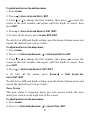
If knowing the exact depth of water beneath the keel is less important, you can calibrate the depth indicators so that they show the actual water depth from surface to bottom. To do this, first measure the
distance from the face of the transducer up to the surface (the water
line on the boat). In this example, we will use 1.5 feet. This will be entered as a positive 1.5 feet, which makes the depth indicators perform
as if the transducer's higher in the water than it really is.
1. Press MENU|MENU|↓ to SET KEEL OFFSET|ENT.
2. The Keel Offset dialog box appears with a plus (+) sign at the
front of the box.
3. Press → to the first number, then press ↑ to change the number
to 1.
68