1
4.
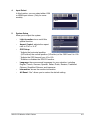
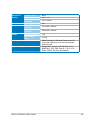
Input Select
In this function, you can select either VGA
or HDMI input source. (Only for some
models)
HDMI
5.
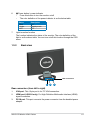
System Setup
Allow you to adjust the system.
•
Light-in-motion: turns on/off this
special function.
•
Aspect Control: adjusts the aspect
ratio to “Full” or “4:3”.
•
OSD Setup:
* Adjusts the horizontal postition
(H-Position)/ the vertical position (V-Position) of the OSD from 0 to 100.
* Adjusts the OSD timeout from 10 to 120.
* Enables or disables the DDC/CI function.
•
Language: there are several languages for your selection, including
English, French, German, Spanish, Italian, Dutch, Russian, Traditional
Chinese, Simplified Chinese, and Japanese.
•
Information: shows the monitor information.
•
All Reset: “Yes” allows you to restore the default setting.
ASUS LCD Monitor LS221 Series
Light-in-motion
3-3