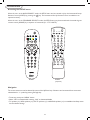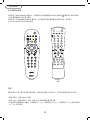
1
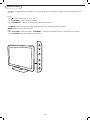
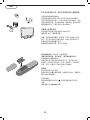
Remote control keys
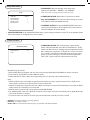
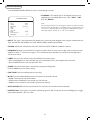
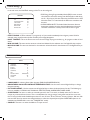
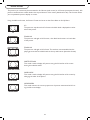
Note: Pressing most buttons once will activate the assigned function. Pressing a second time will de-activate it.
When a button enables multiple options, a small list will be shown. Press repeatedly to select the next item in the list.
The list will be removed automatically after six seconds or press MENU to remove immediately.
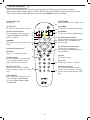
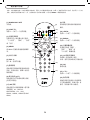
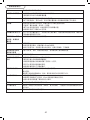
(9) STANDBY
Press to switch the TV to standby mode.
(1) Alarm On / Off
No function.
(9)
(2) +Pay TVTo move up or down a Pay TV channel.
(3) Smart Sound button
Press repeatedly to select among the
4 settings: PERSONAL, THEATRE,
MUSIC, or VOICE.
ALARM
(1)
(10)
ON
PAY TV
INFO
(2)
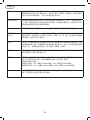
Press repeatedly to select either RICH,
NATURE, SOFT, or PERSONAL of
(14) picture setting.
OK
(13) I-II button / Sound mode
To select 1st or 2nd language.
(15) Note: Language availability depends on
the transmission.
(6)
TV
(7)
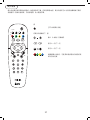
(8) Teletext (p.18)
Press to turn on or off the Teletext
function (available in certain TV models (8)
only).
To move up or down a RADIO channel.
(13)
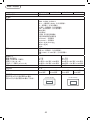
(6) VOL +/Press + or - to adjust the volume.
(7) Mute button
Press to eliminate or restore the LCD
TV sound. Mute will appear on the
screen when the sound is muted.
(11) (11) RADIO
(12) (12) Smart Picture button
(3)
(4)MENU
Press menu to activate on screen menu (4)
on/off.
(5)
(5) Cursor direction key
RADIO
OFF
(10) +INFOTo move up or down an INFO channel.
(14) OK
To activate a setting.
(15) + TV -
(16) To move up or down a TV channel.
TEXT
AV
(17) AV button
Press to select the video input source:
Tuner, AV, SIDE AV, SIDE SVIDEO,
CVI, VGA, HDMI1, HDMI2, HDMI3
and SIDE HDMI.
17
(16) Number button
Press the number buttons for direct
access to the TV channels. For 2 digit
(17)
channel, enter the 2nd digit after the 1st
digit.