1
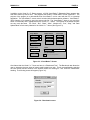
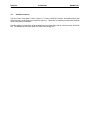
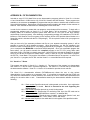
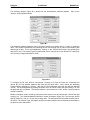
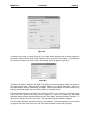
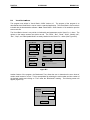
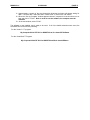
PAGE 34 APPENDIX B B.2 30 JUN 2000 MAN0051-01 Visual Basic Demo This program was written in Visual Basic 32-Bit Version 4.0. The purpose of the program is to demonstrate how Visual Basic can be used in a practical application. The Visual Basic source code is included with the demonstration software. Note: Visual Basic 32-Bit Version 4.0 is needed to open the source code file. The Visual Basic demo is very similar in functionality and appearance as the Visual C++ demo. The options on the startup screens are similar as well. The “Rack”, “Slot”, “Read”, “Write”, “Module Info”, “Run”, “Stop”, and “Data Update Mode” are nearly identical to the Visual C++ demo (See Figure B.5). Select Module Module Access PLC Control Rack 0 Read Run Slot 1 Write Stop Module Info Exit PIF Address Set Port Module Value Status Rack Status Rack Not Found 0 Benchmark Test Data Update Mode Auto Read Update Figure B.5 Another feature of the program, the Benchmark Test, allows the user to determine the scan times of certain cards located on a rack. This is accomplished by selecting the rack number and slot number of the desired module and clicking on “Test” under the “Benchmark” heading. The following screen will appear (Figure B.6). Results Scan Rate 1.253761E-04 Number of Scans 7976 Done