1
USER’S GUIDE
Congratulations
DROID™ 4 by Motorola
Introducing the world’s most powerful 4G QWERTY
smartphone! DROID 4 by Motorola has tons of
advanced features for everything you want to do—video,
web browsing, multimedia, and more.
• A blistering fast dual-core 1.2 GHz processor lets you
download web pages in under a second, and makes
multi-tasking a snap.
• Pound out emails and texts faster than ever before,
using the spacious fifth-row QWERTY keypad with
improved tactile response and backlit keys.
• Use MotoCast to stream or download music, videos,
and documents to your smartphone.
• Use your 8MP camera on the back to capture life’s
moments in full 1080p HD video. Then video chat
in HD with the camera on the front.
Note: Certain apps and features may not be available in
all countries.
Caution: Before assembling, charging, or using your
phone for the first time, please read the important
safety, regulatory and legal information provided with
your product.
This product meets the applicable limit for
exposure to radio waves (known as SAR) of
1.6 W/kg (FCC & IC). The limits and guidelines
include a substantial safety margin designed to assure
the safety of all persons, regardless of age and health.
The highest SAR values measured for this device are
listed in the regulatory information packaged with
your product.
More
• Answers: Touch
>
Help Center.
• Updates: Smartphone updates, computer software,
user guides, online help, and more at
www.motorola.com/mydroid4.
• Accessories: Find accessories for your smartphone at
www.motorola.com/products.
Notes:
• All screens in this guide are simulated. Actual
displays may vary.
• Instructions to perform tasks in this guide may
change depending on the software version on your
smartphone.
• Unless specified otherwise, all instructions to
perform tasks in this guide assume that you are
starting from the home screen.
Congratulations
1
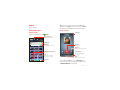
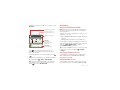
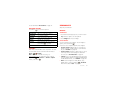
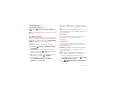
Your smartphone
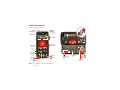
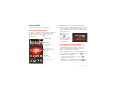
the important keys & connectors
3.5mm
Headset Jack
Power
Key
Press = sleep
Hold = power
11:23
11:23
HD Webcam
David Kelley
David Kelley
Jen Uriegas
JP Jordan
Lisa Jones
Jen Uriegas
JP Jordan
Lisa Jones
Tatia Torrey
Volume Keys
Apps
Camera
Text
htt p:// w w w .
Voicemail
Micro USB
Connector
Charge or
connect
to PC.
Micro HDMI
Connector
Connect to
HDTV.
Browser
Market
Phone
h t tp : / /www.
Voicemail
Email
Browser
Market
Phone
Text
Camera
Apps
Shift
Search
Symbols
Menu
Back
Home
Note: Your smartphone might look a little different.
2
Email
4.0" qHD
Touchscreen
Your smartphone
Space
Delete
Enter/
Return
Navigation
Keys
Contents
Let’s go
Let’s go . . . . . . . . . . . . . . . . . . . . . . . . . . . . . . . . . . . . . . . . . . . . . . . . . . 3
Touchscreen & keys. . . . . . . . . . . . . . . . . . . . . . . . . . . . . . . . . . . . . . 6
Home screen. . . . . . . . . . . . . . . . . . . . . . . . . . . . . . . . . . . . . . . . . . . . . 9
Apps & updates. . . . . . . . . . . . . . . . . . . . . . . . . . . . . . . . . . . . . . . . . . 12
Calls . . . . . . . . . . . . . . . . . . . . . . . . . . . . . . . . . . . . . . . . . . . . . . . . . . . . 15
Contacts. . . . . . . . . . . . . . . . . . . . . . . . . . . . . . . . . . . . . . . . . . . . . . . . 18
Messaging . . . . . . . . . . . . . . . . . . . . . . . . . . . . . . . . . . . . . . . . . . . . . . 21
Text entry. . . . . . . . . . . . . . . . . . . . . . . . . . . . . . . . . . . . . . . . . . . . . . 23
Social networking . . . . . . . . . . . . . . . . . . . . . . . . . . . . . . . . . . . . . 26
Tips & tricks . . . . . . . . . . . . . . . . . . . . . . . . . . . . . . . . . . . . . . . . . . . . 27
Webtop application. . . . . . . . . . . . . . . . . . . . . . . . . . . . . . . . . . . . . 28
Digital living . . . . . . . . . . . . . . . . . . . . . . . . . . . . . . . . . . . . . . . . . . . 29
Photos & videos. . . . . . . . . . . . . . . . . . . . . . . . . . . . . . . . . . . . . . . . . 30
Music . . . . . . . . . . . . . . . . . . . . . . . . . . . . . . . . . . . . . . . . . . . . . . . . . . . 34
Web. . . . . . . . . . . . . . . . . . . . . . . . . . . . . . . . . . . . . . . . . . . . . . . . . . . . . 38
Personalize . . . . . . . . . . . . . . . . . . . . . . . . . . . . . . . . . . . . . . . . . . . . 39
Location. . . . . . . . . . . . . . . . . . . . . . . . . . . . . . . . . . . . . . . . . . . . . . . . 41
Wireless. . . . . . . . . . . . . . . . . . . . . . . . . . . . . . . . . . . . . . . . . . . . . . . . 42
Memory card & file management. . . . . . . . . . . . . . . . . . . . . . . . 46
Tools . . . . . . . . . . . . . . . . . . . . . . . . . . . . . . . . . . . . . . . . . . . . . . . . . . . 47
Management. . . . . . . . . . . . . . . . . . . . . . . . . . . . . . . . . . . . . . . . . . . . 52
Security . . . . . . . . . . . . . . . . . . . . . . . . . . . . . . . . . . . . . . . . . . . . . . . . 53
Troubleshooting . . . . . . . . . . . . . . . . . . . . . . . . . . . . . . . . . . . . . . . 56
Safety, Regulatory & Legal . . . . . . . . . . . . . . . . . . . . . . . . . . . . . 57
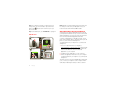
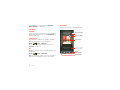
let’s get you up and running
Assemble & charge
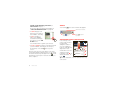
1
Lift grommet &
insert micro SIM
in lower slot.
3
Cover on.
2
Lift grommet & insert
optional microSD in
upper slot.
4
Charge up.
3H
Note: This product uses a non-removable battery. The
battery should only be replaced by a Motorola-approved
service facility. Any attempt to remove or replace your
battery may damage the product and void your warranty.
Let’s go
3
Tip: In the unlikely event that your device becomes
unresponsive, try a forced reboot—press and hold
both Power
and the down volume key for up to
10 seconds.
Note: This phone supports apps and services that use a
lot of data, so make sure your data plan meets your
needs. Contact Verizon Wireless® for details.
Tip: To save battery life, see “Battery tips” on page 27.
WELCOME HOME TO MOTOROLA ANDROID
Set up & go
1
2
Turn on.
Tu
Select a language.
S
11:23
David Kelley
JJen
en Uriegas
J Jordan
JP
Lisa Jones
To migrate data from your old phone to your Motorola
smartphone:
Welcome
Touch the android to begin.
Emergency dial
3
C
Create
account,
or log in.
o
Email
ill
Browser
Browse
err
Don’t have a Google Account?
Create
Change language
h ttp://w w w .
Voicemail
Set up your Google Account
4
Market
Add accounts.
A
Set Up Accounts
Phone
Textt
Camera
Switching from an Apple or Blackberry phone? Get all
your important information set up on your new Motorola
Android smartphone in a few easy steps. The Welcome
Home To Motorola Android application transfers
contacts, email addresses, calendar meetings, events,
tasks, music, playlists, photos, and videos from your old
phone to your new Motorola smartphone.
If you use any of the services below, tap the
Apps icon to set it up.
1 Use your computer browser to navigate to
www.markspace.com/welcomehome/, and download
the free Microsoft® Windows® or Apple Macintosh
version of the Welcome Home To Motorola
application to your computer.
2 Install and run the application on your computer.
Already have a Google Account?
Sign in
Backup Assistant+
Contacts
Corporate Sync
Email Accounts
Google
MotoCast ID
Visual Voice Mail
Want to set up an account later?
Skip
3 Follow the application instructions on your computer
to transfer data from your old phone to your Motorola
smartphone.
The Welcome Home To Motorola application will prompt
you to connect your old phone to the computer with a
USB cable, and backup the data you want to transfer.
4
Let’s go
Next, you will be instructed to install the Welcome
Home: Motorola Android app on your Motorola
smartphone, connect the smartphone to your computer
with a USB cable, then transfer and unpack the data
onto the Motorola smartphone.
Wi-Fi connect
If you want to use a Wi-Fi network for even faster
Internet access, touch the status bar at the top of the
home screen and drag it down. Touch the Wi-Fi
networks available notification to select a preferred
network.
You can also touch Menu
> Settings > Wireless &
networks > Wi-Fi settings to search for and connect to
wireless networks. There’s more in “Wi-Fi networks” on
page 43.
Wi-Fi enhanced connectivity
Cool content & more
Browse and download thousands of the coolest apps on
the planet from Android Market™.
Download new apps with “Browse & install apps” on
page 12. An optional microSD memory card can be
installed in your smartphone—you can load it up with
photos, videos, and music from your computer (see
“Memory card” on page 46).
Remove the rear cover
If you need to access the micro SIM card or
insert/remove a microSD memory card, please follow
these rear cover removal instructions.
Insert the rear cover removal tool (packaged with your
smartphone) in the hole near the back camera lens to
unlock the rear cover, and slide the cover down at the
same time to remove.
Wi-Fi Enhanced Connectivity offers a seamless
transition between connections when you switch from
the Verizon network to a Wi-Fi network.
When you launch an Internet-capable app like the
browser, your smartphone scans for available Wi-Fi
networks even when Wi-Fi is turned off, and prompts
you to connect to an available Wi-Fi network. If you have
a usage-based data plan, you can save on your
subscribed monthly data allowance by using a Wi-Fi
connection rather than the Verizon network.
Let’s go
5
If you have any problems unlocking or removing the rear
cover, please take your smartphone to any Verizon
Wireless store for assistance.
Note: This product uses a non-removable battery. The
battery should only be replaced by a Motorola-approved
service facility. Any attempt to remove or replace your
battery may damage the product and void your warranty.
Tip: In the unlikely event that your device becomes
unresponsive, try a forced reboot—press and hold
both Power
and the down volume key for up to
10 seconds.
Touchscreen & keys
a few essentials
Touchscreen on/off
Your touchscreen is on when you need it and off when
you don’t.
• When you hold the smartphone to your ear during
calls, your touchscreen sleeps to prevent accidental
touches.
• To make your touchscreen sleep or wake up, just
press Power
.
• To change how long your smartphone waits before
the screen goes to sleep automatically, touch
Menu
> Settings > Display > Screen timeout.
• To make the screen lock when it goes to sleep, see
“Screen lock” on page 54. To unlock the screen,
press Power
, then drag
to the right.
Note: Your
touchscreen might stay
dark if the sensor just
above it is covered.
Don't use covers or
screen protectors (even clear ones) that cover
this sensor.
6
Touchscreen & keys
Touch tips
Key tips
It’s all in the touch:
Menu, home, back, & search
• Touch: Choose an icon or option.
Touch Home
to
close any menu or app
and return to the home
screen. In the home
screen, touch and hold
Home
to show the
most recent apps used,
then touch an app to
open it.
• Touch & Hold: Show options.
• Drag: Scroll or move slowly.
• Flick: Scroll or move quickly.
• Zoom: Slide fingers apart or together to zoom in or
out on Google Maps™, web pages, or photos.
Displaying 297 contacts
In case of emergency
A
Touch & hold
to show options.
Abe Baudo
Allie Smyth
Abe Baudo
Home
Key
Back
Key
Search
Key
Touch Menu
to
open menu options.
Touch Back
Touch Search
voice search.
View contact
Anna Medina
Menu
Key
to go back.
for text search, or touch and hold for
Call contact
Astrid Fanning
Power key menu
Text contact
born St
lark St
Slide two fingers
apart or together
to zoom in or out.
Wacker Dr
E Wacker Pl
Press and hold Power
to open the power key menu,
where you can turn off your smartphone (Power off),
turn off all wireless connections and put the phone into
low-power Sleep mode, or turn Airplane mode or Silent
mode on and off.
State/Lake
M W Lake St M
W Lake St
E Randolph St
M
N Micigan
Lake Randolph/
Wabash
M
Drag or flick to scroll.
Touchscreen & keys
7
Adjust volume
Quick tips
Press the volume keys to change ring
volume (in the home screen) or
earpiece volume (during a call).
If you’re not sure what to do next, try one of these:
When playing music or video files,
press the volume keys to adjust
media volume.
Rotate the screen
When you turn your smartphone, the touchscreen can
rotate to stay right-side up:
Find it: Menu
> Settings > Display > Auto-rotate
screen
8
Touchscreen & keys
To...
Get the details—Open a text
message, see details for a
contact, or open items in
other lists.
Touch the message,
contact, or item.
See screen menu—Open a
menu for the current screen.
Touch Menu
See item options—Open an
options menu (if available) for
an item on the screen.
Touch & hold the
item.
Start again—Go back to the
home screen.
Touch Home
.
Wake up your
smartphone—Turn on a
sleeping touchscreen.
Press Power
.
Reboot an unresponsive
smartphone—Turn your
smartphone off then back on.
Press and hold both
Power
and the
down volume key for
up to 10 seconds.
.
Home screen
Note: Your home screen might look a little different.
quick access to the things you need most
The home screen extends left and right to give you more
room for adding shortcuts, widgets, and more. Flick the
home screen left and right to see more panels or to add
widgets or shortcuts.
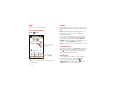
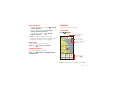
Quick start: Home screen
The home screen gives you all your latest information in
one place. It’s what you see when you turn on the
smartphone or touch Home
from a menu. It’s
basically like this:
11:23
David Kelley
Jen Uriegas
JP Jordan
Lisa Jones
Phone Status Bar
Notifications
Drag this bar down to
see details.
Flick left or right to see
more panels of widgets
& shortcuts.
http:/ / w w w .
Voicemail
Email
Browser
Market
Phone
Text
Camera
Apps
Shortcuts
Touch to open.
Open the app menu.
Tip: From the home
screen, touch
Home
to see
thumbnails of the five
home screen panels.
Touch a thumbnail to
go to the panel.
Use & change your home screen
On your home screen, shortcuts are icons that open
your favorite apps, web bookmarks, contacts, mail
labels, or music playlists. Widgets show you news,
weather, messages, and other updates.
To see other panels of shortcuts and widgets, flick the
home screen left or right. Or, touch Home
and touch
a thumbnail to go to the panel.
• To open something, touch it. Touch Home
return to the home screen.
to
Tip: When you open a widget, touch Menu
to see
any options or settings (you can choose accounts for
Home screen
9
Calendar, Social Networking, Social Status, or
Universal Inbox widgets).
Search
Touch Search
, then use the window that appears.
There’s more about social networking widgets in
“Your social networking account” on page 26.
• To resize widgets, touch
and hold a corner until you
feel a vibration, then drag.
• To add something or
change your wallpaper,
touch and hold an empty
spot until you see the Add
to Home menu.
8 THU
JUL
Kristine Kelley
Not
3pmeven ready to
go
back Meeting
to school
Budget
You can add a folder to organize your shortcuts.
• To move or delete something, touch and hold it until
you feel a vibration, then drag it to another spot,
another panel, or the trash
at the top of the
screen.
Shortcuts in the dock row at the bottom of the home
screen always appear in all panel views. You can change
the dock shortcuts (except the app menu icon
). Touch
and hold a dock shortcut, then select the shortcut you
want to replace it.
Touch here to enter text.
Touch
for more
search options.
Touch
to search
by voice.
Smartphone status & notifications
Icons at the top of the
screen notify you about
messages and
smartphone status. To
see your notifications,
touch the status bar and
drag it down. Touch
a notification to select it.
To dismiss a single
notification, touch . To
dismiss all notifications,
touch Clear .
December 16, 2011
11:23
Verizon Wireless
Clear
Notifications
Wi-Fi networks available
Select a Preferred Network
Jim Somers
Meet me outside the...
2:47 PM
New email
[email protected](2)
2:45 PM
New voicemail
Dial *86
2:41 PM
Tip: To see today’s date, touch the status bar at the top
of the screen.
10
Home screen
Status bar icons
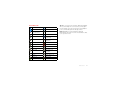
network (full signal)
3G (fast data)
network (roaming)
4G (fastest data)
network
(no connection)
GPS active
Wi-Fi in range
Wi-Fi connected
Bluetooth® on
Bluetooth
connected
USB connected
background
data sync
downloading
warning
active call
missed call
airplane mode
microSD card
new text message
alarm set
new email
calendar event
reminder
new voicemail
music player active
vibrate
speakerphone on
sound off
call muted
battery (charging)
battery (full charge)
Tip: Blue connection icons (network, data, Wi-Fi) appear
when your smartphone is connected to your Google™
account. White connection icons mean your smartphone
is not communicating with the Google servers.
Note: Applications you download from Android
Market™ may show other icons in the status bar to alert
you to specific events.
Home screen
11
Apps & updates
Browse & install apps
get the app you want
Get all the fun games and cool apps you want! Android
Market™ provides direct access to apps, games, books,
and movies that you can download and install on your
smartphone.
Quick start: Apps & updates
You can find all of your apps in one place. From the
home screen, touch
to open the app menu. To see all
of your apps, flick left and right.
From the app menu, touch
app groups.
All apps to view or create
All apps
Find new apps
on Android Market™.
New group
Create a new app group.
Recent
Downloaded
>
Market
Scroll to and touch the app you want to install. Then,
touch Install (if app is free) or Buy.
New apps that you install are added to the app menu.
Open the app groups menu.
All apps
Find it:
Tip: Choose your apps and updates carefully, from
Market, as some may impact your
trusted sites like
phone’s performance—see “Choose carefully” on
page 13.
Note: When installing an app, make sure you read the
alerts that tell you what information the app will access.
If you don’t want the app to have access to this
information, cancel the installation.
Choose which app group
you want to see.
Recent apps
Verizon
rizon Wireless
Wirele
To close the app menu, touch Home
12
Apps & updates
or Back
.
Your smartphone remembers the apps that you used
most recently. From the home screen, touch and hold
Home
to show the most recent apps used. From
the app menu, touch
> Recent.
Manage & restore apps
From the home screen, touch Menu
apps.
> Manage
Touch an app in the list, then touch Uninstall (for apps
you downloaded), Clear cache, or other options.
To reinstall apps from Android Market, touch
Market, then touch Menu
> My apps. Apps
>
that you have previously purchased from Android Market
are listed and available for download.
power it's using, uninstall it. You can always install it
again later.
• Just like web browsing, you may want to monitor
childrens’ access to apps to help prevent exposure to
inappropriate content.
• Certain apps may not provide completely accurate
information. Take care, especially when it comes to
personal health.
Important customer information
Choose carefully
Apps are great. There's something for everyone. Play,
communicate, work, or have fun. But remember, choose
your apps carefully. Here are a few tips:
• To help prevent spyware, phishing, or viruses from
affecting your phone or privacy, use apps from trusted
Market.
sites, like
• In Market, check the apps’ ratings and comments
before installing.
• If you doubt the safety of an app, don't install it.
• Like all apps, downloaded apps will use up memory,
data, battery, and processing power—some more
than others. For example, a simple battery level
widget will use less than a streaming music player
app. After installing an app, if you're not happy with
how much memory, data, battery or processing
Please be advised that many services and applications
offered through this unique device are provided by
Google™ and various application developers. If you use,
link to, or download a Google service, or an application
such as a non-Verizon Wireless location based GPS-type
service, chat room, marketplace or social network from
this device, you should carefully review the terms of
such service or application. If you use any of these
non-Verizon Wireless services or applications, personal
information you submit may be read, collected, or used
by the service or application provider and/or other users
of those forums.
Motorola Mobility, Inc. and Verizon Wireless are not
responsible for your use of those applications or
information you choose to submit or share with others.
Specific terms and conditions, terms of use, and privacy
policies apply to those applications and services. Please
review carefully any and all terms and conditions
Apps & updates
13
applicable to those applications and services including
those related to any location-based services for any
particular privacy policies, risks or waivers.
Your Verizon Wireless customer agreement terms and
conditions and certain other specifically identified terms
govern your use of any Verizon Wireless products and
services.
Update my smartphone
You can check, download, and install smartphone
software updates using your smartphone, or using your
computer:
• Using your smartphone:
You may get an automatic notification of an available
update on your smartphone. Simply follow the
instructions to download and install.
To manually check for updates, touch Menu
> Settings > About phone > System updates.
Your smartphone downloads any updates over your
mobile network. Remember, these updates can be
quite large (25MB or more) and may not be available
in all countries. If you don’t have an unlimited data
plan, or mobile network updates are not available in
your country, you can update using a computer.
14
Apps & updates
• Using your computer:
On your computer, go to
www.motorola.com/mydroid4 and check the
“Software” links. If an update is available, follow the
installation instructions.
it’s good to talk
Tip: Search for contacts right from the dialpad! For
example, to find Jeff in your contacts list, touch 5-3-3-3.
Matching contacts appear above the number field.
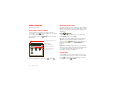
Quick start: Calls
In-call options
Calls
Dialing options
Connected
From the home screen, touch
Phone.
00:12 Verizon Wireless
Call Timer
Jen
Uriegas
Jen U
riegas
Mobile
Mobile 555-555-2541
1
Recent Calls List
Touch an entry to call.
Dialer
Recent
Contacts
Favorites
Most Recent
Julie Smith
Mobile 1-555-555-5555
1 hour ago
Return Call
End Call
Hang up.
Backspace
Delete digits you entered.
1
2
ABC
3
DEF
4
GHI
5
JKL
6
MNO
7
PQRS
8
TUV
9
WXYZ
0
+
#
*
Dialpad
Enter numbers during a call.
Add Number To Contacts
Call
Enter a phone number
& touch here to call it.
Add call
End call
Dialpad
Bluetooth
Mute
Speaker
Speakerphone
Turn the speakerphone
on or off.
Mute
Mute or unmute the call.
Voice Dial
To use a Bluetooth® device, touch Bluetooth. (The
device must be turned on and previously paired—see
“Connect new devices” on page 44.)
Calls
15
Tip: You can touch Home
or Back
to leave the
active call display. To reopen it, touch Home
Phone.
>
Tip: To silence an incoming call alert, press Power
the volume keys.
or
Note: Using a mobile device or accessory while driving
may cause distraction and may be illegal. Always obey
the laws and drive safely.
Note: When you hold the smartphone to your ear, the
display goes dark to prevent accidental touches. When
you move the smartphone away from your ear, the
display lights up again.
Make & answer calls
Recent calls
To make a call, touch
touch .
Phone, enter a number, then
Tip: If the screen is locked, drag
16
Calls
Answer
to
Phone > Recent
• To select a call list, touch
and select All calls,
Missed calls, Incoming calls, or Outgoing calls.
to the right first.
To answer a call when the screen is active, touch
When the screen is locked, answer by dragging
the right.
To ignore a call when the
screen is active,
touch Ignore . When the
screen is locked, ignore the
call by dragging
to the
left. Your smartphone gives
you the option to send a
text message to the caller.
Select a message and
touch Ok to send it, or
touch Cancel to exit without
sending a message.
Find it:
.
• To call a number, touch
next to the entry.
• To send a text message, create a contact, view a
contact, or other options, touch and hold an entry.
Text Message Reply
• To clear the list, touch Menu
Create new message
Frequent calls
”Sorry I was unable to
answer your call”
”Please call me again
in a few minutes”
”I will call you back in
a few minutes”
Turn off text message
reply
Find it:
Ok
Cancel
> Clear list.
Phone > Favorites
• To view contact information, touch the contact.
• To call a contact, touch it, then touch
entry.
next to the
• To text, email, or see other options, touch and hold
the contact.
• To add a contact to your Favorites list, touch and hold
the contact, then touch Add to favorites.
Conference calls
To start a conference call, call the first number. After the
call connects, touch Add call. Dial the next number, or
select it from contacts or favorites. When the next
number answers, touch Merge.
Your phone number
Find it: Menu
> Settings > About phone > Status
> My Phone number
be placed due to network, environmental, or
interference issues.
Phone (if your smartphone is locked, touch
Emergency Call).
1 Touch
2 Enter the emergency number.
3 Touch
to call the emergency number.
Note: Your phone can use location based services (GPS
and AGPS) to help emergency services find you. See
“Location Services” on page 61.
TTY mode
Your smartphone can use an optional teletypewriter
(TTY) device, for people who are hard of hearing or have
a speech impairment.
1 Plug the TTY device into the smartphone’s headset
jack.
2 Touch Menu
> Settings > Call settings > TTY
mode, and choose a TTY setting.
Cool down
In very limited circumstances, such as where your
phone has been exposed to extreme heat, you may see
“Cool Down” messages. To avoid possible damage to
your battery and phone, you should follow these
instructions until the phone is within its recommended
temperature range. When your phone is in “Cool Down”
mode, only emergency calls can be made.
Emergency calls
Note: Your service provider programs one or more
emergency phone numbers that you can call under any
circumstances, even when your phone is locked.
Emergency numbers vary by country. Your
pre-programmed emergency number(s) may not work in
all locations, and sometimes an emergency call cannot
Calls
17
Contacts
Transfer contacts
contacts like you’ve never had before
Get all your contacts, all in one place. Here are a few
helpful hints:
Quick start: Contacts
• Use Backup AssistantSM Plus
Find it:
Dialer
Contacts
>
Recent
Contacts
Displaying 297 contacts
In case of emergency
A
Abe Baudo
Allie Smyth
Anna Medina
Astrid Fanning
Favorites
#
A
B
C
D
E
F
G
H
I
J
K
L
M
N
O
P
Q
R
S
T
U
V
W
X
Group
Create & view groups
of contacts.
Add contacts.
Contacts List
Touch to view contact
information. Touch & hold
to call, send a text message,
& more.
Touch a letter to jump to
contact names that start
with the letter.
Tip: To search the list, touch
to open a touchscreen
keypad, then type a name. When you flick or drag the
list, a scroll bar appears that you can drag to move the
list faster.
18
Contacts
Backup Assistant Plus is a free service from Verizon
Wireless that saves your smartphone’s contacts to a
secure server. If your smartphone is lost or damaged,
or if you upgrade to a new smartphone, Backup
Assistant Plus will restore your contacts. From the
home screen, touch Menu
> Settings > Backup
Assistant+ Contacts, and then enter your password.
Note: Subject to specific terms of use. Results may
vary based on backup schedule and other factors. See
verizonwireless.com/backupassistant for more
details.
• Use Gmail™
All your Gmail contacts will automatically get synced
to your smartphone. Various computer applications
for mobile phones and email accounts allow you to
export your contacts as a “.CSV” file. You can then use
Gmail to import the file. For more details, go to
www.motorola.com/transfercontacts or log in to your
Gmail account on your computer and select “Help”.
• More
There are other methods and tools to help you at
www.motorola.com/transfercontacts.
Find it:
You might have two or more contacts for the same
person, maybe a Gmail contact who is also stored on
your phone, or one friend with two email addresses. To
combine these contacts:
• To find a contact, touch
type the contact name.
Find it:
>
Contacts
Touch a contact to open it, touch Menu
touch the second contact.
> Join, then
>
Contacts
• To view contact information, touch the contact.
• To call a contact, touch it, then touch
entry.
in the Contacts screen and
Touch a contact to open its details. While viewing
details, you can start a call or message by touching
icons next to the phone number, email address, or
social network. To see your interactions with the
person, touch Contact History.
• To change which group of contacts is shown (All,
Facebook, and so on) touch the filter name at the top.
Call or email contacts
Find it:
>
Contacts
Link contacts
• To change how you view the list of contacts, touch
Menu
> Display options.
next to the
• To text, email, or see other options, touch and hold
the contact.
View & use contacts
When you set up a social networking account (see
“Social networking” on page 26), you’ll know what
everybody’s up to and when. Every time you pick up a
call, check a message, or look up a friend’s contact info,
you’ll see their name and number, but you can see their
social network status and smiling face, too.
Contacts
19
Create contacts
Find it:
>
Favorites
Contacts >
To add a contact to your Favorites list, touch and hold the
contact, then touch Add to favorites.
Addcontact
contact
Add
To see your Favorites list:
Google contact
Find it:
from [email protected]
Select a picture
for the contact.
Last name
Add more name details.
Add another number.
Phone
Phone
Home
Remove this number.
Email
Set the number type.
Email
Home
Postal address
Organization
Save
Contacts > Favorites
Edit or delete contacts
Find it:
First name
>
>
Contacts
Touch and hold the contact, then touch Edit contact or
Delete contact.
Synchronize contacts
When you change one of your contacts, your
smartphone automatically updates your other social
networking accounts. When you change a social
networking friend, your smartphone updates your
contacts.
Cancel
Personalize contacts
Touch any entry area to open the touchscreen keypad.
When you’re finished, touch Save.
Where are contacts saved? Your smartphone saves
new contacts in its memory and on the Google Server or
Backup Assistant Plus, if you have a subscription. It also
updates your social networking account.
20
Contacts
Find it:
>
Contacts
Add a photo: Touch and hold the contact, then touch
Edit contact >
.
Set a ringtone: Touch the contact, then touch Menu
> Options > Ringtone.
Groups
Find it:
Messaging
>
Contacts >
> group name
sometimes it’s best to text, or IM, or email . . .
You can put your contacts into groups that you create
(like “friends”, “family”, or “work”). Then, you can find
contacts faster by showing one group at a time.
To create a new group, touch
touch Menu
> New group.
Contacts >
Quick start: Messaging
Find it:
>
Messaging > Universal Inbox
, then
Check for messages now.
Universal Inbox (14)
Anna Medina
Create messages.
7:39 PM
Message Type
Copy Revisions
Please take a look at the new revisions and let...
Jim Somers
5:47 PM
Meet me outside the theater at 8 and don’t
forget your ID. Would you maybe like to...
Arther Bando
2:45 PM
Meeting invitation
Meeting is set for next Thursday at 10:00 am...
Jon Anderson
2:19 PM
Message List
Touch to open a message.
Touch & hold to move,
delete, & more.
Your last message
I’m fine with that.
Mary Morgan
11:41 AM
Freelancers
We’re going to need help with the new interns...
Tip: To see more messages, flick or drag up.
Read & reply to messages
Find it:
>
Messaging > Universal Inbox
Note: Universal Inbox shows all of your messages
together—text, email, and social networking messages.
Messaging
21
To show only one type of message, touch a message
type instead of Universal Inbox.
While viewing the attachment, touch it to save it, share
it, and more.
• To open a text message or social networking
message and all of its replies, touch it.
Tip: To send and receive large attachments faster, use a
Wi-Fi connection (see “Wi-Fi networks” on page 43).
• To respond to a text message, just open it and enter
your response in the text box at the bottom.
Set up messaging
For email, touch
to choose a reply option.
• To forward an email message, open it and touch
> Forward.
• To open options, touch and hold a message.
Create messages
Find it:
>
Messaging >
To add email accounts, touch
> Add account.
>
Account Manager
My Accounts
• Corporate Sync is for Exchange server work email
accounts. Enter details from your IT administrator.
Tip: You might need to enter your domain name with
your user name (like domain/username).
• Email Accounts is for most personal email accounts.
For account details, contact the account provider.
Choose a message type, such as Text Message or
Facebook. Then, enter the recipient and message. In
text messages and emails, touch Menu
for options
like Insert... or Attach Files.
To change your settings, touch
touch Menu
, then touch:
Send & receive attachments
• Edit Universal Inbox to choose which accounts show
messages in the Universal Inbox.
To send a file in a message, open a new message and
touch Menu
> Insert.
When you receive a message with an attachment, open
the message and touch the file name to download it.
Then, touch the name again to open it. Some file
formats can be converted to HTML for faster viewing,
and your smartphone will show Get HTML version.
22
Messaging
>
Messaging,
• Manage accounts to add or remove an account.
• Messaging Settings to set the notification for each
account type (along with other preferences, for
email).
Tip: For social network accounts, see “Add accounts” on
page 26.
Email
Text entry
The first time you turned on your smartphone (see “Set
up & go” on page 4), you probably logged in to your
Gmail™ account. You can also set up and use additional
email accounts.
keys when you need them
To add other email accounts to your Messages widget
>
My Accounts > Add
and Universal Inbox, touch
account > Email Accounts.
Account Manager
Typing tips
To use the full keypad, just open your smartphone.
To...
Enter alternate
characters on the right
sides of keys
Press Shift
Enter symbols chosen
from a list
Press
Enter one capital
letter
Press Shift
Enter only capital
letters
Press Shift
twice. Press
again to revert to lowercase.
Voicemail
Select text
When you have a new voicemail,
appears at the top
of the screen. Drag down the status bar and touch the
New voicemail notification to listen to your voicemail
message.
Hold Shift
and press
a navigation key.
Delete a character
(hold to delete more)
Press Delete
Start a new line
Press Enter
Instant messages
To send and receive instant messages, you can use
Google Talk™.
Find it:
>
Talk
Alternatively, you can touch
>
IM to set up
another instant messaging account, or download an
instant messaging app from Android Market™.
If you need to change your voicemail number, in the
home screen touch Menu
> Settings > Call settings
> Voicemail settings.
.
.
.
.
.
Text entry
23
Touchscreen keypad
Swype™ text entry
When your smartphone is closed, you can open a
keypad on your screen by touching a text box. To close
the keypad, touch Back
.
Enter words with one continuous motion. Just drag your
finger over the letters in the word.
Anne
Text Box
Touch to open
touchscreen
keypad.
Dinner at Bistro Fanta
Done
q
1
w
a
2
e
3
r
4
t
5
y
6
u
7
i
8
o
s
d
f
g
h
j
k
z
x
c
v
b
n
m
.
?123
Open a keypad for
numbers & symbols.
9
p
l
0
Done
1
q
a
Shift
Voice Input/
Dictation
w
@
2
e
s
z
$
EN
i
3
r
x
4
&
d
!
t
-
f
c
#
5
y
g
v
=
(
6
u
)
h
b
/
7
i
:
j
n
n
+
8
o
;
k
m
?
9
p
l
”
0
To enter a word,
just trace a path
through the
letters. To
capitalize, go
above the keypad.
For double letters,
circle the letter.
SYM
Delete
Return/
New Line
Space
Input methods
To select an input method, touch and hold a text entry
area on the screen to open the Edit text menu. Touch
Input method, then touch the method you want.
Tips:
• To enter apostrophes in common words (like “I’ll”),
drag through the n as though it was an apostrophe.
• To enter other punctuation, numbers, or symbols,
touch
.
• To correct a word, double-touch it (tap twice, quickly).
Swype shows a small menu of other word options.
Swype might also show a menu if it can’t guess your
word.
• If Swype doesn’t know a word, you can still touch the
letter keys to enter it. Swype remembers, so next
time you can just drag over the letters.
24
Text entry
Multi-touch keyboard
To...
Enter text a letter at a time. As you type, your
smartphone suggests words from your dictionary and
chosen language. The smartphone also automatically
enters apostrophes in some words, like “dont.”
Paste cut or copied
text at cursor location
Touch and hold location to
paste, then touch Paste.
Delete character to left
of cursor
Touch Delete
delete more).
To add a word to your dictionary, touch and hold the
word, then select Add “word” to dictionary.
(hold to
Text input settings
Typing tips
Find it: Menu
> Settings > Language & keyboard
• To edit your dictionary, touch User dictionary.
To...
Enter one capital
letter
Touch Shift
.
Enter only capital
letters, until you touch
Shift
again
Touch Shift
twice. Touch
again to revert to lowercase.
Move the text entry
cursor
Touch the text where you
want the cursor to go.
Select text
Touch and hold text, then
touch Select word or Select
all.
Cut or Copy selected
text
Touch and hold text, then
touch Cut or Copy.
• To change the language and the style for your
touchscreen keypad, touch Select locale.
• To change input method and settings, touch Swype or
Multi-touch keyboard.
Text entry
25
Social networking
my life, your life
Your social networking account
Integrate and sync all your contacts, emails, and social
networking sites. No opening and closing apps and
menus. Just touch the Social Networking and Social
Status widgets on your home screen.
Twitter messages will always appear as “read” on your
smartphone, but your smartphone notifies you when
you receive a new message.
Tip: To download updates faster, see “Wi-Fi networks”
on page 43.
Edit & delete accounts
Find it:
>
Account Manager
My Accounts
Tip: Use the gallery to view all of yours and your friends’
Gallery.
online albums. Touch
>
Touch an account to edit it or remove it (along with its
contacts and messages).
Add accounts
Note: You can’t delete the Google™ account you used
or created when you set up your smartphone.
You can add your Facebook, Twitter, or other accounts
to your social networking account. If you don’t have
accounts on these sites, visit their websites to set them
up.
To set up email accounts, see “Set up messaging” on
page 22.
Find it:
>
Account Manager
My Accounts > Add account
Add an account by touching it. Then enter your user
name and password for that account.
When you sign into social networking accounts, you’ll
see your friends and contacts in your Contacts list, and
your status and updates can appear in your Social
Networking widget.
26
Social networking
Tips & tricks
Battery tips
a few handy hints
Want to extend your battery life? Try these:
General tips
Smart
• To help minimize battery use, touch
>
Actions. Check out the sample rules that enable
battery savings: Nighttime Battery Saver, and Battery
Extender.
• Screen brightness changes as your smartphone
senses the current lighting conditions.
• To return to the home screen, touch Home
• To sleep/wake your smartphone, press Power
• To set screen timeout, touch Menu
> Display > Screen timeout.
• To search, touch Search
and hold Search
.
• To turn off background data transfers, touch Menu
> Settings > Data manager > Background data.
.
Phone
• To see recently dialed numbers, touch
> Recent.
.
> Settings
• To turn off Bluetooth® power, touch Menu
> Settings > Wireless & networks > Bluetooth.
• To turn off Wi-Fi power, touch Menu
> Wireless & networks > Wi-Fi.
> Settings
. To voice search, touch
• To automate everyday tasks, touch
Actions.
>
Smart
• To show the most recent apps you’ve used, touch and
hold Home
.
• To change one of the dock shortcuts at the bottom of
the home screen, touch and hold the shortcut, then
select the shortcut you want to replace it.
• To turn sound on/off, press and hold Power
> Silent mode.
• To turn airplane mode on/off, press and hold
Power
> Airplane mode.
Tips & tricks
27
Webtop application
Connect the webtop application
smart mobile computing
Connect your smartphone to a Motorola Lapdock™ to
automatically launch the webtop application.
Quick start: Webtop
Connect your smartphone to an HDTV or monitor using
the HD Dock, HD Station, or Adapter for webtop
application, then choose the webtop application from
the application menu.
Browse, or use web apps, on a large screen in a full
Firefox™ browser. Create and share documents,
spreadsheets, and presentations with online tools like
Google Docs.
To open the webtop application, connect your
smartphone to an HDTV or monitor using a dock
accessory (sold separately).
When you’re done using the webtop application, just
disconnect your phone from the accessory.
Control the webtop application
To navigate the webtop application display:
Optional LapDock or HD Dock
• In the Phone window, you can open your phone apps.
LapDock Display, HDTV, or Monitor
• At the bottom of the screen, you’ll see App
Shortcuts.
11:23
David Kelley
Jen Uriegas
JP Jordan
You can open multiple Firefox browsers.
Lisa Jones
• At the top right of the screen, you’ll see icons for
status and Settings.
Mobile View
Voicemail
Email
Browser
Market
Phone
Text
Camera
Apps
For help in the webtop application, open Settings
> Help at the top right of the screen.
App Tray
28
Webtop application
Full Desktop
Browser
Send current web page to phone
Digital living
When you find an interesting web page in the webtop
application, you can send it to your smartphone to view
after undocking. In the Firefox browser, select File
> Send to phone. If prompted to complete the action,
select Browser. The web page opens in your
smartphone browser.
connect and enjoy
MotoCast
Stream or download music, pictures, videos, and
documents from your computer directly to your
smartphone. MotoCast lets you pull content from your
home or work computers at blazing fast 4G LTE speeds,
providing secure, nearly instant remote access to your
files.
Note: Copyright—do you have the right? Always follow
the rules. See “Content Copyright” in your legal and
safety information.
Device setup
To get started, touch
>
My Accounts > Add
account > MotoCast ID, and follow the on-screen
instructions to create an account on your smartphone.
Account Manager
Desktop setup
MotoCast can be installed on one or more
Microsoft® Windows® or Apple Macintosh computers
to stream and download files. Your smartphone contains
the application that needs to be installed on your
computer. Connect your smartphone to the computer
with a USB cable, and follow the on-screen instructions
to install the application. When installed, log in to the
Digital living
29
same account you created on your smartphone, then
select which computer files you want to share.
Photos & videos
see it, capture it, share it!
Use remote files
You can use your smartphone’s
Music,
Gallery,
Files apps to access the shared files stored on
and
your computer.
HD viewing
You can create your own HD videos (see “HD videos” on
page 32) to view on your wide screen HDTV or monitor.
1 Connect a micro HDMI cable (sold separately) from
the micro HDMI port on your smartphone (see “Your
smartphone” on page 2) to an HDMI port on the
HDTV or monitor.
Photos
Take & share photos
Take that family photo, and post it online for everyone
to see.
Find it:
>
Camera
Switch between front
& back cameras.
See your
last photo.
Shots
Remaining
Zoom
in/out.
Take
photo.
1024 Breckenridge, CO
2 Adjust the viewable area on the HDMI screen by
touching Menu
> Settings > HDMI.
Mirror mode
Connect your smartphone to your HDTV, monitor, or
projector so you can view and interact with your
smartphone on the big screen. Show off your photos,
videos, and downloaded movies. Enjoy the big screen
for gaming, movies, the web, and more. Just connect
your smartphone to an HDTV or monitor using a
micro HDMI cable (sold separately). Everything you see
on your display will appear on the big screen as well.
30
Photos & videos
Adjust camera
settings.
Autofocus Box
Touch screen to
change focus location.
Switch to
camcorder.
Note: Photos are stored in your phone’s internal
memory, unless you switch it to the microSD memory
card. Photo resolution can be set to 8MP or Widescreen
(6MP).
Tip: Press the volume keys to zoom in and out on the
viewfinder image.
To take the photo, touch
in the viewfinder screen.
Camera settings
In the viewfinder, drag the tab in the lower-left corner of
the screen (or touch Menu
) to adjust camera
settings:
Options
Settings
Your phone stores the photo, and shows a thumbnail
image of the photo in the corner of the screen. To see
the photo you just took, touch the thumbnail. Then:
• Video Resolution
• Storage Location (phone or
SD card)
• To set the photo as a wallpaper, contact photo, or
social network photo, touch Menu
> Set as.
• To send the photo in a message or post it online,
touch
. For more info on sharing your photos, see
“Share photos & videos” on page 34.
• To upload the photo to an online photo album,
touch
.
• To print the photo, touch Menu
• To delete the photo, touch Menu
> More > Print.
• Geo-Tag (auto location information)
• Video Stabilization
• Shutter Tone
Effects
Set a photo effect: Normal, Black and
White, Negative, and more.
Scenes
Set the type of photo you want to
take: Auto, Portrait, Landscape, Sport,
and more.
Modes
Set to Single shot, Panorama,
Multi-shot, or Timer.
Exposure
Select an exposure setting.
Flash
Set Flash On, Flash Off, or Auto Flash.
> Delete.
Panoramic photos
In the viewfinder, touch Menu
> Modes
> Panorama to take a wide panoramic photo. The
camera auto-captures up to six multiple shots as you
move the camera, and joins them together to make one
large image.
• Widescreen (6MP) or 8MP photo
resolution
Photos & videos
31
Videos
Record & share videos
Find it:
>
Camera, then touch or drag the camera
switch to the right to select the camcorder
Switch between front
& back cameras.
Watch your
last video.
Time
Remaining
Record
video.
Your phone stores the video, and shows a thumbnail
image of the video in the corner of the screen. To see
the video you just took, touch the thumbnail. Then:
• To play the video, touch
.
• To send the video in a message or post it online,
touch . For more info on sharing your video, see
“Share photos & videos” on page 34.
• To upload the video to an online album, touch
• To delete the video, touch Menu
.
> Delete.
HD 01:13:12 Los Angeles, CA
HD videos
You can capture HD-quality videos to watch on an HDTV
or monitor.
To record an HD-quality video, be sure to select the
correct Video resolution. From the active camcorder
viewfinder screen, touch Menu
> Settings > Video
Resolution > HD+ (1080p) or High Definition (720p).
To enhance the video quality, touch Menu
Scenes or Effects.)
Adjust camcorder
settings.
Zoom
in/out.
Switch to
camera.
To record a video, touch
in the viewfinder screen. To
stop the video recording, touch
again.
32
Photos & videos
> Audio
Camcorder settings
View photos & videos
In the viewfinder, drag the tab in the lower-left corner of
the screen (or touch Menu
) to adjust camcorder
settings:
Find it:
Options
Settings
• Widescreen
• Video Resolution (1080p, 720p,
DVD, VGA, or QVGA)
• Storage Location (phone or
SD card)
Gallery
Add photos and videos to your phone
• Geo-Tag (auto location information)
• Video Stabilization (reduce
shakiness during video capture)
>
View all of your photos and your friends’ photos/videos
from different media sites like Picasa™, Flickr,
PhotoBucket, and Facebook®. You can add comments
to others’ photos, and see comments that others have
posted. You can even view photos stored on your
computer with MotoCast.
richie
ie
richie
h
photo
ed a p
ded
ad
Uploa
ay
d
day
erd
Yester
Uploaded a photo
Yesterday
richie
Upload
Yesterd
• Shutter Tone
Effects
Backup your
photos & videos.
Set a video effect: Normal, Black and
White, Negative, and more.
Audio
Scenes
Set sound recording options: Stereo,
Wind Reduction, or Concert.
Modes
Set to Normal video or Video
Message.
Exposure
Select an exposure setting.
Light
Turn the camcorder light on or off.
3
Sort your photos & videos.
See your captured
photos & videos.
See your online albums (like
Picasa, Flikr, or Facebook).
Camera roll
My library
Backup Assistant+
Online
MotoCast
Stream media from your
computer with MotoCast.
Photos & videos
33
Note: To see the controls when a video is playing, touch
the display.
Music
when music is what you need...
Share photos & videos
Find it:
>
Gallery > photo or video
Quick start: Music
, then choose how you want to share—like
Bluetooth, Email, Text Messaging, or an online album.
Keep your music with you! You can put music on your
phone, or stream music from your computer with
MotoCast.
Manage photos & videos
Find it:
Touch
Find it:
>
Gallery > photo or video
Touch Menu
, then select Edit, Delete, Add to
album, Set as (photo), or Map (video). Touch More for
additional options.
Tip: To copy photos to/from a computer, go to “USB
connection” on page 46.
>
Music
Add music to your phone
Recommended song
The Downtown Fiction
Makes Me Better
about two minutes ago
Edit photos & videos
Find it:
>
Gallery > photo or video
Touch Menu
> Edit. You can choose advanced
editing features to resize, crop, or change the color.
Listen to Internet radio.
Stream & sync photos & videos
Go to the current song.
Go to your music library.
Use MotoCast to stream photos and videos from your
computer to your smartphone.
Find it:
>
Gallery > MotoCast
For more information about using MotoCast, see
“MotoCast” on page 29.
34
Music
Download &
listen to podcasts.
Now playing
My library
Internet radio
Podcasts
Music store
Go to the music store.
To play music stored on your phone or computer, touch
My library.
Open the categories menu.
Stream music from your
computer with MotoCast.
Search the music library.
Artists
Jon Levy
Albums
Songs
3 songs
Playlists
Genres
Lisa Palleschi
14 songs
Max Keppler and AnnaLee...
12 songs
What music transfer tools do I need?
Note: Copyright—do you have the right? Always follow
the rules. See “Content Copyright” in your legal and
safety information.
To put music on your computer and then load it on your
smartphone, you need:
• Microsoft® Windows® computer or Apple Macintosh
computer.
Brooks Fairfax
2 songs
Artists
Set up music
Categories
Select music by
artist, album, song,
playlist, or genre.
Last Played
Touch to play again.
Touch
to see which MotoCast computers are
currently connected, and to choose the content you
want to see or hide.
To randomly play all of the songs in a playlist, touch
>
.
Tip: When a song is playing, you can add it to a playlist
by touching Menu
> More > Add to playlist.
Tip: To listen to music during a flight, turn off all your
network and wireless connections: Press and hold
Power
then touch Airplane mode.
• USB data cable (included with your smartphone).
Your smartphone supports removable microSD memory
cards up to 32GB capacity. To install an optional memory
card, see “Remove the rear cover” on page 5
and “Assemble & charge” on page 3.
Tip: To see the available memory on your memory card,
from the home screen touch Menu
> Settings
> Storage.
What audio file formats can I play?
Your smartphone can play many types of files: AAC,
AAC+, AAC+ Enhanced, AMR NB, AMR WB, MP3,
WAV, WMA v9, and MIDI.
What headphones can I use?
Your smartphone has a 3.5mm headset jack for wired
stereo listening. You can go wireless with Bluetooth®
Music
35
stereo headphones or speakers (see “Bluetooth®
handsfree devices” on page 44).
Play music
Touch a song or playlist to start playing music.
Get music
Transfer
Transfer music from your computer to your smartphone
using a USB cable connection. See “USB connection” on
page 46 to learn how.
Max Keppler and AnnaLee Scott
When You're Around
Artist & Song Title
Running Roughshod
Artist Information
Stream & sync
Album Artwork
Use MotoCast to stream music, podcasts, and audio
files from your computer to your smartphone.
Find it:
>
Music > MotoCast
For more information about using MotoCast, see
“MotoCast” on page 29.
Song Lyrics—Current Line
Buy
Song Lyrics—Next Line
Buy MP3 music files that you can install and play on your
smartphone.
Find it:
>
Music > Music store
Tip: You need to have a data connection to the Verizon
network to do this (a Wi-Fi connection won't work).
36
Music
Song lyrics scroll up
as the song plays.
Playlist
Music Controls
Create Playlist
Music player controls
Hide, wake, turn off
Touch Home
to use another app. Your music
continues to play.
To...
Play/pause
Touch
Select previous/next
song
Touch
/
.
Fast forward/rewind
Touch and hold
View playlist
Touch
Shuffle on/off
Touch
>
.
Repeat all/off
Touch
>
.
Adjust volume
Press side volume keys.
Go to music
home screen
home.
/
When you see
in the status bar, a song is playing.
Flick down to see details. Touch the song to return to the
music controls.
.
/
.
To turn off your music, touch
.
Playlists
.
Touch Menu
> Music
Manage speakers
Touch Menu
> More
> Settings > Audio effects.
Add song to playlist
Touch Menu
> More
> Add to playlist.
Use as ringtone
Touch Menu
> More
> Use as ringtone.
Delete
Touch Menu
> Delete.
To add a song from the music library to a playlist, touch
and hold the song, then touch Add to playlist. Choose
an existing playlist, or touch Create playlist to create
one.
To rename, edit, and delete playlists, touch and hold the
playlist in the music library.
> More
Music
37
Web
Connect
surf the web with your smartphone
Your smartphone uses the mobile phone network (over
the air) or a Wi-Fi connection to automatically access the
Web.
Quick start: Browser
h t tp: / / w w w .
Find it:
Note: Surfing the Web or downloading data over the
mobile phone network uses your monthly data
subscription allowance.
Browser
http://www.google.com/...
Web
Images
Places
News
If you want to use a Wi-Fi network for faster Internet
access, touch the status bar at the top of the home
screen and drag it down. Touch the Wi-Fi networks
available notification to select a preferred network. For
more info, see “Wi-Fi networks” on page 43.
more
Note: If you can’t connect, contact your service provider.
Instant (beta) is off: Turn on
Touch a link to select it.
Touch & hold for more
options.
Restaurants
Coffee
New window
Bars
Bookmarks
Refresh
Settings
Forward
The browser features the Adobe® Flash® Player, which
adds animation, video, and interactivity to web pages.
Touch
to begin video playback. Double-touch the
video to enlarge it for better viewing.
More
Windows
Sign in
iGoogle
Help
Touch Menu
for
browser options.
More
Tip: To zoom, touch the display with two fingers, then
move them apart.
38
Web
Play web videos
Downloads
To download files in your browser, touch a file link or
touch and hold a picture to choose Save image.
To see the files you downloaded, touch
Downloads. Touch and hold an item to open it,
>
see details, or remove it from the list.
You can download “Apps & updates” on page 12.
Browser options
Touch Menu
to see browser options:
Options
Personalize
add your personal touch
Widgets
Add widgets
New window
Open a new browser window.
Bookmarks
See your bookmarks.
Windows
View open browser windows.
2 Touch Widgets and choose a widget.
Refresh
Reload the current page.
Set up widgets
Forward
Go forward through viewed pages
(touch Back
to go back).
You can customize some widgets. Touch a widget to
open it, then touch Menu
.
More
View additional browser options.
Your home screen may already have these widgets:
YouTube™
Share videos with YouTube users everywhere. You don’t
need a YouTube account to browse and view videos.
Find it:
>
YouTube
Note: If you want a YouTube account, go to
www.youtube.com. To create an account or sign in,
touch Menu
> My account. To Browse or Upload
videos, touch Menu
.
1 Touch and hold an empty spot on your home screen.
Tip: Flick left or right to see other panels.
• Favorite Contacts: Quickly call, text, or email your
favorite contacts. To add contacts to your Favorites
list, see “Favorites” on page 20.
• Universal Inbox: Change the widget name or choose
how long it shows new messages. To add email
accounts, see “Set up messaging” on page 22.
• Calendar: Sync your calendars and review upcoming
events at a glance with the scrollable calendar widget.
To add calendar events, see “Calendar” on page 47.
• Music: Set this widget to an artist, album, song,
playlist, genre, or just touch Menu
> Shuffle all.
There’s more about “Music” on page 34.
Personalize
39
• News: Change the widget name, choose how long it
shows new stories, or choose a news source. To
choose a source, touch , then choose preset
Bundles or Channels, or choose Custom to enter a
URL for a Webpage or an RSS feed.
• Weather: Change temperature units or add locations.
To add locations, touch
, enter a city, and touch
Search. When you open the weather widget, flick left
to see other locations you added.
To set a song as a ringtone:
Find it:
Menu
Music and play the song, then touch
>
> More > Use as ringtone
Note: To choose from thousands more songs, visit
verizonwireless.com/ringtones.
Wallpaper
Apply a new wallpaper:
1 Touch and hold an empty spot on your home screen.
Shortcuts
2 Touch Wallpapers.
To add shortcuts for apps, bookmarks, and more to the
home screen, touch and hold an empty spot on the
home screen, touch Shortcuts, and select a shortcut.
3 Touch Gallery, Live wallpapers, or Wallpapers, and
choose a wallpaper.
Tip: To change one of the dock shortcuts at the bottom
of the home screen, touch and hold the shortcut, then
select the shortcut you want to replace it.
Sounds
Ringtones
Personalize your ringtones:
Find it: Menu
> Settings > Sound > Phone ringtone
or Notification ringtone
To set your vibrate options:
Find it: Menu
40
Personalize
> Settings > Sound > Vibrate
• To set volume for ringtones, media, and alarms, touch
Menu
> Settings > Sound > Volume.
• To play dial pad tones, touch Menu
> Sound > Audible touch tones.
> Settings
• To play sound on a screen selection, touch Menu
> Settings > Sound > Audible selection.
• To customize the sound settings for media and
videos, touch Menu
> Settings > Sound > Media
audio effects > Phone speaker.
Display settings
Location
• To set display brightness, touch Menu
> Display > Brightness.
• To set orientation, touch Menu
> Display > Auto-rotate screen.
• To set animation, touch Menu
> Display > Animation.
> Settings
> Settings
where you are, where you’re going
Google Maps™
Find it:
Maps
>
> Settings
Note: Some apps are designed so that your
smartphone can “animate” them by rotating, fading,
moving, and stretching one or more images.
Find places near your
current location.
Search Maps
elein
94
Center the map on
your current location.
Highland Park
Grove
Northbrook
Set date, time, time zone, and formats:
Find it: Menu
Add layers of information
to the map view.
ghts
Date & time
> Settings > Date & time
Chicago, IL
Elmwood
Park
Addison
Language & region
Evanston
Des Plaines
k
Oak Park
Elmhurst
A
290
Cicero
Set your menu language and region:
C
Chicago
La Grange
94
Find it: Menu
> Select locale
> Settings > Language & keyboard
294
Oak
O
Oa
ak L
Law
La
Lawn
aw
wn
n
90
Blue Island
Search
Orland Park
355
Directions
Harvey
Tinley Park
80
Clear Map
Calumet
East
Chicago
City
My Places
Hammond
Join LatitudeChicago
Heights
G
Touch Menu
map options.
for
Highland
More
Note: The map image you see may be a little different.
Location
41
Google Maps offers powerful, user-friendly mapping
technology and local business information—including
business locations, contact information, and driving
directions.
For help, touch Menu
> More > Help.
Tip: Want to know what’s in your immediate area? Try
Places to see listings
Google Places™. Touch
>
for Restaurants, ATMs, Gas Stations, and more based on
your current location.
Google Maps™ Navigation
Google Maps Navigation is an Internet-connected GPS
navigation system with voice guidance.
Find it:
>
Navigation
Follow the prompts to speak or type your destination.
For more information, go to
www.google.com/mobile/navigation.
Wireless
lose the wires
Quick start: Wireless
Connect your smartphone to fast Wi-Fi networks or
Bluetooth® devices.
To connect, touch Menu
> Settings > Wireless &
networks > Wi-Fi settings or Bluetooth settings.
Turn on & scan.
Wi-Fi settings
Wi-Fi
Connected to Jenny’s Coffee Shoppe
Bluetooth settings
Notify me
Notify me when Wi-Fi is available, when
launching applications thar require data
connections.
Turn on Bluetooth
Motorola Phone
Open network
Notify me when an open network is available
Discoverable
Make device discoverable
Secure network
Discoverable timeout
Set how long device will be discoverable
Wi-Fi networks
Jenny’s Coffee Shoppe
Connected
Scan for devices
Bluetooth devices
Add Wi-Fi network
Motorola handset
Pair with this device
Manage networks
Turn on & scan.
Connect to this device.
Wireless
Bluetooth
Device name
Network notification
Notify me when a secure network is available
42
Connect to this network.
Wi-Fi autostart reminders
Wi-Fi networks
Turn Wi-Fi power on or off
Find it: Menu
> Wi-Fi
> Settings > Wireless & networks
Note: To extend battery life, turn off Wi-Fi power when
not in use.
When your smartphone is connected to the network,
the Wi-Fi connected indicator
appears in the status
bar.
Tip: When you are in range and Wi-Fi power is on, you
will automatically reconnect to available networks you’ve
connected to before.
Wi-Fi modes
Wi-Fi search & connect
When Wi-Fi is turned on, the Wi-Fi in range indicator
appears in the status bar when a network is available.
Drag down the status bar and touch the Wi-Fi networks
available notification to select and connect to a
network.
To search for a network when Wi-Fi is turned off:
1 Touch Menu
> Settings > Wireless & networks
> Wi-Fi settings.
2 Touch Wi-Fi to turn on and scan. If Wi-Fi power is
already on, touch Menu
> Scan. Your smartphone
lists the networks it finds within range.
Tip: To see your smartphone’s MAC address or other
Wi-Fi details, touch Menu
> Advanced.
3 Touch a network to connect. If necessary,
enter Network SSID, Security, and Wireless
password, and touch Connect.
For those who like to get a bit more technical, your
phone supports the following Wi-Fi modes:
802.11 b, g, n.
Wi-Fi hotspot
You can make your smartphone a Wi-Fi hotspot to
provide portable, convenient internet access to other
Wi-Fi enabled devices.
Caution: This application significantly impacts battery
life. You may want to run this application with the
charger connected.
Note: You need to subscribe to Wi-Fi hotspot service to
use this feature. Contact your service provider.
To set up your smartphone as a Wi-Fi hotspot:
1 Turn off Wi-Fi power by touching Menu
> Wireless & networks > Wi-Fi.
> Settings
Mobile Hotspot > Mobile Hotspot to
2 Touch
>
turn on the hotspot.
Wireless
43
3 Touch Configure Mobile Hotspot to change hotspot
security and configuration settings:
• Network SSID—Enter a unique name for your
hotspot and touch Next.
• Security—Select the type of security you want,
and touch Save: WEP, WPA, or WPA2. Enter a
unique password. Other users can access your
Wi-Fi hotspot only if they enter the correct
password.
Note: Keep it secure. To protect your phone and
hotspot from unauthorized access, it is strongly
recommended that you set up hotspot Security
(WPA2 is the most secure), including password.
• Broadcast Channel—Select a channel that
minimizes potential interference. You may need
to try different channels after your hotspot is
active for a time.
4 Touch Save when the settings are complete.
When your Wi-Fi hotspot is active, other Wi-Fi enabled
devices can connect by entering your hotspot’s SSID,
selecting a Security type, and entering the correct
Wireless password.
Bluetooth® handsfree devices
Turn Bluetooth power on or off
Find it: Menu
> Bluetooth
> Settings > Wireless & networks
Note: To extend battery life, turn off Bluetooth power
when not in use.
Connect new devices
Note: This feature requires an optional accessory.
To connect with a new device, you need to pair with it.
You only need to do this once for each device—to
connect again, just turn on the device.
1 Make sure the device you are pairing with is in
discoverable mode.
Note: Refer to the guide that came with the device
for details.
2 Touch Menu
> Settings > Wireless & networks
> Bluetooth settings.
3 Touch Bluetooth to turn on and scan. If Bluetooth
power is already on, touch Scan for devices.
4 Touch a device to connect.
5 If necessary, touch OK, or enter the device passkey
(like 0000) to connect to the device. When the device
is connected, the Bluetooth connected indicator
appears in the status bar.
44
Wireless
Note: Using a mobile device or accessory while driving
may cause distraction and may be illegal. Always obey
the laws and drive safely.
networked printers for you. You can even save your
favorite printers and geo-tag their location for future use.
Print a document or file
Reconnect devices
To automatically reconnect your smartphone with a
paired device, simply turn on the device.
To manually reconnect your smartphone with a paired
device, touch the device name in the Bluetooth devices
list.
To print something from the Email, Quickoffice, or
Gallery apps, open it and touch Menu
> Print.
To print something directly from the MOTOPRINT app,
MOTOPRINT, then select a document
touch
>
type and follow the on-screen instructions.
Add a printer
Disconnect devices
To automatically disconnect your smartphone from a
paired device, simply turn off the device.
To manually disconnect your smartphone from a paired
device, touch the device name in the devices list, then
touch OK.
Change device name
Touch Menu
> Settings > Wireless & networks
> Bluetooth settings > Device name. Enter a name and
touch OK.
MOTOPRINT
Print email, documents, pictures, and contacts directly
to shared printers on a Wi-Fi network—no printer drivers
necessary. MOTOPRINT automatically discovers
Find it:
>
MOTOPRINT, touch Menu
> Add printer
> Manage printers, touch Menu
MOTOPRINT host
To print to a non-compatible or non-networked printer
connected to your Windows® computer, you need to
install free MOTOPRINT Host software on the computer.
You can download MOTOPRINT Host at
www.motorola.com.
To print something using MOTOPRINT Host:
MOTOPRINT, touch Menu
Find it:
>
> Add printer
> Manage printers, touch Menu
> MOTOPRINT host
Select MOTOPRINT Host running on your computer,
then select the printer you want to use.
Wireless
45
Memory card & file
management
Touch a file or folder to open, then touch and hold a file
to Delete or Share.
copy photos, music, and more
Remove or format your memory card
Download remote files
Note: Do not remove your memory card while your
smartphone is using it or writing files on it.
Use MotoCast to download documents and files from
your computer to your smartphone.
Find it:
>
Files > MotoCast Computers
Before you remove or format your memory card you
need to unmount it. Touch Menu
> Settings
> Storage > Unmount SD card.
For more information about using MotoCast, see
“MotoCast” on page 29.
To format your memory card, touch Format SD card.
Memory card
USB connection
Note: Your photos, videos, and other files are
automatically stored in internal memory on your
smartphone. You can set individual applications (camera,
camcorder, etc.) to store files on a microSD memory
card. To install an optional memory card, see “Remove
the rear cover” on page 5 and “Assemble & charge” on
page 3.
You can connect your smartphone to a computer with a
USB cable.
Tip: To move media stored in internal memory to your
memory card, touch Menu
> Settings > Storage
> Manage internal storage.
Delete or share files on your smartphone
Find it:
>
Files > Internal phone storage or SD
card
46
Memory card & file management
Warning: All data on your memory card will be deleted.
Note: The first time you use a USB connection, your
computer may indicate that drivers are being installed.
Follow any prompts you see to complete the installation.
This may take a few minutes.
1 With your smartphone showing the home screen,
connect a Motorola micro USB data cable from your
smartphone’s micro USB port to a USB port on your
computer. Your smartphone should show
in the
status bar.
Note: Make sure to connect the smartphone to a high
power USB port. Typically, these are located directly
on your computer.
2 Drag and drop files between your computer and
smartphone folders. When you’re done, use “Safely
Remove Hardware” before disconnecting the USB
cable.
Note: If you’re using a memory card, you can’t use the
files on your memory card with your smartphone while it
is connected to the computer.
Tools
stay on top of things
Calendar
Find it:
>
Calendar
Your calendar events can be
viewed in different ways:
Touch
> Agenda, Day,
Week, or Month. When you
highlight an event, more
details appear.
All calendars
July 2011
Sun
Mon
Tue
Wed
Thu
Fri
Sat
Tip: Add a calendar widget to
your home screen by
touching and holding an
empty space. Then touch
Widgets > Calendar.
Add calendar events
From any view, touch
.
Enter the event start time and other details. You can
even set a reminder so you don’t forget about the event.
(When you set the reminder time to 0 minutes, it plays
at the event start time.)
Tip: Reminders will play only if you’ve selected a
notification ringtone (see “Ringtones” on page 40).
When you finish entering event details, touch Save.
Tools
47
Manage calendar events
Alarm clock
To edit an event, touch and hold it, then touch Edit
event. When you’re done, touch Save.
Find it:
To delete an event, touch and hold it, then touch Delete
event.
Tasks
Find it:
Tasks
>
To add a task, touch
.
From the tasks home screen,
All tasks to view
touch
your tasks by due date,
priority, and more.
To add an alarm, touch
Menu
> Add alarm, then
enter alarm details.
All tasks
Phone task
Show completed
OFF
All tasks
Overdue
Due today
Starred
By priority
Tags
Calculator
Find it:
>
12345
Calculator
To switch between basic and advanced functions, touch
Menu
> Advanced panel or Basic panel. To clear
history, touch Menu
> Clear history.
48
Tools
Alarm & Timer
Alarm
When an alarm sounds,
select Dismiss to turn it off or
touch the screen to snooze
for five minutes.
> Show today.
To go to today, touch
>
To turn on an alarm, touch the
check box.
To enable or disable an alarm,
touch the check box.
7:00
AM
PM
every day
8:30
AM
PM
Mon, Tue, Wed, Thu, Fri
9:00
AM
PM
Timer
Accessibility
Voice readouts (TalkBack)
See, hear, speak, feel, and use. Accessibility features are
there for everyone, helping to make things easier.
Your navigation and selections, read out loud.
Note: For general information, accessories, and more,
visit www.motorola.com/accessibility
Voice recognition
Use your voice—just touch and speak.
Voice
• Dialing and commands: Touch
>
Commands. To dial, say “Call” and then a contact
name or phone number. Or, say a command from the
list shown, like “Send Message” or “Go To”.
• Search: Touch and hold Search
, then say what
you want to search for, like “Motorola accessories”.
• Text entry: Touch a text entry field to open the
touchscreen keypad. Touch
, then say what you
want to type.
Tip: Speak naturally, but clearly. Use the microphone in a
similar way to a speakerphone, so no need to shout or
hold the phone close to your mouth.
To change your voice settings, see “Voice settings” on
page 50.
To turn on voice readouts (similar to TalkBack), touch
Menu
> Settings > Accessibility. Touch Accessibility
to enable the settings, then touch Voice Readouts.
Note: You may be asked to download additional
“text-to-speech” software (data charges may apply).
To use voice readouts:
• Menus and screens: In menus and screens, touch an
item to highlight it (the item will be read out loud), and
double-touch to open it.
Note: Touch a home screen widget or shortcut to
open it.
• Dialer & text entry: As you type, each number or
letter is read out loud.
• Notification: When you drag the notifications bar
down, all notifications are read out loud.
Tip: Navigate through your apps and menus to hear how
voice readouts work on your phone.
To change your voice settings, see “Voice settings” on
page 50.
Tools
49
Caller ID
Volume & vibrate
When you want to hear who’s calling:
Choose volume and vibrate settings that work for you.
Touch Menu
> Settings > Sound:
• Read out loud: Have your caller announced—touch
Menu
> Settings > Call settings > Caller ID
Readout.
• Volume: Touch Volume and use the sliders.
Tip: To set separate ring and notification volumes,
uncheck Use incoming call volume for notifications.
• Ringtones: Assign a unique ringtone to a
Contacts, touch a contact, then
contact—touch
touch Menu
> Options > Ringtone.
• Vibrate: Select Vibrate > Always to feel your phone
ring.
To change your voice settings, see “Voice settings” on
page 50.
Zoom
Voice settings
Get a closer look. Open a magnification window that you
can drag around the screen, or slide your fingers apart to
zoom in on maps, web pages, and photos.
Personalize your voice settings:
• Voice recognition: Touch Menu
> Settings
> Voice input & output > Voice recognizer settings.
From here, you can set options like language and
censorship.
Voice Commands
• Voice commands: Touch
>
> Menu
> Settings. From here, you can refine
recognition of your voice (Adaptation) and set options
like prompts and shortcuts.
• Text-to-speech: Touch Menu
> Settings > Voice
input & output > Text-to-speech settings. From here,
you can set options like speed and language.
50
Tools
• Magnification window: Touch Menu
> Settings
> Accessibility. Touch Accessibility to enable the
settings, then touch Zoom Mode.
• Pinch to zoom: To zoom in, touch the screen with
two fingers and then slide them apart. To zoom out,
slide your fingers together.
Display brightness
Set a brightness level that works for you. Touch
Menu
> Settings > Display > Brightness. Make sure
that Automatic brightness is unchecked so you can set
your own level.
Touchscreen & keys
All these touch features are great, and sometimes it’s
nice to hear or feel your touches too. Touch Menu
> Settings > Sound:
• Touchscreen: To hear screen touches (click), select
Audible selection.
• Keys: To feel key touches (vibrate), select Haptic
feedback.
• Screen lock: To hear when you lock/unlock the screen
(click), select Screen lock sounds.
Messages
From a simple text message to IM, email, and more.
Create, send, and receive them all, in one place.
Find it:
>
Messaging > Universal Inbox
And to make text entry even easier, you can use
features like auto-correct, auto-punctuate, and
auto-capitalization—touch Menu
> Settings
> Language & keyboard > Multi-touch keyboard. Of
course if you don’t want to type at all, then use your
voice—touch
on the touchscreen keypad.
Hearing Aids” printed on it, then please read the
following guidance.
Note: Ratings are not a guarantee of compatibility. See
“Hearing Aid Compatibility with Mobile Phones” in your
legal and safety information. You may also want to
consult your hearing health professional, who should be
able to help you get the best results.
• Settings: Touch Menu
> Settings > Call settings
> HAC Mode Settings to turn hearing aid compatibility
mode on or off. HAC mode optimizes your phone for
use with a hearing aid.
• Call volume: During a call, press the side volume
keys to set a call volume that works for you.
• Position: During a call, hold the phone to your ear as
normal, and then rotate/move it to get the best
position for speaking and listening.
Hearing aids
To help get a clear sound when using a hearing aid or
cochlear implant, your phone may have been rated for
use with hearing aids. If your phone’s box has “Rated for
Tools
51
TTY
Management
You can use your phone in TTY mode with standard
teletype machines. Touch Menu
> Settings > Call
settings > TTY mode and select the mode you need:
stay in control
• TTY Full: Type and read text on your TTY device.
• TTY HCO: Hearing-Carry-Over—type text on your TTY
device and listen to voice replies on your phone’s
speaker.
• TTY VCO: Voice-Carry-Over—speak into your phone
and read text replies on your TTY device.
Smart actions
Tired of doing the same tasks over and over again? Let
smart actions do them for you. You can create rules to
do things like automatically dim the touch screen when
the battery is low, set your ringer to vibrate at work, and
set a different wallpaper at home.
Find it:
>
Smart Actions
Note: You’ll need a cable/adapter to connect your TTY
device to the headset jack on your phone.
For more information, open the Smart Actions app and
touch Menu
> Help.
Refer to your TTY device guide for mode and usage
information.
Wireless manager
Find it: Menu
Apps
Want more? No problem. Android Market™ provides
access to thousands of apps, and many provide useful
accessibility features.
Find it:
>
Market
Select a category or touch Search
you want.
to find the app
Tip: Choose your apps carefully, from trusted sites like
Market, as some may impact your phone’s
performance.
52
Management
> Settings > Wireless & networks
Manage all your wireless connections: Wi-Fi,
Bluetooth®, airplane mode, & mobile networks.
Airplane mode
Use airplane mode to turn all your wireless connections
off—useful when flying. Press and hold Power
> Airplane mode.
Note: When you select airplane mode, all wireless
services are disabled. You can then turn Wi-Fi and/or
Bluetooth back on, if permitted by your airline. Other
wireless voice and data services (such as calls and text
messages) remain off in airplane mode. Emergency calls
to your region's emergency number can still be made.
Security
help keep your smartphone safe
Network
You should not need to change any network settings.
Contact your service provider for help.
Touch Menu
> Settings > Wireless & networks
> Mobile networks to show options for roaming
networks, network selection, operator selection, and
access point names.
Quick start: Security
Find it: Menu
> Settings > Location & security
Location & security settings
Security
Set up screen lock
Select & set up a
screen lock method.
Lock screen with a pattern, PIN, or password
Security lock timer
20 minutes
Set lock timer.
Allow Bluetooth bypass
Allow Voice Commands to be launched via
Bluetooth Multi-Function button while device
is locked
SIM card lock
Set up SIM card lock
Data encryption
Data encryption
Protect the data on your phone or memory card.
Requires screen lock
Passwords
Visible passwords
Show password as you type.
See the passwords
you enter.
Security
53
Screen lock
PIN lock
To prevent accidental touches, you can make the screen
lock when it goes to sleep. Touch Menu
> Settings
> Location & security > Set up screen lock, then select
the lock type:
To set a PIN, touch Menu
> Settings > Location &
security > Change screen lock > PIN.
• Pattern—draw a pattern to unlock.
• PIN—enter a numeric PIN to unlock.
• Password—enter a password to unlock.
Note: You can make emergency calls on a locked
smartphone (see “Emergency calls” on page 17). A
locked smartphone still rings, but you need to unlock it
to answer.
Lock pattern
To set the lock pattern, touch
Menu
> Settings
> Location & security
> Change screen lock
> Pattern.
Follow the instructions to
draw your lock pattern.
When prompted, draw the
pattern to unlock the
smartphone.
54
Security
Draw an unlock pattern
Enter a numeric PIN, then confirm it.
When prompted, enter the PIN to unlock the
smartphone.
Password lock
To set the password, touch Menu
> Settings
> Location & security > Change screen lock > Set
password.
Enter a password (up to eight characters), then confirm
it.
When prompted, enter the password to unlock the
smartphone.
Personalize your lock screen
To change your timeout, touch Menu
> Settings
> Location & security > Security lock timer. If you don’t
touch the screen or press any keys for the amount of
time you select, the screen locks automatically.
Lock & unlock
Reset
To lock the screen/smartphone:
• Press Power
.
• Let the screen time out (don’t press anything).
• Switch off the power.
To unlock the screen/smartphone, press Power
, or
touch Home
. Or switch on the smartphone to view
the lock screen.
Forgot your pattern, PIN, or password?
If you make five unsuccessful attempts to enter your
lock pattern, you can touch Forgot pattern and enter the
Gmail user name and password you set up as your main
Gmail account when you registered your device. You will
then be able to create a new pattern and unlock your
device.
If you forget your PIN or password, contact your service
provider to have your device factory reset.
Warning: A factory reset will delete all data on your
smartphone.
To reset your smartphone to factory settings and erase
all the data on your smartphone, touch Menu
> Settings > Privacy > Factory data reset > Reset
phone.
Warning: All data on your smartphone will be deleted.
(Nothing on your memory card is deleted.)
Remote wipe a lost or stolen
smartphone
Don't you just hate it when your life is on your
smartphone and it all goes wrong? Lost, or even
worse—stolen! If necessary, you can use your email
account on a Microsoft® Exchange ActiveSync 2007
server to clear the personal data from your smartphone
and memory card.
You need to be assigned permissions before you can
remote wipe data from your smartphone and memory
card. Contact your IT system administrator for the
information and permissions you need to perform the
remote wipe procedure.
Warning: All downloaded apps and user data on your
smartphone and memory card will be deleted.
Security
55
Troubleshooting
we’re here to help
Crash recovery
In the unlikely event that your smartphone stops
responding to touches and key presses, try a forced
reboot—press and hold both Power
and the down
volume key for up to 10 seconds.
Service & Repairs
If you have questions or need assistance, we're here to
help.
Go to www.motorola.com/repair (United States) or
www.motorola.com/support (Canada), where you can
select from a number of customer care options. You can
also contact the Motorola Customer Support Center at
1-800-734-5870 (United States), 1-888-390-6456
(TTY/TDD United States for hearing impaired), or
1-800-461-4575 (Canada).
56
Troubleshooting
Safety, Regulatory & Legal
Battery Use & Safety
The following battery use and safety information applies to all Motorola mobile devices. If
your mobile device uses a non-removable main battery (as stated in your product
information), details related to handling and replacing your battery should be
disregarded—the battery should only be replaced by a Motorola-approved service facility,
and any attempt to remove or replace your battery may damage the product.
Important: Handle and store batteries properly to avoid injury or damage. Most
battery safety issues arise from improper handling of batteries, and particularly from the
continued use of damaged batteries.
DON’Ts
• Don’t disassemble, crush, puncture, shred, or otherwise attempt to change the
form of your battery.
• Don’t use tools, sharp objects, or excessive force to insert or remove the battery
as this can damage the battery.
• Don’t let the mobile device or battery come in contact with liquids.* Liquids can
get into the mobile device’s circuits, leading to corrosion.
• Don’t allow the battery to touch metal objects. If metal objects, such as jewelry, stay
in prolonged contact with the battery contact points, the battery could become very hot.
• Don’t place your mobile device or battery near a heat source.* High temperatures
can cause the battery to swell, leak, or malfunction.
• Don’t dry a wet or damp battery with an appliance or heat source, such as a hair
dryer or microwave oven.
DOs
• Do avoid leaving your mobile device in your car in high temperatures.*
• Do avoid dropping the mobile device or battery.* Dropping these items, especially
on a hard surface, can potentially cause damage.*
• Do contact your service provider or Motorola if your mobile device or battery
has been damaged in any of the ways listed here.
* Note: Always make sure that any battery, connector and compartment covers are closed
and secure to avoid direct exposure of the battery to any of these conditions, even if your
product information states that your mobile device can resist damage from these
conditions.
Battery Use & Safety
Important: Motorola recommends you always use Motorola-branded batteries and
chargers for quality assurance and safeguards. Motorola’s warranty does not cover
damage to the mobile device caused by non-Motorola batteries and/or chargers. To help you
identify authentic Motorola batteries from non-original or counterfeit batteries (that may not
have adequate safety protection), Motorola provides holograms on its batteries. You should
confirm that any battery you purchase has a “Motorola Original” hologram.
If you see a message on your display such as Invalid Battery or Unable to Charge,
take the following steps:
• Remove the battery and inspect it to confirm that it has a “Motorola Original” hologram;
• If there is no hologram, the battery is not a Motorola battery;
• If there is a hologram, replace the battery and try charging it again;
• If the message remains, contact a Motorola authorized service center.
Warning: Use of a non-Motorola battery or charger may present a risk of fire, explosion,
leakage, or other hazard.
Proper and safe battery disposal and recycling: Proper battery disposal is not only
important for safety, it benefits the environment. You can recycle your used batteries in many
retail or service provider locations. Additional information on proper disposal and recycling
can be found at www.motorola.com/recycling
Disposal: Promptly dispose of used batteries in accordance with local
regulations. Contact your local recycling center or national recycling organizations
for more information on how to dispose of batteries.
Warning: Never dispose of batteries in a fire because they may explode.
032375o
Battery Charging
Notes for charging your product’s battery:
• During charging, keep your battery and charger near room temperature for efficient
battery charging.
• New batteries are not fully charged.
• New batteries or batteries stored for a long time may take more time to charge.
• Motorola batteries and charging systems have circuitry that protects the battery from
damage from overcharging.
Battery Charging
Safety, Regulatory & Legal
57
Third Party Accessories
Use of third party accessories, including but not limited to batteries, chargers, headsets,
covers, cases, screen protectors and memory cards, may impact your mobile device’s
performance. In some circumstances, third party accessories can be dangerous and may void
your mobile device’s warranty. For a list of Motorola accessories, visit
www.motorola.com/products
Driving Precautions
Responsible and safe driving is your primary responsibility when behind the wheel of a
vehicle. Using a mobile device or accessory for a call or other application while driving may
cause distraction, and may be prohibited or restricted in certain areas—always obey the
laws and regulations on the use of these products.
While driving, NEVER:
• Type, read, enter or review texts, emails, or any other written data.
• Surf the web.
• Input navigation information.
• Perform any other functions that divert your attention from driving.
While driving, ALWAYS:
• Keep your eyes on the road.
• Use a handsfree device if available or required by law in your area.
• Enter destination information into a navigation device before driving.
• Use voice activated features (such as voice dial) and speaking features (such as audible
directions), if available.
• Obey all local laws and regulations for the use of mobile devices and accessories in the
vehicle.
• End your call or other task if you cannot concentrate on driving.
Remember to follow the “Smart Practices While Driving” at
www.motorola.com/callsmart (in English only).
Seizures, Blackouts & Eyestrain
To reduce eyestrain and avoid headaches, it is always a good idea to hold the screen a
comfortable distance from your eyes, use in a well-lit area, and take frequent breaks.
Some people may be susceptible to seizures or blackouts (even if they have never had one
before) when exposed to flashing lights or light patterns, such as when playing video games,
or watching videos with flashing-light effects.
58
Safety, Regulatory & Legal
Discontinue use and consult a physician if any of the following symptoms occur: seizures,
blackout, convulsion, eye or muscle twitching, loss of awareness, or disorientation.
If you or someone in your family has experienced seizures or blackouts, please consult with
your physician before using an application that produces flashing-light effects on your mobile
device.
Caution About High Volume Usage
Warning: Exposure to loud noise from any source for extended periods of time may affect
your hearing. The louder the volume sound level, the less time is required before your hearing
could be affected. To protect your hearing:
• Limit the amount of time you use headsets or headphones at high volume.
• Avoid turning up the volume to block out noisy surroundings.
• Turn the volume down if you can’t hear people speaking near you.
If you experience hearing discomfort, including the sensation of pressure or fullness in your
ears, ringing in your ears, or muffled speech, you should stop listening to the device through
your headset or headphones and have your hearing checked.
For more information about hearing, see our website at
direct.motorola.com/hellomoto/nss/AcousticSafety.asp (in English only).
Repetitive Motion
When you repetitively perform actions such as pressing keys or entering finger-written
characters, you may experience occasional discomfort in your hands, arms, shoulders, neck,
or other parts of your body. If you continue to have discomfort during or after such use, stop
use and see a physician.
Children
Keep your mobile device and its accessories away from small children. These
products are not toys and may be hazardous to small children. For example:
• A choking hazard may exist for small, detachable parts.
• Improper use could result in loud sounds, possibly causing hearing injury.
• Improperly handled batteries could overheat and cause a burn.
Supervise access for older children. Similar to a computer, if an older child does use
your mobile device, you may want to monitor their access to help prevent:
• Exposure to inappropriate apps or content.
• Improper use of apps or content.
• Loss of data.
Glass Parts
Some parts of your mobile device may be made of glass. This glass could break if the product
receives a substantial impact. If glass breaks, do not touch or attempt to remove. Stop using
your mobile device until the glass is replaced by a qualified service center.
Operational Warnings
Obey all posted signs when using mobile devices in public areas.
Symbol
Definition
Do not dispose of your battery or mobile device with your household
waste. See “Recycling” for more information.
Do not use tools.
Potentially Explosive Areas
Potentially explosive areas are often, but not always, posted and can include blasting areas,
fueling stations, fueling areas (such as below decks on boats), fuel or chemical transfer or
storage facilities, or areas where the air contains chemicals or particles, such as grain dust,
or metal powders.
When you are in such an area, turn off your mobile device, and do not remove, install, or
charge batteries, unless it is a radio product type especially qualified for use in such areas
and certified as “Intrinsically Safe” (for example, Factory Mutual, CSA, or UL approved). In
such areas, sparks can occur and cause an explosion or fire.
Important safety information follows.
RF Energy Operational Precautions
Do not dispose of your battery or mobile device in a fire.
032376o
032375o
Exposure to RF Energy
Definition
Your battery, charger, or mobile device may contain symbols, defined as follows:
032374o
Radio Frequency (RF) Energy
Your mobile device contains a transmitter and receiver. When it is ON, it receives and
transmits RF energy. When you communicate with your mobile device, the system handling
your call controls the power level at which your mobile device transmits.
Your mobile device is designed to comply with local regulatory requirements in your country
concerning exposure of human beings to RF energy.
Symbol Key
Symbol
For indoor use only.
Your battery or mobile device may require recycling in accordance with
local laws. Contact your local regulatory authorities for more
information.
For optimal mobile device performance, and to be sure that human exposure to RF energy
does not exceed the guidelines set forth in the relevant standards, always follow these
instructions and precautions:
• When placing or receiving a phone call, hold your mobile device just like you would a
landline phone.
• If you wear the mobile device on your body, always place the mobile device in a
Motorola-supplied or approved accessory (e.g. clip, holder, holster, case or arm band). If
you do not use a body-worn accessory supplied or approved by Motorola, ensure that
whatever product is used is free of any metal and that it positions the mobile device at
least 2.5 cm (1 inch) away from the body.
• Using accessories not supplied or approved by Motorola may cause your mobile device to
exceed RF energy exposure guidelines. For a list of Motorola-supplied or approved
accessories, visit our website at: www.motorola.com.
Safety, Regulatory & Legal
59
RF Energy Interference/Compatibility
Nearly every electronic device is subject to RF energy interference from external sources if
inadequately shielded, designed, or otherwise configured for RF energy compatibility. In
some circumstances, your mobile device may cause interference with other devices.
Tests for SAR are conducted using standard operating positions with the device transmitting
at its highest certified power level in all tested frequency bands. The highest SAR values
under the FCC and IC guidelines for your device model are listed below:
Follow Instructions to Avoid Interference Problems
Head SAR
LTE Band13, Wi-Fi, Bluetooth
0.70 W/kg
Turn off your mobile device in any location where posted notices instruct you to do so, such
as hospitals or health care facilities.
In an aircraft, turn off your mobile device whenever instructed to do so by airline staff. If your
mobile device offers an airplane mode or similar feature, consult airline staff about using it in
flight.
Body-worn SAR
CDMA 1900, Wi-Fi, Bluetooth
0.58 W/kg
Medical Devices
If you have a medical device, including an implantable medical device such as a pacemaker
or defibrillator, consult your healthcare provider and the device manufacturer’s directions
before using this mobile device.
Persons with implantable medical devices should observe the following precautions:
• ALWAYS keep the mobile device more than 20 centimeters (8 inches) from the
implantable medical device when the mobile device is turned ON.
• DO NOT carry the mobile device in the breast pocket.
• Use the ear opposite the implantable medical device to minimize the potential for
interference.
• Turn OFF the mobile device immediately if you have any reason to suspect that
interference is taking place.
Specific Absorption Rate (FCC & IC)
SAR (IEEE)
YOUR MOBILE DEVICE MEETS FCC AND IC LIMITS FOR
EXPOSURE TO RADIO WAVES.
Your mobile device is a radio transmitter and receiver. It is designed not to exceed the limits
for exposure to radio waves (radio frequency electromagnetic fields) adopted by the Federal
Communications Commission (FCC) and Industry Canada (IC). These limits include a
substantial safety margin designed to assure the safety of all persons, regardless of age and
health.
The radio wave exposure guidelines use a unit of measurement known as the Specific
Absorption Rate, or SAR. The SAR limit for mobile devices is 1.6 W/kg.
60
Safety, Regulatory & Legal
During use, the actual SAR values for your device are usually well below the values stated.
This is because, for purposes of system efficiency and to minimize interference on the
network, the operating power of your mobile device is automatically decreased when full
power is not needed for the call. The lower the power output of the device, the lower its SAR
value.
If you are interested in further reducing your RF exposure then you can easily do so by limiting
your usage or simply using a hands-free kit to keep the device away from the head and body.
Additional information can be found at www.motorola.com/rfhealth.
European Union Directives Conformance
Statement
The following CE compliance information is applicable to Motorola mobile devices that carry
one of the following CE marks:
EU Conformance
0168
0168
[Only Indoor Use Allowed In France
for Bluetooth and/or Wi-Fi]
Hereby, Motorola declares that this product is in compliance with:
• The essential requirements and other relevant provisions of Directive 1999/5/EC
• All other relevant EU Directives
For products that support Wi-Fi 802.11a (as defined in your product information): This device
is restricted to indoor use when operating in the 5.15 to 5.25 GHz (802.11a) Wi-Fi frequency
band.
The following gives an example of a typical Product Approval Number:
0168
Product
Approval
Number
You can view your product’s Declaration of Conformity (DoC) to Directive 1999/5/EC (to
R&TTE Directive) at www.motorola.com/rtte (in English only). To find your DoC, enter
the Product Approval Number from your product’s label in the “Search” bar on the website.
FCC Notice to Users
The following statement applies to all products that bear the FCC logo on the
product label.
This equipment has been tested and found to comply with the limits for a Class B digital
device, pursuant to part 15 of the FCC Rules. See 47 CFR Sec. 15.105(b). These limits are
designed to provide reasonable protection against harmful interference in a residential
installation. This equipment generates, uses and can radiate radio frequency energy and, if
not installed and used in accordance with the instructions, may cause harmful interference to
radio communications. However, there is no guarantee that interference will not occur in a
particular installation. If this equipment does cause harmful interference to radio or
television reception, which can be determined by turning the equipment off and on, the user
is encouraged to try to correct the interference by one or more of the following measures:
• Reorient or relocate the receiving antenna.
• Increase the separation between the equipment and the receiver.
• Connect the equipment to an outlet on a circuit different from that to which the receiver is
connected.
• Consult the dealer or an experienced radio/TV technician for help.
This device complies with part 15 of the FCC Rules. Operation is subject to the following two
conditions: (1) This device may not cause harmful interference, and (2) this device must
accept any interference received, including interference that may cause undesired operation.
See 47 CFR Sec. 15.19(a)(3).
Motorola has not approved any changes or modifications to this device by the user. Any
changes or modifications could void the user’s authority to operate the equipment. See 47
CFR Sec. 15.21.
FCC Notice
For products that support Wi-Fi 802.11a (as defined in your product information): This device
is restricted to indoor use when operating in the 5.15 to 5.25 GHz (802.11a) Wi-Fi frequency
band.
Industry Canada Notice to Users
This device complies with Industry Canada license-exempt RSS standard(s). Operation is
subject to the following two conditions: (1) This device may not cause interference and (2)
This device must accept any interference, including interference that may cause undesired
operation of the device. See RSS-GEN 7.1.5. This Class B digital apparatus complies with
Canadian ICES-003.
Industry Canada Notice
Software Notices
Warning against unlocking the bootloader or altering a product's operating system
software: Motorola strongly recommends against altering a product's operating system,
which includes unlocking the bootloader, rooting a device or running any operating software
other than the approved versions issued by Motorola and its partners. Such alterations may
permanently damage your product, cause your product to be unsafe and/or cause your
product to malfunction. In such cases, neither the product nor any damage resulting
therefrom will be covered by warranty.
Important FCC information: You must not make or enable any changes to the product that
will impact its FCC grant of equipment authorization. The FCC grant is based on the product's
emission, modulation, and transmission characteristics, including: power levels, operating
frequencies and bandwidths, SAR levels, duty-cycle, transmission modes (e.g., CDMA, GSM),
and intended method of using the product (e.g., how the product is held or used in proximity
to the body). A change to any of these factors will invalidate the FCC grant. It is illegal to
operate a transmitting product without a valid grant.
Software Copyright Notice
Location Services
The following information is applicable to Motorola mobile devices that provide location
based functionality. Location sources can include GPS, AGPS and Wi-Fi.
Your mobile device can use Global Positioning System (GPS) signals for location-based
applications. GPS uses satellites controlled by the U.S. government that are subject to
changes implemented in accordance with the Department of Defense policy and the Federal
Radio Navigation Plan. These changes may affect the performance of location technology on
your mobile device.
Your mobile device can also use Assisted Global Positioning System (AGPS), which obtains
information from the cellular network to improve GPS performance. AGPS uses your wireless
GPS & AGPS
Safety, Regulatory & Legal
61
service provider's network and therefore airtime, data charges, and/or additional charges
may apply in accordance with your service plan. Contact your wireless service provider for
details.
Your mobile device can also use Wi-Fi signals to determine your approximate location, using
information from known and available Wi-Fi networks.
Your Location
Location-based information includes information that can be used to determine the
approximate location of a mobile device. Mobile devices which are connected to a wireless
network transmit location-based information. Devices enabled with location technology also
transmit location-based information. Additionally, if you use applications that require
location-based information (e.g. driving directions), such applications transmit location-based
information. This location-based information may be shared with third parties, including your
wireless service provider, applications providers, Motorola, and other third parties providing
services.
Emergency Calls
When you make an emergency call, the cellular network may activate the AGPS technology
in your mobile device to tell the emergency responders your approximate location.
AGPS has limitations and might not work in your area. Therefore:
• Always tell the emergency responder your location to the best of your ability; and
• Remain on the phone for as long as the emergency responder instructs you.
Navigation
The following information is applicable to Motorola mobile devices that provide navigation
features.
When using navigation features, note that mapping information, directions and other
navigational data may contain inaccurate or incomplete data. In some countries, complete
information may not be available. Therefore, you should visually confirm that the navigational
instructions are consistent with what you see. All drivers should pay attention to road
conditions, closures, traffic, and all other factors that may impact driving. Always obey
posted road signs.
Navigation
62
Safety, Regulatory & Legal
Privacy & Data Security
Motorola understands that privacy and data security are important to everyone. Because
some features of your mobile device may affect your privacy or data security, please follow
these recommendations to enhance protection of your information:
• Monitor access—Keep your mobile device with you and do not leave it where others
may have unmonitored access. Use your device’s security and lock features, where
available.
• Keep software up to date—If Motorola or a software/application vendor releases a
patch or software fix for your mobile device that updates the device’s security, install it as
soon as possible.
• Secure Personal Information—Your mobile device can store personal information in
various locations including your SIM card, memory card, and phone memory. Be sure to
remove or clear all personal information before you recycle, return, or give away your
device. You can also backup your personal data to transfer to a new device.
Note: For information on how to backup or wipe data from your mobile device, go to
www.motorola.com/support
• Online accounts—Some mobile devices provide a Motorola online account (such as
MOTOBLUR). Go to your account for information on how to manage the account, and how
to use security features such as remote wipe and device location (where available).
• Applications and updates—Choose your apps and updates carefully, and install from
trusted sources only. Some apps can impact your phone’s performance and/or have
access to private information including account details, call data, location details and
network resources.
• Wireless—For mobile devices with Wi-Fi features, only connect to trusted Wi-Fi
networks. Also, when using your device as a hotspot (where available) use network
security. These precautions will help prevent unauthorized access to your device.
• Location-based information—Mobile devices enabled with location based
technologies such as GPS, AGPS or Wi-Fi, can transmit location-based information. See
“Location Services” for more details.
• Other information your device may transmit—Your device may also transmit testing
and other diagnostic (including location-based) information, and other non-personal
information to Motorola or other third-party servers. This information is used to help
improve products and services offered by Motorola.
If you have further questions regarding how the use of your mobile device may impact your
privacy or data security, please contact Motorola at [email protected], or contact
your service provider.
Privacy & Data Security
Use & Care
Recycling
To care for your Motorola mobile device, please observe the following:
Recycling
Use & Care
liquids
Don’t expose your mobile device to water, rain, extreme humidity, sweat, or
other liquids.
drying
Don’t try to dry your mobile device using a microwave oven, conventional oven,
or dryer, as this may damage the mobile device.
extreme heat or cold
Don’t store or use your mobile device in temperatures below -10°C (14°F) or
above 60°C (140°F). Don’t recharge your mobile device in temperatures below
0°C (32°F) or above 45°C (113°F).
dust and dirt
Don’t expose your mobile device to dust, dirt, sand, food, or other inappropriate
materials.
Mobile Devices & Accessories
Please do not dispose of mobile devices or electrical accessories (such as
chargers, headsets, or batteries) with your household waste, or in a fire. These
items should be disposed of in accordance with the national collection and
recycling schemes operated by your local or regional authority. Alternatively, you
may return unwanted mobile devices and electrical accessories to any Motorola
Approved Service Center in your region. Details of Motorola approved national recycling
schemes, and further information on Motorola recycling activities can be found at:
www.motorola.com/recycling
Packaging & Product Guides
Product packaging and product guides should only be disposed of in accordance with national
collection and recycling requirements. Please contact your regional authorities for more
details.
California Perchlorate Label
cleaning
To clean your mobile device, use only a dry soft cloth. Don’t use alcohol or other
cleaning solutions.
Some mobile phones use an internal, permanent backup battery on the printed circuit board
that may contain very small amounts of perchlorate. In such cases, California law requires
the following label:
Perchlorate Material – special handling may apply when the battery is recycled or disposed
of. See www.dtsc.ca.gov/hazardouswaste/perchlorate (in English only).
There is no special handling required by consumers.
shock and vibration
Don’t drop your mobile device.
Hearing Aid Compatibility with Mobile
Phones
Perchlorate Label
Some Motorola phones are measured for compatibility with hearing aids. If the box for your
particular model has “Rated for Hearing Aids” printed on it, the following explanation
applies.
When some mobile phones are used near some hearing devices (hearing aids and cochlear
implants), users may detect a buzzing, humming, or whining noise. Some hearing devices are
more immune than others to this interference noise, and phones also vary in the amount of
interference they generate.
The wireless telephone industry has developed ratings for some of their mobile phones, to
assist hearing device users in finding phones that may be compatible with their hearing
Hearing Aid Compatibility
protection
To help protect your mobile device, always make sure that any battery,
connector and compartment covers are closed and secure.
Safety, Regulatory & Legal
63
devices. Not all phones have been rated. Phones that are rated have the rating on their box or
a label on the box. To maintain the published Hearing Aid Compatibility (HAC) rating for this
mobile phone, use only the original equipment battery model.
This phone has been tested and rated for use with hearing aids for some of the wireless
technologies that it uses. However, there may be some newer wireless technologies used in
this phone that have not been tested yet for use with hearing aids. It is important to try the
different features of this phone thoroughly and in different locations, using your hearing aid
or cochlear implant, to determine if you hear any interfering noise. Contact your service
provider or Motorola for information on hearing aid compatibility. If you have questions about
return or exchange policies, contact your service provider or phone retailer.
The ratings are not guarantees. Results will vary depending on the user’s hearing device and
hearing loss. If your hearing device happens to be vulnerable to interference, you may not be
able to use a rated phone successfully. Trying out the phone with your hearing device is the
best way to evaluate it for your personal needs.
M-Ratings: Phones rated M3 or M4 meet FCC requirements and are likely to generate less
interference to hearing devices than phones that are not labeled. M4 is the better/higher of
the two ratings.
T-Ratings: Phones rated T3 or T4 meet FCC requirements and are likely to be more usable
with a hearing device’s telecoil (“T Switch” or “Telephone Switch”) than unrated phones. T4
is the better/higher of the two ratings. (Note that not all hearing devices have telecoils in
them.)
Hearing devices may also be measured for immunity to this type of interference. Your hearing
device manufacturer or hearing health professional may help you find results for your hearing
device. The more immune your hearing aid is, the less likely you are to experience
interference noise from mobile phones.
Software Copyright
Motorola products may include copyrighted Motorola and third-party software stored in
semiconductor memories or other media. Laws in the United States and other countries
preserve for Motorola and third-party software providers certain exclusive rights for
copyrighted software, such as the exclusive rights to distribute or reproduce the copyrighted
software. Accordingly, any copyrighted software contained in Motorola products may not be
modified, reverse-engineered, distributed, or reproduced in any manner to the extent allowed
by law. Furthermore, the purchase of Motorola products shall not be deemed to grant either
directly or by implication, estoppel, or otherwise, any license under the copyrights, patents,
or patent applications of Motorola or any third-party software provider, except for the normal,
Software Copyright Notice
64
Safety, Regulatory & Legal
non-exclusive, royalty-free license to use that arises by operation of law in the sale of a
product.
Content Copyright
The unauthorized copying of copyrighted materials is contrary to the provisions of the
Copyright Laws of the United States and other countries. This device is intended solely for
copying non-copyrighted materials, materials in which you own the copyright, or materials
which you are authorized or legally permitted to copy. If you are uncertain about your right to
copy any material, please contact your legal advisor.
Content Copyright
Open Source Software Information
For instructions on how to obtain a copy of any source code being made publicly available by
Motorola related to software used in this Motorola mobile device, you may send your request
in writing to the address below. Please make sure that the request includes the model
number and the software version number.
MOTOROLA MOBILITY, INC.
OSS Management
600 North US Hwy 45
Libertyville, IL 60048
USA
The Motorola website opensource.motorola.com (in English only) also contains
information regarding Motorola's use of open source.
Motorola has created the opensource.motorola.com website to serve as a portal for
interaction with the software community-at-large.
To view additional information regarding licenses, acknowledgments and required copyright
notices for open source packages used in this Motorola mobile device, please
press Menu Key > Settings > About phone > Legal information
> Open source licenses. In addition, this Motorola device may include
self-contained applications that present supplemental notices for open source packages used
in those applications.
OSS Information
Export Law Assurances
This product is controlled under the export regulations of the United States of America and
Canada. The Governments of the United States of America and Canada may restrict the
exportation or re-exportation of this product to certain destinations. For further information
contact the U.S. Department of Commerce or the Canadian Department of Foreign Affairs and
International Trade.
Export Law
Product Registration
Online Product Registration:
www.motorola.com/us/productregistration (in English only)
Product registration is an important step toward enjoying your new Motorola product.
Registering permits us to contact you for product or software updates and allows you to
subscribe to updates on new products or special promotions. Registration is not required for
warranty coverage.
Please retain your original dated sales receipt for your records. For warranty service of your
Motorola product you will need to provide a copy of your dated sales receipt to confirm
warranty status.
Thank you for choosing a Motorola product.
Registration
Service & Repairs
If you have questions or need assistance, we're here to help.
Go to www.motorola.com/repair (United States) or
www.motorola.com/support (Canada), where you can select from a number of
customer care options. You can also contact the Motorola Customer Support Center at
1-800-734-5870 (United States), 1-888-390-6456 (TTY/TDD United States for hearing
impaired), or 1-800-461-4575 (Canada).
How to Obtain Service or Other Information
1. Please access and review the online Customer Support section of Motorola's consumer
website prior to requesting warranty service.
2. If the Product is still not functioning properly after making use of this resource, please
contact the Warrantor listed at the Motorola website or the contact information for the
corresponding location.
3. A representative of Motorola, or of a Motorola Authorized Repair Center, will help
determine whether your Product requires service. You may be required to download, or
otherwise obtain and accept software updates from Motorola or a Motorola Authorized
Repair Center. You are responsible for any applicable carrier service fees incurred while
obtaining the required downloads. Complying with the warranty process, repair
instructions and accepting such software updates is required in order to receive additional
warranty support.
4. If the software update does not fix the problem, you will receive instructions on how to
ship the Product to a Motorola Authorized Repair Center or other entity.
5. To obtain warranty service, as permitted by applicable law, you are required to include: (a)
a copy of your receipt, bill of sale or other comparable proof of purchase; (b) a written
description of the problem; (c) the name of your service provider, if applicable; (d) your
address and telephone number. In the event the Product is not covered by the Motorola
Limited Warranty, Motorola will inform the consumer of the availability, price and other
conditions applicable to the repair of the Product.
To obtain service or other information, please access and review the online
Customer Support section of Motorola's consumer website at
www.motorola.com.
Motorola Mobility Inc. Limited Global
Warranty Mobile Phones
Note: This Limited Warranty is not applicable in Quebec, Canada.
FOR CONSUMERS WHO ARE COVERED BY CONSUMER PROTECTION LAWS OR
REGULATIONS IN THEIR COUNTRY OF PURCHASE OR, IF DIFFERENT, THEIR
COUNTRY OF RESIDENCE, THE BENEFITS CONFERRED BY THIS LIMITED
WARRANTY ARE IN ADDITION TO ALL RIGHTS AND REMEDIES CONVEYED BY
SUCH CONSUMER PROTECTION LAWS AND REGULATIONS.
Warranty
Who is Covered?
This Limited Warranty extends only to the first consumer purchaser of the Product, and is not
transferable.
What Does this Limited Warranty Cover?
Motorola Mobility Inc. or its subsidiaries' warranty obligations are limited to the terms and
conditions set forth herein. Subject to the exclusions contained below, Motorola Mobility Inc
or its subsidiaries (“Motorola”) warrant this Mobile Phone, and any in-box accessories which
accompany such Mobile Phone (“Product”) against defects in materials and workmanship,
under normal consumer use, for a period of ONE (1) YEAR from the date of retail purchase by
the original end-user purchaser, or the period of time required by the laws of the country
where the Product is purchased, whichever is longer (“Warranty Period”).
Repairs made under this Limited Warranty are covered for the balance of the original
Warranty Period, or 90 days from the date of service, whichever is longer. Any upgrade to the
original product will be covered only for the duration of the original Warranty Period.
This Limited Warranty is only available in the country where the Product was purchased.
Motorola may provide service outside the country of purchase, to the extent that it is possible
and under the terms and conditions of the country of purchase.
This Limited Warranty applies only to new Products which are a) manufactured by or for
Motorola as identified by the “Motorola” trademark, trade name, or logo legally affixed to
Safety, Regulatory & Legal
65
them; b) purchased by consumers from an authorized reseller or distributor of Motorola
Products; and c) accompanied by this written Limited Warranty.
What Will Motorola Do?
If a covered defect or damage arises and a valid warranty claim is received within the
applicable Warranty Period, Motorola, at its sole option, unless otherwise required by
applicable law, will either (1) repair, at no charge, the defect or damage using new, used or
reconditioned/refurbished functionally equivalent replacement parts; or (2) exchange the
Product with a replacement Product that is new or which has been reconditioned/refurbished
or otherwise remanufactured from new or used parts and is functionally equivalent to the
original Product; or (3) refund the purchase price of any Products covered by the terms and
conditions of this Limited Warranty.
Products, parts and supporting documentation provided to Motorola as part of the warranty
process, shall become the property of Motorola, and may not be returned. When a
replacement or refund is given, the Product for which the replacement or refund is provided
must be returned to Motorola and shall become the property of Motorola.
Exclusions (Products and Accessories)
This warranty does not apply to:
(a) Consumable parts, such as batteries or protective coatings designed to diminish over
time unless failure has occurred due to a defect in materials or workmanship. As with all
batteries, the maximum capacity of the battery will decrease with time and use; this is not a
defect. Only defective batteries and batteries that leak are covered by this warranty.
(b) Cosmetic damage, including but not limited to scratches, dents, cracks or other
cosmetic damage.
(c) Damage caused by use with non-Motorola products. Defects or damage that result
from the use of non-Motorola branded or certified Products, accessories or other peripheral
equipment, including without limitation housings, parts, or software, are excluded from
coverage.
(d) Damage caused by accident, abuse, misuse, liquid contact, fire, earthquake or
other external causes; including but not limited to: (i) improper usage or operation (e.g.
operating the Product outside their permitted or intended uses as defined by Motorola,
including but not limited to as set forth by Motorola in the Products' User Manual, Quick Start
Guide, Online Tutorials, and other documentation), improper storage (e.g. subjecting the
Product to extreme temperatures), abuse or neglect (e.g. broken/bent/missing
clips/fasteners/connectors); impact damage (e.g. dropping the Product) (ii) contact with
liquids, water, rain, extreme humidity, heavy perspiration or other moisture; sand, food, dirt or
similar substances (except for Products sold as resistant to such substances, but only to the
66
Safety, Regulatory & Legal
extent the damage was not caused by incorrectly securing the phone's protective elements or
subjecting the Product to conditions beyond its stated specifications or limits); (iii) use of the
Products for commercial rental purposes; or (iv) external causes or acts which are not the
fault of Motorola, including but not limited to flood, fire, earthquake, tornado or other acts of
God, are excluded from coverage.
(e) Unauthorized Service or Modification. Defects or damage resulting from service,
testing, adjustment, installation, maintenance, alteration, or modification in any way,
including but not limited to tampering with or altering the software, by someone other than
Motorola, or its authorized service centers, are excluded from coverage. Notwithstanding the
foregoing, any Product which has had its bootloader unlocked, or whose operating system
has been altered, including any failed attempts to unlock the bootloader or alter such
operating system, is not covered by this warranty, regardless of whether such modifications
are authorized, approved, or otherwise sanctioned by Motorola.
(f) A product or part that has been modified in any manner without the written
permission of Motorola. Products that have been altered in any manner so as to prevent
Motorola from determining whether such Products are covered under the terms of this
Limited Warranty are excluded from coverage. The forgoing shall include but not be limited to
(i) serial numbers, date tags or other manufacturer coding that has been removed, altered or
obliterated; (ii) mismatched or duplicated serial numbers; or (iii) broken seals or other
evidence of tampering. Do not open the Product or attempt to repair the Product yourself;
such conduct may cause damage that is not covered by this warranty.
(g) Normal wear and tear or otherwise due to the normal aging of the Product.
(h) Defects, damages, or the failure of the Product due to any communication
service or network you subscribe to or use with the Products.
(i) All software, including operating system software, third-party software,
applications, and all other software of any kind. Software distributed by Motorola is
provided “AS-IS” and “AS AVAILABLE,” “WITH ALL FAULTS” and without a warranty of any
kind. The Limited Warranty does not apply to any non-Motorola product or any software,
even if packaged or sold with the Motorola hardware, unless otherwise required by
applicable local law.
(j) Products that have been refurbished, reconditioned, or remanufactured, except for
Products repaired or replaced pursuant to the terms of this Limited Warranty.
If damage is outside the scope of warranty coverage, repair services may be available, but all
costs associated with such out of warranty repair will be your responsibility.
What Other Limitations are There?
• TO THE EXTENT PERMITTED BY APPLICABLE LAW, THIS LIMITED WARRANTY AND THE
REMEDIES SET FORTH HEREIN ARE EXCLUSIVE AND IN LIEU OF ALL OTHER
WARRANTIES AND REMEDIES, WHETHER ORAL OR WRITTEN, STATUTORY, EXPRESS OR
IMPLIED. NO ORAL OR WRITTEN REPRESENTATIONS MADE BY MOTOROLA OR ANY
SELLER, RESELLER OR DISTRIBUTOR OF THE PRODUCTS, INCLUDING EMPLOYEES AND
AGENTS THEREOF, SHALL CREATE ANY ADDITIONAL WARRANTY OBLIGATIONS,
INCREASE THE SCOPE, OR OTHERWISE MODIFY IN ANY MANNER THE TERMS OF THIS
LIMITED WARRANTY.
• TO THE EXTENT PERMITTED BY APPLICABLE LAW, MOTOROLA SPECIFICALLY
DISCLAIMS ANY AND ALL STATUTORY OR IMPLIED WARRANTIES, INCLUDING,
WITHOUT LIMITATION, WARRANTIES OF MERCHANTABILITY, FITNESS FOR A
PARTICULAR PURPOSE, NONINFRINGEMENT AND ALL WARRANTIES AGAINST HIDDEN
OR LATENT DEFECTS. WHERE SUCH STATUTORY OR IMPLIED WARRANTIES CANNOT
LAWFULLY BE DISCLAIMED, THEN TO THE EXTENT PERMITTED BY LAW, ALL SUCH
WARRANTIES SHALL BE LIMITED IN DURATION TO THE DURATION OF THE EXPRESS
LIMITED WARRANTY CONTAINED HEREIN AND THE REMEDIES OF REPAIR,
REPLACEMENT, OR REFUND AS DETERMINED BY MOTOROLA IN ITS SOLE DISCRETION
SHALL BE THE EXCLUSIVE REMEDY OF THE CONSUMER.
• TO THE EXTENT PERMITTED BY APPLICABLE LAW, MOTOROLA DOES NOT WARRANT
THAT THE OPERATION OF ANY PRODUCTS OR SOFTWARE COVERED UNDER THIS
LIMITED WARRANTY WILL MEET YOUR REQUIREMENTS, WORK IN COMBINATION
WITH ANY HARDWARE OR SOFTWARE APPLICATIONS OR THIRD PARTY SERVICES, BE
UNINTERRUPTED, ERROR-FREE, OR WITHOUT RISK TO, OR LOSS OF, ANY
INFORMATION, DATA, SOFTWARE OR APPLICATIONS CONTAINED THEREIN, OR THAT
DEFECTS IN THE PRODUCTS OR SOFTWARE WILL BE CORRECTED.
• TO THE EXTENT PERMITTED BY APPLICABLE LAW, IN NO EVENT SHALL MOTOROLA BE
LIABLE, WHETHER IN CONTRACT, TORT OR UNDER OTHER LEGAL THEORY (INCLUDING
NEGLIGENCE), FOR DAMAGES IN EXCESS OF THE PURCHASE PRICE OF THE PRODUCTS,
OR FOR ANY INDIRECT, INCIDENTAL, SPECIAL OR CONSEQUENTIAL DAMAGES OF ANY
KIND, OR LOSS OF REVENUE OR PROFITS; LOSS OF BUSINESS; BUSINESS
INTERRUPTION; LOSS OF OPPORTUNITY; LOSS OF GOODWILL; LOSS OF REPUTATION;
LOSS OF, DAMAGE TO, OR CORRUPTION OF INFORMATION, DATA, SOFTWARE OR
APPLICATIONS (INCLUDING ANY COSTS ASSOCIATED WITH RECOVERING,
PROGRAMMING, OR REPRODUCING ANY INFORMATION, DATA, SOFTWARE OR
APPLICATIONS STORED ON OR USED WITH MOTOROLA PRODUCTS, OR ANY FAILURE
TO MAINTAIN THE CONFIDENTIALITY OF ANY INFORMATION OR DATA STORED ON THE
PRODUCTS); OR OTHER FINANCIAL LOSS ARISING OUT OF OR IN CONNECTION WITH
THE ABILITY OR INABILITY TO USE THE PRODUCTS.
• SOME STATES OR JURISDICTIONS DO NOT ALLOW THE LIMITATION OR EXCLUSION OF
INCIDENTAL OR CONSEQUENTIAL DAMAGES, OR THE EXCLUSION OR LIMITATION ON
THE LENGTH OF AN IMPLIED WARRANTY, OR THE LIMITATION OR EXCLUSION OF
DAMAGES FOR PERSONAL INJURIES CAUSED BY NEGLIGENCE, SO THE ABOVE
LIMITATIONS OR EXCLUSIONS MAY NOT APPLY TO YOU. THIS WARRANTY GIVES YOU
SPECIFIC LEGAL RIGHTS, AND YOU MAY ALSO HAVE OTHER RIGHTS THAT VARY FROM
STATE OR JURISDICTION.
• DATA BACKUP: ALL INFORMATION, DATA, SOFTWARE OR OTHER APPLICATIONS,
INCLUDING BUT NOT LIMITED TO PERSONAL CONTACTS, ADDRESS BOOKS, PICTURES,
MUSIC AND GAMES WILL BE ERASED DURING THE REPAIR PROCESS, AND CAN NOT BE
REINSTALLED BY MOTOROLA. TO AVOID LOSING SUCH INFORMATION, DATA,
SOFTWARE OR OTHER APPLICATIONS PLEASE CREATE A BACK UP BEFORE YOU DELIVER
YOUR PRODUCT FOR WARRANTY SERVICE, REMOVE ANY CONFIDENTIAL, PROPRIETARY
OR PERSONAL INFORMATION AND DISABLE ANY SECURITY PASSWORDS. YOU WILL BE
RESPONSIBLE FOR REINSTALLING ALL SUCH INFORMATION, DATA, SOFTWARE, OTHER
APPLICATIONS AND PASSWORDS. MOTOROLA AND/OR ITS AUTHORIZED SERVICE
CENTERS ARE NOT RESPONSIBLE FOR THE LOSS OR MISUSE OF ANY DATA, FILES,
CONTENT, APPLICATIONS AND PROGRAMS WHEN THE PRODUCT IS DELIVERED FOR
WARRANTY SERVICE. YOUR PRODUCT OR A REPLACEMENT PRODUCT WILL BE
RETURNED TO YOU AS YOUR PRODUCT WAS CONFIGURED WHEN ORIGINALLY
PURCHASED, SUBJECT TO APPLICABLE SOFTWARE UPDATES. MOTOROLA MAY
INSTALL OPERATING SYSTEM SOFTWARE UPDATES AS PART OF WARRANTY SERVICE
THAT MAY PREVENT THE PRODUCT FROM REVERTING TO AN EARLIER VERSION OF THE
OPERATING SYSTEM SOFTWARE. THIRD PARTY APPLICATIONS INSTALLED ON THE
PRODUCT MAY NOT BE COMPATIBLE OR WORK WITH THE PRODUCT AS A RESULT OF
THE OPERATING SYSTEM SOFTWARE UPDATE. MOTOROLA AND ITS AUTHORIZED
SERVICE CENTERS ARE NOT RESPONSIBLE FOR THE LOSS OF, OR INABILITY TO USE,
SUCH INFORMATION, DATA, SOFTWARE OR OTHER APPLICATIONS.
• WARNING AGAINST UNLOCKING THE BOOTLOADER OR ALTERING A
PRODUCT'S OPERATING SYSTEM SOFTWARE: MOTOROLA STRONGLY
RECOMMENDS AGAINST ALTERING A PRODUCT'S OPERATING SYSTEM, WHICH
INCLUDES UNLOCKING THE BOOTLOADER, ROOTING A DEVICE OR RUNNING ANY
OPERATING SOFTWARE OTHER THAN THE APPROVED VERSIONS ISSUED BY
MOTOROLA AND ITS PARTNERS. SUCH ALTERATIONS MAY PERMANENTLY DAMAGE
YOUR PRODUCT, CAUSE YOUR PRODUCT TO BE UNSAFE AND/OR CAUSE YOUR
Safety, Regulatory & Legal
67
PRODUCT TO MALFUNCTION. IN SUCH CASES, NEITHER THE PRODUCT NOR ANY
DAMAGE RESULTING THEREFROM WILL BE COVERED BY THIS WARRANTY.
• IMPORTANT FCC INFORMATION: YOU MUST NOT MAKE OR ENABLE ANY CHANGES
TO THE PRODUCT THAT WILL IMPACT ITS FCC GRANT OF EQUIPMENT AUTHORIZATION.
THE FCC GRANT IS BASED ON THE PRODUCT'S EMISSION, MODULATION, AND
TRANSMISSION CHARACTERISTICS, INCLUDING: POWER LEVELS, OPERATING
FREQUENCIES AND BANDWIDTHS, SAR LEVELS, DUTY-CYCLE, TRANSMISSION MODES
(E.G., CDMA, GSM), AND INTENDED METHOD OF USING THE PRODUCT (E.G., HOW THE
PRODUCT IS HELD OR USED IN PROXIMITY TO THE BODY). A CHANGE TO ANY OF THESE
FACTORS WILL INVALIDATE THE FCC GRANT. IT IS ILLEGAL TO OPERATE A
TRANSMITTING PRODUCT WITHOUT A VALID GRANT.
68
Safety, Regulatory & Legal
Copyright & Trademarks
Motorola Mobility, Inc.
Consumer Advocacy Office
600 N US Hwy 45
Libertyville, IL 60048
www.motorola.com
Note: Do not ship your product to the above address. If you need to return your product for
repairs, replacement, or warranty service, please contact the Motorola Customer Support
Center at:
1-800-734-5870 (United States)
1-888-390-6456 (TTY/TDD United States for hearing impaired)
1-800-461-4575 (Canada)
Certain features, services and applications are network dependent and may not be available
in all areas; additional terms, conditions and/or charges may apply. Contact your service
provider for details.
All features, functionality, and other product specifications, as well as the information
contained in this guide, are based upon the latest available information and believed to be
accurate at the time of printing. Motorola reserves the right to change or modify any
information or specifications without notice or obligation.
Note: The images in this guide are examples only.
MOTOROLA and the Stylized M Logo are trademarks or registered trademarks of Motorola
Trademark Holdings, LLC. DROID is a trademark of Lucasfilm Ltd. and its related companies.
Used under license. LTE is a trademark of ETSI. Google, the Google logo, Google Maps,
Google Talk, Google Latitude, Gmail, YouTube, Picasa, Google Books, Google Docs, Google
Goggles, Google Finance, Google Places, Google Maps Navigation Beta, Google Calendar,
Android and Android Market are trademarks of Google, Inc. All other product or service
names are the property of their respective owners.
© 2011 Motorola Mobility, Inc. All rights reserved.
Caution: Motorola does not take responsibility for changes/modification to the transceiver.
Product ID: Motorola DROID 4 (Model XT894)
Manual Number: 68016676001-A