1
Bluetooth® Stereo Headset & Intercom
with Built-in FM Tuner for Half Helmets
www.sena.com
User's Guide
SPH10H-FM
© 1998-2014 Sena Technologies, Inc. All rights reserved.
Sena Technologies, Inc reserves the right to make any changes and improvements to its product without providing
prior notice.
Sena™ is a trademark of Sena Technologies, Inc. or its subsidiaries in the USA and other countries. SMH10™,
SMH10R™, SMH5™, SMH5- FM™, SPH10™, EXPAND™, SPH10H™, SPH10S™, SR10™, SM10™ are trademarks
of Sena Technologies, Inc. or its subsidiaries. These trademarks may not be used without the express permission of
Sena .
The Bluetooth® word mark and logos are owned by the Bluetooth SIG, Inc. and any use of such marks by Sena is
under license. iPhone, iPod touch are registered trademarks of Apple Inc. Zumo™ is a trademark of Garmin Ltd.
or its subsidiaries. TomTom™ is the trademark or registered trademark owned by TomTom International B.V. Other
trademarks and tradenames are those of their respective owners.
2
SPH10H-FM
1.INTRODUCTION.......................................................................... 5
2. PACKAGE CONTENTS............................................................... 6
3. INSTALLING THE SPH10H-FM ON YOUR HELMET................ 7
4. POWERING ON/OFF AND CHARGING...........................................9
4.1 Powering On.......................................................................................9
4.2 Powering Off.......................................................................................9
4.3Charging...........................................................................................10
4.4 Low Battery Warning........................................................................10
4.5 Checking the Battery Level .............................................................10
5. VOLUME ADJUSTMENT........................................................... 11
6. PAIRING THE SPH10H-FM WITH BLUETOOTH DEVICES.... 11
English
CONTENTS
9.3
9.4
9.5
9.6
Enabling/Disabling Voice Activated Intercom.................................20
Enabling/Disabling Voice Prompts...................................................21
Enabling/Disabling Sidetone............................................................21
RDS AF setting (Radio Data System: Alternative Frequencies) (Factory
Default: Disabled).............................................................................................. 22
9.7 Delete All Bluetooth Pairing Information..........................................22
9.8 Exit Voice Configuration Menu.........................................................22
10. FUNCTION PRIORITY.............................................................. 23
11. STEREO MUSIC........................................................................ 24
12.MOBILE PHONE CALL MAKING AND ANSWERING.............. 25
12.1 Mobile Phone Call Making and Answering.........................................25
12.2 Speed Dialing...................................................................................26
Mobile Phone Pairing.......................................................................11
Multipoint Pairing..............................................................................12
Bluetooth Stereo Device Pairing......................................................12
Bluetooth GPS Navigation Pairing ..................................................13
Pairing with the Sena SR10, Bluetooth Two-way Radio Adapter....15
13. TWO-WAY INTERCOM............................................................. 27
7. PAIRING WITH SELECTIVE PROFILE: A2DP STEREO OR
HANDSFREE....................................................................................... 16
14. THREE-WAY CONFERENCE INTERCOM....................................................30
6.1
6.2
6.3
6.4
6.5
7.1 A2DP Stereo Music Only..................................................................16
7.2 HFP for Phone Call Only...................................................................17
8. INTERCOM PAIRING................................................................ 17
8.1 Pairing with Other SPH10H-FM Headsets for Intercom
Conversation....................................................................................17
8.2 Pairing with Other Sena Headset Models for Intercom
Conversation....................................................................................18
9. SPH10H-FM CONFIGURATION SETTING.................... 19
9.1 Assigning Speed Dial ......................................................................19
9.2 Enabling/Disabling Voice Activated Phone Answering...................20
13.1 Start and End Two-way Intercom.....................................................27
13.2 Intercom and Mobile Phone Call......................................................28
13.3 Intercom and GPS ...........................................................................28
13.4 Intercom and Two-way Radio...........................................................29
14.1 Start Three-way Intercom.................................................................30
14.2 End Three-way Intercom..................................................................31
15. FOUR-WAY CONFERENCE INTERCOM..................................................32
15.1 Start Four-way Intercom...................................................................32
15.2 End Four-way Intercom....................................................................32
16. UNIVERSAL INTERCOM.......................................................... 33
16.1 Universal Intercom Pairing...............................................................33
16.2 Two-way Universal Intercom............................................................33
16.3 Three-way Universal Intercom.........................................................34
16.4 Four-way Universal Intercom............................................................35
17. MUSIC SHARING...................................................................... 37
3
SPH10H-FM
18.THREE-WAY CONFERENCE PHONE CALL WITH
INTERCOM PARTICIPANT....................................................... 37
19. INTERCOM FAILURE................................................................ 38
• Product Storage and Management.....................................................56
• Product Use..........................................................................................56
• Battery..................................................................................................57
20. INTERCOM RECONNECTION................................................. 38
PRODUCT WARRANTY AND DISCLAIMER.................................. 58
21. FM RADIO.................................................................................. 39
21.1 FM Radio On/Off..............................................................................39
21.2 Preset Stations..................................................................................39
21.3 Seek and Save.................................................................................39
21.4 Scan and Save.................................................................................40
21.5 Temporary Preset.............................................................................40
21.6 Region Selection..............................................................................41
22.RESET TO FACTORY DEFAULT SETTINGS.......................... 41
23. FAULT RESET........................................................................... 42
24. FIRMWARE UPGRADE............................................................. 42
25.SENA BLUETOOTH CONNECTION CASE STUDIES ................ 43
Case 1.......................................................................................................43
Case 2.......................................................................................................44
Case 3.......................................................................................................45
Case 4.......................................................................................................46
Case 5.......................................................................................................47
Case 6.......................................................................................................48
Case 7.......................................................................................................49
Case 8.......................................................................................................50
Case 9.......................................................................................................51
Case 10.....................................................................................................52
26. OPERATION QUICK REFERENCE.................................................53
CERTIFICATION AND SAFETY APPROVALS............................... 54
•
•
•
•
•
•
•
4
SAFETY INFORMATION................................................................. 56
FCC Compliance Statement................................................................54
FCC RF Exposure Statement...............................................................54
FCC Caution.........................................................................................54
CE Declaration of Conformity .............................................................54
Industry Canada Statement ................................................................55
Bluetooth License ................................................................................55
WEEE (Waste Electrical and Electronic Equipment )..........................55
•
•
•
•
Limited Warranty..................................................................................58
Warranty Exclusions.............................................................................59
Warranty Service..................................................................................61
Return for Full Refund..........................................................................61
SPH10H-FM
Thank you for choosing the Sena SPH10H-FM, Bluetooth
Stereo Headset & Intercom with Built-in FM Tuner for Half
Helmets. With the SPH10H-FM, you can call handsfree on
your Bluetooth mobile phone, listen to stereo music or voice
instructions of GPS navigations by Bluetooth wirelessly,
and have intercom conversations in full duplex with a
passenger or other motorcycle riders.
The SPH10H-FM is compliant with the Bluetooth 3.0
supporting the following profiles: Headset Profile, HandsFree Profile (HFP), Advanced Audio Distribution Profile
(A2DP), and Audio Video Remote Control Profile (AVRCP).
Please check with the manufacturers of other devices to
determine their compatibility with this headset.
Please read this user’s guide carefully before using the
headset. Also check www.sena.com for the latest version
of the user’s guide and additional information related to
Sena Bluetooth products.
Key Specifications:
• Bluetooth 3.0
upporting profiles: Headset Profile, Hands-Free Profile
•S
(HFP), Advanced Audio Distribution Profile (A2DP), Audio
Video Remote Control Profile (AVRCP)
The SPH10H-FM features:
• Bluetooth handsfree for Bluetooth mobile phones
----------------------*in open terrain
5
English
1.INTRODUCTION
luetooth stereo headset for Bluetooth audio devices
•B
such as MP3 players
• Bluetooth stereo headset for Bluetooth GPS navigations
• Bluetooth intercom up to 700 meters (760 yards)*
• Four-way conference intercom
hree-way conference phone call with intercom participant
•T
• Built-in FM radio tuner with station scan and save function
• Multipoint Bluetooth pairing with GPS navigation or Sena
SR10 Two-way Radio Adapter
• Universal Intercom™
• Multipoint Bluetooth for dual mobile phone
• Speed Dialing
• Sidetone
• Advanced Noise Control™
•S
imple earpad design for quick installation to half helmets
• Compatible with shorty helmets in the market
• Firmware upgradeable
SPH10H-FM
2.PACKAGE CONTENTS
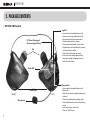
• SPH10H-FM Headset
Jog Dial
• Answer and end a mobile phone call
• Reject an incoming mobile phone call
• Start and end intercom conversation
• Volume adjustment by rotating
• Play and pause Bluetooth stereo device
• Track-forward and track-back by rotating
while pressing the button
• Enter into intercom pairing mode
• Enter into voice configuration setting
• Navigate through configuration menu
• Seek FM radio station
DC Power Charging &
Firmware Upgrade Port
Tab
Status LED
Guide Strap
[ RIGHT ]
[ LEFT ]
Microphone
6
Phone Button
• Answer and end a mobile phone call
• Speed dial
• Call transfer between mobile phone and
headset
• Enter into mobile phone pairing mode
• Enter into Bluetooth stereo device pairing
mode
• Enter into factory reset mode
• Turn on / off FM tuner
SPH10H-FM
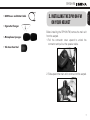
• Cigarette Charger
• Microphone Sponges
• Tab Insertion Tool
3.INSTALLING THE SPH10H-FM
ON YOUR HELMET
English
• USB Power and Data Cable
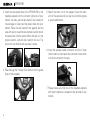
Before installing the SPH10H-FM, remove the main unit
from the earpad.
1. Pull the connector cover upward to unlock the
connector and pull out the speaker cable.
2. Slide upward the main unit to remove from the earpad.
7
SPH10H-FM
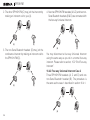
3. Insert the two plastic tabs of the SPH10H-FM on the
headset earpads into the left and right side of your
helmet. You may use the tab insertion tool located in
the package to help insert the plastic tabs into your
helmet. Place the tab insertion tool against the tab
side with velcro. Insert the tab and tab insertion tool at
the same time into the helmet. When the tab is in the
proper position, slide the tab insertion tool out. The
velcro will now hold the tab securely in place.
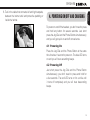
5. Attach the main unit to the earpad. Insert the main
unit on the earpad until you feel the click that signals
a secure attachment.
6. Insert the speaker cable connector over the Y strap
into the main unit and push the connector cover down
to lock the connector in place.
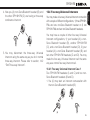
4. Pass through the Y strap of the helmet into the guide
strap of the earpads.
7. Please make sure that one of the headset earpads
with the microphone is located on the left side of your
helmet.
8
SPH10H-FM
4.POWERING ON/OFF AND CHARGING
English
8. Tuck in the cable that connects left and right earpads,
between the helmet shell and protective padding or
inside the helmet.
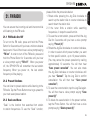
To power on and off the headset, you don’t need to press
and hold any button for several seconds. Just short
press the Jog Dial and the Phone Button simultaneously,
and you will get quick on-and-off convenience.
4.1 Powering On
Press the Jog Dial and the Phone Button at the same
time for about 1 second to power on. The blue LED turns
on and you will hear ascending beeps.
4.2 Powering Off
Just short press the Jog Dial and the Phone Button
simultaneously, you don’t need to press and hold for
a few seconds. The red LED turns on for a while until
it turns off completely and you will hear descending
beeps.
9
SPH10H-FM
4.3Charging
4.5 Checking the Battery Level
• To charge the SPH10H-FM, use the USB power and
data cable included in the package by plugging into
computer’s USB port or USB wall charger. USB wall
charger is not included in the package, but you can
use any USB wall charger in the market.
• The USB power and data cable is also used for
firmware upgrade of the SPH10H-FM.
• You can use any of the standard micro-USB cables
which is mostly adopted by smartphones and general
Bluetooth headsets manufacturers.
• The charging LED beside the charging port turns on
red while charging, and turns to blue when the headset
is fully charged. It takes about 2.5 hours to be fully
charged.
• You can use the SPH10H-FM while charging. It is
especially helpful when you use a cigarette charger for
a long road trip.
You can check the battery level in two different ways
when the headset is powering on.
4.4 Low Battery Warning
When the battery is low, the blinking blue LED in standby mode turns to red and you will hear mid-tone triple
beeps and a voice prompt saying “Low Battery”.
10
4.5.1 LED Indicator
When the headset is powering on, the red LED flashes
rapidly indicating the battery level.
4 flashes = High, 70~100%
3 flashes = Medium, 30~70%
2 flashes = Low, 0~30%
4.5.2 Voice Prompt Indicator
When you power on the headset, keep pressing the
Jog Dial and Phone Button simultaneously for about
3 seconds until you hear high tone triple beeps. Then
you will hear voice prompt indicating the battery level.
However, if you release the buttons as soon as the
headset turns on, you will not hear the voice prompt of
battery level indication.
SPH10H-FM
You can easily adjust the volume by rotating the Jog Dial.
You will hear a beep when the volume reaches maximum
or minimum level. The volume is set and maintained
independently at different levels for each audio source
even when you turn off and on the headset. For example,
once you set the volume for mobile phone handsfree, it
will not change even if you adjust the volume when you
hear Bluetooth MP3 music. So you can always maintain
the preferred optimum volume level for each audio
source.
6.PAIRING THE SPH10H-FM
WITH BLUETOOTH DEVICES
English
5.VOLUME ADJUSTMENT
Before using the SPH10H-FM Bluetooth headset with
any of Bluetooth devices for the first time, you need to
do the pairing operation. It can be paired with Bluetooth
mobile phones, Bluetooth stereo devices such as MP3,
or motorcycle specific Bluetooth GPS, and with other
Sena Bluetooth headsets. This pairing operation is only
required once for each Bluetooth device. The headset
will remain paired with the devices and automatically
connects to the paired devices again when they are
within range. You will hear a high tone single beep and a
voice prompt when the headset connects to the paired
device automatically: “Phone connected” to a mobile
phone, “Media connected” to a Bluetooth stereo
device.
6.1 Mobile Phone Pairing
1. Turn on the SPH10H-FM and press the Phone Button
for 5 seconds until the LED flashes red and blue
alternately and you hear multiple beeps. You will hear
a voice prompt saying “Phone pairing”.
2. Search for Bluetooth devices on your mobile phone.
Select the Sena SPH10H-FM in the list of the devices
11
SPH10H-FM
detected on the mobile phone.
3. Enter 0000 for the PIN. Some mobile phones may not
ask for the PIN.
4. The mobile phone confirms that pairing has completed
and the SPH10H-FM is ready to use. You will hear a
voice prompt from the SPH10H-FM saying “Your
headset is paired”.
5. If the pairing process is not completed within three
minutes, the SPH10H-FM will return to stand-by mode.
6.2 Multipoint Pairing
Typical Bluetooth headsets can connect with only one
HFP (Hands-Free Profile) device, but multipoint pairing
allows the headset to connect with two HFP devices
at the same time. So, when you already have a mobile
phone connected with the SPH10H-FM, you can also
pair and connect a second mobile phone or other HFP
devices such as GPS or Sena SR10, Bluetooth adapter.
1. To pair the second mobile phone, press the Jog
Dial for 5 seconds again until the red LED is rapidly
flashing and you hear multiple beeps.
2. Within 2 seconds, tap the Phone Button again, then
the LED turns to blue flashing and the beeps turn to
high tone double beeps. You will hear a voice prompt
saying “Multipoint pairing”.
12
3. Search for Bluetooth devices on your mobile phone.
Select the Sena SPH10H-FM in the list of the devices
detected on the mobile phone.
4. Enter 0000 for the PIN. Some mobile phones may not
ask for the PIN.
5. The mobile phone confirms that pairing has completed
and the SPH10H-FM is ready to use. You will hear a
voice prompt from the SPH10H-FM saying “Your
headset is paired”.
6. If you want to pair a GPS by multipoint pairing, search
for the Bluetooth device on the GPS screen, and
select the Sena SPH10H-FM at step 3. Please refer
to the section “6.4.1 Multipoint GPS Pairing” for more
details.
7. If you want to pair the Sena SR10, Bluetooth adapter,
please refer to the section “6.5 Pairing with the Sena
SR10, Bluetooth Two-way Radio Adapter”.
6.3 Bluetooth Stereo Device Pairing
1. If the Bluetooth stereo device is integrated with the
mobile phone such as smartphones, you don’t need
to pair the SPH10H-FM with it separately. When the
SPH10H-FM is paired with the mobile phone, it is also
paired as a stereo music device.
SPH10H-FM
Note:
1. If Bluetooth connection between the headset and a
mobile phone is disconnected, tap the Phone Button to
recover the Bluetooth connection immediately.
2. If Bluetooth connection between the headset and a
media player is disconnected, press the Jog Dial for 1
second to recover the Bluetooth connection and play.
6.4 Bluetooth GPS Navigation Pairing
You can listen to voice instruction from Bluetooth GPS
navigation. Some GPS systems use mobile phone profile
(HFP, Hands-Free Profile) and others use stereo music
profile (A2DP, Advanced Audio Distribution Profile). Most
motorcycle specific GPS systems use mobile phone profile
for turn-by-turn voice instruction. You can simultaneously
use a mobile phone and a GPS which uses mobile phone
profile by one of the following procedures.
Multipoint Bluetooth pairing allows the SPH10H-FM
to connect two HFP devices at the same time: mobile
phone and GPS navigation. Follow the steps below to
pair the GPS using the multipoint pairing.
1. Turn on the headset and press the Jog Dial for 5
seconds until the red LED is rapidly flashing and you
hear multiple beeps.
2. Within 2 seconds, tap the Phone Button again, then
the LED turns to blue flashing and the beeps turn to
high tone double beeps. You will hear a voice prompt
saying “Multipoint pairing”.
3. Search for Bluetooth devices on the GPS navigation
screen. Select the Sena SPH10H-FM in the list of the
devices detected on the GPS.
4. Enter 0000 for the PIN.
5. The GPS confirms that pairing has completed and
the SPH10H-FM is ready to use. You will hear a voice
prompt from the SPH10H-FM saying “Your headset
is paired”.
6. If the pairing process is not completed within three
minutes, the SPH10H-FM will return to stand-by mode.
6.4.1 Multipoint GPS Pairing
If you use GPS only for turn-by-turn voice instructions,
not for Bluetooth stereo music streaming, multipoint
pairing is recommended for the GPS connection.
13
English
2. If you have a stand alone Bluetooth stereo device,
follow the pairing procedure separately. The procedure
is the same as the procedure in “6.1 Mobile Phone
Pairing”.
SPH10H-FM
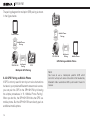
The pairing diagram for multipoint GPS pairing is shown
in the figure below.
GPS
HFP
Mobile Phone
+
Pairing
(A2DP)
Smart Phone
HFP
+ Mobile Phone
Pairing
A2DP
HFP
SPH10H-FM
HFP
SPH10H-FM
Multipoint
Pairing
Mobile Phone
GPS Pairing as Mobile Phone
GPS
Multipoint GPS Pairing
6.4.2 GPS Pairing as Mobile Phone
If GPS is not only used for turn-by-turn voice instructions
but also is your preferred Bluetooth stereo music source,
you can pair the GPS to the SPH10H-FM by following
the simple procedures in “6.1 Mobile Phone Pairing”.
When you do this, the SPH10H-FM thinks the GPS is a
mobile phone. But the SPH10H-FM can directly pair an
additional mobile phone.
14
Multipoint
Pairing
Note:
You have to use a motorcycle specific GPS which
transmits turn-by-turn voice instruction to the headset by
Bluetooth. Most automotive GPS systems don’t have this
feature.
SPH10H-FM
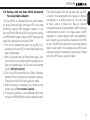
The Sena SR10 is a Bluetooth two-way radio adapter
for group communication, and uses HFP as do most
motorcycle specific GPS navigation systems. If you
pair the SPH10H-FM with a SR10 by multipoint pairing,
the SPH10H-FM is able to have two HFP devices at the
same time: mobile phone and Sena SR10.
1. Turn on the headset and press the Jog Dial for 5
seconds until the red LED is rapidly flashing and you
hear multiple beeps.
2. Within 2 seconds, tap the Phone Button again, then
the LED turns to blue flashing and the beeps turn to
high tone double beeps. You will hear a voice prompt
saying “Multipoint pairing”.
3. Turn on the SR10 and follow the SR10’s “Bluetooth
Headset Pairing” procedure to complete the process.
Please refer to the SR10 user's guide for details.
4. When the pairing is completed, you will hear a voice
prompt saying “Your headset is paired”.
5. If the pairing process is not completed within three
minutes, the SPH10H-FM will return to stand-by mode.
The incoming audio from the two-way radio via SR10
is heard in the background while having an intercom
conversation or a mobile phone call. You can listen
to music, answer a mobile call, have an intercom
conversation and use a two-way radio via SR10 for group
communication as shown in the figure below. A GPS
navigation or a radar detector which has headphone
jack or audio line-out could be connected to the SR10
by wire. The GPS voice instruction or the radar detector
alarm is also heard in the background via SR10 while
having an intercom conversation or a phone call. Please
refer to the SR10 user's guide for details.
15
English
6.5Pairing with the Sena SR10, Bluetooth
Two-way Radio Adapter
SPH10H-FM
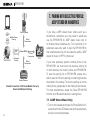
7.PAIRING WITH SELECTIVE PROFILE:
A2DP STEREO OR HANDSFREE
Smart Phone
Two-way Radio
HFP
Mobile Phone
+
Pairing
A2DP
HFP
SPH10H-FM
Multipoint
Pairing
Wired
Connection
Sena SR10
Wired
Connection
GPS
Wired
Connection
Radar Detector
Parallel Connection of SR10 and Mobile Phone by
Bluetooth Multipoint Pairing
If you have a MP3 stereo music phone such as a
smartphone, sometimes you may need to selectively
use the SPH10H-FM for A2DP stereo music only or
for mobile phone handsfree only. This instruction is for
advanced users who want to pair the SPH10H-FM to
their smartphones only with one selective profile: A2DP
stereo for music or HFP for phone call.
If you have previously paired a mobile phone to the
SPH10H-FM, you must clear the previous pairing list
on both devices; the mobile phone and SPH10H-FM.
To clear the pairing list on SPH10H-FM, please do a
factory reset or follow the pairing list clearing procedure
described in this manual. To clear the pairing list on the
mobile phone, please refer to the mobile phone manual.
For most smartphones, delete the Sena SPH10H-FM
from the list of Bluetooth devices in setting menu.
7.1 A2DP Stereo Music Only
16
1. Turn on the headset and press the Phone Button for 5
seconds until the LED flashes red and blue alternately
and you hear multiple beeps.
SPH10H-FM
7.2 HFP for Phone Call Only
1. Turn on the headset and press the Phone Button for 5
seconds until the LED flashes red and blue alternately
and you hear multiple beeps.
2. Within 2 seconds, tap the Phone Button again, then
the LED turns to blue flashing and the beeps turn to
multiple mid-tone beeps. You will hear a voice prompt
saying “Phone selective pairing”.
3. Search for Bluetooth devices on your smartphone.
Select the Sena SPH10H-FM in the list of devices
detected on your phone.
4. Enter 0000 for the PIN. Some smartphones may not
ask for PIN.
8.INTERCOM PAIRING
English
2. Within 2 seconds, tap the Jog Dial again, then the
LED turns to red flashing and the beeps turn to
double mid-tone beeps. You will hear a voice prompt
saying “Media selective pairing”.
3. Search for Bluetooth devices on your smartphone.
Select the Sena SPH10H-FM in the list of devices
detected on your phone.
4. Enter 0000 for the PIN. Some smartphones may not
ask for PIN.
8.1 Pairing with Other SPH10H-FM
Headsets for Intercom Conversation
The SPH10H-FM can be paired with up to three other
headsets for Bluetooth intercom conversation.
1. Turn on the two SPH10H-FM headsets (A and B) that
you would like to pair with each other.
2. Press and hold the Jog Dial of the headset A and B
for 5 seconds until red LEDs of the both units start
to flash rapidly. You will hear a voice prompt saying
“Intercom pairing”.
3. Simply tap the Jog Dial of any one of the two headsets
A or B (It doesn’t matter that you choose A or B.) and
wait until the LEDs of both headsets turn to blue and
intercom connection is automatically established. The
two SPH10H-FM headsets A and B are paired with
each other for intercom conversation. If the pairing
process is not completed within one minute, the
SPH10H-FM will return to stand-by mode.
17
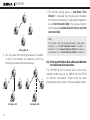
SPH10H-FM
5. The intercom pairing queue is ‘Last-Come, FirstServed’. If a headset has multiple paired headsets
for intercom conversations, the last paired headset is
set as first intercom friend. The previous intercom
friend becomes second intercom friend, and third
intercom friend.
A
B
D
C
Note:
Pairing A & B
4. Y
ou can make other pairings between the headset
A and C, and between the headset A and D by
following the same procedure as above.
A
B
18
A
D
B
D
C
C
Pairing A & C
Pairing A & D
For example, after the pairing procedures listed above,
headset D is the first intercom friend of headset A.
Headset C is the second intercom friend of headset A,
and headset B is the third intercom friend of headset A.
8.2 Pairing with Other Sena Headset Models
for Intercom Conversation
The SPH10H-FM can be paired with all other Sena
headset models such as the SMH10 and the SPH10
for intercom conversation. Please follow the same
procedure as above to pair with these headset models.
SPH10H-FM
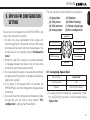
You can set the configuration of the SPH10H-FM by the
voice menu instruction as below.
1. To enter into voice configuration menu, press and
hold the Jog Dial for 12 seconds until the LED shows
solid blue and you hear high tone double beeps. You
will also hear a voice prompt saying “Configuration
menu”.
2. Rotate the Jog Dial clockwise or counter-clockwise
to navigate between the menus. You will hear voice
prompts for each menu items as below.
3. You can enable the feature or execute the command
by tapping the Phone Button, or disable the feature by
tapping the Jog Dial.
4. If any button is not pressed within 10 seconds, the
SPH10H-FM will exit the configuration and goes back
to stand-by.
5. If you want to exit the configuration immediately, rotate
the Jog Dial until you hear a voice prompt, “Exit
configuration”, and tap the Phone Button.
(1) Speed dial
(2) VOX phone
(3) VOX intercom
(4) Voice prompt
English
9.SPH10H-FM CONFIGURATION
SETTING
The voice prompt for each menu item is as below:
(5) Sidetone
(6) RDS AF setting
(7) Delete all pairings
(8) Exit configuration
Speed dial
Exit configuration
VOX phone
Delete all pairings
VOX intercom
Voice prompt
RDS AF setting
Sidetone
9.1 Assigning Speed Dial
Voice Prompt
“Speed dial”
Factory Default
N/A
Execute
Tap the Phone Button
1.To assign a phone number as a speed dial, rotate
the Jog Dial until you hear a voice prompt saying
“Speed dial”.
19
SPH10H-FM
2.Tap the Phone Button, and you will hear a voice
prompt saying “Speed dial one” and “Phone
connected”.
3.Rotate the Jog Dial to select one of three speed
dial numbers and you hear a voice prompt saying
“Speed dial (#)”.
4.Call a phone number you want to assign and you
will hear a voice prompt saying “Save speed dial
(#)”. The phone number is automatically assigned
to the selected speed dial number. Then the phone
call will hang up before being connected.
5.To exit the menu, rotate the Jog Dial clockwise or
counter clockwise until you hear a voice prompt
saying “Cancel”, and tap the Phone Button to
confirm. You will then hear a voice prompt saying
“Cancel”. If any button is not pressed within 1
minute, the SPH10H-FM will exit the configuration
menu and go back to stand-by mode.
Note:
1. A
fter assigning a phone number to one of three speed
dials, you can continually assign another phone
number to the rest of two speed dials.
2. Y
ou can assign phone numbers to speed dials in your
PC. Please visit the Sena Bluetooth web site at www.
sena.com for more information.
20
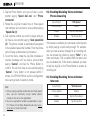
9.2 Enabling/Disabling Voice Activated
Phone Answering
Voice Prompt
“VOX phone”
Factory Default
Enable
Enable
Tap the Phone Button
Disable
Tap the Jog Dial
If this feature is enabled, you can answer incoming calls
by simply saying a word loudly enough. For example,
when you hear a series of beeps for an incoming call,
you can answer the phone by saying “Hello” or any
other word loudly. This is enabled from the factory but
you can disable this. If this mode is disabled, you have
to tap the Jog Dial or the Phone Button to answer an
incoming call.
9.3 Enabling/Disabling Voice Activated
Intercom
Voice Prompt
“VOX intercom”
Factory Default
Disable
Enable
Tap the Phone Button
Disable
Tap the Jog Dial
SPH10H-FM
9.4 Enabling/Disabling Voice Prompts
Voice Prompt
English
If this feature is enabled, you can initiate an intercom
conversation with the last connected intercom friend by
speaking any word loudly enough.The most effortless
way to trigger intercom VOX is to blow into the microphone
as if blowing dust off the microphone. If you start an
intercom conversation by VOX, the intercom terminates
automatically when you and your intercom friend remain
silent for 20 seconds. However, if you manually start an
intercom conversation by tapping the Jog Dial, you have
to terminate the intercom conversation manually.
However, even when this feature is enabled, if you
terminate intercom conversation manually with the
Jog Dial, you are not able to start intercom by voice
temporarily. In this case, you have to tap the Jog Dial
to restart the intercom. This is to prevent repeated
unintentional intercom connections by strong wind noise.
If you tap the Jog Dial to start an intercom conversation,
it is not terminated by 20 seconds of silence. After
turning SPH10H-FM off and on, you can start intercom
by voice again.
“Voice prompt”
Factory Default
Enable
Enable
Tap the Phone Button
Disable
Tap the Jog Dial
You can disable voice prompts by configuration setting,
but the following voice prompts are always on.
- Voice prompts for configuration setting menu
- Voice prompts for battery level Indicator
- Voice prompts for factory reset
9.5 Enabling/Disabling Sidetone
Voice Prompt
“Sidetone”
Factory Default
Disable
Enable
Tap the Phone Button
Disable
Tap the Jog Dial
Sidetone is the sound of your own voice as picked up
by your headset’s microphone and reproduced in your
own ear, by your own speaker. It helps you to naturally
speak at the correct level according to varying helmet
noise conditions. If this feature is enabled, you can hear
what you are speaking during an intercom conversation
or a phone call.
21
SPH10H-FM
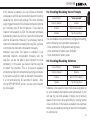
9.6 RDS AF setting (Radio Data System: Alternative
Frequencies) (Factory Default: Disabled)
Voice Prompt
“RDS AF setting”
Factory Default
Disable
Enable
Tap the Phone Button
Disable
Tap the Jog Dial
RDS AF allows a receiver to re-tune to a different frequency
providing the same station has an additional frequency. In
RDS AF, the receiver will “re-tune” to the second frequency
location when the first signal becomes too weak. With RDS
AF enabled on the receiver, a radio station with more than
one frequency can be used.
Note:
RDS feature may be available when radio channel station
provides equivalent service.
22
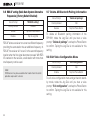
9.7 Delete All Bluetooth Pairing Information
Voice Prompt
“Delete all pairings”
Factory Default
N/A
Execute
Tap the Phone Button
To delete all Bluetooth pairing information of the
SPH10H, rotate the Jog Dial until you hear a voice
prompt, “Delete all pairings”, and tap the Phone Button
to confirm. Taping the Jog Dial is not available for this
setting.
9.8 Exit Voice Configuration Menu
Voice Prompt
“Exit configuration”
Factory Default
N/A
Enable
Tap the Phone Button
To exit voice configuration menu and get back to standby mode, rotate the Jog Dial until you hear a voice
prompt, “Exit configuration”, and tap the Phone Button
to confirm. Taping the Jog Dial is not available for this
setting.
SPH10H-FM
Tap Phone Button
Tap Jog Dial
Speed Dial
Execute
N/A
VOX Phone
Enable
Disable
VOX Intercom
Enable
Disable
Voice Prompt
Enable
Disable
Sidetone
Enable
Disable
RDS AF Setting
Enable
Disable
Delete All Pairings
Execute
N/A
Exit Configuration
Execute
N/A
Voice Configuration Menu & Button Operations
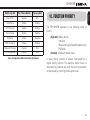
10.FUNCTION PRIORITY
English
Rotate Jog Dial
The SPH10H-FM operates in the following order of
priority:
(highest) Mobile phone,
Intercom,
Music sharing by Bluetooth stereo music
FM Radio,
(lowest) Bluetooth stereo music
A lower priority function is always interrupted by a
higher priority function. For example, stereo music is
interrupted by intercom call, and intercom conversation
is interrupted by incoming mobile phone call.
23
SPH10H-FM
11.STEREO MUSIC
You can listen to stereo music from your Bluetooth
wireless audio device. The Bluetooth audio device
must be paired with the SPH10H-FM by following
the “Bluetooth Stereo Device Pairing” procedures
described in the 6.3 chapter. The SPH10H-FM
supports the Audio/Video Remote Control Profile
(AVRCP), so if your Bluetooth audio device also
supports the AVRCP, you can use the SPH10H-FM to
remotely control music playback. You not only can
adjust the volume but also use the functions such as
play, pause, next track and previous track.
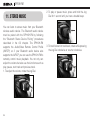
1. To adjust the volume, rotate the Jog Dial.
24
2. To play or pause music, press and hold the Jog
Dial for 1 second until you hear a double beep.
3. To track forward or track back, rotate while pressing
the Jog Dial clockwise or counter clockwise.
SPH10H-FM
12.1 Mobile Phone Call Making and Answering
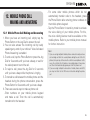
1. When you have an incoming call, simply tap the
Phone Button or the Jog Dial to answer the call.
2. You can also answer the incoming call by loudly
speaking any word of your choice if Voice Activated
Phone Answering is enabled.
3. To end a call, tap the Phone Button or press the Jog
Dial for 2 seconds until you hear a beep, or wait for
the called person to end the call.
4. To reject a call, press the Jog Dial for 2 seconds
until you hear a beep while the phone is ringing.
5. To transfer a call between the mobile phone and the
headset during the phone conversation, press the
Phone Button for 2 seconds until you hear a beep.
6. There are several ways to make a phone call:
-
Enter numbers on your mobile phone keypad
and make a call. Then the call is automatically
transferred to the headset.
Note:
1. If you are using multipoint mobile phone connection and you have
an incoming call from the second phone during the call of the first
phone, then you may still receive the call from second phone. In this
case, the call from the first phone is on waiting mode. If you end a
call, then it will automatically guide you to the first phone call.
2. If you are using multipoint connection of mobile phone and GPS,
you may not listen to the GPS voice instruction during the phone
call.
25
English
12.MOBILE PHONE CALL
MAKING AND ANSWERING
-
For some older mobile phones which do not
automatically transfer calls to the headset, press
the Phone Button after entering phone numbers on
the mobile phone keypad.
- Tap the Phone Button in stand-by mode to activate
the voice dialing of your mobile phone. For this,
the voice dialing feature must be available on the
mobile phone. Refer to your mobile phone manual
for further instruction.
SPH10H-FM
12.2 Speed Dialing
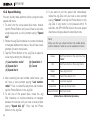
You can quickly make a phone call by using the voice
speed dial menu.
1.To enter into the voice speed dial menu, double
tap the Phone Button and you will hear a mid-tone
single beep and a voice prompt saying “Speed
dial”.
2.Rotate the Jog Dial clockwise or counter-clockwise
to navigate between the menus. You will hear voice
prompts for each menu items.
3.Tap the Phone Button or the Jog Dial to select a
voice menu among the followings:
(1) Last number redial
(2) Speed dial 1
(3) Speed dial 2
(4) Speed dial 3
(5) Cancel
4.After selecting the last number redial menu, you
will hear a voice prompt saying “Last number
redial”. Then, to redial the last phone call number,
tap the Phone Button or the Jog Dial.
5.To call one of the speed dials, rotate the Jog
Dial clockwise or counter-clockwise to navigate
between the menus until you hear a voice prompt
saying “Speed dial (#)”. Then, tap the Phone
Button or the Jog Dial.
26
6.If you want to exit the speed dial immediately,
rotate the Jog Dial until you hear a voice prompt
saying “Cancel”, and tap the Phone Button or the
Jog Dial. If any button is not pressed within 15
seconds, the SPH10H-FM will exit the voice speed
dial menu and goes back to stand-by mode.
Note:
Make sure that you should connect the mobile phone
and the headset in order to use the speed dial function.
Answer
End
Tap Phone Button or Tap Jog Dial or Say
“Hello”
Tap Phone Button or Press Jog Dial for
2”
Reject
Press Jog Dial for 2”
Transfer
Press Phone Button for 2”
Call
Use phone keypad
Speed Dial
Voice Command
Double tap Phone Button
Tap Phone Button
Mobile Phone Call Button Operations
SPH10H-FM
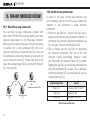
13.1 Start and End Two-way Intercom
1. You can start an intercom conversation with one
of any intercom friends by tapping the Jog Dial:
single tapping to intercom with the first intercom
friend, double tapping with the second intercom
friend, and triple tapping with the third intercom
friend.
1st Intercom
Friend
2nd Intercom
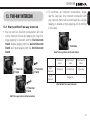
Friend
Terminate
End Two-way Intercom Conversation
Start
intercom
End
intercom
1st intercom
friend
2nd intercom
friend
3rd intercom
friend
Single tap
Double tap
Triple tap
Single tap
Start & End Two-way Intercom
3rd Intercom
Friend
Start Two-way Intercom Conversation
27
English
13.TWO-WAY INTERCOM
2. To terminate an intercom conversation, single
tap the Jog Dial. Any intercom connection with
any intercom friend will be terminated by a single
tapping. A double or triple tapping will do nothing
in this case.
SPH10H-FM
13.2 Intercom and Mobile Phone Call
13.3 Intercom and GPS
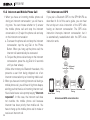
1. When you have an incoming mobile phone call
during an intercom conversation, you will hear a
ring tone. You can choose whether to 1) answer
the mobile phone call and stop the intercom
conversation, or 2) reject the phone call and stay
on the intercom conversation.
a. To answer the phone call and stop the intercom
conversation, tap the Jog Dial or the Phone
Button. When you hang up the phone call, the
intercom will automatically be recovered.
b. To reject the phone call and stay on the intercom
conversation, press the Jog Dial for 2 seconds
until you hear a beep.
U
nlike other motorcycle Bluetooth headsets, this
prevents a user from being dropped out of an
intercom conversation by an incoming mobile call.
2. When you have an incoming intercom call during a
mobile phone call, you will hear 4 high tone beeps,
alerting you that there is an incoming intercom call.
You will also hear a voice prompt saying “Intercom
requested”. In this case, the intercom call does
not override the mobile phone call because
intercom has lower priority than mobile call. You
have to hang up the mobile phone call to make or
receive an intercom call.
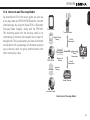
If you pair a Bluetooth GPS to the SPH10H-FM as
described in 6.4 of this user's guide, you can hear
the turn-by-turn voice instruction of the GPS while
having an intercom conversation. The GPS voice
instruction interrupts intercom conversation, but it
is automatically reestablished after the GPS voice
instruction ends.
28
GPS
Voice Multipoint
Instruction Pairing
HFP
Mobile Phone SPH10H-FM
Pairing
Smart Phone
Intercom
Intercom Intercom Friend
Pairing
Intercom and GPS voice instruction
SPH10H-FM
13.4 Intercom and Two-way Radio
English
As described in 6.5 of this user's guide, you can use
a two-way radio and SPH10H-FM Bluetooth intercom
simultaneously by using the Sena SR10, a Bluetooth
Two-way Radio Adapter, along with the SPH10HFM. Incoming audio from the two-way radio is not
interrupting an intercom conversation but is heard in
background. This is useful when you have an intercom
conversation with a passenger on the back seat and
use a two-way radio for group communication with
other motorcycle riders.
Smart Phone
Two-way Radio
HFP
Mobile Phone
+
Pairing
A2DP
Wired
Connection
Audio from
Two-way Radio Sena SR10
Multipoint
Pairing
SPH10H-FM
Intercom
Wired
Connection
GPS
Wired
Connection
Intercom
Pairing
Radar Detector
Intercom Friend
Intercom and Two-way Radio
29
SPH10H-FM
14. THREE-WAY CONFERENCE INTERCOM
14.1 Start Three-way Intercom
Pa
iri
g
30
rin
First Friend
(B)
(A)
i
Pa
ng
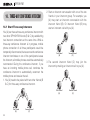
You (A) can have a three-way conference intercom with
two other SPH10H-FM friends (B & C) by establishing
two intercom connections at the same time. While a
three-way conference intercom is in progress, mobile
phone connection of all three participants would be
temporarily disconnected, but as soon as the conference
intercom terminates or one of the participants leaves
the intercom, all mobile phones would be automatically
reconnected. During the conference intercom, if you
have an incoming mobile phone call, terminate the
conference intercom to automatically reconnect the
mobile phone and receive the call.
1. You (A) need to be paired with two other friends (B
& C) for three-way conference intercom.
Second Friend
(C)
2. Start an intercom conversation with one of the two
friends in your intercom group. For example, you
(A) may start an intercom conversation with the
intercom friend (B). Or intercom friend (B) may
start an intercom call with you (A).
(A)
First Friend
(B)
Second Friend
(C)
3. The second intercom friend (C) may join the
intercom by making an intercom call to you (A).
(A)
First Friend
(B)
Second Friend
(C)
SPH10H-FM
(A)
First Friend
(B)
Second Friend
(C)
14.2 End Three-way Intercom
When you are a member of an active three-way
conference intercom, you can completely terminate
the conference intercom or just disconnect an
intercom connection with one of your active intercom
friends.
1. Press the Jog Dial for 1 second until you hear
a beep to terminate three-way conference
intercom completely. It terminates both intercom
connections with (B) and (C).
2. Tap or double tap the Jog Dial to disconnect
intercom connection with one of the two intercom
friends accordingly. For example, by single tapping
the Jog Dial, you can just terminate the intercom
connection with the first intercom friend (B).
However, you still have the intercom connection
with your second intercom friend (C).
Jog Dial Operation
Press for 1”
Result
Disconnect (B) & (C)
Single tap
Disconnect (B)
Double tap
Disconnect (C)
End Three-way Intercom
31
English
4. Now you (A) and two SPH10H-FM intercom
friends (B & C) are having a three-way conference
intercom.
SPH10H-FM
15.FOUR-WAY CONFERENCE INTERCOM
15.1 Start Four-way Intercom
You can have four-way conference intercom with
three other SPH10H-FM users by adding one more
intercom participant to the three-way intercom.
While you are having three-way intercom as above
in section 14.1, a new participant (D), who is an
intercom friend of your intercom friend (C), may join
the conference intercom by making an intercom call
to your intercom friend (C). Please note that in this
case, the new participant (D) is an intercom friend of
(C), not of you (A).
You
(A)
New Participant
(D)
= Intercom Friend of (C)
First Friend
(B)
Second Friend
(C)
15.2 End Four-way Intercom
As same in the case of three-way intercom, you
can completely get out of the four-way conference
intercom or just disconnect a single intercom
connection.
1. Press the Jog Dial for 1 second until you hear a
beep to terminate four-way conference intercom. It
terminates the intercom connections between you
(A), and your intercom friends (B) and (C).
2. Tap or double tap the Jog Dial to disconnect
the intercom connection with one of the two
intercom friends accordingly. However, when
you disconnect the second friend (C) by double
tapping the Jog Dial, you will be disconnected with
the third participant (D) as well. This is because
the third participant (D) is connected with you via
the second friend (C).
Jog Dial Operation
Press for 1”
Result
Disconnect (B), (C) & (D)
Single tap
Disconnect (B)
Double tap
Disconnect (C) & (D)
End Four-way Intercom
32
SPH10H-FM
You can have an intercom conversation with nonSena Bluetooth headsets using the Universal Intercom
function. Non-Sena Bluetooth headsets can be
connected to the Sena Bluetooth headset if they support
the Bluetooth Hands-Free Profile (HFP). The working
distance may differ depending on the performance of
Bluetooth headset that it is connected to. In general, it
is shorter than normal intercom distance since it uses
the Bluetooth Hands-Free Profile.
16.1 Universal Intercom Pairing
The SPH10H-FM can be paired with non-Sena Bluetooth
headsets for Bluetooth intercom conversation. You can
pair the SPH10H-FM with only one non-Sena Bluetooth
headset; if you pair with a different non-Sena Bluetooth
headset, the previous pairing list will be removed.
1.Turn on the SPH10H-FM and a non-Sena Bluetooth
headset which you want to pair with.
2.Press and hold the Jog Dial on the SPH10H-FM
for 8 seconds until the blue LED flashes rapidly.
You will hear a voice prompt saying “Universal
intercom pairing”.
16.2 Two-way Universal Intercom
You can initiate the Universal Intercom connection
with non-Sena Bluetooth headsets using the same
intercom connection method as you would between
other Sena headsets. You may single tap the Jog
Dial to begin an intercom conversation with the first
intercom friend, double tap with the second intercom
friend, and triple tap with the third intercom friend.
Non-Sena Bluetooth headsets may initiate the
Universal Intercom connection, activating the voice
dialing or using the redialing operation. You may also
disconnect the existing connection by ending a call
operation function (refer to the users’ manual of the
headsets for voice dialing, redialing, and ending a
call).
33
English
16.UNIVERSAL INTERCOM
3.Perform the operation required for handsfree
pairing on the non-Sena Bluetooth headset (refer
to the users’ manual of the headsets you want to
use). The SPH10H-FM will automatically perform
pairing with non-Sena Bluetooth headsets in
pairing mode.
SPH10H-FM
16.3 Three-way Universal Intercom
You may make a three-way Universal Intercom
connection with two SPH10H-FMs and one non-Sena
Bluetooth headset. If the intercom connection is
made, all headsets connected cannot use the mobile
phone call function since the connection between the
headset and the phone is disconnected temporarily.
If you disconnect the intercom call, the mobile phone
connection is made again automatically so that you
can use a mobile phone call function. During the
intercom call, you cannot pick up the incoming phone
call since it is disconnected, however, you can pick it
up if you disconnect the intercom call.
1.You (A) need to be paired with non-Sena Bluetooth
headset (B) and another SPH10H-FM headset (C)
for the three-way conference intercom.
2.Start an intercom conversation with non-Sena
Bluetooth headset (B) in your intercom group.
For example, you (A) may start an intercom
conversation with non-Sena Bluetooth headset (B).
The non-Sena Bluetooth headset (B) may also start
an intercom call with you (A).
(A)
(B)
(C)
3. The other SPH10H-FM (C) may join the intercom by
making an intercom call to you (A).
Pa
iri
n
g
(A)
n
iri
Pa
g
(A)
(B)
(B)
34
(C)
(C)
SPH10H-FM
(A)
(B)
(C)
5.You may disconnect the three-way Universal
Intercom using the same way as you do in normal
three-way intercom. Please refer to section, 14.2
“End Three-way Intercom”.
16.4 Four-way Universal Intercom
You may make a four-way Universal Intercom connection
with a couple of different configurations, 1) three SPH10HFMs and one non-Sena Bluetooth headset or 2) two
SPH10H-FMs and two non-Sena Bluetooth headsets.
You may have a couple of other four-way Universal
Intercom configurations, 1) your headset (A), a nonSena Bluetooth headset (B), another SPH10H-FM
(C), and a non-Sena Bluetooth headset (D), 2) your
headset (A), a non-Sena Bluetooth headset (B), and
two other SPH10H-FM headsets (C and D). You may
make the four-way Universal Intercom call the same
way as a normal four-way intercom call.
16.4.1 Four-way Universal Intercom Case 1
Two SPH10H-FM headsets (A and C) and two nonSena Bluetooth headsets (B and D).
1.You (A) may start an intercom conversation with
the non-Sena Bluetooth headset (B).
(A)
(B)
(C)
(D)
35
English
4.Now you (A), non-Sena Bluetooth headset (B), and
the other SPH10H-FM (C) are having a three-way
conference intercom.
SPH10H-FM
2. The other SPH10H-FM (C) may join the intercom by
making an intercom call to you (A).
(A)
4.Now two SPH10H-FM headsets (A & C) and two nonSena Bluetooth headsets (B & D) are connected with
the four-way Universal Intercom.
(C)
(A)
(D)
(B)
3.The non-Sena Bluetooth headset (D) may join the
conference intercom by making an intercom call to
the SPH10H-FM (C).
(A)
(B)
(C)
(D)
(D)
(B)
You may disconnect a four-way Universal Intercom
using the same way as you do in a normal four-way
intercom. Please refer to section, 15.2 “End Four-way
Intercom”.
16.4.2 Four-way Universal Intercom Case 2
Three SPH10H-FM headsets (A, C and D) and one
non-Sena Bluetooth headset (B). The procedure is
the same as the case 1 described in section 16.4.1.
(A)
(B)
36
(C)
(C)
(D)
SPH10H-FM
You can start sharing music with an intercom friend
using Bluetooth stereo music during a two-way
intercom conversation. When you terminate music
sharing, you can go back to the intercom conversation.
To start or terminate sharing music, press and
hold the Jog Dial for 1 second during an intercom
conversation until you hear a double beep and you
and your intercom friend will listen to or terminate
sharing music. To track forward or track back, rotate
while pressing down the Jog Dial clockwise or
counter clockwise.
Note:
1. B
oth you and your intercom friend can remotely
control music playback during music sharing such as
track forward and track back.
2. W
hen you have an incoming call, make a phone
call, or hear the turn-by-turn voice instruction of GPS
during music sharing, the function will be paused.
3. In order to share music, make sure that you update
both headsets with the firmware that has the music
sharing feature, and enable the EDR setting in the
Sena Device Manager.
18.THREE-WAY CONFERENCE PHONE
CALL WITH INTERCOM PARTICIPANT
English
17.MUSIC SHARING
You can have a three-way conference phone call
by adding an intercom friend to the mobile phone
conversation. While having a mobile phone call, make
an intercom call to one of the intercom friends by
tapping the Jog Dial to form a three-way conference call
with the person on the mobile phone line. To disconnect
the intercom first and go back to your private mobile
phone call, terminate the intercom by tapping the Jog
Dial. To end the mobile phone call first and maintain
the intercom conversation, press the Jog Dial for 2
seconds, or tap the phone button, or wait for the person
on the mobile phone line to end the call.
Start
End intercom
first
End phone
call first
Tap Jog Dial while having a mobile phone call
Tap Jog Dial
Press Jog Dial for 2“
or
Tap Phone Button
or
Wait for the called person to end the call
Start & End Three-way Conference Phone Call
37
SPH10H-FM
19.INTERCOM FAILURE
When you try to start an intercom conversation with an
intercom friend who is already having a conference
intercom with other riders or a mobile phone call,
you will hear a low tone double beep signifying an
intercom busy signal. In this case, you have to try
again later.
38
20.INTERCOM RECONNECTION
If your intercom friend goes out of range while having
an intercom conversation, you may hear static noise
and eventually the intercom will be disconnected.
In this case, the SPH10H-FM automatically tries to
reconnect the intercom every 8 seconds and you
will hear high tone double beeps until the intercom
is reestablished. If you don’t want to make a
reconnection, tap the Jog Dial to stop the attempt.
SPH10H-FM
You can answer the incoming call and intercom while
still listening to the FM radio.
21.1 FM Radio On / Off
To turn on the FM radio, press and hold the Phone
Button for 2 seconds until you hear a mid-tone double
beep sound. You will then hear a voice prompt saying
“FM on”. In order to turn off the FM radio, press and
hold the Phone Button for 2 seconds until you hear
a voice prompt saying “FM off”. When you power
off, the SPH10H-FM will remember the last station
frequency. When you power on, the last station
frequency will be playing.
21.2 Preset Stations
You can listen to preset stations while listening to the
FM radio. Tap the Phone Button once to go upward to
your next saved preset station.
21.3 Seek and Save
“Seek” is the function that searches from station
to station frequencies. To use the “Seek” function,
39
English
21.FM RADIO
please follow the procedure below:
1. Rotate while pressing the Jog Dial clockwise to
search up the station dial or counter clockwise to
search down the station dial.
2. If the tuner finds a station while searching
frequencies, it stops the seek function.
3. To save the current station, press and hold the Jog
Dial for 2 seconds until you hear a voice prompt
saying “Preset (#)”.
4. Rotate the Jog Dial clockwise or counter clockwise,
in order to select which preset number you want
for that specific station, up to 10 preset stations.
(You may cancel the preset operation by waiting
approximately 10 seconds. You will then hear
“Save preset cancelled”. You can also rotate
the Jog Dial clockwise or counter clockwise until
you hear “Cancel”. Tap the Jog Dial to confirm
cancellation. You will then hear “Save preset
cancelled”).
5. T
o save the current station, tap the Jog Dial again.
You will then hear a voice prompt saying “Save
preset (#)”.
6. To delete the saved station in the preset number,
tap the Phone Button. You will then hear a voice
prompt saying “Delete preset (#)”.
SPH10H-FM
Note:
You can save FM stations to presets before using FM
radio. Connect SPH10H-FM to your PC and open the
Sena Device Manager. It allows you to save FM station
frequencies up to 10 presets on the SPH10H-FM setting
menu.
21.4 Scan and Save
“Scan” is the function that searches from the current
station frequency upward for stations in a whole
range of FM frequencies. To use the scan function,
please follow the procedures below:
1. Double tap the Phone Button. Then the current
station frequency moves upward to find other
station frequencies.
2. If the tuner finds a station, it stays at the station
frequency for 8 seconds, then scanning to the next
station frequency.
3. Scan function stops when you double tap the
Phone Button again.
4. To save a station while scanning frequencies, tap
the Phone Button when at that station. You will hear
a voice prompt from the SPH10H-FM saying “Save
preset (#)”. The station will be saved as the next
preset number.
40
5. All stations preset during “Scan”, will overwrite
previously set stations.
6. To stop scan function, double tap the Phone Button.
21.5 Temporary Preset
With the temporary preset function, you may
temporarily preset stations automatically without
changing the existing preset stations. Tap the Phone
Button three times which will automatically scan for
10 temporary preset stations. The temporary preset
stations will be cleared when the system is powered
off.
SPH10H-FM
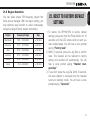
21.6 Region Selection
Region
Frequency Range
Step
Worldwide
76.0 ~ 108.0 MHz
± 100 kHz
Americas
87.5 ~ 107.9 MHz
± 200 kHz
Asia
87.5 ~ 108.0 MHz
± 100 kHz
Australia
87.5 ~ 107.9 MHz
± 200 kHz
Europe
87.5 ~ 108.0 MHz
± 100 kHz
Japan
76.0 ~ 90.0 MHz
± 100 kHz
22.RESET TO FACTORY DEFAULT
SETTINGS
English
You can select proper FM frequency region from
Sena device manager. With the region setting, you
may optimize seek function to avoid unnecessary
frequency range (Factory default: worldwide).
1. To restore the SPH10H-FM to factory default
settings, press and hold the Phone Button for 12
seconds until the LED shows solid red and you
hear double beeps. You will hear a voice prompt
saying “Factory reset”.
2. Within 5 seconds, press the Jog Dial to confirm
reset. The headset will be restored to factory
setting and switched off automatically. You will
hear a voice prompt saying “Headset reset,
good-bye”.
3. If you don’t press the Jog Dial within 5 seconds,
the reset attempt is canceled and the headset
returns to stand-by mode. You will hear a voice
prompt saying, “Canceled”.
41
SPH10H-FM
23.FAULT RESET
When the SPH10H-FM is not working properly or is in
faulty status for any reason, you may reset by pushing
the pin-hole reset button at the back of the headset main
unit. Insert a paper clip into the reset pin-hole and press
the reset button for a second with light pressure. The
SPH10H-FM will be switched off after which time, you
have to turn the system back on and try again. However,
this will not restore the headset to factory default settings.
42
24.FIRMWARE UPGRADE
The SPH10H-FM supports firmware upgrade function.
Please visit Sena Bluetooth web site at www.sena.
com to check the latest software downloads.
SPH10H-FM
English
25.SENA BLUETOOTH CONNECTION
CASE STUDIES
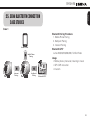
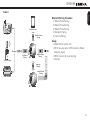
Case 1
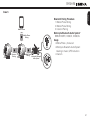
Bluetooth Pairing Procedure
1.Mobile Phone Pairing
2.Multipoint Pairing
3.Intercom Pairing
Mobile Phone
Bluetooth GPS*
zumo 220/350/550/660/665, TomTom Rider
Mobile Phone
Pairing
Intercom
Pairing
Multipoint
Pairing
Usage
• Mobile phone: phone call, listening to music
• GPS: GPS instruction
•Intercom
Bluetooth GPS*
43
SPH10H-FM
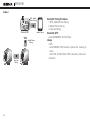
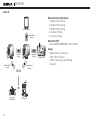
Case 2
GPS - Mobile
Phone Pairing
Bluetooth GPS*
Mobile Phone
Pairing
Intercom
Pairing
44
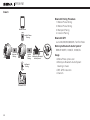
Mobile Phone
Bluetooth Pairing Procedure
1.GPS - Mobile Phone Pairing
2.Mobile Phone Pairing
3.Intercom Pairing
Bluetooth GPS*
zumo 550/660/665, TomTom Rider
Usage
•GPS
zumo 660/665: GPS instruction, phone call, listening to
music
zumo 550, TomTom Rider: GPS instruction, phone call
•Intercom
SPH10H-FM
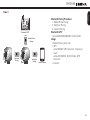
Case 3
Mobile Phone
Pairing
Intercom
Pairing
Multipoint
Pairing
Mobile Phone
English
Bluetooth GPS*
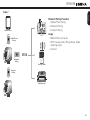
Bluetooth Pairing Procedure
1.Mobile Phone Pairing
2.Multipoint Pairing
3.Intercom Pairing
Bluetooth GPS*
zumo 220/350/550/660/665, TomTom Rider
Usage
• Mobile Phone: phone call
•GPS
zumo 660/665: GPS instruction, listening to
music
zumo 220/350/550, TomTom Rider: GPS
instruction
• Intercom
45
SPH10H-FM
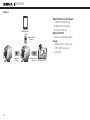
Case 4
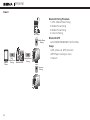
Bluetooth Pairing Procedure
1.Mobile Phone Pairing
2.Mobile Phone Pairing
3.Intercom Pairing
Bluetooth GPS*
Yupiteru, smartphone apps
Usage
• Mobile Phone: phone call
• GPS: GPS instruction
•Intercom
Mobile Phone
Mobile Phone
Pairing
Intercom
Pairing
46
Mobile Phone
Pairing
Bluetooth GPS*
SPH10H-FM
Case 5
Mobile Phone
Pairing
GPS
Intercom
Pairing
Mobile Phone
Pairing
Motorcycle Bluetooth
Audio System*
English
Mobile Phone
Bluetooth Pairing Procedure
1.Mobile Phone Pairing
2.Mobile Phone Pairing
3.Intercom Pairing
Motorcycle Bluetooth Audio System*
BMW R1200RT, K1600GT, K1600GTL
Usage
• Mobile Phone: phone call
• Motorcycle Bluetooth Audio System:
listening to music, GPS instruction
• Intercom
Music
47
SPH10H-FM
Case 6
Bluetooth Pairing Procedure
1.Mobile Phone Pairing
2.Mobile Phone Pairing
3.Multipoint Pairing
4.Intercom Pairing
Mobile Phone
Mobile Phone
Pairing
Bluetooth GPS*
zumo 220/350/550/660/665, TomTom Rider
Motorcycle Bluetooth Audio System*
BMW R1200RT, K1600GT, K1600GTL
Intercom
Pairing
Mobile
Phone
Pairing
Multipoint
Pairing
Bluetooth GPS*
48
Motorcycle Bluetooth
Audio System*
Music
Usage
• Mobile Phone: phone call
• Motorcycle Bluetooth Audio System:
listening to music
• GPS: GPS instruction
• Intercom
SPH10H-FM
Case 7
English
Bluetooth Pairing Procedure
1.Mobile Phone Pairing
2.Multipoint Pairing
3.Intercom Pairing
Mobile Phone
GPS
Mobile Phone
Pairing
Usage
• Mobile Phone: phone call
• SR10: two-way radio, GPS guidance, Radar
detecting signal
• Intercom
SR10
Multipoint
Pairing
Two-way Radio
Intercom
Pairing
Radar Detector
49
SPH10H-FM
Case 8
MP3 Player
Mobile Phone
Pairing
Mobile
Phone
50
Bluetooth Pairing Procedure
1.GPS - Mobile Phone Pairing
2.Mobile Phone Pairing
3.Mobile Phone Pairing
4.Intercom Pairing
Bluetooth GPS*
zumo 220/350/550/660/665, TomTom Rider
Usage
• GPS: phone call, GPS instruction
• MP3 Player: listening to music
• Intercom
GPS Mobile Phone
Mobile Phone
Pairing
Pairing
Bluetooth GPS*
Intercom
Pairing
SPH10H-FM
Case 9
GPS
Mobile Phone
Pairing
Multipoint
Pairing
Mobile Phone
Pairing
Two-way Radio
English
Mobile Phone
Bluetooth Pairing Procedure
1.Mobile Phone Pairing
2.Mobile Phone Pairing
3.Mobile Phone Pairing
4.Multipoint Pairing
5.Intercom Pairing
Usage
• Mobile Phone: phone call
• SR10: two-way radio, GPS instruction, Radar
detecting signal
• SM10: listening to music/sharing
• Intercom
Intercom
Pairing
Mobile Phone
Pairing
Radar Detector
51
SPH10H-FM
Case 10
Bluetooth Pairing Procedure
1.Mobile Phone Pairing
2.Mobile Phone Pairing
3.Mobile Phone Pairing
4.Multipoint Pairing
5.Intercom Pairing
Mobile Phone
Mobile Phone
Pairing
Bluetooth GPS*
zumo 220/350/550/660/665, TomTom Rider
Multipoint
Pairing
Intercom
Pairing
Mobile Phone
Pairing
Mobile Phone
Pairing
SM10
OR
Motorcycle
Audio System
52
MP3 Player
Bluetooth GPS*
Usage
• Mobile Phone: phone call
• GPS: GPS instruction
• SM10: listening to music/sharing
•Intercom
SPH10H-FM
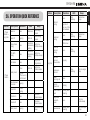
Button
Phone
Button +
Jog Dial
Description
LED
Power-on
1 sec
Solid blue
Power-off
Tapping
Solid red
Descending
beeps
5 sec
Blue & red
High tone
alternatively
multiple beeps
flashing
MP3, GPS
pairing
5 sec
Blue & red
High tone
alternatively
multiple beeps
flashing
Call transfer
2 sec
-
High tone
single beep
12 sec
Solid red
High tone
double beeps
Factory reset
Jog Dial
within 5 sec to confirm reset
-
Description
Duration
5 sec
Intercom
pairing
Beep
Ascending
beeps
Mobile phone
pairing
Phone
Button
Duration
Button
Jog Dial of
any one of the two headsets
Beep
Double tone
beeps
-
5 sec
Red
flashing
Double tone
beeps
Phone Button
within 2 sec
-
-
Universal
intercom
pairing
8 sec
Blue
flashing
-
Start/end
intercom
conversation
Tapping
-
-
End
conference
intercom
1 sec
Blue
flashing
Mid-tone single
beep
Reject
incoming call
2 sec
-
-
Multipoint
pairing
Jog Dial
LED
Red
flashing
English
26. OPERATION QUICK REFERENCE
Make & answer
Tapping
phone call
-
-
Volume
adjustment
Rotating
-
-
Speed dial
Double
tapping
-
-
-
Track forward/
back
Rotating while
pressing
-
2 sec
Mid-tone
double beeps
-
FM radio on
FM radio off
2 sec
-
Mid-tone
double beeps
Play/pause
Bluetooth
music
1 sec
-
Mid-tone
double beeps
Select preset
Tapping
-
Mid-tone single
beep
Seek stations
Rotating while
pressing
-
High tone triple
beeps
53
SPH10H-FM
CERTIFICATION AND SAFETY
APPROVALS
FCC Compliance Statement
This device complies with part 15 of the FCC rules.
Operation is subject to the following two conditions:
(1) This device may not cause harmful interference, and
(2) This device must accept any interference received,
including interference that may cause undesired
operation.
This equipment has been tested and found to comply with
the limits for a Class B digital device pursuant to part 15
of the FCC rules. These limits are designed to provide
reasonable protection against harmful interference in a
residential installation. This equipment generates, uses
and can radiate radio frequency energy and, if not installed
and used in accordance with the instructions, may cause
harmful interference to radio communications. However,
there is no guarantee that interference will not occur in a
particular installation. If this equipment does cause harmful
interference to radio or television reception, which can be
determined by turning the equipment on and off, the user is
encouraged to try to correct the interference by one or more
of the following measures:
• Reorient or relocate the receiving antennae
54
• Increase the separation between the equipment and the
receiver
• Connect the equipment into an outlet on a circuit
different from that to which the receiver is connected.
• Consult the dealer or an experienced radio/TV technician
for help.
FCC RF Exposure Statement
This equipment complies with FCC radiation exposure
limits set forth for an uncontrolled environment. End
users must follow the specific operating instructions for
satisfying RF exposure compliance. The antenna used for
this transmitter must not transmit simultaneously with any
other antenna or transmitter, except in accordance with
FCC multi-transmitter product procedures.
FCC Caution
Any changes or modifications to the equipment not
expressly approved by the party responsible for
compliance could void user’s authority to operate the
equipment.
CE Declaration of Conformity
This product is CE marked according to the provisions
of the R&TTE Directive (99/5/EC). Hereby, Sena declares
that this product is in compliance with the essential
requirements and other relevant provisions of Directive
SPH10H-FM
Industry Canada Statement
This device complies with Industry Canada licenseexempt RSS standard(s). Operation is subject to the
following two conditions:
(1) This device may not cause interference.
(2) This device must accept any interference, including
interference that may cause undesired operation of
the device.
WEEE (Waste Electrical and Electronic Equipment )
The crossed-out wheel bin symbol on
the product, literature, or packaging
reminds you that all electrical and
electronic products, batteries, and
accumulators must be taken to
separate collection at the end of their
working life. This requirement applies to the European
Union and other locations where separate collection
systems are available. To prevent possible harm to the
environment or human health from uncontrolled waste
disposal, please do not dispose of these products as
unsorted municipal waste, but hand it in at an official
collection point for recycling.
Bluetooth License
The Bluetooth® word mark and logos are owned by the
Bluetooth SIG, Inc. and any use of such marks by Sena
is under license. Other trademarks and trade names are
those of their respective owners.
The product is compliant with and adopts the Bluetooth®
Specification 3.0 and has successfully passed all
interoperability tests that are specified in the Bluetooth®
specification. However, interoperability between the device
and other Bluetooth®-enabled products is not guaranteed.
55
English
1999/5/EC. For further information, please consult www.
sena.com. Please note that this product uses radio
frequency bands not harmonized within EU. Within the EU
this product is intended to be used in Austria, Belgium,
Denmark, Finland, France, Germany, Greece, Ireland,
Italy, Luxembourg, The Netherlands, Portugal, Spain,
Sweden, United Kingdom and within EFTA in Iceland,
Norway and Switzerland.
SPH10H-FM
SAFETY INFORMATION
Please ensure that the product is properly used by
observing the warnings and cautions below to prevent
any risk and/or damage to property.
Product Storage and Management
•
Keep the product free of dust. It may damage
mechanical and electronic parts of the product.
• Do not store the product in high temperatures as
this may reduce the life span of electronic devices,
damage the battery, and/or melt plastic parts of the
product.
• Do not store the product in cold temperatures. Abrupt
changes in temperatures may cause condensation
and damage electronic circuits.
• Do not clean the product with cleaning solvents, toxic
chemicals, or strong detergents as this may damage
the product.
• Do not paint the product. Paint may obstruct moving
parts or interfere with the normal operation of the
product.
• Do not drop or otherwise shock the product. It may
damage the product or its internal electronic circuits.
• Do not disassemble, repair or modify the product
as this may damage the product and invalidate the
product warranty.
56
Product Use
•
In some regions, it is prohibited by law to ride
motorcycles or bicycles while wearing headsets.
Therefore be certain to comply with all relevant laws
in the region before using the product.
• Use of the product at a high volume for a long period
of time may damage your eardrums or hearing ability.
Keep the volume at a modest level.
• Do not cause impact to the product or touch it with
sharp tools as this may damage the product.
• Do not use the product in high-temperatures or apply
heat to the product as this may cause damage,
explosion, or fire.
• Keep the product dry and away from water. It may
damage the product.
• Keep product away from pets or small children. It may
damage the product or cause accidents.
• Do not use the product near a microwave oven or a
wireless LAN device as this may cause malfunction or
interference with the product.
• In any place where wireless communication is
prohibited, such as hospitals or airplanes, turn off
the power and refrain from using the product. In a
place where wireless communication is prohibited,
electromagnetic waves may cause hazards or
accidents.
SPH10H-FM
Battery
This product has an irreplaceable rechargeable battery
inside. Therefore, when using the product, make sure
to adhere to the following:
• In recharging the battery, make sure to use an
approved charger provided by the manufacturer. Use
of a non-approved charger may cause fire, explosion,
leakage, and other hazards may also reduce the life
time or performance of the battery.
• Store the battery at temperatures of 15°C~25°C
(59°F~77°F). Higher or lower temperatures may
reduce the capacity and life of the battery, or may
cause temporary non-operation. Do not use the
product in sub-zero temperature, because it may
cause serious reduction of the battery performance.
• If you apply heat to the battery or throw it into fire, it
may explode.
• Do not use the product with a damaged battery. It may
explode and/or cause accidents.
• Never use a damaged charger. It may explode and/
or cause accidents.
• Battery life may vary depending on conditions,
environmental factors, functions of the product in use,
and devices used with it.
• Never separate the battery from the product as this
may damage the product.
• The battery performance may be reduced over time
with usage.
57
English
• Do not use the product near hazardous explosives.
When there are near any explosion hazards, turn off
the power and heed any regulations, instructions, and
signs in the area.
• When using the product, drive at a low speed (slower
than 35km/h) for safety. In addition, be certain to
conform to laws regarding the use of communications
devices while driving.
• Do not put the product where it may hamper the
driver's vision or manipulate it while driving. This may
cause traffic accidents.
• Before driving, fasten the product to the helmet,
and double-check that it is fastened. Separation of
the product while driving may cause damage to the
product or accidents.
• If the product is damaged, stop using it immediately.
It may cause damage, explosion, or fire.
SPH10H-FM
PRODUCT WARRANTY AND DISCLAIMER
Limited Warranty
Limited Warranty
Sena Technologies, Inc. (“Sena”) guarantees the product
quality based on the technical specification stated in the
product manual, and data regarding product warranty.
Here, product warranty extends to the product only.
Sena will not be liable for any loss, damage of human
life, or loss of property which may result from using the
product beyond defective parts or flaws that occur due to
problems in manufacture.
Warranty Period
Sena guarantees free-of-charge replacements of
defective parts of the product or flaws that may have
occurred due to problems in manufacture for a period of
2 years from the date of initial purchase.
Termination
Quality warranty of the product becomes effective on the
date of initial purchase. In addition, the quality warranty
of the product expires when the warranty period expires.
However, in the following cases, the warranty will be
terminated prematurely.
• In the event the product has been sold or transferred to
a third party.
58
• In the event the manufacturer's name, serial number,
product label, or other markings have been modified or
removed.
• In the event any unauthorized person has tried to
disassemble, repair, or modify the product.
Notice and Waiver
By buying and using this product, you relinquish
considerable legal rights including any claim for
compensation for damages. Therefore, be certain to
read and understand the following terms and conditions
before using the product. Use of this product will
constitute consent to this agreement, and forfeiture of
rights to all claims. If you do not consent to all the terms
and conditions of this agreement, return the product for
a refund. (Refer to the section "Return for Full Refund".)
1. You agree that you, your descendants, legal proxies,
successors, or transferees will not raise permanent
volitional request for any suit, claim, implementation,
redemption or similar action from Sena with regard
to any occasion such as difficulty, pain, suffering,
inconvenience, loss, injury, or death which may occur
to you or a third party during the use of this product.
2. You must completely understand and accept all
risks (including those occurring due to any careless
behavior of yours or others) which may occur during
the use of this product.
SPH10H-FM
• Risk factors, which may occur when you use the
product, may be due to errors of the manufacturer,
its agents, or third parties which are involved in the
manufacturing.
• Risk factors, which may occur when you use the
product, may be unforeseeable. Therefore, you must
take full responsibility for any damage or loss caused
by all risk factors which may occur when using the
product.
• When you use the product, use good judgment;
never use it under the influence of alcohol.
6. You must read and completely understand all terms
and conditions of legal rights and warnings that are
involved in using the product. In addition, usage of
the product constitutes acceptance of all terms and
conditions regarding waiver of rights.
Warranty Exclusions
Reasons for Limited Liabilities
If you do not return the product after purchasing it, you
relinquish all rights to liabilities, loss, claims, and claims
for reimbursement of expenses (including attorney's
fees). Therefore, Sena will not be liable for physical injury,
death, or any loss or damage of transportation means,
possessions, or assets which belong to you or third
parties that may have occurred while you use the product.
59
English
3. You are responsible for ensuring that your medical
condition permits usage of the product and that you
are in sufficient physical condition for using any device
which can be used with it. In addition, you must ensure
that the product does not limit your abilities and that
you are able to use it safely.
4. You must be an adult who can take responsibilities for
using the product.
5. You must read and understand the following warnings
and alerts:
• Sena; together with employees, managers, partners,
subsidiaries, representatives, agents, supporting
firms and suppliers, sole sellers of Sena (collectively
referred to as "the company") recommend that,
before using the product and similar devices of any
brands including its derivative models, you collect
any relevant information in advance and be entirely
prepared in terms of weather, traffic situation, and
road conditions.
• When you use the product while you operating any
vehicle or equipment such as motorcycles, scooters,
mopeds, ATVs, or quad-bikes (hereinafter called
as "transportation means"), you must take complete
caution regardless of the location of such operation.
• Use of the product on the road may cause such risks
as fracture, serious disability, or death.
SPH10H-FM
Further, Sena will not be liable for any substantial damage
not related to the, condition, environment, or malfunction
of the product. All risks related with the operation of the
product depend entirely on the user regardless of its use
by the initial purchaser of a third party.
AFFECTED IF ANY REMEDY PROVIDED HEREIN SHALL
FAIL OF ITS ESSENTIAL PURPOSE. IN ANY CASE, THE
TOTAL COMPENSATION LIABILITIES OF SENA OR ITS
SALES AGENTS SHALL NOT EXCEED THE PRICE PAID
FOR THE PRODUCT BY THE PURCHASER.
Use of this product may violate local or national laws. In
addition, be aware once again that correct and safe use
of the product is entirely your responsibility.
Liabilities Disclaimer
In addition to damages which may occur due to the use
of the product, Sena will not be liable for damages of the
product which occur due to the following events.
• In the event the product is misused or used for purposes
other than its intended purposes.
• In the event the product is damaged because the user
does not follow the content of the product manual.
• In the event the product is damaged because it has
been left unattended or has undergone any other
accident.
• In the event the product is damaged because the user
has used any parts or software which are not provided
by the manufacturer.
• In the event the product is damaged because the user
has disassembled, repaired, or modified it in such way
as is not explained in the product manual.
• In the event the product is damaged by a third party.
• In the event the product is damaged due to Acts of God
(including fire, flood, earthquake, storm, hurricane or
other natural disaster).
Limitation of Liability
TO THE FULL EXTENT ALLOWED BY LAW, SENA
EXCLUDES FOR ITSELF AND ITS SUPPLIERS ANY
LIABILITY, WHETHER BASED IN CONTRACT OR
TORT (INCLUDING NEGLIGENCE), FOR INCIDENTAL,
CONSEQUENTIAL, INDIRECT, SPECIAL, OR PUNITIVE
DAMAGES OF ANY KIND, OR FOR LOSS OF REVENUE OR
PROFITS, LOSS OF BUSINESS, LOSS OF INFORMATION
OR DATA, OR OTHER FINANCIAL LOSS ARISING OUT OF
OR IN CONNECTION WITH THE SALE, INSTALLATION,
MAINTENANCE, USE, PERFORMANCE, FAILURE, OR
INTERRUPTION OF ITS PRODUCTS, EVEN IF SENA OR
ITS AUTHORIZED RESELLER HAS BEEN ADVISED OF
THE POSSIBILITY OF SUCH DAMAGES, AND LIMITS ITS
LIABILITY TO REPAIR, REPLACEMENT, OR REFUND OF
THE PURCHASE PRICE PAID, AT SENA’S OPTION. THIS
DISCLAIMER OF LIABILITY FOR DAMAGES WILL NOT BE
60
SPH10H-FM
Warranty Service
To obtain product warranty service, send the defective
product, at your expense, to the manufacturer or the
seller along with proof of purchase (a receipt that shows
the purchase date, a product registration certificate of the
Website, and other relevant information). Take necessary
measures to protect the product. In order to get a refund
or replacement, you must include the whole package as
it was purchased.
Return for Full Refund
Should you not agree to the terms and conditions
explained above, you may return the product for a full
refund. To get a refund, within 14 days from the purchase
date you must return the product to the seller in such a
condition as it was purchased.
Unless you return the product within 14 days from
purchase date, you will have read and agreed to all
terms and conditions explained above, and Sena
not be liable for any claim for damages related with
product.
the
the
will
the
Free-of-charge Service
Sena will provide free-of-charge repair or replacement
service for the product when product defects occur within
the scope of the product warranty during the warranty
period.
61
English
• In the event the surface of the product is damaged by
use.
1.2.1
www.sena.com
User's Guide for Firmware v5.0