1
English
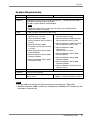
Problems
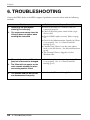
6.
Configuration Backups / Store
Configurations / Backup Firmware
/Store Firmware commands do not
work.
Points to check with possible solutions
Check if the [Administration Console] of Client
is set properly. See ‘3-1. Client Terminal’s
Settings (p.15).
Confirm the access to the FTP server.
The FTP server access may not be available for
writing.
Follow the FTP server naming rules according to
the naming configuration file names and
firmware file name.
Check the followings if the FTP server name
cannot be solved.
• Check if the DNS server name in each Client is
correct.
• Check if the DNS server name in the DHCP
server is correct when the DNS server obtaining
an IP address from the DHCP server.
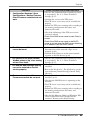
7.
The Clients on a different network
cannot be found.
Make sure the FTP server settings and
determination of the network range are set
properly (p.43).
Confirm if the Clients is on the same network
segment as the NA Service (p.44).
8. The [Status] in the main Console
Window remains “Up” after turning
off the Client itself.
Check if the [Administration Console] of Client
is set properly. See ‘3-1. Client Terminal’s
Settings (p.15).
9. The Remote Boot Manager Setting
can not be selected on the NA
service property.
Check if the Microsoft Remote Boot Service is
installed.
Restart the NA Service. The NA Service can be
restrated from [Control Panel]-[Control Tool][Service].
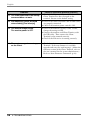
10. Firmware backups and Store
Fimware commands do not work.
Check if the Microsoft Remote Boot Service is
installed. (p.12)
Check in the DHCP Service is operating on the
network.
The FTP server access may not be available for
writing.
Follow the FTP server naming rules according to
the naming configuration file names and
firmware file name.
Check if the Ethernet Address of Windows XPe
Client Terminal has been changed on the
terminal. Return to the default setting.
6. TROUBLESHOOTING
55