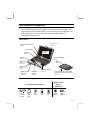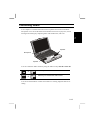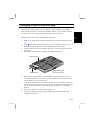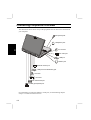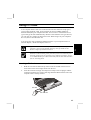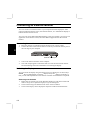
1
Notice for Users in Australia Service Inquiries Please contact your dealer for service if required or contact Sharp Corporation of Australia on 1-800-807820 (free call) for referral to your nearest Sharp authorised Service Centre. Details can be found on the warranty card inserted with the documentation. Copyright Copyright may exist in material you wish to record. Copying or broadcasting such material without permission of the relevant licensees or owners of the copyright is prohibited by law. SHARP is not in a position to authorise the copying or broadcasting of copyright materials and nothing in this OPERATION MANUAL should be implied as giving that authority. Warning For safety reasons, only connect equipment with a telecommunications compliance label. This includes customer equipment previously labelled permitted or certified. i Notice for Users in the UK IMPORTANT The wires in this mains lead are coloured in accordance with the following code: BLUE: Neutral BROWN: Live As the colours of the wires in the mains lead of this apparatus may not correspond with the coloured markings identifying the terminals in your plug proceed as follows. The wire which is coloured BLUE must be connected to the terminal which is marked with the letter N or coloured black. The wire which is coloured BROWN must be connected to the terminal which is marked with the letter L or coloured red. This apparatus must be protected by a 3A fuse in the mains plug or distribution board. Copyright Recording and playback of any material may require consent, which SHARP is unable to give. Please refer particularly to the provisions of the Copyright Act 1956, the Dramatic and Musical Performers Protection Act 1958, the Performers Protection Acts 1963 and 1972 and to any subsequent statutory enactments and orders. ii Notice for Users in Europe About the Modem Your Sharp PC-AR series with integral modem has been designed to work with the analogue PSTN’s in the following countries: ! ! ! ! ! United Kingdom Ireland Italy Germany Switzerland If you wish to connect the equipment to the PSTN in a country not listed above, you should contact your equipment supplier for further details. The modem is not designed for use on a shared service line or a line equipped with a call waiting facility. If you attempt to use the modem on a telephone line with call waiting, you may experience communication errors. To maintain CTR21 network compatibility when used in the above listed countries the following setting should be observed: Pulse dial may not be available in some countries. Modem Name: T18N040.00 Intended Use This is a Personal Computer with Modem for the analogue PSTN network which operates in all UK, Irish, Italian, German, Swiss networks which follow the CTR21 Standard. If you are in doubt whether your network follows the CTR21, please contact your dealer or network operator. iii This equipment complies with the requirements of the Directive 1999/5/EC. Dieses Gerät entspricht den Anforderungen der EG-Richtlinien 1999/5/EC. Ce matériel répond aux exigences contenues dans les directives 1999/5/EC. Dit apparaat voldoet aan de eisen van de richtlijnen 1999/5/EC. Dette udstyr overholder kravene i direktiv nr. 1999/5/EC. Quest' apparecchio è conforme ai requisiti delle direttive 1999/5/EC. Η εγκατασταση αυτη ανταποκρινεται στιζ απαιτησειζ των οδηγιων τηζ Ευρωπαïκηζ Ενωσηζ 1999/5/EC . Este equipamento obedece às exigências das directivas 1999/5/EC. Este aparato satisface las exigencias de las Directivas 1999/5/EC. Denna utrustning uppfyller kraven enligt riktlinjerna 1999/5/EC. Dette produktet oppfyller betingelsene i direktivene 1999/5/EC. Tämä laite täyttää direktiivien 1999/5/EC. iv CAUTION: TO PREVENT ELECTRICAL SHOCK, DISCONNECT THE AC CORD AND THE BATTERY BEFORE SERVICING. CAUTION: FOR A COMPLETE ELECTRICAL DISCONNECTION, PULL OUT THE MAIN PLUG AND THE BATTERY. VORSICHT: UM DIE STROMZUFUHR VOLLSTÄNDIG ZU UNTERBRECHEN, DEN NETZSTECKER HERAUSZIEHEN UND DIE BATTERIE ÈNTFERNEN. ATTENTION: POUR UN ARRET TOTAL DU SYSTEME, DECONNECTEZ LA PRISE DE COURANT SECTEUR ET LA BATTERIE. VARNING: FÖR TOTAL ELEKTRISK URKOPPLING, KOPPLA UR KONTAKTEN OCH TA UR BATTERIET. PRECAUCION: PARA UNA COMPLETA DESCONEXION ELECTRICA DESENCHUFE LA CLAVIJA DE LA RED Y LA BATERIA. v Safety Precautions General • • Follow all cautions and instructions which may be marked on the computer. Except as described elsewhere in this manual, refer all servicing to qualified personnel. Immediately shut off the computer and seek servicing under the following conditions: • when the power cord or plug is damaged or frayed • if liquid has been spilled on the computer • if the computer has been dropped or the cabinet has been damaged Location • • • • • • • • Do not expose the computer to direct sunlight. Try to avoid dusty environments. Keep the computer away from any magnetic devices and TVs. Keep the computer away from excessive humidity or fluids such as rain, snow, water spray, juice, coffee, steam, etc. Do not move the computer from an extremely cold place to an extremely warm place. A temperature difference of more than 10°C (18°F) will cause condensation inside the unit, which may cause damage. Do not block or cover slots or openings on the cabinet. These protect the computer from overheating. Care should be exercised when using on heat sensitive surfaces or your lap as the base of this computer will get hot. Do not smoke near your computer. Usage • • • • vi Never push any objects of any kind into cabinet openings. They may touch dangerous voltage points or short parts that could result in fire or electrical shock. Turn off the computer before installing or removing a peripheral device (except when connecting USB devices, IEEE1394 devices and PC cards). Check the AC power cord and power connectors periodically for damage. Replace the power cord immediately if damage is found. Never subject your computer to sudden shocks or extreme vibration. • • • Do not drop the computer nor hit it with other equipment. Do not scratch the surface of the LCD screen. Turn off the computer and disconnect the AC power cord before cleaning. Battery Pack Precautions CAUTION DANGER OF EXPLOSION IF BATTERY IS INCORRECTLY REPLACED. REPLACE ONLY WITH THE SAME OR EQUIVALENT TYPE RECOMMANDED BY THE MANUFACTURER. DISCARD USED BATTERIES ACCORDING TO THE MANUFACTURER'S INSTRUCTIONS. Handling • • • • • • • Never put the battery pack in a fire, as it could explode and cause injury. Do not attempt to open or alter the battery pack. Do not place the battery where it might get hotter than 60°C (140°F). Do not allow metal objects such as jewelry to short across the battery terminals, as it could heat up and explode. Do not allow liquids to come in contact with the battery pack. Avoid dropping the pack or other violent shock. Do not solder anything to the battery terminals. Charging • Charge the battery pack only with the AC adapter included with your computer. Discharging • Do not use the battery pack for any purpose other than powering the computer. vii Storage • • Store the battery pack in a cool and dry place. Never allow the temperature to exceed 60°C (140°F) during storage. Recharge the battery pack after storage, before use. Modem Precautions • • • • • • viii Never install telephone wiring during a lightning storm. Never install telephone jacks in wet locations unless the jack is specifically designed for wet locations. Never touch uninsulated telephone wires or terminals unless the telephone line has been disconnected at the network interface. Use caution when installing or modifying telephone lines. Avoid using the telephone during a lightning storm. There may be a remote risk of electric shock from lightning. Do not use the telephone to report a gas leak while in the vicinity of the leak. About This Manual Notice Information in this manual is subject to change without notice and does not represent a commitment on the part of SHARP Corporation. SHARP Corporation shall not be liable for technical or editorial errors or omissions contained herein; nor for incidental or consequential damages resulting from the furnishing, performance, or use of this material. SHARP strongly recommends that separate permanent written records be kept of all important data. Data may be lost or altered in virtually any electronic memory product under certain circumstances. Therefore, SHARP assumes no responsibility for data lost or otherwise rendered unusable whether as a result of improper use, repairs, defects, battery replacement, use after the specified battery life has expired, or any other causes. SHARP assumes no responsibility directly or indirectly, for financial losses or claims from third persons resulting from the use of this product and any of its functions, such as stolen credit card numbers, the loss of or alteration of stored data, etc. Edition 1st Edition, October 2000. Copyright © 2000 SHARP Corporation This document contains or refers to proprietary information which is protected by copyright. All rights are reserved. Copying or other reproduction of this document is prohibited without the prior written permission of SHARP Corporation. Trademarks Pentium is a registered trademark, and Celeron is a trademark, of Intel Corporation. IBM and PS/2 are trademarks of International Business Machines Corporation. Microsoft, MS-DOS, Windows, and the Windows Logo are registered trademarks of Microsoft Corporation. All other brand and product names are trademarks or registered trademarks of their respective holders. ix Recording Important Information For future reference, please record the following information in the spaces provided below. Model Number: Serial Number: Date of purchase: Dealer’s Name: Place of purchase: Password: The serial number is printed on a sticker located on the bottom of the computer. x Manual Conventions This manual uses a set of style conventions described below. Notes and Cautions are italicized with icons: A note icon informs you of a special technique or information that may help you perform a task or better understand a process. A caution icon alerts you to something that may cause problems or damage to hardware, software or data. Key Labels on the Keyboard, when referred to in the instructions, are shown in boldface: Press Enter to continue. When two or more keys are pressed simultaneously, the key labels are separated by a plus (+) sign: Restart your computer by pressing Ctrl+Alt+Delete. When necessary, important key combinations are shown in graphics: Sample Entries are shown in upper cases of different typeface. In the following case, press the Enter key after you type the command: C:\>DIR A: Enter Words/Texts on Screen, such as window titles or possible parameters, are italicized: Double-click this icon to display the Power Properties window. Set the item to Enabled. Screens reproduced in this manual may differ slightly from the screens you see on your computer. Section Titles in other parts of this manual are italicized: Refer to Adding a memory module section in Chapter 6. xi Table of Contents Notice for Users in Australia ......................................................................................i Notice for Users in the UK ........................................................................................ii Notice for Users in Europe .......................................................................................iii Safety Precautions.....................................................................................................vi About This Manual ...................................................................................................ix Recording Important Information .............................................................................. x Manual Conventions .................................................................................................xi Table of Contents.....................................................................................................xii Overview of Computer............................................................................................. xv Fast Start Connecting AC Power ............................................................................................1-1 Setting Up Windows Me.........................................................................................1-4 Turning Off Your Computer ...................................................................................1-5 Basic Operations Powering the Computer ..........................................................................................2-1 Resetting the System...............................................................................................2-3 Using the Keyboard ................................................................................................2-4 Using the Quick Start Buttons ................................................................................2-7 Using the Glide Pad ................................................................................................2-8 Reading the Status Indicators................................................................................2-10 Adjusting the Display ...........................................................................................2-11 Controlling Audio .................................................................................................2-13 Using the Drives ...................................................................................................2-14 Changing a Unit in the Unit Bay...........................................................................2-17 Using the CD-RW Drive.......................................................................................2-19 Using the Floppy Disk Drive Externally...............................................................2-21 Battery and Power Management Battery Pack............................................................................................................3-1 Battery Charging.....................................................................................................3-2 Battery Low Warnings ............................................................................................3-4 Battery Conditioning...............................................................................................3-6 Removing a Standard Internal Battery Pack ...........................................................3-7 xii Programmable Power Management........................................................................ 3-8 Power Management Hot-keys .............................................................................. 3-12 Connecting Peripherals Using Peripheral Devices ....................................................................................... 4-1 Connecting Peripherals Overview.......................................................................... 4-2 Using PC Cards ...................................................................................................... 4-3 Connecting an External Monitor ............................................................................ 4-6 Connecting Headphones and a Microphone......................................................... 4-10 Connecting USB Devices..................................................................................... 4-10 Connecting a Printer............................................................................................. 4-11 Connecting a Serial Device .................................................................................. 4-12 Connecting a PS/2 Keyboard or Pointing Device................................................. 4-13 Connecting an IEEE 1394 Device........................................................................ 4-13 Communication Functions Built-in Modem (may not be available in some countries)..................................... 5-1 LAN unit ................................................................................................................ 5-4 Changing or Adding Options Adding a Memory Module ..................................................................................... 6-1 Removing a Memory Module................................................................................. 6-2 Using the Optional Port Replicator (may not be available in some countries) ...... 6-3 Security Features Passwords............................................................................................................... 7-1 Using a Security Cable ........................................................................................... 7-4 Setup Utility Running the Setup Utility....................................................................................... 8-1 Main Page .............................................................................................................. 8-3 Advanced Page....................................................................................................... 8-4 Security Page.......................................................................................................... 8-5 Power Page............................................................................................................. 8-6 Boot Page ............................................................................................................... 8-7 Exit Page ................................................................................................................ 8-7 xiii Appendices Appendix 1: Troubleshooting ................................................................................A-1 Appendix 2: Care & Maintenance .........................................................................A-8 Appendix 3: Specifications ..................................................................................A-10 Index Index ................................................................................................................Index-1 xiv Overview of Computer In the following diagram, the labels in italics refer to the chapter and page number in this manual where you can find more information. The actual appearance of your computer may be slightly different depending on the model. Front View LCD screen System status indicators See 2-10 See 2-9 Power switch Microphone Keyboard See 2-12 See 2-4 Glide pad Quick Start Buttons See 2-8 See 2-7 Headphone Jack See 4-10 Microphone Jack See 4-10 Stereo Speakers Battery & power indicators Glide pad buttons See 2-2 See 2-8 See 2-12 Floppy disk drive in the optional floppy disk drive box (CE-FC02) See 2-14, 2-17 Front View Markings Battery and power indicators System Status Indicators CD or Hard disk activity Floppy disk activity Num lock Caps lock Scroll lock Power Indicator Battery indicator xv Manual Conventions This manual uses a set of style conventions described below. Notes and Cautions are italicized with icons: A note icon informs you of a special technique or information that may help you perform a task or better understand a process. A caution icon alerts you to something that may cause problems or damage to hardware, software or data. Key Labels on the Keyboard, when referred to in the instructions, are shown in boldface: Press Enter to continue. When two or more keys are pressed simultaneously, the key labels are separated by a plus (+) sign: Restart your computer by pressing Ctrl+Alt+Delete. When necessary, important key combinations are shown in graphics: Sample Entries are shown in upper cases of different typeface. In the following case, press the Enter key after you type the command: C:\>DIR A: Enter Words/Texts on Screen, such as window titles or possible parameters, are italicized: Double-click this icon to display the Power Properties window. Set the item to Enabled. Screens reproduced in this manual may differ slightly from the screens you see on your computer. Section Titles in other parts of this manual are italicized: Refer to Adding a memory module section in Chapter 6. xi xvi Right Side View Drive activity indicator Eject tray button Drive bay with CD-RW drive installed Manual tray eject button (recessed) See 2-15, 2-16 Left Side View Ventilation openings USB port PC card slots See 4-10 See 4-3 Security slot See 7-4 Modem jack See 5-1 (may not be available in some countries) IEEE 1394 Port PC card eject buttons See 4-4 See 4-13 xvii Rear View Parallel/FDD port LAN jack External monitor port See 4-11 See 5-4 See 4-6 RS-232C Serial port USB port AC adapter jack See 4-12 See 4-10 See 1-1 PS/2 port See 4-13 Bottom View Port replicator docking connector See 6-6 Memory module compartment See 6-3 Drive bay lock latch Reset switch (recessed) See 2-3 Battery lock button CD-RW drive installed in drive bay See 2-15, 2-16 Battery release lever Battery See 3-1, 3-5 xviii CHAPTER 1 1 Fast Start Your new computer is ready to use as soon as you unpack it from the box. If you’re familiar with computers, follow the instructions in this chapter to get your system up and running in just a few minutes. If this is your first computer, you should read through the entire Operation Manual before starting the system. Connecting AC Power Run your computer the first time using AC power, rather than battery power. This ensures that you will not lose power while you complete the Windows setup operation. • • Use only the AC adapter that was supplied with your computer, or supplied by your computer vendor. You can damage your computer if you try to use an AC adapter that is not approved for use with this system. When removing the AC power cord from a wall outlet, grip the plug and pull it from the socket. Never remove the power cord from the outlet by pulling on the cord. Always grip the plug. Place your computer on a flat working surface and follow the steps below. 1. 2. 3. 4. Turn over your computer on a soft flat surface. Align the left side of the standard battery along the left side of the battery compartment and lower it into place. Lower the right side of the battery all the way so that you feel the battery pack engages with the connector inside the compartment and the battery locks in place. Slide the battery lock button to the locked point. 1-1 Lower battery pack into battery compartment Battery release lever Battery lock button 1 Battery pack 5. 6. Turn over your computer. On the front edge of the computer, slide the cover latch to the right and raise the cover. Cover latch 7. 8. 1-2 Plug the cable from the AC adapter into the AC adapter jack on the rear side of the computer. Connect the power cord to the AC adapter. 1 AC adapter jack AC adapter To power outlet 9. Plug the power cord into a suitable power outlet. The orange battery charge indicator turns on when you connect AC power. 10. Press the power button located just above the F3 button on the keyboard. The green power indicator turns on when the power is turned on. Power Button Battery charge and power indicators 11. After a logo screen and several seconds of power-on testing, the computer loads the Windows Me operating system. 12. As this is the first time you have used your computer, Windows begins by running the Windows Me Setup Wizard. 1-3 Setting Up Windows Me 1 Windows Me is pre-installed on your computer, including the special drivers and software used by built-in components such as the audio and video system, the modem, and the PC card slot. The Windows Setup program lets you enter your personal data such as the date and time in your location, and so on. It takes just a few minutes to complete. The setup process has four steps: • Getting started This section configures your keyboard and your location. • Windows License This section asks you to accept the Windows License Agreement. • Registration This section configures your modem and registers your computer. • Final Settings This section completes the configuration of your system Once you start the system for the first time, be sure to complete the setup program. Windows may not display the Setup Wizard the next time you turn on the computer. About Windows Properties Dialog Boxes In this manual you are often asked to open a XXX Properties dialog box, such as the Modems Properties dialog box, or the Display Properties dialog box. These dialog boxes let you make changes to the configuration and operation of the component by clicking check boxes or selecting radio buttons. To open a property dialog box, from the Start menu in the taskbar at the foot of the Windows display select Settings Control Panel. When you open Control Panel for the first time, only commonly used items appear. You can open a property dialog box, or similar window, for the component or feature represented by that icon, by clicking the underlined name. If you want to show all items, click view all Control Panel options. You can open a property dialog box by double-clicking icons. Some of the Properties dialog boxes that are used to configure components in your computer include: • • • 1-4 Display Modems Mouse • • • PC Card Power Options System 1 Turning Off Your Computer When you’re finished using your computer, turn it off with the following steps: 1. 2. 3. From the Start menu, select Shut Down. In the Shut Down Windows dialog box, select Shut down from the pull-down menu, and click OK. The power indicator turns off. Close the cover to keep the screen and keyboard clean and protected. You can shut down the computer with the power button using the steps below: 1. 2. 3. 4. 5. From the Start menu, select Settings – Control Panel. Click view all Control Panel options. Double-click Power Options. In the Power Options Properties dialog box, click Advanced tab. Select Power Off in the drop down menu for “When I press the power button on my computer”, and then click Apply and OK. If you have not saved a file, a dialog box appears prompting you to save the file. • • Don’t turn off your computer if status indicators show that the computer is still accessing data on the hard disk drive, the floppy disk drive or the CD-RW drive. Data may be lost or damaged. After turning off the computer wait at least five seconds before turning the computer back on. Turning the computer off and on without a pause can damage the system. Since this is your first session using the computer, it’s a good idea to leave the AC adapter connected to the computer until the internal battery is fully charged. The orange battery charge indicator changes to green when the battery is fully charged. 1-5 CHAPTER 2 Basic Operations 2 This chapter describes some of the basic operations of your computer such as using the keyboard, adjusting the display, and so on. Powering the Computer You can operate your computer by using the AC adapter to connect to a suitable power outlet. You can also power the computer by the internal or an optional secondary Lithium-Ion battery Whenever you use the AC adapter to power the computer, the battery automatically begins recharging. Recharging continues whether the computer is turned on or off. Refer to Chapter 3 Battery and Power Management for a full description of battery charging and related information. 2-1 Power and Battery Indicators 2 For proper operations it is important to understand the operation of the power and battery indicators located on the left-side front corner. Indicator Meanings Green Power Indicator Icon Lamp State Status Turned on Turned off Computer is turned on Computer is turned off Computer is in System Slow blinking Standby mode Tri-color (green/red/orange) Battery Indicator Icon Lamp State Status Turned on orange Turned on green Turned on red Flashing red Flashing orange 2-2 Battery is charging Battery is fully charged Battery low warning Critical battery warning Abnormal condition – for example the battery may be installed incorrectly Resetting the System You may need to reset the system after adding hardware or software so that your computer recognizes newly installed devices or software. When the message appears after the installation, click OK, Yes, etc., to restart Windows Me. You can also restart Windows Me from the Start menu. Select Shut Down, then Restart. Warm Boot (Software Reset) If the system is locked up because of a software problem, you can reset or reboot the system by pressing the Ctrl+Alt+Del keys simultaneously. Press the Ctrl+Alt+Del keys again to restart the computer. Resetting may cause data loss. Use the software reset only if the normal Windows Me Shut Down does not work because of software malfunction. Although resetting does not damage the system, you may lose the data you are processing. Power Switch You can turn off the computer with the power switch if the system has hardware or software problems so that you can’t use the Windows Shut Down command or the software reset. In this case, you need to hold the power button down for more than four seconds. Reset Switch If all other methods fail, you can reset the computer by pressing the hardware reset switch. The hardware reset switch is in a recessed location on the base of the computer. Activate the switch with a straightened paper clip or similar implement. Reset switch (recessed) 2-3 2 Using the Keyboard 2 The built-in keyboard includes all the functions that you find on a full-sized keyboard. In addition, the keyboard has built-in hot keys that you can use to control some of the functions of the computer. The illustration below shows the location of some important keys on your keyboard. Function Keys FN Key Windows Key Keypad Area Windows Key Function Keys On their own, the operation of the function keys is usually determined by the software application that you are running. In combination with the Fn key they create hot-keys that you can use to control some of the computer functions. Icons embossed on the function key keycaps indicate the hot-key function. Embedded Keypad The numeric keypad is embedded in some of the right-side alphanumeric keys. The keypad functions are embossed in the upper right corner of the keypad keycaps. You activate the embedded numeric keypad by pressing the Num Lk key. Repeat the keystroke to turn off the embedded keypad. 2-4 The embedded numeric keypad will be disabled if an external keyboard is connected. If you want to enable it, set NumLock to Enabled in the Main menu of the Setup utility. See chapter 8 for more information. Windows Keys There are two different Windows keys as shown below. 2 Windows Start Key. This key opens the Windows Start menu on the taskbar. In combination with other keys it provides short cuts to some Windows functions. See Windows help for more information. Windows Pull-down Menu key. When an item is selected and this key is pressed, it pulls down a menu if one is available. It is similar to the right click of a mouse or glide pad. Fn (Function) Key Combinations You can activate hot-key system controls and various embedded keystrokes by holding down Fn key and then pressing any of the keys embossed with an icon or boxed text on the lower half of the key. Pops up an information box in the upper left corner of the screen – see the section Pop Up Information Box on the next page Switch display between the built-in screen, an external monitor, and a simultaneous display – see Chapter 4 Connecting Peripherals Press keys to decrease screen brightness – see Adjusting the Display later in this chapter Fn + F2 Fn + F5 Fn + F6 Fn + F7 + F8 Fn Press keys to decrease the audio volume – see Controlling the Audio later in this chapter + F9 Fn Press keys to increase the audio volume – see Controlling the Audio later in this chapter Fn + F11 Press keys to increase screen brightness – see Adjusting the Display later in this chapter Turns off the display backlight on the built-in screen – see Adjusting the Display later in this chapter 2-5 2 Fn + Fn + Fn + F12 NumLk ScrLk Puts the system into System standby/Hibernation– see Programmable Power Management in Chapter 3 Returns the Sys Request keystroke Returns the Scroll Lock keystroke Pop-Up Information Box When you hold down the Fn key and press the F2 function key, a pop-up information box appears for about five seconds in the top left corner of the display. The information box has the following information: NON BAT1 FUL XX % NON FUL BAT2 XX % BIOS 2-6 Shows BIOS version number. Standard battery is not installed. Standard battery is fully charged. Remaining capacity of standard battery as a percentage. Optional battery is not installed. Optional battery is fully charged. Remaining capacity of optional battery as a percentage. Using the Quick Start Buttons In addition to the function keys embedded on the keyboard as discussed before, your computer has five more quick start buttons located above the keyboard next to the power button. The buttons are identified by icons printed above each button. The use of each button can be user defined. From the Start menu, select Programs – Quick Start Button – Configuration to show the Quick Start Button Utility dialog box. You can drag-and-drop the application icons to the buttons in the dialogue box or right-click the button to change the settings. See online help for more details. Default assignments are: Button Button appearing in help System Function S1 Opens Windows Internet Explorer browser. S2 Opens Outlook Express. S3 Opens Easy CD Creator. S4 Opens Studio DV. S5 Opens PhotoSuite IIISE. 2-7 2 Using the Glide Pad 2 Your computer has a built-in pointing device called a glide pad. The glide pad consists of the glide pad surface, a left button and a right button. Glide pad surface Left button Right button Using the Glide Pad When you slide your finger across the glide pad surface, the pointer on the screen moves in the same direction as your fingertip. Clicking and double-clicking To click or double-click objects, you can use the left button, just as you do when using a mouse. You can also emulate a left button click or double-click by tapping once or twice with your fingertip on the glide pad surface. Clicking the right button pulls down a menu if one is available. This is the same function as the right click of a mouse. Drag and Drop You can drag and drop objects on the Windows desktop as follows: 1. Position the pointer over the object. 2. Press and hold down the left button. 3. Drag the object by moving your fingertip over the glide pad surface. 4. Drop the object into place by releasing the left button. • • 2-8 Do not use a pointed object, such as a pen or pencil to operate the glide pad, You might scratch or damage the surface. Do not operate the glide pad with a moist finger. This may cause the glide pad to operate incorrectly. Changing the Glide Pad Configuration You can change the way the glide pad operates in the Mouse Properties dialog box. From Windows Start menu, select Settings - Control Panel and double-click Mouse to open up the Mouse Properties dialog box. Click on any of the tabs; Buttons, or Pointers. Use the checkboxes, drop down menus, and so on, to configure the glide pad so that it operates to your satisfaction. 2 Disabling the Glide Pad If you want to disable the glide pad when a mouse is connected, follow the instructions below. 1. From the Start menu, select Settings – Control Panel. 2. Click View all Control Panel options. 3. Double-click Mouse icon. 4. Select Touch tab, and check Disable this Device. This action ignores the settings on Pointing Device of Main menu of the Setup Utility. 2-9 Reading the Status Indicators 2 As well as the Power and Battery Charge indicators discussed before, your computer has five more status indicators located above the keyboard between the power button and the quick start buttons. The indicators are identified by icons printed above each lamp. Indicator Icon System Status This indicator turns on when your computer is reading or writing to the hard disk drive or a CD in the CD-RW drive. This indicator turns on when your computer is reading or writing to a disk in the floppy disk drive. This indicator turns on when the Num Lock key has been pressed and the embedded numeric keypad is activated. This indicator turns on when the Caps Lock key has been pressed and the keyboard is in Caps Lock mode. This indicator turns on when Fn and the Scroll Lock key have been pressed and the cursor arrow keys are in scroll lock mode. 2-10 Adjusting the Display The most important adjustment you can make to the display is to set it to the best viewing angle. The display contrast decreases if you look at it from a wide angle above or below, or from side to side. 2 Changing the Brightness Change the screen brightness by using the Fn+F6 and Fn+F7 hot keys. Press keys to decrease screen brightness Fn + F6 Fn + F7 Press keys to increase screen brightness When you press the screen brightness hot keys to adjust the display, a pop-up screen brightness meter appears in the upper left corner of the display. You can use the popup meter as a visual guide to set the screen brightness. Decreasing the screen brightness is an effective way of reducing the power consumption of your computer when you are operating the computer on battery power. Turning off the Display You might want to turn off the display when you are not using your computer for short periods. This can help reduce power consumption. Use the display power down hot keys Fn+F11. Fn + Turns off the display on the built-in screen F11 You can turn the display back on by pressing any key on the keyboard or Fn +F11key again. 2-11 Changing the Display Properties The Windows Display Properties dialog box lets you make many different kinds of changes to the appearance of the screen under Windows. 2 Place the screen pointer on any empty area of the Windows desktop and click the right glide pad button to pull down a menu. Click on Properties to open the Display Properties window. Use the tabs on the Display Properties dialog box to make adjustments to the following display properties: Background, Screen Saver, Appearance, Effects, Web, and Settings, etc. Using the Settings Tab The Settings tab lets you make changes to the resolution and color depth of the display. The standard display setting for your computer is a resolution of 1024 x 768 pixels. If you select a smaller resolution, the image on the built-in display will stretch to occupy the whole screen. This might cause the image to be somewhat deformed. If you select a larger resolution, the display will extend beyond the edges of the built-in screen. You can scroll the enlarged display by moving the screen pointer to the edges of the display. The standard color depth for your computer is High Color (16bit). You might need to change down to a lower color depth in order to run some computer programs or games. Advanced Settings and Switching the Display Your computer has hot keys to switch the display when you are connected to an external monitor. In the Display Properties window, the Advanced settings button in the Settings tab window has other options for switching the display including a dual independent display that lets you run separate applications on the built-in screen and an external monitor. Turn to Connecting an External Monitor in Chapter 4 for more information on this topic. 2-12 Controlling Audio Your computer is installed with built-in stereo speakers and a built-in monaural microphone. You can use Windows entertainment accessories to play CDs, record messages and sound, play computer games with sound tracks, and so on. 2 Speaker Microphone Speaker You can control the audio volume by using the audio hot keys Fn+F8 and Fn+F9. + F8 Press keys to decrease the audio volume Fn + F9 Press keys to increase the audio volume Fn You can use the Windows volume control meter to visually judge the audio level setting. 2-13 Using the Drives 2 Your computer has three different drives; the internal hard disk drive, the CD-RW drive unit, and the floppy disk drive unit. The CD-RW and floppy disk drive unit can be installed in the unit bay on the right side of the computer. If you want to use the CD-RW and the floppy disk drive at the same time, you can install the CD-RW drive in the unit bay, and use the floppy disk drive as an external component connected to your computer through the parallel/FDD port on the back of the computer. The floppy disk drive has an optional box (CE-FC02) to use the drive externally. Drive Properties You can learn about the properties of the drives by double-clicking the My Computer icon on the Windows desktop. In the My Computer window, right click on any of the drives and select Properties from the drop down menu to display the capacity of the drive, and other information. Hard disk drive Your computer has a high-capacity hard disk drive installed internally. Your computer identifies the hard disk drive as drive C:. The hard disk is pre-installed with the Windows Me operating system and the software and drivers required to run all the components of your computer. When you install software applications and use them to create files and documents, you store them in folders on the hard disk drive. You can use Windows Explorer to create new folders and sub-folders and navigate and maintain the folders and files that are stored on the hard disk. If your hard disk drive ever gets corrupted, you can use the Recovery CD to recreate the state of the hard disk drive when it was first shipped. However, you will lose any files that you have subsequently created unless you have backed them up to another storage device. For information on using the Recovery CD, see Re-installation Instructions. 2-14 CD-RW drive The CD-RW drive lets you read information from CDs. You can also write information to CD-R/RW disks using the installed applications called Easy CD Creator or Direct CD. For more details, see online help of the applications. Your computer identifies the CD-RW drive as drive R:. Many software applications and reference works are shipped on CDs because they store over 600 MB of data. Using Windows entertainment accessories, you can also use the CD-RW drive to play CD-Audio disks and Video CD disks. While you write information to CD-R/RW: • Connect AC adapter to your computer. • Close any other applications except those necessary for writing information. • Do not enter System Standby/Hibernation. • Disable the screen saver. • Do not touch keyboard, mouse or buttons on the computer. Floppy Disk Drive The floppy disk drive is a useful tool because practically all computers can read and write to 3.5-inch floppy disks with a storage capacity of 720K or 1.44 MB. Your computer identifies the floppy disk drive as drive A:. When you need to store a file, or transfer a file to a friend or colleague’s computer, it’s very convenient to use a floppy disk. Handling Floppy Disks • • • • Do not open the shutter and touch the disk inside; otherwise, you will not be able to read or write data to the disk. Do not place floppy disks near magnets or heat source, in direct sunlight or in a dusty place, etc. Never subject a disk to sudden shocks or extreme vibration. Do not drop, bend, or place heavy objects on a disk. Do not spill liquid onto a disk. • • • Always insert a floppy disk straight into the floppy disk drive. When inserting the disk, make sure it is not upside down. Do not use excessive force when inserting the floppy disk. If you have difficulty inserting or removing disks, seek the assistance of an authorized service technician. 2-15 2 • • 2 2-16 Do not touch the disc while reading/writing data. It may cause malfunction of the computer and the drive. Before removing the floppy disk, make sure the indicator of the floppy disk drive unit is not lit. Changing a Unit in the Unit Bay The Unit bay on the right side of your computer can be installed with a CD-RW drive, a floppy disk drive or an optional secondary battery. Your computer supports hot-swap, so you can change units without turning off your computer. 2 Change the units in the bay by following the steps below. 1. 2. 3. 4. 5. Remove any floppy disks or CDs from the drive if currently installed in the unit bay. Click icon on the taskbar; then Change device in Swappable Bay (xxxxx). Read the message in BaySwap window carefully (Do not click OK). Close the upper cover of the computer; then turn it over and locate the unit bay lock latch. Slide the latch towards the rear edge of the computer and hold. Drive lock latch CD-RW drive 6. 7. 8. 9. Raised ribs to push unit out of the bay Slide the unit out by pushing on the raised ribs on the bottom of the unit. You can release the lock latch once the unit is partly removed from the unit bay. Pull the unit all the way out of the unit bay. Position the replacement unit correctly and insert it into the unit bay. Push it all the way in so that you feel the connector on the rear edge of the unit engage with the connector inside the bay. Verify that the drive lock latch is in the locked position. Turn your computer over and open the upper cover. Click OK in BaySwap window. Your computer automatically registers and configures the new unit. 2-17 For information on using an optional secondary battery, see Battery and Power Management of chapter 3. 2 When removing an optional secondary battery, make sure the internal standard battery has power remaining, or connect your computer to AC power; otherwise your computer will be shut down and data may be lost. 2-18 Using the CD-RW Drive If the CD-RW drive is installed in the unit bay, use it as follows. 1. Locate and identify the three features on the front of the CD-RW drive; the eject tray button, the recessed mechanical eject button, and the drive activity indicator. Activity indicator Eject tray button Manual tray eject button (recessed) 2. 3. 4. 5. Press the eject tray button to eject the tray for the CDs. Place the CD on the tray so that the central hole in the CD fits over the spindle in the disk tray. Don’t apply excess downward force on the disk tray. Press the tray back into the CD-RW drive until it clicks closed. To remove a CD, wait until the activity indicator shows that the disk in the drive is not being read. Press the eject tray button and remove the disk from the tray. If you need to remove a CD from the drive while the computer is turned off, or while the drive module is removed from the computer, insert the end of a paper clip, or similar utensil, into the manual tray eject button. This unlocks the try and lets you pull the tray all the way open to remove the CD. Handling CDs • • • Do not write on either side of the disc, particularly the non-label side. Data is read from the non-label side. Do not mark this surface. Keep your discs away from direct sunlight, heat and excessive moisture. Always hold the CDs by the edges. Fingerprints, dirt or water on the CDs can cause noise or mistracking. If a CD is dirty or does not play properly, clean it with a soft, dry cloth, wiping straight out from the center, along the radius. 2-19 2 • • • 2 • • When inserting a CD, do not use force. Make sure the CD is correctly inserted into the tray, then close the tray. Do not leave the tray open. Also, avoid touching the lens in the tray. If the lens becomes dirty, the CD-RW drive may malfunction. Do not wipe the lens with materials with rough surface (such as paper towels). Instead, use a cotton swab to gently wipe the lens. Maximum output and wavelength of the laser: 85mW, 785nm CLASS 1LASER PRODUCT LASER KLASSE 1 FDA regulations require the following statement for all laser-based devices: “Caution, Use of controls or adjustments or performance of procedures other than those specified herein may result in hazardous radiation exposure.” 2-20 Using the Floppy Disk Drive Externally To remove the floppy disk drive from the optional floppy disk drive box (CE-FC02), release the lock latch on the base of the cover and pull the floppy disk drive out of the box. 2 Release lock latch on the base Pull drive out of box To use the floppy disk drive as an external drive, follow the steps below: 1. 2. 3. 4. Install the floppy disk drive into the floppy disk drive box. Simply slide the drive in until it clicks into place. Shut down your computer. Plug the cable from the floppy disk drive box into the parallel/FDD port on the rear edge of the computer. Restart your computer. 2-21 CHAPTER 3 Battery and Power Management This chapter explains how to charge your computer’s internal or an optional secondary battery and how to keep them in good condition. It also explains how you can use the power management features to maximize battery life while operating under battery power. Battery Pack The removable battery pack is installed in the base of the computer. If you have an optional secondary battery pack (Model CE-BL11), you can extend the operating time of your computer when there is no AC power available. See Installing a Unit in the Bay of chapter 2 for installing an optional secondary battery pack. The length of time you can run your computer using a fully-charged battery pack is variable. If you are using applications that make heavy use of peripheral items such as the hard disk drive or the CD-RW drive, the battery discharges in a shorter time. If your battery is older and has already been through many cycles of charging and discharging, it stores less charge. Finally, the temperature and environment can influence battery life. After you have operated your computer using battery power only, you will have a good idea of how long it takes a fully-charged battery to discharge. Use this time as a standard. If the battery begins discharging in a significantly shorter time, and you are not using your computer in a different manner, or have not changed the power management settings, it may indicate a battery problem. After repeated cycles of charging and discharging, all batteries store less charge. Expect a gradual decrease in battery life after a few hundred cycles of charging and discharging. When battery life becomes too short, ask your local dealer for replacement standard battery pack. 3-1 3 Battery Charging The battery packs begin charging anytime your computer is connected to AC power using the AC adapter. If the standard battery pack is fully discharged and your computer is turned off or in System hibernate, it fully recharges in about 2 hours. If the standard battery pack is fully discharged and your computer is turned on, it fully recharges in about 4 hours. 3 If an optional secondary battery is installed in to the drive bay, it will be charged together with the standard battery. In this case, the standard battery is charged first; then, an optional secondary battery is charged. If the standard and an optional secondary battery are fully discharged and your computer is turned off or in System hibernate, they fully recharge in about 5 hours. If the standard and an optional secondary battery are fully discharged and your computer is turned on, the charging time may vary depending on usage. Your computer monitors the internal temperature of the unit. If the unit gets critically hot, battery charging (which generates some heat) is interrupted until the temperature decreases. This can account for slightly longer battery charging times. You can track the charging status of the battery pack using the battery indicator located next to the power indicator. The battery charge indicator shows the following conditions: Tri-color (green/red/orange) Battery Indicator Icon Lamp State Status Turned on orange Turned on green Turned on red Flashing red Flashing orange 3-2 Battery is charging Battery is fully charged Battery low warning Critical battery warning Abnormal condition – for example the battery may be installed incorrectly Or you can use the battery charge indicator located on the corner of the standard battery. There are 5 indicator lamps, and if you press the button above lamps, they will show you the charging status. If all 5 lamps are lit, the battery is fully charged. If only an orange lamp is lit, it will discharge soon. An optional secondary battery also has the battery charge indicator. If you press a white circle, lamps will show you the charging status. The charging status is same as that of the standard battery. Battery Indicator Status Orange Green All On Green Four On 60%~79% Orange Orange Green Three On 40%~59% Orange Green Two On 20%~39% Orange Green Orange only On 11%~19% Orange Blinking Under 10% All Off 0%(Empty) Orange Green Orange Green 3 Capacity Remaining 80%~100% 3-3 Battery Low Warnings The battery low warnings are set in Windows Power Options properties dialog box. Click Alarms tab, and you can set a Low battery alarm and a Critical battery alarm. The alarms are triggered when battery charge decreases to a user-defined percentage set. 3 We recommend that you set the Low battery alarm to about 10% and the Critical battery alarm to about 3-5%. The battery charge percentages are not extremely accurate and the power consumption of different applications are not identical, so it’s important to allow for a margin of error. The primary aim is to save your data before the system shuts down when the battery is fully discharged. Following the battery low alarms that you have set, we recommend that you save your work and shut down your computer when there is about 5% of battery charge remaining. In this condition, you can be confident that you have enough power to power the hard disk drive or floppy disk drive and save even the longest of files. 3-4 After you have shut down your computer in a low battery condition, don’t try to restart the computer until you have replaced the discharged battery with a charged battery pack, or connected the computer to a power outlet using the AC adapter. 3 3-5 Battery Conditioning If you feel that the battery charge meter in Windows is becoming inaccurate, we recommend that you ”condition” the battery using the following steps below. The following procedure helps to keep your battery in good condition so we suggest that you carry out the procedure each time you complete about 30 cycles of charging and discharging the battery pack. 3 1. 2. 3. 4. 5. 6. 7. 8. 9. Connect your computer to a power outlet with the AC adapter. Leave the computer connected to the power outlet until the battery indicator turns green to indicate that the battery is fully charged. Turn on the computer. When the Sharp logo appears with the prompt <ESC> for Diagnostic screen, <F2> for Setup, press F2 to enter the setup utility. In the Power page of the setup utility, highlight the item Power Management Control. Press the Space bar to change the value of this item to Disabled. Go to the Exit page of the setup utility, highlight Exit Saving Changes and press Enter. Press Enter again when the dialog asks for confirmation. When the system restarts and the Sharp logo and prompt appear, press F2 again to enter the setup utility. Disconnect the AC adapter from the computer and leave the computer turned on and the setup utility open until the battery completely discharges and the computer shuts down automatically. Connect the AC adapter to the computer and leave it connected until the battery is fully charged. After you have completed the conditioning procedure, return the power management setting in the setup utility to the original state. The whole conditioning process will take about 9 hours if only a standard battery is installed. If you want to condition an optional battery, install the optional battery, and remove the standard battery. With the standard battery installed, the optional battery cannot be conditioned. The whole conditioning process for the optional battery will take about 7 hours. 3-6 Removing a Standard Internal Battery Pack 1. 2. 3. 4. Turn off the computer and close the upper cover. Turn the computer over and lay on a soft surface. On the base of the computer, locate the battery pack and the battery lock button. Slide the battery lock button to the unlocked potion. Lift battery pack out of battery compartment Battery release lever Battery lock button 3 Battery pack 5. 6. 7. Slide the battery release lever towards the back and hold it, this will release and lift the right edge of the battery pack out of the compartment. Grab the edge of the battery pack and lift it out of the battery compartment. You can release the battery release lever once the battery pack is partially removed. Remove the battery completely. For installing a standard internal battery pack, see Connecting to AC Power of chapter 1. 3-7 Programmable Power Management Your computer supports ACPI (Advanced Configuration and Power management Interface) which is a powerful feature of the Windows Me operating system. Therefore you can select and control all the power management of your computer through the Windows Power Options properties application in Windows Control Panel. If you ever run your computer using an operating system that does not have ACPI, you can use the power management features that are built into the system hardware. You can select and control these routines using the setup utility. See Power Page in Chapter 8 for more information. 3 Running the Power Options properties Application To show the Power Options properties dialog box: 1. From the Start menu, select Settings - Control Panel. 2. Click view all Control Panel options. 3. Double-click Power Options to display the Power Options properties window. 3-8 Intel Speed Step Technology You can control processor core speed to reduce the power consumption with Intel or icon and select Adjust Properties to Speed Step technology. Right-click change the performance. Setting Power Schemes The Power Options properties dialog box opens on the Power Schemes tab. You can use this dialog box to create and name different Power Schemes. For each Power Scheme, you can use the drop down menus to set the timeouts for System standby, for System Hibernate, for Turn off monitor, and for Turn off hard disks. A timeout defines the length of time a component remains inactive before it is automatically turned off. For example, if you set the System standby to 10 minutes, your computer will automatically enter System standby mode if it is inactive for 10 minutes. If you set Turn off monitor to 5 minutes, the built-in screen will turn off automatically if there is no video activity for 5 minutes. You can create one set of timeouts that function when the computer is connected to a power outlet with the AC adapter, and another set of timeouts that function when the computer is running on battery power. About System Standby Mode In System Standby mode, practically all devices are powered down with the exception of the system memory, the video memory, the PC Card controller and the system realtime clock, and the current condition of the computer is stored in RAM. In this mode, the computer remains active but with the minimum possible power consumption. You can return to full power by operating the computer again. About System Hibernate Mode System Hibernate mode is really another way of turning off your computer. When your computer enters System Hibernate mode, the contents of your computer's memory are copied to your hard disk drive as a file. When the contents of the memory have been safely stored to disk, your computer turns off. The next time the computer resumes from System Hibernate, the file on the hard disk is quickly read into memory. In just a few moments your computer appears exactly as it was when your computer enters System Hibernate mode last time. 3-9 3 Supporting System Hibernate To support System Hibernate mode, you need to perform the following: 1. In the Power Options properties dialog box, select Hibernate tab. 2. Check Enable hibernate support. 3. Click Apply and OK. Entering System Standby/Hibernate 3 Your computer will enter System Standby/Hibernate under several sets of conditions as follows: • The System stand by/System hibernate timeout in the Power Options properties dialog box elapses. • Hot keys Fn+F12 are pressed. This functions if you perform the following: 1. In the Power Options properties dialog box, select Advanced tab. 2. Select Hibernate or Stand By in When I press the sleep button on my computer. 3. Click Apply and OK. • The upper cover is closed when no external monitor is connected to the computer. This functions if you perform the following: 1. In the Power Options properties dialog box, select Advanced tab. 2. Select Hibernate or Stand By in When I close the lid of my portable computer: 3. Click Apply and OK. • The power button is pressed. This functions if you perform the following: 1. In the Power Options properties dialog box, select Advanced tab. 2. Select Hibernate or Stand By in When I press the power button on my computer. 3. Click Apply and OK. • You select Stand by/Hibernate in Shut Down Windows dialog box. Resuming from System Standby/Hibernate Resuming from System Standby Your computer will resume from System Standby if you operate the computer again. Resuming from System Hibernate Your computer will resume from System Hibernate if the power button is pressed. 3-10 Power Meter Click on the Power Meter tab of the Power Options properties window to show the battery charge meter. You can also display this information by clicking on the battery meter icon displayed on the right side of the Windows taskbar. Advanced Options Click on the Advanced tab of the Power Options properties window to display the advanced options. Using the check boxes you can turn the battery icon on the taskbar on or off, and you can install password protection for resuming the system from System standby/System Hibernate. 3-11 3 Power Management Hot-keys In addition to the programmable power management, you can use the power management hot-keys to directly control the power consumption of your computer with just a keystroke. 3 Turns off the display on the built-in screen Fn + F11 Fn + F12 Puts the system into System Standby/Hibernation Note that you can also reduce power consumption by decreasing the screen brightness and decreasing the audio volume using the brightness and volume hot-keys. 3-12 CHAPTER 4 Connecting Peripherals This chapter describes how to connect your computer to peripheral devices using the input/output ports on the edges of your computer. To ensure correct operation, follow the instructions given in this chapter, and always read the instructions given with the peripheral device as well. 4 Using Peripheral Devices You can connect and use the peripheral devices shown in the overview on the following page. As these devices are manufactured by a third-party, it is a good idea to verify that they operate correctly when connected to your computer before you purchase them. Your computer vendor can probably recommend reliable brands that are compatible with your system. • • • Be sure to turn off the computer and the peripheral device before connecting them (except when connecting USB devices, IEEE 1394 devices or inserting PC cards). Some devices have to be turned on after the computer is turned on. Some devices require special drivers or other software before they operate correctly. Connecting Peripheral Guidelines 1. 2. 3. Turn off the computer and the peripheral device (except when connecting a USB device, IEEE 1394 device, or inserting a PC card). Connect the cable from the peripheral device into the appropriate I/O port of the computer. If the cable has locking screws, tighten them. Turn on the peripheral device and then turn on the computer. 4-1 Connecting Peripherals Overview The illustration below shows many of the peripheral devices that can be connected to your computer. Microphone jack Headphone jack 4 PC card slot IEEE 1394 port USB port Modem jack External monitor port USB (Universal Serial Bus) port LAN Jack PS/2 Port RS-232C Serial port Parallel (printer)/FDD port For information on using the modem or LAN jack, see the following chapter Chapter 5 Communication Functions. 4-2 Using PC Cards Your computer has PC card slots on the left side. The PC card slots accept type-I, type-II, and type-III PC cards. It also supports the 32-bit CardBus standard or Zoomed Video(ZV) port compliant PC card. You can insert a combination of two type-I and type-II cards simultaneously. Because of the thickness of a type-III card, you can only use a single type-III card at a time. When using a ZV port compliant PC card, insert it into the lower slot. You can use PC cards to add many different features to your computer such as a network adapter, a SCSI host adapter, and so on. If you use a PC card to add a feature that already exists on your computer, such as a fax/modem, this may cause problems as the devices compete for limited resources. 4 Some PC cards can draw power from the system even when they are not being used. If you are operating your computer on battery power, we recommend that you remove PC cards from the PC card slot when you are not using them. Inserting a PC Card 1. 2. Hold the card with the label side up. Most cards are marked with an arrow to show which of the narrow edges inserts into the slot. Insert the card into an empty slot and press it firmly so that it engages with the connector inside the slot. The PC card edge should be flush with the side of the computer when it is fully inserted. PC card PC card slot 4-3 If you plan on using a type-III PC card, all other cards must be removed first. You can only use a single type-III card at a time. Configuring a PC Card The Windows operating system immediately detects the insertion of the card. If Windows recognizes the card, it automatically loads any drivers required by the card, and allocates any resources that are required by the card. Windows usually displays a New Hardware Found dialog box that tells you that the card has been successfully configured. The next time you use the card, Windows configures it automatically without interruption. 4 If Windows cannot recognize the card, or lacks the drivers or software to run the card, an Add New Hardware Wizard appears. Follow the prompts of the series of dialog boxes generated by the Add New Hardware Wizard. If a dialog box asks for the location of drivers or software, you can click the Have Disk button and browse to the location of the software. The next time you use the card, Windows configures it automatically without interruption. When a card is inserted, the Unplug or Eject Hardware icon ( ) appears on the taskbar. You can double click the icon to open the Unplug or Eject Hardware dialog box and see the status of the PC card. If you have installed a storage-type memory card, your computer allocates a drive name to the card. Check the My Computer window to identify the card’s drive name. 4-4 Removing a PC Card 1. 2. 3. 4. 5. 6. Double-click the Unplug or Eject Hardware icon in the taskbar. In Unplug or Eject Hardware dialog box, select the card you want to remove and click the Stop button. In Stop a Hardware device dialog box, confirm the card name you want to remove is highlighted, and click OK. This ensures that any resources reserved for the card are freed up and become available for other devices. Click OK in Safe to Remove Hardware dialog box. Push the eject button so that it sticks out from the side of the computer. Push the eject card button straight into the chassis to force the card from the slot. 4 Push eject button straight into the chassis to force the card from the slot 7. Remove the card; then, push the eject card button all the way into the computer chassis for safekeeping. 4-5 Connecting an External Monitor You can connect an external monitor to your computer and then display the video output to either the built-in screen, the external monitor, or a simultaneous display to both the monitor and the screen. You can even create dual independent displays so that, for example, you can run one application on the built-in screen, and run a different application on the external monitor. Connecting the monitor 1. 2. 4 Place the monitor in a suitable location and plug it into a power outlet. Connect the video cable from the monitor to the 15-pin external monitor port on the rear edge of your computer. External monitor port 3. 4. Turn on the monitor and turn on the computer. The video output appears on both the built-in screen and the external monitor. See the following section for information on switching the display. Switching the Display You can switch the display using the Display Properties dialog box or the hot keys Fn+F5. We recommend that you use the Display Properties dialog box initially so that you can make adjustments to the monitor resolution and refresh rate if required. Switching with Software 1. 2. 3. 4-6 Right click on an empty part of the Windows desktop to pull down a menu and click on Properties to open the Display Properties dialog box. Click on the Settings tab and then click on the Advanced button Click on the Displays tab to display the Properties window illustrated below. 4 4. 5. 6. 7. 8. 9. Use the green button to turn on or off the display to the built-in screen (called Panel in this window) and the external monitor (called Monitor in this window). If both displays are activated, and you want to use dual independent displays, use the blue button to set one display to Primary, and the other display to Secondary. See Dual Independent Displays later in this chapter for information about Primary and Secondary. Click on Apply and verify that the display is the way you want it. If you want to adjust the appearance of an external monitor, click on the Monitor button and make changes to the Screen Position, Size, and Synchronization. Click on Apply and verify that the display is the way you want it, then click on OK. You can name the current scheme and assign a hotkey to later quickly change the display settings to this scheme. 4-7 10. Click on OK to exit the Properties dialog box. Switching with Hot-keys After switching the display with software in the first instance, you can then use the display switching hot-keys Fn + F5 Switch display between the built-in screen, an external monitor, and a simultaneous display When you connect an external monitor and turn on the computer, the system defaults to a simultaneous display on the built-in screen. Press Fn+F5 one time Press Fn+F5 two times Press Fn+F5 three times 4 Video display to built-in screen only Video display to external monitor only Video display to both built-in screen and external monitor Don’t try to use the display switching hot-keys while your computer is booting. It might cause the system to malfunction. Dual Independent Displays The dual independent display feature lets you extend the windows desktop onto the external monitor, so that you can, for example, display one application on the builtin screen and display another application on the external monitor. 1. 2. 3. 4. 4-8 Connect an external monitor to your system as described above. Turn on your computer. The display appears on both the built-in screen and the external monitor as a default. Right click on an empty part of the Windows desktop and select Properties from the pull-down menu. Click on the Settings tab. 4 5. 6. 7. Click on the monitor marked with a number 2. Windows asks if you want to enable the monitor as an extension of your Windows desktop. Click the Yes button. Use the glide pad to drag monitor 2 around monitor 1 so that it is in the same location as the real external monitor is in relation to the built-in screen. The location of the monitors determines on which edge of the built-in screen the screen pointer transits from the screen to the external monitor. For example with the monitors positioned in the illustration above, when you move the screen pointer to the right side of the built-in screen, it disappears from the screen and appears on the left side of the external monitor. Click Apply and OK. Now you can open up applications and drag them from the built-in screen to the external monitor. 4-9 8. To turn off the dual independent display, return to the Settings page of the Display Properties dialog box and right-mouse click the monitor marked with a number 2. A pop-up menu appears, deselect Enabled. The dual independent display feature is now disabled. Connecting Headphones and a Microphone 4 You can connect headphones to your computer so that you can listen to audio in private. Additionally you can connect a microphone for better recording quality. When you plug headphones into the headphone jack, the built-in speaker in the computer cabinet is automatically turned off. In turn, when you connect an external microphone through the microphone jack, the built-in microphone is also automatically turned off. Headphone jack Microphone jack You can adjust the recording and playback volume by double-clicking on the loudspeaker icon on the right side of the taskbar. Connecting USB Devices USB (Universal Serial Bus) devices are increasing in availability, and include many different types of device such as keyboards, pointing devices, digital cameras, and so on. Your computer has two USB ports, one is located on the left side, another one located on the rear side of the unit. Many different USB devices can be connected to your computer through every single USB port. All you need to do is connect a USB hub to one of the USB ports. A USB hub is a USB device that has a series of spare USB ports available for use by multiple devices. 4-10 Rear side USB port Left side USB port To remove USB devices, you may need to perform the following before you remove them: 1. Double-click Unplug or Eject Hardware icon on the task bar. 2. Select the device you want to remove and click Stop. 3. Confirm the device name you want to remove is highlighted, then click OK. 4. Click OK in Safe To Remove Hardware. If you use the USB port to install a pointing device or a keyboard, the built-in glide pad and the built-in keyboard remain active. Connecting a Printer Most printers connect through the parallel/FDD port on the rear side of your computer. Parallel/FDD port Installing a Printer Driver After you have connected the printer to your computer through the parallel/FDD port, install a printer driver following the steps below: 1. 2. 3. From the Start menu, select Settings - Printers. Double-click the Add Printer icon. The Add Printer Wizard appears. Click Next. 4-11 4 4. 5. 6. 7. 8. Confirm Local printer is selected and click Next. Select the manufacturer and the printer and then click Next. If you cannot find the model name of your printer, you have to install the printer driver included with your printer. See your printer manual for more information. Select LPT1 and click Next. Read the message and click Next. Click the Finish button. If you have checked the Print Test Page box, make sure that the printer is ready before clicking the Finish button. Parallel Port Settings 4 The parallel port on your computer can support different kinds of parallel communications, including bi-directional, EPP (Enhanced Parallel Port) and ECP (Extended Capabilities Port). If your printer supports the faster transmission of EPP or ECP, use the system setup utility to change the settings of the parallel port. See Advanced Page in Chapter 8 for more information. Connecting a Serial Device The RS-232C 9-pin serial port on the rear side of the unit can be used to connect your computer to serial devices such as a pointing device or a fax/modem. This port is identified as COM1 and is 16550-compatible. Installing a Serial Device Connect the cable from the serial device to the 9-pin serial port on the rear side of your computer. RS-232C Serial port External Pointing Device If you are connecting a serial mouse which is Windows compliant, the computer should detect the new hardware and take you through the process of installing the hardware. If Windows does not recognize your serial mouse, you will need to Add New Hardware. You can have Windows search for the mouse or you can set up the mouse manually. If Windows does not have drivers for your mouse, you can use a standard driver, or use a disk provided by the mouse manufacturer. 4-12 Serial Devices The serial port also allows you to connect external devices such as a modem or a scanner to your computer. Devices connected to the unit while the power is powered up, may not work reliably. Connect devices to the serial port while the computer is turned off. This allows the computer to prepare itself and to device to operate together. Serial Port Settings The settings of the serial port on your computer can be changed using the system setup utility. See Advanced Page in Chapter 8 for more information. Connecting a PS/2 Keyboard or Pointing Device 4 You can use the mini-DIN PS/2 port on the rear side of the computer to connect a PS/2 keyboard or pointing device. Built-in keyboard remains active while you connect an external PS/2 keyboard. You can disable the built-in glide pad while you connect the external PS/2 mouse. Set Pointing Device to Auto in the Main menu of the Setup utility. See chapter 8 for more information. PS/2 port Connecting an IEEE 1394 Device You can use the IEEE 1394 port on the left side of the computer to connect a host of devices. The IEEE 1394 is a digital interface for handling digital video, digital audio and other data in two directions between devices, and for controlling other equipment. 4-13 IEEE 1394 port Possible applications are operations and data transactions with various digital AV equipment. A SHARP digital View Cam camcorder can be connected to the IEEE 1394 port with an optional connection cable. You can capture the image and edit the data transmitted to your computer with Studio DV, which is pre-installed in your computer. See online help of Studio DV for more details. 4 When two or more IEEE 1394 compatible devices are connected to the computer in a daisy chain, operations and data transactions are possible with not only the equipment that is directly connected, but also with other devices via the directly connected device. The baud rate for the IEEE 1394 port varies from 100Mbps to 400Mbps. To remove IEEE 1394 devices, you may need to perform the following before you remove them: 1. Double-click Unplug or Eject Hardware icon on the task bar. 2. Select the device you want to remove and click Stop. 3. Confirm the device name you want to remove is highlighted, then click OK. 4. Click OK in Safe To Remove Hardware. 4-14 CHAPTER 5 Communication Functions Your computer has two important features that let you establish communications with other computers and devices. The built-in modem lets you connect to the telephone system so that you can communicate with the whole world through the internet, e-mail, etc,. The built-in LAN adapter lets you join your computer to a local network for sharing data. Built-in Modem (may not be available in some countries) 5 You can use the built-in modem for data transfer, or use it to establish a dial-up connection to the internet through an Internet Service Provider. • • • The built-in modem on your computer is designed for regular analog telephone lines. The modem may be damaged if it is connected to a digital ISDN terminal or a digital PBX. If an unusual device is attached to the line you are connecting to, the modem may not function properly. Remove the device or contact the dealer of the device. Before connecting to a PBX, consult the PBX maintenance staff or its service company. If the electric characteristics of your PBX are different from those of a regular analog line, the modem will not function properly. If you connect the modem to a digital PBX, both the modem and the PBX may be damaged. Connecting the Modem to a Telephone Line Connect your modem to a telephone line as follows: 1. 2. Turn off your computer. Locate the modem jack on the left side of your computer. 5-1 Modem jack 3. 4. 5. Plug one end of the telephone cable supplied with your computer into the modem jack. (If the cable is fitted with a core, plug the end of the cable nearest the core into the computer.) Plug the other end of the cable into a wall telephone socket. Turn on your computer. Connect to the telephone line directly. Do not use a distributor or allotter. Configuring the Modem 5 You may have already configured your modem during Windows Me Personal Setup. Otherwise, make the necessary adjustments as shown below. Telephony Configuration 1. 2. 3. 4. From the Start menu, select Settings - Control Panel. Click view all Control Panel options. Double-click the Telephony icon. In the Dialing Properties dialog box, type in the details about your location and dialing properties. The drivers under the Telephony Drivers tab are pre-installed. Internet Connection Windows Me has a special Internet Connection Wizard to help you get connected to the internet with ease. Simply double-click on the Connect to the Internet icon on the Windows desktop. If you plan on connecting to the internet by using the modem to dial an Internet Service Provider (ISP), have your account information and dial-up number ready before you begin the Internet Connection Wizard. In some locations, your Windows desktop may be installed with an icon named Online Services. This folder lets you access Online Service Providers who can provide internet connection and other services. 5-2 Dial-Up Networking To create other dial-up networking accounts: 1. 2. 3. 4. On the Windows desktop, double-click My Computer icon. Click Dial-Up Networking. Click Next. Follow the prompts of the Make New Connection dialog box to create a new account. Hyper Terminal and Phone Dialer You can find these applications by opening the Start menu and selecting ProgramsAccessories- Communications. HyperTerminal lets you connect to other computer terminals, for example, Bulletin Boards. Phone Dialer lets you store and dial numbers for quick access. Modem Settings The settings for your modem are pre-installed in the Windows operating system installed on your computer. In normal circumstances you do not have to make changes to the modem settings. If you need to make changes follow this procedure: 1. 2. 3. 4. From the Start menu, select Settings - Control Panel. Click view all Control Panel options Double-click Modems icon. Use the General and Diagnostics tabs to display the settings of your modem and make changes if necessary. Power Management For modem communications it is a good idea to disable any power management that is running. Uploading or downloading large files can take quite some time and you might lose data if your computer enters System Standby/Hibernate in the middle of a transmission. LAN unit You can use the LAN unit for data transfer and communications over a local network. 5-3 5 Connecting the computer to a local network Connect your computer to a local network as follows: 1. 2. Turn off your computer. Locate the LAN jack on the rear edge of your computer. LAN jack 3. 4. 5. Plug one end of a network cable into the network jack. Plug the other end of the cable into a network router or another computer. Turn on your computer. Configuring the Network Settings 5 You can click on the Network icon in the Control Panel to check the networking configurations that are currently in place on your system and to make modifications. You will see information specific to the network adapter built-in your computer. In order to successfully join a network, after the computer has been physically connected, you need at least define a protocol, which controls how information is transferred between your computer and others on the network. Refer to your network administrator for network specifications. You will also see a button that allows you to set up your computer for file and/or printer sharing. If you want to allow your files or printer to be shared on the network, you can set up the file and printer sharing as described in the section below. Once you have successfully established the network settings for your system, you can click on the My Network Places icon on your desktop. You can use this folder just as you would My Computer. Resources on the network available to you can be accessed through this folder. Sharing If you want to make files on your computer available to another computer, or if you want to allow another system to print to a printer attached to your unit, you will need to set up your system for sharing. 5-4 1. 2. 3. Double-click on the Network icon in the Control Panel. This will bring up the Networking window. Click on the File and Print Sharing button. You will be asked to decided if you want to allow file sharing, print sharing, or both, click on the appropriate checkboxes. You have now established the file and print sharing for your computer. You can click OK to exit the Network utility, you might be asked to reboot. If you want to allow access to certain files on your system, you will need to designate those files for sharing. 1. 2. 3. 4. On the Windows desktop, double-click My Computer icon, and access the drive containing the folders that you want to share. Identify the folders that you want to share. Right click on the folder and click on the Sharing option of the pop-up menu. You will now be asked to establish the kind of access you want to allow to this folder. You should consider who will be using the access and why, and establish the necessary password. Keep in mind that shared folders will be accessible to any machine that establishes a network connection with your computer. 5-5 5 CHAPTER 6 Changing or Adding Options This chapter describes how you can change or add two important optional items to your computer; a port replicator and a memory card. Adding a Memory Module Your computer comes complete with 64 MB of main memory. This is plenty of memory for most applications. However, if you want to enjoy the increased performance that extra memory can bring, you can easily add a memory module to your system using the spare memory compartment in the base of your computer. The memory compartment can be installed with an industry-standard SODIMM (Small Outline Dual In-line Memory Module). You can install a memory module with 16 MB, 32 MB, 64 MB or even 128 MB in the memory compartment. Follow the steps below. 1. 2. Turn off your computer, disconnect the AC adapter, and close the upper cover. Turn your computer over and locate the memory compartment cover and the screws that secure the cover in place. Screws securing the compartment cover Memory compartment 6-1 6 3. 4. 5. Use a small, Phillips-head screwdriver to remove the screws. Lift the cover from the memory compartment using the indent on one side of the compartment cover. Hold the memory module over the memory compartment. The edge connector on the module is divided into two unequal parts and the edge connector slot inside the memory compartment is also divided into two unequal parts. Position the module so that the edge connector on the module matches the edge connector slot in the compartment. Hold the module at a slight angle to the base of the unit and insert the edge connector into the edge connector slot. Memory module Edge connector on module Edge connector slot 6 6. After the module is inserted into the slot, press it down flat into the compartment so that the spring latches inside the compartment grip the edges of the memory module and hold it in place. 7. Replace the compartment cover and secure it with the screws. 8. Restart your computer. 9. From the Start menu, select Settings – Control Panel. 10. Click view all Control Panel options. 11. Double-click System icon. You can see new memory status on General tab. Removing a Memory Module 1. Follow the steps from 1 to 3 of Adding a Memory Module. 2. Press the spring latches apart so that the memory module pops out of the compartment and then pull the edge connector of the module free from the edge connector slot. 3. Remove the memory module. 4. Go back to the step 7 of Adding a Memory Module. 6-2 Using the Optional Port Replicator (may not be available in some countries) The optional port replicator (model CE-DS03) provides a convenient “parking place” for your computer on your desktop or working area. It duplicates the ports on the rear side of your computer and adds extra ports as well. You can leave peripheral devices permanently connected to the port replicator. When you dock your computer to the replicator, all the devices are instantly available. About the Port Replicator The port replicator is a plug and play device. It supports cold and warm docking. Cold docking means that you must turn off your computer before docking it to the port replicator. Warm docking means that you must let your computer to System Standby/Hibernate (press the hot keys Fn+F12) before docking it to the port replicator. When you restart or resume your computer, Windows will automatically configure the devices that are connected to the replicator and automatically assign resources as they are required. 6 Speakers Disconnect button Guide pin Disconnect button Docking connector Guide pin Disconnect lever 6-3 Port Replicator Ports The port replicator ports are all located on the back side. PS/2 Keyboard USB LAN jack PS/2 Mouse Parallel/FDD Microphone Headphone RS-232C Serial External Monitor Audio-in AC Adapter Docking and Undocking 6 Your computer has a connector in the base of the unit that automatically engages with the docking connector on the port replicator. The connector on the base of the computer is protected by a spring-loaded cover. The cover opens automatically when you dock the computer with the port replicator. 6-4 Before docking your computer to the port replicator, either turn off the computer or let the computer enter to System Standby/Hibernate by pressing the hot keys Fn+F12. After the computer is shut down or in System Standby/Hibernate, install the computer in the port replicator. The guide pins ensure that the computer is positioned correctly. Restart your computer by pressing the power button, or resume from System Standby mode by pressing any key. 6 To undock the computer, turn off or let your computer enter System Standby/Hibernation, press down on the two disconnect buttons to disconnect the computer, and then lift the computer from the port replicator. 6-5 CHAPTER 7 Security Features This chapter describes how to protect your computer against unauthorized use, and theft. Passwords Setting a password will help protect against unauthorized access to your computer. When password protection is correctly set, you can leave your computer turned off or in System Standby/Hibernate. No unauthorized users can restart the system without typing in the correct password. If you lose or forget your password while password protection is enabled, you lose access to your computer. Make sure you select a password that you will not forget, or keep a record of your password in a secure place. Otherwise, you must ask your dealer for assistance. 7 If you enter a wrong password three times, the message System Disabled appears. Press the power switch to turn off the computer, turn it on again, and enter the correct password. Supervisor Password and User Password Your computer supports two different levels of password security; Supervisor password and User password. A User password cannot be set unless a Supervisor password has already been activated. When a Supervisor and a User password are set, the holder of the User password has limitations on the use of the computer, that are controlled by the holder of the Supervisor password. 7-1 The following items can only be changed if you know the Supervisor password. Advanced page Security page Power page Boot page Exit page All items Set Supervisor Password Password on Boot Floppy Disk Access Resume on Time Resume on Modem Ring All items Load Setup Defaults Setting the Password in the Setup Utility 1. In the Security menu of the setup utility, select Set Supervisor Password or Set User Password and press Enter. 2. Type your password (up to eight characters), and press Enter. 3. Type the same password again, and press Enter. 4. When the confirmation message appears, press Enter. 5. Press Esc and select Exit Saving Changes. 6. Press Enter twice. The system restarts and asks for the password you have set. If you use the computer personally 7 We recommend that you set the supervisor password. You can prevent other people from using your computer by enabling Password on boot in the Security menu of the setup utility. If you share the computer with others We recommend that a person who administers the computer sets both supervisor and user passwords and lets the other people know only the user password. Changing or Deleting the Password 1. In the Security menu of the setup utility, select the password item you want to delete and press Enter. 2. Type your current password, and press Enter. 3. To change the password, type in the new password and press Enter. To delete the password, just press Enter. 7-2 4. To change the password, type the new password again and press Enter. To delete the password, just press Enter again. 5. When the confirmation message appears, press Enter. 6. Press Esc and select Exit Saving Changes. 7. Press Enter twice. The system restarts. Password Requirements If you have enabled Password on boot in the Security page of the setup utility, the system will ask for a password when the system is started. If a user password is entered, then the user has limited access to the floppy disk drive as set by the holder of the supervisor password. When the setup utility is opened, a password is required. If a user password is entered, the user does not get access to some items shown in Supervisor Password and User Password on the previous page. Setting a Password for Standby/Hibernate Resume Use the Windows Power Options Properties program to set a password that must be entered in order to resume the system from a standby/hibernate mode. If you have already installed a Windows password you can skip steps 1-4. 1. 2. 3. 4. 5. 6. 7. 8. From the Start menu, select Settings - Control Panel. Click view all Control Panel options. Double-click Passwords to open Passwords Properties dialog box. Use the Change Passwords tab to install a password for windows. Restart your computer to complete the password installation. Return to the Control Panel. Double-click the Power Options to open the Power Options Properties dialog box. Click Advanced tab, and check Prompt for password when computer goes off standby and hibernate. Click Apply and OK. 7-3 7 Using a Security Cable You can prevent theft by connecting a laptop security cable to a fixed object and locking the other end of the cable in the slot on the left side of the computer. Slot for security cable 7 7-4 CHAPTER 8 Setup Utility This chapter describes how to run the setup utility to change settings on your computer. Running the Setup Utility With the setup utility, you can customize the system configuration information, such as time and date, port assignments, passwords, or power management settings. The information you have specified is saved in a special area called CMOS RAM, which the system reads every time you turn on the computer. Contents of the Setup Utility The setup utility consists of six menu pages, as follows: • • • • • • Main: Configures basic system Advanced: Configures device interface (I/O ports, etc.) Security: Set password and security system Power: Configures power management (battery saving settings) Boot: Defines where the system boots from Exit: Exits the setup utility or returns to the default values 8 Entering and Exiting the Setup Utility 1. Turn on the computer. 2. When the Sharp logo appears with the prompt <ESC> for Diagnostic screen, <F2> for Setup, press F2. 3. Change the desired settings. 4. Press Esc to select the Exit Page. 5. Select one of the exit methods, and press Enter. 8-1 6. When the message Setup Confirmation appears, press Enter again. The system restarts. To turn off the computer when the setup utility is open, press the power switch. Using the Setup Utility To navigate through the different menus, you can use the following keys: Use the Left and Right cursor arrow keys to choose the pages from the Main menu bar to the Exit menu across the top of the screen. Use the Up and Down cursor arrow keys to select the items on each page. Use the Space bar, F6 key or Shift plus Plus keys to cycle forwards through the values that can be installed for each item. Use the Minus or F5 key to cycle backwards through the values that can be installed for each item. Use the Esc key to display the Exit page of the setup utility. Use the F9 key to install the items of the setup utility with default values. 8 Use the F10 key to save the changes and exit the setup utility. On items marked with a triangular pointer (!), press Enter to display a sub-menu. Press Esc to close the sub-menu and return to the original page. 8-2 Main Page System Date Defines the system date, using the format month:day:year. The Tab key moves the cursor, and the Space bar, F6 key or Shift plus Plus keys and F5 key or Minus keys change numbers. System Time Defines the system time, using the format hour:minute:second (24hour format). The Tab key moves the cursor, and the Space bar, F6 key or Shift plus Plus keys and F5 key or Minus keys change numbers. Floppy Disk Drive Always sets to 1.44MB,3½. You cannot change this item. Primary Master Configures the hard disk drive. Press Enter to display the primary master sub-menu. Type is set to Auto so that the system automatically detects the hard disk drive in your system. Press Esc to return to the Main page. Secondary Master Configures the CD-RW drive. Press Enter to display the secondary master sub-menu. Type is set to Auto so that the system automatically detects the CD-RW drive in your system. Press Esc to return to the Main page. Display Device Selection Determines where the video is displayed when the system is first started. It is recommended to leave this at the default value LCD&CRT. Resolution Expansion Enables the system to add extra pixels to screen resolutions that are less than 1024x768 so that they occupy the whole area of the built-in display if set to Enabled. Note that resolution expansion causes some distortion of the image on the screen. Pointing Device Enables or disables the glide pad built into your system. Auto means the built-in glide pad is disabled if an external PS/2 mouse is connected when the system starts. Boot Options Configures the status of system when starting. Press Enter to display the Boot Options sub-menu. If Quiet boot is Enabled, the system displays the Sharp logo screen. If Summary screen is Enabled, the system shows a hardware summary at start-up time. If NumLock is Disabled and an external keyboard is connected, keys with blue legends on the built-in keyboard are disabled. If set to Enabled, those of both an external and built-in keyboard are enabled. Press Esc to return to the Main page. 8-3 8 System Memory Shows the size of conventional memory. Extended Memory Shows the size of extended memory beyond 1 MB. Advanced Page Serial port A Sets the RS-232C serial port, selecting the base I/O address. Enabled means that you can set the item by yourself. Auto means that the item is automatically assigned. Disabled means that you cannot use the port. Parallel port Sets the printer port, selecting the mode, the base I/O address and DMA channel. Enabled means that you can set the items by yourself. Auto means the items except the Mode are automatically assigned. Disabled means that you cannot use the port. Mode Specifies the LPT port mode: Bi-directional, ECP (Extended Capabilities Port mode), EPP (Enhanced Parallel Port mode) or Output only. 8 8-4 Security Page See Chapter 7 for detailed information on setting passwords in the Security page. Under some password settings, not all items are available to all users. Supervisor Password Is Shows the current status of the supervisor password. User Password Is Shows the current status of the user password You cannot set the user password unless you have set the supervisor password. Set Supervisor Password Sets the supervisor password (up to eight characters). Set User Password Sets the user password (up to eight characters). You cannot set the user password unless you have set the supervisor password. If you lose or forget your password while password protection is enabled, you lose access to your computer. Make sure you select a password that you will not forget, or you keep a record of your password in a secure place. Otherwise, you must ask your dealer for assistance. Password on Boot Defines whether the system requires passwords during the boot process. Enabled means that you need to input a password to continue. Floppy Disk Access Defines who can access the floppy disk drive. Supervisor means that only the user who knows the supervisor password can access the floppy disk drive. User means everyone can access the floppy disk drive. 8-5 8 Power Page Because your computer supports ACPI (Advanced Configuration and Power management Interface), a powerful feature of the Windows Me operating system, the power management for your system is controlled by the Windows OS and the items on this page have no function. See Chapter 3 for information on using the Windows Power Option Properties program. If you install your computer with an alternative operating system that does not have ACPI, you can use the items on this page to manage power on your system. CPU Speed Mode Lets you adjust processor core speed. Auto means CPU speed is high when connected to AC power, and low when using the battery. High means CPU speed is always high, and Low means the speed is always low. Power Management Control Lets you enable or disable all the power management, or have it operate only when you are using the battery. Power Saving Mode Lets you set Battery Life (short timeouts for aggressive power management), Performance (long timeouts for relaxed power management), or Customized (lets you define your own timeout settings using the three items below). Video power down after Sets the timeout for the built-in display to powerdown if you have chosen Customized for the Power Savings item. 8 HD power down after Sets the timeout for a hard disk drive powerdown if you have chosen Customized for the Power Savings item. Auto Suspend Timeout Sets the timeout for suspend mode if you have chosen Customized for the Power Savings item. Suspend Mode Lets you set how your system will suspend when a suspend mode is initiated. Your computer can either suspend to RAM or suspend to disk. Battery Low Suspend Enables the system to automatically enter suspend mode when battery charge is critically low if set to Enabled. 8-6 Resume on Modem Ring Enables the system to resume from suspend mode when an incoming call is received by the modem if set to Enabled. The built-in modem may not be available in some countries. Resume on Time Enables the system to resume from suspend mode by an alarm set on the computer’s realtime clock if set to Enabled. Resume Time Sets the alarm time if you have enabled the Resume on Time . Cooling Control Determines how the system controls the thermal management of your system. If you select Performance, the system turns on the cooling fan first when cooling is required. It only throttles the processor if further cooling is required. If you select Silence, the system throttles the processor first when cooling is required. It only turns on the cooling fan if further cooling is required. Boot Page The Boot page shows the order of preference your system follows when it seeks an operating system at start-up time. To change the order, highlight an item and then use the Shift plus Plus keys to move it up, or Minus key to move it down the list. 8 Exit Page Exit Saving Changes Saves the settings you have changed and exits the Setup Utility. Exit without saving Exits the Setup Utility without saving the changes you made during the current session. Load Setup Defaults Returns the values of all items to default. To exit, select one of the above items. Load Previous Setting Returns the values of all items to the values you last saved. 8-7 Save Changes Saves the settings you have changed. 8 8-8 Appendix 1: Troubleshooting This appendix describes how to troubleshoot problems with your computer. Common Problems Problems with your computer can be caused by something as minor as an unplugged power cord or as major as a damaged hard disk drive. The information in this troubleshooting section is designed to help you find and solve minor problems. If you still have a problem after trying all the suggested remedies in this chapter, contact your dealer. The problems that you might encounter can be divided into two basic categories: hardware and software. Hardware problems can be further divided into being of an electrical or a mechanical nature. You will know you have a hardware problem if, for example, the screen is blank, or the computer cannot recognize the disk drives. Software problems can occur at several levels. Both your operating system and your software application programs are capable of generating errors and error messages. If you encounter a software error, try to determine if the error message is from your operating system or from an application program, and refer to the appropriate manual for possible remedies. Successful troubleshooting is the result of careful observation, deductive reasoning, and an organized approach to solving the problem. If you encounter a problem, begin by performing a careful visual inspection. Check the exterior of the computer first. If no lights are displayed, check the battery charge or power outlet, the plug and power cord, and any power switches that may affect your computer. If the computer has been connected to any peripheral devices, look for loose or disconnected cables. You may also need to check the fuses and breakers in your electric box. A few common problems and suggested solutions are presented in the examples which follow. A-1 Troubleshooting You can also refer to the Windows Me manual or Windows Help program to solve the problem. To access the Help program, select Help from the Start menu. It also gives you an Index. Trouble when Starting Question: Why doesn't the power switch function? • • Make sure the AC power cable is correctly connected to a live power outlet. If the computer is operating with batteries, the batteries may be discharged. Connect the computer to a power outlet. Question: Why doesn't Windows start? • • • • Check whether the floppy disk drive unit contains a non-system disk. Remove the floppy disk from the drive, and press any key. If you are attempting to boot from the floppy disk drive, check to make sure the disk is fully inserted and seated into the drive. If you attempt to boot from the floppy disk drive, check whether the Floppy Disk is set to the first in the Boot menu of the setup utility. Check whether the CD-RW drive unit contains a bootable CD-ROM. Remove the CD-ROM from the drive and press any key. Question: Why do I get a non-system disk or disk error message? • • • You may have inserted a non-bootable disk in the floppy disk drive (either a defective disk or one without an installed operating system). Remove the disk. If this message is issued when you attempt to boot from your hard disk drive, insert a bootable disk into the floppy disk drive unit and check the status of your hard disk drive. Check whether the items Floppy Disk Drive and Primary Master are correctly set in the Main menu of the setup utility. Troubleshooting Question: Why do I get the message Operating system not found? • • A-2 If you get this message when starting from the hard disk, insert the boot up disk into the floppy disk drive unit; then check the condition of the hard disk. Enter the setup utility and check the status of the hard disk. Check the size of the hard disk and make sure the item Primary Master of the Main menu is set to Auto. Trouble with the Display Question: Why is the screen blank? • • • • • • • • Press any key to see if any power management feature has turned off the screen to save power. See the power indicator to check whether the computer is powered. If you are using a battery pack, make sure it has a charge remaining Make sure the LCD screen is selected as the display by pressing Fn+F5. Check the brightness controls for your display by pressing Fn+F7. Check whether the back light is on by pressing any key. If you still have the problem after trying the above, press the power switch for more than four seconds to turn off the system. Five seconds later, turn the computer on. If you cannot power off the system with the above procedure, use the reset switch on the bottom of your computer and turn off the system. Wait five seconds and turn the computer back on. Question: Why does the external monitor display nothing? • • • Confirm the monitor is turned on. Confirm the monitor is connected correctly. Make sure an external monitor is selected as the display by pressing Fn+F5. • • • • Confirm the monitor is connected correctly. Make sure the CRT is not near any electric devices having strong magnetic fields such as a TV set or radio. Do not share an outlet with a TV set or radio. Make sure the value of the Screen area in the Display Properties is lower than the resolution of the CRT monitor. A-3 Troubleshooting Question: Why is the image on an external monitor display distorted? Trouble with the Hard Disk Question: Why can't I read or write data to/from the hard disk? • • • Confirm the drive and file names are correct. Confirm the hard disk has sufficient free space. The hard disk in your computer is formatted with FAT32. You cannot read or write data formatted in other operating systems, which are not FAT 32 compatible. Applications that are not compliant with FAT32 may not work properly. Trouble with Floppy Disks Question: Why can't I read/use a floppy disk? • • • • • • • Confirm the floppy disk drive unit is correctly inserted into the optional floppy disk drive box or internal drive bay. Confirm the floppy disk is inserted correctly. The floppy disk may not be formatted or could be corrupted. If you cannot write to a floppy disk, the disk may be write-protected. Eject the disk and ensure that the write-protect tab covers the detection hole. If you cannot write to a floppy disk, the disk may be full. Use another disk. Confirm the item Floppy Disk Drive is 1.44MB, 3 ½ in the Main menu of the setup utility. Check whether the supervisor has set a password prohibiting access to the floppy disk drive in the Security menu of the setup utility. Troubleshooting Trouble with the Keyboard or Glide Pad Question: Why doesn't the keyboard or the glide pad function? • • • A-4 Perform a software reset by pressing Ctrl+Alt+Delete. If you cannot perform a software reset, press the power switch for more than four seconds to turn off the system. Five seconds later, turn the computer on. If you still cannot turn off the system with the power switch, use the reset switch on the bottom of your computer to turn off the system. Five seconds later, turn on the computer by pressing the power switch. Question: Why doesn't the glide pad function correctly? • • • Confirm the surface of the glide pad is completely dry and free from dirt and grease. Confirm the item Pointing Device in the Main menu of the setup utility is set to Enabled. If the item Pointing Device in the Main menu of the setup utility is set to Auto and an external PS/2 mouse is connected, remove the mouse and restart your computer. Trouble with Peripherals Question: Why don't expansion or peripheral devices function? • • • Confirm they are correctly connected to your computer. Confirm if drivers necessary for operating ports on the devices are installed. There may not be a free IRQ (Interrupt). Free up an IRQ from a built-in device. Question: Why can't I print? • Make sure the printer is turned on. Check whether the printer is connected correctly. Check whether the printer has enough paper. Check whether the printer driver is installed. Make sure Parallel Port in the Advanced menu of the setup utility is set correctly. From the Start menu, select Settings - Printers to confirm your printer is installed here. If not, click Add Printer to install your printer. See also the Windows Help. Question: Why doesn't the device connected to the RS-232C serial port function? • • • • Confirm the device is correctly connected with an appropriate cable. If using the serial port on the port replicator, confirm the port replicator unit is connected correctly. Confirm the application program is compliant with the RS-232C standard interface. Confirm the COM1 port is not disabled using the following procedure. A-5 Troubleshooting • • • • • • 1. In the System Properties dialog box, select Device Manager. 2. Double-click Ports(COM&LPT); then, Communications Port (COM1). • • 3. Make sure the item Disable in this hardware profile is unchecked. Confirm the COM 1 port is not used by another applications. Confirm the item Serial Port is set appropriately in the Advanced menu of the setup utility. Trouble with Communication Question: Why can't I communicate through the built-in modem? (The built-in modem may not be available in some countries) • • • • • • Troubleshooting A-6 Confirm the telephone line is properly connected to the modem telephone socket. Confirm the dial settings of Windows Me or communication software are matched with the telephone line (Example: To access an outside line, first dial "7" for local, "1" for long distance). Confirm the network configuration is appropriate. Confirm the user name or password is correct. Confirm the COM port in the communication software is set appropriately. Turn off the power management and screen savers. Other Troubles Question: Why is the date and/or time incorrect? • Correct the date and time using the Date/Time icon in the Windows Control Panel or the Main menu of the setup utility. Question: Why can't I produce sound? • • Check the volume control with the Fn+F8 and Fn+F9 hot keys. Click the speaker symbol on the taskbar and check the Windows volume control. Question: Why can't I use a hardware device? Make sure the hardware device is not disabled using the following procedure. 1. In the System Properties dialog box, select Device Manager. 2. Select the device you cannot use. 3. Click Properties, and uncheck Disable in this hardware profile. Troubleshooting • A-7 Appendix 2: Care & Maintenance This appendix provides you with information on how to maintain your computer in excellent working condition. Cleaning the Computer Cabinet Apply a small amount of mild cleaning solution to a dry, lint-free cloth and wipe the cabinet with the cloth. • • Do not use alcohol, benzene, thinner or other strong chemical agents or solvents that may damage the cabinet. Never clean the computer while it is turned on. Screen The surface of the screen may become smeared and accumulate dust during use. Avoid touching the screen with your fingers when using the system. Gently wipe the surface of the screen with a soft cloth that has been dipped in a mild detergent solution and squeezed dry. Glide Pad Wipe the glide pad with a soft, dry cloth. Traveling with the Computer Care This computer is designed for portability. For safety and convenience when traveling, please follow these guidelines. • • • • • A-8 Before traveling, back up your data on floppy disks or other external media. Bring an extra copy of your backup data. Do not leave the floppy disk drive in the optional floppy disk drive box connected to the system when you are traveling. Do not travel with the computer powered on. This may result in loss of data and/or damage to the hard disk drive. Disconnect the AC adapter from the computer. Fully charge the battery pack and bring the AC adapter and the AC power cord. Avoid sudden shocks or extreme vibration. Care • • A-9 Appendix 3: Specifications Parts CPU Secondary cache ROM RAM System Video Display Panel Video controller Keyboard Pointing device Drive Hard disk CD-RW Floppy disk PC card slots Audio system I/O ports Audio Video Others Specifications Modem (may not be available in some countries) Power AC adapter Battery Battery life *Battery life may vary depending on usage Battery charging time *Charging time may vary depending on usage A-10 Specifications Mobile Pentium III 650MHz featuring Intel SpeedStep Technology 256 KB (Integrated with CPU) Including system BIOS and VGA BIOS SDRAM 64 MB (expandable to 192 MB) 4 MB Active Matrix (TFT) color LCD ATI Rage Mobility M IBM compatible keyboard Glide pad (touch-sensitive control pad with 2 buttons ) IDE interface Reading:24x average speed, Writing:4x average speed 3.5", 1.44MB/720KB Type II × 2, or Type III x 1 (PCMCIA 2.1 compliant) CardBus/ Zoomed Video compliant Monaural microphone, stereo speakers, sound system compliant with AC97 Headphone and Microphone jack External monitor port USB ports (x 2), modem jack, LAN jack, PS/2 port, parallel/FDD port, RS-232C serial port, IEEE 1394 port Data: 56Kbps(receive), 33.6Kbps(send), Fax: 14.4Kbps, 100-240V, 50-60 Hz Rechargeable lithium ion battery Standard Battery only Approximately 3hours Standard and Optional battery (CE-BL11) Approximately 5hours Standard Battery only Turned off/System Hibernate: about 2.5 hours Turned on: charging time may vary depending on usage. Turned off/System Hibernate: about 5 hours Turned on: charging time may vary depending on usage. Standard and Optional battery (CE-BL11) Dimensions Computer FDD box Operating Environment Temperature Humidity 12.16" wide x 9.62" deep x 1.30” high (309mm x 252mm x 33.3mm) 5.7 lbs (2.6 Kg) 5.66” wide x 6.16” deep x 0.74” high 145mm x 158mm x 19mm 50°F to 95°F (10°C to 35°C) 20% to 80% (non-condensation) Options Battery Pack ............................. CE-BL11 Floppy Disk Drive Box ............ CE-FC02 Port Replicator ......................... CE-DS03 Specifications (May not be available in some countries) A-11 Index A AC adapter first-time use, 1-1 Audio connecting headphones, 4-10 controlling, 2-13 hot-keys, 2-13 turning off, 2-11 using settings tab, 2-12 Drives CD-R/RW drive, 2-15 floppy disk drive, 2-15 hard disk drive, 2-14 using, 2-14 using the drive bay, 2-17 E Battery about, 3-1 charging, 3-2 conditioning, 3-6 indicator, 2-2, 3-2 low charge warnings, 3-4 removing battery pack, 3-7 C Care & maintenance cleaning, A-8 traveling, A-8 CD-RW drive about, 2-15 illustration, 2-19 installing in drive bay, 2-17 using, 2-19 D Display adjusting, 2-11 advanced settings, 2-12 changing brightness, 2-11 changing properties, 2-12 connecting a monitor, 4-6 dual independent displays, 4-8 switching the display, 4-6 troubleshooting, A-3 External monitor connecting, 4-6 dual independent displays, 4-8 switching the display, 4-6 F floppy disk handling, 2-15 Floppy disk drive about, 2-15 illustration, 2-21 installing in drive bay, 2-17 troubleshooting, A-4 using externally, 2-21 G Glide pad changing configuration, 2-9 clicking and double-clicking, 2-8 drag and drop, 2-8 troubleshooting, A-4 using, 2-8 H Index B Hard disk drive about, 2-14 troubleshooting, A-4 Index-1 I Indicators power and battery, 2-2 K keyboard using, 2-4 Keyboard embedded keypad, 2-4 Fn key combinations, 2-5 function keys, 2-4 hot-keys, 2-5 illustration, 2-4 power management hot-keys, 3-12 troubleshooting, A-4 windows keys, 2-5 M Memory module adding, 6-1 Modem about, 5-1 configuring, 5-2 connecting to telephone line, 5-1 settings, 5-3 troubleshooting, A-6 P Index Passwords about, 7-1 changing or deleting, 7-2 setting for standby/hibernate, 7-3 setting in setup, 7-2 Supervisor and User, 7-1 PC cards configuring, 4-4 inserting, 4-3 removing, 4-5 using, 4-3 Peripheral devices connecting guidelines, 4-1 external monitor, 4-6 headphones, 4-10 overview, 4-2 Index-2 PC cards, 4-3 port replicator, 6-3 printer, 4-11 troubleshooting, A-5 USB devices, 4-10 using, 4-1 Port replicator docking and undocking, 6-4 illustration, 6-3 ports, 6-4 using, 6-3 Power choosing AC or battery, 2-1 indicator, 2-2 Power management about System standby mode, 3-9 advanced options, 3-11 battery charging, 3-2 battery conditioning, 3-6 battery low warnings, 3-4 hot-keys, 3-12 pop-up information box, 2-6 power options properties, 3-8 power meter, 3-11 programming in Windows, 3-8 setting power schemes, 3-9 settings in setup utility, 8-6 Printer connecting, 4-11 installing a driver, 4-11 parallel port settings, 4-12 R Resetting power switch, 2-3 reset switch, 2-3 warm boot, 2-3 S Security locking cable, 7-4 passwords, 7-1 Setup utility about, 8-1 advanced page, 8-4 boot page, 8-7 T Troubleshooting common problems, A-1 communications, A-6 display, A-3 floppy diskette drive, A-4 hard disk drive, A-4 keyboard or glide pad, A-4 peripherals, A-5 reference, A-1 U USB devices connecting, 4-10 W Windows Me first-time setup, 1-4 properties dialog boxes, 1-4 special keys, 2-5 standby/hibernate resume password, 7-3 Index entering and exiting, 8-1 exit page, 8-7 main page, 8-3 power page, 8-6 running, 8-1 security page, 8-5 using, 8-2 Specifications reference, A-10 Standby/Hibernate mode about, 3-9 generating conditions, 3-10 resuming from, 3-11 setting a resume password, 7-3 Status indicators meanings, 2-10 System adding memory, 6-1, 6-2 care and maintenance, A-8 optional port replicator, 6-3 resetting, 2-3 setup utility, 8-1 specifications, A-10 status indicators, 2-10 turning off, 1-5 using a security cable, 7-4 Index-3