1
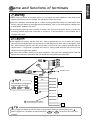
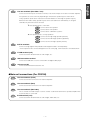
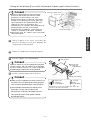
Line-out terminals (Non fader / Low)
Connect to the RCA input connectors of an EQ, or to the RCA input connectors of a woofer amplifier.
*The speakers to connect will vary depending on whether the speaker layout is 4SP+SW or
English
C
3-way speakers. (Refer to the instruction manual for details on switching the speaker layout.)
*Either the 4SP+SW or 3-way speaker layout can be selected for the CD7100 only. If using the
CD5100, only 4SP+SW can be selected.
• If the speaker layout is “4SP+SW”:
A
B
C
Connect to the front speaker.
Connect to the rear speaker.
Connect to the subwoofers systems.
• If the speaker layout is “3-way speakers”:
D
Connect to the high-range speaker (tweeter).
Connect to the mid-range speaker (squawker).
Connect to the low-range speaker (woofer).
AUX in terminals
Connect if using together with portable audio equipment that is sold separately.
* If the output from the connected equipment is via a mini plug, it will need to be converted to RCA.
E
E-LAN terminal (13P)
USB connection terminal
Connect to a USB device such as a flash drive or digital audio player.
G
LAN terminal (8P)
Connect to the LAN terminal of GPS unit.
A
Line-out terminals (Front)
Connect to the RCA connector of an external amplifier.
B
Line-out terminals (Rear)
Line-out terminals (Non fader)
This is used for non fader output. It can be used as a sub-woofer terminal if a separate amplifier with
a low bass filter is connected.
E
E-LAN terminal (13P)
Connect to the E-LAN terminal of the CD changer, AUX cable, etc.
Nederlands
Connect to the RCA connector of an external amplifier.
C
Italiano
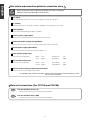
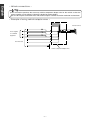
Main unit connections (For CD3100)
Français
Connect to the E-LAN terminal of the CD changer, etc.
F
Español
A
B
C
Svenska
-7-