1
PROGRAMME AND CUSTOMISE
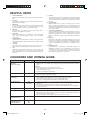
2. Selecting Auto Start Operation
Your oven has 2 ways to start memory cooking.
CU21 : Auto Start OFF = factory setting
CU22 : Auto Start ON
Custom Setting
You can check your oven settings and customise your oven
by changing Custom Settings settings.
The factory setting is Auto Start OFF. Under Auto Start OFF,
cooking will not begin until the START pad is pressed. Under
Auto Start ON, cooking will automatically start after the
memory number is input.
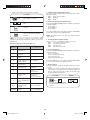
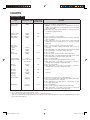
The CUSTOM SETTING pad has 11 operations.
1. Selecting Memory Input Method
2. Selecting Auto Start Operation
3. Programme Lock Setting
4. Audible Signal Sound Volume Setting
5. Cooking Completion Signal Setting
6. Memory Check
7. Counter Check/Clear
8. Air Intake Filter Counter
9. Selecting Operation in Case of Magnetron Failure
10. Multiplication Factors for Double/Triple Quantity
11. Express Defrost Setting
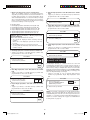
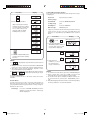
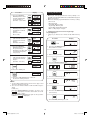
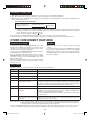
To Set Auto Start
Press the CUSTOM SETTING pad twice within 2 seconds then
enter the numbers
2, 1 for Auto Start OFF
2, 2 for Auto Start ON
Press the START pad to save settings and the STOP/CLEAR
pad to exit from the Custom Setting function.
To use Custom Setting function, press the CUSTOM SETTING
pad twice within 2 seconds, and desired option pads. See
detailed instructions below.
* Suppose you want to set Auto Start ON.
Procedure
NOTE : You will hear an audible signal the second time the
CUSTOM SETTING pad is pressed to indicate that you have
entered Custom Setting.
x2
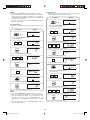
1. Selecting Memory Input Method
Your oven has 3 ways to select memory numbers.
CU11 : Dual Digit Input (100 memory banks)
= Factory Setting
CU12 : Single Digit Input (10 memory banks)
CU13 : Repeat Digit Input (30 memory banks)
2
4 Press the STOP/CLEAR pad to
exit from the Custom Setting
function.
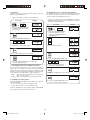
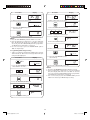
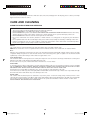
3. Programme Lock Setting
You can select Programme Lock ON or OFF
CU31 : Programme Lock OFF = factory setting
CU32 : Programme Lock ON
Press the START pad to save settings and the STOP/CLEAR
pad to exit from the Custom Setting function.
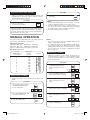
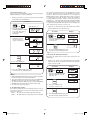
* Suppose you want to set Repeat Digit Input.
Procedure
1
3
2 Enter 2, 2 for Auto Start ON.
3 Press the START pad to save the
setting.
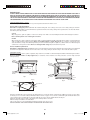
To Set Input Method
Press the CUSTOM SETTING pad twice within 2 seconds then
enter the numbers
1,1 for Dual Digit Input
1,2 for Single Digit Input
1,3 for Repeat Digit Input
x2
2
1 Press the CUSTOM SETTING pad
twice within 2 seconds.
Programme Lock OFF is the factory setting. Programme Lock
prevents accidental changes to settings. When the CUSTOM
SETTING pad is pressed twice within 2 seconds in programme
Lock ON, the LOCK indicator will light up. Turn Programme
Lock OFF when you want to change the settings.
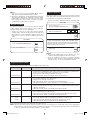
1 Press the CUSTOM SETTING pad
twice within 2 seconds.
2 Enter 1,3 for Repeat Digit Input.
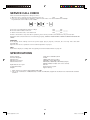
To Turn Programme Lock ON/OFF
Press the CUSTOM SETTING pad twice within 2 seconds then
enter the numbers
3, 1 for Programme Lock OFF
3, 2 for Programme Lock ON
3 Press the START pad to save the
setting.
Press the START pad to save settings and the STOP/CLEAR
pad to exit from the Custom Setting function.
4 Press the STOP/CLEAR pad to
exit from the Custom Setting
function.
9
R-1900J [EN].indd Sec1:9
4/28/09 10:01:26 AM