1
A Note To You
2
ImpoftantSafety
Instructions
3
Parts And Features
6
Using Your Range
7
Eb&d
Assistance
25
28
Warranty
Call TOLLJREE Wti Qlestionr
commenb:
1400-253-1301
STANDARD-CLEANING
Q
ELECTRIC RANGE
MODELS RF310PXY
RF31 OBXY
A NoteToYou
Thank
you for buying
a Whirlpool
appliance.
You have purchased a quality, ~~rf&&ss
home appliance. Years of engineering experience have gone
into its manufacturing. To ensure that you will enjoy many years of trouble-free operation, we have
developed this Use and Care Guide. It is full of valuable information on how to operate and maintain
your appliance properly and safely. Please read it carefully. Also, please complete and mail the Cwnership Registration Card provided with your appliance.
Your
safety
is important
to us.
This guide contains safety symbols and statements. Please pay special attention to these symbols and
follow any instructions given. Here is a brief explanation of the use of each symbol.
This symbol will help alert you to such dangers as
personal injury, burns, fire and electrical shock.
This symbol will help alert you to product
damage (scratches, dents, etc.) and damage to
your personal property.
Our Consumer
is TOLL-FREE,
number,
Assistance
Center
24 hours a day.
l-800-253-1301,
ff you ever have a question concerning your appliance’s operation, or if you need service, feel free to
call our Consumer Assistance Center for help. When calling, you will need to know your appliance’s
complete model number and serial number. You can find this information on the model and serial
number plate (see diagram on page 6.) For your convenience, we have included a handy place below
for you to record these numbers, the purchase date from the sales slip and your dealer’s name and
telephone number. Keep this book and the sales slip together in a safe place for future reference.
Model Number
Dealer Name
Serial Number
Dealer Phone
Purchase Date
lmportantSaSetylnstructions
To reduce the risk of fire, electrical shock, injury to
ersons, or damage when using the range, follow
g asic precautions, including the following:
General
l
l
Read all instructions before
using the range.
Install or locate the range only
in accordance with the provided Installation Instructions. It
is recommended that the range
be installed by a qualified installer. The range must be
properly connected to electrical
supply and grounded.
WI
ivl
@WARNING: To reduce the risk
of ti ping of the appliance, the
app Piance must be secured by
a properl installed anti-tip
bracket. +o check if the bracket
is installed pro erly, see 17he
anti-tip bracke P” on page 17.
.CAUTION: Do not store things
children mi ht want above the
range. Chil il ren could be
burned or injured while climbing on it.
.Do not leave children alone or
unattended in area where the
range is in use.They should
never be allowed to sit or stand
on an part of the range. They
could i e burned or injured.
l Do not operate the range if
it is damaged or not working
properly.
l Do not use the range for
warming or heatin the room.
Persons could be ii!urned or
injured, or a fire could start.
4Jse the range only for itsin- .
t;;t;tl
use as described rn this
.
areas near units, heating elements or interior surfaces of
oven. Surface units and heating
elements may be hot even
though they are dark in color.
Areas near surface units and
interior surfaces of an oven
become hot enou h to cause
burns. During an cf after use,
do not touch, or let clothing or
other flammable materials
contact surface units, areas
near units, heatin elements or
interior surfaces 07 oven until
they have had sufficient time
to cool. Other surfaces of the
range ma become hot enough
to cause I! urns; such as, the
oven vent opening, the surface
near the vent opening, the
cooktop, the oven door and
window.
@Do not wear loose or hanging
garments when using the
range. They could ignite if they
touch a hot surface unit and
you could be burned.
continued on next page
3
) Use only dry otholders. Moist or Gheck to be sure lass cooking utensils are sa9e for use on
damp pothol 8 ers on hot surfaces
the
ran e. Only certain types of
may result in burns from steam.
glass,
g9 ass-ceramic, ceramic,
Do not let potholder touch hot
earthenware
or other glazed
heating elements. Do not use a
utensils
are
suitable
for
towel or bulky cloth for a
cooktops without breaking due
potholder. It could catch on fire.
to the sudden change in
‘Keep range vents unobstructed.
temperature.
) Do not heat unopened containers. They could explode. The hot ONever leave surface units
unattended at high heat setcontents could cause burns and
tings.
A boilover could result
container particles could cause
and
cause
smoking and greasy
injury.
spillovers that may ignite.
1Do not store flammable materials
on or near the ran e. The fumes
can create an exp ?osion and/or
fire hazard.
Nhen using the cookto~
‘Make sure the reflector bowls
are in place during cooking.
Cookin without reflector bowls
may su %ject the wirin and components underneath ti em to
damage.
Do not line reflector bowls with
aluminum foil or other liners.
Improper installation of these
liners ma result in a risk of
electric s A!ock or fire.
Select a pan with a flat bottom
that is about the same size as
the surface unit. If pan is smaller
than the surface unit, some of
the heatin element will be exposed an 8 may result in the
I nltlng of clothing or potholders.
8 orrect pan size also improves
cooking efficiency.
4
@Turn pan handles inward, but
not over other surface units.
This will help reduce the
chance of burns, i niting of
flammable materia 9 s, and spills
due to bumping of the pan.
When using the oven
l Always
osition oven rack(s) in
desired Pocation while oven IS
cool. If a rack must be removed while oven is hot, do
not let potholder contact hot
heating element in oven.
4se care when opening oven
door. Let hot air or steam escape before removing or replacing food.
Grease
Care an’d cleaning
l Grease is flammable. Do not
.Do not soak removable heating
elements in water. The element
will be damaged and shock or
fire could result.
@Do not clean door heat seal. It
is essential for a ood seal.
Care should be taa en not to
rub, damage or move the seal.
Clean only parts recommended
in this Use and Care Guide.
@Do not repair or replace any
part of the range unless specifitally recommended in this
manual. All other servicing
should be referred to a qualified technician.
.Disconnect the electrical supply
before servicing the range.
allow grease to collect around
cooktop or in vents. Wipe spillovers immediately.
.Do not use water on grease
fires. Never pick up a flaming
pan. Smother flaming pan on
range b coverin with a wellfitted IiJ , cookie sll eet or flat
tray. Flaming grease outside of
an can be extin uished with
ii aking soda or, i? available, a
multipurpose dry chemical or
foam-type extinguisher.
- SAVE THESE INSTRUCTIONS
-
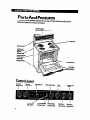
PartsAndFeatures
This section contains captioned illustrations of your range. Use them to become familiar with the
Iocation and appearance of all parts and features.
Antl-tlp bracket
(on wall behlnd oontrol panel )
I
Oven ven1
Plug-in
wmfaoe lmll
~~one-placs
drmlle
reflsctor bowl /
Removsbls
storage drawer,
(model ilF310PX~)
Control
panel
Left front
oontrol
ClodcIMlnut0
n---
knob
Manual oven
light switch
6
W-la08 hmlng
lndlcator light
Oven temperature
control knob
Oven heatlng
lndlcator light
OWNI
8SlSO!0r
Surface unlt
marker
Rlght rear
Rlght front
control knob control knob
UsingYourRange
In This
Section
Using the 8urfaW
Posltlofhg
~%I
racka 8nd p8na ,-----..W..--@
Uslng elumlnum
,,--,---me.10
Baldnglroutlng
Enrgy
10
---...----11
Thor
..,........,---...-11
___---....
-...----.12
the oven temperature
control
19
“..“.....“.“.-------“.-I--
BrdunqU~,,,------------l4
toll for baklng ..---.........
the dodc _----
Uslng the Ylnuta
Adjusting
NP
unka ,--...------..7
For best air droulatlon
Setting
..
@awl
15
UPa -------w--m
16
The oven vent “-Y--“..-““---~Thostoragedrawer
_--_--
-,,--,16
Themtt-tlpbraokat
--....---
-....,--,17
Optlonol
door pand pat ,,--------17
--12
To obtain the best oooking results possible, you must operate your range properly. This section gives
you important information for efficient and safe use of your range.
Using
the surface
units
Control knobs must be pushed in before
turning them to a setting. They can be set
anywhere between HI and OFF.
Surface
unit
markers
The solid dot in the surface unit marker shows
which surface unit ls turned on by that knob.
Surface
heating
indicator
light
The SURFACE HEATING Indicator Light on the
control panel will glow when a surface unit is
turned on.
Burn and Fire Hazard
Be sure all control knobs are turned to OFF
~ and all indicator lights are OFF when you
are not cooking.
Someone could be burned or a fire could
start if a surface unit is accidentally left ON.
Until you get used to the ssttlngs, uss the
followlng as a guide. For best results, start
cooking at the high settings; then turn the control
knob down to continue cooking.
SET-llNG
HI
1
l
l
Medium-hlgh
l
l
Medlum
l
l
Medium-low
LO
Cookware
l
l
RECOMMENDED USE
To start foods cooking.
To bring liquids to a boil.
To hold a rapid boil.
To fry chicken or pancakes.
For gravy, pudding and icing.
To cook large amounts of
vegetables.
To keep food cooking after
starting it on a higher setting.
To keep food warm until ready
to serve.
tips
There is no one brand of cooking utensil that is
best for all people. Knowing something about pan
materials and construction will help you select the
right cooking utensils for your needs.
l Use only flat-bottomed
utensils that make good
contact with the surface units. To check the
flatness of a utensil:
-Turn it over and check the bottom of the pan
by placing a ruler across ft.
-Rotate the ruler in all directions. There should
be no gaps between the pan and the ruler.
NOTE: Woks, canners and teakettles with flat
bottoms suitable for use on your oooktop are
now available in most houseware stores or
departments.
l The pan should have straight sides and a tightfitting lid.
l Choose
medium to heavy gauge (thickness)
pans that are fairly lightweight. Remember that
a very heavy pan will be even heavier when
filled with food.
l The pan material
(metal or glass) affects how
fast heat transfers from the surface unit through
the pan material and how evenly heat spreads
over the pan bottom.
l Handles
should be made of a sturdy, heatresistant material and be securely attached to
the pan.
l Do not leave an empty utensil, or one which has
boiled dry. on a hot surface unit. ft can overheat
and may damage the utensil or surface unit.
l Do not use canners,
woks and specialty utensils
with rounded, warped, ridged or dented
bottoms. These could cause severe overheating
which damages the utensil and/or surface unit.
8
Product Damage Hazard
tl a surface unit stays red for a bng time,
the bottom of the pan is not flat enough or is
too small for the surface unit. Prolonged
usage of inoorrect utensils for long periods
of time can result in damage to the surface
unit. ax&top, wiring and surrounding areas.
To prevent damage, use correct utensils,
start cooking on HI and turn control down to
continue cooking.
Home
canning
Optlonal canning kt
information
To protect your range:
l
l
l
l
l
l
Use flat-bottomed canners for best results. Do
not use canners with dented or ridged (porcelain enamel-ware) bottoms. They do not make
good contact with the surface unit and cause
severe overheating which damages the
cooktop.
For best results, use the largest surface unit.
Also, use a canner which can be centered over
the surface unit. Large diameter canners. if not
properly centered, trap heat and can cause
damage to the cooktop.
Do not place canner on two surface units at the
same time. Excessive heat buildup will damage
the cooktop.
Start with hot water. Th’is reduces the time the
control is set on high. Reduce heat setting to
lowest position needed to keep water boiling.
Keep reflector bowls clean for best heat
reflection.
To prolong the life of the elements:
-Prepare small batches at a time.
-Do not use elements for canning all day.
Positioning
racks
and pans
For baking/roasting with one rack the rack
should be placed so the top of the food will be
centered in the oven. Always leave at least 1 l/z to
2 inches (4-5 cm) between the sides of the pan
and the oven walls and other pans.
oooklng, follow these guldellnee
foods:
l Angel and bundt cakes, yeast breads, frozen
pies, large roasts and turkeys-place
rack on
lowest level.
l Casseroles,
muffins, most quick breads and
meats-place rack on second or third level from
bottom.
l Cookies,
biscuits, cakes and non-frozen piesplace rack on second or third level from bottom.
When baking on two racks, arrange racks on
bottom and third level from bottom.
For proper
for speclflc
NOTE: For recommended rack placement
broiling, see a reliable cookbook.
The large diameter of most water-bath or
pressure canners combined with high heat
settings for bng periods ol time can shorten the
life of regular surface units and cause damage to
the cooktop.
If you plan to use the a&top
for canning, we
recommend the installation of a Canning Kii
Order the kit (Part No. 242905) from your
Whirlpool dealer or authorized WhirlpoolSY
service company.
when
Personal Injury Hazard
Always positiin oven rack(s) in desired
location before turning oven on. Be sure
the rack(s) is level.
l tf rack(s) must be moved while oven is
hot, use potholders or oven mitts to
protect hands.
Failure to follow the above precautions
may result in personal injury.
l
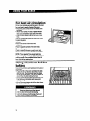
For best air circulation
Hot air must circulate around the pans in the oven
for even heat to reach all parts of the oven.
l Place the pans so that one is not directly over
the other.
l Allow 1 X-2 inches (4-5 cm) of space around
each pan and between pans and oven walls.
l Use only one cookie sheet in the oven at one
time.
Use the following as a guide to determine where
to place the pans.
One pan
Place in the center of the oven rack.
Two pans
Place in opposite comers of the oven rack
Three or four pans
Place in opposite comers on each oven rack.
Stagger pans so no pan is directly over another.
NOTE: “Oven peeking’ may cause heat bss,
longer cooking times and unsatisfactory baking or
roasting results. Use a reliable kitchen timer to
keep track of the cooking time.
Using aluminum
baking
foil for
Use aluminum foil to catch spillovers from pies or
casseroles.
l Place the foil on the oven rack below the rack
with the food. The foil should have the edges
turned up and be about 1 inch (3 cm) larger all
around than the dish holding the food.
l Do not cover the entire rack with aluminum
foil.
tt will reduce air circulation and cause poor
cooking results.
l Do not line oven bottom with foil or other liners.
Poor baking will resuft.
10
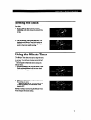
Setting
the clock
Push in and turn the Minute Timer Knob to set
the dock.
1. Push In Minute Tlmer Knob and turn
clockwise
until clock shows the correct time
of day.
2. Let the Mlnuts Tlmsr Knob pop wt. Turn
cbckwise until Minute Timer hand points to
OFF. The clock setting will change If you
push In the knob when turnlng.
Using
the Minute
Timer
The Minute Timer does not start or stop the oven.
lt works like a kitchen timer. Set it in minutes up
to an hour. You will hear a buzzer when the set
time is up.
Do not push In the knob when setting the
Minute Timer.
1. Wlthout pushlng it kr, turn the Minute Timer
Knob counterclockwise until the timer hand
passes the setting you want.
2. Wlthout pushlng It In, turn the knob back to
the setting you want.
When the tlms Is up, a buzzer will sound.
To stop the buzzer, turn the Minute Timer
hand to OFF.
NOTE: Pushing in and turning the Minute Timer
Knob changes the dock setting.
11
Baking/roasting
1. Position the ra&(s) properly before turning on
the oven. To chaise r&k W~sltlon, lift ra&
at front and pull out. For information on
positioning racks, see “Positioning racks and
pans” on page 9.
2. Set the Oven Selector to BAKE.
3. Set the Oven Temperature Control Knob to
the baking/roasting temperature you want.
The OVEN HEATING Indicator Light will come
on. The oven is preheated when the OVEN
HEATING Indicator Light first goes off.
NOTE: Do not preheat oven when roasting or
cooking items such as casseroles.
4. Put food in the oven.
During baking/roasting, the elements will
turn on and off to maintain the temperature
setting. The OVEN HEATING Indicator Light
will turn on and off with the elements.
NOTE: The top element helps heat durlng
baklnglroastlng, but does not turn red.
5. When baking/roasting is done, turn both the
Oven Selector and the Oven Temperature
Control Knob to OFF. The OVEN HEATlNG
Indicator Light will go off.
12
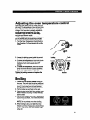
Adjusting
the oven temperature
Does your oven seem hotter or colder than your
old oven? The temperature of your old oven may
have shifted gradually without you noticing the
change. Your new oven is properly adjusted to
provide accurate temperatures. But, when
compared to your old oven, the new design
may give you different results.
ff, after using the oven for a period of time, you
are not satisfied with the temperature settings,
they can be adjusted by following these steps:
1. Turn the Oven Temperature Control Knob to
the off position. Pull knob straight off and flip
it over.
2. Loosen the locking screws inside the control
knob. Note the posltlon of the notches.
3. To lower the temperature, hold knob handle
firmly and move the tooth a notch counterclockwise. Each notch equals about 5OF
(2.5%).
4. To raise the temperature, hold knob handle
firmly and move the tooth a notch clockwise.
Each notch equals about 5°F (2.5%).
Tighten the locking screws and replace the
control knob.
Broiling
1. Position the rack properly before turning on
the oven. The oven rack should be positioned
so that the surface of the food is at least 3 inches (7.4 cm) away from the broil element.
See ‘Positioning racks and pans” on page 9.
2. Put the broiler pan and food on the rack.
3. Close the door to the Broil Stop position (open
about 4 inches [ 10.2 cm]). The door will stay
open by itself.
4. Set the Oven Selector and Oven Temperature
Control Knob to BROIL. The OVEN HEATING
Indicator Light will come on.
NOTE: Do not preheat oven when broiling.
5. When broiling is done, turn both the Oven
Selector and Oven Temperature Control Knob
to OFF. The OVEN HEATING Indicator Light
will go off.
control
Custom
broil
ff food is cooking too fast, turn the Oven
Temperature Control Knob counterclockwise
until the OVEN HEATING Indicator Lght
goes off.
lf you want the food to broil sbwer from the
start, set the Oven Temperature Control Knob
between 170°F and 325OF (77% and 162.7%).
These temperature settings allow the broil
heating element to cycle and to slow cooking.
The bwer the temperature, the slower the
cooking.
Fish and chicken are some foods that may cook
better lf you use lower broiling temperatures.
l
l
l
The Oven Selector must be on BROIL for all
brolllng temperatures.
NOTE: The oven door must be partly open
whenever the oven is being used to broil. Leaving
the door open allows the oven to maintain proper
temperatures.
Broiling
l
l
l
14
tips
Use the broiler pan and grid for broiling. They
are designed to drain excess liquid and fat
away from the cooking surface to help prevent
spatter, smoke or fire.
Refer to a broiling chart in a reliable cookbook
for correct broiling times.
After broiling, remove the broiler pan from the
oven when you remove the food. Drippings will
bake on the pan if it is left in the heated oven.
Flre Hazard
l
l
Place meat the correct distance from the
element. Meat placed too close to the
element may spatter, smoke, burn or
catch fire during broiling.
To ensure adequate grease drainage, do
not use cookie sheets or similar pans for
broiling. Also, covering the broiler grid
with foil is not recommended. Poor
drainage of grease may result in fire. fl foil
is used, cut slits in foil to correspond with
all openings in broiler grid. Grease can
then drain away and cool in pan.
Energy
saving
tips
Although the energy used for cooking is usually a
very small percentage of the total energy used in
the home, cooking energy can be used efficiently.
Here are some tips to help you conserve energy
when using your cooking product.
l Use pans with flat bottoms,
straight sides and
tight-fitting lids.
l Match the pan to the surface unit size.
l Cook wfth a minimum of liquid or fat to help
shorten cooking time.
l Preheat
pans only when recommended and for
the shortest time possible.
l Start food on higher heat settings, then set
surface unit control on low or off to finish
cooking. Use retained heat for cooking when
possible.
l Use the more efficient surface units instead of
the oven when possible.
Turn on the surface unit only after placing filled
pan on the unit.
. ‘Oven peeking’ may cause heat bss, longer
cooking times and unsatisfactory baking
results. Rely on your timer.
l Bake cakes, pies or cookies when oven is
warm. Best time is after a meal has been
caked in it.
l Preheat
the oven no bnger than necessary.
l Plan your meals for the most effiient
use of the
range. When using the oven to cook one food,
try to cook the rest of the meal in lt also.
l Do not preheat
when broiling, roasting or
cooking items such as casseroles.
l Keep reflector howls clean for best heat
ref lectbn.
l
15
The oven vent
Hot air and moisture escape from the oven
through a vent under the right rear surface unit.
You can cook on the unit or keep food warm on it
while the oven is on. The vent is needed for air
circulation. Do not block the vent Poor baking/
roasting can result.
NOTE: Plastic utensils left over the vent can melt.
Burn and Fire l-&zard
tf you leave a utensil on the right rear
surface unit, use potholders when moving
it. Pan handles can become hot enough to
burn.
Keep flammable materials away from oven
vent.
Failure to do so can resutt in burns or a fire.
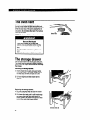
The storage
drawer
The storage drawer is for storing pots and pans.
The drawer can be removed to make it easier to
clean under the range. Use care when handllng
the drawer.
Removing
the storage drawer:
1. Empty drawer of any pots and pans before
removing drawer. Pull drawer straight out to
the first stop. Lii front and pull out to the
second stop.
2. Lift back slightly and slide drawer all the
way out.
Replacing the storage drawer:
1. Fit ends of drawer slide rails into the drawer
guides on both sides of opening.
2. Lift drawer front and push in until metal stops
on drawer slide rails dear white stops on
drawer guides. Lii drawer front again to clear
second stop and slide drawer closed.
16
The anti-tip
bracket
The range will not tip during normal use. However, tipping can occur if excessive force or
weight is applied to the open door without the
anti-tip bracket properly secured.
To verify the anti-tlp bracket ls engaged:
Look to see if the anti-tip bracket is attached
with screws to the wall behind the control panel.
Make sure the cable tether on the back of the
range is secured by the two hooks on the
bracket.
See Installation Instructions for further details.
l
l
l
Optional
door panel
pat
lf you woukf like to change the color of your oven
door glass to white or almond, you can order one
of these kits:
RFllOPXY wlth wlndow:
l
l
White (Kit No. 814069)
Almond (Kit No. 914070)
RF310BXY wlthout window:
White (Kit No. 814071)
Almond (Kit No. 814072)
from your Whirlpool Dealer. The kits include easy
installation instructions.
l
l
17
Caring For Your Range
I
In This Section
Surface
unita and reftector
LIH-up oo&iop
Removing
I-.--...-..-
Page
bowta ___.....__
--.....-..
18
the oven door ..UII...........l....l...II
cleanlngchart
Theoven
-...,21
I
units
and reflector
Removing
1. Make sure all surface units are off and cool
before removing surface units and reflector
bowls.
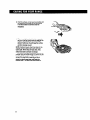
2. Lift the edge of the unit, opposite the receptacle, just enough to clear the element holddown clip and the reflector bowl.
ia
-,n..----..-22
-....-,,-..--..-24
21
Your range is designed for ease of care. Moat
cleaning can be done with items found around
your home. Cleaning your range whenever spills
or soiling occurs will help to keep it koking and
operating like new.
Surface
-....--...
Ilght 1-ww...
Burn and ElectrIcal Shock Hazard
Make sure all controls are OFF and the
range is cool before cleaning.
Failure to do so can resutl in burns or
electrical shock
bowls
3. Pull the surface unit straight away from the
receptacle.
4. Lii out the reflector bowl. See ‘Cleaning
on page 22 for cleaning instructions.
chart’
Replacing
1. Make sure all surface units are off and cool
ee;
replacing surface units and reflector
2. Line up openings in the reflector bowl with the
surface unit receptacle and the element hoMdown clip.
19
3. Hokf the surface unit as level as possible with
the terminal just started into the receptacle.
Push the surface unit terminal into the
receptacle.
4. When terminal is pushed into the receptade
as far as it will go, push down the edge of the
surface unit opposite the receptacle. The
element hokfdown clip will keep the surface
unit from moving around.
NOTE: Reflector bowls reflect heat back to the
utensils on the surface units. They also help
catch spills. When they are kept clean, they
reflect heat better and look new longer.
lf a reflector bowl gets discolored, some of the
utensils may not be flat enough, or some may be
too large for the surface unit. In either case,
some of the heat that’s meant to go into or
around a utensil goes down and heats the
reflector bowl. This extra heat can discolor it.
20
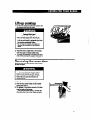
Lift-up
cooktop
1. Lift front of cooktop at both front comers until
the support rods lock into plane.
l
l
F4monal InJury and
Procluot Damage Hazard
Be sure both support rods are fully extended and in the focked posftii.
Failure
to do so could resuft in personal injury from
the cooktop accidentally falling.
Do not drop the cooktop. Damage can
result to the porcelain and the cooktop
frame.
2. wipe with warm, soapy water. Use a soapy
steel-wool pad on heavily soiled areas.
3. To lower the or&top,
lii co&top from both
sides while pressing the support rods bad to
unlock them. Lower the cooktop into place.
Removing
the oven door
Removing the oven door will help make lt easier
to dean the oven.
Burn and ElectrIcal Shock Hazard
Make sure all controls are OFF and the
oven is cool before removing oven door.
Failure to do so can resuft in burns or
electrical shock
1. Opan the door to the first stop position.
2. Hold the door at both sides and lift it at the
3.
earns angle lt Is In.
To replace, fii the bottom comers of the door
over the ends of the hinges.
Push the door down evenly. The door will
cbse only when it is on the hinges correctly.
21
Cleaning
chart
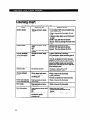
Use the following table to help you dean all Parts of your range.
PART
Control knobs
Control
panel
Exterior surfaces
(other than control
panel)
Surface units
HOW TO CLEAN
WHAT TO USE
Sponge and warm. soapy
water
Turn knobs to OFF and pull straight away
from control panel.
l Wash, rinse and dry thoroughly.
Do not
soak.
l Replace
knobs. Make sure all knobs point
tc OFF.
DO NOT USE steel wool or abrasive
cleaners. They may damage the finish of the
knobs.
Sponge and warm, soapy
water
OR
Paper towel and spray glass
cleaner
l Wash, rinse and dry thoroughly.
DO NOT USE steel wool or abrasive
cleaners. They may damage the finish.
Sponge and warm, soapy
water
l Wash, rinse and dry thoroughly.
USE nonabrasive, plastic scrubbing pad on
heavily soiled areas.
l Do not use abrasive
or harsh cleansers.
NOTE: Do not allow foods containing acids
(such as vinegar, tomato or lemon juice) to
remain on surface. Acids may remove the
glossy finish. Also wipe up milk or egg spills
when cooktop is cool.
l
No cleaning required
l
Spatters or spills will burn off.
. Do not Immerse In water.
Chrome reflector
bowls
Warm, soapy water and a
nonabrasive, plastic
scrubbing pad
Broiler pan and grld
@lean after each use)
Steel-wool pad and warm,
soapy water
Cven racks
Steel-wool pad and warm,
soapy water
Oven door glass
Paper towel and spray glass
cleaner
OR
Warm, soapy water and a
nonabrasive, plastic
scrubbing pad
22
l
Wash, rinse and dry thoroughly.
Clean frequentfy.
Do not use abrasive or harsh cleansers.
l
Wash, rinse and dry thoroughly.
l
Wash, rinse and dry thoroughly.
l
l
l
l
l
Make sure oven is cool.
Follow directions provided with the
cleaner.
Wash, rinse and dry thoroughly.
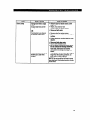
PART
Oven cavtty
WHAT TO USE
~ Sponge and warm, soapy
l
water
Soapy steel-wool pad for
heavily soiled areas
l
l
HOW TO CLEAN
Remoiie door for easier access. (See
page 21.)
Wash, rinse and dry well.
Remove door for easier aocess.
Rinse well with water.
OR
l
Commercial oven cleaner
for heavily soiled areas
Remove door for easier access.
Place newspaper on fkxx to protect floor
surface.
l
Follow directions provided with the oven
cleaner.
. Rinse well with clear water.
l
Use in well-ventilated room.
l
l
l
Heavy-duty aluminum foil or
shallow pan used while
cooking
Do not allow commercial oven cleaners to contact the heatlng elements,
heat seal, thermostat or exterior
surfaces of the range. Damage will
occur.
Place piece of foil or shallow pan,
larger than the cooking container,
bwer rack to catch spillovers.
NOTE: Do not use foil or foil liner to
the oven floor. Poor baking/roasting
could occur.
l
slightly
on
cover
results
23
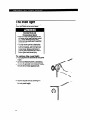
The oven light
The oven light will cOme on when you use the
Oven Light Switch on the control panel.
ElectrIcal Shock and
Personal Injury Hazard
l
l
Make sure oven and light bulb are cool
and power to the range has been turned
OFF before replacing the light bulb.
Failure to do so could result in electrfcal
shock or bums.
The bulb cover must be in place when
using the oven. The cover protects the
bulb from breaking, and from high oven
temperatures. Because bulb cover is
made of glass, be careful not to drop it.
Broken glass could cause injury.
To replace
the oven
light:
1. Unplug appliance or disconnect at main power
supply.
2. Remove the glass bulb cover in the back of
the oven by screwing it out counterdodcwise.
3. Remove the light bulb from its socket. Replace
the bulb with a 40-watt appliance bulb.
4. Replace the bulb cover by screwing it in
clockwise. Plug in appliance or reconnect at
the main power supply.
24
If You Need AssistanceOr
.
Service
This section is designed to help you save the cost of a service call. First we outline possible problems,
their causes and their solutions. However, you may still need assistance or service. When calling our
Consumer Assistance Center for help or calling for service, you will need to provide a complete descrip
tion of the problem, your appliance’s complete model and serial numbers and the purchase date. (See
page 2.) This information is needed to respond to your request properly.
1. Before
calling
for assistance
...
Performance probtems often result from liile things you can find and fix without toots of any kind. Please
check the chart below for problems you can fix. ft could save you the cost of a service call.
PROBLEM
POSSIBLE
CAUSE
SOLlmCN
Nothlng will
operate
The power cord is not plugged
into a live circuit with proper
voltage.
A household fuse has blown or
a circuit breaker has tripped.
Plug the power cord into a live circuit
with proper vottage. (See Installation
Instructions.)
Replace household fuse or reset circuit
breaker.
The oven will
not operats
The Oven Selector fs not turned
to BAKE or BROIL
The Oven Temperature Control
Knob is not turned to a temperature setting.
Turn the Oven Selector to BAKE or
BROIL.
Turn the Oven Temperature Control
Knob to a temperature setting.
The surface
A household fuse has blown or
a circuit breaker has tripped.
Surface units are not plugged in
all the way.
The control knobs are not being
set correctly.
Replace household fuse or reset circuit
breaker.
Plug surface units in all the way. (See
“Replacing” on page 19.)
Push control knobs in before turning to
a setting.
You are not pushing in before
turning.
Push control knob(s) in before turning
to a setting.
unlts will not
operate
Control knob(s)
will not turn
continued on next page
25
POSBIBLE CAUSE
The range is not level.
are not what you
The oven temperature
too tow or too high.
seems
The oven was not preheated as
the recipe calls for.
The recipe has never been
tested or is not from a reliable
source.
The pans are not the type or size
recommended in the redpe.
There is not proper air circulation
around pan when baking.
The cooking utensils are not the
proper shape or do not fit the
surface units being used.
26
.
soLuTloN
Level range. (See Installation Instructions.)
Adjust the oven temperature control. (See
“Adjusting the oven temperature control”
on page 13.)
Preheat oven if called for in recipe.
Use only tested recipes from a reliable
source.
Refer to a reliable cookbook for recommended pan type and size.
Allow 1% to 2 inches (4-5 cm) on all sides
of the pans for air circulation.
Use cooking utensils with smooth, flat
bottoms that fit the surface units being
used.
2. If you need
assistance
4. If you need FSP@ replacement-parts
...
. ..
Call WhIrlpool Consumer Assistance Center
telephone number. D&l free from anywhere In
the U.S.:
1-800-253-1301
and talk with one of our trained consultants. The
consultant can instruct you in how to obtain
satisfactory operation from your appliance or, if
service is necessary, recommend a qualified
service company in your area.
lf you prefer, write to:
Mr. William Clark
Consumer Assistance Representative
Whirlpool Corporation
2000 M-63
Benton Harbor, MI 49022
Please include a daytime phone number in your
correspondence.
3. If you need
service
-
1
. APPlJAHCEHWSEHOLlh
MUOR
SERVICE A REPAIR
. WASHNG
DRYERS,
5. lf you are not satisfied
how the problem
was
solved . . .
l
...
Whirlpool has a nationwide
network of authorized
WhirlpoolSU service oompaSERVCE nies. Whirlpool service
9
technicians are trained to
fulfill the product warranty and provide afterwarranty service, anywhere in the United States.
To locate the authorized Whirlpool service
company in your area, call our Consumer
Assistance Center telephone number (see
Step 2) or look in your telephone directory Yellow
Pages under:
.
FSP is a registered trademark of Whirlpool
Corporation for quality parts. Look for this symbol
of quality whenever you need a replacement part
for your Whirlpool appliance. FSP replacement
parts will fit right and work right, because they
are made to the same exading specifications
used to build every new Whirlpool appliance.
To locate FSP replacement parts in your area,
refer to Step 3 above or call the Whirlpool Consumer Assistance Center number in Step 2.
l
l
with
Contact the Major Appliance Consumer Action
Panel (MACAP). MACAP is a group of independent consumer experts that voices consumer views at the highest levels of the major
appliance industry.
Contact MACAP only when the dealer,
authorized servicer and Whirlpool have failed
to resolve your problem.
Major Appliance Consumer Action Panel
20 North Wacker Drive
Chicago, IL 60606
MACAP will in turn inform us of your action.
MACHNES
L
SERVICE A REPAIR
27
WHIRLPOOL
Electric Freestanding
Warrantv
Range
m.
EROl:
LENGTH OF WARRANTY
WHIRLPOOL WILL PAY FOR
FUU ONE-YEAR
WARRANlY
From Date of Purchase
FSV replacement parts and repair labor to correct defects in materials
or workmanship. Service must be provided by an authorized WhirlpooP”
service company.
LIMITED WARRANTY
FSP replacement
parts for control knobs.
FOR LIFE OF THE
PRODUCT
Second Year Through Life
of Produd From Date of
Purchase
WHIRLPOOL WILL NOT PAY FOR
A Service calls to:
1. Correct the installation of the cooking product.
2. Instruct you how to use the cooking product.
3. Replace house fuses or correct house wiring.
4. Replace owner accessible liiht bulbs.
B. Repairs when the cooking produd is used in other than normal, single-family household use.
C. Pickup and delivery. This produd is designed to be repaired in the home.
D. Damage to the cooking product caused by accident, misuse, fire, flood, zts of God or use of
products not approved by Whirlpool.
E. Repairs to parts or systems caused by unauthorized modifications made to the appliance.
WHIRLPOOL CORPORATION SHALL NOT BE LIABLE FOR INCIDENTAL OR CONSEQUENTIAL
DAMAGES. Some states do not allow the exclusion or limitation of incidental or consequential damages,
so this limitation or exdusion may not apply to you. This warranty gives you specific legal rights, and you
may also have other rights which vary from state to state.
Outside the United States, a different warranty may also apply. For details, please contact your authorized Whirlpool distributor or military exchange.
ff you need service, first see the “Assistance and Service’ section of this book. After checking “Assistance and Service.’ additional help can be found by calling our Consumer Assistance Center telephone
number, 1600-253-1301, from anywhere in the U.S.
PART NO. 3150285
0 1962 wllrpool
CalpJrmti
Primal
h USA