1
CONTACTS
9.6.3
Special Characters
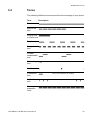
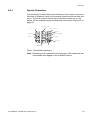
Use the keypad to enter letters and characters. Press a key once for the
first letter or character, twice for the second, three times for the third, and
so on. The most common letters are printed above each key on the
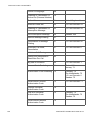
phone. All the available letters and characters are shown in figure 14 on
page 58.
abcæàâç2
defèéêë3
, .? ! - ‘ ” 1
jkl5
ghiîï4
mnoñôöœ6
wxyz9
pqrs7
tuvû8
Space + * 0
#
Figure 14:Available characters
Note: Depending on the selected menu language, other characters can
be available than appear in the illustration above.
1424-EN/LZT 103 088 Uen D 2010-02-12
58