1
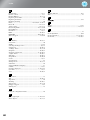
Configuration Menu Functions
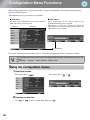
List of configuration menus (For the EH-TW3800)
When no image signals are being input, the "Image" menu and the "Signal" menu cannot be adjusted.
Also, the items displayed in the "Image" menu, the "Signal" menu and the "Info" menu will vary
depending on the type of image signals that are being projected.
Displayed for input sources other than computer image
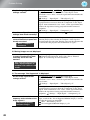
Image
Color Mode
p.32
* This is displayed in the line menu.
Vivid, Cinema Day, Natural, Cinema Night, HD,Silver Screen,
("x.v. Color" is displayed when a signal is being input through the HDMI1/HDMI2 input terminals.)
Brightness
p.32
*
Contrast
p.32
*
Color Saturation
p.32
*
Tint
p.32
*
Sharpness
p.32
*
Abs. Color Temp.
p.32
*
Skin Tone
p.32
*
Advanced
p.32
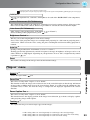
Brightness Control
p.33
High, Low
Auto Iris
p.33
Off, Normal, High Speed
Reset
p.33
Yes, No
Standard
Advanced
Thin Line Enhancement, Thick Line Enhancement
Vert. Line Enhancement, Horiz. Line Enhancement
Gamma
Signal
Displayed for input sources other than
computer image
2.0, 2.1, 2.2, 2.3, 2.4
Customized Adjust it from the image
Adjust it from the graph
Reset
RGB
Offset R, G, B
Gain R, G, B
RGBCMY
R (Hue/Saturation/Brightness),
G (Hue/Saturation/Brightness),
B (Hue/Saturation/Brightness),
C (Hue/Saturation/Brightness),
M (Hue/Saturation/Brightness),
Y (Hue/Saturation/Brightness)
Only displayed for Computer image input
(does not appear when signals from the [HDMI1]/[HDMI2] input port are being input)
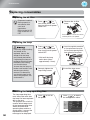
Auto, Normal, Full, Zoom, Wide
Aspect
p.33
Zoom Size
p.33
Zoom Caption Pos.
p.33
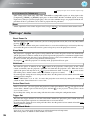
Tracking
p.33
Sync.
p.34
Position
p.34
Auto Setup
p.34
On, Off
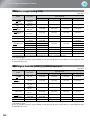
Progressive
p.34
Off, Video, Film/Auto
Motion Detection
p.34
Advanced
p.31
p.35
Reset
p.36
Yes, No
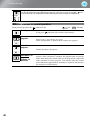
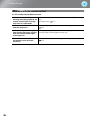
Noise Reduction
Off, 1, 2, 3
Setup Level
0%, 7.5%
EPSON Super White
Output Scaling
On, Off
Auto, 100%, 98%, 96%, 94%, 92%
This will be 100% when a 720p, 1080i, or 1080p signal is being
input through the [HDMI1]/[HDMI2] input terminals.
HDMI Video Range
2-2 Pull-down
28
Normal, Expanded
On, Off