1
About the Manuals and Notations Used
Types of Manual
The documentation for your EPSON projector is divided into the following two manuals. Refer to the
manuals in the order given below.
Safety Instructions/Support and Service Guide
This manual contains information on using the projector safely, and also includes a guide for warranty
service, and a troubleshooting check sheet.
Be sure to read this manual thoroughly before using the projector.
User’s Guide (this manual)
This User's Guide contains information on installing the projector, basic operations, using the
configuration menus, troubleshooting and maintenance.
Notations used in this User’s Guide
Safety indications
So that you can use the product safely and correctly, symbols are applied in the User's Guide and on the
product to indicate possible harm to the user or to others and the risk of damage to property.
The indications and their meaning are as follows. Make sure you understand them properly before reading
the guide.
This symbol indicates information that, if ignored, could possibly result in death or
personal injury due to incorrect handling.
This symbol indicates information that, if ignored, could possibly result in personal
injury or physical damage due to incorrect handling.
General information
Indicates procedures where personal injury or damage to the projector may occur if
the procedures are not followed correctly.
Indicates additional information and points which may be useful to know regarding a
topic.
TIP
Indicates a page where useful information regarding a topic can be found.
Indicates that an explanation of the underlined word or words in front of this symbol
appears in the glossary of terms.
Refer to the "Glossary" in the "Appendix".
p.60
,
etc. Indicates buttons on the remote control or projector's control panel.
" (Menu Name) "
[ (Name) ]
Indicates configuration menu items.
Example: "Image"-"Color Mode"
Indicates the port name of the projector.
Example: [Video]
Meaning of "unit" and "projector"
When "unit" or "projector" appears in the text of this User’s Guide, they may refer to items which are
accessories or optional equipment in addition to the main projector unit itself.
Checking the Components
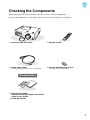
When you unpack the projector, make sure that you have all these components.
If any of the components are missing or incorrect, please contact the place of purchase.
❏ Projector (with lens cover)
❏ Remote control
❏ Power cable (3.0m)
Connect to the projector and to a wall outlet.
❏ AA-size alkali batteries (2 pcs.)
Insert into the remote control.
Documentation
❏ Document CD-ROM
(Safety Instructions/Support and Service
Guide, User’s Guide)
❏ Quick Start Guide
1
Table of Contents
■ Features of the Projector............................. 4
■ Part Names and Functions .......................... 6
Front / Top.................................................... 6
Control panel ................................................ 6
Remote control ............................................. 7
Rear.............................................................. 8
Base ............................................................. 8
■ Appearance................................................... 9
Installing the Projector
■ Setting up.................................................... 10
Adjusting the projection size....................... 10
Projection methods..................................... 11
■ Connecting Image Sources ....................... 12
■ Preparing the Remote Control .................. 13
Inserting batteries into the remote control .. 13
Using the remote control ............................ 13
Basic Operations
■ Starting and Stopping Projection ............. 14
Turning the power on
and projecting images .............................. 14
When the expected images are
not projected............................................. 15
Turning the power off ................................. 15
■ Adjusting the Projection Screen............... 16
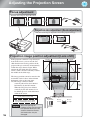
Focus adjustment ....................................... 16
Projection size adjustment
(Zoom adjustment) ................................... 16
Projection image position adjustment
(Lens shift)................................................ 16
Adjusting the tilt of the projector ................. 17
Displaying a test pattern............................. 17
Image Quality Adjustments
■ Basic Image Quality Adjustments ............ 18
Selecting the color mode............................ 18
Selecting the aspect ................................... 18
■ Advanced Color Adjustments ................... 20
Hue, saturation, and brightness
adjustment ................................................ 20
Gamma adjustment .................................... 20
RGB adjustment (Offset, Gain) .................. 22
■ Examining Image Quality Further ............. 23
Sharpness (Advanced) adjustment ............ 23
Auto Iris (automatic aperture) setting ......... 23
■ Viewing Images at a Preset Image Quality
(Memory Function)...................................... 24
Saving, Loading, Erasing and
Renaming Memory ................................... 24
Configuration Menu
2
■ Configuration Menu Functions ................. 26
Using the configuration menus................... 26
List of configuration menus
(EH-TW3500/TW2900)............................. 28
List of configuration menus
(EH-TW4500/TW4400)............................. 30
"Image" menu ............................................. 32
"Signal" menu ............................................. 33
"Settings" menu .......................................... 36
"Memory" menu .......................................... 39
"Reset" menu.............................................. 40
Table of Contents
■ Problem Solving ........................................ 41
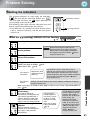
Reading the indicators ............................... 41
• When the
(warning) indicator is lit or
flashing ...............................................................41
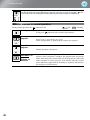
• Indicator statuses in normal operation..................42
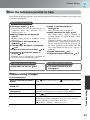
When the indicators provide no help.......... 43
• Problems relating to images................................. 43
• Problems when projection starts .......................... 47
• Problems with the remote control ........................ 48
Installing the
projector
Troubleshooting
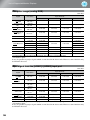
• Component Video ................................................ 55
• Composite Video/S-Video ................................... 55
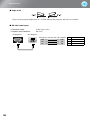
• Computer image (analog RGB) ........................... 56
• Input signal from the [HDMI1] / [HDMI2]
input port............................................................ 56
Consumable replacement periods ............. 51
• Air filter replacement period ................................51
• Lamp replacement period .....................................51
Replacing consumables............................. 52
• Replacing the air filter ..........................................52
• Replacing the lamp ...............................................52
• Resetting the lamp operating time ........................52
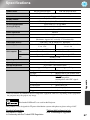
■ Specifications ............................................ 57
■ Glossary ..................................................... 60
■ Index ........................................................... 62
Image Quality
Adjustments
• Cleaning the air filter............................................49
• Cleaning the projector case ..................................50
• Cleaning the lens ..................................................50
Configuration
Menu
■ Optional Accessories/Consumables ....... 54
■ List of Supported Monitor Displays ......... 55
Troubleshooting
■ Maintenance ............................................... 49
Cleaning..................................................... 49
Appendix
l
Basic
operation
Appendix
3
Features of the Projector
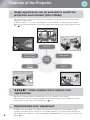
Image appearance can be selected to match the
projection environment (Color Mode)
The optimum images for the location can be projected simply by selecting the desired color mode from the
following seven preset modes.
If "Natural", "Theatre", "x.v.Color", "Theatre Black 1" or "Theatre Black 2" is selected, the Epson Cinema
Filter effect is applied automatically to increase the contrast and to make skin tones appear with more natural
tints.
p.18
Dynamic
Theatre Black1
Theatre Black2
Living Room
Color
Mode
Theatre
Natural
"
" mode realizes more natural color
reproduction
This mode is compatible with the extended-gamut color space standard for video (xvYCC).
Extended-gamut color images output by equipment supporting this standard are more faithful to the original,
and the viewer can enjoy clearer, more natural images.
p.18
Sophisticated color adjustment
4
In addition to the "Color Mode", the absolute color temperature and skin tones can be adjusted by simple
procedures to render the picture even more to your own liking. Further, you can adjust gamma, the offset and
gain for RGB colors, and the hue, saturation, and brightness of RGBCMY colors, to create colors that match the
image.
p.20
Features of the Projector
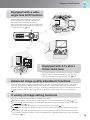
Equipped with a wideangle lens shift function
The lens shift function allows the position of the
projected images to be adjusted vertically and
horizontally without distorting the images.
This can allow the projector to be set up with greater
freedom, even if it is suspended from a ceiling or at
an angle to the screen.
p.16
Equipped with 2.1x short
throw zoom lens
For zoom adjustment, 2.1x short throw zoom lens is provided.
Images can be projected onto an 100" screen (16:9 screen
only) even at a distance of approximately 3 m.
p.10
Advanced image quality adjustment functions
Advanced image quality adjustment functions such as "Auto Iris" and "Sharpness (Advanced)" can be used to
enjoy even sharper images. With the Auto Iris function turned on, the amount of light can be automatically
adjusted to match the images being projected, to create images with depth and perspective. The Sharpness function
is used to adjust not only the entire image, but also to emphasize specific regions, such as hair and clothing.
p.23
A variety of image setting functions
Some of the other many functions that are available are as follows.
EPSON Super White is used to prevent overexposure that can result in images that are too bright.
p.35
A progressive conversion that lets you obtain ideal results both for images with large amounts of movement
and for still images.
p.34
An aspect function that allows images to be viewed in wide-screen format.
p.18
Memory functions that allow adjustment results to be stored and later retrieved easily using the remote control.
p.24
Lock settings that can be used to lock the projector's control panel after adjustments have been made so that
they cannot be changed by mistake, or to prevent children from accidentally turning on the power and looking
into the lens.
p.37
5
Part Names and Functions
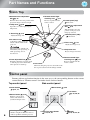
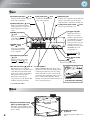
Front / Top
• Horizontal lens adjustment
dial
• Remote control light-
p.16
receiving area
Turn the dial to move the position of the
projection image to the left or right.
• Lamp cover
p.13
Receives signals from the
remote control.
See below
• Vertical lens adjustment
p.52
Open this cover when replacing the
lamp inside.
• Zoom ring
• Control panel (top)
dial
p.16
Turn the dial to move the
position of the projection
image up or down.
• Control panel (side)
See below
p.16
Adjusts the image size.
• Air exhaust vent
A discharge outlet for the air
which cools the inside of the
projector.
• Focus ring
Do not touch the exhaust vent
immediately after projecting, or
while projecting, since it
becomes hot.
• Projection lens
p.16
Adjusts the image focus.
Projects images from here.
• Remote control light-
• Front adjustable feet
receiving area
p.17
Extend to adjust the projection angle
so that the projector is horizontal
when placed on a desk top.
p.13
Receives signals from the
remote control.
• Lens cover
When not using the projector, attach this to the
lens to protect the lens from damage and dirt.
Control panel
Buttons with no explanation function in the same way as the corresponding buttons on the remote
control. Refer to "Remote control" for further details on these buttons.
Top control panel
Side control panel
• Power button
• Menu button
p.26
p.14, 15
• Esc button
• Source button
p.18, 20, 26
p.15
Displays a list of input
sources and switches to
your desired input source.
• Warning indicator
6
p.41
Flashes or lights in different colors to
indicate problems with the projector.
• Enter/Line menu button
p.18, 24, 26
•
button
p.18, 20, 22, 26
Part Names and Functions
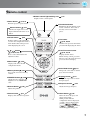
Remote control
• Remote control light-emitting area
p.13
Outputs remote control signals.
• Power button
p.14, 15
Turns the projector power on/off.
Source buttons
p.15
Switches the input source to the
input terminals indicated on each
button.
• Default button
p.26
Returns settings of the adjustment
screen in the configuration menu to
their default values when pressed
while displaying the screen.
•
Illuminates all of the buttons on the
remote control for 10 seconds so
that they can be seen in dark
places.
• Esc button
p.18, 20, 26
Returns to the previous menu when
pressed while displaying the menu.
• Enter/Line menu button
button
p.18, 20, 22, 26
p.18, 24, 26
Press to select menu items and
adjustment values.
• Menu button
• Illumination button
Displays the line menu.
While viewing a menu, press this
button to select the menu item and
proceed to the next display.
p.26
Displays and closes the full
configuration menus.
• Memory button
• Color Mode button
p.24
Saves, loads, and erases memory
contents.
• RGBCMY button
p.20
Adjusts the hue, saturation and
brightness for each RGBCMY
color.
• Gamma button
p.20
p.18
Changes the color mode to suit the
projection environment.
• Aspect
button
p.18
Changes the aspect ratio to match
the input signal.
• Sharpness button
p.23
Adjusts the image sharpness.
Adjusts the gamma.
• Pattern button
p.17
Displays and clears the test pattern.
• Blank button
p.26
Turns off and on the projected
images temporarily.
When pressed while the
configuration menu is displayed,
or while a menu is displayed by
pressing
,
,
, or
, the menu
screen disappears and appears.
7
Part Names and Functions
Rear
• [S-Video] input port
p.12
Connects to the S-Video out ports
of the video equipment.
• [Video] input port
• [PC] input port
p.12
Connects to the RGB out
port of the computer.
p.12
• [RS-232C] port
Connects to a computer using an RS-232C
cable to control the projector from the
computer. This is not used in normal use.
• Lamp cover open switch
Inputs a general video signal
(composite video). Connect to an
image output port of a video
source.
Press to open the lamp cover.
• [Trigger out] port
• [HDMI1] input port*
When the projector is
turned on, a 12 V DC
signal is output from this
port. When the projector is
turned off or a problem
with operation occurs, the
output becomes 0 V to
send the projector's power
ON/OFF status to an
external device.
p.12
Connects to an HDMI compatible video source
or to a computer.
• [HDMI2] input
port*
p.12
Connects to an HDMIcompatible video source
or to a computer.
• Security lock
• [Component] input port
p.61
• Main power switch
p.12
p.14
• [Power] inlet p.14
Connects to the component
(YCbCr or YPbPr ) out
port of the video equipment.
• Air inlet (air filter)
p.52
p.49, 52
This draws in air for cooling the
inside of the projector. If dust collects
on the filter, the temperature inside
the projector will rise and problems
with operation or more rapid
deterioration of the optical
components may occur. The air filter
should be cleaned periodically.
Connects the power cable.
• Cable holders
When an HDMI cable with a large outer
diameter is connected to the input port, the
weight of the cable may cause it to hang
down and result in a poor connection. To
prevent this by securing the cable, you can
pass a commercially-available cable tie
through one of the two holders whichever is
more convenient for you.
Cable tie
(commercially available)
* Compatible with HDCP
Base
• Suspension bracket fixing
points (5 points)
p.54
Install the optional ceiling mount
here when suspending the projector
from a ceiling.
• Cable cover stays
(2 places)
8
Attach the optional cable cover
here.
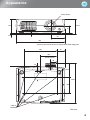
Appearance
Centre of lens
136
148.3
72*
12.3
4.5
131
450
* Distance from centre of lens to suspension bracket fixing point
300
75
150
Centre of lens
56
45
134.7
389.7
160
5-M4×9
Units:mm
9
Setting up
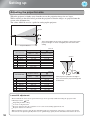
Adjusting the projection size
When the projector is further away from the screen, the projection image size are larger.
While referring to the table below, position the projector so that the images are projected onto the
screen at the optimum size.
The values should be used as a guide for setting up the projector.
Screen
Adjusting the projection size
Centre of lens
This is the height from the centre of the lens to the bottom of the
projection images. It can be changed by the vertical lens shift
setting.
Projection distance
Units: cm
Projection distance
16:9 screen size
Longest
Shortest
to
(Tele)
(Wide)
Vertical lens shift
Highest to Lowest
87 to 188
117 to 252
177 to 380
-17 to 55
-35 to 109
-46 to 146
-58 to 182
30"
40"
60"
80"
66×37
89×50
130×75
180×100
100"
220×120
238 to 508
298 to 636
120"
150"
200"
270×150
330×190
440×250
359 to 764
-69 to 219
450 to 956
601 to 1276
-115 to 364
Screen
-23 to 73
-86 to 273
Units: cm
Projection distance
4:3 screen size
Longest
Shortest
to
(Tele)
(Wide)
Vertical lens shift
Highest to Lowest
-21 to 67
30"
40"
60"
80"
61×46
81×61
120×90
160×120
107 to 231
144 to 309
218 to 466
-42 to 134
292 to 623
-56 to 178
100"
200×150
366 to 779
-71 to 223
120"
150"
240×180
300×230
440 to 936
551 to 1171
-106 to 334
200"
410×300
736 to 1562
-141 to 446
-28 to 89
If the projector is placed at an angle to
the screen, then the projected image will
be distorted.
-85 to 268
Lens shift adjustment
The lens shift dials can be used to position the image and is especially useful when using the projector in the
following locations.
p.16
Suspending from the ceiling
A screen in a high location
Projector situated to the side so that the screen can be viewed sitting right in front of it
Projector situated on a shelf, etc.
When positioning an image using the lens shift dial, hardly any deterioration of the image occurs because the lens
shift correction is adjusted optically. However, for optimal image quality the lens shift function should not be used.
10
Setting up
Projection methods
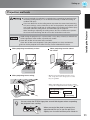
If you use adhesives on the ceiling mount to prevent the screws from loosening,
or if you use things such as lubricants or oils on the projector, the projector case
may crack causing it to fall from its ceiling mount. This could cause serious injury
to anyone under the ceiling mount and could damage the projector.
When installing or adjusting the ceiling mount, do not use adhesives to prevent
the screws from loosening and do not use oils or lubricants and so on.
Avoid setting the projector up in a place which is very dusty or humid, or where there
will be cigarette or other smoke, especially oily smoke.
Clean the air filter at least once every 3 months.
Clean the air filter more frequently if using the projector in a dusty environment.
Do not use the projector on its side. This may cause malfunctions to occur.
When projecting from directly in front
When projecting from the side of
the screen
Installing the Projector
A special method of installation is required when suspending the projector from
the ceiling (ceiling mount). If it is not installed correctly, it could fall causing an
accident and injury.
Projection methods
When projecting from a ceiling
* Even if projection will be from the screen
side, set up the screen and projector so that
they are parallel.
* When suspending the projector from a ceiling,
change the configuration menu settings.
p.37
Configuration menu
Settings
Projection
Front
Front/Ceiling
You can rotate the EPSON logo plate around 180 degrees when suspending
the projector from a ceiling.
TIP
When one end of the plate is pressed, the
opposite end lifts up, so you can pull it out
slightly, turn it around and then push it back in.
11
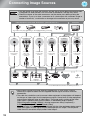
Connecting Image Sources
• Turn the power off for both the projector and the signal source before connecting them.
If the power for either device is on at the time of connection, damage may result.
• Check the shapes of the cable connectors and the device ports before making the
connections. If you try to force a connector to fit a device port with a different shape or
number of terminals, a malfunction or damage to the connector or port may result.
Video equipment (VHS VCR, DVD player, game console, etc.)
Computer
*Port names may vary depending on the equipment being connected.
Video
RCA video cable
(commerciallyavailable)
Component output
S-Video
HDMI
DVI-D output
Component
video cable
(commerciallyavailable)
S-Video cable
(commerciallyavailable)
HDMI cable
(commerciallyavailable *)
HDMI to DVI-D
conversion cable
(commerciallyavailable)
Mini D-Sub
15-pin
Computer cable
(commerciallyavailable)
Mini D-Sub
15-pin
* Use a HDMI cable that conforms to the HDMI specifications.
TIP
12
• Some signal sources may have specially-shaped ports. In such cases, use the
accessory or optional cables that are supplied with the signal source to make the
connections.
• The cable that should be used to connect video equipment to the projector will depend
on the type of video signal that the equipment outputs. Some kinds of video equipment
output several different types of video signal. The image quality ranking of the video
signal types is generally held to be as follows, in descending order of quality:
Digital component video [HDMI ] > Analog component video [Component] >
S-Video [S-Video] > Composite video [Video]
You should refer to the documentation provided with the video equipment being used to
check what types of video signal formats the equipment can output. The composite
video format is sometimes simply called "video output".
Preparing the Remote Control
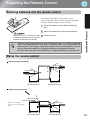
Inserting batteries into the remote control
At the time of purchase, the batteries are not
inserted into the remote control. Insert the supplied
batteries before using the remote control.
Insert the batteries in the correct direction.
Check the (+) and (-) indications inside
the battery compartment and insert the
batteries so that they face correctly.
TIP
Close the cover.
If delays in the responsiveness of the remote control occur or if it does not operate
after it has been used for some time, it probably means that the batteries are
becoming flat. If this happen, replace the batteries with two new batteries. Use two
new AA-size alkali batteries or manganese batteries as replacement batteries.
Batteries other than AA-size alkali batteries or manganese batteries cannot be used.
Installing the Projector
Lift up the battery cover while pressing its
tab.
Using the remote control
Operating range (horizontal)
Approx.30
Approx.30
Approx.30
Approx.30
Approx.10m
Operating distance
Approx.10m
Operating distance
Operating range (vertical)
Approx.60
Approx.10 *
Approx.30
* Remote control signals
cannot be received within this
range.
Approx.30
Approx.10m
Operating distance
Approx.10m
Operating distance
13
Starting and Stopping Projection
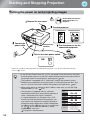
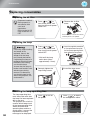
Turning the power on and projecting images
Do not look into the lens
while projection is in
progress.
Remove the lens cover.
Turn the power on.
Control Panel
Connect the
power cable.
(Commerciallyavailable)
Remote Control
Turn the power on for the
connected equipment.
Turn on the main power switch.
ON
If there is a problem with projection even though the projector is set up and connected correctly,
refer to
p.15, 41.
TIP
If you set the "Direct Power On" to "On", the power of the unit will turn ON when
the main power switch is turned ON, without having to press the power button of
the remote control or the projector's control panel.
p.36
The projector is equipped with a "Child Lock" function that prevents young
children from accidentally turning the power on and looking into the lens, and
also an "Control Panel Lock" function that prevents mis-operations.
p.37
When using above an altitude of about 1500 m, make sure you set the "High
Altitude Mode" to "On".
p.37
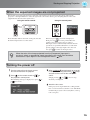
Example of output selection
This projector is equipped with an automatic
adjustment function that automatically optimizes it
when a computer input signal is switched.
If a laptop computer or a computer with a LCD
screen has been connected to the projector, you
may need to use keyboard or function settings to
change the output destination. While holding down
the
key, press
(the key with a symbol such
as
/
on it). After the selection is made,
projection will soon start.
Computer's documentation
14
NEC
Panasonic
SOTEC
HP
Toshiba
IBM
LENOVO
SONY
DELL
Fujitsu
Macintosh
Set mirror setting or
display detection.
Depending on OS, you can
change the output
selection by pressing
.
Starting and Stopping Projection
When the expected images are not projected
If more than one signal source has been connected, or if no images are projected, use the remote control or the
projector's control panel buttons to select the signal source. For video devices, press the [Play] button on the video
equipment first, then select the signal source.
Using the remote control
Using the control panel
When the expected images are not
projected
When you press
, the menu is displayed.
Each press of
moves the pointer. Move the
pointer to the target input source to select it.
The input source is automatically switched when no
operations are performed about three seconds with
placing pointer at the target input source. You can
also press
to switch to the target source.
Press the button that has the name of the port on it that
the desired signal source is connected to.
TIP
When the color of the image projected from the [Component] input port is
unnatural, select an appropriate signal according to the signal from the device
connected at "Input Signal" in the Configuration menu.
p.38
When the expected images are not
projected
Basic Operations
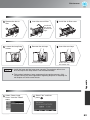
Turning the power off
Turning the power off
Turning the power off
When cool-down (approximately 16 seconds)
is completed, flashing around the
stops
and you can then turn off the main power
switch.
Turn the power off for the signal sources
that are connected to the projector.
Press
on the remote control or
the projector's control panel.
The following message is displayed, so press
once more.
on
or
Simply pressing
or
electricity consumption.
does not stop
Attach the lens cover.
If the projector is suspended from a ceiling and the
lens cover is left removed, the lens cover will still be
needed if the projector is moved anywhere, so keep
it in a safe place.
15
Adjusting the Projection Screen
Focus adjustment
Turn the focus ring to adjust the focus.
Projection size adjustment (Zoom adjustment)
Turn the zoom ring to adjust the size of the projected image.
Focus adjustment
Projection size adjustment (Zoom
Wide
adjustment)
Tele
Projection image position adjustment
(Lens
shift)adjustment (Lens shift)
Projection image
position
If the projector cannot be set up directly in
front of the screen, you can use the lens
shift function to move the position of the
projected images vertically or horizontally
within the range shown at right. While
turning the lens shift dials, the position
where a click is heard is currently at about
the middle of the shift range.
The image position cannot be moved to the
maximum vertical values and maximum
horizontal values at the same time.
Ex) The image cannot be shifted
vertically when it has been shifted
horizontally by the full amount.
When the image has been shifted
vertically by the full amount, it can
be shifted up to 9% of the horizontal
width of the screen.
H
V
1/2V
1/2H
Standard projection position
(centre position for lens shift)
Range that the picture can be shifted
from the standard projection position
16
When transporting the
projector, make sure to turn the
lens position down by the full
amount. Otherwise the lens
shift mechanism may be
damaged.
Move
downwards
Move
upwards
Move to
the left
Move to
the right
Adjusting the Projection Screen
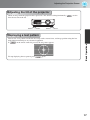
Adjusting the tilt of the projector
When an image from the projector that is placed on a flat surface is tilting horizontally (
front feet to correct the tilt.
Extend
Retract
Extend
), use the
Retract
Displaying a test pattern
Adjusting the tilt of the projector
again.
Displaying a test pattern
To stop displaying the test pattern, press
Basic Operations
You can use a test pattern to make the first setup such as zoom, focus, and image position using the lens
shift without connecting to any electrical equipment.
If
on the remote control is pressed, the test pattern appears.
17
Basic Image Quality Adjustments
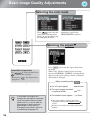
Selecting the color mode
Selecting the color mode
Press
and select the
color mode from the menu.
Setting is also possible using
the configuration menu.
Inputting a signal to the
HDMI1/HDMI2 terminals.
Selecting the aspect
Selecting the aspect
Select Menu Operations
Use
to select an item. Press
to confirm the selection.
*If you press
disappears.
, the Select menu
Press
and select the aspect mode from
the menu.
When 720p, 1080i or 1080p signals are being
input to the [HDMI1], [HDMI2] or [Component]
input port, the aspect setting is fixed at "Normal"
and cannot be changed.
When projecting using Auto
TIP
18
If you project an image that is
compressed, enlarged or separated
using the aspect function in public
places such as a store or hotel for
the purposes of profit-making or
public display, it may result in
infringing on the author's right that
is protected by copyright law.
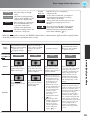
● For 4:3 input signals
Normal
● For input images recorded
in squeeze mode
Full
● For letterbox input signals
Zoom
Not usable during computer input. Not
compatible with certain component video
signals.
If Auto is not suitable, the setting will become
Normal.
Basic Image Quality Adjustments
Theatre
Black 1/2
: Ideal for using in a bright
room.
:
Living Room Ideal for viewing programs
such as sports matches or TV
programs in a bright room.
: Ideal for using in a dark room.
Natural
It is recommended that you
start in this mode when
making color adjustments.
Dynamic
Theatre
Theatre
Black 1
Theatre
Black 2
: Ideal for watching movies and
concerts in a dark room.
: Suitable for use in a completely
darkened room.
: A clear tone of color that you might see
on professional monitors for creating
video software or the like.
: A deep warm tone of color that gives you
the feeling of enjoying a movie at a
theatre.
: You can select from either of the signals
being input to the HDMI1 and HDMI2
terminals. Ideal for reproducing natural
colors most faithfully.
p.4
Input
signal
Recommended
aspect mode
Result
Normal TV broadcasts
Images with standard
aspect ratio (4:3)
Computer images
Normal
Black bands will
appear at the left and
right of the images.
When HDTV images
are projected, the
images appear in 16:9
size.
Remarks
Images recorded by a
video camera or DVD
software in squeeze
mode
Letterbox images
Normal TV broadcasts
Images with standard
aspect ratio (4:3)
Full
Zoom
Wide
Input signals will be
projected at the same
width as the projector's
panel resolution.
When 4:3 images are
projected, the images
will be elongated
horizontally.
Input signals will be
projected at the same
height as the projector's
panel resolution.
When a 4:3 image is
projected, the top and
bottom of the image
are hidden from view.
If this happens, the
part of the image
hidden from view at
the top and bottom can
be reduced in size in
the vertical direction
so that it can be
viewed by "Zoom
Size" in the
Configuration menu.
p.33
When images with
subtitles are projected
and the subtitles are
truncated, use the
"Zoom Caption Pos."
menu command to
adjust.
p.33
Input signals will be
projected at the same height
as the projector's panel
resolution. At this time, the
image enlargement ratio
will be smaller near the
middle of the images but
become larger towards the
left and right edges of the
images.
This is useful for when 4:3
images are projected onto a
wide screen. Because there is
almost no distortion due to
enlargement in the middle of
the images, the images
appear close to what they
would be at their original
size. And because both ends
of the images are enlarged,
movement at the edges of the
images appears faster and
gives an impression of
greater speed, making it
ideal for viewing sporting
events.
Image Quality Adjustments
When the
mode is selected, the EPSON cinema filter is automatically applied and the original colors
of the image source are reproduced more exactly.
19
Advanced Color Adjustments
You can select "Image" - "Sharpness" or "Advanced" to adjust the images according to your own
preferences. The adjustment screens for "Gamma" and "RGBCMY" can be displayed on the screen
directly by pressing the corresponding buttons on the remote control.
The adjustment values can be stored in the memory so that you can retrieve them and apply them to the
projected images at any time. ( p.24)
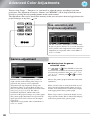
Hue, saturation, and
brightness adjustment
The hue, saturation, and brightness for each of the
R (red), G (green), B (blue), C (cyan), M (magenta)
and Y (yellow) color components can be adjusted.
Adjustment is not possible when "Color Mode" is
set to "x.v. Color".
Gamma adjustment
Hue, saturation, and
brightness adjustment
Adjusting
from the gamma
Gamma
adjustment
correction values
Use
or
(UP or DOWN) to select the
correction value that suits the connected equipment
and your own preferences from "2.0", "2.1", "2.2",
"2.3" or "2.4" , and then press
or
to confirm
the selection.
Differences between equipment may result in a
slight variation in the coloring when images are
projected, and you may want to adjust this.
(Projection will stop temporarily during such
adjustment.) There are two methods of doing so.
One is to select one of the gamma correction values
[2.0], [2.1], [2.2], [2.3], [2.4]. The other is
customized adjustment, which is done with
reference to the projected image or a gamma graph.
The gamma graph's horizontal axis represents the
input signal level and its vertical axis the output
signal level.
Adjustment is not possible when "Color Mode" is
set to "x.v. Color".
20
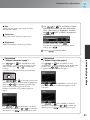
Observe the gamma graph to check the result of the
adjustment.
When a smaller value is selected, the dark areas of
images become brighter, but the lighter areas may
become oversaturated. This is indicated by bulging
in the upper portion in the gamma graph.
When a larger value is selected, the bright areas of
images become darker. This is indicated by bulging
in the lower portion in the gamma graph.
Advanced Color Adjustments
Hue
Adjusts the tone of the entire image to bluish,
greenish and reddish.
Saturation
Use
or
(UP or DOWN) to select
and confirm the color, and then select either
"Hue", "Saturation" or "Brightness" and then
use
or
(LEFT or RIGHT) to make the
adjustment.
Adjusts the overall vividness of the images.
To adjust another color, press
.
To return the adjustment results to their default
settings, press
.
Press
Customized
("Adjust it from the image")
Use
or
(UP or DOWN) to select
"Customized" - "Adjust it from the image" in that
order, and then press
or
to confirm the
selection.
A gamma icon will appear in the projected image.
Use
or
to move the gamma icon
to the place where you want to adjust the brightness,
and press
or
to confirm the selection. The
place selected and the regions of the same
brightness will flash, and a gamma graph will
appear.
Use
or
(UP or DOWN) to make the
adjustment, and then press
or
to confirm the
adjustment. Press
to go back and do it again.
to exit the menu.
Customized
("Adjust it from the graph")
Use
or
(UP or DOWN) to select
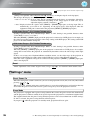
"Customized" - "Adjust it from the graph" in that order,
and then press
or
to confirm the selection.
A gamma adjustment graph will appear.
Use
or
(LEFT or RIGHT) to select the place
where you would like to adjust the brightness of the
color tone.
Image Quality Adjustments
Brightness
Adjusts the brightness of the overall image.
Use
or
(UP or DOWN) to make the
adjustment, and then press
or
to confirm the
adjustment. Press
to go back and do it again.
21
Advanced Color Adjustments
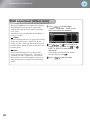
RGB adjustment (Offset, Gain)
The image brightness can be adjusted by adjusting
the individual R (red), G (green) and B (blue)
components of the dark areas (offset) and bright
areas (gain).
Adjustment is not possible when "Color Mode" is
set to "x.v. Color".
Press
and then select
"Image" - "Advanced" - "RGB" in that
order and confirm the selection.
Offset
If you would like dark areas to appear more clearly,
change the setting to the + (right) side. If you
change it to the – (left) side, the whole image will
become sharper, but the contrast in dark areas will
become poorer.
Gain
If you would like bright areas to appear more
clearly, change the setting to the – (left) side. If
you change it to the + (right) side, you will feel
that the image is becoming brighter and closer to
white, but the contrast in light areas will become
poorer.
Use
or
(UP or DOWN) to
select an item, and then use
or
(LEFT or RIGHT) to make the
adjustment.
To return the adjustment results to their
default settings, press
.
Press
to exit the menu.
RGB adjustment (Offset, Gain)
22
Examining Image Quality Further
In addition to color adjustments, adjustments to advanced sharpness and the amount of light from the
lamp can also be made to match the image in search of the best picture.
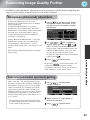
Sharpness (Advanced) adjustment
If "Thin Line Enhancement" is set in the +
direction, hair and the detailed areas of clothing
will be emphasized.
If "Thick Line Enhancement" is set in the +
direction, the areas emphasized by "Thin Line
Enhancement" will be hardly emphasized. Instead,
the rough areas of the entire subject, such as
contour and background, will be emphasized,
resulting in a sharp image.
Setting "Horiz. Line Enhancement" / "Vert. Line
Enhancement" to the + side will enhance the
image sharpness in the horizontal / vertical
direction. Setting them to the - side will give a soft
image.
This cannot be adjusted during input of computer
image signals.
Press
, and then select "Image" "Sharpness". Select "Advanced" at the
top-right corner of the screen to confirm
the selection.
Use
or
(UP or DOWN) to
select a menu item, and use
or
(LEFT or RIGHT) to make adjustments.
You can adjust "Thin Line Enhancement" and
"Thick Line Enhancement" at the same time
by using the bar on the top in the screen.
To return the adjustment results to their default
settings, press
.
to exit
the menu.
Auto Iris (automaticPress
aperture)
setting
By pressing
on the remote control, you
can directly display the sharpness setting
("Standard"/"Advanced") screen just as selected
using "Sharpness" of the "Image" menu.
Auto Iris (automatic aperture) setting
When "Auto Iris" is on, the light intensity from
the lamp is automatically controlled according to
the brightness of images, and you can get higher
contrast and rich images. Tracking speed of the
light intensity control in response to changes in
brightness of images can be set to either "Normal"
or "High Speed" depending on your preference.
Setting is not possible when "Color Mode" is set
to "x.v. Color."
* An operation sound of Auto Iris function may
be emitted while projecting some images. This
is not a failure of the projector.
Press
, and then select
"Image" - "Auto Iris".
Image Quality Adjustments
Sharpness (Advanced) adjustment
Select "Normal" or "High Speed" to
confirm the selection.
Press
to exit the menu.
23
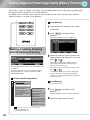
Viewing Images at a Preset Image Quality (Memory Function)
After using a subset of "Signal" and "Image" in the configuration menu to adjust the projected images,
the adjusted values can then be saved (Save Memory).
In addition, the saved data can be retrieved easily, so that you can enjoy viewing images with the
adjusted settings at any time (Load Memory).
Save Memory
Viewing Images Adjust
at aeach
Preset
Image
of the settings
to the values
to be saved.
Quality (Save Memory)
Press
, and select "Save
Memory".
The Save Memory screen is displayed.
Saving, Loading, Erasing
and Renaming memory
Select the memory name to register the
adjustments to from Memory1 to 10, and
press
or
.
The adjustments that can be saved to memory are
as follows.
Up to ten adjustments can be saved to memory.
"Rename Memory" is only available for EHTW4500/TW4400.
When preceding the memory name is
green, this indicates that adjustments are
already saved to memory.
Select an already saved memory name, and
press
or
.
A confirmation message will be displayed.
If you select "Yes", the previous memory
content is erased, and the current adjustment
values are saved.
Saving, Loading, Erasing and Renaming
memory
All Items under Image Menu
Load Memory
Signal
Progressive
Load saved memories.
Frame Interpolation *1
4-4 Pull-down *1
2-2 Pull-down
*2
Advanced
Noise Reduction
Mosquito NR
*1
Block NR *1
Setup Level
EPSON Super White
Overscan
HDMI Video Range
Displayed for input sources other than computer
*1 EH-TW4500/TW4400 only
*2 EH-TW3500/TW2900 only
24
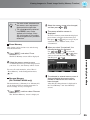
Press
, and select "Load
Memory".
The Load Memory screen will be displayed.
Select the target memory name.
Viewing Images at a Preset Image Quality (Memory Function)
Erase Memory
This feature can be used to erase and clean up
unwanted memories.
Press
, and select "Erase
Memory".
The Erase Memory screen will be displayed.
Select the memory name to be changed,
and then press
or
.
The name selection screen is
displayed.
To select a memory name from the displayed
preset names, select the desired name and
then press
or
and go to step 5. If you
would like to use a custom name, select
"Customized".
When you select "Customized", the
following keyboard is displayed.
Use
or
to select the
desired key, and then press
or
. Once
you have entered the name, select "Finish"
and then press
or
.
Select the memory name to erase.
A confirmation message will be displayed. If
you select "Yes", the memory will be erased.
To erase all saved memories, select "Reset" "Reset Memory" in the Configuration menu.
p.40
Rename Memory
(EH-TW4500/TW4400 only)
The default names ("Memory1" to "Memory10")
can be changed. You can rename memories so
that its settings are easy to recognize.
Erase Memory
Renaming Memory
The selected or entered memory name is
displayed beside the preset memory
number to indicate that the name has
been changed.
After this, the changed name is displayed in
the "Load Memory" and "Save Memory"
screens.
Image Quality Adjustments
TIP
The color mode selected when
the memory was registered is
displayed on the right side.
The aspect setting retrieved
from memory may not be
applied to the images if they
are 16:9 images or if the input
signal images have a particular
resolution.
Press
, and then select "Rename
Memory".
The "Rename Memory" screen is displayed.
25
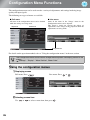
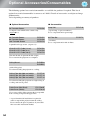
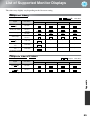
Configuration Menu Functions
The configuration menus can be used to make a variety of adjustments and settings involving image
quality and input signals.
The following two types of menu are available.
■ Full menu
All items in the configuration menu can be checked
while the settings are being made.
Top menu
Sub-menu
■ Line menu
Some of the items in the "Image" menu in the
Configuration menu can be adjusted.
This menu is useful for viewing the effects of
adjustments in the images being projected while the
adjustments are being made.
Navigation Bar
For details on the operation method, refer to "Using the configuration menus" in the next section.
TIP
The Configuration menu can be used to change the color pattern and display position of the
menus.
"Settings" - "Display" - "Menu Position", "Menu Color"
Using the configuration menus
Displaying a menu
Full menu: Press
.
Line menu: Press
Selecting a menu item
Use
26
or
to select a menu item, then press
.
or
.
Configuration Menu Functions
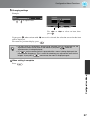
Changing settings
Example:
Use
or
to adjust values.
(green): Current setting value
Use
press
If you press
when an item with
will be displayed.
To return to a previous display, press
TIP
or
to select an item, then
.
next to it is selected, the selection screen for that item
.
• For items such as "Brightness" which can be adjusted using an adjustment bar, the
adjustment values can be reset to the default if you press
while the
adjustment bar is being displayed.
• If
on the remote control is pressed while a menu is being displayed, the
menu screen disappears. This is useful for checking your adjustment result on the
images. If you press
once more, the menu is displayed again.
When setting is complete
.
Configuration Menu
Press
27
Configuration Menu Functions
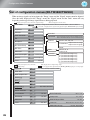
List of configuration menus (EH-TW3500/TW2900)
When no image signals are being input, the "Image" menu and the "Signal" menu cannot be adjusted.
Also, the items displayed in the "Image" menu, the "Signal" menu and the "Info" menu will vary
depending on the type of image signals that are being projected.
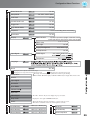
Displayed for input sources other than computer image
Image
Color Mode
* This is displayed in the line menu.
Dynamic, Living Room, Natural, Theatre,Theatre Black 1,Theatre Black 2,
p.32
("x.v.Color" is displayed when a signal is being input through the HDMI1/HDMI2 input terminals.)
Brightness
p.32
*
Contrast
p.32
*
Color Saturation
p.32
*
Tint
p.32
*
Sharpness
p.32
*
Abs. Color Temp.
p.32
*
Skin Tone
p.32
*
Advanced
p.32
Power Consumption
p.33
Normal, ECO
Auto Iris
p.33
Off, Normal, High Speed
Reset
p.33
Yes, No
Standard
Advanced
Thin Line Enhancement, Thick Line Enhancement,
Horiz. Line Enhancement, Vert. Line Enhancement
Gamma
Signal
Displayed for input sources other than
computer image
2.0, 2.1, 2.2, 2.3, 2.4
Customized Adjust it from the image
Adjust it from the graph
Reset
RGB
Offset R, G, B
Gain R, G, B
RGBCMY
R (Hue/Saturation/Brightness),
G (Hue/Saturation/Brightness),
B (Hue/Saturation/Brightness),
C (Hue/Saturation/Brightness),
M (Hue/Saturation/Brightness),
Y (Hue/Saturation/Brightness)
Only displayed for Computer image input
(does not appear when signals from the [HDMI1]/[HDMI2] input port are being input)
Auto, Normal, Full, Zoom, Wide
Aspect
p.33
Zoom Size
p.33
Zoom Caption Pos.
p.33
Tracking
p.34
Sync.
p.34
Position
p.34
Progressive
p.34
Motion Detection
p.34
2-2 Pull-down
p.35
On, Off
Noise Reduction
Off, 1, 2, 3
Auto Setup
p.35
On, Off
Setup Level
0%, 7.5%
Reset
Advanced
p.31
p.35
Reset
p.36
Off, Video, Film/Auto
EPSON Super White
Yes, No
Overscan
HDMI Video Range
28
On, Off
Auto, Off, 2%, 4%, 6%, 8%
Normal, Expanded
Direct Power On
p.36
On, Off
Sleep Mode
p.36
Off, 5min., 10min., 30min.
Child Lock
p.37
On, Off
Control Panel Lock
p.37
On, Off
Trigger Out
p.37
On, Off
High Altitude Mode
p.37
On, Off
Projection
p.37
Illumination
p.37
Display
Front, Front/Ceiling, Rear, Rear/Ceiling
On, Off
Menu Position
p.37
Top-left, Top-center, Top-right, Center-left, Center,
Center-right, Bottom-left, Bottom-center, Bottom-right
Menu Color
Color 1, Color 2
Messages
On, Off
Display Background
Black, Blue, Logo
Startup Screen
Input Signal
On, Off
Video Signal
p.38
Auto, NTSC , NTSC4.43, PAL ,
M-PAL, N-PAL, PAL60, SECAM
Component
Language
Reset
p.38
Yes, No
p.38
p.33
Only displayed for composite video/S-Video input
Only displayed for component video/Computer image input
Only displayed for Computer image input
The message text will be displayed in yellow when it is time to replace the lamp.
Time from 0H to 10H will be displayed as 0H. From 10H onwards, the display will be in units of 1H.
Lamp Hours
Info
Auto, YCbCr , YPbPr
Source
Input Signal
Resolution
Sync Info
Resolution
Scan Mode
Refresh Rate
Video Signal
The "Info" menu is only used to display the projector status.
Deep Color
Display the color depth of HDMI transmission.
Status
This is information about errors that have occurred on the projector.
This value is sometimes referred to when inquiries are made.
Load Memory
p.39
Memory1 to Memory10
Save Memory
p.39
Memory1 to Memory10
Erase Memory
p.39
Memory1 to Memory10
Reset
Memory
Sync Info
Reset All
p.40
Yes, No
Reset Memory
p.40
Yes, No
Reset Lamp Hours
p.40
Yes, No
Configuration Menu
Settings
Configuration Menu Functions
29
Configuration Menu Functions
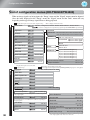
List of configuration menus (EH-TW4500/TW4400)
When no image signals are being input, the "Image" menu and the "Signal" menu cannot be adjusted.
Also, the items displayed in the "Image" menu, the "Signal" menu and the "Info" menu will vary
depending on the type of image signals that are being projected.
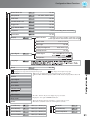
Displayed for input sources other than computer image
Image
Color Mode
* This is displayed in the line menu.
Dynamic, Living Room, Natural, Theatre,Theatre Black 1,Theatre Black 2,
p.32
("x.v.Color" is displayed when a signal is being input through the HDMI1/HDMI2 input terminals.)
Brightness
p.32
*
Standard
Contrast
p.32
*
Advanced
Color Saturation
p.32
*
Gamma
Tint
p.32
*
Sharpness
p.32
*
Abs. Color Temp.
p.32
*
Skin Tone
p.32
*
Advanced
p.32
Power Consumption
p.33
Normal, ECO
Auto Iris
p.33
Off, Normal, High Speed
Reset
p.33
Yes, No
Thin Line Enhancement, Thick Line Enhancement,
Horiz. Line Enhancement, Vert. Line Enhancement
2.0, 2.1, 2.2, 2.3, 2.4
Customized Adjust it from the image
Adjust it from the graph
Signal
Displayed for input sources other than
computer image
Aspect
p.33
Zoom Size
p.33
Zoom Caption Pos.
p.33
Tracking
p.34
Sync.
p.34
Position
p.34
Progressive
p.34
Frame Interpolation
p.34
p.31
p.35
p.35
Advanced
p.31
p.35
Reset
p.36
Offset R, G, B
Gain R, G, B
RGBCMY
R (Hue/Saturation/Brightness),
G (Hue/Saturation/Brightness),
B (Hue/Saturation/Brightness),
C (Hue/Saturation/Brightness),
M (Hue/Saturation/Brightness),
Y (Hue/Saturation/Brightness)
Contrast Enhancement
Off, 1, 2, 3
Super-resolution
Off, 1, 2, 3
Auto, Normal, Full, Zoom, Wide
Video, Film, Auto
Off, Low, Normal, High
On, Off
The default setting for "4-4 Pull-down" is different depending on
the input signals.
Auto Setup
RGB
Only displayed for Computer image input
(does not appear when signals from the [HDMI1]/[HDMI2] input port are being input)
The default setting for "Frame Interpolation" is different depending
on the input signals.
4-4 Pull-down
Reset
On, Off
Noise Reduction
Off, 1, 2, 3
Mosquito NR
Off, 1, 2, 3
Block NR
Setup Level
EPSON Super White
Yes, No
Overscan
HDMI Video Range
30
On, Off
0%, 7.5%
On, Off
Auto, Off, 2%, 4%, 6%, 8%
Auto, Normal, Expanded
The default setting for "HDMI Video Range" is different depending
on the input signals and/or method of connection.
Direct Power On
p.36
On, Off
Sleep Mode
p.36
Off, 5min., 10min., 30min.
Child Lock
p.37
On, Off
Control Panel Lock
p.37
On, Off
Trigger Out
p.37
On, Off
High Altitude Mode
p.37
On, Off
Projection
p.37
Illumination
p.37
Display
Front, Front/Ceiling, Rear, Rear/Ceiling
On, Off
Menu Position
p.37
Top-left, Top-center, Top-right, Center-left, Center,
Center-right, Bottom-left, Bottom-center, Bottom-right
Menu Color
Color 1, Color 2
Messages
On, Off
Display Background
Black, Blue, Logo
Startup Screen
Input Signal
On, Off
Video Signal
p.38
Auto, NTSC , NTSC4.43, PAL ,
M-PAL, N-PAL, PAL60, SECAM
Component
Language
p.38
Reset
Yes, No
p.38
Only displayed for composite video/S-Video input
Only displayed for component video/Computer image input
Only displayed for Computer image input
The message text will be displayed in yellow when it is time to replace the lamp.
Time from 0H to 10H will be displayed as 0H. From 10H onwards, the display will be in units of 1H.
Lamp Hours
Info
Auto, YCbCr , YPbPr
Source
Input Signal
Resolution
Sync Info
Resolution
Scan Mode
Refresh Rate
Video Signal
The "Info" menu is only used to display the projector status.
Deep Color
Display the color depth of HDMI transmission.
Status
This is information about errors that have occurred on the projector.
This value is sometimes referred to when inquiries are made.
Load Memory
p.39
Memory1 to Memory10
Save Memory
p.39
Memory1 to Memory10
Erase Memory
p.39
Memory1 to Memory10
Rename Memory
p.39
Memory1 to Memory10
Reset
Memory
Sync Info
Reset All
p.40
Yes, No
Reset Memory
p.40
Yes, No
Reset Lamp Hours
p.40
Yes, No
Configuration Menu
Settings
Configuration Menu Functions
31
Configuration Menu Functions
"Image" menu
Displayed for input sources other than computer image
Color Mode *1
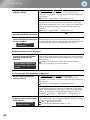
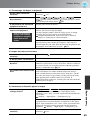
Seven different settings can be selected for the Color Mode, to match the images being projected or the
projection environment.
p.18
Brightness *2
(Adjustment is not possible when "Color Mode" is set to "x.v. Color".)
Adjust this when the output level of the connected equipment is weak and you feel that images are dark.
Contrast
*2
(Adjustment is not possible when "Color Mode" is set to "x.v. Color".)
Adjusts the difference between bright and dark areas.
When the contrast is increased, images with greater modulation are obtained.
Color Saturation *2
(Adjustment is not possible when "Color Mode" is set to "x.v. Color".)
This adjusts the color intensity for the images.
Tint *2
(Adjustment is not possible when "Color Mode" is set to "x.v. Color".)
This adjusts the image tint.
Sharpness *2
This adjusts the image sharpness.
Standard
The adjustment results are applied to the entire image.
Advanced
This can be used to adjust a specific region.
p.23
Abs. Color Temp.*2
(Adjustment is not possible when "Color Mode" is set to "x.v. Color".)
This adjusts the overall tints of the images. If you select a higher value, images appear bluish, and if you
select a lower value, images appear reddish. The absolute color temperature can be set to one of 12
settings within the range of 5000K to 10000K.
Skin Tone *2
(Adjustment is not possible when "Color Mode" is set to "x.v. Color".)
This adjusts the skin tones of people who appear in the images. If you select a higher value, green tone is
increased, and if you select a lower value, red tone is increased.
Advanced
(Adjustment is not possible when "Color Mode" is set to "x.v. Color".)
Gamma *1
This adjusts gamma. You can select a value, or make adjustments while viewing an image or a graph.
p.20
RGB *1
This lets you adjust the offset and gain for each of the R/G/B color components.
32
p.22
*1 The setting values are stored separately for each image source and signal type.
*2 The setting values are stored separately for each image source and color mode setting.
Configuration Menu Functions
Displayed for input sources other than computer image
RGBCMY *1
This lets you adjust the hue, saturation, and brightness for each of the R/G/B/C/M/Y color components.
p.20
Contrast Enhancement (EH-TW4500/TW4400 only)
This automatically enhances the contrast by calculating based on its current contrast. Select one of the
three levels to enhance the contrast. When a larger number is selected, the contrast becomes higher.
Super-resolution (EH-TW4500/TW4400 only)
This improves blurred images and rough edges, giving the projected images a fine, detailed appearance.
Select one of the three levels to enhance the image. When a larger number is selected, the effect becomes
greater.
Positive effects may not be recognized for some images.
Power Consumption*2
This lets you set the lamp brightness to one of two settings.
Set to "ECO" if the projection images are too bright when projecting in a dark room or projecting onto a
small screen. When used at the "ECO" setting, the power consumption and fan noise during projection is
reduced.
Auto Iris *3
(Setting is not possible when "Color Mode" is set to "x.v. Color.")
Tracking speed of the light intensity control in response to changes in brightness of images can be set to
either "Normal" or "High Speed" depending on your preference. If set to "Off", no light intensity control
is performed.
p.23
Reset
This returns all settings in the "Image" menu to their default settings.
Aspect
*1
Selects the aspect mode.
p.18
Zoom Size *1
This can be set only when "Aspect" is set to "Zoom".
This function enables the image to be reduced in size in the vertical direction so that the top and bottom
of images that are hidden from view can be viewed when "Zoom" is set. The larger the adjustment value
(reduction ratio) set here, the more the image is compressed and displayed squashed in the vertical
direction.
Zoom Caption Pos. *1
Configuration Menu
"Signal" menu
This can be set only when "Aspect" is set to "Zoom".
This function moves the display position of the image in one direction, up or down, to display captions
when projecting images with captions.
*1 The setting values are stored separately for each image source and signal type.
*2 The setting values are stored separately for each image source and color mode setting.
*3 The setting values are stored separately for each color mode setting.
33
Configuration Menu Functions
Displayed for input sources other than computer image
Only displayed for Computer image input (does not appear when signals from the [HDMI1] /[HDMI2] input port are being input)
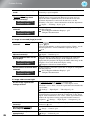
Tracking
*1
This adjusts the images if vertical stripes appear in the images.
Sync.
*1
This adjusts the images if flickering, fuzziness or interference appear in the images.
• Flickering and fuzziness may also occur when the brightness, contrast and sharpness settings are
adjusted.
• Clearer adjustments can be obtained if you adjust the "Tracking" first and then adjust the "Sync".
Position *1
(Setting is not possible when signals are being input from the [HDMI1] /[HDMI2] input port.)
When part of the image is clipped, move the image display position vertically and horizontally so that the
entire image is projected. Press
, ,
and
to adjust the position.
Progressive
*1
(EH-TW3500/TW2900 only)
(This can be set only when signals are being input from the [Video] / [S-Video] input port, or 480i, 576i,
1080i signals are being input from the [Component] / [HDMI1] / [HDMI2] input port.)
Interlace (i) signals are converted to progressive (p) signals using a method appropriate for the image.
• Off
:This is ideal for using when viewing images with a large amount of movement.
• Video
:This is ideal for general video images.
• Film/Auto :Optimum conversion is performed for movie, computer graphics, and animation input
signals.
Progressive
*1
(EH-TW4500/TW4400 only)
(Setting is not possible when "4-4 pull-down" is set to "On". And this can be set only when signals are
being input from the [Video] / [S-Video] input port, or 480i, 576i, 1080i signals are being input from the
[Component] / [HDMI1] / [HDMI2] input port.)
Interlace (i) signals are converted to progressive (p) signals using a method appropriate for the image.
• Video
:This is ideal for general video images.
• Film
:This is ideal for film images. Select this if the setting is "Auto" and flickering appears in
the film images.
• Auto
:Optimum conversion is performed for movie, computer graphics, and animation input
signals.
Motion Detection *1 (EH-TW3500/TW2900 only)
(This can be set only when signals are being input from the [Video] / [S-Video] input port, or 480i, 576i,
1080i signals are being input from the [Component] / [HDMI1] / [HDMI2] input port.)
Select whether the progressive conversion operation mode is for fast-moving images or for slow-moving
images. The smaller the value, the more suitable the mode is for viewing still images. The larger the
value, the more suitable the mode is for viewing video images.
Frame Interpolation (EH-TW4500/TW4400 only)
Setting is not possible when "4-4 pull-down" is set to "On". Set to "Off" if noise occurs at the "Low",
"Normal" or "High" setting. The current and previous frames are compared, and the frame in the middle
of them is interpolated to reduce fuzziness and to produce clearer moving images. The degree of
interpolation can be set to "Low", "Normal" or "High" as desired.
34
*1 The setting values are stored separately for each image source and signal type.
Configuration Menu Functions
Displayed for input sources other than computer image
Only displayed for Computer image input (does not appear when signals from the [HDMI1] /[HDMI2] input port are being input)
2-2 Pull-down (EH-TW3500/TW2900 only)
(This setting can be made only when a 1080p/24Hz signal is being input to the [Component] or
[HDMI1], [HDMI2] input terminals.)
For a 1080p/24Hz input signal, you can select between 2-2 pull-down projection or 2-3 pull-down
projection. Selecting "On" sets the 2-2 pull-down.
4-4 Pull-down (EH-TW4500/TW4400 only)
(This setting can be made only when 480i, 1080i/60Hz or 1080p/24Hz signals are being input to the
[Component], [HDMI1] or [HDMI2] input ports or when NTSC, M-PAL or PAL60 signals are being
input to the [Video] or [S-Video] input ports.) You can select whether images are projected with the 4-4
pull-down or the 2-3 pull-down. The default setting is different depending on the input signals. When set
to "On", images are projected with 4-4 Pull-down. However, set to "Off" if the projection images are not
smooth when signals other than 1080p/24Hz are being input.
Auto Setup
This sets automatic adjustment to on or off in order to set whether the projector automatically adjusts
images to their optimum condition when the input signal is changed. The three automatically adjusted
items are "Tracking", "Position" and "Sync."
Advanced
(Setting is not possible when "Color Mode" is set to "x.v. Color.")
Noise Reduction *1
This reduces flickering of images.
Three modes are available. Select the mode to suit your liking.
Set "Off" when the image source, such as DVD, contains little electrical interference.
Mosquito NR (EH-TW4500/TW4400 only)
This reduces the noise which can be generated around the edges of images when projecting MPEG
images. Three modes are available. Select your preferred mode.
Set to "ON" to reduce block noise which can occur when projecting MPEG images which have been
compressed at a low bit rate.
Setup Level *1
(This can be set when NTSC signals are being input from the [Video] / [S-Video] input ports, or when
component video signals are being input from the [Component] input port.)
If using products designed for destinations such as South Korea that have different black level (setup
level) settings, use this function to obtain correct images. Check the specifications of the connected
equipment when changing this setting.
EPSON Super White *1
Configuration Menu
Block NR (EH-TW4500/TW4400 only)
(Setting is only possible when Color Mode is "Natural", "Theatre", "Theatre Black 1", or "Theatre Black
2", and composite video, S-video, or component video signals are being input.)
If bright white areas of images such as clouds and T-shirts on the beach in summer appear uneven and
overexposed, set to "On". When set to "On", the "HDMI Video Range" setting will be ignored.
*1 The setting values are stored separately for each image source and signal type.
35
Configuration Menu Functions
Displayed for input sources other than computer image
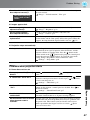
Overscan
*1
(Setting is not possible when composite video , S-Video , or computer signals are being input.)
This changes the display area (the part of projected images).
• Off, 2%, 4%, 6%, 8%: If set to "Off", the top and the bottom of the image are sometimes affected by
electrical interference depending on the image signal. In such cases, try to
adjust the display position ("Position").
p.34
• Auto: Displayed when the signals from [HDMI1] / [HDMI2] input port are being input. This is
automatically set to Off or 8%, depending on the input signal. (Not displayed when the
equipment's DVI port is connected to the projector's [HDMI1] / [HDMI2] input port.)
HDMI Video Range *1 (EH-TW3500/TW2900 only)
(Setting is possible only when "EPSON Super White" is "Off". Setting is not possible, however, when
"Color Mode" is set to "x.v. Color.")
When the [HDMI1] / [HDMI2] input port of the projector is connected to a DVD player, for example, set
the video range of the projector to suit the video range setting of the DVD player. The setting at the DVD
player can be either Normal or Expand.
HDMI Video Range *1 (EH-TW4500/TW4400 only)
(Setting is possible only when "EPSON Super White" is "Off". Setting is not possible, however, when
"Color Mode" is set to "x.v. Color.")
When the [HDMI1] / [HDMI2] input port of the projector is connected to a DVD player, for example,
setting this to Auto allows the projector to automatically determine and set the video range of the input
signal.
If this is set to Auto and a blackout/whiteout condition occurs, set the video range of the projector to
match that of the DVD player. The setting on the DVD player can be either Normal or Expand.
Note that if the equipment's DVI port is connected to the projector's [HDMI1] / [HDMI2] input port,
Auto is not displayed.
Reset
All the adjustment values on the "Signal" menu, except "Aspect ", are returned to their default values.
"Settings" menu
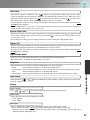
Direct Power On
When the main power switch is turned on, you can set for projection to start (On) / not start (Off) without
pressing
or
.
When set to "On" with the main power switch left on, be aware that sudden surges of electricity that may
occur when the power comes back on after a power outage may cause the projector to turn on.
Sleep Mode
The projector is equipped with a power-saving function that causes the power to turn off automatically
and the projector to switch to standby if no signal is input to the projector for a continuous length of time.
The length of time before the power-saving function operates can be selected from four available settings.
If "Off" is selected, the power-saving function will not operate.
If you press
while the projector is in standby mode, projection will start again.
36
*1 The setting values are stored separately for each image source and signal type.
Configuration Menu Functions
Child Lock
This locks the power on function of the
button on the projector's control panel, so that a child
cannot accidentally turn the projector's power on and look into the projector's lens. When the lock is
applied, the power will only turn on if
is pressed down for about 3 seconds.
can be used to
turn off the power, and the remote control will continue to operate as normal.
If you change the setting, the new setting will take effect after the power has been turned off and the cooldown period is complete.
Even if "Child Lock" is set to "On", be aware that projection starts merely by turning the main power
switch on when "Direct Power On" is set to "On".
Control Panel Lock
If this is set to "On", you can't operate the projector's control panel buttons and a icon appears on the
on the projector's control panel for about
screen when a button is pressed. To cancel, press and hold
seven seconds or more.
If you change the setting, the new setting will take effect after exiting the configuration menu.
Trigger Out
This turns the trigger function on and off to determine whether the projector's power on/off status and
problems with projector operation are communicated to an external device.
If you change the setting, the new setting will take effect after the power has been turned off and the cooldown period is complete.
High Altitude Mode
A fan is set at a certain speed of rotation so as to bring down internal temperature.
When using above an altitude of about 1500m, set to "On".
Projection
Illumination
If the light from
or
turn this setting to "Off".
becomes bothersome while watching a movie or the like in a dark room,
Display
Menu Position
Press
,
,
and
to specify the position for the menus to be displayed.
Menu Color
Configuration Menu
This should be set in accordance with the method used to set up the projector.
• Front
: Select when the projector is set up in front of the screen.
• Front/Ceiling : Select when the projector is set up in front of the screen and suspended from a ceiling.
• Rear
: Select when the projector is set up behind the screen.
• Rear/Ceiling : Select when the projector is set up behind the screen and suspended from a ceiling.
Selects the color for the main configuration menu.
• Color 1:Black
• Color 2:Blue
Messages
This sets whether the following message displays appear (On) or don't appear (Off).
• Image signal, color mode, aspect and item name when memory settings are retrieved.
• Messages such as when no image signals are being input, when an incompatible signal is input, and
when the internal temperature rises.
37
Configuration Menu Functions
Display Background
Displays a menu for selecting the screen status for when using the blank function or when no image
signal is input.
Startup Screen
This sets whether the start-up screen (the image that is projected when projection starts) is displayed (On)
or not displayed (Off).
If you change the setting, the new setting will take effect after the power has been turned off and the cooldown period is complete.
Input Signal
Video Signal
Sets the signal format in accordance with the video equipment that is connected to the [Video] or [SVideo] input port. If set to "Auto", the video signal format is set automatically.
If there is a lot of interference in the image, or if a problem such as no image being projected occurs even
though "Auto" has been selected, select the correct signal format manually.
Component
Change this setting depending on the type of signal that is being output from the video equipment that is
connected to the [Component] input port.
If "Auto" is selected, appropriate signal is automatically set. If colors appear unnatural even though
"Auto" is selected, select appropriate signal name in the menu.
Language
This sets the display language for messages and menus.
Reset
Adjustment values for the "Settings" menu functions are returned to their default settings, except for the
"High Altitude Mode", "Projection", "Component", and "Language".
38
Configuration Menu Functions
"Memory" menu
Load Memory
This retrieves settings previously saved using "Save Memory".
p.24
This cannot be selected when nothing is saved at "Save Memory".
Save Memory
This can be used to save "Image" menu settings.
p.24
Erase Memory
This is used to erase unwanted saved memory.
p.25
Rename Memory (EH-TW4500/TW4400 only)
Configuration Menu
This can be used to change the names of the memories from "Memory1" to "Memory10". You can
rename so that its settings are easy to recognize. Either of the following two methods can be used to
change a memory name.
p.25
• Select a new memory from the list and then rename it.
• Select "Customized" and then enter a desired name.
39
Configuration Menu Functions
"Reset" menu
Reset All
This resets all configuration menu settings to their default settings. "Component" and "Language" in the
"Settings" menu, and the settings of "Memory" menu are not returned to their default even if "Reset All"
is executed.
Reset Memory
This resets (erases) all settings that have been made using the "Save Memory".
Reset Lamp Hours
Clear the cumulative lamp operating time and reset to "0H". Perform this procedure when you replace
the lamp.
40
Problem Solving
Reading the indicators
The projector indicates its status using the indicators.
(the icon and the around the button) and
(the icon) light and flash, and
lights and flashes in
red according to the current status.
The following tables show what the indicators mean and
how to remedy the problems that they indicate.
* If all indicators are switched off, check that the power
cable is connected correctly and that the main power
switch is on.
When the
(operation) indicator
(warning) indicator
(warning) indicator is lit or flashing warning/problem
: Lit
Red Red
Red
: Flashing
: Off
Internal problem
Disconnect the power cable from the
electrical outlet. Then contact your local
dealer or the nearest address provided in
the Support and Service Guide.
Epson
Projector Contact List
Fan problem /
Sensor problem
Red Red Auto iris problem/
Cinema filter problem
Lamp problem / Lamp on error
Check if the lamp is broken.
p.52
Clean the air filter.
p.49
Red
If the problem is still not solved after the lamp is
replaced, stop using the projector and disconnect the
power cable from the electrical outlet. Then contact
your local dealer or the nearest address provided
in the Support and Service Guide.
Epson
Projector Contact List
If the lamp is
not broken
Replace the lamp
and then turn the
power on.
If the lamp is
broken
Contact your local dealer or the nearest address provided in the Epson
Projector Contact List.
Red
High internal temperature
(overheating)
The lamp will switch off
automatically and projection will
stop. Wait for approximately 5
minutes. When the cooling fan
stops, turn off the main power
switch at the rear of the projector.
High-speed cooling in
progress
Orange
You can continue using the
projector, but if the temperature
rises again, it will switch off
automatically.
• If the projector is
installed against a
wall, leave a space
of 20 cm or more
between it and the
wall.
• Clean the air filters
if they are blocked.
p.49
If the problem is not solved
when the power is turned
back on, stop using the
projector, turn off the main
power switch, and
disconnect the power
cable from the electrical
outlet. Then contact your
local dealer or the nearest
address provided in the
Support and Service
Guide.
Epson
Projector Contact List
Troubleshooting
When using above an altitude of about 1500 m, make sure you set the "High Altitude Mode" to
"On".
p.37
41
Problem Solving
Lamp replacement warning
It is time to replace the lamp. Replace the lamp with a new one as soon as possible.
If you continue to use the projector without replacing the lamp, the lamp may blowout.
p.54
Orange
Indicator statuses in normal operation
During normal operation, the
indicator is off.
: Lit
: Flashing
Standby condition
If you press
Warm-up in
progress
, projection will start after a brief interval.
Warm-up time is approximately 30 seconds.
Power off operations are ignored while warm-up is in progress.
Projection in
progress
Normal operation is in progress.
Cool-down in
progress
(Approx. 16
seconds)
42
Remote control and control panel are disabled while cool-down is in
progress. Once cool-down is complete, the projector turns to stand-by
mode. If the main power switch at the rear of the projector is turned off
while cool-down is still in progress, wait until the lamp has cooled
down sufficiently (approximately 10 minutes is required), and then turn
the main power switch back on.
Problem Solving
When the indicators provide no help
If any of the following problems occur and the indicators do not offer a solution, refer to the pages
given for each problem.
Problems relating to images
● No images appear
p.43
Projection does not start, the projection area is
completely black, the projection area is
completely blue, etc.
● Moving images are not displayed
p.44
Moving images played on computer are not
displayed.
● The message "Not Supported" is
displayed p.44
● The message "No Signal" is displayed
p.45
● Images are fuzzy or out of focus
p.45
● Interference or distortion appear in
images p.45
Problems such as interference, distortion or
black & white checked patterns appear.
Problems when projection starts
● Power does not turn on
● Image is truncated (large) or
small p.46
Only part of the image is displayed.
● Image colors are not right
p.46
The whole image appears purplish or
greenish, images are black & white, colors
appear dull, etc.
(Computer monitors and LCD screens have
different color reproduction performance, so
that the colors projected by the projector and
the colors appearing on the monitor may not
necessarily match, but this is not a sign of a
problem.)
● Images appear dark
p.47
● Projection stops automatically
p.47
Problems with the remote control
p.47
● The remote control does not
work p.48
Problems relating to images
■ No images appear
Have you pressed the [Power]
button?
Press
panel.
Is the main power switch
turned off?
Turn on the main power switch at the rear of the projector.
Are all of the indicators
switched off?
Disconnect the power cable and then reconnect it.
p.14
Check the circuit breaker to see if power is being supplied.
Is blank mode active?
Press
Is a video signal being input?
Check that the power for the connected equipment is turned on. If
the "Messages" menu command has been set to "On", messages
relating to the image signals will be displayed.
"Settings" - "Display" - "Messages" p.37
on the projector’s control
on the remote control to cancel the blank function.
Troubleshooting
on the remote control or
43
Problem Solving
Are the image signal format
settings correct?
If a composite video or S-Video signal is being input
If projection does not occur when the "Video Signal" menu
command is set to "Auto", select the signal format that matches the
signal source.
"Settings" - "Input Signal" - "Video Signal" p.38
If the signal source is connected to the [Component] input port
If projection does not occur when the "Component" in the "Input
Signal" menu command is set to "Auto", set the signal format that
matches the signal that is being projected from the connected
equipment.
"Settings" - "Input Signal" - "Component" p.38
Have the configuration menu
settings been made correctly?
Try resetting all of the current settings.
p.40
Were the projector and computer If the connection is made while the power is already turned on, the
connected while their power was function [Fn] key that switches the computer's video signal to
external output may not work. Turn the power for the computer that
already turned on?
is connected to the projector off and then back on again.
When a computer is
connected
■ Moving images are not displayed
Is the computer image signal set
to output simultaneously both
externally and to the LCD
monitor?
Only when projecting images
from a laptop computer or
computer with a built-in LCD
screen
When attempting to display images simultaneously on an external
monitor and an LCD monitor, moving images may not be displayed
due to specifications of the computer. Set the image signal to output
only externally.
Computer documentation, under a title such as "External
output" or "Connecting an external monitor"
■ The message "Not Supported" is displayed
Are the image signal format
settings correct?
If a composite video or S-Video is being input
If projection does not occur when the "Video Signal" menu
command is set to "Auto", select the signal format that matches the
signal source.
"Settings" - "Input Signal" - "Video Signal" p.38
If the signal source is connected to the [Component] input port
If projection does not occur when the "Component" in the "Input
Signal" menu command is set to "Auto", set the signal format that
matches the signal that is being projected from the connected
equipment.
"Settings" - "Input Signal" - "Component" p.38
Does the mode match the
frequency and resolution of the
image signals?
Only when projecting
computer images
44
Use the "Resolution" menu command to check the signals being
input, and check the "List of Supported Monitor Displays" to make
sure that the signals are compatible.
"Info" - "Resolution" p.29, 31
"List of Supported Monitor Displays" p.55
Problem Solving
■ The message "No Signal" is displayed
Are the cables connected
correctly?
Check that all of the cables required for projection are securely
connected.
p.12
Has the correct video input port
been selected?
Press
Is the power for the connected
equipment turned on?
Turn the power on for the devices.
Are the image signals being
output to the projector?
If the image signals are only being output to the computer's LCD
monitor, you need to change the output.
For some computer models, when the image signals are output
externally, they no longer appear on the LCD monitor.
Computer documentation, under a title such as "External
output" or "Connecting an external monitor"
Only when projecting
images from a laptop
computer or computer
with a built-in LCD
screen
,
,
,
,
or
on the remote control or
on the projector’s control
panel to change the image source.
p.15
If the connection is made while the power is already turned on, the
function [Fn] key that switches the computer's video signal to
external output may not work. Turn the power for the projector and
the computer off and then back on again.
p.14
■ Images are fuzzy or out of focus
Has the focus been adjusted
correctly?
Adjust the focus.
p.16
Is the lens cover still attached?
Remove the lens cover.
Is the projector at the correct
distance?
The recommended distance from the projector to the screen is
within 87 to 1276 cm for a screen size of 16:9, and 107 to 1562 cm
for a screen size of 4:3. Set up the projector so that the projection
distance is within this range.
p.10
Has condensation formed on the If the projector is suddenly taken from a cold environment to a
warm environment or if sudden ambient temperature changes
lens?
occur, condensation may form on the surface of the lens, and this
may cause the images to appear fuzzy. Set the projector up in the
room approximately one hour before it is to be used. If
condensation forms on the lens, turn the power off and wait for the
condensation to disappear.
Are the image signal format
settings correct?
If a composite video or S-Video is being input
If projection does not occur when the "Video Signal" menu
command is set to "Auto", select the signal format that matches the
signal source.
"Settings" - "Input Signal" - "Video Signal" p.38
If the signal source is connected to the [Component] input port
If projection does not occur when the "Component" in the "Input
Signal" menu command is set to "Auto", set the signal format that
matches the signal that is being projected from the connected
equipment.
"Settings" - "Input Signal" - "Component" p.38
Are the cables connected
correctly?
Troubleshooting
■ Interference or distortion appear in images
Check that all of the cables required for projection are securely
connected.
p.12
45
Problem Solving
Is an extension cable being
used?
If an extension cable is used, interference may increase. Try
connecting a signal amplifier.
Have the "Sync. " and
"Tracking " settings been
adjusted correctly?
The projector has an automatic adjustment function that causes the
optimum images to be projected. However, for some types of
signal, the correct adjustments may not be obtained even after
automatic adjustment is carried out. In such cases, use the
"Tracking" and "Sync." menu commands to make the adjustments.
"Signal" - "Tracking", "Sync." p.34
Only when projecting
computer images
Has the correct resolution been
selected?
Only when projecting
computer images
Set the computer so that the signals that are output are compatible
with this projector.
"List of Supported Monitor Displays" p.55
Computer documentation
■ Image is truncated (large) or small
Has the correct aspect
selected?
been
Press
to select the aspect that corresponds to the input
signal.
p.18
If images with subtitles are being projected using "Zoom", use the
"Zoom Caption Pos." menu command to adjust the images.
p.33
Has the "Position" setting been
adjusted correctly?
Use the "Position" the menu command to make the adjustment.
"Signal" - "Position" p.34
Has the computer been set for
dual display?
If the dual display setting has been activated by the connected
computer, only half of the images on the computer screen is
displayed by the projector. To display the whole of the image on the
computer screen, turn off the dual display setting.
Computer video driver documentation
Only when projecting
computer images
Has the correct resolution been
selected?
Only when projecting
computer images
Set the computer so that the signals that are output are compatible
with this projector.
"List of Supported Monitor Displays" p.55
Computer documentation
■ Image colors are not right
Are the image signal format
settings correct?
If a composite video or S-Video is being input
If projection does not occur when the "Video Signal" menu
command is set to "Auto", select the signal format that matches the
signal source.
"Settings" - "Input Signal" - "Video Signal" p.38
If the signal source is connected to the [Component] input port
If projection does not occur when the "Component" in the "Input
Signal" menu command is set to "Auto", set the signal format that
matches the signal that is being projected from the connected
equipment.
"Settings" - "Input Signal" - "Component" p.38
46
Are the cables connected
correctly?
Check that all of the cables required for projection are securely
connected.
p.12
Has the image contrast
been adjusted correctly?
Use the "Contrast" menu command to adjust the color.
"Image" - "Contrast" p.32
Has color been adjusted
appropriately?
Use the "Advanced" menu command to adjust the color.
"Image" - "Advanced" p.32
Problem Solving
Have the color intensity and tint
been adjusted correctly?
Only when projecting
images from a video
source
Use the "Color Saturation" and "Tint" menu commands to adjust
the color and tint.
"Image" - "Color Saturation", "Tint" p.32
■ Images appear dark
Has the image brightness been
adjusted correctly?
Use the "Brightness" menu commands to make the adjustments.
"Image" - "Brightness" p.32
Has the image contrast
been adjusted correctly?
Use the "Contrast" menu command to adjust the color.
"Image" - "Contrast" p.32
Is the lamp due for
replacement?
When the lamp is nearly due for replacement, the images will
become darker and the color quality will become poorer. When this
happens, the lamp should be replaced with a new one.
p.52
■ Projection stops automatically
Is sleep mode active?
When "Sleep Mode" has been set to On, the lamp turns off
automatically if no signal is input for about 30 minutes, and the
projector switches to standby mode. Press the
button on the
remote control or the
button on the projector's control panel
to turn the projector's power back on. To cancel the sleep mode
setting, change "Sleep Mode" menu command to "Off".
"Settings" - "Sleep Mode" p.36
Problems when projection starts
■ Power does not turn on
Press
panel.
on the remote control or
on the projector's control
Is "Child Lock" set to "On"?
If the "Child Lock" menu command is set to "On", press
on the
projector's control panel for about 3 seconds or press
on the remote
control to turn the power on.
"Settings" - "Child Lock" p.37
Is "Control Panel Lock" set to
"On"?
If the "Control Panel Lock" menu command is set to "On", all
buttons on the projector’s control panel are disabled. Press
on
the remote control.
"Settings" - "Control Panel Lock" p.37
Are all of the indicators
switched off?
Disconnect the power cable and then reconnect it.
p.14
Check the circuit breaker to see if power is being supplied.
Do the indicators turn off and on Turn the power off, disconnect the power cable and then reconnect
it. If this does not solve the problem, there may be a problem with
when the power cable is
the power cable. Then contact your local dealer or the nearest
touched?
address provided in the Support and Service Guide.
Epson
Projector Contact List
Troubleshooting
Have you pressed the [Power]
button?
47
Problem Solving
Problems with the remote control
■ The remote control does not work
48
Is the remote control lightemitting area facing towards the
remote control light-receiving
area when it is operated?
Face the remote control towards the remote control light-receiving
area.
Operating range
p.13
Is the remote control too far
from the projector?
The operating range for the remote control is approximately 10m.
p.13
Is direct sunlight or strong light
from fluorescent lamps shining
onto the remote control lightreceiving area?
Set the projector up in a location where strong light will not shine
onto the remote control light-receiving area.
Are the batteries dead, or have
the batteries been inserted
correctly?
Insert new batteries, while making sure that they face correctly.
p.13
Maintenance
This section describes maintenance tasks such as cleaning the projector and replacing consumable parts.
Cleaning
You should clean the projector if it becomes dirty or if the quality of projected images starts to
deteriorate.
Do not use sprays containing a flammable gas to remove dirt or dust which is adhering
to parts such as the lens or filter of the projector. Because the lamp inside the projector
becomes very hot during use, the gases may ignite and result in a fire.
Cleaning the air filter
If the air filter becomes blocked with dust and the message "The projector is overheating. Make sure
nothing is blocking the air vent, and clean or replace the air filter" is displayed, clean the air filter.
• If the air filter becomes clogged with dust, it can result in overheating which may
cause operating problems or reduce the operating life of the optical parts. It is
recommended that you clean the air filter about once every three month. If using the
projector in a dusty location, the air filter should be cleaned more often.
• The air filter is not washable. Also do not use detergent or solvents.
• When using a brush for cleaning, use a soft brush with long bristles and brush the
filter gently. If you brush too strong, dust may be pushed inside the air filter and hardly
be removed.
Remove the air filter cover.
Take out the air filter.
Front of air
filter
Appendix
Press the knobs to release the catches, and then
pull the cover upward.
Tap the air filter four or five times with the
surface facing downwards to shake off the
dust.
Hold the filter at the other side and tap it again to
shake off the dust.
Do not hit the air filter hard, otherwise it may
become bent or broken and can no longer be used.
49
Maintenance
Use a vacuum cleaner to remove any
remaining dust from the surface of the air
filter.
Install the air filter.
Install with the
groove faced to
the right.
Install the air filter cover.
Cleaning the projector case
Clean the projector case by wiping it gently with a soft
cloth.
If the projector is particularly dirty, moisten the cloth with
water containing a small amount of neutral detergent, and
then firmly wring the cloth dry before using it to wipe the
projector case. Then wipe the case again with a soft, dry
cloth.
Do not use volatile substances such as wax, alcohol or
thinner to clean the projector case. These can cause
the case to warp and make the coating finish peel off.
Cleaning the lens
To clean the lens it is preferable to use an air blower
purchased for the purpose. But alternatively you can wipe it
gently clean with a spectacle-cleaning cloth.
Do not rub the lens with harsh materials or subject the
lens to shocks, as it can easily become damaged.
50
Maintenance
Consumable replacement periods
Air filter replacement period
• If the air filter has been broken or the "Replace" message is displayed even though the
air filter has been cleaned.
Replace with an optional air filter.
Replacing the air filter p.52
Lamp replacement period
• The message "Replace the lamp." appears on the screen when projection starts.
A message will be displayed.
TIP
• The replacement warning message is set to appear after a minimum of about 3900
hours of lamp use in order to maintain the initial brightness and quality of the
projected images. The time taken for the message to appear will vary depending on
usage conditions such as Color Mode settings.
If you continue to use the lamp after this period, the possibility of the lamp breaking
becomes greater. When the lamp replacement message appears, replace the lamp
with a new one as soon as possible, even if it is still working.
• Depending on the characteristics of the lamp and on the way it has been used, the
lamp may become darker or stop working before the lamp warning message appears.
You should always have a spare lamp ready in case it is needed.
• Contact your local dealer or the nearest address provided in the Epson Projector
Contact List.
Appendix
• The projected images get darker or start to deteriorate.
51
Maintenance
Replacing consumables
Replacing the air filter
TIP
Dispose of used air
filters properly in
accordance with
your local
regulations.
Frame material: PP
Filter materials: PP,
PET
Press
or
to
turn off the power, and
then turn the main power
switch OFF.
Remove the air filter
cover.
Press the knobs to release the catches,
and then pull the cover upward.
Replacing the lamp
If the lamp stops working
and needs to be
replaced, there is the
danger that the lamp
may already be broken.
If replacing the lamp of a
projector which has been
installed to the ceiling,
you should always
assume that the lamp is
broken and handle it with
extreme care during
removal. Furthermore,
you should stand to the
side of the projector, not
underneath it.
Press
or
to
turn off the power, and
then turn the main power
switch OFF.
Insert the supplied screwdriver
of the replacement lamp into
the lamp cover opening switch,
then remove the lamp cover.
* Wait until the lamp
cools down (takes
approximately 1 hour).
Securely tighten the
lamp fixing screws.
Install the lamp cover.
Resetting the lamp operating time
The lamp operating time
must always be reset after
the lamp has been replaced
with a new one.
The projector has a built-in
counter which keeps track
of the lamp operating time.
When the cumulative
operating time reaches a
certain point, it causes the
replacement warning
message to be displayed.
52
Press
to turn on
the power.
Press
to display
the configuration menu.
Maintenance
Remove the old air
filter.
Insert the new air filter.
Install the air filter cover.
Install with
the groove
faced to the
right.
Loosen the lamp fixing
screws.
Remove the old lamp.
Insert the new lamp.
Pull out straight.
Make sure that it faces
the correct way.
Install the lamp and the lamp cover securely. The projector will not turn
on if the lamp or the lamp cover is not installed correctly.
Appendix
This product includes a lamp component that contains mercury (Hg).
Please consult your local regulations regarding disposal or recycling. Do
not dispose of it with normal waste.
Select "Reset Lamp
Hours" from the "Reset"
menu.
Select "Yes" and then
press
.
53
Optional Accessories/Consumables
The following optional accessories/consumables are available for purchase if required. This list of
optional accessories/consumables is current as of: 2009.9. Details of accessories are subject to change
without notice.
Varies depending on country of purchase.
■ Optional Accessories
■ Consumables
50" Portable Screen
ELPSC06
A compact screen which can be carried easily.
(Aspect 4:3)
(1 spare lamp, 1 spare screwdriver)
Use as a replacement for spent lamps.
60" Portable Screen
80" Portable Screen
100" Portable Screen
Air Filter Set
ELPSC07
ELPSC08
ELPSC10
A portable roll-type screen. (Aspect 4:3)
VGA-HD15 PC Cable (1.8 m)
VGA-HD15 PC Cable (3 m)
VGA-HD15 PC Cable (20 m)
ELPKC02
ELPKC09
ELPKC10
(For mini D-Sub 15-pin/mini D-Sub 15-pin)
Use to connect the projector to a computer.
Ceiling Mount*
ELPMB20
ELPMB22
(with ceiling plate)
Use when installing the projector to a ceiling.
Ceiling Pipe 600 (600 mm/white)*
Ceiling Pipe 450 (450 mm/white)*
Ceiling Pipe 700 (700 mm/white)*
ELPFP07
ELPFP13
ELPFP14
Use when installing the projector to a high ceiling or
a ceiling with veneer panels.
Cable Cover (Mat Black)
Cable Cover (White)
ELPCC02B
ELPCC01W
Use to cover cables of the projector that is suspended
from a ceiling to improve the appearance.
* A special method of installation is required in
order to suspend the projector from the ceiling.
Please contact the place of purchase if you would
like to use this installation method.
54
Lamp Unit
(1 air filter)
Use as a replacement for old air filters.
ELPLP49
ELPAF21
List of Supported Monitor Displays
The values may slightly vary depending on the Overscan setting.
Component Video
16:9 : Aspect
4:3
Signal
Resolution
SDTV (480i,
60Hz)
SDTV(576i, 50Hz)
Units: Dots
Aspect mode
Normal
Full
Zoom
Wide
720×480
720×360 *
1440×1080
1920×1080
1920×1080
1920×1080
4:3
16:9
16:9
16:9
720×576
720×432 *
1440×1080
1920×1080
1920×1080
1920×1080
4:3
16:9
16:9
16:9
SDTV(480p)
720×480
720×360 *
1440×1080
1920×1080
1920×1080
1920×1080
4:3
16:9
16:9
16:9
SDTV(576p)
720×576
720×432 *
1440×1080
1920×1080
1920×1080
1920×1080
4:3
16:9
16:9
16:9
-
-
-
-
-
-
-
-
-
HDTV (720p)
16:9
1280×720
HDTV(1080i)
16:9
1920×1080
HDTV(1080p)
16:9
1920×1080
1920×1080
16:9
1920×1080
16:9
1920×1080
16:9
*Letterbox signal
Composite Video /S-Video
4:3
Signal
Resolution
TV(NTSC )
720×480
720×360 *
TV(PAL ,
SECAM )
720×576
720×432 *
Normal
1440×1080
16:9 : Aspect
Aspect mode
Full
Zoom
1920×1080
1920×1080
Units: Dots
Wide
1920×1080
4:3
16:9
16:9
16:9
1440×1080
1920×1080
1920×1080
1920×1080
4:3
16:9
16:9
16:9
Appendix
*Letterbox signal
55
List of Supported Monitor Displays
Computer image (analog RGB)
Units: Dots
Signal
Aspect
Resolution
mode
Normal
Full
Zoom
Wide
VGA 60
640×480
640×360 *2
1440×1080
1920×1080
1920×1080
1920×1080
VESA72/75/85,
iMac*1
640×480
640×360 *2
1440×1080
1920×1080
1920×1080
1920×1080
SVGA 56/60/72/
75/85, iMac*1
800×600
800×450 *2
1440×1080
1920×1080
1920×1080
1920×1080
XGA 60/70/75/
85, iMac*1
1024×768
1024×576 *2
1440×1080
1920×1080
1920×1080
1920×1080
WXGA60-1
1280×768
1800×1080
1920×1080
1920×1080
-
WXGA60-2
1360×768
1912×1080
1920×1080
1920×1080
-
1152×864
1440×1080
1280×1024
1350×1080
SXGA 60/70/75
1920×1080
1920×1080
1920×1080
-
1280×960
1440×1080
MAC13"
640×480
1440×1080
1920×1080
1920×1080
1920×1080
1920×1080
MAC16"
832×624
1440×1080
1920×1080
1920×1080
1920×1080
MAC19"
1024×768
1440×1080
1920×1080
1920×1080
1920×1080
MAC21"
1152×870
1430×1080
1920×1080
1920×1080
-
*1 Connection is not possible if the equipment does not have a VGA output port.
*2 Letterbox signal
It may be possible to project signals which are not listed in the above table. However, some functions may
be limited in that case.
Input signal from the [HDMI1] / [HDMI2] input port
Units: Dots
Signal
Aspect
Resolution
mode
Normal
Full
Zoom
Wide
VGA 60
640×480
640×360 *2
1440×1080
1920×1080
1920×1080
1920×1080
SDTV (480i,
60Hz)
720×480
720×360 *2
1440×1080
1920×1080
1920×1080
1920×1080
SDTV(480p)
720×480
720×360 *2
1440×1080
1920×1080
1920×1080
1920×1080
SDTV(576i, 50Hz)
720×576
720×432 *2
1440×1080
1920×1080
1920×1080
1920×1080
SDTV(576p)
720×576
720×432 *2
1440×1080
1920×1080
1920×1080
1920×1080
1280×720
1920×1080
-
-
-
HDTV(1080i)
1920×1080
1920×1080
-
-
-
HDTV(1080p)
1920×1080
1920×1080
-
-
-
HDTV
(720p)
*1 Connection is not possible if the equipment does not have a VGA output port.
*2 Letterbox signal
It may be possible to project signals which are not listed in the above table. However, some functions may
be limited in that case.
56
Specifications
Product name
EH-TW4500/TW4400
EH-TW3500/TW2900
450 (W) × 136 (H) × 360 (D) mm (not including feet)
Dimensions
0.74 inch wide
Panel size
Polysilicon TFT active matrix
Display method
2,073,600 pixels (1920 (W) × 1080 (H) dots) × 3
Resolution
Pixel clock: 13.5 to 150 MHz
Scanning frequencies
(Analogue/Digital)
Horizontal: 15 to 80 kHz
Vertical: 24, 50 to 85 Hz
Focus adjustment
Manual
Zoom adjustment
Manual (Approx. 1 : 2.1)
Manual
(Maximums: Approx. 96% vertically, 47% horizontally)
UHE lamp, 200 W, Model No.: ELPLP49
Lamp (light source)
Power supply
Power
100 to 120V
Consumption area
220 to 240V
area
100 to 240V AC±10%, 50/60Hz,
3.3 to 1.5A
Operating: 297W
100 to 240V AC±10%, 50/60Hz,
3.2 to 1.4A
Operating: 282W
Standby: 0.2W
Operating: 284W
Operating: 269W
Standby: 0.4W
0 to 2286m
Operating altitude
Operating temperature
+5 to +35°C (No condensation)
Storage temperature
-10 to +60°C (No condensation)
Approx. 7.5kg
Mass
Ports
Approx. 7.3kg
Component input
1
RCA pin jack × 3
PC input
1
Mini D-sub 15-pin (female) blue
HDMI input*
2
Video input
1
HDMI
HDCP compatible,
incompatible with CEC signals
RCA pin jack
S-Video input
1
Mini DIN 4-pin
RS-232C
1
D-sub 9-pin (male)
Trigger out
1
3.5 mm mini jack
Appendix
Lens shift
* You can connect any HDMI or DVI-D compatible equipment. However, depending on the equipment,
the projector may not project any image.
Pixelworks DNXTM ICs are used in this Projector.
This product is also designed for IT power distribution system with phase-to-phase voltage 230V.
Product Information
For users in Turkey:
In Conformity with the Turkish EEE Regulation.
Türkiye’deki kullanıcılar için
EEE Yönetmeliğine Uygundur.
57
Specifications
■ Angle of tilt
If you set the projector higher than 8 º, it could damage the projector and cause an accident.
■ RS-232C cable layout
• Connector shape:
D-Sub 9-pin (male)
• Projector input connector:
RS-232C
<At projector>
<At computer>
Function
<At projector> (PC serial cable) <At computer> Signal
GND Signal wire earth
GND 5
5 GND
TD Transmit data
RD
2
3
TD
RD
Receive data
TD
3
2
RD
58
Specifications
DECLARATION of CONFORMITY
According to 47CFR, Part 2 and 15
Class B Personal Computers and Peripherals; and/or
CPU Boards and Power Supplies used with Class B
Personal Computers
We:
Located at:
Tel:
EPSON AMERICA, INC.
3840 Kilroy Airport Way
MS: 3-13
Long Beach, CA 90806
562-290-5254
Declare under sole responsibility that the product identified herein, complies with 47CFR Part
2 and 15 of the FCC rules as a Class B digital device. Each product marketed, is identical to
the representative unit tested and found to be compliant with the standards. Records
maintained continue to reflect the equipment being produced can be expected to be within
the variation accepted, due to quantity production and testing on a statistical basis as required
by 47CFR 2.909. Operation is subject to the following two conditions : (1) this device may not
cause harmful interference, and (2) this device must accept any interference received,
including interference that may cause undesired operation.
EPSON
LCD Projector
H336C/H337C
FCC Compliance Statement
For United States Users
This equipment has been tested and found to comply with the limits for a Class B digital
device, pursuant to Part 15 of the FCC Rules. These limits are designed to provide
reasonable protection against harmful interference in a residential installation. This equipment
generates, uses and can radiate radio frequency energy and, if not installed and used in
accordance with the instructions, may cause harmful interference to radio communications.
However, there is no guarantee that interference will not occur in a particular installation. If this
equipment does cause harmful interference to radio or television reception, which can be
determined by turning the equipment off and on, the user is encouraged to try to correct the
interference by one or more of the following measures:
• Reorient or relocate the receiving antenna.
• Increase the separation between the equipment and receiver.
• Connect the equipment into an outlet on a circuit different from that to which the receiver is
connected.
• Consult the dealer or an experienced radio/TV technician for help.
WARNING
The connection of a non-shielded equipment interface cable to this equipment will invalidate
the FCC Certification or Declaration of this device and may cause interference levels which
exceed the limits established by the FCC for this equipment. It is the responsibility of the user
to obtain and use a shielded equipment interface cable with this device. If this equipment has
more than one interface connector, do not leave cables connected to unused interfaces.
Changes or modifications not expressly approved by the manufacturer could void the user’s
authority to operate the equipment.
Appendix
Trade Name:
Type of Product:
Model:
59
Glossary
Following is an explanation of some of the terms used in this guide which may be unfamiliar or which
were not explained in the manual itself. Further information can be obtained by referring to other
commercially-available publications.
Aspect
HDTV
The ratio between an image's length and its height.
HDTV images have an aspect of 16:9 and appear
elongated. The aspect for standard images is 4:3.
An abbreviation for High-Definition Television. It refers
to high-definition systems which satisfy the following
conditions.
• Vertical resolution of 720p or 1080i or greater
(p = progressive , i = interlaced )
• Screen aspect of 16:9
• Dolby Digital audio reception and playback (or output)
Component video
Video signals which have the video brightness signals
and color signals separated, in order to provide better
image quality.
In high-definition TV (HDTV), it refers to images which
consist of three independent signals: Y (luminance
signal), and Pb and Pr (color difference signals).
Composite video
A method of image scanning whereby the signal
bandwidth used is approximately half that required for
sequential scanning when images with the same still
picture resolution are broadcast.
Video signals which have the video brightness signals
and color signals mixed together. The type of signals
commonly used by household video equipment
(NTSC , PAL and SECAM formats).
Video signals which consist of a carrier signal Y
(luminance signal) within the color bar signal, and a
chroma or color signal (CbCr).
NTSC
Contrast
The relative brightness of the light and dark areas of an
image can be increased or decreased in order to make text
and graphics stand out more clearly, or to make them
appear softer.
An abbreviation for Phase Alternation by Line, and a
format for ground-based analogue color television
broadcasts. This format is used in Western European
countries except France, and also in Asian countries such
as China and in Africa.
Cool-down
Progressive
This is the process by which the projector's lamp is
cooled down after it has become hot through use. It is
carried out automatically when the [Power] button on
either the remote control or the projector's control panel
has been pressed to turn off the projector. Do not turn off
the main power switch while cool-down is in progress,
otherwise the cool-down process will not work properly.
If the cool-down period is not allowed to finish normally,
the projector's lamp and internal components will remain
at high temperatures, and this may shorten the useful life
of the lamp or cause problems with the operation of the
projector. The projector takes about 16 seconds to cool
down. The actual time will vary depending on the
external air temperature.
A method of image scanning whereby the image data
from a single image is scanned sequentially from top to
bottom to create a single image.
HDMI
An abbreviation for High Definition Multimedia
Interface, and refers to a standard for digital transmission
of high-definition images and multi-channel audio
signals.
HDMI is a standard that is targeted towards household
digital equipment and computers that allows digital
signals to be transmitted in their original high quality
without compression, and it also includes a digital signal
encryption function.
60
Interlace
An abbreviation for National Television Standards
Committee, and a format for ground-based analogue
color television broadcasts. This format is used in Japan,
North America and Central and South America.
PAL
Refresh rate
The light-emitting element of a display maintains the
same luminosity and color for an extremely short time.
Because of this, the image must be scanned many times
per second in order to refresh the light emitting element.
The number of refresh operations per second is called the
"refresh rate", and is expressed in hertz (Hz).
S-Video
A video signal which has the luminance component and
color component separated in order to provide better
image quality.
It refers to images which consist of two independent
signals: Y (luminance signal), and C (color signal).
SDTV
An abbreviation for Standard Definition Television. It
refers to standard television systems which do not satisfy
the conditions for HDTV.
SECAM
An abbreviation for Sequential Couleur A Memoire, and
a format for ground-based analogue color television
broadcasts. This format is used in France, Eastern Europe
and the former Soviet Union, the Middle East and Africa.
Glossary
Security lock
A device consisting of a protector case with a hole in it
that a commercially-available theft-prevention cable can
be passed through in order to secure the device to a table
or pillar. This projector is compatible with the Microsaver
Security System manufactured by Kensington.
SVGA
A type of image signal with a resolution of 800
(horizontal) x 600 (vertical) dots which is used by IBM
PC/ AT-compatible computers.
SXGA
A type of image signal with a resolution of 1280
(horizontal) x 1024 (vertical) dots which is used by IBM
PC/ AT-compatible computers.
Sync. (Synchronization)
The signals output from computers have a specific
frequency. If the projector frequency does not match this
frequency, the resulting images will not be of a good
quality. The process of matching the phases of these
signals (the relative position of the crests and troughs in
the signal) is called "synchronization". If the signals are
not synchronized, problems such as flickering, blurriness
and horizontal interference can occur.
Tracking
The signals output from computers have a specific
frequency. If the projector frequency does not match this
frequency, the resulting images will not be of a good
quality. The process of matching the frequency of these
signals (the number of crests in the signal) is called
"tracking". If tracking is not carried out correctly, wide
vertical stripes will appear in the projected images.
VGA
XGA
A type of image signal with a resolution of 1,024
(horizontal) x 768 (vertical) dots which is used by IBM
PC/ AT-compatible computers.
YCbCr
Appendix
A type of image signal with a resolution of 640
(horizontal) x 480 (vertical) dots which is used by IBM
PC/ AT-compatible computers.
The carrier signal which is contained in the color bar
signal used in modern TV transmissions. The name
comes from the Y (luminance) signal and the CbCr
(chroma [color]) signals.
YPbPr
The carrier signal which is contained in the color bar
signal used in high-definition TV (HDTV )
transmissions. The name comes from the Y (luminance)
signal and the PbPr (color difference) signals.
61
Index
Numeric Character
H
2-2 Pull-down................................................................... 28,35
4-4 Pull-down................................................................... 30,35
HDTV .............................................................................. 55,56
[HDMI] input port ................................................... 8,12,56,57
HDMI-Video Range.................................................... 28,30,36
High Altitude Mode.................................................... 29,31,37
Hue, saturation, and brightness adjustment .......................... 20
A
Absolute Color Temperature....................................... 28,30,32
Advanced ............................................................... 28,30,32,35
Air filter .................................................................................. 8
Aspect .................................................................... 18,28,30,33
Auto ...................................................................................... 18
Auto Iris ................................................................. 23,28,30,33
Auto Setup ............................................................. 14,28,30,35
B
Battery replacement period (Remote control) ...................... 13
Block NR ......................................................................... 30,35
Brightness ................................................................... 28,30,32
C
Ceiling.................................................................... 11,29,31,37
Child Lock .................................................................. 29,31,37
Cleaning the air filter ............................................................ 49
Cleaning the lens................................................................... 50
Cleaning the projector case................................................... 50
Color Mode ................................................................. 18,28,30
Color Saturation.......................................................... 28,30,32
[Component] input port ........................................... 8,12,55,57
Component Video ............................................................ 12,55
Composite Video.............................................................. 12,55
Configuration menu .............................................................. 26
Connecting to a computer ..................................................... 12
Connecting to a video source................................................ 12
Consumables......................................................................... 54
Contrast....................................................................... 28,30,32
Contrast Enhancement ..................................................... 30,33
Control panel........................................................................... 6
Control Panel Lock ..................................................... 29,31,37
Cool-down........................................................................ 15,42
Correcting projector tilt ........................................................ 17
D
Illumination................................................................. 29,31,37
Image size ............................................................................. 10
"Image" menu ............................................................. 28,30,32
Indicators ........................................................................... 6,41
"Info" menu ..................................................................... 29,31
Input Signal................................................................. 29,31,38
L
Lamp cover ........................................................................ 6,52
Lamp Hours .................................................................... 29,31
Language..................................................................... 29,31,38
Lens cover.......................................................................... 6,14
Lens shift ........................................................................... 6,16
Line menu ............................................................................. 26
Load Memory ............................................................. 24,29,31
M
Main power switch........................................................ 8,14,15
Memory................................................................................. 24
"Memory" Menu ......................................................... 29,31,39
Menu Color................................................................. 29,31,37
Menu Position............................................................. 29,31,37
Menus ................................................................................... 26
Messages..................................................................... 29,31,37
Mosquito NR ................................................................... 30,35
Motion Detection ............................................................. 28,34
N
Noise Reduction.......................................................... 28,30,35
Normal .................................................................................. 18
O
Direct Power On ......................................................... 29,31,36
Display ........................................................................ 29,31,37
Display Background ................................................... 29,31,38
Offset .......................................................................... 22,28,30
Optional accessories ............................................................. 54
Overheating........................................................................... 41
Overscan ..................................................................... 28,30,36
E
P
Epson Cinema Filter ............................................................. 18
EPSON Super White................................................... 28,30,35
Erase Memory............................................................. 25,29,31
[PC] input port ......................................................... 8,12,56,57
Port................................................................................ 8,12,57
Position ....................................................................... 28,30,34
Power cable........................................................................... 14
Power Consumption.................................................... 28,30,33
Power inlet ......................................................................... 8,14
Progressive.................................................................. 28,30,34
Projection............................................................... 11,29,31,37
Projection distance................................................................ 10
Projection image position adjustment................................... 16
Projection methods ............................................................... 11
F
Focus adjustment ............................................................... 6,16
Frame Interpolation.......................................................... 30,34
Front adjustable foot .......................................................... 6,17
Full ........................................................................................ 18
Full Menu.............................................................................. 26
G
Gain.................................................................................. 22,28
Gamma........................................................................ 20,28,30
62
I
Index
R
W
Refresh Rate ..................................................................... 29,31
Remote control ................................................................... 7,13
Rename Memory.............................................................. 25,31
Replacing the air filter........................................................... 52
Replacing the battery............................................................. 13
Replacing the lamp................................................................ 52
Reset.................................................................. 28,29,30,31,40
Reset All...................................................................... 29,31,40
"Reset" menu............................................................... 29,31,40
Reset Lamp Hours.................................................. 29,31,40,52
Reset Memory ............................................................. 29,31,40
Resolution ....................................................................... 29,31
RGB............................................................................. 28,30,32
RGBCMY .............................................................. 20,28,30,33
[RS-232C] port.............................................................. 8,57,58
Warning indicator............................................................... 6,41
Wide ...................................................................................... 18
X
.......................................................................... 4,18
Y
YCbCr .............................................................................. 12,29
YPbPr .......................................................................... 12,29,31
Z
Zoom ..................................................................................... 18
Zoom adjustment................................................................ 6,16
Zoom Caption Pos.................................................. 18,28,30,33
Zoom Size ................................................................... 28,30,33
S
Save Memory .............................................................. 24,29,31
Screen size............................................................................. 10
SDTV ............................................................................... 55,56
Selecting the image source.............................................. 6,7,15
Setup Level.................................................................. 28,30,35
"Settings" menu........................................................... 29,31,36
Sharpness..................................................................... 28,30,32
Sharpness (Advanced)............................................ 23,28,30,32
"Signal" menu ............................................................. 28,30,33
Skin Tone..................................................................... 28,30,32
Sleep Mode.................................................................. 29,31,36
Source............................................................................... 29,31
Specifications ........................................................................ 57
Startup Screen ............................................................. 29,31,38
Sub-menu .............................................................................. 26
Super-resolution ............................................................... 30,33
Supported Monitor Displays ................................................. 55
S-Video............................................................................. 12,55
[S-Video] input port ................................................. 8,12,55,57
Sync Info .......................................................................... 29,31
Sync............................................................................. 28,30,33
Test Pattern............................................................................ 17
Tint .............................................................................. 28,30,32
Top menu............................................................................... 26
Tracking ...................................................................... 28,30,33
Trigger Out .................................................................. 29,31,37
[Trigger out] port................................................................ 8,57
Turning off............................................................................. 15
Appendix
T
U
Using the configuration menus ............................................. 26
V
[Video] input port ..................................................... 8,12,55,57
Video Signal ................................................................ 29,31,38
63
All rights reserved. No part of this publication may be reproduced, stored in a retrieval system, or
transmitted in any form or by any means, electronic, mechanical, photocopying, recording, or otherwise, without the prior written permission of Seiko Epson Corporation. No patent liability is
assumed with respect to the use of the information contained herein. Neither is any liability
assumed for damages resulting from the use of the information contained herein.
Neither Seiko Epson Corporation nor its affiliates shall be liable to the purchaser of this product or
third parties for damages, losses, costs, or expenses incurred by purchaser or third parties as a
result of: accident, misuse, or abuse of this product or unauthorized modifications, repairs, or alterations to this product, or (excluding the U.S.) failure to strictly comply with Seiko Epson Corporation’s operating and maintenance instructions.
Seiko Epson Corporation shall not be liable against any damages or problems arising from the use
of any options or any consumable products other than those designated as Original Epson Products
or Epson Approved Products by Seiko Epson Corporation.
The contents of this guide may be changed or updated without further notice.
Illustrations and screens used in this publication may differ from actual illustrations and screens.
General Notice:
is a trademark of Sony Corporation.
Macintosh, Mac, and iMac are trademarks of Apple Inc.
IBM is a registered trademark of International Business Machines Corporation.
Windows, WindowsNT and PowerPoint are trademarks or registered trademarks of Microsoft Corporation in the United States.
Dolby is a trademark of Dolby Laboratories.
HDMI and High-Definition Multimedia Interface are trademarks or registered trademarks of
HDMI Licensing LLC.
Pixelworks and DNX are trademarks of Pixelworks, Inc.
Other product names used herein are also for identification purposes only and may be trademarks
of their respective owners. Epson disclaims any and all rights in those marks.
SEIKO EPSON CORPORATION 2009. All rights reserved.