1
Table of contents
4
Before you get started – Safety and care of your EnviR monitor
Introduction 3
Before you get started
5
Sensor Type
6
1. CT Jaw
6
How it works
6
Have you got everything?
6
2. OptiSmart Reader
6
How it works
6
Have you got everything?
6
Setting up your EnviR – CT Jaw Monitor
7
Pairing the EnviR display and transmitter 7
‘Sensable’ Software – Voltage adjustment
8
‘Sensable’ Software – Pairing additional C² enabled displays to the transmitter
8
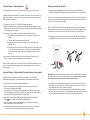
Fitting the transmitter to your meter 9
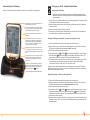
Understanding the EnviR display It’s important you observe some simple precautions before using the product.
The EnviR monitor does not require you to carry out any electrical wiring. However, the transmitter has
to be installed at the meter near the electrical supply to your property.
If you have any doubt about how to install it safely do not attempt to install it yourself, but
consult a qualified electrician.
Similarly, if you notice anything unusual about your electricity supply, such as loose wires, exposed
cabling, burn marks or holes in the insulating materials or damage to your meter then STOP
immediately and consult a qualified electrician.
Do not attempt to repair or service any part of the EnviR monitor.
Contact our customer service department for assistance.
Do not immerse the product in water, or any other liquids.
Do not expose the product to heat, flame, steamy conditions or extreme cold.
10
Do not open the equipment or touch any of its electronic circuitry.
Setting up your EnviR – OptiSmart Reader Monitor
11
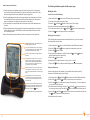
Setting up your EnviR display
11
Do not hit, strike or drop the equipment. If the display gets broken take special
care not to touch the liquid crystals.
Pairing the EnviR display and transmitter – electronic meter ‘appliance 9’ screen 11
Do not use this product for any purpose other than for which it was intended.
Display/Sensor pairing 2 – Main screen (Energy Now Data)
11
At the property’s electricity meter
12
Setting the clock 13
Adjusting your electricity price 13
Setting an additional rate 13
IAMs – Individual Appliance Monitor
14
PC connectivity
14
NetSmart
14
Fascias
14
C² & S² Technology 14
Troubleshooting 15
Technical Information
16
Contact Us 16
5