1
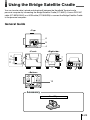
Using the Bridge Satellite Cradle
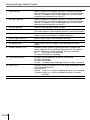
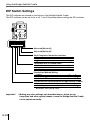
DIP Switch Settings
The DIP switches are located on the bottom of the Bridge Satellite Cradle.
The DIP switches can be set to on or off. Turn off the power before setting the DIP switches.
1 2 3 4 5 6 7 8
Not used (Set to off)
Not used (Set to off)
Host Computer Connection Interface
Content
RS-232C
USB
6
Off
On
Terminator Unit in Linked Chain
Content
Bridge Satellite Cradle interconnection
Not linked/terminator
5
Off
On
Connection Method Setting
Content
Host computer connection
Linked connection
3
Off
On
4
Off
Off
Communication Speed Between Bridge Satellite Cradles
Content
115, 200 bps
1
On
2
Off
Indicates initial setting status.
Important!
E-28
• Making any other settings not described above, which are for
inspection and other special modes, cause the Bridge Satellite Cradle
not to operate correctly.