1
A38694, SCA/SCNZ R210H O/M
OPERATION OF CONTROL PANEL
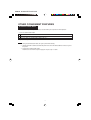
Your oven can be programmed up to 30 minutes. The cooking (defrosting) time varies from 15 seconds to 5
minutes. It depends on the total length of the cooking (defrosting) time as shown on the table below.
1.
Cooking time
Increasing unit
0-1 minute
1-4 minutes
4-15 minutes
15-30 minutes
15 seconds
30 seconds
1 minute
5 minutes
COOKING
DEFROSTING
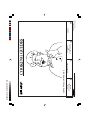
Suppose you want to cook on MED for 10 min.
Suppose you want to defrost 0.5 kg meat.
Select desired power
level by setting the
POWER CONTROLLER
to MED.
Select DEFROST setting
by setting the POWER
CONTROLLER to
DEFROST.
2. Set the cooking time by
rotating the LIGHT UP
DIAL.
Rotate the LIGHT UP
DIAL to the weight of the
meat (0.5 kg) as
indicated on the scale.
The oven starts automatically.
The light up dial will flash to indicate the cooking time.
3. The cooking time will count down to “0”. When the cooking time reaches “0”, an audible signal will sound
and the oven will automatically turn off. If you wish to stop cooking before the end of the cooking time,
turn the dial back to “0” or simply open the door.
Everytime the door is opened, microwave activity stops immediately.
NOTE
1. Your oven is fitted with a safety feature. If the LIGHT UP DIAL remains at the “0” position for more
than 3 minutes, you must open the oven door before the dial can be operated again.
2. The scale of the MEAT DEFROST GUIDE is calibrated, refer to the defrosting chart on page 4 in the
cooking guides.
To defrost other types of food, select the DEFROST setting and rotate the LIGHT UP DIAL to the
required time.
3. The oven door may be opened at any time during the cooking process.
If you wish to continue cooking, close the door.
4. If you wish to change the power level or cooking time during operation, turn the POWER CONTROLLER or LIGHT UP DIAL to the desired setting.
6