1
Scanner Option
Type 480
Operating Instructions
Scanner Reference
Getting Started
Sending Scan Files by E-mail
Sending Scan Files by Scan to Folder
Storing Files
Delivering Scan Files
Using the Network TWAIN Scanner Function
Configuring/Registering Scan Settings
Troubleshooting
Initial Scanner Setup
Appendix
Read this manual carefully before you use this machine and keep it handy for future reference. For safe and correct use, be sure to read the Safety
Information in the "General Settings Guide" before using the machine.
Introduction
This manual contains detailed instructions and notes on the operation and use of this machine. For your
safety and benefit, read this manual carefully before using the machine. Keep this manual in a handy
place for quick reference.
Two kinds of size notation are employed in this manual. With this machine refer to the inch version.
Important
Contents of this manual are subject to change without prior notice. In no event will the company be liable for direct, indirect, special, incidental, or consequential damages as a result of handling or operating the machine.
Do not copy or print any item for which reproduction is prohibited by law.
Copying or printing the following items is generally prohibited by local law:
bank notes, revenue stamps, bonds, stock certificates, bank drafts, checks, passports, driver's licenses.
The preceding list is meant as a guide only and is not inclusive. We assume no responsibility for its
completeness or accuracy. If you have any questions concerning the legality of copying or printing certain items, consult with your legal advisor.
Trademarks
•
Adobe®, PostScript®, and Acrobat® are trademarks of Adobe Systems Incorporated.
•
Pentium® is a registered trademark of Intel Corporation.
•
Microsoft®, Windows®, and Windows NT® are registered trademarks of Microsoft Corporation.
•
Other product names used herein are for identification purposes only and might be trademarks of
their respective companies. We disclaim any and all rights to those marks.
•
The product name of Windows® 95 is Microsoft® Windows® 95.
•
The product name of Windows® 98 is Microsoft® Windows® 98.
•
The product name of Windows® Me is Microsoft® Windows® Millennium Edition (Windows Me).
•
The product names of Windows® 2000 are as follows:
Microsoft® Windows® 2000 Professional
Microsoft® Windows® 2000 Server
Microsoft® Windows® 2000 Advanced Server
•
The product names of Windows® XP are as follows:
Microsoft® Windows® XP Home Edition
Microsoft® Windows® XP Professional
•
The product names of Windows ServerTM 2003 are as follows:
Microsoft® Windows ServerTM 2003 Standard Edition
Microsoft® Windows ServerTM 2003 Enterprise Edition
Microsoft® Windows ServerTM 2003 Web Edition
•
The product names of Windows NT® 4.0 are as follows:
Microsoft® Windows NT® Workstation 4.0
Microsoft® Windows NT® Server 4.0
Manuals for This Machine
The following manuals describe the operational procedures of this machine. For
particular functions, see the relevant parts of the manual.
Note
❒ The manuals provided are specific to machine type.
❒ Adobe Acrobat Reader/Adobe Reader is necessary to view the manuals as a
PDF file.
❒ Two CD-ROMs are provided:
• CD-ROM 1 "Operating Instructions"
• CD-ROM 2 "Scanner Driver and Utilities"
❖ General Settings Guide
Provides an overview of the machine and describes System Settings (such as
Tray Paper Settings), Document Server functions and troubleshooting.
Refer to this manual for Address Book procedures such as registering e-mail
addresses and user codes.
❖ Security Reference
This manual is for administrators of this machine. It describes security functions that the administrators can use to protect data from being tampered, or
prevent the machine from unauthorized use. Also refer to this manual for the
procedures for registering administrators, as well as setting user and administrator authentication.
❖ Network Guide (PDF file - CD-ROM1)
Provides information about configuring and operating the scanner (Type 480)
in a network environment.
For details about network settings of the scanner (RW480) and printer
(RW480) , see the manual that comes with the related option.
❖ Copy Reference
Describes operations, functions, and troubleshooting for the machine's copier
function.
❖ Scanner Reference (Scanner Option Type 480) (this manual) (PDF file - CD-ROM1)
Describes operations, functions, and troubleshooting for the machine's scanner function.
i
❖ Manuals for DeskTopBinder Lite
DeskTopBinder Lite is a utility included on the CD-ROM labeled "Scanner
Driver and Utilities".
• DeskTopBinder Lite Setup Guide (PDF file - CD-ROM2)
Describes the installation of DeskTopBinder Lite, and the operating environment for DeskTopBinder Lite in detail. This guide can be displayed
from the [Setup] dialog box when DeskTopBinder Lite is installed.
• DeskTopBinder Lite Introduction Guide (PDF file - CD-ROM2)
Describes operations with DeskTopBinder Lite and provides an overview
of its functions. This guide is added to the [Start] menu when DeskTopBinder Lite is installed.
• Auto Document Link Guide (PDF file - CD-ROM2)
Describes operations and functions of Auto Document Link installed with
DeskTopBinder Lite. This guide is added to the [Start] menu when DeskTopBinder Lite is installed.
❖ Other manuals
• Manuals for Printer (RW480) function
• Manuals for Scanner (RW480) function
ii
TABLE OF CONTENTS
Manuals for This Machine ......................................................................................i
How to Read This Manual .....................................................................................1
Symbols ..................................................................................................................... 1
Names of Major Options ............................................................................................ 1
1. Getting Started
Control Panel.......................................................................................................... 3
Network Scanner....................................................................................................5
E-mail ......................................................................................................................... 5
Scan to Folder............................................................................................................ 6
Store........................................................................................................................... 7
Network Delivery Scanner.......................................................................................... 8
Network TWAIN Scanner ........................................................................................... 9
Installing Software ............................................................................................... 10
Quick Install.............................................................................................................. 10
TWAIN Driver ........................................................................................................... 10
DeskTopBinder ........................................................................................................ 11
User Authentication............................................................................................. 12
User Code Authentication (Using the Control Panel)............................................... 12
Login (Using the Control Panel) ............................................................................... 12
Log Off (Using the Control Panel) ............................................................................ 13
Programming E-mail Addresses and Folders ................................................... 14
Specifying How to Start Scanning ..................................................................... 15
2. Sending Scan Files by E-mail
Preparation for Sending by E-mail ..................................................................... 17
E-mail Screen........................................................................................................... 18
Sending Scan Files by E-mail .............................................................................19
Procedure for Sending E-mail .................................................................................. 19
Simultaneous Storage and Sending by E-mail......................................................... 28
Checking the E-mail Results...............................................................................30
3. Sending Scan Files by Scan to Folder
Preparation for Sending by Scan to Folder....................................................... 31
Scan to Folder Screen .............................................................................................32
Sending Scan Files by Scan to Folder...............................................................34
Procedure for Sending by Scan to Folder ................................................................34
Simultaneous Storage and Sending by Scan to Folder ...........................................41
Checking the Scan to Folder Results ................................................................ 42
iii
4. Storing Files
Storing Files .........................................................................................................43
Storage Procedure ...................................................................................................44
Displaying the List of Stored Files ..................................................................... 47
Viewing the List ........................................................................................................ 48
Searching for Files ...................................................................................................49
Sending Stored Files by E-mail or Scan to Folder, or Delivering ............................. 50
Checking Stored Files from a Client Computer........................................................ 51
Managing Stored Files......................................................................................... 53
Deleting Files ........................................................................................................... 53
Changing File Information ........................................................................................ 53
5. Delivering Scan Files
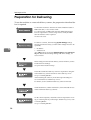
Preparation for Delivering...................................................................................58
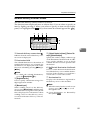
Network Delivery Scanner Screen ........................................................................... 59
Delivering Scan Files........................................................................................... 60
Delivery Procedure...................................................................................................60
Simultaneous Storage and Delivery.........................................................................65
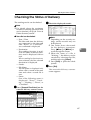
Checking the Status of Delivery ......................................................................... 67
6. Using the Network TWAIN Scanner Function
Preparation for Using the Network TWAIN Scanner.........................................69
Scanning Originals ..............................................................................................70
7. Configuring/Registering Scan Settings
Specifying Scan Settings .................................................................................... 73
Specifying the Orientation and Output Tray of the Original ............................75
For E-mail, Scan to Folder, and a Network Delivery Scanner..................................75
For a Network TWAIN Scanner................................................................................76
Scanning Multiple Pages into a Single File ....................................................... 77
When a Time Limit Is Specified for Additional Originals ..........................................77
When a Time Limit Is Not Specified for Additional Originals....................................78
Programs ..............................................................................................................80
Registering a Program .............................................................................................80
Recalling a Program................................................................................................. 81
Changing a Registered Program.............................................................................. 81
Deleting a Program ..................................................................................................81
Changing the Program Name .................................................................................. 82
iv
8. Troubleshooting
If Your Machine Does Not Operate As You Want..............................................83
When Scanning Is Not Performed as Expected.......................................................83
When the Delivery Function Does Not Work............................................................ 83
When Stored Files Cannot Be Accessed .................................................................84
Network Cannot Be Browsed When Sending a Scan File .......................................84
The TWAIN Driver Cannot Be Started ..................................................................... 84
Stored Files Cannot Be Edited................................................................................. 84
The Network Delivery Function Cannot Be Used..................................................... 84
Operations are not possible when messages appear ..............................................85
When a Message Is Displayed ............................................................................86
When an Error Message Appears on the Control Panel ..........................................86
When an Error Message Appears on the Client Computer...................................... 92
9. Initial Scanner Setup
Scanner Features................................................................................................. 95
Adjusting Scanner Features ...............................................................................97
Settings................................................................................................................. 98
Scan Settings ........................................................................................................... 98
Destination List Settings......................................................................................... 101
Send Settings......................................................................................................... 101
Administrator Tools ................................................................................................103
10.Appendix
Relationship between Resolution and original size ....................................... 105
When Using for E-mail, Scan to Folder, or Store, or as a Network Delivery Scanner ...106
When Using as a Network TWAIN Scanner...........................................................108
Placing Originals................................................................................................ 109
Software Supplied on CD-ROM ........................................................................ 110
Table of files........................................................................................................... 110
TWAIN Driver ......................................................................................................... 110
DeskTopBinder ...................................................................................................... 111
Specifications for Transmission/Store/Delivery Functions ........................... 112
Transmission..........................................................................................................112
Store.......................................................................................................................114
The network delivery scanner function................................................................... 114
Specifications..................................................................................................... 115
INDEX....................................................................................................... 116
v
vi
How to Read This Manual
Symbols
In this manual, the following symbols are used:
Important
If this instruction is not followed, paper might be misfed, originals might be
damaged, or files might be lost. Be sure to read this.
Preparation
This symbol indicates the prior knowledge or preparations required before operating.
Note
This symbol indicates precautions for operation or actions to take after misoperation.
Limitation
This symbol indicates numerical limits, functions that cannot be used together,
or conditions in which a particular function cannot be used.
Reference
This symbol indicates a reference.
[
]
Keys that appear on the machine's display panel.
[
]
Keys and buttons that appear on the computer's display.
{
}
Keys built into the machine's control panel.
{
}
Keys on the computer's keyboard.
Names of Major Options
Major options of this machine are referred to as follows in this manual:
• Scanner Option Type 480 → scanner option
The following software products are referred to using a general name:
• DeskTopBinder Lite and DeskTopBinder Professional* → DeskTopBinder
• ScanRouter EX Professional* and ScanRouter EX Enterprise* → the ScanRouter delivery software
* Optional
1
2
1. Getting Started
Control Panel
This illustration shows the control panel when options are installed.
AGH002S
1. Indicators
6. {Clear Modes}} key
Display errors and the machine status.
See "Control Panel", General Settings
Guide.
m: Data In Indicator (indicates data is being received.).
D: Add Toner indicator
L: Service Call indicator
M: Open Cover indicator
x: Misfeed indicator
Press to clear the current settings.
2. {User Tools/Counter}} key
8. {Interrupt}} key
Use to change default or operation parameters according to the operating conditions.
3. Display panel
Displays the operation status and messages.
Note
❒ Screenshots in this manual are examples and may differ from actual
screens.
4. {Check Modes}} key
Press to check the destinations which are
currently selected.
5. {Program}} key
Use to register settings used frequently as
a program or to recall the registered program.
7. {Energy Saver}} key
Press this key to begin warm-up.
Pressing this key again while in warm-up
mode cancels warm-up.
Note
❒ This key is inactive while scanning or
setting scanner defaults.
Press this key to interrupt the scanner
mode and to activate the copy mode.
9. Main power indicator and power
indicator
The main power indicator lights up when
the main power switch is set to on. The
power indicator lights up when the machine is on.
Important
❒ Do not turn off the main power
while the power indicator is lit or
blinking. Doing so may cause a
failure of the hard disk.
3
Getting Started
10. Operation switch
Press this switch to turn the machine on.
The power indicator lights up. To turn
the machine off, press this switch again.
See "Turning On the Power", General Settings Guide.
1
Note
❒ This key is inactive while scanning or
setting scanner defaults.
11. Function status indicators
• When lit green, the corresponding
function is active.
• When lit red, the corresponding function is interrupted. Press the respective key, and then follow the
instructions that appear on the screen.
12. Function keys
Press the {Copy}
}, {Document Server}
}, or
{Scanner}
} key to activate the respective
function. The display content changes accordingly.
The indicator for the selected function
lights up.
13. Number keys
Use to enter numeric values.
14. {#}} key (Enter key)
Use to confirm the entered numeric value.
15. {Clear/Stop}} key
• Clear: Clears an entered numeric value
• Stop: Stops scanning
16. {Start}} key
Use to begin scanning, file storing, or delivery.
Note
❒ Using the default setting, you can start
scanning, storing, and delivering files,
simply by loading them (without
pressing the {Start}
} key). For details
about how to start scanning, see “System Settings”, General Settings Guide.
4
Network Scanner
Network Scanner
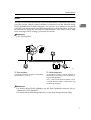
By installing the scanner option, the machine can be used as a network scanner.
As a network scanner, the machine can send e-mail, send files to the FTP server
or the shared folders of client computers, store scan files, operate as a network
delivery scanner, and operate as a network TWAIN scanner.
1
E-mail
A scan file that is attached to an e-mail can be sent using the e-mail system
through a LAN or the Internet.
Reference
p.17 “Sending Scan Files by E-mail”
ZZZ601S
1. This machine
3. Client computer
A scan file can be attached to an e-mail
and sent to a mail server. In combination
with the file storage function, scan files
from multiple originals that have been
temporarily stored can be sent all at once.
An e-mail with a scan file attached is received from the mail server.
Check the content of the file using an appropriate application.
2. Mail server
A mail server is an SMTP server used for
an e-mail system. It transfers a received email to a specified destination through a
LAN or the Internet.
4. LDAP server
The LDAP server provides a directory service for search operations or inquiries from a
client computer on the same network.
You can use the LDAP server to search
for e-mail information when the server is
used as data base to manage user authentication and e-mail accounts.
5
Getting Started
Scan to Folder
A scan file can be sent to the FTP server folders or the shared Windows folders
on the same network.
1
Reference
p.31 “Sending Scan Files by Scan to Folder”
ZZZ602S
1. This machine
3. Client computer
A scan file can be sent to the FTP server
folders using FTP or to the shared Windows folders using SMB. In combination
with the file storage function, scan files
from multiple originals that have been
temporarily stored can be sent all at once.
A scan file that is sent from the machine
is received in shared Windows folders.
Check the content of the file using an appropriate application.
2. FTP server
The FTP server is a server that provides
file transfer services among computers
on the same network. A scan file that is
sent to the FTP server is stored, and the
stored files can be downloaded by a client computer that logs on to the FTP server.
6
Network Scanner
Store
You can store scanned documents as files on the machine’s hard disk. The stored
scan files can be viewed, copied, deleted, or retrieved over the network using
DeskTopBinder from a client computer. You can also view, delete or download
scan files over the network using Web Image Monitor from the client. A file can
be searched for using the user name or the file name. Also, others can be kept
from viewing a file by setting a password for the file.
1
Reference
p.43 “Storing Files”
ZZZ603S
1. This machine
2. Client computer
A scan file from the originals scanned by
the machine is stored.
A stored file can be viewed, copied, or
deleted by connecting to the machine using DeskTopBinder.
Also, a file stored in the machine can be
viewed, downloaded, or deleted using
Web Image Monitor.
Reference
For details about DeskTopBinder, see the DeskTopBinder manuals. See p.i
“Manuals for This Machine”.
For details about Web Image Monitor, see the Web Image Monitor Help.
7
Getting Started
Network Delivery Scanner
A scan file from the originals scanned by the machine is stored in the delivery
server and delivered to the folders of client computers on the same network.
1
Reference
p.57 “Delivering Scan Files”
Note
❒ To use the delivery scanner function, a delivery server installed with the
ScanRouter delivery software is required.
❒ When the ScanRouter delivery software is used, the machine can also deliver
scan files using e-mail, store scan files in the document management server.
ZZZ604S
1. This machine
3. Client computer
A scan file from the originals scanned by
the machine is sent to the delivery server.
In combination with the file storage function, scan files from multiple originals
that have been temporarily stored can be
delivered all at once. See p.65 “Simultaneous Storage and Delivery”.
The contents of a stored file can be
checked in the following ways:
2. Delivery server
The ScanRouter delivery software is installed in this computer which is used as
a delivery server.
A received file is delivered to the in-tray
of the specified destination (A in the figure). According to the settings of the intray, the file is stored in the in-tray or in a
Windows folder (B in the figure).
8
• View the file in the in-tray using DeskTopBinder to check the contents. (C
in the figure)
• Use Auto Document Link to receive
the file stored in the in-tray, and check
the contents with an appropriate application. (D in the figure)
• Access the Windows folder where the
file is stored via the network, and
check the contents with an appropriate application. (E in the figure)
Network Scanner
Reference
For details about DeskTopBinder, or Auto Document Link, see the respective
manuals. See p.i “Manuals for This Machine”.
1
Network TWAIN Scanner
The scanner function of this machine can be used from a client computer via a
network using Ethernet, optional IEEE 1394 (IP over 1394), or optional IEEE
802.11b (wireless LAN).
Reference
p.69 “Using the Network TWAIN Scanner Function”
ZZZ605S
1. This machine
2. Client computer
The scanner function of the machine can be
used from a client computer via a network.
Originals are scanned using the TWAIN
Driver from an application.
Note
❒ When using the machine as a network TWAIN scanner, it is not necessary to
press the {Scanner}
} key on the control panel. When the TWAIN Driver becomes active on a client computer, the display automatically switches to the
following screen.
❒ Press [Exit] to use functions other than the network TWAIN scanner function.
9
Getting Started
Installing Software
This section describes how to install
the software supplied on the “Scanner Driver and Utilities".
1
Reference
For details about the software on
the CD-ROM and the system requirements of the software, see
p.110 “Software Supplied on CDROM”.
Quick Install
When the CD-ROM is inserted into a
client computer running Windows
95/98/Me/2000/XP, Windows Server 2003, or Windows NT 4.0, the installer starts automatically (Auto
Run) to install various software.
Note
❒ If Plug and Play starts, click [Cancel] in the [New Hardware Found],
[Device Driver Wizard], or [Found New
Hardware Wizard] dialog box, and
then insert the CD-ROM. The [New
Hardware Found], [Device Driver Wizard], or [Found New Hardware Wizard]
dialog box appears depending on
the operating system used.
❒ Auto Run may not automatically
work with certain operating system settings. If this happens,
launch “SETUP.exe” on the CDROM root directory.
❒ To disable Auto Run, press the
{ SHIFT}
} key when inserting the
CD-ROM into the drive and keep it
pressed until the computer finishes reading from the CD-ROM.
10
❒ If [Cancel] is selected during installation, the installation will be
stopped and all the remaining software will not be installed. If [Cancel] has been selected, reinstall the
remaining software after restarting
the client computer.
❒ For information about the software
that can be installed by Auto Run,
see p.110 “Software Supplied on
CD-ROM”.
Limitation
❒ For installation under Windows
2000/XP, Windows Server 2003, or
Windows NT 4.0, log on as an Administrators group member.
TWAIN Driver
To use the machine as a network
TWAIN scanner, it is essential to install the TWAIN Driver on a client
computer.
If an application that su pp orts
TWAIN is not installed on the client
computer, it is also necessary to install DeskTopBinder. For information
about the installation of DeskTopBinder, see p.11 “DeskTopBinder”.
Preparation
Before installation, check the system requirements for the TWAIN
Driver. For details about the system requirements, see p.110 “Software Supplied on CD-ROM”.
Note
❒ Use Auto Run for installation.
Installing Software
A Start
Windows, and then insert
the CD-ROM labeled "Scanner
Driver and Utilities" into the CDROM drive of the client computer.
Reference
If the installer does not start automatically, see p.10 “Quick Install”.
B Click [TWAIN Driver].
The Software Setup screen appears.
C The installer of the TWAIN Driver starts. Follow the instructions.
Note
❒ When the installation is complete, a message about restarting the client computer may
appear. In this case, restart the
client computer.
❒ After the installation is complete, a folder with the name of
the machine in use is in [Program] on the [Start] menu. Help
can be displayed from here.
❒ Notes on using the network
TWAIN scanner are provided in
“Readme.txt”. Be sure to read
them before use.
DeskTopBinder
To check an in-tray or to retrieve files
using the network delivery scanner
function, you must install DeskTopBinder on the client computer.
1
Preparation
Before installation, check the system requirements for DeskTopB i n d e r. S ee p . 1 10 “S o ft w a re
Supplied on CD-ROM”.
Note
❒ Use Auto Run for installation.
❒ To use the network delivery scanner function, you need to install
the ScanRouter delivery software
(optional) on the computer used as
the delivery server.
A Start
Windows, and then insert
the CD-ROM labeled “Scanner
Driver and Document Management Utility” into the CD-ROM
drive of the client computer.
The CD-ROM Launcher screen appears.
B Click [DeskTopBinder Lite].
The DeskTopBinder Lite Setup
screen appears.
C Click [DeskTopBinder Lite]. The installer of the DeskTopBinder
starts. Follow the instructions on
the screen.
Reference
For information about the subsequent installation procedure,
see Setup Guide that can be displayed from the Setup screen of
DeskTopBinder.
11
Getting Started
User Authentication
When user authentication (User Code
Authentication, Basic Authentication,
Windows Authentication, or LDAP
Authentication) is set, the authentication screen is displayed. Unless a valid user name and password are
entered, operations are not possible
with the machine. Log on to operate
the machine, and log off when you
are finished operations. Be sure to log
off to prevent unauthorized users
from using the machine.
1
Note
❒ Consult the User Administrator
about your login user name, password, and user code. For details
about the various types of user authentication, consult the appropriate administrators.
❒ For user code authentication, enter
a number registered in the address
book as [User Code].
User Code Authentication
(Using the Control Panel)
When user code authentication is set,
the following screen appears.
Enter a User Code (eight digit), and
then press [#
#].
Note
❒ You do not need to log off after
user code authentication.
12
Login (Using the Control Panel)
Follow the procedure below to log in
when Basic Authentication, Windows
Authentication, or LDAP Authentication is set.
A Press [Enter] for [Login User Name].
B Enter a login user name, and then
press [OK].
C Press [Enter] for [Login Password].
D Enter a login password, and then
press [OK].
E Press [Login].
When the user is authenticated, the
screen for the function you are using appears.
User Authentication
Log Off (Using the Control
Panel)
1
Follow the procedure below to log off
when Basic Authentication, Windows
Authentication, or LDAP Authentication is set.
A Press {User Tools / Counter}}.
B Press [Logout].
C Press [Yes].
D Press{{User Tools / Counter}}.
13
Getting Started
Programming E-mail Addresses and
Folders
1
You can program e-mail addresses and folders using Address Book Management in the Administrator Tools menu under System Settings.
You can also register the programmed e-mail addresses and folders in a Group.
Note
❒ You can register entries in the address book using Web Image Monitor or
SmartDeviceMonitor for Admin. For details about installing SmartDeviceMonitor for Admin, see "Monitoring and Configuring the Printer", Network
Guide. For details about registering addresses, see each application’s Help.
❒ Depending on the machine type, you may not be able to use the machine
when it is updating the address book using CSV files (retrieved using SmartDeviceMonitor for Admin) that contain user codes.
Reference
“E-mail Destination”, General Settings Guide
“Folder Destination”, General Settings Guide
“Registering Destinations to a Group”, General Settings Guide
14
Specifying How to Start Scanning
Specifying How to Start Scanning
There are two ways to start scanning:
• Placing originals
• Pressing the {Start}
} key.
Using the default setting, you can start scanning, storing, and delivering files
simply by loading them (without pressing the {Start}
} key). When you do this,
the {Start}
} key does not light. However, in the following situations, press the
{Start}
} key.
• When you print the scanner journal
• Right after you remove misfed paper
• Right after you specify an entry (such as the destination) required for scanning
1
Note
❒ You can specify that the {Start}
} key must be pressed to start scanning. For details about specifying how to start scanning, see “System Settings”, General
Settings Guide.
15
Getting Started
1
16
2. Sending Scan Files by E-mail
Scan files can be sent from this machine to specified destinations using the email system. This chapter explains the preparation for sending files by the e-mail
system, various display screens, procedures for sending, and how to check the
sending results when this function is used.
Preparation for Sending by E-mail
To send scan files by the e-mail system, the preparation described below is required.
Note
❒ If you establish an e-mail server on the network, set up the e-mail server on
the network in advance. For information about setting up an e-mail server,
see the manuals of the mail server to be used and the software to be installed.
Connect the machine to the network with an Ethernet cable or
IEEE 1394 cable, or use wireless LAN.
To connect using an IEEE 1394 cable, the IEEE 1394 interface
board is required. To connect using wireless LAN, the IEEE
802.11b interface unit is required.
See Network Guide.
To send scan files by e-mail, the following [System Settings] settings must be specified correctly. (Certain other settings must
also be specified.)
• IP address
• subnet mask
• DNS server
• SMTP server name
For details about making settings and other settings, see Network Guide. You also need to register destinations and other information in the address book. For details, see General Settings
Guide.
Make settings for sending e-mail such as file type priority and
sender's default.
See p.101 “Send Settings”.
17
Sending Scan Files by E-mail
E-mail Screen
The e-mail is as shown.
The function items displayed serve as selector keys. You can select or specify an
item by lightly pressing it. When you select or specify an item on the display
panel, it is highlighted like
. Keys that cannot be selected appear like
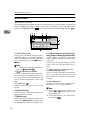
.
2
1. Destination field
6. [Attach Sender's Name] [Return Re-
Displays the selected destination. If multiple destinations are selected, the destinations are displayed in the order they
were selected by pressing [U
U Prev.] or
[T
TNext].
ceipt] [Subject / Message] [Attached File]
Note
❒ To check the selected destinations,
press the {Check Modes}
} key.
2. [ ] E-mail/Scan to Folder
Press to switch between the e-mail function and the Scan to Folder function. You
can send a file to e-mail destinations and
Scan to Folder destinations at the same
time.
3. E-mail icon ( )
Indicates that the e-mail screen is displayed.
4. [Registration No.]
Press to specify a destination using a five
digit registration number.
5. [Manual Input]
When specifying a destination that is not
listed, press [Manual Input], and then enter
the destination using the soft keyboard.
18
Set the sender, a reception confirmation
e-mail, subject, and message of the e-mail
to be sent.
If necessary, specify the file type and file
name of the scan file attached to the email.
7. [ ] Switch Destination
List/Search/Switch Title
Press to switch a destination from the delivery server list to the destination list of
this machine, to search for an e-mail destination.
8. Destination list
Displays the destinations registered in
the delivery server or this machine.
Note
❒ When the entire list does not fit on one
screen, [U
U] or [T
T] can be used to scroll
through the list.
❒ Group destinations are denoted by
this symbol ( ).
Sending Scan Files by E-mail
Sending Scan Files by E-mail
Reference
There are two ways to specify
scan settings, as described below:
Procedure for Sending E-mail
A scan file is sent after scan settings
and destinations are specified.
2
• Configure each setting for
scanning. For details, see
p.73 “Specifying Scan Settings”.
• Recall registered settings. For
details, see p.80 “Programs”.
A Press the {Scanner}} key.
E If
ZZZ606S
Note
❒ The illustration is an example.
The actual appearance may be
different.
the network delivery scanner
screen appears, switch to the email screen.
A Press [ ].
B Press [Switch Destination List].
B Make sure that no previous settings remain.
Note
❒ If a previous setting remains,
press the {Clear Modes}
} key.
C Press [E-mail].
C Make
settings for the original,
such as orientation and output
tray.
Reference
p.75 “Specifying the Orientation and Output Tray of the
Original”
D Make the scan settings.
D Press [Exit].
The e-mail screen appears.
F Specify the destination.
You can specify the destination in
the following ways:
• Select it from the destination list.
• Specify its registration number.
• Enter the e-mail address directly.
• Search for it in the destination
list.
• Search for it in the LDAP server.
19
Sending Scan Files by E-mail
Note
❒ Destinations in the destination
list and registration numbers
must be registered in advance
in [System Settings]. For details,
see “System Settings”, General
Settings Guide.
2
❒ For details about the maximum
number of destinations that can
be selected for each transmission, see p.112 “E-mail”.
❒ Before selecting the destination,
be sure to select [To]. If necessary, select [Cc] or [Bcc] and the
respective destinations.
❒ Depending on the security settings, certain destinations may
not be displayed.
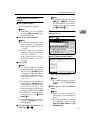
Selecting a destination from the
list
A Select the destination.
The selected destination is highlighted and also displayed in
the destination field at the top of
the screen.
Note
❒ If the target destination does
not appear, take one of the
following steps:
• Display the destination by
selecting its initial letter
from the title.
• Display the destination by
pressing [U
U] or [T
T].
20
B To select more destinations, repeat steps A.
Note
❒ To deselect a destination, press
the destination once more, or
press [U
UPrev.] or [T
TNext] to
display the destination in the
destination field, and then
press the {Clear/Stop}
} key.
Using a registration number to
select a destination
A Press [Registration No.].
B Enter the five digit registration
number that has been assigned
to a destination folder using
the number keys.
If the entered number is less
than five digits, press the { #}
}
key after the last number.
Example: To enter 00003
Press the { 3}
} key, and then
press the {#}
} key.
C To select more destinations, repeat steps A to B.
Note
❒ To deselect a destination, press
[U
UPrev.] or [T
TNext] to display
the destination in the destination field, and then press
the {Clear/Stop}
} key.
Sending Scan Files by E-mail
Manual entry of an e-mail
address
A Press [Manual Input].
The soft keyboard appears.
Note
❒ Depending on the security
settings, [Manual Input] may
not be displayed.
B Enter the e-mail address.
Note
❒ For details about the maximum number of characters
that can be entered, see p.112
“E-mail”.
❒ It is possible to enter alphanumeric characters and periods. The symbols ( ) \ , ; : ”
and spaces cannot be entered. For details, see p.112
“E-mail”.
C Press [OK].
Note
❒ An e-mail address entered
manually can be registered in
the list. Press [ProgDest], and
a screen for registering the email address appears. For information, see General Settings Guide.
❒ To change an e-mail address
entered, press [Change] located on the left side of the destination field. The soft
keyboard appears. Make any
changes, and then press [OK].
❒ To check the selected destinations, press the { Check
Modes}
} key.
❒ Depending on the security
settings, [ProgDest] may not
be displayed.
D To enter more destinations, repeat steps A to C.
Note
❒ To deselect a destination, press
[U
UPrev.] or [T
TNext] to display
the destination in the destination field, and then press
the {Clear/Stop}
} key.
2
Searching for a destination in the
destination list
A Press [
].
B Press [Search by Dest. Name].
The soft keyboard appears.
Note
❒ To search using an e-mail addresses, press [E-mail Address].
C Enter part of the destination
name.
Note
❒ Enter the first character or
characters of the destination
name.
❒ It is also possible to perform
a combined search using
[Search by Dest. Name] and [Email Address].
21
Sending Scan Files by E-mail
❒ It is necessary to differentiate
between uppercase and lowercase letters.
D Press [OK].
E Select a destination.
2
❒ Make sure that the LDAP
server you want to search is
selected and highlighted. If a
server is not selected, the
search is not performed and
an error message appears.
E Press [OK].
F Press [Advanced Search].
F Press [Exit].
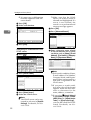
Searching for a destination in the
LDAP server
A Press [
].
B Press [Search LDAP].
C Press [Select Server].
D Select the LDAP server.
Note
❒ The LDAP server can be registered in advance in [System
Settings]. For details, see Network Guide.
22
G Enter a character string related
to the destination for a search
condition such as [Name], [E-mail
Address], [Fax Number], [Company
Name], or [Department Name].
Note
❒ Each search condition (Name,
E-mail Address, Fax Number,
Company Name, and Department Name) corresponds to a
item that is registered in the
LDAP server.
❒ If you press a search condition item, the soft keyboard
appears. Enter the first character or characters for the
name, address, or number.
❒ If you select [S
SSearch Options]
in [Program / Change / Delete
LDAP Server] in [Administrator
Tools] in [System Settings],
you can add a field for LDAP
search. For details, see Network Guide.
Sending Scan Files by E-mail
❒ When the search condition
[Name] is used for searching,
whether the first name or sirname is searched for depends on the setting made by
the administrator. For example, if you want to search for
"John Doe", enter "John" or
"Doe" according to the setting
made by the administrator.
Consult your administrator
for which name to use.
H Press [Search Criteria] corresponding to each item, and then select criteria from the list
displayed.
Note
❒ You can select criteria from
the following list:
• [Search Beginning Word]: The
names which start with
the entered character or
characters are targeted.
For example, to search for
“ABC”, enter “A”.
• [Search End Word]: The names
which end with the entered character or characters are targeted.
For example, to search for
“ABC”, enter “C”.
• [Exact Match]: The names
which correspond to an
entered character or characters are targeted.
For example, to search for
“ABC”, enter “ABC”.
• [Include One of Words]: The
names which contain an
entered character or characters are targeted.
For example, to search for
“ABC”, enter “A”, “B”, or
“C”.
• [Exclude Words]: The names
which do not contain an
entered character or characters are targeted.
For example, to search for
“ABC”, enter “D”.
• [Fuzzy Search]: a vague search
(The function of this
vague search depends on
the system supported by
the LDAP server.)
I Press [OK].
2
Note
❒ The e-mail address searched
for in the LDAP server cannot be specified correctly if it
contains too many characters. For details about the
maximum number of characters that can be entered, see
p.112 “E-mail”.
❒ If a user name and password
for the LDAP server authentication are not set, a log-on
screen appears. Enter a user
name and password.
❒ Multiple e-mail addresses can
be registered for one person,
but a search will only find
one e-mail address per person. Depending on the LDAP
server, the address which
was registered first is generally found.
❒ To display details about the
destination, press [Details].
J Select a destination.
K Press [Exit].
23
Sending Scan Files by E-mail
Note
❒ An e-mail address found in a
search can be registered in
the list. Press [ProgDest], and
a screen for entering the email address appears. For
more information, see General Settings Guide.
2
Checking selected destinations
A Use the destination field at the
top of the scre en to check
which destinations are selected.
Note
❒ Press [U
UPrev.] or [T
TNext] to
scroll through the list. Destinations are displayed in the
order they were selected.
❒ To check the selected destinations, press the { Check
Modes}
} key.
G Select the file type if necessary.
A Press [Attached File].
B Press [File Type]
C Select the file type of the file.
I Specify the e-mail sender.
You can specify the sender in the
following ways:
• Select the sender from the list.
• Enter the registration number of
the sender using the number
keys.
• Search for the sender.
Note
❒ If you specify the sender, information about the sender is included in the file being sent. The
name of the specified sender is
automatically placed in the
from field of the e-mail so that
the sender can be identified
when the e-mail is received.
❒ Depending on system settings,
the administrator's e-mail address may appear automatically
in the e-mail header's FROM
field. To change the address,
specify the sender in Step I.
❒ To prevent misuse of a sender
name, we recommend you set
protection code for that sender
name.See General Settings Guide.
❒ Depending on the security settings, [Attach Sender's Name] may
be selected as the user name
when logging in.
Selecting a sender from the list
A Press [Attach Sender's Name].
D Press [OK] twice.
H Specify the file name if necessary.
24
A Press [Attached File].
B Press [File Name].
The soft keyboard appears.
C Enter a file name.
D Press [OK] twice.
Sending Scan Files by E-mail
B Select the sender.
Example: To enter 00006
Press the { 6}
} key, and then
press the {#}
} key.
2
Note
❒ When a protection code has
been set, a screen for entering
the protection code appears
after selecting the sender. Enter the protection code, and
then press [OK]. If the protection code you entered is correct, the sender nam e is
displayed.
C Press [OK].
Note
❒ When a protection code has
been set, a screen for entering
the protection code appears
after selecting the sender. Enter the protection code, and
then press [OK]. If the protection code you entered is correct, the sender name and
[Return Receipt] are displayed.
Using a registration number to
specify a sender name
C Press [OK].
A Press [Attach Sender's Name].
Searching for a sender
A Press [Attach Sender's Name].
B Enter the five digit registration
number that has been assigned
to a destination folder using
the number keys.
If the entered number is less
than five digits, press the {#}
}
key after the last number.
B Press [
].
25
Sending Scan Files by E-mail
C Press [User (Dest.) Name].
G Press [Exit].
H Press [OK].
J For a reception confirmation e-mail,
press [Return Receipt].
Note
❒ To use [Return Receipt] you must:
2
The soft keyboard appears.
Note
❒ To search for an e-mail address, press [E-mail Address].
D Enter part of the sender name.
Note
❒ Enter the first character or
characters of the sender name.
❒ It is also possible to perform
a combined search using [User (Dest.) Name] and [E-mail Address].
❒ It is necessary to differentiate
between uppercase and lowercase letters.
E Press [OK].
F Select the sender.
Note
❒ When a protection code has
been set, a screen for entering
the protection code appears after selecting the sender. Enter
the protection code, and then
press [OK]. If the protection
code you entered is correct, the
sender name is highlighted.
26
• Log on as a user
• Specify the sender in Step I
❒ When [Return Receipt] is selected, an e-mail notifying that the
e-mail has been read by the destination party is sent to the
sender selected here. However,
if the mailing software used by
the destination party does not
support MDN (Message Disposition Notification), the e-mail
may not be sent.
K Specify a subject if necessary.
Note
❒ To specify a subject, you can select it from the list, enter it directly, or combine selecting and
entering it.
❒ For details about the maximum
number of characters that can
be entered, see p.112 “E-mail”.
❒ When a subject has been specified, this information is added
to the scan file. The subject is automatically placed in the subject
field of the e-mail.
❒ The subjects that can be selected
from the list must be registered
in [System Settings] in advance.
See Network Guide.
The procedure to specify the subject “[Urgent] New product appearance” is explained as an example
here.
A Press [Subject / Message].
Sending Scan Files by E-mail
B Press [Attach Subject].
❒ The messages that can be selected from the list must be registered in [System Settings] in
advance. See Network Guide.
❒ A message can be selected from
the list or entered directly.
2
Selecting a message from the list
C Select the subject [Urgent].
D Press [Manual Input].
The soft keyboard appears.
E Enter the subject “New product appearance”.
F Press [OK].
A Press [Subject / Message].
B Press [E-mail Message].
C Select a message.
D Press [OK] twice.
Manual entry of a message
G Press [OK] twice.
L Enter a message if necessary.
A Press [Subject / Message].
B Press [E-mail Message].
Note
❒ For details about the maximum
number of characters that can
be entered, see p.112 “E-mail”.
❒ When a message has been entered, this information is added
to the scan file.
C Press [Manual Input].
The soft keyboard appears.
27
Sending Scan Files by E-mail
D Enter the message “Thank you
for what you did yesterday”.
E Press [OK] three times.
Simultaneous Storage and
Sending by E-mail
You can use the e-mail function and
the storage function together.
The scan file is sent by e-mail and at
the same time is stored.
2
M Place originals.
Reference
The procedure for placing originals is the same as that for placing originals for copying. For
details about placing originals,
see “Placing Originals”, Copy
Reference.
Note
❒ This section explains mainly the
procedure for simultaneous storage and sending of e-mail. For details, see p.19 “Procedure for
Sending E-mail”.
❒ The file stored when simultaneously storing a file and sending it
by e-mail cannot be resent in the email screen. To resend the file, select the file in the [Select Stored File]
screen and send it. See p.50 “Sending Stored Files by E-mail or Scan
to Folder, or Delivering”.
Note
❒ For details about the maximum
size of the scan file and maximum number of pages that can
be sent, see p.112 “E-mail”.
A Make settings for the original, such
❒ To interrupt scanning, press the
{Clear/Stop}
} key or press [Stop]
on the display panel.
❒ When scanning multiple pages
into a single file, place the next
original. For details, see p.77
“Scanning Multiple Pages into a
Single File”.
B Make the scan settings.
as orientation and output tray.
Reference
p.75 “Specifying the Orientation and Output Tray of the
Original”
Note
❒ There are two ways to specify
scan settings, as described below:
• Configure each setting for
scanning. For details, see
p.73 “Specifying Scan Settings”.
• Recall registered settings. For
details, see p.80 “Programs”.
C Specify the destination.
D Specify the sender and a subject.
28
Sending Scan Files by E-mail
E Press [Store File].
2
F Make sure [Send & Store] is selected.
G Specify file information if necessary.
Reference
For details about specifying file
information, see p.45 “Specifying file information”.
H Press [OK].
I Place originals.
Note
❒ The procedure for placing originals is the same as that for placing originals for copying. For
details about placing originals,
see “Placing Originals”, Copy
Reference.
29
Sending Scan Files by E-mail
Checking the E-mail Results
The sending results can be checked.
B Check the displayed records.
Note
❒ For details about the maximum
number of sending operations that
can be checked, see p.102 “Print &
Delete Scanner Journal”.
2
❖ Items that can be checked
• Date / Time
The date and time the e-mail
was sent or the date and time
“Error” or “Cancelled” was
confirmed is displayed.
• Destination
The sending function (e-mail,
Scan to Folder, or delivery function) used is displayed with an
icon.
When multiple destinations
were selected, the first selected
destination is displayed.
• Sender
• File Name
The file name is displayed only
when a file is stored at the same
time and when a stored file is
sent.
• Status
One of the following status is
displayed: “Done”, “Sending...”, “Waiting...”, “Error”, or
“Cancelled”.
A Press [Scanned Files Status] on the
e-mail screen.
30
Note
❒ Depending on the security settings, certain records may not
be displayed.
❒ One screen shows the records
for five sending operations. Use
[U
U Prev.] or [T
T Next] to scroll
through the list.
❒ When the status of a file is
“Waiting...”, the sending can be
canceled by selecting that file,
and then pressing [Cancel].
❒ Press [Print] to print the whole
journal.
C Press [Exit].
The e-mail screen appears.
3. Sending Scan Files by Scan
to Folder
Scan files can be sent to the folders of the FTP server or the shared folders of Windows. This chapter explains the preparation for sending files by Scan to Folder,
various display screens, procedures for sending, and how to check the sending
results when this function is used.
Preparation for Sending by Scan to Folder
To send scan files by Scan to Folder, the preparation described below is required.
Connect the machine to the network with an Ethernet cable or
IEEE 1394 cable, or use wireless LAN.
To connect using an IEEE 1394 cable, the IEEE 1394 interface
board is required. To connect using wireless LAN, the IEEE
802.11b interface unit is required.
See Network Guide.
To send scan files by Scan to Folder, the following [System Settings] settings must be specified correctly. (Certain other settings
must also be specified.)
• IP address
• subnet mask
For details about making settings and other settings, see Network Guide. You also need to register destinations and other information in the address book. For details, see General Settings
Guide.
Make settings for sending such as compression and file type priority.
See p.101 “Send Settings”.
Note
❒ Under Windows Server 2003, you may not be able to send files by Scan to
Folder.
❒ Sending files using SMB is available only under a NetBIOS over TCP/IP environment. Sending files using SMB is not available under a NetBEUI environment.
❒ Even when settings made with the control panel, Web Image Monitor, Telnet,
or other methods do not permit the use of SMB and FTP, sending files is still
possible.
31
Sending Scan Files by Scan to Folder
Scan to Folder Screen
The Scan to Folder screen is as shown.
The function items displayed serve as selector keys. You can select or specify an
item by lightly pressing it. When you select or specify an item on the display
panel, it is highlighted like
. Keys that cannot be selected appear like
.
3
1. Destination field
6. [Attach Sender's Name] [Return Re-
Displays the selected destination. If multiple destinations are selected, the destinations are displayed in the order they
were selected by pressing [U
U Prev.] or
[T
TNext].
ceipt] [Subject / Message] [Attached File]
Note
❒ To check the selected destinations,
press the {Check Modes}
} key.
2. [ ] E-mail/Scan to Folder
Press to switch between the Scan to Folder function and the e-mail function. You
can send a file to Scan to Folder destinations and e-mail destinations at the same
time.
3. Scan to Folder icon ( )
Important
❒ When the scan file is sent to destinations for e-mail and Scan to
Folder at the same time, the sender, subject, and message are sent to
the e-mail destinations only. [Return Receipt] is also used for e-mail
transmission. For details, see p.17
“Sending Scan Files by E-mail”.
Shows that the Scan to Folder screen is
displayed.
7. [ ] Switch Destination
4. [Registration No.]
Press to specify a destination using a five
digit registration number.
Press to switch between the destination
list of the delivery server and the destination list of this machine, or to search for
an e-mail destination.
5. [Enter Destination]
8. Destination list
When specifying a destination that is not
listed, press [Enter Destination], and then
enter the destination using the soft keyboard.
32
Set the sender, a reception confirmation
e-mail, file name, subject, and message of
the scan file to be sent.
If necessary, make settings for the file
type and file name of the file.
List/Search/Switch Title
Displays the destinations registered in
the delivery server or this machine.
Preparation for Sending by Scan to Folder
Note
❒ When the entire list does not fit on one
screen, press [U
U ] or [T
T ] to scroll
through the list.
❒ Group destinations are denoted by
this symbol ( ).
3
33
Sending Scan Files by Scan to Folder
Sending Scan Files by Scan to Folder
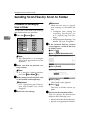
Reference
There are two ways to specify
scan settings, as described below:
Procedure for Sending by
Scan to Folder
A scan file is sent after scan settings
and destinations are specified.
• Configure each setting for
scanning. For details, see
p.73 “Specifying Scan Settings”.
• Recall registered settings. For
details, see p.80 “Programs”.
A Press the {Scanner}} key.
3
E If
ZZZ606S
the network delivery scanner
screen appears, switch to the Scan
to Folder screen.
A Press [ ].
B Press [Switch Destination List].
Note
❒ The illustration is an example.
The actual appearance may be
different.
B Make sure that no previous settings remain.
C Press [E-mail].
Note
❒ If a previous setting remains,
press the {Clear Modes}
} key.
C Make settings for the original, such
as orientation and output tray.
Reference
p.75 “Specifying the Orientation and Output Tray of the
Original”
D Make the scan settings.
D Press [Exit].
The e-mail screen appears.
E Press [ ].
The Scan to Folder screen appears.
F Specify the destination folder.
You can specify the destination
folder in the following ways:
• Select it from the destination list.
• Specify its registration number.
34
Sending Scan Files by Scan to Folder
• Enter the path for the folder of a
client computer on the same
network directly.
• Specify the folder in the FTP
server.
• Select it from the client computers on the same network.
Note
❒ Destinations in the destination
list and registration numbers
must be registered in advance
in [System Settings]. For details,
see “System Settings”, General
Settings Guide.
❒ Depending on the security settings, certain destinations may
not be displayed.
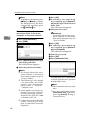
Selecting a destination folder
from the list
A Select the destination folder.
❒ If a protection code has been
set for the shared folder, a
screen for entering the protection code appears.
B To select more destination folders, repeat step A.
Note
❒ To deselect a destination, press
the destination once more, or
press [U
UPrev.] or [T
TNext] to
display the destination in the
destination field, and then
press the {Clear/Stop}
} key.
3
Using a registration number to
select a destination folder
A Press [Registration No.].
B Enter the five digit registration
number that has been assigned
to a destination folder using
the number keys.
If the entered number is less
than five digits, press the { #}
}
key after the last number.
Example: To enter 00004
Press the { 4}
} key, and then
press the {#}
} key.
The selected folder is highlighted and also is displayed in the
destination field at the top of the
screen.
Note
❒ If the target destination does
not appear, take one of the
following steps:
• Display the destination by
selecting its initial letter
from the title.
• Display the destination by
pressing [U
U] or [T
T].
Note
❒ If a protection code has been
set for the shared folder, a
screen for entering the protection code appears.
C To select more destination folders, repeat step B.
35
Sending Scan Files by Scan to Folder
Note
❒ To deselect a destination, press
[U
UPrev.] or [T
TNext] to display
the destination in the destination field, and then press
the {Clear/Stop}
} key.
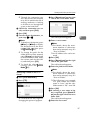
Manual entry of a path for the
destination folder of the client
computer on the same network
3
A Press [Enter Destination].
B Press [SMB].
C Press [Manual Input] on the right
side of the path field.
The soft keyboard appears.
D Enter the path for the folder.
Note
❒ For details about the maximum number of characters
that can be entered, see p.113
“Scan to Folder”.
❒ The following is an example
of a path where the folder
name is “user” and the computer name is “desk01”:
\\desk01\user
❒ An IP address can also be entered if you use one of the following operating systems :
Windows 98/Me/XP/2000
or Windows NT 4.0.
❒ Computer and shared folder
names consisting of more
than 12 characters cannot be
displayed.
36
E Press [OK].
F If entering a user name to log
on is required, press [Manual Input] on the right side of the user
name field.
The soft keyboard appears.
G Enter the user name.
Reference
For details about the maximum number of characters
that can be entered, see p.113
“Scan to Folder”.
H Press [OK].
I If entering a password to log
on is required, press [Manual Input] for [Password].
The soft keyboard appears.
J Enter the password.
K Press [OK].
L Press [Connection Test].
A connection test is performed
to check whether the specified
shared folder exists.
Note
❒ The connection test may take
time.
❒ You may not be able to press
[Connection Test] right after
pressing [Cancel] during a
connection test.
Sending Scan Files by Scan to Folder
❒ Though the connection test
was successful, the machine
may fail to transfer the file if
writing authority is lacking
or if there is not enough free
space on the hard disk.
M Check the connection test result, and then press [Exit].
N Press [OK].
O To enter more destinations, repeat steps A to N.
Note
❒ To deselect a destination, press
[U
UPrev.] or [T
TNext] to display
the destination in the destination field, and then press
the {Clear/Stop}
} key.
❒ To change the path for the
folder that has been entered,
press [Change] on the left side
of the destination field. Enter
the correct path for the folder, and then press [OK].
❒ To check the selected destinations, press the { Check
Modes}
} key.
Specifying a folder in the FTP
server
A Press [Enter Destination].
B Press [FTP].
A confirmation message for
changing the protocol appears.
C Press [Manual Input] on the right
side of the server name field.
3
The soft keyboard appears.
D Enter a server name.
Note
❒ For details about the maximum number of characters
that can be entered, see p.113
“Scan to Folder”.
❒ An IP address also can be entered.
E Press [OK].
F Press [Manual Input] on the right
side of the path field.
The soft keyboard appears.
G Enter the path for the folder.
Note
❒ For details about the maximum number of characters
that can be entered, see p.113
“Scan to Folder”.
❒ The following is an example
of a path where the folder
name is “user” and the subfolder name is “lib”: user\lib
H Press [OK].
I If entering a user name to log
on is required, press [Manual Input] on the right side of the user
name field.
The soft keyboard appears.
J Enter the user name.
37
Sending Scan Files by Scan to Folder
Reference
For details about the maximum number of characters
that can be entered, see p.113
“Scan to Folder”.
K Press [OK].
L If entering a password to log
on is required, press [Manual Input] for [Password].
The soft keyboard appears.
M Enter the password.
N Press [OK].
O To change the port number
which is set in [System Settings],
press [Change] on the right side
of the port number field. Enter
a port number using the
number keys, and then press
the {#}
}key.
P Press [Connection Test].
3
A connection test is performed
to check whether the specified
shared folder exists.
Note
❒ The connection test may take
time.
❒ You may not be able to press
[Connection Test] right after
pressing [Cancel] during a
connection test.
Q Check the connection test result, and then press [Exit].
R Press [OK].
S To enter more destinations, repeat steps A to R.
38
Note
❒ To deselect a destination, press
[U
UPrev.] or [T
TNext] to display
the destination in the destination field, and then press
the {Clear/Stop}
} key.
❒ To change the path for the
folder that has been entered,
press [Change] on the left side
of the destination field. Enter
the correct path for the folder, and then press [OK].
❒ To check the selected destinations, press the { Check
Modes}
} key.
Searching for a destination folder
in client computers on the
network
A Press [Enter Destination].
B Press [SMB].
C Press [Browse Network] on the
right side of the path field.
The list of client computers on
the same network appears.
Sending Scan Files by Scan to Folder
Note
❒ Computer and shared folder
names consisting of more
than 12 characters cannot be
displayed.
❒ If the client computer you
want to select is not displayed, press [Up One Level]
to select another workgroup,
and then search for the client
computer.
❒ The maximum number of client computers and shared
folders that can be displayed
is 100.
D Select the client computer that
has the destination folder.
❒ If authentication is required
for the selected folder, a logon screen appears. Enter the
user name and password.
F Press [OK].
G Press [OK].
Searching for a destination folder
in the destination list
A Press [
3
].
B Press [Search by Dest. Name].
Note
❒ If authentication is required
for the selected computer, a
log-on screen appears. Enter
the user name and password.
The list of folders on the selected computer appears.
E Select the destination folder.
Note
❒ When the selected folder has
sub-folders, the sub-folders
list appears.
The soft keyboard appears.
Note
❒ To search by path, press
[Search by Folder Name].
C Enter part of the destination
folder name.
Note
❒ Enter the first character or
characters of the destination
name.
❒ It is necessary to differentiate
between uppercase and lowercase letters.
39
Sending Scan Files by Scan to Folder
❒ It is also possible to perform
a combined search using
[Search by Dest. Name] and
[Search by Folder Name].
D Press [OK].
E Select a destination folder.
3
F Press [Exit].
Checking selected destinations
A Use the destination field at the
top of the scre en to check
which destinations are selected.
H Specify the file name if necessary.
A Press [Attached File].
B Press [File Name].
The soft keyboard appears.
C Enter a file name.
Note
❒ A scan file is given a 21-digit
(excluding the extension) file
name which combines the
time and date the original was
scanned with a 4-digit page
number. (Example : When one
page is scanned in TIFF at
15.10 seconds, 3.30 p.m., 31
December, 2020, the file name
is 202012311530150100001.tif)
D Press [OK].
Note
❒ Press [U
UPrev.] or [T
TNext] to
scroll through the list. Destinations are displayed in the
order they were selected.
❒ To check the selected destinations, press the { Check
Modes}
} key.
G Select the file type if necessary.
A Press [Attached File].
B Press [File Type].
C Select the file type.
E Press [OK].
I Place originals.
Reference
The procedure for placing originals is the same as that for placing originals for copying. For
details about placing originals,
see “Placing Originals”, Copy
Reference.
Note
❒ For details about the maximum
size of the scan file that can be
sent, see p.113 “Scan to Folder”.
D Press [OK] twice.
40
❒ To interrupt scanning, press the
{Clear/Stop}
} key or press [Stop]
on the display panel.
Sending Scan Files by Scan to Folder
❒ When scanning multiple pages
into a single file, place the next
original. For details, see p.77
“Scanning Multiple Pages into a
Single File”.
Simultaneous Storage and
Sending by Scan to Folder
• Recall registered settings. For
details, see p.80 “Programs”.
C Select the destination.
D Specify the sender, subject,
and
message when sending e-mail is
performed at the same time.
E Press [Store File].
You can use the Scan to Folder function and the storage function together.
The scan file is sent by Scan to Folder
and at the same time is stored.
Note
❒ This section explains mainly the
procedure for simultaneous storage and sending by Scan to Folder.
For details, see p.34 “Procedure for
Sending by Scan to Folder”.
❒ The file stored when simultaneously storing a file and sending it
by Scan to Folder cannot be resent
from the Scan to Folder screen. To
resend the file, select the file in the
[Select Stored File] screen and send
it. See p.50 “Sending Stored Files
by E-mail or Scan to Folder, or Delivering”.
A Make settings for the original, such
as orientation and output tray.
Reference
p.75 “Specifying the Orientation and Output Tray of the
Original”
B Make the scan settings.
Note
❒ There are two ways to specify
scan settings, as described below:
• Configure each setting for
scanning. For details, see
p.73 “Specifying Scan Settings”.
3
F Make sure that [Send & Store] is selected.
G Specify file information if necessary.
Reference
For details about specifying file
information, see p.45 “Specifying file information”.
H Press [OK].
I Place originals.
Note
❒ The procedure for placing originals is the same as that for placing originals for copying. For
details about placing originals,
see “Placing Originals”, Copy
Reference.
41
Sending Scan Files by Scan to Folder
Checking the Scan to Folder Results
The sending results can be checked.
B Check the displayed records.
Note
❒ For details about the maximum
number of sending operations that
can be checked, see p.102 “Print &
Delete Scanner Journal”.
❖ Items that can be checked
• Date / Time
The date and time sending was
requested or the date and time
“Error” or “Cancelled” is confirmed is displayed.
• Destination
The sending function (e-mail,
Scan to Folder, or delivery function) used is displayed with an
icon.
When multiple destinations
were selected, the destinations
are displayed individually.
• Sender
• File Name
The file name is displayed only
when a file is stored at the same
time and when a stored file is
sent.
• Status
One of the following status is
displayed: “Done”, “Sending...”, “Waiting...”, “Error”, or
“Cancelled”.
3
A Press [Scanned Files Status] on the
Scan to Folder screen.
42
Note
❒ Depending on the security settings, certain records may not
be displayed.
❒ One screen shows the records
for five sending operations.
Press [U
U Prev.] or [T
T Next] to
scroll through the screen.
❒ When the status of a file is
“Waiting...”, the sending can be
canceled by selecting that file,
and then pressing [Cancel].
❒ Press [Print] to print the whole
journal.
C Press [Exit].
The Scan to Folder screen appears.
4. Storing Files
Scan files can be stored in the hard disk of the machine using the Document
Server function, and the stored file can be used later. Using DeskTopBinder,
stored files can be viewed or retrieved with a client computer.
Important
❒ A password can be set for every stored file.There is a risk that stored files
without a password can be accessed by someone using DeskTopBinder on the
same LAN. We recommend you consider security measures such as setting
passwords to protect against unauthorized access.
❒ Scan file stored in the machine may be lost if some kind of failure occurs. We
advise against using the hard disk to store important files. The supplier shall
not be responsible for any damage that may result from the loss of files. For
long-term storage of files, we recommend the use of DeskTopBinder. For details, contact your local dealer.
Note
❒ When a delivery server is added to the network, stored files can be delivered.
You can store scan files and simultaneously deliver them with the network
delivery scanner function, send it by e-mail, or send it by Scan to Folder. See
p.50 “Sending Stored Files by E-mail or Scan to Folder, or Delivering”.
Storing Files
This section explains how to store files and how to specify file information for
stored files.
Note
❒ For details about the maximum number of files that can be stored, see p.114
“Store”.
❒ The stored files are deleted automatically after a certain number of days have
passed. For information about making settings and changing settings, see
General Settings Guide.
❒ Files cannot be printed from the control panel after being stored using the
scanner function. Print scan files after a client computer receives them. See
p.51 “Viewing a list of stored files using DeskTopBinder” or p.52 “Viewing a
list of stored files using Web Image Monitor”.
43
Storing Files
E Make the settings for storing scan
Storage Procedure
files.
A Press [Store File].
You can scan and store files.
A Press the {Scanner}} key.
B Press [Store Only].
4
ZZZ606S
Note
❒ The illustration is an example.
The actual appearance may be
different.
B Make sure that no previous settings remain.
Note
❒ If a previous setting remains,
press the {Clear Modes}
} key.
C Make settings for the original, such
as orientation and output tray.
Reference
p.75 “Specifying the Orientation and Output Tray of the
Original”
D Make the scan settings.
Reference
There are two ways to specify
scan settings, as described below:
• Configure each setting for
scanning. For details, see
p.73 “Specifying Scan Settings”.
• Recall registered settings. For
details, see p.80 “Programs”.
44
Note
❒ To store and deliver scan
files, press [Send & Store]. See
p.28 “Simultaneous Storage
and Sending by E-mail”, p.41
“Simultaneous Storage and
Sending by Scan to Folder”,
or p.65 “Simultaneous Storage and Delivery”.
❒ [Store Only] cannot be pressed
if a destination or sender is
selected.
C Press [OK].
F Specify file information.
Specify a user name, file name, and
password for the file.
Reference
For details about specifying file
information, see p.45 “Specifying file information”.
G Place originals.
Storing Files
Reference
The procedure for placing originals is the same as that for placing originals for copying. For
details about placing originals,
see “Placing Originals”, Copy
Reference.
Note
❒ To interrupt scanning, press the
{Clear/Stop}
} key or press [Stop]
on the display panel.
❒ When placing multiple originals one-by-one, place the next
original. For details, see p.77
“Scanning Multiple Pages into a
Single File”.
The File Information screen appears.
B Specify file information.
4
Specifying a user name
A Press [User Name].
B Select the user name.
Specifying file information
You can specify a user name, file
name, and password for a stored scan
file.
According to the settings made, you
can search for files by user name or
file name and you can prevent unauthorized persons from accessing the
files.
Reference
For details about the maximum
number of characters that can be
entered, see p.114 “Store”.
A Press [Store File].
Note
❒ The user names shown here
are names that were registered on the [Administrator
Tools] tab in [System Settings].
To specify a name not shown
here, press [Non-programmed
Name], and then enter the
user name.
C Press [OK].
45
Storing Files
Specifying a file name
Scan files are automatically named
SCAN0001, SCAN0002, etc. If necessary, you can change the file
name.
A Press [File Name].
The soft keyboard appears.
B Enter the file name.
Reference
For information about how
to enter characters, see General Settings Guide.
4
C Press [OK].
Specifying a password
When a password is specified,
only a person who knows the password can view the file.
A Press [Password].
B Enter a four to eight digit number
using the number keys.
C Press the {#}
} key.
Note
❒ To change the password, press
[Change], and then enter a
new one.
D Enter the same number as you
entered in step B for confirmation.
E Press the {#}
} key.
F Press [OK].
46
Important
❒ Do not forget the password.
If you forget it, consult the
system administrator of the
machine.
C Press [OK] to return to the previous screen.
Displaying the List of Stored Files
Displaying the List of Stored Files
From the list of stored files, you can
delete stored files or change file information. To show the list of stored
files, perform the following steps:
Note
❒ You can also display the list of
stored files from a client computer
using DeskTopBinder and Web
Image Monitor. For details, see
p.51 “Checking Stored Files from a
Client Computer”.
4
A Press the {Scanner}} key.
ZZZ606S
Note
❒ The illustration is an example.
The actual appearance may be
different.
B Display the list of stored files.
A Press [Select Stored File].
B Press [Manage / Delete File].
47
Storing Files
Viewing the List
The list of stored files has the following elements.
The function items displayed serve as selector keys. You can select or specify an
item by lightly pressing it. When you select or specify an item on the display
panel, it is highlighted like
. Keys that cannot be selected appear like
.
Note
❒ Depending on the security settings, certain files may not be displayed.
❖ When using the network delivery scanner, e-mail, or Scan to Folder function
4
❖ When displaying information of a selected stored file
1. Keys for searching for files
Press to switch to the screens for
searching for a file by user name or file
name, or to the screen for displaying
all files.
48
3. Keys for sorting files
Press to sort the files using the selected item. Select the same item once
more for a reverse sort. However, the
files cannot be sorted in reverse delivery order.
2. Keys to switch to the information
display
4. Keys for changing file information
Press to switch between the stored file
list and the detailed information of the
selected file.
Use for deleting the selected file or
changing the user name, file name, or
password.
Displaying the List of Stored Files
5. List of stored files
Displays the list of stored files.
Searching for Files
Note
❒ The files that are stored by functions other than the scanner can be
displayed by pressing the [Document Server] key.
❒ If the file is not displayed, press
[U
UPrev.] or [T
TNext] to scroll through
the list.
❒ For files which are password protected, a key symbol( ) is shown to
the left of the user name.
You can search for files from the
stored files using the user name or file
name.
6. [Manage / Delete File]
Searching by user name
A On the screen with the list of stored
files, press [Search by User Name].
B Select the user name to be used
for the search.
4
Press to perform operations such as
deleting stored files or changing file
information.
7. [Send]
Press to send or deliver stored files.
For details, see p.50 “Sending Stored
Files by E-mail or Scan to Folder, or
Delivering”.
8. Information for a selected stored file
Press [Detail] to display the information for a file after selecting the file
from the file list.
Note
❒ The user names shown here are
names that were registered on
the [Administrator Tools] tab in
[System Settings]. To change a
user name not shown here,
press [Non-programmed Name],
and then enter the user name.
C Press [OK].
The search starts, and files whose
user name starts with the entered
string appear.
49
Storing Files
Searching by file name
A On the screen with the list of stored
files, press [Search by File Name].
The soft keyboard appears.
B Enter the file name.
Note
❒ It is necessary to differentiate
between uppercase and lowercase letters.
Reference
For information about how to
enter characters, see General Settings Guide.
4
C Press [OK].
The search starts, and files whose
name starts with the entered string
appear.
Sending Stored Files by E-mail
or Scan to Folder, or Delivering
Files stored can be sent by e-mail or
Scan to Folder, or delivered to the delivery server.
Note
❒ This section explains how to select
files you want to send or deliver.
For details about sending by email, see p.19 “Procedure for Sending E-mail”. For details about
sending by Scan to Folder, see p.34
“Procedure for Sending by Scan to
Folder”. For details about delivering stored files, see p.60 “Delivering Scan Files”.
❒ When stored files are sent or delivered, s can settings can not be
changed. The files are sent or delivered with the scan settings specified when they were stored.
A Press [Select Stored File] to display
the list of stored files.
Reference
p.47 “Displaying the List of
Stored Files”
B Select a file.
Note
❒ When you select a password
protected file, the Password entry screen appears. After you
have entered the correct password and pressed [OK], the file
will be selected.
50
Displaying the List of Stored Files
C To
select multiple files, repeat
step B.
Note
❒ For details about the maximum
number of files that can be selected at once, see p.114 “Store”.
❒ If you select multiple files, the
files will be sent or delivered in
the order they were selected.
❒ If you press [Display Selection],
the selected files will be shown
in the order of delivery.
❒ The illustration used in the following explanation is an example. The
items that actually appear on the
screen may differ, depending on
the model in use and the environment.
Viewing a list of stored files using
DeskTopBinder
Stored files are shown below using
DeskTopBinder.
4
D Press [OK].
The e-mail, Scan to Folder, or network delivery scanner screen appears.
E Switch the destination list if necessary.
F Specify a destination.
G Specify the sender, subject, and
message if necessary.
H Press the {Start}} key.
Checking Stored Files from a
Client Computer
You can view the list of stored files
from a client computer using DeskTopBinder and Web Image Monitor.
Note
❒ You can also view the files stored
under the copy, Document Server,
and printer functions.
Note
❒ The illustration is an example. The
items that actually appear may be
different.
❒ You can also transfer the stored
files to the client computer.
Reference
For details about installing
DeskTopBinder, see p.11
“DeskTopBinder”. For details
about the functions of DeskTopBinder, such as transferring files
to a client computer, see the
manuals related to DeskTopBinder manuals. See p.i “Manuals for This Machine”.
51
Storing Files
Viewing a list of stored files using Web
Image Monitor
The stored files are displayed and can
be checked also in Web Image Monitor.
Note
❒ When you enter http:// (machine
IP address)/ in the address bar of
the Web browser on a client computer, Top Page of Web Image
Monitor is displayed.
❒ You can also download the stored
files.
4
Reference
For details about displaying or
downloading stored files using
Web Image Monitor, see General
Settings Guide.
For details about making settings
for using Web Image Monitor, see
Network Guide.
For details about functions for
managing stored files using Web
Image Monitor, click [Help] on the
upper-right corner of the displayed screen.
52
Managing Stored Files
Managing Stored Files
Deleting Files
You can delete files that are no longer
needed.
Limitation
❒ Files waiting for delivery cannot
be deleted.
Reference
Using Web Image Monitor from a
client computer, you can also delete the stored files. See General Settings Guide.
❒ When you select a password
protected file, the Password entry screen appears. Enter the
correct password, and then
press [OK]. When multiple files
are selected, the password entry
screen appears each time a password protected file is selected.
D Press [Delete File].
4
A Display the list of stored files.
Reference
p.47 “Displaying the List of
Stored Files”
B Press [Manage / Delete File].
The [Manage / Delete File] screen appears.
C Select the file you want to delete.
A confirmation message about deleting the file appears.
E Press [Delete].
F Press [Exit].
Changing File Information
The information for stored files (user
name, file name, and password) can
be changed.
Limitation
❒ Information for files waiting for
delivery cannot be changed.
Note
❒ For details about the maximum
number of files that can be selected at once, see p.114 “Store”.
Reference
Using Web Image Monitor from a
client computer, you can change
the information of files stored. See
General Settings Guide.
A Display the list of stored files.
Reference
p.47 “Displaying the List of
Stored Files”
53
Storing Files
B Press [Manage / Delete File].
C Select the file for which you want
to change the file information.
Note
❒ The user names shown here
are names that were registered on the [Administrator
Tools] tab in [System Settings].
To change a user name not
shown here, press [Non-programmed Name], and then enter the user name.
C Press [OK].
Note
❒ When you select a password
protected file, the password entry screen appears. Enter the
correct password, and then
press [OK].
4
D Change the file information.
Changing the user name
Changing the file name
A Press [Change File Name].
A Press [Change User Name].
B Enter the new file name.
B Select the new user name.
Reference
For information about how
to enter characters, see General Settings Guide.
54
C Press [OK].
Managing Stored Files
Changing the password
A Press [Change Password].
E Make sure that the file informa-
tion was changed as necessary,
and press [Exit].
B Enter a new four to eight digit
number as the password using
the number keys.
4
C Press the {#}
} key.
Note
❒ To change the password, press
[Change], and then enter a
new one.
D Enter the same number as you
entered in step B for confirmation.
E Press the {#}
} key.
F Press [OK].
Important
❒ Do not forget the password.
If you forget it, consult the
system administrator of the
machine.
55
Storing Files
4
56
5. Delivering Scan Files
Scan files can be sent to a specified destination using the network delivery scanner function. This chapter explains the preparation for delivering files, various
display screens, delivery procedures, and how to check the delivery results
when this function is used.
Important
❒ A delivery server in which the ScanRouter delivery software is installed is
necessary to use the network delivery scanner function. Information about
delivery destinations and senders must be registered first in the delivery server. Also, connected devices should be configured in [Set I/O Device] of the ScanRouter delivery software. For details, see the ScanRouter delivery software
Help.
57
Delivering Scan Files
Preparation for Delivering
To use the machine as a network delivery scanner, the preparation described below is required.
Connect the machine to the network with an Ethernet cable or
IEEE 1394 cable, or use wireless LAN.
To connect using an IEEE 1394 cable, the IEEE 1394 interface
board is required. To connect using wireless LAN, the IEEE
802.11b interface unit is required.
See Network Guide.
To deliver scan files, the following [System Settings] settings
must be specified correctly. (Certain other settings must also be
specified.)
• IP address
5
• subnet mask
Also, [On] must be selected for [Delivery Option] under [File Transfer]. For details about making settings and other settings, see
Network Guide.
Make settings for the network delivery scanner function, such as
Destination List Settings.
See p.95 “Initial Scanner Setup”.
Install the ScanRouter delivery software required for using the
network delivery scanner functions on the delivery server.
See p.11 “DeskTopBinder”.
After installing the software, make the required settings for
server maintenance and delivery service.
For details, see the ScanRouter delivery software manuals.
Set the destination, sender information, and connected devices
in the ScanRouter delivery software.
On the client computers, install the software required for viewing or retrieving files by connecting to the delivery server, such
as DeskTopBinder.
See p.11 “DeskTopBinder”.
58
Preparation for Delivering
Network Delivery Scanner Screen
The network delivery scanner screen is as shown.
The function items displayed serve as selector keys. You can select or specify an
item by lightly pressing it. When you select or specify an item on the display
panel, it is highlighted like
. Keys that cannot be selected appear like
.
5
1. Network delivery scanner icon ( )
Indicates that the network delivery scanner screen is displayed.
2. Destination field
The selected destination is shown here. If
multiple destinations are selected, the
destinations are displayed in the order
they were selected by pressing [U
UPrev.] or
[T
TNext].
Note
❒ To check the selected destinations,
press the {Check Modes}
} key.
3. [Registration No.]
Press to specify a destination using a five
digit registration number.
4. [Manual Input]
When sending e-mail via the delivery
server, press [Manual Input], and then enter
the destination using the soft keyboard
that is displayed. For information about
sending e-mail via the delivery server,
see the ScanRouter delivery software
manuals.
5. [Attach Sender's Name] [Return Receipt] [Attach Subject]
Specify the sender, subject, and message
of the document to be delivered. In addition, specify whether or not to check
whether the file has been opened at the
destination.
6. [ ] Switch Destination List/Search
Press to switch between the destination
list of the delivery server and the destination list of this machine, or to perform a
search such as a user name search.
7. Destination list
Displays the destinations registered in
the delivery server or this machine.
Note
❒ When the entire list does not fit on one
screen, press [U
U ] or [T
T ] to scroll
through the list.
❒ Group destinations are denoted by
this symbol ( ).
59
Delivering Scan Files
Delivering Scan Files
Delivery Procedure
A scan file is delivered after scan settings and destinations are specified. If
necessary, you can select a sender and
a subject.
A Press the {Scanner}} key.
Reference
There are two ways to specify
scan settings, as described below:
• Configure each setting for
scanning. For details, see
p.73 “Specifying Scan Settings”.
• Recall registered settings. For
details, see p.80 “Programs”.
E If the e-mail screen appears, switch
to the network delivery scanner
screen.
A Press [ ].
B Press [Switch Destination List].
5
ZZZ606S
Note
❒ The illustration is an example.
The actual appearance may be
different.
B Make sure that no previous set-
C Press [Delivery Server].
tings remain.
Note
❒ If a previous setting remains,
press the {Clear Modes}
} key.
C Make settings for the original, such
as orientation and output tray.
Reference
p.75 “Specifying the Orientation and Output Tray of the
Original”
D Make the scan settings.
60
D Press [Exit].
The network delivery scanner
screen appears.
F Specify the destination.
You can specify the destination in
the following ways:
• Select it from the destination list.
• Specify its registration number.
• Search for it.
• Enter the e-mail address directly.
Delivering Scan Files
Note
❒ The destination list is updated
automatically.
❒ Depending on the security settings, certain destinations may
not be displayed.
Selecting a destination from the
list
A Select the destination.
Using a registration number to
select a destination
A Press [Registration No.].
B Enter the five digit registration
number that has been assigned
to a destination folder using
the number keys.
If the entered number is less
than five digits, press the { #}
}
key after the last number.
Example: To enter 00009
Press the { 9}
} key, and then
press the {#}
} key.
5
The selected destination is highlighted and also is displayed in
the destination field at the top of
the screen.
Note
❒ If the target destination does
not appear, take one of the
following steps:
• Display the destination by
selecting its initial letter
from the title.
• Display the destination by
pressing [U
U] or [T
T].
❒ The destination titles are programed in the delivery server.
❒ To deselect a destination,
press the destination once
more, or press [U
U Prev.] or
[T
TNext] to display the destination in the destination
field, and then press the
{Clear/Stop}
} key.
B To select more destinations, repeat step A.
Note
❒ To deselect a destination, press
[U
UPrev.] or [T
TNext] to display
the destination in the destination field, and then press
the {Clear/Stop}
} key.
C To select more destinations, repeat step B.
Searching for a destination
A Press [
].
61
Delivering Scan Files
B Press [Search Address Book].
Manual entry of a destination
A Press [Manual Input].
C Press [Search by Dest. Name].
Note
❒ To search by comment, press
[Search by Comment].
The soft keyboard appears.
D Enter part of the destination
name.
5
Note
❒ Enter the first character or
characters of the destination
name.
❒ It is necessary to differentiate
between uppercase and lowercase letters.
E Press [OK].
F Select a destination.
G Press [Exit].
The soft keyboard appears.
B Enter the destination.
Note
❒ Enter the e-mail address of
the destination when sending via the delivery server.
❒ For details about the maximum number of characters
that can be entered, see p.114
“The network delivery scanner function”.
❒ Alphanumeric characters and
periods can be entered. The
symbols ( ) \ , ; : ” and spaces
cannot be entered. For details, see p.114 “The network
delivery scanner function”.
C Press [OK].
Note
❒ To deselect a destination, press
[U
UPrev.] or [T
TNext] to display
the destination in the destination field, and then press
the {Clear/Stop}
} key.
❒ To check the selected destinations, press the { Check
Modes}
} key.
D To enter more destinations, repeat steps A to C.
62
Delivering Scan Files
Checking selected destinations
B Select the sender.
A Use the destination field at the
top of the scre en to check
which destinations are selected.
Note
❒ Press [U
UPrev.] or [T
TNext] to
scroll through the list. Destinations are displayed in the
order they were selected.
❒ To check the selected destinations, press the { Check
Modes}
} key.
G Specify the sender (sender of the
file) if necessary.
You can specify the sender in the
following ways:
• Select it from the list.
• Specify its registration number.
• Search for it.
Note
❒ When a sender has been specified, this information is added
to the scan file. Select a sender
from the senders registered in
the delivery server.
❒ Depending on the security settings, [Attach Sender's Name] may
be selected as the user name
when logging in.
Selecting a sender from the list
A Press [Attach Sender's Name].
The selected sender and its registration number appear.
C Press [OK].
Using a registration number to
specify a sender name
5
A Press [Attach Sender's Name].
B Enter the five digit registration
number that has been assigned
to a destination folder using
the number keys.
If the entered number is less
than five digits, press the { #}
}
key after the last number.
Example: To enter 00006
Press the { 6}
} key, and then
press the {#}
} key.
C Press [OK].
63
Delivering Scan Files
Searching for a sender
F Select a sender.
A Press [Attach Sender's Name].
G Press [Exit].
H Press [OK].
H Specify
[Return Receipt] if neces-
sary.
B Press [
].
5
C Press [User (Dest.) Name].
Note
❒ If you did not specify the sender
in Step G, [Return Receipt] cannot
be used even if you select it.
❒ E-mail notification that the file
has been opened at the destination is sent to the sender specified in [Attach Sender's Name]. To
use [Return Receipt], it is necessary to make settings such as the
e-mail address in advance in the
ScanRouter delivery software.
I Specify a subject if necessary.
The soft keyboard appears.
D Enter part of the sender name.
Note
❒ Enter the first character or
ch arac ters of th e s en der
name.
❒ It is necessary to differentiate
between uppercase and lowercase letters.
E Press [OK].
64
Note
❒ To specify a subject, you can select it from the list, enter it directly, or combine selecting and
entering it.
❒ For details about the maximum
number of characters that can
be entered, see p.114 “The network delivery scanner function”.
❒ When a subject has been specified, this information is added
to the scan file.
❒ The subjects that can be selected
from the list must be registered
in [System Settings] in advance.
See Network Guide.
Delivering Scan Files
The procedure to specify the subject name “[Urgent] New product
appearance” is explained as an example here.
A Press [Attach Subject].
❒ When scanning multiple pages
into a single file, place the next
original. For details, see p.77
“Scanning Multiple Pages into a
Single File”.
Simultaneous Storage and
Delivery
B Press the subject [Urgent].
You can use the network delivery
scanner function and the storage
function together.
The scan file is delivered and at the
same time is stored.
Note
❒ This section explains mainly the
procedure for simultaneous delivery and storage. For details, see
p.60 “Delivering Scan Files”.
5
A Make
C Press [Manual Input].
The soft keyboard appears.
D Enter the subject “New product appearance”.
E Press [OK] twice.
J Place originals.
Reference
The procedure for placing originals is the same as that for placing originals for copying. For
details about placing originals,
see “Placing Originals”, Copy
Reference.
Note
❒ To interrupt scanning, press the
{Clear/Stop}
} key or press [Stop]
on the display panel.
settings for the original,
such as orientation and output
tray.
Reference
p.75 “Specifying the Orientation and Output Tray of the
Original”
B Make the scan settings.
Note
❒ There are two ways to specify
scan settings, as described below:
• Configure each setting for
scanning. For details, see
p.73 “Specifying Scan Settings”.
• Recall registered settings. For
details, see p.80 “Programs”.
C Select the destination.
D Specify the sender and a subject if
necessary.
65
Delivering Scan Files
E Press [Store File].
F Make sure that [Send & Store] is selected.
5
G Make
settings for file information if necessary.
Reference
For details about specifying file
information, see p.45 “Specifying file information”.
H Press [OK].
I Place originals.
Note
❒ The procedure for placing originals is the same as that for placing originals for copying. For
details about placing originals,
see “Placing Originals”, Copy
Reference.
66
Checking the Status of Delivery
Checking the Status of Delivery
The sending results can be checked.
B Check the displayed records.
Note
❒ For details about the maximum
number of sending operations that
can be checked, see p.102 “Print &
Delete Scanner Journal”.
❖ Items that can be checked
• Date / Time
The date and time the delivery
was requested or the date and
time “Error” or “Cancelled”
was confirmed is displayed.
• Destination
The sending function (e-mail,
Scan to Folder, or delivery function) used is displayed with an
icon.
When multiple destinations
were selected, the first selected
destination is displayed.
• Sender
• File Name
The file name is displayed only
when a file is stored at the same
time and when a stored file is
sent.
• Status
One of the following status is
displayed: “Done”, “Sending...”, “Waiting...”, “Error”, or
“Cancelled”.
Note
❒ Depending on the security settings, certain records may not
be displayed.
❒ One screen shows the records
for five delivery operations.
Press [U
U Prev.] or [T
T Next] to
scroll through the screen.
❒ When the status of a file is
“Waiting...”, the delivery can be
canceled by selecting that file,
and then pressing [Cancel].
❒ Press [Print] to print the whole
journal.
5
C Press [Exit].
The network delivery scanner
screen appears.
A Press [Scanned Files Status] on the
network delivery scanner screen.
67
Delivering Scan Files
5
68
6. Using the Network TWAIN
Scanner Function
This chapter explains the procedure for scanning originals with the network
TWAIN scanner using DeskTopBinder. In addition, the preparation for using
the network TWAIN scanner is explained.
Preparation for Using the Network TWAIN
Scanner
To use the machine as a network TWAIN scanner, the preparation described below is required.
Connect the machine to the network with an Ethernet cable or
IEEE 1394 cable, or use wireless LAN.
To connect using an IEEE 1394 cable, the IEEE 1394 interface
board is required. To connect using wireless LAN, the IEEE
802.11b interface unit is required.
See Network Guide.
Check the network settings in [System Settings], and change if required.
See Network Guide.
On the client computers, install the software required for using
the network TWAIN scanner functions, such as a TWAIN Driver and DeskTopBinder.
See p.10 “TWAIN Driver”.
69
Using the Network TWAIN Scanner Function
Scanning Originals
This section explains how to scan
originals using the network TWAIN
scanner function.
Note
❒ When using the TWAIN scanner,
you can scan the original without
entering a user code even if [Weekly
Timer Code] has been selected in
[System Settings]. See "System Settings", General Settings Guide.
A Start
DeskTopBinder, and then
select the scanner driver.
A On the [Start] menu, point to
[Program], point to [DeskTopBinder V2], and then click [DeskTopBinder V2].
B On the [Tools] menu, click
[Scanner Settings...].
If the scanner is already selected, no scanner settings are necessary. Check the settings in
[File format for scanned image(s)] ,
and then proceed to step E.
C Click [Select Scanner Driver...].
D Select the name of the machine
you want to use in the list, and
then click [Select].
E Click [OK].
6
B Make the scan settings.
A On the [File] menu, point to
[Add Document], and then click
[Scan...].
After a short while, the dialog
box of the TWAIN Driver that
operates the scanner appears.
This dialog box is called the
scanner properties dialog box.
70
Note
❒ The name of the scanner currently being used is shown
on the title bar of the dialog
bo x. W h en m ult iple m achines are connected, make
sure that the indicated machine is the machine you
want to use. If it is different,
click [Select Scanner] to select
the scanner again.
❒ If the machine you want to
use is not displayed in the
list, make sure that the IP address is configured and that
the machine is correctly connected to the network. If the
machine is still not displayed
in the list after confirming
the above, consult your network administrator.
B Make settings according to such
factors as the type of original,
type of scanning, and orientation of the original.
Note
❒ For details about the settings,
see the TWAIN Driver Help.
C Click [Scan] in the scanner properties dialog box.
Note
❒ Depending on the security settings, a dialog box requesting
your user name and password
may appear when you press
[Scan].
D A message appears on machine's
control panel. Specify the output
tray of the original.
Scanning Originals
E Place originals.
Reference
The procedure for placing originals is the same as that for placing originals for copying. For
details about placing originals,
see “Placing Originals”, Copy
Reference.
F If you have further originals, repeat Step E.
G After completing scanning, click
[Cancel] on the computer display.
H A message appears on the computer display. Click [OK].
I A message appears on the computer display. Click [Complete].
J Save
6
the scan file in DeskTopBinder.
A On the [File] menu, click [Exit].
B Enter the file name, and then
click [OK].
The image is stored in DeskTopBinder, and DeskTopBinder
Viewer closes.
- Editing and printing scan files
With DeskTopBinder, it is possible to
edit and print scan files. For details
about how to edit and print, see DeskTopBinder Help.
71
Using the Network TWAIN Scanner Function
6
72
7. Configuring/Registering
Scan Settings
This section describes how to specify scan settings, the orientation of the original, and the output tray of the original. In addition, this section describes the
programming function by which you can register frequently used settings.
Specifying Scan Settings
A Press [Scan Settings].
B Select
items such as resolution
and original size, and then
change their settings.
Specify the basic scan settings
(scan type, resolution, image density, scan size, and edit) as follows:
❖ Scan Type
Originals are scanned according
to the selected scan type.
Select the scan type from the following:
• Text (Print)
For standard originals containing mainly text.
Printer printing is best
scanned with Text (Print).
• Text (OCR)
For standard originals containing mainly text.
Text (OCR) is suitable for
higher OCR accuracy.
• Drawing
For originals con taining
mainly lines, such as technical drawings.
This setting prevents smudges on the original appearing
on the scanned image.
• Text / Photo
For originals containing a
mixture of text and photographs
• Photo
For originals containing photographs and other pictures
(two-value).
Creates scanned images suitable for printing.
❖ Resolution
Select the resolution from 150,
200, 300, 400, or 600 dpi.
❖ Image Density
Select the image density in seven steps from iLighter (1) to
Darkerj (7), or use Auto Image
Density.
73
Configuring/Registering Scan Settings
❖ Scan Size
Select the size of the original to
be scanned.
When [Auto Detect] is selected,
the auto detect function of the
machine is used to set the original size.
If you select [Custom Size], you
can specify the vertical and horizontal dimensions of the
scanned area in millimeters. Alternatively, specify the horizontal dimension only, and then set
the vertical dimension using
[Auto Detect].
Reference
For details about operations
under [Custom Size], see p.99
“Selecting a custom size”.
When the size is specified, scanning is performed for that size,
regardless of the actual size of
the original. The following sizes
can be selected:
A0R, A1RS, A2RS,
A3RS, A4RS,B1R,
B2RS,B3RS,B4RS,
36 × 48 inchR,
34 × 44 inchR,
30 × 42 inchR,
24 × 36 inchRS,
22 × 34 inchRS,
18 × 24 inchRS,
17 × 22 inchRS,
12 × 18 inchRS,
11 × 17 inchRS,
81/2 × 14 inchRS,
9 × 12 inchRS,
81/2 × 11 inchRS
7
❖ Edit
Make editing settings.
• Erase Border
Delete the borders of the
scanned original according
to the width specified.
If you select [Same Width], you
c a n s p ec i fy , m i lli m et ers
(inches), a uniform width for
deleting all sides (top, bottom, left, and right). If you
select [Diff. Width], you can
specify, millimeters (inches),
a different width for deleting
each side. You can specify a
value between 2 and 99 millimeters (0.1 and 3.9 inches).
Limitation
❒ If you set [Scan Size] to [Auto Detect], or select [Auto
Detect] for the vertical
length in [Custom Size],
[Erase Border] becomes unavailable (If [Erase Border]
was selected beforehand,
[Erase Border] is disabled).
• Positive / Negative
If you select [Positive / Negative], a black and white original will produce a negative
scanned image.
Note
❒ If you select [Erase Border],
the deleted margin is
made black.
• Mirror Image
If you select [Mirror Image], the
scanned image will be a mirror image of the original.
C Press [OK].
74
Specifying the Orientation and Output Tray of the Original
Specifying the Orientation and Output
Tray of the Original
To correctly orient a scanned image
on the computer display, you must
specify the orientation of the original.
Also, specify the original's output
tray.
For E-mail, Scan to Folder, and
a Network Delivery Scanner
A Select [Original Orientation] or [Original Exit].
❒ Depending on the image size,
originals with orientations
other than
may not be
scanned. If this happens, an
error message appears after
scanning is started. ⇒ p.105
“Relationship between Resolution and original size”
Reference
For details about the orientation of the original and [Original Orientation] setting, see
p.109 “Placing Originals”.
The default orientation setting can be changed in [Original Orientation Priority] in
[Scanner Features]. For details,
see p.98 “Scan Settings”.
7
Specifying the Output Tray for the
Original
Orientation selection
A Press the key for the same orientation as the actual orientation of the original.
A Specify the output tray for the
original.
[ ] is suitable as the output
tray for roll paper.
Limitation
❒ If you set [Scan Size] to [Auto
Detect], or set only the vertical size to [Auto Detect] in
[Custom Size], orientations
other than
cannot be selected.
Note
❒ The default setting for the
output tray for the original
can be registered in [System
Settings]. For details, see
“System Settings”, General
Settings Guide.
75
Configuring/Registering Scan Settings
B Press [OK].
The current settings are displayed.
D Change the settings in the [Original
Size], [Specify output size], and [Quality] groups.
Reference
For details about each setting,
see the Help.
E If
For a Network TWAIN Scanner
When using the network TWAIN
scanner, make the setting using the
TWAIN Driver.
A Open the Scanner Properties dialog box.
Reference
p.70 “Scanning Originals”
7
B Specify [Scan Mode:] according to
the type of original and scanning.
• [Standard] is suitable for scanning text-based standard originals.
• [Diazo type] is suitable for scanning diazo copies.
C From the [Rotate Image:] menu in
the [Quality] group, select the angle of rotation.
To correctly orient the scanned image on the computer display, specify the angle of rotation according
to the orientation of the original.
Reference
p.109 “Placing Originals”
76
you have specified the User
Code Authentication, click [Authentication...], enter the User Code
and encryption key in the dialog
box that appears, and then click
[OK].
Note
❒ Ask the administrator for the
User Code and encryption key.
Scanning Multiple Pages into a Single File
Scanning Multiple Pages into a Single File
You can scan multiple pages into a
single file.
Select the standby mode for additional originals from the following:
• Wait a specified length of time for
the next original (Time limit set)
• Wait indefinitely for the next original (No time limit set)
Note
❒ The machine will not switch to energy saver mode while waiting for
additional originals.
❒ While the machine is waiting for
additional originals, you can
change scan settings and the output tray for the original.
When a Time Limit Is Specified
for Additional Originals
In advance, specify the waiting time
in seconds for placing the additional
originals.
In [Scanner Features], [Next Original Wait
at Off], specify [Set Wait Time].
Reference
⇒ p.98 “Next Original Wait at Off”
A Specify scan settings, the orienta-
tion of the original, and the output tray for the original.
Reference
p.73 “Specifying Scan Settings”
p.75 “Specifying the Orientation and Output Tray of the
Original”
B Make sure [Next Original Wait] is not
selected.
C Make settings for sending by e-mail,
Scan to Folder, storing, or delivering.
Reference
p.19 “Procedure for Sending Email”
p.34 “Procedure for Sending by
Scan to Folder”
p.44 “Storage Procedure”
p.60 “Delivery Procedure”
D Place the originals.
7
Reference
The procedure for placing the
originals is the same as that for
placing the originals for copying. For details about placing
the originals, see “Placing Originals”, Copy Reference.
Note
❒ Originals are scanned in order.
Place them from the first page.
Scanning is started. When scanning is
completed, the time remaining for receiving additional originals appears.
77
Configuring/Registering Scan Settings
Note
❒ The selected destination appears
while scanning the originals.
E To scan additional originals, load
them within the specified time.
Repeat this step until all originals
are scanned.
Note
❒ If you change settings while the
machine is waiting for additional originals, the countdown
stops. If you load an original, it
is scanned, and the countdown
for loading additional originals
starts
F When
scanning of all originals
and the countdown are completed, the machine automatically
starts storing/sending the
scanned data.
7
Note
❒ Alternately, you can press the
{#}
} key to start storing/sending
the scanned data.
When a Time Limit Is Not
Specified for Additional
Originals
A Specify scan settings, orientation
and output tray for the original.
Reference
p.73 “Specifying Scan Settings”
p.75 “Specifying the Orientation and Output Tray of the
Original”
78
B Select [Next Original Wait].
Note
❒ In [Scanner Features], if you set
[Next Original Wait at Off] to [Continuous Wait], [Next Original Wait]
does not appear. Proceed to
Step C. In this case, the machine
operates as if [Next Original Wait]
has been selected.
C Make settings for sending by email, or Scan to Folder, storing, or
delivering.
Reference
p.19 “Procedure for Sending Email”
p.34 “Procedure for Sending by
Scan to Folder”
p.44 “Storage Procedure”
p.60 “Delivery Procedure”
D Place the originals.
Scanning starts.
Reference
The procedure for placing the
originals is the same as that for
placing the originals for copying. For details about placing
the originals, see “Placing Originals”, Copy Reference.
Scanning Multiple Pages into a Single File
Note
❒ Originals are scanned in order.Place them from the first
page.
Note
❒ The selected destination appears
while scanning the originals.
E To scan additional originals, load
them.
Repeat this step until all originals
are scanned.
F After
all originals are scanned,
press the {#}
} key.
Storing or sending starts.
7
79
Configuring/Registering Scan Settings
Programs
You can register frequently used settings in the machine memory and recall them for future use.
m Register].
C Press [m
Note
❒ You can register up to 10 programs
for the scanner mode.
❒ You can use the settings registered
in program No.10 as the initial
mode by selecting [Program No.10]
in [Change Initial Mode] of [Scanner
Features].
❒ Programs are not deleted by turning
the power off or by pressing the
{Clear Modes}
} key. They are deleted only when you delete them or
overwrite them with another program.
❒ Settings that can be registered as a
program are scan settings, standby
mode for additional originals,
loading orientation of the original,
output tray of the original, and file
format.
7
Registering a Program
D Press
the program number you
want to register.
Note
❒ Program numbers with m already have settings in them.
E Enter the program name with the
soft keyboard that appears on the
display panel.
A Make
Note
❒ You can enter up to 40 characters.
B Press the {Program}} key.
❒ If it is not necessary to enter the
program name, proceed to step
F.
the settings you want to
register in the initial display of
the scanner mode.
F Press [OK].
AGH003S
80
When the settings are successfully
registered, m appears on the left
side of the registered program
number and the program name appears on the right side. The display
returns to the initial display after a
moment.
Programs
Recalling a Program
A Make sure the {Scanner}} key is selected, and then press the { Program}
} key.
B Recall].
B Press [B
G Press the number of the program
for which you changed settings or
the number of a different program in which you want to register the changed settings.
H Press [Register].
Note
❒ When you want to overwrite a
program that is already registered, a confirmation message
appears.
I Enter a program name.
J Press [OK].
C Press the number of the program
you want to recall.
The registered settings are displayed.
Note
❒ Programs are not registered in
numbers that appear without
m.
D Place the originals.
Scanning of the original is started.
Note
❒ If you register a program in a
number that is already registered, the old program is overwritten.
7
Deleting a Program
A Make sure the {Scanner}} key is selected, and then press the { Program}
} key.
B Press [Delete].
Changing a Registered
Program
A Make sure the {Scanner}} key is selected, and then press the { Program}
} key.
B Recall].
B Press [B
C Press the number of the program
you want to change.
D Change settings of the program.
E Press the {Program}} key.
m Register].
F Press [m
C Press the number of the program
you want to delete.
D Press [Yes].
The program is deleted, and the
display returns to the initial display after a moment.
81
Configuring/Registering Scan Settings
Changing the Program Name
A Make sure the {Scanner}} key is selected, and then press the { Program}
} key.
B Press [Change Name].
C Press the number of the program
for which you want to change the
name.
D Enter a new program name.
Note
❒ A program name can be entered
using up to 40 characters.
7
E Press [OK].
The new program name appears
briefly, and then the display returns to the initial display.
82
8. Troubleshooting
This section contains advice on what to do if you have problems scanning an
original, or if the network delivery scanner or e-mail function does not work.
Various messages that may appear on the control panel or client computer are
listed, along with causes and solutions.
If Your Machine Does Not Operate As You
Want
When Scanning Is Not Performed as Expected
Problems
Causes and solutions
The scanned image is
dirty.
The exposure glass or reflector is dirty. Clean these parts. See
“Maintaining Your Machine”, General Settings Guide.
The image is distorted or
out of position.
• The original was moved during scanning. Do not move the
original during scanning.
• The original has not been loaded square. Align the original
with the side guides. See “Placing Originals”, Copy Reference.
The scanned image is upside down.
The original was placed upside down. Place the original in the correct orientation.
See "Placing Originals", Copy Reference.
No image results from
scanning.
The original was loaded back-to-front. Load the original with the
side you want to scan facing up. See "Placing Originals", Copy Reference.
The scanned image contains white spaces.
If you scan originals using functions other than the network
TWAIN scanner function, certain paper size and resolution settings may produce scanned images that are larger than the specified size because of margins being added to the sides. Scanning at
a higher resolution may reduce the margins.
When the Delivery Function Does Not Work
Problems
Causes and solutions
The delivery scanner func- • If the network TWAIN scanner screen appears when the mation screen is not dischine is switched to scanner mode, press [Exit] to switch to the
played.
network delivery scanner screen.
• If the display does not switch from network TWAIN scanner
to network delivery scanner, the delivery scanner settings are
not correct. See p.95 “Initial Scanner Setup”, and then make the
appropriate settings.
83
Troubleshooting
When Stored Files Cannot Be Accessed
Problems
Causes and solutions
The stored file is locked
and is not accessible.
The file, which is password protected, is locked because the password was incorrectly entered ten times. Consult the network administrator.
Network Cannot Be Browsed When Sending a Scan File
Problems
Causes and solutions
The network cannot be
browsed when specifying
the destination folder.
The following machine settings may not be correct:
• IP address
• subnet mask
Check the settings.
See "Connection and Setup", Network Guide.
The TWAIN Driver Cannot Be Started
8
Problems
Causes and solutions
The Scanner Properties dialog box cannot be displayed.
Advanced encryption has been specified in the extended security
setting. For details about the extended security setting, consult an
administrator.
Stored Files Cannot Be Edited
Problems
Causes and solutions
Stored files cannot be deLimits have been imposed using the available extended security
leted. File names and pass- function. Consult the user administrator.
words cannot be changed.
Files cannot be redelivered.
The Network Delivery Function Cannot Be Used
84
Problems
Causes and solutions
The network delivery
function cannot be used.
The delivery software may be an old version or a security setting
may be specified. Consult the machine administrator.
If Your Machine Does Not Operate As You Want
Operations are not possible when messages appear
Problems
Causes and solutions
"Updating the des-
The destination list is being updated from the network using
SmartDeviceMonitor for Admin. Depending on the number of
destinations to be updated, there may be some delay before you
can resume operation. Operations are not possible while this message is displayed.
tination
list...Please
wait. Specified
destination(s) or
sender's name has
been cleared.” ap-
Wait until the message disappears. Do not switch off the power
while this message is displayed.
pears, and operations are
not possible.
8
85
Troubleshooting
When a Message Is Displayed
When an Error Message Appears on the Control Panel
Note
❒ If an error message that is not included in this section appears, turn off the
main power switch of the machine, and then turn it on again. If the message
still appears, note the content of the message and the error number (if displayed), and contact your service representative. For information about how
to turn off the main power switch, see General Settings Guide.
Message
Causes and solutions
Authentication has failed.
The entered login user name or login
password is incorrect. Check the
login user name and login password.
The machine is unable to authenticate. Consult an administrator.
Authentication with the destination
has failed. Check settings. To check
the current status, press [Scanned
Files Status].
• Check that the user name and
password are correct.
Note
❒ A password of 64 or more
characters may not be recognized.
• Check that the ID and password
for the destination folder are correct.
8
86
Cannot cancel sending certain file(s).
To confirm the result, check [Scanned
Files Status].
Only files in waiting can be canceled.
Files with a delivery status of successful or other result cannot be canceled.
Cannot find the specified path. Please
check the settings.
Check whether the computer name
and the folder name for the destination are correct.
Cannot log in with the entered user
name or password.
Make settings correctly for the user
name and password for authentication.
Cannot send scanned data. Exceeded
max. number of files. Unable to capture files.
For details about the maximum
number of files that can be stored,
see p.114 “Store”. Reduce the
number of stored files for transmission or delete unnecessary stored
files.
Captured file exceeded max. number of
pages per file. Cannot send the
scanned data.
For details about the maximum
number of pages per file that can be
stored, see p.114 “Store”. Reduce the
number of pages in the file, and then
resend it.
When a Message Is Displayed
Message
Causes and solutions
Connection with LDAP server has
failed. Check the server status.
A network error has occurred and
connection has failed. Try the operation once more. If the message is still
shown, the network may be crowded. Check the information of System
Settings. See "User Tools (System
Settings)", General Settings Guide.
Connection with the destination has
failed. Check the status and connection. To check the current status,
press [Scanned Files Status].
• Check the network settings of the
client computer.
• Check that components such as
the LAN cable are connected
properly.
• Check that the server settings are
correct and the server is working
properly.
Entered protection code for destination is incorrect. Please re-enter.
Make sure the protection code is correct, and then enter it again. See
"Registering a Protection Code",
General Settings Guide.
Exceeded max. data capacity. Original
Orientation to
, then press the
Start key again.
• Reload the original in the orientation of
.
• If you select an original loading
orientation other than
, the
machine may not be able to scan
the original with high resolution.
seep.105 “Relationship between
Resolution and original size”.
8
Exceeded max. E-mail size. Sending E- • Increase the size of [Max. E-mail Size].
mail has been cancelled. Check [Max. • Set [Divide & Send E-mail] to [Yes
E-mail Size] in Scanner Features.
(per page)] or [Yes (per max. size)].
See p.101 “Send Settings”.
Exceeded max. file capacity. Delete
the unnecessary stored files.
For details about the maximum
number of files that can be stored,
see p.114 “Store”. Reduce the
number of stored files for transmission or delete unnecessary stored
files.
Exceeded max. No. of search results
which can be displayed.
Max.: nnn
Search again after changing the
search conditions.
Note
❒ “nnn” in the message represents a changeable
number.
87
Troubleshooting
8
Message
Causes and solutions
Exceeded max. number of alphanumeric
characters.
Make sure the maximum number of
characters which can be entered, and
then enter it again. See p.112 “Specifications for Transmission/Store/Delivery Functions”.
Exceeded max. number of alphanumeric
characters for the path.
The maximum number of characters
which can be entered for the path is
128. Check the number of character
you entered, and then enter the path
again. See p.113 “Scan to Folder”.
Exceeded max. number of files which
can be sent at the same time. Reduce
the number of the selected files.
The number of files exceeded the
maximum number possible. Reduce
the number of files and send them
again.
Exceeded max. number of files which
can be used in Document Server at the
same time.
Check the files stored by the other
functions, and then delete unneeded
files. See "Document Server", General
Settings Guide.
Exceeded max. number of pages per
file. Do you want to store the scanned
pages as 1 file?
Specify whether to use the data or
not. Scan the pages that were not
scanned and store them as a new file.
See p.43 “Storing Files”.
Exceeded max. number of standby files.
Try again after the current file is
sent.
There are 100 files waiting in the
sending queue for e-mail, Scan to
Folder, or delivery functions. Wait
until files have been sent.
Exceeded max. page capacity per file.
Press [Send] to send the scanned data,
or press [Cancel] to delete.
Because the number of pages has
reached the maximum number that
can be sent, the data up to this point
is sent. Scan the remaining pages after transmission.
Exceeded time limit for LDAP server
search. Check the server status.
A network error has occurred and
connection has failed. Try the operation once more. If the message is still
shown, the network may be crowded. Check the information of System
Settings. See "User Tools (System
Settings)", General Settings Guide.
LDAP server authentication has failed.
Check the settings.
Make settings correctly for the user
name and the password for LDAP
server authentication.
Load paper of the following sizes. Re- Load paper of the sizes listed in the
message.
quired: A3S B4S A4S A4R
88
When a Message Is Displayed
Message
Causes and solutions
Memory is full. Cannot scan. The
scanned data will be deleted.
Because of insufficient hard disk
space, the first page could not be
scanned. Try one of the following
measures:
• Wait for a while, and then retry
the scan operation.
• Reduce the scan area or scanning
resolution. See p.95 “Scan Settings”.
• Delete unneeded stored files. See
p.53 “Deleting Files”.
Memory is full. Do you want to store
scanned file?
Because there is not enough free
hard disk space in the machine for
storing in the Document Server, only
some of the pages could be scanned.
Specify whether to use the data or
not.
Memory is full. Press [Send] to send
the current scanned data, or press
[Cancel] to delete.
Because there is not enough free
hard disk space in the machine for
delivering or sending by e-mail
while storing in the Document Server, only some of the pages could be
scanned. Specify whether to use the
data or not.
Original is being scanned by another
function.
The machine is using another function such as copying. Retry scanning
after the operation with the other
function is completed.
Output buffer is full. Sending the
data has been cancelled. Please try
again later.
Too many files are waiting to be delivered. Please try again after they
have been delivered.
Selected file is currently in use.
Cannot change file name.
You cannot change the name of a file
whose status is “Waiting...” or that is
being edited with DeskTopBinder.
Change the file name after canceling
delivery or completing editing.
Selected file is currently in use.
Cannot change password.
You cannot delete the password of a
file whose status is “Waiting...” or
that is being edited with DeskTopBinder. Delete the password after
canceling delivery or completing editing.
Selected file is currently in use.
Cannot change user name.
You cannot change the user name for
a file whose status is “Waiting...” or
that is being edited with DeskTopBinder. Change the user name after
canceling delivery or completing editing.
8
89
Troubleshooting
Message
Causes and solutions
Selected file is currently in use.
Cannot delete it.
You cannot delete a file whose status
is “Waiting...” or that is being edited
with DeskTopBinder. Delete the file
after canceling delivery or completing editing.
Selected files contain file(s) that
the user does not have access privileges to. Please note that only the
files with access privileges will be
deleted.
You have tried to delete files without
the authority to do so. The files can
be deleted by the file administrator.
To delete a file which you are not authorized to delete, contact the file administrator.
Sender's name is not selected. Please
specify sender's name.
A sender's name should be specified
before sending e-mail. Send e-mail
after specifying the sender's name.
Sending the data has failed. The data
will be resent later.
A network error has occurred and a
file was not sent correctly. Wait until
sending is retried automatically after
the preset interval. If sending fails
again, consult the network administrator.
Sending the data has failed. To confirm the result, check [Scanned Files
Status].
While a file was being sent, a network error occurred and the file
could not be sent correctly. Try the
operation once more.
If the message is still shown, the network may be crowded. Consult the
network administrator.
8
If multiple files were sent, use the
Scanned Files Status screen to check
for which file the problem occurred.
See p.30 “Checking the E-mail Results”, p.42 “Checking the Scan to
Folder Results”, or p.67 “Checking
the Status of Delivery”.
The destination list has been updated.
Specified destination(s) or sender's
name has been cleared.
A specified destination or sender's
name was cleared when the destination list in the delivery server was
updated. Specify the destination or
sender's name again.
The E-mail address entered is not cor- Make sure the e-mail address is correct, and then enter it again.
rect. Please re-enter.
The entered path is not correct.
Please re-enter.
90
Confirm the destination computer
and the path, and then enter it again.
When a Message Is Displayed
Message
Causes and solutions
The specified group contains some
invalid destination(s). Do you want to
select only valid destination(s)?
The specified group contains some
destinations for sending by e-mail
and some destinations for sending
by Scan to Folder. To select destinations for sending by email, press [Select] for the message displayed on
the e-mail screen. To select destination for sending by Scan to Folder,
press [Select] for the message displayed on the Scan to Folder screen.
Transmission has failed. Insufficient
memory in the destination hard disk.
To check the current status, press
[Scanned Files Status].
Transmission has failed. There was
not enough free space on the hard
disk of the SMTP server, FTP server,
or client computer at the destination.
Allocate sufficient space.
Updating the destination list...
Please wait. Specified destination(s)
or sender's name has been cleared.
If a destination or sender's name was
already selected, re-select it after this
message disappears.
Updating the destination list has
failed. Try again?
Check whether the server is connected.
You do not have the privileges to use
this function.
The machine has not been set to allow you to use the function. Consult
an administrator.
No HDD is available for this function,
or File Format Converter is not connected. Cannot use Scanner Function.
The required device for the scanner
function cannot be identified correctly. Contact your service representative.
8
91
Troubleshooting
When an Error Message Appears on the Client Computer
This section describes the main possible causes and solutions for error messages
displayed on the client computer when the TWAIN Driver is used.
Note
❒ If an error message that is not included in this section appears, turn off the
main power switch of the machine, and then turn it on again. If the message
still appears, note the content of the message and the error number (if displayed), and contact your service representative. For information about how
to turn off the main power switch, see General Settings Guide.
Message
Causes and solutions
[Another user is already logged in.]
Another user has logged on to the machine. Wait for that user to log off.
[Authentication at the device side may take some time.
Please wait.]
Contact the machine administrator or
network administrator.
[Authentication succeeded. However, the access privileg- Ask the machine administrator about the
access privilege to use the scanner funces for scanner function has been denied.]
tion.
[Cannot find the scanner. Check the scanner main power
switch..]
• Check whether the main power
switch of the machine is turned off.
• Check whether the machine is connected to the network correctly.
[Entered value is out of range.]
[Reenter the size within the range of xxxx to xxxx.]
8
[Enter New Name.]
Check and correct the setting in the scan
setting dialog box.
In the [Save/Delete] dialog box, enter the
new name.
[Error has occurred on the scanner. Scanning will be cancelled.] • If the message appears while operating the TWAIN driver:
• Make sure the scanner is not switched
off.
• Make sure the cables are connected
properly.
• Delete or change the access mask in
the network setting.
• Update the version of Winsock.
• If the message appears while scanning:
• Expand the RAM or virtual memory
in the client computer.
• If you try to scan a long original at
high resolution, an error may occur
due to the prolonged processing time.
If this happens, select [Off] in [Compression (Black & White)]. See p.101
“Send Settings”.
92
When a Message Is Displayed
Message
Causes and solutions
[Exceeded the maximum allowable characters for a scan
mode.]
A maximum of 40 characters can be entered as the name of a scanning mode. Reenter the name within this limit.
[Enter within 40 characters.]
[Exceeded the maximum number of scan modes to save.] A maximum of 48 scanning modes can be
registered. Delete unnecessary scanning
[Reenter after deleting.]
modes, and try registering again.
[Insufficient memory. Reduce resolution, original size, or
scanning area.]
The computer does not have enough
memory. Reduce the resolution or size of
scanning. Alternately, try scanning again
after closing any other applications in
use.
[No User Code is registered. Consult your system admin- Access is restricted with user codes. Conistrator.]
sult the system administrator of the machine.
[Paper misfeed has occurred.]
An original has been misfed. Remove the
original.
[Please call your service representative.]
An unrecoverable error has occurred in
the machine. Call your service representative.
[Scanner function is not available. Check the device.]
Call your service representative.
[Scanner is in use by another function.]
The machine is being used for functions
other than the scanner function, such as
the copier function. Try accessing the machine a little later.
[Scanner is not ready yet.]
Check the cover is not open.
[Scanning has been aborted.]
Scanning has been stopped. Try scanning
again.
[Standby time reached.]
Load an original within the time limit
specified in [Standby Time:].
[The device's authentication service cannot be performed.]
The machine is editing the address book.
Wait a while, or contact the machine administrator.
[The login user name, login password, or driver encryption key entered is invalid.]
• Check the login user name, login password, and driver encryption key.
8
• Permission to use this function has not
been granted. Contact the machine
administrator.
[The scanning area does not match the original.]
Check the location of the original.
[The start position of the scanning area does not match
the original.]
Check the location of the original.
[This mode cannot be changed/deleted.]
The standard scanning modes, [Standard],
and [Diazo type], cannot be registered or
deleted.
93
Troubleshooting
8
94
9. Initial Scanner Setup
This section explains all required settings and procedures for using the machine
as a network scanner.
Reference
First, see General Settings Guide to make basic settings, and then make scanner
settings. For details about settings for e-mail, see "Connection and Setup",
Network Guide.
Scanner Features
The settings for using the network scanner functions of the machine are listed
below. Make the necessary settings.
Note
❒ Make settings for the items marked with ❍ if necessary.
❖ Scan Settings
For explanations of settings, see p.98 “Scan Settings”.
Settings
Default Scan
Settings
Default
E-mail
Scan to
Folder
Store
Scan Type
Text (Print)
❍
❍
❍
❍
Resolution
200 dpi
❍
❍
❍
❍
Image Density Auto Image
Density
(Medium)
❍
❍
❍
❍
Scan Size
Auto Detect
❍
❍
❍
❍
Set Wait
Time (60)
❍
❍
❍
❍
❍
❍
❍
❍
❍
❍
❍
❍
Next Original Wait at Off
Original Orientation Priority
Change Initial Mode
Standard
Delivery TWAIN
95
Initial Scanner Setup
❖ Destination List Settings
For explanations of settings, see p.101 “Destination List Settings”.
Settings
Default
E-mail
Scan to
Folder
Destination List Display
Priority 1
Delivery
Server
❍
❍
Destination List Display
Priority 2
E-mail
Address
❍
❍
Title 1
❍
❍
Select Title
Update Delivery Server
Destination List
Store
Delivery TWAIN
❍
❍
❍
-
Note
❒ If [Off] is selected for [Delivery Option] in [File Transfer] in [System Settings],
[Destination List Display Priority 1] and [Update Delivery Server Destination List]
will not be displayed. For details see "Connection and Setup", Network
Guide.
❖ Send Settings
For explanations of settings, see p.101 “Send Settings”.
Settings
Default
E-mail
Scan to
Folder
Store
10 sec.
❍
❍
❍
❍
Multi-page:
TIFF
❍
❍
On
❍
❍
❍
❍
Print & Delete Scanner Journal Delete All after Printing
❍
❍
❍
Print Scanner Journal
-
❍
❍
❍
Delete Scanner Journal
-
❍
❍
❍
2048 KB
❍
Yes (per max.
size)( Max.
Number of
Divisions 5 )
❍
American
English
❍
Off
❍
TWAIN Standby Time
File Type Priority
Compression (Black & White)
9
Max. E-mail Size
Divide & Send E-mail
E-mail Information Language
Store File Priority
❍
Delivery TWAIN
❍
❍
❍
❖ Administrator Tools
For explanations of settings, see p.103 “Administrator Tools”.
Settings
96
Menu Protect
Default
E-mail
Scan to
Folder
Store
Level 2
-
-
-
Delivery TWAIN
-
-
Adjusting Scanner Features
Adjusting Scanner Features
In Scanner Features, you can make
settings for basic operations when using this machine as a scanner. Normally, you can use the machine with
its default settings. However, you can
change the settings to suit your needs.
This section describes the Scanner
Features settings. For details about
the settings for the whole system, see
General Settings Guide.
F Press [OK].
G Repeat steps C to F to make the
necessary settings, and then click
[Exit].
H Press [Exit].
The main menu reappears.
A Press the {User Tools/Counter}} key.
B Press [Scanner Features].
C Press [Send Settings].
D Press the item to be set.
Example: TWAIN Standby Time
setting
E Change the setting.
9
• To select an item, touch its key
on the screen. The item is highlighted.
• To enter numbers, use the number
keys.
Note
❒ To cancel changing a setting,
press [Cancel].
97
Initial Scanner Setup
Settings
Scan Settings
This section explains how to set the
defaults for scan settings.
The scan settings consist of the following. For the table about settings
and defaults, see p.95 “Scanner Features”.
❖ Default Scan Settings
Various basic settings (scan type,
resolution, image density, and
scan size) can be set. You can register the scan settings in the same
way as specifying them. For details, see p.73 “Specifying Scan Settings”.
• Scan Type
• Resolution
• Image Density
• Scan Size
❖ Next Original Wait at Off
When scanning multiple pages
into a single file, you can select
[Continuous Wait], [Off], or [Set Wait
Time] as the standby mode of the
additional original.
Even if you select [Continuous Wait]
or [Set Wait Time], the machine operates as if [Continuous Wait] has
been selected if you select [Next
Original Wait] on the Scan to Folder
screen.
9
Note
❒ If [Off] is selected, sending will
start automatically after one
page of original is scanned.
98
❒ If [Set Wait Time] is selected, enter the wait time in seconds (3999) for placing additional originals with the number keys. If
you load additional originals
within the specified time, scanning is starts. Alternatively, you
can finish scanning and start
sending the scanned file by
pressing the {#}
} key within this
time. Once the specified time
has elapsed, transmission starts
automatically.
❒ If [Continuous Wait] is selected,
the machine waits for additional originals until the {#}
} key is
pressed. Scanning starts when
additional originals are loaded.
You can end scanning and begin sending the scanned file by
pressing the {#}
} key.
❒ If a paper misfeed occurs or any
of the following operations is
performed while the machine is
waiting for additional originals,
the countdown stops and does
not start again until the {#}
} key
is pressed.
• Changing the settings such
as the scan settings
• Pressing the {Interrupt}
} key to
activate the copy mode
❖ Original Orientation Priority
Select the default original loading
orientation. If you always load
originals in the same orientation,
select that orientation as the default.
Reference
p.75 “Specifying the Orientation and Output Tray of the
Original”
Settings
❖ Change Initial Mode
Select [Standard] to use the standard settings as the initial mode
which is the mode of the machine
immediately after the operation
switch is turned on or modes are
cleared or reset.
Select [Program No.10] to use the settings stored in Program No.10 as
the initial mode.
B Enter the scan starting point in
relation to the standard scan
starting point.
Select and enter values for [X2]
and [Y2], and then press the {#}
}
key.
Selecting a custom size
When selecting [Custom Size] as the
scan size, follow the procedure below.
A Press [Custom Size] on the Scan Size
Setting screen.
C Enter the scan size (area) with
the number keys.
Select and enter values for [X3]
and [Y3], and then press the {#}
}
key.
Specifying Vertical and
Horizontal Measurements
(Length and Width)
9
A Enter the original size with the
number keys.
Select and enter values for [X1]
and [Y1], and then press the {#}
}
key.
99
Initial Scanner Setup
Depending on how the original
is positioned, the scan area will
be as follows:
E Make sure that the area specified in step D (X3 and Y3) is
shown in the [Custom Size]
field, and then press [OK].
Automatically Detecting the
Vertical Measurement (Length)
A Press [Auto Detect].
AGG002D
The range of possible original
sizes and scan sizes is as follows:
• Original Size
X1: 210-914 mm (8.3”-36.0”)
Y1: 210-15000 mm (8.3”-11.7”)
• Scan Area
X3: 10-914 mm (0.4”-36.0”)
Y3: 10-15000 mm (0.4”-590.6”)
Keep the scan area settings
within these ranges.
D When all dimensions are entered, press [OK].
9
B Using the number keys, enter
the horizontal measurement
(width) of the original.
Select [X1], enter the horizontal
measurement, and then press
the {#}
} key.
When you automatically detect
the vertical measurement
(length) you can specify only
[X1]. [X2] is set to “0”, and [X3] is
set to the same value as [X1].
100
Settings
C Press [OK].
❖ Select Title
Select the titles for destinations
and group destinations of e-mail
and Scan to Folder. Selected titles
appear in the e-mail and Scan to
Folder destination list to be used
for searching for destinations. Select [Title 1] (ten titles), [Title 2] (ten
titles), or [Title 3] (five titles).
D Make sure the values of “X3”
and “Auto Detect” appear next
to [Custom Size], and then press
[OK].
❖ Update Delivery Server Destination
List
To update the delivery server destination list, press [Update Delivery
Server Destination List].
Normally, the delivery server destination list is automatically updated. This function allows manual
updating at any time.
Send Settings
B Press [Exit] twice.
The main menu reappears.
Destination List Settings
Select the defaults for the titles and
the display priority for the destination list in the machine and the delivery server.
❖ Destination List Display Priority 1
Select a destination list to be displayed when the machine is in the
initial state. You can select either
[E-mail / Folder] or [Delivery Server].
❖ Destination List Display Priority 2
This function is available when [Email / Folder] is selected for [Destination List Display Priority 1].
Select a destination list to be displayed when the machine is in the
initial state.
You can select either [E-mail Address] or [Folder].
This section explains how to set the
defaults for settings such as the compression level for the scan file and
switching to and from the network
TWAIN scanner function.
The settings consist of the following.
For the table about settings and defaults, see p.95 “Scanner Features”.
9
❖ TWAIN Standby Time
When the machine is being used to
send e-mail or a file, or functioning
as Document Server or a network
delivery scanner, a scanning request to the machine as a TWAIN
scanner will switch the machine to
the network TWAIN scanner function. This setting determines the
delay until the machine switches to
the network TWAIN scanner function.
• When [Off] is selected, the machine will switch to the network
TWAIN scanner function at
once.
101
Initial Scanner Setup
• When [On] is selected, you can
enter the delay time with the
number keys (3-30 seconds).
The machine will switch to the
network TWAIN scanner function when the time set here
passes after the last key operation.
❖ File Type Priority
Select whether to send the scanned
originals as single-page files or a
multiple-page file. Also, select
TIFF or PDF as the file format.
Note
❒ If you send the data as a PDF
file, depending on the file size,
on some computers you may
not be able to read the PDF file.
❒ Files are stored as single-page
d o cu m e n t s . W h e n s e n d i n g
stored files by e-mail, you can
select to send them either as single- or multiple-page files.
❖ Compression (Black & White)
Select whether or not to compress
black and white scan files.
Note
❒ Compression reduces the time
required for transferring the
scan file.
9
❒ The actual time required for file
transfer will vary depending on
the file size and network load.
❖ Print & Delete Scanner Journal
Up to 250 transmission/delivery
results can be checked on this machine. If the stored tra nsmission/delivery results reach 250,
select whether to print the delivery
journal.
• [Delete All after Printing]:
The transmission/delivery
journal is printed automatically.
The printed journal is deleted.
102
• [Do not Print: Delete Oldest]:
Transmission/delivery results
are deleted one by one as new
results are stored.
• [Do not Print: Disable Send]:
Transmission/delivery cannot
be performed when the journal
is full.
Note
❒ When printed, all records are
deleted after printing. When not
printed, records over the limit
are automatically deleted in
su cces sion from the oldest
record.
❒ While the journal is being printed, files with the status waiting
cannot be sent.
❖ Print Scanner Journal
The scanner journal is printed and
deleted.
❖ Delete Scanner Journal
The scanner journal is deleted
without being printed.
❖ Max. E-mail Size
Select whether or not to limit the
size of an e-mail to which an image
is attached.
When [On] is selected, enter the
size limit (128-102400 KB) with the
number keys.
Note
❒ When the SMTP limits the size,
match that setting.
❖ Divide & Send E-mail
This function is effective only
when [On] is selected for [Max. Email Size].
Select whether or not an image exceeding the size specified in [Max.
E-mail Size] should be divided and
sent using more than one e-mail.
Settings
Select either [No], [Yes (per Page)], or
[Yes (per Max. Size)]. When [Yes (per
Max. Size)] is selected, enter the
Max. Number of Divisions (2-500)
with the number keys.
Note
❒ When [Multi-page: TIFF] or [Multipage: PDF] is selected for [File
Type Priority], the image will not
be divided even if [Yes (per
Page)] is selected.
❒ When [Yes (per Max. Size)] is selected, some received files may
not be able to be restored, depending on the type of e-mail
software.
❒ When [No] is selected, the e-mail
is not sent if its size exceeds the
limit, and an error message appears. The scan file is discarded.
❒ Set the maximum e-mail size
within the capacity of the SMTP
server.
❖ E-mail Information Language
Select the language in which email information such as title, document name, and sender's name is
sent.
Select one of the following 11 languages: British English, American
English, German, French, Italian,
Spanish, Dutch, Portuguese, Russian, Japanese, Simplified Chinese.
Note
❒ If you select [Send & Store],
"Send & Store" appears in [Scanner Features], and files are stored
and sent simultaneously.
❒ If you select [Store Only], "Store
Only" appears in [Scanner Features], and files are only stored.
❒ If you select [Off], [Scanner Features] shows that nothing has
been selected. If you want to
store files, specify [Store File] for
scanning.
Administrator Tools
❖ Menu Protect
You can prevent unauthenticated
users from changing the user tools
settings.
Note
❒ For details, consult the administrator.
9
Note
❒ The e-mail text which is a template cannot be changed.
❖ Store File Priority
Select [Send & Store], [Store Only], or
[Off] as the default that is displayed
when modes are cleared or reset,
or immediately after the operation
switch is turned on.
103
Initial Scanner Setup
9
104
10. Appendix
Relationship between Resolution and
original size
Resolution and scan area are inversely related. The higher the resolution is set,
the smaller the area that can be scanned. Conversely, the larger the scan area, the
lower the resolution that can be set.
The relationship between the scanning resolution and the file size is shown below. If the file size is too large, the message “Exceeded max. data capacity.
Check the scanning resolution.” appears on the control panel of the machine. Specify the scan size and resolution again.
Limitation
❒ Depending on the image compression level and loading orientation of the
original, the amount of the data that can be scanned may be limited.
105
Appendix
When Using for E-mail, Scan to Folder, or Store, or as a Network
Delivery Scanner
Long
length
10
106
Horizontal measurement
(length)
mm
(inches)
Vertical
measurement
(length)
mm
(inches)
914 (36.0)
up to 15000 |
(590.6)
*1
150dpi
200dpi
300dpi
400dpi
600dpi
up to 13400 |
(527.6)
|
up to 6000 |
(236.3)
|
|
up to 3680 ❍
(144.9)
|
|
up to 3400 ❍
(133.9)
|
|
|
up to 2760 ❍
(108.7)
❍
|
|
up to 1840 ❍
(72.5)
❍
❍
|
up to 1520 ❍
(59.9)
❍
❍
|
|
up to 1380 ❍
(54.4)
❍
❍
❍
|
up to 920
(36.3)
❍
❍
❍
❍
❍
A0×2
841 (33.2)
2378
(93.7)
❍
❍
|
|
A1×2
594 (23.4)
1682
(66.3)
❍
❍
❍
|
|
A0
841 (33.2)
1189
(46.9)
❍
❍
❍
❍
|
36×44
914 (36.0)
1117.6
(44.0)
❍
❍
❍
❍
|
Engineer- 864 (34.0)
ing E
1117.6
(44.0)
❍
❍
❍
❍
|
30×42
762 (30.0)
1066.8
(42.0)
❍
❍
❍
❍
|
Architecture E
610 (24.0)
914.4
(36.0)
❍
❍
❍
❍
❍
Relationship between Resolution and original size
Vertical
measurement
(length)
mm
(inches)
150dpi
200dpi
300dpi
400dpi
600dpi
Engineer- 559 (22.0)
ing D
863.6
(34.0)
❍
❍
❍
❍
❍
Architecture C
457 (18.0)
609.6
(24.0)
❍
❍
❍
❍
❍
Engineer- 432 (17.0)
ing C
558.8
(22.0)
❍
❍
❍
❍
❍
Architecture A
304.8
(12.0)
❍
❍
❍
❍
❍
A1,A2,A3,A4
❍
❍
❍
❍
❍
Double letter, Legal, Letter, Half
letter
❍
❍
❍
❍
❍
Horizontal measurement
(length)
mm
(inches)
229 (9.0)
❍ : You can select [
], [
],[
], or [
] as the loading orientation
of the original.
| : You can select [
] or [
] as the loading orientation of the original.
Unmarked : You can only select [
] as the loading orientation of the original.
*1
If the width is less than 914 mm (36.0") , the original may be scanned at a resolution
higher than shown in the table.
10
107
Appendix
When Using as a Network TWAIN Scanner
The maximum resolution available for scanning is determined by the original's
horizontal measurement (width). For example, the width of an A0 × 2 original is
841mm (33.2"). Since this is the same as an A0 original, both A0 × 2 and A0 originals can be scanned at the same maximum resolution of 600 dpi.
Originals of any vertical length can be scanned at up to 1200 dpi resolution.
The maximum available scanning resolution for each original size is shown below:
Limitation
❒ Large originals require more memory. Increase available memory by closing
other applications before scanning large originals.
Reference
To specify the scanning area or resolution when using the machine as a network TWAIN scanner, see TWAIN Driver Help.
10
108
Horizontal measurements
(width) mm (inches)
Maximum Resolution (dpi)
Maximum
914 (36.0)
600
A0 × 2
841 (33.2)
652
A1 × 2
594 (23.4)
923
A0
841 (33.2)
652
A1
594 (23.4)
923
A2
420 (16.6)
1200
A3
297 (11.7)
1200
36 × 44
914 (36.0)
600
Engineering E
864 (34.0)
635
30 × 42
762 (30.0)
720
Architecture E
610 (24.0)
899
Engineering D
559 (22.0)
981
Architecture C
457 (18.0)
1200
Engineering C
432 (17.0)
1200
Architecture A
229 (9.0)
1200
Double letter
280 (11.0)
1200
Legal
216 (8.5)
1200
Letter
280 (11.0)
1200
Half letter
140 (5.5)
1200
Placing Originals
Placing Originals
To correctly display the top/bottom orientation of the scanned original on a client computer, the placement of the original and the settings made on the control
panel and scanner driver must match.
There are 4 orientations for placing the original. See the table below.
Note
❒ Normally, an original is or , but in the table below, a square original is
used to make original orientation easy to understand. If the actual shape of
the original is different, the combination of original orientation and the orientation specified on the control panel or scanner driver does not change.
An original to be scanned
Specify the
loading
orientation
of the
original.
When scanning using
the e-mail function, the
Scan to Folder function, the Store function,
or the delivery scanner
function
(Specified on the control panel screen)
When scanning using
the TWAIN scanner
function
In the [Rotate
Image:] menu
in the [Quali(Specified in the Scan- ty] group, sener Control dialog box) lect [OFF]
In the [Rotate
Image:] menu
in the [Quality] group, select [Right 90
deg.]
In the [Rotate
Image:] menu
in the [Quality] group, select [Left 90
deg.]
In the [Rotate
Image:] menu
in the [Quality] group, select [180 deg.]
Load the
original topedge first. *1
Load the
original with
its top edge
touching the
left side of the
exposure
glass.
Load the
original with
its top edge
touching the
right side of
the exposure
glass.
Load the
original bottom-edge
first.
Place the original.
10
The original displayed on a
computer
*1
When using the machine as a network TWAIN scanner, this is the standard orientation for the TWAIN Driver. Normally, set the original this way.
109
Appendix
Software Supplied on CD-ROM
Table of files
CD-ROM
Wizard for the TWAIN Driver and utilities
Drivers
Twain
Utility
DeskV2
TWAIN Driver for Windows 95/98/Me,
Windows XP, Windows 2000, Windows
NT4.0, Windows Server 2003
DeskTopBinder Lite
TWAIN Driver
This driver is required to scan an original on the machine.
To use the machine as a network TWAIN scanner, this driver must be installed.
❖ File storage folder
The files are stored in the following folder on the CD-ROM provided with this
machine:
\DRIVERS\TWAIN
❖ System requirements
• Hardware
PC/AT-compatible machines that support the operating system properly
Limitation
❒ Under Windows NT with RISC-based processors (MIPS R series, Alpha
AXP, or PowerPC), this driver is not supported.
• Operating system
Microsoft Windows 95/98/Me
Microsoft Windows 2000/XP
Microsoft Windows NT 4.0
Microsoft Windows Server 2003
• Display resolution
800 × 600 pixels, 256 colors or higher
10
110
Software Supplied on CD-ROM
DeskTopBinder
DeskTopBinder is to be installed on the client computers for integration and
management of various kinds of files such as scan files, files created with applications, and existing scan files. This software allows you to use various functions
for stored scan files such as viewing stored files. Also, with the ScanRouter delivery software, you can view the files stored in in-trays of the delivery server or
use other functions for stored files.
Reference
See DeskTopBinder Help or the manuals for DeskTopBinder.
❖ File storage folder
The files are stored in the following folder on the CD-ROM provided with this
machine:
\UTILITY\DESKV2
❖ System requirements
• Hardware
PC/AT-compatible machines that support the operating system properly
• Operating system
Microsoft Windows 98SE/Me
Microsoft Windows 2000/XP
Microsoft Windows Server 2003
• Display resolution
800 × 600 pixels, 64K colors or higher
❖ Software installed with DeskTopBinder
• Auto Document Link
Auto Document Link on the client computer monitors in-trays of the delivery server. In addition, the files delivered to in-trays can be retrieved or notification of the arrival of a file can be received at the client computer with
this software.
• Function Palette
Function Palette allows you to use functions such as the network TWAIN
scanner, printing, printing preview, sending files by e-mail, or sending faxes without starting DeskTopBinder. You must make settings in advance in
[Extended Features...] to use Function Palette. For details, see manuals related to DeskTopBinder.
• Extended Features Wizard
You can make the same settings in [Extended Features...] of the [Tools] menu
with Extended Features Wizard. For details, see manuals related to DeskTopBinder.
10
111
Appendix
Specifications for
Transmission/Store/Delivery Functions
Note
❒ Depending on the type or settings of the file or document, you may not be
able to specify the destination or enter the maximum number of characters
stated below.
Transmission
E-mail
Maximum Number of Characters That Can Be
Entered for E-mail
128 *1
Message
80
E-mail Address
128 *2
Maximum Number of Destinations That Can Be
Specified at Once
500 *3
Maximum Number of Destinations That Can Be
Registered in the Destination List
2000 *5
Maximum Transmittable Sizes
Files
725.3 MB per file
Pages
1000 per file
*1
*2
10
*3
*4
*5
112
Title
*4
This is the total number of characters entered directly and from subjects selected in
the subject list.
The e-mail address must meet the following requirements:
A The address must be specified using one of the following formats:
• name
• name@domain
B "name" and "domain" in A must only consist of the following characters:
• numbers (0–9)
• letters (a-z, A-Z)
• symbols (! # $ % & ' * + - / = ? ^ _ ` { | } ~)
• Period (.). They can be used anywhere except the beginning and end of an address or before @. Periods cannot be used next to each other.
An e-mail address found using a LDAP server search cannot be specified properly if
the address exceeds 128 characters.
100 destinations can be entered directly(including LDAP search).
The remaining 400 destinations can be selected from the registered addresses.
This is the total number of e-mail destinations and file destinations.
Specifications for Transmission/Store/Delivery Functions
Scan to Folder
Maximum Number of Characters That Can Be
Entered for Scan to Folder
SMB
Destination folder
path: 256 characters
User name:
128 characters
Password:
128 characters
FTP
Server name:
128 characters
Destination folder
path: 256 characters
User name:
128 characters
Password:
128 characters
Maximum Number of Destinations That Can Be
Specified at Once
50 *1
Maximum Number of Destinations That Can Be
Registered in the Destination List
2000 *2
Maximum Transmittable Size
2000 MB per file
*1
*2
When directly entering the destinations, up to 50 destinations can be specified.
This is the total number of e-mail destinations and file destinations.
Simultaneous Transmission
The following table shows the maximum number of destinations when performing E-mail and Scan to Folder simultaneously.
Transmission
Type
E-mail
Destination Selection Method
Selected from the 500
destination list
Direct input (including LDAP
search) *1
Scan to Folder
*2
Selectable
Number of Destinations for
Each Function
Selectable
Number of Destinations for Email and Scan to
Folder
500
550
10
100 *2
Selected from the 50
destination list
Direct input
*1
Selectable
Number of Destinations
50
50 *2
An e-mail address found using a LDAP server search cannot be specified properly if
the address exceeds 128 characters.
A total of 100 e-mail destinations and file destinations can be entered directly (including destinations selected using LDAP search).
113
Appendix
Store
Maximum Number of Characters That Can Be
Entered for Stored File Information
File Name
64 *1
User Name
20 *1
Password
4-8 digit number
Maximum Number of Stored Files That Can Be
Selected at Once
30
Maximum number of files that can be stored
3000 *2
Maximum number of pages that can be stored
3000 *2
Maximum Number of Pages per file That Can
Be Stored
1000
*1
*2
On the control panel, the first 16 characters are displayed. When viewing the stored
files from a client computer using DeskTopBinder, all the entered characters can be
viewed.
This is the total number of files that can be stored under the scanner, copier, store,
and printer functions.
The network delivery scanner function
Maximum number of characters that can be entered for delivery
Delivery Destination 128 *2
(E-Mail Address)
500 *3
Maximum Number of Destinations That Can Be
Registered in the Destination List
See the manual provided with the ScanRouter delivery software.
*2
*3
114
128 *1
Maximum Number of Destinations That Can Be
Specified at Once
*1
10
Title
This is the total number of characters entered directly and from subjects selected in
the subject list.
The e-mail address must meet the following requirements:
A The address must be specified using one of the following formats:
• name
• name@domain
B "name" and "domain" in A must only consist of the following characters:
• numbers (1–9)
• letters (a-z, A-Z)
• symbols (! # $ % & ' * + - / = ? ^ _ ` { | } ~)
• Period (.). They can be used anywhere except the beginning and end of an address or before @. Periods cannot be used next to each other.
The maximum number of destinations that can be selected depends on the ScanRouter delivery software. For details, see the manual provided with the ScanRouter delivery software.
Specifications
Specifications
Scan method
Original feed image scanning
Maximum power consumption
1,500W
Image sensor type
Fixed contact image sensor
Scan type
Sheet
Interface
Ethernet interface (10BASE-T or 100BASE-TX), IEEE 1394
(IP over 1394) (optional), and IEEE 802.11b (Wireless LAN)
(optional)
Maximum scan size
914mm (36.0") × 15000mm (590.6")
Original width that can be detect- 914mm (36.0"), A0R, B1R, A1R, A1S, B2R, B2S, A2R,
A2S, B3R, B3S, A3R, A3S, B4R, B4S, A4R, A4S
ed automatically *1
Resolution
600 dpi
Variable range of scan resolution
• E-mail/Scan to Folder/Store/Network Delivery Scanner
Setting range: 150 dpi, 200 dpi, 300 dpi, 400 dpi, and 600 dpi
• TWAIN Scanner
Setting range: 150 dpi - 1200 dpi
File formats that can be sent by e-mail TIFF, PDF
Compression method
TIFF (MH, MR, MMR)
Protocol
Network: TCP/IP
Sending e-mail: SMTP
Scan to Folder: SMB, FTP
*1
When automatically detecting the size of an original, its width (horizontal length) is
read as that of the closest standard-size paper. The original's vertical measurement is
read exactly.
10
115
INDEX
A
Adjusting Scanner Features, 97
Administrator Tools, 96, 103
C
Checking the status of delivery, 67
{Check Modes}
} key, 3
{Clear Modes}
} key, 3
{Clear/Stop}
} key, 4
Compression (Black & White), 102
D
Default Scan Settings, 98
Delete Scanner Journal, 102
Delivering Scan File, 57
DeskTopBinder, 69, 111
Destination List Display Priority 1, 101
Destination List Display Priority 2, 101
Destination List Settings, 96, 101
Display panel, 3
Divide & Send E-mail, 102
E
Edit, 74
E-mail, 5, 17, 112
E-mail Information Language, 103
E-mail Screen, 18
{Energy Saver}
} key, 3
{#}
} Enter key, 4
Erase Border, 74
F
File Type Priority, 102
FTP server, 6, 37
Function keys, 4
Function status indicators, 4
I
Indicators, 3
Installing software, 10
{Interrupt}
} key, 3
116
L
LDAP server, 5
Login (Using the Control Panel), 12
Log Off (Using the Control Panel), 13
M
Main power indicator and power indicator, 3
Max. E-mail Size, 102
Menu Protect, 103
Mirror Image, 74
Mode, 76
N
Network delivery scanner, 8
Network Delivery Scanner Screen, 59
Network TWAIN scanner, 9, 69
Next Original Wait at Off, 98
Number keys, 4
O
Operation switch, 4
Original Orientation Priority, 98
Output Tray for the Original, 75
P
Positive / Negative, 74
Print & Delete Scanner Journal, 102
Print Scanner Journal, 102
{Program}
} key, 3
Programming E-mail Addresses and Folders, 14
Programs, 80
Q
Quick Install, 10
R
Relationship between
Resolution and original size, 105
Resolution, 73
S
Save, 71
Scanner Features, 95
Scanning Multiple Pages into a Single File, 77
Scanning originals, 70
Scan Settings, 95, 98
Scan Size, 74
Scan to Folder, 6, 31, 113
Scan to Folder Screen, 32
Scan Type, 73
Selecting a custom size, 99
Select Title, 101
Send Settings, 96, 101
Simultaneous Storage and Delivery, 65
Simultaneous Storage
and Sending by E-mail, 28
Simultaneous Storage
and Sending by Scan to Folder, 41
SMB, 6, 36
SMTP server, 5
Software supplied on CD-ROM, 110
Specifying How to Start Scanning, 15
Specifying Scan Settings, 73
Specifying the Orientation
and Output Tray of the Original, 75
Specifying the Output Tray for the Original, 75
{Start}
} key, 4
Store, 7, 43, 114
Stored Files Cannot Be Edited, 84
Store File Priority, 103
Storing Files, 43
W
When a Time Limit Is Not Specified
for Additional Originals, 78
When a Time Limit Is Specified
for Additional Originals, 77
T
The Network Delivery Function
Cannot Be Used, 84
The TWAIN Driver Cannot Be Started, 84
Transmission, 112
TWAIN Driver, 110
TWAIN Standby Time, 101
U
Update Delivery Server Destination List, 101
User Authentication, 12
User Code Authentication
(Using the Control Panel), 12
{User Tools/Counter}
} key, 3
117
118
EN
USA
B765-8707
In accordance with IEC 60417, this machine uses the following symbols for the main power switch:
a means POWER ON.
c means STAND BY.
In accordance with IEC 60417, this machine uses the following symbols for the anti-humidity heater switch:
a means POWER ON.
b means POWER OFF.
Note to users in the United States of America
Note:
This equipment has been tested and found to comply with the limits for a Class B digital device, pursuant to Part 15 of the FCC Rules. These limits are designed to provide reasonable protection against
harmful interference in a residential installation. This equipment generates, uses and can radiate radio
frequency energy and, if not installed and used in accordance with the instructions, may cause harmful
interference to radio communications. However, there is no guarantee that interference will not occur
in a particular installation. If this equipment does cause harmful interference to radio or television reception, which can be determined by turning the equipment off and on, the user is encouraged to try to
correct the interference by one more of the following measures:
Reorient or relocate the receiving antenna.
Increase the separation between the equipment and receiver.
Connect the equipment into an outlet on a circuit different from that to which the receiver is
connected.
Consult the dealer or an experienced radio /TV technician for help.
Caution:
Changes or modifications not expressly approved by the party responsible for compliance could void
the user's authority to operate the equipment.
Note to users in Canada
Note:
This Class B digital apparatus complies with Canadian ICES-003.
Remarque concernant les utilisateurs au Canada
Avertissement:
Cet appareil numérique de la classe B est conforme à la norme NMB-003 du Canada.
Declaration of Conformity
Product Name: Scanner Option Type 480
Model Number: 4800WD/LW411/A080/Aficio 480W
Responsible party: Ricoh Corporation
Address: 5 Dedrick Place, West Caldwell, NJ 07006
Telephone number: 973-882-2000
This device complies with Part 15 of the FCC Rules.
Operation is subject to the following two conditions:
1. This device may not cause harmful interference, and
2. this device must accept any interference received,
including interference that may cause undesired operation.
Copyright © 2005
Scanner Option Type 480 Operating Instructions Scanner Reference
EN USA B765-8707