1
Motorola StarMax Desktop System
and
Motorola StarMax Minitower System
User’s Guide
Notice
While reasonable efforts have been made to assure the accuracy of this document,
Motorola, Inc. assumes no liability resulting from any omissions in this document,
or from the use of the information obtained therein. Motorola reserves the right to
revise this document and to make changes from time to time in the content hereof
without obligation of Motorola to notify any person of such revision or changes.
No part of this material may be reproduced or copied in any tangible medium, or
stored in a retrieval system, or transmitted in any form, or by any means, radio,
electronic, mechanical, photocopying, recording or facsimile, or otherwise,
without the prior written permission of Motorola, Inc.
It is possible that this publication may contain reference to, or information about
Motorola products (machines and programs), programming, or services that are
not announced in your country. Such references or information must not be
construed to mean that Motorola intends to announce such Motorola products,
programming, or services in your country.
Restricted Rights Legend
If the documentation contained herein is supplied, directly or indirectly, to the U.S.
Government, the following notice shall apply unless otherwise agreed to in
writing by Motorola, Inc.
Use, duplication, or disclosure by the Government is subject to restrictions as set
forth in subparagraph (c)(1)(ii) of the Rights in Technical Data and Computer
Software clause at DFARS 252.227-7013.
Motorola, Inc.
Computer Group
2900 South Diablo Way
Tempe, Arizona 85282
Preface
The Motorola StarMax Desktop System and Motorola StarMax Minitower System
User’s Guide describes how to install, upgrade, and use these computer systems.
StarMax is a trademark of Motorola, Inc.
Motorola® and the Motorola symbol are registered trademarks of Motorola, Inc.
Apple, the Apple logo, AppleLink, AppleScript, At Ease, Foreign File Access,
GeoPort, LocalTalk, Macintosh, Mac OS, the Mac OS logo, PlainTalk, Power
Macintosh, PowerTalk, and QuickTake are trademarks of Apple Computer, Inc.,
registered in the U.S. and other countries and are used under license.
Apple Desktop Bus, Balloon Help, Disk First Aid, Extensions Manager, Finder,
Macintosh PC Exchange, and QuickDraw are trademarks of Apple Computer, Inc.
PowerPC and the PowerPC logo are trademarks of International Business
Machines Corporation, used under license therefrom.
All other products mentioned in this document are trademarks or registered
trademarks of their respective holders.
© Copyright Motorola, Inc. 1996, 1997
All Rights Reserved
Printed in the United States of America
April 1997
CE Notice (European Community)
Marking a system with the “ ” symbol indicates compliance of that Motorola
system to the EMC and Low Voltage directives of the European Community. A
system with the CE marking meets or exceeds the following technical standards:
EN 55022 “Limits and methods of measurement of radio interference
characteristics of information technology equipment. Equipment Class B”.
EN 50082-1 “Electromagnetic compatibility - Generic immunity standard Part 1:
Residential, commercial, and light industry”.
IEC 801-2 “Electromagnetic compatibility for industrial process measurement
and control equipment Part 2: Electrostatic discharge requirements”.
IEC 801-3 “Electromagnetic compatibility for industrial process measurement
and control equipment Part 3: Radiated electromagnetic field requirements”.
IEC 801-4 “Electromagnetic compatibility for industrial process measurement
and control equipment Part 4: Electrical fast transient/burst requirements”.
EN 60950 “Safety of information technology equipment, including electrical
business equipment”.
In accordance with European Community directives, a “Declaration of
Conformity” has been made and is on file at Motorola, Inc. - Computer Group, 27
Market Street, Maidenhead, United Kingdom, SL6 8AE.
In addition to the above standards, this system has also met the requirements of
the following European standards:
EN 60555-2 “Disturbances in supply systems caused by household appliances and
similar electrical equipment Part 2: Harmonics”.
EN 60555-3 “Disturbances in supply systems caused by household appliances and
similar electrical equipment Part 3: Voltage fluctuations”.
!
WARNING
Regulatory Notices
Changes or modifications not expressly approved by Motorola
Computer Group could void the user’s authority to operate the
equipment.
Use only shielded cables when connecting peripherals to assure
that appropriate radio frequency emissions compliance is
maintained.
FCC Class B
NOTE: This equipment has been tested and found to comply with the
limits for a Class B digital device, pursuant to part 15 of the FCC Rules.
These limits are designed to provide reasonable protection against
harmful interference in a residential installation. This equipment
generates, uses and can radiate radio frequency energy and, if not
installed and used in accordance with the instructions, may cause
harmful interference to radio communications. However, there is no
guarantee that interference will not occur in a particular installation. If
this equipment does cause harmful interference to radio or television
reception, which can be determined by turning the equipment off and
on, the user is encouraged to try to correct the interference by one or
more of the following measures:
• Reorient or relocate the receiving antenna.
• Increase the separation between the equipment and receiver.
• Connect the equipment into an outlet on a circuit different
from that to which the receiver is connected.
• Consult the dealer or an experienced radio/TV technician
for help.
If a 10BASE-T Ethernet connector is used, the system
complies only with the FCC PART 15 Class A limits and
the CISPR 22 Class A limits and may not be used in a
residential area.
FCC Class A
NOTE: This equipment has been tested and found to
comply with the limits for a Class A digital device,
pursuant to Part 15 of the FCC Rules. These limits are
designed to provide reasonable protection against
harmful interference when the equipment is operated in
a commercial environment. This equipment generates,
uses, and can radiate radio frequency energy and if not
installed and used in accordance with the instruction
manual, may cause harmful interference to radio
communications. Operation of this equipment in a
residential area is likely to cause harmful interference, in
which case the user will be required to correct the
interference at his own expense.
!
WARNING
Industry Canada
This Class B digital apparatus meets all requirements of the
Canadian Interference-Causing Equipment Regulations.
Cet appareil numérique de la classe B respecte toutes les exigences
du Règlement sur le matériel brouilleur du Canada.
CD-ROM drive
!
WARNING
!
WARNING
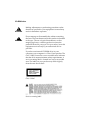
Making adjustments or performing procedures other
than those specified in your equipment’s manual may
result in hazardous exposure.
Do not attempt to disassemble the cabinet containing
the laser. The laser beam used in this product is harmful
to the eyes. The use of optical instruments, such as
magnifying lenses, with this product increases the
potential hazard to your eyes. For your safety, have this
equipment serviced only by an authorized service
provider.
If you have an internal CD-ROM drive in your
computer, your computer is a Class 1 laser product. The
Class 1 label, located in a user-accessible area, indicates
that the drive meets minimum safety requirements. A
service warning label is located in a service-accessible
area. The labels on your product may differ slightly
from the ones shown here.
Class 1 label
Service warning label
Alkaline battery warning
The computer contains an alkaline battery to power the clock and calendar
circuitry.
!
CAUTION
!
ATTENTION
Danger of explosion if battery is replaced incorrectly.
Replace only with the same or equivalent type
recommended by the manufacturer. Discard used
batteries according to the manufacturer’s instructions.
Il y a danger d’explosion s’il y a remplacement incorrect
de la batterie. Replacer uniquement avec une batterie du
même type ou d’un type recommandé par le
constructeur. Mettre au rébut les batteries usagées
conformément aux instructions du fabricant.
Software notice
Application software programs have been installed on the computer and compact
discs have been included with your StarMax. See the label on the box for a
complete list of all your programs.
LIMITATION OF LIABILITY: MOTOROLA, INC. MAKES NO WARRANTIES
WITH RESPECT TO THE COMPACT DISCS OR APPLICATION SOFTWARE
PROGRAMS OR THE COMPLETENESS OF THE INFORMATION CONTAINED
THEREIN. MOTOROLA SPECIFICALLY DISCLAIMS ALL WARRANTIES,
EXPRESS OR IMPLIED, INCLUDING BUT NOT LIMITED TO THE IMPLIED
WARRANTIES OF MERCHANTABILITY AND FITNESS FOR A PARTICULAR
PURPOSE.
Declaration of Conformity
Tested Equipment Name
StarMax
Manufacturer’s Name
Motorola, Inc. - Computer Group
Manufacturer’s Address
2900 S. Diablo Way
Tempe, Arizona 85282 USA
Manufacturer’s Phone
(602) 438-3000
Type of Equipment
Personal Computer
Model Numbers
3000/160DT, 3000/180DT,
3000/200 DT, 4000/160 DT,
4000/200DT, 3000/160MT,
3000/180MT, 3000/200MT,
3000/240MT, 4000/160MT,
4000/200MT
This device complies with Part 15 of the FCC Rules. Operation is subject to the
following two conditions: (1) this device may not cause harmful interference, and
(2) this device must accept any interference received, including interference that
may cause undesired operation.
ADVARSEL!
Lithiumbatteri - Eksplosionsfare ved fejlagtig håndertyering. Udskiftning må kun
ske med batteri af samme fabrikat og type. Levér det brugte batteri tilbage til
leverandøren.
ADVARSEL!
Eksplosjonsfare ved fellaktig skifte av batteri. Benytt samme batteritype eller en
tilsvarende type anbefalt av apparatfabrikanten. Brukte batterier kasseres i
henhold til fabrikantens instruksjoner.
Apparetet må kun tilkoples jordet stikkontakt.
Jordet stikkontakt skal benyttes når apparatet tilkoples datanett.
VARNING!
Explosionsfara vid felaktigt batteribyte. Använd samma batterityp eller en
ekvivalent typ som rekommenderas av apparattillverkaren. Kassera använt batteri
enligt fabrikantens instruktion.
Apparaten skall anslutas till jordat uttag.
VAROITUS!
Paristo voi räjähtää, jos se on virheelliseti asennettu. Vaihda paristo ainoastaan
laitevalmistajan suosittelemaan tyypplin. Hävitä käytetty paristo valmistajan
ohjeiden mukaisesti.
Safety Summary
Safety Depends On You
The following general safety precautions must be observed during all phases of operation, service, and
repair of this equipment. Failure to comply with these precautions or with specific warnings elsewhere in
this manual violates safety standards of design, manufacture, and intended use of the equipment.
Motorola, Inc. assumes no liability for the customer's failure to comply with these requirements.
The safety precautions listed below represent warnings of certain dangers of which Motorola is aware. You,
as the user of the product, should follow these warnings and all other safety precautions necessary for the
safe operation of the equipment in your operating environment.
Ground the Instrument
To minimize shock hazard, the equipment chassis and enclosure must be connected to an electrical ground.
The equipment is supplied with a three-conductor AC power cable. The power cable must be plugged into
an approved three-contact electrical outlet. The power jack and mating plug of the power cable must meet
International Electrotechnical Commission (IEC) safety standards.
Keep Away From Live Circuits
Operating personnel must not remove equipment covers. Only Factory Authorized Service Personnel or
other qualified maintenance personnel may remove equipment covers for internal subassembly or
component replacement or any internal adjustment. Do not replace components with power cable
connected. Under certain conditions, dangerous voltages may exist even with the power cable removed. To
avoid injuries, always disconnect power and discharge circuits before touching them.
Use Caution When Exposing or Handling the CRT
Breakage of the Cathode-Ray Tube (CRT) causes a high-velocity scattering of glass fragments (implosion).
To prevent CRT implosion, avoid rough handling or jarring of the equipment. Handling of the CRT should
be done only by qualified maintenance personnel using approved safety mask and gloves.
Do Not Substitute Parts or Modify Equipment
Because of the danger of introducing additional hazards, do not install substitute parts or perform any
unauthorized modification of the equipment. Contact your local Motorola representative for service and
repair to ensure that safety features are maintained.
Contents
Chapter 1
Getting Started
Before you begin...................................................................................................1-2
Front panel features .............................................................................................1-3
Rear panel ports....................................................................................................1-4
Assembling your StarMax system .....................................................................1-7
Voltages for different locations ..................................................................1-15
Connecting audio equipment...........................................................................1-16
Sound ports...................................................................................................1-16
Connecting most audio equipment...........................................................1-17
Connecting and positioning a microphone..............................................1-18
Connecting external stereo speakers.........................................................1-19
Connecting external SCSI devices ...................................................................1-20
Before you connect a device .......................................................................1-21
Connecting a SCSI device ...........................................................................1-23
Connecting other equipment............................................................................1-24
Chapter 2
Turning the Computer on for the First Time
Problems starting up?..........................................................................................2-4
What’s next?..........................................................................................................2-5
Using the mouse...................................................................................................2-6
Reviewing the basics............................................................................................2-8
Menus ..............................................................................................................2-8
Icons.................................................................................................................2-9
Windows .........................................................................................................2-9
Inserting a CD-ROM disc or other CD............................................................2-10
Turning the computer off ..................................................................................2-12
Using the Shut Down command ...............................................................2-12
Using the Shut Down desk accessory.......................................................2-13
Using the keyboard .....................................................................................2-14
If you cannot shut down (power off) your computer ............................2-14
Where to find answers.......................................................................................2-15
xiii
Chapter 3
Getting Help
Getting answers to your questions.................................................................... 3-2
Getting answers with the Topics button .................................................... 3-5
Getting answers with the Index button...................................................... 3-7
Getting answers with the Look For button................................................ 3-9
Tips for using Mac OS Guide..................................................................... 3-11
Identifying objects on the screen ..................................................................... 3-12
Learning useful shortcuts ................................................................................. 3-13
Chapter 4
Installing and Using Application Programs
Installing application programs......................................................................... 4-1
Working with several applications at a time.................................................... 4-3
Finding out which applications are open .................................................. 4-3
Switching applications.................................................................................. 4-3
Increasing memory available to run applications .................................... 4-4
Hiding and showing windows on the desktop ........................................ 4-6
Backing up your files........................................................................................... 4-6
Using PowerPC Mac OS application programs .............................................. 4-7
Special memory requirements ..................................................................... 4-7
Shared libraries .............................................................................................. 4-7
Chapter 5
Using the CD-ROM Drive
Inserting a CD-ROM disc.................................................................................... 5-2
Ejecting a CD-ROM disc ..................................................................................... 5-3
Playing audio CDs ............................................................................................... 5-4
Sharing a CD-ROM disc over a network .......................................................... 5-4
xiv
Chapter 6
Troubleshooting
When you have questions...................................................................................6-1
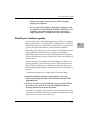
If you run into trouble .........................................................................................6-2
Take your time................................................................................................6-3
Start over .........................................................................................................6-4
Rebuild your desktop regularly ..................................................................6-5
Solutions to common problems..........................................................................6-7
Solutions to CD-ROM problems ......................................................................6-23
Problems using the CD-ROM drive ..........................................................6-23
Problems using CD-ROM discs .................................................................6-25
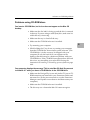
Problems using ISO 9660 or High Sierra discs ........................................6-27
Problems playing audio CDs .....................................................................6-27
Problems using Photo CDs.........................................................................6-28
If your computer’s performance decreases ....................................................6-29
Solving printer problems ..................................................................................6-31
Obtaining online support and updated Mac OS software ...........................6-32
America Online ............................................................................................6-33
CompuServe .................................................................................................6-34
Internet: World Wide Web ..........................................................................6-34
Internet: FTP servers ...................................................................................6-35
Internet: gopher server................................................................................6-36
Testing and repairing a damaged disk............................................................6-37
When do you need to repair a disk? .........................................................6-37
Try these suggestions first ..........................................................................6-37
How to verify and test a disk.....................................................................6-38
How to repair a hard disk or floppy disk.................................................6-40
If Disk First Aid cannot correct the problem ...........................................6-41
Initializing a hard disk.......................................................................................6-42
When do you need to initialize a hard disk? ...........................................6-42
How to initialize a hard disk......................................................................6-43
Starting up from another disk ..........................................................................6-45
Starting up from a CD-ROM disc..............................................................6-45
Starting up from floppy disk......................................................................6-46
Starting up from another hard disk ..........................................................6-47
Installing or reinstalling system software.......................................................6-48
When should you install system software? .............................................6-48
When should you reinstall system software?..........................................6-49
Installing system software..........................................................................6-50
xv
Doing a clean installation of system software......................................... 6-54
Replacing your special software ............................................................... 6-58
Doing a custom installation ....................................................................... 6-59
Appendix A Safety and Maintenance Tips
Safety instructions............................................................................................... A-1
Handling your computer equipment............................................................... A-2
Handling a monitor...................................................................................... A-4
Handling the keyboard................................................................................ A-4
Handling floppy disks ................................................................................. A-5
Ejecting a disk ............................................................................................... A-5
If you cannot eject a floppy disk ................................................................ A-6
Handling compact discs .............................................................................. A-7
Power supply ................................................................................................ A-8
Cleaning your equipment.................................................................................. A-9
Cleaning the computer case........................................................................ A-9
Cleaning the monitor ................................................................................... A-9
Cleaning the mouse.................................................................................... A-10
Unlocking and locking the mouse.................................................................. A-12
Appendix B Installing an Expansion Card
Before you begin ..................................................................................................B-2
Expansion card power requirements ................................................................B-3
Card installation...................................................................................................B-3
Appendix C Expanding Memory
General information ........................................................................................... C-1
Appendix D Special Keys on Your Keyboard
Typing special characters and symbols ........................................................... D-3
Special key combinations................................................................................... D-5
xvi
Figures
The Fully Assembled Systems ...........................................................................1-2
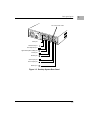
Desktop System Rear Panel ...............................................................................1-5
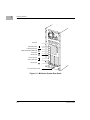
Minitower System Rear Panel ...........................................................................1-6
SCSI Cable ..........................................................................................................1-21
SCSI Peripheral Interface Cable ......................................................................1-21
SCSI Terminator .................................................................................................1-22
xvii
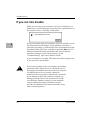
1Getting Started
1
Follow the instructions in this chapter to set up your computer.
Congratulations on the purchase of your new Motorola StarMax
computer. Your computer is designed to give you the highest
performance combined with real ease of use—it is easy to set up,
easy to use, and easy to expand. This book will guide you through
the setup procedure, tell you how to expand your computer, and
provide many tips on using your new computer.
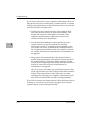
Place your equipment on a sturdy, flat surface near a grounded
wall outlet. Your computer was designed to be used and carried in
an upright position. It should not be tipped on its side during
operation.
Before following the setup instructions, you may want to read
Safety instructions on page A-1 and Handling your computer
equipment on page A-2 for tips on the safe handling and use of your
computer.
1-1
1
Getting Started
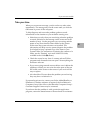
Before you begin
Before you plug your computer into a wall socket, carefully read all
the setup instructions in this chapter. Then, before you connect
anything to your computer, follow the instructions in this section to
plug it in. The plug grounds the computer and protects it from
electrical damage while you are setting up.
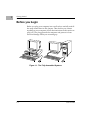
Figure 1-1. The Fully Assembled Systems
1-2
User’s Guide
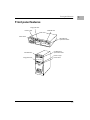
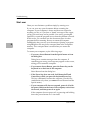
Front panel features
Front panel features
Floppy disk drive
Power-on light
CD-ROM drive
Power switch
CD-ROM drive
Open/Close button
CD-ROM drive
Floppy disk drive
CD-ROM drive
Open/Close button
Power-on light
Power switch
1-3
1
1
Getting Started
Rear panel ports
Printer port
n Connects your computer to a printer, LocalTalk
network, and the QuickTake 150 digital camera.
Modem port
G Connects an external modem and the QuickTake
150 digital camera to your computer.
SCSI port
Connects your computer to SCSI equipment,
such as external hard disk drives and scanners.
PCI card access
cover
Covers slot for optional Peripheral Component
Interconnect (PCI) slot expansion card.
Monitor Port
Y Connects a monitor to your computer.
Sound output port
k Connects your computer to sound output
equipment, such as externally powered
(amplified) speakers.
Sound input port
Connects your computer to another audio
source, such as a microphone, compact disc, or
audio cassette player.
PS/2 Keyboard port K Connects a PS/2 style keyboard to your
computer.
1-4
PS/2 Mouse port
h Connects a PS/2 style mouse to your computer.
Apple Desktop Bus
(ADB) port
b Connects Apple Desktop Bus devices, such as a
keyboard and mouse, to your computer.
User’s Guide
Rear panel ports
PCI card access covers
SCSI port
PS/2 Mouse port
PS/2 Keyboard port
Apple Desktop Bus (ADB) port
Printer port
Modem port
Sound input port
Sound output port
Monitor port
Figure 1-2. Desktop System Rear Panel
1-5
1
1
Getting Started
SCSI port
PS/2 Mouse port
PS/2 Keyboard port
Apple Desktop Bus (ADB) port
Printer port
Modem port
Sound input port
Sound output port
Monitor port
PCI card access covers
Figure 1-3. Minitower System Rear Panel
1-6
User’s Guide
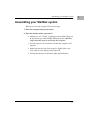
Assembling your StarMax system
Assembling your StarMax system
When you are ready to begin, follow these steps:
1. Place the computer where you want it.
2. Place the monitor where you want it.
• Monitors up to 17-inches, weighing less than 40lb. (18kg) can
be placed on top of the StarMax Desktop System. Monitors
larger than this must be used beside the computer.
• Provide space for air circulation around the computer and
monitor.
• Make sure that the top of the screen is slightly below eye
level when you are sitting at the keyboard.
• Position the monitor to minimize glare and reflections.
1-7
1
1
Getting Started
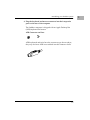
3. Attach the monitor cable to the monitor port on the back panel of
the computer.
If you are using a SVGA monitor, the monitor connector attaches
directly to the monitor port on the back panel of the computer.
If you are using an Apple-compatible (DB15) monitor, the monitor
connector attaches to the monitor port via an adapter. If you do not
find this adapter in your accessory kit, contact your Motorolaauthorized dealer for details on obtaining this adapter.
See the information that came with the monitor to use its special
features.
ADB
1-8
SVGA
ADB
SVGA
User’s Guide
Assembling your StarMax system
4. Plug the keyboard and mouse connectors into their respective
ports on the rear of the computer.
The StarMax computer is shipped with an Apple Desktop Bus
(ADB) keyboard and mouse.
ADB Connector and Icon
b
ADB keyboards and mice have the connector type shown above,
they may also have ADB icons molded into the connector shells.
1-9
1
1
Getting Started
Apple Desktop Bus Keyboard and Mouse Connection
ADB devices are connected together in a string or “daisy chain.”
The mouse plugs into a port on the keyboard, the keyboard then
plugs into the port, on the rear of the computer. The ports are
marked with the b icon.
Both connectors are “keyed” to prevent incorrect orientation.
Important
Do not force a connector into a port. If it does not insert easily, check
the connector and port orientation.
If your computer fails to recognize these devices, check that they
are connected correctly.
ADB icon
1-10
ADB icon
User’s Guide
Assembling your StarMax system
PS/2 Keyboard and Mouse Connection
Ensure that you connect the mouse and keyboard to the correct
ports. The keyboard port is marked with the K icon and the mouse
port is marked with the h icon. Both of these devices have the same
type of connector and it is possible to swap connectors.
The mouse and keyboard connectors are “keyed” to prevent
incorrect orientation.
Important
Do not force a connector into a port. If it does not insert easily, check
the connector and port orientation.
If your computer fails to recognize these devices, check that they
are connected correctly.
PS/2 keyboard icon
PS/2 mouse icon
1-11
1
Getting Started
5. Make sure the voltage switch on the back of the computer is set to
the correct voltage for your location.
The voltage switch must be set correctly to avoid damaging your
computer. If you do not know the voltage used your country, refer
to Voltages for different locations on page 1-15.
!
Warning
If the voltage switch is set incorrectly and you plug it
into an outlet, even before powering the computer on,
the power supply will blow a safety capacitor.
115
Set the switch to show “115” for
voltages in the 100-130V range.
230
1
Set the switch to show “230” for
voltages in the 220-270V range.
Check to see that the voltage switch
is properly set before you plug it in.
If you need to change the setting,
insert a small screwdriver here and
slide the switch.
1-12
User’s Guide
Assembling your StarMax system
6. Plug the socket ends of two power cords into the recessed power
plugs on the back of the computer and monitor.
Make sure at least one end of the computer power cord is within
easy reach in order to make it easy to unplug the computer.
Important
To protect both yourself and the computer from electrical hazards,
the computer should remain powered off until you are finished
connecting all equipment to the computer.
!
Warning
Before plugging in the computer to the electrical outlet,
be sure the voltage switch is set correctly. If the switch is
not set correctly, you may damage your computer.
1-13
1
1
Getting Started
7. Plug the other ends of the power cords into three-hole grounded
outlets or power strip.
!
Warning
This equipment is intended to be electrically grounded.
Your computer is equipped with a three-wire
grounding plug—a plug that has a third (grounding)
pin. This plug will fit only a grounded AC outlet. This is
a safety feature. If you are unable to insert the plug into
the outlet, contact a licensed electrician to replace the
outlet with a properly grounded outlet. Do not defeat
the purpose of the grounding plug!
IMPORTANT
The only way to disconnect power completely is to unplug the
power cord. Make sure that at least one end of the power cord is
within easy reach so that you can unplug the computer.
1-14
User’s Guide
Assembling your StarMax system
Voltages for different locations
Country
Single voltage
Japan
100
S. Korea
100/220
Jamaica, Taiwan
110
Peru
110/220
Brazil, Lebanon
110-220
Philippines
115
Bermuda, Canada, Puerto Rico, United States,
Venezuela
120
Mexico
127
Saudi Arabia
127/220
Hong Kong
200
India, South Africa
220-250
Israel, Pakistan, Singapore
230
Australia, Kuwait, Malta, New Zealand, Northern
Ireland, Papua New Guinea, Oman, Qatar, United
Kingdom
240
Austria, Belgium, Denmark, Finland, France,
Germany, Greece, Italy, Luxembourg, Netherlands,
Norway, Portugal, Spain, Sweden, Switzerland
220-230
Bahrain, Chile, China (People’s Republic),
220
Czechoslovakia, Egypt, Greenland, Hungary, Iceland,
Indonesia, Iran, Jordan, Liechtenstein, Nepal,
Paraguay, Poland, Romania, United Arab Emirates,
Russia and the Commonwealth of Independent States
(CIS), Yemen, Yugoslavia
1-15
1
1
Getting Started
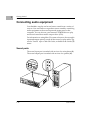
Connecting audio equipment
Your StarMax can play and record stereo sound from a variety of
sources. You can listen to or reproduce stereo sound by connecting
audio equipment to the sound input and output ports on the
computer. You can also use your internal CD-ROM drive to play
and record sound from audio compact discs (CDs).
For information on using Mac OS system software to choose audio
input and output options, record an alert sound, or play audio CDs,
see the “Sound” topic of Mac OS Guide, available in the Guide (T)
menu.
Sound ports
The sound input port is marked with an icon of a microphone (j).
The sound output port is marked with an icon of a speaker (k).
1-16
User’s Guide
Connecting audio equipment
The computer’s sound ports accept these 3.5mm connectors:
Stereo miniplug
Extended miniplug
The smaller connector (stereo miniplug) is found most often on
stereo equipment. The slightly longer connector is found on the
Apple PlainTalk Microphone and other voice quality microphones.
If your equipment has a different type of connector, you can
purchase an adapter at an electronics supply store.
Connecting most audio equipment
To play or record sound with your computer, you can attach a
microphone, amplifier, tape recorder, headphones, or a pair of
speakers. (When you have headphones connected, you do not hear
beeps or other computer noises through the built-in speaker.)
For instructions on connecting a microphone, go to the next section,
Connecting and positioning a microphone. For specific instructions on
connecting speakers, see Connecting external stereo speakers on page
1-19.
Follow these steps to connect most audio equipment to the
computer:
1. Make sure that the audio equipment has a cable with a stereo
connector.
If it does not, attach an adapter that has a stereo miniplug.
2. Place the audio equipment near the computer.
3. Shut down the computer and power off the audio equipment.
1-17
1
1
Getting Started
4. Attach the cable to the audio equipment and to the appropriate
sound port on the computer.
To hear or record incoming sound on the computer, connect the
audio equipment to the sound input port (j).
To record the sound produced by the computer or play that sound
through external speakers, connect the audio equipment to the
sound output port (k).
5. Power on the computer and the audio equipment.
You are now ready to begin listening to and working with sound.
For more information on working with sound, see the “Sound”
topic of Mac OS Guide, available in the Guide (T) menu.
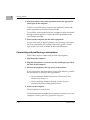
Connecting and positioning a microphone
Follow these steps to connect and position a microphone:
1. Shut down the computer.
2. Plug the microphone’s connector into the sound input port (j) on
the back of the computer.
3. Place the microphone at the top center of the monitor.
If you cannot place the microphone on top of the monitor, position
the microphone according to these guidelines:
• The microphone should be between 1 (30cm) and 3 feet
(90cm) away from you.
• The microphone should be directly in front of you to
minimize the effect of background noises.
4. Power on the computer.
The microphone is ready to use.
To install software that enables the computer to read text to you, see
Chapter 4, Installing and Using Application Programs.
1-18
User’s Guide
Connecting audio equipment
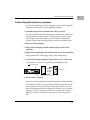
Connecting external stereo speakers
You can take advantage of your computer’s stereo sound output by
attaching externally powered (amplified) speakers.
1. Assemble the speakers and attach the cable you need.
You need a cable with stereo miniplugs at each end to connect one
or both speakers to the computer. Some speakers require a dualplug adapter. Others, like those shown in the next illustration,
accept a single stereo miniplug and are joined by standard wires.
2. Shut down the computer.
3. Plug a stereo miniplug into the sound output port (k) on the
computer.
4. Plug a stereo miniplug into the Audio In port on one of the speakers.
If the speakers take a dual-plug cable, connect both plugs.
5. Connect the speakers together with speaker wires, if necessary.
Your finished connections should look something like this:
Sound output port
Externally
powered
speakers
Audio in port
6. Power on the computer.
Now you hear the computer’s sound through the external speakers.
To control the volume of your external speakers, open the Sound
control panel and choose Volumes in the pop-up menu. Use the
Built-in Headphones slider to adjust the volume for your external
speakers. If you are playing an audio CD, you may also need to
adjust the volume control in the program you are using to play
CDs.
1-19
1
1
Getting Started
Connecting external SCSI devices
Your computer has an external port for connecting devices that use
the Small Computer System Interface (SCSI, pronounced “skuhzee”). SCSI devices include hard disk drives, CD-ROM drives,
scanners, some printers, and tape or cartridge backup drives. The
SCSI port permits high-speed communication between the
computer and the device.
You can connect SCSI devices to the SCSI port in a chain. The first
device in the chain plugs into the SCSI port; the second device plugs
into the first device, and so on.
You can attach up to seven SCSI devices to the SCSI port. All SCSI
devices connected to this chain must have their own unique ID
number (no two devices can use the same ID number).
IMPORTANT
Before you connect a device on page 1-21 and Connecting a SCSI device
on page 1-23 contain general instructions for attaching SCSI devices
to your computer. Be sure to follow the specific instructions that
came with your external hard disk drive or other SCSI device when
connecting the device to your computer.
1-20
User’s Guide
Connecting external SCSI devices
Before you connect a device
Before you connect a SCSI device to your computer, be sure to
complete these tasks:
• Make sure each SCSI device connected to your computer has
its own, unique ID number from 0 to 6. See the instructions
that came with each SCSI device for information on checking
and setting its SCSI ID number.
IMPORTANT
If you use two or more devices attached to the same SCSI interface
with the same ID number, your equipment could malfunction and
you could lose data as a result.
• Make sure you have the appropriate cable for attaching the
SCSI device to your computer.
If the device is the first or only one you are connecting, use a
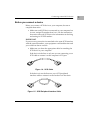
SCSI cable to connect it to the computer’s SCSI port.
Figure 1-4. SCSI Cable
If the device is not the first one, use a SCSI peripheral
interface cable to connect it to the last device in the chain.
Figure 1-5. SCSI Peripheral Interface Cable
1-21
1
1
Getting Started
IMPORTANT
The total length of the cables in a SCSI chain should not exceed 6
meters (20 feet). SCSI cables must have a 110-ohm impedance.
• Make sure that the last (or only) device in the SCSI chain has
a terminator. Make sure that no other external SCSI device
has a terminator.
Some external SCSI devices have built-in terminators. (Check
the information that came with the device.) If the device at the
end of the SCSI chain does not have a built-in terminator, you
need to attach an external terminator.
If your SCSI device has a built-in terminator, it should be the
last device in the chain. You can attach or remove external
terminators yourself. Refer to the documentation provided
with the SCSI device.
Figure 1-6. SCSI Terminator
1-22
User’s Guide
Connecting external SCSI devices
Connecting a SCSI device
Use these general instructions in conjunction with the instructions
that came with your SCSI device:
1. Shut down your computer.
2. Make sure the SCSI device is switched off.
!
Warning
Do not connect or disconnect any device while the
device or your computer is powered on. Doing so could
damage the device, your computer, or both.
3. Use a SCSI cable to connect the device either to the computer’s
SCSI port or to the last SCSI device already in the chain.
If the device you are installing is the last device in the chain, be sure
that a terminator is installed on that device. A terminator must be
installed on the last device in the chain.
4. Power on all devices in your SCSI chain.
Important
Always power on any external SCSI devices connected to your
computer before powering on the computer itself. Otherwise, your
computer will not be able to recognize that the SCSI devices are
connected to it, and your computer may not be able to start.
5. Install any necessary device drivers (software that makes a device
work with your computer).
Drivers needed for a SCSI device usually come on a floppy disk
with the device. (If no drivers come with the device, contact the
device manufacturer.)
Note
If you experience problems after connecting a SCSI
device, see Chapter 6, Troubleshooting, for possible
solutions.
1-23
1
1
Getting Started
Connecting other equipment
For instructions on how to connect other equipment such as a
modem or a printer, refer to the manual shipped with the unit. See
Rear panel ports on page 1-4 to locate the correct port on the rear of
the computer.
1-24
User’s Guide
2Turning the Computer on for the
First Time
2
Follow the instructions in this chapter to power up your computer and learn
the basics.
To turn the computer on for the first time, follow these steps:
1. Power on your monitor.
See the information that came with your monitor for the location of
the power switch. The power switch is usually located on the front
of the unit.
2. Power on your computer by pressing the Power Switch on the
front of the computer or by pressing the Power key on your
keyboard.
Power switch
2-1
Turning the Computer on for the First Time
The Power key on the keyboard is marked with a triangle (e).
2
The location of the Power key depends on which type of ADB
keyboard you have.
You hear a tone from your computer as it starts up.
2-2
User’s Guide
3. Check to see what is on your screen.
2
You see a sequence of messages describing what is happening,
followed by the Desktop screen.
• If you see a blinking question mark, see Solutions to common
problems on page 6-7.
• If you see anything else on your screen, or if you see nothing
at all, see the section Problems starting up? next in this
chapter.
• If you see the Mac OS desktop (shown here), your system
software is working correctly.
Hard disk icon
The desktop
Now go to the section, What’s next? on page 2-5.
2-3
Turning the Computer on for the First Time
2
Problems starting up?
If the screen is dark, check these items to see if you can identify the
problem:
• Is the computer turned on? The power-on light on the front
of the computer should be on. If it is not on, press the power
switch.
• Is the power cord connected to the computer, and is the cord
plugged into a power source?
• If the computer is plugged into a power strip, is the power
strip turned on?
• Is the monitor power cord plugged in?
• Is the monitor cable attached firmly to both the monitor and
computer?
• Is the monitor turned on? (Check the power-on light on the
front of the monitor.)
• Is the brightness control on the monitor adjusted correctly?
• Is the computer asleep? (Press a key on the keyboard to wake
up the computer. It may take a moment or two for the
computer to wake up.)
2-4
User’s Guide
What’s next?
What’s next?
2
Continue with one of the following steps:
• If you are new to the Mac OS, go to the next section, Using the
mouse. When you have learned the basic Mac OS skills, see
Chapter 3, Getting Help to learn about Mac OS Guide, your
main source of information when working with the Mac OS.
• If you want to install application software on your computer,
see Chapter 4, Installing and Using Application Programs. You
need this information to properly set up any applications
specifically designed for computers with PowerPC
processors.
IMPORTANT
If you need to power off your computer at any point, see Turning
the computer off on page 2-12. It is important to use the correct
procedure for powering down your computer.
2-5
Turning the Computer on for the First Time
2
Using the mouse
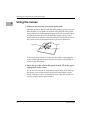
1. Slide your mouse along your mouse pad or desk.
Hold the mouse as shown, with the cable pointing away from you.
Rest the heel of your palm on the desk and grasp the sides of the
mouse between your thumb and fingers. Use your wrist and fingers
to slide the mouse around with the index finger resting on the
mouse button. Do not press the mouse button. Notice the arrow on
the screen moves in the same direction you move the mouse.
Mouse button
If the arrow does not move, make sure the cables connecting the
mouse and keyboard are secure and your mouse is positioned as
shown in the illustration.
2. Move the tip of the arrow to the question mark (T) in the upperright portion of the screen.
If you run out of room on your mouse pad or desk while moving
the mouse, pick up the mouse and place it where there is more
room. (The arrow on the screen moves only when the mouse is in
contact with the mouse pad or desk.)
2-6
User’s Guide
Using the mouse
3. With the tip of the arrow on the question mark (T), press and hold
down the mouse button.
A list of choices (called a menu) appears. This is the Guide menu,
which is the place to go when you have a question about how to use
your computer.
Note
If your mouse has more than one button, only the left
button functions.
2-7
2
Turning the Computer on for the First Time
2
Reviewing the basics
Look at the following illustrations to review the elements you use
on your screen to work with your computer.
Icons
Menu
Window
Menus
The strip across the top of the screen is called the menu bar. The
symbols and words in it represent menus of commands. To open a
menu, place the pointer or arrow on the symbol or word for the
menu and press the mouse button.
Guide menu
To find an answer to a question, look in the
Guide menu.
2-8
Application menu
You can have several
application programs
open at once. Use this
menu to see which
program is active or to
switch from one
program to another.
User’s Guide
Reviewing the basics
Icons
2
Icons are small pictures that represent disks, programs, documents,
and folders. You can double-click any icon to open it and see what
it contains.
This icon represents the internal hard disk.
Icons like this one represent application programs, which
you use to create documents and do other work.
Icons like this one represent documents, which you can
create and edit.
Icons like this represent folders. A folder contains other icons.
To throw away an item you no longer want, drag it to the
Trash icon and choose Empty Trash from the Special menu.
Windows
Windows are boxes that display text, graphics, or icons. To change
the shape or position of a window, or to close the window, use the
elements shown here.
Close box
To close a window, click the close box.
Title bar
To move a window, drag it by the middle of the title
bar (anywhere in the bar except the small boxes).
Scroll arrow
To bring hidden
portions of a window’s
contents into view,
click one of the four
scroll arrows.
To bring a partially
covered window to the
front, click anywhere in it.
Size box
To change the shape
or size of a window,
drag the size box.
2-9
Turning the Computer on for the First Time
2
Inserting a CD-ROM disc or other CD
Your internal CD-ROM drive works with CD-ROM discs, standard
audio compact discs (CDs), and single-session or multisession
Photo CDs. Follow these instructions to insert a CD-ROM disc (or
other CD) into your CD-ROM drive. Then follow the instructions
provided with your disc, as well as the instructions in this manual.
1. Power up your computer, if it is not already on.
2. Press the Open/Close button to open the tray of the CD-ROM
drive.
Open/Close button
The tray opens.
3. Place a disc in the tray with the disc label facing up.
Make sure the disc is lying flat and centered in the tray. If you are
using a small (8cm) disc, make sure it is centered within the inside
ring on the tray.
2-10
User’s Guide
Inserting a CD-ROM disc or other CD
4. Gently push the tray in, or press the Open/Close button, to close
the tray.
In a few moments, an icon for the disc appears on your screen.
For instructions on ejecting a CD-ROM disc or other CD, see the
“CD-ROM Discs” topic area of Mac OS Guide, available in the
Guide (T) menu. For instructions on using Mac OS Guide, see
Chapter 3, Getting Help.
2-11
2
Turning the Computer on for the First Time
2
Turning the computer off
Using the Shut Down command
You can power your computer off by using the Finder’s Shut Down
command in the Special menu. Follow these steps:
1. Move the tip of the arrow to the word “Special” at the top center
of the screen.
If the word “Special” does not appear in the menu bar at the top of the
screen, you are not working in the Finder. Finder is the application you
need to be in when you power down your computer. Choose Finder
from the Application menu (at the far right of the menu bar) and try
again.
2-12
User’s Guide
Turning the computer off
2. With the tip of the arrow on the word Special, press and hold
down the mouse button.
3. While holding down the mouse button, move the arrow until the
words “Shut Down” are highlighted, then release the button.
Using the Shut Down desk accessory
You do not need to return to the Finder to power off your computer.
Most programs allow you to use the Apple (A) menu which
contains an alternate shut down method. Follow these steps:
1. With the tip of the arrow on the Apple (A) icon, press and hold
down the mouse button.
2. While holding down the mouse button, move the arrow until the
words “Shut Down” are highlighted, then release the button.
2-13
2
Turning the Computer on for the First Time
2
Using the keyboard
You may also power off your computer from the keyboard. Follow
these steps:
1. Press the Power Key.
The following confirmation dialog appears:
2. Move the tip of the arrow into the “Shut Down” button and click
the mouse button. (Or you may also press the “return” key.)
If you cannot shut down (power off) your computer
If a problem prevents you from using the previous methods of
shutting down, you can power off the computer by pressing the
Power switch on the front of the computer. You can also restart the
computer by pressing the Reset switch on the front of the computer
or pressing the Command (Z)-Control-Power keys.
IMPORTANT
You will lose unsaved work if you use the Power switch, Reset
switch, or Command (Z)-Control-Power keys. Only use these
methods when there is a problem that prevents the computer from
being turned off by using any of the three previously described
methods. To make sure your work is saved, always use the Shut
Down command.
2-14
User’s Guide
Where to find answers
Where to find answers
2
When you have questions about using your computer, there are
several places you can look for answers.
In this book
Use this book to help you set up your computer
and learn about it, or to find solutions to problems.
In the Guide menu
The Guide menu (marked with the T icon) is your
main source of information about the Mac OS. To
learn how to get different kinds of help from the
Guide menu, see Chapter 3, Getting Help.
In other manuals
For answers to questions about other equipment or
about application programs you have purchased,
see the manuals that came with the equipment or
programs.
Welcome to StarMax File
The Welcome to StarMax file on your hard disk
contains important information about some of the
application programs included with your
computer. Read Me files can also be found inside
application folders.
If you have problems with a particular application program,
contact the manufacturer of the program.
2-15
3Getting Help
3
Use the instructions in this chapter to learn about the help available to you
in the Guide menu.
The Guide menu is your main source of information when you are
working with your computer. The menu is identified by a question
mark (T) in the upper-right corner of the screen.
3-1
Getting Help
Getting answers to your questions
When you have a question while working with your computer, you
can get the answer by choosing Mac OS Guide from the Guide (T)
menu.
3
1. Pull down the Application menu (in the upper-right corner of the
screen) and choose Finder to make it the active application
program.
A checkmark in the menu indicates that Finder is the active
program.
3-2
User’s Guide
Getting answers to your questions
2. Pull down the Guide (T) menu and choose Mac OS Guide.
3
The Mac OS Guide window appears.
Whenever you use Mac OS Guide, its window remains in front of
other windows. If the window obstructs your viewing area, move
it by dragging its title bar (the gray bar across the top of the
window).
3-3
Getting Help
3. Notice the three buttons at the top of the window: Topics, Index,
and Look For.
3
Mac OS Guide gives you three ways of finding information:
• Topics lets you choose from a list of general subjects. It is
similar to the table of contents in a book.
• Index lets you choose from an alphabetical list of more
specific subjects. It is similar to the index in a book.
• Look For lets you search for information related to a specific
word or phrase that you type.
If you have problems while using Mac OS Guide, see Tips for using
Mac OS Guide on page 3-11.
3-4
User’s Guide
Getting answers to your questions
Getting answers with the Topics button
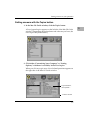
1. In the Mac OS Guide window, click the Topics button.
A list of general topics appears on the left side of the Mac OS Guide
window. (Depending on the hardware and software you have, the
list of topics may be different.)
2. Click either “Customizing Your Computer,” or “Setting
Options,” whichever is available, in the list of topics.
When you click any topic area, a list of related questions appears on
the right side of the Mac OS Guide window.
To get instructions,
click a question…
…and then click OK.
3-5
3
Getting Help
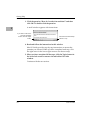
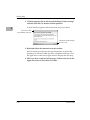
3. Click the question “How do I set the time and date?” and then
click OK. Or double-click the question.
A small window appears with instructions.
3
If you want to return to the
main Mac OS Guide
window, click this Topics
button.
Click here to see the next step
(if there is one).
4. Read and follow the instructions in this window.
Mac OS Guide provides step-by-step instructions to answer the
question you selected. When you have completed each step, click
the right arrow in the lower-right corner to see the next step.
5. When you have completed all the steps, click the Topics button in
the lower-left corner to return to the main Mac OS Guide
window.
Continue with the next section.
3-6
User’s Guide
Getting answers to your questions
Getting answers with the Index button
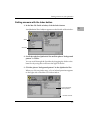
1. In the Mac OS Guide window, click the Index button.
An alphabetical list of subjects appears on the left side of the window.
Slider
Scroll bar
2. Scroll through the alphabetical list until the phrase “background
pattern” is visible.
You can scroll through the list either by dragging the slider to the
letter B or by using the scroll bar at the right of the list.
3. Click the phrase “background pattern” in the alphabetical list.
When you click any index entry, a list of related questions appears
on the right side of the Mac OS Guide window.
To get instructions,
click a question…
…and then click OK.
3-7
3
Getting Help
4. Click the question “How do I change the background pattern?”
and then click OK. Or double-click the question.
A small window appears with instructions for you to follow.
3
If you want to return to the
main Mac OS Guide
window, click this Topics
button.
Click here to see the next step
(if there is one).
5. Read and follow the instructions in the window.
Mac OS Guide provides step-by-step instructions to answer the
question you selected. When you have completed each step, click
the right arrow in the lower-right corner to see the next step.
6. When you have completed all the steps, click the Topics button in
the lower-left corner to return to the main Mac OS Guide
window.
Continue with the next section.
3-8
User’s Guide
Getting answers to your questions
Getting answers with the Look For button
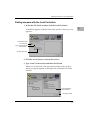
1. In the Mac OS Guide window, click the Look For button.
A small box appears on the left side of the window, where you can
type text.
To activate the text
box, click here.
Type a word or phrase
in the text box…
…and then click here.
2. Click the arrow button to activate the text box.
3. Type “trash” in the text box and then click Search.
When you click Search, a list of questions related to the word or
phrase you typed appears on the right side of the Mac OS Guide
window.
To get instructions,
click a question…
…and then click OK.
3-9
3
Getting Help
4. Click the question “How do I turn off the Empty Trash warning?”
and then click OK. Or double-click the question.
A small window appears with instructions for you to follow.
3
If you want to close
Mac OS Guide, click here.
Click here to see the next step
(if there is one).
5. Read and follow the instructions in the window.
Mac OS Guide provides step-by-step instructions to answer the
question you selected. When you have completed each step, click
the right arrow in the lower-right corner to display the next step.
6. When you have completed all the steps, click the close box in the
upper-left corner to close Mac OS Guide.
3-10
User’s Guide
Getting answers to your questions
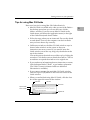
Tips for using Mac OS Guide
Here are a few tips for using Mac OS Guide effectively:
• Mac OS Guide is available only when you are in the Finder—
the desktop area where you can see the icons of disks,
folders, and files. If you do not see Mac OS Guide in the
Guide menu, pull down the Application menu (to the right
of the Guide menu) and choose Finder.
• Follow the steps when you are instructed. Do not skip ahead
or read ahead. That way the computer can check to make
sure you have done a step correctly.
• Unlike most windows, the Mac OS Guide window stays in
front of other windows on the screen so that your
instructions are never covered. If you need to move the
Guide window out of the way, drag it by the title bar at the
top of the window.
You can also move the window out of the way by clicking the
zoom box. Click the box once to shrink the window. Click it a
second time to expand the window to its original size.
• If you need more information about an instruction or a term,
click the button labeled “Huh?” to get further explanation.
(The “Huh?” button is dimmed when no additional
information is available.)
• If you want to return to the main Mac OS Guide window,
click the Topics or (T) button in the lower-left corner of the
Guide window.
• When you are finished using Mac OS Guide, click the close
box in the upper-left corner of the window.
Close box
Title bar
Zoom box
Topics button
“Huh?” button
Right arrow
3-11
3
Getting Help
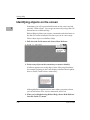
Identifying objects on the screen
Sometimes you will see an unfamiliar item on the screen and ask
yourself, “What is that?” You can get an answer by using a Mac OS
feature known as Balloon Help.
3
Balloon Help explains icons, menus, commands, and other items on
the Mac OS screen in balloons like those you see in comic strips.
Follow these steps to use Balloon Help:
1. Pull down the Guide menu and choose Show Balloons.
2. Point to any object on the screen that you want to identify.
A balloon appears next to the object. In the following illustration,
for example, pointing to the Trash displays a balloon that explains
how to use the Trash to throw items away.
Although balloons appear next to items when you point to them,
you can still select icons, choose commands, and so on.
3. When you’re finished using Balloon Help, choose Hide Balloons
from the Guide (T) menu.
3-12
User’s Guide
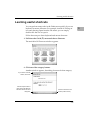
Learning useful shortcuts
Learning useful shortcuts
You can perform many tasks in the Finder more quickly if you use
keyboard or mouse shortcuts. For example, instead of clicking an
icon and choosing Open from the File menu, you can simply
double-click the icon to open it.
Follow these steps to learn keyboard and mouse shortcuts:
1. Pull down the Guide (T) menu and choose Shortcuts.
The main Mac OS Shortcuts window appears.
2. Click one of the category buttons.
Another window appears, describing shortcuts for that category.
If you want to close the
window, click here.
Click the Topics button to
return to the main Mac OS
Shortcuts window for more
categories.
Click here to see the next
window (if there is one).
3-13
3
Getting Help
3. Read about the shortcuts available for the category you selected.
Click the right arrow in the lower-right corner of the window to
display the next window (if there is one).
3
4. When you finish reading about the shortcuts for your category,
click the Topics button in the lower-left corner to return to the
main Mac OS Shortcuts window. Or click the close box in the
upper-left corner to close the window.
3-14
User’s Guide
4Installing and Using Application
Programs
4
Read this chapter for information on installing and using application
programs with your computer.
Installing application programs
You will probably want to buy and install additional application
programs. See the manuals you receive with your applications for
instructions on installing and using them.
Note
Be sure you are acting within the terms of the software
license agreement that comes with your application
program before you install the program on your computer.
The license agreement specifies how many copies of the
program you can make for yourself and others.
In most cases, you will install an application program on your
internal hard disk from either a CD-ROM disc or floppy disc that
contains the program. The illustrations below show how to insert
CD-ROM discs and floppy disks into your computer’s drives. CDROM discs should be placed in the drive with the label side up.
Insert the floppy disk, metal
end first, into the floppy disk
drive of your computer.
4-1
Installing and Using Application Programs
For instructions on how to eject CD-ROM discs, see Ejecting a CDROM disc on page 5-3. Some application programs come on floppy
disks. See the “Disks” topic of Mac OS Guide, available in the Guide
(T) menu, for information on inserting and ejecting floppy disks.
To use your applications most effectively, follow these guidelines:
4
• To avoid installation problems, turn off virus protection
programs and use Apple Extensions Manager to turn off
system extensions (except for Mac OS Easy Open) before you
install any software. To start Apple Extensions Manager,
restart your computer while holding down the Space bar.
Use Apple Extensions Manager to turn off all system
extensions except Mac OS Easy Open (this extension is
needed to rebuild the desktop correctly). To turn extensions
back on, use Apple Extensions Manager to turn them on,
then restart your computer.
• Put only one copy of each application on your hard disk.
Having more than one copy of the same application can
cause errors.
• Whenever you copy an application disk to your hard disk, be
careful not to copy a System Folder. Always check to see what
you have copied, and drag any extra System Folders to the
Trash.
• If an application malfunctions consistently, try installing a
fresh copy. If that does not help, find out from the software
manufacturer whether your version of the application is
compatible with the system software you are using.
4-2
User’s Guide
Working with several applications at a time
Working with several applications at a time
You can open as many application programs and desk accessories
as your computer’s memory allows.
All open applications are listed in the Application menu at the right
end of the menu bar. The name of the active application (the one
you are using right now) has a checkmark next to it, and its icon
appears in the menu bar.
The Finder icon
Commands to hide or
display open programs
A checkmark
indicates the active
program.
Open programs
Finding out which applications are open
If you have several applications and windows open, you can find
out which application is active and which other applications are
open by pulling down the Application menu.
Switching applications
You can switch to another open application or desk accessory by
choosing its name from the Application menu.
If an application’s icon is dimmed in the menu, that means its
windows are hidden. Choosing the application from the
Application menu displays its windows.
You can also switch to another application by clicking in a window
that belongs to an open application, or by double-clicking an
application icon (or the icon of a document that was created with
the application).
4-3
4
Installing and Using Application Programs
Increasing memory available to run applications
You can increase the memory available to run your application
programs by changing memory settings and removing software
that you may not need. Each of these options is discussed below.
4
Turning virtual memory on
Virtual memory uses space on your computer’s hard disk to create
extra random-access memory (RAM) to run your applications.
Virtual memory allows your computer to run more applications at
the same time, and to have more windows open at the same time,
but it can result in slightly slower performance. Also, some
application programs may not perform optimally when virtual
memory is turned on.
To turn virtual memory on or off, use the Memory control panel.
See the “Memory” topic area of Mac OS Guide, available in the
Guide (T) menu for more information.
Removing software that you may not need
You can remove or “uninstall” the software if you are not using it.
Removing software like this will make more disk space available.
To remove software, follow these steps:
1. Start up your computer from the system software CD-ROM disc
that came with your computer.
For detailed steps, see Starting up from a CD-ROM disc on page 6-45.
2. Find and open the Installer program.
The Installer’s Welcome screen may appear.
3. Click OK.
The Easy Install dialog box appears.
4-4
User’s Guide
Working with several applications at a time
4. Choose Custom Remove from the pop-up menu.
4
The Custom Remove dialog box appears, listing the software
components that can be removed.
5. Scroll through the list of components, clicking the checkbox next
to each component you want to remove.
To get additional information about each component listed, click
the box containing the letter “i” to the right of the component.
6. Click Remove.
7. Follow the instructions that appear on the screen.
8. When you see a message reporting that the removal was
successful, click Quit.
9. Restart your computer.
The software is removed and your computer is ready to use. If you
want to remove more software, you can repeat the steps in this section.
4-5
Installing and Using Application Programs
Hiding and showing windows on the desktop
You can hide all windows except those of the active application by
choosing Hide Others from the Application menu.
The other applications remain open even though their windows are
hidden. When you switch to another application, its windows
become visible again.
4
If you want to see all the open windows, choose Show All from the
Application menu.
Backing up your files
Making backup copies of important files is good protection against
possible damage to the originals.
• You can back up files stored on your hard disk by copying
them to floppy disks.
• You can back up an entire floppy disk by copying it to
another floppy disk, or to a hard disk.
• You can use a commercial backup application to copy new
and changed files from a hard disk to another hard disk, to a
tape drive, or to a series of floppy disks.
• If your computer is on a network, you can back up files by
copying them to a shared disk on the network.
4-6
User’s Guide
Using PowerPC Mac OS application programs
Using PowerPC Mac OS application programs
Your StarMax computer is compatible with application programs
intended for use with Mac OS compatible computers. Certain
applications are designed especially for PowerPC Mac OS
compatible computers like the StarMax. (These are sometimes
called “native” applications.) These applications take advantage of
your computer’s speed.
Special memory requirements
Some PowerPC Mac OS compatible applications may be slightly
larger than other applications and may take up more memory. If
you find that you are running out of memory when you use your
PowerPC Mac OS compatible applications, you can use space on
your computer’s hard disk as additional memory. For instructions
on how to use hard disk space as memory, see the “Memory” topic
area of Mac OS Guide, available in the Guide (T) menu.
You can also install additional memory in your computer. See the
Technical Information booklet for more information.
Shared libraries
Mac OS applications use special files called shared libraries. These
files help Mac OS applications run more efficiently, and can be used
by more than one Mac OS application simultaneously. Any
necessary shared libraries are installed automatically in the System
Folder when you install Mac OS applications.
If a Mac OS application requires a shared library and there is not
enough memory available for the shared library, you will see a
message that the program could not be opened because of
insufficient system memory. If this happens, see the “Memory”
topic of Mac OS Guide, available in the Guide (T) menu, for
instructions on increasing available memory.
4-7
4
Installing and Using Application Programs
If a shared library is missing, you will see a message that the
application could not be opened because the shared library could
not be found. If this happens, follow the directions that came with
your application to reinstall the application. If the shared library is
still missing, contact the application’s manufacturer for assistance.
4
4-8
User’s Guide
5Using the CD-ROM Drive
5
Read this chapter for information on using the internal CD-ROM drive.
Read this chapter for information on using the internal CD-ROM
(Compact Disk Read-Only Memory) drive. (CD-ROM drives are
also sometimes called CD-ROM players.) Refer to Appendix A,
“Safety and Maintenance Tips,” for information on the proper
handling of CD-ROM discs.
Your internal CD-ROM drive works with CD-ROM discs, standard
audio compact discs (CDs), and single session or multisession
photo CDs. Your CD-ROM drive provides access to large amounts
of information. However, you cannot save information on CDROM discs. ROM stands for read only memory, meaning that the
player cannot “write” information onto CD-ROM discs.
A wide selection of CD-ROM discs are available for entertainment,
education and business. A typical disc can hold over 650 megabytes
(MB) of information - the equivalent of 270,000 pages of text, up to
8 hours of speech or music (depending on the sound quality),
hundreds of high resolution images, or a combination of text,
sound, and graphics.
5-1
Using the CD-ROM Drive
Inserting a CD-ROM disc
Follow these instructions to insert a CD-ROM disc into your CDROM drive. Then follow the instructions provided with your disc,
as well as the instructions in this manual.
1. Power on your computer, if it is not already on.
2. Press the open/close button to open the tray of the CD-ROM drive.
5
Open/Close button
The tray opens.
3. Place a CD-ROM disc in the tray, with the disc label facing up.
Make sure the disc is lying flat and centered in the tray. If you are
using a small (8cm) disc, make sure it is centered within the inside
ring on the tray.
4. Push the tray in, or press the open/close button, to close the tray.
In a few moments, an icon for the CD-ROM disc appears on your screen.
5-2
User’s Guide
Ejecting a CD-ROM disc
Ejecting a CD-ROM disc
Follow these instructions to open the tray and eject a CD-ROM disc.
IMPORTANT
You may not be able to eject a disc if it is being shared. To turn off
file sharing, use the Control Strip or the Sharing Setup control
panel.
1. Open the tray.
5
There are several ways to open the tray of your CD-ROM drive.
If a CD-ROM disc icon appears on your screen:
• Select the disc icon on your screen and drag the icon to the
Trash.
• Click the disc icon, then choose the Put Away command in
the file menu.
• While the AppleCD Audio Player window is active, choose
Eject CD from the file menu, or simultaneously press the Z
and E keys. (AppleCD Audio Player is a program that allows
you to control your CD-ROM drive and is available in the
Apple (A) menu.)
If no CD-ROM disc icon appears on your screen:
• Press the open/close button for your CD-ROM drive.
2. Take the CD-ROM disc out of the tray.
Store your disc in a safe place, away from heat, dust, and moisture.
3. Push the tray in, or press the open/close button, to close the tray.
To avoid possible damage to the tray or the CD-ROM drive, keep
the tray closed when you are not using it.
5-3
Using the CD-ROM Drive
Playing audio CDs
With the CD-ROM drive and your computer’s built-in speaker, you
can play audio compact discs (CDs) or audio tracks on CD-ROM
discs. You can also attach headphones or speakers to the computer
to listen to audio CDs and audio tracks. See Connecting audio
equipment on page 1-16, for information on connecting sound
equipment to your computer.
Note that you may need to set control panel options in order to play
audio CD-ROM discs. Refer to the “Sound” topic of Mac OS Guide.
5
To start, stop, and control audio discs, use the AppleCD Audio
Player program, available in the Apple menu. Your audio CD
software will only play tracks that contain audio information. You
can listen to an audio CD or audio tracks in the background while
you do other work on your computer. For more information about
playing audio CDs, see the “CD-ROM Discs” topic of Mac OS
Guide, available in the Guide (A) menu.
Sharing a CD-ROM disc over a network
You can share a CD-ROM disc using the file-sharing feature. If the
disc has audio portions, you will be able to hear the audio yourself,
but other people on the network will not. Likewise, you cannot hear
the audio portions of discs you access over a network.
For further information about file sharing, see the “Sharing files”
topic of Mac OS Guide.
5-4
User’s Guide
6Troubleshooting
6
Consult this chapter if you experience problems using your computer.
When you have questions
If you want to know how to do a particular task with your
computer, refer to Mac OS Guide in the Guide (A) menu. For
instructions on using Mac OS Guide, see Chapter 3, Getting Help.
6-1
Troubleshooting
If you run into trouble
While you are using your computer, you may occasionally see a
bomb icon or an error message, or you may have a problem such as
the pointer or arrow “freezing” on the screen.
If you have trouble with your computer, take a few minutes to read
the information in this chapter. If your problem is related to a
particular procedure, you should also look for information on that
procedure in Mac OS Guide, available in the Guide (A) menu. For
additional troubleshooting information and a list of common
questions relating to your system software, see the
“Troubleshooting” topic area of Mac OS Guide.
6
If you are unable to access Mac OS Guide, refer to this chapter to see
if you can resolve the problem.
!
Warning
6-2
If you have a problem with your computer and nothing
presented in this chapter solves it, consult the service
and support information that came with your computer
for instructions on how to contact a Motorolaauthorized service provider or Motorola for assistance.
If you attempt to repair the computer yourself, any
damage you may cause to the computer will not be
covered by the limited warranty on your computer.
Contact a Motorola-authorized dealer or service
provider for additional information about this or any
other warranty question.
User’s Guide
If you run into trouble
Take your time
When you see an error message, you do not have to take action
immediately. The message stays on the screen until you click the
OK button or power off the computer.
To help diagnose and correct the problem, gather as much
information on the situation as you can before starting over.
• Write down exactly what you were doing when the problem
occurred. Write down the message on the screen and its ID
number (if any). List the programs you were using and the
names of any items that have been added to the System
Folder since the system software was installed. This
information will help a service person diagnose the problem.
(It is helpful to keep a printed copy of the items in your
System Folder. For instructions on printing the contents of a
folder, see the “Printing” topic area of Mac OS Guide,
available in the Guide (A) menu.)
• Check the screen for any clues. Is a menu selected? What
programs and document icons are open? Note anything else
that seems relevant.
• If you were typing text and were not able to save it before the
problem occurred, you can write down the parts of the text
still visible on the screen so that some of your work will be
easy to replace.
• Ask other Mac OS users about the problem you are having;
they may have a solution for it.
If you need repair service, contact your Value Added Reseller or
Distributor. If further assistance is required, the local Motorola
Computer Group Sales office or the Motorola Computer Group’s
Customer Support Centers may be contacted.
If you know that the problem is with a particular application
program, contact the manufacturer of that software for assistance.
6-3
6
Troubleshooting
Start over
Often you can eliminate a problem simply by starting over.
If you can, save any open documents before restarting the
computer. If your computer is frozen and does not respond to
anything you do, or if you have a “bomb” message on the screen,
saving your work may not be possible. You can try pressing ZOption-Esc to quit the program in use when the problem occurred.
If this works, you can then save the documents open in other
programs before restarting. Be sure to restart the computer
immediately after you save your documents. Quitting a program
using Z-Option-Esc may leave corrupted data in the computer’s
memory. This corrupted data is erased when you restart the
computer.
6
To restart your computer, try the following steps:
• If you can, choose Restart from the Special menu or from
the dialog box.
Dialog boxes contain messages from the computer. If
something goes wrong, a message may appear on the screen,
asking you to restart the computer.
• If you cannot choose Restart, press the Power key on the
keyboard or on the front of the computer.
Select Restart from the dialog box.
• If the Power key does not work, hold down the Z and
Control keys while you press the keyboard Power key.
This key combination restarts the computer. (Use this key
combination only when you cannot choose Restart from the
Special menu.)
• If your computer still does not respond, power it off with
the power switch on the front of the computer, wait at least
10 seconds, and then power it on again.
If the computer does not power off, try pressing and holding
down the power button for 3–4 seconds.
6-4
User’s Guide
If you run into trouble
• If the power button does not power off the computer,
unplug your computer.
• If you suspect the problem is with other equipment, such
as a printer or an external hard disk that is attached to your
computer, power that equipment off for 10 seconds or
longer, then power it on again and restart the computer.
Rebuild your desktop regularly
A process known as “rebuilding the desktop” helps your computer
keep track of data on your startup disks. (Although you usually use
the hard disk in your computer as a startup disk, you can also start
up from any other disk that has system software installed.)
Rebuilding your desktop can solve a number of problems, such as
when application documents are no longer represented by
application-specific icons (and are instead represented by generic
icons on the desktop), or when a document will not open when you
double-click it.
Some extensions may interfere with rebuilding your desktop. To
prevent problems, you will need to turn off all extensions except
Mac OS Easy Open before you rebuild your desktop. When you
finish rebuilding the desktop, turn the extensions you normally use
back on.
To rebuild the desktop of a startup disk, follow these steps:
1. Open the Extensions Manager control panel by choosing
Extensions Manager from the Control Panels submenu of the
Apple (A) menu.
2. Note the name shown in the Selected Set pop-up menu. This is
the name of your current set. You may change this name by
choosing Rename Set from the File menu.
This new set is initially created with all extensions turned on. Your
current set of extensions and controls panels is automatically saved
when you select a new set or another set.
6-5
6
Troubleshooting
3. From the File menu, choose New Set.
4. In the New Set window, type a name for your new set of
extensions (for example, “My Extensions”) and click OK. The
name of your set is added to the Sets pop-up menu.
5. Choose All Off from the Edit menu to turn off all extensions.
6. Turn on Mac OS Easy Open by clicking it in the list (under
Control Panels) so that a “x” appears beside it.
7. Restart your computer while holding down the Option and Z
keys.
6
Do not release the keys until you see a message asking whether you
want to rebuild the desktop.
8. Click OK.
The desktop is rebuilt.
IMPORTANT
Do not stop the desktop-rebuilding process. Doing so could cause
problems with your system software.
9. Open the Extensions Manager control panel by choosing Control
Panels from the Apple (A) menu.
When the Control Panels window appears, double-click the
Extensions Manager icon.
10. From the Selected Set pop-up menu, choose the name you gave
your set of extensions in step 2 of these instructions.
This restores your original set of extensions.
11. Restart your computer to activate the extensions.
6-6
User’s Guide
Solutions to common problems
Solutions to common problems
This section contains descriptions of problems you could
experience with your computer. Some problems may be caused by
your CD-ROM drive, so if you do not find your problem here, be
sure to check the section Solutions to CD-ROM problems on page
6-23.
The computer is powered on, but the screen is dark.
One of the following is probably the cause:
• The computer or the monitor is not getting power.
6
If you have a separate monitor, check that the monitor is
plugged in and powered on and that the monitor cable is
firmly connected to both the computer and monitor.
Check that the computer’s power cord is firmly connected to
the computer and plugged into a grounded electrical outlet
and that the outlet has power.
If you have more than one monitor, and only one is dark, check
that it is set up correctly in the Monitors control panel. For
information on using more than one monitor, see the “Monitors”
topic of Mac OS Guide, available in the Guide (T) menu.
• You have a screen saver program that darkens the screen
when the computer has not been used for a certain period of
time.
Press a key or move the mouse to turn off the screen saver.
• Your computer has been put in sleep mode.
Press any key to wake it up.
• The monitor’s brightness control is not adjusted properly.
Check the monitor’s brightness control and turn it up if necessary.
6-7
Troubleshooting
• If none of these steps solves the problem, you may need to
reset your computer’s parameter RAM (PRAM). Reset
PRAM by powering off the computer and disconnecting all
external SCSI devices. Next, restart the computer while
holding down the key combination Z-Option-p-r. Wait for
the second startup chime, then release the keys. (Note that
the “Caps Lock” key must be in the up position. This
procedure won’t work with the uppercase “P” and “R”
keys.)
The computer does not start up from the hard disk.
6
Try the following:
• If the hard disk is internal, power down your computer, wait
at least 10 seconds, and then power it on again.
• If the startup hard disk is external, make sure that it is
powered on and that its cable is connected firmly; then
restart the computer.
• Check the ID numbers of all SCSI equipment connected to
your computer. Each SCSI device must have its own unique
ID number. See the manuals that came with your SCSI
equipment for information on setting SCSI ID numbers.
• Start your computer using the CD-ROM disc that contains
system software. (For instructions on how to start up your
computer from the CD-ROM disc, see Starting up from a CDROM disc on page 6-45.) Follow the instructions in Testing
and repairing a damaged disk on page 6-37 to test your startup
hard disk and repair any damage.
If repairing the disk does not help, follow the instructions in
Installing or reinstalling system software on page 6-48 to
reinstall system software on your startup hard disk.
6-8
User’s Guide
Solutions to common problems
The computer’s clock keeps time inaccurately.
Your computer has a clock that runs continuously. When the
computer is powered off, a battery keeps the clock running.
If your clock begins to keep time inaccurately, have a Motorolaauthorized service provider replace the battery. Consult the service
and support information that came with your computer for
instructions on how to contact a Motorola-authorized service
provider or Motorola for assistance.
6
6-9
Troubleshooting
When you start up, a disk icon with a blinking question mark appears in the
middle of the screen.
This icon indicates that your system cannot find the system
software it needs to start up. One of the following is probably the
cause:
• Your computer may be having a problem recognizing
equipment that uses the Small Computer System Interface
(SCSI).
Power down the computer, power off all SCSI equipment and
disconnect the first SCSI device in the chain from your
computer’s SCSI port. Then restart the computer. If the
computer starts up after you disconnect your SCSI
equipment, refer to the manuals that came with the
equipment for information on how to connect SCSI
equipment and assign SCSI ID numbers.
6
If you have a printer connected to your computer’s SCSI port,
make sure your printer is not supposed to be connected to the
printer port instead. Check the manuals that came with your
printer for information on how to connect it properly.
• System software is not installed on the startup hard disk, the
system software is damaged, or the hard disk is not working
properly.
Start up your computer using the CD-ROM disc that contains
system software. This CD-ROM disc is in the accessory kit
shipped with your StarMax. For instructions on how to start
up your computer from the CD-ROM disc, see Starting up
from a CD-ROM disc on page 6-45. Follow the instructions in
Testing and repairing a damaged disk on page 6-37 to test your
startup hard disk and repair any damage.
If repairing the disk does not help, follow the instructions in
Installing or reinstalling system software on page 6-48 to
reinstall system software on your startup hard disk.
6-10
User’s Guide
Solutions to common problems
When you try to start up from a floppy disk, a disk icon with a X appears in
the middle of the screen and the floppy disk is ejected.
This icon indicates that the floppy disk you tried to start up from is
not a startup disk.
Wait a few seconds. The computer should start up from its internal
hard disk. Make sure you insert floppy disks only after the
computer has begun starting up.
A “sad Mac OS” icon appears and the computer will not start up.
6
This icon indicates that your system cannot start up because of a
problem with the system software or the computer hardware.
Eject any floppy disks by powering off the computer and then
holding down the mouse button while you power the computer on
again. Try starting up with the CD-ROM disc that contains system
software. (For instructions on how to start up your computer from
the CD-ROM disc, see Starting up from a CD-ROM disc on page 6-45.)
If the “sad Mac OS” icon appears again, consult the service and
support information that came with your computer for information
on contacting a Motorola-authorized service provider or Motorola
for assistance.
6-11
Troubleshooting
The hard disk icon does not appear on the desktop.
If you do not see a hard disk icon on the desktop, try the following:
• If the hard disk is internal, power down the computer, wait
at least 10 seconds, and then power it on again.
• If the hard disk is external, make sure that it is powered on
and that its cable is connected firmly; then restart the
computer.
• Check the ID numbers of all SCSI equipment connected to
your computer. No two SCSI devices on the same SCSI chain
can have the same ID number.
6
• If the hard disk is your startup disk, start your computer
using the CD-ROM disc that contains system software. This
CD-ROM disc is in the accessory kit shipped with your
StarMax. For instructions on how to start up your computer
from the CD-ROM disc, see Starting up from a CD-ROM disc
on page 6-45. Follow instructions in Testing and repairing a
damaged disk on page 6-37 to test your startup hard disk and
repair any damage.
If repairing the disk does not help, follow the instructions in
Installing or reinstalling system software on page 6-48 to
reinstall system software on your startup hard disk.
Icons do not appear correctly on your screen.
You need to rebuild the desktop—a process that helps your
computer keep track of files and folders on your hard disk. For
instructions, see Rebuild your desktop regularly on page 6-5.
If icons do not appear correctly after you rebuild the desktop, try
rebuilding a second time.
6-12
User’s Guide
Solutions to common problems
Your computer cannot read a floppy disk.
If you see a message that a floppy disk is unreadable, try one of the
following:
• If the disk has never been used, you may simply need to
initialize it. For instructions, see the “Disks” topic area of
Mac OS Guide, available in the Guide menu.
• The disk may be damaged. See Testing and repairing a damaged
disk on page 6-37 for information on testing and repairing
disks.
• If the disk is a high-density disk previously used on another
computer, the disk may have been formatted incorrectly as
an 800K disk rather than as a 1440K (high-density) disk. If so,
use the other computer to copy the disk’s contents onto a
properly formatted disk.
• The disk may have been formatted for use on another kind of
computer. You may be able to use a special program that
allows you to work with such disks.
If you are trying unsuccessfully to use a floppy disk created in a PC
(personal computer), DOS (Disk Operating System), or Windows
environment, consider the following:
• When formatting floppy disks on a DOS computer for use in
a Mac OS compatible computer, you need to format standard
double-sided disks as 720K disks and high-density disks as
1440K disks. It is possible that your disk has been given a
format that will not work in a Mac OS compatible computer.
Try using a DOS computer to copy the contents of your DOS
floppy disk onto another DOS floppy disk that has been
properly formatted for use in a Mac OS compatible computer.
6-13
6
Troubleshooting
You cannot eject a floppy disk.
If you cannot eject a floppy disk in the usual way, try the following
in order:
• Hold down the Z and Shift keys and press the number 1 key
at the upper left of your keyboard to eject a disk in the
internal disk drive.
• Power off the computer. If the disk is not ejected, then hold
down the button on your mouse or other pointing device
while you power the computer on again.
• Locate the small hole near the disk drive’s opening, and
carefully insert the end of a large straightened paper clip into
it. Push gently until the disk is ejected. Do not use excessive
force.
6
If none of these solutions works, take the computer to your
Motorola-authorized service provider to have the disk removed.
6-14
User’s Guide
Solutions to common problems
A dialog box with a bomb appears.
Your computer has a software problem.
• Write down what you were doing when the message
appeared, and write down the message’s text and its
number, if there is one.
• Restart your computer. (See Start over on page 6-4 for
instructions.) Most software problems are temporary, and
restarting usually corrects the problem.
• Check the startup disk and application program you were
using when the dialog box appeared. Make sure that all
programs, desk accessories, and system extensions you are
using are compatible with the system software. Reinstalling
the system software may correct the problem.
• If the bomb occurs in one application program, try
reinstalling the program from the original disks. If
reinstalling does not solve the problem, contact the
manufacturer of the program.
• Sometimes incompatible system extensions or control panels
can cause system software problems. Restart while holding
down the Shift key. This temporarily turns off all system
extensions. If your computer works normally after you do
this, remove all extensions from the Extensions folder (inside
the System Folder) and put them back into the Extensions
folder one at a time. Restart after you add each extension.
This procedure should identify any incompatible extensions.
6-15
6
Troubleshooting
You can also use the Extensions Manager control panel to
turn off individual extensions. For information on using this
control panel to manage system extensions, see the
“Customizing Your Computer” topic area of Mac OS Guide,
available in the Guide (T) menu.
• If the problem recurs, you may need to reinstall system
software. See Installing or reinstalling system software on page
6-48 for instructions.
Your screen displays a blank dialog box with a caret (>) in it.
Your computer has tried to launch a “debugging” application, but
could not find one on your hard disk. Debugging applications are
programs that software developers use to locate and fix problems
in computer code. If you do not have a debugging application
installed, your screen displays a caret prompt (>). To return to the
desktop, type “G” and then press the Return key.
6
The pointer does not move when you move the mouse.
One of the following situations is probably the cause:
• The mouse is not connected properly.
Power down the computer. Check that the mouse and
keyboard cables are connected properly, and then restart the
computer.
IMPORTANT
Do not connect the mouse while the computer is powered on.
You may damage the computer.
• Signals from the mouse are not reaching the computer, either
because the mouse needs cleaning or because there is
something wrong with the mouse.
Clean the mouse according to the instructions in Appendix A,
Safety and Maintenance Tips.
If you have another mouse or pointing device, try connecting
and using it. (Power off the computer before connecting it.) If
the new device works, there is probably something wrong
with the mouse you replaced.
6-16
User’s Guide
Solutions to common problems
• Your computer has a software problem.
Press Z-Option-Esc to quit the application program in use
when the problem occurred. If this works, you can save the
documents open in other programs before restarting.
Restart your computer. See Start over on page 6-4 for
instructions.
Check the startup disk and program you were using when
the problem occurred. Make sure that all programs, desk
accessories, and system extensions you are using are
compatible with the system software. Try starting up the
computer from the CD-ROM disc that contains system
software. (For instructions on how to start up your computer
from the CD-ROM disc, see Starting up from a CD-ROM disc
on page 6-45.) If your computer starts up normally, there may
be an extension conflict.
If the problem recurs, you may need to reinstall system
software. See Installing or reinstalling system software on page
6-48 for instructions.
If none of these procedures solves the problem, consult the service
and support information that came with your computer for
instructions on how to contact a Motorola-authorized service
provider or Motorola for assistance.
Typing on the keyboard produces nothing on the screen.
One of the following is probably the cause:
• You have not selected any text or set the insertion point.
Make sure the program is the active program. Place the arrow
or pointer in the active window and click to set an insertion
point or drag to select text (if you want to replace the text).
• The keyboard is not connected properly.
Power down the computer and check that the keyboard cable
is connected securely at both ends.
6-17
6
Troubleshooting
• Your computer has a software problem.
Restart your computer. For instructions, see Start over in the
section If you run into trouble on page 6-2.
Check the startup disk and application program you were
using when the problem occurred. Make sure that all
programs, desk accessories, and system extensions you are
using are compatible with the system software.
If the problem recurs, you may need to reinstall system
software. See Installing or reinstalling system software on page
6-48 for instructions.
• The keyboard is damaged.
6
If you have access to another keyboard, try using it instead.
(Power the computer off before connecting it.) If the new
keyboard works, there is probably something wrong with the
one you replaced.
• If the computer beeps every time you press a key, Easy
Access is probably turned on.
Open Easy Access from the control panels listed under the
Apple (A) menu and turn it off.
If none of these procedures solves the problem, consult the service
and support information that came with your computer for
instructions on how to contact a Motorola-authorized service
provider or Motorola for assistance.
Your computer will not restart, and a CD-ROM disc is in the CD-ROM drive.
• Your computer may be trying to start up from the CD-ROM
disc. Press the Open/Close button of your CD-ROM drive to
open the tray and remove the CD-ROM disc. Close the tray,
then restart your computer.
6-18
User’s Guide
Solutions to common problems
You cannot start an application program or it quits unexpectedly.
One of the following is probably the cause:
• The computer ran out of memory.
Quit the programs that you have open and then open the
program you want to use, or restart your computer.
Make sure virtual memory is turned on in the Memory
control panel. For more information on virtual memory, see
the “Memory” topic area of Mac OS Guide, available in the
Guide (T) menu.
• The program needs more memory.
Use the program’s Info window to give it more memory. For
information on increasing a program’s memory, see the
“Memory” topic area of Mac OS Guide, available in the Guide
(T) menu.
• The program is a non-PowerPC Mac OS compatible
application program running in emulation mode that
requires a separate floating-point unit (FPU), for example, a
68882 FPU.
Check the documentation that came with the program or
contact the program’s manufacturer to find out if the
program requires the FPU found in a non-PowerPC chip. If it
does, you may need to upgrade to the PowerPC Mac OS
compatible version of the program, or install software that
emulates a non-PowerPC FPU.
• Sometimes incompatible system extensions or control panels
can cause software problems. Restart while holding down
the Shift key to temporarily turn off all system extensions.
If your program works normally after you do this, restart
your computer again. Then use the Extensions Manager to
turn off individual extensions and control panels. For
detailed instructions, see the “Customizing Your Computer”
topic of Mac OS Guide, available in the Guide (T) menu.
If your program performs better when a particular extension
or control panel is turned off, contact the software’s
manufacturer for information or an upgrade.
6-19
6
Troubleshooting
You see a message that your computer does not have enough memory to
start an application or open a document.
You can make more memory available to run your application
following the instructions in Increasing memory available to run
applications on page 4-4.
You cannot open a document, or you see a message that an application
program cannot be found.
• Some documents can be opened by more than one
application program. Try starting a program that you think
might be able to open the document, then choose Open from
the program’s File menu to try to open the document.
6
• Purchase and install the correct software to use the
document, or find out if the creator of the document can
convert it to a form that one of your programs can use.
• Do not try to open the files in your System Folder. Most of
the files in your System Folder are used by your computer
for internal purposes and are not intended to be opened.
• Rebuild your desktop. See Rebuild your desktop regularly on
page 6-5 for more information.
• If the document was created on a PC (personal computer
running DOS or Windows), use the PC Exchange control
panel to specify which program will open the document. For
information about working with DOS documents on your
computer, see the information about DOS in Mac OS Guide,
available in the Guide (T) menu.
6-20
User’s Guide
Solutions to common problems
You experience problems using a document created in a PC environment.
If you cannot open a DOS document using a Mac OS program, try
the following:
• Open the document from within the program by choosing
Open in the program’s File menu.
• Use the PC Exchange control panel to change the document’s
type to one that can be opened by the program.
If a DOS document is displayed incorrectly, or you see strange
codes or characters in the document, try one of the following:
• Your application program may have special procedures for
opening and saving documents with different file formats.
See the information that came with your program.
• Try opening the document in another program.
Note
Some characters that can be displayed on a Mac OS
compatible computer are not accurately displayed on
DOS computers, and vice versa.
For more information about working with DOS documents on your
computer, see the “DOS, Windows, and Apple II Files” topic area
of Mac OS Guide, available in the Guide (T) menu.
6-21
6
Troubleshooting
You see a message that your application program cannot be opened because
a file cannot be found.
PowerPC Mac OS compatible programs use special files called
shared libraries. Any necessary shared libraries should be installed
automatically when you install PowerPC Mac OS compatible
programs.
Follow the directions that came with your program to reinstall the
program. If the shared library is still missing, contact the software
program’s manufacturer for assistance.
6
You experience problems using an older Mac OS program.
Some older Mac OS programs are not completely compatible with
PowerPC Mac OS compatible computers. Contact the software
manufacturer for an upgrade.
6-22
User’s Guide
Solutions to CD-ROM problems
Solutions to CD-ROM problems
Problems using the CD-ROM drive
The CD-ROM drive icon does not appear on screen.
• If you have SCSI devices attached to your computer, make
sure that each device has a unique SCSI ID number.
Refer to the documentation that came with your SCSI devices
if you need to reset SCSI ID numbers.
• If you reinstall or re-enable the CD-ROM software, make
sure to restart your computer after you reinstall the software.
• The CD-ROM software has been disabled.
Use the Extension Manager to re-enable it. For detailed
instructions see the “Customizing Your Computer” topic of
the Mac OS Guide.
Your computer starts up and you see large folder-shaped areas, containing
labeled pictorial buttons, instead of the usual Mac OS desktop.
• Your computer may have started up from a CD-ROM disc
containing At Ease, an alternative to the Mac OS desktop.
You need to have the Mac OS desktop on your screen before
you can use any of the installation instructions in this
manual.
To return to the Mac OS desktop, choose Shut Down from the
Special menu. Power on your computer, and then
immediately press the Open/Close button on your CD-ROM
drive to open the tray. Remove the CD-ROM disc and gently
close the tray. Your computer finishes starting up.
To avoid having the computer start up from a CD-ROM disc,
remember to remove any disc in the drive before you power down
your computer.
6-23
6
Troubleshooting
The tray of your CD-ROM drive will not open.
If a CD-ROM disc icon appears on your screen:
• Drag the disc icon to the Trash, or select it and choose Put
Away from the File menu. If the AppleCD Audio Player
program is active, choose Eject CD from the File menu.
If you see a message that a disc cannot be put away because
it is being shared, turn off file sharing, then try again to put
away the disc.
If no CD-ROM disc icon appears on your screen:
6
• Press the Open/Close button of your CD-ROM drive.
• The signal to open the tray may not be reaching the
computer. Power off your computer and locate the small
pinhole to the lower right of the CD-ROM tray opening.
Insert the end of a large, straightened paper clip firmly and
horizontally into the pinhole. Push gently until the tray is
released, then carefully pull the tray open. Do not force the
tray open; wait until the paper clip has dislodged it, or you
may break the front of the tray.
!
Warning
Power off your computer before you attempt to eject the
tray using a paper clip. If you do not, you may damage
the CD-ROM drive.
If neither of these suggestions works, your CD-ROM drive may be
damaged. Contact a Motorola-authorized service provider or
Motorola for further assistance.
Your computer will not restart, and a CD-ROM disc is in the CD-ROM drive.
• Your computer may be trying to start up from the CD-ROM
disc. Press the Open/Close button of your CD-ROM drive to
open the tray, and remove the CD-ROM disc. Gently close
the tray and restart your computer.
6-24
User’s Guide
Solutions to CD-ROM problems
Problems using CD-ROM discs
You insert a CD-ROM disc, but its icon does not appear on the Mac OS
desktop.
• Make sure the disc label is facing up and the disc is centered
in the tray. If you are using a small (8cm) disc, make sure it is
within the tray’s inner ring.
• Make sure the tray is closed all the way.
• Make sure the CD-ROM software is installed.
6
• Try restarting your computer.
• While holding the C key down, try starting your computer
from the CD-ROM disc that contains system software. (This
CD-ROM disc is in the accessory kit shipped with your
computer.) If only the hard drive icon appears on the
desktop, then there may be a hardware problem with your
CD-ROM drive. If the CD-ROM icon appears above the hard
drive icon, try reinstalling your software following the
instructions in Installing or reinstalling system software on page
6-48.
Your computer displays the message “This is not a Mac OS disk: Do you want
to initialize it?” when you insert a CD-ROM disc in the CD-ROM drive.
• Make sure the Foreign File Access and Audio CD Access CDROM extensions are installed in your Extensions Folder and
are turned on. (If they are not turned on, use the Extensions
Manager control panel to turn them on and then restart your
computer.)
• Make sure the CD-ROM software is installed.
• The disc may use a format the Mac OS cannot recognize.
6-25
Troubleshooting
Your computer ejects a CD-ROM disc without giving you any error message.
• Make sure the disc is flat in the tray and the disc label is
facing up. If you’re using a small (8cm) disc, make sure it is
centered within the tray’s inner ring.
• The disc may need to be cleaned. (See Handling compact discs
on page A-7.) If there are visible scratches on the shiny side
of the disc, you may be able to remove them with a CD
polishing kit (available from your audio CD dealer). If the
scratches cannot be removed, you will need to replace the
disc.
6
• The disc may be damaged. Try another disc in the drive. If
you have access to another computer, try the original disc in
its CD-ROM drive. If the original drive reads other discs or if
the original disc does not work in another drive, the disc is
probably damaged. You need to replace the disc.
You cannot open a document on a CD-ROM disc.
• Try opening the application program first; then open the
document.
• Read the manual that came with your CD-ROM disc. Some
discs come with software that you need to install on the hard
drive of your computer before using the application
program.
You cannot save changes you make to information on a CD-ROM disc.
• CD-ROM is a read-only medium. This means that
information can be read (retrieved) from it, but not written
(stored) on it. You can save the changed information on a
hard disk or floppy disk.
6-26
User’s Guide
Solutions to CD-ROM problems
Problems using ISO 9660 or High Sierra discs
You cannot access files on a CD-ROM disc that uses the ISO 9660 or High
Sierra format.
• Discs in the ISO 9660 and High Sierra disc formats have
version numbers attached to filenames. Some application
programs need these version numbers in order to work with
files. To make the version numbers available to programs on
your computer, follow these instructions:
Drag the CD icon to the Trash. When the tray opens, hold
down the Option key and push the tray back in, continuing to
hold down the Option key until the disc is fully in the drive.
The program you are using should now be able to locate
filenames on that CD-ROM disc.
• Make sure that Foreign File Access, ISO 9660 File Access and
High Sierra File Access are present in the Extensions folder
in your System Folder.
Problems playing audio CDs
You do not hear any sound when you play an audio CD or an audio track on
a CD-ROM disc using the AppleCD Audio Player.
• If you have headphones or speakers connected to the
computer, adjust the plug to make sure they are firmly
connected. Make sure the volume control on your
headphones or speakers is not turned down too low.
• If you are using a CD-ROM disc over a network, you will not
be able to hear the audio portion.
• Some programs change the sound options to suit their needs.
You may need to reset the sound options in a control panel.
Refer to the “Sound” topic of Mac OS Guide, available in the
Guide (T) menu.
6-27
6
Troubleshooting
• Make sure the volume is turned up in the AppleCD Audio
Player. With the Audio Player open, drag the volume control
slider up or press the Up Arrow key on your keyboard.
• The CD may have been paused. Click the Play/Pause button
in the AppleCD Audio Player once or twice.
While playing an audio track on a CD-ROM disc that combines audio tracks
and data, you double-click the disc icon and the audio track stops playing.
• You cannot open data files on a CD-ROM disc and listen to
audio tracks on that disc at the same time.
6
You are unable to record sound from an audio CD.
• Check your computer’s sound input port to see if a
microphone or other device is connected.
• You may need to reset the sound options in a sound control
panel. Refer to the “Sound” topic area of Mac OS Guide,
available in the Guide (T) menu.
Problems using Photo CDs
Your CD-ROM drive will not open Photo CDs.
• Reinstall the CD-ROM software (available through the
“Multimedia Software” option in Custom Install when you
reinstall system software).
Your computer does not display color icons for individual images on a Photo CD.
• Your computer may be low on memory. To view color icons,
restart your computer and then reopen the Photos folder. See
the “Memory” topic area of Mac OS Guide, available in the
Guide (T) menu, for more information on managing
memory.
6-28
User’s Guide
If your computer’s performance decreases
After you open an image on a Photo CD, the image is scrambled, colors are
displayed incorrectly, or no image appears in the window.
• The program you are using may not be designed to work
with large (high-resolution) image files. You can open the
image with another program or you can assign more
memory to the program. (For more information on
managing memory, see the “Memory” topic area of Mac OS
Guide, available in the Guide (T) menu.)
After you open an image on a Photo CD, your computer is “frozen” and does
not respond to any input, or you have a “bomb” message on your screen.
• Restart your computer. The program you are using may not
be designed to work with large (high-resolution) image files.
You can open the image with another program, or you can
assign more memory to the program (see the “Memory”
topic area of Mac OS Guide, available in the Guide (T) menu,
for more information on managing memory).
If your computer’s performance decreases
If you notice a decrease in your computer’s speed and general
performance and you often use networks, connect to bulletin
boards, or share files with other computer users, your computer
may have a computer “virus.” Computer viruses are potentially
data-destroying programs that can be copied to your computer
without your knowledge when you or someone you share files with
connects to public computer resources. Use a virus detection
application, available at most software retailers, to find out if your
computer has a virus.
If you notice a significant decrease in performance and your
computer has virtual memory turned on, you may want to turn it
off. Refer to the section Increasing memory available to run applications
on page 4-4 and to the “Memory” topic area of Mac OS Guide,
available in the Guide (T) menu.
6-29
6
Troubleshooting
If you notice a decrease in your computer’s performance after you
add special software (a control panel, system extension, or custom
utility), it may be because your special software does not work well
with the PowerPC microprocessor.
• To find out if your special software is the problem, hold
down the Shift key while you restart the computer. This
temporarily turns off certain kinds of software. If the
computer performs better without this software, the
software is likely to be the problem.
• Use the Extensions Manager control panel to turn off a
system extension or set of extensions. For detailed
instructions, see the “Customizing Your Computer” topic
area of Mac OS Guide, available in the Guide (T) menu. If
the computer performs better when an extension is turned
off, contact the extension’s manufacturer for information or
an upgrade.
6
• Drag special software items out of the System Folder or
remove them permanently. (The special software may be in
the Control Panels or Extensions folder inside the System
Folder.) If the computer performs better when the software is
removed, contact the software’s manufacturer for
information or an upgrade.
Hint: If you have more than one special software item, drag
all the special items out of the Control Panels and Extensions
folders. Then return them to the folders (one at a time),
restarting and checking your computer’s performance each
time until you identify the one that is causing problems.
If you still do not notice an improvement, follow the instructions in
Installing or reinstalling system software on page 6-48 to reinstall
system software on your startup hard disk.
6-30
User’s Guide
Solving printer problems
Solving printer problems
The following suggestions should work for all printers.
• Check your printer settings in the Chooser, making sure you
have selected the correct printer.
• Next, power off the computer and printer and check the
printer cable connections.
• If neither of these suggestions solves the problem, reinstall
your printer driver. If your printer is an older model, do not
use the driver that came with the printer. Instead, use the
updated printer drivers provided on the system software
CD-ROM that came with your computer. These drivers are
created especially for use with the PowerPC Mac OS
compatible computers.
6-31
6
Troubleshooting
Obtaining online support and updated Mac OS
software
Mac OS technical support information and software updates are
available from many online services. Using these services, you can
get troubleshooting and other important information. You can also
get all of the latest versions of Mac OS software, including most
printer drivers, system enablers, and updates to utilities,
networking, and communication software.
IMPORTANT
Be sure to read the posted Software License Agreement before
installing any software.
6
For Mac OS software updates, look in the following online services:
• America Online
• CompuServe
• Internet: World Wide Web site
• Internet: FTP servers
• Internet: Gopher server
Specific paths and details for each service follow.
6-32
User’s Guide
Obtaining online support and updated Mac OS software
America Online
Apple software updates are posted to the USA Apple SW Updates
area, which is located in the Apple Computer, Inc. folder. You can
use the keyword applecomputer to go directly to the Apple
Computer, Inc. folder, or follow this path to find the software
updates:
Computing window
Company Connection window
Technical Support window
Hardware folder
Hardware window
Apple Computer, Inc. folder
USA Apple SW Updates folder
6
6-33
Troubleshooting
CompuServe
The MacPlanet (GO MACPLANET) area provides access to Applerelated information on CompuServe. From MacPlanet, go to the
Apple Online (GO APLNEW) section for Apple product information,
a database of technical support articles, a collection of popular
software files, and software updates for U.S. and international
customers.
The address for the Apple systems operator on CompuServe is
74431,1472 (via the Internet: [email protected]).
6
Internet: World Wide Web
You can also download Apple software updates via Apple’s World
Wide Web server, www.info.apple.com. The Apple web site allows
you an easy way to download Apple software updates from
ftp.info.apple.com.
• URL for the Apple web site is: http://www.info.apple.com
• IP number for the web site is: 204.96.16.2
6-34
User’s Guide
Obtaining online support and updated Mac OS software
Internet: FTP servers
Support information and software updates are posted to two File
Transfer Protocol (FTP) servers: ftp.info.apple.com, and
ftp.support.apple.com.
ftp.info.apple.com
• Host name: ftp.info.apple.com
• IP number: 204.96.16.4
• Path: ftp/Apple.Support.Area/Apple.SW.Updates
6
ftp.support.apple.com
• Host name: ftp.support.apple.com
• IP number: 130.43.6.3
• Path: /pub/Apple.SW.Updates
You can log onto Apple’s ftp.info.apple.com server via the America
Online file transfer protocol (ftp) gateway. To do this, you’ll need
an America Online account. Once you’re online, follow these steps:
1. Use the keyword ftp to take you to the ftp area.
2. Click the FTP button (disk with sunglasses icon).
3. In the favorite sites list, double-click ftp.info.apple.com
A dialog box will appear with the ftp.info.apple.com welcome
screen.
4. Click the OK button.
5. Double-click the Apple.Support.Area folder to open it.
6. Double-click the Apple.Software.Updates folder to open it.
Each time you open a folder, a new Mac OS window opens.
6-35
Troubleshooting
Internet: gopher server
Apple recommends using TurboGopher client software to access
the Apple Computer Higher Education Gopher server. The “Apple
Support Area” folder is located in the following path:
Home Gopher Server
Computer Information
Apple Computer Higher Education gopher server
Apple Support Area
Apple SW Updates
TurboGopher Client software is available via anonymous file
transfer protocol (ftp) to boombox.micro.umn.edu in the
/pub/gopher directory.
6
• Host name: info.hed.apple.com
6-36
User’s Guide
Testing and repairing a damaged disk
Testing and repairing a damaged disk
Hard disks and floppy disks can become damaged by repeated use
and handling.
When do you need to repair a disk?
If you see a message reporting that a disk is damaged or
unreadable, you may need to repair the disk.
Dealing with a potentially damaged disk consists of several steps,
which are explained in more detail later in this section:
• verifying the disk (checking for imperfections) with an
application called Disk First Aid
• repairing any problems detected by Disk First Aid
• testing the disk with an application called Drive Setup
• repairing any problems detected by Drive Setup by using
Disk First Aid (or another disk repair application) a second
time, or, if the problem cannot be repaired, by reinitializing
the disk
Before you begin verifying and testing a disk you think is damaged,
try the following possible solutions.
Try these suggestions first
If you cannot start up from a hard disk or you do not see the hard
disk icon on the desktop, try the following:
• If the hard disk is internal, power off the computer by using
Shut Down. Wait at least 10 seconds, and then power it on
again.
• If the hard disk is external, make sure that it is powered on
and that its cable is connected firmly. Restart the computer.
6-37
6
Troubleshooting
• If the hard disk is your startup disk, start up with a different
startup disk, such as the CD-ROM. If the hard disk’s icon
appears on your desktop, reinstall system software on the
hard disk (see Installing or reinstalling system software on page
6-48).
• Check the ID numbers of all SCSI equipment connected to
your computer. Each device must have a unique ID number.
Also check that the chain of devices is terminated properly.
For information on setting SCSI ID numbers and terminating
a SCSI chain, see the manuals that came with your SCSI
equipment.
6
• If none of these steps solves the problem, verify and test the
disk by following the instructions in the next section, How to
verify and test a disk.
How to verify and test a disk
The Drive Setup and Disk First Aid applications are used to verify
and test disks. They can be found on the CD-ROM disc that contains
system software.
To verify and test the disk, follow these steps:
1. Start up your computer from the CD-ROM disc that contains
system software. This disc is in the accessory kit shipped with
your computer.
See Starting up from a CD-ROM disc on page 6-45.
2. Verify the disk using Disk First Aid.
• Double-click the Disk First Aid icon (you may need to look in
a folder called Utilities to find Disk First Aid).
6-38
User’s Guide
Testing and repairing a damaged disk
• When the Disk First Aid window appears, click the icon of
the disk you want to verify, then click Verify.
• If any problems are detected, repair them with Disk First Aid
following the instructions in How to repair a hard disk or floppy
disk on page 6-40.
3. Open the Drive Setup program.
You may need to look in a folder called Utilities to find Drive Setup.
6
4. In the list of drives, click the disk you want to test.
5. Open the Functions menu and choose Test Disk.
6. When a message tells you that testing is complete, click Quit.
If the Drive Setup test reveals a problem, you may be able to correct
it by using Disk First Aid again or another disk repair program (see
the instructions that follow), or you may need to reinitialize the disk
(see Initializing a hard disk on page 6-42). Consult a Motorolaauthorized service provider for assistance if necessary.
If you had a hard disk installed from another manufacturer after
you bought your computer, use the software that came with the
disk or contact the disk vendor to get the latest version of the
software.
6-39
Troubleshooting
How to repair a hard disk or floppy disk
You can repair some types of disk damage by using the Disk First
Aid application which is included on the CD-ROM disc containing
system software. This CD-ROM disc is in the accessory kit shipped
with your StarMax.
1. Start up your computer from the CD-ROM disc that contains
system software.
See Starting up from a CD-ROM disc on page 6-45.
2. Open the Disk First Aid icon.
6
You may need to look in a folder called Utilities to find Disk First
Aid.
3. Click the icon of the disk you want to repair.
Disk icons appear in a box at the top of the Disk First Aid window.
6-40
User’s Guide
Testing and repairing a damaged disk
4. Click Repair to begin testing and repairing the disk.
You cannot repair the startup disk or the disk that is running the
Disk First Aid program, but you can test these disks by clicking
Verify. If the program reveals a problem with either of these disks,
start up the computer from another disk so that you can repair the
damaged disk.
If you want to test and repair another disk, click its icon and then
click Repair.
5. When testing and repair are finished, choose Quit from the File
menu.
If Disk First Aid cannot correct the problem
• Try repairing the disk with Disk First Aid again. Sometimes
repeating the process corrects the problem.
• Use another disk repair or recovery program. Some disk
repair programs let you recover information from a
damaged disk.
• Consult a computer repair specialist for help.
• Once you have recovered all the information you can, erase
(reinitialize) the disk. If initialization does not work, discard
the damaged disk (if it is a floppy disk), or take it to your
Motorola-authorized service provider for repair (if it is a
hard disk).
6-41
6
Troubleshooting
Initializing a hard disk
You may never need to initialize a hard disk. This section helps you
determine whether you need to initialize your hard disk and tells
you how to do the initialization, if it is necessary.
When do you need to initialize a hard disk?
The hard disk inside your computer was initialized at the factory,
so you should not need to initialize it. You need to initialize a hard
disk only if one of the following conditions is true:
6
• You purchase a hard disk that has not been initialized at the
factory.
• Your hard disk is damaged.
A hard disk may need to be initialized if the disk’s icon does not
appear on the desktop when you start up the computer using
another disk.
!
Warning
6-42
Initializing a disk erases any information that may be on
it. Before you initialize a damaged disk, try to repair it as
described in How to repair a hard disk or floppy disk on
page 6-40.
User’s Guide
Initializing a hard disk
How to initialize a hard disk
You initialize a hard disk by using a program called Drive Setup,
which is on the CD-ROM disc that contains system software. (To
initialize a hard disk from another manufacturer, use the utility
software that came with the hard disk.)
!
Warning
Initializing a disk erases all information on it. Before you
initialize a damaged disk, try to repair it as described in
How to repair a hard disk or floppy disk on page 6-40.
6
1. Start up your computer from the CD-ROM disc that contains
system software.
See Starting up from a CD-ROM disc on page 6-45.
2. Open the Drive Setup program.
You may need to look in a folder called Utilities to find Drive Setup.
6-43
Troubleshooting
3. In the list of drives, click the disk you want to initialize.
Click the drive you want
to initialize…
… then click Initialize.
6
4. Click Initialize to initialize the hard disk.
5. Click Quit when you see a message reporting that initialization
was successful.
If a message reports that initialization failed, try again. If
initialization fails a second time, take the disk to your Motorolaauthorized service provider for repair.
6-44
User’s Guide
Starting up from another disk
Starting up from another disk
If the hard disk you want to repair or initialize is the startup disk,
you need to restart from another disk. Use the instructions in this
section for alternate methods of restarting.
Starting up from a CD-ROM disc
To initialize, test, or repair a hard disk, or to install system software
on a hard disk, you need to start up your computer from another
device. You can start up your computer using the CD-ROM disc
containing system software. This CD-ROM disc is in the accessory
kit shipped with your StarMax.
To start up the computer using the CD-ROM disc, either use the
“Startup Disk” control panel to set the CD-ROM drive as your
startup drive, or follow these steps:
1. Power your computer on.
2. Immediately press the open/close button on your CD-ROM drive,
and quickly insert the CD-ROM disc containing system software
into the drive.
3. Immediately press the C key on your keyboard.
Continue to hold down the key until you see the “Welcome to Mac
OS” message.
If a blinking question mark appears, or if the computer starts up from your
hard disk: You did not insert the CD-ROM disc quickly enough for
the computer to recognize it as a startup disk. Follow these steps:
1. Power down your computer.
The CD-ROM disc will remain in the CD-ROM drive.
2. Power the computer on.
6-45
6
Troubleshooting
3. Immediately press the C key on the keyboard.
Continue to hold down the key until you see the “Welcome to Mac
OS” message.
Starting up from floppy disk
To initialize, test, or repair a hard disk, or to install system software on
hard disk, you need to start up your computer from another device.
You can start up the computer using the Disk Tools floppy disk. In
order to do this, you will first need to create that floppy disk. Find the
Disk Tools Image in the Disk Images Folder on the CD-ROM disc and
follow the instructions in the “Using Disk Copy” read me file.
6
To start up you computer using a floppy disk, follow these steps:
1. Power down your computer.
2. Insert the Disk Tools floppy into the disk drive.
3. Power on the computer.
6-46
User’s Guide
Starting up from another disk
Starting up from another hard disk
To initialize, test, or repair a hard disk, or to install system software
on a hard disk, you need to start up your computer from another
disk. If you have another hard disk that will start up your
computer, you may restart from it. Use either the “Startup Disk”
control panel to set the other hard disk as your startup disk, or
follow these steps:
1. If the other hard drive is external, power it on and wait a moment
for it to start up.
2. Power your computer on.
6
3. Immediately press the Z-Option-Shift-Delete keys on your
keyboard.
Continue to hold down these keys until you see the “Welcome to
Mac OS” message. If a blinking question mark appears, or if the
computer starts up from your primary hard disk, your alternate
hard disk may not be properly configured to start the computer. See
Installing or reinstalling system software on page 6-48.
6-47
Troubleshooting
Installing or reinstalling system software
System software is the set of programs and other files that your
computer uses to start itself up, keep track of your files, and run the
application programs you use. System software is kept in the folder
called the System Folder. When you power on your computer, it
looks for a startup disk, which is a disk that contains the system
software. The startup disk is usually the hard disk that is inside your
computer, though another hard disk or a floppy disk can also be a
startup disk.
The accessory kit that came with your computer provides system
software on a CD-ROM disc. You can use the CD-ROM disc to
install the system software on your computer if you need to do so.
6
Note
For instructions on reinstalling any additional software
that originally came with your computer, refer to the
“Read Me” file on your CD-ROM disc.
When should you install system software?
Your computer came with all the necessary system software
installed on its internal hard disk, so you do not need to install
system software on that disk unless you encounter software
problems.
You should install system software:
• If you have a new hard disk or a newly initialized hard disk
that does not contain system software.
• If you want to upgrade to a more recent version of system
software on a hard disk.
Follow the instructions in Installing system software on page 6-50.
6-48
User’s Guide
Installing or reinstalling system software
When should you reinstall system software?
If you have a problem with your system software, you may see this
icon in the middle of the screen.
If this icon appears, follow the instructions in How to repair a hard
disk or floppy disk on page 6-40 to test your startup hard disk and
repair any damage.
If repairing the disk does not help, follow the instructions in Installing
system software on page 6-50, to reinstall system software on your
startup hard disk.
6
6-49
Troubleshooting
Installing system software
Follow the steps in this section to do a normal installation of system
software (also known as an “Easy Install”).
If you are installing system software on a hard disk for the first
time, make sure that your hard disk has been initialized. This is a
process that prepares the disk to store information. When you start
up the computer and see the hard disk’s icon on the desktop, the
disk has been initialized. If no disk icon appears, see Initializing a
hard disk on page 6-42 for instructions.
To do a normal installation, follow these steps:
6
1. Start up your computer from the CD-ROM disc containing
system software.
See Starting up from a CD-ROM disc on page 6-45.
2. Find and open the Disk First Aid icon.
You may need to look in the Utilities folder to find Disk First Aid.
After Disk First Aid starts, follow the instructions on the screen.
Disk First Aid checks your hard disk for any problems.
3. When Disk First Aid finishes checking your hard disk, choose
Quit from the File menu.
6-50
User’s Guide
Installing or reinstalling system software
4. Find and open the Install Mac™ OS icon.
5. Follow these four steps in the Install Mac™ OS program.
6
6-51
Troubleshooting
During step 4, you can select which software parts to install. The
recommended parts are already checked, so just click the Start
button.
6
During the software installation, you may be shown software
license agreements. Click the Agree button to continue the
installation.
6. When you see a message stating the selected software has been
successfully installed, click the Quit button.
If a message states that the installation was not successful, try
installing again. (Follow the instructions on the screen.)
7. Reset the Startup Disk to the hard disk. Open the Startup Disk
control panel, select the hard disk, and close the control panel.
8. Select Restart from the Finder’s Special menu.
6-52
User’s Guide
Installing or reinstalling system software
If, after reinstalling system software by doing a normal installation,
you still experience problems with your computer, follow the steps
in the next section for doing a “clean” installation of system
software.
IMPORTANT
Certain system extensions or application programs that were
originally on your hard disk may not be installed with the Installer
program. If you notice that a certain extension or program was not
installed, you may need to install it separately. You can find these
additional extensions and programs on the CD-ROM disc that
contains system software. This disc is in the accessory kit shipped
with your system. System extensions or application programs from
other vendors can be reinstalled from their installation disks.
6-53
6
Troubleshooting
Doing a clean installation of system software
This section outlines what is commonly called a “clean” installation
of system software. A clean installation allows you to discover which
item in your System Folder is causing a problem. A clean installation
creates a new System Folder and saves everything in your original
System Folder as “Previous System Folder.” You can then follow the
instructions in Replacing your special software on page 6-58 to reinstall
system extensions, control panels, and other special software from
the Previous System Folder to the new System Folder. This
procedure allows you to determine which item in the old System
Folder was the source of the problem.
6
Do a clean installation if you cannot determine what is damaged in
your System Folder. Do this if you think any special software, such as
control panels, system extensions, or custom utilities, may be causing
problems. You should also do a clean installation if you are having
problems after you have reinstalled system software by doing a
normal installation.
To do a clean installation, follow these steps:
1. Start up your computer from the CD-ROM disc containing
system software.
See Starting up from a CD-ROM disc on page 6-45.
2. Find and open the Disk First Aid icon.
You may need to look in the Utilities folder to find Disk First Aid.
After Disk First Aid starts, follow the instructions on the screen.
Disk First Aid checks your hard disk for any problems.
3. When Disk First Aid finishes checking your hard disk, choose
Quit from the File menu.
6-54
User’s Guide
Installing or reinstalling system software
4. Find and open the Install Mac™ OS icon.
5. Follow these four steps in the Install Mac™ OS program.
6
6-55
Troubleshooting
During step 4, you can select which software parts to install. Click
the Customize button. The button changes to Don’t Customize. The
list of software also changes slightly, showing the previously
hidden Easy Install items.
6
Click the “Options...” button. When the options dialog appears,
check the “Create new System Folder” item, then click OK.
6-56
User’s Guide
Installing or reinstalling system software
After checking the items to be installed, click the Start button.
During the installations, each software component will show its
software license agreement. Click the Agree button to continue the
installations. Each software component will also display its own
welcome screen and installation dialog. Click the Clean Install
button to continue.
6
6. When you see a message stating that the selected software
successfully installed, click the Quit button.
If a message states that the installation was not successful, try
installing again. Follow the instructions on the screen.
7. Reset the Startup Disk to the hard disk. Open the Startup Disk
control panel, select the hard disk, and close the control panel.
8. Select Restart from the Finder’s Special menu.
IMPORTANT
Certain system extensions or application programs that were
originally on your hard disk may not be installed with the Installer
program. If you notice that a certain extension or program was not
installed, you may need to install it separately. You can find these
additional extensions and programs on the CD-ROM disc that
contains system software. This CD-ROM disc is in the accessory kit
shipped with your computer. System extensions or application
programs from other vendors can be reinstalled from their installation
disks.
6-57
Troubleshooting
Replacing your special software
Special software consists of items such as control panels, system
extensions, custom utilities, fonts, or Apple menu items that you
may have added to your previous System Folder. To make sure that
special software does not create any conflicts with other programs
on your computer, follow this procedure to add these items in your
new System Folder:
1. Copy any special software items from the Previous System Folder
back to your System Folder one item at a time, restarting the
computer after copying each item.
6
Special software consists of items such as control panels, system
extensions, or custom utilities that you may have added to your
System Folder.
IMPORTANT
Be very careful not to replace (copy over) any of the files in the System
Folder with files from the Previous System Folder.
2. Check after each restart to make sure your computer is not having
any software problems.
If any of your special software items cause software problems,
contact the software manufacturer for assistance or an upgrade.
6-58
User’s Guide
Installing or reinstalling system software
Doing a custom installation
For most Mac OS users, the Easy Install procedure described in the
previous sections is appropriate, because it automatically installs
all the items you need. However, if you would like to select a
combination of system software files for your specific needs, you
can customize your system software installation. You use custom
installation to install or update one or more specific files, or to save
space on your hard disk by installing only the files you want.
To install customized system software, follow these steps:
1. Start up your computer from the CD-ROM disc containing
system software.
6
See Starting up from a CD-ROM disc on page 6-45 or How to initialize
a hard disk on page 6-43.
2. Find the specific Installer you want in the Software Installers
folder.
The Mac OS 7.6 Installer is shown here. Other system software
installers are similar.
6-59
Troubleshooting
3. Open the Installer program.
The Installer welcome screen appears.
6
4. Click Continue.
You will be shown a software license agreement. If you agree with
the license, the installation continues.
6-60
User’s Guide
Installing or reinstalling system software
The Easy Install dialog box appears.
6
5. Choose Custom Install from the pop-up menu.
6-61
Troubleshooting
The Custom Install dialog box appears, listing all available system
software components.
6
6. Scroll through the list of components, clicking the box next to
each component you want to install.
You can see and select individual items within each component by
clicking the arrow to the left of the component, then clicking the
item you want to install.
To get additional information about each component listed, click
the box containing the letter i.
7. Click Install.
8. Follow the instructions appearing on the screen.
9. When you see a message stating the installation was successful,
click Quit.
If a message states the installation was not successful, try installing
again. Follow the instructions on the screen.
10. Reset the Startup Disk to the hard disk. Open the Startup Disk
control panel, select the hard disk, and close the control panel.
11. Select Restart from the Finder’s Special menu.
The system software is installed and your computer is ready to use.
Do not forget to eject the CD-ROM disc containing system software.
6-62
User’s Guide
ASafety and Maintenance Tips
A
Read this appendix for important safety instructions, as well as tips on
keeping your computer in good working order.
For your own safety and that of your equipment, follow all the
instructions in this chapter. Keep these instructions available for
reference by you and others.
Safety instructions
For your own safety and that of your equipment, always take the
following precautions.
Power off the computer completely and disconnect the power plug
(by pulling the plug, not the cord) if any of the following conditions
exists:
• The power cord or plug becomes frayed or otherwise
damaged.
• You spill something into the case.
• Your computer is exposed to rain or any other excess
moisture.
• Your computer has been dropped or the case has been
otherwise damaged.
• You suspect that your computer needs service or repair.
• You want to clean the case (use only the recommended
procedure described later in this chapter).
Be sure that you always do the following:
• Keep your computer away from sources of liquids, such as
wash basins, bathtubs, shower stalls, and so on.
A-1
A
Safety and Maintenance Tips
• Protect your computer from dampness or wet weather, such
as rain, snow, and so on.
• Read all the installation instructions carefully before you
plug your computer into a wall socket.
• Keep these instructions handy for reference by you and
others.
• Follow instructions and warnings dealing with your
computer.
!
Warning
Electrical equipment may be hazardous if misused.
Operation of this product, or similar products, must
always be supervised by an adult. Do not allow children
access to the interior of any electrical product and do not
permit them to handle any cables.
Handling your computer equipment
Follow these guidelines for handling your computer and its
components:
• When setting up your computer, place components on a
sturdy, flat surface, and carefully follow all setup
instructions.
• When connecting or disconnecting a cable, always hold the
cable by its connector (the plug, not the cord).
• Power off your computer and all its components before
connecting or disconnecting any cables to add or remove any
component. Failure to do so could seriously damage your
equipment.
A-2
User’s Guide
Handling your computer equipment
• Never force a connector into a port. If the connector and port
do not join with reasonable ease, they probably do not
match. Make sure that the connector matches the port and
that you have positioned the connector correctly in relation
to the port.
• Take care not to spill any food or liquid on the computer,
keyboard, mouse, or other components. If you do, power
your computer off immediately and unplug it before
cleaning up the spill. Depending on what you spilled and
how much of it got into your equipment, you may have to
bring your equipment to a Motorola-authorized service
provider.
• Protect the computer and its components from direct
sunlight and rain or other moisture.
• Keep all ventilation openings clear and unobstructed.
Without proper air circulation, components can overheat,
causing damage or unreliable operation.
!
Warning
This equipment is intended to be electrically grounded.
Your computer is equipped with a three-wire
grounding plug—a plug that has a third (grounding)
pin. This plug will fit only a grounded AC outlet. This is
a safety feature. If you are unable to insert the plug into
the outlet, contact a licensed electrician to replace the
outlet with a properly grounded outlet. Do not defeat
the purpose of the grounding plug!
A-3
A
A
Safety and Maintenance Tips
Handling a monitor
Follow these procedures for handling a monitor:
• Make sure the ventilation openings on the computer and the
monitor are clear and unobstructed.
• Some large monitors cannot safely be placed on top of the
computer. Check the instructions that came with the monitor
for setup information.
• If there is interference on the monitor’s screen or on a
television or radio near your computer, move the computer
farther away.
Handling the keyboard
Take care not to spill any liquid on the keyboard. If you do, power
off your computer immediately.
• If you spill liquid that is thin and clear, unplug the keyboard,
turn it upside down to let the liquid drain out, and let it dry
for 24 hours at room temperature. If, after you take these
steps, the keyboard does not work, take it to your Motorolaauthorized service provider for repair.
• If you spill liquid that is greasy or sticky, unplug the
keyboard and take it to your Motorola-authorized service
provider for repair.
A-4
User’s Guide
Handling your computer equipment
Handling floppy disks
Store disks at
temperatures
between 50 F
and 125 F
Do not use a
pencil or an
eraser on a disk
or disk label.
Keep disks dry.
125 F (52 C)
50 F (10 C)
Do not touch the
exposed part of the
disk behind the
metal shutter.
Keep disks away
from magnets.
Avoid exposing
disks to extremely
hot temperatures.
Ejecting a disk
For instructions on ejecting a floppy disk, a CD-ROM disc, or a
removable media disk, see the “Disks” topic area of Mac OS Guide,
available in the Guide (T) menu.
A-5
A
A
Safety and Maintenance Tips
If you cannot eject a floppy disk
If you cannot eject a floppy disk in the usual way, try the following
in order:
1. Hold down the Z and Shift keys and press the number 1 key
on your keyboard to eject a disk in the internal disk drive.
2. Power off the computer. If the disk is not ejected, hold down
the button on your mouse or other pointing device while you
power the computer on again.
3. Locate the small hole near the disk drive’s opening, and
carefully insert the end of a large straightened paper clip into
it. Push gently until the disk is ejected. Do not use excessive
force.
If nothing works, take the computer to your Motorola-authorized
service provider to have the disk removed.
A-6
User’s Guide
Handling your computer equipment
Handling compact discs
Keep these important safety instructions in mind as you use
compact discs (such as CD-ROM discs, audio CDs, and Photo CDs):
• Hold a disc by the edges or by one edge and the center hole.
Do not touch the disc surface.
• To clean discs, wipe the shiny surface with a soft damp cloth,
working in straight lines from center to edge. Do not use any
form of cleaning agent.
• To avoid damage to your discs, keep these points in mind:
Do not expose discs
to direct sunlight.
Do not write on
discs.
Do not spill liquids
on discs.
Do not put tape
on discs.
Do not scratch
discs.
Do not get
dust on discs.
Other important safety instructions to keep in mind as you use your
CD-ROM drive:
• Position your computer so that when the tray opens, it does
not bump into anything.
• Do not leave the disc tray open. If dust gets on the lens of the
CD-ROM drive, the drive may have problems reading your
compact discs.
• Do not put anything (for example, a cup) on top of the tray
when it is open.
A-7
A
A
Safety and Maintenance Tips
• Do not force the tray open by hand.
• Do not wipe the lens with a paper towel or other abrasive
surface. If you need to clean the lens, see a Motorolaauthorized service provide for a lens cleaner.
• Never transport your computer with a disc inside the CDROM drive.
• Keep your computer equipment away from any source of
liquid (such as wash basins, bathtubs, and shower stalls). If
you drink coffee or other beverages while you are at your
computer, take care not to spill.
• Avoid exposing your equipment to damp or wet weather. If
your computer is near a window, be sure the window is
closed in rainy weather.
The tray on your CD-ROM drive automatically closes when you
power down your computer. You may want to open the tray and
take your disc out before shutting down.
Power supply
!
Warning
To protect the power supply from damage, make sure
the voltage switch on the back of the computer is set
correctly before you plug the computer into a power
outlet. Refer to Chapter 1, Getting Started for instructions
on setting the voltage switch.
The power supply in your computer is a high-voltage component
and should not be opened for any reason, even when the computer
is powered off. If the power supply needs service, contact your
Motorola-authorized dealer or service provider.
A-8
User’s Guide
Cleaning your equipment
Cleaning your equipment
Follow these general rules when cleaning the outside of your
computer and its components:
• Use a damp, soft, lint-free cloth to clean the computer’s
exterior. Avoid getting moisture in any openings.
• Do not use aerosol sprays, solvents, or abrasives.
Cleaning the computer case
To clean the case, do the following:
1. Shut down and power off the computer completely and then
disconnect the power plug. (Pull the plug, not the cord.)
2. Wipe the surfaces lightly with a clean, soft cloth dampened with
water.
Cleaning the monitor
To clean the screen, put household glass cleaner on a soft cloth and
wipe the screen. Do not spray the cleaner directly on the screen,
because the liquid might drip into the monitor or computer.
A-9
A
A
Safety and Maintenance Tips
Cleaning the mouse
The mouse contains a small ball that must roll smoothly for the
mouse to work properly. You can keep this ball free of dirt and
grease by using the mouse on a clean, lint-free surface and by
cleaning it occasionally.
You need a few cotton swabs and a clean, soft, lint-free cloth.
1. Power off your computer.
2. Turn the mouse upside-down and turn the plastic ring on the
bottom counterclockwise to disengage it.
On some mouse devices, you may need to press the plastic ring
(rather than turn it) to disengage it.
If the mouse is locked, see the next section, Unlocking and locking the
mouse, for instructions on how to unlock it.
A-10
User’s Guide
Cleaning your equipment
3. Turn the mouse right-side up with one hand and catch the ring
and the ball with your other hand.
4. Clean the three small rollers inside the mouse with a cotton swab
moistened with water.
Rotate the rollers to clean all around them.
5. Wipe the mouse ball with a clean, soft, dry, and lint-free cloth.
6. If necessary, wash the mouse ball with warm soapy water (use a
mild soap such as a dishwashing liquid) and then dry the mouse
ball thoroughly.
7. Gently blow into the mouse case to remove any dust that has
collected there.
8. Put the ball and the ring back in place.
Your mouse should roll smoothly across your mouse pad or desk.
If it does not, repeat these instructions carefully.
A-11
A
A
Safety and Maintenance Tips
Unlocking and locking the mouse
Some mouse devices can be locked so that the ball cannot be
removed. A locking mouse has a small hole on the plastic ring.
To unlock the mouse, follow these steps:
1. Insert a straightened paper clip into the hole on the plastic ring.
Insert a straightened paper clip into this hole.
(The hole may be located here on your mouse.)
2. Press down on the paper clip while you turn the ring
counterclockwise.
Turn the ring a very short distance. When the recessed area on the
ring is lined up with the recessed area surrounding the ring, the
mouse is unlocked.
Recessed area on ring
Recessed area surrounding ring
The mouse ring is unlocked when the recessed area on the
ring lines up with the recessed area surrounding the ring.
A-12
User’s Guide
Unlocking and locking the mouse
To lock the mouse, follow these steps:
1. Insert a straightened paper clip into the hole on the plastic ring.
Insert a straightened paper clip into this hole.
(The hole may be located here on your mouse.)
2. Press down on the paper clip while you turn the ring clockwise.
Turn the ring a very short distance, until it stops. When the recessed
area on the ring is not lined up with the recessed area surrounding
the ring, the mouse is locked.
Recessed area on ring
Recessed area surrounding ring
The mouse ring is locked when the recessed area on the ring
does not line up with the recessed area surrounding the ring.
A-13
A
BInstalling an Expansion Card
B
Read this appendix for instructions on installing an expansion card in your
computer.
You can install printed circuit boards (called cards) for video and
graphics applications, networking and communications, additional
processing power, or other purposes. The cards fit into expansion
slots inside the computer.
Your computer has expansion slots, designed to accept a Peripheral
Component Interconnect (PCI) cards. Install only expansion cards
that come with Mac OS drivers and are compliant with the PCI 2.0
standard. NuBus™ cards cannot be used in these expansion slots.
Note
StarMax Minitower Computers only. High bandwidth
cards, such as graphics cards, should be installed in
either of the two slots closest to the main board.
Depending on the version of the motherboard, the slot
closest to the motherboard may accept half length cards
only.
!
Warning
To avoid damaging your computer and expansion card, do not
attempt to install any expansion card without first checking the
documentation for that card. If the documentation specifies that a
Motorola-certified technician must install the card (usually because
the installation requires special training or tools), consult the
service and support information that came with your computer for
instructions on how to contact a Motorola-authorized service
provider or Motorola for assistance. If you attempt to install the
card yourself, any damage you may cause to the computer or card
will not be covered by the limited warranty on your computer. If
the card is not a Motorola-labeled product, check with a Motorolaauthorized dealer or service provider to see if you can install it
yourself.
B-1
Installing an Expansion Card
B
Before you begin
Motorola strongly recommends that you use an antistatic wrist
strap and a conductive foam pad when installing or upgrading the
computer. Electronic components, such as disk drives, computer
boards, and memory modules, can be extremely sensitive to
Electrostatic Discharge (ESD). After removing the component from
the computer or its protective wrapper, place the component flat on
a grounded, static-free surface, and in the case of a board,
component-side up. Do not slide the component over any surface.
If an ESD station is not available, you can avoid damage resulting
from ESD by wearing an antistatic wrist strap (available at
electronics stores). Wrap one end of a wrist grounding strap around
your wrist.
Attach the grounding end (usually a piece of copper foil or an
alligator clip) to an electrical ground. An electrical ground can be a
piece of metal that literally runs into the ground (such as an
unpainted metal pipe) or a metal part of a grounded electrical
appliance. An appliance is grounded if it has a three-prong plug
and is plugged into a three-prong grounded outlet.
Power off the computer before you perform these procedures.
Failure to turn the power off before opening the computer can
result in personal injury or equipment damage. Hazardous voltage,
current, and energy levels are present in this product. Do not
operate the computer with the cover removed. Always replace the
cover before powering on the computer.
B-2
User’s Guide
Expansion card power requirements
Expansion card power requirements
B
The combined power consumption of expansion cards must not
exceed the limits specified for your model. If you have more than
one expansion card installed, check the information that came with
your cards to make sure that their power consumption is within the
limits specified in the Technical Information booklet.
Card installation
1. Power off the computer.
Leave the computer plugged in to ground it and protect its
components from static electricity damage.
2. Remove the cover retaining screws.
The StarMax Desktop Computer has three retaining screws located
on the rear panel.
B-3
Installing an Expansion Card
The StarMax Minitower Computer has four retaining screws
located on the rear panel.
B
B-4
User’s Guide
Card installation
3. Remove the cover from the computer.
B
Slide the cover backward about one inch, lift it straight up and then
off the computer.
B-5
Installing an Expansion Card
4. Use an antistatic wrist strap as described on page B-2. If you do
not have an antistatic wrist strap, touch the metal part of the
power supply case inside the computer to discharge static
electricity.
B
Always do this before you touch any parts, or install any
components, inside the computer.
B-6
User’s Guide
Card installation
5. Remove the PCI expansion slot cover.
B
Desktop Computer:
Being careful not to touch the sharp edges, remove the screw and
port access cover from the expansion slot you want to use, and set
the screw and access port cover aside.
B-7
Installing an Expansion Card
Minitower Computer:
B
Lay the computer down on its right side and slide the internal
chassis outward by one inch (3cm) before removing the screw and
port access cover from the Minitower Computer.
6. Remove the expansion card from its static-proof bag.
Hold the card by its edges to avoid touching the connector.
B-8
User’s Guide
Card installation
7. Align the connector end of the card with the expansion slot, then
press the card gently but firmly until the connector is fully
inserted.
• Do not force the card. If you meet a lot of resistance, pull the
card out and try again.
• To see if the card is properly connected, pull it gently. If it
resists and stays in place, it is connected. Do not pull the card
so much that you accidentally disconnect it.
Desktop Computer:
B-9
B
Installing an Expansion Card
Minitower Computer:
B
8. Fix the card in place with the screw removed earlier.
If you have other cards to install, put them in now by repeating
steps 5 through 8.
B-10
User’s Guide
Card installation
If you disconnected any of the power supply cables while pulling
out the motherboard tray (minitower computer), use the next
illustration as a reference. The connectors are keyed so they can
only be inserted one way.
P1
P10
P2
P11
9. Replace the cover on the computer.
Lower the cover all the way down onto the case, leaving a one-inch
(3cm) gap. Slide the cover forward until the forward edge aligns
with the front bezel.
Replace the retaining screws to fix the cover in place.
You are now finished installing the card. You may power on the
computer and start using the new card.
!
Warning
Never power on your computer unless all of its internal
and external parts are in place. Operating the computer
when it is open or missing parts can be dangerous and
can damage your computer.
B-11
B
CExpanding Memory
C
General information
The random-access memory (RAM) in your computer can be
expanded. Installing additional RAM adds more memory chips to
your computer and expands its capabilities.
Memory for your computer is provided in packages called Dual
Inline Memory Modules (DIMMs). Adding dynamic RAM (DRAM)
DIMMs increases your computer’s memory. Installing a larger
cache DIMM can also increase your computer’s performance. The
memory used to display images on the screen (called video RAM,
or VRAM) can also be expanded by installing larger DIMMs.
The DIMMs must be the correct type for your computer, and can be
installed one at a time. DIMMs do not have to be installed in pairs.
!
Warning
Motorola recommends that you have a Motorolaapproved technician install additional DRAM, VRAM
or cache DIMMs. Consult the service and support
information that came with your computer for
instructions on how to contact a Motorola-approved
service provider or Motorola for service. If you install
additional DIMMs yourself, you risk damaging your
equipment and this damage would not be covered by
the limited warranty on your computer. See a Motorolaauthorized dealer or service provider for additional
information about this or any other warranty question.
It is very important that the DIMMs be correctly installed in your
computer, because incorrect installation can result in errors,
unpredictable results, and damage to your equipment and data.
Refer to the Technical Information booklet for RAM configuration
and installation information.
C-1
DSpecial Keys on Your Keyboard
D
Read this appendix to learn how to use the special keys on your keyboard.
Your computer keyboard contains special keys that typewriter
keyboards do not have. Many of these keys allow you to give
commands to the computer without using the mouse. For example,
in many application programs, you can press the Z (Command)
key at the same time as the Q key to quit a program.
The following table describes what you can do with the special keys
on your keyboard. The special keys on your keyboard depend on
the model of keyboard you have. Some keyboards do not have all
the keys listed here.
Special keys on Mac OS compatible keyboards
Arrow keys
Use to move the insertion point, as an
alternative to using the pointer. In some
programs, the arrow keys have other
functions.
Caps Lock key
Clear key
Z key
(Command key)
num
lock
clear
or
Control key
Delete key
Use to capitalize a series of letters
(numbers and symbols are not affected).
caps
lock
Use in combination with other keys as
an alternative to choosing a menu
command.
control
or
Use to delete the current selection (or
use the Delete key). In some programs,
Clear has other functions.
delete
In combination with other keys, this key
provides shortcuts or modifies other
actions.
Use to delete selected material, or the
character to the left of the insertion
point.
D-1
Special Keys on Your Keyboard
or
Enter key
enter
Escape key
or
esc
esc
D
Function keys
F1
,
Option key
Numeric keys
or
num
lock
clear
=
/
7
8
9
4
5
6
1
2
3
alt
option
*
.
0
The function of this key depends on the
program you are using.
Some programs allow you to use the
twelve function keys to give commands.
You can assign commands or action
sequences to function keys with special
utility programs.
Use in combination with other keys to
produce special characters or modify
actions.
Use to produce numbers and
mathematical symbols. Some programs
use these keys as function keys to initiate
actions.
enter
Power key
On some models, press to power on the
computer. Also press to power down the
computer, to put the computer to sleep,
or to restart the computer.
Return key
or
Shift key
or
Use to move the insertion point to the
beginning of the next line. In a dialog
box, pressing Return is the same as
clicking the outlined button.
return
Use to produce capital letters (or the
upper character on the key).
shift
or
Tab key
Use to move the insertion point to the
next stopping place (such as a tab stop or
field in a dialog box or program).
tab
Other special keys
or
ins
help
home
page
up
end
page
down
del
D-2
In a dialog box, pressing Enter is the
same as clicking the outlined button. In
some programs, pressing this key
confirms information you have
provided.
The function of these keys depends on
the operating system and program you
are using.
User’s Guide
Typing special characters and symbols
Typing special characters and symbols
You can type a variety of international and other special symbols
and characters (including characters with diacritical marks, such as
accents) by pressing combinations of keys.
The Key Caps program, which is installed with your system
software, shows you the characters produced when you type
certain keys and key combinations in the fonts available on your
computer. Choose Key Caps from the Apple (A) menu, then choose
the font from the Key Caps menu.
Characters appear
here when you press
keys on the
keyboard or click
them in the window.
Characters
available in the
Chicago font
To have Key Caps show more options for special characters, press
each of these keys or key combinations: Option, Shift, Shift-Option,
Shift-Z, and Option-Z.
Characters
available in the
Chicago font when
the Option key is
pressed.
The highlighted
key represents the
key held down on
the keyboard — in
this case the
Option key.
If you press the Option key, Key Caps outlines lightly the keys that
you can use in combination with letter keys to type letters with
accents or other diacritical marks.
D-3
D
Special Keys on Your Keyboard
If you see rectangles: If you see rectangles instead of diacritical marks
on some of the pictures of keys in Key Caps, try pressing Option-Z
to see the diacritical marks. However, you only need to use the
Option key (not Option-Z) in combination with the other keys to
type letters with diacritical marks.
If you press the Option key at the same time as a key for a specific
diacritical mark and then release both keys, Key Caps outlines in
bold the keys for letters that can be typed with that mark. (You will
see that most key combinations for diacritical marks can be used
with the Space bar as well as letter keys—producing the mark
without a letter.)
D
The most common diacritical marks and how to create them are
summarized next.
Diacritical mark
Key combination
Grave accent (`)
Option-`, then type the character
Acute accent (´)
Option-e, then type the character
Circumflex (^)
Option-i, then type the character
Tilde (~)
Option-n, then type the character
Umlaut (¨)
Option-u, then type the character
The letter “c” with a cedilla (ç)
Option-c
• To type a letter or a space with a specific diacritical mark,
press the Option key and the key for the mark
simultaneously. Then type the letter that needs the mark.
If you are having trouble getting a mark and letter to appear
together, try again. Be sure to press the Option key before (or
at the same time as) the key for the mark; then, after you
release both keys, type the letter to be marked.
D-4
User’s Guide
Special key combinations
Special key combinations
If difficulties with your mouse or computer do not allow you to use
standard methods of quitting a program or restarting your
computer, you can try using these special key combinations.
To do this...
…press this key combination
D
Z-Option-Esc
Force the computer to restart
Z–Control–Power key
Start a “debugging program used by Z–Power key
Force a program to quit
software programmers*”
Here are other key combinations you may find useful to use while
starting up your computer:
To do the following at startup…
…press this key combination
Reset PRAM
Z-Option-p-r
Start the computer from a CD-ROM
disc
C key
Ignore the selected startup disk and
find another
Z-Option-Shift-Delete
Turn off system extensions
Shift key
Start the Extensions Manager
Spacebar
Rebuild the desktop
Option-Z
* If you do not have a debugging program installed, your screen
displays a caret prompt (>). To return to the desktop, type “G.”
D-5
Index
A
C
AC outlet
plugging in computer 1-13
ADB devices
connecting together 1-10
ADB icons 1-9
ADB keyboards 1-9
ADB mouse 1-9
adding memory C-1
answers
getting help with Mac OS Guide 3-5
Apple-compatible monitor 1-8
application menu 4-3
application programs
installing and using 4-1
PowerPC 4-7
switching 4-3
working with multiple 4-3
assembling the system 1-7
audio CDs 5-4
audio equipment
connecting 1-16, 1-17
cable
for external SCSI 1-21
cards
installing expansion cards B-1
CD disc
inserting into drive 2-10, 4-1
CD discs
ejecting from drive 5-3
handling A-7
inserting into drive 5-2
playing audio 5-4
sharing over network 5-4
CD-ROM drive
playing CDs 1-16
using 5-1
using the drive 2-10
clean installation 6-54
cleaning
computer equipment A-9
combinations
special keys D-5
command
shut down 2-12
computer
powering on 2-1
computer equipment
cleaning A-9
handling A-2
computer performance
problems 6-29
computer virus
detection programs 6-29
connecting external SCSI devices 1-21
connecting power cords 1-13
connectors
rear panel 1-4
copying files for backups 4-6
B
backup copies
files 4-6
bezel
installing B-11
removing B-3
IN-1
Index
covers
removing B-3
replacing B-11
custom installation 6-59
D
daisy chain
for external SCSI devices 1-20
damaged disk
repairing 6-37
desktop
rebuilding 6-5
desktop computer
rear panel ports 1-5
devices
connecting external SCSI 1-20
DIMMs
adding C-1
discs
handling CDs A-7
disk drives
testing and repairing 6-37
disks
ejecting floppy A-5
E
error messages
what to do 6-3
ESD precautions B-2
expansion cards
installation B-1
power requirements B-3
expansion slots
for PCI cards B-1
external SCSI devices 1-20
external speakers
connecting 1-19
I
N
D
E
X
IN-2
F
features
system 1-3
files
making backup copies 4-6
floppy disks
inserting into drive 4-1
starting up 6-46
storage and care A-5
front panel indicators 1-3
G
graphics cards
restrictions in Minitower computer B-1
grounding plug 1-14
guide menu
getting help 3-1
guidelines
using applications 4-2
H
hard disk
initializing 6-42
starting up 6-47
headphones
attaching to system 1-17
help
guide menu 3-1
Mac OS Guide menu 3-2
troubleshooting information 6-1
I
icons
how to interpret 2-9
increasing memory 4-4
index button
getting answers 3-7
information
about the computer 2-5
initialization messages 2-3
initialization problems and solutions 2-4
installation
custom 6-59
installation (application) problems 4-2
installation guidelines A-2
Index
installation instructions
expansion card B-3
installation of system software 6-54
installing application programs 4-1
installing external SCSI devices 1-21
installing PCI cards
ESD precautions B-2
installing the system 1-7
installing/reinstalling software 6-48
instructions
safety and maintenance A-1
international characters
keyboard D-3
K
key caps program D-3
key combinations D-5
keyboard
ADB 1-9
connecting to computer 1-11
powering down computer 2-14
keyboard maintenance A-4
keyboard power key 2-2
keys
special D-1
L
libraries
shared 4-7
location recommendations 1-7
look for button
getting answers 3-9
M
Mac OS applications
shared libraries 4-7
Mac OS basics 2-8
Mac OS compatible keyboard D-1
Mac OS guide
getting help 3-2
tips 3-11
Mac OS shortcuts 3-13
Mac OS software
getting updates 6-32
maintenance
monitor and keyboard A-4
maintenance tips A-1
memory
expanding C-1
increasing available 4-4
virtual 4-4
memory requirements 4-7
menu bar 2-8
menus 2-8
messages
startup 2-3
microphone
connecting and positioning 1-18
microphone types 1-17
minitower computer
rear panel ports 1-6
monitor
ADB connector 1-8
cleaning A-9
SVGA connector 1-8
monitor cable
installing 1-8
monitor maintenance A-4
monitor placement on desktop 1-7
mouse
ADB 1-9
cleaning A-10
connecting to computer 1-11
how to use 2-6
locking and unlocking A-12
I
N
D
E
X
IN-3
Index
I
N
D
E
X
O
R
off
shutting the computer down 2-12
on-line support 6-32
open/close button
CD-ROM drive 1-3
rear panel ports 1-4
recording sound 1-17
removing software 4-4
repairing a disk 6-37
restarting the system 6-4
P
S
performance degradation 6-29
Peripheral Component Interconnect (PCI) cards
installation B-1
placement recommendations 1-7
ports
rear panel 1-4
power button
location 1-3
power cord
before plugging it in 1-2
connecting 1-13
power key
ADB keyboard 2-2
power requirements
expansion cards B-3
power supply
precautions A-8
power switch
computer 2-1
powering down the computer 2-12
problem solving 6-1
problems
starting up 2-4
problems and solutions 6-7
program
key caps D-3
PS/2 keyboard
connecting to computer 1-11
PS/2 mouse
connecting to computer 1-11
pushbuttons on front of computer 1-3
safety instructions A-1
screen
identifying objects 3-12
screen elements 2-8
SCSI cable
for external device 1-21
SCSI daisy chain 1-20
total length 1-22
SCSI device drivers 1-23
SCSI devices
connecting external 1-20
SCSI ID number 1-20
SCSI terminator 1-22
setting up the computer A-2
shared libraries 4-7
shortcuts 3-13
shut down command 2-12
shutting down the computer 2-12
problems 2-14
shutting down the system 6-4
software
installing or reinstalling 6-48
removing 4-4
solutions to problems 6-7
sound ports 1-16
special keys D-1
special symbols
keyboard D-3
starting up from a floppy disk 6-46
starting up from a hard disk 6-47
startup messages 2-3
stereo speakers
connecting 1-19
support information and software updates 6-32
SVGA monitor
connecting cable 1-8
system assembly 1-7
Q
questions
getting answers 6-1
IN-4
Index
system software
clean installation 6-54
T
tape recorder
attaching to system 1-17
terminating external SCSI devices 1-22
terminator
external SCSI 1-22
topics button
getting answers 3-5
troubleshooting 6-1
starting up 2-4
turning off computer 2-12
V
virtual memory 4-4
virus detection programs 6-29
voltage switch 1-12
W
windows
definition 2-9
showing/hiding 4-6
I
N
D
E
X
IN-5