1
vi
MC3000 User Guide
Bluetooth Radio .......................................................................................................................
On Device with CE 5.0 (OEM Version 01.16 or higher) .................................................................
WLAN Radio ............................................................................................................................
Bluetooth Radio .......................................................................................................................
1-15
1-15
1-15
1-15
Chapter 2: Operating the MC3000
Introduction ..........................................................................................................................................
Power Button .......................................................................................................................................
Keypads ...............................................................................................................................................
Keypad Special Functions ...................................................................................................................
20-Key Mechanical Keypad ...........................................................................................................
28-Key Keypad ..............................................................................................................................
38-Key Keypad ..............................................................................................................................
48-Key Keypad ..............................................................................................................................
Demo Window .....................................................................................................................................
Desktop Window ..................................................................................................................................
Taskbar ................................................................................................................................................
Battery Unknown Icon ....................................................................................................................
Start Button ....................................................................................................................................
Programs Menu .............................................................................................................................
Keyboard Input Panel Button .........................................................................................................
Desktop Display Button ..................................................................................................................
Task Manager and Properties .............................................................................................................
Task Manager ................................................................................................................................
Properties .......................................................................................................................................
Entering Information ............................................................................................................................
Entering Information Using Keypad ...............................................................................................
Entering Information Using the Keyboard Input Panel ...................................................................
Entering Data via the Bar Code Scanner .......................................................................................
Data Capture .......................................................................................................................................
Laser Scanning ..............................................................................................................................
Scan LED Indicators ......................................................................................................................
Scanning Considerations ...............................................................................................................
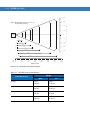
Laser Decode Ranges ...................................................................................................................
Imaging ................................................................................................................................................
Imager ............................................................................................................................................
Operational Modes ...................................................................................................................
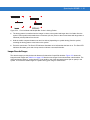
Aiming the Mobile Computer ..........................................................................................................
Imager Decode Ranges .................................................................................................................
Direct Part Marking ........................................................................................................................
Resetting the Mobile Computer ...........................................................................................................
Performing a Warm Boot ...............................................................................................................
Performing a Cold Boot ..................................................................................................................
Waking the Mobile Computer ..............................................................................................................
File System Directory Structure ...........................................................................................................
Connecting to the Internet on a Wireless LAN Network ......................................................................
2-1
2-1
2-1
2-2
2-3
2-5
2-8
2-11
2-13
2-13
2-14
2-15
2-15
2-16
2-16
2-16
2-17
2-17
2-18
2-19
2-19
2-19
2-19
2-20
2-20
2-20
2-20
2-21
2-23
2-23
2-23
2-24
2-25
2-27
2-28
2-28
2-28
2-29
2-29
2-30








































![MC909X User Guide [English] (P/N 72E-72215](http://vs1.manualzilla.com/store/data/006923233_1-b8645820a9c9206bed43f7013f7b5dae-150x150.png)