1
GL200 User Manual
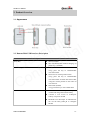
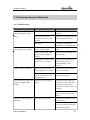
2.3. LEDs Description
There are three LED in GL200, the description as following.
Light
GSM light
GPS light
Event
Searching network
State
Fast flash
Network has been registered
Power off
GPS has fixed
Slow flash
Dark
Solid
GPS is in fixing
Fast flash
GPS is on and GPS data wrong
Slow flash
GPS is off
Dark
If “LED On” is not selected, and the GPS LED
will not work after turn on 150 seconds.
Dark
Power on and normal
Dark
Charger inserted and charging completed
Solid
Charger inserted and charging
Fast flash
Power key was pressed and prepare to power off
Abnormal
Fast flash
Fast flash
Power low alert
Slow flash
Power off or turn off the power light by command
Dark
k
n
i
l
l
a
c
i
t
e
n
u
e
Q fid
n
o
C
Power light
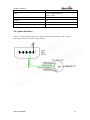
2.4. External Power Interface
2.4.1. External DC Charger Interface
The Pin2 on Mini-USB connector are used for charging and named as VCHG pin, It can be
connected to a 5V DC power supply to power GL200 and charge the internal battery.
TRACGL200UM001
-6-