1
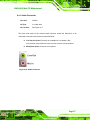
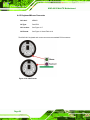
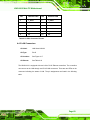
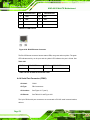
KINO-6612 Mini-ITX Motherboard
,
Page i
KINO-6612 Mini-ITX Motherboard
Revision
Date
Version
Changes
2007-08-14
V1.30
Removed TPM connector
BIOS support on the LPC bus
-12 V added to PCI slot
2007-11-29
1.12
Changed in accordance with Quick Installation Guide changes
2007-11-01
1.1
Removed the 800Z models and changed the LVDS connector pin
definitions
2007-05-01
Page ii
1.0
Initial release
KINO-6612 Mini-ITX Motherboard
Copyright
COPYRIGHT NOTICE
The information in this document is subject to change without prior notice in order to
improve reliability, design and function and does not represent a commitment on the part
of the manufacturer.
In no event will the manufacturer be liable for direct, indirect, special, incidental, or
consequential damages arising out of the use or inability to use the product or
documentation, even if advised of the possibility of such damages.
This document contains proprietary information protected by copyright. All rights are
reserved. No part of this manual may be reproduced by any mechanical, electronic, or
other means in any form without prior written permission of the manufacturer.
TRADEMARKS
All registered trademarks and product names mentioned herein are used for identification
purposes only and may be trademarks and/or registered trademarks of their respective
owners.
Page iii
KINO-6612 Mini-ITX Motherboard
Manual Conventions
WARNING!
Warnings appear where overlooked details may cause damage to the equipment or result
in personal injury. Warnings should be taken seriously. Warnings are easy to recognize.
The word “warning” is written as “WARNING,” both capitalized and bold and is followed by
text. The text is the warning message. A warning message is shown below:
WARNING:
This is an example of a warning message. Failure to adhere to warning
messages may result in permanent damage to the KINO-6612 or
personal injury to the user. Please take warning messages seriously.
CAUTION!
Cautionary messages should also be heeded to help reduce the chance of losing data or
damaging the KINO-6612. Cautions are easy to recognize. The word “caution” is written
as “CAUTION,” both capitalized and bold and is followed. The italicized text is the
cautionary message. A caution message is shown below:
CAUTION:
This is an example of a caution message. Failure to adhere to cautions
messages may result in permanent damage to the KINO-6612. Please
take caution messages seriously.
Page iv
KINO-6612 Mini-ITX Motherboard
NOTE:
These messages inform the reader of essential but non-critical information. These
messages should be read carefully as any directions or instructions contained therein can
help avoid making mistakes. Notes are easy to recognize. The word “note” is written as
“NOTE,” both capitalized and bold and is followed by text. The text is the cautionary
message. A note message is shown below:
NOTE:
This is an example of a note message. Notes should always be read.
Notes contain critical information about the KINO-6612. Please take
note messages seriously.
Page v
KINO-6612 Mini-ITX Motherboard
Packing List
NOTE:
If any of the components listed in the checklist below are missing,
please do not proceed with the installation. Contact the IEI reseller or
vendor you purchased the KINO-6612 from or contact an IEI sales
representative directly. To contact an IEI sales representative, please
send an email to [email protected].
0
The items listed below should all be included in the KINO-6612 package.
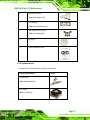
1 x KINO-6612 Single Board Computer
1 x Mini Jumper Pack
1 x ATA66/100 Flat Cable
2 x SATA cable
1 x SATA Power cable
1 x I/O Shielding
1 x Utility CD
1 x QIG
Images of the above items are shown in Chapter 3.
Page vi
KINO-6612 Mini-ITX Motherboard
Table of Contents
1
INTRODUCTION..................................................................................................... 1
1H
420H
1.1 OVERVIEW ................................................................................................................. 2
1.1.1 KINO-6612 Introduction.................................................................................... 2
1.1.2 KINO-6612 Model Variations ............................................................................ 3
1.2 KINO-6612 OVERVIEW ............................................................................................. 3
1.2.1 KINO-6612 Overview Photo.............................................................................. 3
1.2.2 KINO-6612 Peripheral Connectors and Jumpers ............................................. 4
1.2.3 Technical Specifications..................................................................................... 5
2H
421H
3H
42H
4H
423H
5H
42H
425H
7H
426H
8H
427H
2
6H
DETAILED SPECIFICATIONS ............................................................................. 9
9H
428H
2.1 DIMENSIONS ............................................................................................................ 10
2.1.1 Board Dimensions............................................................................................ 10
2.1.2 External Interface Panel Dimensions ............................................................... 11
2.2 DATA FLOW ...............................................................................................................11
2.3 COMPATIBLE PROCESSORS ....................................................................................... 12
2.3.1 Supported Processors ...................................................................................... 12
2.3.2 Intel® Pentium® M Processors....................................................................... 13
2.3.3 Intel® Celeron® M Processors ....................................................................... 14
2.3.4 Front Side Bus (FSB) ....................................................................................... 15
2.4 SIS661CX NORTHBRIDGE CHIPSET ......................................................................... 15
10H
429H
1H
430H
12H
431H
13H
432H
14H
43H
15H
43H
16H
435H
17H
436H
18H
437H
19H
438H
2.4.1 SiS661CX Overview ......................................................................................... 15
20H
439H
2.4.2 DDR Controller................................................................................................ 16
2.4.3 Graphics Support Mode................................................................................... 16
2.4.4 Integrated Graphics Engine............................................................................. 17
2.4.5 SiS302LV Video Bridge .................................................................................... 17
2.4.5.1 SiS302LV Video Bridge............................................................................ 17
2.4.5.2 SiS302LV Video Bridge TV Display Features.......................................... 18
2.4.5.3 SiS302LV Video Bridge LVDS Display Features..................................... 18
2.4.5.4 Dual Display ............................................................................................. 19
2.4.6 SiS MuTIOL® 1G Northbridge-to-Southbridge Bus ....................................... 19
2.5 SIS964 SOUTHBRIDGE CHIPSET ............................................................................... 19
21H
40H
2H
41H
23H
42H
24H
43H
25H
4H
26H
45H
27H
46H
28H
47H
30H
29H
48H
49H
Page vii
KINO-6612 Mini-ITX Motherboard
2.5.1 SIS964 Southbridge Overview ......................................................................... 19
2.5.2 SiS964 Audio Codec ’97 Controller................................................................. 19
2.5.2.1 Realtek ALC655 AC’97 Audio Codec...................................................... 19
2.5.3 SiS964 IDE Controllers ................................................................................... 21
2.5.4 SiS964 LPC host bus controller ....................................................................... 22
2.5.5 SiS964 PCI Host Bus Controller...................................................................... 22
2.5.6 SiS694 Real Time Clock ................................................................................... 23
2.5.7 SIS964 SATA Controllers ................................................................................. 23
2.5.8 Keyboard and Mouse Controller...................................................................... 23
2.5.9 SIS964 USB Controllers................................................................................... 24
2.6 LPC BUS COMPONENTS ........................................................................................... 25
31H
450H
32H
451H
3H
452H
34H
453H
35H
45H
36H
45H
37H
456H
38H
457H
39H
458H
40H
459H
41H
460H
2.6.1 LPC Bus Overview........................................................................................... 25
2.6.2 BIOS Chipset.................................................................................................... 25
2.6.3 Winbond W83697HF Super I/O chipset........................................................... 26
2.6.3.1 Super I/O LPC Interface ........................................................................... 27
2.6.3.2 Super I/O Infrared ..................................................................................... 28
2.6.3.3 Super I/O Hardware Monitor Functions ................................................... 28
2.6.3.4 Super I/O Fan Speed and Fan Control ...................................................... 28
2.6.3.5 Super I/O UART ....................................................................................... 28
2.6.4 Fintek F81216D LPC Serial Port Chipset....................................................... 29
2.7 PCI BUS COMPONENTS ............................................................................................ 29
2.7.1 PCI Bus Overview............................................................................................ 29
2.7.2 PCI Slot............................................................................................................ 30
2.7.3 PCI GbE Controllers ....................................................................................... 30
2.8 ENVIRONMENTAL AND POWER SPECIFICATIONS ....................................................... 32
2.8.1 System Monitoring ........................................................................................... 32
2.8.2 Operating Temperature and Temperature Control........................................... 33
2.8.3 Power Consumption......................................................................................... 33
42H
461H
43H
462H
4H
463H
45H
46H
46H
465H
47H
46H
48H
467H
49H
468H
50H
469H
51H
470H
52H
471H
53H
472H
54H
473H
5H
47H
475H
57H
476H
58H
47H
3
56H
UNPACKING .......................................................................................................... 34
59H
478H
3.1 ANTI-STATIC PRECAUTIONS ...................................................................................... 35
3.2 UNPACKING.............................................................................................................. 35
3.2.1 Unpacking Precautions.................................................................................... 35
3.3 UNPACKING CHECKLIST ........................................................................................... 36
3.3.1 Package Contents............................................................................................. 36
60H
479H
61H
480H
62H
481H
63H
482H
64H
Page viii
483H
KINO-6612 Mini-ITX Motherboard
3.3.2 Optional Items.................................................................................................. 37
65H
4
48H
CONNECTORS ...................................................................................................... 39
6H
485H
4.1 PERIPHERAL INTERFACE CONNECTORS .................................................................... 40
4.1.1 KINO-6612 Layout........................................................................................... 40
4.2 PERIPHERAL INTERFACE CONNECTORS .................................................................... 41
4.2.1 External Interface Panel Connectors............................................................... 43
4.3 INTERNAL PERIPHERAL CONNECTORS ...................................................................... 44
4.3.1 ATX Power Connector (20-pin) ....................................................................... 44
4.3.2 Backlight Inverter Connector .......................................................................... 45
4.3.3 Fan Connectors (+12V, 3-pin) ......................................................................... 46
67H
486H
68H
487H
69H
48H
70H
489H
71H
490H
72H
491H
73H
492H
74H
493H
4.3.4 Front Panel Connector (14-pin) ...................................................................... 48
4.3.5 GPIO Connector .............................................................................................. 49
4.3.6 IDE Connector (40-pin)................................................................................... 50
4.3.7 IDE Connector(44-pin).................................................................................... 52
4.3.8 Infrared Interface Connector (5-pin) ............................................................... 54
4.3.9 LVDS LCD Connector ..................................................................................... 55
4.3.10 PCI Slot.......................................................................................................... 56
4.3.11 SATA Drive Connectors.................................................................................. 59
4.3.12 Serial Port Connectors (COM 3, COM4, COM5 and COM6) ...................... 61
4.3.13 Serial Port Connector (COM 2)(RS-232, RS-422 or RS-485)....................... 62
4.3.14 TV Out Connector .......................................................................................... 64
4.3.15 USB Connectors (Internal) ............................................................................ 65
4.4 EXTERNAL PERIPHERAL INTERFACE CONNECTOR PANEL ......................................... 66
4.4.1 Audio Connector .............................................................................................. 67
4.4.2 Keyboard/Mouse Connector ............................................................................ 68
4.4.3 LAN Connectors............................................................................................... 69
4.4.4 Serial Port Connector (COM1) ....................................................................... 70
4.4.5 USB Connectors............................................................................................... 71
4.4.6 VGA Connector ................................................................................................ 72
75H
49H
76H
495H
7H
496H
78H
497H
79H
498H
80H
49H
81H
50H
82H
501H
83H
502H
84H
503H
85H
504H
86H
50H
87H
506H
507H
89H
508H
90H
509H
91H
510H
92H
51H
93H
512H
5
8H
INSTALLATION .................................................................................................... 74
94H
513H
5.1 ANTI-STATIC PRECAUTIONS ...................................................................................... 75
5.2 INSTALLATION CONSIDERATIONS ............................................................................. 76
5.2.1 Installation Notices .......................................................................................... 76
95H
514H
96H
51H
97H
516H
Page ix
KINO-6612 Mini-ITX Motherboard
5.2.2 Installation Checklist ....................................................................................... 77
5.3 UNPACKING.............................................................................................................. 78
5.4 CPU, CPU COOLING KIT AND DIMM INSTALLATION ............................................. 78
5.4.1 Socket 479 CPU Installation............................................................................ 78
5.4.2 Cooling Kit CF-479B-RS Installation.............................................................. 81
5.4.3 DIMM Installation ........................................................................................... 83
5.5 JUMPER SETTINGS .................................................................................................... 84
5.5.1 Clear CMOS Jumper........................................................................................ 85
5.5.2 CPU Frequency Setup Jumper......................................................................... 86
5.5.3 FSB Setup Jumper............................................................................................ 87
5.5.4 LCD Voltage Selection ..................................................................................... 88
98H
517H
9H
518H
10H
519H
10H
520H
102H
521H
103H
52H
104H
523H
105H
524H
106H
52H
107H
526H
108H
527H
5.5.5 RS-232/485 Serial Port Select Jumper ............................................................ 89
5.6 CHASSIS INSTALLATION ........................................................................................... 90
5.6.1 Airflow.............................................................................................................. 90
5.6.2 Motherboard Installation................................................................................. 91
5.7 INTERNAL PERIPHERAL DEVICE CONNECTIONS........................................................ 91
5.7.1 Peripheral Device Cables ................................................................................ 91
5.7.2 ATA Flat Cable Connection ............................................................................. 92
5.7.3 SATA Drive Connection ................................................................................... 93
5.7.4 Dual RS-232 Cable with Slot Bracket.............................................................. 94
5.7.5 USB Cable (Dual Port) with Slot Bracket ....................................................... 95
5.8 EXTERNAL PERIPHERAL INTERFACE CONNECTION ................................................... 97
5.8.1 Audio Connection............................................................................................. 97
5.8.2 LAN Connection (Single Connector) ............................................................... 98
5.8.3 Parallel Device Connection............................................................................. 99
5.8.4 PS/2 Keyboard and Mouse Connection ......................................................... 100
5.8.5 Serial Device Connection .............................................................................. 101
5.8.6 USB Connection (Dual Connector) ............................................................... 102
5.8.7 VGA Monitor Connection .............................................................................. 103
109H
528H
10H
529H
1H
530H
12H
531H
13H
532H
14H
53H
15H
534H
16H
53H
17H
536H
18H
537H
19H
538H
120H
539H
12H
540H
12H
541H
542H
124H
543H
125H
54H
126H
54H
6
123H
BIOS SCREENS.................................................................................................... 105
127H
546H
6.1 INTRODUCTION ...................................................................................................... 106
6.1.1 Starting Setup................................................................................................. 106
6.1.2 Using Setup .................................................................................................... 106
6.1.3 Getting Help................................................................................................... 107
128H
547H
129H
548H
130H
549H
13H
50H
Page x
KINO-6612 Mini-ITX Motherboard
6.1.4 Unable to Reboot After Configuration Changes............................................ 107
6.1.5 BIOS Menu Bar.............................................................................................. 107
6.2 MAIN ..................................................................................................................... 108
6.3 ADVANCED ............................................................................................................. 109
6.3.1 CPU Configuration......................................................................................... 110
6.3.2 IDE Configuration .......................................................................................... 112
6.3.2.1 IDE Master, IDE Slave ............................................................................115
6.3.3 Super IO Configuration.................................................................................. 120
6.3.4 Hardware Health Configuration.................................................................... 125
6.3.5 ACPI Configuration ....................................................................................... 127
6.3.5.1 Advanced ACPI Configuration ............................................................... 128
132H
51H
13H
52H
134H
53H
135H
54H
136H
5H
137H
56H
138H
57H
139H
58H
140H
59H
14H
560H
142H
561H
6.3.6 MPS Configuration ........................................................................................ 129
6.3.7 USB Configuration......................................................................................... 130
6.4 PCI/PNP ................................................................................................................ 133
6.5 BOOT ..................................................................................................................... 139
6.5.1 Boot Settings Configuration........................................................................... 139
6.5.2 Boot Device Priority ...................................................................................... 143
6.6 SECURITY............................................................................................................... 144
6.7 CHIPSET ................................................................................................................. 146
6.7.1 NorthBridge SiS963/964 Chipset Configuration ........................................... 146
6.7.2 SouthBridge Configuration............................................................................ 150
6.8 POWER ................................................................................................................... 152
6.9 EXIT ....................................................................................................................... 155
143H
562H
14H
563H
145H
564H
146H
56H
147H
56H
148H
567H
149H
568H
150H
569H
15H
570H
152H
571H
572H
154H
573H
7
153H
SOFTWARE DRIVERS ....................................................................................... 157
15H
574H
7.1 AVAILABLE SOFTWARE DRIVERS ............................................................................ 158
7.2 AGP DRIVER INSTALLATION .................................................................................. 158
7.3 REALTEK AUDIO DRIVER INSTALLATION ............................................................... 162
7.4 SIS VGA UTILITIES DRIVER .................................................................................. 167
7.5 SIS IDE DRIVER INSTALLATION ............................................................................ 172
7.6 LAN DRIVER INSTALLATION ................................................................................. 175
156H
57H
157H
576H
158H
57H
159H
578H
160H
579H
16H
580H
A
BIOS MENU OPTIONS....................................................................................... 177
B
TERMINOLOGY ................................................................................................. 181
C
DIO INTERFACE................................................................................................. 186
162H
164H
163H
581H
582H
583H
Page xi
KINO-6612 Mini-ITX Motherboard
C.1 DIO INTERFACE INTRODUCTION ........................................................................... 187
C.2 DIO CONNECTOR PINOUTS ................................................................................... 187
C.3 ASSEMBLY LANGUAGE SAMPLES ........................................................................... 188
C.3.1 Enable the DIO Input Function..................................................................... 188
C.3.2 Enable the DIO Output Function .................................................................. 188
165H
584H
16H
58H
167H
586H
168H
587H
169H
58H
D
WATCHDOG TIMER............................................................................................ 189
E
ADDRESS MAPPING ......................................................................................... 192
170H
17H
589H
590H
E.1 I/O ADDRESS MAP ............................................................................................... 193
E.2 IRQ ADDRESS MAP ............................................................................................. 195
E.3 MEMORY ADDRESS MAP...................................................................................... 196
591H
173H
592H
174H
593H
F
172H
COMPATIBILITY................................................................................................ 197
175H
594H
F.1 COMPATIBLE OPERATING SYSTEMS ........................................................................ 198
F.2 COMPATIBLE PROCESSORS ..................................................................................... 198
F.3 COMPATIBLE MEMORY MODULES .......................................................................... 199
59H
17H
596H
178H
597H
G
176H
HAZARDOUS MATERIALS DISCLOSURE ................................................... 200
179H
598H
G.1 HAZARDOUS MATERIAL DISCLOSURE TABLE FOR IPB PRODUCTS CERTIFIED AS
ROHS COMPLIANT UNDER 2002/95/EC WITHOUT MERCURY ..................................... 201
180H
59H
H
18H
INDEX .................................................................................................................... 204
Page xii
60H
KINO-6612 Mini-ITX Motherboard
List of Figures
Figure 1-1: KINO-6612 Mini-ITX CPU Card..................................................................2
182H
601H
Figure 1-2: KINO-6612 Overview [Front View]............................................................4
183H
602H
Figure 2-1: KINO-6612 Dimensions (mm) .................................................................10
184H
603H
Figure 2-2: External Interface Panel Dimensions (mm)...........................................11
185H
604H
Figure 2-3: Data Flow Block Diagram........................................................................12
186H
605H
Figure 2-4: CPU Socket ..............................................................................................13
187H
60H
Figure 2-5: Front Side Bus .........................................................................................15
18H
607H
Figure 2-6: DDR DIMM Sockets..................................................................................16
189H
608H
Figure 2-7: Video Interface Bus .................................................................................17
190H
609H
Figure 2-8: Audio Codec and Connectors ................................................................20
19H
610H
Figure 2-9: IDE Connector..........................................................................................22
192H
61H
Figure 2-10: SATA Connectors ..................................................................................23
193H
612H
Figure 2-11: Keyboard and Mouse Connectors .......................................................24
194H
613H
Figure 2-12: USB Connectors ....................................................................................25
195H
614H
Figure 2-13: BIOS Chipset..........................................................................................26
196H
615H
Figure 2-14: Super I/O Chipset...................................................................................27
197H
61H
Figure 2-15: PCI Slot ...................................................................................................30
198H
617H
Figure 2-16: Realtek PCI GbE Controllers ................................................................31
19H
618H
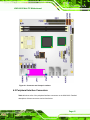
Figure 4-1: Connector and Jumper Locations .........................................................41
20H
619H
Figure 4-2: ATX Power Connector (20-pin) Pinout Locations ................................45
201H
620H
Figure 4-3: Panel Backlight Connector Pinout Locations.......................................46
20H
621H
Figure 4-4: +12V Fan Connector Location................................................................47
203H
62H
Figure 4-5: Front Panel Connector Pinout Locations..............................................48
204H
623H
Figure 4-6: GPIO Connector Pinout Locations ........................................................49
205H
624H
Figure 4-7: IDE Device Connector Locations ...........................................................51
206H
625H
Figure 4-8: Secondary IDE Device Connector Locations........................................53
207H
62H
Figure 4-9: Infrared Connector Pinout Locations ....................................................54
208H
627H
Figure 4-10: LVDS LCD Connector Pinout Locations .............................................55
209H
628H
Page xiii
KINO-6612 Mini-ITX Motherboard
Figure 4-11: PCI Slot Location ...................................................................................57
210H
629H
Figure 4-12: SATA Drive Connector Locations........................................................60
21H
630H
Figure 4-13: COM Connector Pinout Locations .......................................................61
21H
631H
Figure 4-14: RS-232/422/485 Serial Port Connector Location ................................63
213H
632H
Figure 4-15: TV Connector Pinout Locations...........................................................64
214H
63H
Figure 4-16: USB Connector Pinout Locations........................................................65
215H
634H
Figure 4-17: KINO-6612 External Peripheral Interface Connector .........................66
216H
635H
Figure 4-18: Audio Connector....................................................................................67
217H
63H
Figure 4-19: PS/2 Pinouts...........................................................................................68
218H
637H
Figure 4-20: RJ-45 Ethernet Connector ....................................................................70
219H
638H
Figure 4-21: COM1 Pinout Locations ........................................................................71
20H
639H
Figure 4-22: VGA Connector ......................................................................................72
21H
640H
Figure 5-1: Make sure the CPU socket retention screw is unlocked .....................79
2H
641H
Figure 5-2: Lock the CPU Socket Retention Screw .................................................80
23H
642H
Figure 5-3: IEI CF-479B-RS Cooling Kit ....................................................................81
24H
643H
Figure 5-4: Cooling Kit Support Bracket...................................................................82
25H
64H
Figure 5-5: Connect the cooling fan cable ...............................................................82
26H
645H
Figure 5-6: Installing a DIMM .....................................................................................83
27H
64H
Figure 5-7: Jumper Locations....................................................................................84
28H
647H
Figure 5-8: Clear CMOS Jumper ................................................................................86
29H
648H
Figure 5-9: CPU Frequency Setup Jumper ...............................................................87
230H
649H
Figure 5-10: FSB Setup Jumper.................................................................................88
231H
650H
Figure 5-11: LCD Voltage Selection Jumper Location ............................................89
23H
651H
Figure 5-12: RS-232/485 Serial Port Select Jumper Location.................................90
23H
652H
Figure 5-13: IDE Cable Connection ...........................................................................92
234H
653H
Figure 5-14: SATA Drive Cable Connection .............................................................93
235H
654H
Figure 5-15: SATA Power Drive Connection ............................................................94
236H
65H
Figure 5-16: Dual RS-232 Cable Installation.............................................................95
237H
65H
Figure 5-17: Dual USB Cable Connection.................................................................96
238H
657H
Figure 5-18: Audio Connectors..................................................................................98
239H
658H
Figure 5-19: LAN Connection.....................................................................................99
240H
659H
Figure 5-20: Parallel Device Connector ................................................................. 100
241H
Page xiv
60H
KINO-6612 Mini-ITX Motherboard
Figure 5-21: PS/2 Keyboard/Mouse Connector..................................................... 101
24H
61H
Figure 5-22: Serial Device Connector .................................................................... 102
243H
62H
Figure 5-23: USB Connector ................................................................................... 103
24H
63H
Figure 5-24: VGA Connector ................................................................................... 104
245H
64H
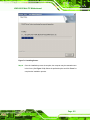
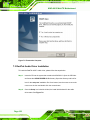
Figure 7-1: StartingInstallShield Wizard Screen ................................................... 158
246H
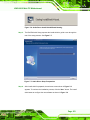
65H
Figure 7-2: Preparing Setup Screen ....................................................................... 159
247H
6H
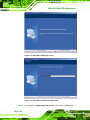
Figure 7-3: Install Shield Screen............................................................................. 160
248H
67H
Figure 7-4: Installing Screen ................................................................................... 161
249H
68H
Figure 7-5: Restart the Computer ........................................................................... 162
250H
69H
Figure 7-6: Audio Driver Install Shield Wizard Starting ....................................... 163
251H
670H
Figure 7-7: Audio Driver Setup Prerparation......................................................... 163
25H
671H
Figure 7-8: Audio Driver Welcome Screen ............................................................ 164
253H
672H
Figure 7-9: Audio Driver Software Configuration ................................................. 164
254H
673H
Figure 7-10: Audio Driver Digital Signal ................................................................ 165
25H
674H
Figure 7-11: Audio Driver Installation Begins ....................................................... 166
256H
675H
Figure 7-12: Audio Driver Installation Complete................................................... 167
257H
67H
Figure 7-13: VGA Utilities Welcome Screen .......................................................... 168
258H
67H
Figure 7-14: Select Setup Installation Type........................................................... 169
259H
678H
Figure 7-15: Select Folders to Copy Files ............................................................. 170
260H
679H
Figure 7-16: Review Settings .................................................................................. 170
261H
680H
Figure 7-17: Read ReadMe File ............................................................................... 171
26H
681H
Figure 7-18: Restart the Computer ......................................................................... 172
263H
682H
Figure 7-19: Select a Language .............................................................................. 173
264H
683H
Figure 7-20: Welcome Screen ................................................................................. 173
265H
684H
Figure 7-21: Chipset Driver Readme File Information .......................................... 174
26H
685H
Figure 7-22: Chipset Driver Installation Complete................................................ 175
267H
68H
Figure 7-23: LAN Driver Welcome Screen ............................................................. 175
268H
687H
Figure 7-24: LAN Driver Installation Complete ..................................................... 176
269H
68H
Page xv
KINO-6612 Mini-ITX Motherboard
List of Tables
Table 1-1: Model Variations..........................................................................................3
270H
689H
Table 1-2: Technical Specifications ............................................................................8
271H
690H
Table 2-1: Support Intel® Pentium® M Processors .................................................14
27H
691H
Table 2-2: Supported Intel® Celeron® M Processors .............................................15
273H
692H
Table 2-3: Power Consumption .................................................................................33
274H
693H
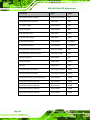
Table 4-1: Peripheral Interface Connectors..............................................................43
275H
694H
Table 4-2: Rear Panel Connectors.............................................................................44
276H
695H
Table 4-3: ATX Power Connector (20-pin) Pinouts ..................................................45
27H
69H
Table 4-4: Panel Backlight Connector Pinouts ........................................................46
278H
697H
Table 4-5: +12V Fan Connector Pinouts ...................................................................47
279H
698H
Table 4-6: Front Panel Connector Pinouts ...............................................................49
280H
69H
Table 4-7: GPIO Connector Pinouts ..........................................................................50
281H
70H
Table 4-8: IDE Connector Pinouts .............................................................................52
28H
701H
Table 4-9: Secondary IDE Connector Pinouts..........................................................54
283H
702H
Table 4-10: Infrared Connector Pinouts....................................................................55
284H
703H
Table 4-11: LVDS LCD Port Connector Pinouts.......................................................56
285H
704H
Table 4-12: PCI Slot.....................................................................................................59
286H
705H
Table 4-13: SATA Drive Connector Pinouts .............................................................60
287H
706H
Table 4-14: COM Connector Pinouts.........................................................................62
28H
70H
Table 4-15: RS-232/RS-485 Serial Port Connector Pinouts.....................................63
289H
708H
Table 4-16: TV Port Connector Pinouts ....................................................................64
290H
709H
Table 4-17: USB Port Connector Pinouts .................................................................66
291H
710H
Table 4-18: PS/2 Connector Pinouts .........................................................................69
29H
71H
Table 4-19: LAN Pinouts.............................................................................................70
293H
712H
Table 4-20: RJ-45 Ethernet Connector LEDs............................................................70
294H
713H
Table 4-21: RS-232 Serial Port (COM 1) Pinouts ......................................................71
295H
714H
Table 4-22: USB Port Pinouts ....................................................................................72
296H
715H
Table 4-23: VGA Connector Pinouts .........................................................................73
297H
Page xvi
716H
KINO-6612 Mini-ITX Motherboard
Table 5-1: Jumpers......................................................................................................85
298H
71H
Table 5-2: Clear CMOS Jumper Settings ..................................................................85
29H
718H
Table 5-3: CPU Frequency Setup Jumper Settings .................................................86
30H
719H
Table 5-4: FSB Setup Jumper Settings .....................................................................87
301H
720H
Table 5-5: LCD Voltage Selection Jumper Settings.................................................89
302H
721H
Table 5-6: RS-232/485 Serial Port Select Jumper Settings .....................................90
30H
72H
Table 5-7: IEI Provided Cables...................................................................................91
304H
723H
Table 6-1: BIOS Navigation Keys............................................................................ 107
305H
724H
Page xvii
KINO-6612 Mini-ITX Motherboard
List of BIOS Menus
Menu 1: Main............................................................................................................. 108
306H
725H
Menu 2: Advanced.................................................................................................... 110
307H
726H
Menu 3: CPU Configuration .................................................................................... 111
308H
72H
Menu 4: IDE Configuration ...................................................................................... 113
309H
728H
Menu 5: IDE Master and IDE Slave Configuration ................................................ 115
310H
729H
Menu 6: Super IO Configuration ............................................................................. 120
31H
730H
Menu 7: Hardware Health Configuration ............................................................... 126
312H
731H
Menu 8: ACPI Configuration ................................................................................... 127
31H
732H
Menu 9: General ACPI Configuration ..................................................................... 128
314H
73H
Menu 10: MPS Configuration .................................................................................. 130
315H
734H
Menu 11: USB Configuration .................................................................................. 131
316H
735H
Menu 12: PCI/PnP Configuration ............................................................................ 133
317H
736H
Menu 13: Boot........................................................................................................... 139
318H
73H
Menu 14: Boot Settings Configuration................................................................... 140
319H
738H
Menu 15: Boot Device Priority Settings ................................................................. 144
320H
739H
Menu 16: Security..................................................................................................... 145
321H
740H
Menu 17: Chipset...................................................................................................... 146
32H
741H
Menu 18:NorthBridge Chipset Configuration........................................................ 147
32H
742H
Menu 19:SouthBridge Chipset Configuration ....................................................... 151
324H
743H
Menu 20:Power ......................................................................................................... 152
325H
74H
Menu 21:Exit ............................................................................................................. 155
326H
Page xviii
745H
KINO-6612 Mini-ITX Motherboard
Chapter
1
1 Introduction
Page 1
KINO-6612 Mini-ITX Motherboard
1.1 Overview
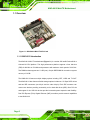
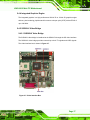
Figure 1-1: KINO-6612 Mini-ITX CPU Card
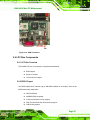
1.1.1 KINO-6612 Introduction
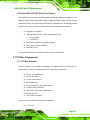
The KINO-6612 Mini-ITX motherboard (Figure 1-1) is a socket 479 Intel® Pentium® M or
74H6
Celeron® M CPU platform. This high performance platform supports a front side bus
(FSB) of 400 MHz or 533 MHz and processors with maximum clock speed of 2.26 GHz.
Two DIMM sockets support two 1.0 GB (max.) 184-pin DDR DIMM for a maximum system
memory of 2.0 GB.
The KINO-66112 features multiple display options including CRT, LVDS and TV-OUT.
The KINO-66112 also features flexible storage options include two 1.5 Gbps SATA drives
and two IDE connectors (one 40-pin and the other 44-pin). Each IDE connector can
connect two devices providing connectivity to four hard disk drives (HDD). One PCI slot
and support for six USB 2.0 devices provide increased system expansion and flexibility.
Dual PCI Express (PCIe) Gigabit Ethernet (GbE) controllers provide network capabilities
to the KINO-6612.
Page 2
KINO-6612 Mini-ITX Motherboard
1.1.2 KINO-6612 Model Variations
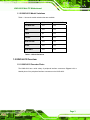
Table 1-1 shows the model variations that are available:
745H
Feature
KINO-6612
KINO-6612LVDS
533 MHz FSB
Yes
Yes
VGA
Yes
Yes
LVDS
No
Yes
TV-OUT
No
Yes
Dual PCI GbE
Yes
Yes
Audio
Yes
Yes
Dual SATA
Yes
Yes
Table 1-1: Model Variations
1.2 KINO-6612 Overview
1.2.1 KINO-6612 Overview Photo
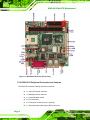
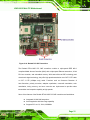
The KINO-6612 has a wide variety of peripheral interface connectors. Figure 1-2 is a
746H8
labeled photo of the peripheral interface connectors on the KINO-6612.
Page 3
KINO-6612 Mini-ITX Motherboard
Figure 1-2: KINO-6612 Overview [Front View]
1.2.2 KINO-6612 Peripheral Connectors and Jumpers
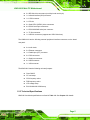
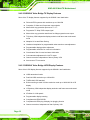
The KINO-6612 has the following connectors on-board:
1 x 20-pin ATX power connector
1 x Backlight inverter connector
1 x CompactFlash® socket
2 x Fan connectors
2 x Front panel connectors (one is optional)
1 x General purpose input/output (GPIO) connector
Page 4
KINO-6612 Mini-ITX Motherboard
2 x IDE disk drive connectors (one 40-pin and one 44-pin)
1 x Infrared interface (IrDA) connector
1 x LVDS connector
1 x PCI slot
2 x Serial ATA II (SATA II) drive connectors
4 x RS-232 serial port connectors
1 x RS-232/422/485 serial port connector
1 x TV Out connector
1 x USB 2.0 connectors (supports two USB 2.0 devices)
The KINO-6612 has the following external peripheral interface connectors on the board
rear panel.
2 x Audio Jacks
2 x Ethernet connectors
1 x Parallel port (LPT) connector
2 x PS/2 connectors
1 x Serial port connector
4 x USB connectors
1 x VGA connector
The KINO-6612 has the following on-board jumpers:
Clear CMOS
CF card setup
CPU frequency select
FSB frequency select
LCD voltage setup
RS-232/422/485 COM2 setup
1.2.3 Technical Specifications
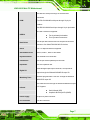
KINO-6612 technical specifications are listed in Table 1-2. See Chapter 2 for details.
74H9
Page 5
KINO-6612 Mini-ITX Motherboard
Specification
KINO-6612
Form Factor
Mini-ITX
Socket 479 Intel® Pentium® M
System CPU
Socket 479 Intel® Celeron® M
Front Side Bus (FSB)
400 MHz or 533 MHz
Northbridge: SIS661CX
System Chipset
Southbridge: SIS964
Two 184-pin DDR DIMM sockets support two 1.0GB
Memory
(maximum) DIMM modules with clock speeds of 400MHz or
533MHz
Super I/O
Winbond W83697HG
Analog VGA integrated on the SiS661CX and interfaced
through an external DB-15 connector
Display
24-bit dual-channel LVDS by SiS 302LV on
(KINO-6612LVDS only)
TV-OUT integrated in the SiS302LV
AMI BIOS label
BIOS
SPI EEPROM
8.0 MB
Audio
AC'97 codec with Realtek ALC655
LAN
Two Realtek RTL8110S GbE controllers
Page 6
KINO-6612 Mini-ITX Motherboard
One RS-232 serial port through an external DB-9
connectors
COM
Four RS-232/422/485 serial ports through 10-pin pin
headers
One RS-232/422/485 serial port through 14-pin pin header
Six USB 2.0 devices supported:
USB2.0
Two by onboard pin-headers
Four by external connectors
One 40-pin IDE connector and one 44-pin IDE connector
Hard Drives
connect to four Ultra ATA33/66/100/133 devices
SATA
Two 1.5 Gbps SATA drives supported
SATA RAID Levels
RAID 0, RAID 1, RAID 10 and JBOD
Keyboard/mouse
Two external PS/2 connectors
Parallel Port
One 26-pin external parallel port connector
Expansion
One PCI expansion slot
One8-bit digital input/output connector; 4-bit input/4-bit
Digital I/O
output through the Winbond W83697HG super I/O
Software programmable 1-255 sec. through the Winbond
Watchdog Timer
W83697HG super I/O
One IrDA connector through the Winbond W83697HG super
Infrared
I/O. Supports:
Serial Infrared (SIR)
Amplitude Shift Keyed IR (ASKIR)
Power Supply
20-pin ATX power connector
Fan Connector
Two fan connectors
Page 7
KINO-6612 Mini-ITX Motherboard
[email protected], [email protected] and [email protected]
Power Consumption
(1.5 GHz Intel® Celeron® M CPU with one 400 MHz 1.0 GB
DDR DIMM)
Temperature
0ºC – 60ºC (32ºF - 140ºF)
Humidity (operating)
5%~95% non-condensing
Dimensions (LxW)
170mm x 170mm
Weight (GW/NW)
1,100g/420g
Table 1-2: Technical Specifications
Page 8
KINO-6612 Mini-ITX Motherboard
Chapter
2
2 Detailed Specifications
Page 9
KINO-6612 Mini-ITX Motherboard
2.1 Dimensions
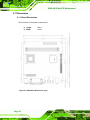
2.1.1 Board Dimensions
The dimensions of the board are listed below:
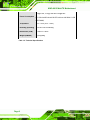
Length:
170mm
Width:
170mm
Figure 2-1: KINO-6612 Dimensions (mm)
Page 10
KINO-6612 Mini-ITX Motherboard
2.1.2 External Interface Panel Dimensions
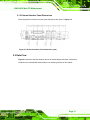
External peripheral interface connector panel dimensions are shown in Figure 2-2.
748H50
Figure 2-2: External Interface Panel Dimensions (mm)
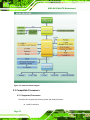
2.2 Data Flow
Figure 2-3 shows the data flow between the two on-board chipsets and other components
749H51
installed on the motherboard and described in the following sections of this chapter.
Page 11
KINO-6612 Mini-ITX Motherboard
Figure 2-3: Data Flow Block Diagram
2.3 Compatible Processors
2.3.1 Supported Processors
The KINO-6612 supports the following Socket 479 Intel® processors:
Intel® Pentium® M
Page 12
KINO-6612 Mini-ITX Motherboard
Intel® Celeron® M
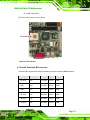
The CPU socket is shown is show below:
Figure 2-4: CPU Socket
2.3.2 Intel® Pentium® M Processors
The KINO-6612 supports the Intel® Pentium® M processors listed in Table 2-1 below.
750H2
CPU Speed
Processor #
Bus Speed Mfg Tech Cache Size
2.26 GHz
780
533 MHz
90 nm
2 MB
2 GHz
760
533 MHz
90 nm
2 MB
2 GHz
755
400 MHz
90 nm
2 MB
1.80 GHz
745
400 MHz
90 nm
2 MB
1.80 GHz
745
400 MHz
90 nm
2 MB
1.73 GHz
740
533 MHz
90 nm
2 MB
Page 13
KINO-6612 Mini-ITX Motherboard
1.70 GHz
735
400 MHz
90 nm
2 MB
1.60 GHz
730
533 MHz
90 nm
2 MB
1.60 GHz
725
400 MHz
90 nm
2 MB
1.50 GHz
715
400 MHz
90 nm
2 MB
Table 2-1: Support Intel® Pentium® M Processors
2.3.3 Intel® Celeron® M Processors
The KINO-6612 supports the Intel® Celeron® M processors listed in Table 2-2 below.
751H3
CPU Speed Processor # Bus Speed
Mfg Tech
Cache Size
1.70 GHz
390
400 MHz
90 nm
1 MB
1.60 GHz
380
400 MHz
90 nm
1 MB
1.50 GHz
340
400 MHz
0.13 micron
512 KB
1.50 GHz
370
400 MHz
90 nm
1 MB
1.50 GHz
370
400 MHz
90 nm
1 MB
1.40 GHz
360
400 MHz
90 nm
1 MB
1.40 GHz
360
400 MHz
90 nm
1 MB
1.40 GHz
360
400 MHz
90 nm
1 MB
1.30 GHz
320
400 MHz
0.13 micron
512 KB
1.30 GHz
350
400 MHz
90 nm
1 MB
Page 14
KINO-6612 Mini-ITX Motherboard
1.30 GHz
350
400 MHz
90 nm
1 MB
1.20 GHz
310
400 MHz
0.13 micron
512 KB
Table 2-2: Supported Intel® Celeron® M Processors
2.3.4 Front Side Bus (FSB)
The Intel® processor on the KINO-6612 is interfaced to the SiS661CX Northbridge
through an 800 MHz front side bus (FSB). The FSB is shown in Figure 2-5 below.
752H4
Figure 2-5: Front Side Bus
2.4 SiS661CX Northbridge Chipset
2.4.1 SiS661CX Overview
The SiS661CX Northbridge chipset supports Socket 479 Intel® Pentium® M and Intel®
Celeron® M processors. The SiS661CX is interfaced to the processor through an 800
MHz FSB clock with a 3.2 GBps transfer bandwidth, stable high-speed computing
Page 15
KINO-6612 Mini-ITX Motherboard
functions and multiple RAM formats such as 400 MHz. 333 MHz and 266 MHz DDR. The
SiS661CX ECLK and 1600 x 1200 high resolution can support UXGA TFT-LCD output.
2.4.2 DDR Controller
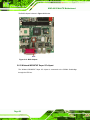
There are twp 184-pin DDR DIMM sockets on the KINO-6612. These sockets support to
DDR DIMM with the following specifications:
333 MHz or 400 MHz un-buffered DIMM
1.0 GB maximum capacity per DIMM (2.0 GB maximum system memory)
Dynamic Clock Enable (CKE)
Figure 2-6: DDR DIMM Sockets
2.4.3 Graphics Support Mode
The graphics controller supports the following maximum resolutions:
CRT highest resolution mode: 2048x1536x32 @ 75NI
LCD highest resolution mode: 1600x1200x32 @ 60NI
TV highest resolution mode: 1024x768x32 @60NI
Page 16
KINO-6612 Mini-ITX Motherboard
2.4.4 Integrated Graphics Engine
The integrated graphics is a high performance 256-bit 3D or 128-bit 2D graphics engine
with two, pixel rendering, pipelines and four texture units per cycle (2P4T) with an ECLK of
up to 200 MHz.
2.4.5 SiS302LV Video Bridge
2.4.5.1 SiS302LV Video Bridge
The SiS302LV video bridge is interfaced to the SiS661CX through the SiS video interface.
The SiS302LV video bridge provides connectivity to both TV signals and LVDS signals.
The video Interface bus is shown in Figure 2-7.
753H
Figure 2-7: Video Interface Bus
Page 17
KINO-6612 Mini-ITX Motherboard
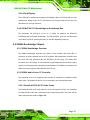
2.4.5.2 SiS302LV Video Bridge TV Display Features
Some of the TV display features supported by the SiS302LV are listed below.
PAL and NTSC systems with resolutions up to 1024x768
Composite, S-Video and Component output signals
Macrovision copy protection process rev. 7.1.L1
Progressive TV 480p YPbPr output signal
Macrovision copy protection waveforms for 480p progressive scan output
TV/primary VGA independent display resolution and frame rate at enhanced
mode
Adaptive 6-Line anti-flicker filtering
Hardware interpolation for programmable under-scan/over-scan adjustment
Programmable display position adjustment
Programmable notch filter for cross color elimination
Chrominance filter for cross luminance elimination
Color saturation adjustment for vivid TV output
Gamma correction independent of that of primary VGA
Auto-sense of TV connection
2.4.5.3 SiS302LV Video Bridge LVDS Display Features
Some of the LVDS display features supported by the SiS302LV are listed below.
LVDS transmitter function
Dual link LVDS resolution up to 1920x1600
TIA/EIA-644 LVDS standard
Bi-linear scaling to scale VGA low resolution mode up to 1600x1200 for LCD
display
LCD/primary VGA independent display resolution and frame rate at enhanced
mode
2D dither for 18-bit panels
Programmable display centering
Compliant with VESA DDC2B
Compliant with VESA plug & display, hot plugging function
Gamma corrections independent of that of primary VGA
Page 18
KINO-6612 Mini-ITX Motherboard
2.4.5.4 Dual Display
The LVDS and TV windows driver supports dual display. When the TV and LCD are in the
simultaneous display mode, the TV data stream runs through Channel B and the LCD
data stream run through Channel A.
2.4.6 SiS MuTIOL® 1G Northbridge-to-Southbridge Bus
The proprietary SiS MuTIOL® 1G bus is 1.0 GBps link between the SiS661CX
Northbridge and the SiS964 Southbridge. The SiS MuTIOL® 1G bus is a bi-directional
16-bit data bus with an operating frequency of 533 MHz Operating Frequency.
2.5 SIS964 Southbridge Chipset
2.5.1 SIS964 Southbridge Overview
The SiS964 Southbridge integrates one USB 2.0 host controller and three USB 1.1
controllers, an audio controller with an AC'97 Interface, IDE master/slave controllers, and
two serial ATA host controllers with SiS MuTIOL® 1G technology. The SiS964 also
includes a PCI to LPC bridge, an I/O Advanced Programmable Interrupt Controller, legacy
system I/O and legacy power management functionalities. The SIS964 is interfaced to the
SIS661CX bus through the 1GB/s SiS MuTIOL® 1G bus.
2.5.2 SiS964 Audio Codec ’97 Controller
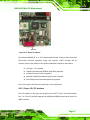
The integrated AC'97 v2.3 compliant audio controller is interfaced to a Realtek ALC655
audio codec. The Realtek ALC655 is in turn connected to two external audio jacks.
2.5.2.1 Realtek ALC655 AC’97 Audio Codec
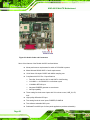
The Realtek ALC655 AC’97 audio codec is a 16-bit, full-duplex AC'97 Rev. 2.3 compatible
six-channel audio codec and is interfaced to two external audio jacks. The codec and the
audio connectors are shown in Figure 2-8.
754H6
Page 19
KINO-6612 Mini-ITX Motherboard
Figure 2-8: Audio Codec and Connectors
Some of the features of the Realtek ALC655 are listed below:
Meets performance requirements for audio on PC99/2001 systems
Meets Microsoft WHQL/WLP 2.0 audio requirements
16-bit Stereo full-duplex CODEC with 48KHz sampling rate
Compliant with AC'97 Rev 2.3 specifications
o
o
o
o
o
Front-Out, Surround-Out, MIC-In and LINE-In Jack Sensing
14.318MHz -> 24.576MHz PLL to eliminate crystal
12.288MHz BITCLK input
Integrated PCBEEP generator to save buzzer
Interrupt capability
Three analog line-level stereo inputs with 5-bit volume control, LINE_IN, CD,
AUX
High-quality differential CD input
Two analog line-level mono inputs: PCBEEP, PHONE-IN
Two software selectable MIC inputs
Dedicated Front-MIC input for front panel applications (software selectable)
Page 20
KINO-6612 Mini-ITX Motherboard
Boost preamplifier for MIC input
LINE input shared with surround output; MIC input shared with Center and
LFE output
Built-in 50mW/20ohm amplifier for both Front-out and Surround-Out
External Amplifier Power Down (EAPD) capability
Power management and enhanced power saving features
Supports Power-Off CD function
Adjustable VREFOUT control
Supports 48KHz S/PDIF output, complying with AC'97 Rev 2.3 specifications
Supports 32K/44.1K/48KHz S/PDIF input
Power support: Digital: 3.3V; Analog: 3.3V/5V
Standard 48-pin LQFP package
EAX™ 1.0 & 2.0 compatible
Direct Sound 3D™ compatible
A3D™ compatible
I3DL2 compatible
HRTF 3D positional audio
10-band software equalizer SIS964 PCIe x1 Bus
2.5.3 SiS964 IDE Controllers
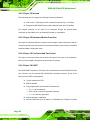
One 40-pin IDE connector and one 44-pin IDE connector on the KINO-6612 connect to
four IDE devices and are directly interfaced to an IDE Master and IDE Slave controller on
the SIS964 Southbridge chipset. The controllers support PIO mode 0, 1, 2, 3, 4 and hard
drives with the following specifications.
Ultra ATA/133, with data transfer rates up to 133MB/s
Ultra ATA/100, with data transfer rates up to 100MB/s
Ultra ATA/66, with data transfer rates up to 66MB/s
Ultra ATA/33, with data transfer rates up to 33MB/s
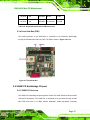
The IDE connector is shown in Figure 2-9 below.
75H
Page 21
KINO-6612 Mini-ITX Motherboard
Figure 2-9: IDE Connector
2.5.4 SiS964 LPC host bus controller
The SIS964 Southbridge LPC interface complies with the LPC 1.1 specifications. The LPC
bus from the Southbridge is connected to the following components:
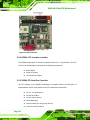
BIOS chipset
Super I/O chipset
LPC Serial Port Chipset
2.5.5 SiS964 PCI Host Bus Controller
The PCI interface on the SIS964 Southbridge is compliant with the PCI Revision 2.3
implementation. Some of the features of the PCI interface are listed below.
PCI rev. 2.3 specifications
PCI bus at 33 MHz
Up to 6 master devices
40-bit addressing
Interrupt steering for plug-n-play devices
Concurrent PCI operations
Page 22
KINO-6612 Mini-ITX Motherboard
Hiding of PCI devices by BIOS/hardware
Spread spectrum
2.5.6 SiS694 Real Time Clock
The SiS964 Real Time clock has 512B CMOS SRAM.
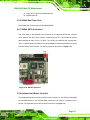
2.5.7 SIS964 SATA Controllers
Two SATA ports on the KINO-6612 are interfaced to an integrated SATA Host controller
on the SiS964. The SATA Host controller complies with SATA 1.0 specifications and has
data transmission rates of up to 1.5 Gbps. The SATA host controller also complies with
AHCI 1.0 specification with software providing transparent switching between the legacy
interface and the AHCI interface. The SATA connectors are shown in Figure 2-10.
756H8
Figure 2-10: SATA Connectors
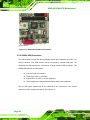
2.5.8 Keyboard and Mouse Controller
The hardwired keyboard controller and PS/2 mouse interface on the SiS964 Southbridge
are interfaced directly to two external PS/2 connectors one each for a keyboard and a
mouser. The keyboard and mouse connectors are shown in Figure 2-11.
75H9
Page 23
KINO-6612 Mini-ITX Motherboard
Figure 2-11: Keyboard and Mouse Connectors
2.5.9 SIS964 USB Controllers
The USB controllers on the SiS 964 Southbridge chipset are interfaced to six USB 1.1 or
USB 2.0 devices. Four USB devices can be connected to external USB ports. The
remaining two USB devices are connected to a single onboard USB connectors. The
SiS964 USB features are listed below:
One EHCI USB 2.0 controller
Three OHCI USB 1.1 controllers
Eight USB 2.0 or USB 1.1 devices supported
USB 2.0 high-speed devices with 480 Mb/s transfer rates supported
The six USB ports implemented on the KINO-6612 are connected to one internal
connector and four external connectors. See Figure 2-12.
758H60
Page 24
KINO-6612 Mini-ITX Motherboard
Figure 2-12: USB Connectors
2.6 LPC Bus Components
2.6.1 LPC Bus Overview
The SIS964 LPC bus is connected to components listed below:
BIOS chipset
Super I/O chipset
LPC Serial Port Chipset
2.6.2 BIOS Chipset
The BIOS chipset has a licensed copy of AMI BIOS installed on the chipset. Some of the
BIOS features are listed below:
AMI Flash BIOS
SMIBIOS (DMI) compliant
Console redirection function support
PXE (Pre-boot Execution Environment) support
USB booting support
Page 25
KINO-6612 Mini-ITX Motherboard
The BIOS chipset is shown in Figure 2-13 below.
759H61
Figure 2-13: BIOS Chipset
2.6.3 Winbond W83697HF Super I/O chipset
The Winbond W83697HF Super I/O chipset is connected to the SiS964 Southbridge
through the LPC bus.
Page 26
KINO-6612 Mini-ITX Motherboard
Figure 2-14: Super I/O Chipset
The Winbond W83697HF is an LPC interface-based Super I/O device that comes with
Environment Controller integration, floppy disk controller, UART controller and IR
controller. Some of the features of the Winbond W83697HF chipset are listed below:
LPC Spec. 1.01 compliant
LDRQ# (LPC DMA) and SERIRQ (serial IRQ) supported
Hardware monitor functions integrated
Microsoft PC98/PC99 Hardware Design Guide compliant
ACPI DPM (Device Power Management) supported
Some of the Super I/O features are described in more detail below:
2.6.3.1 Super I/O LPC Interface
The LPC interface on the Super I/O complies with the Intel® Low Pin Count Specification
Rev. 1.01. The LPC interface supports both LDRQ# and SERIRQ protocols as well as PCI
PME# interfaces.
Page 27
KINO-6612 Mini-ITX Motherboard
2.6.3.2 Super I/O Infrared
The onboard Super I/O supports the following infrared specifications:
IrDA version 1.0 SIR protocol with a maximum baud rate up to 115.2Kbps
Supports SHARP ASK-IR protocol with maximum baud rate of 57,600bps
The infrared controller on the super I/O is interfaced through the board-to-board
connectors on the KINO-6612 to an infrared pin-header on a backplane.
2.6.3.3 Super I/O Hardware Monitor Functions
The Super I/O Hardware Monitor monitors internal voltages, system temperature and the
cooling fan speed. All the monitored environmental parameters can be read from the BIOS
Hardware Health Configuration menu.
2.6.3.4 Super I/O Fan Speed and Fan Control
The super I/O can both monitor and control the fan speed. The super I/O is interfaced to
the fan on the backplane through the board-to-board connectors.
2.6.3.5 Super I/O UART
Two 16550 UART controllers on the super I/O are interfaced to one external RS-232 serial
port connector and one onboard RS-232/422/485 pin-header connector. Some of the
features of the UART are listed below:
16-byte send/receive FIFO
MIDI compatible
Fully programmable serial interface characteristics
o
o
o
5, 6, 7 or 8 bit characters
Even, odd or no parity bit generation detection
1, 1.5 or 2 bits stop generation
Internal diagnostic capabilities
Maximum baud rate up to 921 kbps for 14.769 MHz and 1.5 Mbps for 24 MHz
Page 28
KINO-6612 Mini-ITX Motherboard
2.6.4 Fintek F81216D LPC Serial Port Chipset
The KINO-6612 has a Fintek F81216D chipset onboard that enables the addition of four
additional UART serial ports (COM3, COM4, COM5 and COM6). UART includes 16-byte
send/receive FIFO. The Fintek serial port chipset is interfaced to the Southbridge chipset
through the LPC bus. Some of the features of the Fintek chipset are listed below:
Supports LPC interface
Totally provides 4 UART (16550 asynchronous) ports
o
o
1 x Pure UART
1 x UART+IR
One Watch dog timer with WDTOUT# signal
One Frequency input 24/48MHz
Powered by 3Vcc
The Fintek is interfaced to four RS-232 onboard serial port connectors.
2.7 PCI Bus Components
2.7.1 PCI Bus Overview
The PCI interface on the SIS964 Southbridge is compliant with the PCI Revision 2.3
implementation. Some of the features of the PCI interface are listed below.
PCI rev. 2.3 specifications
PCI bus at 33 MHz
Up to 6 master devices
40-bit addressing
Interrupt steering for plug-n-play devices
Concurrent PCI operations
Hiding of PCI devices by BIOS/hardware
Spread spectrum
LPC Serial Port Chipset
The PCI bus is connected to the following components:
1 x PCI slot
Page 29
KINO-6612 Mini-ITX Motherboard
2 x PCI GbE controllers
2.7.2 PCI Slot
One PCI lanes is connected to a single PCI slot for PCI expansion. See Figure 2-15
760H2
below.
Figure 2-15: PCI Slot
2.7.3 PCI GbE Controllers
Two PCI lanes are connected to two Realtek RTL8110SC GbE controllers shown in
Figure 2-16 below.
761H3
Page 30
KINO-6612 Mini-ITX Motherboard
Figure 2-16: Realtek PCI GbE Controllers
The Realtek RTL8110SC PCI GbE controllers combine a triple-speed IEEE 802.3
compliant Media Access Controller (MAC) with a triple-speed Ethernet transceiver, 32-bit
PCI bus controller, and embedded memory. With state-of-the-art DSP technology and
mixed-mode signal technology, they offer high-speed transmission over CAT 5 UTP cable
or CAT 3 UTP (10Mbps only) cable. Functions such as Crossover Detection &
Auto-Correction, polarity correction, adaptive equalization, cross-talk cancellation, echo
cancellation, timing recovery, and error correction are implemented to provide robust
transmission and reception capability at high speeds.
Some of the features of the Realtek RTL8110SC PCI GbE controllers are listed below.
Integrated 10/100/1000 transceiver
Auto-Negotiation with Next Page capability
Supports PCI rev.2.3, 32-bit, 33/66MHz
Page 31
KINO-6612 Mini-ITX Motherboard
Supports pair swap/polarity/skew correction
Crossover Detection & Auto-Correction
Wake-on-LAN and remote wake-up support
Microsoft® NDIS5 Checksum Offload (IP, TCP, UDP) and largesend offload
support
Supports Full Duplex flow control (IEEE 802.3x)
Fully compliant with IEEE 802.3, IEEE 802.3u, IEEE 802.3ab
Supports IEEE 802.1P Layer 2 Priority Encoding
Supports IEEE 802.1Q VLAN tagging
Serial EEPROM
3.3/1.8/1.5V signaling, 5V PCI I/O tolerant
0.15µm CMOS process
Transmit/Receive FIFO (8K/64K) support
Supports power down/link down power saving
Supports PCI Message Signaled Interrupt (MSI)
2.8 Environmental and Power Specifications
2.8.1 System Monitoring
Two thermal inputs on the KINO-6612 Super I/O Enhanced Hardware Monitor monitor the
following temperatures:
System temperature
CPU temperature
Eight voltage inputs on the KINO-6612 Super I/O Enhanced Hardware Monitor monitor the
following voltages:
Vcore
+3.3Vin
+5.0Vin
+12.0Vin
Page 32
KINO-6612 Mini-ITX Motherboard
The KINO-6612 Super I/O Enhanced Hardware Monitor also monitors the following fan
speeds:
CPU Fan speed
The values for the above environmental parameters are all recorded in the BIOS
Hardware Health Configuration menu.
2.8.2 Operating Temperature and Temperature Control
The maximum and minimum operating temperatures for the KINO-6612 are listed below.
Minimum Operating Temperature: 0ºC (32°F)
Maximum Operating Temperature: 60°C (140°F)
A cooling fan and heat sink must be installed on the CPU. Thermal paste must be
smeared on the lower side of the heat sink before it is mounted on the CPU. Heat sinks
are also mounted on the northbridge and southbridge chipsets to ensure the operating
temperature of these chips remain low.
2.8.3 Power Consumption
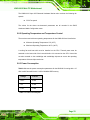
Table 2-3 shows the power consumption parameters for the KINO-6612 running with a 1.5
762H4
GHz Intel® Celeron® M with 1.0 GB of 400MHz DDR memory.
Voltage
Current
+3.3V
0.92A
+5V
3.79A
+12V
1.44A
Table 2-3: Power Consumption
Page 33
KINO-6612 Mini-ITX Motherboard
Chapter
3
3 Unpacking
Page 34
KINO-6612 Mini-ITX Motherboard
3.1 Anti-static Precautions
WARNING!
Failure to take ESD precautions during the installation of the
KINO-6612 may result in permanent damage to the KINO-6612 and
severe injury to the user.
Electrostatic discharge (ESD) can cause serious damage to electronic components,
including the KINO-6612. Dry climates are especially susceptible to ESD. It is therefore
critical that whenever the KINO-6612, or any other electrical component is handled, the
following anti-static precautions are strictly adhered to.
Wear an anti-static wristband: - Wearing a simple anti-static wristband can
help to prevent ESD from damaging the board.
Self-grounding:- Before handling the board touch any grounded conducting
material. During the time the board is handled, frequently touch any
conducting materials that are connected to the ground.
Use an anti-static pad: When configuring the KINO-6612, place it on an
antic-static pad. This reduces the possibility of ESD damaging the
KINO-6612.
Only handle the edges of the PCB:- When handling the PCB, hold the PCB
by the edges.
3.2 Unpacking
3.2.1 Unpacking Precautions
When the KINO-6612 is unpacked, please do the following:
Follow the anti-static precautions outlined in Section 3.1.
763H5
Make sure the packing box is facing upwards so the KINO-6612 does not fall
out of the box.
Make sure all the components shown in Section 3.3 are present.
764H
Page 35
KINO-6612 Mini-ITX Motherboard
3.3 Unpacking Checklist
NOTE:
If any of the components listed in the checklist below are missing, do
not proceed with the installation. Contact the IEI reseller or vendor the
KINO-6612 was purchased from or contact an IEI sales representative
directly by sending an email to [email protected].
326H7
3.3.1 Package Contents
The KINO-6612 is shipped with the following components:
Quantity
Item and Part Number
1
KINO-6612
1
40p/40p/40p HDD flat cable
(P/N: 32200-000052-RS)
1
44p/44p HDD cable flat cable
(P/N: 32200-000009-RS)
2
SATA cable
(P/N: 32000-062800-RS)
1
SATA power cable
(P/N: 32100-088600-RS)
Page 36
Image
KINO-6612 Mini-ITX Motherboard
2
Dual RS-232 cable
(P/N: 32200-028401-RS)
1
I/O Shielding
(P/N: 45002-450903-00-RS)
1
Mini jumper pack (2.0mm)
(P/N:33100-000033-RS)
1
Utility CD
1
Quick Installation Guide
3.3.2 Optional Items
The KINO-6612 is shipped with the following components:
Item and Part Number
Image
TV Out Cable
(P/N:19800-000056-RS)
CPU cooler
(P/N: CF-479B-RS)
Page 37
KINO-6612 Mini-ITX Motherboard
Dual RS-232 cable
(P/N: 32200-000077-RS)
Dual USB cable (w bracket)
(P/N: CB-USB02-RS)
Page 38
KINO-6612 Mini-ITX Motherboard
Chapter
4
4 Connectors
Page 39
KINO-6612 Mini-ITX Motherboard
4.1 Peripheral Interface Connectors
Section 4.2 shows peripheral interface connector locations. Section 4.2 lists all the
765H
76H8
peripheral interface connectors seen in Section 4.2.
76H9
4.1.1 KINO-6612 Layout
Figure 4-1 shows the on-board peripheral connectors, rear panel peripheral connectors
768H0
and on-board jumpers.
Page 40
KINO-6612 Mini-ITX Motherboard
Figure 4-1: Connector and Jumper Locations
4.2 Peripheral Interface Connectors
Table 4-1 shows a list of the peripheral interface connectors on the KINO-6612. Detailed
769H1
descriptions of these connectors can be found below.
Page 41
KINO-6612 Mini-ITX Motherboard
Connector
Type
Label
ATX power connector (20-pin)
20-pin ATX connector
J12
Backlight inverter connector
5-pin wafer
INV1
CF Type II socket
50-pin socket
CF1
GPIO connector
10-pin header
DIO1
Fan connector, CPU
3-pin wafer
FAN1
Fan connector, system
3-pin wafer
FAN2
Front panel connector
14-pin header
F_PANEL1
Front panel connector
14-pin header
F_PANEL2
Hard disk drive (HDD) connector
40-pin box header
IDE1
Hard disk drive (HDD) connector
44-pin box header
IDE2
Infrared connector
5-pin header
IR1
LVDS connector
30-pin crimp
LVDS1
PCI slot
128-pin slot
PCI1
Serial ATA (SATA) connector
7-pin SATA connector
SATA1
Serial ATA (SATA) connector
7-pin SATA connector
SATA2
Serial port connector (RS-232/422/485)
14-pin header
COM2
Serial port connector (RS-232)
10-pin header
COM3
Serial port connector (RS-232)
10-pin header
COM4
Serial port connector (RS-232)
10-pin header
COM5
Serial port connector (RS-232)
10-pin header
COM6
Page 42
KINO-6612 Mini-ITX Motherboard
TV out connector
6-pin header
TV1
USB connector
8-pin header
JUSB1
Table 4-1: Peripheral Interface Connectors
4.2.1 External Interface Panel Connectors
Table 4-2 lists the rear panel connectors on the KINO-6612. Detailed descriptions of these
70H2
connectors can be found in Section 4.4 on page 66.
71H3
Connector
72H4
Type
Label
Audio connector
Dual audio jacks
AUDIO1
Ethernet connector
RJ-45
LAN1
Ethernet connector
RJ-45
LAN2
Keyboard/mouse
Dual PS/2
KB/MS1
Parallel port
Female DB-26
LPT1
RS-232 serial port connector
Male DB-9
COM1
USB port
USB port
USB1
USB port
USB port
USB2
Page 43
KINO-6612 Mini-ITX Motherboard
USB port
USB port
USB3
USB port
USB port
USB4
VGA port connector
15-pin female
VGA
Table 4-2: Rear Panel Connectors
4.3 Internal Peripheral Connectors
Internal peripheral connectors are found on the motherboard and are only accessible
when the motherboard is outside of the chassis. This section has complete descriptions of
all the internal, peripheral connectors on the KINO-6612.
4.3.1 ATX Power Connector (20-pin)
CN Label:
J12
CN Type:
20-pin ATX (2x10)
CN Location:
See Figure 4-2
CN Pinouts:
See Table 4-3
73H5
74H6
The ATX connector is connected to an external ATX power supply. Power is provided to
the system, from the power supply through this connector.
Page 44
KINO-6612 Mini-ITX Motherboard
Figure 4-2: ATX Power Connector (20-pin) Pinout Locations
PIN NO.
DESCRIPTION
PIN NO.
DESCRIPTION
1
NC
11
NC
2
NC
12
N/C
3
GND
13
GND
4
VCC5
14
PSON-
5
GND
15
GND
6
VCC5
16
GND
7
GND
17
GND
8
PWOK
18
N/C
9
SB5V
19
VCC5
10
+12V
20
VCC5
Table 4-3: ATX Power Connector (20-pin) Pinouts
4.3.2 Backlight Inverter Connector
CN Label:
INV1
CN Type:
5-pin wafer (1x5)
Page 45
KINO-6612 Mini-ITX Motherboard
CN Location:
See Figure 4-3
CN Pinouts:
See Table 4-4
75H
76H8
The backlight inverter connector provides the backlight on the LCD display connected to
the KINO-6612 with +12V of power.
Figure 4-3: Panel Backlight Connector Pinout Locations
PIN NO.
DESCRIPTION
1
N/C
2
GROUND
3
+12V
4
GROUND
5
BACKLIGHT ENABLE
Table 4-4: Panel Backlight Connector Pinouts
4.3.3 Fan Connectors (+12V, 3-pin)
CN Label:
FAN1, FAN2
CN Type:
3-pin header
CN Location:
See Figure 4-4
CN Pinouts:
See Table 4-5
Page 46
7H9
78H0
KINO-6612 Mini-ITX Motherboard
The cooling fan connectors provide a 12V, 500mA current to two cooling fans. The
connector has a "rotation" pin to get rotation signals from fans and notify the system so the
system BIOS can recognize the fan speed. Please note that only specified fans can issue
the rotation signals.
Figure 4-4: +12V Fan Connector Location
PIN NO.
DESCRIPTION
1
Fan Speed Detect
2
+12V
3
GND
Table 4-5: +12V Fan Connector Pinouts
Page 47
KINO-6612 Mini-ITX Motherboard
4.3.4 Front Panel Connector (14-pin)
CN Label:
F_PANEL1, F_PANEL2
CN Type:
14-pin header (2x7)
CN Location:
See Figure 4-5
CN Pinouts:
See Table 4-6
79H81
780H2
The front panel connector connects to external switches and indicators to monitor and
controls the motherboard. These indicators and switches include:
Power button
Reset button
Power LED
HDD LED
Figure 4-5: Front Panel Connector Pinout Locations
FUNCTION
PIN
DESCRIPTION
FUNCTION
PIN
DESCRIPTION
Power LED
1
+5V
Speaker
2
+5V
3
N/C
4
N/C
5
Ground
6
N/C
7
PWRBTN-
8
Speaker
Power
Page 48
KINO-6612 Mini-ITX Motherboard
Button
9
GND
HDD LED
11
13
Reset
10
N/C
+5V
12
Reset-
HDD LED-
14
GND
Table 4-6: Front Panel Connector Pinouts
4.3.5 GPIO Connector
CN Label:
CN14
CN Type:
10-pin header (2x5)
CN Location:
See Figure 4-6
CN Pinouts:
See Table 4-7
781H3
782H4
The GPIO connector can be connected to external I/O control devices including sensors,
lights, alarms and switches.
Figure 4-6: GPIO Connector Pinout Locations
PIN NO.
DESCRIPTION
PIN NO.
DESCRIPTION
1
GND
2
5V
3
GPI0
4
GPI1
Page 49
KINO-6612 Mini-ITX Motherboard
5
GPI2
6
GPI3
7
GPO0
8
GPO1
9
GPO2
10
GPO3
Table 4-7: GPIO Connector Pinouts
4.3.6 IDE Connector (40-pin)
CN Label:
IDE1
CN Type:
40-pin header (2x20)
CN Location:
See Figure 4-7
CN Pinouts:
See Table 4-8
783H5
784H6
One 40-pin IDE device connector on the KINO-6612 supports connectivity to two hard disk
drives.
Page 50
KINO-6612 Mini-ITX Motherboard
Figure 4-7: IDE Device Connector Locations
PIN NO.
DESCRIPTION
PIN NO.
DESCRIPTION
1
RESET#
2
GROUND
3
DATA 7
4
DATA 8
5
DATA 6
6
DATA 9
7
DATA 5
8
DATA 10
9
DATA 4
10
DATA 11
11
DATA 3
12
DATA 12
13
DATA 2
14
DATA 13
15
DATA 1
16
DATA 14
17
DATA 0
18
DATA 15
19
GROUND
20
N/C
21
IDE DRQ
22
GROUND
23
IOW#
24
GROUND
25
IOR#
26
GROUND
27
IDE CHRDY
28
GROUND
29
IDE DACK
30
GROUND–DEFAULT
31
INTERRUPT
32
N/C
33
SA1
34
N/C
Page 51
KINO-6612 Mini-ITX Motherboard
35
SA0
36
SA2
37
HDC CS0#
38
HDC CS1#
39
HDD ACTIVE#
40
GROUND
Table 4-8: IDE Connector Pinouts
4.3.7 IDE Connector(44-pin)
CN Label:
IDE2
CN Type:
44-pin header (2x22)
CN Location:
See Figure 4-8
CN Pinouts:
See Table 4-9
785H
786H
One 44-pin IDE device connector on the KINO-6612 supports connectivity to two hard disk
drives.
Page 52
KINO-6612 Mini-ITX Motherboard
Figure 4-8: Secondary IDE Device Connector Locations
PIN NO.
DESCRIPTION
PIN NO.
DESCRIPTION
1
RESET#
2
GROUND
3
DATA 7
4
DATA 8
5
DATA 6
6
DATA 9
7
DATA 5
8
DATA 10
9
DATA 4
10
DATA 11
11
DATA 3
12
DATA 12
13
DATA 2
14
DATA 13
15
DATA 1
16
DATA 14
17
DATA 0
18
DATA 15
19
GROUND
20
N/C
21
IDE DRQ
22
GROUND
23
IOW#
24
GROUND
25
IOR#
26
GROUND
27
IDE CHRDY
28
GROUND
29
IDE DACK
30
GROUND–DEFAULT
31
INTERRUPT
32
N/C
Page 53
KINO-6612 Mini-ITX Motherboard
33
SA1
34
N/C
35
SA0
36
SA2
37
HDC CS0#
38
HDC CS1#
39
HDD ACTIVE#
40
GROUND
41
VCC
42
VCC
43
GROUND
44
N/C
Table 4-9: Secondary IDE Connector Pinouts
4.3.8 Infrared Interface Connector (5-pin)
CN Label:
IR1
CN Type:
5-pin header (1x5)
CN Location:
See Figure 4-9
CN Pinouts:
See Table 4-10
78H9
78H90
The infrared interface connector supports both Serial Infrared (SIR) and Amplitude Shift
Key Infrared (ASKIR) interfaces.
Figure 4-9: Infrared Connector Pinout Locations
PIN NO.
1
Page 54
DESCRIPTION
VCC
KINO-6612 Mini-ITX Motherboard
2
NC
3
IR-RX
4
GND
5
IR-TX
Table 4-10: Infrared Connector Pinouts
4.3.9 LVDS LCD Connector
CN Label:
LVDS1
CN Type:
30-pin crimp (2x10)
CN Location:
See Figure 4-10
CN Pinouts:
See Table 4-11
789H1
790H2
The 30-pin LVDS LCD connector can be connected to single channel or dual channel,
18-bit or 36-bit LVDS panel.
Figure 4-10: LVDS LCD Connector Pinout Locations
PIN NO. DESCRIPTION
PIN NO. DESCRIPTION
1
GND
2
GND
3
A0P
4
A0M
Page 55
KINO-6612 Mini-ITX Motherboard
5
A1P
6
A1M
7
A2P
8
A2M
9
CLK1P
10
CLK1M
11
A3P
12
A3M
13
GND
14
GND
15
A4P
16
A4M
17
A5P
18
A5M
19
A6P
20
A6M
21
CLK2P
22
CLK2M
23
A7P
24
A7M
25
GND
26
GND
27
LCD_VDD
28
LCD_VDD
29
LCD_VDD
30
LCD_VDD
Table 4-11: LVDS LCD Port Connector Pinouts
4.3.10 PCI Slot
CN Label:
PCI1
CN Type:
PCI Slot
CN Location:
See Figure 4-11
CN Pinouts:
See Table 4-12
791H3
792H4
The PCI slot enables a PCI expansion module to be connected to the board.
Page 56
KINO-6612 Mini-ITX Motherboard
Figure 4-11: PCI Slot Location
PIN NO.
DESCRIPTION
PIN NO.
DESCRIPTION
A1
TRST
B1
-12V
A2
+12V
B2
TCK
A3
TMS
B3
GND
A4
TDI
B4
TDO
A5
+5V
B5
+5V
A6
INTA
B6
+5V
A7
INTC
B7
INTB
A8
+5V
B8
INTD
A9
RESERVED3
B9
PRSNT1
A10
+5V
B10
RESERVED1
A11
RESERVED4
B11
PRSNT2
A12
GND
B12
GND
A13
GND
B13
GND
Page 57
KINO-6612 Mini-ITX Motherboard
A14
3.3V_AUX
B14
RESERVED2
A15
RST
B15
GND
A16
+5V
B16
CLK
A17
GNT
B17
GND
A18
GND
B18
REQ
A19
PME
B19
+5V
A20
AD30
B20
AD31
A21
+3.3V
B21
AD29
A22
AD28
B22
GND
A23
AD26
B23
AD27
A24
GND
B24
AD25
A25
AD24
B25
+3.3V
A26
IDSEL
B26
C/BE3
A27
+3.3V
B27
AD23
A28
AD22
B28
GND
A29
AD20
B29
AD21
A30
GND
B30
AD19
A31
AD18
B31
+3.3V
A32
AD16
B32
AD17
A33
+3.3V
B33
C/BE2
A34
FRAME
B34
GND
A35
GND
B35
IRDY
A36
TRDY
B36
+3.3V
A37
GND
B37
DEVSEL
A38
STOP
B38
GND
A39
+3.3V
B39
LOCK
A40
SDONE
B40
PERR
A41
SBO
B41
+3.3V
A42
GND
B42
SERR
A43
PAR
B43
+3.3V
A44
AD15
B44
C/BE1
A45
+3.3V
B45
AD14
Page 58
KINO-6612 Mini-ITX Motherboard
A46
AD13
B46
GND
A47
AD11
B47
AD12
A48
GND
B48
AD10
A49
AD9
B49
GND
A52
C/BE0
B52
AD8
A53
+3.3V
B53
AD7
A54
AD6
B54
+3.3V
A55
AD4
B55
AD5
A56
GND
B56
AD3
A57
AD2
B57
GND
A68
AD0
B68
AD1
A59
+5V
B59
+5V
A60
REQ64
B60
ACK64
A61
+5V
B61
+5V
A62
+5V
B62
+5V
Table 4-12: PCI Slot
4.3.11 SATA Drive Connectors
CN Label:
SATA1, SATA2
CN Type:
7-pin SATA drive connectors
CN Location:
See Figure 4-12
CN Pinouts:
See Table 4-13
793H5
794H6
The four SATA drive connectors are each connected to a first generation SATA drive. First
generation SATA drives transfer data at speeds as high as 150Mb/s. The SATA drives can
be configured in a RAID configuration.
Page 59
KINO-6612 Mini-ITX Motherboard
Figure 4-12: SATA Drive Connector Locations
PIN NO. DESCRIPTION
1
GND
2
TX+
3
TX-
4
GND
5
RX-
6
RX+
7
GND
Table 4-13: SATA Drive Connector Pinouts
Page 60
KINO-6612 Mini-ITX Motherboard
4.3.12 Serial Port Connectors (COM 3, COM4, COM5 and COM6)
CN Label:
COM 3, COM4, COM5 and COM6
CN Type:
10-pin header (2x5)
CN Location:
See Figure 4-13
CN Pinouts:
See Table 4-14
795H
796H8
The 10-pin serial port connector provides a second RS-232 serial communications
channel. The COM serial port connectors can be connected to external RS-232 serial port
devices.
Figure 4-13: COM Connector Pinout Locations
Page 61
KINO-6612 Mini-ITX Motherboard
PIN NO.
DESCRIPTION
PIN NO.
DESCRIPTION
1
Data Carrier Direct (DCD)
2
Data Set Ready (DSR)
3
Receive Data (RXD)
4
Request To Send (RTS)
5
Transmit Data (TXD)
6
Clear To Send (CTS)
7
Data Terminal Ready (DTR)
8
Ring Indicator (RI)
9
Ground (GND)
10
N/C
Table 4-14: COM Connector Pinouts
4.3.13 Serial Port Connector (COM 2)(RS-232, RS-422 or RS-485)
CN Label:
COM2
CN Type:
14-pin header (2x7)
CN Location:
See Figure 4-14
CN Pinouts:
See Table 4-15
79H
798H0
The 14-pin serial port connector connects to the COM2 serial communications channels.
COM2 is a multi function channel. In default mode COM2 is an RS-232 serial
communication channel but, with the COM2 function select jumper, can be configured as
either an RS-422 or RS-485 serial communications channel.
Page 62
KINO-6612 Mini-ITX Motherboard
Figure 4-14: RS-232/422/485 Serial Port Connector Location
PIN NO.
DESCRIPTION
PIN NO.
DESCRIPTION
1
NDCD
8
NDSR
2
NRX
9
NRTS
3
NTX
10
NCTS2
4
NDTR
11
NRI
5
GND
12
GND
6
TX+
13
TX-
7
RX+
14
RX-
Table 4-15: RS-232/RS-485 Serial Port Connector Pinouts
Page 63
KINO-6612 Mini-ITX Motherboard
4.3.14 TV Out Connector
CN Label:
TV1
CN Type:
6-pin header (2x3)
CN Location:
See Figure 4-15
CN Pinouts:
See Table 4-16
79H801
80H2
The 2x3 pin TV out connector connects to a TV output by using an S-Video or RCA
connector. The TV out connector makes displaying media data on a television easier.
Figure 4-15: TV Connector Pinout Locations
PIN NO. DESCRIPTION PIN NO. DESCRIPTION
1
GND
2
IOY
3
GND
4
IOC
5
GND
6
IOCOMP
Table 4-16: TV Port Connector Pinouts
Page 64
KINO-6612 Mini-ITX Motherboard
4.3.15 USB Connectors (Internal)
CN Label:
JUSB1
CN Type:
8-pin header (2x4)
CN Location:
See Figure 4-16
CN Pinouts:
See Table 4-17
801H3
802H4
The 2x4 USB pin connectors each provide connectivity to two USB 1.1 or two USB 2.0
ports. Each USB connector can support two USB devices.. Additional external USB ports
are found on the rear panel. The USB ports are used for I/O bus expansion.
Figure 4-16: USB Connector Pinout Locations
Page 65
KINO-6612 Mini-ITX Motherboard
PIN NO. DESCRIPTION PIN NO. DESCRIPTION
1
VCC
2
GND
3
DATAN-
4
DATA1M-
5
DATAN+
6
DATAM+
7
GND
8
VCC
Table 4-17: USB Port Connector Pinouts
4.4 External Peripheral Interface Connector Panel
Figure 4-17 shows the KINO-6612 external peripheral interface connector (EPIC) panel.
803H5
The KINO-6612 EPIC panel consists of the following:
2 x Audio jack connectors
2 x RJ-45 LAN connectors
2 x PS/2 connectors
1 x Serial port connectors
1 x Parallel port connector
4 x USB connectors
1 x VGA connector
Figure 4-17: KINO-6612 External Peripheral Interface Connector
Page 66
KINO-6612 Mini-ITX Motherboard
4.4.1 Audio Connector
CN Label:
AUDIO1
CN Type:
2 x audio jacks
CN Location:
See Figure 4-17
804H6
The three audio jacks on the external audio connector enable the KINO-6612 to be
connected to external audio devices as specified below.
Line Out port (Lime): Connects to a headphone or a speaker. With
multi-channel configurations, this port can also connect to front speakers.
Microphone (Pink): Connects a microphone.
Figure 4-18: Audio Connector
Page 67
KINO-6612 Mini-ITX Motherboard
4.4.2 Keyboard/Mouse Connector
CN Label:
KB/MS1
CN Type:
Dual PS/2
CN Location:
See Figure 4-17
CN Pinouts:
See Figure 4-19 and Table 4-18
805H7
806H
807H9
The KINO-6612 keyboard and mouse connectors are standard PS/2 connectors.
Figure 4-19: PS/2 Pinouts
Page 68
KINO-6612 Mini-ITX Motherboard
PIN
DESCRIPTION
PIN
DESCRIPTION
1
L_KDAT
7
L_MDAT
2
NC
8
NC
3
GND
9
GND
4
5V
10
5V
5
L_KCLK
11
L_MCLK
6
NC
12
NC
Table 4-18: PS/2 Connector Pinouts
4.4.3 LAN Connectors
CN Label:
LAN1A and LAN2A
CN Type:
RJ-45
CN Location:
See Figure 4-17
CN Pinouts:
See Table 4-19
80H1
809H1
The KINO-6612 is equipped with two built-in RJ-45 Ethernet controllers. The controllers
can connect to the LAN through two RJ-45 LAN connectors. There are two LEDs on the
connector indicating the status of LAN. The pin assignments are listed in the following
table:
Page 69
KINO-6612 Mini-ITX Motherboard
PIN
DESCRIPTION
PIN
DESCRIPTION
1
TXA+
5
TXC-
2
TXA-
6
TXB-
3
TXB+
7
TXD+
4
TXC+
8
TXD-
Table 4-19: LAN Pinouts
Figure 4-20: RJ-45 Ethernet Connector
The RJ-45 Ethernet connector has two status LEDs, one green and one yellow. The green
LED indicates activity on the port and the yellow LED indicates the port is linked. See
Table 4-20.
810H2
STATUS
DESCRIPTION
GREEN
Activity
STATUS
YELLOW
DESCRIPTION
Linked
Table 4-20: RJ-45 Ethernet Connector LEDs
4.4.4 Serial Port Connector (COM1)
CN Label:
COM1
CN Type:
DB-9 connectors
CN Location:
See Figure 4-17 (see 2)
CN Pinouts:
See Table 4-21 and Figure 4-21
81H3
812H4
813H5
The 9-pin DB-9 serial port connectors are connected to RS-232 serial communications
devices.
Page 70
KINO-6612 Mini-ITX Motherboard
PIN NO. DESCRIPTION PIN NO. DESCRIPTION
1
DCD
6
DSR
2
RX
7
RTS
3
TX
8
CTS
4
DTR
9
RI
5
GND
Table 4-21: RS-232 Serial Port (COM 1) Pinouts
Figure 4-21: COM1 Pinout Locations
4.4.5 USB Connectors
CN Label:
USB1, USB2, USB3, USB4
CN Type:
USB port
CN Location:
See Figure 4-17
CN Pinouts:
See Table 4-22
814H6
815H7
The KINO-6612 has four external USB 2.0 ports. The ports connect to both USB 2.0 and
USB 1.1 devices.
Page 71
KINO-6612 Mini-ITX Motherboard
PIN NO. DESCRIPTION PIN NO. DESCRIPTION
1
USBV3L 5V
2
GND
3
USBP4N
4
USBP5P
5
USBP4P
6
USBP5N
7
GND
8
USBV3L 5V
Table 4-22: USB Port Pinouts
4.4.6 VGA Connector
CN Label:
VGA1
CN Type:
15-pin Female
CN Location:
See Figure 4-17
CN Pinouts:
See Figure 4-22 and Table 4-23
816H
817H9
81H20
The KINO-6612 has a single 15-pin female connector for connectivity to standard display
devices.
Figure 4-22: VGA Connector
Page 72
KINO-6612 Mini-ITX Motherboard
PIN
DESCRIPTION
PIN
DESCRIPTION
1
RED
2
GREEN
3
BLUE
4
NC
5
GND
6
GND
7
GND
8
GND
9
VCC / NC
10
GND
11
NC
12
DDC DAT
13
HSYNC
14
VSYNC
15
DDCCLK
Table 4-23: VGA Connector Pinouts
Page 73
KINO-6612 Mini-ITX Motherboard
Chapter
5
5 Installation
Page 74
KINO-6612 Mini-ITX Motherboard
5.1 Anti-static Precautions
WARNING:
Failure to take ESD precautions during the installation of the
KINO-6612 may result in permanent damage to the KINO-6612 and
severe injury to the user.
Electrostatic discharge (ESD) can cause serious damage to electronic components,
including the KINO-6612. Dry climates are especially susceptible to ESD. It is therefore
critical that whenever the KINO-6612, or any other electrical component is handled, the
following anti-static precautions are strictly adhered to.
Wear an anti-static wristband: - Wearing a simple anti-static wristband can
help to prevent ESD from damaging the board.
Self-grounding:- Before handling the board touch any grounded conducting
material. During the time the board is handled, frequently touch any
conducting materials that are connected to the ground.
Use an anti-static pad: When configuring the KINO-6612, place it on an
antic-static pad. This reduces the possibility of ESD damaging the
KINO-6612.
Only handle the edges of the PCB:-: When handling the PCB, hold the PCB
by the edges.
Page 75
KINO-6612 Mini-ITX Motherboard
5.2 Installation Considerations
NOTE:
The following installation notices and installation considerations should
be read and understood before the KINO-6612 is installed. All
installation notices pertaining to the installation of the KINO-6612
should be strictly adhered to. Failing to adhere to these precautions
may lead to severe damage of the KINO-6612 and injury to the person
installing the motherboard.
5.2.1 Installation Notices
WARNING:
The installation instructions described in this manual should be carefully
followed in order to prevent damage to the KINO-6612, KINO-6612
components and injury to the user.
Before and during the installation please DO the following:
Read the user manual:
o
The user manual provides a complete description of the KINO-6612
installation instructions and configuration options.
Wear an electrostatic discharge cuff (ESD):
o
Electronic components are easily damaged by ESD. Wearing an ESD cuff
removes ESD from the body and helps prevent ESD damage.
Place the KINO-6612 on an antistatic pad:
o
When installing or configuring the motherboard, place it on an antistatic
pad. This helps to prevent potential ESD damage.
Turn all power to the KINO-6612 off:
Page 76
KINO-6612 Mini-ITX Motherboard
o
When working with the KINO-6612, make sure that it is disconnected from
all power supplies and that no electricity is being fed into the system.
Before and during the installation of the KINO-6612 DO NOT:
Remove any of the stickers on the PCB board. These stickers are required for
warranty validation.
Use the product before verifying all the cables and power connectors are
properly connected.
Allow screws to come in contact with the PCB circuit, connector pins, or its
components.
5.2.2 Installation Checklist
The following checklist is provided to ensure the KINO-6612 is properly installed.
All the items in the packing list are present
The CPU is installed
The CPU cooling kit is properly installed
A compatible memory module is properly inserted into the slot
The CF Type I or CF Type II card is properly installed into the CF socket
The jumpers have been properly configured
The KINO-6612 is inserted into a chassis with adequate ventilation
The correct power supply is being used
The following devices are properly connected
o
o
o
o
o
Primary and secondary IDE device
SATA drives
Power supply
USB cable
Serial port cable
The following external peripheral devices are properly connected to the
chassis:
o
o
o
o
I/O shield
VGA screen
Keyboard
Mouse
Page 77
KINO-6612 Mini-ITX Motherboard
o
o
RS-232 serial communications device
USB devices
5.3 Unpacking
When the KINO-6612 is unpacked, please check all the unpacking list items listed in
Chapter 3 are indeed present. If any of the unpacking list items are not available please
contact the KINO-6612 vendor reseller/vendor where the KINO-6612 was purchased or
contact an IEI sales representative.
5.4 CPU, CPU Cooling Kit and DIMM Installation
WARNING:
A CPU should never be turned on without the specified cooling kit
being installed. If the cooling kit (heat sink and fan) is not properly
installed and the system turned on, permanent damage to the CPU,
KINO-6612 and other electronic components attached to the system
may be incurred. Running a CPU without a cooling kit may also result
in injury to the user.
The CPU, CPU cooling kit and DIMM are the most critical components of the KINO-6612.
If one of these component is not installed the KINO-6612 cannot run.
5.4.1 Socket 479 CPU Installation
WARNING:
CPUs are expensive and sensitive components. When installing the
CPU please be careful not to damage it in anyway. Make sure the CPU
is installed properly and ensure the correct cooling kit is properly
installed.
Page 78
KINO-6612 Mini-ITX Motherboard
To install a socket 479 CPU onto the KINO-6612, follow the steps below:
WARNING:
When handling the CPU, only hold it on the sides. DO NOT touch the
pins at the bottom of the CPU.
Step 1: Unlock the CPU retention screw. When shipped, the retention screw of the
CPU socket should be in the unlocked position. If it is not in the unlocked
position, use a screwdriver to unlock the screw. See Figure 5-1.
819H2
Figure 5-1: Make sure the CPU socket retention screw is unlocked
Step 2: Inspect the CPU socket. Make sure there are no bent pins and make sure the
socket contacts are free of foreign material. If any debris is found, remove it with
compressed air.
Step 3: Correctly Orientate the CPU. Make sure the IHS (integrated heat sink) side is
facing upwards.
Step 4: Correctly position the CPU. Match the Pin 1 mark with the cut edge on the
Page 79
KINO-6612 Mini-ITX Motherboard
CPU socket. See Figure 5-1.
820H
Step 5: Align the CPU pins. Carefully align the CPU pins with the holes in the CPU
socket.
Step 6: Insert the CPU. Gently insert the CPU into the socket. If the CPU pins are
properly aligned, the CPU should slide into the CPU socket smoothly.
Step 7: Lock the retention screw. Rotate the retention screw into the locked position.
See Figure 5-2.Step 0:
821H3
Figure 5-2: Lock the CPU Socket Retention Screw
Page 80
KINO-6612 Mini-ITX Motherboard
5.4.2 Cooling Kit CF-479B-RS Installation
Figure 5-3: IEI CF-479B-RS Cooling Kit
An IEI Socket 479 CPU cooling kit (Figure 5-3) can be purchased separately. The cooling
82H4
kit comprises a CPU heat sink and a cooling fan.
WARNING:
Do not wipe off (accidentally or otherwise) the pre-sprayed layer of
thermal paste on the bottom of the [Fan model#] heat sink. The thermal
paste between the CPU and the heat sink is important for optimum
heat dissipation.
To install the CF-479B-RS cooling kit, please follow the steps below.
Step 1: Place the cooling kit onto the CPU. Make sure the CPU cooling fan cable
can be properly routed when the cooling kit is installed.
Step 2: Properly align the cooling kit. Make sure its four spring screw fasteners can
pass through the pre-drilled holes on the PCB.
Step 3: Secure the cooling kit. From the solder side of the PCB, align the support
bracket to the screw threads on heat sink that were inserted through the PCB
holes. (See Figure 5-4)
823H5
Page 81
KINO-6612 Mini-ITX Motherboard
Figure 5-4: Cooling Kit Support Bracket
Step 4: Tighten the screws. Use a screwdriver to tighten the four screws. Tighten each
nut a few turns at a time and do not over-tighten the screws.
Step 5: Connect the fan cable. Connect the cooling kit fan cable to the fan connector
on the motherboard. Carefully route the cable and avoid heat generating chips
and fan blades. See Figure 5-5. Step 0:
824H6
Figure 5-5: Connect the cooling fan cable
Page 82
KINO-6612 Mini-ITX Motherboard
5.4.3 DIMM Installation
WARNING:
Using incorrectly specified DIMM may cause permanently damage the
KINO-6612. Please make sure the purchased DIMM complies with the
memory specifications of the KINO-6612. DIMM specifications
compliant with the KINO-6612 are listed in Chapter 2.
To install a DIMM into a DIMM socket, please follow the steps below and refer to
Figure 5-6.
825H7
Figure 5-6: Installing a DIMM
Step 1: Open the DIMM socket handles. The DIMM socket has two handles that
secure the DIMM into the socket. Before the DIMM can be inserted into the
socket, the handles must be opened. See Figure 5-6.
826H
Step 2: Align the DIMM with the socket. The DIMM must be oriented in such a way
that the notch in the middle of the DIMM must be aligned with the plastic bridge
Page 83
KINO-6612 Mini-ITX Motherboard
in the socket. See Figure 5-6.
827H9
Step 3: Insert the DIMM. Once properly aligned, the DIMM can be inserted into the
socket. As the DIMM is inserted, the white handles on the side of the socket will
close automatically and secure the DIMM to the socket. See Figure 5-6.
82H30
Step 4: Removing a DIMM. To remove a DIMM, push both handles outward. The
memory module is ejected by a mechanism in the socket.Step 0:
5.5 Jumper Settings
NOTE:
A jumper is a metal bridge used to close an
electrical circuit. It consists of two or three metal
pins and a small metal clip (often protected by a
plastic cover) that slides over the pins to connect
them. To CLOSE/SHORT a jumper means
connecting the pins of the jumper with the plastic
clip and to OPEN a jumper means removing the
Figure 5-7: Jumper Locations
plastic clip from a jumper.
Before the KINO-6612 is installed in the system, the jumpers must be set in accordance
with the desired configuration. The jumpers on the KINO-6612 are listed in Table 5-1.
829H31
Description
Label
Type
Clear CMOS
J4
3-pin header
CPU Frequency Select
JP2
2-pin header
FSB Select
JP1
2-pin header
LCD Voltage Select
JP3
6-pin header
RS-232/485 Serial Port Select
CON1
3-pin header
Page 84
KINO-6612 Mini-ITX Motherboard
Table 5-1: Jumpers
5.5.1 Clear CMOS Jumper
Jumper Label:
J4
Jumper Type:
3-pin header
Jumper Settings:
See Table 5-2
Jumper Location:
See Figure 5-8
830H2
831H
If the KINO-6612 fails to boot due to improper BIOS settings, the clear CMOS jumper
clears the CMOS data and resets the system BIOS information. To do this, use the jumper
cap to close pins 2 and 3 for a few seconds then reinstall the jumper clip back to pins 1
and 2.
If the “CMOS Settings Wrong” message is displayed during the boot up process, the fault
may be corrected by pressing the F1 to enter the CMOS Setup menu. Do one of the
following:
Enter the correct CMOS setting
Load Optimal Defaults
Load Failsafe Defaults.
After having done one of the above, save the changes and exit the CMOS Setup menu.
The clear CMOS jumper settings are shown in Table 5-2.
832H4
AT Power Select
Description
Short 1 - 2
Keep CMOS Setup
Short 2 - 3
Clear CMOS Setup
Default
Table 5-2: Clear CMOS Jumper Settings
The location of the clear CMOS jumper is shown in Figure 5-8 below.
83H5
Page 85
KINO-6612 Mini-ITX Motherboard
Figure 5-8: Clear CMOS Jumper
5.5.2 CPU Frequency Setup Jumper
Jumper Label:
JP2
Jumper Type:
3-pin header
Jumper Settings:
See Table 5-3
Jumper Location:
See Figure 5-9
834H6
835H7
The CPU Frequency setup jumper enables a user to select the frequency of the CPU on
the KINO-6612. The FSB CPU Frequency jumper settings are shown in Table 5-2.
836H
FSB Setup
Description
Short 1 – 2
100 MHz
Short 2 – 3
133 MHz
Default
Table 5-3: CPU Frequency Setup Jumper Settings
The location of the CPU Frequency Setup jumper is shown in Figure 5-8 below.
837H9
Page 86
KINO-6612 Mini-ITX Motherboard
Figure 5-9: CPU Frequency Setup Jumper
5.5.3 FSB Setup Jumper
Jumper Label:
JP1
Jumper Type:
3-pin header
Jumper Settings:
See Table 5-4
Jumper Location:
See Figure 5-10
83H40
839H41
The clear FSB setup jumper enables a user to select the FSB speed on the KINO-6612.
The FSB Setup jumper settings are shown in Table 5-2.
840H2
FSB Setup
Description
Short 1 – 2
Default
Short 2 – 3
For 533MHz FSB CPU
Default
Table 5-4: FSB Setup Jumper Settings
The location of the FSB Setup jumper is shown in Figure 5-8 below.
841H3
Page 87
KINO-6612 Mini-ITX Motherboard
Figure 5-10: FSB Setup Jumper
5.5.4 LCD Voltage Selection
WARNING:
Permanent damage to the screen and KINO-6612 may occur if the
wrong voltage is selected with this jumper. Please refer to the user
guide that came with the monitor to select the correct voltage.
Jumper Label:
JP3
Jumper Type:
6-pin header
Jumper Settings:
See Table 5-5
Jumper Location:
See Figure 5-11
842H
843H5
The LCD Voltage Selection jumper allows the LCD screen voltage to be set. The LCD
Voltage Selection jumper settings are shown in Table 5-5.
84H6
Page 88
KINO-6612 Mini-ITX Motherboard
AT Power Select
Description
Short 1-2
+3V
Short 2-3
+5V
Short 2-3
+12V
Default
Table 5-5: LCD Voltage Selection Jumper Settings
The LCD Voltage Selection jumper location. is shown in Figure 5-11.
845H7
Figure 5-11: LCD Voltage Selection Jumper Location
5.5.5 RS-232/485 Serial Port Select Jumper
Jumper Label:
CON1
Jumper Type:
3-pin header
Jumper Settings:
See Table 5-6
Jumper Location:
See Figure 5-12
846H
847H9
Page 89
KINO-6612 Mini-ITX Motherboard
The RS-232 or RS-422/RS-485 Serial Port Select jumper sets the communication protocol
used by the second serial communications port (COM2) as RS-232 or RS-422/RS-485.
The RS-232 or RS-422/RS-485 Serial Port Select settings are shown in Table 5-6.
84H50
RS-232/485 Select
Description
Short 1-2
RS-232
Short 2-3
RS-422/485
Default
Table 5-6: RS-232/485 Serial Port Select Jumper Settings
The RS-232/485 Serial Port Select jumper location is shown in Figure 5-12.
849H51
Figure 5-12: RS-232/485 Serial Port Select Jumper Location
5.6 Chassis Installation
5.6.1 Airflow
WARNING:
Airflow is critical to the cooling of the CPU and other onboard
components. The chassis in which the KINO-6612 must have air vents
to allow cool air to move into the system and hot air to move out.
Page 90
KINO-6612 Mini-ITX Motherboard
The KINO-6612 must be installed in a chassis with ventilation holes on the sides allowing
airflow to travel through the heat sink surface. In a system with an individual power supply
unit, the cooling fan of a power supply can also help generate airflow through the board
surface.
NOTE:
IEI has a wide range of backplanes available. Please contact your
KINO-6612 vendor, reseller or an IEI sales representative at
[email protected] or visit the IEI website (http://www.ieiworld.com.tw)
327H8
328H9
to find out more about the available chassis.
5.6.2 Motherboard Installation
To install the KINO-6612 motherboard into the chassis please refer to the reference
material that came with the chassis.
5.7 Internal Peripheral Device Connections
5.7.1 Peripheral Device Cables
The cables listed in Table 5-7 are shipped with the KINO-6612.
850H2
Type
Quantity
1
ATA 66/100 flat cable
1
I/O Shield
2
SATA drive cable
1
SATA drive power cable
1
Dual RS-232 cable
Table 5-7: IEI Provided Cables
Page 91
KINO-6612 Mini-ITX Motherboard
Some optional items that can be purchased separately and installed on the KINO-6612
include:
TV-OUT cable
Dual RS-232 cable
Dual USB cable
5.7.2 ATA Flat Cable Connection
The ATA 66/100 flat cable connects to the KINO-6612 to one or two IDE devices. To
connect an IDE HDD to the KINO-6612 please follow the instructions below.
Step 1: Locate the IDE connector. The location/s of the IDE device connector/s is/are
shown in Chapter 3.
Step 2: Insert the connector. Connect the IDE cable connector to the onboard
connector. See Figure 5-13. A key on the front of the cable connector ensures it
851H3
can only be inserted in one direction.
Figure 5-13: IDE Cable Connection
Page 92
KINO-6612 Mini-ITX Motherboard
Step 3: Connect the cable to an IDE device. Connect the two connectors on the other
side of the cable to one or two IDE devices. Make sure that pin 1 on the cable
corresponds to pin 1 on the connector. Step 0:
5.7.3 SATA Drive Connection
The KINO-6612 is shipped with two SATA drive cables and one SATA drive power cable.
To connect the SATA drives to the connectors, please follow the steps below.
Step 1: Locate the connectors. The locations of the SATA drive connectors are shown
in Chapter 3.
Step 2: Insert the cable connector. Press the clip on the connector at the end of the
SATA cable and insert the cable connector into the onboard SATA drive
connector. See Figure 5-14.
852H4
Figure 5-14: SATA Drive Cable Connection
Step 3: Connect the cable to the SATA disk. Connect the connector on the other end
Page 93
KINO-6612 Mini-ITX Motherboard
of the cable to the connector at the back of the SATA drive. See Figure 5-15.
853H
Step 4: Connect the SATA power cable. Connect the SATA power connector to the
back of the SATA drive. See Figure 5-15. Step 0:
854H6
Figure 5-15: SATA Power Drive Connection
5.7.4 Dual RS-232 Cable with Slot Bracket
The dual RS-232 cable slot connector consists of two connectors attached to two
independent cables. Each cable is then attached to a D-sub 9 male connector that is
mounted onto a slot. To install the dual RS-232 cable, please follow the steps below.
Step 1: Locate the connectors. The locations of the RS-232 connectors are shown in
Chapter 3.
Step 2: Insert the cable connectors. Insert one connector into each serial port box
headers. See Figure 5-16. A key on the front of the cable connectors ensures
85H7
the connector can only be installed in one direction.
Page 94
KINO-6612 Mini-ITX Motherboard
Figure 5-16: Dual RS-232 Cable Installation
Step 3: Secure the bracket. The dual RS-232 connector has two D-sub 9 male
connectors secured on a bracket. To secure the bracket to the chassis please
refer to the reference material that came with the chassisStep 0:
5.7.5 USB Cable (Dual Port) with Slot Bracket
The KINO-6612 is shipped with a dual port USB 2.0 cable. To connect the USB cable
connector, please follow the steps below.
Step 1: Locate the connectors. The locations of the USB connectors are shown in
Chapter 3.
WARNING:
If the USB pins are not properly aligned, the USB device can burn out.
Page 95
KINO-6612 Mini-ITX Motherboard
Step 2: Align the connectors. The cable has two connectors. Correctly align pin 1on
each cable connector with pin 1 on the KINO-6612 USB connector.
Step 3: Insert the cable connectors. Once the cable connectors are properly aligned
with the USB connectors on the KINO-6612, connect the cable connectors to the
onboard connectors. See Figure 5-17.
856H
Figure 5-17: Dual USB Cable Connection
Step 4: Attach the bracket to the chassis. The USB 2.0 connectors are attached to a
bracket. To secure the bracket to the chassis please refer to the installation
instructions that came with the chassis.Step 0:
Page 96
KINO-6612 Mini-ITX Motherboard
5.8 External Peripheral Interface Connection
The following external peripheral devices can be connected to the external peripheral
interface connectors.
Audio devices
RJ-45 Ethernet cable connectors
PS/2 devices
Serial port devices
USB devices
VGA monitors
To install these devices, connect the corresponding cable connector from the actual
device to the corresponding KINO-6612 external peripheral interface connector making
sure the pins are properly aligned.
5.8.1 Audio Connection
Audio signals are interfaced through three phone jack connections. The red phone jack is
for Mic In, blue is for Line In and green is for Speaker Out. Follow the steps below to
connect audio devices to the KINO-6612.
Step 1: Locate the audio phone jacks. The location of the audio phone jacks are
shown in Chapter 3.
Step 2: Insert audio phone jack plugs. Insert audio phone jack plugs into the audio
phone jacks on the external peripheral interface. See Figure 5-18. Step 0:
857H9
Page 97
KINO-6612 Mini-ITX Motherboard
Figure 5-18: Audio Connectors
5.8.2 LAN Connection (Single Connector)
There are two external RJ-45 LAN connectors. The RJ-45 connectors enable connection
to an external network. To connect a LAN cable with an RJ-45 connector, please follow
the instructions below.
Step 1: Locate the RJ-45 connectors. The locations of the USB connectors are shown
in Chapter 4.
Step 2: Align the connectors. Align the RJ-45 connector on the LAN cable with one of
the RJ-45 connectors on the KINO-6612. See Figure 5-19.
85H60
Page 98
KINO-6612 Mini-ITX Motherboard
Figure 5-19: LAN Connection
Step 3: Insert the LAN cable RJ-45 connector. Once aligned, gently insert the LAN
cable RJ-45 connector into the onboard RJ-45 connector. Step 0:
5.8.3 Parallel Device Connection
The KINO-6612 has a single female DB-25 connector on the external peripheral interface
panel for parallel devices. Follow the steps below to connect a parallel device to the
KINO-6612.
Step 1: Locate the DB-25 connector. The location of the DB-25 connector is shown in
Chapter 3.
Step 2: Insert the DB-25 connector. Insert the DB-25 connector of a parallel device
into the DB-25 connector on the external peripheral interface. See Figure 5-20.
859H61
Page 99
KINO-6612 Mini-ITX Motherboard
Figure 5-20: Parallel Device Connector
Step 3: Secure the connector. Secure the DB-25 connector to the external interface by
tightening the two retention screws on either side of the connector. Step 0:
5.8.4 PS/2 Keyboard and Mouse Connection
The KINO-6612 has a dual PS/2 connector on the external peripheral interface panel. The
dual PS/2 connector is used to connect to a keyboard and mouse to the system. Follow
the steps below to connect a keyboard and mouse to the KINO-6612.
Step 1: Locate the dual PS/2 connector. The location of the dual PS/2 connector is
shown in Chapter 3.
Step 2: Insert the keyboard/mouse connector. Insert a PS/2 keyboard or mouse
connector into the appropriate PS/2 connector on the external peripheral
interface connector. See Figure 5-21. Step 0:
860H2
Page 100
KINO-6612 Mini-ITX Motherboard
Figure 5-21: PS/2 Keyboard/Mouse Connector
5.8.5 Serial Device Connection
The KINO-6612 has a single female DB-9 connector on the external peripheral interface
panel for a serial device. Follow the steps below to connect a serial device to the
KINO-6612.
Step 1: Locate the DB-9 connector. The location of the DB-9 connector is shown in
Chapter 3.
Step 2: Insert the serial connector. Insert the DB-9 connector of a serial device into
the DB-9 connector on the external peripheral interface. See Figure 5-22.
861H3
Page 101
KINO-6612 Mini-ITX Motherboard
Figure 5-22: Serial Device Connector
Step 3: Secure the connector. Secure the serial device connector to the external
interface by tightening the two retention screws on either side of the connector.
Step 0:
5.8.6 USB Connection (Dual Connector)
The external USB Series "A" receptacle connectors provide easier and quicker access to
external USB devices. Follow the steps below to connect USB devices to the KINO-6612.
Step 1: Locate the USB Series "A" receptacle connectors. The location of the USB
Series "A" receptacle connectors are shown in Chapter 3.
Step 2: Insert a USB Series "A" plug. Insert the USB Series "A" plug of a device into
the USB Series "A" receptacle on the external peripheral interface. See Figure
862H4
5-23.Step 0:
Page 102
KINO-6612 Mini-ITX Motherboard
Figure 5-23: USB Connector
5.8.7 VGA Monitor Connection
The KINO-6612 has a single female DB-15 connector on the external peripheral interface
panel. The DB-15 connector is connected to a CRT or VGA monitor. To connect a monitor
to the KINO-6612, please follow the instructions below.
Step 1: Locate the female DB-15 connector. The location of the female DB-15
connector is shown in Chapter 3.
Step 2: Align the VGA connector. Align the male DB-15 connector on the VGA screen
cable with the female DB-15 connector on the external peripheral interface.
Step 3: Insert the VGA connector. Once the connectors are properly aligned with the
insert the male connector from the VGA screen into the female connector on the
KINO-6612. See Figure 5-24.
863H5
Page 103
KINO-6612 Mini-ITX Motherboard
Figure 5-24: VGA Connector
Step 4: Secure the connector. Secure the DB-15 VGA connector from the VGA
monitor to the external interface by tightening the two retention screws on either
side of the connector. Step 0:
Page 104
KINO-6612 Mini-ITX Motherboard
Chapter
6
6 BIOS Screens
Page 105
KINO-6612 Mini-ITX Motherboard
6.1 Introduction
A licensed copy of AMI BIOS is preprogrammed into the ROM BIOS. The BIOS setup
program allows users to modify the basic system configuration. This chapter describes
how to access the BIOS setup program and the configuration options that may be
changed.
6.1.1 Starting Setup
The AMI BIOS is activated when the computer is turned on. The setup program can be
activated in one of two ways.
1. Press the DELETE key as soon as the system is turned on or
2. Press the DELETE key when the “Press Del to enter SETUP”
message appears on the screen. 0.
If the message disappears before the DELETE key is pressed, restart the computer and try
again.
6.1.2 Using Setup
Use the arrow keys to highlight items, press ENTER to select, use the PageUp and
PageDown keys to change entries, press F1 for help and press ESC to quit. Navigation
keys are shown in.
Key
Function
Up arrow
Move to previous item
Down arrow
Move to next item
Left arrow
Move to the item on the left hand side
Right arrow
Move to the item on the right hand side
Esc key
Main Menu – Quit and not save changes into CMOS
Status Page Setup Menu and Option Page Setup Menu -Exit current page and return to Main Menu
Page Up key
Increase the numeric value or make changes
Page Dn key
Decrease the numeric value or make changes
Page 106
KINO-6612 Mini-ITX Motherboard
F1 key
General help, only for Status Page Setup Menu and Option
Page Setup Menu
F2 /F3 key
Change color from total 16 colors. F2 to select color
forward.
F10 key
Save all the CMOS changes, only for Main Menu
Table 6-1: BIOS Navigation Keys
6.1.3 Getting Help
When F1 is pressed a small help window describing the appropriate keys to use and the
possible selections for the highlighted item appears. To exit the Help Window press ESC or
the F1 key again.
6.1.4 Unable to Reboot After Configuration Changes
If the computer cannot boot after changes to the system configuration is made, CMOS
defaults. Use the jumper described in Chapter 5.
6.1.5 BIOS Menu Bar
The menu bar on top of the BIOS screen has the following main items:
Main Changes the basic system configuration.
Advanced Changes the advanced system settings.
PCIPnP Changes the advanced PCI/PnP Settings
Boot Changes the system boot configuration.
Security Sets User and Supervisor Passwords.
Chipset Changes the chipset settings.
Power Changes power management settings.
Exit Selects exit options and loads default settings
The following sections completely describe the configuration options found in the menu
items at the top of the BIOS screen and listed above.
Page 107
KINO-6612 Mini-ITX Motherboard
6.2 Main
The Main BIOS menu (BIOS Menu 1) appears when the BIOS Setup program is entered.
864H
The Main menu gives an overview of the basic system information.
BIOS Menu 1: Main
System Overview
The System Overview lists a brief summary of different system components. The fields in
System Overview cannot be changed. The items shown in the system overview include:
AMI BIOS: Displays auto-detected BIOS information
o
o
o
Page 108
Version:
Current BIOS version
Build Date: Date the current BIOS version was made
ID:
Installed BIOS ID
KINO-6612 Mini-ITX Motherboard
Processor: Displays auto-detected CPU specifications
o
o
o
Type: Names the currently installed processor
Speed: Lists the processor speed
Count: The number of CPUs on the motherboard
System Memory: Displays the auto-detected system memory.
o
Size:
Lists memory size
The System Overview field also has two user configurable fields:
System Time [xx:xx:xx]
Use the System Time option to set the system time. Manually enter the hours, minutes
and seconds.
System Date [xx/xx/xx]
Use the System Date option to set the system date. Manually enter the day, month and
year.
6.3 Advanced
Use the Advanced menu (BIOS Menu 2) to configure the CPU and peripheral devices
865H7
through the following sub-menus:
WARNING:
Setting the wrong values in the sections below may cause the system
to malfunction. Make sure that the settings made are compatible with
the hardware.
CPU Configuration (see Section 6.3.1)
86H
IDE Configuration (see Section 6.3.2)
867H9
SuperIO Configuration (see Section 6.3.3)
86H70
Hardware Health Configuration (see Section 6.3.4)
869H71
ACPI Configuration (see Section 6.3.5)
870H2
Page 109
KINO-6612 Mini-ITX Motherboard
MPS Configuration (see Section 6.3.6)
871H3
USB Configuration (see Section 6.3.7)
872H4
BIOS Menu 2: Advanced
6.3.1 CPU Configuration
Use the CPU Configuration menu (BIOS Menu 3) to view detailed CPU specifications
873H5
and configure the CPU.
Page 110
KINO-6612 Mini-ITX Motherboard
BIOS Menu 3: CPU Configuration
The CPU Configuration menu (BIOS Menu 3) lists the following CPU details:
874H6
Manufacturer: Lists the name of the CPU manufacturer
Brand String: Lists the brand name of the CPU being used
Frequency: Lists the CPU processing speed
FSB Speed: Lists the FSB speed
Cache L1: Lists the CPU L1 cache size
Cache L2: Lists the CPU L2 cache size
The following CPU Configuration menu items can be configured.
CPU TM Function
Intel ® SpeedStep ™ tech.
Clock Spread Spectrum
Page 111
KINO-6612 Mini-ITX Motherboard
Intel (R) SpeedStep (tm) tech. [Automatic]
Use the Intel (R) SpeedStep (tm) tech. option to set the CPU speed.
Maximum Speed
DEFAULT
CPU speed is set to maximum
Minimum Speed
CPU speed is set to minimum
Disabled
CPU speed is disabled
Clock Spread Spectrum [Disabled]
The Clock Spread Spectrum BIOS option can help to improve CPU EMI issues.
Disabled
(Default)
Enabled
The clock spread spectrum is disabled
The clock spread spectrum is enabled
6.3.2 IDE Configuration
Use the IDE Configuration menu (BIOS Menu 4) to change and/or set the configuration
875H
of the IDE devices installed in the system.
Page 112
KINO-6612 Mini-ITX Motherboard
BIOS Menu 4: IDE Configuration
OnBoard PCI IDE Controller [Both]
The OnBoard PCI IDE Controller BIOS option specifies the IDE channels used by the
onboard PCI IDE controller. The following configuration options are available.
Disabled
Disables all IDE controllers
Primary
Only enables the primary IDE controller
Secondary
Only enables the secondary IDE controller
Both
Default
Enables both the primary and secondary IDE controllers
Onboard PCI IDE Mode [Native Mode]
The Onboard PCI IDE Mode BIOS option sets the running mode for the PCI IDE.
Page 113
KINO-6612 Mini-ITX Motherboard
The PCI IDE mode will be the same as the IDE
Legacy Mode
mode
Native Mode
DEFAULT
The PCI IDE mode will be the native mode
Onboard PCI S-ATA Controller
The Onboard PCI S-ATA Controller option sets the onboard SATA controller. If the RAID
function is used (see Appendix E) this option must be set in the RAID mode.
Disabled
DEFAULT
The onboard PCI SATA controller is disabled
The SATA controller is set as an IDE device with ID
Native Mode
at 0181h
The SATA controller is set as a RAID device with ID
Raid Mode
at 0181h
IDE Master and IDE Slave
When entering setup, BIOS auto detects the presence of IDE devices. BIOS displays the
status of the auto detected IDE devices. The following IDE devices are detected and are
shown in the IDE Configuration menu:
Primary IDE Master
Primary IDE Slave
Secondary IDE Master
Secondary IDE Slave
The IDE Configuration menu (BIOS Menu 4) allows changes to the configurations for the
876H
IDE devices installed in the system. If an IDE device is detected, and one of the above
listed four BIOS configuration options are selected, the IDE configuration options shown in
Section 6.3.2.1 appear.
87H9
Page 114
KINO-6612 Mini-ITX Motherboard
6.3.2.1 IDE Master, IDE Slave
Use the IDE Master and IDE Slave configuration menu to view both primary and
secondary IDE device details and configure the IDE devices connected to the system.
BIOS Menu 5: IDE Master and IDE Slave Configuration
Auto-Detected Drive Parameters
The “grayed-out” items in the left frame are IDE disk drive parameters automatically
detected from the firmware of the selected IDE disk drive. The drive parameters are listed
as follows:
Device: Lists the device type (e.g. hard disk, CD-ROM etc.)
Type: Indicates the type of devices a user can manually select
Vendor: Lists the device manufacturer
Page 115
KINO-6612 Mini-ITX Motherboard
Size: List the storage capacity of the device.
LBA Mode: Indicates whether the LBA (Logical Block Addressing) is a
method of addressing data on a disk drive is supported or not.
Block Mode: Block mode boosts IDE drive performance by increasing the
amount of data transferred. Only 512 bytes of data can be transferred per
interrupt if block mode is not used. Block mode allows transfers of up to 64 KB
per interrupt.
PIO Mode: Indicates the PIO mode of the installed device.
Async DMA: Indicates the highest Asynchronous DMA Mode that is
supported.
Ultra DMA: Indicates the highest Synchronous DMA Mode that is supported.
S.M.A.R.T.: Indicates whether or not the Self-Monitoring Analysis and
Reporting Technology protocol is supported.
32Bit Data Transfer: Enables 32-bit data transfer.
Type [Auto]
Use the Type BIOS option select the type of device the AMIBIOS attempts to boot from
after the Power-On Self-Test (POST) is complete.
BIOS is prevented from searching for an IDE disk
Not Installed
drive on the specified channel.
Auto
DEFAULT
The BIOS auto detects the IDE disk drive type
attached to the specified channel. This setting should
be used if an IDE hard disk drive is attached to the
specified channel.
CD/DVD
The CD/DVD option specifies that an IDE CD-ROM
drive is attached to the specified IDE channel. The
BIOS does not attempt to search for other types of
IDE disk drives on the specified channel.
ARMD
This option specifies an ATAPI Removable Media
Device. These include, but are not limited to:
Page 116
KINO-6612 Mini-ITX Motherboard
ZIP
LS-120
LBA/Large Mode [Auto]
Use the LBA/Large Mode option to disable or enable BIOS to auto detects LBA (Logical
Block Addressing). LBA is a method of addressing data on a disk drive. In LBA mode, the
maximum drive capacity is 137 GB.
BIOS is prevented from using the LBA mode control on
Disabled
the specified channel.
Auto
DEFAULT
BIOS auto detects the LBA mode control on the specified
channel.
Block (Multi Sector Transfer) [Auto]
Use the Block (Multi Sector Transfer) to disable or enable BIOS to auto detect if the
device supports multi-sector transfers.
BIOS is prevented from using Multi-Sector Transfer on the
Disabled
specified channel. The data to and from the device occurs
one sector at a time.
Auto
DEFAULT
BIOS auto detects Multi-Sector Transfer support on the
drive on the specified channel. If supported the data
transfer to and from the device occurs multiple sectors at
a time.
PIO Mode [Auto]
Page 117
KINO-6612 Mini-ITX Motherboard
Use the PIO Mode option to select the IDE PIO (Programmable I/O) mode program timing
cycles between the IDE drive and the programmable IDE controller. As the PIO mode
increases, the cycle time decreases.
Auto
DEFAULT
BIOS auto detects the PIO mode. Use this value if the IDE disk
drive support cannot be determined.
0
PIO mode 0 selected with a maximum transfer rate of 3.3MBps
1
PIO mode 1 selected with a maximum transfer rate of 5.2MBps
2
PIO mode 2 selected with a maximum transfer rate of 8.3MBps
3
PIO mode 3 selected with a maximum transfer rate of 11.1MBps
4
PIO mode 4 selected with a maximum transfer rate of 16.6MBps
(This setting generally works with all hard disk drives
manufactured after 1999. For other disk drives, such as IDE
CD-ROM drives, check the specifications of the drive.)
DMA Mode [Auto]
Use the DMA Mode BIOS selection to adjust the DMA mode options.
Auto
DEFAULT
BIOS auto detects the DMA mode. Use this value if the IDE
disk drive support cannot be determined.
SWDMA0
Single Word DMA mode 0 selected with a maximum data
transfer rate of 2.1MBps
SWDMA1
Single Word DMA mode 1 selected with a maximum data
transfer rate of 4.2MBps
SWDMA2
Single Word DMA mode 2 selected with a maximum data
transfer rate of 8.3MBps
MWDMA0
Page 118
Multi Word DMA mode 0 selected with a maximum data
KINO-6612 Mini-ITX Motherboard
transfer rate of 4.2MBps
Multi Word DMA mode 1 selected with a maximum data
MWDMA1
transfer rate of 13.3MBps
Multi Word DMA mode 2 selected with a maximum data
MWDMA2
transfer rate of 16.6MBps
Ultra DMA mode 0 selected with a maximum data transfer
UDMA1
rate of 16.6MBps
Ultra DMA mode 1 selected with a maximum data transfer
UDMA1
rate of 25MBps
Ultra DMA mode 2 selected with a maximum data transfer
UDMA2
rate of 33.3MBps
Ultra DMA mode 3 selected with a maximum data transfer
UDMA3
rate of 44MBps (To use this mode, it is required that an
80-conductor ATA cable is used.)
Ultra DMA mode 4 selected with a maximum data transfer
UDMA4
rate of 66.6MBps (To use this mode, it is required that an
80-conductor ATA cable is used.)
Ultra DMA mode 5 selected with a maximum data transfer
UDMA5
rate of 99.9MBps (To use this mode, it is required that an
80-conductor ATA cable is used.)
S.M.A.R.T [Auto]
Use the S.M.A.R.T option to auto-detect, disable or enable Self-Monitoring Analysis and
Reporting Technology (SMART) on the drive on the specified channel. S.M.A.R.T predicts
impending drive failures. The S.M.A.R.T BIOS option enables or disables this function.
Auto
DEFAULT
BIOS auto detects HDD SMART support.
Page 119
KINO-6612 Mini-ITX Motherboard
Disabled
Prevents BIOS from using the HDD SMART feature.
Enabled
Allows BIOS to use the HDD SMART feature
32Bit Data Transfer [Enabled]
Use the 32Bit Data Transfer BIOS option to enables or disable 32-bit data transfers.
Prevents the BIOS from using 32-bit data transfers.
Disabled
Enabled
DEFAULT
Allows BIOS to use 32-bit data transfers on supported
hard disk drives.
6.3.3 Super IO Configuration
Use the Super IO Configuration menu (BIOS Menu 6) to set or change the
87H0
configurations for the FDD controllers, parallel ports and serial ports.
BIOS Menu 6: Super IO Configuration
Page 120
KINO-6612 Mini-ITX Motherboard
Serial Port1 Address [3F8/IRQ4]
Use the Serial Port1 Address option to select the Serial Port 1 base address.
No base address is assigned to Serial Port 1
Disabled
3F8/IRQ4
DEFAULT
Serial Port 1 I/O port address is 3F8 and the interrupt
address is IRQ4
Serial Port 1 I/O port address is 3E8 and the interrupt
3E8/IRQ4
address is IRQ4
Serial Port 1 I/O port address is 2E8 and the interrupt
2E8/IRQ3
address is IRQ3
Serial Port2 Address [2F8/IRQ3]
Use the Serial Port2 Address option to select the Serial Port 2 base address.
No base address is assigned to Serial Port 2
Disabled
2F8/IRQ3
DEFAULT
Serial Port 2 I/O port address is 3F8 and the interrupt
address is IRQ3
Serial Port 2 I/O port address is 3E8 and the interrupt
3E8/IRQ4
address is IRQ4
Serial Port 2 I/O port address is 2E8 and the interrupt
2E8/IRQ3
address is IRQ3
Serial Port2 Mode [Normal]
Use the Serial Port2 Mode option to select the Serial Port2 operational mode.
Normal
IrDA
DEFAULT
Serial Port 2 mode is normal
Serial Port 2 mode is IrDA
Page 121
KINO-6612 Mini-ITX Motherboard
Serial Port 2 mode is ASK IR
ASK IR
Onboard CIR Port [Disabled]
Use the Onboard CIR Port option to select the CIR base address.
Disabled
DEFAULT
No base address is assigned to CIR
3E0
CIR base address is 3E0
2E0
CIR base address is 2E0
Parallel Port Address [Disabled]
Use the Parallel Port Address option to select the parallel port base address.
Disabled
DEFAULT
No base address is assigned to the Parallel Port
378
Parallel Port I/O port address is 378
278
Parallel Port I/O port address is 278
3BC
Parallel Port I/O port address is 3BC
Parallel Port Mode [Normal]
Use the Parallel Port Mode option to select the mode the parallel port operates in.
Normal
DEFAULT
The normal parallel port mode is the standard mode
for parallel port operation.
Bi-directional
Parallel port outputs are 8-bits long. Inputs are
accomplished by reading 4 of the 8 bits on the
status register.
EPP
The parallel port operates in the enhanced parallel
port mode (EPP). The EPP mode supports
bi-directional communication between the system
Page 122
KINO-6612 Mini-ITX Motherboard
and the parallel port device and the transmission
rates between the two are much faster than the
Normal mode.
The
ECP+EPP
parallel
port
operates
in
the
extended
capabilities port (ECP) mode. The ECP mode
supports bi-directional communication between the
system and the parallel port device and the
transmission rates between the two are much faster
than the Normal mode
The parallel port is also be compatible with EPP
devices described above
Parallel Port IRQ [IRQ7]
Use the Parallel Port IRQ selection to set the parallel port interrupt address.
IRQ5 is assigned as the parallel port interrupt address
IRQ5
IRQ7
DEFAULT
IRQ7 is assigned as the parallel port interrupt address
Serial Port3 Address [3E8]
Use the Serial Port3 Address option to select the base addresses for serial port 3
No base address is assigned to serial port 3
Disabled
3E8
DEFAULT
Serial port 3 I/O port address is 3E8
2E8
Serial port 3 I/O port address is 2E8
2E0
Serial port 3 I/O port address is 2E0
Serial Port3 IRQ [11]
Use the Serial Port3 IRQ option to select the interrupt address for serial port 3.
Page 123
KINO-6612 Mini-ITX Motherboard
4
Serial port 3 IRQ address is 4
9
Serial port 3 IRQ address is 9
10
Serial port 3 IRQ address is 10
11
DEFAULT
Serial port 3 IRQ address is 11
Serial Port4 Address [2E8]
Use the Serial Port4 IRQ option to select the interrupt address for serial port 4.
Disabled
No base address is assigned to serial port 3
3E8
Serial port 4 I/O port address is 3E8
2E8
DEFAULT
Serial port 4 I/O port address is 2E8
Serial port 4 I/O port address is 2E0
2E0
Serial Port4 IRQ [10]
Use the Serial Port4 IRQ option to select the interrupt address for serial port 4.
3
DEFAULT
Serial port 4 IRQ address is 9
9
10
Serial port 4 IRQ address is 3
DEFAULT
11
Serial port 4 IRQ address is 10
Serial port 4 IRQ address is 11
Serial Port5 Address [2E0]
Use the Serial Port5 IRQ option to select the interrupt address for serial port 5.
Page 124
Disabled
No base address is assigned to serial port 5
3E8
Serial port 5 I/O port address is 3E8
KINO-6612 Mini-ITX Motherboard
Serial port 5 I/O port address is 2E8
2E8
2E0
DEFAULT
Serial port 5 I/O port address is 2E0
Serial port 5 I/O port address is 2D0
2D0
Serial Port5 IRQ [11]
Use the Serial Port5 IRQ option to select the interrupt address for serial port 5.
Serial port 5 IRQ address is 10
10
11
DEFAULT
Serial port 5 IRQ address is 11
Serial Port6 Address [2D8]
Use the Serial Port6 IRQ option to select the interrupt address for serial port 6.
Disabled
No base address is assigned to serial port 6
3E8
Serial port 6 I/O port address is 3E8
2E8
Serial port 6 I/O port address is 2E8
2E0
Serial port 6I/O port address is 2E0
2D8
DEFAULT
Serial port 6 I/O port address is 2D8
Serial Port6 IRQ [10]
Use the Serial Port6 IRQ option to select the interrupt address for serial port 6.
10
11
DEFAULT
Serial port 6 IRQ address is 10
Serial port 6 IRQ address is 11
6.3.4 Hardware Health Configuration
The Hardware Health Configuration menu (BIOS Menu 7) shows the operating
879H1
temperature, fan speeds and system voltages.
Page 125
KINO-6612 Mini-ITX Motherboard
BIOS Menu 7: Hardware Health Configuration
The following system parameters and values are shown. The system parameters that are
monitored are:
System Temperatures: The following system temperatures are monitored
o
o
Temperature Sensor #1
System Temperature
Fan Speeds: The CPU cooling fan speed is monitored.
o
Fan1 Speed
Voltages: The following system voltages are monitored
o
o
o
o
Page 126
Vcore
+3.30Vin
+5.00Vin
+12Vin
KINO-6612 Mini-ITX Motherboard
6.3.5 ACPI Configuration
The ACPI Configuration menu (BIOS Menu 8) configures the Advanced Configuration
80H2
and Power Interface (ACPI) and Power Management (APM) options.
BIOS Menu 8: ACPI Configuration
ACPI Aware O/S [Yes]
ACPI Aware O/S can only be configured if the OS complies with the ACPI standard.
Windows 98, Windows 2000, and Windows XP all comply with ACPI.
Disables the ACPI support for the OS. This selection should
No
be disabled if the OS does not support ACPI
Yes
(Default)
Enables the ACPI support for the operating system. This
Page 127
KINO-6612 Mini-ITX Motherboard
selection should be enabled if the OS does support ACPI
6.3.5.1 Advanced ACPI Configuration
The Advanced ACPI Configuration menu (BIOS Menu 9) selects the ACPI state when the
81H3
system is suspended.
BIOS Menu 9: General ACPI Configuration
ACPI 2.0 Features
The ACPI 2.0 Features BIOS option enables the ACPI (Advanced Configuration and
Power Interface) features. By enabling this feature the system RSDP (Root System
Description Pointer) is able to obtain physical addresses for other 64-bit fixed system
description tables.
Page 128
KINO-6612 Mini-ITX Motherboard
No
(Default)
RSDP pointers to 64-bit fixed systems are not provided to the
system
Yes
RSDP pointers to 64-bit fixed systems are provided to the
system
ACPI APIC Support [Enabled]
The ACPI APIC Support BIOS option adds a pointer to an ACPI APIC table in the RSDT
(Root System Description Table). The RSDT is an array of pointers that direct the system
to the physical addresses of other description tables. The RSDT is the main ACPI table.
The RSDP is located in low memory space of the system. It provides the physical address
of the RSDT. The RSDT itself is identified in memory because it starts with the signature
"RSDT."
Pointers to the APIC APIC table are not be provided in the
Disabled
RSDT
Enabled
(Default)
A pointers to the APIC APIC table are provided in the
RSDT
6.3.6 MPS Configuration
The MPS Configuration menu (BIOS Menu 10) configures the multi-processor table.
82H4
Page 129
KINO-6612 Mini-ITX Motherboard
BIOS Menu 10: MPS Configuration
MPS Revision [1.1]
The Multiprocessor Specification (MPS) for OS specifies the MPS version to be used.
1.1
1.4
(Default)
MPS version 1.1 is used
MPS version 1.4 is used
6.3.7 USB Configuration
Use the USB Configuration menu (BIOS Menu 11) to read USB configuration
83H5
information and configure the USB settings.
Page 130
KINO-6612 Mini-ITX Motherboard
BIOS Menu 11: USB Configuration
Onboard SiS USB1.1 DEVICE [Enabled]
The Onboard SiS USB1.1 DEVICE BIOS option enables or disables the onboard SiS
USB1.1 controller. If disabled, USB1.1 devices cannot be used on the system.
USB 1.1 interface is disabled and cannot be used.
Disabled
Enabled
DEFAULT
USB 1.1 interface is enabled and can be used.
Onboard SiS USB2.0 DEVICE [Enabled]
The Onboard SiS USB2.0 DEVICE BIOS option enables or disables the onboard SiS
USB2.0 controller. If disabled, USB2.0 devices cannot be used on the system.
Disabled
USB 2.0 interface is disabled and cannot be used.
Page 131
KINO-6612 Mini-ITX Motherboard
Enabled
DEFAULT
USB 2.0 interface is enabled and can be used.
Legacy USB Support [Enabled]
Use the Legacy USB Support BIOS option to enable USB mouse and USB keyboard
support.
Normally if this option is not enabled, any attached USB mouse or USB keyboard does not
become available until a USB compatible operating system is fully booted with all USB
drivers loaded. When this option is enabled, any attached USB mouse or USB keyboard
can control the system even when there is no USB driver loaded onto the system.
Legacy USB support disabled
Disabled
Enabled
DEFAULT
Legacy USB support enabled
Legacy USB support disabled if no USB devices are
Auto
connected
USB2.0 Controller Mode [HiSpeed]
Use the USB2.0 Controller Mode option to set the speed of the USB2.0 controller.
FullSpeed
DEFAULT
HiSpeed
The controller is capable of operating at 12Mb/s
The controller is capable of operating at 480Mb/s
BIOS EHCI Handoff
Use the BIOS EHCI Handoff option for systems running OSes that do not have EHCI
hand-off support. The EHCI ownership change is managed by the EHCI driver.
Disabled
Systems with OSes that do not support EHCI can
use the EHCI handoff functionality.
Page 132
KINO-6612 Mini-ITX Motherboard
Enabled
DEFAULT
Systems with OSes that do not support EHCI cannot
use the EHCI handoff functionality.
6.4 PCI/PnP
Use the PCI/PnP menu (BIOS Menu 12) to configure advanced PCI and PnP settings.
84H6
WARNING:
Setting wrong values for the BIOS selections in the PCIPnP BIOS
menu may cause the system to malfunction.
BIOS Menu 12: PCI/PnP Configuration
Page 133
KINO-6612 Mini-ITX Motherboard
Clear NVRAM [No]
Use the Clear NVRAM option to specify if the NVRAM (Non-Volatile RAM) is cleared
when the power is turned off.
No
DEFAULT
System does not clear NVRAM during system boot
System clears NVRAM during system boot
Yes
Plug & Play O/S [No]
Use the Plug & Play O/S BIOS option to specify whether system plug and play devices
are configured by the operating system or the BIOS.
No
DEFAULT
If the operating system does not meet the Plug and Play
specifications, this option allows the BIOS to configure all the
devices in the system.
This setting allows the operating system to change the
Yes
interrupt, I/O, and DMA settings. Set this option if the system
is running Plug and Play aware operating systems.
PCI Latency Timer [64]
Use the PCI Latency Timer option to specify the PCI latency time. The latency time is
measured in units of PCI clock cycles for the PCI device latency timer register.
Configuration options are:
32
64
96
128
160
192
224
248
Page 134
Default
KINO-6612 Mini-ITX Motherboard
Allocate IRQ to PCI VGA [Yes]
Use the Allocate IRQ to PCI VGA option to restrict the system from giving the VGA
adapter card an interrupt address.
Yes
DEFAULT
No
Assigns an IRQ to a PCI VGA card if card requests IRQ
Does not assign IRQ to a PCI VGA card even if the card
requests an IRQ
Palette Snooping [Disabled]
Use the Palette Snooping option to enable or disable the palette snooping function.
Disabled
DEFAULT
Unless the VGA card manufacturer requires palette
snooping to be enabled, this option should be disabled.
No/Enab
PCI devices are informed that an ISA based Graphics
led
device is installed in the system so the ISA based
Graphics card functions correctly. This does not
necessarily indicate a physical ISA adapter card. The
graphics chipset can be mounted on a PCI card. Always
check with the adapter card manual first, before
modifying the default settings in the BIOS.
PCI IDE BusMaster [Disabled]
Use the PCI IDE BusMaster BIOS option to enable or prevent PCI IDE busmastering.
Disabled
DEFAULT
Busmastering is prevented
No/Enab
IDE controller on the PCI local bus has mastering
led
capabilities
Page 135
KINO-6612 Mini-ITX Motherboard
OffBoard PCI/ISA IDE Card [Auto]
Use the OffBoard PCI/ISA IDE Card BIOS option to select the OffBoard PCI/ISA IDE
Card.
Auto
DEFAULT
The location of the Off Board PCI IDE adapter card is
automatically detected by the AMIBIOS.
PCI Slot 1
PCI Slot 1 is selected as the location of the OffBoard
PCI IDE adapter card. Only select this slot if the
adapter card is installed in PCI Slot 1.
PCI Slot 2
PCI Slot 2 is selected as the location of the OffBoard
PCI IDE adapter card. Only select this slot if the
adapter card is installed in PCI Slot 2.
PCI Slot 3
PCI Slot 3 is selected as the location of the OffBoard
PCI IDE adapter card. Only select this slot if the
adapter card is installed in PCI Slot 3.
PCI Slot 4
PCI Slot 4 is selected as the location of the OffBoard
PCI IDE adapter card. Only select this slot if the
adapter card is installed in PCI Slot 4.
PCI Slot 5
PCI Slot 5 is selected as the location of the OffBoard
PCI IDE adapter card. Only select this slot if the
adapter card is installed in PCI Slot 5.
PCI Slot 6
PCI Slot 6 is selected as the location of the OffBoard
PCI IDE adapter card. Only select this slot if the
adapter card is installed in PCI Slot 6.
Page 136
KINO-6612 Mini-ITX Motherboard
IRQ# [Available]
Use the IRQ# address to specify what IRQs can be assigned to a particular peripheral
device.
Available
DEFAULT
The specified IRQ is available to be used by
PCI/PnP devices
The specified IRQ is reserved for use by Legacy ISA
Reserved
devices
Available IRQ addresses are:
IRQ3
IRQ4
IRQ5
IRQ7
IRQ9
IRQ10
IRQ 11
IRQ 14
IRQ 15
DMA Channel# [Available]
Use the DMA Channel# option to assign a specific DMA channel to a particular PCI/PnP
device.
Available
DEFAULT
The specified DMA is available to be used by
PCI/PnP devices
Reserved
The specified DMA is reserved for use by Legacy
ISA devices
Available DMA Channels are:
DM Channel 0
Page 137
KINO-6612 Mini-ITX Motherboard
DM Channel 1
DM Channel 3
DM Channel 5
DM Channel 6
DM Channel 7
Reserved Memory Size [Disabled]
Use the Reserved Memory Size BIOS option to specify the amount of memory that
should be reserved for legacy ISA devices.
Disabled
Page 138
DEFAULT
No memory block reserved for legacy ISA devices
16K
16KB reserved for legacy ISA devices
32K
32KB reserved for legacy ISA devices
64K
54KB reserved for legacy ISA devices
KINO-6612 Mini-ITX Motherboard
6.5 Boot
Use the Boot menu (BIOS Menu 13) to configure system boot options.
85H7
BIOS Menu 13: Boot
6.5.1 Boot Settings Configuration
Use the Boot Settings Configuration menu (BIOS Menu 13) to configure advanced system
86H
boot options.
Page 139
KINO-6612 Mini-ITX Motherboard
BIOS Menu 14: Boot Settings Configuration
Quick Boot [Enabled]
Use the Quick Boot BIOS option to make the computer speed up the boot process.
No POST procedures are skipped
Disabled
Enabled
DEFAULT
Some POST procedures are skipped to decrease
the system boot time
Quiet Boot [Disabled]
Use the Quiet Boot BIOS option to select the screen display when the system boots.
Disabled
Page 140
DEFAULT
Normal POST messages displayed
KINO-6612 Mini-ITX Motherboard
OEM Logo displayed instead of POST messages
Enabled
AddOn ROM Display Mode [Force BIOS]
The AddOn ROM Display Mode option allows add-on ROM (read-only memory)
messages to be displayed.
Force BIOS
DEFAULT
Allows the computer system to force a third party
BIOS to display during system boot.
Allows the computer system to display the
Keep Current
information during system boot.
Bootup Num-Lock [Off]
The Bootup Num-Lock BIOS option allows the Number Lock setting to be modified
during boot up.
Off
DEFAULT
Does not enable the keyboard Number Lock automatically. To
use the 10-keys on the keyboard, press the Number Lock key
located on the upper left-hand corner of the 10-key pad. The
Number Lock LED on the keyboard lights up when the Number
Lock is engaged.
On
Allows the Number Lock on the keyboard to be enabled
automatically when the computer system boots up. This allows
the immediate use of the 10-key numeric keypad located on
the right side of the keyboard. To confirm this, the Number
Lock LED light on the keyboard is lit.
PS/2 Mouse Support [Enabled]
Use the PS/2 Mouse Support option adjusts PS/2 mouse support capabilities.
Page 141
KINO-6612 Mini-ITX Motherboard
PS/2 mouse support is disabled and prevented from
Disabled
using system resources.
Enabled
Allows the system to use a PS/2 mouse.
DEFAULT
The system auto-adjusts PS/2 mouse support.
Auto
Wait For ‘F1’ If Error [Enabled]
Use the Wait For ‘F1’ if Error option to specify how the system responds when the
system detects an error on boot up.
If there is an error when booting up, the system does not
Disabled
wait for user intervention but continues to boot up in the
operating system. Only use this setting if there is a
known reason for a BIOS error to appear. An example
would be a system administrator must remote boot the
system. The computer system does not have a keyboard
currently attached.
Enabled
DEFAULT
If there is an error during boot up, the system waits for a
user to press “F1” and enter the BIOS to rectify the
problem. The BIOS can then be adjusted to the correct
settings.
Hit ‘DEL’ Message Display [Enabled]
Use the Hit “DEL” Message Display option to specify whether the instruction to hit the
delete button to enter BIOS during POST appears or not.
No message displayed during POST
Disabled
Enabled
DEFAULT
Displays “Press DEL to run Setup” message in
POST
Page 142
KINO-6612 Mini-ITX Motherboard
Interrupt 19 Capture [Disabled]
Use the Interrupt 19 Capture option to allow optional ROMs such as network controllers
to trap BIOS interrupt 19.
Disabled
DEFAULT
Enabled
Does not allow optional ROM to trap interrupt 19
Allows optional ROM to trap interrupt 19
6.5.2 Boot Device Priority
Use the Boot Device Priority menu (BIOS Menu 15) to specify the boot sequence from
87H9
the available devices. The following options are available:
1st Boot Device
2nd Boot Device
3rd Boot Device
Page 143
KINO-6612 Mini-ITX Motherboard
BIOS Menu 15: Boot Device Priority Settings
6.6 Security
Use the Security menu (BIOS Menu 16) to set system and user passwords.
8H90
Page 144
KINO-6612 Mini-ITX Motherboard
BIOS Menu 16: Security
Change Supervisor Password
Use the Change Supervisor Password to set or change a supervisor password. The
default for this option is Not Installed. If a supervisor password must be installed, select
this field and enter the password. After the password has been added, Install appears
next to Change Supervisor Password.
Change User Password
Use the Change User Password to set or change a user password. The default for this
option is Not Installed. If a user password must be installed, select this field and enter the
password. After the password has been added, Install appears next to Change User
Password.
Page 145
KINO-6612 Mini-ITX Motherboard
6.7 Chipset
Use the Chipset menu (BIOS Menu 17) to access the NorthBridge and SouthBridge
89H1
configuration menus
WARNING!
Setting the wrong values for the Chipset BIOS selections in the Chipset BIOS
menu may cause the system to malfunction.
BIOS Menu 17: Chipset
6.7.1 NorthBridge SiS963/964 Chipset Configuration
Use the NorthBridge SiS963/964 Chipset Configuration menu (BIOS Menu 17) to
890H2
configure the Northbridge chipset settings.
Page 146
KINO-6612 Mini-ITX Motherboard
BIOS Menu 18:NorthBridge Chipset Configuration
Primary Graphics Adapter [PCI]
Use the Primary Graphics Adapter option to select the graphics adapter the system is
connected to.
PCI
AGP
DEFAULT
PCI graphics adapter is used
AGP graphics adapter is used
DRAM CAS# Latency [By SPD]
The DRAM CAS# Latency option sets the CAS (Column Address Strobe) latency. The
CAS latency is the number of clock cycles (or Ticks, denoted with T) between the receipt
of a "read" command and when the ram chip actually starts reading. The BIOS options are
as follows:
Page 147
KINO-6612 Mini-ITX Motherboard
By SPD DEFAULT
2T
2.5T
3T
Graphic Win Size [64MB]
The Graphic Win Size selects the size of the AGP aperture and the size of the GART
(Graphics Address Relocation Table). The aperture is a portion on the PCI memory
address range dedicated for use as AGP memory address space and the GART is a
translation table that translates the AGP memory addresses into actual addresses. The
following options are available.
32MB
64MB
128MB
Share Memory Size [32MB]
The Share Memory Size BIOS feature allocates the maximum amount of system memory
to the integrated graphics processor. The options are:
16MB
32MB
64MB Default
128MB
Disabled
Display Device Select [CRT1 only]
Use the Display Device Select BIOS feature to determine what displays are used. Dual
display functionality is enabled here. Dual display configuration options are listed below:
CTR1 only
CRT1 + LCD
CRT1 + TV
CRT1 + CRT2
Page 148
DEFAULT
KINO-6612 Mini-ITX Motherboard
LCD Display Type [Full Screen]
Use the LCD Display Type BIOS to specify the screen display type. Configuration options
are listed below:
Full Screen
DEFAULT
Center Screen
LCD Panel Resolution Type
Use the LCD Panel Resolution Type to determine the LCD panel resolution.
Configuration options are listed below:
1024 x 768
1280 x 1924
1400 x 1050
1280 x 768 (HT x VT = 1688 x 806)
1600 x 1200
1280 x 768 (HT x VT = 1408 x 806)
TV NTSC/PAL Display [NTSC]
Use the TV NTSC/PAL Display option to specify the TV format:
NTSC
(Default)
PAL
Different PAL TV [PAL]
Use the Different PAL TV option specifies the PAL format of the TV graphics card use.
Configuration options are listed below.
PAL
PAL-M
PAL-N
Page 149
KINO-6612 Mini-ITX Motherboard
TV UnderScan/OverScan
Use the TV UnderScan/OverScan option to specify whether overscan or underscan
functionalities are enabled on the system. Configuration options are listed below.
UNDERSCAN
OVERSCAN
Different YPbPrTV
Use the Different YPbPrTV option to specify the YPbPr TV settings. Configuration
options are listed below.
515i
525p
750p
1080i
6.7.2 SouthBridge Configuration
The SouthBridge Configuration menu (BIOS Menu 19) the southbridge chipset to be
891H3
configured.
Page 150
KINO-6612 Mini-ITX Motherboard
BIOS Menu 19:SouthBridge Chipset Configuration
OnBoard AC97 Audio Device
The OnBoard AC97 Audio Device option enables or disables the AC’97 CODEC.
The onboard AC’97 is disabled
Disabled
Auto
DEFAULT
The onboard AC’97 automatically detected and enabled
OnBoard Lan Rom [Enabled]
The OnBoard Lan Rom option enables or disables the onboard LAN.
Onboard LAN device manually disabled
Disabled
Enabled
DEFAULT
The onboard LAN device automatically detected and
Page 151
KINO-6612 Mini-ITX Motherboard
enabled
6.8 Power
The Power menu (BIOS Menu 20) allows the advanced power management options to be
892H4
configured.
BIOS Menu 20:Power
Power Management/APM [Enabled]
Use the Power Management/APM BIOS option to enable access to the advanced power
management features. If this option is disabled, the only other option on the screen is the
Power Button Mode.
Disabled
Page 152
Disables the Advanced Power Management (APM)
KINO-6612 Mini-ITX Motherboard
feature
Enabled
DEFAULT
Enables the APM feature
Power Button Mode [On/Off]
Use the Power Button Mode BIOS to specify how the power button functions.
On/Off
DEFAULT
When the power button is pressed the system is either
turned on or off
When the power button is pressed the system goes into
Suspend
suspend mode
Restore on AC Power Loss [Last State]
The Restore on AC Power Loss BIOS option specifies what state the system returns to if
there is a sudden loss of power to the system.
Power Off
The system remains turned off
Power On
The system turns on
Last State
DEFAULT
The system returns to its previous state. If it was on, it
turns itself on. If it was off, it remains off.
PME Resume [Disabled]
The PME Resume BIOS option specifies if the system will be roused from a suspended or
standby state when there is activity on the PCI PME (power management event)
controller.
Disabled
DEFAULT
Wake event not generated by PCI PME controller
activity
Enabled
Wake event generated by PCI PME controller activity
Page 153
KINO-6612 Mini-ITX Motherboard
RI Resume [Disabled]
The RI Resume BIOS option specifies if the system will be roused from a suspended or
standby state when there is activity on the RI (ring in) modem line. That is, the system will
be roused by an incoming call on a modem.
Disabled
DEFAULT
Wake event not generated by an incoming call
Wake event generated by an incoming call
Enabled
Resume On RTC Alarm [Disabled]
The Resume On RTC Alarm determines when the computer will be roused from a
suspended state.
Disabled
DEFAULT
The real time clock (RTC) cannot generate a wake
event
Enabled
If selected, the following will appear with values that
can be selected:
RTC Alarm Date (Days)
System Time
After setting the alarm, the computer will turn itself
on from a suspend state when the alarm goes off.
Page 154
KINO-6612 Mini-ITX Motherboard
6.9 Exit
Use the Exit menu (BIOS Menu 21) to load default BIOS values, optimal failsafe values
893H5
and to save configuration changes.
BIOS Menu 21:Exit
Save Changes and Exit
Use the Save Changes and Exit option to save the changes made to the BIOS options
and to exit the BIOS configuration setup program.
Discard Changes and Exit
Use the Discard Changes and Exit option to exit the BIOS configuration setup program
without saving the changes made to the system.
Page 155
KINO-6612 Mini-ITX Motherboard
Discard Changes
Use the Discard Changes option to discard the changes and remain in the BIOS
configuration setup program.
Load Optimal Defaults
Use the Load Optimal Defaults option to load the optimal default values for each of the
parameters on the Setup menus. F9 key can be used for this operation.
Load Failsafe Defaults
Use the Load Failsafe Defaults option to load failsafe default values for each of the
parameters on the Setup menus. F8 key can be used for this operation.
Page 156
KINO-6612 Mini-ITX Motherboard
Chapter
7
7 Software Drivers
Page 157
KINO-6612 Mini-ITX Motherboard
7.1 Available Software Drivers
NOTE:
The content of the CD may vary throughout the life cycle of the product
and is subject to change without prior notice. Visit the IEI website or
contact technical support for the latest updates.
The following drivers can be installed on the system:
SiS AGP
VGA
SIS-IDE
AUDIO
LAN
Installation instructions are given below.
7.2 AGP Driver Installation
To install the AGP driver, please follow the steps below:
Step 1: Insert the CD into the system that contains the KINO-6612. Open the AGP 121
directory and locate the icon for the Setup installation file. Once located, use the
mouse to move the cursor over the icon and double click the mouse button.
Step 2: The “StartingInstallShield Wizard” in Figure 7-1appears.
894H6
Figure 7-1: StartingInstallShield Wizard Screen
Page 158
KINO-6612 Mini-ITX Motherboard
Step 3: The “Preparing Setup” window in Figure 7-2 appears next.
895H7
Figure 7-2: Preparing Setup Screen
Step 4: The “Install Shield” window in Figure 7-3 appears next. To continue installing
896H
the AGP pack driver, click “NEXT.”
Page 159
KINO-6612 Mini-ITX Motherboard
Figure 7-3: Install Shield Screen
Step 5: The installation shield starts to extract and install files as shown in Figure 7-4.
897H
Page 160
KINO-6612 Mini-ITX Motherboard
Figure 7-4: Installing Screen
Step 6: Once the installation process is complete, the computer may be restarted now or
in the future. (See Figure 7-19). Select the preferred option and click “FINISH” to
89H0
complete the installation process. Step 0:
Page 161
KINO-6612 Mini-ITX Motherboard
Figure 7-5: Restart the Computer
7.3 RealTek Audio Driver Installation
To install the RealTek AC’97 Audio driver, please follow the steps below:
Step 1: Insert the CD into the system that contains the KINO-6612. Open the CD folder
and locate the AUDIO DRIVER A3.79 directory. Open the directory and look for
icon for the setup.exe installation file. Once located, use the mouse to move the
cursor over the icon and double click the mouse button.
Step 2: Once the Setup icon is double clicked, the install shield wizard for the audio
driver starts. See Figure 7-6.
89H01
Page 162
KINO-6612 Mini-ITX Motherboard
Figure 7-6: Audio Driver Install Shield Wizard Starting
Step 3: The RealTek Audio Setup prepares the install shield to guide a user through the
rest of the setup process. See Figure 7-7.
90H2
Figure 7-7: Audio Driver Setup Prerparation
Step 4: After install shield is prepared, the welcome screen shown in Figure 7-8
901H3
appears. To continue the installation process, click the “NEXT” button. The install
shield starts to configure the new software as shown in Figure 7-9.
902H4
Page 163
KINO-6612 Mini-ITX Motherboard
Figure 7-8: Audio Driver Welcome Screen
Figure 7-9: Audio Driver Software Configuration
Step 5: At this stage the “Digital Signal Not Found” screen shown in Figure 7-10
903H5
Page 164
KINO-6612 Mini-ITX Motherboard
appears. To continue the installation process, click the “YES” button. The
installation notice shown below appears.
Figure 7-10: Audio Driver Digital Signal
Step 6: At this stage the clicking the “YES” button in Figure 7-10 appears, the installation
904H6
of the driver begins. See Figure 7-11.
905H7
Page 165
KINO-6612 Mini-ITX Motherboard
Figure 7-11: Audio Driver Installation Begins
Step 7: After the driver installation process is complete, a confirmation screen shown in
Figure 7-12 appears
906H8
Page 166
KINO-6612 Mini-ITX Motherboard
Figure 7-12: Audio Driver Installation Complete
Step 8: The confirmation screen shown in Figure 7-12 allows the computer to be
907H
restarted immediately after the installation is complete or at a later time. For the
settings to take effect the computer must be restarted. Decide when to restart
the computer and click the “FINISH” button. Step 0:
7.4 SiS VGA Utilities Driver
To install the SiS VGA Utilities driver in the Chipset_VGA 3.72logo directory please
follow the steps below:
Step 1: Insert the CD into the system that contains the KINO-6612. Open the
Chipset_VGA 3.72logo directory and locate the icon for the setup installation
file. Once located, use the mouse to move the cursor over the icon and double
click the mouse button.
Step 2: Once the setup icon is double clicked, a welcome screen shown in Figure 7-13
908H1
Page 167
KINO-6612 Mini-ITX Motherboard
appears.
Figure 7-13: VGA Utilities Welcome Screen
Step 3: Select the setup type (see Figure 7-14). Once the setup type is selected, click
90H1
on the NEXT button in the setup type menu (see Figure 7-14).
910H2
Page 168
KINO-6612 Mini-ITX Motherboard
Figure 7-14: Select Setup Installation Type
Step 4: Select a folder to copy the files in (see Figure 7-15). Once the setup type is
91H3
selected, click on the NEXT button.
Page 169
KINO-6612 Mini-ITX Motherboard
Figure 7-15: Select Folders to Copy Files
Step 5: Before the files are copied, review the selected settings (see Figure 7-16). To
912H4
continue, click the NEXT button.
Figure 7-16: Review Settings
Step 6: The driver installation starts.
Page 170
KINO-6612 Mini-ITX Motherboard
Step 7: Once the installation is complete, the user is prompted to read the Read Me file.
(see Figure 7-17)
913H5
Figure 7-17: Read ReadMe File
Step 8: The user is prompted to restart the computer. Select yes or no.
Page 171
KINO-6612 Mini-ITX Motherboard
Figure 7-18: Restart the Computer
7.5 SiS IDE Driver Installation
To install the SiS IDE driver in the IDE R204a directory please follow the steps below:
Step 9: Insert the CD into the system that contains the KINO-6612. Open the IDE R204a
and locate the icon for the setup installation file. Once located, use the mouse to
move the cursor over the icon and double click the mouse button.
Step 10: Once the setup icon is double clicked, select a language. (See Figure 7-19).
914H6
Page 172
KINO-6612 Mini-ITX Motherboard
Figure 7-19: Select a Language
Step 11: After a language is selected a welcome screen shown in Figure 7-20 appears.
915H7
To continue the installation, click the “NEXT” button.
Figure 7-20: Welcome Screen
Step 12: Select an OS. (See Figure 7-21.)
916H8
Page 173
KINO-6612 Mini-ITX Motherboard
Figure 7-21: Chipset Driver Readme File Information
Step 13: Select an OS and click on the “NEXT” button to initiate driver installation. The
installation screen shown in Figure 7-22 appears.
917H
Page 174
KINO-6612 Mini-ITX Motherboard
Figure 7-22: Chipset Driver Installation Complete
Step 14: After the installation is complete the user is prompted to restart the computer
now or later. Step 0:
7.6 LAN Driver Installation
To install the LAN driver, please follow the steps below:
Step 1: Insert the CD into the system that contains the KINO-6612driver. Open the
lan\RTL81698169S(B)8110S(B)\LanSetup_v1.80.635.051018 directory and
locate the icon for the Setup installation file. Once located, use the mouse to
move the cursor over the icon and double click the mouse button.
Step 2: Once the Setup icon is double clicked, a Welcome screen shown in Figure
918H20
7-24 appears.
Figure 7-23: LAN Driver Welcome Screen
Page 175
KINO-6612 Mini-ITX Motherboard
Step 3: To continue installing click “Next.” The driver is installed and a confirmation
screen at the end of the installation appears. (See Figure 7-24) Step 0:
91H2
Figure 7-24: LAN Driver Installation Complete
Page 176
KINO-6612 Mini-ITX Motherboard
Appendix
A
A BIOS Menu Options
Page 177
KINO-6612 Mini-ITX Motherboard
System Overview ............................................................................................. 108
30H
92H
System Time [xx:xx:xx]................................................................................... 109
31H
923H
System Date [xx/xx/xx].................................................................................... 109
32H
924H
Intel (R) SpeedStep (tm) tech. [Automatic] ................................................... 112
3H
925H
Clock Spread Spectrum [Disabled] ............................................................... 112
34H
926H
OnBoard PCI IDE Controller [Both] ............................................................... 113
35H
927H
Onboard PCI IDE Mode [Native Mode] .......................................................... 113
36H
928H
Onboard PCI S-ATA Controller ...................................................................... 114
37H
92H
IDE Master and IDE Slave ............................................................................... 114
38H
930H
Auto-Detected Drive Parameters ................................................................... 115
39H
931H
Type [Auto]....................................................................................................... 116
340H
932H
ZIP ..................................................................................................................... 117
341H
93H
LS-120 ............................................................................................................... 117
342H
934H
LBA/Large Mode [Auto] .................................................................................. 117
34H
935H
Block (Multi Sector Transfer) [Auto].............................................................. 117
34H
936H
PIO Mode [Auto] .............................................................................................. 117
345H
937H
DMA Mode [Auto] ............................................................................................ 118
346H
938H
S.M.A.R.T [Auto] .............................................................................................. 119
347H
93H
32Bit Data Transfer [Enabled] ........................................................................ 120
348H
940H
Serial Port1 Address [3F8/IRQ4] .................................................................... 121
349H
941H
Serial Port2 Address [2F8/IRQ3] .................................................................... 121
350H
942H
Serial Port2 Mode [Normal] ............................................................................ 121
351H
943H
Onboard CIR Port [Disabled].......................................................................... 122
352H
94H
Parallel Port Address [Disabled].................................................................... 122
35H
945H
Parallel Port Mode [Normal] ........................................................................... 122
354H
946H
Parallel Port IRQ [IRQ7] .................................................................................. 123
35H
947H
Serial Port3 Address [3E8] ............................................................................. 123
356H
948H
Serial Port3 IRQ [11]........................................................................................ 123
357H
94H
Serial Port4 Address [2E8] ............................................................................. 124
358H
950H
359H
Page 178
Serial Port4 IRQ [10]........................................................................................ 124
951H
KINO-6612 Mini-ITX Motherboard
Serial Port5 Address [2E0] ............................................................................. 124
360H
952H
Serial Port5 IRQ [11]........................................................................................ 125
361H
953H
Serial Port6 Address [2D8] ............................................................................. 125
362H
954H
Serial Port6 IRQ [10]........................................................................................ 125
36H
95H
ACPI Aware O/S [Yes] ..................................................................................... 127
364H
956H
ACPI 2.0 Features ............................................................................................ 128
365H
957H
ACPI APIC Support [Enabled] ........................................................................ 129
36H
958H
MPS Revision [1.1] .......................................................................................... 130
367H
95H
Onboard SiS USB1.1 DEVICE [Enabled] ....................................................... 131
368H
960H
Onboard SiS USB2.0 DEVICE [Enabled] ....................................................... 131
369H
961H
Legacy USB Support [Enabled] ..................................................................... 132
370H
962H
USB2.0 Controller Mode [HiSpeed] ............................................................... 132
371H
963H
BIOS EHCI Handoff.......................................................................................... 132
372H
964H
Clear NVRAM [No] ........................................................................................... 134
37H
965H
Plug & Play O/S [No] ....................................................................................... 134
374H
96H
PCI Latency Timer [64].................................................................................... 134
375H
967H
Allocate IRQ to PCI VGA [Yes] ....................................................................... 135
376H
968H
Palette Snooping [Disabled]........................................................................... 135
37H
96H
PCI IDE BusMaster [Disabled]........................................................................ 135
378H
970H
OffBoard PCI/ISA IDE Card [Auto] ................................................................. 136
379H
971H
IRQ# [Available] ............................................................................................ 137
380H
972H
DMA Channel# [Available] .............................................................................. 137
381H
973H
Reserved Memory Size [Disabled]................................................................. 138
382H
974H
Quick Boot [Enabled] ...................................................................................... 140
38H
975H
Quiet Boot [Disabled]...................................................................................... 140
384H
976H
AddOn ROM Display Mode [Force BIOS]...................................................... 141
385H
97H
Bootup Num-Lock [Off]................................................................................... 141
386H
978H
PS/2 Mouse Support [Enabled] ...................................................................... 141
387H
97H
Wait For ‘F1’ If Error [Enabled]....................................................................... 142
38H
980H
Hit ‘DEL’ Message Display [Enabled] ............................................................ 142
389H
981H
Interrupt 19 Capture [Disabled]...................................................................... 143
982H
391H
390H
Change Supervisor Password........................................................................ 145
983H
Page 179
KINO-6612 Mini-ITX Motherboard
Change User Password .................................................................................. 145
392H
984H
Primary Graphics Adapter [PCI] .................................................................... 147
39H
985H
DRAM CAS# Latency [By SPD] ...................................................................... 147
394H
986H
Graphic Win Size [64MB] ................................................................................ 148
395H
987H
Share Memory Size [32MB]............................................................................. 148
396H
98H
Display Device Select [CRT1 only] ................................................................ 148
397H
98H
LCD Display Type [Full Screen] ..................................................................... 149
398H
90H
LCD Panel Resolution Type............................................................................ 149
39H
91H
TV NTSC/PAL Display [NTSC] ........................................................................ 149
40H
92H
Different PAL TV [PAL] ................................................................................... 149
401H
93H
TV UnderScan/OverScan ................................................................................ 150
402H
94H
Different YPbPrTV ........................................................................................... 150
403H
95H
OnBoard AC97 Audio Device ......................................................................... 151
40H
96H
OnBoard Lan Rom [Enabled]....................................................................... 151
405H
97H
Power Management/APM [Enabled] .............................................................. 152
406H
98H
Power Button Mode [On/Off] .......................................................................... 153
407H
9H
Restore on AC Power Loss [Last State]........................................................ 153
408H
10H
PME Resume [Disabled] ................................................................................. 153
409H
10H
RI Resume [Disabled]...................................................................................... 154
410H
102H
Resume On RTC Alarm [Disabled] ................................................................ 154
41H
103H
RTC Alarm Date (Days) ................................................................................... 154
412H
104H
System Time .................................................................................................... 154
413H
105H
Save Changes and Exit ................................................................................... 155
41H
106H
Discard Changes and Exit .............................................................................. 155
415H
107H
Discard Changes ............................................................................................. 156
416H
108H
Load Optimal Defaults .................................................................................... 156
417H
109H
418H
Page 180
Load Failsafe Defaults .................................................................................... 156
10H
KINO-6612 Mini-ITX Motherboard
Appendix
B
B Terminology
Page 181
KINO-6612 Mini-ITX Motherboard
AC ’97
Audio Codec 97 (AC’97) refers to a codec standard developed by
Intel® in 1997.
ACPI
Advanced Configuration and Power Interface (ACPI) is an OS-directed
configuration, power management, and thermal management interface.
AHCI
Advanced Host Controller Interface (AHCI) is a SATA Host controller
register-level interface.
AMD64
AMD64 enables simultaneous 32-bit and 64-bit computing with no
degradation in performance. AMD64 Direct Connect Architecture
connects everything directly to the CPU thereby eliminating system
architecture bottlenecks.
ATA
The Advanced Technology Attachment (ATA) interface connects
storage devices including hard disks and CD-ROM drives to a
computer.
APM
The Advanced Power Management (APM) application program
interface (API) enables the inclusion of power management in the
BIOS.
ARMD
An ATAPI Removable Media Device (ARMD) is any ATAPI device that
supports removable media, besides CD and DVD drives.
ASKIR
Amplitude Shift Keyed Infrared (ASKIR) is a form of modulation that
represents a digital signal by varying the amplitude (“volume”) of the
signal. A low amplitude signal represents a binary 0, while a high
amplitude signal represents a binary 1.
BIOS
The Basic Input/Output System (BIOS) is firmware that is first run when
the computer is turned on and can be configured by the end user
CODEC
The Compressor-Decompressor (CODEC) encodes and decodes
digital audio data on the system.
Page 182
KINO-6612 Mini-ITX Motherboard
CMOS
Complimentary metal-oxide-conductor is a type of integrated circuit
used in chips like static RAM and microprocessors.
COM
COM is used to refer to serial ports. Serial ports offer serial
communication to expansion devices. The serial port on a personal
computer is usually a male DE-9 connector.
DAC
The Digital-to-Analog Converter (DAC) converts digital signals to
analog signals.
DDR
Double Data Rate refers to a data bus transferring data on both the
rising and falling edges of the clock signal.
DMA
Direct Memory Access (DMA) enables some peripheral devices to
bypass the system processor and communicate directly with the
system memory.
DIMM
Dual Inline Memory Modules are a type of RAM that offer a 64-bit data
bus and have separate electrical contacts on each side of the module.
EHCI
The Enhanced Host Controller Interface (EHCI) specification is a
register-level interface description for USB 2.0 Host Controllers.
FSB
The Front Side Bus (FSB) is the bi-directional communication channel
between the processor and the Northbridge chipset.
GbE
Gigabit Ethernet (GbE) is an Ethernet version that transfers data at 1.0
Gbps and complies with the IEEE 802.3-2005 standard.
418H9
GPIO
General purpose input
IrDA
Infrared Data Association (IrDA) specify infrared data transmission
protocols used to enable electronic devices to wirelessly communicate
with each other.
L1 Cache
The Level 1 Cache (L1 Cache) is a small memory cache built into the
system processor.
Page 183
KINO-6612 Mini-ITX Motherboard
L2 Cache
The Level 2 Cache (L2 Cache) is an external processor memory cache.
LVDS
Low-voltage differential signaling (LVDS) is a dual-wire, high-speed
differential electrical signaling system commonly used to connect LCD
displays to a computer.
MAC
The Media Access Control (MAC) protocol enables several terminals or
network nodes to communicate in a LAN, or other multipoint networks.
SiS MuTIOL® 1G
A 1.0 GBps bus bi-directional 16-bit data bus with an operating
frequency of 533MHz that connects an SiS Northbridge chipset to an
SiS Southbridge chipset.
PCIe
PCI Express (PCIe) is a communications bus that uses dual data lines
for full-duplex (two-way) serial (point-to-point) communications between
the SBC components and/or expansion cards and the SBC chipsets.
Each line has a 2.5 Gbps data transmission rate and a 250 MBps
sustained data transfer rate.
POST
The Power-on Self Test (POST) is the pre-boot actions the system
performs when the system is turned-on.
QVGA
Quarter Video Graphics Array (QVGA) refers to a display with a
resolution of 320 x 240 pixels.
RAID
Redundant Array of Inexpensive Disks (RAID) refers to redundantly
backing up data on multiple disks to ensure that if one disk fails, the
data is not lost and can be restored from the remaining disks in the
array.
RAM
Random Access Memory (RAM) is a form of storage used in computer.
RAM is volatile memory, so it loses its data when power is lost. RAM
has very fast data transfer rates compared to other storage like hard
drives.
SATA
Page 184
Serial ATA (SATA) is a serial communications bus designed for data
KINO-6612 Mini-ITX Motherboard
transfers between storage devices and the computer chipsets. The
SATA bus has transfer speeds up to 1.5 Gbps and the SATA II bus has
data transfer speeds of up to 3.0 Gbps.
S.M.A.R.T
Self Monitoring Analysis and Reporting Technology (S.M.A.R.T) refers
to automatic status checking technology implemented on hard disk
drives.
UART
Universal Asynchronous Receiver-transmitter (UART) is responsible for
asynchronous communications on the system and manages the
system’s serial communication (COM) ports.
UHCI
The Universal Host Controller Interface (UHCI) specification is a
register-level interface description for USB 1.1 Host Controllers.
USB
The Universal Serial Bus (USB) is an external bus standard for
interfacing devices. USB 1.1 supports 12Mbps data transfer rates, while
USB 2.0 supports 480Mbps data transfer rates.
VGA
The Video Graphics Array (VGA) is a graphics display system
developed by IBM.
Page 185
KINO-6612 Mini-ITX Motherboard
Appendix
C
C DIO Interface
Page 186
KINO-6612 Mini-ITX Motherboard
C.1 DIO Interface Introduction
The DIO connector on the KINO-6612 is interfaced to GPIO ports on the Winbond
W83697HG Super I/O chipset. The DIO has both 4-bit digital inputs and 4-bit digital
outputs. The digital inputs and digital outputs are generally control signals that control the
on/off circuit of external devices or TTL devices. Data can be read or written to the
selected address to enable the DIO functions.
NOTE:
For further information, please refer to the datasheet for the Winbond
W83697HG Super I/O chipset.
C.2 DIO Connector Pinouts
The following table describes how the DIO connector pins are connected to the Super I/O
GPIO port 1.
Pin
Description
Super I/O Pin
Super I/O Pin Description
1
Ground
N/A
N/A
2
VCC
N/A
N/A
3
Input 0
GP10
General purpose I/O port 1 bit 0.
4
Input 1
GP11
General purpose I/O port 1 bit 1.
5
Input 2
GP12
General purpose I/O port 1 bit 2.
6
Input 3
GP13
General purpose I/O port 1 bit 3.
7
Output 0
GP14
General purpose I/O port 1 bit 4.
8
Output 1
GP15
General purpose I/O port 1 bit 5.
9
Output 2
GP16
General purpose I/O port 1 bit 6.
10
Output 3
GP17
General purpose I/O port 1 bit 7.
Page 187
KINO-6612 Mini-ITX Motherboard
C.3 Assembly Language Samples
C.3.1 Enable the DIO Input Function
The BIOS interrupt call INT 15H controls the digital I/O. An assembly program to enable
digital I/O input functions is listed below.
MOV
AX, 6F08H
Sets the digital port as input
INT
15H
Initiates the INT 15H BIOS call
C.3.2 Enable the DIO Output Function
The BIOS interrupt call INT 15H controls the digital I/O. An assembly program to enable
digital I/O output functions is listed below.
MOV
AX, 6F09H
MOV
BL, 09H
INT
15H
Page 188
Sets the digital port as output
Initiates the INT 15H BIOS call
KINO-6612 Mini-ITX Motherboard
Appendix
D
D Watchdog Timer
Page 189
KINO-6612 Mini-ITX Motherboard
NOTE:
The following discussion applies to DOS environment. IEI support is
contacted or the IEI website visited for specific drivers for more
sophisticated operating systems, e.g., Windows and Linux.
The Watchdog Timer is provided to ensure that standalone systems can always recover
from catastrophic conditions that cause the CPU to crash. This condition may have
occurred by external EMI or a software bug. When the CPU stops working correctly,
Watchdog Timer either performs a hardware reset (cold boot) or a Non-Maskable Interrupt
(NMI) to bring the system back to a known state.
A BIOS function call (INT 15H) is used to control the Watchdog Timer:
INT 15H:
AH – 6FH Sub-function:
AL – 2:
Sets the Watchdog Timer’s period.
BL:
Time-out value (Its unit-second is dependent on the item “Watchdog
Timer unit select” in CMOS setup).
Table D-1: AH-6FH Sub-function
Call sub-function 2 to set the time-out period of Watchdog Timer first. If the time-out value
is not zero, the Watchdog Timer starts counting down. While the timer value reaches zero,
the system resets. To ensure that this reset condition does not occur, calling sub-function
2 must periodically refresh the Watchdog Timer. However, the Watchdog timer is disabled
if the time-out value is set to zero.
A tolerance of at least 10% must be maintained to avoid unknown routines within the
operating system (DOS), such as disk I/O that can be very time-consuming.
Page 190
KINO-6612 Mini-ITX Motherboard
NOTE:
When exiting a program it is necessary to disable the Watchdog Timer,
otherwise the system resets.
Example program:
; INITIAL TIMER PERIOD COUNTER
;
W_LOOP:
MOV
AX, 6F02H
MOV
BL, 30
INT
;setting the time-out value
;time-out value is 48 seconds
15H
;
; ADD THE APPLICATION PROGRAM HERE
;
CMP
EXIT_AP, 1
JNE
W_LOOP
;is the application over?
;No, restart the application
MOV
AX, 6F02H
;disable Watchdog Timer
MOV
BL, 0
;
INT
15H
;
; EXIT ;
Page 191
KINO-6612 Mini-ITX Motherboard
Appendix
E
E Address Mapping
Page 192
KINO-6612 Mini-ITX Motherboard
E.1 I/O Address Map
Page 193
KINO-6612 Mini-ITX Motherboard
Table E-1: IO Address Map
Page 194
KINO-6612 Mini-ITX Motherboard
E.2 IRQ Address Map
Table E-2: IRQ Address Map
Page 195
KINO-6612 Mini-ITX Motherboard
E.3 Memory Address Map
Table E-3: IRQ Address Map
Page 196
KINO-6612 Mini-ITX Motherboard
Appendix
F
F Compatibility
Page 197
KINO-6612 Mini-ITX Motherboard
NOTE:
The compatible items described here have been tested by the IEI R&D
team and found to be compatible with the KINO-6612
F.1 Compatible Operating Systems
The following operating systems have been successfully run on the KINO-6612.
MS-DOS 6.22
Microsoft Windows Server 2003 (32-bit)
Microsoft Windows Server 2003 (64-bit)
Microsoft Windows Vista (32-bit)
Microsoft Windows Vista (64-bit)
Microsoft Windows XP (32-bit)
Microsoft Windows XP (64-bit)
Microsoft Windows 2000
WinPOS (XPE)
QNX Neutrino ver. 6.2.1
Fedora Core 7
Mandriva Linux 2006
Mandriva Linux 2007
F.2 Compatible Processors
The following Socket AM2 processors have been successfully tested on the KINO-6612
CPU
Model
Frequency
Number
L2
Cache
AMD Athlon™ 64 X2 Dual-Core
5200+
2.6 GHz
2 MB
AMD Athlon™ 64 X2 Dual-Core
5000+
2.6 GHz
1 MB
Page 198
KINO-6612 Mini-ITX Motherboard
AMD Athlon™ 64 X2 Dual-Core
4800+
2.4 GHz
1 MB
AMD Athlon™ 64 X2 Dual-Core
4200+
2.1 GHz
1 MB
AMD Athlon™ 64 X2 Dual-Core
3400+
1.8 GHz
1 MB
AMD Athlon™ 64
3500+
2.2 GHz
512 KB
AMD Athlon™ 64
3200+
2.0 GHz
512 KB
AMD Sempron™
3600+
2.0 GHz
256 KB
F.3 Compatible Memory Modules
Note:
The memory modules listed below have been tested on the KINO-6612
other memory modules that comply with the specifications may also
work on the KINO-6612 but have not been tested.
The following memory modules have been successfully tested on the KINO-6612.
Manufacturer
Model No.
Capacity
Speed
CORSAIR
64M8CFEG PS0900702
1 GB
667 MHz
CORSAIR
64M8CFEG EL1000617
512 MB
667 MHz
Kingston
KHX5400D2K2/1G
512 MB
667 MHz
Kingston
KVR667D2E5/512
512 MB
667 MHz
Kingston
KVR800D2E5K2/1G
512 MB
800 MHz
Twinmos
ELPIDA E5116AB-5C-E
256MB
PC2-4300 U-DIMM/CL4
Elixir
N2TU51280AF-37B
512MB
PC2-4200U
Apacer
ELPIDA E5108AG-8E-E
1GB
PC2-5300
KINGSTEK
KST3216533-612MP
256MB
533 MHz
KINGSTEK
Elixir N2TU51280AE-37B
512MB
533 MHz
KINGSTEK
KST648533-612LA
1GB
533 MHz
KINGSTEK
KKEA88B4LAUG-37DX
512MB
533 MHz
Hynix
Hy5PS56821 FP-C4
256MB
533 MHz
Hynix
Hy5PS12821 PH-C4
512MB
533 MHz
Page 199
KINO-6612 Mini-ITX Motherboard
Appendix
G
G Hazardous Materials
Disclosure
Page 200
KINO-6612 Mini-ITX Motherboard
G.1 Hazardous Material Disclosure Table for IPB Products
Certified as RoHS Compliant Under 2002/95/EC Without Mercury
The details provided in this appendix are to ensure that the product is compliant with the
Peoples Republic of China (China) RoHS standards. The table below acknowledges the
presences of small quantities of certain materials in the product, and is applicable to China
RoHS only.
A label will be placed on each product to indicate the estimated “Environmentally Friendly
Use Period” (EFUP). This is an estimate of the number of years that these substances
would “not leak out or undergo abrupt change.” This product may contain replaceable
sub-assemblies/components which have a shorter EFUP such as batteries and lamps.
These components will be separately marked.
Please refer to the table on the next page.
Page 201
KINO-6612 Mini-ITX Motherboard
Part Name
Toxic or Hazardous Substances and Elements
Lead
Mercury
Cadmium
Hexavalent
Polybrominated
Polybrominated
(Pb)
(Hg)
(Cd)
Chromium
Biphenyls
Diphenyl Ethers
(CR(VI))
(PBB)
(PBDE)
Housing
X
O
O
O
O
X
Display
X
O
O
O
O
X
Printed Circuit
X
O
O
O
O
X
X
O
O
O
O
O
X
O
O
O
O
X
Fan Assembly
X
O
O
O
O
X
Power Supply
X
O
O
O
O
X
O
O
O
O
O
Board
Metal
Fasteners
Cable
Assembly
Assemblies
Battery
O
O: This toxic or hazardous substance is contained in all of the homogeneous materials for the part is below
the limit requirement in SJ/T11363-2006
X: This toxic or hazardous substance is contained in at least one of the homogeneous materials for this part
is above the limit requirement in SJ/T11363-2006
Page 202
KINO-6612 Mini-ITX Motherboard
此附件旨在确保本产品符合中国 RoHS 标准。以下表格标示此产品中某有毒物质的含量符
合中国 RoHS 标准规定的限量要求。
本产品上会附有”环境友好使用期限”的标签,此期限是估算这些物质”不会有泄漏或突变”的
年限。本产品可能包含有较短的环境友好使用期限的可替换元件,像是电池或灯管,这些
元件将会单独标示出来。
部件名称
有毒有害物质或元素
铅
汞
镉
六价铬
多溴联苯
多溴二苯醚
(Pb)
(Hg)
(Cd)
(CR(VI))
(PBB)
(PBDE)
壳体
X
O
O
O
O
X
显示
X
O
O
O
O
X
印刷电路板
X
O
O
O
O
X
金属螺帽
X
O
O
O
O
O
电缆组装
X
O
O
O
O
X
风扇组装
X
O
O
O
O
X
电力供应组装
X
O
O
O
O
X
电池
O
O
O
O
O
O
O: 表示该有毒有害物质在该部件所有物质材料中的含量均在 SJ/T11363-2006 标准规定的限量要求以下。
X: 表示该有毒有害物质至少在该部件的某一均质材料中的含量超出 SJ/T11363-2006 标准规定的限量要求。
Page 203
KINO-6612 Mini-ITX Motherboard
H Index
Page 204
KINO-6612 Mini-ITX Motherboard
BIOS chipset
A
ACPI
127, 128
Advanced Power Management
152
AGP
147, 148, 158, 159
airflow
90
anti-static precautions
35, 75
anti-static pad
35, 75
anti-static wristband
handling
self-grounding
ASKIR interface
ATA flat cable
ATX
ATX power connector
20-pin
4-pin
ATX power connector
audio connector
audio connector, external
Audio device connector
audio devices, external
audio jack
audio jack
35, 75
35, 75
35, 75
54
92
44
4
4
4
44
67
67
97
67
67
67
B
backlight inverter connector
46
location and pinouts
46
BIOS 25, 106, 107, 108, 109, 110, 111,
112, 113, 114, 115, 120, 125, 126, 127,
128, 129, 130, 131, 133, 139, 140, 141,
143, 144, 145, 146, 147, 150, 151, 152,
155
25
C
cables
91
ATA flat cable
92
dual port USB
95
dual RS-232 cable
94
SATA drive
93
SATA drive power
93
chassis
90, 91
installation
90
chipset
15
northbridge
15
chipset driver
158
clear CMOS jumper
5, 85
location
85, 87
settings
85
CMOS
85
clear CMOS jumper
85
COM 2
62
connector location and pinouts
62
RS-232, RS-422 or RS-485
62
COM 2 function select jumper
62
COM2
RS-232/485 select
89
CompactFlash socket
4
connectors, external
audio jacks
67
COM 1 serial port
70
keyboard PS/2 connector
68
LAN connector
69
mouse PS/2 connector
68
RJ-45 connector
69
Page 205
KINO-6612 Mini-ITX Motherboard
USB port
connectors, pinouts and location
ATX power
backlight inverter
COM 2 serial port
fan
GPIO
IDE
infrared interface
LVDS LCD (30-pin)
PCI slot
71
44
45
61, 62
46
49
50, 52
54
55
56
serial port (COM 2)
61, 62
TV out
64
USB (internal)
65
cooling
90
airflow
90
cooling fan
47, 81, 82, 126
cooling kit installation
81
CPU
cooling fan
81
heat sink
81
installation
78
CPU
86
CPU Frequency Setup
86
CPU card
162, 167, 172, 175
CPU Frequency Setup
settings
86
CPU Frequency Setup jumper
86
D
DB-15 connector
DB-25 connector
DB-9 connector
dimensions
Page 206
103
99
101
10
board
10
external peripheral interface connector
panel
11
DIMM
83
installation
83
specifcations
83
DIO Interface
186
dual port USB cable
95
E
electrostatic discharge
Enhanced Hardware Monitor
Ethernet
RJ-45 connector
Ethernet connector, external
Ethernet controllers
external indicators
external peripheral interface
connection
connectors
external switches
35, 75
28
5
69
69
48
97
97
97
48
F
fan connector
location and pinouts
FDD
front panel connector
location and pinouts
FSB
FSB Setup
FSB Setup
settings
FSB Setup jumper
4, 47
47
120
4, 48
48
86, 87, 111
87
87
87
KINO-6612 Mini-ITX Motherboard
G
GPIO
GPIO connector
location and pinouts
50
4, 49
49
H
hard disk drives
SATA
HDD LED
heat sink
59
48
81
IrDA
IrDA connector
jumper
5, 50
50
52
52
92
92
92
54
54
54
54
54
5, 54
54
77
121
5
J
5
5
84
5
85
86
87
84
84
88
89
K
I
IDE connector, 40-pin
location and pinouts
IDE connector, 44-pin
location and pinouts
IDE device
ATA flat cable
connector
infrared interface
Amplitude Shift Key Infrared
ASKIR
Serial Infrared
SIR
infrared interface connector
location and pinouts
installation checklist
LCD voltage setup
RS-232/422/485 COM2 setup
jumper
clear CMOS
clear CMOS
CPU Frequency Setup
FSB Setup
jumper configuration
jumper settings
LCD voltage selection
RS-232/485 serial port select
keyboard connector
keyboard connector
68
68
L
LAN connection
LAN connector
LCD display
backlight inverter connector
voltage select
LCD voltage selection jumper
location
settings
LED
HDD
power
LPC bus
LPC interface
LPT connector
LVDS connector
LVDS LCD connector
location and pinouts
98
69
46, 88
46
88
88
89
88
48
48
25
22, 27
5
5
55
55
Page 207
KINO-6612 Mini-ITX Motherboard
LVDS panel
18-bit
36-bit
dual channel
single channel
55
55
55
55
55
M
memory module installation
motherboard
installation
mouse connector
83
91
91
68
N
northbridge chipset
15
P
Parallel Device Connection
parallel port
parallel port connector
PCI interface
PCI slot
location and pinouts
peripheral connectors
peripheral device cables
power button
Power Button Mode
power LED
PS/2 connector
PS/2 connector
PS/2 keyboard and mouse
connection
99
122, 123
5
22, 29
5, 56
56
44
91
48
153
48
68
5, 68
R
RAID
59
RealTek Audio Driver
162
reset button
48
RJ-45 connection
98
single connector
98
RJ-45 connector
69
RJ-45 connector
70
RJ-45 Ethernet connector
5
RJ-45 LAN connector
69
RS-232
61, 62, 63, 70, 94
cable connection
94
COM 1 location and pinouts
70
COM 2 location and pinouts
61, 62
COM 3 location and pinouts
62
COM 4 location and pinouts
62
connector location and pinouts 61, 62,
70
dual cable
94
serial port devices
61
RS-232 serial port connector
5
RS-232 serial port devices
61
RS-232/422/485 serial port connector 5
RS-232/485 serial port select jumper 89
location
90
settings
90
RS-422
62
COM 2 location and pinouts
62
RS-485
62, 63
COM 2 location and pinouts
62
100
S
Safety Precautions
Page 208
198
KINO-6612 Mini-ITX Motherboard
SATA drive
cables
connection
power cable
SATA drive connector
location and pinouts
SATA drives
Serial Device
connection
serial port
serial port connector
location and pinouts
SIR interface
SiS IDE driver
SiS VGA utilities driver
socket 479 CPU
cooling kit
cooling kit installation
installation
Super I/O chipset
system voltages
93
93
93
93
5, 59
59
59
101
70
61, 62, 70
61, 62, 70
54
172
167
81
81
78
26
125, 126
unpacking precautions
35
USB
64, 65, 66, 95, 130, 131, 132
cable
dual port
95
cable
95
cable connection
96
connectors
95
devices
65
external USB device connection 102
port
65
USB 1.1
65
USB 2.0
65
USB 1.1
65
USB 2.0
65
USB 2.0 port
71
USB cable
dual port
95
USB connector, internal
5, 65
location and pinouts
65
USB device connection
102
dual connector
102
USB port
71
T
technical specifications
temperature
TV out connector
location and pinouts
TV Out connector
5
125
64
64
5
U
unpacking
unpacking checklist
V
VGA
VGA connector
VGA monitor
connection
103
72
103
103
W
35
36
warranty validation
WSB-9154
77
162, 167
Page 209