1
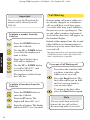
SE C
R A
S
W VIC LL NE UB Y
O E ER T SC O
RK S D W R U
B
I
. A E SP OR IB MU
E
Q FOR LAY K P TO ST
UA E A R
RT TH ND OV YO
ER ES C ID UR
LY E AL ER
FE FEA L W ’S
E T AIT
IS UR IN
PA ES G
YA W
BL IL
E L
Synergy 3500 user guide ~ 3rd Edition ~ 21st October ’02 ~ 4461
This equipment is not designed for making emergency telephone calls when the power fails.
Alternative arrangements should be made for access to emergency services.
This product is intended for connection to analogue public switched telephone networks
and private switchboards in the United Kingdom.
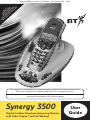
Synergy 3500
Digital Cordless Telephone Answering Machine
with Caller Display* and Call Waiting*
User
Guide
Synergy 3500 user guide ~ 3rd Edition ~ 21st October ’02 ~ 4461
Please open this page for an ‘at a glance’
guide to your Synergy 3500
Synergy 3500 user guide ~ 3rd Edition ~ 21st October ’02 ~ 4461
Please open this page for a further
‘at a glance’ guide to your Synergy 3500
Synergy 3500 user guide ~ 3rd Edition ~ 21st October ’02 ~ 4461
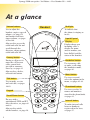
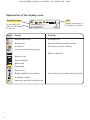
At a glance
Volume buttons
Red light
Handset
Use to adjust the
handset earpiece speech
volume (see page 19)
and handset and base
ringer volume, see pages
25 and 28.
Di g i t a
lC
la r
i
To indicate that
the phone is ringing or
in use.
ty
Liquid Crystal
Display
Also used to access the
redial and calls list and
scroll through the
directory, menu options,
redial and calls list.
Display shows you
incoming caller’s
details, the name
and/or number you
have dialled, and the
status of the handset.
Secrecy button
During a call press to
mute the call so your
caller cannot hear
you talk to someone
close by, see page 21.
Handsfree button
Secrecy
Handsfree
Also used as a delete,
edit and exit button.
Calls
2䊳
䊴
4
6䊳
WX
8
YZ
V
9
Co
n
Phonebook button
Use to access the 50
names and numbers
stored in the phonebook,
see page 21.
f
For use with a
switchboard/ PBX and BT
Select Services, see pages 60
and 33.
MN
TU
RS
7
5ⴒ
3
O
I
JKL
Use to access and
select the options in the
menu, see pages 25-30.
F
C
1
PQ
1
DE
AB
GH
Also used to switch
off the handset, see page 18.
Menu button
Vol
Use to make, receive
and end calls, see pages
18-19.
Recall/Power button
Menu
Redial
Talk button
Keypad
Use to answer calls
or make a call using
the handsfree mode,
see page 20.
0
Internal button
Int
R
To make internal calls
between handsets
registered to the base,
see page 55.
Synergy 3500 user guide ~ 3rd Edition ~ 21st October ’02 ~ 4461
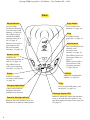
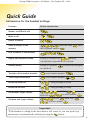
Base
Page button
Skip backward
Press to page the
handset, see page 24.
Lets you skip
backwards through
your messages and
memos, see page 44.
Stop
Also allows you to
switch the audible
message alert on or
off, see page 37.
To stop message
playback, see page 43.
Allows you to select
your Answer and
Record outgoing
message, see page 40.
Skip forward
Page
Lets you skip forward
through your
messages and
memos, see page 44.
DECT
Digital Clarity
Answer on/off
Switches the
answering machine on
and off, see page 36.
Also allows you to set
the answer delay, see
page 37.
Ans.
Vol.
Allows you to select
your Answer Only
outgoing message,
see page 40/41.
on
off
Also allows you to
select your outgoing
message, see page 40.
䊴
Skip
Del
Stop
Skip 䊳
Play
Volume
Delete
Adjust the loudspeaker
volume, see page 36.
Deletes recorded
messages and memos,
see page 44.
Play
Charging light (Red)
Comes on to indicate
charging when the
handset is on the base.
Power/In Use light (Green)
Flashes when the handset is in use.
Remains on to indicate mains power.
2
Lets you play and pause your
messages, see page 43.
Message display LED
Indicates when the answering machine
is on or off and when the power is on
plus how many messages have been left.
See page 35.
Synergy 3500 user guide ~ 3rd Edition ~ 21st October ’02 ~ 4461
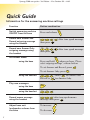
Explanation of the display icons
Standby screen
HS1
EXT
INT
To personalise the
name of your handset,
see page 26.
Icon
EXT
INT
EXT
INT
SYNERGY
HS1
Displays the number of
the handset at all times.
Steady
Flashing
External line in use
Incoming call
Internal call
Internal call from another handset
In calls list
New call received in calls list
3 way conversation in progress
Battery exhausted
Battery weak
Battery half-full
Battery full
Phonebook
Menu in use
Handset linked to base station
In handsfree mode
Answering machine is switched on
3
Out of range or searching for base station
Synergy 3500 user guide ~ 3rd Edition ~ 21st October ’02 ~ 4461
Quick Guide
Information for the handset settings
Function
Button combination
*
Answer a call/End a call
Make a call
Redial a number
Redial
Vol
Menu
Store a number in the
memory
Menu
Vol
Menu
Menu
enter
the name
Menu
the telephone number
enter
C alls
Dial a number in the memory
Redial
Vol
Vol
C alls
Redial
Vol
Vol
C alls
Adjust the earpiece volume
During a call, press the
during a
call until the required level is reached.
Secrecy on/off
During a call, press
to switch off.
Secrecy
to switch on and again
Transfer call to another handset
Int
enter handset number
Three way conversation
Int
enter handset number
Co
Redial
Vol
Redial
nf
Access to redial list
Int
– keep pressing to scroll.
Vol
C alls
Access to calls list
Vol
C alls
Redial
– keep pressing to scroll.
Vol
C alls
Menu
Set handset ringer volume
Vol
Vol
Vol
C alls
C alls
C alls
RING VOL
Menu
HANDSET
Vol
C alls
Redial
Vol
Vol
C alls
Menu
Set base unit ringer volume
Menu
to select volume
Menu
Vol
Vol
C alls
C alls
Redial
Vol
Vol
C alls
SETUP
to select volume
Menu
Menu
BASE VOL
Menu
Important
*If the handset is sitting in the base when a call comes in, you can pick it up
and answer it automatically without pressing the
button.
4
Synergy 3500 user guide ~ 3rd Edition ~ 21st October ’02 ~ 4461
Quick Guide
Information for the answering machine settings
Function
Button combination
Switch answering machine
ON/OFF from the base
Press and release
Menu
TU
DE
F
3
8
Co
then press
Menu
Menu
After tone speak message
GH
TU
I
V
8
䊴
4
Co
After tone speak message
nf
then press
Set answer mode:
using the base
on
off
nf
Record own Answer Only
outgoing message using
the handset
Menu
V
Record own Answer and
Record outgoing message
using the handset
Ans.
Ans.
on
off
Press and hold
when you hear, “Please
select outgoing message”, release button.
To set Answer and Record, press
To set Answer Only, press
Menu
Menu
Skip
.
.
JKL
TU
V
using the handset
Skip 䊳
䊴
8
, either 5ⴒ for Answer and
for Answer Only.
MN
O
Record or
6䊳
Play new messages:
using the base
Menu
AB
2䊳
Menu
Menu
PQ
Record memo message
using the handset
after tone speak memo
message then press
Adjust base unit
loudspeaker volume from
the base
To increase
7
RS
Co
nf
5
Menu
C
using the handset
Play
To decrease
Vol.
Vol.
Synergy 3500 user guide ~ 3rd Edition ~ 21st October ’02 ~ 4461
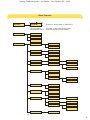
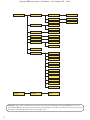
Menu Structure
TAM MENU
TAM MENU
This is a handset
announcement menu.
Phonebook
(Flashes on display when in TAM menu.)
See page 46 ‘Using the Synergy 3500
answering machine via the handset’.
Add
Delete
Modifiy
Setup
Base Vol
Handset 1.....5
Vol Off
Base Mel
Melody 1.....5
Sel Base
Base 1.....4
Auto
Del H/S
PIN?
Handset 1.....5
PIN Code
PIN?
New PIN
Retype
Priority
On
Off
Select
Base
Handset 1.....5
Dial Mode
Tone
Pulse
Recall
Recall 1
Recall 2
PABX
PBX1
PIN?
PBX2
PIN?
Pause
3 Sec
5 Sec
Default
PIN?
Cont......
6
Synergy 3500 user guide ~ 3rd Edition ~ 21st October ’02 ~ 4461
Handset
Beep
Ring Vol
Keytone
On or Off
Low Batt
On or Off
Outrange
On or Off
Volume 1.....5
Vol Off
Ear Vol
Ear Vol 1.....5
Int Mel
Melody 1.....5
Ext Mel
Melody 1.....5
Auto Ans
On
Off
Name
Language
English
Francais
Deutsch
Nederl
Italiano
Espanol
Portuges
Norsk
Dansk
Svenska
Suomi
Register
BS 1234
PIN?
Important. If you make a mistake you can return to the previous menu heading by pressing the ✘ button. If you press
and hold the ✘ button at any time you will return to the standby screen. After 30 seconds if no buttons are pressed
the handset will automatically return to the standby screen.
7
Synergy 3500 user guide ~ 3rd Edition ~ 21st October ’02 ~ 4461
In this guide
Note
There is a detailed INDEX at the end of this guide, see page 62.
Outgoing messages
At a glance
Handset
Base
Display icons
Quick Guide
Menu structure
Introduction
Unpacking your
Synergy 3500
For your records
Safety information
Setting up
Plan the location
Using the telephone
Making and receiving calls
Call timer
Handsfree
Redial
Secrecy
Name and number
Phonebook
Paging handsets
1
2
3
4-5
6-7
9
10
10
11
12
12
18
18
18
20
20
21
21
24
Handset settings
25
Base settings
28
Caller Display and Call Waiting
31
Using Caller Display
Calls list
Call Waiting
Setting up and personalising
your answering machine
Message display on the base station
Answer delay
Audible message alert
31
31
33
35
35
36
37
Using the Synergy 3500 answering
machine via the base unit
Call screening
38
43
45
Using the Synergy 3500 answering
machine via the handset
Memos
Call screening/Call intercept
Remote access
46
48
49
50
Time saver
Operating the answering machine
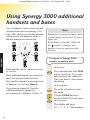
Using Synergy 3000
additional handsets and bases
Internal calls
Transferring calls
Three-way conversation
51
51
53
55
55
55
Help
57
General information
59
Guarantee
Technical information
Switchboard compatibility
Switchboard external line
access code
Recall
Index
59
60
60
60
60
62
Note
In this user guide, we’ve included
helpful tips and useful notes. They
are shown in a white box like this.
8
Synergy 3500 user guide ~ 3rd Edition ~ 21st October ’02 ~ 4461
Introduction
Your Synergy 3500 has been designed for ease of use and made
to the high standards set by BT
Please read the instructions carefully
before use and keep this user guide for
future reference.
DECT
INTRODUCTION
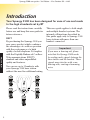
By purchasing the Synergy 3500 you
now own a product which combines
the advantages of cordless operation
with the performance of a high
quality corded telephone. It complies
with the Digitally Enhanced Cordless
Telecommunications (DECT)
standard and offers unparalleled
quality and features.
You can use up to 5 handsets with
your Synergy 3500 base station
without the need for additional wiring.
Di g it a
Secrecy
Handsfree
lC
lar
Di g it a
ity
Secrecy
Menu
Handsfree
Redial
I
JKL
4
5ⴒ
PQ
DE
3
MN
6䊳
WX
V
8
9
Co
n
f
f
0
0
DECT
Digital Clarity
Int
R
Di g it a
lC
lar
it
Int
R
Di g it a
Ans.
y
YZ
TU
RS
V
YZ
RS
7
Co
n
O
䊴
Page
WX
9
2䊳
GH
6䊳
TU
8
C
I
5ⴒ
PQ
7
1
MN
O
4
AB
3
F
C
JKL
F
䊴
Menu
Vol
Calls
DE
AB
2䊳
GH
ity
Redial
Vol
Calls
1
lC
lar
Vol.
lC
lar
it
y
on
off
䊴
Stop
Skip
Skip 䊳
Play
Del
Secrecy
Handsfree
Secrecy
Menu
Handsfree
Redial
Vol
Calls
DE
GH
PQ
JKL
DE
3
MN
6䊳
WX
TU
V
7
ity
Co
n
5ⴒ
8
9
Co
n
f
f
0
0
Int
Int
R
R
Secrecy
Handsfree
Menu
Redial
Vol
Calls
DE
C
GH
2䊳
JKL
I
PQ
5ⴒ
3
MN
6䊳
WX
V
8
YZ
TU
RS
7
O
4
F
AB
1
䊴
9
Co
n
f
0
Int
R
9
YZ
lC
lar
4
RS
V
YZ
RS
9
2䊳
I
䊴
Di g it a
WX
TU
8
1
MN
6䊳
O
I
7
AB
3
O
JKL
5ⴒ
C
2䊳
F
C
PQ
F
AB
GH
4
Menu
Redial
Vol
Calls
1
䊴
This user guide applies to both single
and multiple handset systems. The
internal call functions described in
this guide apply only to Synergy 3500
base stations with more than one
handset connected.
Important
If you wear a hearing aid, please
note that the Synergy 3500 works
by sending radio signals between the
base station and the handset. These
signals may interfere with some
hearing aids, causing a humming
noise.
Synergy 3500 user guide ~ 3rd Edition ~ 21st October ’02 ~ 4461
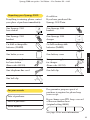
Unpacking your Synergy 3500
In addition:
If anything is missing, please contact
your place of purchase immediately.
If you have purchased the
Synergy 3500 Twin:
One Synergy 3500
base station
One Synergy 3000
handset
Page
DECT
Digital Clarity
Ans.
Vol.
on
off
䊴
Skip
Del
Stop
Skip 䊳
Play
One Synergy 3000
charger
2 x AAA rechargeable
batteries (Ni-MH)
2 x AAA rechargeable
batteries (Ni-MH)
One battery cover
One battery cover
One power supply
for base station
(Item code: 005391)
One power supply
for charger
(Item code: 003313)
One telephone line cord
One belt clip
Charging
INTRODUCTION
One Synergy 3500
handset
One belt clip
For your records
Date of purchase:
Place of purchase:
For guarantee purposes proof of
purchase is required so please keep
your receipt.
If you change your PIN, keep a record
of the new number here:
(original setting 0000)
Serial number:
See page 29 for more information.
10
Synergy 3500 user guide ~ 3rd Edition ~ 21st October ’02 ~ 4461
Safety information
General
Only use the power supply included
with the product. Using an unauthorised
power supply will invalidate your
guarantee and may damage the telephone.
The item number for the power supply
used with the base station is 005391.
The item number for the power supply
used with the charger is 003313 (only
applicable when you have purchased the
Synergy 3500 Twin).
INTRODUCTION
Only use the approved rechargeable
batteries supplied. Spare rechargeable
batteries are available from the Synergy
Helpline 08706 058 047.
Do not open the handset or base station.
This could expose you to high voltages
or other risks. Contact the Helpline for
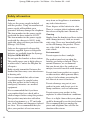
all repairs.
Radio signals transmitted between the
handset and base may cause interference
to hearing aids.
It is recommended that advice from
a qualified expert be sought before
using this product in the vicinity of
emergency/intensive care medical
equipment.
11
away from such appliances to minimise
any risk of interference.
Never dispose of the batteries in a fire.
There is a serious risk of explosion and/or
the release of highly toxic chemicals.
Cleaning
Simply clean the handset and base station
with a damp (not wet) cloth, or an antistatic wipe. Never use household polish
as this will damage the product. Never
use a dry cloth as this may cause a
static shock.
Environmental
Do not expose to direct sunlight.
The product may heat up when the
batteries are being recharged. This is
normal. However, we recommend
that you do not place the product on
antique/veneered wood to avoid damage.
Do not stand your product on carpets
or other surfaces which generate fibres,
or place it in locations preventing the
free flow of air over its surfaces.
Do not submerge any part of your
product in water and do not use it in
damp conditions, such as bathrooms.
It is recommended that if you have
a pacemaker fitted you check with a
medical expert before using this product.
Do not expose your product to fire,
explosive or other hazardous conditions.
Your product may interfere with other
electrical equipment, e.g. TV and radio
sets, clock/alarms and computers if placed
too close. It is recommended that you
place your product at least one metre
There is a slight chance that your phone
could be damaged by an electrical storm.
We recommend that you unplug the
power and telephone line cord for the
duration of the storm.
Synergy 3500 user guide ~ 3rd Edition ~ 21st October ’02 ~ 4461
Setting up
Follow these steps to set up your Synergy 3500 ready for use
Plan the location
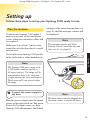
Position your Synergy 3500 within 2
metres of a power socket and phone
socket otherwise extension cables will
be required.
Make sure it is at least 1 metre away
from other electrical products to avoid
interference.
settings of the answering machine, see
page 16, and the message counter will
be displayed.
Note
The message counter will flash
between O and C until the day and
time are set, see page 15.
Do not place your Synergy 3500 product
in the bathroom or other humid areas.
SETTING UP
Note
The Synergy 3500 has a range of up
to 300 metres outdoors and up to
50 metres indoors. The range will be
reduced when there is no clear line
of sight between the base and handset.
Thick stone walls can severely affect
the range.
1
Connect the power supply to
the base
Plug the power adaptor into the mains
power socket and switch on. The green
Power/In Use light comes on. Your
Synergy 3500 will announce the default
Note
The base station must be plugged into
the mains power socket at all times.
12
Synergy 3500 user guide ~ 3rd Edition ~ 21st October ’02 ~ 4461
2
Install the rechargeable
batteries in the handset
Please note that the red charging light
will remain on even when the batteries
are fully charged.
BATTERY LEVELS
WEAK
SETTING UP
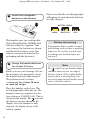
The handset uses two rechargeable
Nickel Metal Hydride (Ni-MH) AAA
batteries which are supplied. Take
care to insert the batteries as shown
and then fit the battery cover (the
battery cover may be found in the
packaging with the batteries).
3
Charge the handset batteries
for at least 16 hours
Before you use your Synergy 3500 for
the first time, it is important to have
the handset batteries fully charged.
The batteries need to charge
continuously for at least 16 hours
to reach full charge.
Place the handset on the base. The
red charging light will come on. The
handset comes pre-registered to the
base station as SYNERGY HS1. This is
shown on the display. The
icon and
the battery icon are shown on the
display. Once the handset is fully
charged, the display shows a full
battery symbol.
13
HALF-FULL
FULL
Battery low warning
If the handset battery symbol is empty
and flashing, and you hear a warning
beep every 10 seconds, you will need
to recharge your handset before you
can use it.
Note
The
symbol on your handset display
indicates when you are in range of
the base station. If the symbol flashes
and you hear a warning beep, you
are out of range and will need to move
closer to the base station.
Synergy 3500 user guide ~ 3rd Edition ~ 21st October ’02 ~ 4461
Battery performance
4
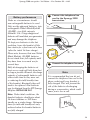
Connect the telephone line
cord to the Synergy 3500
base station
5
Connect the telephone line cord
Under no circumstances should
non-rechargeable batteries be used.
Only use the approved batteries, type:
rechargeable Nickel Metal Hydride
(Ni-MH); size AAA; capacity
550mAh 1.2v. Using unapproved
batteries will invalidate your guarantee
and may damage the telephone.
To keep your batteries in the best
condition, leave the handset off the
base station for a few hours at a time.
(after the intial 16 hour charge).
Fully discharging the batteries at
least once a week will help them last
as long as possible. However, the charge
capacity of rechargeable batteries will
reduce with time as they wear out,
so reducing the talk/standby time
of the handset. Eventually they will
need to be replaced. New batteries
can be obtained from the BT Synergy
Helpline 08706 058 047.
SETTING UP
Please note, however, that new Nickel
Metal Hydride (Ni-MH) batteries
do not reach their full capacity until
they have been in normal use for
several days.
Note
It is recommended that you do not
connect the telephone line cord to the
phone socket until your handset is
fully charged. This will prevent the
risk of the batteries discharging
during a conversation, which could
cause you to lose a call.
Note: Under ideal conditions, the
handset batteries should give about
14 hours talktime or 350 hours
standby on a single charge. Optimum
times for talk and standby are only
achieved when the handset batteries
are fully charged.
14
Synergy 3500 user guide ~ 3rd Edition ~ 21st October ’02 ~ 4461
6
Press the ✱ button. The prompt
will announce, “Please enter
new day and time after the tone”.
To set the day and time
The message counter on the
base unit will flash between
0 and C until the day and time
are set.
After the tone enter the day,
followed by the time using the
24 hour clock.
The day and time must be set
using the Synergy 3500 handset.
1 = Sun, 2 = Mon,
3 = Tues, 4 = Wed,
5 = Thur, 6 = Fri, 7 = Sat.
SETTING UP
Your Synergy 3500
automatically adds the day
and time to all messages and
memos received.
Menu
Menu
Press the button twice on
the Synergy 3500 handset.
Important
The main menu announcements
are automatically announced
through the handset earpiece when
the button is pressed twice.
Press the 0 button. The prompt
will announce, “To set day and
time press ✱, to hear day and
time press #”.
(Please note that if you press
the # button this will only allow
you to check the day and time.)
15
1 1415 = Sunday 2.15pm.
Or
When you first switch the
power on, the clock is set to
Sunday, 12.01pm. You can
change the day and time as
required.
TAM MENU will flash on the
display.
0
For example:
5 0915 = Thursday 9.15am.
You will then hear your setting
confirmed.
Secrecy
Press the ✘ button twice to
return the handset to standby.
Note
If the day and time is entered
incorrectly, the prompt will announce,
“Incorrect, please set again”. Enter
the correct setting within 15 seconds
otherwise the handset will return to
standby mode. If the day and time
is entered incorrectly three times the
handset will return to standby.
Note
If you have any difficulties setting up
your Synergy 3500 please call the
Helpline on 08706 058 047.
Synergy 3500 user guide ~ 3rd Edition ~ 21st October ’02 ~ 4461
If you wish to register additional
handsets, please see page 53.
Please see the table below for your
Synergy 3500 default settings.
Synergy 3500 Default Settings Table
Feature
Default Setting
Day/Time Stamp
Sunday 12:01 pm
Answer Delay
Your answering
machine will answer
after 6 rings
Audible Message
Alert Tone
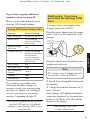
Additionally, if you have
purchased the Synergy 3500
Twin:
1. Connect the power supply to the
charger (item code 003313).
Plug the power adaptor into the mains
power socket on the underside of the
charger.
OFF
Answer and Record
“Hello your call cannot
be taken at the
moment so please
leave your message
after the tone.”
Answer Mode
ON
Base ringer level
High
Base loudspeaker
volume
Level 5
PIN code
0000
Dialling mode
Tone
SETTING UP
Outgoing Message
Plug the adaptor into the mains power
supply and switch on.
Note
If you wish to personalise your
answering machine settings, for
example record your own outgoing
message etc, please see “Setting up
and personalising your answering
machine” beginning on page 35.
The answering machine will now be
switched ON and set to its default
settings so your Synergy 3500 is now
ready for use.
The charger must be plugged into the
mains power socket at all times.
2. Install the rechargeable batteries in
the handset.
3. Charge the handset batteries for at
least 16 hours.
Your Synergy 3000 additional handset
comes pre-registered to the main base
station as SYNERGY HS2. This will be
shown on the display.
Your Synergy 3500 Twin
is now ready for use.
16
Synergy 3500 user guide ~ 3rd Edition ~ 21st October ’02 ~ 4461
7
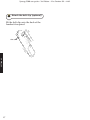
Attach the belt clip (optional)
Fit the belt clip onto the back of the
handset if required.
SETTING UP
Slot
17
Synergy 3500 user guide ~ 3rd Edition ~ 21st October ’02 ~ 4461
Using the telephone
Preparatory dialling
Note
To exit and return to the previous
menu at any time, press the
button. If you press and hold the
button you will return to the
standby screen.
Secrecy
Preparatory dialling allows
you to enter the number
before pressing the TALK
button. This enables you to
correct any mistakes before
you actually make the call.
Secrecy
To switch the handset on and off
R
Press and hold the POWER
button to switch the handset off.
To switch the handset on,
press and hold the POWER
button again.
Making and receiving calls
USING YOUR PHONE
R
Enter the number to be
dialled.
The number is shown in the
display.
Secrecy
(If you make a mistake, press
the ✘ button to delete the
incorrect digit).
When you have entered the
number correctly, press the
TALK button to dial the number.
To make an external call
Call timer
Press the TALK button.
You will hear the dial tone and
the display will show the EXT
symbol.
Enter the number you want.
The number is dialled
automatically.
Your handset will automatically time
the duration of all external calls.
The handset display shows the call
duration both during your call and for
a few seconds after it is complete.
EXT
18
Synergy 3500 user guide ~ 3rd Edition ~ 21st October ’02 ~ 4461
To adjust the speech volume
during a call
To end a call
Press the TALK button.
During a call:
Or
You can adjust the earpiece
volume. There are 5 levels to
choose from.
Place the handset back on
the base.
Redial
Vol
C alls
To receive a call
When the phone rings the
display will show CALL and
the EXT symbol will flash.
In standby mode:
Menu
Press the button.
USING YOUR PHONE
Vol
If you have subscribed to a
Caller Display Service, the
number (and name if stored
in the Phonebook) will be
displayed.
Press the UP or DOWN
button until you reach the
required level. This will be
shown on the display.
eg: EAR VOL 3.
C alls
Press the DOWN button until
HANDSET is displayed.
Menu
Press the button.
Vol
C alls
Press the DOWN button until
EAR VOL is displayed.
Menu
Press the button.
Press the TALK button.
Or
Redial
Vol
If the handset is on the base,
simply lift it up and speak.
C alls
Press the UP or DOWN
button until you reach the
required level.
Menu
Press the button to confirm
the selected level.
Note
You can switch the Auto-Talk feature
on or off. Please see page 26.
19
Secrecy
Press and hold the ✘ button to
return to the standby screen.
Synergy 3500 user guide ~ 3rd Edition ~ 21st October ’02 ~ 4461
Handsfree
Handsfree allows you to talk to your
caller without holding the handset and
enables other people in the room to
listen to your conversation.
To answer a call in handsfree
When the phone rings:
Handsfree
Press the HANDSFREE
button. The call is transferred
to the loudspeaker.
To make a handsfree call
Dial the number.
Handsfree
Press the HANDSFREE button.
To switch back to using the
handset at any time, press the
HANDSFREE button.
To end the call, press the
TALK button.
During a call you can switch
to handsfree mode.
Handsfree
Handsfree
Press the HANDSFREE
button. The call is transferred
to the loudspeaker.
USING YOUR PHONE
The display will show the
icon to indicate handsfree is
active. You will hear the number
being dialled out.
Handsfree
To switch to handsfree during
a call
Press the HANDSFREE
button to switch back to using
the handset.
Redial
To adjust the handsfree volume
Whilst in handsfree mode you
can increase or decrease the
handsfree volume. There are
5 volume levels to choose from.
Redial
Vol
C alls
Press the UP or DOWN
button to adjust the volume.
You can redial up to 5 of the last
numbers called. They are stored in the
redial list. If you have stored a name
to go with a number in the Phonebook,
the name will be displayed instead.
See “Name and number Phonebook”,
page 21.
The volume will be adjusted
accordingly.
20
Synergy 3500 user guide ~ 3rd Edition ~ 21st October ’02 ~ 4461
Dial from the redial list
Redial
Redial
Press the UP button to enter
the redial list.
Continue pressing the UP
button to view the next number
in order of most recent first.
Press the TALK button when
the number (or name) you
want to call is displayed. The
number is dialled automatically.
Name and number Phonebook
You can store up to 50 of your most
frequently used names and numbers
in the Phonebook. Stored numbers
can be no longer than 20 digits and
a maximum of 8 characters can be
stored.
To store a name and number in
the Phonebook
Press the button to enter
the menu.
Menu
USING YOUR PHONE
Secrecy
When on a call you can talk to
someone in the same room, without
your caller hearing.
Vol
Press the DOWN button.
C alls
Menu
The display will show
PHONEBK, press the button.
Menu
The display will show ADD,
press the button.
To switch secrecy on / off
Secrecy
Secrecy
The display shows NAME?
Enter the name using the
letters on the keypad. Names
can be no longer than 8
characters.
During a call, press the ✘
button. The display will show
MUTE. Your caller cannot hear
you.
Entering names:
Press the ✘ button again to
resume your call.
Use the keypad letters to
enter names, e.g. if you wish
to store the name TOM:
TU
V
8
MN
To enter the letter T, press the
8 button once.
O
6
MN
O
6
MN
O
6
21
To enter O, press the 6 button
three times and wait for the
cursor to move across.
Synergy 3500 user guide ~ 3rd Edition ~ 21st October ’02 ~ 4461
MN
O
6
Secrecy
Menu
To enter M, press the 6 button
once.
To enter a pause in a stored
number
If you enter a digit incorrectly,
press the ✘ button to delete it.
You may want to enter a pause
when storing international
numbers, charge card numbers
or if you connect your
telephone to a switchboard.
(For more information on
switchboard use see page 60.)
Press to confirm the name.
You will hear a confirmation
beep.
The display shows NUMBER?
Enter the telephone number
you want to store.
Menu
Menu
When storing the number,
press and hold the UP button,
until a P is displayed, at the
point where you want to enter
the pause.
Redial
Alternatively, press the button to continue storing
entries in the Phonebook.
You may enter as many pauses
as required.
Press and hold the ✘ button to
return to the standby screen.
Note
Press the 1 button once to insert a
space, press twice for a - (hyphen),
press 3 times for the number 1.
To dial a name and number
from the Phonebook
Press the PHONEBOOK
button to enter the Phonebook.
Use the UP or DOWN button
to scroll through.
Redial
Vol
C alls
Or
Note
TU
V
If you subscribe to a Caller Display
Service (see page 31) and want
Phonebook names to be displayed
when a call is received from one of
your Phonebook numbers, you must
ensure that you always enter the full
telephone number, including the
national code.
USING YOUR PHONE
Secrecy
Press the button. You will
hear a confirmation beep.
8
Enter the first letter of the
name you want, e.g. for Tom,
press the 8 button to search
for names beginning with T.
Press the TALK button to
dial the number of the name
displayed. The number is
dialled automatically.
22
Synergy 3500 user guide ~ 3rd Edition ~ 21st October ’02 ~ 4461
Note
You can scroll in either direction to
search through the list.
To edit an entry in the
Phonebook
Menu
Vol
C alls
Menu
Vol
USING YOUR PHONE
C alls
Menu
Redial
Vol
C alls
Menu
Secrecy
Menu
Secrecy
Menu
Secrecy
23
Press the button to enter
the menu.
To delete a Phonebook entry
Menu
Vol
C alls
Menu
Vol
C alls
Press the DOWN button.
Menu
The display will show
PHONEBK, press the button.
Redial
Use the DOWN button to
scroll to MODIFY and press
the button.
Use the UP or DOWN button to
find the name you want to edit.
Vol
C alls
Press to store the new
name. You will hear a
confirmation beep.
The number will be displayed.
Use the ✘ button to delete
unwanted digits and re-enter
the correct ones.
Press the button to store
the new number. You will hear
a confirmation beep.
Press and hold the ✘ button to
return to the standby screen.
Press the DOWN button.
The display will show
PHONEBK, press the button.
Use the DOWN button to
scroll to DELETE and press
the button.
Use the UP and DOWN
buttons to scroll through to
the entry you want to delete.
Menu
When you have found the name
to delete, press the button.
Menu
The number will be displayed,
press the button.
Menu
The display will show
CONFIRM?, press the button.
Press the button.
Use the ✘ button to delete
unwanted letters. You can
enter new letters as shown in
‘Entering names’ on page 21.
Press the button to enter
the menu.
You will hear a confirmation
beep. The number is now
deleted.
Secrecy
Press and hold the ✘ button to
return to the standby screen.
Synergy 3500 user guide ~ 3rd Edition ~ 21st October ’02 ~ 4461
Paging handsets
You can page your handset(s) from
the base station to alert a handset
user that they are wanted or to locate
a missing handset.
Note
Paging calls cannot be answered by
a handset.
To page a handset from the base
USING YOUR PHONE
Page
Press the PAGE button on the
base.
The handset(s) will ring.
The display will show
INT
flashing.
Page
To stop paging, press the
PAGE button again.
Or
To stop paging, press any
button on the handset.
24
Synergy 3500 user guide ~ 3rd Edition ~ 21st October ’02 ~ 4461
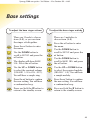
Handset settings
To switch keypad beeps on
and off
Menu
Vol
C alls
Menu
HANDSET SETTINGS
Menu
Menu
Redial
Vol
C alls
Menu
Secrecy
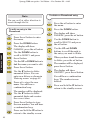
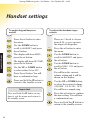
To adjust the handset ringer
volume
Press the button to enter
the menu.
Use the DOWN button to
scroll to HANDSET and press
the button.
The display will show BEEP,
press the button.
The display will show KEYTONE,
press the button.
Use the UP or DOWN button
to select either ON or OFF.
There are 5 levels to choose
from (1-5), or you can turn
the ringer off altogether.
Menu
Vol
C alls
Menu
Vol
C alls
Menu
Redial
Vol
C alls
Important
Press and hold the ✘ button at any
time to exit the menu and return to
the standby screen.
Menu
Secrecy
25
Use the DOWN button to
scroll to HANDSET and press
the button.
Use the DOWN button to
scroll to RING VOL and press
the button.
You will hear the current
volume setting and it will be
shown on the display.
Press the button. You will
hear a confirmation beep.
Press and hold the ✘ button to
return to the standby screen.
Press the button to enter
the menu.
Use the UP or DOWN button
to select the required volume
(VOLUME 1-5 or VOL OFF).
You will hear a sample ring.
Press the button to confirm
the new setting. You will hear
a confirmation tone.
Press and hold the ✘ button to
return to the standby screen.
Synergy 3500 user guide ~ 3rd Edition ~ 21st October ’02 ~ 4461
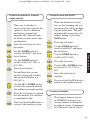
To set the external or internal
ringer melody
There are 5 melodies to
choose from and you have the
option to choose a different
melody for external and
internal calls. (Internal calls
for when you have more than
one handset).
Menu
Vol
C alls
Menu
Menu
Use the DOWN button to
scroll to HANDSET and press
the button.
Use the DOWN button to
scroll to either INT MEL or
EXT MEL.
Press the button.
You will hear the current
melody setting and it will be
shown on the display. e.g.
MELODY 4.
Redial
Vol
C alls
Menu
Secrecy
Use the UP or DOWN button
to select the required melody.
You will hear a sample melody.
Press the button to confirm
the new melody. You will hear
a confirmation tone.
Press and hold the ✘ button to
return to the standby screen.
When the handset is on the
base or the charging unit you
can answer the call by picking
it up from the base. This will
automatically answer the call
without having to press the
TALK button.
Menu
Vol
C alls
Menu
Vol
C alls
Menu
Redial
Vol
C alls
Menu
Secrecy
Press the button.
Use the DOWN button to
scroll to HANDSET and press
the button.
Use the DOWN button to
scroll to AUTO ANS.
HANDSET SETTINGS
Vol
C alls
Press the button to enter
the menu.
To switch auto-talk on/off
Press the button.
Use the UP or DOWN button
to turn AUTO-TALK ON or
OFF.
Press the button to
confirm.
Press and hold the ✘ button to
return to the standby screen.
To name a handset
The handset name is pre-set
as SYNERGY, however, you
can personalise each handset
by giving it a name. A maximum
of 8 characters can be stored.
26
Synergy 3500 user guide ~ 3rd Edition ~ 21st October ’02 ~ 4461
Menu
Vol
C alls
Menu
Vol
C alls
Menu
Secrecy
Menu
HANDSET SETTINGS
Secrecy
Press the button to enter
the menu.
Use the DOWN button to
scroll to HANDSET and press
the button.
Use the DOWN button to
scroll to NAME and press the
button.
Press the ✘ button to delete
the name already set.
Menu
Redial
Vol
C alls
Press and hold the ✘ button to
return to the standby screen.
Use the DOWN button to
scroll to LANGUAGE and press
the button.
Use the UP or DOWN button
to scroll through the language
options.
Menu
Press the button to confirm
your choice. You will hear a
confirmation beep.
Secrecy
Press and hold the ✘ button to
return to the standby screen.
Enter the name you want using
the keypad and press the button, correct any mistakes
by pressing the ✘ button.
You will hear a confirmation
beep.
Secrecy
Vol
C alls
Note
To default back to the English
language follow:
Menu
Press the MENU button.
Vol
C alls
Press the DOWN button three
times.
Menu
Press the MENU button.
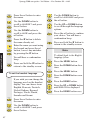
To set the handset language
Vol
C alls
If you wish, you can change the
language used on the handset
display. You can choose from
English, Francais, Deutsch,
Nederl, Italiano, Espanol,
Portuges, Norsk, Dansk,
Svenska and Suomi.
Menu
Vol
C alls
Menu
27
Press the button to enter
the menu.
Use the DOWN button to
scroll to HANDSET and press
the button.
Press the DOWN button seven
times.
Menu
Press the MENU button.
Redial
Vol
C alls
Press the UP or DOWN button
until ENGLISH is displayed.
Menu
Press the MENU button once.
Synergy 3500 user guide ~ 3rd Edition ~ 21st October ’02 ~ 4461
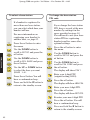
Base settings
To adjust the base ringer volume
There are 5 levels to choose
from (1-5), or you can turn
the ringer off altogether.
Menu
Vol
C alls
Menu
Redial
Vol
C alls
Menu
Secrecy
Use the DOWN button to
scroll to SETUP and press the
button.
The display will show BASE
VOL. Press the button.
Use the UP or DOWN button
to select the required volume
(VOLUME 1-5 or VOL OFF).
You will hear a sample ring.
Press the button to confirm
the new setting. You will hear
a confirmation beep.
Press and hold the ✘ button to
return to the standby screen.
There are 5 melodies to
choose from (1-5)
Menu
Vol
C alls
Menu
Vol
C alls
Menu
Redial
Vol
C alls
Menu
Secrecy
Press the button to enter
the menu.
Use the DOWN button to
scroll to SETUP and press the
button.
BASE SETTINGS
Menu
Press the button to enter
the menu.
To adjust the base ringer melody
Use the DOWN button to
scroll to BASE MEL and press
the button.
Use the UP or DOWN button
to select the required melody
(MELODY 1-5). You will hear
a sample melody.
Press the button to confirm
the new setting. You will hear
a confirmation beep.
Press and hold the ✘ button to
return to the standby screen.
28
Synergy 3500 user guide ~ 3rd Edition ~ 21st October ’02 ~ 4461
To select a base station
To change the base station
PIN code
If a handset is registered to
more than one base station,
you can select which base your
handset will use.
If you change the base station
PIN, keep a record of the new
number by writing it in the
space provided on page 10.
You will need to use your base
station PIN for registering
handsets and for some other
optional settings.
For more information on
registering your handset to
another base, see page 53.
Menu
Vol
C alls
Menu
Press the button to enter
the menu.
Use the DOWN button to
scroll to SETUP and press the
button.
Menu
Vol
C alls
BASE SETTINGS
Menu
Vol
C alls
Menu
Use the DOWN button to
scroll to SEL BASE and press
the button.
Vol
C alls
Menu
Redial
Vol
C alls
Menu
Secrecy
Use the UP or DOWN button
to select the base you want
(BASE 1-4).
Press the button. You will
hear a confirmation beep.
Press the button to enter
the menu.
Use the DOWN button to
scroll to SETUP and press the
button.
Use the DOWN button to
scroll to PIN CODE and press
the button.
The display will show PIN?
Enter your 4-digit PIN
(original setting OOOO).
Menu
Press and hold the ✘ button to
return to the standby screen.
Press the button.
The display will show NEW PIN.
Enter your new 4-digit PIN.
Menu
Press the button.
The display will show RETYPE.
Re-enter your new 4-digit PIN.
Menu
Secrecy
29
Press the button. You will
hear a confirmation beep.
Press and hold the ✘ button to
return to the standby screen.
Synergy 3500 user guide ~ 3rd Edition ~ 21st October ’02 ~ 4461
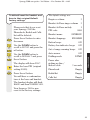
To default/reset the handset and
base to their original/default
factory settings
Menu
Vol
C alls
Menu
Vol
C alls
Earpiece volume
3
Handset & Base ringer volume
3
Please note that if you reset
your Synergy 3500 the
Phonebook, Redial and Calls
list will be deleted.
Handset & Base melody
1
Handset name
SYNERGY
Press the button to enter
the menu.
Handset language
ENGLISH
Button beeps
ON
Use the DOWN button to
scroll to SETUP and press the
button.
Battery low indicator beeps
ON
Out of range warning beeps
ON
Use the DOWN button to
scroll to DEFAULT and press
the button.
Auto answer
ON
The display will show PIN?
Enter the base PIN (original
setting OOOO)
Menu
PIN code
Dialling mode
Pause after
picking up line /
dial-out code
0000
DTMF
BASE SETTINGS
Menu
The default settings are:
3 seconds
Phonebook
Empty
Press the button.
Redial list
Empty
You will hear a confirmation
tone at the base and handset.
The handset display will flash
BASE 1 and then SYNERGY HS1.
Calls list
Empty
Your Synergy 3500 is now
reset to the factory settings.
30
Synergy 3500 user guide ~ 3rd Edition ~ 21st October ’02 ~ 4461
Caller Display and Call Waiting
Important
To use Caller Display or Call
Waiting you must first subscribe
to your network provider’s Caller
Display or Call Waiting Service.
A quarterly fee is payable.
CALLER DISPLAY
For more information on BT’s
Select Services, call BT free on
0800 800 150.
Using Caller Display
If you subscribe to a Caller Display
Service you can see your caller’s
number (provided it is not withheld)
on your handset display, as well as the
time and date of their call. If you have
your caller’s name and number stored
in your handset Phonebook, you will
see the name of your caller displayed
instead of the number.
Please ensure that you have stored
the full telephone number, including
the area code, otherwise the name
will not match the number stored in
the Phonebook.
Whether you take a call or not, the
caller’s details are stored in the Calls
list. You can display, scroll through
and dial numbers on the list and copy
them into the Phonebook.
31
Caller information not available
With some incoming calls the telephone
number of the caller is not available
and cannot therefore be displayed.
In this case, your Synergy 3500 provides
you with some explanatory information
about the type of call received. This will
be one of the following.
UNAVAILA
The number is unavailable.
WITHHELD
The caller has withheld their number.
RINGBACK
Ringback call.
OPERATOR
The call has been made via the operator.
PAYPHONE
The caller is ringing from a payphone.
INTERNAT
International call.
Calls list
The Calls list contains the telephone
numbers of your last 20 callers.
New calls in the Calls list are indicated
by the flashing
symbol on the
display.
If a call is received when the Calls list
is full then the oldest entry will be
deleted automatically.
Synergy 3500 user guide ~ 1st Edition ~ 22nd March ’02 ~ 4457
To enter and view the Calls list
Press the DOWN button to
enter the Calls list. The
symbol is displayed.
Vol
C alls
Use the UP or DOWN button
to scroll backwards and
forwards through the Calls list.
Redial
Vol
C alls
To store a number from the
Calls list into the Phonebook
Vol
C alls
Redial
Vol
C alls
Menu
If the ‘name’ of your caller has
been stored in the Phonebook,
this will be displayed. Press
the button and the number
will be displayed.
Menu
Menu
Secrecy
Menu
Press the button again, the
display shows ADD.
Menu
Press the button, the display
shows NAME?.
Press keypad buttons to enter
name as described before
under the “Entering names”
section.
Keep pressing the ✘ button to
return to the Calls list entry.
Press and hold the ✘ button to
return to the standby screen.
Note
You can enter names up to 8
characters long. If necessary, you
can edit the entry, when
the entry is correct, press the
button. The number is now
stored in the Phonebook.
To dial a number from the
Calls list
Vol
Redial
Vol
C alls
Press the DOWN button to
enter the Calls list.
Use the UP or DOWN button
to scroll to the number you
want to dial.
Press the button.
The display shows the date and
time of the call.
Note
C alls
Use the UP or DOWN button
to scroll to the number you
want to store in the Phonebook.
CALLER DISPLAY
Press the button and the
time and date of the call will be
displayed.
Press the DOWN button to
enter the Calls list.
Menu
Press the button.
The name and number are
now stored in the Phonebook.
Press the TALK button. The
number will be dialled
automatically.
32
Synergy 3500 user guide ~ 3rd Edition ~ 21st October ’02 ~ 4461
Important
Once stored in the Phonebook the
number will be deleted from the
Calls list.
To delete a number from the
Calls list
Vol
C alls
Redial
Vol
C alls
CALL WAITING
Menu
Menu
Redial
Vol
C alls
Menu
Press the DOWN button to
enter the Calls list.
Use the UP or DOWN button
to scroll to the number you
want to delete.
*Call Waiting
If an incoming call arrives while you
are already engaged on a telephone
call, you will hear a soft beep every
5 seconds (this beep is not audible to
the person you are speaking to). The
second caller’s number (and name if
stored in the directory) will appear on
the handset display.
Instead of the engaged tone, the second
caller will hear an announcement to
hold on as you are aware that there is
a second call.
*You must subscribe to your network provider’s
Call Waiting Service before this feature will
work. A quarterly fee is payable.
Press the button twice,
ADD will be displayed.
Use the UP or DOWN button
to scroll to DELETE? and
press the button.
To accept a Call Waiting call
If you hear the tone that tells
you there is another caller,
whilst you are on a call:
The number is deleted from
the Calls list.
R
To delete all numbers from the
Calls list
Redial
Vol
C alls
Secrecy
Menu
33
Press the DOWN button to
enter the Calls list.
Press the ✘ button. The
display will show DEL ALL.
Press the button. The display
will show EMPTY for 2 seconds.
R
Press the Recall button. The
first caller will be put on hold
and you can now speak to
your second caller.
To return to the first caller
press the Recall button again.
Note
You can switch back and forth
between the two calls without
disconnecting either if you wish.
Synergy 3500 user guide ~ 3rd Edition ~ 21st October ’02 ~ 4461
If you wish to disconnect the
first call press the TALK
button after speaking to the
first caller.
The handset will then ring.
Press the TALK button again
and continue with the second
caller.
Note
The second caller will only be
charged for their call from the
moment you answer and not
while they are waiting for your
initial contact.
CALL WAITING
34
Synergy 3500 user guide ~ 3rd Edition ~ 21st October ’02 ~ 4461
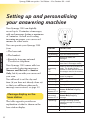
Setting up and personalising
your answering machine
Your Synergy 3500 can digitally
record up to 13 minutes of messages,
with each message lasting a maximum
of 3 minutes. As well as recording
incoming messages, you can record
memos for other users.
Page
DECT
Digital Clarity
Ans.
Vol.
on
off
Skip
Del
ANSWER MACHINE
Skip Play
You can operate your Synergy 3500
from:
DISPLAY
DEFINITION
• The base unit.
(Blank)
Power off.
C-0 (flashing)
Day/Time needs to be set.
0-9
Answer-on mode, 0-9
messages.
9 (flashing)
10-59 messages. Indicating
more than 9 messages stored.
––
Alternating
with
Power on, but set to answer off
mode. The display flashes
between a dash and the number
of messages saved in the memory.
• The handset.
• Remotely from any external
TouchtoneTM telephone.
Your Synergy 3500 comes with two
pre-recorded outgoing messages,
Answer and Record or Answer
Only, but if you wish you can record
your own.
You will need to set the day and
time (if you have not already done so)
so that you will know when each
message was received, see page 15.
Message display on the
base station
The table opposite provides an
explanation of what is shown on the
base station display.
35
Stop
0-9
A (flashing)
Handset menu and Remote
access in progress.
E (flashing)
Error.
F (flashing)
Memory full.
P (flashing)
Message paused.
P-1:
Alternating
between P & 1
When selecting or playing
Answer & Record outgoing
message.
P-2:
When selecting or playing
Alternating
Answer Only outgoing
between P & 2 message.
r (flashing)
Message recording (memo,
outgoing message or incoming
message).
t or 2 to 9
Setting or reading answer delay.
8-0
Counting down.
Synergy 3500 user guide ~ 3rd Edition ~ 21st October ’02 ~ 4461
To switch the answering
machine ON/OFF
To adjust the base unit
loudspeaker volume
The loudspeaker volume
ranges from 0-9 plus H, where
0 is Off and H is the
maximum level. The default
level is 5.
Your Synergy 3500 is set to
ON and Answer and Record
when first powered up.
Ans.
on
off
Press and release the
ANSWER ON/OFF button to
switch ON or OFF.
Answer Only is an advisory
announcement only, so that the
machine will not record an
incoming message.
See page 38 for a full
explanation of the outgoing
messages available.
The display on the base unit
shows the number of messages
stored in the memory.
If you hear “Answer off”
the answering machine is
switched off.
Vol.
Press Vol + on the base to
increase the volume.
Press Vol – on the base to
decrease the volume.
If you adjust the volume when
the answering machine is not
being used, a beep sounds at
each press. When the volume
reaches its highest or lowest
levels two beeps will sound.
ANSWER MACHINE
If you hear “Answer on, your
outgoing message is....” the
answering machine is switched
on and is ready to answer
incoming calls and record any
messages, unless Answer Only
is selected.
Vol.
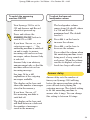
Answer delay
Answer delay sets the number of
times your Synergy 3500 will ring
before the answer machine picks up
your call and starts playing the
outgoing message. The default setting
is for the answering machine to
answer after 6 rings. You can change
this setting to between 2-9 rings.
The display on the base unit
will flash between a dash and
the number of messages
saved in the memory.
36
Synergy 3500 user guide ~ 3rd Edition ~ 21st October ’02 ~ 4461
To change the answer delay
setting
Skip Skip Press and hold the SKIP button on the base unit until
the current setting is
announced, then release.
Press and release the SKIP button to move through the
settings, with each press the
options will be announced
and will also be shown on the
base unit display, i.e 8, 9,
Time Saver, 2, 3, 4, 5, 6, 7.
ANSWER MACHINE
When you hear the setting
you want, do not press the
SKIP button again. After a
short delay your chosen
setting will be announced.
To check the answer delay
setting at the base station
Skip Press and release the SKIP button.
The current setting will be
announced and also shown on
the base unit display.
37
Audible Message alert
When audible message is switched ON
and new messages have been received,
your Synergy 3500 will beep every
10 seconds. The volume of the beep is
at the volume you have set for the
loudspeaker. The default setting is OFF.
To switch audible message alert
ON or OFF
Skip
Press and hold the SKIP
button on the base unit to
change the setting.
The prompt will announce
“Message alert on/off” as
appropriate.
Synergy 3500 user guide ~ 3rd Edition ~ 21st October ’02 ~ 4461
Outgoing messages
The outgoing message is the message
a caller first hears when the
answering machine picks up their call.
Your Synergy 3500 comes with 2
pre-recorded outgoing messages to
choose from as follows:
Note
You can only record your own
outgoing messages via the handset.
To record your own Answer and
Record outgoing message
Answer and Record
Your Synergy 3500 has a pre-set
Answer and Record outgoing message
that allows your caller to leave a
message.
“Hello, your call cannot be taken at the
moment, so please leave your message
after the tone”.
However, you can record your own
Answer and Record outgoing message
if you wish, see ‘To record your own
Answer and Record outgoing message’,
opposite.
Answer Only
Your Synergy 3500 will play a
pre-recorded Answer Only outgoing
message but will not allow your
caller to leave a message.
ANSWER MACHINE
You can record your own
Answer and Record
outgoing message to use
instead of the pre-recorded
message already available.
Your outgoing message can
be up to 3 minutes long. Your
own outgoing message will
replace the Answer and
Record pre-recorded outgoing
message, but it is possible to
reinstate it later if you wish
(see page 41).
Pick up the handset.
Press the button twice.
You will hear the main menu
announcement from the
handset earpiece.
Menu
“Hello, your call cannot be taken at the
moment and you cannot leave a
message, so please call later”.
8
You can also record your own Answer
Only outgoing message if you wish,
see ‘To record your own Answer Only
outgoing message’, page 39.
3
TU
V
DE
Press the 8 button for the
outgoing message menu.
F
To record your own Answer
and Record outgoing
message, press the 3 button.
The prompt will announce,
“Please speak after the tone.
To end recording, press #”.
38
Synergy 3500 user guide ~ 3rd Edition ~ 21st October ’02 ~ 4461
Co
nf
available. Your outgoing message
can be up to a maximum
recording capacity (13 minutes),
but you should try to keep it
short to allow time for recording
memos, or incoming messages
when using the alternative
Answer and Record outgoing
message. Your own outgoing
message will replace the
Answer Only pre-recorded
outgoing message, but it is
possible to reinstate it later if
you wish (see page 41).
After the tone, speak your
outgoing message into the
handset. Press # when you
have finished. You will hear
a long beep.
Note
Throughout recording r will flash
on the base unit display.
ANSWER MACHINE
The prompt will announce,
“Your outgoing message is”
and then play your message.
The display will flash p and
after playing your message
you will hear the menu once
more.
Secrecy
Pick up the handset.
Press the button twice.
You will hear the main menu
announcement from the
handset earpiece.
Menu
Press and hold the ✘ button to
return the handset to standby.
TU
V
8
To record your own Answer Only
outgoing message
GH
I
4
Note
You can record your own
Answer Only outgoing
message to use instead of the
pre-recorded message already
39
Co
nf
When recording your own Answer
Only outgoing message, please
remember not to invite your caller
to leave a message as the
Answer Only mode will not record
incoming messages.
Press the 8 button for the
outgoing message menu.
To record your own Answer
Only message, press the
4 button. The prompt will
announce, “Please speak after
the tone. To end recording,
press # ”.
After the tone, speak your
outgoing message into the
handset. Press # when you
have finished. You will hear
a long beep.
Synergy 3500 user guide ~ 3rd Edition ~ 21st October ’02 ~ 4461
The prompt will announce,
“Your outgoing message is” and
then play your message. The
display will flash p and after
playing your message you will
hear the menu once more.
Secrecy
To check or play your outgoing
message via the handset
Pick up the handset.
Menu
Press the button twice to
enter the answering machine
menu.
Press and hold the ✘ button to
return the handset to standby.
TU
V
8
To check or play your outgoing
message via the base unit
AB
C
2
Ans.
on
off
Secrecy
• “Answer on, your outgoing
message is...” and play your
currently selected outgoing
message.
To select your outgoing messages
via the base unit
Ans.
on
off
Or
on
off
Press and hold the ✘ button to
return the handset to standby.
Press the ANSWER ON/OFF
button.
The prompt will announce
either:
Ans.
Press the 2 button. Your
currently selected outgoing
message will be played.
ANSWER MACHINE
You can check and play back
your current outgoing
message at any time via your
Synergy 3500 base unit.
Press the 8 button.
The prompt will announce,
“To play outgoing message,
press 2”.
• “Answer off”. If prompt
is “Answer off”, press the
ANSWER ON/OFF button
again and the prompt will
announce the current
outgoing message.
p
Ski
Press and hold the ANSWER
ON/OFF button until you hear,
“Please select outgoing message”,
then release the button.
Either
To set Answer and Record,
press and release the Skip
button. P/1 will be displayed
and will flash consecutively.
Or
40
Synergy 3500 user guide ~ 3rd Edition ~ 21st October ’02 ~ 4461
Skip To set Answer Only, press
and release the SKIP button
P/2 will be displayed and will
flash consecutively.
The prompt will announce,
“Your outgoing message is .......”
followed by ........
Secrecy
Your chosen setting will be
announced over the base
speaker.
To select your Answer and Record
outgoing message via the handset
Menu
To delete your own outgoing
message and re-instate the
pre-recorded outgoing message
via the base unit
You can delete your
personalised outgoing message
and return to your Synergy
3500’s pre-recorded outgoing
message.
Press the button twice.
TU
V
ANSWER MACHINE
8
JKL
5
Press the 8 button.
To select Answer and Record
outgoing message, press the
5 button.
The prompt will announce,
“Your outgoing message is .......”
followed by ........
Press and hold the ✘ button to
return the handset to standby.
Secrecy
To select your Answer Only
outgoing message via the handset
Menu
Press the button twice.
TU
V
8
MN
O
6
41
Press the 8 button.
To select Answer Only
outgoing message, press the
6 button.
Press and hold the ✘ button to
return the handset to standby.
First select the outgoing
message that you want to delete.
Del
Whilst your outgoing message
is playing press the DELETE
button on the base unit.
The message will stop playing
and you will hear a short beep,
then the default pre-recorded
outgoing message will be
played.
Synergy 3500 user guide ~ 3rd Edition ~ 21st October ’02 ~ 4461
To delete your own outgoing
message and re-instate the
pre-recorded outgoing message
via the handset
Pick up the handset.
Menu
Press the button twice.
TU
V
8
Press the 8 button.
The prompt will announce,
“To play outgoing message,
press 2”.
AB
C
2
Press the 2 button.
ANSWER MACHINE
The selected outgoing message
that you wish to replace will
be played.
JKL
5
Press the 5 button to delete it.
Whilst your outgoing message
is being played you will hear a
confirmation beep, followed by
the voice prompt announcing
the default pre-recorded
outgoing message.
Secrecy
Press and hold the ✘ button to
return the handset to standby.
42
Synergy 3500 user guide ~ 3rd Edition ~ 21st October ’02 ~ 4461
Using the Synergy 3500
answering machine via the
base unit
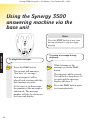
Note
Press the STOP button at any time
during playback to stop messages
playing.
Page
DECT
Digital Clarity
Ans.
Vol.
on
off
Skip
ANSWER MACHINE
Del
Stop
Skip Play
To playback messages
Play
Press the PLAY button.
To pause a message during
playback
Play
The prompt will announce,
“You have (n) messages”.
The message will be paused.
You will hear a beep every 10
seconds and the message
display will show P.
Your message(s) will be
played back, starting with the
first message received.
At the start of each message,
the number of the message is
announced. The message
number will also be shown on
the base unit display.
43
While listening to the
message, press the PLAY
button.
Play
Press the PLAY button again
to resume playback.
Synergy 3500 user guide ~ 3rd Edition ~ 21st October ’02 ~ 4461
To skip forward and backward
through messages (including
fast playback)
To delete all messages
When all messages have been
played the prompt will
announce, “End of messages.
To delete all messages, press
delete”. The display counts
down from 8-0.
During playback:
Skip Skip Skip
Press the SKIP button to skip
forwards to the next message.
If you press and hold the SKIP button the current message
will be played at 11/2 times the
speed (fast playback).
Del
ANSWER MACHINE
Press the Skip button to
return to the start of the
current message. Press again
to return to the start of the
previous message.
During the countdown press
the red DELETE button and
the prompt will announce,
“All messages deleted”. At the
end of the countdown there
will be a confirmation tone.
To cancel deletion
To delete an individual message
Del
Press the red DELETE button
on the base unit during
message playback.
The prompt will announce,
“Message deleted”.
Individual or all.
Stop
Press the STOP button
during the 8-0 countdown.
All messages will be saved
including any marked for
deletion.
The message is not deleted yet,
but at the end of playback when
there is an 8 second countdown
followed by a confirmation
tone. Let the countdown reach
0 and all the selected messages
are deleted and the remaining
messages are saved.
44
Synergy 3500 user guide ~ 3rd Edition ~ 21st October ’02 ~ 4461
Call screening
You can let your answering machine
pick up a call, even if you are in. This
allows you to identify the caller and
decide whether to take the call.
Make sure the volume on the base
unit is set to an audible level,
see page 36. Allow the incoming call
to be answered by your Synergy 3500
answering machine as normal. You
will hear the caller begin to leave a
message.
ANSWER MACHINE
To screen a call from the
base unit
While listening to your caller
leaving a message, via the
base unit loudspeaker, you can
decide to take the call by
pressing the TALK button on
the handset.
Or
If the handset is resting on
the base unit and you decide
to take the call, lift the handset
and speak to the caller.
Recording will stop
automatically.
45
Synergy 3500 user guide ~ 3rd Edition ~ 21st October ’02 ~ 4461
Using the Synergy 3500
answering machine via the
handset
Di g it a
Secrecy
Handsfree
lC
la
rit
Accessing your messages from
the handset
y
Menu
Redial
Vol
Calls
DE
C
GH
2
4
PQ
3
MN
6
WX
V
8
YZ
TU
RS
7
5
O
JKL
I
F
AB
1
9
Co
n
Menu
Use the table on the next
page for instructions on which
buttons to press to access the
answering machine from the
handset.
f
Int
R
You can use your Synergy 3500 for a
variety of functions: to listen to your
messages; delete, skip forward or
backward; record a memo or new
outgoing message, and to screen
incoming calls.
ANSWER MACHINE
0
Press the button twice. The
handset will beep and announce
the main menu options.
The display will flash TAM MENU
and the handset will beep.
Note
If you try to access the answering
machine via the handset when the
base unit is in use the handset display
will flash TAM BUSY.
46
Synergy 3500 user guide ~ 3rd Edition ~ 21st October ’02 ~ 4461
AB
C
2
To play all messages
To playback messages
DE
F
3
To play new messages
GH
I
4
JKL
5
Pick up the handset.
To skip back during messages
To delete messages, memo,
outgoing message
Press the button twice.
You will hear the main menu
announcement from the
handset earpiece.
Menu
MN
O
6
To skip forward during messages
PQ
RS
7
To record a new memo
AB
V
8
C
TU
To hear outgoing message menu
2
AB
C
2
DE
F
3
GH
I
4
ANSWER MACHINE
JKL
5
MN
O
6
Your message(s) will be
played back, starting with the
first message received.
To record Answer Only
Outgoing Message, Press 4
To select Answer and Record
Outgoing Message, Press 5
At the start of each message,
the number of the message is
announced. The message
number will also be shown on
the base unit display.
To select Answer Only
Outgoing Message, Press 6
To hear the Outgoing Message Menu
again, Press 8
1
To hear Main Menu again, Press 1
V
YZ
9
The prompt will announce,
“You have (n) messages”.
To record Answer and Record
Outgoing Message, Press 3
8
TU
WX
To play Outgoing Message, Press 2
To set a new security code
(Please see Remote access, page 50)
0
To set day and time
1
To hear main menu.
Press the 2 button to play all
messages.
Press and hold the ✘ button to
return the handset to standby.
Secrecy
To play new messages
Pick up the handset.
Press the button twice.
You will hear the main menu
announcement from the
handset earpiece.
Menu
DE
F
3
47
Press the 3 button to play all
new messages.
Synergy 3500 user guide ~ 3rd Edition ~ 21st October ’02 ~ 4461
The prompt will announce,
“You have (n) new messages”.
To delete all messages
Your new message(s) will be
played back, starting with the
first message received.
Press and hold the ✘ button to
return the handset to standby.
Secrecy
When all messages have been
played the prompt will
announce, “End of messages.
To delete all messages, press 5”.
JKL
5
To skip back during message
playback
GH
I
4
The prompt will announce,
“All messages deleted”.
This is a useful timesaving
feature to delete all messages,
once you have listened to
them, and avoids having to
delete each one individually
during playback.
ANSWER MACHINE
Press the 4 button during
message playback to skip
back to the start of the current
message. Press again to return
to the start of the previous
messages.
Press the 5 button.
Memos
To skip forward during message
playback
MN
O
6
Press the 6 button during
message playback to skip
forward to the next message.
To delete individual messages
during playback
A personal memo can be recorded on
your Synergy 3500 and left as a
message for another user. Memos can
be of any length, up to the maximum
recording capacity (13 minutes), but
you should try to keep them short to
allow time for recording incoming
messages.
Note
JKL
5
Press the 5 button during
message playback to delete an
individual message.
You cannot record a memo using the
base unit.
The prompt will announce,
“Message deleted”.
48
Synergy 3500 user guide ~ 3rd Edition ~ 21st October ’02 ~ 4461
To record a new memo
Press the button on the
handset twice.
Menu
PQ
RS
7
Press the 7 button. The prompt
will announce, “Please speak
after the tone. To end recording
press #”.
Speak your memo into the
handset.
Call screening/Call intercept
You can let your answering machine
pick up a call, even if you are in. This
allows you to identify the caller and
decide whether to take the call.
Make sure the volume is set to an
audible level, see page 36. Allow the
incoming call to be answered by your
Synergy 3500 answering machine as
normal. You will hear the caller begin
to leave a message.
The display will show r
flashing.
Co
ANSWER MACHINE
nf
Press the # button to end
recording.
Your memo is now stored and
can be played back later.
Memos are stored in the same
way as incoming messages,
and the message counter on
the base unit will increase by 1.
Secrecy
Press and hold the ✘ button to
return the handset to standby.
To screen a call via the handset
(when the handset is off the base
unit)
When your Synergy 3500
starts to record an incoming
message, the IN USE light will
flash. The display will show
SCREEN?
Menu
Press the button.
You can hear the caller on the
handset.
Or
To interrupt recording and
talk to your caller, press the
TALK button.
Recording is stopped.
49
Synergy 3500 user guide ~ 3rd Edition ~ 21st October ’02 ~ 4461
Remote access
You can turn your Synergy 3500
answering machine on and off and
listen to your messages from any
TouchtoneTM telephone. To protect your
privacy, messages can only be accessed
by entering a 3-digit security code.
The pre-set code is 000 and can be
changed. If you change the code it is
advisable that you make a note of it
somewhere safe.
Note
After 15 seconds the handset will
automatically return to standby.
To switch your answering
machine on remotely
To change your security PIN code
REMOTE ACCESS
If you go out and forget to turn
your answering machine on
you can switch it on remotely.
Dial your telephone number.
Menu
Let the phone ring for 20 rings
until you hear your outgoing
message.
Press the button twice.
WX
YZ
9
Press the 9 button.
To set a new security PIN
code press ✱.
Enter a 3-digit code of your
choice.
The prompt will announce the
new security PIN code.
Co
nf
Secrecy
To confirm your security code
press #.
Press and hold the ✘ button to
return to standby.
Enter your security code.
PQ
7
RS
You will hear a beep, followed
by, “Please enter new security
code after the tone”.
Press the ✱ button.
Press the 7 button within 8
seconds. You will hear “Answer
On” and your answering
machine will now be switched
on to answer incoming calls.
Note
If you have new messages they will
be played after you have entered your
security code.
50
Synergy 3500 user guide ~ 3rd Edition ~ 21st October ’02 ~ 4461
To check for messages
Dial your phone number and
wait.
When you hear your outgoing
message, press the ✱ button
on your phone. You will hear,
“Please enter your security code”.
Enter your security code.
If you have new messages,
you will hear, “You have ‘n’ new
messages”.
Your messages will be played.
REMOTE ACCESS
If you have no new messages,
you will hear, “You have no new
messages, to hear main menu
press 1”.
You have 15 seconds to enter
any other instructions before
your Synergy 3500 hangs up.
Note
If you enter your security PIN code
incorrectly, after the second attempt,
your Synergy 3500 will announce:
“Thank you for calling” and will
then hang up.
51
Time saver
The Time saver feature is useful if you
are out and want to ring in and check
if you have received any new messages.
If your answering machine is set to
time saver you can check whether you
have new messages or not before your
answering machine actually answers
your call. If you have new messages
your answering machine will answer
after 2 rings, if you do not have any
new messages, it will not answer until
6 rings. This enables you to hang up
before you are connected, saving you
time and the cost of a call.
Operating the
answering machine
When you have accessed your
answering machine, you can operate
it using the keypad numbers on the
phone you are using.
Synergy 3500 user guide ~ 3rd Edition ~ 21st October ’02 ~ 4461
The Remote access main menu
The main menu lets you
operate a range of answering
machine functions. Simply
follow the instructions as
announced:
AB
C
2
DE
F
3
GH
I
4
JKL
MN
O
6
PQ
RS
7
TU
V
8
WX
YZ
9
“To play new messages,
press 3”.
“To skip back during messages,
press 4”.
“To delete during messages,
press 5”.
REMOTE ACCESS
5
“To play all messages,
press 2”.
“To skip forward during
messages, press 6”.
“To set answer on or off
press 7”.
“To hear the outgoing message
menu, press 8”.
“To set a new security code
press 9”.
0
“To set day and time
press 0”.
1
“To hear main menu again,
press 1”.
52
Synergy 3500 user guide ~ 3rd Edition ~ 21st October ’02 ~ 4461
Using Synergy 3000 additional
handsets and bases
Up to 5 handsets can be registered and
operated from any one Synergy 3500
base. This allows you to make internal
calls between two handsets while a
third is making an external call.
Di g it a
Secrecy
Handsfree
lC
lar
Di g it a
ity
Secrecy
Menu
Handsfree
Redial
Vol
C
1
MN
2
GH
I
JKL
4
5
PQ
DE
3
MN
6
WX
V
8
9
Co
n
f
f
0
0
DECT
Digital Clarity
Int
R
Di g it a
lC
lar
Int
R
Di g it a
ity
YZ
TU
RS
V
YZ
RS
7
Co
n
O
I
O
Page
WX
9
F
C
3
6
TU
8
AB
F
JKL
5
PQ
7
Menu
Calls
DE
AB
2
GH
4
ity
Redial
Vol
Calls
1
lC
lar
Ans.
lC
lar
Vol.
Note
Remember to charge the battery pack
of new handsets for at least 16 hours
before use.
If the display shows NOT REG and
the
symbol is flashing, your
handset is not yet registered with
the base.
ity
on
off
Stop
Skip
Skip Play
Del
Secrecy
Handsfree
Secrecy
Menu
Handsfree
Redial
Vol
Calls
DE
4
PQ
JKL
DE
3
MN
6
WX
TU
V
7
ity
Co
n
5
8
YZ
lC
lar
RS
V
9
2
I
9
Co
n
f
f
ADDITIONAL
GH
Di g it a
WX
YZ
RS
8
1
MN
6
TU
O
I
7
AB
3
O
JKL
5
C
2
F
C
PQ
F
AB
GH
4
Menu
Redial
Vol
Calls
1
0
0
Int
Int
R
R
Secrecy
Handsfree
Menu
To register a Synergy 3000
handset to another base
Redial
Vol
Calls
DE
C
GH
2
JKL
I
PQ
5
3
MN
6
WX
V
8
YZ
TU
RS
7
O
4
F
AB
1
9
Co
n
f
0
Int
R
Each handset can be registered on up
to 4 bases.
At the base:
Page
Each additional handset you purchase
must be registered with the base.
Your handset supplied is pre-registered
as Handset 1 to its base (Base 1).
If you have purchased a Twin the
additional handset supplied is
pre-registered as Handset 2 (Base 1).
Press and hold the base PAGE
button for at least 10 seconds,
until you hear the validation
tone (two beeps), then release
the button.
At the handset:
Menu
Redial
Vol
C alls
Menu
Press the button to enter
the menu.
Use the DOWN button to
scroll to REGISTER and press
the button.
The display will show
BS 1 2 3 4. (The numbers
53
Synergy 3500 user guide ~ 3rd Edition ~ 21st October ’02 ~ 4461
that are flashing indicate
other bases that the handset is
already registered to).
To de-register a Synergy 3000
additional handset from
the base
Enter the base number
(BS 1-4) that you want to
register the handset to.
Enter your 4-digit PIN
(original factory setting OOOO)
and press the button.
Handsets can only be de-registered
via another handset.
Menu
Redial
Vol
C alls
Menu
Redial
Vol
C alls
Menu
Your 4 digit PIN number is 0000
unless you have previously allocated
a new PIN number as explained on
page 29.
Use the DOWN button to
scroll to DEL HS and press
the button.
Enter your 4-digit PIN.
Menu
Redial
Vol
C alls
Menu
Menu
Note
Use the DOWN button to
scroll to SETUP and press the
button.
The display will show PIN?
Note
If the handset does not locate the
base, the handset will return to
the previous menu. Try to register
again by using a different
available base number. Ensure
that you are in close vicinity of
the base).
Press the button to enter
the menu.
ADDITIONAL
The display will show
SEARCH 1, 2, 3, 4 and the
symbol will flash as the
handset tries to locate the base.
When the handset locates
the base, the handset will be
automatically selected and
shown on the display.
Note
Press the button.
Use the UP or DOWN button
to select the handset you want
to de-register (HANDSET 1-5).
Press the button. Display
shows CONFIRM?.
Press . You will hear a
confirmation beep.
Once de-registered, the
handset will display NOT REG.
54
Synergy 3500 user guide ~ 3rd Edition ~ 21st October ’02 ~ 4461
Enter the number of the
handset that you want to
transfer the call to (1-5).
Internal calls
If you have multiple handsets
registered to the base you can make
internal calls between handsets.
Your caller will be put on hold.
When the internal handset is
answered, (if you want to you
can talk to the handset user
first), press the TALK button.
The call will be transferred.
To make an internal call to
another handset
Int
Press the INT button.
Enter the number of the
handset you wish to call, (1-5).
The called handset will ring
Int
The display will show INT.
If the call to the second
handset is not answered you
can revert/speak to the caller
again by pressing the INT
button.
ADDITIONAL
To end the call, press the
TALK button.
The number of the handset
calling will be displayed on the
called handset. For example, if
handset 2 calls handset 1, HS2
will be displayed on handset 1.
Three-way conversation
You can talk to one external
caller and another internal
caller at the same time on
your handset.
During a call with an external
caller:
Transferring calls
You can transfer an external call to
another handset registered to the base.
To transfer an external call
between handsets
During an external call:
Int
55
Press the INT button.
Int
Press the INT button. Your
caller is put on hold and you
hear a tone.
Enter the number of the
handset you want to transfer
the call to.
Synergy 3500 user guide ~ 3rd Edition ~ 21st October ’02 ~ 4461
Co
nf
Int
When the handset is
answered, press and hold the
# button for about 3 seconds.
You can now start your
three-way conversation. (If the
internal handset user does
not answer your call, press the
INT button to return to your
external caller).
Vol
C alls
Menu
Vol
C alls
Press the button.
Vol
C alls
Menu
When on a three-way call the call can
only be cleared by the handset which
set it up.
button to exit the call.
Vol
C alls
Menu
Handset Priority
If you have more than one
handset registered to the base
you can select the handset
you want to ring first. You can
also set the number of rings
the handset will have before
an incoming call reverts to all
available handsets.
Menu
Vol
C alls
Menu
Menu
Use the DOWN button to
display the option you want,
either BASE or the handset
number you require, eg
HANDSET 3.
Press the button.
The display shows RINGS
followed by a number between
1 and 9.
ADDITIONAL
Press the
Use the DOWN button to
scroll to SELECT.
Menu
Press the TALK button to end
the call.
Note
Use the DOWN button to
scroll to PRIORITY and press
the button.
Use the DOWN button to
scroll to the number of rings
you require.
Press the button.
PRIORITY is displayed,
denoting that handset priority
is on.
Press the button to confirm.
The display shows ON.
Press the button to enter
the menu.
Use the DOWN button to
scroll to SETUP and press the
button.
56
Synergy 3500 user guide ~ 3rd Edition ~ 21st October ’02 ~ 4461
Help
Replacing the handset batteries.
After a time, you may find that the
handset batteries are running out of
charge more quickly. This is a
standard sign of wear and the batteries
will need replacing.
For spare 2 x AAA rechargeable
batteries please contact the
Synergy 3500 Helpline 08706 058 047.
HELP
Replacing the batteries
In the event that you should need
to change or replace the batteries:
Remove the battery compartment
cover and take out the batteries.
Insert new 2 x AAA re-chargeable
batteries and replace the battery
compartment cover.
Do not immerse the batteries in water
or throw into a fire, or dispose of with
ordinary domestic refuse.
BT accepts no responsibility for
damage caused to your Synergy
handset by using any other type of
batteries.
No display appears.
The batteries may be flat or dead.
Recharge or replace the batteries.
The handset may be switched off.
No dial tone.
Is the telephone line cord plugged into
the phone socket?
Check that: The base station is
connected to the mains power and
switched on.
You cannot link up with the base
station.
Is the display flashing
?
The mains power cable may not be
connected at the base or switched on.
Are you in range of the base station?
The batteries could be low or flat.
If using more than one base station,
check that you are connected to the
correct base. See page 29.
57
Synergy 3500 user guide ~ 3rd Edition ~ 21st October ’02 ~ 4461
Handset does not ring.
The ringer volume may be switched
to off. To adjust the ringer volume on
the handset. See page 25.
Are you using the correct power
adaptor?
Synergy 3500 base station power
supply is Item Code 005391.
Check that: The base station is
plugged into the phone socket.
Check that: The base station is
plugged into the mains power and
switched on.
Synergy 3000 charger power supply is
item code 003313.
Buzzing noise on my radio, TV,
computer or hearing aid.
Is someone else making changes via
another handset?
Sometimes, your Synergy 3500 can
interfere with other electrical
equipment if it is placed too close.
Have you pressed the button to
confirm your selection?
Customer Helpline
If you are still experiencing difficulty,
call the Synergy 3500 Helpline on
08706 058 047.
HELP
It is recommended that you place
your Synergy 3500 and other Synergy/
DECT GAP compatible handsets at
least one metre away from such
appliances to avoid any risk of
interference.
Cannot adjust an option in the
base station.
The charger does not appear to be
working.
Check that: The power adaptor is
properly plugged into the charger.
Check that: Your handset has slotted
correctly into the charger.
Check that: The batteries are correctly
fitted into the handset.
Check that: The base is plugged in to a
working socket and that the socket
is switched on.
58
Synergy 3500 user guide ~ 3rd Edition ~ 21st October ’02 ~ 4461
General information
Guarantee
Your Synergy 3500 is guaranteed for
a period of 12 months from the date of
purchase.
GENERAL INFORMATION
Subject to the terms listed below the
guarantee will provide for the repair
of, or at BT’s or its agent’s discretion,
the option to replace the Synergy 3500,
or any component thereof, (other than
the batteries), which is identified as
faulty or below standard, or as a result
of inferior workmanship or materials.
Products over 28 days old from the
date of purchase may be replaced with
a refurbished product.
The conditions of this guarantee are:
• The guarantee shall only apply to
defects that occur within the 12
month guarantee period.
• Proof of purchase is provided.
• The equipment is returned to BT or
its agent as instructed.
• This guarantee does not cover the
battery pack and any faults or defects
caused by accidents, misuse, fair
wear and tear, neglect, storm damage,
tampering with the equipment, or
any attempt at adjustment or repair
other than through approved agents.
• This guarantee does not affect your
statutory rights.
59
Within the 12 month guarantee
period:
If you experience difficulty using the
product, prior to returning your
product, please read the Help section
beginning on page 57, or contact the
Synergy 3500 Helpline for assistance:
Helpline 08706 058 047, 9am to
5.30pm Monday to Friday.
In the unlikely event of a defect
occurring, please follow the Helpline’s
instructions for replacement or repair.
Outside of the 12 month guarantee
period:
If your product needs repair after the
guarantee period has ended, the
repair must meet the approval
requirements for connection to the
telephone network. We recommend
that you contact BT’s approved repair
agent, TecLogic on 01672 564444 or a
local qualified repairer.
Instructions for returning the product:
If the Helpline is unable to remedy
your problem they will ask you to
return the product. Where possible,
pack the product in its original
packaging. Please remember to
include all parts, including line cords,
power supply units, and the original
Synergy 3500 user guide ~ 3rd Edition ~ 21st October ’02 ~ 4461
batteries. (Please note that we cannot
take responsibility for goods damaged
in transit.) Please obtain and keep
proof of posting from the Post Office.
Technical information
How many telephones can you have?
You may need to enter an access code
(e.g. 9) in order to get an outside line.
So that the switchboard has time to pick
up an outside line, you may also need
to add a Pause after the access code.
Recall
To use the recall button
R
With different telephone types there
is no guarantee of ringing, even when
the REN is less than 4.
Only use approved power supply, item
code 005391 for base station or 003313
for charger (only applicable if you have
purchased the Synergy 3500 Twin).
Use only approved (Ni-MH)
rechargeable batteries.
To set the dialling mode
Menu
Vol
C alls
Menu
Switchboard compatibility
Vol
C alls
This product is intended for use
within the UK for connection to the
public telephone network and
compatible switchboards, which
support tone dialling and timed break
recall. If in doubt please consult your
service provider.
This is used when connected
to certain switchboards and
for some BT Select Services
or those services available via
your network provider.
GENERAL INFORMATION
All items of telephone equipment have
a Ringer Equivalence Number (REN),
which is used to calculate the number
of items which may be connected to
any one telephone line. Your Synergy
3500 has a REN of 1. A total REN of 4
is allowed, if the total REN of 4 is
exceeded, the telephones may not ring.
Switchboard external line
access code
Menu
Redial
Vol
C alls
Menu
Press the button to enter
the menu.
Use the DOWN button to
scroll to SETUP and press the
button.
Use the DOWN button to
scroll to DIALMODE and press
the button.
Use the UP or DOWN button to
select either TONE or PULSE.
Press the button. You will
hear a confirmation beep.
60
Synergy 3500 user guide ~ 3rd Edition ~ 21st October ’02 ~ 4461
To automatically insert a pause
after an access code
With some switchboards it
may be helpful to dial a pause
after entering the switchboard
access code, e.g. 9, 11 etc. to
enable you to get an outside
line.
GENERAL INFORMATION
This feature automatically
inserts a pause between the
access code and the telephone
number that you have entered
in the Phonebook. However
for this feature to work you
must still enter the access
code at the front of the
telephone number when
storing in the Phonebook.
Menu
Vol
C alls
Menu
Vol
C alls
Menu
Vol
C alls
Menu
Menu
Press the button to enter
the menu.
Use the DOWN button to
scroll to SETUP.
Press the button.
Use the DOWN button to
scroll to PABX.
Press the button.
Use the DOWN button to
scroll to PBX 1.
Press the button.
Display shows PIN?.
Enter PIN number.
Press the button.
Enter the access code.
61
Menu
Press the button.
You can also adjust the length
of the pause to be inserted.
There are two options available,
3 or 5 seconds to be set to suit
the switchboard:
Menu
Vol
C alls
Menu
Vol
C alls
Menu
Vol
C alls
Press the button.
Use the DOWN button to
scroll to SETUP.
Press the button.
Use the DOWN button to
scroll to PABX.
Press the button.
Use the DOWN button to
scroll to PAUSE.
Display shows 3 SEC.
Vol
C alls
Menu
Use the DOWN button to
scroll to 5 SEC.
Press the button. You will
hear a confirmation tone.
Synergy 3500 user guide ~ 3rd Edition ~ 21st October ’02 ~ 4461
Index
Accessories and spares
65
Additional handsets
53
36
37
36
45, 49
36
48
35
36
38
43
43
15
44, 48
50
Answer delay
36
Answer on/off
36
Audible message alert
37
Auto talk on/off
26
Base ringer volume
28
Base settings
default/reset
diagram
PIN number
ringer melody
ringer volume
select which base station
30
2
29, 50
28
28
29
13
13
13
14
57
Belt clip
17
Button beeps on/off
25
Caller Display
31
Calls
end
handsfree
internal
make
preparatory dialling
receive
redial
secrecy
three-way conversation
transfer
19
20
55
18, 20
18
19
20
21
55
55
Calls list
delete
delete all
dial number
enter
store in Phonebook
view
31
33
33
32
32
32
32
Call screening
via the base
via the handset
45
49
INDEX
Answering machine
answer delay
audible message alert
base unit loudspeaker
call screening
loudspeaker volume
memos
message display on base
on/off
outgoing messages
pause message playback
playback messages
set day and time
skip backward/forward
remote access
Batteries
charging
installing
low warning
performance
replacing
62
Synergy 3500 user guide ~ 3rd Edition ~ 21st October ’02 ~ 4461
Call timer
18
Call Waiting
33
Cleaning
11
Day – set
15
INDEX
Delete
cancel message deletion
calls list numbers
messages via base
messages via handset
own outgoing message
Phonebook numbers
De-register
54
Dialling mode
60
Display icons
3
Earpiece volume
19
End a call
19
Guarantee
59
Handset diagram
63
44
33
44
48
41-42
23
1
Internal calls
55
Keypad beeps on/off
25
Language
27
Location of product
12
Make a call
18, 20
Melody
base
handset
28
26
Menu structure
6-7
Memo
48
Name a handset
26
Number of rings
(handset priority)
56
On/off
answer machine
audible message alert
auto-talk
handset
keypad beeps
secrecy
Handset settings
auto-talk on/off
default/reset
keypad beeps on/off
language setting
name handset
on/off
priority
register to another base
ringer melody
ringer volume
26
30
25
27
26
18
56
53
26
25
Handsfree
20
Help
57
Pause – insert
Helpline
58
Paging handsets
36
37
26
18
25
21
Outgoing messages
check or play via the base
check or play via the handset
record Answer and Record
record Answer Only
reinstate pre-recorded
message
select via the base
select via the handset
40
40
38
39
41
40
41
22, 61
24
Synergy 3500 user guide ~ 3rd Edition ~ 21st October ’02 ~ 4461
Pause during playback
43
Phonebook
delete
dial
edit
enter a pause
store
21
23
22
23
22
21
PIN base
PIN remote access
Playback messages
via the base
via the handset
Power supply
28
25
Safety information
11
Screening calls
45, 49
Secrecy
21
29
Setting up
12
50
Skip forward/backward
during playback
43
47
12, 16
Preparatory dialling
18
Pulse dialling
60
4
44, 48
Speech volume
19
Storing a number
21
Switchboard access code
60
Switchboard compatibility
60
Technical information
60
Telephone line cord
14
Recall
60
Three-way conversation
55
Receive a call
19
Time saver
51
Time – set
15
Tone dialling
60
Transfer calls
55
10
Record
outgoing message
memo
38-39
49
Redial
20
Register handset to another base
53
Unpacking
Remote access
50
Volume
REN (Ringer Equivalence Number) 60
Reset handset/base
30
Returning your Synergy 3500
59
Ring delay
36
Ring priority
56
Ringer melody
base
handset
28
26
base ringer
earpiece (speech)
handset ringer
handsfree
speech (earpiece)
INDEX
Quick guide – handset settings
Ringer volume
base
handset
28
19
26
20
19
64
Synergy 3500 user guide ~ 3rd Edition ~ 21st October ’02 ~ 4461
Accessories and spares
For the Synergy 3500 range of telephones
Accessories and spares for the
Synergy 3500 range of telephones
are listed below.
All items are available from the
Synergy Helpline, please call
08706 058 047
Additional handsets and chargers:
In Titanium:
Item code 005717
Di g it a
lC
la
rit
Power supply units for the base
station or charger
Plug mounted,
13 amp mains adaptor.
Item code 005391
for base station
Item code 003313
for charger
Telephone line cord
y
AAA rechargeable
batteries (Ni-MH)
Secrecy
Handsfree
Menu
Redial
Vol
Calls
DE
C
GH
2
4
PQ
MN
WX
V
YZ
8
Battery cover
3
6
TU
RS
7
5
O
JKL
I
F
AB
1
9
Co
n
f
0
Int
Charging
R
User guide
Additional chargers:
Charging
65
Synergy 3500 user guide ~ 3rd Edition ~ 21st October ’02 ~ 4461
R&TTE
This product is intended for use
within the UK for connection to the
public telephone network and
compatible switchboards.
This equipment complies with the
essential requirements for the Radio
Equipment and Telecommunications
Terminal Equipment Directive
1999/5/EC.
Declaration of Conformance.
Hereby, Suncorp Technologies,
declares that this Synergy 3500 is in
compliance with the essential
requirements and other relevant
provisions of Directive 1999/5/EC.
The Declaration of Conformance for
the Synergy 3500 is published on the
web site
http://www.suncorptech.com/bt
Synergy 3500 user guide ~ 3rd Edition ~ 21st October ’02 ~ 4461
Offices worldwide
The telecommunications services described in this publication
are subject to availability and may be modified from time to time.
Services and equipment are provided subject to British
Telecommunications plc’s respective standard conditions of contract.
Nothing in this publication forms any part of any contract.
Touchtone™ is a registered trade mark of
British Telecommunications plc in the UK.
© British Telecommunications plc 2002.
Registered Office: 81 Newgate Street, London EC1A 7AJ.
Registered in England No. 1800000.
Designed by: The Art & Design Partnership Limited.
Printed in China. Synergy 3500. Issue 1 (10/02) 3