1
!" "! !"!# ! $ %# & '' &%( #
)*+
#
'
,
This manual describes the installation and operation of Vidscope-HD, a software package that provides Television
Monitoring and Measurement tools for Windows™ based PCs users. It is capable real-time waveform, vectorscope and
picture monitoring on a suitable PC’s monitor screen.
All information contained in this manual and the Vidscope-HD ™ software is this copyright of Hamlet Video International Ltd unless otherwise stated. All rights reserved.
Hamlet Video International Ltd. reserves the right to make changes to this manual and companion software product at any time without notice. Hamlet Video International Ltd
in no way guarantees the quality or fitness of the products or manual whether implied or expressly made. Hamlet Video International Limited shall not be held liable in any
way for any action or non-performance of its software or manual either by actual or implied loss, consequential damages or use for illegal purposes.
Hamlet Video International Ltd. does not encourage or condone the use of its products to breach copyright by infringement of legal owners rights.
© 2004,2005,2006 Hamlet Video International Ltd. All rights reserved
This handbook contains proprietary information of Hamlet Video International Limited and may not be copied in whole or in part nor its contents
disclosed to any third parties without the express written consent of the company
http://www.vidscope-HD.co.uk
Hamlet Video International Limited
Maple House 11 Corinium Business Centre Raans Road Amersham Bucks HP6 6FB England
Main Line: +44 (0)1494 729 728 Fax Line: +44 (0)1494 723 237 Free phone (UK) 0500 625 525
E-mail: [email protected] Web site: www.hamlet.co.uk
Hamlet Video International USA service center , Tecads Inc, 23 Del Padre St, Foothill Ranch, CA
92610, U.S.A. Tel: +1 (949) 597 1053, Fax: +1 (949) 597 1094.
Toll Free Tel number: (866) 4 HAMLET
1
Manual vidscope-hd v2.doc
CONTENTS
1
1.1
1.2
1.3
1.4
2
2.1
2.2
2.3
2.4
3
3.1
3.2
3.3
3.4
3.5
3.6
3.7
3.8
3.9
GENERAL INFORMATION .....................................5
WARRANTY ..................................................................... 5
SAFETY COMPLIANCE ................................................... 5
BS EN 61010-1 : 1993
5
OVERVIEW....................................................................... 6
Features 6
Measurement Functions
6
Important Advice............................................................. 7
INSTALLATION.......................................................8
3.10
3.11
Hardware & Computer requirements ............................. 8
General Indications 8
Minimum configuration:
Recommended configuration:
8
8
3.12
Graphics Card ................................................................. 8
Loading and installing VidScope ................................... 9
CD version
9
USB Memory stick version
9
Software version downloaded from the Internet
OPERATING INSTRUCTIONS..............................11
Registration continued
12
Vidscope’s Main Application Windows ....................... 13
Main Window Menu & ToolBar ..................................... 14
Main Menu Description ................................................. 15
File ................................................................................. 15
4.3
4.4
15
16
5
5.1
5.2
5.3
5.4
5.5
Sources [Video Inputs] ................................................. 18
Clip File Source
18
DV Sources
19
Setting up video sources
19
Display Aspect 16:9
Display Aspect 4:3
21
21
Waveform & Vector Analysis ..............................23
12
Capture file setup
15
Save Copy of Captured File
Set Space or Time Limit
Format Options
16
Snapshot Options
17
Exit
17
Capture .......................................................................... 20
PVW Preview Monitor Display ...................................... 21
4
VidScope Start Window ................................................ 12
Demo / Trial Mode
19
Safe Area ....................................................................... 21
Overlay........................................................................... 22
4.1
4.2
First Time Start Up ........................................................ 11
Restore Source(s)
19
Show video dimensions
19
Use Skin Decoration 19
Lock Display to actual video pixel sizes
Integrate VidScope Displays
20
Show Presets
20
Video Source Control 20
Stop to change video settings
20
3.13
9
Continue Installation....................................................... 9
Audio.............................................................................. 19
Options .......................................................................... 19
Load image overlay 22
Overlay last snapshot 22
No Overlay
22
Overlay image settings
22
Main Control Panel........................................................ 23
Summary of Display Modes.......................................... 24
WFM – waveform
Line Selection
Vector Mode
wfm/vector
Histogram 26
RGB Parade
Gamut
26
YUV Parade
24
24
25
25
26
26
Monitor modes .............................................................. 28
Scale Menu .................................................................... 29
Audio Menu...........................................................30
Audio Waveforms.......................................................... 30
Multi-Channel Audio...................................................... 30
Audio Level Scales........................................................ 30
Audio Configuration...................................................... 31
Audio Monitoring........................................................... 32
2
Manual vidscope-hd v2.doc
CONTENTS
5.6
Soundcard settings....................................................... 33
6
Alarms Menu (formerly gamut) ..............................34
6.1
6.2
6.3
6.4
6.5
6.6
6.7
6.8
6.9
Actual Error ................................................................... 34
Average Error ................................................................ 34
Peak Error...................................................................... 34
Alarm Flagging.............................................................. 34
Audio Alarms and Logging Options ............................ 35
Setups Menu.................................................................. 36
Screen Layout
Freeze Display
Source Menu
36
36
36
36
User Presets .................................................................. 37
KEYBOARD SHORT CUTS
37
About ............................................................................. 37
Multi-Mode Display ....................................................... 38
Multi –Mode Default 38
Multi – User Mode
38
7
Setups Menu CPU & Quality ...............................39
7.3
7.4
Waveform Snapshot Options Menu ............................. 40
Overlay........................................................................... 41
Other Setup Options ..................................................... 42
Pane Editing in User Mode ........................................... 42
8
Logging Menu ......................................................43
9
SPECIFICATIONS .................................................45
7.1
7.2
9.1
10
Setting up a log operation
Logging Form
44
43
Vidscope-HD version .................................................... 45
Host Platform
45
Input Sources
45
Display Modes
45
Timing Measurement 45
Amplitude /Measurements
45
CONTACT DETAILS AND SUPPORT ..................46
3
Manual vidscope-hd v2.doc
INTRODUCTION
Vidscope-HD is an integrated suite of Windows programs for television
signal monitoring and measurements. Operating on a Windows
desktop, the Waveform monitor, Vectorscope and associated Audio
displays with the Picture can all be displayed on the PC'
s monitor
screen. The real time Hamlet VidScope displays look like those on
conventional waveform monitors with variable intensity, persistence
and graticule brightness just like a conventional CRT. The user can
scale all displays as floating windows from full screen to thumbnail
sizes.
In designing Vidscope-HD, we have tried to make it visually selfexplanatory. If you hover your mouse cursor over any button,
a detailed description will appear. In outlining Vidscope-HD in this
manual, we have attempted to keep it readable by brevity.
Before you start installing and running Vidscope-HD, you need to
check the system requirements and understand a few simple
technicalities about video monitoring and setting up the product.
SAVE TIME : READ THE MANUAL FIRST
Waveforms can be portrayed in field, frame and 1 H display modes. In
Line select mode all frame'
s lines are overlaid in real time with the
recurrent features displayed in higher intensities. Horizontal scaling
can be set between 1H and full frame and amplitude between half
scale and x 10. Luminance only, Chrominance, YCrCb or RGB
parades or stacks can be displays as can statistical and gamut
displays. Markers can be inserted into the preview display to show the
region being investigated. In the Vectorscope mode a graticule scaling
for 75 or 100% or variable gain can be used.
For Audio monitoring, there are bar graphs displays have peak hold
and have the associated graticules scales and ballistics selectable
from whatever industry standard template required such as Digital,
VU, PPM and Nordic etc..
All the scales and measurements of the Vidscope are made with
precision and update the display generally within 2 TV frames in realtime: subject to the PC’s CPU capabilities.
4
Manual vidscope-hd v2.doc
Vidscope-HD User Manual
!"#
1.1
1.2
$%!&"' %
WARRANTY
This product is manufactured by Hamlet Video International Ltd and is
warranted to be free from defects in components and factory
workmanship under normal use and service for a period of one year from
the date of purchase.
BS EN 61010-1 : 1993
Safety requirements for electrical equipment for measurement, control
and laboratory use.
EMC COMPLIANCE
TERMS AND CONDITIONS
We:
HAMLET VIDEO INTERNATIONAL LTD
MAPLE HOUSE
11 CORINIUM BUSINESS CENTRE
RAANS ROAD
AMERSHAM
BUCKS
HP6 6FB
ENGLAND
declare under our sole responsibility that the product
During the warranty period, Hamlet Video International Ltd will undertake to repair
or at its option, replace this product at no charge to its owner when failing to
perform as specified, provided the unit is returned shipping prepaid, to the factory
or authorised service facility. The licensed user is entitled to downloads updates
and improvements for the Hamlet website for a period on 1 year from first
installation/registration.
No other warranty is expressed or implied. Warranty shall not be applicable and be
void when this product is subjected to:
1.
2.
3.
SAFETY COMPLIANCE
This product is manufactured and tested to comply with:
Repair work or alteration by persons other than those authorised by Hamlet
Video International Ltd in such a manner as to injure the performance, stability,
reliability or safety of this product.
HAMLET VidScope
to which this declaration relates are in conformity with the following standards:
Misuse, negligence, accident, act of God, war or civil insurrection.
EN50081-1
Generic emissions standard for light industrial applications.
EN50082-1
Generic immunity standard for light industrial applications.
Connection, installation, adjustment or use otherwise than in accordance with
the instructions in this manual.
Hamlet Video International Ltd reserves the right to alter specifications without
notice.
following the provisions of EU EMC directives 89/336/EEC and 92/31/EEC.
This warranty does not affect the statutory rights of the UK customer.
NOTE. During the EMC certification of this product, shielded cables were used. We
recommend that they be used in operation.
5
Manual vidscope-hd v2.doc
Vidscope-HD User Manual
1.3
OVERVIEW
Features
Measurement Functions
•
Runs on Desk or Laptop PCs
•
Waveform, Vectorscope
•
Works on-line with most Video Capture cards*
•
Looks and feels just like a conventional CRT
•
Works with HDV or DV on Firewire
•
Real time displays from 1 line to full frame
•
Works off-line with files
•
Vectorscope with a standard graticule
•
HD or SD operation in most formats
•
Vector scaling of 75% or 100% or variable*
•
Preview Monitor with Safe Area graticules
•
Statistical histogram analysis
•
Picture snapshots as jpegs etc
•
Gamut Zebra and RGB displays
•
4:3 or 16:9
•
Component displays RGB Y,Pr,Pb parade
•
Multi-standard operation
•
Line selector for waveform and vector *
•
Capturing to AVI files etc.
•
Audio bar graphs VU, PPM, Nordic etc.
•
Transport controls for files or VCR
•
Multi-channel Audio bar graphs, Audio Phase
•
Still picture overlay for comparison
•
Audio spectrogram
•
Multi-Window or Single Display
•
Surround Sound display
•
Multi-channel audio monitoring
•
Waveform snapshots*
•
Timecode readout
•
Gamut and Audio alarm flagging
•
All HD and SD picture standards
•
Error and gamut Logging facility with a formatted rich
text output document*
6
Manual vidscope-hd v2.doc
Vidscope-HD User Manual
1.4
Important Advice
Before using VidScope it is important to be familiar with the settings and
control panel of your video capture card that you will be using with the
VidScope.
For HDV and DV users, this will probably not apply unless a custom DV
capture card is used, rather than the Firewire port of the PC.
Obviously, the most important setting this to check that shall capture
card is set for the correct TV standard that you wish to use. The
VidScope itself automatically varies its input settings and TV standard
being used. The capture card will probably reject an input that does not
match the settings preset. Refer to the manufacturers instructions; help
manual or online guidance on this matter if in doubt.
Typical Firewire IEEE1394 Card
7
Manual vidscope-hd v2.doc
Vidscope-HD User Manual
(
2.1
2.2
)'"##"' %
Graphics Card
The 3D graphics capabilities your machine is very important for
waveform realisation is real-time
Hardware & Computer requirements
The application should work satisfactorily on most AGP or
PCI-X graphics cards from the following manufacturers:
NVIDIA
ATI
3D Labs
S3
Possible problem cards: ** Intel 3D graphics, ** Matrox
General Indications
* Windows-based desktop PCs older than 2004 may not be able to run it
or be slow.
* Windows-based notebook PCs older than 2005 may not be able to run
it or be slow.
The following steps can help you find out what type of graphics card you
have. Note: the instructions that follow apply to the Windows XP
operating system, but are similar for other versions of Windows.
* Apple Macintosh computers are not supported
Minimum configuration:
1. Open the Control Panel window by selecting it from the Start menu.
Double-click on the System icon in this window to display the System
Properties dialog. Click on the Device Manager button in the Hardware
panel.
* Operating system: Windows XP Home with DirectX 9.0 or higher
installed.
* CPU speed: Intel(r) Pentium(r) P4 D 3.5GHz+ or AMD 4000xp+
* System memory (RAM): 512MB
2. In the Device Manager window, double-click the Display Adaptors icon
to list the graphics card(s) for your computer.
* 200MB Free hard-disk space
* 3D graphics card: 3D-capable video card with 128MB VRAM
The make and model of your graphics card appears under the Display
Adaptor tab.
* 1024x768, 32-bit true colour screen LCD or CRT
Recommended configuration:
Check the Advanced Tab then Trouble-shooter tab or possibly the
Adapter tab for the hardware acceleration setting.
This should be set to maximum. A graphics card without any hardware
acceleration is very unlikely to produce real-time displays with the
Vidscope.
* Operating system: Windows XP Home or Pro
* Dual or Dual core CPU Intel® CoreDuo(r) 2.0 GHz, Pentium D, or
AMD Athlon 64 X2
* System memory (RAM): 512MB or more
* 10GB Free hard-disk space
* 3D graphics card: PCI-X with 128MB VRAM or greater
* 1024x768, 32-bit true colour screen
* Firewire IEEE1342 ports and/or HD Video capture card
8
Manual vidscope-hd v2.doc
Vidscope-HD User Manual
Vidscope and needs to be plugged in whenever the program is run. This
means you can install on more than one computer, but run on only one
at a time.
2.3
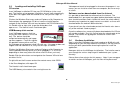
Loading and installing VidScope
CD version
Insert VidScope installation CD into your CD-ROM drive in the usual
way. The Hamlet set-up program should then launch itself automatically.
If this does not happen after 20 seconds or so, carry out the steps as
follows:
Software version downloaded from the Internet
It is possible to download the software from the Internet. The
downloaded file is password encrypted, before download a registration
form should have been filed in Hamlet will email the unlock code it is
therefore very important to supply correct user details as these will be
checked before the code will be emailed out.
Click on the Windows Start menu and use Explorer or My Computer to
find and open the appropriate CD drive. Locate using the browser
navigate to the filename VSinstall.exe located on the CD-ROM drive file
list. Double click or right click to get the dialog box, click
open or run . The Hamlet install should now open
If you do not have the unlock code contact the Hamlet sales team using
any of the methods listed on page 1.
USB Memory stick version
Once the software has successfully been downloaded a file VSinstall.exe
will now be available . Run this file and enter the unlock code at the
prompt. The Hamlet set-up program should then launch itself
automatically.
Insert VidScope memory stick into
any of your USB sockets in the usual
way. The device should be
recognized automatically and a popup menu appears. From this explore
the portable memory drive and Find
the Vidscope set-up program called VSinstall.exe. If the pop-up does not
happen after 20 seconds or so, carry out the steps as follows:
2.4
Continue Installation
Bear in mind that VidScope suite might need up to 30 Mb to install.
(depending on your existing software installations). So may want to
review your disk space before choosing the place to install the
application.
Click on the Windows Start menu and use Explorer or My Computer to
find the portable memory device as a drive (probably E: ,F: or G: etc
depending on how many other disk drives and CD drives you have).
Now open click on the VidScope install button. The Installer now take
your through the various steps to get it loaded onto your system
correctly.
Double Click the drive letter and navigate to the filename VSinstall.exe
on drives file list.
Please allow a few minutes for this process. Note: if you are upgrading
an earlier version of VidScope, your vital files will be preserved.
Or right click on the file name and on the context menu, click OPEN.
In the Run dialog box, click open OK
The Hamlet install should now open
The USB Memory also contains the running license for
9
Manual vidscope-hd v2.doc
Vidscope-HD User Manual
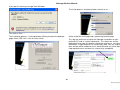
If you get this warning message from Windows:
The install process should only take a minute or so….
Just click on Run…..
At the end of the install pops-up a special registration page.
The installation process is self-explanatory. When you get to the backups
page, check YES if this is the first time install.
This logs the technical set-up of the Vidscope installation on your
particular PC and its system information. This allows our service
department to answer any queries should the need arise. An internet
connection is required for this to successfully work. You can skip this
form, but we will be unable to assist should there be any future technical
help required unless the form has successfully completed.
10
Manual vidscope-hd v2.doc
Vidscope-HD User Manual
*
3.1
%+ !"'
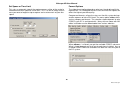
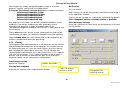
If you don’t have the Vidscope USB stick (which automatically licenses):
you get an invitation to register.
)'!,-' % )
First Time Start Up
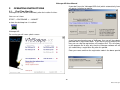
VidScope can be started immediately after the installer finishes.
You can run it from
START -> PROGRAMS -> ~ HAMLET
or from the desktop icon is installed.
Vidscope-HD
On running you will see a splash screen
If you have purchased a copy of VidScope, then you will have been
provided with a registration code. If you are only trying a demo version,
then you can skip the registration until another time. This will allow you to
try the program for 14 days only then the Vidscope software will not run
you need to buy a registration key after this period.
Enter your name and then the registration code in the boxes provided.
11
Manual vidscope-hd v2.doc
Vidscope-HD User Manual
Registration continued
Demo / Trial Mode
Once this is done successfully, you should not need to do it again. If this
should be unsuccessful, then contact Hamlet with your Unique
Reference Number displayed in the on-screen registration form and we
will issue a new personal code. Do not share or distribute your
registration code with anyone else as the code is unique to the installed
PC, otherwise you may be prevented for getting further free product
updates or support.
In the start-up the Splash Screen pauses and the invitation to register
appears. This delay does not occur with the registered/licensed version.
3.2
The trial/demo version is designed to function for a limited period only.
Once this time expires, the software must be registered by purchase of a
license or otherwise un-installed and deleted from the PC concerned.
VidScope Start Window
Depending on your license, you can start one of different versions of
Vidscope from the Start splash window
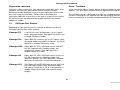
Vidscope-DV
is for DV only users and operates in 8 bit. Capture
cards, Advanced modes and special file formats are
inhibited. Stereo only audio.
Vidscope-Pro
Allows both DV source as well as SD Capture cards,
Advanced modes and special file formats. 8 or 10 bit
operation is allowed. Stereo only audio.
Vidscope-HDV
Allows both DV, HDV, HDVCpro sources and NOT
HD/ SD Capture cards, Standard modes and
nospecial file formats. Only 8 bit operation is
allowed. Stereo only audio.
Vidscope-HD
Allows both DV, HDV, HDVCpro sources as well as
HD/ SD Capture cards, Advanced modes and
special file formats. 8 or 10 bit operation is allowed.
Multichannel audio and surround-sound displays.
Vidscope-444
Only allows HD and SD RGB 444 sources with Dual
Link and HMDI Capture cards, Advanced modes
and special file formats. 8, 10, or 12 bit operation is
allowed. Multichannel audio and surround-sound
displays.
12
Manual vidscope-hd v2.doc
Vidscope-HD User Manual
3.3
Vidscope’s Main Application Windows
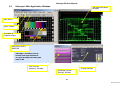
Vidscope Waveform
Window
Main Menu
Main Toolbar
Transport &
Capture buttons
PREVIEW VIDEO
WINDOW
Vidscope’s Windows can be
resized and re-positioned to
suit your desktop and what you
want to do
User Presets
(optional) Window
VidScope Control
Settings Window
Display controls
13
Manual vidscope-hd v2.doc
Vidscope-HD User Manual
3.4
Main Window Menu & ToolBar
Setup File Name &
Snapshot options
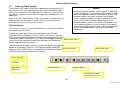
The Main window menu and toolbar sets the input and
(if capturing intended_ output options. The vidscope
waveform & monitoring settings are all in its own
independent window/menu.
Capture options
Pick Video Source
Still picture over live
superimposition
Pick Audio Source
Operational modes
System info & manual
Transport & Source
Start/Stop etc..
Capture Start / Stop
Snapshot Video + WFM
14
Manual vidscope-hd v2.doc
Vidscope-HD User Manual
3.5
Allocate File Space This brings up a sub-menu.
Main Menu Description
Main Menu Headings:
File
Capture file, format, snap-shot options
Source
Video, Video/Media file input selection
Audio
Audio source selection if available
Options
Preview monitor setups
PVW
Preview monitor framing tools, overlay and
display modes
Help
Manual, system information and about
vidscope
You can skip this section if you don’t intend capturing…..
3.6
This allocates a block of disk space rather like pre-stripping a tape. This
allows the writing process during capturing more smoothly than if a raw
new file were to be used. The amount of space that is allocated should
be larger than the clip / shot / sequence you intend recording. The
default size is 1Gb (= 1000Mb) unless your free space is less than 5Gb.
The same initial file can be used again and again because at the end of
the capture, there is a utility to copy off the captured file of to the final
destination and other file name.
File
Save Copy of Captured File
After stopping the capture process, this utility copies off the captured file
of to the a different, final destination and alternative file name so that you
can use the “pre-striped” capture file again without have to allocate a
new fresh block of space on the disk.
Capture file setup
This sets a new file name for capturing or picks an existing one. If
available, use a different disk drive from that used for programs. You
cannot select a CD-R or DVD type drive and expect it to work. For uncompressed SD video a Raid drive is desirable. For HD formats, a Raid
drive is essential to be able to successfully capture in real-time without
dropping frames.
15
Manual vidscope-hd v2.doc
Vidscope-HD User Manual
Set Space or Time Limit
Format Options
This sets an automatic stop of the capture process either at the end of a
fixed amount of disk space or a time limit. This is a sort of safety valve in
case you were to forget to stop a capture and use too much of your disc
space.
The video format option depend on what you intend doing with the
captured file. An uncompressed AVI uses the most disk space, but
offers the highest possible quality.
Compressed formats, relieve the stress on the disk system during record
and the expense of extra CPU load. The menu option, other, offers
various compressed formats. The selection shown depends on what
CODECs your PC is configured with. Many of these come with NLE
editor installed or can be downloaded from various websites.
When
. is clicked, you get the available CODEC sub-menu.
What is listed, depends on what you already have installed. Any newly
installed CODECs won’t be available until after the next time you re-boot
the PC system.
16
Manual vidscope-hd v2.doc
Vidscope-HD User Manual
Snapshot Options
These extensive options set what happen when you
the snapshot button on the toolbar.
click
Exit
This closes the VidScope capture application completely. Because its
complexity, this operation is not instantaneous and might take up to 10
seconds to finish.
Link to Waveform combines a picture snapshot with a waveform
snapshot as two separate files. See Vidscope control panel settings
for waveform only snapshots.
17
Manual vidscope-hd v2.doc
Vidscope-HD User Manual
3.7
Sources [Video Inputs]
The content of the Video Sources menu depend on your particular PC’s
configuration. This menu populates with the names of whatever video
source you currently have available plus Files Sources. If you have no
live sources, you get an information message when the program is first
booted up.
Codecs
Microsoft Windows provides several codecs as operating
system components. The available codecs always include
those that ship with whichever version of the DirectX and
Windows Media Player was included in the Windows
release. Additional codecs may be installed when newer
versions of DirectX or Windows Media Player or the
Windows Media runtimes are installed. Third parties may
install additional codecs on a host system; these codecs
may be designed to work only with a particular application,
or they may support general use by any DirectShow
application.
Some of the PC’s video sources or files may not be a suitable television
format to work with Vidscope. In which case, you will get a warning
message when you try to use such a source.
Clip File Source
The clip file as a source is always available even if you have no capture
card or device or DV active.
Clicking this option allows a pre-recorded video or A/V file to be
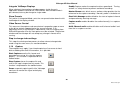
streamed into the Vidscope system as if were a live source. There are
VCR style transport control buttons that become enabled once the file is
selected an loaded. Alternatively, an AV file can be dragged and droppedSingle frame step +/into the main menu/preview monitor from Windows (file) Explorer or
another application for play/analysis.
The Vidscope should cope with most common file formats provided they
decode to a standard TV format. The Vidscope decode capabilities
Multi-frame step depend on what CODECs you have loaded and installed that support
DirectX and DirectShow Microsoft technologies.
Multi-frame step +
Pause /Re-start
Full Stop
Start from
beginning
Move to Start
Move to End
Jump to Timecode
position hh:mm:ss:ff
18
Manual vidscope-hd v2.doc
Vidscope-HD User Manual
3.9
DV Sources
Options
To use DV a feed, your PC must be fitted with a Firewire IEEE1394 port
or a specialist video capture card interface. The camera or VCR needs
to be switched on and plugged in the PC before the sources menu
shows the feed on the list so that the Vidscope can use it. The default
driver comes up on the list as: &
-!
If you have a custom driver and/or specialist card other DV names could
come up on the menu option from which you can choose the most
appropriate.
Once selected, the Vidscope’s transport buttons will operate the DV
camera or deck’s main functions. An alternative interface provided by
the driver manufacture can be accessed by clicking on the menu
%
/
)
.
Restore Source(s)
When selected the current video source will be offered first when
VidScope is next booted-up.
Setting up video sources
See Options -> Video Source Control or Stop to change Video Settings.
3.8
Show video dimensions
Audio
When selected the current video format H and V size is shown in the
PVW window.
Use of the Vidscope application without an active Audio is permited. But
the reverse, Audio with no video source is not possible.
use or available.
Use Skin Decoration
can be clicked (or shows ticked) where no audio in
Turns on and off normal Windows appearance or skinned (decorated
windows) on the main VidScope screens. This may need re-start of the
application to fully take effect .
The other source listed depend on what is installed in your system and
available. ie: )
000
Lock Display to actual video pixel sizes
"
. Click on this for the card manufacturers or driver
provider’s set-up and selection menu. You may find it more convenient
to change these settings via the Windows +
or double
clicking the Volume control icon on the lower right system tray toolbar.
This sets the preview video display window exactly to the dimensions of
the video format. This avoids any potential resizing artefacts that are
possible with an arbitrary size window. When a HD is used, the window
is half both V and H pixel sizes or else it might be too big for the PC
screen and take too long to render.
"
gets ticked automatically to show that audio
is interleaved with the Video source such as with DV or a DV file or AVI
file.
19
Manual vidscope-hd v2.doc
Vidscope-HD User Manual
Integrate VidScope Displays
Capture makes the capture functions operational. Turning on
and off is a safety feature to prevent accidental recording
When checked, the waveforms window appears inside the main
application window instead of the PVW monitor. Multi-window mode is
pre-selected, but may be change to single mode.
&
)
sets which source, audio or video provides the timing
reference for the capture recording. Normally audio is the better choice
Show Presets
)
&
1 enables/disables the start of capture information
and precautionary warning message.
Only active in Integrated Mode,: puts the user preset button down the left
hand edge of the display window.
session
Video Source Control
This accesses the capture card manufacturer’s properties page or menu
or the driver controls appropriate for the source selected. If an
adjustment result in any change in video format, such as changing from
525 to 625 operation then the next option must be selected. The preview
window and the vidscope will not accept any change in format whilst
running.
enables/disables the audio channel(s) in a capture
&
enables/disables multi-channel audio if available
from the in a capture session.
Stop to change video settings
This stops the whole preview process to allow a format change to be
made using the same menu, as mentioned above.
3.10
Capture
These options only apply if you intend capturing a live source to hard
disk or dubbing from one file to another, as is possible.
)
once the file, format and
parameter are set-up, this start the capture
process. This function is duplicated on the
toolbar button
)
closes the capture file and
reverts the input into preview only mode. This
function is duplicated on the toolbar button
+
suspends capturing whilst the Vidscope
continues to monitor the signal and display
waveforms.
20
Manual vidscope-hd v2.doc
Vidscope-HD User Manual
3.11
3.12
PVW Preview Monitor Display
Safe Area
Superimposes on the Preview Monitor Window a guide Graticule. This
does not affect the video capture in any way.
none
90%
"
80%
)
+
23
*
16:9 composite graticule
+
23
*1
16:9 composite graticule
+
Display Aspect 16:9
1
Sets the Preview video display in widescreen format irrespective of the
chosen window size. Safe areas are changed to reflect different
properties and will be turned off when the aspect ratio is changed.
Display Aspect 4:3
Sets the Preview video display in standard format irrespective of the
chosen window size.
21
Manual vidscope-hd v2.doc
Vidscope-HD User Manual
No Overlay
You can pick any suitably configured graphics image as a custom
graticule. Typically, you will find in the folder called
C:\Program Files\Hamlet\Vidscope\Graticules a number of examples:
)
%4
2 *
)
%4
5 6
)
%4
67
)
%4
)
%4
Any .bmp files in this folder can be freely modified, deleted or used a
templates. If you design and draw your own ,preferably save to
uncompressed .bmp files as jpegs will produce poor results.
The graticule background should be a pure as this is used a keying level
for the overlay.
Turns off facility.
Note: Overlays do not get analysed by the waveform/vectorscope section
on the application software.
Overlays can be included in a snapshot by unchecking the option in
$
/)
/ 9
4
1
Overlay image settings
Brings up a sub-menu to select mask and transparency of still picture on
the live preview.
Those .wbm extensions are the system (.bmp) graticules and may be
substituted by an expert use should the standard versions be replaced.
Copy the
8
to a new file blank.bmp, the blank.bmp can be
used as a template onto draw your own design.
3.13
Overlay
These options allow superimposition of a still picture on the live Preview
Monitor Window for comparison or line-up guide. This function cuts out
the Graticule function, as it uses the same facilities. Use of an overlay
does not affect the video capture in any way. The still could be any
standard graphic formatted file, but is most useful when a still is capture
from your current source. Thus a camera could be set-up to match a
previous shot or position an actor back on spot. It can also help in
matching camera set-ups from previous configurations.
Load image overlay
Manual file selection
Selects split modes
Overlay last snapshot
Automatic file selection after snapshot button clicked.
Fades still overlay
picture on PVW
Transparent Full
frame still overlay
22
Manual vidscope-hd v2.doc
Vidscope-HD User Manual
2
4
4.1
:
"
This menu controls the main display function for the
VidScope and accesses the other control menus
available. It can be re-displayed by right mouse
clicking on the VidScope display window or the
VidScope icon on the task bar.
Main Control Panel
The Vidscope has a floating control panel and display window that can
be arbitrarily placed anywhere on your desktop screen.
The control panel can go on any monitor if you have more than one
attached to your display adapter. However the Vidscope display must be
on the primary monitor for the graphics acceleration to work properly.
Because of this hardware requirement, the window will refuse to be
moved fully or partly off-screen.
Main Display Menu
Tabs
Display modes
Timebases and Line
Selection
Interpolation
Factory Reset to
basic waveform
Trace and Graticule Levels
1 varies trace intensity and can highlight low repetition features in
the waveform. This is helped by decay which varies persistence
)
varies graticule brightness If auto brightness is set in the CAL
menu these controls are changed by the timebase settings chosen
23
Manual vidscope-hd v2.doc
Vidscope-HD User Manual
Line Selection
4.2
Summary of Display Modes
WFM – waveform
(Advanced Mode Only)
Standard Luminance waveform display either 1H All lines superimposed,
1 Field (interlaced mode) or 1 Frame across the X-axis. With the line
selector on (advanced mode), then any range of individual lines can be
displayed 1 – 150H and the starting line position varied.
When the waveform display mode is set for Frame or Field, the #
)
option allows a range of lines to be selected and displayed from
any part of the picture. This is only available in pro versions when the
"4
option is checked in the )
menu
To vary the gain and baseline offset, go to the -"#menu and click the
+
button.
Vertical start line position is set either by the Line Selector slider, the line
Use WFM first when selecting
lines, then any other display
mode shows just the line range
selected
A Vmode option needs to
be selected before Line
Select will operate
In interlaced mode, line numbering is according to
PAL/NTSC standard and in field order and displays in
that order.
In + 1
4
, line numbering begins at 1, field
1 and 2 (odd/even) are meaningless, only Frame
applies.
number box or the up/down blue arrows.
The horizontal scale from 1H to 150H selects how many lines are
displayed or 1 whole field or Frame.
Using the
9
button allows zooming in on a narrow range of a
single (1H) line. Expansion only operates when 1 H Scale selected.
24
Manual vidscope-hd v2.doc
Vidscope-HD User Manual
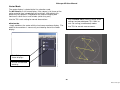
Vector Mode
The vector display is related to the line selection used.
Set " #
for a full frame display. If the source is full frame of live
action material then interpolation can be left off. With digital stills,
particularly test patterns, interpolation on make the display look
continuous rather that a serial of dots (which they are!).
Use the )
' to find the Vector Scale
settings to choose between 75% 100% or
user set scaling (uncalibrated) modes.
Use the 75% scale setting for normal observations.
wfm/vector
simply combines the vector with the luminance waveform display. The
width of the waveform is necessarily restricted by that of the vector
display.
Use 75% for normal measurements.
Gain Settings for
Vector displays
Use for uncalibrated
zooming
25
Manual vidscope-hd v2.doc
Vidscope-HD User Manual
YUV Parade
Histogram
With a component source such as SDI or DV, Vidscope shows the
individual Y, Pb, Pr (YUV) signals separately.
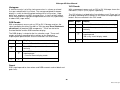
A statistical analysis of all the luminance values in a frame or a band
lines pre-selected with Line Select. The average weighted Histogram
display is useful for identifying bad coding with missing values, super
black level problems and APL characteristics. In terms of 8 bit coding
there should not be a high percentage below the value 16 (super black)
or above 235 (super-white).
The YUV display is related to the line selection used. There are 3 modes
of display according to the settings on the Stack and Superimpose option
buttons that are revealed in the YUV mode.
)
RGB Parade
Standard Parade in broadside horizontally
With a component source such as SDI or DV, Vidscope matrixes the
signal according the either Rec.601 or 709 (see page Error! Bookmark
not defined.) to produce RGB components. These are fed to the
Preview Monitor and the RGB waveform display.
Each YUV component full width, stacked
vertically
Each YUV component full width,
superimposed
Not a very useful display mode
The RGB display is related to the line selection used. There are 3
modes of display according to the settings on the Stack and
Superimpose option buttons that are revealed in the RGB mode.
)
)
Not allowed
)
Standard Parade in broadside horizontally
Each RGB component full width, stacked
vertically
Each RGB component full width,
superimposed
– same a Gamut display mode
Not allowed
Gamut
RGB superimposed to show where and RGB exceeds nominal black and
peak limits.
26
Manual vidscope-hd v2.doc
Vidscope-HD User Manual
Example Displays
WFM – Waveform Display
VEC – Vector Display
STATS – Statistics Display
RGB Display Parade
RGB Display Stacked
W/V – Waveform and Vector Display
27
Manual vidscope-hd v2.doc
Vidscope-HD User Manual
4.3
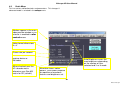
Click on
Monitor modes
tab to display the diagnostic picture monitor.
This allows special picture display modes for fault or quality examination
and supplements the main preview monitor.
Colour + zebra
stripe on gamut
error areas
Chrominance on
50% white
Red channel only
(decoded)
V (Pr) component
only (no luma)
Green channel only
(decoded)
U (Pb) component
only (no luma)
Blue channel only
(decoded)
Blue Only
Improve performance on
interlaced ore HD images
by field skipping
Sub-menu to change Diagnostic
Aspect Ratio (not PVW)
Gamut Zebra Display
28
Manual vidscope-hd v2.doc
Vidscope-HD User Manual
4.4
Scale Menu
This has various calibration tools and parameters. This changes if
advanced mode is selected in the
menu.
Markers appear in the main
video preview window if line
selector is enabled in 8
menu
Video format dimensions
HxV
Frame rate per second
Video format from the
capture device or
file/codec
When checked uses the
HD decode matrix
otherwise uses Rec.601
matrix for SD (std def.)
Auto Brightness varies the
trace brightness depending
on the number of lines
selected and V or H mode.
Waveform traces colour
options. Dual colours depend
on repetition of waveform
features and brightness set.
29
Manual vidscope-hd v2.doc
Vidscope-HD User Manual
;
"
5.2
&
Clicking the Audio menu tab puts the Vidscope into an audio mode.
Waveform and Audio vector (phase) are standard, other optional display
modes are included with the extra AudioPlus option pack.
5.1
Multi-Channel Audio
If you have a source with multi-channel audio content, the channel option
buttons become revealed.
Audio
# ! is the first stereo pair – and the only one you get if the source
is form
informatio
not multi-channel or enabled as such using Stop Change Audio Settings
in main menu.
Audio Waveforms
In Audio Waveform mode, the Timebase up/down buttons vary the
display timebase. The gain buttons allow low amplitude audio signals to
be zoomed up and down. The gain setting does not affect the audio
monitoring via the PC’s speakers.
#( !( is the second pair in the group in a multi-channel stream. G1 to
G4 are the group selectors in a multi-channel stream.
Whichever pair/group is selected is that indicated in the on-display level
meters and the audio though the PC’s speakers via the wave output
channel on the soundcard mixer if enabled.
5.3
Audio Level Scales
Clicking ) 8 # 4 )
1 button changes the menu to allow
different Audio Scales to be set. These options set both the scale types
and the ballistics for the audio bar graphs shown on the edge of the
waveform display window.
The timebase can be varied between 2mS and 10 seconds full-scale
width. The nominal (best viewing) position is 100mS. Some adjustment
of brightness and or decay may be necessary for optimum results. The
oscilloscope type triggerring is automatic and occurs on zero crossings,
slightly to the right of the left hand edge.
Audio Level Bars
ON/OFF
30
Manual vidscope-hd v2.doc
Vidscope-HD User Manual
5.4
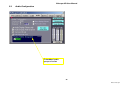
Audio Configuration
Embedded audio
group selection
31
Manual vidscope-hd v2.doc
Vidscope-HD User Manual
5.5
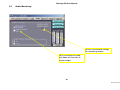
Audio Monitoring
Access sound card settings
for monitoring output
With multichannel audio:
mix down all channels to
stereo output
32
Manual vidscope-hd v2.doc
Vidscope-HD User Manual
5.6
Soundcard settings
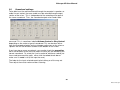
To be able hear the audio monitored through the computer'
s speakers or
audio line out socket, the wave audio must be selected through output
section of the mixer. This is independent of the recording mixer part of
the same soundcard. Thus, the soundcard output mixer needs to be
accessed. This is sometimes labelled
or + depending on the make or type of soundcard This can be done either
from the loudspeaker button on the vidscope audio menu or the mixer or
speaker icon on the Windows taskbar at the bottom of the screen.
If you have two or more soundcards, you need to check the
tab in the Windows mixer menu to make sure that you are controlling the
correct soundcard. To select the Line-In socket or whichever socket you
have used to connect the radio, either click the select check box or
make sure it'
s mute is off (if the input has one).
The fader for the input selected needs to be halfway or all the way out.
Then adjust the master volume of best listening.
33
Manual vidscope-hd v2.doc
Vidscope-HD User Manual
5
"
&
Vidscope can continuously monitor for video gamut
errors in your source material. It calculates those
colour values and luminance level that exceed the
proper RGB limits. It produces
as a
percentage of the picture area that has such
excursions. This figure is shown both on the 8
and 1
.
6.1
Actual Error
6.2
Average Error
6.3
Peak Error
6.4
Alarm Flagging
A small gamut percentage can occur in a legal
picture due sight over-shoots on sharp bright edges.
If errors occur over large areas, then the picture is
not broadcast legal.
The
1
value can be very twitchy and
hard to read. The filtered 4 1 1
is
smoothed over the number of frames set in the
4 1 1
box to be more meaningful.
Every time the gamut value exceeds the peak value, it updates the peak
value. This remains indefinitely until the
button is clicked.
Thus a worst-case gamut figure over an entire programme segment can
be read off.
The gamut
will flag a message on the preview monitor
window to indicate excursions over the pre-determined limit you set in
"
4 l box.
Similarly, common audio errors can be flagged in the same way by
enabling the
option. This works for out of balance and
apparently high (clipping) audio levels if present.
34
Manual vidscope-hd v2.doc
Vidscope-HD User Manual
6.5
Audio Alarms and Logging Options
Use selection as
logging option once
logging activated
Toggles Video and
Audio Alarm options
35
Manual vidscope-hd v2.doc
Vidscope-HD User Manual
Freeze Display
This configures the screen layout, the waveform snapshot parameters
and user presets etc.
The freeze button stops both the waveform and preview monitor displays
whilst other functions, including capturing continue normally. Pressing
Ctrl+f on the keyboard operates freeze from any menu.
Screen Layout
Source Menu
6.6
Setups Menu
This reveals the preview monitor window on the desktop if it has been
minimized or “lost” under something else.
The main windows used in Vidscope are all floating – you can put them
where you like on the desktop.
The )
#
option buttons allow the windows to be restored to
regular positions.
%
+
<)
$& sets a large preview monitor size and fits
the waveform window in what ever space if left to it right. The control
panel is always repositioned below the waveform window if possible.
+
< $&
sets a both the preview monitor window and the
waveform window widths to half the full desktop screen width and
displays these windows side-by-side at the top of the desktop. This may
compromise picture quality in the preview monitor due to scaling. The
control panel is always repositioned below the waveform window if
possible.
=) > restores the display that you last set
+ 4
+
manually.
+
) 4 -
,
)
) 4 sets positions as specifically saved using the
#
button
!
ensures that the current layout is
restored the next time Vidscope is booted-up.
"4
If you lose, hide or kill the Control Panel window itself, if can be revealed
by right clicking on the waveform display window.
&
Note: If the Vidscope Control Panel window ever gets left unnecessarily
on the desktop , it can be closed by the keyboard command: Ctrl + Z.
Advanced mode, when checked, turns on the line selector
facilities, logging menu and full snapshot facilities.
36
Manual vidscope-hd v2.doc
Vidscope-HD User Manual
6.7
Note: A saved preset will change the " 4
check box in the
Settings Menu to whichever state it was in, when saved. This could
mean the appearance of the control menus will change to reflect the
changed mode.
User Presets
Any current Vidscope state of whatever settings have been made can be
memorized to a user preset. Then those settings can be recalled again
without having to go to any of the standard menus and controls.
KEYBOARD SHORT CUTS
Clicking on the User Presets button in the Setups menu brings up the
user settings sub-menu. Once displayed, this window can be positioned
anywhere on the desktop for convenient use.
Numeric keypad
To save a user preset, click ) 4 ,
+
and then the preset
option check box to be set. Then in the dialogue box provided confirm
the name for the setting. Any name my be used, although if too long they
my not fit properly into the menu once set. There are 10 user presets
provided on the user settings menu and these can be labelled with any
suitable word that fit in the space. These are automatically saved
permanently for later recall.
+
increment to next user preset
Numeric keypad
-
to go back to previous preset
Numeric keypad
Home
go to user preset 1
6.8
About
The about button in the User )
menu shows the version
information for your installation of Vidscope. It also accesses the license
information should you need to refer to it.
To recall a setting, just click whichever setting option required.
37
Manual vidscope-hd v2.doc
Vidscope-HD User Manual
6.9
Multi – User Mode
Multi-Mode Display
The first time user is selected , the six windows may very well be blank
or in random displays. To set any window, left click on it – the pane
number will appear in the title of the control menu. Then select the
display mode required using any video or audio control menu. Do this in
turn for each pane required. Move the pane vertical and horizontal
dividers to arrange the relative geometry for optimum clarity.
Vidscope-HD+ has the ability to display up to 6 separate waveform
windows at once. This mode is switched from the normal single mode by
the Multi button found either on the waveform menu or the setups menu.
When in Multi mode you can either have a default set of window modes
or switch to the User mode, where you can select any arrangement of
the six windows you choose. Multi-mode is automatically selected if the
main application window: Options >> Integrate Vidscope windows is
clicked. This puts the whole display into the one window with the
multiple panes.
If you left click on any display window, the menu will change to the
current mode for that window for convenient change. In user mode it is
recommended that the settings are saved as User Presets for later
recall. These are found either in the setups menu or displayed in the
main application window once Options >> Show Presets is selected.
Multi –Mode Default
The six windows are identified by pane numbers 1,2,3 on the top row
and 4, 5 and 6 on the bottom row. In default multi mode the control
menus automatically linked to the default panes.
PANE 1
PANE 2
PANE 3
Always a picture
monitor
Always audio level
bars
Any selected audio
display default to
audio vectors
PANE 4
PANE 5
PANE 6
Always Luminance
waveform (wfm)
Always vectorscope
default 75% cal
Can be set by user to
either histogram,
component RGB
parade or gamut
Double left clicking a window will zoom up that display to single display
mode, cancelling multi-mode. Double clicking again, restores multi-user
mode. If the Show Title option is checked in the setup menu, the bar
highlights when selected.
The setups menu has a set of buttons for Multi and user mode. These
reveal some additional controls to clear the panes or set default positions
which are self-evident.
Saving a Multi-mode set
If you left click on any display window, the menu will
change to the current mode for that window for convenient
change.
Double left clicking a window will zoom up that display to
single display mode, cancelling multi-mode. Double
clicking again, restores multi-mode.
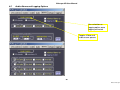
1.
Setup the display set you want in user mode
2.
Find the Save Preset button at the bottom of the
button stack
3.
Click this once to change message to Clcik
Preset Button
4.
Click the preset button to save into
5.
Enter your descriptive text for your arrangement
so as to fit the example button shown in the
save menu..
6.
Click OK in the save preset box.
38
Manual vidscope-hd v2.doc
Vidscope-HD User Manual
?
)
&
-+,: @
The Vidscope uses considerable CPU horsepower. Usage of the CPU is
shown when you click on the ) 8 -+,button. This figure is the
aggregate of all the applications currently running on your PC of which of
VidScope is a proportion. If the CPU usage is over 85 percent then there
could be problems for any time critical job such as capturing
performance.
To avoid performance problems with capturing or other critical
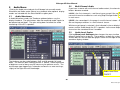
applications, VidScope'
s display quality can be reduced, making a
saving in CPU usage.
Experiment with different display quality modes to reduce CPU
usage. As for quality introduces the waveform and preview
monitor update rate is progressively reduced making a saving the
number crunching activities of VidScope.
The display quality mode setting is retained and restored the next
time VidScope is run. The entry box below the lowest display
quality option is for custom mode numbers.
39
Manual vidscope-hd v2.doc
Vidscope-HD User Manual
7.1
Waveform Snapshot Options Menu
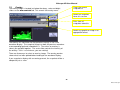
This configures the screen layout, the waveform
snapshot parameters and user presets etc.
Waveform snapshots are made whenever the red ball
button in most menus is clicked. To use facility, the
filename should be first set up in the required
destination.
The auto number option automatically increments of
number appended to your chosen filename if required. If
the auto number option is unchecked, then the filename
given will be overwritten each time a snapshot is
confirmed.
The file format selected in the filename picker may be
either uncompressed .BMP or JPEG or another
compressed image format. When the compressed
image file format selected, then the compression quality
option buttons are revealed. For the highest quality
snapshot images select 1:1 and best.
This duration may be changed by clicking on the option box at the
bottom of the Snapshot Preview.
If the image preview option is used then whenever the snapshot is
clicked on a temporary window pops up to confirm the waveform image
and filename. The default duration for the pop-up and five seconds.
Snapshots of waveforms may be used for later comparison with a live
source by means of overlays. For this purpose always use highest
quality settings and 1:1 for optimum appearance.
40
Manual vidscope-hd v2.doc
Vidscope-HD User Manual
7.2
Overlay
Clears the current
snapshot list
The overlay button is located just below the decay, scale and bright
sliders on the 8
tab. This reveals the overlay menu.
Loads last snapshot
taken this session
Picks from all
snapshots taken this
session
Loads any graphic or image in an
appropriate format
The overlay still substitutes for the graticule currently in use in the
waveform display. The snapshot image has both the previous waveform
a corresponding graticule imbedded in it. Thus when an overlay is
select, you get both together. The scale slider controls the intensity of
the overlay. If this is at minimum, you see nothing!
There are three ways to select an overlay image. The overlay preview
shows what has been picked before loading to the waveform display.
If you snapshot a display with an overlay present, the snapshot will be a
composite just as seen.
41
Manual vidscope-hd v2.doc
Vidscope-HD User Manual
7.3
Other Setup Options
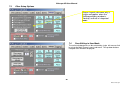
Screen Layout sub-menu only is
visible and applies when the
VidScope display window is
“floating” and not in Integrated
Mode
7.4
Pane Editing in User Mode
The active window pane can be selected by single left mouse clicks or
by using the Multi Screen Layout sub-menu. The up-down buttons
navigate the 6 windows displayed.
42
Manual vidscope-hd v2.doc
Vidscope-HD User Manual
A
# 11 1&
(advanced mode only)
the logging facility allows a text-based document to be built containing
the detected errors in a programme segment to be listed against time
code.
Setting up a log operation
Click on video options and select
those factors that you wish to be
included in the log. Similarly, click
on audio options and pick those
audio aspects that also want to log.
Then
11 1
to the name
and location you require. The
logging facility uses a RTF format
text document based on template.
This you can customise in Microsoft
Word or some other text editor.
Once the logging form has opened a
log, it may be manually edited by the
user. You could simply type any
relevant information about the
programme material etc.
when you are ready to run along simply click on the
11 1
button.
When you wish to stop logging operations, just click on
11 1
button.
Stopping a video source playing or stopping a capture automatically
closes the logging operation.
It is possible to use the same log file for multiple program segments.
43
Manual vidscope-hd v2.doc
Vidscope-HD User Manual
Logging Form
the logging form may be conveniently repositioned
anywhere on the desktop or minimised during the logging
process. To edit any of the information listed on the form,
the logging must have been paused stopped completely.
(
or stop
).
The
9 button conveniently you add your annotation
or edit anywhere in the document.
The other button functions in the logging form speak for
themselves, however the print button sends the document
to your default printer with its current default settings.
44
Manual vidscope-hd v2.doc
Vidscope-HD User Manual
6
Spectrogram stereo or multi-channel using 1024 point FFT
)+ - $ -"' % )
9.1
Vidscope-HD version
Host Platform
Surround-sound display with GMO graphics
Timing Measurement
* Operating system: Windows XP Home or Professional with DirectX 9.0
or higher installed.
Uncalibrated nominal 52 uS full screen 1H modes
Input Sources
Sync/blanking not displayed due to capture card general limitation
HDV or DV 625/525 (SD) subject to a IEEE1394 port being available
Amplitude /Measurements
Any television signal capture device connected to the PC conforming to
the WDM standard or otherwise supported by Microsoft
DirectShow/DirectX8.1+.
Video levels +/-0.5% digital levels, absolute analogue levels subject to
gain/calibration of capture source used.
Audio waveform
+/- 1% digital level, absolute analogue levels subject
to gain/calibration of capture source used.
Television standard supported subject to capture device or file formats:
1080i, 1080p, 720p any format up to 1920H x 1080V
PAL 625 720x576 and any analogue derived 625 coding.
NTSC 525 720x480/486 and any analogue derived 525 coding.
Display Modes
Waveform, Luminance All lines (1H), 1H to 150H, 1 Field 1, Field 2
(interlaced mode) Frame progressive or interlaced.
RGB, Parade, Stacked and Overlaid
YUV (Y.PrPb.) , Parade, Stacked and Overlaid
Vector, 75%, 100% or arbitrary scaling 1-300%
Histogram, weighted average of discrete luminance values
Combined waveform and vector
Audio waveform, gain selectable -6 to +40dB
Audio vector and phase
Audio level bar graphs,
VU,PPM,NORDIC ,BBC,EBU,70dB Digital scales
45
Manual vidscope-hd v2.doc
Vidscope-HD User Manual
7 -% '"-'
'" #) "
Hamlet Video International Limited
),++%!'
if you find a problem or encounter difficulty installing or using the
VidScope software product, then first find and click on the VidScope
problem reporting utility. This you will find in the list of programs clicking
though the Windows:
Maple House 11 Corinium Business Centre Raans Road
Amersham Bucks HP6 6FB England
Main Line: +44 (0)1494 729 728
)
E-mail: [email protected] Web site: www.hamlet.co.uk
/B
)
/
Fax Line:
)
+44 (0)1494 723 237
'
1
8
1
For any form of assistance in maintaining your Vidscope, please contact:
[email protected]
Hamlet Video International USA service center ,
Telephone support is not available for this product, however if you user
fault reporter and e-mail with your particular problem first and request
telephone call we will try and respond within 24 hours during the
warranty period.
23 Del Padre St, Foothill Ranch, CA 92610, U.S.A.
Tecads Inc,
Tel: +1 (949) 597 1053,
Fax: +1 (949) 597 1094.
If an on-line Internet connection not available to your system, then
telephone for further advice.
E-mail: [email protected] Web site: www.hamlet.us.com
For software updates and more information see:
http://www.vidscope-HD.co.uk
46
Manual vidscope-hd v2.doc