1
Chapter 6
Upgrading the Cisco ATA 186 Software
About the Software Upgrade Process
Upgrading the Software by Using the Executable File
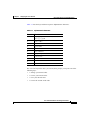
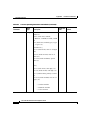
To upgrade your Cisco ATA 186 by using the ata186us.exe file and the voice
menu, you need the following:
•
A PC running Windows 9X/ME/NT/2000
•
A network connection between the PC and the Cisco ATA 186
To upgrade, follow these steps:
Step 1
In Windows, click Start > Programs > MSDOS Command Prompt and locate
or create a directory to store the file.
Step 2
After you unzip the files on the PC, save the executable file, the software image
(the software image will have a “.zup” extension) to a directory on your PC. The
images to save are:
•
ata186us.exe
•
ata186-vx.zup
where x is the version number and date of the software release; for example,
ata186-v2-00-0522b.zup.
Step 3
At the DOS prompt of the directory where the files are saved, enter:
ata186us software_file_name. zup -d1 -any2
Step 4
Press the function button to go to the configuration menu.
Caution
Step 5 will begin the upgrade process. Do not cancel the process or unplug the
power cord at any time during the upgrade process; doing so can permanently
damage your Cisco ATA 186. Wait until after the button stops flashing and the
light has turned off.
Step 5
Using the dialpad of your telephone attached to your Cisco ATA 186, enter:
100# ip_address_of_PC *8000#
For example, if the IP address of your PC is 192.168.1.10, enter:
100#192*168*1*10*8000#
Cisco ATA 186 Installation and Configuration Guide
OL-1267-01
6-3