1
Display Unit Placement
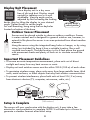
Place display unit in a dry area
free of dirt and dust. Display stands
upright for tabletop use or is wallmountable. Viewing angle can be
adjusted by first loosening the locking
knobs, then by tilting the display to your desired
angle. Tighten knobs to set the angle.
For wall mounting, hang using the two keyholes
located on bottom of the base.
Display Angle
Locking Knobs
Outdoor Sensor Placement
Sensor must be placed outside to observe outdoor conditions. Sensor
is water resistant and is designed for general outdoor use, however, to
extend its life place the sensor in an area protected from direct weather
elements.
Hang the sensor using the integrated hang holes or hanger, or by using
string (not included) to hang it from a suitable location, like a well
covered tree branch. The best location is 4 to 8 feet above the ground
with permanent shade and plenty of fresh air to circulate around the
sensor.
Important Placement Guidelines
•To ensure accurate temperature measurement, place units out of direct sunlight and away from any heat sources or vents.
•Display unit and outdoor sensor must be within 330 ft (100 m) of each other.
•To maximize wireless range, place units away from large metallic items, thick walls, metal surfaces, or other objects that may limit wireless communication.
•To prevent wireless interference, place both units at least 3 ft (.9 m) away from electronic devices (TV, computer, microwave, radio, etc.).
TV
AT
LEAST
3
(.91 m)
APART
Setup is Complete
(330 feet maximum)
(100 meters)
The sensor will now synchronize with the display unit. It may take a few
minutes for synchronization to complete. NOTE: It will take up to 4 hours to
generate a weather forecast after initial setup.
9