1
7. After a few moments you should see the BrightSign shell appear. It should also
show you the software version number. Verify it is 1.0.72 or greater.
List of Shell Commands
With the shell running, type: help <enter> for a list of commands. Type the command
on a line by itself for more information on a particular command.
Example Shell Commands: Playing Files & Changing Settings
All files on the CompactFlash card should be referenced with a “/” in front of the
filename.
For a Directory of the cards contents use:
dir /
To show the contents of a sub-directory named images, use:
dir /images
To play a video named “myvideo.vob” on the CF card, enter this command:
videoplay /myvideo.vob
To play a video with a space in its name, my video.vob:
videoplay “/my video.vob”
To change volume (0 - 100) to 75% when playing back a video or audio use:
videoplay volume 75
audioplay volume 75
To change the videomode use the videomode command. Example:
videomode 1024x768x60p
To display an image, use the imageplay command. Example:
imageplay slide1.bmp
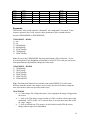
To specify an image mode, use the imageplay command with mode setting. Examples:
imageplay slide1.bmp 0
40