1
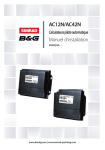
AC12N/AC42N
Autopilot Computers
Installation manual
ENGLISH
www.bandg.com | www.simrad-yachting.com
Preface
Warranty
As Navico is continuously improving
this product, we retain the right to make
changes to the product at any time which
may not be reflected in this version of
the manual. Please contact your nearest
distributor if you require any further
assistance.
The warranty card is supplied as a separate
document. In case of queries, refer to the
brand web sites: www.bandg.com and
www.simrad-yachting.com
It is the owner’s sole responsibility to install
and use a product from Navico in a manner
that will not cause accidents, personal
injury or property damage. The user of this
product is soleley responsible for observing
safe boating practices.
About this manual
NAVICO HOLDING AS AND ITS
SUBSIDIARIES, BRANCHES AND AFFILIATES
DISCLAIM ALL LIABILITY FOR ANY USE
OF THIS PRODUCT IN A WAY THAT MAY
CAUSE ACCIDENTS, DAMAGE OR THAT MAY
VIOLATE THE LAW.
Please take time to read this manual to get
a thorough understanding of the system
components and their relationship to a
complete autopilot system.
Governing Language: This statement,
any instruction manuals, user guides and
other information relating to the product
(Documentation) may be translated to,
or has been translated from, another
language (Translation). In the event of a
conflict between any Translation of the
Documentation, the English language
version of the Documentation will be the
official version of the Documentation.
This manual represents the product as at
the time of printing.
Copyright
© Copyright 2012 by Navico Holding AS.
This manual is intended as a reference
guide for installing and maintaining the
AC12N and AC42N autopilot computers
and other components in an autopilot
system.
Important text that requires special
attention from the reader is emphasized as
follows:
¼¼ Note: Used to draw the reader’s
attention to a comment or other
important information.
Warning: Used when necessary to
warn personnel that they should proceed
carefully to prevent risk of injury to
personnel or damage to equipment.
 | AC12N/AC42N Autopilot Computers
|1
Contents
3
System description
3General
3
How to use this manual
4
Installation and wiring
4
Installation checklist
4
Unpacking and handling
5
Determine system configuration
6
Autopilot system layout
7
Autopilot computer installation
9
Introduction to NMEA 2000 (SimNet)
11
Autopilot control units
12 Rudder feedback installation
13 Drive unit installation
16Interfacing
17 External alarm
18
2|
Spare parts
19
Technical specifications
19
20
Autopilot system
Autopilot computers
Contents | AC12N/AC42N Autopilot Computers
1
System description
General
The autopilot computer is a navigational data processing unit
and contains the steering computer and electronics for the drive
unit motor and clutch and provides an interface to other system
components. Two models, AC12N (8 A continuous / 16 A peak
motor current) and AC42N (30 A continuous / 50 A peak motor
current) are available.
It communicates on the NMEA 2000 data and control network to
establish a reliable digital communication and power distribution
between the units in the autopilot system as well as other NMEA
2000 compatible products.
How to use this manual
This manual is intended as a reference guide for installing the
AC12N and AC42N autopilot computers and other components in
an autopilot system.
Please take time to read this manual to get a thorough
understanding of the system components and their relationship to
a complete autopilot system.
The autopilot system includes and Operator manual. Refer to this
manual for commissioning and seatrial of your autopilot system.
System description | AC12N/AC42N Autopilot Computers
|3
2
Installation and wiring
An autopilot system interfaces with several units that are to be
mounted in different locations on the boat, including:
• The boat’s steering system
• The boat’s electrical system (input power)
• Other equipment on board (NMEA 2000 interfacing)
In addition, the advanced capabilities of the system require the
installer to perform a series of settings and tests to verify proper
operation of the system, refer to the check list below.
Installation checklist
1.
2.
3.
4.
5.
Determine the system configuration you are installing (Page 5)
Perform the hardware installation (page 7)
Connect NMEA 2000 devices to network (page 9)
Perform Set-up (refer to Operator manual)
Test autopilot operation at sea (refer to sea trial instructions in the
Operator manual).
Unpacking and handling
Care should be taken when unpacking and handling the
equipment. A visual inspection should be made to see that the
equipment has not been damaged during shipment and that all
components and parts are present according to the packing list.
An autopilot system will include:
• Control unit with accessories
• Autopilot computer (AC12N or AC42N) with accessories.
¼¼ Note: The following parts are all part of an autopilot system, but will
not necessarily be delivered with this autopilot computer (can be
obtained separately).
• Compass (RC42N) with cable
• Feedback unit (RF300 or RF25N) with transmission rod and cable
• Appropriate drive unit for the installation (unless the autopilot is
going to operate an existing drive unit or solenoids)
• Optional equipment that may have been ordered for the installation.
4|
Installation and wiring | AC12N/AC42N Autopilot Computers
Determine system configuration
It is important to become familiar with the configuration of the
system prior to beginning the installation. An example of a system
featuring this autopilot computer is shown on the next page.
Plan your cabling and configure the NMEA 2000 network in
accordance with the section on page 9. Pay particular attention to
the autopilot computer/drive unit combinations.
As most of the units are communicating on a common network
(NMEA 2000) with identical connectors, the installation is simple.
Try to mount the units within the standard cable length supplied
with each unit. Compatible drop, extension or converter cables
should be available from your distributor.
Installation and wiring | AC12N/AC42N Autopilot Computers
|5
Autopilot system layout
LTW
T
LTW
LTW
LTW
12V DC
T
120
¼¼ Notes:
• The backbone must be terminated at both ends. The wind sensor
has a built-in terminator and can be used as one of the terminators
• Daisy-chaining, as shown in this illustration, is recommended for
ease of installation. It will still be compatible with most NMEA 2000
devices but not fully comply with NMEA 2000 standard.
6|
Installation and wiring | AC12N/AC42N Autopilot Computers
Autopilot computer installation
The autopilot computer is designed to operate in a location with
ambient temperatures below +55°C (+130°F).
¼¼ Note: The autopilot computer units (AC12N and AC42N) should be
mounted vertically in a place between the control unit and the drive
unit. The unit should not be exposed to dripping or splashing water.
Cabling
Use only shielded cables and ready made NMEA 2000 (or
compatible) cables and accessories. This includes motor supply,
drive unit cables and, if necessary, extension of the optional rudder
feedback cable(s). The clutch/bypass cable and the solenoid cable
should be 1.5 mm2 (AWG14).
The motor supply cable and the drive unit motor cable should have
sufficient wire gauge. This will minimize voltage drop and allow the
drive unit to operate at full power.
Refer to the table below for recommended cable sizes.
Cable length
1. Breaker panel to autopilot computer.
2. Autopilot computer to drive unit
motor (Length refers to each of the
two cables)
Drive unit voltage
12 V
24 V
AWG
mm2
AWG
mm2
Up to 3 m (10 ft.)
12
2.5
12
2.5
Up to 6 m (20 ft.)
10
4
10
2.5
Up to 10 m (32 ft.)
8
6
10
4
Up to 16 m (52 ft.)
6
10
8
6
Installation and wiring | AC12N/AC42N Autopilot Computers
|7
Remove the bottom cover to get access to the plug-in terminals.
Provide sufficient wire length so that the plug-in terminals can be
easily connected and disconnected.
Pull out each terminal before connecting the wires. Remove all
strands before putting back the terminal cover.
A Micro-C NMEA 2000
cable is supplied with the
autopilot computer. It has a
connector in one end, and
the other end is prepared
for screw terminals.
AC12N Board Terminals
AC42N Board Terminals
¼¼ Note: White wire may be yellow on other compatible SimNet cable
versions!
8|
Installation and wiring | AC12N/AC42N Autopilot Computers
Polarity protection
¼¼ Note: The fuse located in the lower left corner of the AC board is not
put in its final position when supplied from factory.
When the motor supply is connected to the terminal, a diode will
light. If the light is red, you have to swap the wires. When the light is
green, the polarity is correct. Switch off the supply voltage and put
the fuse into the correct position.
Radio Frequency Interference (RFI)
The autopilot system has excellent RFI protection as per EMC
Directive 2004/108/EC.
NMEA 2000 (or compatible) cables and other signal cables
(feedback, or others as required) should not be run in parallel with
other cables carrying RF or high current, such as VHF and SSB
transmitters, battery chargers/generators, winches and thrusters.
¼¼ Note: If problems occur with RFI, make provisions to connect the
supply cable shield to the fast-on ground terminal. This terminal
must also be connected to the hull bonding.
Introduction to NMEA 2000 (SimNet)
NMEA 2000 is a combined electrical and data specification,
and is based on CAN (Controller Area Network - SAE J1939) bus
technology. NMEA 2000 permits exchange of data and commands
between the interfaced products. NMEA 2000 stipulates the use of
Micro-C and Mini-C hardware for the physical aspect of the network.
Most NMEA 2000 devices can be connected directly to the NMEA
2000 backbone and SimNet devices can be connected by using
adapter cables.
Essential network information
• NMEA 2000 is a powered network. It must have a separate 12-15 V
DC power supply protected by a 5 Amp fuse. Do not connect the
NMEA 2000 power cable to the same terminals as the start batteries,
Autopilot Computer, Radar, thruster or other high current products
• An NMEA 2000 network consists of a linear “backbone” from which
“drop cables” connect to the NMEA 2000 devices
• A single drop cable has a maximum length of 6 m (20 ft). The total
length of all drop cables combined should not exceed 78 m (256 ft)
• An NMEA 2000 network has a maximum cable length of 100 m (328
ft) between any two points
Installation and wiring | AC12N/AC42N Autopilot Computers
|9
• An NMEA 2000 network needs to have a terminator at each end of
the backbone. A terminator can be one of the following:
• a power cable with built in terminator
• a terminated blanking plug
• a wind transducer (terminator is in the mast head unit
as opposed to the mast cable).
• Certain products have two Micro-C or SimNet connectors, which
can be made to be an in-line component of the backbone.
Connecting from device to device is known as ‘daisy chaining’. This
network topology is not officially NMEA 2000 compliant.
Planning and installing a network backbone
•
•
•
•
•
Plan the backbone carefully.
The NMEA 2000 backbone needs to run between the locations of all
products you want to install, typically in a bow to stern layout, and
should be no further than 6 m from a device to be connected.
Choose from the following components to make up your NMEA
2000 backbone:
Micro-C cables: Available lengths from 0.4 m (1.3 ft) to 25 m (82.5 ft)
Micro-C power cables with or without termination
T-connector: Use at locations where you want to connect a device
by drop cable
Wind transducer: If using a wind sensor, plan to connect this to one
end of the backbone, as this has a built-in terminator
Micro-C male and Micro-C female to SimNet adaptor cables for
connecting to existing SimNet bus, or adding devices fitted with a
SimNet connector to a Micro-C network.
Power the network
An NMEA 2000 network requires its own 12 V DC power supply,
protected by a 5 amp fuse or breaker.
In smaller NMEA 2000 systems, the power connection may be made
anywhere in the system.
For larger systems, introduce power at a central point in the
backbone to “balance” the voltage drop of the network. Use a power
cable without termination.
¼¼ Note: When joining an NMEA 2000 network to a SimNet network, it
is not necessary to introduce power to both.
10 |
Installation and wiring | AC12N/AC42N Autopilot Computers
¼¼ Note: Do not connect the power cable to the same terminals as the
autopilot computer, pulse radar, bow thruster or other high current
devices - the network may be affected by voltage drop when these
devices are operated. Avoid connection to the engine starting
batteries, where possible.
Autopilot control units
2
1
1
3
3
4
1.
2.
3.
4.
4
NMEA 2000 drop cable, male-female Micro-C plugs
SimNet to Micro-C (male) adapter cable (part no. 24005729)
NMEA 2000 backbone
Micro-C T-connectors
¼¼ Note: For more details, refer to the Autopilot Control unit’s
documentation.
Installation and wiring | AC12N/AC42N Autopilot Computers
| 11
Rudder feedback installation
1
2
2
3
1. RF25N cable
2. NMEA 2000 backbone
3. Micro-C T-connector
¼¼ Note: For more details, refer to the rudder feedback unit’s
documentation.
Autopilot Computer
Optional RF300 Rudder Feedback
RUDDER
* Non polarized
(color independent)
RF300 connection
12 |
Installation and wiring | AC12N/AC42N Autopilot Computers
Drive unit installation
The relations between drive units, drive unit voltage, autopilot
computer, drive performance and interface to the steering gear are
shown in the tables below.
Refer to the connecting diagram for the different drive units.
Installation instruction for the drive units are found in the manual for
the individual units.
The maximum drive current capability of the AC12N and AC42N
autopilot computers are different. Use the table below as reference
and observe the notes.
HYDRAULIC PUMPS:
MODEL
MOTOR
VOLTS
AUTOPILOT
COMPUTER
RPU80
12V
RPU160
RAM CAPACITY
FLOW RATE
MAX
AT 10 bar
PREScm3 /min
SURE bar
(cu. in./min)
POWER
CONSUMPTION
MIN cm
(cu. in.)
MAX cm
(cu. in.)
AC12N
80 (4.9)
250 (15.2) 800 (49)
50
2.5-6 A
12V
AC42N
160 (9.8)
550 (33.5) 1600 (98)
60
3-10 A
RPU300
12V
AC42N
290 (17.7) 960 (58.5) 3000 (183)
60
5-25 A
RPU300
24V
AC42N
290 (17.7) 960 (58.5) 3000 (183)
60
2.5-12 A
3
3
LINEAR DRIVE UNITS:
MODEL
MO- AUTOMAX
PEAK
MAX
HARD- POWER
TOR
PILOT STROKE THRUST RUDDER OVER
CONVOLTS COM- mm (in.) kg (lb.) TORQUE TIME sec. SUMPPUTER
Nm
(30%
TION
(lb.in.)
load)
DD15
12V
AC42N
HLD350
12V
AC12N
-
HLD2000L
12V
AC42N 340 (13.4)
HLD2000D
24V
AC42N
HLD2000LD
-
2A
-
610
(5400)
12
2.5-8 A
175
(6.9)
500
(1100)
1460
(12850)
19
3-10 A
298
(11.7)
200 (7.9)
1050
(2310)
1800
(15900)
11
3-10 A
175
(6.9)
24V
AC42N 340 (13.4)
1050
(2310)
3180
(28000)
19
3-10 A
298
(11.7)
MSD50*
12V
AC12N
190 (7.5)
60 (132)
-
15
0.8-2 A
-
RAM-T1-12V
12V
AC42N
254 (10)
680
(1496)
1427
(12574)
16
2-4 A
214
(8.4)
200 (7.9) 350 (770)
150 Kgm
TILLER
ARM
mm
(in.)
Installation and wiring | AC12N/AC42N Autopilot Computers
| 13
MODEL
MO- AUTOMAX
PEAK
MAX
HARD- POWER
TOR
PILOT STROKE THRUST RUDDER OVER
CONVOLTS COM- mm (in.) kg (lb.) TORQUE TIME sec. SUMPPUTER
Nm
(30%
TION
(lb.in.)
load)
TILLER
ARM
mm
(in.)
RAM-T2-12V
12V
AC42N
254 (10)
680
(1496)
1427
(12630)
12
2-4 A
214
(8.4)
RAM-T2-24V
24V
AC42N
254 (10)
680
(1496)
1427
(12630)
12
2-4 A
214
(8.4)
RAM-T3-24V
24V
AC42N
305 (12)
1062
(2341)
2688
(23790)
15
2-4 A
257
(10.1)
1.
2.
3.
4.
Steering gear interface: Connects to quadrant or tiller.
* For stern drive power assisted steering only.
For 12V drive units, the motor voltage is stepped down by the
autopilot computer when operating from 24V supply.
The specified autopilot computer is necessary to achieve max drive
unit capacity.
Recommended operational thrust or torque is 70% of listed peak
value.
Typical average power consumption is 40% of listed maximum
value.
Connecting a reversible pump
AC12 Autopilot Computer
Reversible
Pump
AC12
Autopilot
Computer
14 |
Installation and wiring | AC12N/AC42N Autopilot Computers
Connecting a hydraulic linear drive
Hydraulic Linear Drive
AC12 Autopilot Computer
Connecting a solenoid valve
Solenoid Valve
AC12 Autopilot Computer
Installation and wiring | AC12N/AC42N Autopilot Computers
| 15
Interfacing
With the autopilot system there are several possibilities to connect
to other equipment for data collection and exchange:
1. NMEA 2000 device directly through Micro-C connectors and cables.
2. SimNet device via adapter cable, part no. 24005729.
3. NMEA 0183 via AT10 converter (+ adapter cable).
The different connecting diagrams on the following pages illustrate
the interface possibilities of the autopilots.
AT10 SimNet/NMEA 0183 converter
White
Rx+, A
Brown
Rx-, B
Yellow
Tx+, A
Green
Tx+, B
From NMEA
‘Talker’
To NMEA
‘Listener’
Data converted from SimNet/NMEA 2000 to NMEA 0183 (TX) and
vice versa (RX).
NMEA 0183
sentence
TX (max rate [Hz])
RX
APB
0.5
x
BWC
0.5
x
BWR
x
DBT
x
DPT
0.5 11)
GGA
x
GLL
0.5
x
HDG
4
x
2)
HDM
x2)
HDT
4
HSC
0.1
MTW
0.2
x
MWV Relative Wind
1
x
MWV True Wind
1
x
RMA
16 |
x
Installation and wiring | AC12N/AC42N Autopilot Computers
x
x
NMEA 0183
sentence
TX (max rate [Hz])
RX
RMB
0.5
x
RMC
0.5
x
RSA
3.33
VHW
0.5
VTG
0.5
VLW
0.2 0.5
x
x
x
1)
VWR
x
WPL
x
XTE
x
ZDA
0.5
x
ZTG
x
Open cells indicates no transmission or reception.
1)
Applies only for units with P/N - S/N code AA.
2)
Applies for units with P/N - S/N code BA onwards.
External alarm
The external alarm circuit has an open collector output for an
external alarm relay or buzzer. The operating voltage for the circuit is
the main supply voltage. Max. load on external alarm output is 0.75
Amp.
Autopilot Computer
ALARM
External alarm connection
Installation and wiring | AC12N/AC42N Autopilot Computers
| 17
3
Spare parts
Autopilot Computers
000-10866-001
22097166
000-10867-001
22097125
22096986
AC12N Autopilot Computer
AC12N Installation accessories
AC42N Autopilot Computer
AC42N Installation accessories
Terminal cover
Other cables and accessories
24005729
SimNet cable to Micro-C. Adapter cable for
SimNet products in an NMEA 2000 network.
24005936
AT10 Universal NMEA 0183 converter
24006694
AT10HD Heading NMEA 0183 converter
000-10611-001
Triton Autopilot Controller
000-10932-001
Simrad OP10 Autopilot Controller
000-10613-001
RC42N, Rate Compass, Micro-C
000-10614-001
Cable, Micro-C, right angle interconnect
000-10756-001
RF25N, Rudder feedback, 5 m, Micro-C
000-10760-001
Micro-C backbone kit, including: T-connector,
15 foot extension cable, 120 Ohm female
terminator, 120 Ohm male terminator, Power
node cable.
¼¼ Note: New accessories are continuously being developed, check
with your Simrad or B&G dealer or on the brand web sites:
www.simrad-yachting.com or www.bandg.com for details on new
products.
18 |
Spare parts | AC12N/AC42N Autopilot Computers
4
Technical specifications
Autopilot system
Boat type and size: ......................Sail- and Motor boat (displacement and
planning), up to 80 ft. *
Steering system types:........................................................Hydraulic, Mechanical
Inter-unit connection:..... NMEA 2000 (primary)/SimNet or NMEA 0183
Maximum number of products connected in a network:.......................50
Supply voltage:....................................................................................See system units
Power consumption:......................... Dependent on system configuration
EMC protection:..................................... CE IEC60945 Fourth edition 2002-08
Automatic Steering control:
Rudder Drive:.....................................Proportional rate or solenoid on/off
Parameter selection:.. Automatic (Autotune) with manual override
Sea state control:................................Adaptive sea state filter or manual
Heading sensors:
Standard:...............................................................................RC42N Rate Compass
Options:............................................................................FC40 Fluxgate compass
Rudder feedback units:.......RF25N, RF300 (optional), LF3000 (optional)
Alarms:.........................................................Audible and visual, optional external
Alarm modes:...........................................Off course, system failures, overload
Steering modes:.............Standby (Off ), Power steering, Auto, Nav, Wind,
Special Turn modes:...................................................................................... Tack, Gybe
Course change:................................................. 1 and 10 degrees push buttons
* Depending on hull and steering type, displacement and drive
type, it may steer boats up to approximately 110 ft.
¼¼ Note: More detailed specifications can be found on the brand web
sites www.BandG.com and www.simrad-yachting.com
Technical specifications | AC12N/AC42N Autopilot Computers
| 19
Instrument data page interface:
Instrument screen
SimNet/NMEA 2000 PGN*
Heading
PGN 127250, PGN 130577
Rudder angle
PGN 127245
Speed
PGN 128259, PGN 129026, PGN 130577
Depth
PGN 128267
Wind angle, speed
and direction
PGN 130306
Position
PGN 126992, PGN 127250, PGN 127258,
PGN 129025, PGN 129026, PGN 129029,
PGN 129033, PGN 130577
NAV
PGN 129283, PGN 129284, PGN 129285,
PGN 129029, PGN 129291
Log
PGN 128275
Sea temperature
PGN 130310, PGN 130311
* Parameter Group Number
Autopilot computers
Dimensions:....................................................................................See page 21 and 22
Weight:
AC12N....................................................................................................1.3 kg (2.9 lbs.)
AC42N.....................................................................................................2.8 kg (6.2 lbs)
Material:........................................................ Anodized aluminum and black ABS
Network supply and interface:...........................9-16 V via SimNet/NMEA 2000
Supply voltage: AC12N/AC42N..............................................................12-24 V DC
Power consumption:................................... 5 W (electronics), 0.5 W Network
Network load factor (NL):.................................................................................................1
Network ports (input/output): ...................................................................................1
Clutch/bypass current:.............................................................................0.6 mA - 3 A
Reverse voltage indication:....................................................................................... Yes
Motor / solenoid drive:
AC12N:...................................................8 A continuous, 16 A for 1 sec. peak
AC42N:................................................ 30 A continuous, 50 A for 1 sec. peak
Heading Sensor input: SimNet/NMEA 2000 PGN 127250, PGN 130577
NFU Remote control input:....................................................................................... Yes
20 |
Technical specifications | AC12N/AC42N Autopilot Computers
Rudder feedback input:............................SimNet/NMEA 2000 PGN 127245
Optional rudder feedback input:...................... Frequency signal, 3400 Hz,
20 Hz/deg.
Solenoid output:...........................................................................................AC12N only
External Alarm:........................................................................................Open collector
Temperature range:
Operation:............................................................. 0 to +55 °C (+32 to +130 °F)
Storage:..............................................................–30 to +70 °C (–22 to +158 °F)
Mounting:.............................................................................................. Bulkhead mount
AC12N Autopilot Computer - Dimensions
Technical specifications | AC12N/AC42N Autopilot Computers
| 21
AC42N Autopilot Computer - Dimensions
AC12N/AC42N Cable retainer
22 |
Technical specifications | AC12N/AC42N Autopilot Computers
*988-10276-002*