1
STUDIO GT QUICK START
DIRECT MONITORING
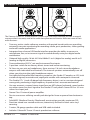
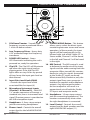
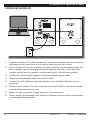
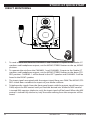
1. To send a mono mix from the CHANNEL 1 and CHANNEL 2 inputs to the Studio GT
speakers and headphone outputs, set the MONO/STEREO button to the up, MONO
position.
2. To separate the mix from the CHANNEL 1 and CHANNEL 2 inputs to the Studio GT
speakers and headphone outputs, set the MONO/STEREO button to the down STEREO position. CHANNEL 1 will be heard in the LEFT speaker and CHANNEL 2 will be
heard in the RIGHT speaker.
3. The input signals are mixed with the output signal from your DAW. The MONO/STEREO switch does not affect the inputs of your audio software.
4. To balance the signals from the front panel inputs with the output signal from your
DAW, adjust the MIX control until you find the desired mix. When the MIX control
is turned fully counter-clockwise, only the input signal will be heard. When the MIX
control is turned fully clockwise, only the audio coming from the computer will be
heard.
9
Studio GT
Owner’s Manual