1
Express® Deck Lavatory System EXD-Series
Installation
EXD-2N
Installation Instructions continued . . .
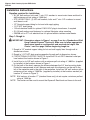
Step 5: Optional hot water heater
WARNING: To avoid personal injury or damage to the unit when installing the water
heater, make all plumbing connections first, then proceed with the
electrical connections.
NOTE: 240/208 or 277 voltage
is required for hot water heater.
Refer to the installation manual
provided with the hot water heater
for further installation information.
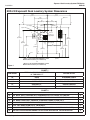
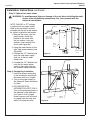
1.Remove the cover from the
water heater. Attach the
bracket to the cover with
the two screws, nuts and
washers, then reattach the
cover (see Figure 6a).
2.Hang the water heater on the
right side frame member (see
Figure 6b).
3.Connect the 1/2” flexible hose
from the cold water supply
stub-out to the hot water
heater inlet.
4.Connect the 1/2” flexible hose
from the hot water heater
outlet to the supply inlet on
the solenoid valve assembly.
Step 6: Completing installation
1.Install the faucets according
to the installation instructions
that came with your faucets.
2.Turn on the water supply to
the Express® Deck and check
for leaks.
3.FOR DECKS WITH
INFRARED FAUCETS ONLY:
Turn on the electrical power to
the electrical outlet and pass
your hand in front of each
faucet’s sensor until all the air
is purged from the lines and
water is flowing smoothly.
Bracket
#8 Nut
#8 Washer
#8-32 x ¾"
Round Head
Machine Screw
Water
Heater
Base
Water Heater
Cover
Figure 6a
Stop Valve
Water
Heater
Inlet
Cold Water
Supply
Outlet to
Faucets
Figure 6b
Bradley Corporation • 215-1542 Rev. F; ECN 11-08-011
3/2/2012
9