1
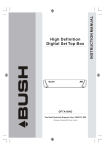
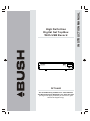
DFTA46R
Toll Free Warranty and Service: 1800 509 394
The Gold Technical Support Line: 1902 215 259
(Charges will apply at $2.95 per minute for gold
technical support only)
INSTRUCTION MANUAL
High Definition
Digital Set Top Box
With USB Record
Important Safety Instructions
Always read the safety instructions carefully
Keep this Instruction Manual for future reference
Keep this device away from humidity
Lay this device on a reliable flat surface before setting it up
Do not stand it on soft furnishings
If any of the following situation arises, get the Set Top Box checked by
a service technician:
It has been exposed to moisture
It has been dropped and damaged
It has obvious sign of breakage
It has not been working well or you cannot get it to work according
to the Instruction Manual
Warning
To prevent the risk of electric shock, do not open the cover or the
back of the receiver.
Do not block the ventilation holes of the device. Leave appropriate
gap above and around it to allow for adequate ventilation.
Do not place the device in an unventilated cabinet or on top of a unit
which emits heat.
Copyright Statement
No part of this publication may be reproduced in any form by any means
without the prior written permission. Other trademarks or brand names
mentioned herein are trademarks or registered trademarks of their
respective companies.
Disclaimer
Information in this document is subject to change without notice.
The manufacturer does not make any representations or warranties
(implied or otherwise) regarding the accuracy and completeness of this
document and shall in no event be liable for any loss of profit or any
commercial damage, including but not limited to special, incidental,
consequential, or other damage.
1
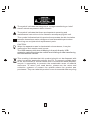
The symbol indicates that dangerous voltages constituting a risk of
electric shock are present within this unit.
The symbol indicates that there are important operating and
maintenance instructions in the literature accompanying this unit.
This symbol indicates that this product incorporates double insulation
between hazardous mains voltage and user accessible parts.when
servicing use only identical replacement parts.
CAUTION:
When the apparatus was in electrostatic circumstance, it may be
malfunction and need to reset by user.
The USB memory stick should be plug in the unit directly. USB
extension cable should not be used to avoid failing of data transferring
and interference caused.
This marking indicates that this product should not be disposed with
other household wastes throughout the EU. To prevent possible harm
to the environment or human health from uncontrolled waste disposal,
recycle it responsibly to promote the sustainable reuse of material
resources. To return your used device, please use the return and
collection systems or contact the retailer where the product was
purchased. They can take this product for environmental safe recycling.
2
Introduction
Thank you for buying this Bush product, which is designed to give you many
years of trouble-free service.
You may already be familiar with using a similar unit, but please take time to
read these instructions. They are designed to familiarise you with the unit s
m any features and to ensure you get the very best from your purchase.
Safety is important
Your safety and the safety of others is important. Please therefore, ensure you
read the Safety Instructions before you operate this unit.
Warranty
In the unlikely event that your product fails to work normally, please call the
below Bush warranty number for support.
Australia
Bush Warranty: 1800 509 394
New Zealand
Bush Warranty: 0800 450 259
3
About the Set Top Box
Thank you for choosing this Bush High Definition Digital Set Top Box
with USB Record. As well as receiving all standard and high definition
digital free to air channels, you can also record your favourite TV
programs via an external USB or Hard Disk Drive device whilst
watching TV or pause and time-shift live TV for a convenient TV
experience.
An easy to use on-screen installation guide is provided. In addition,
a fully featured Remote Control is included that offers you access
to every feature with a simple press of a button.
Main Features
Compliant with Australian DVB-T Standards
Full MPEG2 ISO/IEC 13818 Transport Stream Compliant Audio/
Video Decoding
Bandwidth of 7/8MHz Supported
COFDM Demodulator
Automatic/Manual Channel Search
Channel Edit, Moving and Deletion
Parental Lock Control
EPG (Electronic Program Guide) and Teletext Function (where
available)
HDMI Output
Multiple-Language OSD
Supports Multi-Subtitle
USB Input Supports JPEG Files, Music Files, Video Files for
Recording and Software Upgrade
Timeshift
Tuner RF In/Loop Through
Component, Video output
Digital audio via coaxial output
Full Function Remote Control
Package Contents
Before installation, please check the items of the package.
The package should contain the following items:
~ Set Top Box
x1 pc
~ Remote Control
x1 pc
~ AAA Battery for the Remote Control x1 pair
~ Instruction Manual
x1 pc
~ Composite RCA Cable
x1 pc
4
Table of Contents
Front and Rear Panel .......................................................................... 6
Remote Control...................................................................................7
Connections..................................................................................9
First Time Installation........................................................................12
Troubleshooting......................................................................22
Technical Specifications....................................................................23
Warranty............................................................................................24
5
Front and Rear Panel
1. Front panel
4
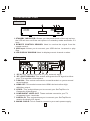
1 STANDBY INDICATOR: Shows you the power state of the set top box,
the LED will turn red if the set top box is in standby mode and Green if it
is on.
2 REMOTE CONTROL SENSOR: Used to receive the signal from the
remote control.
3 USB Input: Allows you to connect your USB device to record or play
files.
4 LED DISPLAY WINDOW: Used to display current channel number.
2. Rear panel
DFTA46R/A
POWER SUPPLY: AC 230V ~ 50Hz
MAX POWER CONSUMPTION: 6 WATTS
BUSH WARRANTY: 1800 509 394 AUSTRALIA
BUSH WARRANTY: 0800 450 259 NEW ZEALAND
Serial No.:
AC 230V
~50Hz
MADE IN PRC
2011/10
N14119
1 RF IN: This socket connects to your external aerial.
2 RF LOOP THROUGH: This socket will bypass the RF signal to either
your TV or another video system.
3 COAXIAL: This socket connects to a coaxial socket on your surround
sound system.
4 HDMI OUT: This socket connects to HDMI device to allow high
definition output.
5 VIDEO: This socket allows you to connect your Set Top Box via
Composite Video Signal.
6 COMPONENT VIDEO OUT: These sockets connect to your TV
component input terminals.
7 AUDIO L/R: This socket allows you to connect your Set Top Box to
receive the Audio L/R signal.
8 MAINS CABLE: This is used to connect to your main power supply.
6
Remote Control
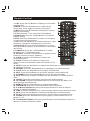
1. LIST: Press the List Button to display your recorded
programs list.
2. MUTE: Press the Mute Button to switch off the
Sound only. Press again to restore audio output.
3. INFO: Press the INFO Button to display the current
channel information.
4. TTX: Press the TTX to enter the Teletext Menu.
5. SUBTITLE: Press the Subtitle Button to select the
subtitle setting.
6. EXIT: Press the Exit button to exit the current Menu
or return to the previous Menu.
7. OK: Press the OK Button to confirm settings or menu
selections. Also press to display the channel list.
8. RIGHT/LEFT: Press the Navigate Buttons to move
through the Menu options or to increases or decreases
the volume.
9. TV/RADIO: Press the TV/Radio Button to switch
between from TV and Radio mode.
10. RECALL: Press the Recall Button to go back to the
previous channel you were watching.
11. GOTO: Press the GOTO Button to select the
multimedia option.
12. PREV: Press the Prev Button to skip to the
previous track in multimedia mode or timeshift in DTV
mode.
13. NEXT: Press the Next Button to skip to the Next track in multimedia mode or
timeshift in DTV mode.
14. REPEAT: Press the Repeat Button to repeat play in multimedia mode.
15. STOP: Press the Stop Button to stop play in Multimedia.
16. REC: Press the Rec Button to record the program you are watching.
17. STANDBY: Press the Standby Button to turn the unit to standby.
18. EPG: (Electronic Program Guide) Press the EPG Button to enter the EPG
menu.
19. AUDIO: Press the Audio Button to change the audio settings.
20. UP / DOWN: Press the Navigate Buttons to scroll through the Menu or to
scroll through the channel list.
21. MENU: Press the Menu Button to enter the Main Menu.
22. FAVOURITE: Press the Favourite Button to enter the Menu.
23. 0-9 (Numeric Buttons): Press the Numeric Buttons to enter a channel
directly or setting information.
24. FWD: Press the FWD Button to Fast Forward in Multimedia or timeshift mode.
25. REV: Press the Rev Button to Rewind in Multimedia or timeshift mode.
26. PLAY: Press the Play Button to begin or resume play in multimedia mode.
27. PAUSE: Press the Pause Button to pause play in multimedia mode or to
pause live TV.
28. COLOUR BUTTONS: Press the Colour Buttons to select different options in
the menu, EPG and Teletext modes.
7
Installing the Batteries
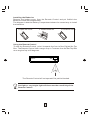
Remove the battery cover from the Remote Control and put 2xAAA size
batteries inside the compartment.
The diagram inside the Battery Compartment shows the correct way to install
the batteries.
1.Open the cover
2.Install batteries
3.Close the cover
Using the Remote Control
To use the Remote Control, point it towards the front of the Digital Set Top
Box. The Remote Control has a range of up to 7 metres from the Set Top Box
at an angle of up to 60 degrees.
The Remote Control will not operate if its path is blocked.
Sunlight or very bright light will decrease the sensitivity of the
Remote Control.
8
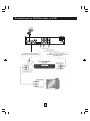
Connecting to a Television
Caution: Make sure to check the voltage specification of the wall outlet is
the same rating with the receiver. To prevent the risk of electric shock, do
not open the cover or the back of the receiver.
TV Aerial
AC 230V
~50Hz
YELLOW
(Video)
(Audio)
Composite
VIDEO IN
Cr
Cb
HDMI
Note: When connecting the receiver to other equipment, e.g., TV, VCR and
amplifier, make sure to refer to relevant user manual for instruction. Also, make
sure you disconnect all the equipments from the mains supply before the
connection.
For a basic connection from your Set Top Box to the television, use the
Composite connection outlined below. For a higher quality connection, use the
Component Video connection outlined with the Composite Audio Connection.
For the highest quality connection use a direct HDMI connection.
9
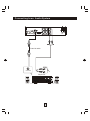
Connecting to a DVD Recorder or VCR
TV Aerial
AC 230V
~50Hz
10
Connecting to an Audio System
AC 230V
~50Hz
Coaxial cable
Coaxial
Amplifier
VOLUME
INPUT SELECTOR
POWER
BYPASS
PRO LOGIC
3 STEREO
MODE
TEST
CHANNEL
KARAOKE
MUTE
UP
DOWN
BASS
1
MIC
2
1
MIC VOL
2
EXCITE
11
MIC
TREBLE
ECHO
First Time Installation
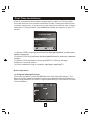
After all connections have been made properly, switch on TV and make
sure the receiver is connected to the Main Power. Press the Power button
to switch receiver on. If you are using the receiver for the first time or have
restored to Factory Default, the Installation Guide will appear on your TV
screen.
Installation Guide
OSD Language
English
Country
Australia
Channel Search
EXIT
EXIT
OK
Confirm
(1) Select [OSD Language] and Press the Navigate Buttons to select your
desired language.
(2) Select [Country] and Press the Navigate Buttons to select your desired
country.
(3) Select [Channel Search] and press RIGHT or OK key to begin
Automatic channel search
(4) Once channel tuning is complete, can begin watching TV.
Basic Operation
(1) Program Manage Settings
To access the Menu, press the MENU button and select [Program]. The
Menu provides options to adjust the Program Manage Settings. Select an
option and press OK or RIGHT to adjust that setting. Press the EXIT button
to exit the Menu.
12
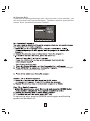
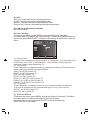
(2) Program Edit
To edit your program preferences (lock, skip, favourite, move or delete), you
will need to enter the Program Edit Menu. This Menu requires a password to
access. Enter the default password '000000'.
Programme Edit
ALL TV
001 TV3
002 33
SKIP
003 3/24
004 K3/300
Searching...
Move
Skip
Lock
Delete
FAV FAV
, or press Left/right
button to select your favourite type.
To cancel the skip, pres the GREEN button again and the skip
symbol will be taken off.
13
Move a TV or Radio Program/s
1. Select the preferred program then press the RED button. A move symbol
will appear
2. Press UP/DOWN to move the program
3. Press OK to confirm
4. Repeat the above steps to move more channels
Lock Program/s
You can lock selected programs for restricted view.
Lock a TV or Radio Program:
1.Select the preferred program then press the YELLOW button. A lock-shaped
symbol is displayed. The program is now marked as locked
2. Repeat the previous step to select more programs
3. To confirm and exit the menu, press the EXIT button
4. Press the YELLOW button to disable the locked program
5. To view the locked program, you will be require to enter either the default
password '000000' or your last set password.
(3) EPG (Electronic program guide)
The EPG is an on-screen TV guide that shows scheduled programs seven
days in advance for every tuned channel.
1. Press the [EPG] button.
2. Press [up] or [down] to move through the programmes.
3. To move through the list of channels press [left] and [right].
4. To move forwards one day, press [RED]. To move backwards, press [GREEN]
5. To set a book list, press [INFO] then press [RED], follow the on screen
instructions to scroll the programme you want to set as a reminder to watch.
When the programme is about to start a reminder window will be shown.
6. Press [OK] to enter schedule book, like schedule view and schedule
recording.
14
(4) Sort
Sort your channels from the following options:
[LCN] - Sort the channels in ascending order
[Name] - Sort the channels in alphabetical order
[Service ID] - Sort the channels according to the station
(5) LCN (Logical channel number)
Set LCN on or off.
(6) Video Setting
To access the Menu, press MENU then select [Picture]. The Menu
provides options to adjust the video settings. Press UP/DOWN to select an
option and press RIGHT/LEFT to adjust that setting. Press EXIT to exit the
menu.
(1). Aspect Ratio
You must set the display format to either 4:3 PanScan, 4:3 Letter Box,16:9
Full Screen or 4:3 Full, 16:9 Pillar Box, 16:9 PanScan Auto to get the
maximum display when watching TV.
(2). Resolution
If the video does not appear correctly, change the setting. This setting is to
match the most common setting for HDMI.
[480i]: for NTSC system TV.
[480P]: for NTSC system TV.
[576i] for PAL system TV.
[576P]: for PAL system TV.
[720P]: for NTSC or PAL system TV.
[1080I]: for NTSC or PAL system TV.
[1080P]: for NTSC or PAL system TV.
(3). TV format
If the video does not appear correctly, you need to change the settings.
This should match the most common setting for TVs in your country.
[NTSC]: for NTSC system TV.
[PAL]: for PAL system TV.
(7) Channel Search
To access the menu,press MENU and select [Search Channel]. The M enu
provides options to adjust the S earch C hannel settings.
Select an option and press RIGHT/LEFT to adjust the setting s .
Press EXIT to exit the M enu
15
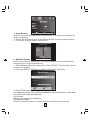
1 . Auto Search
Search and install all channels automatically. This option overwrites all
preset channels.
1. Select [Auto Search] and press OK or RIGHT to start channel search.
2. To cancel channel search, press EXIT.
Channel Search
498.0MHz/8MHz
DTV:004
001 TVE1
002 La 2
003 24H TVE
004 CLAN TVE
Radio: 003
001 RNE1
002 RNEC
003 RNE3
Progress
EXIT
EXIT
MENU
Skip
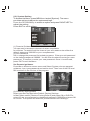
2. Manual Search
Install new channels manually. This option adds new channels without
changing the current channels list.
1. Select [Manual Search] then press OK or RIGHT. The channel search
screen will appear.
2. Press the RIGHT/LEFT key to select the channel frequency
Manual Search
Frequency channel
10
Frequency(MHz)
212.5
Bandwidth:
7M
Quality
EXIT
EXIT
OK
Confirm
3. Press OK to start searching channels
If a channel is found, it is saved and added to the channels list. If channels
can’t be found, then exit the menu.
(3) Country
Select your country of residence.
(4) Antenna power
Enable Antenna Power if an external active antenna is connected.
16
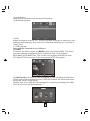
(8) Time Setting
To access the M enu, press MENU then select [Time]. The M enu provides
options to adjust the time settings.
Press UP/DOWN to s elect an option and press RIGHT/LEFT to adjust the
setting s . Press EXIT to exit the menu .
(1) Time offset
Select auto or manual for GMT offset adjustments.
(2) Country Region
Select the Country Region when [Time Offset] is set to Auto.
(3) Time Zone
Select the Time Zone Offset when [Time Offset] is set to Manual.
Auto Standby
Auto Standby (inactivity setting) is used to put the Set Top Box into standby
if a button hasn't been pressed for 3 hours. The default setting of the Set Top
Box is Off.
(9) Option
To access the M enu, press MENU and select [Option]. The menu provides
options to adjust the OSD Language, Subtitle Language and Audio
Language. Select an option and press RIGHT/LEFT to adjust the setting.
Press EXIT to exit the M enu
(1). OSD Language
Select an OSD language
(2). Subtitle Language
Select the preferred subtitle language.
(3). Audio Language
Select the preferred audio language for watching TV channels.
If the language is not available, the default program language will be used.
17
(10) System Setting
To access the M enu, press MENU and select [System]. The menu
provides options to adjust the system settings.
Press the UP/DOWN key to select an option and press RIGHT/LEFT to
adjust the setting.
Press EXIT to exit the M enu .
(1) Parental Guidance
You can restrict access to channels that are unsuitable
for children. To restrict/lock the channel you will need to enter either the
default password '000000' or your own password.
(2) Set Password
Set or change the password for locked programs. Enter your old password
or the default password '000000'. You will then be asked to enter your new
password. To confirm re-enter your new password. Once it is confirmed,
press EXIT to exit the Menu.
Set Parental guidance
Press Menu button to access menu and Select System, choose parental
guidance, input your password and set the level. Then icon of the PG level
will be shown in the info bar of the program.
(3) Restore Factory Default
Reset your Set Top Box to the Default Factory Settings.
In Main Menu select [Restore Factory Default] and press OK or RIGHT to
select. Enter your password or the default password '000000' and press OK
to confirm. This option will delete all preset channels and settings.
18
(4) Information
View model, hardware and software information.
(5) Software Update
1.OAD
When this option is set to "On", the Set Top Box will begin to search for new
software automatically, from over air broadcasts based on your set time in
"Start Time".
2. USB upgrade
New software updated via the USB port.
(11)USB
To access the Menu, press the MENU button and select [USB]. The menu
provides options to playback Music and Photo files, it can support
MP3,WMA,JPEG,BMP files, The unit will only support USB device with
FAT and FAT32 file system. It will not support NTFS file system.
(1) Multimedia: Once your USB is plugged in, you can select the Music or
Photo type in the multimedia menu. Press OK to enter the file browser and
select the file you wish to play.
Please note: If no USB device is plugged in, a warning message "No USB
Device is Found" will be displayed.
19
(2) Photo configure:
You can select on of the following settings to for your photo slide show
options.
-Slide Time: You can adjust slide show interval from 1~8 seconds.
-Slide Mode: You can adjust slide show effect as mode 0~59 or random.
-Aspect Ratio: You can displays the picture as its original aspect.
- Discard displays the picture in full screen mode.
- Subtitle Specific:
[Small]: Displays the subtitle as small mode.
[Normal]: Displays the subtitle as normal mode.
[Big]: Displays the subtitle as big mode.
- Subtitle BG:
[White]: Displays the subtitle in white background.
[Transparent]: Displays the subtitle in transparent background.
[Grey]: Displays the subtitle in grey background.
[Yellowgreen]: Displays the subtitle in yellowgreen background.
- Subtitle Font Color:
[Red]: Displays Subtitle in red font.
[Blue]: Displays Subtitle in blue font.
[Green]: Displays Subtitle in green font.
USB Recording:
The most unique feature on your Set Top Box is its ability to record live TV.
You can simply connect a USB storage device or Hard Disk Drive to your Set
Top Box and press the record button on the remote control.
We recommend that you use a powered hard disk drive, as USB sticks only
allow limited functionality. If you decide to use a USB stick please ensure it
has over 2GB of recordable space.
With the Record Function you can record Live TV at anytime. Follow the
below steps to activate this function.
1. Press the Record Button to activate Record function.
2. The recorded program can be played in 2X speed by pressing fast
forward/ rewind Button for first time, in 4X speed for second time, in 8X
speed for third time, in 16X speed for fourth time, in 32X speed for fifth time.
3. You can display information of the recorded program will be displayed by
pressing the 'INFO' Button while in full-screen playback.
4. To exit the recorded program press the stop button.
Note:
- We cannot guarantee compatibility (operation and/or bus power) with all
USB mass storage devices and assumes no responsibility for any loss of
data that may occur when connected to this unit.
- With large amounts of data, it may take longer for the system to read the
contents of a USB device.
- Some USB devices may not be properly recognized.
- Even when they are in a supported format, some files may not play or
display depending on the content.
20
Time shift
Make sure that a USB or Hard Disc Drive device is connected to the
receiver in order to be able to use the time shift function.
We recommend that you use a powered Hard Disk Drive as USB Sticks will
only allow limited functionality.
Please ensure that the USB Memory used has a memory capacity of above
2 GB.
With the Timeshift Function you can pause and continue Live TV at anytime
you like without having to miss any action. Follow the below steps to
activate this function.
1. Press the Pause Button to activate Timeshift and pause Live TV. You can
press play at anytime to resume play.
2. You can fast forward the playback at anytime until returning to live TV, or
press the stop button to exit timeshift mode.
21
Troubleshooting
Problem
No picture
Potential Reasons
Power isn't connected
What to do
Connect the power
The power switch is not on Switch on the power
Screen shows
No Signal
DVB-T cable not connected Plug in the DVB-T cable
Incorrect setting
No sound from
speaker
No or incorrect connection Connect the audio cable
with audio cable
correctly
Sound on mute
Turn off mute function
Adjust the volume.
Only sound, no
image on the
screen
Remote Control
is not responding
Volume is set to low
No or incorrect connection Make sure cables are
with AV cable
connected correctly
The program is a radio
program
Press <TV/RADIO> key to
shift into TV mode
The battery is exhausted
Change battery
Remote Control is not
facing or close enough
to the Set Top Box
Adjust the position of the
Remote Control and move
closer to the unit
The image stopped The signal is too weak
suddenly or mosaic
USB not responding
Conduct a factory reset
USB is not connected
properly or does not
sufficient memory
22
Conduct a Factory Reset
Reconnect the USB or
connect another USB
Technical Specifications
Item
Sub Item
Tuner
Input Frequency
170~230MHz
470~860MHz
RF Input level
-25~-78dBm
IF Bandwidth
7MHz and 8MHz
Modulation
QPSK,16QAM,64QAM
Decoder Format
MPEG4 AVC/H.264 HP@L4
MPEG2 [email protected]
Output Format
576P, 720P, 1080i,1080P, 4:3 and 16:9
Output Port
HDMI, CVBS
Decoder Format
MPEG-1 (layer1&2)
Audio output
Digital audio: S/PDIF
Voltage
230V~ 50Hz
Power
Max 6W
Video
Audio
Power
Parameter
23
Warranty
Please keep your receipt as proof of purchase. This product is warranted
for any defect in materials or workmanship for one year after the original
date of purchase. This product is for normal domestic and office use only.
This warranty does not cover damage from misuse or neglect, accidental
damage, vermin infestation, excessive voltages such as lightning or power
surges or any alteration that affects the performance or reliability of the
product.
Our goods come with guarantees that cannot be excluded under the
Australian Consumer Law. You are entitled to a replacement or refund for a
major failure and for compensation for any other reasonably foreseeable
loss or damage. You are also entitled to have the goods repaired or
replaced if the goods fail to be of acceptable quality and the failure does not
amount to a major failure.
In the unlikely event that your product fails to work normally, please contact
the Bush Warranty on 1800 509 394 (Australia) or 0800 450 259 (New
Zealand) and have your receipt of purchase on hand.
This warranty is subject to the following provisions:
It is only valid within the boundaries of the country of purchase.
The product must be correctly assembled and operated in accordance
with the instructions contained in this manual.
The product must be used solely for domestic purposes.
The warranty does not cover accidental damage, misuse, cabinet parts
or consumable items.
The warranty will rendered invalid if the product is resold or has been
damaged by inexpert repair.
The manufacturer disclaims any liability for incidental or consequential
damages.
This warranty is in addition to, and does not diminish,
Your statutory or legal rights.
PO BOX 6287,
SILVERWATER NSW 1811
www.bushaustralia.com.au
Bush Warranty: 1800 509 394 Australia
Bush Warranty: 0800 450 259 New Zealand
24
PO BOX 6287,
SILVERWATER NSW 1811
www.bushaustralia.com.au