1
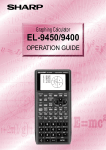
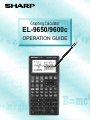
Graphing Calculator
EL-9650/9600c
OPERATION GUIDE
Introduction
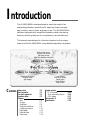
The EL-9650/9600c was developed to meet the needs of an
expanding education market and is based on three concepts:
easy to teach, easy to learn and easy to use. The EL-9650/9600c
has been designed with simplified operations and time-saving
features, allowing teachers to concentrate on actual teaching.
This manual was designed to introduce teachers to the unique
features of the EL-9650/9600c using detailed operation examples.
Built-in slide shows
Original slide shows
Educational tools
(OHP/PC-link/Data collection)
Easy to Teach
Contents
Easy to Learn
Easy to Use
Shift/Change function
Equation editor
Split display
Large display
Pen-touch screen
Rapid graph
Rapid window
Rapid zoom
Sales points
Basic operation
Pen-touch operation
Equation editor
Features
Shift
Change
Slide show
Slide show selections
Graphing procedure
Rapid graph
Rapid window
Rapid zoom
P1
P2
P4
P5
P6
P7
P8
P9
P 11
P 12
P 13
P 14
System options
PC-link system
Set to set communication
OHP system
Menu tree 1~6
Specification
P 15
P 16
P 17
P 18
P 24
S ales points
1
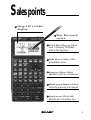
Large 132 x 64-dot
display
2
Easy Pen-touch
screen
3 Graph Shift/Change shows
how "changing" the graph
affects the equation
4 Slide Shows reduce class
preparation time
5 Equation Editor shows
equations just as in textbooks
6 Rapid graph/Rapid window
simplify graphing procedures
7 Rapid zoom allows easy
adjustment of window size
1
Basic operation
Power ON/OFF
○
○
○
○
○
○
○
Power on
Function keys
Use to enter equations
Use to draw graphs
○
○
○
Power off
Use to view table of function value
Use to set size of viewing window
○
○
○
○
○
○
Erase equations and
remove error displays
QUIT
CL
○
○
○
Cancel of previous
function (Escape)
Use to adjust the viewing range
Use to trace graphs
Use to enter calculation mode
Use to enter slide show mode
Use to operate Rapid Graph/Rapid Window and Rapid Zoom functions
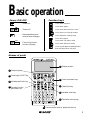
Names of parts
5 Display screen
1 Graphing keys
2 Power supply ON/OFF key
3 Alphabet specification key
4 Secondary function
6 Cursor movement keys
7 Clear/Quit key
specification key
8 Variable enter key
9 Calculation execute key
10 Communication port for peripheral devices
2
Basic operation
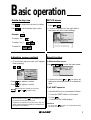
Guide to key use
Press
Press
to use secondary functions (in yellow).
to use the alphabet keys (in blue).
SET UP menu
Press
.
• Contents displayed on the right side of
the screen are the current settings.
A
Example: sin
To select “sin”:
To select A:
]
To select “sin-1”:
There may be differences in the results
of calculations and graph plotting
depending on the SET UP settings.
]
Adjusting screen contrast
Reset function
• The contrast adjust screen will appear
when pressing
1) When trouble occurs
Press
to enter the reset mode.
OPTION
OPTION .
Press
to darken contrast.
Press
to lighten contrast.
Pen
Touch
(Change the contrast by touching
or
using the pen)
• With pen-touch mark Pen
Touch , all operations can
be performed using the pen touch.
• Operation examples for the pen-touch key are
given assuming that the operation is started from
the default value setting.
or
) to return all
• Use this function (
settings to the default value or to delete all
data.
2) All RESET operation
• If trouble still occurs, proceed as follows:
1. Press the RESET switch on the back.
2. Press
.
• Returns to the initial display.
CAUTION
Do not press
in step 2. It will delete all data
stored in the calculator.
3
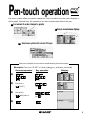
Pen-touch operation
Pen
Touch
Pen-touch screen offers convenient operations. Use it to select from the menu displays or
shift a graph, fast and easy. All operations can also be performed without the pen.
1 Convenient to make changes to graphs
3 Easy to move between displays
○ ○
○ ○
○ ○
○ ○
2 Select menu options with a touch of the pen
See how a simple choice can be made directly from the screen.
Example: Convert “3.55” to d,m,s (degree, minute, second)
Pen-touch operation
Key operation
Display
1)
2)
Pen-touch
[
3)
CONV]
(or
)
(or
)
Pen-touch
[
dms] twice
4)
4
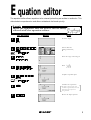
E quation editor
The equation editor allows equations to be viewed just as they are written in textbooks. This
aids student comprehension and allows mistakes to be found quickly.
Example
Input the equation and see how it can be easily
viewed with the equation editor.
Key Operation
Display
Notes
Clear the display.
1
Select CALC and
(Integral function)
2
Pen
Touch
(or
)
Enter the range of the integral.
3
Enter
4
Complete equation input.
5
6
7
(or
)
]
Pen
Touch
Calculate the expression.
The mark in the upper right corner
will blink for approximately 10 seconds,
indicating that the expression is
being calculated.
]
Review the input equation.
5
Features
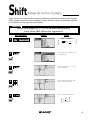
Shift
(Change the location of graphs)
Graph shift function helps students grasp the relationship between an equation and its graph.
Shift the graph’s location without changing its shape, and the change is immediately reflected
in the equation on the right side of the display.
Example
When the graph of y = x2 is shifted downward,
how does this affect the equation?
1
2
Display
Notes
Enter SHIFT/CHANGE mode.
]
Key Operation
If SHIFT is not already
.
highlighted press
]
Select shift. Cursor moves to the
equation menu.
Pen
Touch
3
Select the equation: y = x2 and
draw the graph.
Pen
Touch
4
Select the location of the shift:
move cursor down twice.
Pen
Touch
Pen
Touch
View the result of the shift.
]
5
y = x2
y = x2-2
]
6
Features
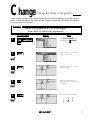
Change
(Change the shape of the graphs)
Graph change function helps students grasp the relationship between an equation and its
graph. Change the shape of the graph, and the change is immediately reflected in the equation
on the right side of the display.
Example
When the graph of y = x2 is changed,
how does it affect the equation?
Key Operation
Display
Notes
1
Enter SHIFT/CHANGE mode
and specified ( CHANGE ).
2
Select change. Cursor will move
to the equation menu.
Pen
Touch
3
Select the equation: y = x2 and
draw the graph.
Pen
Touch
4
Select the location of the
change: increase the value of ycoordinates.
Pen
Touch
Pen
Touch
View the result of the change.
]
5
y = x2
y = 2x2
]
7
Features
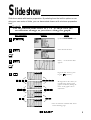
S lide show
Slide show assists with teacher preparation. By selecting from the built-in options or creating your own series of slides, you can demonstrate lessons with minimum preparation
time.
Example
Use the built-in slide show of y = x2 to show how the
coordinates change as you move along the graph.
Key Operation
1
2
Display
Notes
Specified SLIDE SHOW mode.
Select the built-in menu.
Pen
Touch
3
Select y = x2 and the first slide
appears.
Pen
Touch
4
Begin the slide show by pressing the
cursor key.
Moving between the values you
can follow the changes in the
graph’s coordinates, making the
nature of the graph easier to
understand.
* View the selection of built-in slide shows
on the following pages.
8
Features
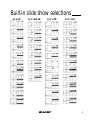
Built-in slide show selections
1) Y=X2
2) Y=AX+B
3) Y= X
4) Y=1/X
9
Features
Built-in slide show selections
5) Y=sinX
6) Y=tanX
7) Y=cos-1X
8) Y=lnX
10
Features
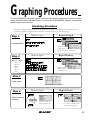
Graphing Procedures
The EL-9650/9600c has three unique functions that simplify graphing procedures: Rapid
Graph, Rapid Window and Rapid Zoom. Of course, the EL-9650/9600c supports conventional
graphing procedures as well.
Graphing Procedure
Following outlines graphing procedures and indicates the steps where Sharp's unique functions can
be used to simplify operations. These functions are introduced on the following pages.
Step 1
Manual Input
Rapid Graph
Input equation
Simply select from
built-in menu to
modify desired type of equation.
Step 2
Manual Input
Rapid Window
Set X, Y range
Xmin =
Xmax =
Xscl =
Ymin =
Ymax =
Yscl =
Simply select from
built-in menu to
set window size.
Step 3
Draw graph
Press Graph button to draw graph.
Step 4
Adjust viewing
window
Manual Input
Amending
range size
Go back to Step 2 to
readjust window size.
Rapid Zoom
Use arrows to adjust window
size while viewing graph.
11
Features
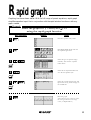
R apid graph
Graphing has never been easier. With its full range of preset equations, rapid graph
simplifies equation input. Use in conjunction with the rapid window function or with any
graph created.
Example
Draw the graph for y = 2sin (-2x+ ) + 2
using the rapid graph function.
Key Operation
1
Display
Notes
Enter the equation entry mode.
2
Enter Rapid Graph mode and view
the equation-type menu.
3
Select the type of equation: Trigonometric, and view the equation
format menu.
Pen
Touch
4
Select the sin equation format and
view the sin equation style.
Pen
Touch
5
Select the second equation style and
input. If necessary, make changes to
the coefficients.
Pen
Touch
6
Draw the graph.
(Note: Previous range values may affect
the viewing window. To reset range
values, use Rapid Window.)
12
Features
R apid window
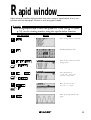
Rapid window simplifies setting window size with a range of preset values. Use in conjunction with the rapid graph function or with any graph created.
Example
After using Rapid Graph to draw the graph of y = 2sin (-2x+ ) + 2 (refer
p. 12), set the viewing window using the rapid window function.
Key Operation
Enter Rapid Window mode.
2
Select the No. 3 style and view the
X-range menu.
3
4
Pen
Touch
(or
)
(Five times)
(or
)
7
Select X-range No. 4:
(-1 < X < 10 scl=1), and
view the Y-range menu.
Move the cursor to No. 5:
(-0.5 < Y < 5 scl=0.5)
5
Pen
Touch
Notes
Enter viewing window setup mode.
1
Pen
Touch
Display
(or
)
Select the Y-range and draw the
graph.
13
Features
R apid zoom
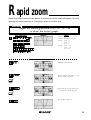
Rapid zoom offers one-touch adjustment of window size while viewing the graph. No more
guessing or wasting class time to find optimal values for window size.
Example
Adjust the viewing window for y = x3 + x2 - 2x
to show the entire graph.
Key Operation
1
Display
Notes
Create the graph y = x3 + x2 - 2x
using the following conditions:
X-range: xmin = -3
xmax = 3
xscl = 1
Y-range: ymin = -1.5
ymax = 1.5
yscl = 0.5
2
Enter Rapid Zoom mode.
3
Change Y-range from Ymax = 1.5 to
Ymax=2. Draw the graph.
Pen
Touch
4
Repeat: Change Y-range from Ymax
= 2 to Ymax=2.5. Draw the graph
Pen
Touch
5
View display (adjusted).
14
System options
PC-LINK
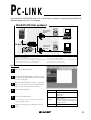
Connect the EL-9650/9600c with a PC or Macintosh computer to expand the possibilities of
data exchange using PC-Link software.
CE-LK1P (PC-link system)
PC-Link
Software
PC conversion
connector for
IBM-PC
R
IBM PC
or Compatibles
PC-Link
Software
CE-450L
PC conversion
connector for
Macintosh
Macintosh
R
What is PC LINK?
• Creates and edits EL-9650/9600c programs on a PC.
• Loads image data of EL-9650/9600c.
• Receives and saves programs and various data from EL-9650/9600c. • Converts programs and various data files into a Text File. Converts
• Makes a backup of all the contents of EL-9650/9600c.
program text files into a Program File.
• Sends programs and various data to EL-9650/9600c.
• Prints out programs and various data files.
Procedure
1
Turn off the EL-9650/9600c.
2
Connect the EL-9650/9600c to the PC by using
the CE-450L, PC-Link adaptor and PC connector
(see above diagram).
3
Make sure that the RS-232C (serial port) is connected
to the PC. Use of the connector is determined by the
shape of the PC serial port (see below chart).
4
Open PC-Link Software.
Shape of PC serial port
25 pin (male)
5
Switch on EL-9650/9600c.
Connect the other side (25-pin side) of PC LINK
adaptor to the serial
port for the PC.
* It is essential to use the same port for both the PC
9 pin (male)
Connect the other side (25-pin side) of PC LINK
adaptor to the 25-pin
terminal of a converting adaptor. Also connect the
other side (9-pin side) of the converting adaptor to
the serial port for the PC.
Operate according to the instructions on the
screen.
8 pin (female)
For Macintosh
and the PC-Link Software.
6
Connecting procedure
15
System options
Set to set communication
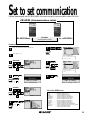
Transfer data between two EL-9650/9600c calculators using the communication cable (CE-450L).
CE-450L (Communication cable)
EL-9650/9600c
CE-450L
Communication cable
EL-9650/9600c
Communication Procedure
3
Pen
Touch
Turn power on.
Select SEND/ALL.
Receiver
)
Specified LINK.
4
Select ‘LI’, ‘YI’
* mark desired data to be
sent.
]
9
( or
)
Select LINK/RECEIVE.
Execute Sending function.
Sender
List of the SEND menu
Pen
Touch
( or
6
]
Pen
Touch
( or
5
List of sendable data will
appear on screen.
8
Pen
Touch
Pen
Touch
7
]
2
Plug the cable into both calculators.
]
1
( or
)
Specified LINK.
)
Pen
Touch
A SELECT ....................... Sends files individually as described below.
01 ALL ............................ Selects and displays all files.
02 List ............................. Selects and displays all list files.
03 Matrix ........................ Selects and displays all matrix files.
04 Graph Eqn .................. Selects and displays all graph equations.
05 Solver Eqn ................. Selects and displays all solver equations.
06 Program ..................... Selects and displays all program files.
07 G_Data ....................... Selects and displays all graph data files.
08 L_Data ....................... Selects and displays all list data files.
09 Picture ....................... Selects and displays all picture data files.
10 Slide .......................... Selects and displays all self-made slide shows.
11 A~Z, Ø ........................ Selects and displays all fixed memory of A to Z, and Ø
B BACKUP ...................... Menu to send all file data. Use this
feature to send the entire content.
Select LINK/SEND.
16
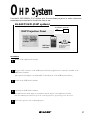
OHP System
Use the EL-9650/9600c OHP system with the overhead projector to make classroom
presentations convenient for the whole class to see.
EL-965T/96Tc (OHP system)
AC adaptor (optional)
OHP Projection Panel
CE-450L
OHP Panel
Controller
The CE-450L is included
for separate use
(see page 16)
Procedure
1
Switch off the OHP Panel Controller.
2
Plug the cable connector of the OHP Projection Panel straight into the connection terminal of the
OHP Panel Controller.
(The optional AC adaptor is recommended for extended use of the OHP Projection Panel.)
3
Switch on the OHP Panel Controller.
4
Operating the OHP Panel Controller.
The OHP Projection Panel display is synchronized with the display of the OHP Panel Controller.
Place the OHP Projection Panel on top of the overhead projector to project images onto the screen.
5
Turn on the power to the overhead projector.
17
Menu tree 1
SET UP
( 2nd F
SET UP
)
A
B DRG
Rad
FloatPt
9
Rect
Decimal (Real)
Equation
1 Deg
2 Rad
3 Grad
F AMSWER
1 Decimal (Real)
2 Mixed (Real)
3 Improp (Real)
4 x+yi (complex)
5r
(complex)
FORMAT
( 2nd F
C FSE
1 FloatPt
2 Fix
3 Sci
4 Eng
G EDITOR
1 Equation
2 One Line
D TAB
11
22
33
44
55
66
77
88
99
00
E COORD
1 Rect
2 Param
3 Polar
4 Seq
)
FORMAT
A
B CURSOR
RectCursor
OFF
OFF
Connect
Sequen
1 RectCoord
2 PolarCoord
D Y1
C EXPRES
1 ON
2 OFF
1 ON
2 OFF
E STYLE1
1 Connect
2 Dot
F STYLE 2
1 Sequen
2 Simul
( 2nd F
FORMAT
FORMAT
*When coordinate system is Rect, palm or polar
)
A
B CURSOR
RectCursor
ON
ON
Connect
Sequen
Web
F PLOT2
1 Sequen
2 Simul
MATH
(
MATH
1 RectCoord
2 PolarCoord
D Y1
C EXPRES
1 ON
2 OFF
1 ON
2 OFF
E PLOT1
1 Connect
2 Dot
G TYPE
1 Web
2 Time
3 uv
4 uw
5 vw
*When coordinate system is Seq.
)
A CALC
01 log2
x
02 2
03 fmin(
04 fmax(
05 d/dx(
06 ∫
07 dx
08 ∑(
09 sec
10 csc
B NUM
11 cot
12 sec-1
13 csc-1
14 cot-1
15 sinh
16 cosh
17 tanh
18 sinh-1
19 cosh-1
20 tanh-1
E ANGLE
1
2'
3"
4r
5g
F INEQ
1
2
3>
4≥
5<
6≤
1 abs(
2 round(
3 ipart
4 fpart
5 int
6 min(
7 max(
8 lcm(
9 gcd(
G LOGIC
1 and
2 or
3 not
4 xor
5 xnor
C PROB
1 random
2 nPr
3 nCr
4l
D CONV
1 deg
2 dms
3 xy r(
4 xy
(
5r
x(
6r
y(
H COMPLX
1 conj(
2 real(
3 image(
4 abs(
5 arg(
18
Menu tree 2
When coordinate system is Rect
CALC
( 2nd F
CALC
When coordinate system is Polar, Param or Seq
)
CALC
CALC
( 2nd F
CALC
)
( 2nd F
LIST
)
CALC
1 Value
1 Value
2 Intsct
3 Minimum
4 Maximum
5 X_Incpt
6 Y_Incpt
7 Inflec
LIST
MATH menu on the NBASE calculation
A OPE
N-MATH
( 2nd F
TOOL MATH
)
1 sortA(
2 sortD(
3 dim(
4 fill(
5 seq(
6 cumul
7 df_list
8 augument(
9 list mat(
0 mat list(
A LOGIC
1 and
2 or
3 not
4 neg
5 xor
6 xnor
STAT
C L_DATA
1 stoLD
2 RclLD
( STAT )
A EDIT
edit list
Press
ENTER
B OPE
1 sortA(
2 sortD(
3 SetList
4 ClrList
E TEST
01 2 test
02 Ftest2samp
03 Ttest1samp
04 Ttest2samp
05 TtestLinreg
06 Tint1samp
07 Tint2samp
08 Ztest1samp
09 Ztest2samp
DRAW
B MATH
1 min(
2 max(
3 mean(
4 median(
5 sum(
6 prod(
7 stdDv(
8 varian(
( 2nd F
DRAW
C CALC
1 1_Stats
2 2_Stats
3 ANOVA(
D LINE
01 Med_Med
02 Rg_ax+b
03 Rg_a+bx
04 Rg_x2
05 Rg_x3
06 Rg_x4
07 Rg_In
08 Rg_log
09 Rg_abx
10 Rg_aebx
11 Rg_x-1
12 Rg_axb
13 x’
14 y’
F DISTRI
10 Ztest1prop
11 Ztest2prop
12 Zint1samp
13 Zint2samp
14 Zint1prop
15 Zint2prop
16 InputList
17 Input Stats
01 pdfnorm(
02 cdfnorm(
03 InvNorm(
04 pdfT(
05 pdf 2(
06 cdf 2 (
07 pdfF(
08 cdfF(
09 pdfbin(
10 cdfbin(
11 pdfpoi(
12 cdfpoi(
13 pdfgeo(
)
A DRAW
1 ClrDraw
2 Line(
3 H_Line
4 V_Line
5 T_Line(
6 Draw
7 Shade(
8 DrawInv
9 Circle(
0 Text(
F PICT
1 StoPict
2 RclPict
B POINT
1 PntON(
2 PntOFF(
3 PntCHG(
4 PxlON(
5 PxlOFF(
6 PxlCHG(
7 PxlTST(
C ON/OFF
1 DrawON
2 DrawOFF
D LINE
select
line type
Press
E G_DATA
1 StoGD
2 RclGD
ENTER
G SHADE
1 SET
2 INITIAL
19
Menu tree 3
ZOOM
( ZOOM )
A ZOOM
1 Auto
2 Box
3 In
4 Out
5 Default
6 Square
7 Dec
8 Int
9 Stat
B FACTOR
Set factor
of zoom
PROGM-COM
(
2nd F PRGM
A PRGM
F FORM
1 RectCursor
2 PolarCursor
3 ExprON
4 ExprOFF
5 Y' ON
6 Y' OFF
7 Connect
8 Dot
9 Sequen
0 Simul
(
VARS
E TRIG
1 sin x
2 cos x
3 tan x
4 sin-1 x
5 cos-1 x
6 tan-1 x
H RCL
1 RclWin
2 PreWin
on Program screen)
1 Print
2"
3 Input
4 Wait
5 Rem
6 End
VARS
G STO
1 StoWin
D EXP
1 10x
2 ex
3 log x
4 In x
Press ENTER
F HYP
1 sinh x
2 cosh x
3 tanh x
4 sinh-1 x
5 cosh-1 x
6 tanh-1 x
C POWER
1 X2
2 X-1
3 X
B BRNCH
1 Label
2 Goto
3 If
4 Gosub
5 Return
G S_PLOT
1 Plt1(
2 Plt2(
3 Plt3(
C SCRN
1 ClrT
2 ClrG
3 DispT
4 DispG
D I/O
E COORD
1 Get
2 Send
1 Rect
2 Param
3 Polar
4 Web
5 Time
6 uv
7 uw
8 vw
L_DATA
1 L_Data 1
2 L_Data 2
3 L_Data 3
4 L_Data 4
5 L_Data 5
6 L_Data 6
7 L_Data 7
8 L_Data 8
9 L_Data 9
0 L_Data 0
E G_DATA
1 G_Data 1
2 G_Data 2
3 G_Data 3
4 G_Data 4
5 G_Data 5
6 G_Data 6
7 G_Data 7
8 G_Data 8
9 G_Data 9
0 G_Data 0
H COPY
1 StoLine
2 RclLine
)
A EQVARS
Graph equation
B WINDOW
C STOWIN
Value of
window
Value of
stored window
Press ENTER
Press ENTER
Press ENTER
F PICTUR
1 Pict1
2 Pict2
3 Pict3
4 Pict4
5 Pict5
6 Pict6
7 Pict7
8 Pict8
9 Pict9
0 Pict0
G TABLE
1 TBLStrt
2 TBLStep
3 TBLList
H STAT
Statistics
Press ENTER
20
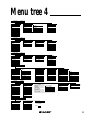
Menu tree 4
EQ VAR
( VARS
A
)
A XY
B XYT
1 Y1
2 Y2
3 Y3
4 Y4
5 Y5
6 Y6
7 Y7
8 Y8
9 Y9
0 Y0
WIN VAR
( VARS
B
BT
1 Tmin
2 Tmax
3 Tstep
( VARS
C
B STOT
1 Zm_Tmin
2 Zm_Tmax
3 Zm_Tstp
( VARS
H
MATRIX
D SEQ
1 nMin
2 nMax
3 u(nMin)
4 v(nMin)
5 w(nMin)
6 PlotStart
7 PlotStep
D STOSEQ
1 Zm_nMin
2 Zm_nMax
3 Zm_u(nMin)
4 Zm_v(nMin)
5 Zm_w(nMin)
6 Zm_PltStart
7 Zm_PltStep
1 RegEqn
2a
3b
4c
5d
6e
7r
8 r2
9 R2
0 resid
C POINTS
1 x1
2 x2
3 x3
4 y1
5 y2
6 y3
7 Q1
8 Med
9 Q3
D TEST
01 p
02 z
03 t
04 2
05 F
06 df
07 p
08 p1
09 p2
10 s
11 n1
12 n2
13 x1
14 x2
15 sx1
16 sx2
17 sxp
18 lower
19 upper
( MATRIX )
A NAME
B EDIT
1 mat A
2 mat B
3 mat C
4 mat D
5 mat E
6 mat F
7 mat G
8 mat H
9 mat I
0 mat J
( 2nd F
PRGM
A EXEC
01
02
03
04
05
06
C STO
1 Zm_ min
2 Zm_ max
3 Zm_ step
B REGEQN
09 ∑y
10 y
11 sy
12 y
13 ymin
14 ymax
15 ∑y
16 ∑y2
1 mat A
2 mat B
3 mat C
4 mat D
5 mat E
6 mat F
7 mat G
8 mat H
9 mat I
0 mat J
PRGM
min
max
step
)
A XY
01 n
02 x
03 sx
04 x
05 xmin
06 xmax
07 ∑x
08 ∑x2
C
1
2
3
)
A STOXY
1 Zm_Xmin
2 Zm_Xmax
3 Zm_Xscl
4 Zm_Ymin
5 Zm_Ymax
6 Zm_Yscl
STAT VAR
1 R1
2 R2
3 R3
4 R4
5 R5
6 R6
)
A XY
1 Xmin
2 Xmax
3 Xscl
4 Ymin
5 Ymax
6 Yscl
7 X_Fact
8 Y_Fact
ZOOM VAR
CR
07 X4T
08 Y4T
09 X5T
10 Y5T
11 X6T
12 Y6T
01 X1T
02 Y1T
03 X2T
04 Y2T
05 X3T
06 Y3T
D MATH
07 row_swap(
08 row_plus(
09 row_mult(
10 row_m.p.(
11 mat list
12 list mat
1 det
2 trans
3 rowEF
4 rrowEF
E[]
1[
2]
)
B EDIT
01
02
03
04
05
06
C OPE
01 dim(
02 fill(
03 cumul
04 augment(
05 identity
06 rnd_mat(
C NEW
Cleate
new program
Press ENTER
21
Menu tree 5
STAT PLOT
( 2nd F
STATPLOT )
A PLOT1
B PLOT2
C PLOT3
Stat plot1
Stat plot2
Stat plot3
Press ENTER
Press ENTER
Press ENTER
OPTION
( 2nd F
OPTION
A CTRST
B MEMCHK
Press ENTER
to detail
(
(
SHIFT/CHANGE
F MBOX
1 MBox •
2 MBox+
3 MBox
G S.D.
1 Scattr •
2 Scattr+
3 Scattr
H XYLINE
1 xyLine •
2 xyLine+
3 xyLine
SLIDESHOW
2
X
X
1/X
ex
lnX
sinX
tanX
X
E RESET
1 default set
2 All memory
D N.D.
1 NormDis
E BOX
1 Box
)
C NEW
0 screen
Press ENTER
Press ENTER
(
C N.P.
1 Norm • X
2 Norm+_X
3 Norm _X
4 Norm • _Y
5 Norm+_Y
6 Norm _Y
2nd F SHIFT/CHANGE
A SHIFT
1Y
2Y
3Y
4Y
5Y
6Y
7Y
8Y
B B.L.
1 Broken •
2 Broken+
3 Broken
B ORG
2
X
AX+B
X
1/X
sinX
tanX
cos-1X
lnX
D LINK
1 SEND
2 RECEIVE
1 Hist
A B-IN
1Y
2Y
3Y
4Y
5Y
6Y
7Y
8Y
C DEL
1 List
2 Matrix
3 Graph Eqn
4 Solver Eqn
5 Program
6 Picture
7 G-Data
8 L-Data
9 Slide
0 Entry
2nd F STATPLOT on PLOT1-3screen )
A HIST
SLIDE
E ON/OFF
1 PlotON
2 PlotOFF
)
Remain
12345bytes
STAT GRAPH
D LIMIT
1 SET
2 LimON
3 LimOFF
D EDIT
1 MOVE
2 DEL
3 RENAME
)
B CHANGE
1Y
2Y
3Y
4Y
5Y
6Y
2
X
X
X
ex
sinX
tanX
22
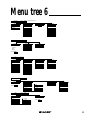
Menu tree 6
SOLVER
(
SOLVER on SOLVER screen
2nd F
A METHOD
B EQTN
1 Equation
2 Newton
3 Graphic
TOOL
)
(
2nd F
TOOL
A NBASE
C SAVE
Press ENTER
1
2
3
4
5
6
7
8
9
0
)
B SYSTEM
Calculate
Hexadecimal
Decimal
Octal
Binary
C RENAME
1
2
3
4
5
6
7
8
9
0
22
33
44
55
66
Select number
C POLY
22
33
Select degree
Press ENTER
Y=
(
Y=
)
RECT MODE
PAR MODE
Y1=
Y2=
Y3=
Y4=
Y5=
Y6=
Y7=
Y8=
Y9=
Y0=
X1T=
Y1T=
X2T=
Y2T=
X3T=
Y3T=
X4T=
Y4T=
X5T=
Y5T=
X6T=
Y6T=
FINANCE
(
2nd F
A SOLVER
FINANCE
B CALC
Press ENTER
(
2nd F
OPTION
A SELECT
01 All
02 List
03 Matrix
04 Graph eqn
05 Solver eqn
06 Program
SEQ MODE
u(n)=
u(nMin)=
v(n)=
v(nMin)=
w(n)=
w(nMin)=
)
01 slv_pmt
02 slv_1%
03 slv_PV
04 slv_N
05 slv_FV
06 Npv(
07 lrr(
TVM Solver
LINK
POL MODE
R1=
R2=
R3=
R4=
R5=
R6=
D
C PERIOD
08 Bal(
09 ∑Pm(
10 ∑Int(
11 Apr(
12 Eff
13 days(
1 PmtEnd
2 PmtBegin
D VARS
1N
2 1%
3 PV
4 PMT
5 FV
6 P/Y
7 C/Y
1)
B BACKUP
back up
07 G_Data
08 L_Data
09 Picture
10 Slide
11 A Z,
Press ENTER
23
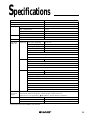
Specifications
Specifications
Dimensions W x D x H (mm)
183 x 86 x 19.5
Power
R03 (AAA) x 4
(without hardcase)
Backup Battery
CR2032 x 1
Display
Size (dot)
132 x 64
Line x Characters
8 x 22
Character Size (dot)
5x7
Digits (mantissa + exponent)
10 + 2
Total Memory Size
32 KB
Constant Memory
27 + last answer memory
Memory
Accessory Protective hard case
Standard
Features
Graphing
Function graphing
Up to 10
Parametric graphing
Up to 6
Polar graphing
Up to 6
Sequence graphing
Up to 3
Split screen
Graph-table/graph-equation
Graph style
Zoom, Trace
Table of function values
Statistics
Regression models
12
Scatter Plots and Histograms
Box-and-Whisker Diagrams
Inferential statistics
Probability Distributions
Other
Matrix
Up to 10 (Maximum size : 99 x 99)
List
Up to 6 (Maximum length : 999)
Programming
Trigonometry functions (including sec, csc, cot)
Solver
Complex numbers
Financial calculation
Fraction/Decimal conversions
Last entry recall (up to 160 steps)
Last answer recall
Features
unique to
Sharp
Pen-touch screen, Equation editor, Shift/Change,
Slide show (Built-in/Original), Rapid graph, Rapid window,
Rapid zoom, List grouping, calculation, Simultaneous equation
Peripheral CE-450L
Unit-to-unit communications cable
CE-LK1P
PC-Link (Print screen/Data storage)
EL-965T/96Tc
OHP system (includes controller)
* Design and specifications are subject to change without notice.
* Some products may not be available in some countries.
24
EL-9650/9600c Graphing Calculator
Distributed by:
SHARP CORPORATION OSAKA, JAPAN