1
Rear Panel Controls
SEL
MENU
1
2
Control
1 Menu/Exit
2
3
4
5
Function
Display/exits the On Screen Display (OSD) menus.
1. Enter contrast of the OSD.
2. Increase value of the adjustment item.
3. Select item clockwise.
1. Enter brightness adjustment.
2. Decrease value of the adjustment item.
3. Select item counter-clockwise.
Selects the adjustment items from the OSD menus.
Switches the power of the monitor.
3
4 Select
5 Power Switch
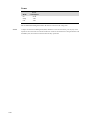
Remote OSD Buttons(option)
AUTO/SEL DOWN
1
Control
1 AUTO/SEL
2 DOWN
3 UP
4 MENU
3-10
2
UP
MENU
3
4
Function
Selects the adjustment items from the OSD menus.
1. Enter brightness adjustment.
2. Decrease value of the adjustment item.
3. Select item counter-clockwise.
1. Enter contrast of the OSD.
2. Increase value of the adjustment item.
3. Select item clockwise.
Display/exits the On Screen Display (OSD) menus.