1
KEYBOARD BASICS
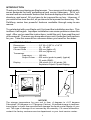
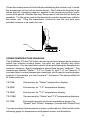
The unit sounds a tone when you press
any key. This tells you the unit has accepted a command.
PWR/CLEAR
Use this key to turn the unit on. It also
clears menu selections and the menus
from the screen. This key also turns the
unit off. NOTE: You must hold the OFF key
down for a few seconds in order to turn the unit OFF.
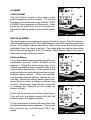
MENU FWD / MENU REV
These sonar units have many features that are accessed with the menu
keys. The MENU FWD key moves forward through the menus, the MENU
REV key moves backward. To see the first menu, simply press either
MENU key. To see the other menus, press a MENU key repeatedly.
UP and DOWN ARROWS
Use these keys to adjust virtually every feature and function on the unit.
NOTE: The up arrow key also stops the chart when no menus are
displayed. In other words, anytime you wish to stop the chart, first make
certain no menu is on the screen. Now press the up arrow key. The chart
freezes and the word “STOP” appears at the top of the screen. To start the
chart, press the up arrow key again or the PWR/CLEAR key.
DISPLAY - General
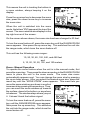
The lights flash for about ten seconds when the unit is turned on. Two
menus appear, one after the other. The menus are the lights (BACK
LIGHT) and a feet-meter selection (FEET/METER). To turn the lights on,
press the up arrow key. To switch from feet to meters, press the down
arrow key when the proper menu appears. The menus disappear after a
few seconds. If you don’t want to wait, press the
PWR key to clear the menus from the screen.
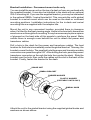
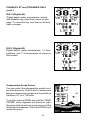
When the sonar unit is first turned on, the display
appears similar to the one at right. The unit is in
the automatic mode and the Fish ID feature is
on. The depth range shows on the left side of the
screen. On the screen at right, the range is from
0 to 60 feet and the bottom depth is 48.6 feet.
18