1
HCO ScoutGuard SG580MB
4 Advanced Operations
it continues to capture photos and save them on the
SD-card. After 24 hours, the camera will send MMS
again when it captures photos. If it is on Video mode,
the Camera will send only SMS instead of MMS.
4) “OFF”: To disable MMS function.
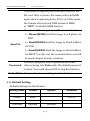
Choose send the image to your Phone or to Email.
1> Phone[MMS]:Send the image to cell phone via
WAP.
2> Email[MMS]:Send the image to Email address
Send To
via WAP.
3> Email[GPRS]:Send the image to Email address
via SMTP. Use this way the communication cost will
be much cheaper in many countries.
For safety purposes, enter a password each time
Password
when entering into Test mode. The default password
is 0000. You could choose OFF to stop this function.
Default Set Restore all customer settings to default values.
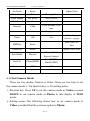
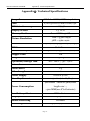
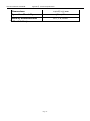
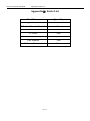
4.1.1 Default Setting
Defaults settings are listed below:
Setting Items
Default
Options
Camera Mode
Photo
Video
Format
Enter
Photo Size
8M Pixel
5M Pixel
Video Size
640×480
320×240
Submenu
Yes, No
Page 15