1
CHAPTER 4: Troubleshooting
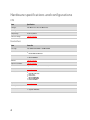
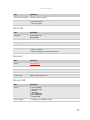
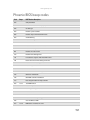
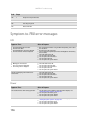
Code
Beeps
POST Routine Description
95h
Install CD ROM for boot
96h
Clear huge ES segment register
97h
Fixup Multi Processor table
98h
1-2
Search for option ROMs. One long, two short beeps on checksum failure.
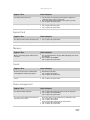
99h
Check for SMART drive (optional)
9Ah
Shadow option ROMs
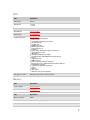
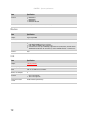
9Ch
Set up Power Management
9Dh
Initialize security engine (optional)
9Eh
Enable hardware interrupts
9Fh
Determine number of ATA and SCSI drives
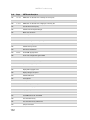
A0h
Set time of day
A2h
Check key lock
A4h
Initialize Typematic rate
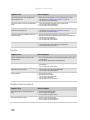
A8h
Erase F2 prompt
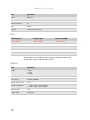
AAh
Scan for F2 key stroke
ACh
Enter SETUP
AEh
Clear Boot flag
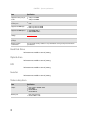
B0h
Check for errors
B2h
POST done- prepare to boot operating system
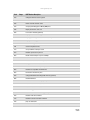
B4h
1
One short beep before boot
B5h
Terminate QuietBoot (optional)
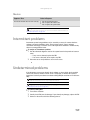
B6h
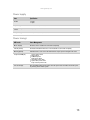
Check password (optional)
B9h
Prepare Boot
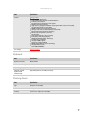
BAh
Initialize DMI parameters
BBh
Initialize PnP Option ROMs
BCh
Clear parity checkers
BDh
Display MultiBoot menu
BEh
Clear screen (optional)
BFh
Check virus and backup reminders
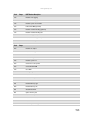
C0h
Try to boot with INT 19
C1h
Initialize POST Error Manager (PEM)
154