1
SETTING UP YOUR VCR/DVD COMBINATION
CAUTION:
• Be sure to turn off the VCR/DVD and equipment to be connected before connecting.
• Read through the operation manual for the equipment to be connected.
• Be sure to keep the VCR/DVD connection cables separate from the TV antenna cable when you install the VCR/DVD,
because it may cause electrical interference when you are watching television programmes.
• DTS audio cannot be produced with an analogue connection.
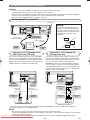
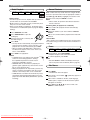
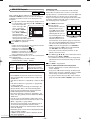
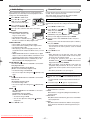
Connecting to a TV or a stereo TV
from Antenna
CAUTION:
DVD
DIGITAL
AUDIO OUT
AERIAL
ANALOG
AUDIO OUT
S-VIDEO
OUT
L
VCR
AV2 (DECODER)
DVD/VCR
AV1 (TV)
To RF OUT
jack
R
RF OUT
• Connect the VCR/DVD directly to the
TV. Do not connect the VCR/DVD to a
VCR, then connect the VCR to the TV.
Copyright protection in the VCR could
distort the picture playing on the
VCR/DVD.
To EURO AV1 (TV)
OUT terminal
SCART cable
(commercially available)
VCR/DVD
Round coaxial cable
(supplied)
VCR
(TV)
TV
To SCART
terminal
To AERIAL
jack
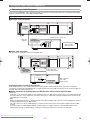
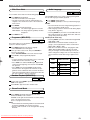
Connecting to a TV Equipped with SVIDEO Input Jack (DVD only)
If your TV has no SCART input jack but has an S-VIDEO
input jack, use a commercially available S-VIDEO cable to
connect from the VCR/DVD to the TV. You will still need the
SCART cable or Round coaxial cable for VCR features. (SVIDEO connection is available only in DVD mode.)
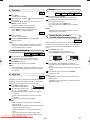
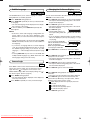
Connecting to a TV Equipped with
RCA type Input Jack
If your TV has RCA type audio and video input jacks, you
may connect to EURO AV1 (TV) OUT terminal through the
SCART output adaptor (supplied). When using this connection, do not connect a decoder to the EURO AV2
(DECODER) terminal of your VCR/DVD. Other equipment,
such as a VCR or camcoder, can be connected to EURO
AV2 (DECODER) terminal. If the connected equipment has
RCA type audio and video input jacks, use a SCART input
adaptor (commercially available).
DVD
DIGITAL
AUDIO OUT
DVD
ANALOG
AUDIO OUT
S-VIDEO
OUT
(White)
L
DIGITAL
AUDIO OUT
VCR
AV2 (DECODER)
DVD/VCR
AV1 (TV)
S-VIDEO
OUT
L
VCR
AV2 (DECODER)
DVD/VCR
AV1 (TV)
To EURO
AV1 (TV)
OUT terminal
SCART output
adaptor (supplied)
R
R
(Red)
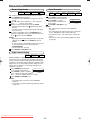
To ANALOG
AUDIO OUT jacks
To S-VIDEO
OUT jack
AUDIO cable
(supplied)
ANALOG
AUDIO OUT
To VIDEO output
jack
S-VIDEO cable
(commercially available)
To AUDIO output
jacks
(Yellow) (White)
(Red)
VIDEO cable
(supplied)
(White)
(Red)
(Yellow) (White)
To S-VIDEO
input jack
To AUDIO input
jacks
L
(Red)
To VIDEO input
jack
To AUDIO input
jacks
R
AUDIO
IN
AUDIO cable
(supplied)
L
S-VIDEO
INPUT
VIDEO
IN
TV (with external input jacks)
R
AUDIO
IN
TV (with external input jacks)
• You will not be able to hear all of the sound being output by the VCR/DVD if you use the AUDIO cable (supplied) to a
monaural TV that has only one AUDIO input jack.
NOTES:
• Be sure that the colours of the jacks and plugs match up when connecting the cable.
• Connect the VCR/DVD directly to the TV. If you attempt to view video on a TV connected via a VCR, the copy protection
function will scramble the picture.
If you want to listen to Sharp
the audio
through audio equipment, connect only the S-VIDEO or VIDEO cable to the TV.
Downloaded From•DvDPlayer-Manual.com
Manuals
– 10 –
EN