1
Crestron WPR-48
Waterproof Wireless Handheld Remote
Operations Guide
This document was prepared and written by the Technical Documentation department at:
Crestron Electronics, Inc.
15 Volvo Drive
Rockleigh, NJ 07647
1-888-CRESTRON
WARNING: The WPR-48 Waterproof Wireless Handheld Remote has been tested
and found to be waterproof when submerged to a maximum depth of 1 meter, and for
a maximum duration of 30 minutes, per IEC 60529 IPX7 standards. Exceeding these
limits may result in damage to the equipment, possible personal injury, and void the
product warranty.
WARNING: The WPR-48 is shipped from the factory partially assembled. That is,
the eight screws that secure the rear cover to the button faceplate are not fully
tightened, to simplify the process of installing button labels, as described in this
Operations Guide. As such, the unit is not waterproof; exposing it to water may result
in damage to the equipment, possible personal injury, and void the product warranty.
WARNING: After installing button labels, as described in this Operations Guide,
tighten all eight screws that secure the rear cover to the button faceplate evenly just
until the gasket is no longer visible between the button faceplate and the rear cover
(from 1.5 to 2 in/lbs torque, maximum). Do not overtighten the screws. To do so
may damage the gasket such that the unit is no longer waterproof. Exposing
such a unit to water may result in damage to the equipment, possible personal injury,
and void the product warranty.
WARNING: The lanyard, supplied with the lanyard foot, poses a possible
strangulation hazard. Crestron does not recommend placing the lanyard around the
neck as a means of carrying the WPR-48. Do not leave the lanyard, or the WPR-48
with lanyard foot and lanyard attached, unattended in any area where children or
pets may be present.
WARNING: This product contains small parts and is not intended for children. This
product is intended for adult use only.
All brand names, product names, and trademarks are the property of their respective owners.
©2004 Crestron Electronics, Inc.
Crestron WPR-48
Waterproof Wireless Handheld Remote
Contents
Waterproof Wireless Handheld Remote: WPR-48
1
Introduction ............................................................................................................................... 1
Features and Functions ................................................................................................ 1
Specifications .............................................................................................................. 2
Physical Description.................................................................................................... 3
Industry Compliance ................................................................................................... 5
Setup .......................................................................................................................................... 5
Applying Power........................................................................................................... 5
Configuring the WPR-48............................................................................................. 5
Setting RF/IR ID via Button Presses ........................................................................... 9
User-Printable Customized Button Labels ................................................................ 10
Installing/Replacing Button Labels ........................................................................... 12
Installing Alternate Foot............................................................................................ 13
Programming the WPR-48....................................................................................................... 14
Earliest Version Software Requirements for the PC ................................................. 14
Programming with SIMPL Windows ........................................................................ 14
Uploading and Upgrading........................................................................................................ 18
Communication Settings ........................................................................................... 18
Firmware Upgrade..................................................................................................... 20
Problem Solving ...................................................................................................................... 21
Troubleshooting......................................................................................................... 21
Further Inquiries ........................................................................................................ 22
Future Updates .......................................................................................................... 22
Return and Warranty Policies .................................................................................................. 23
Merchandise Returns / Repair Service ...................................................................... 23
CRESTRON Limited Warranty................................................................................. 23
Operations Guide – DOC. 6254A
Contents • i
Crestron WPR-48
Waterproof Wireless Handheld Remote
Waterproof Wireless Handheld
Remote: WPR-48
Introduction
Features and Functions
The Crestron® WPR-48 waterproof wireless handheld remote can be configured to
transmit either RF or IR signals, making it perfect for controlling music, television,
lighting and more. The unit is also available in an international version, the
WPRI-48. The unit is safe to use in the shower or hot tub. The rubberized,
immersible case is easy to grip, and will not slip from moist hands.
A streamlined user interface of multi-function pushbuttons makes the WPR-48
simple to use under a variety of conditions. The nine three-position pushbuttons may
be configured in any of four arrangements, providing 9, 18, 27, or 48 possible
functions.
Large customizable labels with electroluminescent backlighting facilitate use under
any lighting conditions.
The WPR-48 can communicate via RF or IR with a number of gateways in a
Crestron control system (Cresnet® system). Since it is compatible with Crestron’s
CNRFGWA and CNRFGWA-418 RF gateways; as well as the MC2W and ST-CP
control systems with a built-in RFGWA gateways, the CNXRMIRD IR receiver, and
the CN-TVAV device controller, the WPR-48 fits easily into any Crestron control
system design.
Functional Summary
• Nine pushbuttons provide up to three functions per button.
• Configuration settings allow up to 48 possible functions.
• Large customizable labels with electroluminescent backlighting
identify the button functions.
• Long-life lithium-ion rechargeable battery provides several
weeks of wireless use on a single charge.
The built-in, long-life lithium-ion rechargeable battery provides several weeks of
wireless use on a single charge. It is easily recharged when the remote is placed in
the WPR-DS docking station (included).
Operations Guide – DOC. 6254A
Waterproof Wireless Handheld Remote: WPR-48 • 1
Waterproof Wireless Handheld Remote
Crestron WPR-48
Specifications
The following table provides a summary of specifications for the WPR-48.
Specifications of the WPR-48
SPECIFICATION
Power Requirements
DETAILS
3.6 VDC Lithium-Ion battery, 750 mAh
Usage per charge: up to 5 hours (backlight On
continuous); up to 4 weeks (typical home use)
Charging time: 1.5 hours (maximum)
Wireless Specifications
RF Transmitter
433 MHz or 418 MHz 1-way RF
RF Bandwidth
±100 kHz
RF Range
IR Transmitter formats
1
Up to 300 feet (typical)
2
38 kHz RC5
455 kHz Crestron format
Up to 15 feet (typical)
IR Range
Control System Update Files
3, 4, 5
2-Series Control System
CEN/CN-TVAV
All Versions
CNMSX-AV/PRO
CNRACKX/-DP
ST-CP
Default RF ID; IR ID
10
Operating Temperature
32° to 140°F (0° to 60°C)
Humidity
0% to 100% RH (non-condensing)
Dimensions
Height: 5.26.in (13.36 cm)
Width: 2.79 in (7.09 cm)
Depth: 1.16 in (2.95 cm) using standard lanyard foot
0.82 in (2.08 cm) using blank foot
Weight
4.8 oz (134.4 g)
1.
Requires Crestron CNRFGWA, CNRFGWA-418, or the MC2W or ST-CP control systems with built-in
RFGWA gateways.
2.
Requires Crestron CNXRMIRD IR Receiver, or CN-TVAV device controller.
3.
The latest versions can be obtained from the Downloads | Software Updates section of the Crestron
website (www.crestron.com). Refer to NOTE after last footnote.
4.
Crestron 2-Series control systems include the AV2 and PRO2. Consult the latest Crestron Product
Catalog for a complete list of 2-Series control systems.
5.
CNX update files are required for either CNMSX-AV/PRO or CNRACKX/-DP. Filenames for CNX
update files have a UPZ extension and ST-CP files are in one EXE or zipped UPZ file. To avoid program
problems, make certain you are using the update file with the correct suffix letter (e.g., S, V, W, X).
NOTE: Crestron software and any files on the website are for Authorized Crestron
dealers only. New users may be required to register to obtain access to certain areas
of the site (including the FTP site).
WARNING: The WPR-48 is shipped from the factory partially assembled. That is,
the eight screws that secure the rear cover to the button faceplate are not fully
tightened to simplify the process of installing button labels, as described in
“Installing/Replacing Button Labels” on page 12. As such, the unit is not waterproof;
exposing it to water may result in damage to the equipment, possible personal injury,
and void the product warranty.
2 • Waterproof Wireless Handheld Remote: WPR-48
Operations Guide – DOC. 6254A
Crestron WPR-48
Waterproof Wireless Handheld Remote
Physical Description
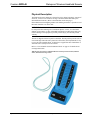
The WPR-48 electronic hardware is housed in a slim, rubberized plastic, waterproof
enclosure, with two clear windows for large customized labels that identify the
intended button functions. (Refer to the illustration on the next page.)
Electroluminescent backlighting enhances the labeling and makes it possible to read
the button functions even in the dark.
WARNING: The WPR-48 Wireless Handheld Remote has been tested and found to
be waterproof when submerged to a maximum depth of 1 meter, for a maximum
duration of 30 minutes, per IEC 60529 IPX7 standards. Exceeding these limits may
result in damage to the equipment, possible personal injury, and void the product
warranty.
The unit is shipped with the lanyard foot installed. The lanyard foot puts the unit at a
convenient angle when the unit is placed on a flat surface; the lanyard makes it easy
to carry the unit around the home. A blank foot is supplied for those installations in
which the unit is usually left in one location.
Refer to “User-Printable Customized Button Labels” on page 10 for details about
creating button labels.
WPR-48 Waterproof Wireless Handheld Remote with Lanyard and Customized Button
Labels, Mounted in Docking Station
Operations Guide – DOC. 6254A
Waterproof Wireless Handheld Remote: WPR-48 • 3
Waterproof Wireless Handheld Remote
Crestron WPR-48
WPR-48 Physical Views.
Connectors
The only connectors on the WPR-48 are the two contacts on the back panel. These
contacts are used for charging the long-life lithium-ion battery when the unit is
placed in the WPR-DS docking station. These contacts are also used when
configuring the unit and when firmware is uploaded via the docking station.
NOTE: During configuration and when firmware is being uploaded, the charging
circuits in the docking station are automatically disconnected.
Controls
The WPR-48 has nine three-position buttons, which can be configured, using the
Crestron Viewport, for 9-, 18-, 27-, or 48-function operation. Actual button functions
are defined in the SIMPL Windows program, based on the application of the unit
within the Cresnet system.
Indicators
The only indicators on the hand-held WPR-48 are the four LEDs on the face of the
unit, above the button function windows. The B LED (red) blinks if the battery
charge is low; the T LED (red) illuminates when the WPR-48 is transmitting. The
operation of the J LED (red) and the K LED (red) depends on the unit’s
configuration. In a 48-button configuration, the J LED indicates that the unit is
transmitting ‘page 1’ functions; the K LED indicates that the unit is transmitting
‘page 2’ functions. In the 9-, 18-, and 27-button configurations, there are no ‘page’
functions. If the configuration is set up to allow key presses to change the unit’s RF
or IR ID, these two LEDs illuminate simultaneously during ID reprogramming (refer
to “Setting RF/IR ID via Button Presses” on page 9 for details).
4 • Waterproof Wireless Handheld Remote: WPR-48
Operations Guide – DOC. 6254A
Crestron WPR-48
Waterproof Wireless Handheld Remote
Industry Compliance
As of the date of manufacture, this unit has been tested and found to comply with
specifications for CE marking and standards per EMC and Radiocommunications
Compliance Labelling (N11785).
NOTE: This device complies with part 15 of the FCC rules. Operation is subject to
the following two conditions: (1) this device may not cause harmful interference, and
(2) this device must accept any interference received, including interference that may
cause undesired operation.
NOTE: This equipment has been tested and found to comply with the limits for a
Class B digital device, pursuant to part 15 of the FCC Rules. These limits are
designed to provide reasonable protection against harmful interference in a
residential installation. The equipment generates, uses and can radiate radio
frequency energy and, if not installed and used in accordance with the instructions,
may cause harmful interference to radio communications. However, there is no
guarantee that interference will not occur in a particular installation. If this
equipment does cause harmful interference to radio or television reception, which
can be determined by turning the equipment off and on, the user is encouraged to try
to correct the interference by one or more of the following measures:
Reorient or relocate the receiving antenna.
Increase the separation between the equipment and receiver.
Connect the equipment into an outlet on a circuit different from that to which the
receiver is connected.
Consult the dealer or an experienced radio/TV technician for help.
Setup
Applying Power
Power for the WPR-48 is provided by the built-in, rechargeable 3.6 VDC lithium-ion
battery. (The unit is shipped with the battery charged.) The battery is recharged when
the WPR-48 is placed in the companion docking station (WPR-DS). Note that the
docking station is also used during configuration procedures and when uploading
new firmware to the WPR-48. When the docking station is being used for
configuration or firmware functions, the recharge circuits are automatically turned
off.
Configuring the WPR-48
The WPR-48 can be configured to transmit either RF or IR signals. (By default, the
units are shipped as RF devices.) Every WPR-48 transmitter communicating with a
Cresnet system via RF requires a unique RF ID to secure RF communications.
Similarly, every WPR-48 transmitter communicating with a Cresnet system via IR
signals requires a unique IR ID to secure IR communications. The unit’s default RF
Operations Guide – DOC. 6254A
Waterproof Wireless Handheld Remote: WPR-48 • 5
Waterproof Wireless Handheld Remote
Crestron WPR-48
ID and IR ID settings are 10. The RF/IR ID of the unit and the RF/IR ID specified
for it in the SIMPL Windows program must match. There are 256 possible two-digit
hexadecimal codes ranging from 00 to FF.
Refer to the note on page 18 for a
definition of Viewport.
To configure the WPR-48 through Viewport, the following items are required
•
PC running Crestron’s Viewport utility, version 3.99.01 or later.
•
An RS-232 cable (RJ-11 – DB-9) such as the Crestron STCP-502 (not
supplied) to connect the WPR-DS to the serial port of the PC. This
connection can also be made with a modular RJ-11 cable and a DB9F to
RJ-11 adapter. (Refer to the following illustration.)
NOTE: Check the SIMPL Windows gateway models prior to setting the RF ID or
IR ID. Some gateway models do not support ID “00” or “FF.”
NOTE: If the battery in the WPR-48 has become fully discharged, it will require
approximately five minutes of recharging before the unit can be reconfigured.
With the WPR-48 inserted in its docking station, complete the following procedures.
1.
Verify that communications with the PC are established, as specified in
“Communication Settings” on page 18.
2.
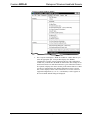
Open the Crestron Viewport, and from the menu bar, select Functions |
Configure WPR-48 as shown in the following illustration.
NOTE: While configuring the WPR-48, do not remove the WPR-48 from the
docking station until you have exited the dialog by clicking on Exit.
6 • Waterproof Wireless Handheld Remote: WPR-48
Operations Guide – DOC. 6254A
Crestron WPR-48
Waterproof Wireless Handheld Remote
“Function | Configure WPR-48” Window
3.
Operations Guide – DOC. 6254A
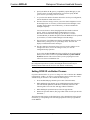
The Viewport first displays a “WPR-48 COM Port” window that lets you
select the appropriate port. Viewport then displays the “WPR48
Configuration” window, as shown following this step. The configuration
window lets you define how the WPR-48 will function. The settings are not
transferred to the device until that instruction is given. When the window is
first opened, it displays the values currently in the connected device. If there
is no device communication, the default configuration values, as shown
here, will be displayed. If the values in the device are not one of the four
supported configurations (9-, 18- 27-, or 48-buttons), a notice appears on
the screen and the default settings are displayed.
Waterproof Wireless Handheld Remote: WPR-48 • 7
Waterproof Wireless Handheld Remote
Crestron WPR-48
“WPR48 Configuration” Window
4.
Select one of the “Load . .” buttons to display either the default
configuration values, the current values stored in the WPR-48 in the
docking station, or the values saved in a file on the PC. When you select the
Load From File button, the Viewport displays an “Open” window that
allows you to browse to find the desired file.
The default values for the RF configuration are: RF Remote, RF ID 10, 433
MHz, 27 Buttons, 100% Backlight Brightness, 10 second Backlight
Timeout, unchecked “Allow key presses. . .”
If you select Load From Device and the device contains disallowed
configuration settings, they will be replaced by default values and an error
message will be displayed.
5.
The Remote Type area lets you specify whether the WPR-48 will function
as an RF or an IR device, and lets you assign the unit’s corresponding RF or
IR ID number. (The number(s) must correspond with the numbers set in the
SIMPL program.)
8 • Waterproof Wireless Handheld Remote: WPR-48
Operations Guide – DOC. 6254A
Crestron WPR-48
Waterproof Wireless Handheld Remote
6.
Specify the RF or the IR gateway compatibility options that apply to your
Cresnet system. For an RF configuration, you can also specify the RF
power level as a percentage from 1% to 100%.
7.
As you select the number of buttons that will be used in your configuration,
note the limitations stated on the screen.
8.
The Miscellaneous Settings area lets you set the relative brightness level of
the backlight (from 1% to 100%), set the timeout for the backlight (1-999
seconds), which reduces wear on the battery, or choose to disable the
backlight completely.
You can also choose to allow changing the RF ID or IR ID via button
presses. (Refer to “Setting RF/IR ID via Button Presses” below.)
This can be useful when first setting up a job. However, Crestron
recommends that you disable this option when the WPR-48 will be operated
by an end user, to avoid accidental changes to the ID settings.
9.
The Information from WPR48 area displays the WPR-48 firmware version
and the battery’s charge level (as a percentage value). This area also
displays communications status messages.
10. The three buttons at the bottom of the screen are used to send the screen
settings to the device, to save the settings to a file, or to exit the
configuration setup operation.
If you select the Save To File button, the saved file can be used to upload
directly to the remote via the Viewport File Transfer | Update WPR-48
Firmware function. This can be useful if you are preparing files in the
office to be sent to an installation site.
NOTE: Do not remove the WPR-48 from the docking station until you have exited
the configuration operation. If you do, the backlight timeout function may be
disabled, which would result in excessive wear and tear on the battery.
Setting RF/IR ID via Button Presses
If you have checked Allow key presses to change unit’s RF or IR ID on the “WPR48
Configuration” window, you can use a special button sequence to alter these values
without having to connect to a PC. Perform the following steps.
1.
Press and hold both page buttons (press center of bottom button).
2.
While holding the page buttons, press and hold the appropriate button to
select the desired operation (Set IR ID or Set RF ID), as shown in the
following table. This will cause both page LEDs to illuminate.
3.
While holding the operation button, release the page buttons.
4.
Release the operation button. (The page LEDs remain on until you enter the
ID number.)
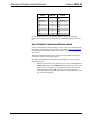
The following table lists the two ID functions as well as hexadecimal values, shown
in brackets [ ], corresponding to the left and right positions of the top eight buttons
on the WPR-48
Operations Guide – DOC. 6254A
Waterproof Wireless Handheld Remote: WPR-48 • 9
Waterproof Wireless Handheld Remote
LEFT PRESS
VALUE
[0]
Crestron WPR-48
BUTTON
RIGHT PRESS
VALUE
1
[1]
[2] Set IR ID
2
[3] Set RF ID
[4]
3
[5]
[6]
4
[7]
[8]
5
[9]
[A]
6
[B]
[C]
7
[D]
[E]
8
[F]
To enter the ID number, (two hexadecimal numbers), press the corresponding
buttons, such as [6] [B]. The page LEDs then go out indicating that the ID has been
set.
User-Printable Customized Button Labels
Use the Crestron Engraver software package, Version 2.2 or later, available from the
Downloads | Software Updates section of the Crestron website (www.crestron.com)
to design and print unique button labels. (Also requires Crestron Database, version
16.3 or later.)
The help file included with the software package provides detailed instructions for
selecting the buttons and entering the legends
To design the button labels for the WPR-48, open the Engraver software package
and do the following:
1.
When the “Choose Panel Type” window appears, click on the Create a new
Engraver File button, select WPR-48 from the drop-down list. Then, in the
“Options” area, select white text on a black background or black text on a
white background, and click OK. The button layout screen appears as
shown in the following illustration (shown here with populated fields; white
text on a black background).
10 • Waterproof Wireless Handheld Remote: WPR-48
Operations Guide – DOC. 6254A
Crestron WPR-48
Waterproof Wireless Handheld Remote
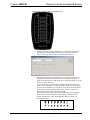
Crestron Engraver Software Button Legend Entry Screen
Operations Guide – DOC. 6254A
2.
Double click the desired entry field (there are two fields on each side of
each button location except the bottom button). The “Enter Text Area
Label” window appears as shown in the following illustration.
3.
The label is tapered at the top and bottom. You can enter from one to six
alphanumeric characters in the narrowest fields, and from one to seven,
eight, or nine characters in wider fields. An error message appears if you try
to enter too many characters.
You can select any of the three fonts available from the drop-down list—
Arial, Crestron Transport, or Crestron Transport Outline—but you cannot
mix fonts in a single field. You can, however, use the Field One and Field
Two entry fields, which together form one line of text, to combine two
different fonts, for example VOLK and VOLJ.
The Crestron Transport font consists of symbols that represent standard
device functions such as Fast Forward, Rewind, Up and Down. Each
symbol corresponds to a letter of the alphabet (from A to P, not casesensitive) as follows:
a
b
c
d
e
f
g
h
A
i
B
j
C
k
D
l
E
m
F
n
G
o
H
p
I
J
K
L
M
N
O
P
Waterproof Wireless Handheld Remote: WPR-48 • 11
Waterproof Wireless Handheld Remote
Crestron WPR-48
4.
Once you have entered all the desired button legends, save the file and print
the file. You can use any paper from 20-pound bond to 100-pound card
stock. Maximum paper thickness is 0.013 in (0.03 cm). Cut out the labels,
cutting just inside the lines that define the label area.
5.
To install the labels, refer to the “Installing/Replacing Button Labels”
procedure, which follows.
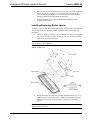
Installing/Replacing Button Labels
To install or replace button labels in the WPR-48, the unit must be disassembled and,
after placing the labels in position, carefully reassembled. Perform the following
procedures.
1.
Using a #1 Phillips screwdriver, remove the eight cover screws securing the
rear cover to the button faceplate, and lift the rear cover from the assembly.
(Refer to the following illustration.)
CAUTION: Avoid contact with the electronic circuitry attached to the rear cover, to
prevent damage to the equipment.
WPR-48 Assembly View
2.
During disassembly, the gasket may become separated from the rear cover
and the button faceplate. If this occurs, carefully assemble the gasket to the
button faceplate with the deeper side down as shown in the preceding
graphic.
CAUTION: The reassembly procedure must be done carefully to ensure that the
WPR-48 will be waterproof.
12 • Waterproof Wireless Handheld Remote: WPR-48
Operations Guide – DOC. 6254A
Crestron WPR-48
Waterproof Wireless Handheld Remote
3.
Place the button labels in position, face down, and carefully assemble the
rear cover to the button faceplate, making certain the gasket is properly
seated. Use two or three screws to hold the assembly together and turn the
unit over to verify that the button labels are properly positioned and can be
easily seen. Then add the remaining screws and tighten all eight screws
evenly just until the gasket is no longer visible between the button faceplate
and the rear cover (from 1.5 to 2 in/lbs, maximum). Do not overtighten the
screws. To do so may damage the gasket such that the unit is no longer
waterproof. Exposing such a unit to water may result in damage to the
equipment, possible personal injury, and void the product warranty.
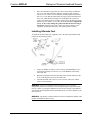
Installing Alternate Foot
To install the alternate blank foot (supplied), refer to the following illustration and
perform the associated procedures.
1.
Using a #1 Phillips screwdriver, remove the two pan head Phillips screws
securing the lanyard foot to the rear cover of the WPR-48, and carefully
remove the foot.
2.
Retain the lanyard foot (note the placement of the lanyard end knots in the
cavity of the lanyard foot) for use at another time.
3.
Assemble the blank foot to the rear cover as shown, and secure with the
screws removed in Step 1.
WARNING: The lanyard, supplied with the lanyard foot, poses a possible
strangulation hazard. Crestron does not recommend placing the lanyard around the
neck as a means of carrying the WPR-48. Do not leave the lanyard, or the WPR-48
with lanyard foot and lanyard attached, unattended in any area where children or pets
may be present.
WARNING: This product contains small parts and is not intended for children. This
product is intended for adult use only.
Operations Guide – DOC. 6254A
Waterproof Wireless Handheld Remote: WPR-48 • 13
Waterproof Wireless Handheld Remote
Crestron WPR-48
Programming the WPR-48
Have a question or comment about Crestron software?
Answers to frequently asked questions (FAQs) can be viewed in the Online Help
section of the Crestron website (www.crestron.com). Go to
http://support.crestron.com to post your own question or view questions you have
submitted to Crestron’s True Blue Support. First-time users will need to establish a
user account.
Including a WPR-48 into a system requires adding the WPR-48 into a SIMPL
Windows program, using the Crestron Viewport to configure the unit for operation,
and using the Crestron Engraver to prepare and print button labels.
Earliest Version Software Requirements for the PC
NOTE: Crestron recommends that you use the latest software to take advantage of
the most recently released features. The latest software is available from the
Downloads | Software Updates section of the Crestron website (www.crestron.com).
The following are the earliest useable software version requirements for the PC:
•
SIMPL Windows version 2.05.18 or later with library update file 297
or later. Requires SIMPL+® Cross Compiler version 1.1.
•
Crestron Database version 16.2.3 or later. Required by SIMPL
Windows and Crestron Engraver.
•
Viewport version 3.99.01 or later. For setting up the unit configuration.
•
Crestron Engraver version 2.2. Requires Crestron Database version
16.2.3.
Programming with SIMPL Windows
NOTE: The following assumes that the reader has knowledge of SIMPL Windows.
If not, refer to the extensive help information provided with the software.
NOTE: In the following description, the PRO2 control system is used.
SIMPL Windows is Crestron's software for programming Crestron control systems.
It provides a well-designed graphical environment with a number of workspaces
(i.e., windows) in which a programmer can select, configure, program, test, and
monitor a Crestron control system. SIMPL Windows offers drag and drop
functionality in a familiar Windows® environment.
This section describes a sample SIMPL Windows program that includes a WPR-48
Configuration Manager is where programmers “build” a Crestron control system by
selecting hardware from the Device Library. In Configuration Manager, drag the
PRO2 from the Control Systems folder of the Device Library and drop it in the upper
pane of the System Views. The PRO2 with its associated communication ports is
displayed in the System Views upper pane.
14 • Waterproof Wireless Handheld Remote: WPR-48
Operations Guide – DOC. 6254A
Crestron WPR-48
Waterproof Wireless Handheld Remote
PRO2 System View
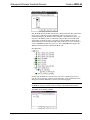
The System Views lower pane displays the PRO2 system tree. This tree can be
expanded to display and configure the communications ports.
Expanded PRO2 System Tree
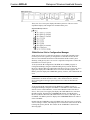
C2Net-Device Slot in Configuration Manager
An RF gateway device is required to incorporate a wireless RF transmitter into a
Cresnet system. Once a gateway is configured in a C2Net-Device Slot, the slot
allows Cresnet communication between the transmitter and the control system.
Similarly, an IR gateway device or receiver is required to incorporate a wireless IR
transmitter into a Cresnet system.
To incorporate the RF configuration of the WPR-48 in a SIMPL program, in
Configuration Manager, drag the CNRFGWA RF gateway from the Wireless
Receivers | Wireless Receivers (RF) folder of the Device Library. The System Views
upper pane displays the CNRFGWA device icon below the PRO2 graphic. The
PRO2 system tree displays the CNRFGWA gateway in Slot 9, with a default Net ID
of 24.
NOTE: The ST-CP control processor is automatically configured with a
CNRFGWA in its STCP-Net Device Slot 3, with a fixed Net ID of 2, when the
ST-CP is dragged into the upper pane of System Views. This Net ID cannot be
changed.
To incorporate the IR configuration of the WPR-48 in a SIMPL program, in
Configuration Manager, drag the CNX-RMC or CNX-RMCLV room solution box
from the Cresnet Control Modules | Cresnet Video Modules folder of the Device
Library. The System Views upper pane displays the CNX-RMC device icon below
the PRO2 graphic. Then drag the CNXRMIRD IR detector from the Wireless
Receivers | Wireless Receivers (IR) folder of the Device Library and drop it on the
CNX-RMC. The PRO2 system tree displays the CNXRMIRD IR detector in Slot 2
of the CNX-RMC.
Double-click the CNRFGWA or the CNX-RMC icon in the lower pane to open the
“Device Settings” window, which displays device information. Select the Net ID tab
to change the gateway Net ID. The window for the CNRFGWA is shown in the
following figure.
Operations Guide – DOC. 6254A
Waterproof Wireless Handheld Remote: WPR-48 • 15
Waterproof Wireless Handheld Remote
Crestron WPR-48
“Device Settings” Window for the CNRFGWA
Drag the WPR-48 from the Wireless Remotes | Wireless Remotes (RF) folder of the
Device Library and drop it on the CNRFGWA symbol in System Views. The
CNRFGWA displays the WPR-48 at the transmitter’s default RF ID location, “10,”
as shown in the PRO2 system tree illustration. The procedure for the WPR-48 IR
configuration is almost the same, except that you drag the WPR-48 (IR) from the
Wireless Remotes | Wireless Remotes (IR) folder of the Device Library and drop it
on the CNXRMIRD symbol in System Views. The CNXRMIRD then displays the
WPR-48 with the transmitter’s default RF/IR ID, “0F.”
Pro2 System Tree
Double-click the WPR-48 icon in the lower pane of the expanded system tree to
open the “Device Settings” windows for the transmitter. Select the RF/IR ID tab to
change the transmitter RF/IR ID, as shown in the following figure.
NOTE: The hardware configuration settings, which were described in “Configuring
the WPR-48” on page 5, and the software settings of the RF/IR ID must match.
Transmitter “Device Settings” Window
16 • Waterproof Wireless Handheld Remote: WPR-48
Operations Guide – DOC. 6254A
Crestron WPR-48
Waterproof Wireless Handheld Remote
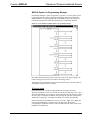
WPR-48 Symbol in Programming Manager
Programming Manager is where programmers “program” a Crestron control system
by assigning signals to symbols. The following diagram shows the symbol in the
SIMPL Windows’ Programming Manager for the WPR-48 (RF). The symbols for
both the RF configuration and the IR configuration are functionally identical.
Detail View of the WPR-48 in SIMPL Windows’ Programming Manager
Each digital output signal represents a button press state. If the signal is high/1, the
button is being pressed; if low/0, the button is not being pressed.
The WPR-48’s nine pushbuttons operate in four different modes. All four modes are
configurable using the Crestron Viewport.
48-button mode
In 48-button mode each of the top eight pushbuttons can trigger up to three
functions, depending on where it is pressed: the left side, the right side, or the center.
The ninth pushbutton acts as a shift key. Pressing the left side of the shift key enables
the first "page" of 24 digital commands, while pressing the right side of the shift key
enables the second "page" of 24 digital commands, for a total of 48 commands.
In this configuration, the WPR-48 receives presses on the <_Pg1> and <_Pg2> that
correspond to pushbuttons 1 through 8, left, right and center. The digitals
corresponding to pushbutton 9 have no effect in 48-button mode, since in this mode
pushbutton 9 is the shift key.
Operations Guide – DOC. 6254A
Waterproof Wireless Handheld Remote: WPR-48 • 17
Waterproof Wireless Handheld Remote
Crestron WPR-48
27-button mode
In 27-button mode, the pushbuttons can trigger up to three functions depending on
where it is pressed. In this configuration the WPR-48 is programmable using the 27
<_Pg1> digital presses that correspond to buttons 1 through 9, left, right and center.
18-button mode
In 18-button mode, each of the nine pushbuttons can trigger up to two functions,
depending on whether the button is pressed on the left or right side. Pressing the
center of the button has no effect in this mode. In this configuration, the WPR-48 is
programmable using the 18 <_Pg1> digital presses that correspond to buttons 1
through 9, left and right only (no center).
9-button mode
In 9-button mode, each pushbutton can trigger one function. In this configuration, the
WPR-48 is programmable using the first nine digital presses on the symbol detail—
that is, <Left1_Pg1> through <Left9_Pg1_IfOnlyPg1>. None of the other digital
presses has any effect in this mode.
Uploading and Upgrading
Assuming a PC is properly connected to the entire system, Crestron programming
software allows the programmer to upload programs and projects after their
development to the system and network devices. However, there are times when the
files for the program and projects are compiled and not uploaded. Instead, compiled
files may be distributed from programmers to installers, from Crestron to dealers,
etc. Even firmware upgrades are available from the Crestron website as new features
are developed after product releases. In those instances, one has the option to upload
via the programming software or to upload and upgrade via the Crestron Viewport.
NOTE: The Crestron Viewport utility performs multiple system tasks, primarily via
an RS-232 or TCP/IP connection between the control system and a PC. It is used to
observe system processes, upload new operating systems and firmware, change
system and network parameters, and communicate with network device consoles and
touchpanels, among many other tasks. Viewport can also function as a terminal
emulator for generic file transfer. All of these functions are accessed through the
commands and options in the Viewport menus. Therefore, for its effectiveness as a
support and diagnostic tool, the Crestron Viewport may be preferred over
development tools when uploading programs and projects.
The following sections define how one would upgrade the firmware of the WPR-48.
However, before attempting to upgrade, it is necessary to establish communications.
Communication Settings
NOTE: For laptops and other PCs without a built-in RS-232 port, Crestron
recommends the use of PCMCIA cards, rather than USB-to-serial adapters. If a
USB-to-serial adapter must be used, Crestron has tested the following devices:
Belkin (large model) F5U103
I/O Gear GUC232A (discontinued)
Keyspan USA-19QW (discontinued)
18 • Waterproof Wireless Handheld Remote: WPR-48
Operations Guide – DOC. 6254A
Crestron WPR-48
Waterproof Wireless Handheld Remote
Results may vary, depending on the computer being used. Other models, even from
the same manufacturer, may not yield the same results.
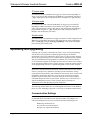
The procedure in this section provides details for RS-232 communication between
the PC and the WPR-48. Refer to the figure below for a typical connection diagram
when upgrading firmware.
NOTE: Use an RS-232 cable (RJ-11 – DB-9) to connect the WPR-DS docking
station to the serial port of the PC. This connection can be made with a modular
RJ-11 cable and a DB9F to RJ-11 adapter. (Refer to “Configuring the WPR-48” on
page 5 for details).
NOTE: The connection to the WPR-48 is through the charging contacts of the
WPR-DS. During a firmware upload procedure, the charging circuits are
automatically disconnected.
Typical Connection Diagram when Uploading Firmware from the PC
1.
Open the Crestron Viewport.
Either launch the stand-alone version of Viewport, or start SIMPL
Windows, and from the menu bar, select Tools | Viewport.
2.
From the Viewport menu, select Setup | Communications settings
(alternatively, press Alt+D) to open the “Port Settings” window. Refer to
the following figures.
Accessing the “Port Settings” Window
3.
Operations Guide – DOC. 6254A
Select the RS-232 connection type. Verify the available COM is selected.
Verify that the baud rate is set to 57600, the parity is None, the data bits is
Eight, the stop bits is One, XON/XOFF is not selected, and RTS/CTS is
selected. Click the OK button to save the settings and close the window.
Waterproof Wireless Handheld Remote: WPR-48 • 19
Waterproof Wireless Handheld Remote
Crestron WPR-48
“Port Settings” Window
4.
Proceed to “Firmware Upgrade” which follows.
Firmware Upgrade
A firmware upgrade file has the
extension .upg
Firmware upgrade files can be obtained from the Downloads | Software Updates |
Touchpanels section of Crestron’s website (www.crestron.com). To upgrade the
WPR-48 firmware, complete the following steps.
1.
Make sure that “Communication Settings” that begins on page 18 has been
performed.
2.
Press one of the buttons on the WPR-48 to activate the unit. The backlight
should come on.
NOTE: Be aware that pressing a button to activate the unit automatically sends
whatever command is associated with that button.
3.
From the Viewport, select File Transfer | Update WPR-48 Firmware.
4.
The “WPR-48 COM Port” window appears to permit selection of the
appropriate COM port for the WPR-48. Select the port and click OK.
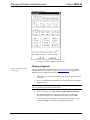
5.
As shown in the following illustration, select the desired firmware (.upg)
file and click Open. The transfer will complete automatically.
20 • Waterproof Wireless Handheld Remote: WPR-48
Operations Guide – DOC. 6254A
Crestron WPR-48
Waterproof Wireless Handheld Remote
Select Firmware File
6.
If the transfer is successful, the Viewport screen displays a message similar
to CNWPR [v0.3]. If the transfer is unsuccessful, the screen will again
display the bootloader message CNWPR Bootloader (v8.3).
Problem Solving
Troubleshooting
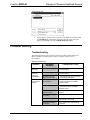
The following table provides corrective action for possible trouble situations. If
further assistance is required, please contact a Crestron customer service
representative.
WPR-48 Troubleshooting
Operations Guide – DOC. 6254A
TROUBLE
PROBABLE
CAUSE(S)
CORRECTIVE ACTION
LEDs do not
illuminate.
Battery is discharged.
Place unit in docking station to
recharge battery.
Intermittent
response
during RF
transmission.
Battery charge is low.
Place unit in docking station to
recharge battery.
RF gateway is near
large metal structure.
Verify that large amount of metal is
not blocking transmission.
No response
from Cresnet
system.
Net ID of gateway is
incorrectly set.
Verify that the Net ID for the gateway
and the Net ID set in the SIMPL
program match.
RF ID is incorrectly set.
Verify that the RF ID for the gateway
and the RF ID set in the SIMPL
program match.
Program does not
match hardware.
Verify correct program is loaded in
system.
Gateway is unplugged
(no power).
Verify power to the gateway.
Wrong WPR-48 in use.
If multiple transmitters are accessible,
verify proper unit is used.
WPR-48 not properly
configured.
Run Viewport and verify WPR-48
attributes.
Waterproof Wireless Handheld Remote: WPR-48 • 21
Waterproof Wireless Handheld Remote
Crestron WPR-48
Further Inquiries
If, after reviewing this Operations Guide, you cannot locate specific information or
have questions, please take advantage of Crestron's award winning customer service
team in your area. Dial one of the following numbers.
•
In the US and Canada, call Crestron's corporate headquarters at
1-888-CRESTRON [1-888-273-7876].
•
In Europe, call Crestron International at +32-15-50-99-50.
•
In Asia, call Crestron Asia at +852-2341-2016.
•
In Latin America, call Crestron Latin America at +5255-5093-2160.
•
In Australia and New Zealand, call Crestron Control Solutions at
+61-2-9737-8203.
You can also log onto the online help section of the Crestron website
(www.crestron.com) to ask questions about Crestron products. First-time users will
need to establish a user account to fully benefit from all available features.
Future Updates
As Crestron improves functions, adds new features, and extends the capabilities of
the WPR-48, additional information and programming examples may be made
available as manual updates. These updates are solely electronic and serve as
intermediary supplements prior to the release of a complete technical documentation
revision.
Check the Crestron website (www.crestron.com) periodically for manual update
availability and its relevance. Updates are available from the Downloads | Product
Manuals section and are identified as an “Addendum” in the Download column.
22 • Waterproof Wireless Handheld Remote: WPR-48
Operations Guide – DOC. 6254A
Crestron WPR-48
Waterproof Wireless Handheld Remote
Return and Warranty Policies
Merchandise Returns / Repair Service
1.
No merchandise may be returned for credit, exchange, or service without prior
authorization from CRESTRON. To obtain warranty service for CRESTRON products,
contact the factory and request an RMA (Return Merchandise Authorization) number.
Enclose a note specifying the nature of the problem, name and phone number of contact
person, RMA number, and return address.
2.
Products may be returned for credit, exchange, or service with a CRESTRON Return
Merchandise Authorization (RMA) number. Authorized returns must be shipped freight
prepaid to CRESTRON, 6 Volvo Drive, Rockleigh, N.J., or its authorized subsidiaries,
with RMA number clearly marked on the outside of all cartons. Shipments arriving
freight collect or without an RMA number shall be subject to refusal. CRESTRON
reserves the right in its sole and absolute discretion to charge a 15% restocking fee, plus
shipping costs, on any products returned with an RMA.
3.
Return freight charges following repair of items under warranty shall be paid by
CRESTRON, shipping by standard ground carrier. In the event repairs are found to be
non-warranty, return freight costs shall be paid by the purchaser.
CRESTRON Limited Warranty
CRESTRON ELECTRONICS, Inc. warrants its products to be free from manufacturing defects in
materials and workmanship under normal use for a period of three (3) years from the date of
purchase from CRESTRON, with the following exceptions: disk drives and any other moving or
rotating mechanical parts, pan/tilt heads and power supplies are covered for a period of one (1)
year; touchscreen display and overlay components are covered for 90 days; batteries and
incandescent lamps are not covered.
This warranty extends to products purchased directly from CRESTRON or an authorized
CRESTRON dealer. Purchasers should inquire of the dealer regarding the nature and extent of the
dealer's warranty, if any.
CRESTRON shall not be liable to honor the terms of this warranty if the product has been used in
any application other than that for which it was intended, or if it has been subjected to misuse,
accidental damage, modification, or improper installation procedures. Furthermore, this warranty
does not cover any product that has had the serial number altered, defaced, or removed.
This warranty shall be the sole and exclusive remedy to the original purchaser. In no event shall
CRESTRON be liable for incidental or consequential damages of any kind (property or economic
damages inclusive) arising from the sale or use of this equipment. CRESTRON is not liable for any
claim made by a third party or made by the purchaser for a third party.
CRESTRON shall, at its option, repair or replace any product found defective, without charge for
parts or labor. Repaired or replaced equipment and parts supplied under this warranty shall be
covered only by the unexpired portion of the warranty.
Except as expressly set forth in this warranty, CRESTRON makes no other warranties, expressed or
implied, nor authorizes any other party to offer any warranty, including any implied warranties of
merchantability or fitness for a particular purpose. Any implied warranties that may be imposed by
law are limited to the terms of this limited warranty. This warranty statement supercedes all
previous warranties.
Trademark Information
All brand names, product names, and trademarks are the sole property of their respective owners. Windows is a registered
trademark of Microsoft Corporation. Windows95/98/Me/XP and WindowsNT/2000 are trademarks of Microsoft
Corporation.
Operations Guide – DOC. 6254A
Waterproof Wireless Handheld Remote: WPR-48 • 23
Crestron Electronics, Inc.
15 Volvo Drive Rockleigh, NJ 07647
Tel: 888.CRESTRON
Fax: 201.767.7576
www.crestron.com
Operations Guide – DOC. 6254A
10.04
Specifications subject to
change without notice.