1
Installation manual
Intelligent Reliable Power
5.4 Power on the Gateway
For full instructions on installing the Gateway please refer to the Gateway Installation Manual.
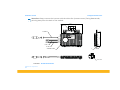
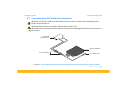
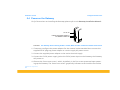
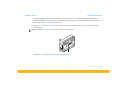
5V DC IN
INSTALLER MODE SWITCH
ETHERNET CABLE IN
FIGURE 7. The Gateway device showing 5V DC in socket, Ethernet cable socket and installer mode switch.
1. If necessary configure the power adaptor for the national socket standard then connect the
supplied 5V DC plug top power adapter to a mains supply AC power source.
2. Connect the supplied power adapter to the mains electrical supply.
3. Connect the 5V DC power supply jack to the 5V DC power input on the Gateway, the Gateway
will power on.
4. Observe the 'home user screen', which, by default, is the first screen presented upon powering up the Gateway. The ‘home user screen’ graphically indicates to the installer the number
© ENECSYS 2010. All rights reserved.
18