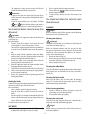
1
Default values (reset)
2. Press the
button to enter the water hardness
selection mode. The lights corresponding to the current
selection come on:
This resets all menu settings and programmed quantities back
to the default values.
To reset the default values, proceed as follows:
1. Access the settings menu;
position;
2. Turn the steam dial to the
soft
medium
button. The three lights flash
3. Press the
simultaneously to confirm that the original settings have
been restored.
hard
and
lights flash to indicate that the
4.The
steam dial must be closed again (○symbol).
When the steam dial has been closed, the appliance is ready for
use.
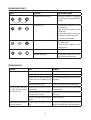
3. The lights start flashing in sequence;
4. Press the button corresponding to the water hardness in
your area:
soft
water
medium
water
hard
water
<10°dH
10°dH - 20°dH
>20°dH
<18°fH
18°fH - 36°fH
>36°fH
HOW TO MAKE ESPRESSO COFFEE
Tips for a hotter coffee
For hotter espresso coffee, you should:
• Attach the filter holder to the appliance with the filter in
place but without adding coffee.
Using the same cup as will later be used to make the coffee,
press the 1 cup button and deliver hot water into the cup to
heat it.
• Raise the coffee temperature in the settings menu.
• Rest the cups you will be using on the cup warmer (D)
which becomes hot during operation.
<180mg/l CaCo3 180-300mg/l CaCo3 360mg/l CaCo3
-The
button flashes to indicate that the selection has
been saved.
The appliance exits the menu and is ready for use.
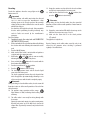
Adjusting auto-off (stand-by)
To save energy, an auto-off function turns the appliance off
when not used for a long period.
To turn it back on again, press any button on the control panel.
1. Access the settings menu;
How to make espresso coffee using pre-ground
coffee
1. Place the ground coffee filter (P or Q) in the filter holder
(fig. 6). To make one coffee, use the filter with the
symbol on the bottom, to make two coffees, use the filter
with the
symbol on the bottom.
2. To make just one coffee, place one level measure of preground coffee (about 7 g) in the filter (fig. 7).
To make two coffees, place two loosely filled measures
(about 7+7 g) of pre-ground coffee in the filter. Fill the
filter a little at a time to prevent the pre-ground coffee
from overflowing.
2. Press the
button to enter the auto-off time selection
mode. The lights corresponding to the current selection
come on:
9 min
30 min
3 hours
3. The lights start flashing in sequence;
4. Press the button corresponding to the required time:
Important:
For correct operation, before filling with pre-ground coffee,
make sure there are no coffee residues left in the filter from the
last time you made coffee.
3. Distribute the pre-ground coffee evenly and press lightly
with the presser (fig. 8). Correct pressing of the pre-ground
coffee is essential to obtain a good espresso. If you press
too firmly, the coffee will be delivered slowly and will be
strong. If you press too lightly, the coffee will be delivered
quickly and will be weak.
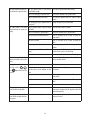
9 min
30 min
3 hours
5.The
button flashes to indicate that the selection has
been saved.
The appliance exits the menu and is ready for use.
9