1
SPH10
12. MOBILE PHONE CALL MAKING AND
ANSWERING
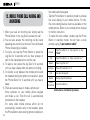
1. When you have an incoming call, simply tap the
Phone Button or the Jog Dial to answer the call.
2. You can also answer the incoming call by loudly
speaking any word of your choice if Voice Activated
Phone Answering is enabled.
3. To end a call, tap the Phone Button or press the
Jog Dial for 2 seconds until you hear a beep, or
wait for the called person to end the call.
4. To reject a call, press the Jog Dial for 2 seconds
until you hear a beep while the phone is ringing.
5. To transfer a call between the mobile phone and
the headset during the phone conversation, press
the Phone Button for 2 seconds until you hear a
beep.
6. There are several ways to make a phone call:
- Enter numbers on your mobile phone keypad
and make a call. Then the call is automatically
transferred to the headset.
- For some older mobile phones which do not
automatically transfer calls to the headset, press
the Phone Button after entering phone numbers on
20
the mobile phone keypad.
- Tap the Phone Button in stand-by mode to activate
the voice dialing of your mobile phone. For this,
the voice dialing feature must be available on the
mobile phone. Refer to your mobile phone manual
for further instruction.
- To redial the last number, double tap the Phone
Button in stand-by mode. You will hear a voice
prompt saying “Last number redial”.
Answer
Tap Phone Button or Tap Jog Dial or Say
“Hello”
End
Tap Phone Button or Press Jog Dial for 2”
Reject
Press Jog Dial for 2”
Transfer
Press Phone Button for 2”
Call
Redial
Voice
Command
Use phone keypad
Double tap Phone Button
Tap Phone Button
Mobile Phone Call Button Operations