1
Contents
Safety Precautions ................ E-1
Introduction ........................... E-5
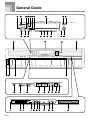
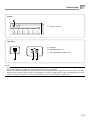
General Guide ...................... E-10
Attaching the Score Stand ..................... E-11
Using the Drawbar Organ
Mode ..................................... E-21
To select a drawbar organ tone .............. E-22
To edit a drawbar organ tone ................. E-22
Parameter Details .................................. E-23
To save an edited drawbar organ tone ... E-24
Playing a Demo Tune ............................. E-12
Applying Effects to Tones .... E-25
Power Supply ...................... E-14
Using the AC Adaptor ............................. E-14
Turning Off the Digital Piano .................. E-14
Memory Contents ................................... E-14
Connections ........................ E-16
Effect Blocks .......................................... E-25
Selecting a DSP Type ............................ E-26
About the DSP Button ............................ E-27
Selecting REVERB ................................ E-27
Selecting CHORUS ................................ E-28
Using the Equalizer ................................ E-29
Connecting Headphones ....................... E-16
Connecting to a PEDAL Jack ................. E-16
Using the Microphone Input Jack ........... E-17
Basic Operations ................. E-18
Auto Accompaniment ......... E-30
About the MODE Button ........................ E-30
Selecting a Rhythm ................................ E-30
Playing a Rhythm ................................... E-31
Getting Ready ........................................ E-18
Adjusting the Tempo ............................... E-31
Selecting a Tone by Tone Name ............ E-18
Using Auto Accompaniment ................... E-31
Selecting a Tone by Tone Number ......... E-18
Using an Intro Pattern ............................ E-34
PIANO SETTING Button ........................ E-20
Using a Fill-in Pattern ............................. E-34
Using the PITCH BEND Wheel .............. E-20
Using a Rhythm Variation ....................... E-35
Synchro Starting Accompaniment with
Rhythm Play ........................................... E-35
Finishing with an Ending Pattern ........... E-35
Using One-touch Preset ......................... E-36
Using Auto Harmonize ........................... E-36
E-7