1
08
BEFORE USE
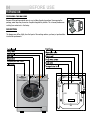
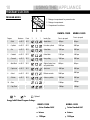
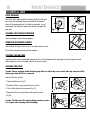
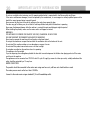
CONTROL PANEL
I
J
K
S
C
Mixed
90
RPM
1200
HWM70-1203D
7kg
1000
800
Spin/Drain
400
Wash Temp. Spin Speed Intense Extra Rinse
Start/Pause
HIGH SPEED
1200rpm
(7kg Model shown)
Arial Regular,18pt ,100%black colour
A
B
C
D E F
G
H
A
Detergent/Softener Drawer
G
Extra Rinse
B
Power Button
H
Start/Pause Button
C
Program Dial
I
ECO
D
Wash Temp
J
LED Display
E
Spin Speed
K
Delay
F
Intense button
OPERATIONAL FUNCTIONS
A
¬Detergent
distribution drawer
_Open the drawer, three compartments can be seen:
Compartment 1: Prewash detergent
Compartment 2: Detergent for programs 1 to 8.
Compartment 3: Softener, conditioning agent.
2
2
3
1
1
B
¬Power Button
_ Press this button to switch on the washing machine. Press it again to switch it off.Press this button
gently for 2 seconds to switch off the machine as buttons are soft touch sensitive.
C
¬Program Dial
D
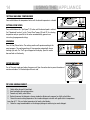
¬Wash Temp
_By turning the knob clockwise/counterclockwise, the required program can be selected. There are
11 programs available. After a program is selected, the corresponding light will go on.
_ Touch this button lightly, the washing temperature will be displayed on the indicator. Select a
temperature according to the type of laundry.Note: If there is no indicator light displayed, it means
cold wash.
¬Control panel lock function:
Press the "Delay" and the "Start/Pause" buttons simultaneously for 3 seconds after starting a program.Button Functions and wash cycle
will be unable to be changed. To unlock press the "Delay" and "Start/Pause" buttons again for 3 seconds.