1
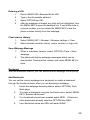
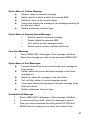
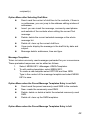
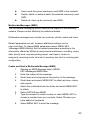
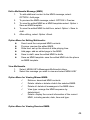
User Manual for Totem
Introduction to the Totem User Manual
This manual provides operation guidelines for use of your Totem mobile
phone. Please reference the Quick Start Guide, included in the box for a
brief overview of the basic functions.
Introduction to User Manual Icons
The following icons are used for indication an important message in the
User Manual:
Message prompt.
A service or function that requires the support of the Mobilicity
network. For more details, please contact Mobilicity.
1
TABLE OF CONTENTS
GETTING TO KNOW YOUR TOTEM…………………………………………………………………………….4
GETTING STARTED……………………………………………………………………………………………….5
(U)SIM CARD AND BATTERY…………………………………………………………………………5
RECHARGING THE BATTERY………………………………………………………………………..6
POWERING THE PHONE ON AND OFF………………………………………………………….....7
HOME SCREEN DISPLAY……………………………………………………………………………..8
NAVIGATION KEYS AND TOUCH SCREEN………………………………………………………………….11
NAVIGATION KEYS…………………………………………………………………………………...11
TOUCH SCREEN……………………………………………………………………………………...12
TEXT INPUT METHODS……………………………………………………………………………...12
SETTING UP YOUR PHONE……………………………………………………………………………………15
DISPLAY SETTINGS………………………………………………………………………………….15
RINGTONE SETTINGS……………………………………………………………………………….16
LANGUAGE SETTINGS………………………………………………………………………………16
TIME AND DATE SETTINGS…………………………………………………………………………16
SHORTCUT KEY SETTING………………………………………………………………………….16
PHONE LOCK SETTING……………………………………………………………………………..16
CALLING FUNCTIONS…………………………………………………………………………………………. 18
DIALING CALLS……………………………………………………………………………………….18
ANSWERING CALLS………………………………………………………………………………… 21
MULTI-PARTY CALLS……………………………………………………………………………….. 24
MAIN MENU FUNCTIONS……………………………………………………………………………………… 25
MAIN FUNCTION MENU…………………………………………………………………………… .25
MENU CATALOG………………………………………………………………………………………26
PROFILE…………………………………………………………………………………………………………..27
MANAGING YOUR PROFILES…………………………………………………………………….. 27
MOBILE BROWSER……………………………………………………………………………………………. 29
BROWSE THE INTERNET…………………………………………………………………………. 29
BOOKMARK………………………………………………………………………………………….. 30
HISTORY……………………………………………………………………………………………… 31
SAVED PAGES………………………………………………………………………………………...31
BROWSER SETTINGS……………………………………………………………………………….32
ENTERTAINMENT………………………………………………………………………………………………..34
APPLICATIONS………………………………………………………………………………………..34
CAMERA…………………………………………………………………………………………………………..35
CAMERA FUNCTIONS……………………………………………………………………………….36
VIDEO FUNCTIONS…………………………………………………………………………………. 38
STORAGE SETTINGS………………………………………………………………………………. 39
2
MESSAGES……………………………………………………………………………………………………. ..40
SMS (TEXT) MESSAGES……………………………………………………………………………40
MULTIMEDIA MESSAGES (MMS)……………………………………………………………….....44
EMAIL……………………………………………………………………………………………….. ..48
CONTACTS……………………………………………………………………………………………52
SET UP CONTACT VIEW……………………………………………………………………………53
CREATE AND EDIT CONTACTS……………………………………………………………….......53
MANAGE A GROUP……………………………………………………………………………….....56
BUSINESS CARDS…………………………………………………………………………………...57
MEMORY STATUS……………………………………………………………………………….......58
TOOLS………………………………………………………………………………………………………….....59
ALARM CLOCK…………………………………………………………………………………… …59
CALCULATOR…………………………………………………………………………………….. …59
RECORDER…………………………………………………………………………………………...60
WORLD TIME……………………………………………………………………………………........60
MULTIMEDIA……………………………………………………………………………………………………..62
MEDIA PLAYER…………………………………………………………………………………...... .62
FM RADIO……………………………………………………………………………………………..64
MY STUFF………………………………………………………………………………………………………...65
FOLDER……………………………………………………………………………………………….65
FILES…………………………………………………………………………………………………..66
CALENDAR………………………………………………………………………………………………………69
VIEW CALENDAR……………………………………………………………………………………69
MANAGING EVENTS………………………………………………………………………………..70
CALL LOG………………………………………………………………………………………………………..71
VIEWING THE CALL LOG…………………………………………………………………………..71
SETTINGS…………………………………………………………………………………………….73
DISPLAY SETTINGS…………………………………………………………………………..........73
PHONE SETTINGS…………………………………………………………………………………..73
CALL SETTINGS……………………………………………………………………………………..74
NETWORK SETTINGS………………………………………………………………………………75
SECURITY SETTINGS………………………………………………………………………………75
CONNECTION SETTINGS………………………………………………………………………….76
RESET SETTINGS…………………………………………………………………………………. .79
FAQ AND TROUBLESHOOTING SOLUTIONS……………………………………………………………...80
HEALTH AND SAFETY INFORMATION……………………………………………………………………...83
3
Getting to Know Your Totem
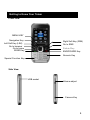
Front View
MENU KEY
Navigation Key
Right Soft Key (RSK)
Left Soft Key (LSK)
Go to browser
Go to home
SEND Key
Go to SMS
Delete Key
END/POWER Key
Numeric Key
Special Function Key
Side View
USB socket
Volume-adjust
Camera Key
4
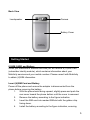
Back View
Loudspeaker
Camera
Battery Cover
Getting Started
(U)SIM CARD and Battery
When you subscribe to wireless services you will receive a (U)SIM Card
(subscriber identity module), which contains information about your
Mobilicity services and your mobile number. Please consult with Mobilicity
to obtain (U)SIM information.
Insert (U)SIM Card and Battery
Power off the phone and ensure the adapter is disconnected from the
phone before removing the battery.
1.
With the phone back facing upward, slightly press and push the
rear cover toward the phone bottom until the cover is removed.
2.
Remove the battery according to the figure indication.
3.
Insert the SIM card into marked SIM slot with the golden chip
facing down.
4.
Install the battery according to the figure indication, ensuring
5
5.
contacts are aligned.
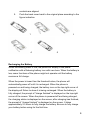
Push the back cover back to the original place according to the
figure indication.
1
4
2
3
5
Recharging the Battery
When the battery power is low, the phone will display a low power
notification with a flickering battery icon with zero bars. When the battery is
low, some functions of the phone might not operate until the battery
receives a full charge.
When the power is lower than the threshold value, the phone will
automatically power off until it is recharged. When the phone is
powered-on and being charged, the battery icon on the top-right corner of
the display will flicker to show it is being recharged. When the battery is
fully charged, the prompt of “charge finished” is displayed on the top-right
corner of the screen. When the phone is powered-off and being charged,
the charging status is displayed on the screen; after charging has finished,
the prompt of “charge finished” is displayed on the screen. It takes
approximately 2.5 hours to fully charge the battery. Be sure to fully charge
your battery before using for the first time.
6
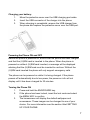
Charging your battery:
1.
Move the protective cover over the USB charging port aside.
2.
Insert the USB connector of the charger into the phone.
3.
When charging is compleletd, remove the USB charger from
the phone and replace the protective cover over the USB port.
Powering the Phone ON and OFF
Before the phone is powered on, ensure that the phone has been charged
and that the (U)SIM card is inserted in the phone. When the phone is
powered on without (U)SIM card inserted, a message will be displayed
advising that the (U)SIM card must be inserted to continue. Without the
(U)SIM card inserted the phone will only support emergency calls.
The phone can be powered on while it is being charged. If the phone
powers off automatically due to low power, the power-on info will not
display until it has been charged for 30 minutes.
Turning the Phone ON
1.
Press and hold the END/POWER key.
2.
If the phone has been locked, insert the lock code and select
the MENU KEY to confirm.
3.
The homescreen will display the default wallpaper and
screensaver. These images can be changed to one of your
choice. For more information see the section titled SETTING
UP YOUR PHONE.
7
After the phone is powered on, it will identify the Mobilicity network
automatically and finish setting up the wireless network parameters. If the
phone does not configure all parameters automatically, please consult
Mobilicity for the correct parameters to complete this process manually.
Turning the phone OFF
1.
Press and hold END/POWER key for approximately 4 seconds.
2.
The phone has been powered off once the power down
animation is completed.
Note: when the phone is powered off, all phone functions are
disabled except for the alarm.
Home Screen Display
Status Indicator
Standby
Wallpaper
Right Soft Key Indicator
Left Soft Key Indicator
MENU KEY Indicator
8
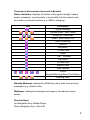
Overview of Homescreen Icons and Indicators
Status Indication: displays the status of the signal strength, battery
power, messages, incoming calls, users profile, function options and
connection to external devices (e.g. USB or charging).
Icon
Discription
Signal Strength
Unread Email / SMS /MMS
Roaming / Download
Email / SMS /MMS Full
USB Connection
HSDPA
Bluetooth
T-Flash Card
Radio
Call Forward
Earphone
In Voice Call
Missed Calls
Java Opened
Profile
Standard/Meeting/Silent/Car/Outdoor
Sending SMS
Standby Message: displays the Mobilicity name, date, time and any
messages (e.g. missed calls).
Wallpaper: displays the background image on the device’s home
screen.
Shortcut Keys:
Up Navigation Key->Media Player,
Down Navigation Key-> My stuff,
9
Left Navigation Key-> Call Log,
Right Navigation Key-> Profile.
Soft Key Functions:
Left Soft Key (LSK) -> Contacts,
MENU KEY->Main Function Menu,
Rights Soft Key (RSK)->Mobilicity.
10
Navigation Keys and Touch Screen
Navigation Keys
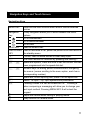
MENU KEY
Enter into the main function menu and/or confirm selected
entries
Navigation
4 way navigation allows you to scroll between the menu
Key
options
Go to Homescreen
Go to Mobile Browser
Go to SMS
SEND KEY
Used to initiate a call
END/POWER Used to terminate a call, power the phone on/off and return to
KEY
the standby menu
CLEAR, used to delete entries or clear away input.
One touch access to voicemail by pressing and holding 1.
Speed dial options; Press and hold to call the contact that has
been programmed into the speed dial slot.
Numeric keys for dialing phone numbers and/or navigating
the menus (versus scrolling to the menu option, each has a
corresponding number)
Space bar; When inputting text, press 0 for the space bar.
Select * to input */+/p, input symbols and punctuation.
Pressing # when in a call will enable MUTE. Pressing #
when composing a messaging will allow you to change your
text input method. Pressing MENU KEY # will unlock the
keypad
Adjust the volume when calling or playing media.
Snap function of Camera/Video
11
Touch Screen
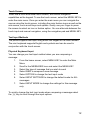
Totem has a multi-directional touch screen, with similar navigation
capabilities as the keypad. To use the touch screen, select the MENU KEY to
enter the main menu. Once you enter the main menu you can navigate the
menus using the touch screen, including the main feature icons as well as the
sub-menus, such as soft keys and options. Gently use your finger to press
the screen to select an icon or feature option. You can alternate between the
touch input and manual navigation, using the navigation pad and MENU KEY.
Text Input Methods
The phone supports text input using either the keypad or the touch screen.
The mini-keyboard supports English and symbols and can be used in
conjunction with the touch screen.
Physical Keyboard Input
You can change your text input method when you are composing a
message.
1.
From the home screen, select MENU KEY to enter the Main
Menu
2.
Scroll to the MESSAGES icon and select the MENU KEY
3.
Select the type of message that you wish to send
4.
Select NEW to compose a new message
5.
Select OPTION to change the text input mode
6.
Select INPUT SETTINGS to change the default mode for ALL
messages
7.
Select INPUT MODE to change the settings for this message
only.
To quickly change the text input mode when composing a message select
the
key to scroll through the input options
12
Text Entry Methods
The letter input method supports both multi-press and EZi input modes.
Text Input using Multi-press Mode
1.
Select: MENU KEY > Messages > Text message > New.
2.
Begin composing your message. The cursor will stay in the
same place for 0.5 seconds before moving to the right.
3.
Spell out the word you want to type by repeatedly press the
numbers
utill the required character appears.
4.
To switch between lower-case and capital letters, select
OPTION and select SWITCH INPUT METHOD; select the
letter input mode “Abc/ABC/abc/PreAbc/PreABC/Preabc” and
click OK.
5.
To input numbers select OPTION and INPUT MODE. Scroll to
123 and select MENU KEY and OK.
6.
To input symbols when composing a message, select the
key and select the symbol.
Text Input using EZi Predictive Text Input Mode:
EZi is a predictive text feature that identifies the most commonly used
words with a built in dictionary. For example, rather than have to type a
number three times to get a C to display in your message, you could press
the corresponding number once and proceed to type out the rest of the
word using the same approach and it will predict word options that you can
select from.
1.
2.
3.
4.
5.
6.
Select MENU KEY>MESSAGES
Select the type of message that you wish to send
Select NEW to compose a new message
Select OPTION and INPUT MODE to change the text input
mode to Pre-Abc
To type the word ‘Phone’, select
, , ,
and
If the screen displays the desired word, click MENU KEY for
confirmation.
13
7.
8.
9.
10.
If the screen does not display the desired word, select the
DOWN NAVIGATION KEY to view other word options. Once
the desired word has been found, select the MENU KEY for
confirmation.
To switch between lower-case and capital letters, select
OPTION menu and select SWITCH INPUT METHOD, select
the letter input mode “PreAbc/PreABC/Preabc” and click “OK”.
To input numbers select OPTION and INPUT MODE. Scroll
to 123 and select MENU KEY and OK.
To input symbols when composing a message, select the
key and select the symbol.
Touch Screen Text Input
Mini-keyboard Text Input:
The mini-keyboard supports number and letter inputs. To launch the mini
keyboard gently press the screen when you are in the compose mode of a
message.
1.
Select: MENU KEY > Messages > Text message > New.
2.
Touch the icon
on the top right corner or touch the blank
area of the screen to display the Mini-keyboard.
3.
Use the mini -keyboard to input your numbers, letters, special
symbols, space etc.
4.
If you do not want to use mini-keyboard, you can click the
icon , and the mini-keyboard will retract.
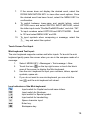
Icon Indicators of the Mini-keyboard:
Input switch for Capital and small-case letters.
Input switch for Numbers.
Input switch for Special symbol.
Input switch for handwriting.
Space character input.
Enter key.
Backspace key
14
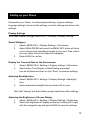
Setting up your Phone
Personalize your Totem, including display settings, ringtone settings,
language settings, time and date settings, shortcut settings and phone lock
settings.
Display Settings
To access Display Settings: MENU KEY> Settings > Display Settings
Select Wallpaper
1.
Select: MENU KEY > Display Settings > Idle screen.
2.
Select WALLPAPER and select the MENU KEY which will allow
you to choose from preloaded images or from your Files, where
you can select a file to be loaded as wallpaper.
3.
Select SAVE to confirm.
Display the Time and Date on the Homescreen
1.
Select: MENU KEY> Settings > Display settings > Idle screen.
2.
Select either Time Display or Date Display and select
turn-on/off status and then to click “Save” to save the settings.
Adjusting Backlight time
1.
Select: MENU KEY> Settings > Display Settings > Backlight
time.
2.
Select preferred backlight time and select OK to save.
Note that “Always” will drain battery power faster than other settings.
Adjusting the Brightness of Screen Display
1.
Select: MENU KEY> Settings > Display Settings > Brightness
2.
Select the brightness of display screen by scrolling left or right
with the navigation key and select SAVE to save the settings.
15
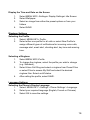
Display the Time and Date on the Screen
1.
2.
3.
4.
Select MENU KEY> Settings> Display Settings> Idle Screen
Select Wallpaper
Select an image from either the preset options or from your
folders
Select SAVE
Ringtone Settings
Selecting the Profile
1.
Select: MENU KEY> Profile.
2.
Select either one profile for all calls or select New Profile to
assign different types of notifications for incoming voice calls,
message alert, email alert, vibrating alert, key tone and warning
tone.
Selecting a Ringtone
1.
Select MENU KEY>Profile
2.
To change the ringtone, select the profile you wish to change
(e.g. Standard),
3.
Select Voice Call Ring and select a ringtone from Preset Files
or select Files to access My Stuff and select the desired
ringtone files. Select on/off status.
4.
After setting the profile, select SAVE.
Language Settings
Selecting the Phone’s Display Language
1.
Select: MENU KEY > Settings > Phone Settings > Language.
2.
Select your required language (English, French or Chinese)
3.
Select OK to save the settings.
16
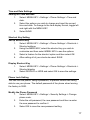
Time and Date Settings
Setting the Time and date
1.
Select: MENU KEY > Settings > Phone Settings > Time and
date.
2.
Select the options you wish to change and input the current
time and date. To change to the time display format, toggle left
and right with the MENU KEY.
3.
Select SAVE
Shortcut Key Setting
Set up Shortcut Key
1.
Select: MENU KEY > Settings > Phone Settings > Shortcuts >
Shortcut settings.
2.
Using the MENU KEY, select the shortcut key you wish to
customize and then select MENU KEY to see the options.
3.
Select a feature for the shortcut option and then select OK.
4.
After setting all of your shortcuts select SAVE
Display Shortcut Key
1.
Select: MENU KEY > Settings > Phone Settings > Shortcuts >
Shortcut display.
2.
Select DISPLAY or HIDE and select OK to save the settings.
Phone Lock Setting
You can lock the phone, using a password, to prevent others from being
able to use your phone. The default password of the phone when leaving
the factory is 0000.
Modify the Phone Password
1.
Select: MENU KEY > Settings > Security Settings > Change
phone code.
2.
Enter the old password, the new password and then re-enter
the new password to confirm it
3.
Select OK to save the new password setting.
17
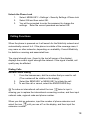
Unlock the Phone Lock
1.
Select: MENU KEY > Settings > Security Settings >Phone lock
2.
Select ON and then select OK.
3.
You will be prompted to enter the password to change the
settings. Enter the current password and select OK.
Calling Functions
When the phone is powered on it will search for the Mobilicity network and
automatically connect to it. If the phone is outside of the coverage area, it
may roam on other networks, depending on availability. Consult Mobilicity
for details on roaming and associated fees.
The signal strength icon, (found in the top left corner of the display),
displays the current signal strength the network. If the signal is weak, call
quality may be affected.
Dialing Calls
Normal Phone Dialing
1.
From the homescreen, dial the number that you want to call.
(The number will be visible on the display)
2.
Select the SEND KEY or MENU KEY to initiate the call.
3.
To end the call or cancel, select the END/POWER Key.
To make an international call select the icon
twice to input +
allowing you to replace the international connecting number, and then input
national code, regional code and phone number.
When you dial an extension, input the number of phone extension and
select the icon
until you see a P on the display, and then input the
extension number.
18
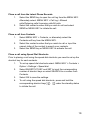
Place a call from the Latest Phone Records
1.
Select the SEND key to open the call log from the MENU KEY.
Alternately select: MENU KEY > Call log > Missed
calls/Outgoing calls/ Incoming calls/All calls.
2.
Select the contact number that you wish to call and select
SEND or MENU KEY to initiate the call.
Place a call from Contacts
1.
Select MENU KEY > Contacts, or alternately select the
Contacts soft key from the MENU KEY.
2.
Select the contact number that you nwish to call or input the
name’s letter of the contact to search your contacts.
3.
Select the SEND key or MENU KEY to activate the call.
Place a call using Speed Dial Shortcuts
Prior to placing a call using the speed dial shortcuts you need to set up the
shortcut key for each contacts.
1.
To set up speed dial shortcuts select: MENU KEY > Contacts >
Option > Settings > Speed dial.
2.
Select SHORTCUT KEY and SET to input the corresponding
number of shortcut keys or select SEARCH to a number from
Contacts.
3.
Select OK to save the settings.
4.
To call using the speed dial shortcuts, press and hold the
corresponding shortcut keys
under the standby status
to initiate the call.
19
Fixed Dial
Fixed dialing restricts the phone numbers which can be dialed from the
phone. All outbound calls other than those set in the fixed dial menu will
be restricted and protected by a PIN. Fixed dial allows for restricting calls to
partial numbers and prefixes. For example, if a fixed-dialing number is
input with 416-555, the user can dial all numbers beginning with 416-555.
The PIN numbers for fixed dial can be accessed from Mobilicity.
Setting up Fixed Dial
To set the numbers allowable for the phone to originate a call:
1.
Select: MENU KEY>Phonebook>Setting> Fixed Dial.
2.
Select OPTION menu and NEW CONTACT.
3.
Input PIN2 and select OK when prompted.
4.
Input contact’s name and number in fixed dialing and select
SAVE to save the input information.
5.
To delete the fixed dial, open the OPTION menu and select
DELETE.
Enabling Fixed Dial
1.
Select MENU KEY>Phonebook>Settings>Fixed Dial
2.
Open the OPTION menu and select Enable.
Fixed dialing will still support emergency 911 calls.
Emergency Calls
The phone supports emergency calls to 911 wherever there is network
coverage, regardless of you subscribe to service or have a SIM card
installed. To make an emergency call:
1.
Dial the emergency number (911) and select SEND or the
MENU KEY to initiate the call.
20
Answering Calls
Setting up the Answer Mode
1.
Select MENU KEY > Settings > Call settings > Answer mode
2.
Select either ANY KEY or SEND KEY as the preferred setting
and press OK to save the settings.
Normal Answer
When your phone receives an incoming call, the ringtone will sound or the
phone will vibrate, and the display screen will display the incoming call icon.
There are a number of options for how to respond to incoiming calls.
1.
Select ANSWER or the SEND Key to receive the incoming call;
2.
If you wish to end the call or ignore the incoming call, you can
do so by pressing the END/POWER;
3.
If you are using a wired headset or Bluetooth headset you can
answer the call by the earphone;
4.
Select MENU KEY to switch phone to speakerphone mode
during the call.
5.
You can adjust the volume by Up/Down key
of side key
during the call.
When you use the loudspeaker, do not hold or press the phone close to
your ear as it may be harmful to your hearing.
Missed calls
1.
When an incoming call is not answered, the phone will display
the missed calls on the standby display.
2.
Select VIEW to see the record of missed calls.
3.
To dial from the missed calls list, select the number and select
the SEND key or the MENU KEY.
4.
To view the call log of all missed calls select: MENU KEY > Call
log > Missed calls.
21
Transfer to receive the Incoming Call with Call Divert
1.
Select: MENU KEY > Settings > Call settings > Call divert >
Voice call
2.
Select the transfer condition: All calls /If busy/If not answered/If
not available.
3.
Select OPTION and then select ON
4.
Select where you want the calls transferred to; TO VOICEMAIL
or TO ANOTHER.
5.
If you select TO ANOTHER, you will be prompted to enter the
phone number to transfer to, or you can select MENU KEY and
select a number from your contact list.
6.
Select OK to save the settings.
7.
To cancel transfers select MENU KEY > Settings > Call settings
> Call divert > Voice call > Cancel all.
This feature requires the support from the Mobilicity network. Please
contact Mobilicity for details.
Screening Incoming Calls
1.
Select: MENU KEY>Phonebook>Option> Setting> Black list
2.
Select NEW and input numbers to be screened/filtered or
select SEARCH to go to contacts where you can select the
numbers to be filtered.
3.
Select SAVE.
Call Waiting
1.
Select: MENU KEY > Settings > Call settings > Call waiting >
Check Status.
2.
Confirm if Call Waiting is enabled or disabled. To change the
setting select ON or OFF
3.
After activating the call waiting, if there has new incoming call
during calling, the phone will display the call waiting window
and the message prompt.
22
4.
To switch between the two calls select SWITCH
This feature requires support of the Mobilicity network. Please contact
Mobilicity for more details.
Multi-party calls
Making a call during an existing call
1.
During a call, select OPTION and select NEW CALL
2.
Input the number of new call and select the SEND key to
initiate the second call.
3.
To switch between the two calls select SWITCH.
4.
To end the call, select the END/POWER key.
Multi-Party Calls
You can accept multi party calls by connecting your existing call to an
incoming call. In addition, you can initiate multi-party calls, adding up to
six participants.
1.
When on the phone within the first participant, select OPTION
and select PHONE CONFERENCE
2.
To end the conference call, you can select OPTION and END
PHONE CONFERENCE.
3.
To terminate one party from the call select OPTION and select
HANG UP ONE PARTY CALL, then select the number to be
disconnected from the conference.
4.
To cancel the conference call to make a single call, select
OPTION and select SPLIT.
This feature requires the support of the Mobilicity network. Please
contact Mobilicity for more details.
23
Main Menu Functions
Select the MENU KEY to enter the Main Menu from the Homescreen. The
main menu has 12 icons which are used to access the features of the
phone. The features and functionality steps for each of the menu options
are described below the menu catalog matrix.
Main Function Menu
Profile
Browser
Entertainment
Camera
Messages
Contacts
Tools
Multimedia
My stuff
Calendar
Call log
Settings
24
Menu Catalog
Profile
Standard
Meeting
Silent
Car
Outdoor
New Profile
Camera
Camera
Camcorder
Tools
Alarm
Calculator
Recorder
World time
Calendar
Month View
Browser
Go to homepage
Enter URL
Bookmark
History
Push message box
Saved pages
Browser settings
Network settings
Messages
SMS
MMS
Email
Entertainment
Get New Apps
Contacts
All/Phone/USIM
Group
Multimedia
Media player
Radio
My stuff
Images
Video
Sounds
Others
Call Log
Missed calls
Outgoing calls
Incoming calls
All Calls
Data Transmission
Call duration
Call cost
Settings
Display Settings
Phone Settings
Call Settings
Network Settings
Security Settings
Connection
Reset Settings
25
The profile menu will allow you to change the alerts on your device
including ring tones for different notifications. See the Call Functions
Section above for additional details on how to do this.
To access the PROFILE menu, select MENU KEY from the homescreen
and select the PROFILE icon.
Managing Your Profiles
You can set up personalized ringtone or prompt tone for different feature
notifications.
Changing your Notifications Profile
1.
Select: MENU KEY > Profile.
2.
Select from one of the five profile options (Standard, Meeting,
Silent, car or Outdoor) to indicate the volume of your alerts.
3.
Once you select the Profile select MENU KEY to change the
settings of the profile.
4.
Scroll through each feature notification and assign different
notifications for incoming voice calls, message alerts, email
alerts, key tones and warnings.
5.
Press SELECT using the left soft key to save your changes.
Create a Custom Notifications Profile
1.
Select: MENU KEY>Profile
2.
Select NEW PROFILE
3.
Scroll to the alert that you wish to change (e.g. Voice Call Ring)
and select the MENU KEY
4.
Select from the ring tone/alert options and select the MENU
KEY
26
5.
To select a ringtone file that you have downloaded or
transferred to the phone scroll down and sselect FILES, select
the folder and select the file you wish to assign.
Options for Standard Mode Settings:
z
Voice call ring: set the ringtone for incoming voice calls.
z
Volume: control the volume of the ringtone.
z
Message alert: set up prompt tone of message.
z
Email alert: set up prompt tone of email.
z
Vibrating alert: set the phone to vibrate.
z
Key tone: select audible keytones or silent.
z
Warning tone: turn the warning tone on/off.
Options for Silent Mode Settings:
z
Voice call ring: set the ringtone for incoming voice calls.
z
Message alert: set up prompt tone of message.
z
Email alert: set up prompt tone of E-mail.
27
The wireless application protocol (WAP) browser allows you to connect to
the web using the Mobilicity network. This will allow you to browse news,
search for information and ownload content.
To access the BROWSER menu, select MENU KEY from the homescreen
and select the BROWSER icon.
Browse the Internet
Browse
1.
2.
3.
When browsing a webpage, select OPTION and select
TOOLS to access the options, send a link, mark a page, save
a page or save an item.
To view other windows, select OPTION and then GO TO and
select either homepage, enter URL, bookmark, history or push
message box.
To refresh the window, select OPTION and REFRESH
You can use the brower to download files that will not be displayed on the
webpage such as ringtones, images and video. These downloaded items
will be stored in their respective application files on the phone.
Go to homepage
The default homepage is the Mobilicity page. You can link to the homepage
URL with the MENU KEY.
1.
Select: MENU KEY > Browser.
2.
Select “Go to homepage” and then select the MENU KEY to
access to the Mobilicity homepage.
3.
Select BACK to quit and return to the previous page.
4.
Select OPTION and EXIT to close the browser.
28
Entering a URL
1.
Select: MENU KEY>Browser>Enter URL
2.
Type in the the website address.
3.
Select OPTION and OK.
4.
After the webpage is loaded, any links will be highlighted. Use
the MENU KEY to open the selected link. If one of the links is
a phone number, you can select the MENU KEY to dial the
phone number directly from the webpage.
Clear Internet History
1.
Select: MENU KEY > Browser > Browser settings > Clear.
2.
Select cleared contents: history, cache, cookies, or login info.
Save Webpage Message
1.
When in a browser session, select: OPTION >Tools > Save
webpage
2.
The phone will display webpage messages which can be
downloaded. Download the content and select MENU KEY to
save.
Bookmark
With the bookmark feature, you can access saved webpage URLs quickly.
Add Bookmark
You can set the current webpage as a bookmark or create a bookmark
through the functional menu when you are browsing a webpage.
1.
Under the webpage-browsing status, select: OPTION> Tool>
Mark page.
2.
To create a bookmark using the functional menu, select: MENU
KEY> Browser>Bookmark.
3.
If no bookmarks have been created select NEW. If there are
other bookmarks already selection OPTION then NEW.
4.
Input bookmark name and URL and select SAVE.
29
Open Bookmark
1.
Select: MENU KEY >Browser > Bookmark.
2.
Select the bookmark you wish to open and select MENU KEY
to access the link.
Option Menu for Bookmark:
z
New: create a new bookmark.
z
Edit: re-edit the bookmark name and URL.
z
Delete: delete the current bookmark.
z
Delete All: delete all.
z
Detaileds: view the name of bookmark and address.
z
Send Link: send the link by SMS, MMS or Bluetooth.
z
Move: move a selected bookmark to a previous position, or to
a next position, or to the list top or bottom.
History
With the historic log, you can view a history of URLs visited and open URLs
directly from the history log
Access Browser History
1.
Select: MENU KEY >Browser > History.
2.
Highlight the link and select the MENU KEY to access any of
the the webpages.
Option Menu for the Browsing Log:
z
Delete: delete a current browsing log.
z
Delete All: clear away all the browsing logs.
z
Show title: display message title.
Saved pages
Save Webpage
1.
When browsing a webpage, select OPTION and TOOLS
2.
Select SAVE PAGE and the current webpage will be saved in
the Saved Pages folder.
30
Browse Saved Pages
1.
Select: MENU KEY > Browser > Saved pages.
2.
Select webpage list and select the MENU KEY to view the
webpage.
3.
When viewing the Saved pages, select a link to the webpage
and select the MENU KEY. The browser will automatically
open the linked webpage.
Set up Webpage List Display Mode
1.
Select: MENU KEY > Browser > Saved pages
2.
Select to display webpage name, time and URL.
Option Menu for Saved Pages:
z
Delete: delete a currently-saved pages.
z
Delete All: clear up all Saved pages.
z
Show title/ Show date/ Show URL:display according to title,
date and URL.
z
Sort by title / Sort by date: classified by webpage title or date.
Browser Settings
Clear Browser Settings
1.
Select: MENU KEY > Browser > Browser settings > Clear.
2.
Select the item to clear including clear history, cache, cookies
and login info.
3.
Select clear to delete the history.
Set up Security Parameter
1.
Select: MENU KEY > Browser > Browser Settings > Security
setting.
2.
Select Setting type, and select OK to access the setting
options.
3.
Select a security characteristic status to select and save the
setting by selecting OK.
31
Set up Browser Display Characteristics
1.
Select: MENU KEY > Browser > Browser Settings> Look and
feel.
2.
Select Setting type, and select OK to access the setting
options.
3.
Select the concrete display character parameter to select and
save the setting by selecting OK
View Browser Message
1.
Select: MENU KEY > Browser > Browser Settings>About
browser.
2.
View the detailed message of browser.
Some internet services require certificates, (e.g. online
banking). The phone will have some preset certificates and
others you may download.
32
The phone supports various functions enabled by JAVA™ applications.
You can download the games from the Mobilicity network to your phone.
To download applications from the network, contact Mobilicity for additional
information. Please install and use applications only from reliable sources.
To access the ENTERTAINMENT menu, select the MENU KEY from the
homescreen and select the ENTERTAINMENT icon.
Applications
Download Apps
1.
Select: MENU KEY > Entertainment.
2.
Select OPTION and select DOWNLOAD, and select OK.
3.
Type in the URL that you wish to download from and select
MENU KEY. The device will link to the webpage of the URL to
complete the download.
4.
After the download has completed, the phone will display a
prompt asking you to confirm installation. Select YES.
5.
The phone will begin to install the application software.
6.
If the download fails, the phone will provide information about
the reason, such as: memory shortage, user interruption,
interruption for network switch.
Install Apps
1.
Select: MENU KEY > Entertainment.
2.
Select OPTION and select GO TO JAVA, then select OK
3.
Select the application software you wish to install and select
the MENU KEY to begin to installation.
4.
The screen will display the installation progress
5.
To delete the application software, you can click OPTION and
33
6.
select DELETE, then click OK.
To view information regarding the application, select OPTION,
then select DETAILS and click OK.
Run Application Software
1.
Select: MENU KEY > Entertainment.
2.
To run application software, select the MENU KEY
Option Menu for the JAVA Application List:
z
Download: input the download URL. The phone will link to the
URL.
z
Go to Java: open the My stuff to view the download software
list saved in the phone.
z
Delete: delete the application software.
z
Access Point: set up the network configuration.
z
Details: view the application software data.
34
You can take pictures and record videos by using the 3MP camera function
in the phone. The photos and videos captures on the phone will be saved
in JPG, 3GP, MP4 and 3G2 formats.
To access the CAMERA menu, select the MENU KEY from the
homescreen and select the CAMERA icon.
Camera Functions
Taking Photos
1.
Select: MENU KEY >Camera.
2.
Alternately you can access the camera by pressingthe one
touch camera key omn the right side of the device.
3.
To take a picture select the icon
or select the MENU KEY.
The device will automatically save the captured picture in the
My Stuff folder.
4.
To delete the picture, select OPTION and DELETE under the
preview status.
5.
Select MENU KEY to return back the view finder
6.
To view your pictures, select OPTION and PHOTO ALBUM
7.
Select the MENU KEY to open the album with pictures
8.
To quit out the camera function, select BACK to return to the
main menu.
Camera Settings
1.
To use the automatic timer select: MENU
KEY>Camera>Option>Countdown >Close/3 sec./5 sec./10
sec.
2.
To set special effects for the picture select: MENU
KEY>Camera>Option> Effect. Choose from Close/Black and
white/Negative/Sepia/Aqua.
35
3.
To adjust the settings on the camera select: MENU
KEY>Camera>Option>Settings. From here you can adjust the
Shutter tone, Resolution, White balance, Flicker frequency
adjustment, Night mode and Initial filename of picture.
Option Menu for the Camera:
z
To camcorder: switch to the video camera.
z
Photo album: switch to My Album or My stuff. My Album is a
folder for storing the default picture.
z
Countdown: the function of self-timer includes Close/3
seconds/5 seconds/10 seconds, self-timer close is default.
z
Effect: Close/Black and white/Negative/Brown/Reseda,
special effect close is default.
z
Settings: you can set up the Shutter sound, Quality, Image
size, White balance, Anti-Banding, Night mode and Photo
default name.
9
Shutter sound: Sound1/Sound2/Sound3
9
Quality: Middle, Low, High, Middle is default.
9
Image size: many kinds of Resolution to choose,
240X320 is default.
9
White balance: Auto, Tungsten, Fluorescence,
Daylight, Cloudy, Auto is default.
9
Anti-Banding: 50Hz/60Hz, 50Hz is default.
9
Night mode: Open/Close, Close is default.
9
Photo default name of picture: Image.
z
Save location: the storage position for screened photos. The
option is phone/Memory card. The phone is default.
z
Memory status: displays the current memory used. The
display contents are used space/ total space and classified
as phone and external memory display.
36
Video Functions
With the camera/camcorder feature you can record the videos with the
option to store, view or send the video files.
Recording Video
1.
Select: MENU KEY > Camera
2.
Select OPTION and select “To camcorder” which will open the
camera window.
3.
Click the icon
or the MENU KEY to start the video.
4.
Select the MENU KEY to pause and resume the video record.
5.
Select the DOWN NAVIGATION KEY to end the video
recording. The phone will automatically save the recorded
video to the My stuff folder and and return back to the video
standby status.
6.
To view the video select OPTION in the camera menu and
select VIDEO ALBUM
7.
Select the MENU KEY to open the video.
8.
To quit the video function, select BACK to return to the main
menu.
Video Settings
1.
To set the video colour, select: MENU KEY>Camera>Option
>Effect >Close/Black and white/Negative/Sepia/Aqua.
2.
To adjust the settings of the camera select MENU
KEY>Camera>Option>Settings. These include Quality,
Resolution, White balance, Voice switch record, Video format,
Record time restriction, Flicker frequency adjustment, Night
mode and Initial filename of picture.
Option Menu for Video:
37
z
z
z
z
z
z
To camera: switch to the camera.
Video album: switch to video in My stuff, the storage folder for
screening film will be defaulted as “video”.
Effect: Close/Black and white/Negative/Sepia/Aqura,
Settings: Quality, Image size, White balance, Record sound,
Video type, Record time limit, Anti-banding, Night mode and
Video default name.
9
Quality: Middle, Low, High, Middle is default.
9
Image size: 176X144 and 128X96, 176X144 is default.
9
White balance: Auto, Tungsten, Fluorescence,
daylight, Cloudy, Auto is default.
9
Record sound: Close/Open, Open is default.
9
Video type: 3GP, MP4 and 3G2, MP4 is default.
9
Record time limit: 1minute/5 minutes/15 minutes/60
minutes, 60 minutes is default.
9
Anti-banding: 50Hz/60Hz, 50Hz is default.
9
Night mode: Close/Open, Close is default.
Save location: the storage position for screened photos. The
option is phone/memory card. The phone is default.
Memory status: display the status memory used.
Storage Settings
Set up Storage Position of Pictures
1.
Select: MENU KEY >Camera.
2.
Select OPTION and SAVE LOCATION
3.
Select if you want to store to the Phone or Memory card.
Set up Storage Position of Videos
1.
Select: MENU KEY >Camera.
2.
Select OPTION and then select TO CAMCORDER and select
OK.
3.
Select OPTION and then SAVE LOCATION then select if you
want to store to the Phone or Memory card.
38
Totem supports SMS, MMS and Email messaging services. Consult
Mobilicity for additional details.
To access the MESSAGES menu select the MENU KEY from the home
screen and select the MESSAGES icon.
SMS (Text) Messages
SMS (text) messages of up to 160 characters in length can sent and
received by the phone. There are two options for composing text
messages; directly from the Contacts menu or from the Messages menu.
Compose and Send a SMS Message
1.
Directly from Contacts: Select MENU KEY>Contacts
2.
Select Option>Send>Via SMS and select the recipients.
1.
2.
3.
4.
From the Messages Menu: Select MENU KEY > Messages>
SMS > New
Compose the message and select OPTION and SEND
Type the recipient’s mobile number or select MENU KEY to
choose a number from your contacts. Select OK when you
have added all recipients
Select the MENU KEY to send the message
Option Menu for Editing Text Messages:
z
Send: send the completed Text message
z
Insert: insert a preset message, a website or additional
contacts when editing the current Text message.
z
Save to draft: save the currently edited Text message into
draft box.
z
Input mode: change the text input mode.
z
Input settings: change the input mode for all messages.
39
View Received Message
1.
Select: MENU KEY > Messages > Text message > Inbox.
2.
Select the message you wish to view
Option Menu for Inbox:
z
Reply: reply the current message by SMS /MMS.
z
Forward: forward the current Text message
z
Delete: delete the current Text message or selected Text
message.
z
Delete all: clear up the Text message in inbox.
z
Call: call the number of current message sender.
z
Save number: create a new contact or edit an existing.
z
View mode: display the message in the message-receiving
list by date and subject.
z
Details: display the attribute information of the current
message.
Option Menu for Viewing Text Messages:
9
Reply: reply the current SMS by SMS/MMS.
9
Forward: forward the current SMS to operation
window of editing SMS which contained original SMS
contents.
9
Delete: delete SMS.
9
Call: call the number of current message sender.
9
Extract: extract the phone number/URL/E-mail in the
message contents.
9
Move to USIM card: move the SMS to the
phone/USIM card.
View Message Failed in Sending
1.
Select: MENU KEY >Messages>Text message>Outbox.
2.
Select the message you wish to view and select MENU KEY to
view the details.
40
Option Menu of Outbox Message
z
Resend: resend a selected message.
z
Delete: delete or delete a batch the selected SMS.
z
Delete all: clear up the current outbox.
z
View mode: display the message in the message-sending list
by date and subject.
z
Details: addressee, time and type.
Option Menu of Viewing Unsent Message:
9
Resend: resend a selected message.
9
Delete: delete the selected SMS.
9
Call: call the current message sender.
9
Extract: phone number, website and E-mail.
View Sent Message
1.
Select: MENU KEY >Messages >Text message >Sentbox.
2.
Select the message you wish to view and select MENU KEY.
Option Menu of Sent Messages:
z
Forward: forward the current successfully-sent message to
other person.
z
Delete: delete the current selected message or the whole
message list.
z
Delete all: delete all messages in the sent folder.
z
Call: call the number of current message sender.
z
View mode: display the message in the sent message list by
date and subject.
z
Details: addressee, time and type.
View/Edit Draft Message
1.
Select: MENU KEY >Messages > Text message >Draftbox.
2.
To continue editing a draft, select the message to open it.
3.
When you have completed the editing select OPTION and
SEND which will prompt you to select the number of the
41
recipient(s)
Option Menu after Selecting Draft Box:
z
Send: send the content of draft box to the contacts, if there is
no addressee, you can jump to the address editing window of
addressee.
z
Insert: you can insert the message, commonly-used phrase
and website of the contacts when editing the current Text
message.
z
Delete: delete the current selected message or the whole
message list.
z
Delete all: clear up the current draft box.
z
View mode: display the message in the draft list by date and
subject.
z
Message details: addressee, time and type.
Message Templates
Totem includes commonly used messages preloaded for your convenience.
These preloaded responses can be edited as follows.
1.
Select: MENU KEY >Messages >SMS>Templates.
2.
To edit existing templates, select MENU KEY.
To create a new template select OPTION and then NEW
Type in the content of the message template and select MENU
KEY to save.
Option Menu when the Preset Message Templates Entry is not full:
z
Send: send the preset commonly-used SMS to the contacts.
z
New: create the commomly-used SMS.
z
Delete: delete or delete a batch the selected commonly-used
SMS.
z
Delete all: clear up the SMS templates.
Option Menu when the Preset Message Templates Entry is full:
42
z
z
z
Send: send the preset commonly-used SMS to the contacts.
Delete: delete or delete a batch the selected commonly-used
SMS.
Delete all: clear up all commonly-used SMS.
Multimedia Messages (MMS)
The Multimedia messaging feature requires the support of the Mobilicity
network. Please contact Mobilicity for additional details.
Multimedia messages may include text, pictures, photos, audio and video.
Default parameters are set, however additional settings can be
user-controlled. To change MMS parameters select: MENU KEY
>Message>MMS>Setting. Set the related parameters according to the
information offered by Mobilicity and personal preference, including: expiry
date, priority level, request sending report, read report, receive in
anonymity, receiving mode, size limit in sending, size limit in receiving and
configuration
Create and Send a Multimedia Message (MMS)
1.
Sending an MMS Message select: MENU
KEY>Messages>MMS>New
2.
Enter the subject of the message
3.
Scroll down and compose the text portion of the message
4.
Scroll down and select MENU KEY to attach pictures, videos
and sounds
5.
Select the multimedia from the folder and select MENU KEY
to attach
6.
Select OPTION and SEND
7.
Type the recipient’s mobile number or select MENU KEY to
choose a number from your contacts. Select OK when you
have added all recipients
8.
Select MENU KEY to send the message
43
Edit a Multimedia Message (MMS)
1.
To add additional content to the MMS message, select:
OPTION > Add page.
2.
To preview the MMS message, select: OPTION > Preview.
3.
To save the edited MMS as a MMS templates select: Option >
Save as MMS template.
4.
To save the edited MMS to draft box, select: Option > Save to
draft.
5.
After editing, select: Option >Send.
Option Menu for Editing Multimedia:
z
Send: send the composed MMS contents
z
Preview: preview the edited MMS.
z
Slide time: set up the interval of slide playing time.
z
Add page: add an edited page in the MMS.
z
Save to draft: save the edited MMS to drafts.
z
Save as MMS template: save the edited MMS into the phone
as MMS template.
View Multimedia
1.
Select: MENU KEY>Messages>Multimedia>Inbox.
2.
Select the message you wish to view and select MENU KEY
Option Menu for Viewing Missed MMS:
9
Retrieve: download MMS contents.
9
Delete: delete or delete a batch the selected MMS.
9
Delete all: delete all messages in the MMS inbox.
9
View type: arrange the MMS sequence by
date/subject.
9
Details: display the current information of the current
MMS, including sender, date, time and type.
Option Menu for Viewing Received MMS:
44
9
9
9
9
9
9
9
9
Open: open image and install JAD to play the video.
Reply: reply the current sender of the MMS.
Forward: forward the current MMS to other contacts.
Call: call the current MMS sender.
Save file: save the video, audio and image to the
folder.
Extract: extract the phone number, website and image.
Delete: delete or delete a batch the selected MMS.
Details: display the current attribute information of the
current MMS, including sender, date, time and type.
View a failed Multimedia Message:
1.
Select: MENU KEY>Messages>Multimedia>Outbox.
2.
Select the message you wish to view and select MENU KEY to
view the MMS details.
Option Menu of Outbox Message:
z
Resend: resend the selected MMS.
z
Delete: delete or delete a batch the selected MMS.
z
Delete all: clear up the current outbox.
z
View type: display the MMS in the message-sending list by
date and subject.
z
Details: addressee, time and type.
Option Menu of viewing Unsend Multimedia:
9
Resend: resend the selected MMS.
9
Delete: delete or delete a batch the selected MMS.
9
Details: view addressee, time and type of MMS.
View Sent Multimedia
1.
Select: MENU KEY >Messages >Multimedia>Sent Mailbox.
2.
Select the message you wish to view and select MENU KEY to
view the MMS details.
45
Option Menu of Sent MMS:
z
Forward: forward the current sent MMS to other contacts.
z
Delete: select to delete the current selected MMS or the
whole MMS list
z
Delete all: delete all messages in the sent mailbox.
z
Call: call the current MMS sender number.
z
View type: display the sent list of MMS by date and subject.
z
Details: addressee, time and type.
View/Edit Draft
1.
Select: MENU KEY >Messages >Multimedia>Draft box.
2.
Select the message you wish to view and select MENU KEY to
view. To continue to edit message in draft box, select the
MENU KEY.
3.
After selecting the editing entry and finishing the editing, select
OPTION and SEND which will prompt you to enter the new
number of the recipient.
4.
Select MENU KEY to send the message.
Option Menu after Selecting Draft Box:
z
Send: if there is no addressee, you can jump to the address
editing window of addressee; if the content of MMS is empty,
it will prompt whether to continue to send.
z
Delete: select to delete the current selected MMS or the
whole MMS list
z
Delete all: clear up the current draft box.
z
View type: display the message of draft list by date and
subject.
z
Details: addressee, time and type.
MMS Template
46
Totem includes commonly used messages preloaded for your convenience.
These preloaded responses can be edited as follows.
1.
Select: MENU KEY >Messages >MMS>Templates.
2.
To edit existing templates, select MENU KEY.
To create a new template select OPTION and then NEW
Type in the content of the message template and select MENU
KEY to save.
Option Menu of Multimedia Templates Entry:
z
Send: send the MMS templates to the contacts.
z
Delete: delete or delete a batch the selected MMS templates.
z
Delete all: clear up MMS templates.
Multimedia Setting
1.
Select: MENU KEY >Messages >Multimedia>Setting.
2.
Select the setting you wish to modify: MMS center life time,
priority, report allowed, delivery report, read report, admit
anonymity, fetch mode, delivery size limit, reception size limit
and profile settings.
47
Email
This feature requires the support of the Mobilicity network. Please contact
Mobilicity for more details.
Totem supports a number of POP3/IMAP4 email accounts, allowing you to
access email and respond from your device. Consult your Internet
Service Provider for the required settings. The required setting include:
account name, email address, Save copy, User name, Password, Receive
server, Send server, Receive port, Send port, Auth.type, SMTP
authentication, Use SSL and Data account.
Setting up an Email Account
1.
Select MENU KEY>Messages>Email>Settings
2.
Select EMAIL ACCOUNTS and NEW
3.
Enter your email settings, including email address, user name
and password, incoming and outgoing servers, email type and
security settings if applicable.
4.
Select SAVE
Receiving and Viewing Email Messages
When your phone receives a new email message, the prompt ringtone will
sound or vibrate and the message icon will display in the screen.
1.
To view the new message, select VIEW when the new
message prompt displays in the screen.
2.
To view the message in your inbox select: MENU KEY >
Messages > Text message/Multimedia/E-mail > Inbox.
3.
Scroll to the message you wish to view and select MENU KEY
to view the message.
4.
To delete the message, select OPTION and select DELETE
while viewing the current message.
48
Create and Send Email
1.
Select: MENU KEY >Messages >Email>New.
2.
Scroll to the subject line and enter the subject
3.
Scroll to the text section and compose the message
4.
To add an attachment to your E-mail, select: Option >Add
attachment.
5.
To insert a contact card into the E-mail, select: Option >Add
vCard.
6.
To save a draft of an E-mail in the drafts folder, select: Option
>Save to draft.
7.
After you have finished editing, select: Option >Send.
8.
You can input the address of contacts or select the address of
contacts from the Contacts.
9.
To use CC or BCC, select: Option >Change send mode
>To/CC/BCC.
10. Select Send the E-mail.
Option Menu for Editing Email:
z
Send: send the composed E-mail contents
z
Add attachment: select the Add File from the My stuff.
z
Add vCard: select and add contact info from the Contacts.
z
Save to draft: save the composed E-mail in the draft.
Option Menu for Viewing Email List:
9
Reply: reply to sender of the current E-mail.
9
Reply All: reply to all senders and copy-to persons of
the current E-mail.
9
Forward: forward the current E-mail to other contact.
9
Retreive body: download an integral E-mail content.
9
Mark as unread/read: mark the E-mail as
read/unread.(downloaded E-mail)
9
Retreive new: view and receive the new E-mail.
9
Delete: delete or delete a batch the selected E-mail.
9
Delete all: clear up the E-mails.
49
9
9
View mode: display the mail of mail list by date and
subject.
Details: display the mail data.
View unsuccessfully-sent Email
1.
Select: MENU KEY >Email > Outbox.
2.
Select the message you wish to view and select the MENU
KEY to view it.
Option Menu of Outbox Message:
z
Resend: resend the selected mail.
z
Delete: delete or delete a batch the selected E-mail.
z
Delete all: clear up the current outbox.
z
View mode: display the mail of mail-sending list by date and
subject.
z
Details: from,subject, time, size, to, priority, attachment.
Option Menu of Viewing unsent E-mail:
9
Resend: resend the selected mail.
9
Delete: delete or delete a batch the selected E-mail.
9
Extract: extract number, URL, mail address from the
content.
View Sent E-mail
1.
Select: MENU KEY >Messages >Email>Sentbox.
2.
Select the message you wish to view and select MENU KEY
Option Menu of Sent E-mail:
z
Forward: forward the sent E-mail to other contact.
z
Delete: delete or delete a batch the selected E-mail.
z
Delete all: clear up the current sent mail.
z
View mode: display the mail of mail-sending list by date and
subject.
z
Details: from,subject, time, size, to, priority, attachment.
50
Option Menu of Viewing Sent Email:
9
Forward: forward the sent E-mail to other contact.
9
Delete: delete or delete a batch the selected E-mail.
9
Attachment list: view the detailed list in attachment.
9
Extract: extract number, URL, mail address from the
content.
9
Details: from,subject, time, size, to, priority,
attachment.
View/Edit Draft
1.
Select: MENU KEY >Messages >Email>Draft box.
2.
To continue to edit message in draft box, select the draft entry
and select MENU KEY to edit
3.
Select OPTION and SEND to send the email.
Option Menu after Selecting Draft Box:
z
Send: if there is no addressee, you can jump to the address
editing window of addressee; if the content of mail is empty, it
will prompt whether to continue to send.
z
Delete: delete the current selected mail or the whole mail list.
z
Delete all: delete all messages in the drafts folder.
z
View mode: display the draft list by date and subject.
z
Details: from, subject, time, size, to, priority, attachment.
51
With the contacts feature, you can manage the information, such as
contact phone number and address and you can set up the personal
ringtone and incoming call image or send the v-Card to the contacts. Up to
1000 contacts can be stored in the device with additional storage capacity
on the (U)SIM card.
To access the CONTACTS menu select the MENU KEY from the main
menu and select the CONTACTS icon.
Set up Contact View
Viewing Contacts
1.Select MENU KEY>Contacts>
2.View contacts stored on the device, the (U)SIM card or ALL.
Create and Edit Contacts
Create a New Contact
1.
Select: MENU KEY > Contacts > New
2.
Select Phone or USIM card to determine where the contact
should be stored by scrolling left and right.
3.
Scroll down to NAME and select the MENU KEY to continue
4.
Enter at least one phone number for the contact and select the
MENU KEY to save.
5.
If storing a contact to the phone you can save the following
data: mobile number, other numbers, group, E-mail, URL,
birthday, ringtone, image and notes.
6.
If storing a contact to the USIM card, you can save the name
and number.
52
Edit a Contact
1.
Select: MENU KEY > Contacts.
2.
Select the contact entry and select OPTION and select EDIT
and OK.
3.
If the data of the contact is saved in the phone, the contents
that can be edited include: name, mobile number, other
numbers, number type, group, E-mail, URL, birthday, ringtone,
image and notes. If the data of contacts save in USIM card, the
contents which can be edited are name and number.
Delete a Contact
Delete the data of contacts individually or in a batch.
1.
Select: MENU KEY >Contacts.
2.
Select the contact entry and select OPTION and DELETE
3.
Select the deletion mode and select OK.
4.
If selecting the mode “batch to delete”, you can use the MENU
KEY to select deletion items
5.
Select OPTION and DELETE, then select OK to confirm.
Assign a Ringtone and Image for a Contact
Only contacts stored in the phone\’s memory support this feature.
1.
Select: MENU KEY >Contacts.
2.
Select a contact and select OPTION and EDIT.
3.
Select the ringtone or image, and then select the MENU KEY to
open the folder, select the required files.
Option Menu for Creating a new Contact:
9
Save: save the currently-set message of a new
contact.
9
Add number: add the option for a couple of numbers
including phone number editing and phone number
type selecting.
9
Add company: add the company name item which can
be edited.
53
9
Add job title: add the post item which can be edited.
Search Contacts
The phone supports alphabetic search in English. Contacts will be ordered
alphabetically starting with the first letter of the name.
1.
2.
3.
4.
Select: MENU KEY > Contacts.
Search a contact and phone number by the alphabetic
sequence.
To search the message entries by the group, select RIGHT
NAVIGATION KEY to open the group folder. Select group type,
and select MENU KEY to open the contact’s list under the
group, and then search the sequence.
To do a quick search in contacts input several lettes from the
contacts name.
Option Menu for Contacts Status:
z
Call: call the selected contact
z
Send message: edit SMS or MMS.
z
New: create the message of contact in contacts.
z
Edit: edit the message of the current contact in contacts.
z
Delete: delete the current selected contacts or delete a batch
the selected contacts.
z
Copy to USIM/mobile: support the copy between USIM card
and phone mutually, copy the current record/copy a batch
selected records.
z
Add to group: add the contact into a certain group.
z
Contacts display: select the contacts to display phone/USIM
card/All.
z
Send: send the data of current contact by
SMS/MMS/E-mail/Buletooth.
z
Memory status: display available memory in the phone and
USIM card.
z
Settings: set up my business card/Speed dial/Reject
54
call/Fixed dial.
9
My business card: preset to edit the self-message.
9
Speed dial: support to set up the numeric key of
keyboard to Quick Dial Key of contact number in
contacts. Under the standby status, press and hold the
numeric key 1 is dialing the voice mailbox, press and
hold other numeric keys is calling the contact’s
number.
9
Reject call: save the contact’s number of phone into
incoming call filter list, the phone will refuse the
incoming call of this contact.
9
Fixed dial: set up the contact’s number as fixed
number and after through confirming of PIN and
launching, the phone just supports to dial the numbers
in fixed dial list.
Manage a Group
Organize and classify the contact data according to the type of the contact.
Manage Group
1.
Select: MENU KEY >Contacts.
2.
Switch to the group by selecting the RIGHT NAVIGATION KEY.
3.
Select group name and select the MENU KEY to enter into the
call entry list under the current group.
4.
The group contacts entry are alphabetically ordered. You can
quickly search the required contact’s name and phone number
by typing in the contact’s name.
Option Menu for Predefining Group:
z
Edit: edit relevant data for current group, including group
name, group ringtone and group image.
z
New: create the group.
55
Option Menu for Customizing Group:
z
Edit: edit relevant data for current group, including group
name, group ringtone and group image.
z
New: create the group.
z
Delete: delete a currently-selected group.
Business cards
Create a business card
1.
Select: MENU KEY >Contacts.
2.
Select OPTION and select SETTINGS.
3.
Select MY BUSINESS CARD and select the MENU KEY to
open the business card setting window.
4.
Select the input entries and input the personal information in
order, including name, mobile number, video number, number,
number type, group, E-mail, URL, birthday, ringtone, image and
notes.
Edit a business card
1.
Select: MENU KEY > Contacts.
2.
Click “Option” to select “Settings”, and open setting list to select
“My business card”.
3.
Select name entry and click it to enter into the editing window,
you can input name and click[MENU KEY]to save.
4.
Select data entry and input the required message.
5.
After finished all message input, you can click “Save” to reserve
the business card settings.
Send My business card through Contacts
1.
Select: MENU KEY >Contacts.
2.
Select OPTION and select SETTINGS
3.
Select MY BUSINESS CARD and select the MENU KEY to
open the business card message window.
4.
Select SEND to select the sending mode and select OK.
5.
The phone will open the message editing window and add
56
6.
7.
business card in message.
After finishing message editing, you can selct OPTION and
SEND, followed by OK.
Input the address of the recipient and select the MENU KEY to
send.
Memory Status
View Memory Status
1.
Select: MENU KEY >Contacts.
2.
Select OPTION and select MEMORY STATUS.
3.
Memory status exists in two places; the phone and USIM card
which displays the use space/total space.
57
The tools menu includes an Alarm clock, Calculator, Voice Recorder and
World time clock.
To access the TOOLS menu select the MENU KEY from the main menu
and select the TOOLS icon.
Alarm Clock
You can set the alarm clock for a specific time and can activate the alarm
clock with a recurring date. The tone function of alarm clock will be audible
when you set the phone at mute or turn the phone off.
Activate Alarm Clock
1.
Select: MENU KEY >Tools >Alarm
2.
The phone supports three alarm clock settings; scroll to the
desired setting and select the MENU KEY to access the
settings page of the alarm clock.
3.
Input the time for the alarm and select SAVE.
4.
To re-activate an alarm which has been turned off, scroll to the
alarm and select ON
Calculator
The phone supports the simple calculator function, including addition,
subtraction, multiplication and division operations, radical sign operation,
storage operation and operation number reverse.
Calculator Usage
1.
Select: MENU KEY > Tools > Calculator.
2.
The calculator will operate according to the input order. And the
result will display in the input area.
58
Recorder
The phone supports record and play functions.
Using the Recorder
1.
Select: MENU KEY > Tools > Recorder.
2.
To activate the recorder, select the MENU KEY
3.
To pause recording select the MENU KEY.
4.
To end the recording, select the DOWN NAVIGATION KEY and
the phone will store the recorded file into My stuff automatically.
5.
After finishing the recording, you can use the UP NAVIGATION
KEY to play the recorded file.
Option Menu for Recorder Status:
z
Record folder: turn to the page of record folder to play or view
the specific message of record folder.
z
Setting: set up the storage position of record file, name of file
is set in default and the record time is limited.
World Time
The phone supports the display of time from cities in different time zones.
Search City Info via Focusing on Map
1.
Select: MENU KEY > Tools >World Time.
2.
Search city info via the NAVIGATION KEYS to find the desired
time zone.
3.
The city name, map position, local city time, time zone and day
& night status will be displayed on the window.
Quickly Search City via City Name
1.
Select: MENU KEY > Tools > World Time.
1.
Select the MENU KEY open a search window or use:
OPTION> Quick search.
2.
Input the first letter of the City and use the UP/DOWN
NAVIGATION KEYS to scroll the list and find the city.
3.
Select OK to select the city.
59
4.
The phone will display the city position in the map, local date,
time, time zone and day &night status.
Set Locate Zone
1.
Select: MENU KEY > Tools >World Time.
2.
Select a city by either the map or via the quick search.
3.
Select OPTION and select SET LOCATE ZONE and select OK.
4.
The phone will set up the selected city time as local city time.
60
The Multimedia menu includes a media player and FM radio. The media
player supports playing audio and video files, including AMR, AAC, MP3,
WAV, IMY, MID, MIDI, MMF, 3GP, 3G2, 3GPP and MP4 formats. When the
player is open, use the 4 way navigation key to control the functions of the
media player.
To access the MULTIMEDIA menu select the MENU KEY from the
homescreen and select the MULTIMEDIA icon.
Media Player
Create Play List
1.
Select: MENU KEY > Multimedia > Media player.
2.
Select OPTION and PLAY LIST to open a play list.
3.
Select NEW to create the play list.
4.
Select OPTION and VIEW then select ADD, which will open
the My stuff folder.
5.
Select the media folder/file that you wish to add and select
MENU KEY to finish your playlist.
Edit Play List
1.
Select: MENU KEY > Multimedia > Media player.
2.
Select OPTION and then PLAY LIST and select OPTION to
view the play list.
3.
Select ADD, and then select FOLDER/FILES
4.
Select the MENU KEY to open the My stuff folder.
5.
Select the media folder/file that you wish to add to the playlist
and select the MENU KEY to complete
61
Delete the File from the Play List
1.
Select: MENU KEY > Multimedia > Media player.
2.
Select OPTION and PLAY LIST and then select OPTION to
open the play list.
3.
Select OPTION and REMOVE to select deletion mode.
4.
If selecting batch deletion mode, you can use the MENU KEY
to select the file you want to remove, and then click OPTION
and select REMOVE, followed by YES.
Play Media File
1.
Select: MENU KEY > Multimedia > Media player
2.
Select the
key to play songs in order (when the play list is
not empty).
3.
Select
key to pause the play and select
key to stop
playing, press and hold
or
key to forward or
backward the playing file.
4.
Select
key to open play list
5.
Select the MENU KEY to play the selected files when the play
list is not empty.
6.
To set the playlist to repeat, select OPTION and then
SETTINGS. Select entries to repeat and save.
Option Menu of Play List:
z
Add: add folder/files to the play list.
z
Remove: remove the current/ delete a batch file from play list.
Option Menu When Playing:
z
Play list: the media player will play audio and video files in the
playlist.
z
Play mode: you can set up cycle play and random play.
z
Equalizer: set up play audio effect mode.
z
Download: input website address and download designated
audio and video content.
z
Send: you can send non-DRM protected audio and video files
62
z
z
by MMS, E-mail or Bluethooth.
Full screen (only video): you can conceal the panel to play
video with full screen while playing the video.
Details: display the attribute message of play file, including
name, format, creation date, playing extent and size of the
file.
FM Radio
Listening to the radio
Please note that the ability to receiving broadcast by radio depends on the
proximity and coverage of the broadcasting station. The antenna used by
FM radio is not the antenna of wireless device. The FM radio will work only
when used with the wired USB headset, included in the box.
Using the FM Radio
1.
Select: MENU KEY > Multimedia > Radio.
2.
To activate the radio search, select SEARCH
3.
The search will stop when it has compoleted its search of
available stations.
4.
Select the UP/DOWN NAVIGATION KEYS to tune the radio
5.
Select the LEFT/RIGHT NAVIGATION KEYS to change the
channel.
6.
Press side key to adjust the volume of the radio.
Broadcast Setting
1.
Select OPTION and select AUTO SAVE to scan the channels.
2.
Select SAVE CHANNEL to program the current channel in your
list.
3.
If you program the channels you can use CHANNEL LIST to
access your saved stations.
4.
To change the channel manually, select OPTION and select
MANUAL INPUT.
5.
Select OPTION>Quit to close the radio.
63
The My stuff folder supports the operation of images, sounds, videos and
JAVA files. You can use My stuff to manage files stored in the phone or the
optional Micro SD card; for example: pictures, videos, and music.
Within My Stuff you can set up new folders, move or copy files. In addition,
you can view detailed information of the file and the mount of available
memory. If all memory is full the phone can not continue to store files until
some files are deleted.
DRM digital copyright management rules apply to all content that you
download or transfer to your device. If a file is DRM protected it cannot be
copied or sent. When DRM files are used as wallpaper or ringtone, it will be
according to restriction conditions of the license.
To access the MY STUFF menu select the MENU KEY from the
homescreen and select the MY STUFF icon.
Folder
Create a Folder
1.
Select: MENU KEY > My stuff.
2.
Select a sub-folder including: images, sounds, videos,
applications and others by pressing the MENU KEY
3.
Select OPTION and NEW FOLDER
4.
Input the name of new folder and select MENU KEY to save.
Option Menu of Folder Type:
z
New Folder: create the new folder in the current folder.
z
Delete folder: delete the selected folder.
z
Move floder: move the selected folder from the current
position to other position.
64
z
z
z
Copy folder: Copy the current folder to other position.
View mode: list and abbreviatory image.
Memory status: display the phone and storage status of
external memorizer.
Files
View Files
1.
Select: MENU KEY >My stuff
2.
Select a folder including: images, sounds, videos, applications
and others. You can select the MENU KEY to open the folder
list under this folder.
3.
After selecting and opening the folder, select MENU KEY to
see the file list.
4.
To view the memory status of the folder OPTION and
MEMORY STATUS.
Move, Copy and Delete the Files
1.
Select: MENU KEY > My stuff.
2.
Select a folder including: images, sounds, videos, applications
and others.
3.
Select the required files and select OPTION
4.
Select MOVE/COPY/DELETE or MOVE/BATCH TO MOVE or
COPY/BATCH TO COPY or DELETE/BATCH TO DELETE
5.
For a batch operation, select MENU KEY to select the required
file and select OPTION to select a specific operation.
Option Menu for Image List:
z
Set as: set up the selected file as wallpaper/contact image.
z
Send: send the selected files by MMS/E-mail/Bluetooth.
z
Move: move the selected file from the current position to
other position.
z
Copy: copy the selected the file to other position.
z
Delete: delete the selected file.
z
Rename: rename the current file.
65
z
z
z
z
New Folder: create the new folder in the current folder.
View mode: set up to array the files by list/abbreviatory
image.
Details: display the current detailed message of the file,
including name, mode, type, time creation, size, resolution,
position and file protection.
Memory status: view the phone and occupied status of
external memorizer.
Option Menu When Viewing Image Status:
9
Set as: set up the selected file as wallpaper/contact
image/screen protection.
9
Rotation+flip: rotate or overturn the image.
9
Add effect: original image, decoloration, old picture,
brightening, darkening, exposure.
9
Slides show: display the file by playing slide.
9
Send: send thecurrent files by MMS/E-mail/Bluetooth.
9
Delete: delete the current file.
9
Details: display the current specific message of the file,
including name, mode, type, time creation, size,
resolution, position and file protection.
Option Menu for Music Ring List:
z
Set as: set up the selected file as voice call
ringtone/message alert/email alert.
z
Send: send the selected files by MMS/E-mail/Bluetooth.
z
Move: move the selected file from the current position to
other position.
z
Copy: copy the selected file to other position.
z
Delete: delete the selected file.
z
Rename: rename the current file.
z
New folder: create the new folder in the current folder.
z
View mode: set up to array the files by list/abbreviatory
image.
66
z
Details: display the current detailed message of the file,
including name, mode, type, time creation, size, position and
file protection.
z
Memory status: view the phone and occupied status of
external memorizer.
Option Menu for Video List:
z
Send: send the selected files by MMS/E-mail/Bluetooth.
z
Move: move the selected file from the current position to
other position.
z
Copy: copy the selected file to other position.
z
Delete: delete the selected file.
z
Rename: rename the current file.
z
New folder: create the new folder in the current folder.
z
View mode: view files by list/abbreviatory image.
z
Details: display the current detailed message of the file,
including name, mode, type, time creation, size, position and
file protection.
z
Memory status: view the available memory.
Option Menu for Application List:
z
Send: send the selected files by MMS/E-mail/Bluetooth.
z
Move: move the selected file from the current position.
z
Copy: copy selected file to other position.
z
Delete: delete the selected file.
z
Rename: rename the current file.
z
New folder: create the new folder in the current folder.
z
View mode: view the files by list/abbreviatory image.
z
Details: display the current detailed message of the file,
including name, mode, type, time creation, size, position and
file protection.
z
Memory status: view the phone and occupied status of
external memorizer.
67
You can save the To-Do List, appointments, important dates and memos.
The phone will remind you of the related events, assisting you in managing
your routines.
To access the CALENDAR menu select the MENU KEY from the
homescreen and select the CALENDAR icon.
After you enter into the calendar window, the current date will be displayed
in the calendar month view.
View Calendar
View Events in Designated Date
1.
Select: MENU KEY > Calendar.
2.
Select OPTION and TO CERTAIN DAY, followed by OK.
3.
After inputting the date, select OK.
Week View
1.
Select: MENU KEY > Calendar.
2.
Select OPTION and WEEK VIEW and select the MENU KEY.
3.
If there is an event log in a time interval, the week view will
prominently display the time interval.
View an Outdated Event
1.
Select: MENU KEY > Calendar.
2.
Select OPTION and select EXPIRED EVENT and select OK.
3.
Select OPTION to view the detailed event info.
Option Menu for Calendar Status:
z
New event: create an event in a selected date.
z
Week view: view the specific routine in the week.
68
z
z
z
z
Delete: delete the Current/A certain day ago/ All/Partial
events.
To certain day: skip to a designated date.
Settings: set up alarm ringtones for different types of events,
and set up the parameter for Week View including the date
and name of Week View.
Expired Event: display all outdated event logs.
Managing Events
Create Event
1.
Select: MENU KEY > Calendar.
2.
Select new event date and select the MENU KEY to access
the current day’s calendar details.
3.
Select OPTION and NEW EVENT.
4.
Type the event details (e.g. title, type, summary, address, start
date, start time, end date, end time, alarm, (alarm ringtone)
repeat cycle etc. in calendar setting.
5.
Select SAVE
Delete Event
1.
Select: MENU KEY > Calendar.
2.
Select date in calendar and select the MENU KEY to access
the current day’s calendar details.
3.
Select OPTION and DELETE and then select the deletion
mode and select OK.
Option Menu for Present Event Management List
z
New event: create an event in a present date.
z
Delete: delete the current or delete a batch files.
z
To certain day: skip to the event management list window of
designated date.
69
The call log allows you to view Outgoing calls, incoming calls, missed calls
and relevant messages.
To access the CALL LOG, select the MENU KEY from the home screen
and select the CALL LOG icon.
Option Menu for Call Log
•
•
•
•
•
•
Missed calls: displays the list of recently missed calls.
Outgoing calls: displays the list of recently outgoing calls.
Incoming calls: displays the list of recently incoming calls.
All Calls: displays all call records including missed calls,
outgoing calls, incoming calls and call log.
Data transmission: displays the volume of sent and received
messages
Call duration: display recent call duration, all outgoing calls
time, all incoming calls time.
Viewing the Call Log
View Call Log
1.
Select: MENU KEY > Call log
2.
Select the call log you wish to view: Missed calls/Outgoing
calls/ Incoming calls/All calls.
Save a Number from Call Log in Contacts
1.
Select: MENU KEY > Call log
2.
Select the call log you wish to view: Missed calls/Outgoing
calls/ Incoming calls/All calls.
3.
Select call log entry/phone number and select OPTION and
70
4.
5.
6.
SAVE NUMBER, then select OK.
If saving as a new contact entry, select the type of number,
select OK and input the other information of contact
Select SAVE.
If adding the number as an update to an existing contact, select
number’s type, add any other information of contact and select
SAVE.
Make a call from the Call Log
1.
Select: MENU KEY > Call log
2.
Select the call log you wish to view: Missed calls/Outgoing
calls/ Incoming calls/All calls.
3.
Select call log entry.
4.
Select SEND to call the number.
Option Menu in Record List:
z
Edit and dial: you can edit and call the number.
z
Send message: send the SMS/MMS.
z
Delete: delete the current/ delete a batch records.
z
Save number: add the message of recored contact to the
Contacts.
z
Set speed dial: set up the selected contact’s number as
speed dial number.
z
Set reject call: set up the selected contact’s number as filter
number.
71
The settings function will help you customize the phone. Do not revise
settings provided by Mobilicity.
To access the SETTINGS menu select the MENU KEY from the home
screen and select the SETTINGS icon. For more details on setting
persoinalizing the settings in yoru device see the section titled SETTING
UP YOUR PHONE
Display Settings
Set up screen display parameters for the phone.
1.
Select: MENU KEY > Settings > Display settings.
2.
Select setting to edit and select the MENU KEY to open.
3.
After editing the settings select SAVE.
Options for Display Settings:
z
Idle screen: set up standby menu for the phone. It includes
wallpaper and whether to display the time and date.
z
Backlight time: set up the waiting time of screen light,
including 5 seconds/10 seconds/20 seconds/ normal open.
z
Brightness: set up the brightness of display screen.
Phone Settings
Set up the language, time, date and shortcut of the phone.
1.
Select: MENU KEY > Settings > Phone settings.
2.
Select setting to edit and select the MENU KEY to open.
3.
After editing the settings select SAVE.
Options for Phone Settings:
z
Language: you can set up the displayed language of the
72
z
z
phone.
Time and date: set up reference time, date, displayed format
of time, displayed format of date.
Shortcuts: set up the displayed status and function of
shortcut key.
Call Settings
Set up the attribute parameter of call function.
1.
Select: MENU KEY > Settings > Call settings.
2.
Select setting to edit and select the MENU KEY to open
3.
After editing the settings select SAVE.
Option for Call Settings:
z
Phone number: set up whether displaying the local phone
number in the contactee’s phone, and the sending local
phone number requires the network support.
z
Call waiting: set up whether answering the second incoming
call under the call status of the phone.
z
Answer mode: set up to receive the call by random
key/receving key.
z
Auto redial: set up whether continuing to dial if calling failure,
this function supports at most 10 times automatic re-dial.
z
Minute prompt: set up whether reminding 10 seconds prior to
integral minute under the call status of the phone.
z
Answer prompt: prompt the receving function of the phone.
z
Call divert: transfer the voice incoming call to another number
or voice/video message box which you designated.
z
Call barring: set up the preview of calling and receving,
including to prohibit the phone from dialing out, restrict dialing
international long-distance call, restrict dialing international
long-distance outer domestic, restrict all incoming calls,
restrict the incoming call during the international roam, cancel
all call restriction. This feature requires the support of the
Mobilicity network.
73
z
Voicemail: set up the number of voice mail box.
Network Settings
Configure settings for the phone when searching for networks.
1.
Select: MENU KEY > Settings > Network settings.
2.
Select setting to edit and select the MENU KEY to open
3.
After editing the settings select SAVE.
Options for Network Settings:
z
Network mode: set up the connected network mode of the
phone to support the automatic /GSM/WCDMA modes.
z
Search mode: set up the mode that the phone searches the
network; including automatic and manual.
z
Perferred network: set up the phone to look for your home
network first
Security Settings
Unauthorized use of the phone will be prevented through management of
the phone and (U)SIM card passwords. The phone and (U)SIM card have
passwords, as well as PIN2 which support 4-8. The original lock password
of the phone when leaving the factory is 0000. The (U)SIM card password
and PIN2 are provided by Mobilicity. If you input an invalid PIN/PIN2 3
consecutive times in a row your (U)SIM card will be locked.
If you want to unlock the locked (U)SIM card, you need to input personal
unlock key (PUK/PUK2), which are provided by Mobilicity. If you input an
invalid PUK 10 consecutive times, your (U)SIM card will be permanently
disabled..
1.
Select: MENU KEY > Settings > Security Settings
2.
Select setting to edit and select the MENU KEY to open
3.
After editing the settings select SAVE.
Items in Security Settings:
z
Automatic keylock: Set up to launch or close the auto
74
z
z
z
z
z
keyboard lock function. After launching the auto keyboard
lock, it will lock the keyboard automatically after operating
one minute without key pressing under the standby status of
the phone to prevent dialing the number wrongly.
Phone lock: set up to launch or close the function of phone
lock. After launching the phone lock, you should input the
password of phone lock at a time when you turn on the
phone.
PIN lock: set up to launch or close the function of PIN lock.
After launching of PIN lock, you should input the password of
PIN lock at a time when you turn on the phone.
Change phone code: alter the password of phone lock.
Change PIN: alter password of PIN.
Change PIN2: alter password of PIN2.
Connection Settings
Setings for Bluetooth and USB connections, as well as management of
data accounts. Select: MENU KEY>Settings>Connection settings.
Options for Connection Settings:
z
Bluetooth: activate or deactivate the Bluetooth function,
search Bluetooth devices or set up Bluetooth parameters.
z
USB: USB Connections
z
Data account: Set up the parameter of data account.
Bluetooth® Wireless Technology
Bluetooth Wireless technology 2.0 allows your phone to connect wirelessly
with other Bluetooth 2.0 compatible devices, including phones, PC,
headsets, handsfree units within a range of 100m.
The maximum tolerable number of Bluetooth devices for the phone is 25.
Bluetooth Settings
Select: MENU KEY > Settings > Connection Settings > Bluetooth>
75
Settings.
Option for Bluetooth Settings:
9
Visibility: Aiming at other Bluetooth device to display or
conceal the local phone.
9
Dial up: Launch or close the Dial-up Mode.
9
Device name: Input the name of local phone.
Pairing Bluetooth Devices
Bluetooth devices are paired prior to being able to communicate and
exchange information. In order to complete the pairing a PIN number must
be entered. For accessories this is often 0000 (or as otherwise indicated in
the manual of the accessory). For other devices a matching password (1-6
digits), must be created to enable pairing. Once paired, the devices will
automatically connect in the future, when Bluetooth is enabled.
1.
2.
3.
4.
5.
6.
7.
8.
MENU KEY >Settings > Connection Settings > Bluetooth.
Select TURN ON to activate the Bluetooth function.
Scroll to DEVICES and select
Select SEARCH to look for Bluetooth devices in range
Select your headset or Bluetooth accessory from the list
Enter the PIN 0000 to complete the pairing process and select
the MENU KEY
After the password is accepted the Bluetooth device will be
paired to the phone and stored in the list of devices.
Note: please consult the user manual of your Bluetooth
accessorory for the PIN if it is not 0000.
Transmitting Data via Bluetooth
1.
Open the folder containing the file you wish to send, (for
example, open My Stuff if you want to send a picture to
another device), select the file you wish to send.
2.
Select OPTION and SEND and then select VIA BLUETOOTH
3.
The phone will display the device list, allowing you to select
76
4.
5.
which Bluetooth device you send it to. Note: in order to send a
file via Bluetooth your device must be paired with the receiving
device in advance. See instructions on pairing above.
If the object device requires a password, the phone will prompt
you to input.
After the devices are paired, the phone will display a prompt of
Sending File.
USB Connection
1.
You can connect your phone to a PC using the USB cable
included in the box, allowing you to transfer files that are not
DRM protected.
2.
Do not remove the USB cable from the phone or PC when in
the process of transmitting the data, as it might damage the
memory card.
Data Account Settings
1.
Select: MENU KEY > Setting >Connection Settings > Data
Account.
2.
Select a data account and select the MENU KEY to view the
account info, including account name, access point,
authentification type, user’s name and password.
3.
If desired to create a new data account, select OPTION and
CREATE
4.
Input the option, input account setting parameters, and settings
and select SAVE.
77
Reset Settings
There are two types or reset options; partial or full. A partial recovery
(Restore Specific), restores all settings to the factory default but does not
erase user-created content, including contacts, messages and files. A full
recovery (Restore All), restores the device to factory settings and erases all
user-created or downloaded content.
1.
2.
3.
4.
5.
Select: MENU KEY > Settings > Default Settings
Choose the restore type; Restore specific /Restore all.
Input the phone password. (The original password of the phone
is 0000 when the phone leaves the factory).
Select OK.
After the phone is reset, it will return to the homescreen
78
FAQ and Troubleshooting Solutions
Please review the following troubleshooting steps prior to bringing your
device in for service.
The phone will not power on
z
Confirm if the END/POWER key is being pressed and held
continuously.
z
Confirm that the battery is installed properly with the contacts
touching.
z
Try removing the battery and reinstalling it and then re-power on the
device.
z
Confirm if that the battery is fully charged. Recharge if required.
There phone is locked
z
If the phone is locked the unlock password must be entered to be
able to use it. Input the phone lock password
z
If the device programmed with a PIN to restrict user access you will
be required to enter the PIN each time the phone is powered on.
Input PIN.
z
If an invalid PIN number is input 3 consecutive times the Mobilicity
PUK must be input. Input PUK
(U)SIM Card Error
z
Check to see if the (U)SIM card metal surface is contaminated.
Wipe the (U)SIM card metal contacts with a piece of clean cloth.
z
Confirm that the (U)SIM card is installed properly. Install the (U)SIM
card correctly according to Users Manual instructions.
z
If the (U)SIM card is damaged you will need to contact Mobilicity.
79
Unable to access the network
z
Weak signal. If only one or two signal strength bars are displayed
you may be in an area with weak signal. Try moving to a different
location for a stronger signal.
z
Confirm if you are in the Mobilicity coverage area.
z
(U)SIM card is invalid. Please contact Mobilicity.
Cannot Dial Out
z
Confirm that the SEND key was pressed after the number was
dialed
z
Confirm that the U(SIM) card is valid and that there is an active
wireless service subscription.
z
Confirm if call restrictions are enabled.
z
Confirm if fixed dial restrictions are enabled.
Cannot receive calls
z
Confirm that the phone is powered on and connected to the
network/in a service area.
z
Confirm that the (U)SIM card is valid
z
Confirm if fixed dial restrictions are enabled.
Contact cannot hear you
z
Confirm that mute is not enabled
z
Ensure that the microphone is close to your mouth
z
If using a headset, confirm that the mute is not on.
Short battery life
A number of factors can influence battery life including:
z
z
z
A high volume of talk time will consume the battery, reducing the
available standby time
Use of games, mobile browser, media player all drain the battery
faster
Leaving Bluetooth enabled; consider turning Bluetooth off when not
using this feature
80
z
Setting the backlight time to Always; consider setting it to 10
seconds to preserve battery power.
Cannot charge
z
Confirm that the AC adapter is properly connected
z
Clean the contacts of the battery and phone with a soft/dry cloth
z
Ensure the battery is being charged in an environment between 0℃
and 45℃.
z
If the phone continues to be unable to charge it might be a problem
with the battery or adapter.
Totem comes with a 12 month warranty against manufacturer’s defects. If
your phone requires service please consult your Mobilicity retailer for more
information. You will be required to present your proof of purchase showing
your date of purchase and IMEI of the device. Please see the warranty
card included in the box for complete details.
81
Health and Safety Information
RF/SAR Information
Your phone is a low-energy wireless receiver. Upon powering it on, the
phone will emit a low-level radio frequency (RF).
All governments around the world use the national safety directives framed
by specialized scientific organizations, such as ICNIRP and IEEE. These
directives have established an approved level of radio waves exposure to
common population. The approved level includes any metrological
deviation, such as age and health levels, providing a guarantee within a
safe range for human being.
The specific absorption rate (SAR) is a measurement unit of
body-absorbed wireless wave quantity when the phone is used. The SAR
value is instituted according to the highest energy level validated in the lab
status. The true SAR level when the phone is operated will be far lower
than this level. The nearer the phone is from a base station, the lower is the
energy emitted by the phone.
The SAR levels of different models of phones will vary possibly. In order to
ensure the subscriber safe and healthful, the phone is designed and
manufactured by abiding by the Wireless Exposure Directive.
The SAR limit fit for the public radio wave is 2.0watt/kg (W/kg) per 10 body
issues. After test, the phone conforms to this limit.
Battery
•
•
•
Do not use the damaged adapter or battery.
Please use the battery correctly, do not make the battery short
circuit, or otherwise produced heat may cause the fire.
Refrain from putting the battery under an elevated temperature
or into the fire, or otherwise the battery may explode.
82
•
•
•
•
•
•
Discard used batteries at a recycling location. Do not place in
the garbage.
The battery charging time depends on the remained capacity,
type and adapter. The battery may be charged for hundreds of
times, but will wear out gradually. Please purchases new
battery when the standby time is shorter than the normal time
obviously.
Please use the adapter and battery dedicated to or authorized
for the phone. Use of aftermarket accessories will void your
warranty.
Please disconnect the adapter and the power supply when the
adapter is not in use.
Do not over-charge the battery as it may cause damage and
shorten the service life of the battery.
Please keep the battery in normal temperatures because the
temperature extremes will affect recharging (lithium ion battery
is affected when the temperature is lower than 0℃).
Traffic Safety
Observe local laws and regulations regarding use of a wireless device
while operating a motor vehicle. For safety, always use a handsfree device
or headset while driving.
Do not use your phone while fueling your vehicle or in any place where
wireless device use is prohibited.
•
Operating Environment
•
Ensure that the phone is not used in any environments where
mobile phone use is prohibited.
•
Please read the User Manual to ensure understanding of use of
the phone.
•
Ensure that the phone is used as designed; with the earpiece
at the ear or with an approved headset.
83
•
Ensure that the phone is used within the temperature range -
-10℃ to 50℃.
Electronic Apparatus
Most electronic devices shield the radio information. Please contact with
the manufacturer for related information.
Pacemaker: keep the phone 6 inches (15cm) or above apart from the
pacemaker; should not carry the phone in the chest pocket; answer the
incoming call with the ear at the other side of the pacemaker to lower the
possible disturbance. Please close the phone if you concern about the
disturbance of the phone.
Hearing aid: partial digital wireless phones disturb the hearing aid possibly.
Please contact with the hearing aid manufacturer in case of disturbance.
Other medical apparatus: please consult with manufacturer if you use other
personal medical apparatus in confirmation of wireless shield wave. The
doctor may assist you obtaining the information. Please close the phone if
the phone is prohibited using near the healthcare facilities.
Automobile device: please consult the manufacturer in confirmation of the
information because the wireless signal may affect the electronic devices
installed in the automobile.
Emergency Call
Mobile devices use wireless signals which will vary in availability. As such,
it is recommended that you not rely solely on your mobile phone for
emergency situations.
84
Please input the emergency call under the standby mode and then press
the
key to dial out if you want to dial the emergency call.
Other Important Safety Information
z
Please use the accessories of the original manufacturer or the
accessories approved by the manufacturer. The usage of any
unapproved accessory may affect the phone’s performance and
damage the phone, even resulting in the human body risks.
z
Please do not place your phone near to the magnetic memory
medium such as PC disk. The phone may disturb the TV, radio, PC,
thus affecting the call performance when using the phone near
them.
z
Do not connect the phone with other devices not supported by the
phone.
z
This device should only be serviced by an authorized
representative.
Repair &Maintenance
z
Please use care with you mobile phone. The following suggestions
will help protect the life of your phone.
z
Keep the phone dry, and avoid all types of liquids entering in interior
of the phone so as to prevent against damage.
z
Do not operate the phone with wet hands, or immerse in liquid
z
Please do not store the phone under elevated temperature, or
otherwise shorten the service life of the electronic apparatus,
damage the battery and melt the accessories.
z
Please do not store the phone under the low temperature. When the
phone restores a normal operating temperature, moisture may enter
in the interior of the phone to damage the phone circuit board.
z
Please do not expose your phone under the strong sunlight and
avoid your phone being heated.
z
Please do not place your phone near to flammable liquid and gas or
explosive objects.
z
Please do not throw and beat your phone. Physical abuse will cause
85
z
z
z
damage to the internal circuit board.
When cleaning the phone, use a dry static-proof cloth. Do not use
chemicals, such as detergents. Please power off the phone before
cleaning it.
Please do not paint your phone because the pigments will impede
your phone from being used normally.
If your phone or battery gets wet, the internal tags of the phone will
be damaged and void your warranty.
NOTE: This equipment has been tested and found to comply with the
limits for a Class B digital device, pursuant to Part 15 of the FCC Rules.
These limits are designed to provide reasonable protection against
harmful interference in a residential installation. This equipment
generates uses and can radiate radio frequency energy and, if not
installed and used in accordance with the instructions, may cause
harmful interference to radio communications. However, there is no
guarantee that interference will not occur in a particular installation. If
this equipment does cause harmful interference to radio or television
reception, which can be determined by turning the equipment off and on,
the user is encouraged to try to correct the interference by one or more
of the following measures:
1. Reorient or relocate the receiving antenna.
2. Increase the separation between the equipment and receiver.
3. Connect the equipment into an outlet on a circuit different from that to
which the receiver is connected.
86
4. Consult the dealer or an experienced radio/TV technician for help.
2. The phone with internal antenna has been tested for compliance with
FCC RF Exposure (SAR) limits and is complied with FCC RF exposure
compliance requirements.
MAX. SAR Measued (1g)
Head: 1.28 W/kg (At left-Cheek High Channel)
Body: 0.948 W/kg (At Body Middle Channel)
3. We Shanghai Longcheer3g Technology Co.,Ltd declared that the
product is installed with battery separately in the box. The FCC ID label
is placed on the mobile phone clearly visible to all persons at the time of
purchase.
4. This device complies with part 15 of the FCC Rules. Operation is
subject to the following two conditions: (1) This may not cause harmfull
interference, and (2) this device must accept any interference received,
includeing interference that may cause undesired operation.
87