1
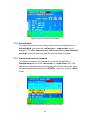
7.7.4. Authorized User Setup
Up to 3 authorized users can manage the KVM switch. To change the user
name and password, please move the highlight bar to the user for editing.
Press the <left arrow> or <right arrow> key. The user name and
password setup window will be shown on the screen. Please Input the new
user’s name and password twice, then press <ENTER> to confirm or
<ESC> to cancel.
Figure 29: User name password setup window
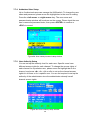
7.7.5. User Authority Setup
You can set up the authority level for each user. Specific users have
different access rights for each channel. To change the access rights of
each channel for a particular user, please move the highlight bar to the
channel, and press <A>, <1>, <2> or <3> to set up the channel access
rights for all users or for a specific user. You are not required to set up the
authority of the administrator since the administrator already has all
channel access rights.
Figure 30: User authority setup window
29