1
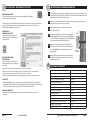
Photo Quality
Photo
Quality
LOW
X 832
(1.3MP)
CARACTÉRISTIQUES
TECHNIQUES DE L’APPAREIL1480
PHOTO
GAMESPY
Photo
LOW Quality
1480 xX1040
832 (1.3MP)
MEDIUM
1848
(3.2 MP)
LOW
1480
X
832 (1.3MP)
MEDIUM
1848 x
x 1472
1040
(3.2 MP)
MP)
HIGH
2616
(4.0
Photo
Quality
MEDIUM
1848
1040
(3.2
Qualité
d’image
photo
HIGH
2616 xx 1824
1472 (6.0
(4.0 MP)
MP)
ENHANCED
3248
LOW
1480
X
832
(1.3MP)
HIGH
2616
x
1472
(4.0
MP)
ENHANCED
3248
x
1824
(6.0
MP)
Video
LOW
(faible)Quality
744 x 416
MEDIUM
1848
x
1040
(3.2
MP)
ENHANCED
3248
x
1824
(6.0
MP)
Video(moyenne)
Quality
HIGH
720x 832
x 400
@ 24fps
MEDIUM
1480
(1,3 Mpx)
HIGH
2616
1472
MP)
Video
HIGH Quality
720 xxx192
400
@(4.0
24fps
LOW
352
@
24fps
HIGH
(élevée)
2368
x 1328
(3,2 Mpx)
ENHANCED
3248
x
1824
(6.0
MP)
HIGH
720
x
400
@
24fps
LOW
352 x 192 @ 24fps
Approximate
photos stored 1GB SD card
ENHANCED
(améliorée)
2984
x
1680
(5,0
Mpx)
Video
Quality
LOW
352
x
192
@
24fps
Approximate photos stored 1GB SD card
3779
HIGH
720
x 400 @ 24fps
Approximate
photos stored 1GB SD card
Qualité
LOWd’image vidéo
3779
MEDIUM
1784
LOW
352
x 192 @ 24fps
LOW
3779
MEDIUM
1784
HIGH
890
HIGH
(élevée)
720
x 400 @ 24 images par seconde
Approximate
photos
stored
1GB
SD
card
MEDIUM
1784
HIGH
890
ENHANCED
578
LOW
(faible)
352
x 192 @ 24 images par seconde
LOW
3779
HIGH
890
ENHANCED video time stored 1GB SD card
578
Approximate
Nombre
approximatif de photos que peut stocker une carte SD de 1 Go
MEDIUM
1784
ENHANCED
578
Approximate video time stored 1GB SD card
HIGH
20min
HIGH
890
LOW
(faible)
12500
Approximate
video time stored 1GB SD card
HIGH
20min
LOW
60min
ENHANCED
578
HIGH
20min
MEDIUM
2600
LOW(moyenne)
60min
32
GB Max
Optional
SD Memory Card
Approximate
video
time
stored
1GB
SD
card
LOW
60min
32
GB Max
Optional
SD
Memory
Card
55
Optical
Field
of
View
HIGH (élevée)
1100 degrees
HIGH
20min
32
GB
Max
Optional
SD
Memory
Card
55
degrees
Optical
Field
of
View
Alkaline
AA-cells
Batteries
ENHANCED
(améliorée)
800
LOW
60min
55
degrees
Optical
Field
of
View
Alkaline
AA-cells
Batteries
45 +/-5 feet
Approximate
Detection Range
Durée
approximative
des vidéosCard
que peut stocker une carte SD de 1 Go
32
GB
Max
Optional
SD
Memory
Alkaline
AA-cells
Batteries
45 +/-5 feet
Approximate Detection Range
HIGH
(élevée)Field of
2055
mindegrees
Optical
View Range
45
+/-5 feet
Approximate
Detection
Alkaline
AA-cells
Batteries
LOW (faible)
60 min
45
+/-5
feet
Approximate
Detection
Range
Carte mémoire SD en option
32 Go max
VII
Champ angulaire
55 degrés
Piles
Piles alcalines AA
Portée de détection approximative
13,7 m +/- 1,5 m
Page 12
Page 12
Page 12
Page 12
M80 GameSpy Digital Camera
M80 GameSpy Digital Camera
M80 GameSpy Digital Camera
M80 GameSpy
Digital GameSpy
Camera M80
Appareil
photo numérique
V
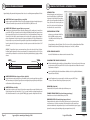
Setup Menu - The UP/DOWN buttons are used to navigate through the available
Setup
Menu
- The
buttons
used
to navigate
through
theselects
available
setting
choices.
UP/DOWN
moves
toPHOTO
theare
next
menu
item, and
ENTER
the
RÉGLAGES
DEUP/DOWN
L’APPAREIL
Setup
- The
UP/DOWN
buttons
arenext
used
toavailable
navigate
the
available
setting
choices.
UP/DOWN
moves
tochoices
the
menu
item, and
ENTER
the
item
toMenu
be
changed.
Additional
menu
are
bythrough
hitting
theselects
setting
UP/DOWN
moves
to the
next
menu
and
ENTERthe
selects the
item tochoices.
be changed.
Additional
menu
choices
are
available
by hitting
UP/DOWN
button
when
either
the
first/last
option
isitem,
highlighted.
Menu
des
réglages
– Les UP/DOWN
touches
HAUT/BAS
servent
à naviguer
dans
réglages
disponibles;
ellesthe
permettent
Setup
- The
are used
navigate
through
available
item
toMenu
be
changed.
Additional
menu
choices
aretoles
available
by
hitting
the
UP/DOWN
button
when
eitherbuttons
the
first/last
option
is highlighted.
d’accéder
au
prochain
élément
du
menu.
La
touche
ENTER
permet
de
sélectionner
l’
é
lément
à
modifier.
D’autres choix
setting
choices.
UP/DOWN
moves
the next
menuisitem,
and ENTER selects
the
UP/DOWN
button
when either
the to
first/last
option
highlighted.
deSETUP
menu
si vousAdditional
appuyez sur lesmenu
touches HAUT/BAS
la première ouby
la dernière
item
to apparaîtront
be changed.
choicesquand
are available
hittingoption
the est surlignée.
DATE/TIME
SETUPbutton
DATE/TIME
UP/DOWN
when
either the first/last option is highlighted.
MM.DD/YY
HH:MMAM
SETUP
DATE/TIME
MM.DD/YY
HH:MMAM
MM.DD/YY
HH:MMAM
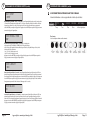
Date/Time
- Set Date
/Time - on the SETUP DATE/TIME screen, use the
SETUP DATE/TIME
Date/Time -buttons
Set Date
/Time - the
on the
SETUP
DATE/TIME
screen,
usetothe
UP/DOWN
to modify
month.
Press
LEFT/RIGHT
buttons
move to
Heure/date
– Pour
régler
laHH:MMAM
date
etENTER
l’heure
àthe
l’ébutton
cran
SETUP
DATE/TIME
(réglage
date/heure),
appuyez
sur
lesmove
MM.DD/YY
Date/Time
-buttons
Set
Date
- on
the
SETUP
DATE/TIME
screen,
useThe
the
UP/DOWN
to/Time
modify
month.
Press
buttons
to
the
next field.
Press
the
again
to LEFT/RIGHT
save
your
selections.
Time to
touches HAUT/BASbuttons
pour changer
mois. Appuyez
sur les touches
GAUCHE/DROITE
passer
au champtosuivant.
UP/DOWN
thebutton
month.
Press
LEFT/RIGHT
buttons
move
the next
Press to
thelemodify
ENTER
again
to
saveisyour
selections.
The
Timeto
and
Datefield.
is retained
between
battery
changes.
Time
notpour
automatically
adjusted
Appuyez de nouveau
surDate
la touche
ENTER pour
enregistrer
vos sélections.
L’heure et la date
sont conservées
entre
Date/Time
Set
/Time
on
the
SETUP
DATE/TIME
screen,
use
the
the
next
field.
Press
the
ENTER
button
again
to
save
your
selections.
The
Time
anddaylight
Date is retained
for
savings. between battery changes. Time is not automatically adjusted
chaque changement de piles. L’heure ne sera pas automatiquement modifiée lors des passages à l’heure avancée et
UP/DOWN
buttons
to modify the month. Press LEFT/RIGHT buttons to move to
and
Date
is
retained
for
daylight
à l’heure normale. savings.between battery changes. Time is not automatically adjusted
the
field.savings.
Press the ENTER button again to save your selections. The Time
for next
daylight
and
Date is retained
between battery changes. Time is not automatically adjusted
CAPTURE
MODE
forCAPTURE
daylight savings.
MODE
TRAIL
CAM
CAPTURE
TRAIL CAMMODE
TRAILMode
CAM
Capture
- (default Trail Cam) Press the UP/DOWN buttons to highlight
CAPTURE
MODE
Mode
d’enregistrement
(par défaut
:ENTER
TrailCam)
cam, c.-à-d.
appareil
photo
gibier)
– Appuyez
sur
Capture
Press
thesave
UP/DOWN
buttons
to highlight
the
desiredMode
mode.- (default
Press
theTrail
button
to
thepour
mode
and
return
tolesthe
touches
HAUT/BAS
pour-surligner
le mode
désiré.
Appuyez
sur lathe
touche
ENTER pour enregistrer
le mode
et retourner
TRAIL
CAM
Capture
Mode
(default
Trail
Cam)
Press
UP/DOWN
buttons
to
highlight
the desired
mode.
Press
the are
ENTER
button tomode
savesettings
the mode
and return
to the
Camera
Setup
Menu.
There
four capture
–TRAIL
CAM,
PLOT
au menu des réglages de l’appareil photo. L’appareil offre quatre modes d’enregistrement : TRAIL CAM (appareil
the
desired
mode.
Press
theVIDEO.
ENTER
button
save
the
mode–TRAIL
and return
to the
Camera
Setup
Menu.
There
are fourRefer
capture
mode
settings
CAM,
PLOT
CAM,
HYBRID
CAM
or
to to
the
CAPTURE
MODE
section
of
this
photo pour gibier), PLOT CAM (appareil photo vue par vue), HYBRID CAM (appareil photo hybride) et VIDEO. Consultez
Capture
Mode
(default
Trail
Cam)
Press
the
UP/DOWN
buttons
to
highlight
Camera
Setup
Menu.
There
are
four
capture
mode
settings
–TRAIL
CAM,
PLOT
CAM,
HYBRID
CAM
or
VIDEO.
Refer
to
the
CAPTURE
MODE
section
of
this
manual
for
details.
la section MODE D’ENREGISTREMENT du présent mode d’emploi pour de plus amples renseignements.
the
desired
Press or
theVIDEO.
ENTERRefer
buttontotothe
save
the modeMODE
and return
to the
CAM,
HYBRID
CAM
CAPTURE
section
of this
manual
formode.
details.
Camera
Menu. There are four capture mode settings –TRAIL CAM, PLOT
manual Setup
for details.
PHOTO
QUALITY
CAM,
HYBRID
CAM or VIDEO. Refer to the CAPTURE MODE section of this
PHOTO
QUALITY
manual
for
details.
HIGH
PHOTO
HIGH QUALITY
HIGH
Qualité
d’image
(par- défaut
: High,
c.-à-d.-The
élevée)
– Pour les
commeofpour
vidéos, plus la qualité
Photo
Quality
(default
High)
higher
thephotos
quality
thelesphoto/image
the
PHOTO
QUALITY
d’image
estQuality
élevée, plus
la(default
quantité deHigh)
mémoire
utiliséehigher
est grande.
Parquality
contre,
si of
la qualité
d’image
est élevée,the
alors
Photomemory
-The
the
thehave
photo/image
more
it-consumes.
However,
higher
quality
images
higher
les
images
ont une
résolution
plus haute
et sont
donc
plus
claires,
en
particulier
siofle zoom
est utilisé.
Il existe
quatreare
HIGH
Photo
Quality
-The
higher
the
quality
the
photo/image
the
more
memory
it- (default
consumes.
However,
higher
quality
images
have
higher
resolution
which
results
inHigh)
clearer
images
-especially
when
zooming
in.
There
réglages
de qualité
d’image
pour lesin
photos
: LOW-ENHANCED,
(faible),
MEDIUM
(moyenne),
HIGH
(élevée)
ENHANCED
(améliorée).
more
memory
it consumes.
However,
higher
quality
images
haveethigher
resolution
which
results
clearer
images
-especially
when
zooming
in. There
are
four
photo/image
quality
settings
HIGH,
MEDIUM,
and
LOW.
Appuyez
sur
les
touches
HAUT/BAS
pour
surligner
le
réglage
désiré.
Appuyez
sur
la
touche
ENTER
pour
enregistrer
Photo
Quality
- (default
High)
higherthe
thedesired
quality
of MEDIUM,
thezooming
photo/image
the leare
resolution
which
results
in
clearer
images
-especially
when
in.
There
four photo/image
quality
settings
-ENHANCED,
HIGH,
and
LOW.
Press
the
UP/DOWN
buttons
to-The
highlight
setting.
Press the
ENTER
réglage et retourner au menu des réglages de l’appareil photo. La section CARACTÉRISTIQUES TECHNIQUES du présent
more
memory
itthe
consumes.
However,
higher
quality
images
have
higher
four
quality
settings
-ENHANCED,
HIGH,
MEDIUM,
and
LOW.
Pressd’photo/image
UP/DOWN
buttons
to
highlight
setting.
Press
the
button
to save
setting
and
return
to
the the
Camera
Setup
Menu.
Refer
toENTER
mode
ethe
mploi
indique
le nombre
d’images
stockées
en fonction
dedesired
la qualité
d’image.
resolution
whichtheresults
inand
clearer
images
when
zooming
There are
Press
buttons
highlight
the
desired
setting.
Press
the
ENTER
buttonthe
to UP/DOWN
save
setting
return
to the-especially
Camera
Setup
Refer
to
SPECIFICATIONS
section
ofto
this
document
for
details
onMenu.
number
ofin.images
four
photo/image
quality
settings
-ENHANCED,
andto
LOW.
button
to saveonthe
setting
andofreturn
to the Camera
SetupMEDIUM,
Menu.
Refer
SPECIFICATIONS
section
this
document
for HIGH,
details
on
number
of
images
stored
based
Photo
Quality.
PHOTO
DELAY
Press
UP/DOWN
buttons
highlight
the desired
setting.
Press the
ENTER
SPECIFICATIONS
section
oftothis
document
for details
on number
of images
storedthe
based
on Photo
Quality.
button
to
saveon
thePhoto
setting
and return to the Camera Setup Menu. Refer to
1 MIN
stored
based
Quality.
SPECIFICATIONS section of this document for details on number of images
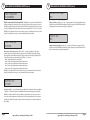
Photo
Delayon- (default
1 minute)
-The
delay determines
the
number
of
stored
based
Photo
Quality.
Délai
d’enregistrement
(par défaut
: 1 minute)
– Lephoto
délai d’enregistrement
détermine le
nombre
de minutes
minutes
whenestandétecté
animal
detected
remains
range.
entre
chaquebetween
prise d’imagepictures
lorsqu’un animal
et qu’ilisdemeure
dans and
le champ
de visionin
de l’appareil.
Pour
changer le délai,
appuyeztime,
sur les touches
afin de surligner
le réglage
Appuyezthe
sur ladesired
touche
To change
the delay
pressHAUT/BAS
the UP/DOWN
buttons
todésiré.
highlight
ENTER
pour Press
enregistrer
réglage
et retourner
auto
menu
des
réglages
de
l’appareil
choix
de menu
setting.
thele ENTER
button
save
the
setting
and photo.
returnD’autres
to the
Camera
Setup
M80
GameSpy
Digital
Camera
Page
5
apparaîtront
si vous appuyez
surM80
les choices
touches
HAUT/BAS
quand
la première
ou la dernière
option est surlignée.
Le délai5
Menu. Additional
menu
are available
byCamera
hitting
the UP/DOWN
button
GameSpy
Digital
Page
d’
enregistrement
peut être option
régléM80
à 15 is
ouGameSpy
30 secondes ainsiDigital
qu’à
1, 5, 10,
30 ou 60can
minutes.
Camera
when
the first/last
highlighted.
Photo
Delays
be set to 15 andPage
30 5
seconds, 1, 5, 10, 30 and 60 minutes.
M80 GameSpy
Digital GameSpy
Camera M80
Page 5
Appareil
photo numérique
MULTI SHOT