1
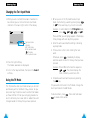
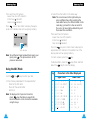
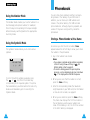
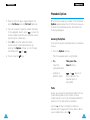
Intellectual Property
All Intellectual Property, as defined below, owned by or
which is otherwise the property of Samsung or its respective suppliers relating to the SAMSUNG Phone, including
but not limited to, accessories, parts, or software relating
thereto (the "Phone System"), is proprietary to Samsung and
protected under federal laws, state laws, and international
treaty provisions. Intellectual Property includes, but is not
limited to, inventions (patentable or unpatentable), patents,
trade secrets, copyrights, software, computer programs, and
related documentation and other works of authorship. You
may not infringe or otherwise violate the rights secured by
the Intellectual Property. Moreover, you agree that you will
not (and will not attempt to) modify, prepare derivative
works of, reverse engineer, decompile, disassemble, or otherwise attempt to create source code from the software. No
title to or ownership in the Intellectual Property is transferred to you. All applicable rights of the Intellectual
Property shall remain with SAMSUNG and its suppliers.
Samsung Telecommunications America (STA),
Inc.
Headquarters:
1130 E.Arapaho Road
Richardson, TX 75081
Tel: 972.761.7000
Fax: 972.761.7001
Customer Care Center:
1601 E.Plano Parkway, Suite 150
Plano, TX 75074
Toll Free Tel: 1.888.987.HELP(4357)
Fax: 972.761.7501
Internet Address: http://www.samsungusa.com/wireless
©2002 Samsung Telecommunications America, Inc. All
rights reserved. No reproduction in whole or in part allowed
without prior written approval.
Samsung Telecommunications America, Inc. is a trademark of Samsung Electronics Corporation, Ltd.
Openwave® is a registered Trademark of Openwave, Inc.
RSA® is a registered Trademark RSA Security, Inc.
T9® Word Text Input is licensed by Tegic Communications
and is covered by the U.S. Pat. 5,818,437, U.S. Pat.
5,953,541, U.S. Pat. 6,011,554 and other patents pending.
English. 02/2002. Rev. 1.0
Printed in South Korea
User Guide GH68-02605A
DISCLAIMER OF WARRANTIES;
EXCLUSION OF LIABILITY
Except as set forth in the express warranty contained on
the warranty page enclosed with the product, the purchaser takes the product "as is", and Samsung makes no
express or implied warranty of any kind whatsoever with
respect to the product, including but not limited to the
merchantability of the product or its fitness for any particular purpose or use; the design, condition or quality of the
product; the performance of the product; the workmanship
of the product or the components contained therein; or
compliance of the product with the requirements of any
law, rule, specification or contract pertaining thereto.
Nothing contained in the instruction manual shall be construed to create an express or implied warranty of any
kind whatsoever with respect to the product. in addition,
Samsung shall not be liable for any damages of any kind
resulting from the purchase or use of the product or arising from the breach of the express warranty, including
incidental, special or consequential damages, or loss of
anticipated profits or benefits.
Contents
Safety Quick Guide. . . . . . . . . . . . . . . .
7
Unpacking . . . . . . . . . . . . . . . . . . . . . .
9
Your Phone . . . . . . . . . . . . . . . . . . . . .
10
Phone Layout. . . . . . . . . . . . . . . . . . . . . . . . . .
Display . . . . . . . . . . . . . . . . . . . . . . . . . . . . . . .
Service Light . . . . . . . . . . . . . . . . . . . . . . . . . .
10
12
14
Getting Started . . . . . . . . . . . . . . . . . .
15
Installing the SIM Card and the Battery . . .
Charging a Battery . . . . . . . . . . . . . . . . . . . . .
Switching the Phone On/Off . . . . . . . . . . . . .
15
18
20
Call Functions . . . . . . . . . . . . . . . . . . .
22
Making a Call . . . . . . . . . . . . . . . . . . . . . . . . .
Adjusting the Volume . . . . . . . . . . . . . . . . . . .
Answering or Rejecting a Call . . . . . . . . . . .
Viewing Missed Calls . . . . . . . . . . . . . . . . . . .
In-Call Options . . . . . . . . . . . . . . . . . . . . . . . .
22
24
25
26
28
Entering Text . . . . . . . . . . . . . . . . . . .
35
Changing the Text Input Mode . . . . . . . . . . .
Using the T9 Mode . . . . . . . . . . . . . . . . . . . . .
Using the ABC Mode . . . . . . . . . . . . . . . . . . .
Using the Number Mode . . . . . . . . . . . . . . . .
Using the Symbolic Mode . . . . . . . . . . . . . . .
36
36
38
40
40
3
Contents (continued)
Phonebook . . . . . . . . . . . . . . . . . . . . .
41
Tones . . . . . . . . . . . . . . . . . . . . . . . . .
70
Storing a Phone Number with a Name . . . .
Phonebook Options . . . . . . . . . . . . . . . . . . . .
Speed-Dialing by SIM Memory Location . .
Searching for and Dialing a Number
in the Phonebook . . . . . . . . . . . . . . . . . . . . . .
Dialing a Number using the Service
Directory or Information Numbers . . . . . . .
41
43
45
70
71
73
73
73
74
74
75
75
75
Selecting Functions and Options . . . . . .
48
Example: Selecting an Alert Type . . . . . . . . .
50
Ring Tone (Menu 3-1) . . . . . . . . . . . . . . . . . . .
Melody Composer (Menu 3-2) . . . . . . . . . . . .
Ring Volume (Menu 3-3). . . . . . . . . . . . . . . . .
Key Volume (Menu 3-4) . . . . . . . . . . . . . . . . .
Alert Type (Menu 3-5). . . . . . . . . . . . . . . . . . .
Keypad Tone (Menu 3-6) . . . . . . . . . . . . . . . .
Message Tone (Menu 3-7) . . . . . . . . . . . . . . .
Error Tone (Menu 3-8). . . . . . . . . . . . . . . . . . .
Minute Minder (Menu 3-9). . . . . . . . . . . . . . .
Connect Tone (Menu 3-0). . . . . . . . . . . . . . . .
Using the Menus . . . . . . . . . . . . . . . . .
52
Accessing Menu Functions by Scrolling . . .
Accessing Menu Functions by
Using Shortcuts . . . . . . . . . . . . . . . . . . . . . . .
Menu Map . . . . . . . . . . . . . . . . . . . . . . . . . . .
52
Settings . . . . . . . . . . . . . . . . . . . . . . .
76
Call Records . . . . . . . . . . . . . . . . . . . .
59
Phone Settings (Menu 4-1) . . . . . . . . . . . . . .
Network Services (Menu 4-2) . . . . . . . . . . . .
Security Settings (Menu 4-3). . . . . . . . . . . . .
LCD Settings (Menu 4-4) . . . . . . . . . . . . . . . .
Service Light Color (Menu 4-5) . . . . . . . . . . .
76
81
86
89
90
Missed Calls (Menu 1-1) . . . . . . . . . . . . . . . .
Incoming Calls (Menu 1-2) . . . . . . . . . . . . . . .
Outgoing Calls (Menu 1-3) . . . . . . . . . . . . . . .
Call Time (Menu 1-4). . . . . . . . . . . . . . . . . . . .
Call Cost (Menu 1-5) . . . . . . . . . . . . . . . . . . . .
59
59
60
60
61
Organizer . . . . . . . . . . . . . . . . . . . . . .
91
Messages . . . . . . . . . . . . . . . . . . . . . .
62
Scheduler (Menu 5-1). . . . . . . . . . . . . . . . . . .
Alarm (Menu 5-2) . . . . . . . . . . . . . . . . . . . . . .
Calculator (Menu 5-3). . . . . . . . . . . . . . . . . . .
World Time (Menu 5-4). . . . . . . . . . . . . . . . . .
Clock (Menu 5-5). . . . . . . . . . . . . . . . . . . . . . .
91
93
95
97
98
Voice Mail (Menu 2-1) . . . . . . . . . . . . . . . . . .
Read Messages (Menu 2-2). . . . . . . . . . . . . .
Write Messages (Menu 2-3) . . . . . . . . . . . . .
Preset Message List (Menu 2-4) . . . . . . . . . .
Setup (Menu 2-5) . . . . . . . . . . . . . . . . . . . . . .
Broadcast (Menu 2-6) . . . . . . . . . . . . . . . . . .
Picture Messages (Menu 2-7) . . . . . . . . . . . .
62
63
65
66
66
67
68
Games . . . . . . . . . . . . . . . . . . . . . . . .
99
4
46
47
53
54
5
Contents (continued)
Solving Problems . . . . . . . . . . . . . . . . . 100
Reference Information . . . . . . . . . . . . . 103
Access Codes . . . . . . . . . . . . . . . . . . . . . . . . 103
Health and Safety Information . . . . . . . . . . . 106
Glossary . . . . . . . . . . . . . . . . . . . . . . 121
Index . . . . . . . . . . . . . . . . . . . . . . . . . 125
Quick Reference Card . . . . . . . . . . . . . . 129
Safety Quick Guide
Read these guidelines before using your wireless
phone. Failure to comply with these guidelines may
be dangerous or illegal. For more detailed safety
information, see “Health and Safety Information” on
page 106.
Road safety comes first
Do not use a hand-held phone while driving; park the
vehicle first.
Switch phone off when refueling
Do not use the phone at a refueling point (service
station) or near fuels or chemicals.
Switch phone off on aircraft
Wireless phones can cause interference. Using them
on aircraft is both illegal and dangerous.
Switch phone off in hospital
Switch off your phone near medical equipment.
Follow any regulations or rules in force.
Interference
All wireless phones may get interference which
could affect performance.
Respect special regulations
Follow all special regulations in any area and always
switch off your phone whenever its use is prohibited,
or when it may cause interference or danger (in a
hospital, for example).
6
7
Safety Quick Guide
Unpacking
Radio frequency exposure information
In August 1996, the Federal Communications
Commisision (FCC) of the U.S. adopted an updated
safety standard for human exposure to radio
frequency electromagnetic energy emitted by FCC
regulated transmitters. The design of this phone
complies with the FCC guidelines and those
standards.
To maintain compliance with FCC RF exposure
guidelines, if you wear a handset on your body, use
the Samsung-supplied or approved carrying case,
holster, or other body-worn accessory.
If you do not use a body-worn accessory, ensure the
antenna is at least 1.5cm from your body when
transmitting. Use of non-approved accessories may
violate FCC RF exposure guidelines.
Use sensibly
Use only in the normal position (to ear). Avoid
unnessary contact with the antenna when the phone
is switched on.
Accessories and batteries
Use only SAMSUNG-approved accessories and
batteries.
Use qualified service
Only qualified service personnel may install or repair
your phone.
8
Your package contains the following items.
Phone
Battery
Travel Adapter
Hand String Owner’s Manual
In addition, you can obtain the following accessories
for your phone from your local SAMSUNG dealer:
• Cigarette lighter adapter
• Simple hands-free car kit
• Standard battery
• Data kit
• Ear-microphone*
* : Depending on the country, this accessory may be
supplied in the standard package.
9
Your Phone
Your Phone
Soft keys
Perform the functions indicated by the text
above them (in the bottom line of the display).
Phone Layout
The following illustration shows the main elements
of your phone.
In the menu function, scroll through the menu
options and phonebook memory.
During a call, adjust the earpiece volume.
Deletes characters from the display.
Service light
Antenna
Earphone
jack
Makes or answers a call.
In idle mode, recalls the last number dialed.
In the menu function, selects a menu function
or stores information that you have entered
(such as a name) in the phone or SIM memory.
Earpiece
Display
~
Ends a call. Also switches the phone on and
off when pressed and held.
In the menu function, returns to the idle mode
and cancels your input.
Microphone
Enter numbers, letters and some special
characters.
When held down in idle mode, locks the
keypad manually.
When held down, toggles the Silent mode on
and off.(This feature is not available when the
phone is connected to a optional car kit.).
10
11
Your Phone
Your Phone
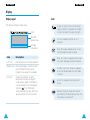
Display
Display Layout
Icons
The display comprises three areas.
Icons
Text and
graphic area
Soft key
indications
Area
Description
First line
Displays various icons (see opposite).
Middle lines Display messages, instructions and
any information that you enter
(number to be dialed, for example).
Last line
12
Shows the functions currently
assigned to the two soft keys.Or
shows various types of information,
such as missed calls or the keypad
lock icon ( ). This information
varies, depending on your SIM card,
service provider or current context.
Signal strength: shows the received
signal strength. The greater the number
of bars, the better the signal strength.
Service: appears when a call is in
progress.
New Message: appears when a new
text message has been received.
New Voice Mail: appears when a new
voice mail message has been received.
Vibrator on/Silent mode on: appears
when the Vibrate mode or Silent mode
is active.
Alarm on: appears when you set an
alarm.
Battery strength: shows the level of
your battery. The more bars you see, the
more power you have left.
13
Your Phone
Getting Started
Backlight
Installing the SIM Card and the Battery
The display and keypad are illuminated by a
backlight. When you press any key, the backlight
comes on.
To specify the length of time for which the backlight
is active, set the Backlight menu option (4-1-5); see
page 78 for further details.
When you subscribe to a cellular network, you are
provided with a SIM card loaded with your subscription
details (PIN, optional services available and so on).
Service Light
There are several cases in which the service light
flashes.
• When in service.
To activate or deactivate the service light, set the
Service Light menu option (4-1-6); see page 79.
To select the color of the service light, set the
Service Light Color menu option (4-5); see page
90.
• When an SMS message is received (the light is
orange, only if the Message Tone (3-7) is set to
Light only.).
• Keep all SIM cards out of the reach of small
children.
• The SIM card and its contacts can be easily
damaged by scratches or bending, so be careful
when handling, inserting or removing the card.
• Before installing the SIM card, always make sure
that the phone is switched off before removing the
battery.
1. If necessary, switch off the phone by holding
down
until the closing animation is displayed.
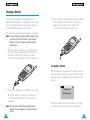
2. Remove the battery. To do so:
➀ Press and hold down the catch above the
battery on the back of the phone
➁ Slide the battery away, as shown
①
• When the alarms ring.
• When you receive a call.
To change the color, set the phonebook LED Color
option; see page 45.
14
②
15
Getting Started
Getting Started
3. Slide the SIM card holder in the direction of the
arrow and hold it in this position.
5. Hold the SIM card down and release the holder to
lock it into place.
4. Insert the SIM card under the two tabs, ensuring
that the cut corner is lower left and the gold
contacts of the card face into the phone.
6. Place the battery back on the phone. Slide the
battery up towards the catch until it locks into
place. Make sure that the battery is properly
installed before switching on the power.
Note: If you need to remove the SIM card, carefully
slide the SIM card lock back and take the card
out of the holder.
16
17
Getting Started
Getting Started
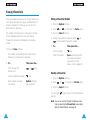
Charging a Battery
Your phone is powered by a rechargeable Li-ion
battery. A travel adapter is provided with your phone.
Use only approved batteries and chargers. Ask your
local SAMSUNG dealer for further details.
3. When charging is finished, disconnect the adapter
from the power outlet and from the phone by
pressing the grey tabs on both sides of the
connector and pulling the connector out.
The phone can be used while the battery is charging.
Note: You must fully charge the battery before using
your phone for the first time. A discharged
battery is fully recharged in approximately
120 minutes.
1. With the battery in position on the phone connect
the lead from the travel adapter to the bottom of
the phone. Check that the arrow on the lead
connector is facing towards the front of the phone.
Low Battery Indicator
When the battery is weak and only a few minutes of
talk time remain, you will hear a warning tone and a
message will be repeated at regular intervals on the
display:
2. Connect the adapter to a standard AC wall outlet.
** Warning **
Battery Low
When the battery is charging, the battery icon
in the top right-hand corner of the display fills
repeatedly.
Note: Do not remove the battery from the phone
while the travel adapter is connected to the
phone.
18
When the battery becomes too weak for the phone
to operate, the phone switches off automatically.
19
Getting Started
Getting Started
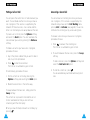
Switching the Phone On/Off
1. Hold down
for more than one second to
switch the phone on.
4. When you wish to switch the phone off, hold
down
for more than two seconds.
Note: If “Insert SIM Card” appears on the display,
please check that the SIM card is correctly
inserted. The phone requires a 3 V SIM card.
Please contact your service provider if you
experience any problems.
2. If the phone asks for a password, key in the
password and press the OK soft key. The phone
password is factory set to 0000. For further
details, see page 103.
3. If the phone asks for a PIN, key in the PIN and
press the OK soft key. For further details, see
page 104.
The phone searches for your network and when it
finds it, the idle screen, illustrated below, is
displayed.
SAMSUNG
Dec 14 12:57
Menu
PhoneBook
Note: The display language is determined by the
SIM card inserted. To change the language,
use the Language menu option (4-1-3); for
further details, refer to page 77.
20
21
Call Functions
Call Functions
Making a Call
When the idle screen is displayed, key in the area
code and phone number and press
.
Note: If you have set the Auto Redial option (4-1-7) to
ON (see page 79) and the person called does not
answer or the line is busy, the number is
redialed automatically up to ten times.
Making International Calls
1. Press and hold down the
key.
The + international prefix appears.
2. Key in the country code, area code and phone
number and press
.
Correcting the Number
To clear...
Then...
The last digit
displayed
Press the ❙!soft key.
Any other digit
in the number
Press the
or
key
until the cursor ( ❘ ) is immediately to the right of the digit to
be cleared. Press the ❙!soft
key. You can also insert a
missing digit simply by pressing
the appropriate key.
The whole display
22
Hold down the ❙!soft key for
more than one second.
Ending a Call
When you have finished your call, briefly press
.
Making a Call from the Phonebook
You can store the names and phone numbers of the
people you call regularly in the SIM card memory,
called the phonebook. You then simply select the
required name to recall the associated number. For
further details on the Phonebook feature, refer to
page 41.
You can also quickly dial the numbers stored in SIM
locations 2 to 9, simply by holding down the
corresponding number key.
Redialing the Last Number
The phone stores the last 10 numbers dialed. To
recall any of these numbers, proceed as follows.
1. If there are any characters on the display, press
the
key to return to the idle mode.
2. Press the
key to access the list of the last
numbers dialed.
3. Use the
and
keys to scroll through the
numbers until the required number is displayed.
4. Press the
key to dial the number displayed.
23
Call Functions
Call Functions
Adjusting the Volume
Answering or Rejecting a Call
During a call, if you wish to adjust the earpiece
volume, use the
or
keys.
When somebody calls you, the phone rings and the
phone icon in the middle of the screen flashes.
Caller’s name or
number
(if available)
nnnn
((
Accept
))
Reject
If the caller can be identified, the caller’s phone
number (or name if stored in your phonebook) is
displayed. If the caller cannot be identified, only the
phone icon flashes.
In idle mode, you can access the Write Messages
menu option by using the
key.
With the
key, you can view the PhoneBook lists
directly from idle mode.
Answering a Call
There are two ways to answer an incoming call.
• Press the Accept soft key, or
key.
• When the Any-Key Answer menu option is set to
ON, press any key, except
or the Reject soft
key.
Rejecting a Call
To reject a call, press
24
or the Reject soft key.
25
Call Functions
Call Functions
Viewing Missed Calls
If you are unable to answer a call for any reason, you
can find out who was calling you, provided that this
service is available. In this way, you can call the
person back, if necessary.
Editing a Missed Call Number
The number of missed calls is displayed on the idle
screen immediately after the call was missed.
3. Press the Select soft key.
To view the missed call immediately, proceed as
follows.
1. Press the Options soft key.
2. Press
or
to highlight the Paste option.
4. Change the number as required. Press
to move back through the number.
5. To...
1. Press the View soft key.
2. To...
key.
Store the number
Save soft key and enter
the name and location
required (for further
details, refer to page 41).
Then press the...
Scroll through the
missed calls
or
Call the number displayed
key.
Edit or delete a missed
call number
Then press the...
Call the number
The number corresponding to the most recent
missed call is displayed, if available.
or
key.
Deleting a Missed Call
Options soft key
(see opposite).
1. Press the Options soft key.
2. Press
or
to highlight the Delete option.
3. Press the Select soft key.
You can press
feature.
at any time to exit the Missed Call
Note: You can access the Missed Call feature at any
time by selecting the Missed Calls menu option
(1-1); for further details, see page 59.
26
27
Call Functions
Call Functions
In-Call Options
Your phone provides a number of control functions
that you can use during a call. To access these
functions during a call, press the Options soft key.
Switching the Microphone Off (Mute)
You can temporarily switch your phone’s microphone
off, so that the other party cannot hear you.
Example: You wish to say something to another
person in the room but do not want the
other party to hear you.
To switch the microphone off temporarily, proceed as
follows.
1. Press the Options soft key.
2. Press
or
to highlight the Mute option.
3. Press the OK soft key.
Your correspondent can no longer hear you.
To switch the microphone back on, proceed as
follows.
1. Press the Options soft key.
2. Press
option.
or
to highlight the Unmute
Searching for a Number in the Phonebook
You can search for a number in the phonebook during
a call.
1. Press the Options soft key.
2. Press
option.
or
to highlight the Phonebook
3. Press the OK soft key.
4. Enter the start of the name that you wish to find
and press the Find soft key.
Note: You can also scroll through the phonebook
from the beginning, by pressing the Find
soft key directly.
The phonebook entries are listed, starting with
the first entry matching your input. This entry is
also highlighted.
5. To view the highlighted entry, press the View soft
key.
For a more detailed description of the Phonebook
feature, refer to page 41.
3. Press the OK soft key.
Your correspondent can hear you again.
28
29
Call Functions
Call Functions
Putting a Call on Hold
Answering a Second Call
You can place the current call on hold whenever you
want. You can make another call while you have a
call in progress if this service is supported by the
network. Of these two calls, one is active and the
other is on hold and you can swap between the calls.
You can answer an incoming call while you have a
call in progress, if this service is supported by the
network and you have set the Call Waiting menu
option (4-2-2) to Activate (see page 84). You will be
notified of an incoming call by a call waiting tone.
To place a call on hold, press the Options soft key,
and select the Hold option. You can reactivate the
call whenever you want, by pressing the Retrieve
soft key.
To answer a call while you have a call in progress,
proceed as follows.
To make a call while you have a call in progress,
proceed as follows.
1. Key in the phone number that you wish to dial or
look it up in the phonebook.
2. Press
to dial the second call.
The first call is automatically put on hold.
Or alternatively, proceed as follows.
1. Put the current call on hold by pressing the
Options soft key and selecting the Hold option.
1. Press
to answer the incoming call.
The first call is automatically put on hold.
2. To switch between the two calls, press the Swap
soft key.
To end a held call, press the Options soft key and
select the End held call option.
3. To end the current call, press
.
You are automatically switched back to any held
calls.
2. Make the second call in the normal way.
To swap between the two calls, simply press the
Swap soft key.
The current call is placed on hold and the call on
hold is reactivated so that you can continue
conversing with the other party.
When you have finished, end each call normally by
pressing
.
30
31
Call Functions
Call Functions
Making a Multiparty Call
A multiparty call is a network service that allows
up to six people to take part simultaneously in a
multiparty or conference call. For more information,
contact your service provider.
Setting up the Multiparty Call
1. Call the first participant in the normal way.
2. Call the second participant in the normal way.
The first call is automatically put on hold.
2. Highlight the required person, by pressing
or
, followed by
.
3. Select Private.
Now you can talk privately with that person. The
other participants can continue to converse with
each other.
4. To return to the multiparty call, press the Options
soft key and select Join.
All the multiparty call participants can now hear
each other.
3. To join the first participant to the multiparty call,
press the Options soft key and select the Join
option.
Dropping One Participant
4. To add a new person to the multiparty call, call
the person in the normal way, then press the
Options soft key and select the Join option.
1. Press the Options soft key and choose the
Select one option.
The list of call participants appears.
You can add incoming callers by answering the call
and pressing Options, followed by Join. Repeat as
required.
2. Highlight the required person, by pressing
or
, followed by
.
3. Select the Remove soft key.
Having a Private Conversation With One
Participant
1. Press the Options soft key and choose the
Select one option.
The list of call participants appears.
32
The call is ended with that participant, but you
can continue to talk with the other participants.
4. End the multiparty call by pressing
.
33
Call Functions
Entering Text
Muting/Sending Key Tones
These options allow you to turn the key tones off or
on. If the Mute keys option is selected, your phone
does not transmit the key tones.
Note: To communicate with answering machines or
computerised telephony systems, the Send
keys option must be selected.
Using the SMS Service
If you receive an SMS (Short Message Service)
message during a call, the message icon (
)
appears in the display.
After you have finished your call, you can read the
message; refer to page 63 for further details.
Note: You can also read or write a new SMS
message during a call.
When storing a name in the phonebook, creating
your personal greeting or scheduling events in your
calendar, you will need to enter text.
You are provided with the following text input
modes.
T9 mode
This mode allows you to enter words with only one
keystroke per letter. Each key on the keypad has
more than one letter – when you press the
key
once, J, K or L may be displayed. The T9 mode
automatically compares your keystrokes with an
internal linguistic dictionary to determine the correct
word, thus requiring far fewer keystrokes than the
traditional ABC mode.
ABC mode
This mode allows you to enter letters by pressing the
key labelled with the required letter once, twice or
three times until the letter is displayed.
Number mode
This mode allows you to enter numbers.
Symbolic mode
This mode allows you to enter special characters.
is a registered trademark of Tegic Communications, Inc.
34
35
Entering Text
Entering Text
Changing the Text Input Mode
1. When you are in a field that allows characters to
be entered, you will notice the text input mode
indicator in the lower right corner of the display.
1. When you are in the T9 predictive text input
mode, start entering a word by pressing keys
to
. Press each key only once for one letter.
Example: to enter HELLO in the T9 English mode,
press
,
,
,
and
.
The word that you are typing appears in the display.
It may change with each key that you press.
Save
ABC
Text input mode
indicator:
ABC: ABC mode
NUM: Number mode
: T9 mode
SYM: Symbolic mode
2. Press the right soft key.
The modes available are displayed.
3. Scroll to the required mode, then press the Select
soft key.
Using the T9 Mode
The T9 predictive text input mode allows you to enter
words easily with a minimum of key presses. As you
press each key, the phone selects a letter that makes
up the word that it thinks you are typing, based on a
built-in dictionary. As a new letter is added, the word
changes based on the key that you have pressed.
36
2. Enter the whole word before editing or deleting
any keystrokes.
3. If the word is correct, start entering the next
word.
Otherwise, press
repeatedly to display
alternate word choices for the keys that you have
pressed.
Example: OF and ME both share the sequence
,
. The phone displays the
most commonly used choice first.
4. Complete each word with a space by pressing
the
key.
To type words not found in the T9 mode, change the
text input mode to the ABC mode.
To delete letters, press
. Press and hold down
to erase entire words.
37
Entering Text
Entering Text
There are three shift options:
• Lower Case (no shift indicator)
• Initial Cap ( indicator)
• Caps Lock ( indicator)
Press
one or more times to display the appropriate shift indicator and continue typing normally.
Meet me at
OK
ENG
Shift indicator
Note: To exit the text input mode without saving your
input, press
. The phone returns to the
previous menu level.
2. Select the other letters in the same way.
Note: The cursor moves to the right when you
press a different key. When entering the
same letter twice (or a different letter on the
same key), just wait for a few seconds for
the cursor to move right automatically, and
then select the next letter.
There are three shift options:
• Lower Case (no shift indicator)
• Initial Cap ( indicator)
• Caps Lock ( indicator)
Press the
key one or more times to display the
appropriate shift indicator in the bottom line of the
display and continue typing normally.
To insert a space, press the
key.
To delete letters, press the
key. Press and hold
down the
key to clear the display.
Using the ABC Mode
Key
Use the
to
1. Press the key labelled with the required letter:
• Once for the first letter
• Twice for the second letter
• And so on
Note: To display a list of special characters,
press
. See the table on page 39 for
more information on the characters available
using the keys.
38
Characters in the Order Displayed
keys to enter your text.
Lower Case
Upper Case
1
2
3
4
5
6
7
8
9
0
: ;
A B
D E
G H
J K
MN
P Q
T U
WX
0 x
¿
C
F
I
L
O
R
V
Y
<
¡
2
3
4
5
6
S
8
Z
>
1 = “ /
Ä ÆÅ Γ
É ∆
Θ
Λ
Ñ Ö Ø Ξ
7 ΠΣ
Ü Φ
9 ΨΩ
%# £
.
a
d
g
j
m
p
t
w
0
,
b
e
h
k
n
q
u
x
+
?
c
f
i
l
o
r
v
y
(
!
2
3
4
5
6
s
8
z
)
1 - ‘ @:
à ä æå Ç
é è
ì
ñ
7
ù
9
&
ò ö ø
ß
ü
_ $
39
Entering Text
Phonebook
Using the Number Mode
The Number mode enables you to enter numbers in a
text message (a telephone number, for example).
Press the keys corresponding to the required digits
before manually switching back to the appropriate
text entry mode.
You can store phone numbers and their corresponding names in the memory of your SIM card. In
addition, you can store up to 100 numbers and
names in the phone memory. The SIM card and
phone memories, although physically separate, are
used as if they were a single entity, called the
phonebook.
Storing a Phone Number with a Name
Using the Symbolic Mode
The Symbolic mode enables you to enter various
symbols.
As soon as you start to enter a number, Save
appears above the left soft key to allow you to store
the number in the phonebook.
1. Key in the number to be stored.
123 456 789
.( ), : ; %!
Save
SYM
To scroll through the symbols available, press
the
or
key. Press the number key
corresponding to the required symbol. The phone
then automatically switches back to the text entry
mode used immediately prior to selecting the
Symbolic mode.
Notes:
• If you make a mistake while entering a number,
correct it using the ❙!soft key or
. For
further details, refer to page 22.
• To insert a dialing pause for special phone
services, such as banking by phone, hold down
. ‘P’ is displayed to indicate the pause.
2. When you are sure that the number is correct,
press the Save soft key.
3. Enter the corresponding name (the maximum
length depends on your SIM card). For information
on how to enter a name, see page 35.
4. When you are satisfied, press the Save soft key.
The phone now displays the first free location in
the last memory used to save a number and
name. If that memory is full, the first free location
in the other memory is displayed.
40
41
Phonebook
Phonebook
Phonebook Options
5. Press the right soft key to toggle between the
phone (To Phone) and card (To Card) memories.
6. If you do not want to save the number and name
in the suggested location, press
to clear the
location number and enter your preferred location
by pressing the number keys.
7. Press OK to store the name and number.
You can access the phonebook options by
pressing the Options soft key, or scroll through
the memory with
or
.
8. To exit, press the
key.
When storing or viewing a number in the phonebook,
Options appears above the left soft key to allow you
to access the phonebook options, described in the
following paragraphs.
Accessing the Options
To access the various phonebook options, proceed as
follows.
1. Press the Options soft key.
The first available option is highlighted.
2. To...
Then press the...
Select the
highlighted option
Select soft key.
Highlight a
different option
or
key one or
more times until the
required option is
highlighted.
Paste
Allows you to paste the phonebook number into the
normal dialing mode. Use this option to dial a
number similar to one in the phonebook (a different
extension in the same office for example).
Use the ❙!soft key to change the number as
required (refer to page 22 for further details). When
you are ready to dial, press
.
42
43
Phonebook
Phonebook
Edit
LED Color
Allows you to edit a number and name stored in the
phonebook.
This option allows you to assign a specific service
light color to a number and thus distinguish the caller
by the service light color.
Four colors are available (normal, red, violet and
blue) and they can be assigned to up to five numbers.
If no specific color is assigned, the service light
flashes with the color you set in Service Light
Color option (4-5).
Erase
Allows you to erase a number and name stored in
the phonebook.
You are asked to confirm that you wish to erase the
name and number from the phonebook by pressing
the Yes soft key.
Copy
Allows you to copy a phonebook number to another
location. Use this option to store a number similar to
one already in memory; once copied, edit the number
and store it in another location on the SIM card or in
the phone memory.
Speed-Dialing by SIM Memory Location
Once you have stored phone numbers in the SIM
card, you can dial them easily whenever required.
To speed-dial a number, proceed as follows.
To speed-dial a
Then...
number in locations...
2 to 9
Press and hold down the
appropriate key.
10 and above
Press the appropriate keys,
followed by the # key.
When the display shows
the name, phone number
and location, press the
Dial soft key.
Memory Status
This option allows you to check how many names and
phone numbers are stored and how many locations
are still free in the card memory and phone memory.
Alert
This option allows you to assign a specific ringing
tone to a number and thus distinguish the caller by
the ringing tone. Specific ringing tones can be
assigned to up to five numbers.
44
Note: Memory location 1 is reserved for your Voice
Mail server number.
45
Phonebook
Phonebook
Searching for and Dialing a Number in
the Phonebook
1. When the idle screen is displayed, press the
PhoneBook soft key.
Note: You can view the PhoenBook lists directly
by pressing the
key in idle mode.
2. If your SIM card provides Service Dialing Number
(SDN) and Information Number services, you will
see the following screen.
]
1 . [ Find Entry
2. Service Dir.
3. Information Numbers
5. To...
Then press the...
View the
highlighted entry
View soft key.
Select a
different entry
or
key one or more
times until the required entry
is highlighted.
Look for a name
starting with a
different letter
Key labeled with the required
letter.
6. Once you have found the required entry, press
to dial the number.
Dialing a Number using the Service
Directory or Information Numbers
OK
Note: The Service Dir. and Information Numbers
3. Press the OK soft key when Find Entry is
highlighted.
4. Enter the start of the name that you wish to find
and press the Find soft key.
46
options may not be available, depending on
your SIM card.
When the idle screen is displayed, press the
PhoneBook soft key. You will see the screen
illustrated on page 46.
Note: You can also scroll through the phonebook
from the beginning, by pressing the Find
soft key directly.
Service Dir.: enables you to view the Service
Directory and make calls from it.
The phonebook entries are listed, starting with
the first entry matching your input. This entry is
also highlighted.
Information Numbers: enables you to see the
Information Numbers in a tree structure and make
a call.
47
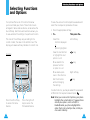
Selecting Functions and Options
Selecting Functions
and Options
Your phone offers a set of functions that allow
you to customize your phone. These functions are
arranged in menus and sub-menus, accessed via the
two soft keys. Each menu and sub-menu allows you
to view and alter the settings of a particular function.
The roles of the soft keys vary according to the
current context; the label on the bottom line of the
display just above each key indicates its current role.
Example:
SAMSUNG
Dec 14 12:57
Menu
PhoneBook
To view the various functions/options available and
select the one required, proceed as follows.
1. Press the appropriate soft key.
2. To...
Select the:
• Function displayed
or
• Option highlighted
Then press the...
Left soft key.
View the next function
or highlight the next
option in a list
key.
Move back to the
previous function
or option in a list
key.
Move back up one
level in the structure
Exit the structure
without changing
the settings
Right soft key.
key.
In some functions, you may be asked for a password
or PIN. Enter the required code and press
.
Press the left soft key
to access the menu
feature.
48
Press the right soft
key to access the
Phonebook feature.
Note: When you access a list of options, your phone
highlights the current option. If, however, there
are only two options, such as On/Off or
Enable/Disable, your phone highlights the
option that is not currently active, so that you
can select it directly.
49
Selecting Functions and Options
Selecting Functions and Options
Example: Selecting an Alert Type
1. When the idle screen is displayed, press the
Menu soft key to enter the menu function.
4. To select the Alert Type menu, press the Select
soft key.
The current setting is highlighted.
SAMSUNG
Dec 14 12:57
Menu
PhoneBook
Current setting
1 Light only
2 [ Melody
]
3 Vibration
Select
2. Scroll through the menus until you reach the
Tones menu, by pressing
.
Tones
Select
5. Scroll through the list of alert types until the
appropriate one is highlighted, by pressing
or
.
6. Press the Select soft key to confirm your
selection.
3
7. Press the
key to exit the menu function.
3. To select the Tones menu, press the Select soft
key and press
until you reach the Alert Type.
Alert Type
Melody
Select
50
3.5
51
Using the Menus
Using the Menus
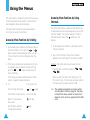
The phone offers a range of functions that allow you
to tailor the phone to your needs. These functions
are arranged in menus and sub-menus.
Accessing Menu Functions by Using
Shortcuts
The menus and sub-menus can be accessed by
scrolling or by using the shortcuts.
The menu items (menu, sub-menus and options) are
numbered and can be accessed quickly by using their
shortcut number. The shortcut number is shown in
the bottom-right next to the
soft key on the
display.
Accessing Menu Functions by Scrolling
1. In idle mode, press the Menu soft key to access
the menu function. Scroll with the
or
keys to reach the required main menu, such as
Tones. Press the Select soft key to enter the
menu.
1. In idle mode, press the Menu soft key to access
the menu function.
2. If the menu contains any sub-menus, Ring Tone
for example, you can access them by scrolling
with the
or
keys and pressing the
Select soft key.
Example: setting the Any-key Answer function
If the menu you have selected contains further
options, repeat the same procedure.
3. To...
Scroll through the menus
Confirm the chosen setting
52
Then press the...
or
keys.
Select soft key.
Return to the previous
menu level
soft key.
Exit the menu, without
changing the settings
key.
2. Key in the first digit of the shortcut number.
Repeat this for each digit of the shortcut number.
Press the Menu soft key, and key in
,
.
,
,
Menu to enter the menu, 4 for Settings, 1 for
Phone Settings, 4 for Any-key Answer and 2 to
set the Any-key Answer option to O N.
Note: The numbers assigned to each menu option
are indicated in the list on page 54. They may
not match the menu number on the phone. It
depends on the services supported by the SIM
card.
53
Using the Menus
Using the Menus
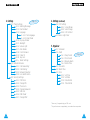
Menu Map
2. Messages
The following illustration shows the menu structure
available and indicates the:
• Number assigned to each option
• Page on which you can find a description of each
feature
Note: You can only see menu 0, if your SIM card
supports the SIM Application Toolkit. This is a
network feature. Please contact your service
provider for more information.
1. Call Records
1-1
1-2
1-3
1-4
Missed Calls
Incoming Calls
Outgoing Calls
Call Time
1-4-1 Last Call
1-4-2 Total Outgoing
1-4-3 Total Incoming
1-4-4 Reset Timers
1-5 Call Cost 1
1-5-1 Last Call Cost
1-5-2 Total Cost
1-5-3 Max Cost
1-5-4 Reset Counters
1-5-5 Set Max Cost
1-5-6 Price/Unit
1
54
Page 59
Page 62
2-1 Voice Mail
2-1-1 Connect to Voice Mail
2-1-2 Voice Server Number
2-2 Read Messages
2-3 Write Messages
2-4 Preset Message List
2-5 Setup
2-5-1 Service Center
2-5-2 Default Type
2-5-3 Default Validity
2-5-4 Reply Path
2-5-5 Delivery Report
2-6 Broadcast
2-6-1 Read
2-6-2 Receive
2-6-3 Channel List
2-6-4 Language
2-7 Picture Messages
Page 70
3. Tones
3-1
3-2
3-3
3-4
3-5
3-6
3-7
3-8
3-9
3-0
Ring Tone
Melody Composer
Ring Volume
Key Volume
Alert Type
Keypad Tone
Message Tone
Error Tone
Minute Minder
Connect Tone
Shown only if supported by your SIM card.
55
Using the Menus
Using the Menus
4. Settings
Page 76
4-1 Phone Settings
4-1-1 Greeting Message
4-1-2 Own Number 1
4-1-3 Language
4-1-3-1 Text Language
4-1-3-2 Input Mode
4-1-4 Any-key Answer
4-1-5 Backlight
4-1-6 Service Light
4-1-7 Auto Redial
4-1-8 Car Kit Answer
4-1-9 Caller ID
4-1-0 Key Lock
4-1-* Reset Settings
4-2 Network Services
4-2-1 Call Forwarding 2
4-2-2 Call Waiting 2
4-2-3 Network Selection
4-2-4 Line Identification 2
4-3 Security Settings
4-3-1 PIN Check
4-3-2 Change PIN
4-3-3 Phone Lock
4-3-4 Change Password
4-3-5 SIM Lock
4-3-6 FDN Mode 1
4-3-7 Change PIN2 1
56
4. Settings (continued)
4-4 LCD Settings
4-4-1 Screen Mode
4-4-2 Select Image
4-4-3 LCD Contrast
4-5 Service Light Color
5. Organizer
5-1 Scheduler
5-2 Alarm
5-2-1 Daily Alarm
5-2-2 Once Alarm
5-2-3 Weekly Alarm
5-2-4 Alarm Tone
5-3 Calculator
5-4 World Time
5-5 Clock
5-5-1 Set Time
5-5-2 Set Date
5-5-3 Date Format
5-5-4 Time Format
Page 91
1
Shown only if supported by your SIM card.
2
May not be shown or supported by your network service provider.
57
Using the Menus
Call Records
6. Games
Using this menu you can enjoy
popular games with the phone.
Page 99
Via this menu, you can view the phone calls:
• Missed
• Incoming
• Outgoing
The number and name (if available) are displayed
together with the date and time at which the call
was made. You can also view call times.
Missed Calls
Menu 1-1
This option lets you view the last 10 unanswered
calls. You can also:
• Edit the number if available and dial it or save it
in the phonebook
• Delete the call from the list
Incoming Calls
Menu 1-2
This option lets you view the last 10 phone calls
received. You can also:
• Edit the number if available and dial it or save it
in the phonebook
• Delete the call from the list
58
59
Call Records
Outgoing Calls
Call Records
Menu 1-3
This option lets you view the last 10 numbers dialed.
You can also:
• Edit the number and save it in the phonebook
• Redial the number
• Delete the number from the list
Call Cost (SIM Card Dependent)
Menu 1-5
Note: The options of this menu may vary, depending
on your SIM card.
This network feature lets you view the cost of calls.
The following options are available.
Last Call Cost: cost of the last call made.
Last Call : length of the last call.
Total Cost: total cost of all calls made since the cost
counter was last reset. If the total cost exceeds the
maximum cost set via the Set Max Cost option, you
will no longer be able to make any calls, except calls
to the emergency services, until you reset the
counter.
Total Outgoing: total length of all calls made since
the timer was last reset.
Max Cost: maximum cost set via the Set Max
Cost option (see below).
Total Incoming: total length of all calls received
since the timer was last reset.
Reset Counters: option used to reset the cost
counter; you must first enter your PIN2 (see
page 104) and then press the OK soft key.
Call Time
Menu 1-4
This option lets you view the timers for calls made
and received. The following timers are available.
Reset Timers: option used to reset the call timers;
you must first enter the phone password (see
page 103) and then press the OK soft key.
Note: The actual time invoiced for calls by your
service provider may vary, depending on
network features, rounding-off for billing
purposes and so forth.
Set Max Cost: option used to enter the maximum
cost that you authorise for your calls. You must first
enter your PIN2 (see page 104) and then press the
OK soft key.
Price/Unit: option used to set the cost of one unit;
this price per unit is applied when calculating the
cost of your calls. You must first enter your PIN2
(see page 104) and then press the OK soft key.
Note: AOC (Advice Of Charge) information may be
displayed in idle mode, depending on your SIM
card or service provider.
60
61
Messages
Messages
Your phone receives voice mail notification messages,
and text messages. Voice mail and the Short Message
Service (SMS) are network services. Please contact your
service provider for more information.
Note: In idle mode, you can access your voice mail
server directly by holding down the
key.
Voice Server Number
You can change the voice mail server number.
When the
icon appears, you have received new text
messages. If the Message Tone menu option (3-7) is
set to Light only, the service light flashes orange.
When the
icon appears, you have received voice
mail. If the message memory is full, an error message is
displayed, the
icon flashes and you cannot receive
any new messages. Use the Delete option in the Read
Messages menu (2-2) to delete obsolete messages.
To...
Then press the...
Enter the server
number
Corresponding number
keys.
Recall a number in
the phonebook
PhoneBook soft key.
Correct a digit
❙ soft key or
Picture and ringing tone messages can also be received.
Move the cursor to
the left/right without
clearing the digit
To...
Send or receive
picture messages
Load ringing
tone messages
Then use the...
Picture Messages menu
option (2-7); see page 68.
Ring Tone menu option (3-1);
see page 70.
Voice Mail
Menu 2-1
This menu provides you with a quick way of accessing
your voice mailbox (if provided by your network).
Connect to Voice Mail
Before using this feature, you must enter the voice
server number obtained from your service provider (see
the following page). You can then select this option and
simply press the OK soft key to listen to your messages.
62
or
.
key.
Note: See page 41 for instructions on how to use the
phonebook.
Read Messages
Menu 2-2
When the Read Messages menu is selected, the
header of the first message is displayed:
• Message number
• Message status (new, old, not sent, sent)
To view this message, press the View soft key. The
screen shows the:
• Sender’s phone number (if sent with the message)
• Date and time at which the message was received
• Message text
63
Messages
Messages
Write Messages
To scroll through the messages, press the
or
keys. You can choose the following options, by
pressing the Options soft key.
Text Reply: allows you to reply by sending a text
message. You can also:
• Send the message
• Save and send the message
• Save but not send the message
Call back: allows you to call the sender back.
Edit: allows you to edit a message.
Delete: allows you to delete obsolete messages.
Cut Number: allows you to extract a number from
the message text, so that you can call the number or
save it in the phonebook.
Send: allows you to send a message that you have
not already sent.
Send again: allows you to resend a message that
you have already sent.
Note: The options available vary, depending on the
message status (new, old, not sent, sent).
Menu 2-3
Note: In idle mode, you can directly access the Write
Messages menu option by pressing the
key.
Via this menu, you can write and edit text messages of
up to 160 characters.
1. Key in a message. For details on how to enter text,
refer to page 35.
2. After you complete the message, you can select the
following options.
Send Only: allows you to send the message
immediately. You can enter the required
destination.
Save and Send: allows you to save a copy of the
message and then send the message to the
required destination. You can read the message
using the Read Messages option. When you read
the message, ‘Sent’ is displayed to indicate the
message state.
Save Only: allows you to save the message so
that it can be sent later. When you read the
message, ‘Not sent’ is displayed.
3. After selecting the required option, press the
Select soft key.
The display prompts you to enter the destination
number.
4. Enter the phone number and press the O K soft key.
64
65
Messages
Preset Message List
Messages
Menu 2-4
There are five preset messages available. This menu
shows the preset message list. Scroll through the list
using the
or
keys. When the required
message number appears, press the Options soft
key.
The following options are available.
Edit: allows you to write a new message or edit the
selected preset message.
Note: For further information on how to enter text in
your message, refer to page 35.
Send Message: allows you to recall the selected
preset message. Once you have completed the
message, you can send, save and send, or simply save
it.
Delete: allows you to delete the selected preset
message.
Setup
Menu 2-5
Via this menu, you can set up default SMS
information.
Service Center: allows you to store or change the
number of your SMS center required when sending
text messages. You must obtain this number from
your service provider.
Default Type: allows you to set the default message
type (Text, Voice, Fax, X400, Email, and ERMES). The
network can convert the messages into the selected
format.
Default Validity: allows you to set the length of
time for which your text messages will be stored at
the SMS center while attempts are made to deliver
them to the recipient.
Possible values are one hour, 6 hours, 24 hours, one
week and the maximum authorised by your service
provider.
Reply Path: allows the recipient of your SMS
message to send you a reply via your message
center, if the service is provided by the network.
Delivery Report: allows you to activate or
deactivate the report function. When this function is
activated, the network informs you whether or not
your message has been delivered.
Broadcast
This network service allows you to receive text
messages on various topics, such as the weather or
traffic. Messages are displayed immediately they are
received, provided that:
• The phone is in the idle mode
• The Receive option is set to Enable
• The message channel is currently active in the
channel list
If the message is long, press the
one or more times.
66
Menu 2-6
and
keys
67
Messages
Messages
The last five messages are also stored for later
retrieval. Please contact your service provider for
more information.
The following options are available.
The following options are available.
Read: lets you view the first message. Scroll through
the message using
or
. At the end of the
message, press the Next soft key to move to the
next message.
Erase: deletes the picture message; Empty is
displayed instead of the title.
Receive: allows you to enable or disable the
reception of broadcast messages.
Channel List: lists all available channels. The
channels currently selected are indicated by an
asterisk (*) beside the name. When you select one of
them, you can edit, enable, disable or delete the
channel.
The Enter Channel option allows you to add a new
channel to the channel list. Enter the appropriate
channel ID obtained from your service provider, and a
title for the channel.
Language: allows you to select your preferred
language to be used when displaying cell broadcast
messages.
Picture Messages
Menu 2-7
You can send and receive picture messages via this
menu. When you select a picture message, you can
view the text or image by pressing the right soft key.
Write Message: allows you to write the text of the
picture message.
Send Message: allows you to enter the destination
phone number; you must then press the O K soft key
to send the picture message.
Cut Number: allows you to extract a number from
the picture message, so that you can call the number
or save it in the phonebook.
Receiving a Picture Message
To view the image in the picture message, press the
View soft key.
To toggle between the text and image, press the
right soft key.
The following options are available.
Save: allows you to save the picture message to
your picture message list.
Discard: allows you to discard the picture message
without saving it.
Note: This function is available between phones
supporting Nokia’s* Smart Messaging
services.
*
68
Nokia is a registered trademark of Nokia Corporation
69
Tones
Tones
You can use the Tones menu to customize various
sound settings, such as the:
• Ringing tone or melody, volume and type
• Sounds made when you press a key, make an error
or receive a message
Note: The silent mode allows you to turn the various
tones off when discretion is required. Press and
hold down
to toggle between activating and
deactivating the silent mode.
Ring Tone
Menu 3-1
This option allows you to select the required ringing
tone. You can choose between 20 different tones. Each
time you select a tone, it is played for a few seconds.
Three additional ringing tones can be created from any
ringing tone messages that you have received.
When you receive a ringing tone message, proceed as
follows.
1. To listen to the tone, press the Play soft key.
2. Press the Save soft key.
3. Select one of the ringing tone locations and
press the OK soft key.
4. To use this tone as the ringing tone, press the Yes
soft key. Otherwise No soft key.
Two additional options correspond to the melodies that
you can compose, using the Melody Composer menu
option (3-2).
70
If your SIM card supports the ALS feature, this option
also allows you to select a different ringing tone for each
line, and thus distinguish incoming calls.
Melody Composer
Menu 3-2
This option allows you to compose your own melody to
be used as the ringing tone.
• Three octaves are available.
• A maximum of 100 notes can be entered.
• You can adjust the length of the notes and add rests,
as required.
Composing a Melody
1. When you access the menu, the names of any
melodies created are displayed. Otherwise, (Empty)
appears. Select the melody that you wish to create or
edit.
2. Press the Select soft key and compose your melody
using the following keys.
To...
Then press the...
Enter C, the first note
in the musical scale
key.
Enter D
key.
Enter E
key.
Enter F
key.
Enter G
key.
Enter A
key.
Enter B
key.
Move a note up or
down one octave
key.
71
Tones
Tones
To...
Then press the...
Enter a rest
key (press the key
until the rest is of the
required length).
Delete notes
Move a note a
semitone up or down
key.
or
key (for
example, the note A
changes to A#, B, C, C#, and
so on in the scale each time
you press the
key).
Change the length
of a note
key (the length
will be changed each time
you press the key).
Listen to your melody
Listen soft key.
Cancel your changes
key.
3. When you are satisfied with your melody, press the
Yes soft key.
4. Enter a title for the melody.
Note: For further details on how to enter characters,
refer to page 35.
You are asked if the melody is to become the ringing
tone.
5. To use the melody as the ringing tone, press the Yes
soft key.
The melody is saved and is played each time your
phone rings. You can also select the melodies
composed via the Ring Tone menu option (3-1).
2. Press and hold
for a few seconds.
All notes are erased.
3. Press the Listen soft key. You are asked to confirm
that you wish to delete the melody by pressing the
Yes soft key.
Ring Volume
Menu 3-3
This option allows you to adjust the ringing volume to
one of five levels.
Use the
or
keys. The greater the number of
bars, the greater the volume level.
Key Volume
Menu 3-4
This option allows you to adjust the key volume to one
of five levels.
Use the
or
keys. The greater the number of
bars, the greater the volume level.
Alert Type
Menu 3-5
This option allows you to indicate how you are to be
informed of any incoming calls. The following options
are available.
Light only: only the backlight is switched on; the
phone neither rings nor vibrates.
Deleting a Melody
Melody: the phone rings using the ringing tone
selected via menu option 3-1.
1. Select the melody that you wish to delete.
Vibration: the phone vibrates but does not ring.
Vibra+Melody: the phone vibrates, then rings .
72
73
Tones
Keypad Tone
Tones
Menu 3-6
Error Tone
Menu 3-8
This option allows you to select the tone that the
keypad generates when you press a key. The following
options are available.
This option allows you to select how the phone
informs you that you have made a mistake. The
following options are available.
OFF: the keys do not make any sound.
OFF: the phone does not beep.
Tone: each key, when pressed, makes a different
sound.
ON: the phone beeps to indicate an invalid entry.
Beep: each key, when pressed, makes the same
sound.
Minute Minder
Message Tone
This option allows you to specify whether the phone
must beep every minute during an outgoing call to
keep you informed of the length of your call. The
following options are available.
Menu 3-7
This option allows you to select how the phone
informs you that a new message has been received.
The following options are available.
Menu 3-9
OFF: the phone does not beep.
OFF: no ringer or vibrating when new messages are
received.
ON: the phone beeps every minute.
Light only: just the service light flashes indicating a
new message has been received. No ring or Vibrate.
Connect Tone
Single: the phone vibrates or the selected SMS tone
is heard one time.
This option allows you to specify whether the phone
should beep when the phone connects to the
network. The following options are available.
Periodic: the phone vibrates or the selected SMS
tone sounds periodically.
Menu 3-0
OFF: the phone does not beep.
ON: the phone beeps when your call is accepted.
74
75
Settings
Many different features of your phone can be
customized to suit your preferences. All of these
features are accessed via the Settings menu.
Phone Settings
Menu 4-1
Greeting Message
This option allows you to set a greeting message to
be displayed briefly when the phone is switched on.
The current message is displayed.
To...
Then press the...
Clear the existing message
key and hold it
down until the message
is cleared.
Enter a new message
Appropriate
alphanumeric keys.
For more information on how to enter characters,
refer to page 35.
To go back to the previous menu level without saving
your input, press
.
76
Settings
Own Number
Note: The contents of this menu may vary,
depending on the SIM card.
You can enter your own name and number using this
menu. If you have subscribed to the Alternate Line
Service, you can select a line with
or
.
The following options are available:
Edit: allows you to edit name and number.
Erase: allows you to erase name and number.
Language
Your phone supports different languages in addition
to English. The text features are changed when the
language setting is changed.
You can also set the default text input mode. For
details on the text input modes available, refer to
page 35.
77
Settings
Settings
Any-key Answer
Service Light
Depending on the setting of the Any-key Answer
option, you can answer an incoming call by pressing
any key, except
and the Reject soft key.
To reject the call, press
or the Reject soft key.
The following options are available.
This option allows you to select whether or not the
service light on the top of the phone is used. The
following options are available.
ON: you can press any key, except
answer a call.
OFF: you can only press
to answer a call.
and Reject to
or the Accept soft key
Backlight
You can select whether or not the phone uses the
backlight. A marginal increase in standby/talk time
can be achieved by turning the backlight off. The
following options are available.
Short: the backlight comes on when you press a key
or receive a call and switches off 10 seconds after
the last key is pressed.
Long: the backlight comes on when you press a key
or receive a call and switches off 20 seconds after
the last key is pressed.
OFF: the backlight is not used.
ON: the service light flashes when the phone is
ready for use.
OFF: the service light is not used.
Auto Redial
With the Auto Redial function, the phone makes up
to ten attempts to redial a phone number after an
unsuccessful call.
Note: The interval between two call attempts varies.
The following options are available.
ON: the number is redialed automatically.
OFF: the number is not redialed.
Car Kit Answer
With the Auto Answer function, the phone automatically answers calls after 3, 5 or 10 seconds. You
can also turn this feature off.
Note: This feature is only available when the phone
is connected to a car kit (optional).
78
79
Settings
Settings
Caller ID
Reset Settings
You can prevent your phone number from being
displayed on the phone of the person being called.
You can easily reset your phone to its default
configuration. To do so, proceed, as follows.
Note: Some networks do not allow the user to
change this setting.
1. Select the Reset Settings menu option.
The following options are available.
Default: the default setting provided by the network
is used.
Hide Number: your number is not displayed on the
other person’s phone.
Send Number: your number is sent each time you
make a call.
Key Lock
2. Enter the 4-digit phone password.
Note: The password is preset to 0000. To change this
password, refer to page 88.
Network Services
Menu 4-2
These menu functions are network services.
Please contact your service provider to check their
availability and subscribe to them, if you so wish.
With the key lock function, you can prevent accidental
key pressing.
15 seconds/ 30 seconds/ 1 minute/ 2 minutes:
When set, the lock icon( )is visible in the display
and your key input doesn’t work in idle mode. To
activate the key pad, press the left soft key and
press the
key. The keypad is automatically
locked if no key is pressed within the set time.
OFF: the keypad will not lock automatically.
Note: You can make the keypad lock manually by
pressing and holding the
key in
idle mode regardless of this key lock setting.
80
81
Settings
Call Forwarding
Note: Some call forwarding options may not be shown
if they are not supported by your network
operator.
This network service enables incoming calls to be
rerouted to the number that you specify.
Example: You may wish to forward your business calls
to a colleague while you are on holiday.
Call forwarding can be set up in the following ways.
Forward Always: all calls are forwarded.
Unavailable: calls are forwarded if you are busy, do
not answer or cannot be reached.
Cancel All: all call forwarding options are cancelled.
Note: These options may be different, depending on the
SIM card.
You can specify individual forwarding options for each
of the following call types:
• Voice calls only
• Fax calls only (not available when line 2 is in use)
• Data calls only (not available when line 2 is in use)
Example: You can:
• Systematically forward fax calls to your
office fax machine
• Forward voice calls to your colleague if
you are already using the phone
Settings
To set your call forwarding options, proceed as
follows.
1. Select the type of call forwarding required by
pressing
or
until the appropriate option
is highlighted, and then press the Select soft key.
2. Select the type of calls to be forwarded by pressing
or
until the appropriate option is
highlighted and then press the Select soft key.
3. Press the Activate soft key to confirm your settings.
4. Enter the number to which the calls are to be
forwarded.
To enter the international code, press and hold 0
until the + sign is displayed. You can also select a
number in the phonebook or the voice server
number, by pressing the Options soft key, followed
by PhoneBook or Voice Server Number.
5. When you are satisfied, press
or theOK soft
key.
The phone sends your setting to the network and
the network’s acknowledgement is displayed.
To deactivate specific call forwarding settings,
proceed as follows.
1. Select the call forwarding option to be deactivated.
2. Select the type of call to which this option applies.
3. Press the Remove soft key.
The phone sends your settings to the network and
the network’s acknowledgement is displayed.
You can also deactivate all call forwarding settings by
selecting the Cancel All option.
82
83
Settings
Settings
Call Waiting
Network Selection
This network service enables you to be informed when
someone is trying to reach you during another call.
The Network Selection feature enables you to:
• Indicate whether the network used when roaming
(outside your home area) is selected automatically
or manually
• Set up a preferred list to be used when selecting
a network automatically
To set your call waiting options, proceed as follows.
1. Select the type of calls to which the call waiting
option is to be applied by pressing
or
until the appropriate option is highlighted and
then press Select.
2. Press the Activate soft key to confirm your
settings.
The phone sends your settings to the network and
the network’s acknowledgement is displayed.
To deactivate specific call waiting settings, proceed
as follows.
1. Select the type of call to which the option applies.
2. Press the Deactivate soft key.
The phone sends your settings to the network and
the network’s acknowledgement is displayed.
You can also deactivate all call waiting settings by
selecting the Cancel All option.
Note: You can select a network other than your
home network if it has a valid roaming
agreement with your home network.
To indicate whether the network is to be selected
automatically or manually when roaming, proceed as
follows.
1. When Network Select is displayed, press the
Select soft key.
2. Press
or
until the appropriate option is
highlighted and press the OK soft key.
If you select Automatic, you are connected to the
first available network in the preferred list when
roaming.
If you select Manual, the phone scans for the
available networks. Go to Step 3.
3. Press
or
until the preferred network is
highlighted and press the OK soft key.
You are connected to that network when roaming.
84
85
Settings
Settings
Line Identification
The following options are available.
This option allows you to view the following line
identification settings.
CLIP (Calling Line Identification Presentation) /
COLP (Connected Line Identification Presentation)
If these network functions are active, the caller’s
number is displayed during a call. If the phone
number matches one stored in the phonebook, the
caller’s name is also displayed.
CLIR (Calling Line Identification Restriction) /
COLR (Connected Line Identification Restriction)
If these network functions are active, your phone
number is not displayed on the called person’s phone.
Security Settings
Menu 4-3
The Security feature enables you to restrict the use
of your phone to:
• The people of your choice
• The types of calls of your choice
Various codes and passwords are used to protect the
features of your phone. They are described in the
following sections (also see page 103).
PIN Check
When the PIN Check feature is enabled, you must
enter your PIN each time you switch the phone on.
Consequently, any person who does not have your
PIN cannot use your phone without your approval.
Note: Before disabling the PIN Check feature, you
must enter your PIN.
86
Enable: you must enter the PIN each time the phone
is switched on.
Disable: the phone connects directly to the network
when you switch it on.
Change PIN
This feature allows you to change your current PIN
to a new one, provided that the PIN Check feature is
enabled. You must enter the current PIN before you
can specify a new one.
Once you have entered a new PIN, you are asked to
confirm it by entering it again.
Phone Lock
When the Phone Lock feature is enabled, the phone
is locked and you must enter the phone password
each time the phone is switched on.
The password is factory set to 0000. To change the
phone password, refer to the Change Password
menu option (4-3-4).
Once the correct password has been entered, you
can use the phone until you switch it off.
The following options are available.
Enable: you are required to enter the phone
password when you switch the phone on.
Disable: you are not asked to enter the phone
password when you switch the phone on.
87
Settings
Settings
Change Password
Change PIN2
The Change Password feature allows you to change your
current phone password to a new one. You must enter
the current password before you can specify a new one.
The Change PIN2 feature allows you to change your
current PIN2 to a new one. You must enter the current
PIN2 before you can specify a new one.
Once you have entered a new PIN2, you are asked to
confirm it by entering it again.
The password is factory set to 0000. Once you have
entered a new password of up to 4 digits, you are asked
to confirm it by entering it again.
Note: Not all SIM cards have a PIN2. If your SIM card
does not, this menu option is not displayed.
SIM Lock
When the SIM Lock feature is enabled, your phone only
works with the current SIM.
LCD Settings
Once you have entered the lock code, you are asked to
confirm it by entering it again.
The LCD Settings menu enables you to set the style of
the LCD display.
To unlock the SIM, you must enter the SIM lock code.
FDN Mode
The FDN (Fixed Dial Number) mode, if supported by your
SIM card, allows you to restrict your outgoing calls to a
limited set of phone numbers.
The following options are available.
Enable: you can only call phone numbers stored in the
phonebook. You must enter your PIN2.
Disable: you can call any number.
Note: Not all SIM cards have a PIN2. If your SIM card
does not, this menu option is not displayed.
88
Menu 4-4
Screen Mode
You can select the screen image to be displayed in idle
mode.
Normal Mode: the LCD displays <Service Provider>
and the current time and date.
Image Display: The LCD displays the image selected
via the Select Image option 10 seconds after the last
key is pressed. When the LCD displays the image, press
any key to access the normal mode.
If the Key Lock is On, press the left soft key and then
the
key to access the normal mode.
Clock: The LCD displays an analogue clock. 10 seconds
after the last key is pressed.
When the LCD displays the clock, press any key to
access the normal mode. If the Key Lock is On, press
the left soft key and then the
key to access the
normal mode.
89
Settings
Select Image
This option allows you to select the image to be displayed
when you set the Screen Mode option to Image
Display. You can select one of five images
(Flowers, House, Kangaroo, Panda and Tiger).
LCD Contrast
This option allows you to adjust the contrast of the LCD
screen. Press
to increase or
to decrease the
contrast.
Service Light Color
Menu 4-5
There are five colors available for the service light: normal
(green), orange, red, violet and blue.
You can scroll through these colors, by pressing the
or
key. Press the Select soft key to select the
required color.
90
Organizer
The Organizer feature enables you to:
• Write your schedule
• Calculate
• Set the current date and time
• Set the alarm so that the phone rings at a specific
time (to remind you of an appointment for
example)
• Find out what time it is in various cities around
the world
Scheduler
Menu 5-1
The Scheduler helps you to keep track of reminders,
calls that you need to make, meetings and birthdays.
The phone alarm rings when the date set for a
birthday, reminder or call is reached.
When you access the Scheduler menu, the
following options are available.
Go to date: allows you to enter a particular date and
schedule an event on that date.
View All: shows the events scheduled.
Delete All: deletes all scheduled events.
91
Organizer
To schedule a new event, proceed as follows.
1. When the calendar is displayed, use the
and
keys to select the month, the
and
keys to select the week and the
and
keys to select the day. You can also use the
Go to date menu option to specify the date.
Note: To exit the Calendar screen, press
.
The phone returns to the previous menu
level.
2. Press the O K soft key.
3. Select a schedule type. Four types are available.
Reminder: requires a description and the time.
Call: requires a phone number and the time.
Meeting: requires a description and the time.
B i rthday: requires a name and the time.
4. Enter the appropriate information, referring to
page 35 for further details on how to enter text if
necessary.
5. If you wish to set the alarm to ring on the
scheduled date and time, select Yes. Otherwise,
select No.
6. If you selected Yes, set the time for the alarm
and press OK.
Organizer
A date that has a schedule already associated is
displayed in bold.
If you select such a date, you will see the contents.
Note: If you have scheduled more than one event on
a given day, you can scroll to the required
event by pressing
or
.
The following options are available.
Add: allows you to add new contents.
Delete: deletes the scheduled event.
Move: moves the scheduled event to a new date.
Copy: copies the scheduled event to a new date.
Delete Day: deletes all events scheduled on that
date.
Alarm
Menu 5-2
This option allows you to set the alarm to ring at a
specific time. You can set one or more alarms.
The following alarms are available.
Daily Alarm: the alarm rings every day at the same
time.
Once Alarm: the alarm rings only once and is then
deactivated.
Weekly Alarm: the alarm rings every week on the
same day and at the same time.
The Alarm Tone option allows you to select a
specific tone for the alarm.
92
93
Organizer
To set the alarm, proceed as follows.
Organizer
Calculator
Menu 5-3
1. Select an alarm type by pressing the Select soft
key.
The Set Alarm option allows you to set the alarm
time or days of the week.
You can use the phone as a 9-digit calculator. The
calculator provides the basic arithmetic functions:
addition, subtraction, multiplication, division,
percentages.
2. If you choose Weekly Alarm, select the required
day of the week and press
.
The * symbol appears to indicate that the day is
selected.
To remove it, press
.
You can set more than one day.
To use the calculator, proceed as follows.
3. Press the OK soft key.
3. Enter the second number.
4. Enter the required time, then press the OK soft
key.
Alarm Activated is displayed.
4. Repeat Steps 2 and 3 if necessary.
Note: If you set the time format to 12H via the
Time Format menu option (5-5-4), it allows
you to select AM or PM.
The alarm icon ( ) appears in the top line of the
display. The service light flashes in white when the
alarm rings. To stop the alarm when it rings, press
the Exit soft key or press any key.
1. Enter the first number using the number keys.
2. Press the Functions soft key until you find the
appropriate arithmetic symbol: + (add),
- (subtract), x (multiply), / (divide).
5. To calculate the result to two decimal places,
press the Equal soft key or the
key.
To erase any mistakes or clear the display, press
the
key.
To enter a decimal point, press the
key.
To deactivate the alarm, select Remove Alarm.
Note: If no battery is attached to the phone or the
battery is discharged, when the alarm is to
ring, the alarm does not ring.
94
95
Organizer
Organizer
World Time
Examples:
Expression
12*3+5=
34+57=
45+57=
48-23=
14-23=
68*25=
68*40=
35/14=
98/14=
Key Sequence
12x3+5
(or )
34+57
(or )
45
(or )
48-23
(or )
14
(or )
68x25
(or )
40
(or )
35/14
(or )
98
(or )
10% of 200
10=? % of 100
200x10
10/100
20
10
10% premium of 200 200+10
10% discount of 200 200-10
220
180
square of 4
reciprocal of 8
4x
8/
(or
(or
)
)
Result
41
91
102
25
-9
1700
2720
2.5
7
16
0.12
Note: When you have finished with the calculator,
press
to return to the previous menu level.
96
Menu 5-4
You can use your phone to check the current time in
21 major cities around the world. Scroll through the
cities using the
or
key.
The screen shows the:
• City name
• Current date and time
• Time difference between the selected city and
your city if you have set the local time (see below
for further details) or New York (by default)
To select the time zone in which you are located,
proceed as follows.
1. Select the city corresponding to your time zone by
pressing the
or
keys one or more
times.
The local date and time are displayed.
2. Press the Set soft key.
3. To...
Then press the...
Update the current
date/time with this
new setting
Set Local soft key.
Indicate that the
time zone is currently
using the daylight
saving time
Set DST soft key.
A check mark is shown
next to the time
difference.
Indicate that the
time zone is no longer
using the daylight
saving time
Remove DST soft key
(only available when a
check mark is shown
next to the time
difference).
97
Organizer
Games
Clock
Menu 5-5
Set Time
This option allows you to change the time displayed,
using the 12 or 24 hour system.
Note: Before setting the time, you must specify your
time zone, via the World Time menu option (5-4).
Set Date
This option allows you to change the date displayed.
Enter the day, month and year, using the format
specified in the option below.
Date Format
This option allows you to select the date format:
• DD/MM/YYYY (day, month, year)
• MM/DD/YYYY (month, day, year)
Time Format
This option allows you to select the time format:
Using this menu you can also enjoy popular games
on the phone.
Scroll to the chosen game and press the Select soft
key.
The following options are available.
Play: allows you to start a game.
Level: appears whenever you can select the level of
the game. You can scan the levels available with the
or
key, and then press the O K soft key.
Configuration: allows you to adjust phone settings,
such as the backlight and sound.
To adjust each setting, highlight the BackLight or
Sound option by pressing the
or
key and
then toggle between O N and OFF by pressing the
On/Off soft key.
Instructions: gives you an explanation of how to
play the game.
You can scroll up or down with the
or
key.
High Score: shows you the game’s high score list.
• 12H
• 24H
To stop playing a game, press the
key.
If you record a high score for a given game, the
phone displays the High Score screen when the
game is over.
98
99
Solving Problems
Solving Problems
Before contacting the after-sales service, perform the
following simple checks. They may save you the time
and expense of an unnecessary service call.
When you switch your phone on, the following
messages appear
Insert SIM Card
• Check that the SIM card is correctly installed.
• This phone requires a 3 V SIM card. Please contact
your service provider if you experience any
problems.
Phone Locked
• The automatic locking function has been enabled.
You must enter the phone’s password before you
can use the phone.
Enter PIN
• You are using your phone for the first time. You
must enter the Personal Identification Number
supplied with the SIM card.
• The option requiring that the PIN be entered each
time the phone is switched on has been enabled.
You must enter your PIN and then disable this
option if so required.
“No service” is displayed
• The network connection was lost. You may be in a
weak reception area (in a tunnel or surrounded by
buildings). Move and try again.
• You are trying to access an option for which you
have not taken out a subscription with your
service provider. Contact the service provider for
further details.
You have entered a number but it was not dialed
• Have you pressed
?
• Are you accessing the right cellular network?
Your correspondent cannot reach you
• Is your phone switched on ( pressed for more
than one second)?
• Are you accessing the right cellular network?
Your correspondent cannot hear you speaking
• Have you switched off the microphone
( appears)?
• Are you holding the phone close enough to your
mouth? The microphone is located in the bottom
center of the phone.
Enter PUK
• The PIN code was entered wrongly three times in
succession and the phone is now blocked. Enter
the PUK supplied by your network operator.
100
101
Solving Problems
Reference Information
The phone starts beeping and “** Warning **
Battery Low” flashes in the display
• The battery is insufficiently charged. Replace the
battery with a charged one or recharge the phone.
The audio quality of the call is poor
Access Codes
There are several access codes that are used by your
phone and its SIM card. These codes help you protect
the phone against unauthorised use.
• Check the signal strength indicator in the display
( ); the number of bars after it indicates the
signal strength from strong (
) to weak ( ).
• Try moving the phone slightly or moving closer to
a window if you are in a building.
The access codes (except for the PUK and PUK2
codes) can be changed using the Security Settings
menu options (4-3). See page 86 for further details.
No number is dialed when you recall a phonebook
entry
The phone password can be set to avoid unauthorised
use of the phone. The password generally supplied
with the phone is 0000. You are advised to change it
before you start using your phone.
• Check that the numbers have been stored
correctly, by using the Phonebook Search feature.
• Re-store them, if necessary.
Phone Password
Keep the new password secret and in a safe place,
separate from the phone.
If the above guidelines do not enable you to solve
the problem, take a note of:
• The model and serial numbers of your phone
• Your warranty details
• A clear description of the problem
Then contact your local dealer or SAMSUNG
after-sales service.
102
103
Reference Information
Reference Information
PIN
PUK
The PIN (Personal Identification Number) protects
your SIM card against unauthorised use. The PIN is
usually supplied with the SIM card. When the PIN
Check feature is enabled (menu option 4-3-1), the
PIN is needed each time the phone is switched on.
The PUK (Personal Unblocking Key) is required to
change a blocked PIN. The PUK may be supplied with
the SIM card. If not, contact your local service
provider.
If you key in an incorrect PIN three times in
succession, key in the PUK and press the OK soft key.
Key in a new PIN and press the OK soft key. Key in
the new PIN again and press the OK soft key.
PIN2
The PIN2, supplied with some SIM cards, is required
to access specific functions, such as call cost
counters. These functions are only available if
supported by your SIM card.
If you key in an incorrect PIN2 three times in
succession, key in the PUK2 and press the OK soft
key. Key in a new PIN2 and press the OK soft key.
Key in the new PIN2 again and press the OK soft
key.
104
If you key in an incorrect PUK ten times in
succession, the SIM card cannot be used anymore.
Contact your service provider for a new card.
You cannot change the PUK. If you lose it, contact
your service provider.
PUK2
The PUK2, supplied with some SIM cards, is required
to change a blocked PIN2.
If you key in an incorrect PUK2 ten times in
succession, you cannot use the functions requiring
the PIN2. Contact your service provider for a new
card.
You cannot change the PUK2. If you lose it, contact
your service provider.
105
Reference Information
Health and Safety Information
Exposure to Radio Frequency (RF) Signals
Your wireless phone is a radio transmitter and
receiver. It is designed and manufactured not to
exceed the emission limits for exposure to radio
frequency (RF) energy set by the Federal
Communications Commission of the U.S.
Government. These limits are part of comprehensive
guidelines and establish permitted levels of RF
energy for the general population. The guidelines are
based on the safety standards previously set by both
U.S. and international standards bodies:
• American National Standards Institute (ANSI)
IEEE. C95.1-1992
• National Council on Radiation Protection and
Measurement (NCRP). Report 86. 1986
• International Commission on Non-Ionizing
Radiation Protection (ICNIRP) 1996
• Ministry of Health (Canada), Safety Code 6.
The standards include a substantial safety margind
designed to assure the safety of all persons,
regardless of age and health.
The exposure standard for wireless mobile phones
employs a unit of measurement known as the
Specific Absorption Rate, or SAR. The SAR limit set
by the FCC is 1.6W/kg *.
*In the U.S. and Canada, the SAR limit for mobile phones used by the public is 1.6 watts/kg
(W/kg) averaged over one gram of tissue. The standard incorporates a substantial margin of
safety to give additional protection for the public and to account for any variations in
measurements.
106
Reference Information
Tests for SAR are conducted using standard
operating positions specified by the FCC with the
phone transmitting at its highest certified power
level in all tested frequency bands. Although the SAR
is determined at the highest certified power level,
the actual SAR level of the phone while operation
can be well below the maximum value. This is
because the phone is designed to operate at multiple
power levels so as to use only the power required to
reach the network. In general, the closer you are to a
wireless base station antenna, the lower the power
output.
Before a phone model is available for sale to the
public, it must be tested and certified to the FCC that
it does not exceed the limit established by the
government-adopted requirement for safe exposure.
The tests are performed in positions and locations
(e.g., at the ear and worn on the body) as required by
the FCC for each model. (Body-worn measurements
may differ among phone models, depending upon
available accessories and FCC requirements). While
there may be differences between the SAR levels of
various phones and at various positions, they all
meet the government requirement for safe exposure.
For body worn operation, to maintain compliance
with FCC RF exposure guidelines, use only Samsungapproved accessories. When carrying the phone
while it is on, use the specific Samsung-supplied or
approved carrying case, holster, or other body-worn
accessory.
Use of non-Samsung-approved accessories may
violate FCC RF exposure guidelines and should be
avoided.
107
Reference Information
For additional information concerning exposure to
radio frequency signals, see the following websites:
Federal Communications Commission (FCC)
RF Safety program (select “Information on Human
Exposure to RF Fields from Cellular and PCS Radio
Transmitters”):
http://www.fcc.gov/oet/rfsafety
Cellular Telecommunications Industry
Association (CTIA): http://www.wow-com.com
World Health Organization (WHO)
International Commission on Non-lonizing Radiation
Protection (select Qs & As):
http://www.who.int/emf
United Kingdom, National Radiological
Protection Board: http://www.nrpb.org.uk
U.S.Food and Drug Administration (FDA)
Center for Devices and Radiological Health:
http://www.fda.gov/cdrh/consumer/
Reference Information
Precautions When Using Batteries
Your phone is powered by a rechargeable Li-ion
standard battery.
• Never use any charger or battery that is damaged
in any way.
• Use the battery only for its intended purpose.
• If you use the phone near the network’s base
station, it uses less power; talk and standby time
are greatly affected by the signal strength on the
cellular network and the parameters set by the
network operator.
• Battery charging time depends on the remaining
battery charge and the type of battery and charger
used. The battery can be charged and discharged
hundreds of times, but it will gradually wear out.
When the operation time (talk time and standby
time) is noticeably shorter than normal, it is time
to buy a new battery.
• If left unused, a fully charged battery will
discharge itself over time.
• Use only Samsung-approved batteries and
recharge your battery only with Samsung-approved
chargers. When a charger is not in use, disconnect
it from the power source. Do not leave the battery
connected to a charger for more than a week,
since overcharging may shorten its life.
108
109
Reference Information
Reference Information
Road Safety
• Extreme temperatures will affect the charging
capacity of your battery: it may require cooling or
warming first.
• Do not leave the battery in hot or cold places, such
as in a car in summer or winter conditions, as you
will reduce the capacity and life-time of the
battery. Always try to keep the battery at room
temperature. A phone with a hot or cold battery
may temporarily not work, even when the battery
is fully charged. Li-ion batteries are particularly
affected by temperatures below 0 °C (32 °F).
• Do not short-circuit the battery. Accidental short
circuiting can occur when a metallic object (coin,
clip or pen) causes a direct connection between
the + and - terminals of the battery (metal strips
on the back of the battery), for example when
you carry a spare battery in a pocket or bag.
Short-circuiting the terminals may damage the
battery or the object causing the short-circuit.
• Dispose of used batteries in accordance with local
regulations. Always recycle. Do not dispose of
batteries in a fire.
Your wireless phone gives you the powerful ability to
communicate by voice - almost anywhere, anytime.
But an important responsibility accompanies the
benefits of wireless phones, on that every user must
uphold.
When driving a car, driving is your first responsibility.
When using your wireless phone behind the wheel of
a car, practice good common sense and remember
the following tips:
1. Get to know your wireless phone and its features
such as speed dial and redial. If available, these
features help you to place your call without taking
your attention off the road.
2. When available, use a hands free device. If
possible, add an additional layer of convenience and
safety to your wireless phone with one of the many
hands free accessories available today.
3. Position your wireless phone within easy reach. Be
able to access your wireless phone without removing
your eyes from the road. If you get an incoming call
at an inconvenient time, if possible, let your voice
mail answer it for you.
4. Let the person you are speaking with know you are
driving; if necessary, suspend the call in heavy traffic
or hazardous weather conditions. Rain, sleet, snow,
ice, and even heavy traffic can be hazardous.
5. Do not take notes or look up phone numbers while
driving. Jotting down a “to do” list or flipping
through your address book takes attention away from
your primary responsibility, driving safely.
110
111
Reference Information
Reference Information
Operating Environment
6. Dial sensibly and assess the traffic; if possible,
place calls when you are not moving or before
pulling into traffic. Try to plan calls when your car
will be stationary. If you need to make a call while
moving, dial only a few numbers, check the road and
your mirrors, then continue.
7. Do not engage in stressful or emotional
conversations that may be distracting. Make people
you are talking with aware you are driving and
suspend conversations that have the potential to
divert your attention from the road.
8. Use your wireless phone to call for help. Dial 9-1-1
or other local emergency number in the case of fire,
traffic accident or medical emergencies. Remember,
it is a free call on your wireless phone!
9. Use your wireless phone to help others in
emergencies. If you see an auto accident, crime in
progress or other serious emergency where lives are
in danger, call 9-1-1 or other local emergency
number, as you would want others to do for you.
10. Call roadside assistance or a special nonemergency wireless assistance number when
necessary. If you see a broken-down vehicle posing
no serious hazard, a broken traffic signal, a minor
traffic accident where no one appears injured, or a
vehicle you know to be stolen, call roadside
assistance or other special non-emergency wireless
number.
112
Remember to follow any special regulations in force
in any area and always switch off your phone
whenever it is forbidden to use it, or when it may
cause interference of danger.
When connecting the phone or any accessory to
another device, read its user’s guide for detailed
safety instructions. Do not connect incompatible
products.
As with other mobile radio transmitting equipment,
users are advised that for the satisfactory operation
of the equipment and for the safety of personnel, it is
recommended that the equipment should only be
used in the normal operating position (held to your
ear with the antenna pointing over your shoulder).
Electronic Devices
Most modern electronic equipment is shielded from
radio frequency (RF) signals. However, certain
electronic equipment may not be shielded against
the RF signals from your wireless phone.
consult the manufacturer to discuss alternatives.
Pacemakers
Pacemaker manufacturers recommend that a
minimum separation of 6 inches (15 cm) be
maintained between a wireless phone and a
pacemaker to avoid potential interference with the
pacemaker. These recommendations are consistent
113
Reference Information
with the independent research by and recommendations of Wireless Technology Research.
Persons with pacemakers:
• Should always keep the phone more than 6
inches (15cm) from their pacemaker when the
phone is switched on;
• Should not carry the phone in a breast pocket;
• Should use the ear opposite the pacemaker to
minimize the potential for interference.
• If you have any reason to suspect that
interference is taking place, switch off your
phone immediately.
Hearing Aids
Some digital wireless phones may interfere with
some hearing aids. In the event of such interference,
you may want to consult your hearing aid
manufacturer to discuss alternatives.
Other Medical Devices
If you use any other personal medical devices,
consult the manufacturer of your device to determine
if they are adequately shielded from external RF
energy. Your physician may be able to assist you in
obtaining this information. Switch off your phone in
health care facilities when any regulations posted in
these areas instruct you to do so.Hospitals or health
care facilities may be using equipment that could be
sensitive to external RF energy.
Vehicles
Reference Information
You should also consult the manufacturer of any
equipment that has been added to your vehicle.
Posted Facilities
Switch off your phone in any facility where posted
notices so require.
Potentially Explosive Atmospheres
Switch off your phone when in any area with a
potentially explosive atmosphere and obey all signs
and instructions. Sparks in such areas could cause an
explosion or fire resulting in bodily injury or even
death.
Users are advised to switch off the phone while at a
refueling point (service station). Users are reminded
of the need to observe restrictions on the use of
radio equipment in fuel depots (fuel storage and
distribution areas), chemical plants or where blasting
operations are in progress.
Areas with a potentially explosive atmosphere are
often but not always clearly marked. They include
below deck on boats; chemical transfer or storage
facilities; vehicles using liquefied petroleum gas
(such as propane or butane); areas where the air
contains chemicals or particles, such as grain, dust
or metal powders; and any other area where you
would normally be advised to turn off your vehicle
engine.
RF signals may affect improperly installed or
inadequately shielded electronic systems in motor
vehicles. Check with the manufacturer or its
representative regarding your vehicle.
114
115
Reference Information
Emergency Calls
This phone, like any wireless phone, operates using
radio signals, wireless and landline networks as well
as user-programmed functions which cannot guarantee
connection in all conditions. Therefore, you should
never rely solely upon any wireless phone for essential
communications (for example, medical emergencies).
Remember, to make or receive any calls the phone
must be switched on and in a service area with
adequate signal strength. Emergency calls may not be
possible on all wireless phone networks or when
certain network services and/or phone features are in
use. Check with local service providers.
To make an emergency call:
1. If the phone is not on, switch it on.
2. Key in the emergency number for your present
location (for example, 911 or other official emergency
number). Emergency numbers vary by location.
3. Press the <SEND> key.
If certain features are in use (keyguard, restrict calls,
etc.), you may first need to turn those features off
before you can make an emergency call. Consult this
document and your local cellular service provider.
When making an emergency call, remember to give all
the necessary information as accurately as possible.
Remember that your phone may be the only means of
communication at the scene of an accident - do not cut
off the call until given permission to do so.
116
Reference Information
Other Important Safety Information
• Only qualified personnel should service the
phone, or install the phone in a vehicle. Faulty
installation or service may be dangerous and
may invalidate any warranty which may apply to
the unit.
• Check regularly that all wireless phone
equipment in your vehicle is mounted and
operating properly.
• Do not store or carry flammable liquids, gases or
explosive materials in the same compartment as
the phone, its parts or accessories.
• For vehicles equipped with an air bag, remember
that an air bag inflates with great force. Do not
place objects, including both installed or
portable wireless equipment in the area over the
air bag or in the air bag deployment area. If in
vehicle wireless equipment is improperly
installed and the air bag inflates, serious injury
could result.
• Switch off your phone before boarding an
aircraft. The use of wireless phones in aircraft
may be dangerous to the operation of the
aircraft, and may be illegal.
• Failure to observe these instructions may lead to
the suspension or denial of telephone services
to the offender, or legal action, or both.
117
Reference Information
Reference Information
Care and Maintenance
Your phone is a product of superior design and
craftsmanship and should be treated with care. The
suggestions below will help you to fulfill any
warranty obligations and allow you to enjoy this
product for many years. When using your phone,
battery, charger, or any accessory:
• Keep it and all its parts and accessories out of
small children’s reach.
• Keep it dry. Precipitation, humidity and liquids
contain minerals that will corrode electronic
circuits.
• Do not use or store it in dusty, dirty areas as its
moving parts can be damaged.
• Do not use harsh chemicals, cleaning solvents, or
strong detergents to clean it. Wipe it with a soft
cloth slightly dampened in a mild soap-and-water
solution.
• Do not paint it. Paint can clog the device’s moving
parts and prevent proper operation.
• Use only the supplied or an approved replacement
antenna. Unauthorized antennas, modifications of
attachments could damage the phone and may
violate regulations governing radio devices.
• If the phone, battery, charger, or any accessory is
not working properly, take it to your nearest
qualified service facility. The personnel there will
assist you, and if neccessary, arrange for service.
• Do not store it in hot areas. High temperatures
can shorten the life of electronic devices, damage
batteries, and warp or melt certain plastics.
• Do not store it in cold areas. When the phone
warms up (to its nomal operating temperature),
moisture can form inside the phone, which may
damage the phone’s electronic circuit boards.
• Do not drop, knock or shake it. Rough handling
can break internal circuit boards.
118
119
Reference Information
Acknowledging Special Precautions and the FCC
and Industry Canada Notice
Cautions
Modifications not expressly approved by the party
responsible for compliance could void the user's authority
to operate the equipment.
Information to User
This equipment has been tested and found to comply with
the limits for a Class B digital device, pursuant to part 15
of the FCC Rules. These limits are designed to provide
reasonable protection against harmful interference in a
residential installation.
This equipment generates, uses and can radiate radio
frequency energy and, if not installed and used in
accordance with the instructions, may cause harmful
interference to radio communications. However, there is
no guarantee that interference will not occur in a
particular installation. If this equipment does cause
harmful interference to radio or television reception,
which can be determined by turning the equipment off and
on, the user is encouraged to try to correct the
interference by one or more of the following measures:
• Reorient or relocate the receiving antenna.
• Increase the separation between the equipment and
receiver.
• Connect the equipment into an outlet on a circuit
different from that to which the receiver is connected.
• Consult the dealer or an experienced radio/ TV
technician for help.
120
Glossary
To help you understand the main technical terms and
abbreviations used in this booklet and take full
advantage of the features on your mobile phone, here
are a few definitions.
Call Forwarding
Ability to reroute calls to another number.
Call Holding
Ability to put one call on standby while answering or
making another call; you can then switch between
the two calls, as required.
Call Waiting
Ability to inform users that they have an incoming call
when engaged on another call.
GSM (Global System for Mobile Communication)
International standard for cellular communication,
guaranteeing compatibility between the various
network operators. GSM covers most European
countries and many other parts of the world.
121
Glossary
Glossary
Multiparty Calling
PUK (PIN Unblocking Key)
Ability to establish a conference call involving up to
five additional parties.
Security code used to unlock the phone when an
incorrect PIN has been entered three times in
succession. The eight-digit number is supplied by
the service provider with the SIM card.
Phone Password
Security code used to unlock the phone when you
have selected the option to lock it automatically each
time it switches on.
PIN (Personal Identification Number)
Security code that protects the phone/SIM card
against unauthorised use. The PIN is supplied by the
service provider with the SIM card. It may be a four
to eight-digit number and can be changed, as
required.
Roaming
Use of your phone when you are outside your home
area (when travelling for example).
SIM (Subscriber Identification Module)
Card containing a chip with all the information
required to operate the phone (network and memory
information, as well as the subscriber’s personal
data). The SIM card fits into a small slot on the back
of the phone and is protected by the battery.
SMS (Short Message Service)
Network service sending and receiving messages to
and from another subscriber without having to speak
to the correspondent. The message created or
received (up to 160 characters long) can be
displayed, received, edited or sent.
122
123
Glossary
Index
Soft Keys
Keys marked
and
on the phone, the purpose
of which:
• Varies according to the function that you are
currently using
• Is indicated on the bottom line of the display just
above the corresponding key
A
ABC text mode • 38
Access codes • 103
Accessories • 9
Alarm (5-2) • 93
Alert Type (3-5) • 44; 50; 73
Answering
a call • 25
a second call • 31
Any-key Answer (4-1-4) • 78
Auto Redial (4-1-7) • 79
B
Voice Mail
Computerized answering service that automatically
answers your calls when you are not available, plays
a greeting (optionally in your own voice) and records
a message.
Backlight • 14; 78
Batteries
charging • 18
installing • 15
low battery indicator • 19
precautions • 109
Broadcast (2-6) • 67
C
Calculator (5-3) • 95
Caller ID (4-1-9) • 80
Calls
answering • 25
a second call • 31
cost (1-5) • 61
emergency • 116
ending • 23
forwarding (4-2-1)• 82
holding • 30; 84
incoming (1-2) • 59
international • 22
making • 22
missed (1-1) • 26; 59
multiparty • 32
outgoing (1-3) • 60
records (1) • 59
redialing • 23
automatically • 79
rejecting • 25
searching for a number in
the phonebook • 46
time (1-4) • 60
via the phonebook • 41
waiting (4-2-2) • 84
124
C (continued)
Car Kit Answer (4-1-8) • 79
Card
installing SIM • 15
Care • 118
Changing
password (4-3-4) • 88
PIN (4-3-2) • 87
PIN2 (4-3-7) • 89
text modes • 36
Characters
changing modes • 36
entering • 35
Charging batteries • 18
Clock (5-5) • 98
type • 89
Color
service light • 14; 90
Composer
Melody (3-2) • 71
Conference calls • 32
Connect
to Voice Mail (2-1-1) • 62
Tone (3-0) • 75
Contrast (4-4-3) • 90
Copying phonebook
numbers • 44
Cost of calls • 61
D
Date
format (5-5-3) • 98
setting (5-5-2) • 98
Deleting
missed calls • 27
phonebook numbers • 44
schedules • 93
Dialing • 22
Display • 12
contrast • 90
icons • 13
language • 77
E
Earpiece volume • 24
Editing
messages • 64
missed calls • 27
phonebook numbers • 44
schedules • 93
125
Index
E (continued)
Emergency calls • 116
Erasing
missed calls • 27
phonebook numbers • 44
schedules • 93
Error Tone (3-8) • 75
F
Fixed Dial Number (FDN)
mode (4-3-6) • 88
Forwarding
Call (4-2-1) • 82
Functions
selecting • 48
G
Games (6) • 99
Greeting Message
(4-1-1) • 76
H
Holding calls • 30; 83
I
Icons • 13
Identifying a caller • 80
Image
screen • 89
Incoming Calls (1-2) • 59
K
Key tones
muting • 34
selecting • 74
sending • 34
volume • 73
Keypad locking • 21;80
Keys • 10; 11
L
Language (4-1-3) • 77
Last number redialing • 23
automatic • 79
LCD
layout • 12
settings (4-4) • 89
LED indicator • 14
Length of calls • 60
Letters
changing modes • 36
entering • 35
126
Index
L (continued)
Line
identification (4-2-4) • 86
Locking
keypad • 21;80
phone (4-3-3) • 87
SIM card (4-3-5) • 88
Low battery indicator • 19
Numbers (continued)
redialing • 23
automatically • 79
searching/dialing • 46
storing • 41
M
Options
selecting • 48
Organizer (5) • 91
Outgoing Calls (1-3) • 60
Own Number (4-1-2) • 77
Read Messages (2-2) • 63
Records
call (1) • 59
Redialing
automatically • 79
last number • 23
Rejecting calls • 25
Reset Settings (4-1-*) • 81
Ring
tone (3-1) • 70
type • 73
volume (3-3) • 73
Roaming • 85
P
S
Maintenance • 118
Melody Composer (3-2) • 71
Memory status • 44
Menus • 52-58
Messages
broadcast (2-6) • 67
greeting (4-1-1) • 76
preset (2-4) • 66
reading (2-2) • 63
set up (2-5) • 66
tone (3-7) • 74
voice mail (2-1) • 62
writing (2-3) • 65
Microphone mute • 28
Minute Minder (3-9) • 75
Missed calls (1-1) • 26; 59
Multiparty calls • 32
Mute
key tones • 34
microphone • 28
N
Names
entering • 35
searching/dialing • 46
storing in the
phonebook • 41
Network Selection
(4-2-3) • 85
Network Services (4-2) • 81
Numbers
copying phonebook • 44
correcting • 22
editing
missed call • 27
phonebook • 44
entering • 40
erasing phonebook • 44
fixed dial • 88
mode • 40
own • 77
O
Password
phone • 103
changing (4-3-4) • 88
Pasting numbers • 43
Phone
Lock (4-3-3) • 87
password • 88; 103
settings (4-1) • 76
Phonebook • 41
alert tone • 44
colors • 45
copying numbers • 44
dialing • 46
editing numbers • 44
erasing numbers • 44
making calls • 23; 46
memory status • 44
options • 43
pasting numbers • 43
ring tones • 44
searching/dialing • 46
storing numbers/
names • 41
PIN • 104
changing (4-3-2) • 87
checking (4-3-1) • 86
PIN2 • 104
changing (4-3-7) • 89
Preset Message
List (2-4) • 66
Problem solving • 100
PUK • 105
PUK2 • 105
R
Safety
batteries • 109
guide • 7
information • 117
Scheduler (5-1) • 91
Screen Mode (4-4-1) • 89
SDN • 46
Searching for names/
numbers • 46
Security (4-3) • 86
Selecting functions/
options • 48
Sending
key tones • 34
messages • 64
Service
colors • 90
dialing numbers
(SDN) • 46
light (4-1-6) • 14; 79
Settings
alarm • 94
date • 96
language • 77
LCD • 89
network • 81
phone • 76
reset • 81
security • 86
service color • 90
time • 96
127
Index
128
• Each of the two soft keys (
)
performs the function indicated by the
text above it (bottom line in the display).
Press the Accept soft
key or
.
Answer a Call
.
Briefly press
End a Call
➄ Press the OK soft key to
confirm.
Adjust the
Earpiece
Volume
Press
or
during a call.
.
➁ Press
➀ Key in the number.
Make a Call
Power On/Off
Press and hold down
Quick Reference Card
.
➃ Scroll with
or
through the list of
options until the required
option is selected.
Vibration • 73
Voice mail • 62
Voice Server Number
(2-1-2) • 63
Volume adjustment
earpiece • 24
keypad • 73
ring (3-3) • 73
➂ Press the Select soft
key.
V
➁ Scroll with
or
through the list of menus
until you reach the
required menu.
Text
changing modes • 36
entering • 35
Time
call (1-4) • 60
format (5-5-4) • 98
setting (5-5-1) • 98
world (5-4) • 97
Tone
connect (3-0) • 75
error (3-8) • 75
keypad (3-6) • 74
melody • 70
message (3-7) • 74
ring (3-1) • 70
Travel adapter • 18
T9 mode • 36
Waiting
calls • 30; 83
World Time (5-4) • 97
Write Messages (2-3) • 65
SGH-R225 GSM Telephone
T
W
➀ Press the Menu soft key.
Setup (2-5) • 66
Silent mode • 11;70
SIM card
installing • 15
locking (4-3-5) • 88
precautions • 15
SMS
see Messages
Soft keys • 48
Solving problems • 100
Switching on/off
microphone • 28
phone • 20
Symbolic mode • 40
Access
the Menu
Function
S (continued)
129
Speed-Dial
with SIM
Locations
2 to 9
Press and hold down the
appropriate number key.
twice.
Press and hold
down
.
Press
Connect to
the Voice
Mail Server
Press and hold
down
.
Redial the
Last Call
Set the
Silent Mode
On/Off
Store
Numbers
in the
Phonebook
Search for
a Number
in the
Phonebook
➀ Type in the number.
➁ Press the Save soft key.
➂ Enter the name.
➃ Press the Save soft key.
➄ If necessary, change the
location.
➅ Press the OK soft key.
➀ Press the PhoneBook soft
key then Select “1 Find
Entry” or
.
➁ Enter the start of the name.
➂ Press the Find soft key.
.
➃ To scroll through the names,
press
or
.
➄ To make a call, press
130