1
B
Line Voltage Conversion
Series 654xA and 655xA Power Supplies
Hazardous voltage can remain inside the power supply even after it has been turned off. This procedure
should be done only by qualified electronics personnel.
Provisions for converting the operating line voltage are provided inside the power supply.
These provisions are:
•
•
Series 654xA supplies: voltage select switches.
Series 655xA supplies: voltage select jumpers.
You must also change the power fuse to correspond to the new line voltage setting. If you need a different power cord,
contact your nearest Agilent Sales and Support Office.
Proceed as follows:
1.
2.
3.
4.
5.
6.
7.
Turn off the ac power and disconnect the power cord.
Remove the four screws securing the carrying straps and dustcover.
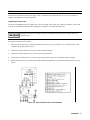
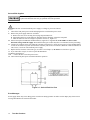
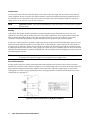
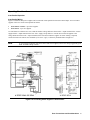
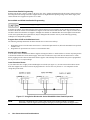
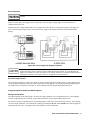
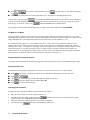
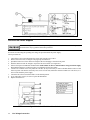
Slide the dustcover back far enough to expose the line select switches (see Figure B-l) or the line select jumpers (see
Figure B-2).
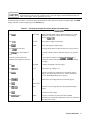
On a Series 654xA supply, move the line select switches to the positions corresponding to the desired voltage (see
Figure B-1).
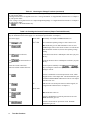
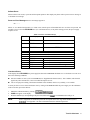
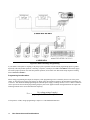
On a Series 655xA supply, move the line select jumpers to the positions corresponding to the desired voltage (see
Figure B-2).
To disconnect it from the transformer tab, pull the wire straight up. Do not wiggle the wire from side-to-side as this
can damage the tab.
Replace the top cover and secure the carrying straps.
Change the line fuse (on the rear panel) to the proper value for the new line voltage setting (see Table 1-3 in
Chapter
1).
Figure B-1. Series 654xA Line Select Switches
Line Voltage Conversion 67