1
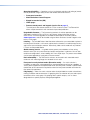
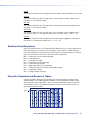
User Guide
Matrix Switchers
DMS 1600, DMS 2000,
DMS 3200, and DMS 3600
Configurable Digital Video Matrix Switchers
68-1829-01 Rev. D
09 13
Safety Instructions
Safety Instructions • English
WARNING: This symbol,
, when used on the product, is intended to
alert the user of the presence of uninsulated dangerous voltage within the
product’s enclosure that may present a risk of electric shock.
ATTENTION: This symbol,
, when used on the product, is intended
to alert the user of important operating and maintenance (servicing)
instructions in the literature provided with the equipment.
For information on safety guidelines, regulatory compliances, EMI/EMF
compatibility, accessibility, and related topics, see the Extron Safety and
Regulatory Compliance Guide, part number 68-290-01, on the Extron website,
www.extron.com.
Instructions de sécurité • Français
AVERTISSEMENT: Ce pictogramme,
, lorsqu’il est utilisé sur le
produit, signale à l’utilisateur la présence à l’intérieur du boîtier du produit
d’une tension électrique dangereuse susceptible de provoquer un choc
électrique.
Инструкция по технике безопасности • Русский
ПРЕДУПРЕЖДЕНИЕ: Данный символ,
, если указан
на продукте, предупреждает пользователя о наличии
неизолированного опасного напряжения внутри корпуса
продукта, которое может привести к поражению
электрическим током.
ВНИМАНИЕ: Данный символ,
, если указан на продукте,
предупреждает пользователя о наличии важных инструкций
по эксплуатации и обслуживанию в руководстве,
прилагаемом к данному оборудованию.
Для получения информации о правилах техники безопасности,
соблюдении нормативных требований, электромагнитной
совместимости (ЭМП/ЭДС), возможности доступа и других
вопросах см. руководство по безопасности и соблюдению
нормативных требований Extron на сайте Extron: www.extron.
ru, номер по каталогу - 68-290-01.
Chinese Simplified(简体中文)
ATTENTION: Ce pictogramme,
, lorsqu’il est utilisé sur le produit,
signale à l’utilisateur des instructions d’utilisation ou de maintenance
importantes qui se trouvent dans la documentation fournie avec le
matériel.
Pour en savoir plus sur les règles de sécurité, la conformité à la réglementation,
la compatibilité EMI/EMF, l’accessibilité, et autres sujets connexes, lisez les
informations de sécurité et de conformité Extron, réf. 68-290-01, sur le site
Extron, www.extron.fr.
Sicherheitsanweisungen • Deutsch
WARNUNG: Dieses Symbol
auf dem Produkt soll den Benutzer
darauf aufmerksam machen, dass im Inneren des Gehäuses dieses
Produktes gefährliche Spannungen herrschen, die nicht isoliert sind
und die einen elektrischen Schlag verursachen können.
VORSICHT: Dieses Symbol
auf dem Produkt soll dem Benutzer in der
im Lieferumfang enthaltenen Dokumentation besonders wichtige Hinweise
zur Bedienung und Wartung (Instandhaltung) geben.
Weitere Informationen über die Sicherheitsrichtlinien, Produkthandhabung,
EMI/EMF-Kompatibilität, Zugänglichkeit und verwandte Themen finden Sie in
den Extron-Richtlinien für Sicherheit und Handhabung (Artikelnummer
68-290-01) auf der Extron-Website, www.extron.de.
Instrucciones de seguridad • Español
ADVERTENCIA: Este símbolo,
, cuando se utiliza en el producto,
avisa al usuario de la presencia de voltaje peligroso sin aislar dentro del
producto, lo que puede representar un riesgo de descarga eléctrica.
ATENCIÓN: Este símbolo,
, cuando se utiliza en el producto, avisa
al usuario de la presencia de importantes instrucciones de uso y
mantenimiento recogidas en la documentación proporcionada con el
equipo.
Para obtener información sobre directrices de seguridad, cumplimiento
de normativas, compatibilidad electromagnética, accesibilidad y temas
relacionados, consulte la Guía de cumplimiento de normativas y seguridad de
Extron, referencia 68-290-01, en el sitio Web de Extron, www.extron.es.
警告:
产品上的这个标志意在警告用户该产品机壳内有暴露的危险 电压,
有触电危险。
注 意:
产 品 上 的 这个 标 志 意 在 提 示用 户 设 备 随 附 的 用 户 手 册 中 有
重要的操作和维护(维修)说明。
关于我们产品的安全指南、遵循的规范、EMI/EMF 的兼容性、无障碍
使用的特性等相关内容,敬请访问 Extron 网站 www.extron.cn,参见 Extron
安全规范指南,产品编号 68-290-01。
Chinese Traditional(
)
警告:
若產品上使用此符號,是為了提醒使用者,產品機殼內存在著
可能會導致觸電之風險的未絕緣危險電壓。
注意
若產品上使用此符號,是為了提醒使用者。
有關安全性指導方針、法規遵守、EMI/EMF 相容性、存取範圍和相關主題的詳
細資訊,請瀏覽 Extron 網站:www.extron.cn,然後參閱《Extron 安全性與法
規遵守手冊》,準則編號 68-290-01。
Japanese
警告: この記号
が製品上に表示されている場合は、筐体内に絶縁されて
いない高電圧が流れ、感電の危険があることを示しています。
注意: この記号
が製品上に表示されている場合は、本機の取扱説明書
に 記載されている重要な操作と保守(整備)の指示についてユーザーの 注
意を喚起するものです。
安全上のご注意、法規厳守、EMI/EMF適合性、その他の関連項目に
ついては、エクストロンのウェブサイト www.extron.jp より『Extron Safety and
Regulatory Compliance Guide』(P/N 68-290-01) をご覧ください。
Korean
경고: 이 기호
가 제품에 사용될 경우, 제품의 인클로저 내에 있는
접지되지 않은 위험한 전류로 인해 사용자가 감전될 위험이 있음을
경고합니다.
주의: 이 기호
가 제품에 사용될 경우, 장비와 함께 제공된 책자에 나와
있는 주요 운영 및 유지보수(정비) 지침을 경고합니다.
안전 가이드라인, 규제 준수, EMI/EMF 호환성, 접근성, 그리고 관련 항목에
대한 자세한 내용은 Extron 웹 사이트(www.extron.co.kr)의 Extron 안전 및
규제 준수 안내서, 68-290-01 조항을 참조하십시오.
FCC Class A Notice
This equipment has been tested and found to comply with the limits for a Class A digital
device, pursuant to part 15 of the FCC rules. The Class A limits provide reasonable
protection against harmful interference when the equipment is operated in a commercial
environment. This equipment generates, uses, and can radiate radio frequency energy
and, if not installed and used in accordance with the instruction guide, may cause harmful
interference to radio communications. Operation of this equipment in a residential area is
likely to cause interference; the user must correct the interference at his own expense.
NOTE: For more information on safety guidelines, regulatory compliances, EMI/EMF
compatibility, accessibility, and related topics, see the Extron Safety and
Regulatory Compliance Guide on the Extron website.
FDA/IEC 60825-1 Requirements
CLASS 1 LASER PRODUCT
Complies with FDA performance standards for laser products except for deviations pursuant
to Laser Notice No. 5, dated June 24, 2007.
The product is intended to be used with the fiber optic cables fully installed.
This product meets the applicable requirements of IEC 60825-1, Edition 1 (2007).
Any service to this product must be carried out by Extron Electronics and its qualified
service personnel.
Copyright
© 2013 Extron Electronics. All rights reserved.
Trademarks
All trademarks mentioned in this guide are the properties of their respective owners.
The following registered trademarks®, registered service marks(SM), and trademarks(TM) are the property of
RGB Systems, Inc. or Extron Electronics:
Registered Trademarks (®)
AVTrac, Cable Cubby, CrossPoint, eBUS, EDID Manager, EDID Minder, Extron, Flat Field, GlobalViewer, Hideaway, Inline, IP Intercom, IP Link,
Key Minder, LockIt, MediaLink, PlenumVault, PoleVault, PowerCage, PURE3, Quantum, SoundField, SpeedMount, SpeedSwitch, System
Integrator, TeamWork, TouchLink, V‑Lock, VersaTools, VN‑Matrix, VoiceLift, WallVault, WindoWall, XTP, and XTP Systems
Registered Service Mark(SM) : S3 Service Support Solutions
Trademarks (™)
AAP, AFL (Accu‑Rate Frame Lock), ADSP (Advanced Digital Sync Processing), AIS (Advanced Instruction Set), Auto‑Image, CDRS (Class D
Ripple Suppression), DDSP (Digital Display Sync Processing), DMI (Dynamic Motion Interpolation), Driver Configurator, DSP Configurator, DSVP
(Digital Sync Validation Processing), FastBite, FOXBOX, IP Intercom HelpDesk, MAAP, MicroDigital, ProDSP, QS-FPC (QuickSwitch Front Panel
Controller), Scope‑Trigger, SIS, Simple Instruction Set, Skew‑Free, SpeedNav, Triple‑Action Switching, XTRA, ZipCaddy, ZipClip
Notifications
The following notifications are used in this guide:
WARNING: A warning indicates a situation that has the potential to result in death or
severe injury.
ATTENTION: Attention indicates a situation that may damage or destroy the product or
associated equipment.
NOTE: A note draws attention to important information.
Specifications Availability
Product specifications are available on the Extron website, www.extron.com.
Conventions Used in this Guide
Software Commands
Commands are written in the fonts shown here:
^AR Merge Scene,,Op1 scene 1,1 ^B 51 ^W^C
[01] R 0004 00300 00400 00800 00600 [02] 35 [17] [03]
E X! *X1&* X2)* X2#* X2! CE}
NOTE: For commands and examples of computer or device responses mentioned
in this guide, the character “0” is used for the number zero and “O” represents
the capital letter “o.”
Computer responses and directory paths that do not have variables are written in the font
shown here:
Reply from 208.132.180.48: bytes=32 times=2ms TTL=32
C:\Program Files\Extron
Variables are written in slanted form as shown here:
ping xxx.xxx.xxx.xxx —t
SOH R Data STX Command ETB ETX
Selectable items, such as menu names, menu options, buttons, tabs, and field names are
written in the font shown here:
From the File menu, select New.
Click the OK button.
Contents
Introduction............................................................ 1
About this Guide.................................................. 1
About the DMS Matrix Switchers......................... 1
Features.............................................................. 3
Installation............................................................... 6
Setup and Installation Checklist........................... 6
Rear Panel Cabling and Features......................... 7
I/O Boards....................................................... 9
Remote Port.................................................. 11
Ethernet Port................................................. 11
Reset Button and LED................................... 12
Power............................................................ 13
Cooling fans (DMS 1600 and DMS 3600 only)...13
Front Panel Configuration Port........................... 13
Operation............................................................... 14
Front Panel Controls and Indicators................... 14
Input and Output Buttons.............................. 16
Control Buttons............................................. 18
Power Indicators............................................ 19
Button Labels................................................ 20
Rear Panel Power Indicators
(DMS 1600 and DMS 3600)............................. 20
Front Panel Operations...................................... 21
Definitions...................................................... 21
Power............................................................ 22
Creating a Configuration................................ 22
Viewing a Configuration................................. 26
I/O Grouping.................................................. 27
Using Presets................................................ 30
Muting and Unmuting Outputs....................... 33
Locking the Front Panel (Executive Mode)..... 34
Performing a System Reset from
the Front Panel............................................. 35
Background Illumination................................ 35
Selecting the Rear Panel Remote Port
Protocol and Baud Rate............................... 36
Rear Panel Operations....................................... 36
Performing Soft System Resets
(Modes 3, 4, and 5)...................................... 38
Performing a Hard Reset (Mode 1)................. 39
Troubleshooting................................................. 39
General Checks............................................. 39
Digital Signal Guidelines................................. 40
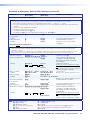
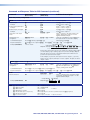
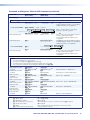
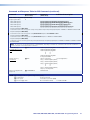
Configuration Worksheets................................. 41
Worksheet Example 1: System Equipment.... 41
Worksheet Example 2: Daily Configuration..... 42
Worksheet Example 3: Test Configuration...... 43
Programming Guide............................................ 46
Local Host-Control Ports................................... 46
Ethernet (LAN) Port........................................... 47
Host-to-Switcher Instructions............................ 48
Switcher-Initiated Messages.............................. 48
Switcher Error Responses................................. 49
Using the Command and Response Tables....... 49
Command and Response Table for
SIS Commands............................................ 50
Matrix Software.................................................... 61
Matrix Switchers Control Program..................... 61
Installing the Software.................................... 61
Software Operation via Ethernet.................... 62
Using the Matrix Switcher Control Software... 63
Starting the program...................................... 64
Using the program......................................... 65
IP Settings/Options Window.......................... 67
Updating Firmware........................................ 72
Uploading HTML Files.................................... 76
Windows Buttons, Drop Boxes,
and Trash Can.............................................. 77
Windows Menus............................................ 77
Using Emulation Mode................................... 82
Using the Help System.................................. 82
Button Label Generator Program....................... 83
Installing the Button Label Generator
Software....................................................... 83
Using the Button Label Generator Software... 84
DMS 1600, DMS 2000, DMS 3200, and DMS 3600 • Table of Contents
v
HTML Operation.................................................. 85
Ethernet Connection........................................ 108
Opening the Embedded Web Pages.................. 85
Status Tab......................................................... 87
System Status Page...................................... 87
DSVP and Physical Configuration Page......... 88
Configuration Tab.............................................. 89
System Settings Page................................... 89
Passwords Page........................................... 92
Email Settings Page....................................... 93
Firmware Upgrade Page................................ 94
File Management Tab........................................ 96
File Management Page.................................. 96
Control Tab........................................................ 97
Set and View Ties Page................................. 97
EDID and Mute Settings Page....................... 98
Special Characters............................................ 99
Ethernet Link................................................... 108
Ethernet Connection.................................... 108
Default IP Address....................................... 108
Pinging to Determine the Extron
IP Address.................................................. 109
Pinging to Determine the Web IP Address... 109
Configuring the DMS Matrix Switcher for
Network use via the ARP Command........... 109
Connecting as a Telnet Client....................... 111
Telnet Tips................................................... 111
Subnetting — A Primer.................................... 113
Gateways.................................................... 113
Local and Remote Devices.......................... 113
IP Addresses and Octets............................. 113
Subnet Masks and Octets........................... 113
Determining Whether Devices are
on the Same Subnet................................... 114
Maintenance and Modifications.................... 100
Mounting the Switcher..................................... 100
UL Guidelines.............................................. 100
Mounting Instructions.................................. 100
Removing and Installing the I/O Board or
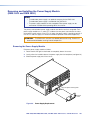
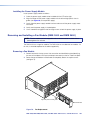
Blank Panel.................................................... 101
Removing the I/O Board or Blank Panel....... 102
Installing the I/O Board or Blank Panel......... 102
Removing and Installing the Power Supply
Module (DMS 1600 and DMS 3600)............... 103
Removing the Power Supply Module........... 103
Installing the Power Supply Module............. 104
Removing and Installing a Fan Module
(DMS 1600 and DMS 3600)........................... 104
Removing a Fan Module.............................. 104
Installing a Fan Module................................ 105
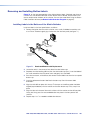
Removing and Installing Button Labels............ 106
Installing Labels in the Buttons of the
Matrix Switcher........................................... 106
DMS 1600, DMS 2000, DMS 3200, and DMS 3600 • Introduction
vi
Introduction
WARNING: Risk of serious physical injury — The DMS fiber optic I/O boards output
continuous invisible light, which may be harmful to the eyes; use with caution.
• Do not look into the fiber optic cable connectors or into the fiber optic cables
themselves.
• Plug the attached dust caps into the optical transceivers when the fiber cable is
unplugged.
•
About this Guide
•
About the DMS Matrix Switchers
•
Features
About this Guide
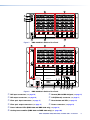
This guide contains installation, configuration, and operating information for the Extron
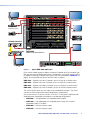
DMS 1600, DMS 2000, DMS 3200, and DMS 3600 Matrix Switchers (see figure 1 on the
next page). These customizable matrix switchers support DVI inputs and outputs and the
fiber optic outputs and inputs of Extron DFX transmitters and receivers. The switchers can
support multiple inputs and outputs, depending on the model:
•
DMS 1600 — up to 16 inputs and outputs
•
DMS 2000 — up to 20 inputs and outputs
•
DMS 3200 — up to 32 inputs and outputs
•
DMS 3600 — up to 36 inputs and outputs
NOTE: In this guide, “DMS matrix switcher” refers to any switcher model.
About the DMS Matrix Switchers
The DMS matrix switchers are configurable, modular matrix switchers that distribute a single
link of DVI (or HDMI with suitable adapters) digital video and DFX transmitter and receiver
outputs and inputs. The switchers are assembled from user-installed input and output (I/O)
boards. There are six I/O boards available:
•
4-input x 4-output DVI board
•
4-input x 4-output mutimode fiber optic board
•
4-input DVI board
•
4-input multimode fiber optic board
•
4-output DVI board
•
4-output multimode fiber optic board
DMS 1600, DMS 2000, DMS 3200, and DMS 3600 • Introduction
1
B
A
B
9 - 12
A
B
13- 16
A
B
1-4
A
DVI-D INPUTS
C
D
A
B
C
D
A
B
C
D
A
B
C
D
A
B
DVI-D OUTPUTS
C
D
C
D
C
D
C
D
C
D
C
D
C
D
C
D
C
D
FAN ASSEMBLY
5-8
DVI Equipped
PCs
DVI-D INPUTS
DVI-D INPUTS
17 - 20
Compact HDTV
Camera Systems
DVI-D INPUTS
21 - 24
B
A
B
29- 32
A
33 - 36
HD Camera
B
A
25 - 28
FAN ASSEMBLY
A
B
A
FOXBOX 4G Rx DVI
DISCONNECT BOTH POWER
CORDS BEFORE SERVICING
B
DVI-D OUTPUTS
DVI-D OUTPUTS
DVI-D OUTPUTS
DVI-D OUTPUTS
DVI-D OUTPUTS
DVI-D OUTPUTS
DVI-D OUTPUTS
DVI-D OUTPUTS
REMOTE
LAN
RS232/RS422
ACT LINK
PRIMARY POWER SUPPLY
HDTV Monitors
Digital Monitors
DVI Projectors
RESET
REDUNDANT POWER SUPPLY
REDUNDANT
POWER
12V
1.0A MAX
MODE
ON
POWER
12V
1.0A MAX
DVI-D
MODE
100-240V
50/60Hz
1.2A MAX.
INPUTDVI-D OUTPUT AUDIO AUDIORS-232
RS-232
OVER OVER
FIBER
ALARM
FIBERALARM
1 2
FOXBOX 4G Rx DVI
Tx Rx
Tx Rx
FOXBOX 4G Tx DVI
1
1
PRIMARY
2
2
100-240V
50/60Hz
1.2A MAX.
ANAHEIM, CA
FOXBOX 4G Tx DVI
POWER
12V
1.0A MAX
MODE
ON
DVI-D OUTPUT
POWER
12V
1.0A MAX
DVI-D INPUT
AUDIO
RS-232
OVER FIBER ALARM
AUDIO
Extron
DMS 3600
Analog Monitor
Modular DVI Matrix Switcher
RS-232
OVER FIBER ALARM
1 2
Tx Rx
1 2
FOXBOX 4G
Rx DVI
FOXBOX
4G Tx DVI
Tx Rx
1 2
ADJUST
INPUTS
1
2
3
4
5
CONFIG
6
MUTE
AUTO
IMAGE
SIZE
BRIGHT
/CONT
DETAIL
MENU
FREEZE
PIP
PRESET
POSITION
COLOR
/TINT
ZOOM
/PAN
NEXT
7
UPS 507
UNVERSAL SIGNAL PROCESSOR
USP 507
PC
Figure 1.
Typical DMS 3600 Application
Each switcher model supports a different number of I/O boards of any of the above type.
With only one input and output board, each is configured as a 4-input by 4-output matrix.
By adding or removing I/O boards within certain rules that are detailed in I/O Boards, on
page 9, you can expand and contract the DMS matrix as follows:
DMS 1600 — Supports up to four I/O boards, up to a 16-input by 16-output matrix.
DMS 2000 — Supports up to five I/O boards, up to a 20-input by 20-output matrix.
DMS 3200 — Supports up to eight I/O boards, up to a 32-input by 32-output matrix.
DMS 3600 — Supports up to nine I/O boards, up to a 36-input by 36-output matrix.
The matrix switcher routes any input signal to any combination of outputs. The matrix
switcher can route multiple input/output configurations simultaneously.
One or two internal, 100 VAC to 240 VAC, 50-60 Hz, 175-watt power supplies provide
worldwide power compatibility and reliability in the following configurations:
•
DMS 3600 — Two replaceable, hot-swappable power supplies
•
DMS 1600 — One replaceable, hot-swappable power supply with a second
replaceable supply as an option
•
DMS 2000 — One built-in power supply
•
DMS 3200 — One built-in power supply
DMS 1600, DMS 2000, DMS 3200, and DMS 3600 • Introduction
2
The matrix switchers are single box solutions to complex digital video signal routing
applications. Each input and output is individually isolated and buffered, and any input can be
switched to any one or all outputs with virtually no crosstalk or signal noise between channels.
The matrix switchers can be remotely controlled via their rear panel Remote RS-232/RS-422
ports, their rear panel LAN port, and their front panel Configuration (USB) port using either
the Extron Matrix Switchers Control Program or the Simple Instruction Set (SIS). The icondriven Extron software uses a graphical, drag-and-drop interface to make I/O configuration
and other customization functions simple and convenient. The SIS is a set of basic ASCII
code commands that provide simple control through a control system or PC.
The switcher can be operated remotely by any of the following when connected to either a
serial port or the LAN port:
•
Control system
•
PC
•
Extron MKP 2000 or MKP 3000 remote control panel
•
(RS-232/RS-422 only) Extron MCP 1000 remote control panel
•
(RS-232/RS-422 only) Extron MKP 1000 remote keypad
The matrix switchers are housed in rack-mountable, metal enclosures, of the following sizes,
with mounting flanges for standard 19-inch racks:
•
DMS 1600 — 4U high
•
DMS 2000 — 3U high
•
DMS 3200 — 5U high
•
DMS 3600 — 8U high
Features
DVI video inputs and outputs — With DVI I/O boards, the switchers input and output
DVI-D digital video signals on DVI-I connectors.
Fiber optic inputs and outputs — With fiber optic I/O boards, the switchers input and
output fiber optic signals generated and decoded by Extron DFX transmitters and receivers
on LC connnectors.
Automatic input board cable equalization — Typically equalizes greater than 100 feet
(30 m) at 1.65 Gb/s of Extron DVID SL or equivalent high quality cable.
Automatic output board re-clocking — Restores the signal timing and shape allowing for
increased transmission distances.
EDID Minder — Lets you direct the monitor reference of the computer video source and
what resolution to output.
Switching flexibility — The switcher provides individually buffered, independent matrix
switched outputs.
•
Tie any input to any or all outputs.
•
Quick multiple tie — Multiple inputs can be switched to multiple outputs
simultaneously. This allows all displays (outputs) to change from source to source at the
same time.
Digital Sync Validation Processing (DSVP) — In critical environments or unmanned,
remote locations, it may be vital to know that sources are active and switching. The Extron
DSVP feature confirms that input sources are active by scanning all sync inputs for active
signals. DSVP provides instantaneous feedback via any of the remote control ports on the
switcher.
DMS 1600, DMS 2000, DMS 3200, and DMS 3600 • Introduction
3
E-mail notification — The DMS matrix switchers have a built-in SMTP client feature
that send out e-mail notifications through an SMTP server. The e-mail notification function
monitors a selected input. If the input loses or regains the sync signal, the switcher sends
out an e-mail regarding the loss or restoration of the input signal to the e-mail recipients. The
matrix switcher can send e-mails to up to 8 e-mail recipients.
Rooming — The switcher can be programmed to group multiple outputs to specific
“rooms” (user-designated groups), allowing them to have their own presets.
Field upgradable, hot-swappable modular design — The architecture of the DMS
matrix switcher allows you to repair, upgrade, reconfigure, or expand the matrix by simply
installing a new I/O board or replacing a board of one type with one of another.
Hot-swappable components let you replace any I/O board at any time without powering
down the switcher.
DMS 1600 and DMS 3600 power redundancy — The DMS 1600 and DMS 3600
have standard and optional power redundancy features. This redundancy, standard for
the DMS 3600 and optional for the DMS 1600, ensures zero downtime and no loss of
functionality through all but catastrophic power failure to support round-the-clock operation
in mission-critical applications.
•
Two AC power inputs — Two inputs ensure the switcher operates through any power
interruption short of a simultaneous loss of power from both power sources.
•
Two power input circuits — The two complete power circuits, from the plug, through
the power supply, to the power insertion onto the power distribution plane, are separate
and independent from each other (see figure 2).
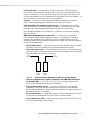
AC
Power
AC
Power
Primary
Power
Supply
Figure 2.
Redundant
Power
Supply
Redundant Power Supply Backs Up Primary Power Supply
•
Two hot-swappable power supplies (standard for the DMS 3600 and optional
for the DMS 1600) — The 100 VAC to 240 VAC, 50-60 Hz power supplies of the
matrix switchers provide worldwide power compatibility.
•
Primary and redundant circuits — The power supply circuitry is configured to
automatically switch over. Should the primary power supply fail, the hot redundant
power supply immediately assumes the load of the failed primary supply, meaning zero
downtime and no loss of functionality.
•
Ease of maintenance — A failed power supply can be easily replaced from the rear at
any time without powering down the matrix, and with no tools required.
•
Power supply status LEDs — Front panel and rear panel LEDs indicate the status of
the primary and redundant power supplies.
DMS 1600, DMS 2000, DMS 3200, and DMS 3600 • Introduction
4
Operational flexibility — Operations such as input/output selection and setting of presets
can be performed using a variety of local and remote control mechanisms:
•
Front panel controller
•
Matrix Switchers Control Program
•
Simple Instruction Set (SIS)
•
HTML pages
•
Remote control panels and keypads (see the list on page 3)
The serial ports allow remote control via a PC or a control system. The Ethernet link
allows multiple remote links with two levels of password protection.
Upgradeable firmware — The firmware that controls all switcher operation can be
upgraded in the field via RS-232/RS-422 or Ethernet, without taking the switcher
out of service. Firmware upgrades are available for download on the Extron website,
www.extron.com, and can be installed using the Matrix Switchers Control Program or the
built-in HTML pages.
Labeling — The included Button Label Generator software lets you create labels to place in
the front panel I/O buttons, with names, alphanumeric characters, or color bitmaps for easy
and intuitive input and output selection. Alternatively, labels can be made with any Brother®
P-Touch® or comparable labeler.
Global memory presets — 32 global memory presets are available as a time-saving
feature that lets you set up and store input/output configurations in advance. You can then
recall those configurations, when needed, with a few simple steps. The presets are available
via front panel operation or serial port or Ethernet control.
Rack mountability — The DMS matrix switchers are housed in rack-mountable metal
enclosures with mounting flanges for standard 19-inch racks.
Front panel security lockout modes (Executive mode) — If a matrix switcher is
installed in an open area, where operation by unauthorized personnel may be a problem, a
security lockout mode can be implemented. When the front panel is locked, a special button
combination or SIS command is required to unlock the front panel controller and make the
front panel fully operational.
I/O grouping — Allows the matrix switcher to be virtually divided into smaller subswitchers,
making installation and control easier. I/O grouping limits the selection of inputs and outputs
to members of the same group. I/O grouping allows specific outputs, such as those
designated for a specific purpose, to be grouped together.
DMS 1600, DMS 2000, DMS 3200, and DMS 3600 • Introduction
5
Installation
This section describes the installation of the DMX matrix switchers, including:
•
Setup and Installation Checklist
•
Rear Panel Cabling and Features
•
Front Panel Configuration Port
Setup and Installation Checklist
Get ready
c Familiarize yourself with the DMS matrix switcher.
c Obtain IP setting information for the matrix switcher from the local network administrator
(see Ethernet Connection on page 108).
Configure the matrix switcher
c Install the desired I/O boards (page 101).
Perform physical installation
c Create (page 83) and replace (page 106) button labels (optional).
c Install the switcher in a rack (page 100) (optional).
c Cable input and output devices to the I/O boards (page 9).
c Connect computers or control systems to any of the remote control ports (a serial
[RS-232/RS-422] port [page 11], a USB port [page 13], and a LAN port [page 11]) on
the switcher (optional).
c Connect power (page 13).
c Test the switcher by creating a tie (page 23).
Ancillary operations
c Install the Matrix Switchers Control Program (page 61).
DMS 1600, DMS 2000, DMS 3200, and DMS 3600 • Installation
6
Rear Panel Cabling and Features
Figure 3, below, shows a DMS 1600. Figure 4, below, shows a DMS 2000. Figure 5, on the
next page, shows a DMS 3200. Figure 6, on the next page, shows a DMS 3600. The four
models have similar features, but different-sized enclosures and a different arrangement of
the features.The DMS 2000 and DMS 3200 do not have swappable power supplies or fan
assemblies. The DMS 3600 has two fan assemblies.
1
1-4
10
1
A
B
A
B
1
2
DVI-D INPUTS
C
D
A
B
C
D
A
B
DVI-D OUTPUTS
C
D
C
D
DMS 44 DVI
5-8
ANAHEIM, CA
DVI-D INPUTS
DVI-D OUTPUTS
DMS 44 DVI
B
A
B
9 - 12
A
13 - 16
RESET
D
TMDS
FIBER
OUTPUTS
REDUNDANT
100-240V
50-60Hz
1.2A MAX.
PRIMARY
100-240V
50-60Hz
1.2A MAX.
PRIMARY POWER SUPPLY
7
Figure 3.
1
8
9
1
3
1-4
A
B
A
B
9
4
1
2
A
B
A
B
DVI-D INPUTS
C
D
A
B
C
D
A
B
C
D
A
B
DVI-D OUTPUTS
C
D
C
D
C
D
DVI-D INPUTS
DVI-D OUTPUTS
LAN
5-8
RESET
DMS 44 DVI
9 - 12
DMS 44 DVI
DVI-D INPUTS
DVI-D OUTPUTS
13- 16
DMS 44 DVI
B
17 - 20
100-240V
50/60Hz
2.0A MAX
C
D
A
B
TMDS
FIBER
INPUTS
A
C
TMDS
FIBER
OUTPUTS
C
D
A
B
TMDS
FIBER
INPUTS
8
Figure 4.
DMS FIBER 44
DMS 1600 Matrix Switcher Rear Panel
REMOTE
5
D
REDUNDANT POWER SUPPLY
1
7
6
C
B
DISCONNECT BOTH POWER
CORDS BEFORE SERVICING
REMOTE
RS-232/RS-422
C
A
TMDS
FIBER
INPUTS
ACT
LAN
6
D
TMDS
FIBER
INPUTS
LINK
5
C
1
3
DMS FIBER 44
C
TMDS
FIBER
OUTPUTS
D
D
DMS FIBER 44
4
DMS 2000 Matrix Switcher Rear Panel
a DVI input connectors (see page 10)
e Remote (RS-232/RS-422) port (see page 11)
b DVI output connectors (see page 10)
f LAN (Ethernet) connector (see page 11)
c Fiber optic input connectors (see page 11)
g Reset button and LED (see page 12)
d Fiber optic output connectors (see page 11)
h Power connectors (see page 13)
i Power indicator LEDs (DMS 1600 and DMS 3600 only) (see page 13)
j Cooling fan assemblies (DMS 1600 and DMS 3600 only) (see
page 106)
DMS 1600, DMS 2000, DMS 3200, and DMS 3600 • Installation
7
A
B
A
B
A
B
A
B
A
B
A
B
1-4
B
1
2
DVI-D INPUTS
C
D
A
B
C
D
A
B
C
D
A
B
C
D
A
B
C
D
A
B
C
D
A
B
DVI-D OUTPUTS
C
D
C
D
C
D
C
D
C
D
C
D
DMS 44 DVI
DVI-D INPUTS
DVI-D OUTPUTS
5-8
LAN
6
7
A
17 - 20
REMOTE
5
21 - 24
1
9 - 12
RESET
DMS 44 DVI
DVI-D INPUTS
DVI-D OUTPUTS
13- 16
DMS 44 DVI
DVI-D INPUTS
DVI-D OUTPUTS
DMS 44 DVI
DVI-D INPUTS
DVI-D OUTPUTS
DMS 44 DVI
25 - 28
100-240V
50/60Hz
3.0A MAX
DVI-D OUTPUTS
DMS 44 DVI
C
D
A
B
TMDS
FIBER
INPUTS
C
D
TMDS
FIBER
OUTPUTS
B
29- 32
A
DMS FIBER 44
C
D
TMDS
FIBER
OUTPUTS
8
Figure 5.
DVI-D INPUTS
1
3
DMS FIBER 44
4
DMS 3200 Matrix Switcher Rear Panel
1
1-4
1
10
A
B
A
B
A
B
A
B
A
B
A
B
1
2
DVI-D INPUTS
C
D
A
B
C
D
A
B
C
D
A
B
C
D
A
B
C
D
A
B
DVI-D OUTPUTS
C
D
C
D
C
D
C
D
C
D
DMS 44 DVI
FAN ASSIMBLY
DVI-D OUTPUTS
5-8
DVI-D INPUTS
9 - 12
DMS 44 DVI
DVI-D INPUTS
DVI-D OUTPUTS
13- 16
DMS 44 DVI
DVI-D INPUTS
DVI-D OUTPUTS
17 - 20
DMS 44 DVI
DVI-D OUTPUTS
21 - 24
DMS 44 DVI
C
D
A
B
A
B
TMDS
FIBER
INPUTS
C
D
TMDS
FIBER
OUTPUTS
25 - 28
FAN ASSIMBLY
DVI-D INPUTS
DMS FIBER 44
C
D
TMDS
FIBER
OUTPUTS
B
29- 32
A
DMS FIBER 44
C
D
TMDS
FIBER
OUTPUTS
B
33 - 36
A
DMS FIBER 44
C
D
TMDS
FIBER
OUTPUTS
N
DISCONNECT BOTH POWER
CORDS BEFORE SERVICING
PRIMARY POWER SUPPLY
DMS FIBER 44
REMOTE
LAN
RS232/RS422
ACT LINK
RESET
REDUNDANT POWER SUPPLY
REDUNDANT
100-240V
50/60Hz
1.2A MAX.
PRIMARY
100-240V
50/60Hz
1.2A MAX.
ANAHEIM, CA
1
8
Figure 6.
1
3
9
4
5
6 7
9
DMS 3600 Matrix Switcher Rear Panel
a DVI input connectors (see page 10)
e Remote (RS-232/RS-422) port (see page 11)
b DVI output connectors (see page 10)
f LAN (Ethernet) connector (see page 11)
c Fiber optic input connectors (see page 11)
g Reset button and LED (see page 12)
d Fiber optic output connectors (see page 11)
h Power connectors (see page 13)
i Power indicator LEDs (DMS 1600 and DMS 3600 only) (see page 13)
j Cooling fan assemblies (DMS 1600 and DMS 3600 only) (see
page 106)
DMS 1600, DMS 2000, DMS 3200, and DMS 3600 • Installation
8
ATTENTION: Use electrostatic discharge (ESD) precautions (be electrically grounded)
when making connections. Electrostatic discharge can damage equipment, even if
you cannot feel, see, or hear it.
Remove system power before making all connections.
I/O Boards
I/O board configuration overview
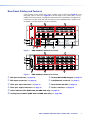
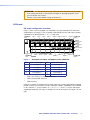
Figure 7 shows a mix of I/O boards. On the boards, the input and output DVI connectors
are identified as A through D. Each I/O board is identified by the input and output numbers
supported by the board position (1 - 4, 5 - 8, and so on).
Location A
Input
Input 1
Input 2
1-4
A
Input 3
DVI-D INPUTS
B
C
Output 4 Location D
Output 1 Output 2 Output 3
Input 4
D
A
DVI-D OUTPUTS
B
C
Output
Slot 1
D
(1-4) Input/Output
Board
ANAHEIM, CA
B
5-8
A
C
D
A
C
B
TMDS
FIBER
INPUTS
D
TMDS
FIBER
OUTPUTS
9 - 12
A
B
DMS FIBER 44
DVI-D OUTPUTS
C
D
(5-8) Input/Output
Board
Slot 3
(9-12) Output Board
13 - 16
Slot 4
No board installed
100-240V
Location A
Input
Figure 7.
PRIMARY POWER SUPPLY
50/60Hz 1.2A MAX.
Input 5
Input 6
Input 7
REDUNDANT POWER SUPPLY
Input 8
Output 10
Output 9
Output 12
Output 11
Location D
Output
Arrangement of Inputs and Outputs on the I/O Boards
Slot
Inputs and outputs
Slot
Inputs and outputs
1
1 through 4
5*
17 through 20
2
5 through 8
6
21 through 24
3
9 through 12
7
25 through 28
4
13 through 16
8
29 through 32
33 through 36
9
*
Slot 2
DMS 2000, DMS 3200, and DMS 3600 only
DMS 3200 and DMS 3600 only
DMS 3600 only
Locations A through D correspond to the input and output numbers identified by the board
position numbers. (For example, the input and output numbers supported by the I/O board
in slot 2 [location 5 - 8] are as follows: A = 5, B = 6, C = 7, and D = 8.) Inputs and outputs
are grouped separately, with inputs A through D on the left and outputs A through D on the
right.
DMS 1600, DMS 2000, DMS 3200, and DMS 3600 • Installation
9
Below are installation guidelines for the switcher configuration; if you incorrectly order the
I/O boards, the switcher will not recognize some inputs, outputs, or both.
•
You must install a 4x4 DVI or fiber optic input and output board in the top slot (slot 1).
•
You can install any of the six board types (a 4x4 DVI or fiber optic input and output
board, a 4 DVI or fiber optic input board, or a 4 DVI or fiber optic output board) or a
blank panel in the next slot (slot 2).
•
You can install any of the board types in the slot directly underneath a 4x4 input and
output board.
•
After you install a 4-input board or 4-output board, all active boards underneath it must
be the same size (4-input or 4-output).
•
Within these size guidelines (4-input must follow 4-input or 4-output must follow
4-output), you can follow a DVI board with a fiber optic board or follow a fiber optic
board with a DVI board.
•
If you install a blank panel, all slots under it must contain blank panels (you cannot skip
a slot).
I/O connections
WARNING: Risk of serious physical injury — The DMS fiber optic I/O boards output
continuous invisible light, which may be harmful to the eyes; use with caution. For
additional safety, plug the attached dust caps into the optical transceivers when the
fiber cable is unplugged.
NOTES:
• Fiber optic boards: Ensure that you use multimode fiber cable for your I/O board.
Typically, multimode cable has an orange or aqua jacket.
• DVI boards: Although the DVI I/O boards use DVI-I connectors, the switchers
handle only DVI-D (digital) video and the boards are labeled “DVI-D.”
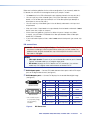
a DVI-D Inputs ports — Connect DVI cables between these ports and the DVI output
ports of the digital video sources (see figure 8).
b DVI-D Outputs ports — Connect DVI displays for the routed direct digital image
(see figure 8).
1
9
17
8
24
Female Connector
Male Connector
* CEC control on pin 8
is a proprietary usage,
not the industry
standard.
Figure 8.
Pin
Signal
Pin
Signal
Pin
Signal
1
TMDS data 2–
9
TMDS data 1–
17
TMDS data 0–
2
TMDS data 2+
10
TMDS data 1+
18
TMDS data 0+
3
TMDS data 2
shield
11
TMDS data 1
shield
19
TMDS data 0
shield
4
Spare
12
Spare
20
Spare
5
Spare
13
Spare
21
Spare
6
DDC clock
14
+5 V power
22
TMDS clock
Shield
7
DDC data
15
Ground (+5 V)
23
TMDS clock+
8
CEC control*
16
Hot Plug Detect
24
TMDS clock–
DVI Connectors
DMS 1600, DMS 2000, DMS 3200, and DMS 3600 • Installation
10
c Fiber optic input ports — Connect fiber optic cables to the Input LC
connectors.
Connect the opposite ends of these fiber optic cables to the Output connectors on
DFX 100 Tx transmitters.
Input LEDs — Amber indicates fiber connections.
Green indicates input signal detection.
d Fiber optic output ports — Connect fiber optic cables to the Input LC
connectors.
Connect the opposite ends of these fiber optic cables to the Input connectors on
DFX 100 Rx receivers.
Input LEDs — Amber indicates fiber connections.
Green indicates signal transmission.
Remote Port
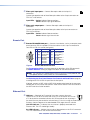
e Remote RS-232/RS-422 port — Connect a host device, such as a computer, touch
panel control, or RS-232 capable PDA to the switcher via this 9-pin D connector for
serial RS-232/RS-422 control (see figure 9).
REMOTE
RS-232/RS-422
9
5
1
6
Figure 9.
RS-422 Function
Pin RS-232 Function
1
— Not used
—
Not used
2
TX Transmit data
TX– Transmit data (–)
3
RX Receive data
RX– Receive data (–)
Not used
4
— Not used
—
5
Gnd Signal ground Gnd Signal ground
Not used
6
— Not used
—
7
— Not used
RX+ Receive data (+)
8
— Not used
TX+ Transmit data (+)
9
— Not used
—
Not used
Remote RS-232/RS-422 Port
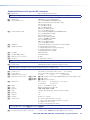
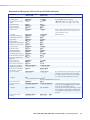
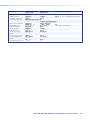
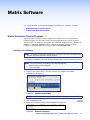
See Programming Guide, starting on page 46 for definitions of the SIS commands
and Matrix Software starting on page 61 for details on the control software.
NOTE: The switcher can support either the RS-232 or RS-422 serial protocol, and
can operate at 9600, 19200, 38400, or 115200 baud rates.
See Selecting the Rear Panel Remote Port Protocol and Baud Rate on page 36
to configure the RS-232/RS-422 port from the front panel.
If desired, connect an MKP 2000 or MKP 3000 remote control panel to the rear panel
Remote port on the switcher. See the MKP 2000 Remote Control Panel User Guide or
the MKP 3000 User Guide for details.
LAN
f LAN port — If desired, for IP control of the system, connect the matrix
ACT
Ethernet Port
LINK
switcher to a PC or to an Ethernet LAN via this RJ-45 connector. You can use
a PC to control the networked switcher with SIS commands from anywhere in
the world. You can also control the switcher from a PC that is running the Extron Matrix
Switchers Control Program or has downloaded HTML pages from the switcher.
Link LED indicator — Indicates that the switcher is properly connected to an
Ethernet LAN. This LED should light steadily.
Act LED indicator — Indicates transmission of data packets on the RJ-45 connector.
This LED should flicker as the switcher communicates.
DMS 1600, DMS 2000, DMS 3200, and DMS 3600 • Installation
11
Cabling
It is vital that your Ethernet cables be the correct cable type and that they be properly
terminated with the correct pinout. Ethernet links use Category (CAT) 3, 5e, or CAT 6,
unshielded twisted pair (UTP) or shielded twisted pair (STP) cables, terminated with RJ-45
connectors. Ethernet cables are limited to a length of 328 feet (100 m).
NOTES:
• Do not use standard telephone cables. Telephone cables do not support Ethernet
or Fast Ethernet.
• Do not stretch or bend cables. Transmission errors can occur.
The cable used depends on your network speed. The switcher supports both
10 Mbps (10Base-T — Ethernet) and 100 Mbps (100Base-T — Fast Ethernet), half-duplex
and full-duplex Ethernet connections.
•
10Base-T Ethernet requires CAT 3 UTP or STP cable at minimum.
•
100Base-T Fast Ethernet requires CAT 5e UTP or STP cable at minimum.
RJ-45 connector wiring
The Ethernet cable can be terminated as a straight-through cable or a crossover cable and
must be properly terminated for your application (see figure 10).
•
Crossover cable — Direct connection between the computer and the DMS matrix
switcher
•
Patch (straight) cable — Connection of the DMS matrix switcher to an Ethernet LAN
Crossover Cable
Pins:
12345678
Pin
Insert Twisted
Pair Wires
RJ-45
Connector
End 1
Wire color
End 2
Wire color
Straight-through Cable
Pin
End 1
Wire color
End 2
Wire color
1 White-green
White-orange
1 White-orange
White-orange
2 Green
Orange
2
Orange
Orange
3 White-orange
White-green
3 White-green
White-green
4 Blue
Blue
4 Blue
Blue
5 White-blue
White-blue
5 White-blue
White-blue
6 Orange
Green
6
Green
7 White-brown
White-brown
7 White-brown
White-brown
8 Brown
Brown
8 Brown
Brown
T568A
Green
T568B
A cable that is wired as T568A at one end
and T568B at the other (Tx and Rx pairs
reversed) is a "crossover" cable.
T568B
T568B
A cable that is wired the same at both ends is
called a "straight-through" cable, because
no pin/pair assignments are swapped.
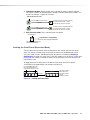
Figure 10. RJ-45 Connector and Pinout Tables
Reset Button and LED
g Reset button — The Reset button initiates four levels of reset of the matrix
switcher. For four different reset levels, press and hold the button while the
switcher is running or while you power up the switcher (see Rear Panel
Operations on page 36 for details).
DMS 1600, DMS 2000, DMS 3200, and DMS 3600 • Installation
RESET
12
Power
h Primary and Redundant AC power connectors —
NOTES:
• Redundant power connectors are present on the DMS 1600 and DMS 3600
only.
• A redundant power supply is optional for the DMS 1600 and standard for the
DMS 3600.
• For the most reliable power with your DMS 1600 and DMS 3600, connect
a power cord between the Redundant power connector and either an
uninterruptible power source or to a power source that is completely
independent from the primary power source.
Plug standard IEC power cords into these connectors to connect the switcher to
100 VAC to 240 VAC, 50-60 Hz power sources.
i Primary and Redundant power supply indicator LEDs (DMS 1600 and
DMS 3600 only) —
Green — Indicates that the associated power supply is operating normally.
Red — Indicates that the associated power supply is operating outside the normal
tolerances or has failed (see Removing and Installing the Power Supply Module
(DMS 1600 and DMS 3600)) on page 103 to replace the power supply).
Cooling fans (DMS 1600 and DMS 3600 only)
NOTE: DMS 2000 and DMS 3200 cooling fans are fixed in place and not field
replaceable.
j Cooling fan or fans (DMS 1600 and DMS 3600 only) — See Removing and
Installing a Fan Module (DMS 1600 and DMS 3600) on page 104.
Front Panel Configuration Port
CONTROL
CONFIG
ENTER
PRESET
VIEW
ESC
CONTROL
CONFIG
PRIMARY
REDUNDANT
ENTER
PRESET
VIEW
ESC
POWER
POWER SUPPLY
DMS 1600
DMS 2000
TMDS DIGITAL MATRIX SWITCHER
1
TMDS DIGITAL MATRIX SWITCHER
1
Figure 11. Front Panel Configuration Port
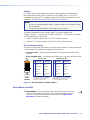
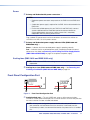
a Config(uration) port — This mini USB B port serves a similar communications
function as the rear panel Remote port, but it is easier to access than the rear port after
the matrix switcher has been installed and cabled.
NOTE: A front panel Configuration port connection and a rear panel Remote
port connection can both be active at the same time. If commands are sent
simultaneously to both, the command that reaches the processor first is handled
first.
DMS 1600, DMS 2000, DMS 3200, and DMS 3600 • Installation
13
Operation
This section describes the front panel operation of the DMS matrix switchers, including:
•
Front Panel Controls and Indicators
•
Rear Panel Power Indicators (DMS 1600 and DMS 3600)
•
Front Panel Operations
•
Rear Panel Operations
•
Troubleshooting
•
Configuration Worksheets
Front Panel Controls and Indicators
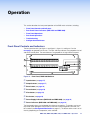
The front panel controls (see figure 12 and figure 13, figure 14, and figure 15 on the
next page) are grouped into two sets. The input and output buttons are grouped on the left
side of the control panel. The control buttons are grouped on the right side of the panel.
INPUTS
1
3
1 2 3 4 5 6 7 8 9 10 11 12 13 14 15 16
4
2
1 2 3 4 5 6 7 8 9 10 11 12 13 14 15 16
5
CONTROL
CONFIG
ENTER
PRESET
VIEW
6
ESC
OUTPUTS
PRIMARY
7
REDUNDANT
POWER SUPPLY
DMS 1600
TMDS DIGITAL MATRIX SWITCHER
Figure 12. Front Panel, DMS 1600 Switcher
a Input buttons (see page 17)
b Output buttons (see page 17)
c Enter button (see page 18)
d Preset button (see page 18)
e View button (see page 19)
f Esc button (see page 19)
g Power Supply indicators (DMS 1600 and DMS 3600) (see page 19)
h Power indicators (DMS 2000 and DMS 3600) (see page 19)
The illuminated buttons can be labeled with either text or graphics. The buttons can be set
to provide amber background illumination all the time or the background illumination can
be turned off (see Background Illumination on page 35). The buttons blink or are lit at full
intensity (depending on the operation) when selected.
DMS 1600, DMS 2000, DMS 3200, and DMS 3600 • Operation
14
3
1
1
2 3 4 5
6 7 8 9 10
11 12 13 14 15 16 17 18 19 20
I
N
P
U
T
S
4
5
CONTROL
2
1
2 3 4 5
6 7 8 9 10
11 12 13 14 15 16 17 18 19 20
O
U
P
T
U
T
S
CONFIG
ENTER
PRESET
VIEW
ESC
6
POWER
8
E
DMS 2000
TMDS DIGITAL MATRIX SWITCHER
Figure 13. Front Panel, DMS 2000 Switcher
3
1
1
2
2 3 4 5
6 7 8 9 10 11 12 13 14 15 16
17 18 19 20 21 22 23 24 25 26 27 28 29 30 31 32
1
2 3 4 5
6 7 8 9 10 11 12 13 14 15 16
17 18 19 20 21 22 23 24 25 26 27 28 29 30 31 32
I
N
P
U
T
S
O
U
T
P
U
T
S
4
5
CONTROL
CONFIG
ENTER
PRESET
VIEW
ESC
6
POWER
8
E
DMS 3200
TMDS DIGITAL MATRIX SWITCHER
Figure 14. Front Panel, DMS 3200 Switcher
3
INPUTS
1
1 2 3 4 5 6 7 8 9 10 11 12 13 14 15 16 17 18
4
19 20 21 22 23 24 25 26 27 28 29 30 31 32 33 34 35 36
5
CONTROL
1 2 3 4 5 6 7 8 9 10 11 12 13 14 15 16 17 18
2
19 20 21 22 23 24 25 26 27 28 29 30 31 32 33 34 35 36
OUTPUTS
ENTER
CONFIG
PRESET
VIEW
PRESET
6
POWER SUPPLY
PRIMARY
REDUNDANT
7
DMS 3600
TMDS DIGITAL MATRIX SWITCHER
Figure 15. Front Panel, DMS 3600 Switcher
a Input buttons (see page 17)
e View button (see page 19)
b Output buttons (see page 17)
f Esc button (see page 19)
c Enter button (see page 18)
g Power Supply indicators (DMS 1600 and DMS 3600) (see page 19)
d Preset button (see page 18)
h Power indicator (DMS 2000 DMS 3600) (see page 19)
DMS 1600, DMS 2000, DMS 3200, and DMS 3600 • Operation
15
Input and Output Buttons
NOTE:See Front Panel Operations, beginning on page 21, for detailed descriptions
of the following operations.
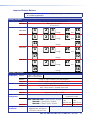
Primary functions
Action
Indication
DMS 1600
DMS 2000
Select input or output for tie being created.
Blink: potential tie/untie.
Lit: current tie
1
2
3
1
2
3
15 and 16
through
9
through
and
10
11 through
20
DMS 3200
1
2
3
15 and 16
through
17 through
32
DMS 3600
1
2
3
17 and 18
through
19 through
36
Secondary functions
I/O Grouping Action 1
Action 2
Indication
Presets
Action
Indication
Output mutes Action
Indication
Port
configuration
Assign an input or output to the selected group.
Lit: Input or output is assigned to the selected group.
Select a preset in Preset mode.
Lit: A preset has already been saved to this location.
Blink: Preset location is selected to be saved.
Outputs: Press and hold to mute the output.
Outputs, blink: Output is muted.
Inputs shown above: Select
Configuration mode
Action 1
Action 2
Indication
Background
illumination
Input 1 and Output 1:
Select I/O Group mode.
Action
Input defined
NOTE: DMS 1600, 3200 — Input 15 (232) / 16 (422) at left:
DMS 2000 — Input 9 (232) / 10 (422)
Select RS-232
DMS 3600 — Input 17 (232) / 18 (422)
Blink: selected
Input defined
at left:
Select RS-422
Blink: selected
Input 1 and Input 2:
Toggle between background
illumination or buttons unlit.
DMS 1600, DMS 2000, DMS 3200, and DMS 3600 • Operation
16
a Input buttons — The input buttons have one primary function (❏) and five secondary
functions (•):
❏ Select and identify an input.
•
Input 1 only — Press simultaneously with the Output 1 button to select I/O Group
mode.
•
Select a preset.
•
Input 1 and Input 2 only — Toggle background illumination of the buttons on and
off.
•
Input 15 and 16 (DMS 1600 and DMS 3200), Input 9 and 10 (DMS 2000), or
Input 17 and 18 (DMS 3600) — Select Serial Port Selection and Configuration
mode.
•
Input 15 (DMS 1600, DMS 3200), Input 9 DMS 2000), or Input 17 (DMS 3600) —
Select the RS-232 protocol for the RS-232/RS-422 port in Serial Port Selection and
Configuration mode and indicate its selection.
•
Input 16 (DMS 1600, DMS 3200), Input 16 (DMS 2000), or Input 18
(DMS 3600) — Select the RS-422 protocol for the RS-232/RS-422 port in Serial
Port Selection and Configuration mode and indicate its selection.
b Output buttons — The output buttons have one primary function (❏) and three
secondary functions (•):
❏ Select and identify output.
•
Output 1 only — Press simultaneously with the Input 1 button to select I/O Group
mode.
•
DMS 1600 and DMS 2000 — Select a preset.
•
Mute the output.
DMS 1600, DMS 2000, DMS 3200, and DMS 3600 • Operation
17
Control Buttons
Primary functions
Action
Indication
Save changes.
Select Preset
mode.
Select View
mode.
Cancel/escape.
Blink: A save is
needed.
Blink: Save preset.
Lit: Recall preset.
View mode
selected.
Flashes once.
ENTER
PRESET
VIEW
ESC
Select group 1.
Select group 2.
Select group 3.
Select group 4.
Lit: group
selected.
Lit: group
selected.
Lit: group
selected.
Lit: group
selected.
Select 9600
baud.
Select 19200
baud.
Select 38400
baud.
Select 115200
baud.
Blink: selected
Blink: selected
Blink: selected
Blink: selected
Secondary functions
I/O Grouping
Action
Indication
Port
configuration
Action
Indication
Front panel
lock
With Esc, toggle
front panel lock
on and off.
Action
Indication
With Enter,
toggle front panel
lock
on and off.
Flash twice to indicated the front
panel has been locked or unlocked.
c Enter button — The Enter button has three primary functions (❏) and three secondary
functions (•):
❏ Saves configuration or preset changes that you make on the front panel. To create
a simple configuration:
•
Press the desired input button (item a on page 17).
•
Press the desired output buttons (item b on page 17).
•
Press the Enter button.
❏ Indicates that a potential tie has been created but not saved.
❏ Indicates that a global preset has been selected to be saved or recalled but that the
preset action has not been accomplished.
•
In the I/O Group mode, selects group 1 and indicates its selection.
•
Selects 9600 baud for the RS-232/RS-422 port in Serial Port Selection and
Configuration mode and indicate its selection.
•
With the Esc button, toggles the front panel lock on and off.
d Preset button — The Preset button has two primary functions (❏) and three secondary
functions (•):
❏Activates Save Preset mode to save a configuration as a preset and Recall Preset
mode to activate a previously-defined preset.
❏ Blinks when Save Preset mode is active and lights steadily when Recall Preset
mode is active.
•
In the I/O Group mode, selects group 2 and indicates its selection.
•
Selects 19200 baud for the RS-232/RS-422 port in Serial Port Selection and
Configuration mode and indicates its selection.
•
With the View button, indicates that the front panel lock has been toggled on or off.
DMS 1600, DMS 2000, DMS 3200, and DMS 3600 • Operation
18
e View button — The View button has one primary function (❏) and four secondary
functions (•):
❏ Selects and indicates View-only mode, which displays the current configuration.
NOTE: View-only mode also provides a way to mute and unmute the outputs.
•
In the I/O Group mode, selects group 3 and indicates its selection.
•
With the Esc button, commands the front panel system reset.
•
Selects 38400 baud for the RS-232/RS-422 port in Serial Port Selection and
Configuration mode and indicates its selection.
•
With the Preset button, indicates that the front panel lock has been toggled on or
off.
f Esc button — The Esc button has two primary functions (❏) and three secondary
functions (•):
❏ Cancels operations or selections in progress and resets the front panel button
indicators.
NOTE: The Esc button does not reset the current configuration or any presets.
❏ Flashes once to indicate that the escape function has been activated.
•
In the I/O Group mode, selects group 4 and indicates its selection.
•
Selects 115200 baud for the RS-232/RS-422 port in Serial Port Selection and
Configuration mode and indicates its selection.
•
With the Enter button, toggles the front panel lock on or off.
Power Indicators
DMS 1600 and DMS 3600
g Primary and Redundant Power Supply LEDs —
POWER SUPPLY
Green — Indicates that the associated power supply is operating
within normal tolerances.
PRIMARY
REDUNDANT
Red — Indicates that the associated power supply is operating
outside the normal tolerances, has failed, or (DMS 3600 only) is not
installed (see Removing and Installing the Power Supply Module (DMS 1600 and
DMS 3600), on page 103, to replace the power supply).
Unlit (DMS 1600 Redundant LED) — No power supply is installed.
DMS 2000 and DMS 3200
h Power LED — Indicates that the power supply is operating within normal
POWER
tolerances.
DMS 1600, DMS 2000, DMS 3200, and DMS 3600 • Operation
19
Button Labels
The numbered translucent covers on the input and output buttons can be removed and
replaced to insert labels behind them.
Input and output labels can be created easily with the Extron Button Label Generator
software, which ships with every Extron matrix switcher. Each input and output can be
labeled with names, alphanumeric characters, or color bitmaps for easy and intuitive input
and output selection (see figure 16) (see Button Label Generator Program, on page 83,
for details on using the labeling software, see Removing and Installing Button Labels,
on page 106, for blank labels and a procedure for removing and replacing the translucent
covers).
10
VCR
DVD
Document
Camera
Computer
13
Computer
15
VTG 200
28 29 30 31 32
Figure 16. Sample Button Labels and Icons
Rear Panel Power Indicators (DMS 1600 and DMS 3600)
NOTE: The DMS 2000 and DMS 3200 each have a built-in, non-removeable power
supply, which does not have the Power Supply LEDs (a), below.
1
The primary and redundant power supply modules on the DMS 1600 and DMS 3600
(see figure 17) each have a 2-color LED.
100-240V
PRIMARY POWER SUPPLY
REDUNDANT POWER SUPPLY
REDUNDANT
50/60Hz 1.2A MAX.
PRIMARY
DISCONNECT BOTH POWER
CORDS BEFORE SERVICING
RESET
REMOTE
LINK
ACT
LAN
RS-232/RS-422
100-240V
50/60Hz 1.2A MAX.
1
1
Redundant Power
Supply is Optional
for DMS 1600, Blank
Panel is Standard
Figure 17. Rear Panel Power Supply Indicators
a Primary and Redundant Power Supply LEDs —
Green — Indicates that the associated power supply is operating within normal
tolerances.
Red — Indicates that the associated power supply has failed (see Removing and
Installing the Power Supply Module (DMS 1600 and DMS 3600), on page 103, to
replace the power supply).
DMS 1600, DMS 2000, DMS 3200, and DMS 3600 • Operation
20
Front Panel Operations
The following paragraphs detail the power-up process and provide sample procedures for
the following actions:
•
Creating ties, sets of ties, and configurations
•
Changing a configuration
•
Viewing ties, sets of ties, and configurations
•
Creating I/O groups
•
Saving a preset
•
Recalling a preset
•
Muting and unmuting outputs
•
Locking and unlocking the front panel
•
Performing a front panel reset
•
Toggling background illumination on and off
•
Reading and setting the Remote RS-232/RS-422 port settings
Definitions
The following terms, which apply to Extron matrix switchers, are used throughout this guide:
•
Tie — An input-to-output connection.
•
Set of ties — An input tied to two or more outputs. (An output can never be tied to
more than one input.)
•
Configuration — One or more ties or one or more sets of ties.
•
Current configuration — The configuration that is currently active in the switcher (also
called configuration 0)
•
Global memory preset — A configuration that has been stored. Up to 32 global
memory presets can be stored in memory. When a preset is retrieved from memory, it
becomes the current configuration. Presets can be saved and recalled from the front
panel and any of the serial or LAN ports. For front panel operations, preset locations are
assigned to the input buttons.
•
Room — A subset of outputs that are logically related to each other, as determined by
the operator. The switchers support up to 10 rooms, each of which can consist of from
1 to 16 outputs.
•
Room memory preset — A configuration consisting of outputs in a single room that
has been stored. When a room preset is retrieved from memory, it becomes the current
configuration.
DMS 1600, DMS 2000, DMS 3200, and DMS 3600 • Operation
21
Power
Apply power by connecting one or both power cords between the one or two AC power
connectors (depending on the model) and the AC power sources. The switcher performs
a self-test that flashes the front panel buttons several times and then turns them either off
or to background illumination. An error-free power up self-test sequence leaves all control
buttons either unlit or showing background illumination.
The current configuration and all presets are saved in non-volatile memory. When power is
applied, the most recent configuration is retrieved. The previous presets remain intact.
If an error occurs during the self-test, the switcher locks up and fails to respond to
commands or button pushes. If your switcher locks up on power-up, call the Extron S3
Sales and Technical Support Hotline (see the last page of this guide for the phone number
in your region of the world).
Creating a Configuration
The current configuration can be changed using the front panel buttons. Change the current
configuration as follows:
1. Press the Esc button to clear any front panel button indications that may be lit.
2. Select the desired input and one or more outputs by pressing the input and output
buttons. Input buttons and output buttons light or blink green to indicate ties.
•
To indicate potential ties, output buttons blink when an input is selected.
•
To indicate current ties, output buttons light steadily when an input is selected.
3. To clear unwanted outputs, press and release the associated lit output buttons.
To indicate potential unties, output buttons blink when an output is deselected but
not untied from the input.
4. Press and release the Enter button to accept the tie.
5. Repeat steps 1 through 4 to create or delete additional ties until the desired
configuration is complete.
NOTES:
• Only one input can be tied to an output.
• If a tie is made between an input and an output, and the selected output was
previously tied to another input, the older tie is broken in favor of the newer tie.
• If an input with no tie is selected, only the button for that input lights.
• As each input and output is selected, the associated output button blinks to
indicate a tentative tie. Buttons for outputs that were already tied to the input
light steadily. Outputs that are already tied can be left on, along with new
blinking selections, or toggled off by pressing the associated output button.
• If you press the input button for an input that is I/O grouped
(see I/O Grouping on page 27), you cannot select the output button for an
output in a different group. The associated input button remains lit.
DMS 1600, DMS 2000, DMS 3200, and DMS 3600 • Operation
22
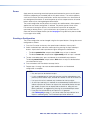
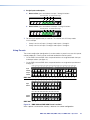
Example 1: Creating a set of ties
In the following example, input 5 is tied to outputs 3, 4, and 8. The steps show the front
panel indications that result from your action.
NOTE: This example assumes that there are no ties in the current configuration.
1. Clear all selections: Press and release the Esc button. The button flashes once.
2. Select an input: Press and release the input 5 button.
Press the button.
The button lights.
INPUTS
1
2
3
4
5
6
7
8 15 16
3. Select the outputs: Press and release the output 3, output 4, and output 8 buttons.
Press and release the buttons.
The buttons blink to indicate that the selected input will be tied
to these outputs.
C O NT R O L
1 2 3 4 5 6 7 8 15 16
1
OUTPUTS
ENTER PRESET
VIEW
ESC
The Enter button blinks
to indicate the need to
confirm the change.
NOTE: You can cancel the entire set of ties at this point by pressing and releasing
the Esc button. The Esc button flashes once and all selected input and output
buttons return to unlit or background illumination.
4. Confirm the change: Press and release the Enter button.
Press the button.
All input buttons and output buttons
return to unlit or background illumination.
ENTER
The Enter button returns to
unlit or background
illumination.
The current configuration is now input 5 tied to output 3, output 4, and output 8 (see
figure 18).
Input 5 tied
to outputs 3, 4, and 8
Input
5
3
4
Output
8
Figure 18. Example 1: Create Ties
DMS 1600, DMS 2000, DMS 3200, and DMS 3600 • Operation
23
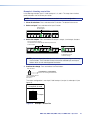
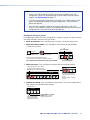
Example 2: Adding a tie to a set of ties
In the following example, a new tie is added to the current configuration. The steps show
the front panel indications that result from your action.
NOTE: This example assumes that you have performed example 1.
1. Clear all selections: Press and release the Esc button. The button flashes once.
2. Select an input: Press and release the input 5 button.
Press the button.
The button lights.
INPUTS
1
2
3
4
5
6
7
8 15 16
The Output 3, Output 4, and Output 8 buttons light
to indicate the ties created in example 1.
1
2
3
4
5
6
7
8 15 16
OUTPUTS
3. Select the output: Press and release the output 1 button.
Press the button.
The button blinks to indicate that the
selected input will be tied to this output.
C O NT R O L
1
2
3
4
5
6
7
8 15 16
OUTPUTS
ENTER PRESET
VIEW
ESC
The Enter button blinks
to indicate the need to
confirm the change.
4. Confirm the change: Press and release the Enter button.
Press the button.
All input buttons and output buttons
return to unlit or background illumination.
ENTER
The Enter button returns to
unlit or background
illumination.
The current configuration is now input 5 tied to output 1, output 3, output 4, and output 8
(see figure 19).
Input 5 tied
to outputs 1, 3, 4, and 8
Input
5
1
3
4
Output
8
Figure 19. Example 2: Add a Tie
DMS 1600, DMS 2000, DMS 3200, and DMS 3600 • Operation
24
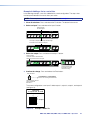
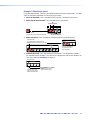
Example 3: Removing a tie from a set of ties
In the following example, an existing tie is removed from the current configuration. The steps
show the front panel indications that result from your action.
NOTE: This example assumes that you have performed example 1 and example 2.
1. Clear all selections: Press and release the Esc button. The button flashes once.
2. Select an input: Press and release the input 5 button.
Press the button.
The button lights.
INPUTS
1
2
3
4
5
6
7
8 15 16
The Output 1, Output 3, Output 4, and Output 8 buttons light
to indicate the ties created in example 1 and example 2.
1
2
3
4
5
6
7
8 15 16
OUTPUTS
3. Select the output: Press and release the output 4 button.
Press and release the Output 4 button.
The button blinks to indicate that the
selected input will be untied from this output.
C O NT R O L
1
2
3
4
5
6
7
8 15 16
OUTPUTS
ENTER PRESET
VIEW
ESC
The Enter button blinks
to indicate the need to
confirm the change.
4. Confirm the change: Press and release the Enter button.
Press the button.
All input buttons and output buttons
return to unlit or background illumination.
ENTER
The Enter button returns to
unlit or background
illumination.
The current configuration is now input 5 tied to output 1, output 3, and
output 8 (see figure 20).
Input 5 tied
to outputs 1, 3, and 8
Input
5
1
3
Output
8
Figure 20. Example 3: Remove a Tie
DMS 1600, DMS 2000, DMS 3200, and DMS 3600 • Operation
25
Viewing a Configuration
The current configuration can be viewed using the front panel buttons. The View-only mode
prevents inadvertent changes to the current configuration. View-only mode also provides a
way to mute outputs (see Muting and Unmuting Outputs, on page 33).
View the current configuration as follows:
1. Press the Esc button to clear any front panel button indications that may be lit.
2. Press and release the View button. All of the buttons light for outputs that are not tied.
3. Select the desired input or outputs whose ties you wish to view by pressing the input
and output buttons.
If you press an output button for which there are no ties, the output buttons light for all
outputs without ties.
NOTES:
• To see all ties of the current configuration, press and release each input and
output button, one at a time.
• After 30 seconds of front panel inactivity, View-only mode automatically ends.
Example 4: Viewing Ties
In the following example, the ties in the current configuration are viewed. The steps show
the front panel indications that result from your action.
NOTE: This example assumes that you have performed example 1, example 2, and
example 3.
1. Clear all selections: Press and release the Esc button. The button flashes once.
2. Select View-only mode: Press and release the View button.
Press the button. It lights.
C O NT R O L
ENTER PRESET
VIEW
ESC
Until you select an input, only the buttons for untied outputs light.
1
2
3
4
5
6
7
8 15 16
OUTPUTS
3. Select an input: Press and release the input 5 button.
Press the button. It lights.
INPUTS
1
2
3
4
5
6
7
8 15 16
The output buttons for outputs
that are tied to input 5 light.
1
2
3
4
5
6
7
8 15 16
OUTPUTS
The output buttons for outputs that are not tied to
Input 5 are either unlit or background illuminated.
DMS 1600, DMS 2000, DMS 3200, and DMS 3600 • Operation
26
NOTE: You can also view a set of ties by selecting a tied output. Demonstrate this
as follows:
1. Note the number of a lit output button, and then press and release the output
button for an untied (unlit or background illumination) output.
2. Observe that all of the untied outputs light.
3. Press the output button that you noted previously.
4. Observe that the selected output button, the tied input button (input 5), and
the output buttons light for all of the outputs that are tied to the input.
5. Exit View-only mode: Press and release the View button to exit View-only mode.
Press the button.
VIEW
All input buttons and output buttons
return to unlit or background illumination.
The View button returns to unlit
or background illumination.
I/O Grouping
I/O grouping is a matrix switcher feature that allows you to subdivide the front panel controls
of the matrix into up to four smaller functional subswitchers (see figure 21) and limit tie
creation. The I/O group limitation applies to tie creation from the front panel only. Inputs and
outputs can be assigned to one of four groups or not assigned to any group.
INPUTS
8 25
2 19
9 26
11
4 21
6 23
7 24
5 22
3 20
17
1 18
10 27
LEVEL
PEAK
BOOST
CONTROL
DVI-RGB 200
DVI TO RGB CONVERTER
DVI-RGB 200
3 input, 4 output
DVI matrix
Group
1
1
Group
2
2 3 4 5
Computer #8
Group
3
6 7 8 9 10 11
OUTPUTS
Input
8 9 10
5
6 Output
7
8
Computer #3
Projector
Group 3
Computer #10
Monitor
4 input, 2 output
DVI video matrix
Computer #1
DVD
Input
1 2 3 4
1
2 Output
Monitor 1
DVD
Group 1
Computer #3
Computer #4
Monitor 2
3 input, 2 output
HDMI video matrix
(via adapters)
LEVEL
PEAK
BOOST
CONTROL
DVI-RGB 200
DVI TO RGB CONVERTER
DVI-RGB 200
Input
5 6 7
3
Output
4
Group 2
DVD
Monitor
Figure 21. I/O Grouping
When you are creating ties on the front panel, inputs and outputs that are assigned to a
group can be tied only to other outputs and inputs within the same group. For example,
a front panel operator cannot tie an input that is assigned to group 1 to an output that is
assigned to group 2. Ungrouped inputs and outputs can be switched to outputs and inputs
in any group. Ties between groups (an input in group 1 tied to an output in group 2) can be
created under RS-232/RS-422 or Ethernet control.
DMS 1600, DMS 2000, DMS 3200, and DMS 3600 • Operation
27
Suggested applications for the I/O grouping feature include:
•
Segregating sync-critical inputs and outputs
•
Segregating specific video formats to prevent an input in one video format from being
inadvertently applied to an output device that supports another video format
•
Segregating input and output devices that are in separate rooms
•
Isolating video from being displayed on specific output devices for operational security
reasons
The I/O groups can be set up on the front panel or via the serial port, the USB port, or the
LAN port and using either the SIS commands (see the I/O Grouping SIS command on
page 55) or the Matrix Switchers Control Program (See I/O Group Settings on page 80).
Create I/O groups on the front panel as follows:
1. Press the Esc button to clear any front panel button indications that may be lit.
2. To enter I/O Group mode, press and hold the Input 1 and Output 1 buttons until the
input and output buttons light to display the ungrouped inputs and outputs.
3. Press and release one of the Control buttons to select a group:
•
Press the Enter button to select group 1.
•
Press the Preset button to select group 2.
•
Press the View button to select group 3.
•
Press the Esc button to select group 4.
C O NT R O L
ENTER PRESET
Group # 1
2
VIEW
ESC
3
4
4. Select the desired inputs and outputs to assign to the group by pressing the input and
output buttons.
5. Allow the I/O Group mode to time out after approximately 30 seconds.
NOTES:
• Ties between groups (an input in group 1 tied to an output in group 2) can be
created under serial port, USB port, or Ethernet control.
• Ties that were created before I/O groups were created remain valid, even if
they include inputs and outputs in different groups.
• Presets can be created under serial port, USB port, or Ethernet control that
tie inputs and outputs across group boundaries. These presets are selectable
from the front panel.
• An input or output can be assigned to only one group. If you assign an input
or output to a group and that input or output is already assigned to a different
group, the older grouping is discarded in favor of the new grouping.
• For I/O groups to have any function, at least two groups must be created.
DMS 1600, DMS 2000, DMS 3200, and DMS 3600 • Operation
28
Example 5: Grouping inputs and outputs
In the following example, several switcher inputs and outputs are assigned to groups. The
steps show the front panel indications that result from your action.
1. Clear all selections: Press and release the Esc button. The button flashes once.
2. Select I/O Group mode: Press and hold the Input 1 and Output 1 buttons
simultaneously for approximately 2 seconds and then release the buttons.
Press and hold the Input 1 button and Output 1 button.
Release the Input 1 button
and Output 1 button.
1
2
3
1
2 seconds
1
2
1
Ungrouped input and
output buttons light.
3
3. Select an I/O group: Press and release the Enter button to select group 1.
Press the button. The button lights.
C O NT R O L
ENTER PRESET
Group # 1
2
VIEW
ESC
3
4
4. Assign inputs and outputs:
a. One at a time, press and release the input 1 through 4 buttons.
Press the buttons. The selected buttons light.
INPUTS
1
2
3
4
5
6
7
8 15 16
b. One at a time, press and release the output 1 through 4 buttons.
Press the buttons. The selected buttons light.
1
2
3
4
5
6
7
8 15 16
OUTPUTS
5. Select an I/O group: Press and release the Preset button to select group 2.
Press the button. The button lights.
C O NT R O L
ENTER PRESET
Group # 1
2
VIEW
ESC
3
4
DMS 1600, DMS 2000, DMS 3200, and DMS 3600 • Operation
29
6. Assign inputs and outputs:
a. One at a time, press and release the input 5 through 8 buttons.
Press the buttons. The selected buttons light.
INPUTS
1
2
3
4
5
6
7
8 15 16
b. One at a time, press and release the output 5 through 8 buttons.
Press the buttons. The selected buttons light.
1
2
3
4
5
6
7
8 15 16
OUTPUTS
7. Do nothing for approximately 30 seconds. The switcher exits I/O Group mode.
In this example:
•
Group 1 consists of inputs 1 through 4 and outputs 1 through 4.
•
Group 2 consists of inputs 5 through 8 and outputs 5 through 8.
Using Presets
The current configuration (configuration 0) can be saved as a preset in any one of 32 preset
memory addresses. Presets can be saved and recalled from the front panel.
•
On the DMS 1600 and DMS 2000, the preset locations are assigned to both the input
and output buttons (see figure 22).
•
On the DMS 3200 and DMS 3600, the preset locations are assigned to input buttons 1
through 32.
Preset Preset Preset Preset Preset Preset Preset Preset Preset Preset Preset Preset Preset Preset Preset Preset
1
2
3
4
5
6
7
8
9
10
11
12
13
14
15
16
INPUTS
Input
buttons
1
2
3
4
5
6
7
Output
buttons
1
2
3
4
5
6
7
8
9 10 11 12 13 14 15 16
8
9 10 11 12 13 14 15 16
OUTPUTS
DMS 1600
Preset Preset Preset Preset Preset Preset Preset Preset Preset Preset Preset Preset Preset Preset Preset Preset
17
18
19
20
21
22
23
24
25
26
27
28
29
30
31
32
Preset Preset Preset Preset Preset Preset Preset Preset Preset Preset
1
2
3
4
5
6
7
8
9
10
Input
buttons
1 2 3 4 5 6 7 8 9 10
11 12 13 14 15 16 17 18 19 20
I
N
P
U
T
Preset Preset Preset Preset Preset Preset Preset Preset Preset Preset
11
12
13
14
15
16
17
18
19
20
Preset Preset Preset Preset Preset Preset Preset Preset Preset Preset
21
22
23
26
24
25
27
28
29
30
Output
buttons
DMS 2000
1 2 3 4 5 6 7 8 9 10
11 12 13 14 15 16 17 18 19 20
O
U
T
P
U
T
Preset Preset
31
32
Figure 22. DMS 1600 and DMS 2000 Preset Locations
When a preset is retrieved from memory, it becomes the current configuration.
DMS 1600, DMS 2000, DMS 3200, and DMS 3600 • Operation
30
NOTES:
• Presets cannot be viewed from the front panel unless recalled as the current
configuration. Presets can be viewed using the Extron Matrix Switchers Control
Program (see Presets menu on page 77).
• The current configuration and all presets are stored in non-volatile memory. When
power is removed and restored, the current configuration is still active and all
presets are retained.
• When a preset is recalled, it replaces the current configuration, which is lost
unless it is also stored as a preset. The recalled preset overwrites all of the current
configuration ties in favor of the preset configuration ties.
Example 6: Saving a preset
In the following example, the current configuration is saved as a preset. The steps show the
front panel indications that result from your action.
1. Clear all selections: Press and release the Esc button. The button flashes once.
2. Select Save Preset mode: Press and hold the Preset button for approximately
2 seconds until it blinks.
Lit
(preset assigned)
PRESET
2 seconds
PRESET
Release the button.
Press and hold the button.
All input buttons with assigned presets light.
If you then save the configuration to a lit preset number,
the configuration data at that preset location will be overwritten.
1
2
3 16
Unlit
(no preset assigned)
3. Select the preset: Press and release the input button for the desired preset.
Press and release the Input 1 button.
The button blinks to indicate that this
preset number is selected but not saved.
C O NT R O L
ENTER PRESET
VIEW
ESC
INPUTS
1
2
3
4
5
6
7
8 15 16
The Enter button blinks to
indicate the need to save the
preset.
The Preset button continues
to blink.
4. Confirm the change: Press and release the Enter button. The current configuration is
now stored in the selected memory location.
Press the button.
C O NT R O L
ENTER PRESET
VIEW
ESC
The Enter and Preset
buttons return to unlit or
background illumination.
All input buttons and output
buttons return to unlit or
background illumination.
DMS 1600, DMS 2000, DMS 3200, and DMS 3600 • Operation
31
Example 7: Recalling a preset
In the following example, a preset is recalled to become the current configuration. The steps
show the front panel indications that result from your action.
1. Clear all selections: Press and release the Esc button. The button flashes once.
2. Select Recall Preset mode: Press and release the Preset button.
Lit
(preset assigned)
1
PRESET
Press the button.
All input buttons with assigned presets light.
2
3 16
Unlit
(no preset assigned)
3. Select the preset: Press and release the input button for the desired preset.
Press the button.
The button blinks to indicate that this
preset number is selected but not recalled.
C O NT R O L
ENTER PRESET
VIEW
ESC
INPUTS
1
2
3
4
5
6
7
8 15 16
The Enter button blinks
to indicate the need to
recall the preset.
4. Confirm the recall: Press and release the Enter button. The configuration stored in
the selected memory location is now the current configuration and can be viewed in the
View-only mode (see example 4 on page 26).
Press the button.
C O NT R O L
ENTER PRESET
VIEW
ESC
The Enter and Preset
buttons return to unlit or
background illumination.
All input buttons and output
buttons return to unlit or
background illumination.
DMS 1600, DMS 2000, DMS 3200, and DMS 3600 • Operation
32
Muting and Unmuting Outputs
Individual outputs can be muted or unmuted as follows:
1. Press the Esc button to clear any front panel button indications that may be on.
2. Press and release the View button.
3. One at a time, press and hold the button or buttons for the desired output or outputs
for approximately 2 seconds. The output buttons for the selected outputs blink to
indicate the mute or return to their previous state to indicate the unmute.
4. Press and release the View button to return to normal switcher operation.
NOTES:
• When you enter View-only mode, the output buttons light for all outputs without
ties.
• Mutes are saved to non-volatile memory. When power is removed and restored,
the mute settings are retained.
Example 8: Muting and unmuting an output
In the following example, several switcher outputs are muted and unmuted. The steps show
the front panel indications that result from your action.
NOTE: This example assumes that you have performed example 1, example 2, and
example 3.
1. Clear all selections: Press and release the Esc button. The button flashes once.
2. Select View-only mode: Press and release the View button. The View button lights.
Press the button. It lights.
C O NT R O L
ENTER PRESET
VIEW
ESC
Until you select an input, only the buttons for untied outputs light.
1
2
3
4
5
6
7
8 15 16
OUTPUTS
3. Mute the outputs: One at a time, press and hold the Output 3 button and then the
Output 4 button for approximately 2 seconds until each button begins to blink. The
output 3 and output 4 signals are muted.
Mute outputs one at a time.
3
4
Press and hold the Output 3 button.
2 seconds
Press and hold the Output 4 button.
2 seconds
3
The button blinks
to indicate that the
outputs are muted.
4
The button blinks
to indicate that the
outputs are muted.
NOTE: When you push Input 3, it lights and Input 4 returns to
unlit because of ties made in examples 1, 2, and 3.
DMS 1600, DMS 2000, DMS 3200, and DMS 3600 • Operation
33
4. Unmute the outputs: One at a time, press and hold the Output 3 button and then
the Output 4 buttons for approximately 2 seconds until each button lights steadily. The
output 3 and output 4 signals are unmuted.
Unmute outputs one at a time.
3
4
2 seconds
3
The button returns to its previous indication
(lit, background illuminated, or unlit) to
indicate that the outputs are unmuted.
Press and hold the Output 4 button.
2 seconds
4
The button returns to its previous indication
(lit, background illuminated, or unlit) to
indicate that the outputs are unmuted.
Press and hold the Output 3 button.
5. Exit View-only mode: Press and release the View button.
Press the button.
All input buttons and output buttons
return to unlit or background illumination.
VIEW
The View button returns to unlit
or background illumination.
Locking the Front Panel (Executive Mode)
The front panel security lockout limits the operation of the switcher from the front panel.
When the switcher is locked, all of the front panel functions are disabled except for the
View-Only mode functions and deselecting the front panel Lock mode (see Viewing a
Configuration, on page 26). Other than in View-Only mode, if the user pushes a front panel
button when the switcher is locked, the View and Preset buttons flash twice and return to
their previous state.
To toggle the lock on and off, press and hold the Enter button and the Esc button
simultaneously for approximately two seconds (see figure 23).
Press and hold the Enter and
Esc buttons simultaneously to
toggle Executive mode on or off.
C O NT R O L
ENTER PRESET
VIEW
C O NT R O L
ESC
2 seconds
ENTER PRESET
VIEW
ESC
The Preset and View
buttons blink twice
to indicate the mode
change.
Release the buttons.
Figure 23. Locking the Front Panel
DMS 1600, DMS 2000, DMS 3200, and DMS 3600 • Operation
34
Performing a System Reset from the Front Panel
The front panel reset is identical to the EZXXX} SIS command on page 56. A system
reset clears all ties and presets, all output mutes, and resets all I/O grouping.
Reset the switcher to the factory default settings by pressing and holding the View button
and Esc button simultaneously while you apply AC power to the switcher (see figure 24).
NOTES:
• For the reset to occur, you must apply power from an unpowered state. Applying
the redundant power with primary power already applied does not reset the
switcher.
• System reset does not reset the Internet protocol (IP) settings or replace
user-installed firmware.
Press and hold the buttons while
you apply power to the switcher.
.
AX
13 - 16
AM
z
/60H
1.2
50
REDUNDANT
CONTROL
0V
0-24
LAN
LINK
REMOTE
Continue to hold the View and Esc
buttons until all input and output buttons
return to either unlit or to background
illumination.
PRIMARY
RESET
ESC
RS-232/RS-422
VIEW
TRI-LEVEL BI-LEVEL
T
DISCONNECT BOTH POWER
CORDS BEFORE SERVICING
10
— and —
ACT
The switcher flashes the
button indicators; light amber,
off, green, red, and amber;
and then turns them off.
.
AX
AM
z
/60H
1.2
50
0V
0-24
10
ITCH E
SW NC
RE
FE
RE
Power
Release the View and Esc buttons.
Figure 24. Performing A System Reset
Background Illumination
The buttons on the front panel can be set to provide amber background illumination at
all times or the background illumination can be turned off. To toggle the background
illumination on or off, press and hold the Input 1 and Input 2 buttons simultaneously for
approximately 2 seconds (see figure 25).
Press and hold the buttons.
1
2
3 16
After approximately 2 seconds, release
the Input 1 and Input 2 buttons.
Figure 25. Locking the Front Panel
DMS 1600, DMS 2000, DMS 3200, and DMS 3600 • Operation
35
Selecting the Rear Panel Remote Port Protocol and Baud Rate
The switcher can support either RS-232 or RS-422 serial communication protocol, and can
operate at 9600, 19200, 38400, and 115200 baud rates. The settings of these variables
can be viewed and changed from the front panel.
View and configure the serial communications settings of the switcher as follows:
1. Select Serial Port Selection and Configuration mode: Simultaneously press and
hold the two top rightmost input buttons.
Press and hold the buttons.
C O NT R O L
DMS 1600
DMS 3200
2 seconds
4 15 16
ENTER PRESET
VIEW
ESC
• All Control buttons light with
DMS 2000
DMS 3600
one flashing.
• Release the buttons.
8 9 10
4 15 16
• Inputs 15 and 16 (DMS 1600, DMS 3200) or
Inputs 9 and 10 (DMS 2000) or
Inputs 17 and 18 (DMS 3600)
both light with one button flashing.
The flashing Control button indicates the baud rate as follows:
Enter — 9600
Preset — 19200
View — 38400
Esc — 115200
The flashing input button indicates the protocol as follows:
Input 15 (9, 17) — RS-232
Input 16 (10, 18) — RS-422
In this example, the port is set to RS-232 at 9600 baud.
6 17 18
2. Release the Input buttons.
3. Change a value: Press and release the button that relates to the desired value.
Press and release the buttons to configure the port as follows:
Baud rate:
Enter — 9600
Preset — 19200
View — 38400
Esc — 115200
Serial protocol:
Input 15 (9, 17) — RS-232
Input 16 (10, 18) — RS-422
The selected buttons blink and the others remain lit.
In this example, the port is set to RS-422 at 38400 baud.
C O NT R O L
ENTER PRESET
VIEW
ESC
4 15 16
4. Exit Serial Port Selection and Configuration mode: Press and release any output
button.
Press and release
an output button.
All Control buttons and the Input 15 (9, 17) and Input 16 (10, 18)
buttons return to unlit or background illumination.
C O NT R O L
5
ENTER PRESET
VIEW
ESC
4 15 16
Rear Panel Operations
The rear panel has a Reset button that initiates four levels of resets (identified as modes
1, 3, 4, and 5 for the sake of comparison with an Extron IPL product). The Reset button is
recessed, so use a pointed stylus, ballpoint pen, or small screwdriver to access it.
For different reset levels, press and hold the button while the switcher is running or press
and hold the button while you apply power to the switcher.
See the table on the next page for a summary of the modes.
DMS 1600, DMS 2000, DMS 3200, and DMS 3600 • Operation
36
ATTENTION: Review the reset modes carefully. Using the wrong reset mode may
result in unintended loss of flash memory programming, port reassignment, or a
controller reboot.
NOTE: The reset modes listed below close all open IP and Telnet connections and close
all sockets. Also, the following modes are separate functions, not a continuation from
Mode 1 to Mode 5.
Reset Mode Comparison/Summary
Mode Activation
1
Hold down the recessed Reset button
while applying power to the switcher.
NOTE: After a mode 1 reset is
performed, update the switcher
firmware to the latest version. Do
not operate the switcher firmware
version that results from the
mode 1 reset. If you want to use
the factory default firmware, you
must upload that version again
(see Updating Firmware on
page 72).
Result
Purpose & Notes
The switcher reverts to the factory default firmware. Event
scripting will not start if the switcher is powered on in
this mode. All user settings and files, such as the current
configuration and IP settings, are maintained.
Use mode 1 to revert
to the factory default
firmware version if
incompatibility issues
arise with user-loaded
firmware.
NOTE: If you do not want to update firmware, or you
performed a mode 1 reset by mistake, cycle power
to the switcher to return to the firmware version that
was running before the mode 1 reset. Use the 0Q
SIS command to confirm that the factory default
firmware is no longer running (look for the asterisk [*]
following the version number).
3
Hold down the Reset button for about
3 seconds, until the Reset LED blinks
once, then press Reset momentarily
(<1 second) within 1 second.
Mode 3 turns events on or off. During resetting, the Reset Mode 3 is useful for
LED flashes 2 times if events are starting, 3 times if events troubleshooting.
are stopping.
4
Hold down the Reset button for
about 6 seconds, until the Reset
LED blinks twice (once at 3 seconds
and again at 6 seconds). Then press
Reset momentarily (<1 second) within
1 second.
Mode 4:
• Enables ARP capability.
• Sets the IP address to the factory default
Mode 4 enables you
to set IP address
information using ARP
and the MAC address.
• Sets the subnet address to the factory default.
• Sets the gateway address to the factory default.
• Sets port mapping to the factory default.
• Turns DHCP off.
• Turn events off.
The Reset LED flashes three times in quick succession
during the reset.
5
Hold down the Reset button for
about 9 seconds, until the Reset
LED blinks three times (once at
3 seconds, again at 6 seconds, and
then again at 9 seconds). Then press
Reset momentarily (<1 second) within
1 second.
Mode 5 performs a complete reset to factory defaults
(with the exception of the firmware):
• Does everything mode 4 does.
• Resets most settings including:
• clears all ties and presets
• clears all output mutes
Mode 5 is useful if
you want to start over
with configuration
and uploading or to
replace events.
Same as EZQQQ}
SIS command.
• clears all I/O grouping
• Resets all IP options.
• Removes/clears all files for the switcher.
The reset LED flashes three times in quick succession
during the reset.
DMS 1600, DMS 2000, DMS 3200, and DMS 3600 • Operation
37
Performing Soft System Resets (Modes 3, 4, and 5)
Perform a soft reset of the switcher as follows:
Use an Extron Tweeker or other small screwdriver to press and hold the rear panel Reset
button until the rear panel Reset LED and the front panel Preset and View buttons blink
once (events reset), twice (IP settings reset), or three times (absolute reset).
Release the Reset button and then immediately press and release the Reset button again.
Nothing happens if the second momentary press does not occur within 1 second.
Press and hold
the Reset button.
Events
Reset
(Mode 3)
Reset LED flashes once.
Release, then immediately
press and release again.
3 seconds
RESET
View and Esc buttons flash once.
CONTROL
ENTER
Press and hold
the Reset button.
IP Settings
Reset
(Mode 4)
PRESET
VIEW
ESC
Reset LED flashes twice.
Release, then immediately
press and release again.
6 seconds
RESET
View and Esc buttons flash twice.
CONTROL
ENTER
Press and hold
the Reset button.
Absolute
Reset
(Mode 5)
RESET
PRESET
VIEW
ESC
Reset LED flashes
three times.
Release, then immediately
press and release again.
9 seconds
View and Esc buttons flash three times.
CONTROL
ENTER
PRESET
VIEW
ESC
Figure 26. Soft System Resets
DMS 1600, DMS 2000, DMS 3200, and DMS 3600 • Operation
38
Performing a Hard Reset (Mode 1)
The hard reset function restores the switcher to the base firmware that it was shipped with.
After a hard reset, events do not automatically start, but user settings and files are restored.
Perform a hard reset as follows:
NOTE: The hard reset restores the factory-installed firmware. The switcher reverts
to that factory firmware the next time power is cycled off and on unless a firmware
update is performed before the power cycle.
If necessary, turn off power to the switcher.
Press and hold the Reset button on the rear panel while you apply AC power to the
switcher (see figure 27).
Press and hold the Reset button while
you apply power to the switcher.
.
13 - 16
AX
AM
1.2
REDUNDANT
z
/60H
50
0V
0-24
REMOTE
PRIMARY
RESET
RS-232/RS-422
LINK
LAN
ACT
— and —
TRI-LEVEL BI-LEVEL
RESET
The switcher flashes the
button indicators amber,
off, green, red, and amber
and then turns them off.
DISCONNECT BOTH POWER
CORDS BEFORE SERVICING
10
.
AX
AM
z
/60H
1.2
50
0V
0-24
10
ITCH E
SW NC
RE
FE
RE
Power
Continue to hold the Reset button until all input
and output buttons are either unlit or return to
background illumination.
Release the Reset button.
RESET
Figure 27. Hard Reset
Troubleshooting
This section gives recommendations on what to do if you have problems operating the
switcher.
General Checks
•
Ensure that all devices are plugged in and powered on. The switcher is receiving power
if one of the front panel Power Supply LEDs is lit green.
•
Check to see if one or more outputs are muted.
•
Ensure an active input is selected for output on the switcher.
•
Ensure that the proper signal format is supplied.
•
Check the cabling and make corrections as necessary.
•
Call the Extron S3 Sales and Technical Support Hotline if necessary (see the last page
of this guide for the phone number in your region of the world).
DMS 1600, DMS 2000, DMS 3200, and DMS 3600 • Operation
39
Digital Signal Guidelines
DVI and HDMI signals run at a very high frequency and are especially susceptible to bad
video connections, too many adapters, or cables that are too long. To avoid the loss of an
image or introduction of image jitter, follow these guidelines:
•
The DVI cable on the input or output of the switcher should not exceed 50 feet (15.2 m).
•
Use only cable designed for DVI signals.
•
If the display exhibits a flashing black or blue screen, snow, or other distortion, a
non-HDCP compliant display may be receiving an HDCP-encrypted signal.
•
Check for an HDCP problem by ejecting the DVD from the player. If the display
distortion stops and the DVD menu or screen saver image is clear, the problem is
HDCP-related.
•
The DMS matrix switchers work as described in point-to-point applications. Do not use
any additional adapters, patch panels, or couplers with the input or output DVI or HDMI
cables. Additional links in the signal chain can result in the reduction of signal integrity
and overall cable length performance.
DMS 1600, DMS 2000, DMS 3200, and DMS 3600 • Operation
40
Configuration Worksheets
Rather than trying to remember the configuration for each preset, use worksheets to record
this information. Make copies of the blank worksheet on page 44 and page 45 and use one
for each preset configuration. Cross out all unused or inactive inputs and outputs.
Worksheet Example 1: System Equipment
Figure 28 shows a worksheet for a switcher configured as a 12-input by 16-output matrix
in a fictional organization with the system hardware annotated. Inputs 10 and 11 have no
connections in this organization, so they have been crossed out on the worksheet. Inputs
13 through 16 do not exist on this model, so they are crossed out. Similarly, outputs 5, 7,
14, 15, and 16 are crossed out on the worksheet.
Inputs include PCs, cameras, Blu-Ray players, a VCR, and an Extron VTG 400DVI. Output
devices include monitors, front and rear projectors, and a VCR for recording presentations.
The VTG 400DVI video test generator connected to input 12 enables a video test pattern to
be sent to one, several, or all output devices for problem isolation or adjustment purposes.
Input sources
Camera
main
podium
Camera
#2
Podium
DVD
Laptop
1
2
3
4
5
5
1
2
3
4
Main
hall
PJ#1
Main
hall
PJ#2
Podium
monitor
Conf.
room
Classrm Classrm
VCR
(USP 507) #1 DVD #2 DVD
6
7
6
7
VCR
(USP 507)
PC1
8
8
Lobby
monitor
Rack DVD
(DVS)
VTG
400DVI
9
10
9
10
Class
Class
room #1 room #2
monitor monitor
11
12
13
14
15
16
14
15
16
11
12
13
Demo
room
PJ#1
Demo
rack
monitor
Demo
rack
switcher
Output destinations
Preset #
Title:
Fill in the preset number and use colors, or dashes, etc. to make connecting lines.
Figure 28. Worksheet Example 1: System Equipment
DMS 1600, DMS 2000, DMS 3200, and DMS 3600 • Operation
41
Worksheet Example 2: Daily Configuration
Figure 29 continues from worksheet example 1 by showing the ties that make up the
configuration of preset 1. Black lines show one configuration, green lines a second
configuration, and red lines a third configuration.
In this example:
•
•
•
The image of the presenter, from the main podium camera (input 1), is:
•
Displayed in the main hall (output 1)
•
Displayed in the conference room (output 4) to the overflow crowd
•
Tied to the VCR (output 6)
The presenter has a presentation on her laptop computer (input 4) that is:
•
Displayed in the main hall (output 2)
•
Displayed locally on the podium (output 3)
Video from the VCR (input 5) is played in the lobby (output 8)
Input sources
Camera
main
podium
Camera
#2
Podium
DVD
Laptop
1
2
3
4
5
5
1
2
3
4
Main
hall
PJ#1
Main
hall
PJ#2
Podium
monitor
Conf.
room
Classrm Classrm
VCR
(USP 507) #1 DVD #2 DVD
6
7
6
7
VCR
(USP 507)
PC1
8
8
Lobby
monitor
Rack DVD
(DVS)
VTG
400DVI
9
10
9
10
Class
Class
room #1 room #2
monitor monitor
11
12
13
14
15
16
14
15
16
11
12
13
Demo
room
PJ#1
Demo
rack
monitor
Demo
rack
switcher
Output destinations
Preset #
Title:
Fill in the preset number and use colors, or dashes, etc. to make connecting lines.
Figure 29. Worksheet Example 2: Daily Configuration
DMS 1600, DMS 2000, DMS 3200, and DMS 3600 • Operation
42
Worksheet Example 3: Test Configuration
The video system in our fictional organization needs to be fine tuned on a regular basis.
Figure 30 shows a typical test configuration, with an Extron video test generator (input 12)
generating a test pattern to all projectors and monitors.
Input sources
Camera
main
podium
Camera
#2
Podium
DVD
Laptop
1
2
3
4
5
5
1
2
3
4
Main
hall
PJ#1
Main
hall
PJ#2
Podium
monitor
Conf.
room
Classrm Classrm
VCR
(USP 507) #1 DVD #2 DVD
6
7
6
7
VCR
(USP 507)
PC1
8
8
Lobby
monitor
Rack DVD
(DVS)
VTG
400DVI
9
10
9
10
Class
Class
room #1 room #2
monitor monitor
11
12
13
14
15
16
14
15
16
11
12
13
Demo
room
PJ#1
Demo
rack
monitor
Demo
rack
switcher
Output destinations
Preset #
Title:
Fill in the preset number and use colors, or dashes, etc. to make connecting lines.
Figure 30. Worksheet Example 3: Test Configuration
DMS 1600, DMS 2000, DMS 3200, and DMS 3600 • Operation
43
DMS 1600, DMS 2000, DMS 3200, and DMS 3600 • Operation
44
2
1
3
3
4
4
5
5
6
6
7
7
Blank Configuration Worksheet, DMS 1600
8
8
9
9
Output destinations
Fill in the preset number and use colors, or dashes, etc. to make connecting lines.
Preset #
2
1
Input sources
10
10
11
11
12
12
13
13
14
14
15
15
16
16
2
20
19
20
19
1
2
1
21
3
21
3
22
4
22
4
23
5
23
5
24
6
24
6
25
7
25
7
26
8
26
8
28
10
28
10
Output destinations
27
9
27
9
Input sources
Blank Configuration Worksheet, DMS 2000, DMS 3200, and DMS 3600
Fill in the preset number and use colors, or dashes, etc. to make connecting lines.
Preset #
DMS 1600, DMS 2000, DMS 3200, and DMS 3600 • Operation
45
29
11
29
11
30
12
30
12
31
13
31
13
32
14
32
14
33
15
33
15
34
16
34
16
35
17
35
17
36
18
36
18
Programming Guide
This section describes SIS command control of the DMS matrix switchers, including:
•
Local Host-Control Ports
•
Ethernet (LAN) Port
•
Host-to-Switcher Instructions
•
Switcher-Initiated Messages
•
Switcher Error Responses
•
Using the Command and Response Tables
Local Host-Control Ports
The switchers have two local ports that can be directly connected to a host device such
as a computer running the Extron DataViewer utility or a control system. These ports make
remote control of the switcher possible using a direct connection. The local ports are:
•
The rear panel Remote RS-232 / RS-422 port, a serial port on a 9-pin D female
connector (see Remote Port on page 11).
NOTES:
• The rear panel and front panel ports are independent of one another. A front
panel Configuration port connection and a rear panel Remote port connection
can be active at the same time.
• The serial port protocol of the rear panel Remote RS-232 / RS-422 port is:
• 9600 baud•
No parity•
8-bit
• No flow control•
1 stop bit
• See Selecting the Rear Panel Remote Port Protocol and Baud Rate, on
page 36 to configure the rear panel Remote port from the front panel.
• Extron recommends leaving the Remote RS-232 / RS-422 port at 9600 baud
only.
•
The front panel Configuration port, a mini USB B port (see Front Panel Configuration
Port on page 13). A standard USB cable and the Extron DataViewer utility, version 2.0
or newer, can be used for connection to the Configuration port.
NOTE: Before you use the Configuration (USB) port for the first time, you need to
install and activate the USB driver on your computer. The simplest way to do this is
to install version 8.0 or newer of the Matrix Switchers Control Program and then run
the Found New Hardware Wizard (see Installing the Software on page 61 and
Activating a USB port for the first time on page 63).
DMS 1600, DMS 2000, DMS 3200, and DMS 3600 • Programming Guide
46
Ethernet (LAN) Port
The Ethernet cable can be terminated as a straight-through cable or a crossover cable and
must be properly terminated for your application (see Ethernet Port on page 11).
•
Crossover cable — Direct connection between the computer and the DMS matrix
switcher.
•
Patch (straight-through) cable — Connection of the DMS matrix switcher to an
Ethernet LAN.
Default IP addresses
To access the DMS matrix switcher via the LAN port, you need the IP address for the unit,
and may need the subnet mask and the gateway address. If the IP address has been
changed to an address comprised of words and characters, you can determine the actual
numeric IP address using the ping (ICMP) utility (see Ethernet Link on page 108 for more
details). If the addresses have not been changed, the factory-specified defaults are:
•
IP address192.168.254.254
• Subnet mask255.255.0.0
•
Gateway address0.0.0.0
Establishing a Connection
Establish a network connection to a DMS matrix switcher as follows:
1. Open a TCP socket using the IP address of the switcher.
NOTE: If the local system administrators have not changed the value, the factoryspecified default, 192.168.254.254, is the correct value for this field.
The switcher responds with a copyright message including the date, the name of the
product, firmware version, part number, and the current date/time.
NOTE: If the switcher is not password-protected, the device is ready to accept SIS
commands immediately after it sends the copyright message.
If the switcher is password-protected, a Password prompt appears below the
copyright message.
2. If the switcher is password protected, enter the appropriate administrator or user
password.
•
If the password is accepted, the switcher responds with Login User or Login
Administrator.
•
If the password is not accepted, the Password prompt reappears.
Connection Timeouts
The Ethernet link times out after a designated period of time of no communications. By
default, this timeout value is set to 5 minutes but the value can be changed (see the
Configure port timeout SIS commands on page 60).
NOTE: Extron recommends leaving the default timeout at 5 minutes and periodically
issuing the Query (Q) command to keep the connection active. If there are long
idle periods, Extron recommends disconnecting the socket and reopening the
connection when another command must be sent.
DMS 1600, DMS 2000, DMS 3200, and DMS 3600 • Programming Guide
47
Number of Connections
A DMS matrix switcher can have up to 200 simultaneous TCP connections, including all
HTTP sockets and Telnet connections. When the connection limit is reached, the switcher
accepts no new connections until some have been closed.
No error message or indication is given that the connection limit has been reached. To
maximize performance of an IP Link device, the number of connections should be kept low
and unnecessary open sockets should be closed.
Using Verbose Mode
A Telnet connection to a DMS matrix switcher can be used to monitor for changes that
occur on the switcher, such as front panel operations and SIS commands from other Telnet
sockets or a serial port. For a Telnet session to receive change notices from the switcher,
the Telnet session must be in verbose mode 1 or 3 (see the Verbose mode SIS command
on page 60). In verbose mode 1 or 3, the Telnet socket reports changes in messages that
resemble SIS command responses.
Host-to-Switcher Instructions
SIS commands consist of one or more characters per field. No special characters are
required to begin or end a command character sequence. When a command is valid, the
unit executes the command and sends a response to the host device. All responses from
the unit to the host end with a carriage return and a line feed (CR/LF = ]), which signals the
end of the response character string. A string is one or more characters.
Switcher-Initiated Messages
When the connection is via a serial port or the switcher is in verbose mode 2 or 3, and a
local event such as a front panel operation occurs, the switcher responds by sending a
message to the host. The switcher-initiated messages are listed below (underlined).
(c) Copyright 20nn, Extron Electronics, DMS nn00 AC, Vx.xx, 60-1nnn-01]
{Day, date, time}]
The switcher issues the appropriate copyright message (above) when it is first powered on
or when connection via Internet Protocol (IP) is established. Vx.xx is the firmware version
number. “AC” appears after the model name for the DMS 2000 and the DMS 3200 only.
NOTE: {Day, date, time} are reported only if the connection is via the LAN port.
]Password:]
The switcher initiates the password message immediately after the copyright message when
the controlling system is connected using TCP/IP or Telnet and the switcher is password
protected. This message means that the switcher requires an administrator or user level
password before it will perform the commands entered via this link. The switcher repeats
the password message response for every entry other than a valid password until a valid
password is entered.
]Login Administrator]
]Login User]
The switcher initiates the login message when a correct administrator or user password has
been entered. If the user and administrator passwords are the same, the switcher defaults
to administrator privileges.
DMS 1600, DMS 2000, DMS 3200, and DMS 3600 • Programming Guide
48
Qik]
The switcher initiates the Qik message when a front panel switching operation has occurred.
Sprnn]
The switcher initiates the Spr message when a memory preset has been saved from the
front panel. nn is the preset number.
Rprnn]
The switcher initiates the Rpr message when a memory preset has been recalled from the
front panel. nn is the preset number.
Vmtnn*x]
The switcher initiates the Vmt message when a channel output mute is toggled on or off
from the front panel. nn is the output number and x is the mute status: 1 = on, 0 = off.
Exen]
The switcher initiates the Exe message when executive mode is toggled on or off from the
front panel. n is the executive mode status: 1 = on, 0 = off.
Switcher Error Responses
When the switcher receives an SIS command and determines that it is valid, it performs the
command and sends a response to the host device. If the switcher is unable to perform
the command because the command is invalid or contains invalid parameters, the switcher
returns an error response to the host. The error response codes are:
E01 — Invalid input channel number (too large)
E10 — Invalid command
E11 — Invalid preset number
E12 — Invalid output number (too large)
E13 — Invalid value (out of range)
E14 — Illegal command for this configuration
E17 — Timeout (caused only by direct write of global presets)
E21 — Invalid room number
E24 — Privilege violation (Ethernet)
Using the Command and Response Tables
Symbols (variables), defined on the next page, are used throughout the command and
response tables. The symbols represent variables in the unit-initiated messages and the
command and response table fields. Letters in the command field are not case-sensitive.
The table below shows the hexadecimal equivalent of each ASCII character used in the
command and response table.
ASCII to Hex Conversion Table
Space
•
DMS 1600, DMS 2000, DMS 3200, and DMS 3600 • Programming Guide
49
Command and Response Table for SIS Commands
Symbol definitions for command and response table
]
}
= Carriage return (no line feed)
|
= Pipe (can be used interchangeably with the } character)
•
= Space (hard) character
= CR/LF (carriage return/line feed)
E = Escape key (hex 1B)
W
= Can be used interchangeable with the E character
X!
X@
X#
X$
X%
X^
X&
= Input number (for tie)
00 – 16, 20, 32, or 36 (the highest numbered input for your model) (00 = untied)
= Output
01 – 16, 20, 32, or 36 (the highest numbered output for your model)
= Mute, front panel lock
0 = not muted/not locked, 1 = muted/locked
= DDC value (EDID) (see the table on page 52)
= Input number
01 – 16, 20, 32, or 36 (the highest numbered input for your model)
= Global preset number
00 through 32 (00 = current configuration)
= Room number (for room presets)
01 through 10 (each can have up to 10 room presets [X(s] assigned)
NOTE: A room is a subset of operator selected outputs that relate to each other. The DMS matrix switcher supports up to 10 rooms, each
of which can consist of from 1 to 16 outputs.
X*
= Name
Up to 12 characters for input and output names, global preset names, and room
preset names
11 characters maximum for room names
Upper-and lower-case alphanumeric characters are valid
NOTE: The following characters are invalid or not recommended in the name: ~ , @ = ‘ [ ] { } < > “ : | \ and ?.
X(
= Room preset number
01 through 10
NOTE: A room preset is a stored configuration with all of the outputs assigned to a single room. When a room preset is recalled from
memory, it becomes the current configuration.
X1) = Connection status
X1! = Group number (for I/O grouping)
X1@ = Number (quantity) of inputs
X1# = Number (quantity) of outputs
X1$ = Board installed
0 = no input connected
1 = input connected
1 through 4 (or 0 = no group)
4, 8, 12, 16, 20, 24, 28, 32, 36
4, 8, 12, 16, 20, 24, 28, 32, 36
X0 = No board installed
C1 = DVI 4 inputs x 4 outputs
C2 = DVI 4 inputs x 0 outputs
C3 = DVI 0 inputs x 4 outputs
D1 = Fiber 4 inputs x 4 outputs
D2 = Fiber 4 inputs x 0 outputs
D3 = Fiber 0 inputs x 4 outputs
X1% = Part number
60-nnnn-01
X1^ = Firmware version number to second decimal place (x.xx)
X1& = Verbose firmware version-description-
See the Query controller firmware version (verbose) command on page 56
upload date/time
X1* = Voltage
X1( = Temperature
X2) = Fan speed
X2! = Power supply status
Positive or negative voltage and magnitude
Degrees Fahrenheit
In revolutions per minute (RPM)
0 = not installed or failed
1 = installed and OK
DMS 1600, DMS 2000, DMS 3200, and DMS 3600 • Programming Guide
50
Command and Response Table for SIS Commands
Command
ASCII Command
Response
(Host to Unit)
(Unit to Host)
Additional Description
Create ties
NOTES:
• The matrix switchers support 1-, 2-, and 3-digit numeric entries (1, 02, or 003).
• Commands can be entered back-to-back in a string, with no spaces. For example: 1*1!02*02&003*003%.
• The quick multiple tie and tie input to all output commands activate all I/O switches simultaneously.
•The ! tie command, & tie command, and % tie command can be used interchangeably.
•The ! tie all command, & tie all command, and % tie all command can be used interchangeably.
Tie input X! to output X@
Example:
Tie input X! to output X@
Example (see note above):
Tie input X! to output X@
Example (see note above):
Quick multiple tie
Tie input to all outputs
Example:
Tie input to all outputs
Example:
Tie input to all outputs
Example:
X!*X@!
1*3!
X!*X@&
10*4&
X!*X@%
7*5%
E+QX!*X@!...X!*X@!}
X!*!
5*!
X!*&
8*&
X!*%
10*%
OutX@•InX!•All]
Out03•In01•All]
OutX@•InX!•RGB]
Out04•In10•RGB]
OutX@•InX!•Vid]
Out05•In07•Vid]
Qik]
InX!•All]
In05•All]
InX!•RGB]
In08•RGB]
InX!•Vid]
In10•Vid]
Tie input X! to output X@.
Tie input 1 to output 3.
Tie input X! to output X@.
Tie input 10 to output 4.
Tie input X! to output X@.
Tie input 7 to output 5.
!, &, and % ties are valid.
Tie input X! to all outputs.
Tie input 5 to all outputs.
Tie input X! to all outputs.
Tie input 8 to all outputs.
Tie input X! to all outputs.
Tie input 10 to all outputs.
Read ties
NOTE:The ! read tie command, & read tie command, and % read tie command can be used interchangeably.
Read tied input
Read tied input, RGB output
Read tied input, Vid output
X@!
X@&
X@%
Channel mute commands
X@*1B
Channel mute
X@*0B
Channel unmute
X@B
Read channel mute status
Global channel mute
Global channel unmute
1*B
0*B
NOTE: X! = Input number
X@ = Output number
X# = Mute status
X!]
X!]
X!]
Input X! is tied to output X@.
Input X! is tied to output X@.
VmtX@*1]
VmtX@*0]
X#]
Mute output X@.
Unmute output X@.
1 = mute on, 0 = mute off.
Vmt1]
Vmt0]
Mute all outputs.
Unmute all outputs.
Input X! is tied to output X@.
00 – 16 (20, 32, 36) (00 = untied)
01 – 16 (20, 32, 36)
0 = not muted, 1 = muted
DMS 1600, DMS 2000, DMS 3200, and DMS 3600 • Programming Guide
51
Command and Response Table for SIS Commands (continued)
Command
ASCII Command
Response
(Host to Unit)
(Unit to Host)
Additional Description
EDID commands
NOTES:
• EDID communicates video display information, including native resolution and vertical interval refresh rate requirements, to the input.
The input device then outputs the optimal video format for the output (such as a display) based on the provided EDID data, ensuring
proper video image quality. This communication takes place over the Display Data Channel (DDC).
• In the commands below, the EDID data can come from either an active output or be set to a specified value.
X$ values:
X$ value for DMS model
1600 2000
Source
3200 3600
X$ value for DMS model
1600 2000 3200
Source
Resolution
1600
2000
3200
3600
19
19
19
Output 19
17
21
33
37
640x480 @ 60 Hz
N/A
20
20
20
Output 20
18
22
34
38
640x480 @ 75 Hz
N/A
N/A
21
21
Output 21
19
23
35
39
800x600 @ 60 Hz
Output 4
N/A
N/A
22
22
Output 22
20
24
36
40
800x600 @ 75 Hz
Output 5
N/A
N/A
23
23
Output 23
21
25
37
41
852x480 @ 60 Hz
06
Output 6
N/A
N/A
24
24
Output 24
22
26
38
42
852x480 @ 75 Hz
07
Output 7
N/A
N/A
25
25
Output 25
23*
27*
39*
43*
1024x768 @ 60 Hz
08
08
Output 8
N/A
N/A
26
26
Output 26
24
28
40
44
1024x768 @ 75 Hz
09
09
Output 9
N/A
N/A
27
27
Output 27
25
29
41
45
1024x852 @ 60 Hz
10
10
10
Output 10
N/A
N/A
28
28
Output 28
26
30
42
46
1024x852 @ 75 Hz
11
11
11
Output 11
N/A
N/A
29
29
Output 29
27
31
43
47
1280x768 @ 60 Hz
12
12
12
12
Output 12
N/A
N/A
30
30
Output 30
28
32
44
48
1280x768 @ 75 Hz
13
13
13
13
Output 13
N/A
N/A
31
31
Output 31
29
33
45
49
1280x1024 @ 60 Hz
14
14
14
14
Output 14
N/A
N/A
32
32
Output 32
30
34
46
50
1280x1024 @ 75 Hz
15
15
15
15
Output 15
N/A
N/A
N/A
33
Output 33
31
35
47
51
1365x768 @ 60 Hz
01
01
01
01
Output 1
N/A
02
02
02
02
Output 2
03
03
03
03
Output 3
04
04
04
04
05
05
05
05
06
06
06
07
07
07
08
08
09
09
10
11
3600
X$ value for DMS model
16
16
16
16
Output 16
N/A
N/A
N/A
34
Output 34
32
36
48
52
1365x768 @ 75 Hz
N/A
17
17
17
Output 17
N/A
N/A
N/A
35
Output 35
33
37
49
53
1366x768 @ 60 Hz
18
Output 18
N/A
N/A
N/A
36
Output 36
34
38
50
54
1366x768 @ 75 Hz
35
39
51
55
1400x1050 @ 60 Hz
36
40
52
56
1600x1200 @ 60 Hz
37
41
53
57
1920x1200 @ 60 Hz
38
42
54
58
480p @ 60 Hz
N/A
18
18
EAX%*X$EDID}
EA*X$*EDID}
EdidAX%*X$]
EdidA0*X$]
ES*X$EDID}
EdidSX$]
EA*X%EDID}
X$]
NOTE: X$ = DDC value (EDID)
X% = Input number
43
55
59
576p @ 50 Hz
44
56
60
720p @ 50 Hz
41
45
57
61
720p @ 60 Hz
42
46
58
62
1080p @ 60 Hz
43
47
59
63
1080i @ 60 Hz
44
48
60
64
1080p @ 50 Hz
45
49
61
65
1080p @ 60 Hz, stereo
46–53 50–57 62–69 66–73
* Default resolution and refresh rate
Assign EDID data to an input
Assign EDID data to all
inputs
Save output #1 EDID data
to a user-defined space
View EDID data assignment
39
40
User defined
See the table above. 01 – 16 (20, 32, 36) matches the resolution and rate of the specified output.
01 – 16 (20, 32, 36)
DMS 1600, DMS 2000, DMS 3200, and DMS 3600 • Programming Guide
52
Command and Response Table for SIS Commands (continued)
Command
ASCII Command
Response
(Host to Unit)
(Unit to Host)
Additional Description
Save, recall, and directly write presets
NOTES:
• If you try to recall a preset that is not saved (does not exist), the matrix switcher responds with the error code E11.
• The following characters are invalid or not recommended in preset names: = - , “ @ = [ ] { } “ ; : | \ and ?.
• If a room is not defined (does not exist in the switcher) and you try to save a room preset, the matrix switcher responds with error
code E11.
• A room can contain a maximum of 16 outputs.
• An output can belong only to one room.
• The maximum number of rooms (X&) is 10.
• The default name (X*) is the room number with four trailing spaces: “Room•#X&••••.”
Save current configuration
as a global preset
Example:
Recall a global preset
Example:
X^,
SprX^]
Command character is a comma.
9,
X^.
5.
Spr09]
RprX^]
Rpr05]
Save current configuration as preset 9.
Command character is a period.
Recall preset 5 to become the current
configuration.
Direct write process for a global preset —
NOTE:The direct write of a global preset should always be preceded by a clear global preset ties command of that same preset
number, as shown below. In a directly-written preset, the input tied to each output (or no tied input) remains unchanged unless
overwritten or cleared.
If you do not clear the ties in a global preset number before you directly write a global preset to that number, ties that are part of the
previous version of the specified preset with the same number can unexpectedly become part of the newly-created preset.
Clear all ties of a preset
Directly write a global preset
Example:
E+X^P0*!}
SprX^]
E+X^PX!*X@!X!*X@&X!*X@%...X!*X@!}
SprX^]
E+27P0!}
Spr27]
Esc +27P12*5!10*09%3*2!3*8&
Spr27]
Write room outputs
Example:
Read room outputs
Example:
EX&,X@1,X@2,... X@nMR}
E8,3,04,5,6MR}
EX&MR}
E3MR}
Save current configuration
as a room preset
Example:
Recall room preset
Directly write a room preset
X&*X(,
Example:
MprX&,X@1,X@2,...X@n]
Mpr8,03,04,05,06]
X*,X@1,X@2,X@n]
Room•#03••••,01,02,08,09]
Outputs 1, 2, 8, and 9 are assigned to room 3.
Command character is a comma.
RmmX&•SprX(]
3*9,
Rmm03•Spr09]
X&*X(.
RmmX&•RprX(]
E+X&*X(PX!*X@!X!*X@&X!*X@%...X!*X@!}
RmmX&•SprX(]
Esc +7*3P12*7&11*5&4*15%6*6!
Rmm07•Spr03]
NOTE: X! = Input number (for tie)
X@ = Output number
X^ = Global preset number
X& = Room number (for room presets)
X* = Name
X( = Room preset number
Clear all ties in preset X^.
Enter as many ties as are valid for this
configuration. The ! tie command, &
tie command, and % tie command are
interchangeable.
Clear all ties in preset 27.
Brackets are shown to separate ties for clarity
only. Create global preset 27, which ties input
12 to output 5, input 10 to output 9, input 3 to
output 2, and input 3 to output 8.
See notes above.
Outputs 3, 4, 5, and 6 are assigned to room 8.
Save current configuration as preset 9 for room 3.
Command character is a period.
Enter as many ties as are valid for this
configuration. The ! tie command, &
tie command, and % tie command are
interchangeable.
Brackets are shown to separate ties for clarity
only. Create preset 3 for room 7, which ties
input 12 to output 7, input 11 to output 5,
input 4 to output 15, and input 6 to output 6.
00 – 16 (20, 32, 36) (00 = untied)
01 – 16 (20, 32, 36)
00 through 32
01 through 10 (each can have up to 10 room presets [X(s] assigned)
Up to 12 upper-and lower-case alphanumeric characters are valid
00 through 10
DMS 1600, DMS 2000, DMS 3200, and DMS 3600 • Programming Guide
53
Command and Response Table for SIS Commands (continued)
Command
ASCII Command
Response
(Host to Unit)
(Unit to Host)
Additional Description
View ties, mutes, and presets
NOTE:The ! read tie command, & read tie command, and % read tie command can be used interchangeably.
Read tied input
Example:
Read tied input, RGB output
Example:
Read tied input, Vid output
Example:
View status of all output
mutes
X@!
X!]
05]
View global preset
configuration
Command description:
Response description:
Example (8x8 matrix):
EX^*X@*1VC}
1!
X@&
15&
X@%
7%
EVM}
Input X! is tied to output X@.
Input 5 is tied to output 1.
Input X! is tied to output X@.
Input 27 is tied to output 15.
Input X! is tied to output X@.
Input 2 is tied to output 7.
X!]
27]
X!]
02]
X#1X#2X#3 ... X#n]
X!n•X!n+1•...X!n+15•Vid]
Each X# response is the mute status of an
output, starting from output 1. n is the
highest-numbered output.
Show the configuration of preset X^. Show
the input tied to 16 consecutive outputs,
starting from output X@.
Preset # (X^)*starting output# (X@)*1VC
Input # (X!n) tied to output # (X@)•X!n+1 tied to X@•X!n+2 tied to X@• ... •X!n+15 tied to X@•Vid]
E23*1*1VC}
input 8 tied to output 4
input 2 tied to output 3
no tied input
outputs do not exist
Response = tied input: 08•08•02•08•08•01•00•00•--•--•--•--•--•--•--•--•
•Vid ]
Output: 1 2 3 4 5 6 7 8 09 10 11 12 13 14 15 16
Each position shown in the response is an output: left = starting output number
(1 in this example), right = starting output +15 (16 in this example). (Outputs
9 through 16 are not present on this matrix switcher.) The number in each
position is the input tied to that output.
In this example, for preset 23, video input 8 is tied to outputs 1, 2, 4, and 5;
input 2 is tied to output 3; and input 1 is tied to output 6. No inputs are tied to
outputs 7 and 8.
NOTE: EX^*1*1VC} where X^ = 0 returns the current video configuration of the switcher.
View room preset
configuration
Command description:
Response description:
EX&*X(*X@*1VC}
0LS
X1)1X1)2X1)3 ... X1)n]
0LS
Response Status: 0 0 0 1 1 1 0 . . . 0
Input: 1 2 3 4 5 6 7
32
no input detected
Example (32x32 matrix):
Show the configuration for room X&, preset
X(. Show the input tied to 16 consecutive
outputs, starting from output X@.
Room # (X&)*room preset # (X()*starting output# (X@)*1VC
Input # (X!n) tied to output # (X@)•X!n+1 tied to X@•X!n+2 tied to X@• ... •X!n+15 tied to X@•Vid]
DSVP
List all connections
X!n•X!n+1•...X!n+15•Vid]
NOTE: X! = Input number (for tie)
X@ = Output number
X# = Mute status
X^ = Global preset number
X& = Room number (for room presets)
X( = Room preset number
X1) = Connection status
Each X1) response is the connection status
of an input, starting from input 1. n is the
highest-numbered input.
input detected
00 – 16 (20, 32, 36) (00 = untied)
01 – 16 (20, 32, 36)
0 = not muted
1 = muted
00 through 32
01 through 10 (each can have up to 10 room presets [X(s] assigned)
01 through 10
0 = no input connected 1 = input connected
DMS 1600, DMS 2000, DMS 3200, and DMS 3600 • Programming Guide
54
Command and Response Table for SIS Commands (continued)
Command
ASCII Command
Response
(Host to Unit)
(Unit to Host)
Additional Description
I/O Grouping
NOTE:Each X1! position in the following I/O grouping commands must have an entry, 1, 2, 3, or 4 (or 0 [not grouped]).
Write input grouping
Example (16 x 16 matrix):
EX1!1X1!2X1!3... X1!nI}
GriX1!1X1!2X1!3 ... X1!n]
E40133000044 ... 4I}
See below.
Input 1 in group 4 Input 2 not grouped
Input 16 in group 4
Response #s = group: Gri 4 0 1 3 3 0 0 0 0 4 0 0 0 4 4 4
Input: 01 02 03 04 05 06 07 08 09 10 11 12 13 14 15 16
Each X1! entry is the group number assigned to
an input, starting from input 1. n is the highestnumbered input for your configuration.
Input 1 – group 4, input 2 – group 0 (not
grouped), ... input 16 – group 4.
Write output grouping
EX1!1X1!2X1!3... X1!nO}
GroX1!1X1!2X1!3 ... X1!n]
Read input grouping
E I}
X1!1X1!2X1!3X1!4X1!n]
E I}
Response = group: 1 1 1 3 3 0 0 0
Input: 01 02 03 04 05 06 07 08
E O}
X1!1X1!2X1!3X1!4X1!n]
Input 1 in group 1
Example (8 x 8 matrix):
Read output grouping
Each X1! entry is the group number assigned to
an output, starting from output 1.
n is the highest-numbered output for your
configuration.
Each X1! entry is the group number assigned to
an input, starting from input 1. n is the highestnumbered input for your configuration.
Input 8 not grouped
Each X1! entry is the group number assigned to
an output, starting from output 1.
n is the highest-numbered output for your
configuration.
Names
NOTES:
• Do not use leading spaces in preset name.
• If a preset is unassigned, the X* displays [unassigned].
• If a global preset is saved, but not yet named, the default name is Preset X^.
• If a room preset is saved, but not yet named, the default name is RmX&PrstX(.
Write global preset name
Example:
Read global preset name
Example:
Write room name
Example:
Read room name
Write room preset name
Example:
Read room preset name
Write input name
Example:
Read input name
Write output name
Read output name
Example:
EX^,X*NG}
E1,Security 1NG}
EX^NG}
E2NG}
EX&,X*NR}
E1,Classrm 1NR}
EX&NR}
EX&*X(,X*NP}
E1*3,Podium_DVDNP}
EX&,X(NP}
EX%,X*NI}
E1,Podium camNI}
EX%NI}
EX@,X*NO}
EX@NO}
E1NO}
NOTE: X@ = Output number
X% = Input number
X^ = Global preset number
X& = Room number (for room presets)
X( = Room preset number
X* = Name
X1! = Group number (for I/O grouping)
NmgX^,X*]
Nmg01,Security 1]
Name global preset 1 “Security 1.”
X*]
Security 2]
NmrX&,X*]
Nmr01,Classrm 1]
Global preset 2 is named “Security 2.”
Name room 1 “Classrm 1.”
X*]
NmpX&*X(,X*]
Nmp01*03,Podium_DVD]
Name room 1, preset 3 “Podium_DVD.”
X*]
NmiX%,X*]
Nmi01,Podium cam]
Name input 1 “Podium cam.”
X*]
NmoX@,X*]
X*]
Main PJ1]
Output 1 is named “Main PJ1.”
01 – 16 (20, 32, 36)
01 – 16 (20, 32, 36)
00 through 32
01 through 10 (each can have up to 10 room presets [X(s] assigned)
00 through 10
Up to 12 upper-and lower-case alphanumeric characters are valid
1 through 4 (or 0 = no group)
DMS 1600, DMS 2000, DMS 3200, and DMS 3600 • Programming Guide
55
Command and Response Table for SIS Commands (continued)
Command
ASCII Command
Response
(Host to Unit)
(Unit to Host)
Front panel locks (Executive mode)
Additional Description
1X
0X
X
Exe1]
Exe0]
Reset all global presets
Reset one global preset
Reset all mutes
Reset room map (outputs)
Reset individual room
Reset individual room preset
Reset whole switcher
Reset settings and delete files
EZG}
EX^ZG}
EZZ}
EZR}
EX&ZR}
EX&*X(ZP}
EZXXX}
EZY}
Zpg]
ZpgX^]
Zpz]
Zpr]
ZprX&]
ZppX&*X(]
Zpx]
Zpy]
Absolute reset
EZQQQ}
Zpq]
Information request
I
Request part number
N
VX1@XX1#•AX1@XX1#•SX1$1X1$2 ... X1$n]
VX1@XX1# shows the number of available inputs
and outputs for this configuration.
AX1@XX1# has no meaning for this product.
SX1$1X1$2 ... X1$n shows the board type
installed in each slot. n is either 4 (DMS 1600),
5 (DMS 2000), 8 (DMS 3200), or 9 (DMS 3600).
X1%]
See the part numbers listed on the Extron web
site, www.extron.com.
Lock front panel
Unlock front panel
View lock status
Resets
X#]
Information requests
Clear all global presets and their names.
Clear global preset X^.
Unmute all outputs.
Clear all room definitions.
Delete room X&.
Clear an individual room preset (X&*X() and name.
Clear all ties and presets, rooms, and I/O names.
Excludes IP settings to preserve communications.
Recommended after a firmware update.
Similar to Reset whole switcher, plus clear the
IP address to 192.168.254.254 and subnet mask
to 255.255.000.000.
NOTE: There are up to three separate sets of Extron firmware on which the switcher can report: the controller firmware, which is the
overall control firmware; the Ethernet protocol firmware, which handles the Ethernet interface; and the latest optional Extron firmware
update, which is available at www.extron.com.
Query firmware version
Example:
Query controller firmware
version (verbose)
Response description:
X1^]
Q
Q
1.23]
The factory installed firmware controller version
is 1.23 (sample value only).
X1^-X1&-X1&]
0Q
Provide a detailed status of the Ethernet protocol
firmware, the controller firmware, and an firmware
upgrade. The firmware that is running is marked
by an asterisk (*). A caret (^) indicates that the
firmware has a bad checksum or an invalid load.
?.?? indicates that firmware is not loaded.
Ethernet protocol firmware version–controller firmware version–updated firmware version]
0q
See below
Description
* indicates the version running
Upload date and time
1.23-1.00(1.68-DMS1600••••-Wed, 24 Feb 2010 00:00:00 GMT)-1.00*(1.06-DMS1600••••-Mon, 27 Mar 2010 16:39:21 GMT)
Ethernet protocol
firmware
DMS firmware version
Updated firmware version
NOTE: X# = Lock status
0 = not locked
1 = locked
X^ = Global preset number
00 through 32
X& = Room number (for room presets) 01 through 10 (each can have up to 10 room presets [X(s] assigned)
X( = Room preset number
00 through 10
X1@ = Number (quantity) of inputs
4, 8, 12, 16, 20, 24, 28, 32, 36
X1# = Number (quantity) of outputs
4, 8, 12, 16, 20, 24, 28, 32, 36
X1$ = Board installed
X0 = No board installed
C1 = 4 DVI inputs x 4 outputs
D1 = 4 fiber inputs x 4 outputs
C2 = 4 DVI inputs x 0 outputs
D2 = 4 fiber inputs x 0 outputs
C3 = 0 DVI inputs x 4 outputs
D2 = 4 fiber inputs x 0 outputs
X1% = Part number
60-nnnn-01
X1^ = Firmware version number to second decimal place (x.xx)
X1& = Verbose firmware version-description-upload date/time
DMS 1600, DMS 2000, DMS 3200, and DMS 3600 • Programming Guide
56
Command and Response Table for SIS Commands (continued)
Command
ASCII Command
Response
(Host to Unit)
(Unit to Host)
Additional Description
Information requests (continued)
S
Request system status
X1*•X1*•X1*•X1*•X1*•X1*•X1*•X1(•X2)•X2)•X2!•X2!]
DMS 1600 response
X1*•X1*•X1*•X1*•X1*•00.00•00.00•X1(•X2)•00000•X2!•0]
DMS 2000 response
X1*•X1*•X1*•X1*•X1*•00.00•00.00•X1(•X2)•X2)•X2!•0]
DMS 3200 response
X1*•X1*•X1*•X1*•X1*•X1*•X1*•X1(•X2)•X2)•X2)•X2)•X2!•X2!]
DMS 3600 response
Response description (DMS 1600):
+3.3V•+5V•+1.3V•+1.2V•+12V (system volts)•+12V (redundant PS)•+12V (Primary PS)•Temp•Fan 1 RPM•Fan 2 RPM•Pri PS•Red PS]
Response description (DMS 2000):
+3.3V•+5V•+1.3V•+1.2V•+12V (system volts)•00.00•00.00•Temp•Fan RPM•00000•PS•0]
Response description (DMS 3200):
+3.3V•+5V•+1.3V•+1.2V•+12V (system volts)•00.00•00.00•Temp•Fan 1 RPM•Fan 2 RPM•PS•0]
Response description (DMS 3600):
+3.3V•+5V•+1.3V•+1.2V•+12V (system volts)•+12V (redundant PS)•+12V (Primary PS)•Temp•Fan 1 RPM•Fan 2 RPM•Fan 3 RPM•Fan 4 RPM•
Pri PS•Red PS]
NOTE: The response to the View File Directory command differs, depending on whether the command is sent via an RS-232/RS-422 or
Telnet connection or via a web browser connection.
View file directory
RS-232/RS-422 port and
Telnet
View file directory
web browser
EDF}
filename1,date/time,length] List user-supplied files.
filename2,date/time,length]
filename3,date/time,length]
••
••
filenamen,date/time,length]
# of Bytes•Left]]
Var file = new array ();
List user-supplied files.
File [1] = ‘filename1,date1,filesize1’;
File [2] = ‘filename2,date2,filesize2’;
File [3] = ‘filename3,date3,filesize3’;
EDF}
••
••
Erase a user-supplied web
page or file
EfilenameEF}
File [n] = ‘filenamen,daten,filesizen’;
File [n+1] = # of Bytes•Left
Delfilename]
NOTE: X1* = Voltage (positive or negative voltage and magnitude)
X1( = Temperature
Degrees Fahrenheit
X2) = Fan speed
In revolutions per minute (RPM)
X2! = Power supply status
0 = not installed or failed
1 = installed and OK
DMS 1600, DMS 2000, DMS 3200, and DMS 3600 • Programming Guide
57
Symbol Definitions for IP-specific SIS commands
X3) = Matrix name
(Up to 240 alphanumeric characters)
NOTE: The following characters are invalid or not recommended in the name: {space} ~ , @ = ` [ ] { } < > ‘ “ ; : | \ and ?.
X3! = Default name
X3@ = Time and date (for set)
DMS-nn00 + last 3 pairs of MAC address
In the format: MM/DD/YY•HH:MM:SS where:
MM = month: 01 (January) through 12 (December)
DD = day: 01 through 31
YY = year: 00 through 99
HH = hour: 00 through 23
MM = minutes: 00 through 59
SS = seconds: 00 through 59
X3# = Time and date (for read)
In the format: Day,•DD•Mmm•YYYY•HH:MM:SS where:
Day = weekday: Mon through Sun
DD = date: 01 through 31
Mmm = month: Jan through Dec
YYYY = year: 2000 through 2099
HH = hour: 00 through 24
MM = minutes: 00 through 59
SS = seconds: 00 through 59
X3$ = GMT offset
X3% = Daylight Saving Time
–12.0 through +14.0. Hours and minutes removed from GMT
0 = Daylight Saving Time off/ignore
1 = Daylight Saving Time on (northern hemisphere)
2 = Daylight Saving Time on (Europe)
3 = Daylight Saving Time on (Brazil)
X3^ = IP address
X3& = Hardware (MAC) address
X3* = Number of open connections
X3( = Password
###.###.###.###
##-##-##-##-##-##
0 – 255
12 alphanumeric characters
NOTE: The following characters are invalid or not recommended in passwords: {space} + ~ , @ = ` [ ] { } < > ‘ “ ; : | \ and ?.
X4) = Domain name
Standard domain name rules apply (for example: xxx.com)
NOTE: The following characters are invalid or not recommended in a domain name: {space} + ~ , = ` [ ] { } < > ‘ “ ; : | \ and ?.
The @ character is acceptable only as the lead-in to the domain name (such as @extron.com).
X4! = E-mail account
X4@ = E-mail address
X4# = Notification selections, part 1
X4$ = Notification selections, part 2
65 - 72. 65 = e-mail recipient 1, 66 = 2, 67 = 3, ... 72 = recipient 8
Typical e-mail address format (for example: [email protected])
I = inputs
If X4# = I, then
If X4# = F, then
If X4# = P, then
F = fans
P = power supply
X4$ = 00 (all inputs), or 01 through 16 (20, 32, 36) (input 1 through 16 [20, 32, 36])
X4$ = 00 (all fans)
X4$ = 00 (both power supplies).
X4% = Notify when?
0 = no response
1 = fail/missing
X4^=DHCP
X4& = Port #
X4* = Baud rate
X4(=Parity
X5) = Data bits
X5! = Stop bits
X5@ = Port type
X5# = Verbose mode
0 =off, 1 = on. Off (0) is the default.
2 = fixed/restored
3 = both 1 & 2
4 = suspend
00 (all ports), 01 (rear panel), 03 – 99
9600, 19200, 38400, 115200
odd, even, none, mark, space (Only the first letter required.)
7, 8
1, 2
0 = RS-232, 1 = RS-422
0 = clear/none (default for Telnet connection)
1 = verbose mode (default for RS-232/RS-422 connection)
2 = tagged responses for queries
3 = verbose mode and tagged for queries
NOTE: If tagged responses is enabled, all read commands return the constant string and the value as the set command does (for example,
the read matrix name command, ECN}, returns Ipn•X3)]).
X5$ = Port timeout interval (in 10-sec. increments)
1 (= 10 seconds) – 65000 (default is 30 = 300 seconds = 5 minutes)
DMS 1600, DMS 2000, DMS 3200, and DMS 3600 • Programming Guide
58
Command and Response Table for IP-specific SIS Commands
Command
ASCII Command
Response
(host to unit)
(unit to host)
Set matrix name
Set matrix name to factory
default
Read matrix name
Set time and date
Read time and date
Set GMT offset
EX3)CN}
E•CN}
Ipn•X3)]
Ipn•X3!]
Example:
Set Daylight Saving Time
Read Daylight Saving Time
Set IP address
Read IP address
E8.0CZ}
EX3%CX}
ECX}
EX3^CI}
ECI}
ECH}
ECC}
EX3^CS}
ECS}
EX3^CG}
ECG}
EX3(CA}
ECA}
E•CA}
Ipz08:00]
IpxX3%]
EX3(CU}
ECU}
E•CU}
EX3^,X4),X3(CM}
Ipu•X3(]
ECM}
X3^,X4),X3(]
EX4!,X4@CR}
IprX4!,X4@,]
IP setup commands
Read hardware (MAC) address
Read # of open connections
Set subnet mask
Read subnet mask
Set gateway address
Read gateway address
Set administrator password
Read administrator password
Reset (clear) administrator
password
Set user password
Read user password
Reset (clear) user password
Set mail server IP address,
domain name, password
Read mail server IP address,
domain name, password
Set e-mail recipient
Example:
ECN}
EX3@CT}
ECT}
EX3$CZ}
X3)]
Additional description
Up to 240 alphanumeric characters.
“DMS-nn00” plus the last 3 pairs of the MAC
address. nn is either “16,” “20,“ “32,”or “36.”
IptX3@]
X3#]
IpzX3$]
In the command, the divider between hours and
minutes can be either a colon or a period. In the
response divider is a colon.
GMT +8:0 hours.
X3%]
IpiX3^]
X3^]
X3&]
X3*]
IpsX3^]
X3^]
IpgX3^]
X3^]
Ipa•X3(]
X3(]
Ipa•]
X3(]
Ipu•]
IpmX3^,X4),X3(]
E72,[email protected]}
This command sets the recipient. To receive e-mail
notifications, you must then set the events that
the switcher reports, using one or more separate
Set e-mail events (EM) commands (see below).
Ipr72,[email protected],]
Read e-mail recipient
Set e-mail events for
recipient
Example:
Read e-mail events for
recipients
EX4!CR}
EIX4#X4!,X4$,X4%EM}
X4@,]
IpeX4#,X4!,X4$,X4%]
EI72,0,3EM}
Ipe*72*0*3]
EX4#X4!,X4$EM}
X4%,X4%,X4%,...,X4%]
You must first have set an e-mail recipient for the
e-mail account number (X4!), using the separate
Set e-mail (CR) command (see above).
E-mail account #72 (recipient #8) (Jsmith, as set by
the preceding Set e-mail recipient command), will
receive fail/missing and fixed/restore messages for
all inputs.
DMS 1600, DMS 2000, DMS 3200, and DMS 3600 • Programming Guide
59
Command
ASCII Command
Response
(host to unit)
(unit to host)
Additional description
IP setup commands (continued)
EX4^DH}
X4^: 0 = off, 1 = on. The default setting is 0 (off).
Set DHCP on or off
IdhX4^]
EDH}
X4^]
Read DHCP on/off status
EX4&*X4*,X4(,X5),X5!CP}
Set serial port parameters
CpnX4&•CcpX4*,X4(,X5),X5!]
EX4&CP}
X4*,X4(,X5),X5!]
Read serial port parameters
EX4&*X5@CY}
X5@: 0 = RS-232, 1 = RS-422
Set serial port mode
CpnX4&•CtyX5@]
EX4&CY}
X5@]
Read serial port mode
EX5#CV}
Set verbose mode
VrbX5#]
ECV}
X5#]
Read verbose mode
E0*X5$TC}
Configure current port
Pti0*X5$]
timeout
View current port timeout
Configure global IP port
timeout
View global IP port timeout
E0TC}
E1*X5$TC}
Pti1*X5$]
X5$]
E1TC}
X5$]
DMS 1600, DMS 2000, DMS 3200, and DMS 3600 • Programming Guide
60
Matrix Software
This section describes using software to operate the DMS matrix switchers, including:
•
Matrix Switchers Control Program
•
Button Label Generator Program
Matrix Switchers Control Program
The Extron Matrix Switchers Control Program communicates with the switcher via the
Ethernet LAN port, the serial port, or the USB port to provide an easy way to set up ties
and sets of ties. The program is compatible with Microsoft® Windows® 2000, Windows XP,
Windows 7, and newer operating systems. Updates to the Matrix Switchers Control
Program can be downloaded from the Extron website (www.extron.com).
Installing the Software
NOTE: To support the front panel Configuration (USB) port, you must use version 8.0 or
newer of the Matrix Switchers Control Program.
The program is available on the Extron Software Products disc. Install the software as follows:
NOTE: For full functionality, install both of the following programs:
• Matrix Switchers Control Program
• Firmware Loader
1. Insert the disc into the drive. The Extron software DVD window should open
automatically (see figure 31).
Figure 31. Software DVD Window
NOTE: If the window does not open automatically, run Launch.exe from the DVD.
2. Click the Software tab.
3. Scroll to the desired program and click Install (see figure 32).
Figure 32. Software Installation
DMS 1600, DMS 2000, DMS 3200, and DMS 3600 • Matrix Software
61
4. Follow the on-screen instructions. By default, the installation of the Matrix Switchers
Control Program creates a C:\Program Files\Extron\ Matrix_Switchers directory,
and it places the following four icons into a group folder named “Extron Electronics\
Matrix Switchers”:
•
MATRIX Switcher + Control Program
•
MATRIX Switcher + Help
•
Uninstall MATRIX Switcher
•
Check for Matrix Updates
NOTES:
• For Windows 7 and higher, the folder is C:\Program Files (x86)\Extron\
Matrix_Switchers.
• The DMS matrix switcher can support remote control via any of the following
three ports:
• Rear panel LAN port — For IP control of the system via an Ethernet LAN,
via this RJ-45 connector from anywhere in the world.
• Rear panel Remote RS-232/RS-422 port — The port can be configured
for either the RS-232 or RS-422 serial communication protocol and
operate at the 9600, 19200, 38400, or 115200 baud rate (see the serial
port parameters SIS commands on page 60 to configure the port).
• Front panel Configuration port — A USB B port.
Software Operation via Ethernet
When a matrix switcher is connected to an Ethernet WAN or LAN, up to 200 users can
operate it, locally or remotely, using the Matrix Switchers Control Program (see Ethernet
Port on page 11 for installation details).
Connection to the switcher via the Ethernet is password protected. There are two levels of
password protection: administrator and user. Administrators have full access to all switching
capabilities and editing functions. Users can select inputs and outputs, recall presets, and
view all settings with the exception of passwords. If the same password or no password
is required for logging on, all personnel log on with administrator privileges. Fields and
functions that exceed user privileges are not selectable in the Matrix Switchers Control
Program when the operator is logged on as a user.
The IP Settings/Options window (see figure 38 on page 67) provides a location for
viewing and, if connected via the RS-232 link or if logged on via the Ethernet port as an
administrator, editing settings unique to the Ethernet interface (see IP Settings/Options
Window on page 67 for more details).
DMS 1600, DMS 2000, DMS 3200, and DMS 3600 • Matrix Software
62
Using the Matrix Switcher Control Software
Many items found in the Matrix Switchers Control Program are also accessible via front
panel controls (see Front Panel Operations on page 21) and under SIS control (see
Command and Response Table for SIS Commands) on page 50). The Matrix Switcher
Help Program provides information on settings and on how to use the control program,
itself.
NOTE: The first time you connect to the Configuration (USB) port, the Found New
Hardware Wizard opens (see figure 33) (see “Activating a USB Port for the First Time,”
below).
For other connections, proceed to Starting the program on the next page.
1
3
2
4
Figure 33. Found New Hardware Wizard
Activating a USB Port for the First Time
The first time you connect to the Configuration (USB) port, the Found New Hardware Wizard
opens (see figure 33). Activate the connected USB port for your device as follows:
NOTE: If you have not installed the latest Matrix Switchers Control Program (version 8.0
or newer), click Cancel and install the program. Reconnect the switcher to the
Configuration port.
1. Select No, not this time.
2. Click Next.
3. Select Install the software automatically.
4. Click Next.
5. Follow the on-screen instructions.
The wizard assigns the driver necessary to access the switcher to the connected
Configuration (USB) port. This may take a few minutes.
6. Click Finish to exit the wizard.
7. Proceed to Starting the program on the next page or return to Programming Guide
on page 46.
NOTE: You may need to repeat these steps if you subsequently connect the
switcher to a different USB port on the same computer.
DMS 1600, DMS 2000, DMS 3200, and DMS 3600 • Matrix Software
63
Starting the program
1. To run the Matrix Switchers Control Program, click Start > Programs > Extron
Electronics > Matrix Switchers > MATRIX Switcher + Control Pgm.
The Comm Port Selection dialog box (see figure 34) opens.
Figure 34. Comm Port Selection Dialog box
2. Choose either the comm port that is connected to the serial port of the switcher, USB,
IP [LAN], or Emulate.
•
If you selected a comm port, check the baud rate displayed in
the Baud Rate field. If you need to change the baud rate, click
Baud and double-click the desired baud rate.
•
Click OK. The Extron Matrix Switchers Control Program window
(see figure 36 and figure 37 on page 66) opens, displaying the
current configuration of the attached matrix. Proceed to Using the program on the
next page.
•
If you selected USB, select the DMS matrix switcher in the
drop-down window and click OK. Proceed to Using the program on
the next page/
•
If you selected IP [LAN], click OK and proceed to step 3.
•
If you selected Emulate, click OK and see Using Emulation Mode on page 82.
DMS 1600, DMS 2000, DMS 3200, and DMS 3600 • Matrix Software
64
3. If you selected IP [LAN] in step 2, the IP Connection dialog box opens (see figure 35).
Figure 35. Address and Password Entry
a. Examine the Matrix IP Address field in the IP Connection dialog box.
The field displays the last Extron IP address entered.
•
If the IP address is correct, proceed to step 3b.
•
If the address is not correct, either click in the Extron IP Address field and
enter the IP address or click the scroll down button ( ) and select from among
the recently used addresses. Proceed to step 3b.
NOTE: If the local system administrators have not changed the value, the
factory-specified default, 192.168.254.254, is the correct value for this
field.
b. If the switcher is password protected, click in the Password field and enter the
appropriate administrator or user password.
c. Click Connect.
If you logged on with the administrator password, the program connects you to the
matrix switcher with all of the administrator rights and privileges. The Extron Matrix
Switchers Control Program window (see figure 36 and figure 37 on the next page)
opens, displaying the current configuration of the attached matrix. Proceed to
“Using the program,” below.
If you logged on with the user password, the program connects you to the matrix
switcher with only user capabilities.
If an incorrect password was entered, the computer beeps and the program returns
to the password entry display.
Using the program
•
To create a tie, click and drag an input box to one or more output boxes. To remove a
tie, drag the output box to its tied input box or to the trash can.
•
To make the control program easier to use, assign a device icon to each input and
output. Click on a box that represents an input or output, and drag the desired icon
onto the box from the icon palette that opens.
•
For quick display of information on a specific input or output device, position the pointer
tool over that device in the control program window. The program opens a pop-up that
details the connections to that device and the signal status (present or missing) input
from or output to that device (see the inset box in figure 37 on the next page).
TIP: You can print a map of the current configuration by clicking File > Print
Tie Map.
DMS 1600, DMS 2000, DMS 3200, and DMS 3600 • Matrix Software
65
Figure 36. Extron Matrix Switchers Control Program Window
Figure 37. Sample Control Program Window, with Ties and Icons
DMS 1600, DMS 2000, DMS 3200, and DMS 3600 • Matrix Software
66
IP Settings/Options Window
The IP Settings/Options window (from the main window, click Tools > IP options, see
figure 38, below) provides a location for viewing and, if connected via the serial port or USB
port or if logged on via the Ethernet port as an administrator, editing settings unique to the
Ethernet interface (see Ethernet Connection on page 108 for basic information about IP
addresses). None of the fields on this screen can be edited while you are logged on as a
user.
Figure 38. Control Program IP Setting/Options Window
NOTES:
• Editing variables in the IP Settings/Options window while connected via the
Ethernet port can immediately disconnect the user from the switcher. Extron
recommends editing the settings on this screen using the RS-232 or USB port
and protecting the Ethernet access to this screen by assigning an administrator
password to qualified and knowledgeable personnel only.
• When the control program is connected to the switcher via the RS-232 or USB
port, the Administrator and User Password fields are not masked. If a password
has been inadvertently changed to an unknown value, you can look up and,
if desired, change a password in this window without knowing the current
password.
Address and Name fields
The Matrix IP Address field contains the IP address of the connected matrix switcher.
The Gateway IP Address field identifies the address of the gateway to the controlling PC to
be used if the matrix switcher and the mail server are not on the same subnet.
The Subnet Mask field is used to determine whether the matrix switcher is on the same
subnet as the controlling PC when you are subnetting (see Subnetting — A Primer on
page 113).
DMS 1600, DMS 2000, DMS 3200, and DMS 3600 • Matrix Software
67
The Mail Server IP Address field (see figure 38, on the previous page) displays the
IP address of the mail server that handles the e-mail for the facility in which the DMS matrix
switcher is installed.
Valid addresses consist of four 1-, 2-, or 3-digit numeric subfields, properly called octets,
separated by dots (periods). Each field can be numbered from 000 through 255. Leading
zeroes, up to 3 digits total per field, are optional. Values of 256 and above are invalid.
The default addresses are as follows, but if these conflict with other equipment at your
installation, you can change the addresses to any valid value:
•
IP address:192.168.254.254• Gateway address:0.0.0.0
•
Subnet mask:255.255.0.0
NOTE: The address fields are unavailable for editing when DHCP is selected.
The Extron Name/Descriptor field contains the name of the matrix switcher. This
descriptor can be changed to any valid name, up to 12 alphanumeric characters.
NOTE: The following characters are invalid or not recommended in the Extron Name/
Descriptor field:
{space} + ~ , @ = ‘ [ ] { } < > ’ “ ; : | \ and ?.
The Mail Server Domain Name field displays the domain name that the DMS matrix
switcher uses to log on to the e-mail server. Standard domain conventions (such as
nnn.com) apply.
NOTE: The following characters are invalid or not recommended in a domain name:
{space} + ~ , = ‘ [ ] { } < > ’ “ ; : | \ and ?. The @ character is only
acceptable as the lead-in to the domain name (such as @folklore.net).
Edit any of these fields as follows:
1. Click in the desired field. The graphic cursor becomes a text cursor.
2. Edit the address or name as desired.
3. Press <Tab> on the keyboard or click in another field to exit the field.
4. Click Take to make the address change take affect.
Hardware Address field
The hardware (MAC) address is hardcoded in the switcher and cannot be changed.
Use DHCP checkbox
The Use DHCP checkbox directs the matrix switcher to ignore any entered IP addresses
and to obtain its IP address using Dynamic Host Configuration Protocol (DHCP) (if the
network is DHCP capable). The default setting is off (deselected). Contact the local system
administrator to determine whether to use DHCP.
DMS 1600, DMS 2000, DMS 3200, and DMS 3600 • Matrix Software
68
Date, Time (local), and GMT (offset) fields
See figure 38, on the page 67.
The Date field displays the current date in the local zone.
The Time (local) field displays the current time in the local time zone.
The GMT field displays the amount of time, in hours and minutes, that the local time varies
from the GMT international time reference.
NOTE: Rather than using the following procedure, you can click Sync Time to PC to
set the switcher to the internal time on your computer.
If desired, adjust any of these values as follows:
1. Click in the desired field. The field changes to an editable field appropriate to the value
being changed and the graphic cursor becomes a text cursor.
•
The Date: field becomes a set date field, with the date in
the format (M)M/(D)D/YYYY. Leading zeroes are not shown.
•
The Time (local): field becomes a set time field, with the
time in the format HH:MM:SS (00:00:00 to 23:59:59).
•
The GMT field becomes a set offset field, with the offset in the format
±HH:MM (–12:00 to +14:00).
2. Edit the field as desired to set the proper value. For time, remember to use 24-hour
time. Leading zeroes are optional.
3. Press <Tab> on the keyboard or click in another field to exit the edited field.
4. Click Take to make the date change take affect.
Sync Time to PC button
Click Sync Time to PC to force the computer you are operating to send its internal time to
the switcher in a set time command.
Use Daylight Saving checkbox
Click in the Use Daylight Saving checkbox to turn Daylight Saving Time on and off for
North America. When Daylight Saving Time is turned on, the switcher automatically updates
its internal clock between Standard Time and Daylight Saving Time in the spring and fall
on the date that the time change occurs in North America. When Daylight Saving Time is
turned off, the switcher does not adjust its time reference.
NOTE: For Daylight Saving Time in Europe and Brazil, see the Set Daylight Saving
Time SIS command on page 59.
DMS 1600, DMS 2000, DMS 3200, and DMS 3600 • Matrix Software
69
Administrator Password and User Password fields
See figure 38, on the page 67.
The Administrator Password field displays the password required to log on to the matrix
switcher via the Ethernet port with all of the administrator rights and privileges. The User
Password field displays the password required to log on to the matrix switcher via the
Ethernet port as a user, without all of the administrator rights and privileges. Passwords are
case sensitive and are limited to 12 upper-case and lower-case alphanumeric characters.
While you are logged on as a user, both password fields are masked with asterisks
(************) as a security measure.
NOTES:
• Editing the Administrator Password field while connected via the Ethernet
port can immediately disconnect the user from the switcher. Extron recommends
editing this field using either the serial port or USB port and protecting the Ethernet
access to this screen by assigning an administrator password to qualified and
knowledgeable personnel only.
• An administrator password must be created before a user password can be
created.
• The following characters are invalid or not recommended in passwords:
{space} + ~ , @ = ‘ [ ] { } < > ’ “ ; : | \ and ?.
Edit either password field as follows:
1. Click in the desired Password field. The pointer tool becomes a text cursor.
2. Edit the case-sensitive password as desired.
3. Press <Tab> on the keyboard or click in another field to exit the Password field.
4. Click Take to make the password change take effect.
DMS 1600, DMS 2000, DMS 3200, and DMS 3600 • Matrix Software
70
E-mail Addressee fields
The eight E-mail Addressee fields permit the administrator to identify the e-mail addresses
of the personnel to whom the matrix switcher e-mails notification of its failure and repair
status. Figure 39 shows a typical e-mail from the switcher.
Miles Standish
From:
Sent:
To:
Subject:
[email protected]
Wednesday, July 14, 2010 11:22 AM
Miles Standish
DMS-3600-3-03-E0-C1 - Fans restored.
Wed, 14 Jul 2010 11:21:48
Unit Name = DMS-3600-3-03-E0-C1
Unit IP Address = 192-168-254-254
Figure 39. Typical DMS Switcher E-mail
The radio buttons and check boxes associated with each address field (see figure 40) permit
the administrator to specify e-mail requirements for each recipient.
Figure 40. E-mail Addressee Fields
Edit these fields and controls as follows:
1. Click in the desired E-mail Addressee field. The pointer tool becomes a text cursor.
2. Edit the e-mail address as desired. Standard e-mail address conventions apply (for
example: [email protected]).
3. Press <Tab> on the keyboard or click in another field to exit the e-mail addressee field.
4. In the square check boxes associated with each addressee, select one or more options
about which the addressee is to be e-mailed: Missing Input(s), Fans, and Power
Supply. In the floating box that contains the input numbers, select the inputs to be
monitored.
5. In the round radio buttons associated with each addressee, select whether the
addressee is to be e-mailed of failures, fixes, both, or not be notified.
The None radio button is useful for temporarily removing personnel from the e-mail list
when they are unavailable, such as on travel or vacation.
6. If desired, click Send test E-mail to test the e-mail function.
7. Click Take to make the e-mail address changes take effect.
DMS 1600, DMS 2000, DMS 3200, and DMS 3600 • Matrix Software
71
Updating Firmware
The firmware upgrade utility provides a way to replace the firmware that is coded on the
control board in the switcher without taking the switcher out of service.
Update the switcher firmware as follows:
1. Visit the Extron website, www.extron.com, click Download (see figure 41).
1
1
2
3
3
Figure 41. Location of Firmware Upgrade Files
2. Click Firmware.
3. Select the appropriate firmware file (such as DMS Series) to download and click
Download.
4. Enter the requested personal information and then click Download to copy the firmware
to your computer.
5. Click Run twice (see figure 42 (a) on the next page). The PC downloads the firmware
update from the Extron website and starts the Extron Installation Program to extract the
firmware file.
6. Click Next (b). The program extracts the firmware files and places them in a folder
identified in the InstallShield Wizard window. Note the folder to which the firmware file is
saved.
7. Click Finish to exit the program (c).
DMS 1600, DMS 2000, DMS 3200, and DMS 3600 • Matrix Software
72
1
1
2
Folder where
firmware is
installed.
Sample location
only.
3
Figure 42. Downloading Firmware Upgrade Files
DMS 1600, DMS 2000, DMS 3200, and DMS 3600 • Matrix Software
73
8. Connect a computer running Windows to the serial port (see Remote Port on page 11),
USB port (see Front Panel Configuration Port on page 13) , or LAN port (see
Ethernet Port on page 11) of the switcher.
9. Start the Matrix Switchers Control Program and connect to the matrix switcher (see
Starting the program, steps 1 through 4, starting on page 64).
10. Click Tools > Update firmware.
If you are connected via the LAN port, the Choose File to Upload dialog box opens
(see figure 43) (see “Ethernet-connected firmware upload,” below).
If you are connected via either serial port, the Firmware Loader window opens
(see figure 44 and Serial-port or USB-port-connected firmware upload on the
next page).
Ethernet-connected firmware upload
1
2
Figure 43. Choose File to Upload Dialog Box
11. Navigate to the folder where you saved the firmware upgrade file. Select the file (see
figure 43 (a).
NOTES:
• Valid firmware files must have the file extension .S19. Any other file extension
is not a firmware upgrade.
• The original factory-installed firmware is permanently available on the DMS
matrix switcher. If the attempted firmware upload fails for any reason, the
switcher reverts to the factory-installed firmware.
12. Click Open (a). The software advises you that you are about to reprogram the firmware
of the switcher. Click OK to continue.
A status window opens that advises that the upload
is in progress. The firmware upload to the
DMS matrix switcher may take a few minutes. When
the status window closes and the front panel button
indications on the switcher flash amber, green, red, and amber and then return to either
off or to background illumination, the upload is complete.
DMS 1600, DMS 2000, DMS 3200, and DMS 3600 • Matrix Software
74
Serial-port- or USB-port-connected firmware upload
1
Figure 44. Extron Firmware Loader Window
11. Select the DMS matrix switcher and click File > Open (see figure 44 [a]).
The Choose File to Upload dialog box opens (see figure 45).
2
2
Figure 45. Choose File to Upload Dialog Box
12. Navigate to and select the new firmware file. Click Open (b). The Choose File to Upload
dialog box closes.
ATTENTION: The firmware file must have an .s19 extension. Other file types can
cause the switcher to stop functioning until a reset is performed.
13. In the Firmware Loader window, click Begin (see figure 46).
The Total Progress and Progress status bars show the progress of the upload, which
may take several minutes. Once the status bars have progressed from 0% to 100%, and
Status is listed as Complete, the firmware loader utility resets the switcher.
Figure 46. Firmware Loader Screen
14. Click Exit to close the Firmware Loader.
DMS 1600, DMS 2000, DMS 3200, and DMS 3600 • Matrix Software
75
Uploading HTML Files
You can create customized HTML pages for the switcher to display. The HTML Files List
window (see figure 47), accessible via the Tools menu, provides a way to view the contents
of the file system and upload custom HTML pages to the switcher.
NOTE: The HTML Files List window is for inserting your own HTML pages. This is not
the window to replace the firmware that controls all switcher operation (see Updating
Firmware on page 72 to replace the firmware).
1
2
3
Figure 47. HTML Files List Window
NOTE: The files listed in figure 47 are shown for example only and may not be present
on your switcher.
Upload HTML pages as follows:
NOTE: The following characters are invalid or not recommended in file names:
{space} + ~ , @ = ‘ [ ] { } < > ’ “ ; : | \ and ?.
1. Connect the PC to the matrix switcher via the RS-232/RS-422 port, USB port, or
Ethernet port on the switcher.
2. Start the Matrix Switchers Control Program and connect to the DMS matrix switcher
(see Starting the program, steps 1 through 4, starting on page 64).
3. Click Tools > HTML File Manager.
4. Click Pick File(s) to Load to Server (a). An Open File dialog box opens.
5. Navigate to the folder where you saved the HTML file. Select the file.
NOTES:
• To select multiple files, hold the <Ctrl> key while you select the desired files.
• If you want one of the HTML files that you created to be the default start-up
page, name the file “index.html.” The DMS matrix switcher automatically looks
for that file name when you first connect to it using an Internet browser.
6. Click Open. The upload of files to the DMS matrix switcher may take a few minutes.
7. Click Update to confirm the upload (b).
8. Click Close to exit the HTML Files List window (c).
DMS 1600, DMS 2000, DMS 3200, and DMS 3600 • Matrix Software
76
Windows Buttons, Drop Boxes, and Trash Can
The buttons, drop boxes, and trash can on the right side of the Matrix Switchers Control
Program window perform the following functions:
Power — Unavailable for DMS matrix switchers, because the switcher
power cannot be controlled via software.
Executive Mode — Allows you to lock out front panel operations, except for
the view-only mode functions. Click the button to cycle between locked (the
indicator displays red) and unlocked (the indicator is white).
Rooms menu — Displays a list of up to 10 rooms. You can select a room from
the list to display it in the window.
NOTE:A Room is a subset of outputs that are logically related to each
other, as determined by the operator. The DMS matrix switcher
supports up to 10 rooms, each of which can consist of from 1 to 16
outputs.
Presets menu — Displays a list of up to 32 global presets and up to
100 room presets (10 rooms x 10 presets per room). You can select a preset
from the list to display it and either activate it (Go) or delete it (Delete).
Presets – Go — Activates the selected preset as the current configuration.
Presets – Save as ... — Allows the current set of ties to be saved as a preset.
Enter the preset number when prompted to do so.
Presets – Delete — Allows the current preset to be deleted.
Changes – Take — Allows you to save to file any changes made to the displayed
configuration.
Changes – Cancel — Returns to the previous screen, undoing any changes you have made.
Trash can — Drag and drop from an input or output button to the trash can to erase all
ties associated with that input or output.
Windows Menus
NOTE: Selections in the various drop-down menus in the following pages that are gray
are unavailable for selection.
File menu
Save Matrix settings as ... — Saves a complete set of up to
32 presets, plus the last active setting (preset #0), to a file. Saved
settings include assigned icons and icon captions.
Restore Matrix settings from ... — Loads and activates a
previously saved setting file.
Save This-Session’s settings — Saves the current assigned
icons and icon captions.
Restore Last-Session’s settings — Loads the icons and icon captions that were saved
during the last session. If you saved the changes from the previous session the last time you
exited the program, the ties from that session are also loaded.
Select printer — Selects the target printer.
Print tie map — Prints the tie set that is displayed on the screen.
Exit — Closes the Matrix Switchers Control Program.
DMS 1600, DMS 2000, DMS 3200, and DMS 3600 • Matrix Software
77
Tools menu
Assign Device Icons — Displays the complete set of input and
output device icons. You can drag any of these icons to the input and
output boxes.
Edit Device Palette — Allows you to add your own device icon
graphics.
Mute-Outputs settings — Displays the Mute Adjust screen, from
which you can mute each output.
EDID settings — Displays the EDID Configuration dialog box
(see figure 48), from which you can select a pre-programmed
resolution and refresh rate for an input and save the output resolution
of the monitor connected to output 1 to one of the user-defined
locations.
Figure 48. EDID Configuration Dialog Box
NOTES:
• EDID communicates video display information, including native resolution and
vertical interval refresh rate requirements, to the input. The input device then
outputs the optimal video format for the output (such as a display) based on the
provided EDID data, ensuring proper video image quality. This communication
takes place over the Display Data Channel (DDC).
• In the EDID Configuration window, the EDID data can come from either an active
output or be set to a specified value.
Update Firmware ... — Allows you to replace the firmware that is coded on the control
board in the switcher without taking the switcher out of service, opening the switcher
enclosure, and replacing the firmware chip set (see Updating Firmware on page 72).
IP Options — Allows you to set IP options (see IP Settings/Options Window on
page 67).
DMS 1600, DMS 2000, DMS 3200, and DMS 3600 • Matrix Software
78
Hardware Status — Opens the Status dialog box (see figure 49), which provides an
overall view of the status of the matrix switcher, including the power supply voltages, the
temperature status, the Remote RS-232/RS-422 port configuration, and the installed and
updated firmware status.
Proper operation.
Component has failed.
Figure 49. Status Dialog Box
Physical Switcher Layout — Opens the DMS Physical Configuration dialog box
(see figure 50), which displays the I/O board type installed in each slot. The In Channels or
Out Channels field can be helpful in identifying a specific input or output. In figure 50, for
example, output 29 is identified as slot 8, connector A (8o01).
Figure 50. Physical Configuration Dialog Box
DMS 1600, DMS 2000, DMS 3200, and DMS 3600 • Matrix Software
79
Name presets — Allows you to assign a name to each of the memory presets.
NOTES:
• Preset names are limited to 12 upper- and lower-case alphanumeric characters,
space, and the _ and / characters.
• The following characters are invalid or not recommended in preset names:
+ ~ , @ = ‘ [ ] { } < > ’ “ ; : | \ and ?.
Show RS-232 Strings — Displays the ASCII commands that are used by the current
configuration. You can refer to these for SIS programming.
I/O group settings — Allows you to establish I/O groups.
Room configuration — Allows you to assign outputs to rooms or delete outputs from
rooms.
NOTE: A Room is a subset of outputs that are logically related to each other, as
determined by the operator. The DMS matrix switcher supports up to 10 rooms, each
of which can consist of from 1 to 16 outputs.
Initialize ... — Initializes and clears any or all of the following: ties, presets, preset
names, icon names, and icons.
Preferences menu
Immediate Changes — Causes configuration changes to take effect
immediately.
Hold/Verify Changes — Delays implementation of configuration
changes until the Changes – Take button is pressed.
DMS 1600, DMS 2000, DMS 3200, and DMS 3600 • Matrix Software
80
Ties as Lines — Displays ties as lines (below).
Ties as Crosspoints — Displays ties as a matrix of inputs and outputs (see figure 51). Ties
that have been made are indicated as amber or green boxes. Ties that will take effect when
you click Take are indicated by +. Ties that will be broken when you click Take are indicated
by –.
Figure 51. Ties Shown as Crosspoints
Signal-detection options — Allows you to set the signal presence feature as follows, to:
•
Automatically refresh the display every 10 seconds.
•
Update the display whenever you refresh the screen.
•
Never sample and display the link status.
Icons in I/O Boxes — Erases any numbers in the I/O boxes in the Control
Program window (see figure 37, on page 66). You can place icons in the boxes.
Numbers in I/O Boxes — Erases any icons in the I/O boxes in the Control
Program window and fills each box with the associated input or output number.
Catch FPC/other’s changes — When checked, sets the switcher to report all
configuration and setting changes to the serial port or Ethernet connection that turned this
selection on. These reports allow the Matrix Switchers Control Program to track the changes
that occur in the configuration and settings of the switcher, whether commanded via the
front panel, either serial port, or the Ethernet port.
Master-Reset selection
Master reset performs all of the following functions:
•
Clears all ties
•
Clears all presets
•
Clears all output mutes
•
Resets all I/O grouping
NOTE: Master reset does not reset the Internet protocol (IP) settings.
DMS 1600, DMS 2000, DMS 3200, and DMS 3600 • Matrix Software
81
Using Emulation Mode
Emulation mode allows you to set up the software without attaching the switcher to the
computer. To use Emulation mode, do the following:
1. Double-click the Matrix Switchers Control Program icon in the Extron Electronics
group or folder.
2. Choose Emulate, and click OK.
3. Choose an emulation file to open, and click OK. The file DEMO.MTX provides a sample
of a completed matrix setup. Selecting the file NEW.INI or clicking Cancel provides a
blank setup to get you started.
4. Enter the file name under which you want to save any changes to the file, and click OK.
5. Select DMS as the Matrix Model (see figure 52) and either DMS 1600/3600 or
DMS 2000/3200 as the Default Size. Check the boards that are installed; and select the
type, input/output (4x4), input only (4x0), or output only (0x4), for each board. Click OK.
Figure 52. Emulation Mode Configuration
6. Continue using the program as described on page 65.
Using the Help System
For information about program features, you can access the help program in any of the
following ways:
•
From the Extron Electronics program folder or group, double-click on
the MATRIX Switcher Help icon (shown at right).
•
From within the Matrix Switchers Control Program, click the Help menu on
the main screen.
•
From within the Matrix Switchers Control Program, press the <F1> key.
DMS 1600, DMS 2000, DMS 3200, and DMS 3600 • Matrix Software
82
Button Label Generator Program
The Button Label Generator software creates labels that you can place in the translucent
covers above and below the input and output buttons. You can create labels with names,
alphanumeric characters, or even color bitmaps for easy and intuitive input and output
selection (see Installing Labels in the Buttons of the Matrix Switcher, on page 106, for
the procedure for removing and replacing the translucent covers).
Installing the Button Label Generator Software
The Extron Button Label Generator is available on the Extron website, www.extron.com,
under the Download tab. Click the Software link (see figure 53). Locate, download, and
install the program.
Figure 53. Location of Software on the Web Site
NOTE: The Button Label Generator software is also included on the Extron Software
Products disc that accompanied the switcher.
By default, the Windows installation creates a C:\Program Files\Extron\
ButtonLabelGenerator directory and places the Button Label Generator icon into a group
or folder named “Extron Electronics.”
NOTE: For Windows 7 and newer, the folder is C:\Program Files (x86)\Extron\
ButtonLabelGenerator.
DMS 1600, DMS 2000, DMS 3200, and DMS 3600 • Matrix Software
83
Using the Button Label Generator Software
To run the Button Label Generator program, click Start > Programs > Extron
Electronics > Button Label Generator > Button Label Generator. The Button Label
Generator window opens (see figure 54).
Figure 54. Button Label Generator Window
In the Systems selection box:
•
Choose the Matrix Switchers 1616 drop-down option to match the button label size
and quantities for a DMS 1600 switcher.
•
Choose the Matrix Switchers 6464 drop-down option to match the button label size
and provide the quantities for a DMS 2000, DMS 3200, and DMS 3600 switcher.
•
Using standard Windows controls, create and print labels that can be placed in the
clear button caps on the front panel of the switcher.
•
Click Clear All Buttons and create new labels as many times as necessary to make
all of the button labels that you need.
To access the help program, click the Help menu.
DMS 1600, DMS 2000, DMS 3200, and DMS 3600 • Matrix Software
84
HTML Operation
This section describes the operation of the DMS 1600 and DMS 3600 via their embedded
web pages, including:
•
Opening the Embedded Web Pages
•
Status Tab
•
Configuration Tab
•
File Management Tab
•
Control Tab
•
Special Characters
The switcher can be controlled and operated through its LAN port, connected via a LAN or WAN,
using a web browser such as Microsoft Internet Explorer®. The display of the status or
operation of the switcher has the appearance of web pages. This chapter describes the
factory-installed HTML pages, which are always available and cannot be erased or overwritten.
NOTE: If your Ethernet connection to the matrix switcher is unstable, try turning off the
proxy server in your web browser. In Internet Explorer, click Tools > Internet
Options > Connections > LAN Settings, uncheck the Use a proxy server...
box, and then click OK.
Opening the Embedded Web Pages
Access the switcher using HTML pages as follows:
1. Start the web browser program.
2. Click in the Address field of the browser.
3. Enter the matrix IP address in the Address field of the browser.
NOTE: If the local system administrators have not changed the value, the factoryspecified default, 192.168.254.254, is the correct value for this field.
4. If you want the browser to display a page other than the default page (such as a custom
page that you have uploaded), enter a slash (/) and the file name to open.
NOTES:
• The Address field of the browser should display the address in the following
format: xxx.xxx.xxx.xxx/{optional_file_name.html}.
• The following characters are invalid or are not recommended in file names:
{space} + ~ , @ = ‘ [ ] { } < > ’ “ ; : | \ and ?.
DMS 1600, DMS 2000, DMS 3200, and DMS 3600 • HTML Operation
85
5. Press <Enter> on the keyboard. The switcher checks to see if it is password protected.
If the switcher is not password protected, it checks and downloads the HTML pages
(proceed to step 7).
If the switcher is password protected, the switcher downloads the Enter Network
Password dialog box (see figure 55).
Figure 55. Enter Network Password Dialog Box
NOTE: A User name entry is not required.
6. Click in the Password field and type in the appropriate administrator or user password.
Click OK.
7. The switcher checks several possibilities, in the following order, and then responds
accordingly:
•
Does the address include a specific file name, such as
10.13.156.10/file_name.html? If so, the switcher downloads that HTML page.
•
Is there a file in the switcher that is named “index.html”?
If so, the switcher downloads “index.html” as the default startup page.
•
If neither of the above conditions is true, the switcher downloads the factoryinstalled default startup page, “nortxe_index.html”, also known as the System
Status page (see figure 56, on the next page).
DMS 1600, DMS 2000, DMS 3200, and DMS 3600 • HTML Operation
86
Status Tab
System Status Page
The System Status page (see figure 56) provides an overall view of the status of the matrix
switcher, including individual voltages and the serial port status (if applicable). The System
Status page is the default page that the switcher downloads when you connect to the
switcher. Access the System Status page from other pages by clicking the Status tab.
Figure 56. System Status Page
The System Status page periodically updates itself to reflect the latest status of the switcher
components. If a variable changes, the display shows the change the next time it updates.
DMS 1600, DMS 2000, DMS 3200, and DMS 3600 • HTML Operation
87
DSVP and Physical Configuration Page
You can view the board type and signal status of each I/O board slot on the DSVP and
Physical Configuration page (see figure 57). Click the DSVP and Physical Configuration
link to the left of the Status page to download the DSVP and Physical Configuration page.
The page updates every 30 seconds to show the latest board types and signal status.
Figure 57. DSVP and Physical Configuration Page
DMS 1600, DMS 2000, DMS 3200, and DMS 3600 • HTML Operation
88
Configuration Tab
System Settings Page
The DMS matrix switcher downloads the System Settings page (see figure 58) when you
click the Configuration tab. The screen consists of fields in which you can view and edit
IP administration and system settings (see Ethernet Connection on page 108 for basic
information about IP addresses and subnetting.
Figure 58. System Settings Page
On password-protected connections, there are two levels of protection: administrator and
user. Administrators have full access to all switching capabilities and editing functions. Users
can create ties, create and recall presets, set output mutes, and view all settings with the
exception of passwords.
IP Settings fields
The IP Settings fields provide a location for viewing and editing settings unique to the
Ethernet interface. After editing any of the settings on this page, click Submit at the bottom
of the IP Settings fields section.
Unit Name field
The Unit Name field contains the name used as the “from” information when the switcher
e-mails notification of its failed or repaired status. This name field can be changed to any
valid name, up to 24 alphanumeric characters.
NOTE: The following characters are invalid or not recommend in the matrix name:
+ ~ , @ = ‘ [ ] { } < > ’ “ ; : | \ and ?.
DMS 1600, DMS 2000, DMS 3200, and DMS 3600 • HTML Operation
89
DHCP radio button
The DHCP On radio button directs the switcher to ignore any entered IP addresses and to
obtain its IP address from a Dynamic Host Configuration Protocol (DHCP) server (if the
network is DHCP capable). The DHCP Off radio button turns DHCP off. The default selection
is DHCP Off. Contact the local system administrator to determine if DHCP is appropriate.
IP Address field
The IP Address field contains the IP address of the connected switcher. This value is
encoded in the flash memory of the switcher.
Standard IP protocol consists of addresses comprised of four 1-, 2-, or 3-digit numeric
subfields, properly called octets, separated by dots (periods). Each field can be numbered
from 000 through 255. Leading zeroes, up to 3 digits total per field, are optional. Values of
256 and above are invalid.
The factory-installed default address is 192.168.254.254, but if this conflicts with other
equipment at your installation, you can change the IP address to any valid value.
NOTE: IP address changes can cause conflicts with other equipment. Only local system
administrators should change IP addresses.
Gateway IP Address field
The Gateway IP Address field identifies the address of the gateway to the mail server to be
used if the switcher and the mail server are not on the same subnet. Standard IP protocol
rules apply to the Gateway IP address
Subnet Mask field
The Subnet Mask field is used to determine whether the switcher is on the same subnet
as the mail server when you are subnetting. For more information, see Subnetting — A
Primer, on page 113.
MAC Address field
The Media Access Control (MAC) Address is hardcoded in the switcher and cannot be
changed.
Firmware field
The Firmware field identifies the installed firmware version. This field is hardcoded in the
switcher and cannot be changed without updating the firmware.
Model field
The Model field identifies the number of inputs and outputs. This field is hardcoded in the
switcher and cannot be changed.
Part Number field
The Part Number field identifies the part number of your switcher. This field is hardcoded in
the switcher and cannot be changed.
DMS 1600, DMS 2000, DMS 3200, and DMS 3600 • HTML Operation
90
Date/Time Settings fields
The Date/Time Settings fields (see figure 59) provide a location for viewing and setting the
time functions.
Figure 59. Date/Time Settings Fields
To sync the clock in the switcher to the connected PC, simply click Local Date/Time and
then click Submit.
NOTE: Use of the Local Date/Time button has no effect on the Zone and Daylight
Savings functions.
For more complete control of the date and time settings, change the settings as follows:
1. Click the drop box for the desired variable. The adjustable variables are month, day,
year, hours, minutes, AM/PM, and (time) zone. A drop-down scroll box opens (the year
drop box is selected in figure 59).
2. Click and drag the slider or click the scroll up
the desired variable is visible.
button or the scroll down
button until
3. Click the desired variable.
NOTE: If setting the time, set the local time. The Zone variable allows you to then
enter the offset from Greenwich Mean Time (GMT).
The Zone field identifies the standard time zone selected and displays the
amount of time, in hours and minutes, that the local time varies from the GMT
international time reference.
4. Repeat steps 1 through 3 for other variables that need to be changed.
5. If appropriate, select the correct Daylight Saving radio button to turn on the daylight
savings time feature for your region or nation.
NOTE: When Daylight Saving Time is turned on, the switcher automatically updates
its internal clock between Standard Time and Daylight Saving Time in the spring
and fall on the date that the time change occurs in the country or region selected.
When Daylight Saving Time is turned off, the switcher does not adjust its time
reference.
6. Click Submit.
DMS 1600, DMS 2000, DMS 3200, and DMS 3600 • HTML Operation
91
Passwords Page
Access the Passwords page (see figure 60) by clicking the Passwords link on the System
Settings page.
Figure 60. Passwords Page
The fields on the Passwords page are for entering and verifying administrator and user
passwords.
If you do not want to password protect an access level, leave the Password field and the
Re-Enter Password field blank.
To password protect the switcher, each password must be entered twice; once in the
Password field and then again in the Re-enter Password field. Passwords are case
sensitive and are limited to 12 upper-case and lower-case alphanumeric characters.
Characters in these fields are masked by asterisks (*****). After entering the desired
password in both fields, click Submit.
NOTE: An administrator password must be created before a user password can be
created.
To clear an existing password so that no password is required, enter a single space
character in the Password and Re-enter Password fields, and click Submit.
DMS 1600, DMS 2000, DMS 3200, and DMS 3600 • HTML Operation
92
Email Settings Page
Reach the Email Settings page (see figure 61) by clicking the Email Settings link on
the System Settings page. The Email Settings page has fields for setting up the e-mail
notification capabilities of the switcher. For the e-mail settings and for each row of the e-mail
notification settings, click Edit to make the fields available for editing. The button changes
to Save. After editing the associated settings, click Save.
Figure 61. Email Settings Page
Mail IP Address field
The Mail IP Address field displays the IP address and the domain name of the e-mail
server for the facility in which the DMS matrix switcher is installed. Standard IP protocol
rules apply to the Mail IP address
Domain Name field
The Domain Name field displays the domain name that the DMS matrix switcher uses to log
on to the e-mail server. Standard domain name conventions (for example: xxx.com) apply.
NOTE: The following characters are invalid or not recommended in a domain name:
{space} @ + ~ , = ‘ [ ] { } < > ’ “ ; : | \ and ?.
DMS 1600, DMS 2000, DMS 3200, and DMS 3600 • HTML Operation
93
Email Address fields
The eight Email Address fields identify the e-mail addresses of the personnel to whom
the DMS matrix switcher e-mails notification of its failure and repair status. Standard e-mail
address conventions ([email protected]) apply.
The check boxes and drop boxes associated with each address field permit you to specify
specific criteria under which the switcher will e-mail recipients. In the associated Missing
Input drop boxes, select the inputs to monitor for presence or absence of a signal. Check
the Fans and Power boxes to monitor the cooling and power supplies. In the associated
Email Options drop box, select whether the recipient is to be e-mailed of failures, fixes,
both, not notified, or to be removed from the e-mail list. The Suspend option is useful for
temporarily removing personnel from the e-mail list when they are unavailable, such as
when travelling or on vacation. Deleting an e-mail addressee and clicking the Submit button
removes the recipient from e-mail notification completely.
Firmware Upgrade Page
The Firmware Upgrade page provides a way to replace the switcher firmware without taking
the switcher out of service. Access the Firmware Upgrade page (see figure 62) by clicking
the Firmware Upgrade link on the System Settings page.
Figure 62. Firmware Upgrade Page
Update the switcher firmware as follows:
NOTE: The Firmware Upgrade page is only for replacing the firmware that controls all
switcher operation. To insert your own custom HTML pages, see File Management
Page, on page 96.
1. Perform steps 1 through 6 of Updating Firmware on page 72.
NOTE: Note the folder to which the firmware file is saved.
2. Connect the PC to the DMS matrix switcher via the LAN port on the switcher.
3. Access the DMS matrix switcher using HTML pages.
4. Click the Configuration tab.
DMS 1600, DMS 2000, DMS 3200, and DMS 3600 • HTML Operation
94
5. Click the Firmware Upgrade link (see figure 63 [a]).
1
2
4
3
Figure 63. Firmware Upgrade
6. Click Browse (b). A Choose File window opens.
7. Navigate to the folder where you saved the firmware upgrade file. Select the file (c).
NOTES:
• Valid firmware files must have the file extension “.S19.” Any other file extension
is not a firmware upgrade.
• The original factory-installed firmware is permanently available on the DMS
matrix switcher. If the attempted firmware upload fails for any reason, the
switcher automatically reverts to the factory-installed firmware.
8. Click Open.
9. Click Upload (d). The firmware upload to the DMS matrix switcher may take a few
minutes.
DMS 1600, DMS 2000, DMS 3200, and DMS 3600 • HTML Operation
95
File Management Tab
File Management Page
To delete files such as HTML pages from the switcher or to upload your own files to the
switcher, click the File Management tab. The switcher downloads the File Management
HTML page (see figure 64).
1
2
Figure 64. File Management Page
NOTE: The files listed in figure 64 are shown for example only and may not be present
on your switcher.
To delete a file, click Delete associated with a file.
Upload your own files as follows:
NOTE: The following characters are invalid or not recommended in file names:
{space} + ~ , @ = ‘ [ ] { } < > ’ “ ; : | \ and ?.
1. Click Browse (see figure 64 [a]).
2. Browse through your system and select the desired files.
NOTE: If you want one of the pages that you create and upload to be the default
startup page, name that file “index.html.”
3. Click Upload File (b). The files that you selected appear in the list.
DMS 1600, DMS 2000, DMS 3200, and DMS 3600 • HTML Operation
96
Control Tab
Set and View Ties Page
You can create ties on the Set and View Ties page (see figure 65). Access the Set and View
Ties page by clicking the Control tab.
2
1
1
Figure 65. Set and View Ties Page
The page consists of a matrix of input (rows) and output (columns) selection buttons of two
colors:
•
Amber — indicate ties.
•
Gray — indicate no ties.
Creating or deleting a tie
Make or break a tie as follows:
1. Move the mouse over the matrix of input and output selection buttons. Click a button to
•
Create a pending tie of the input and output associated with that button
•
Create a pending untie of the input and output associated with that button
A “P” (for pending) appears in the button (see figure 65 [a]).
NOTES:
• Because of command length limitations in the browser, you can make a
maximum of 30 connections with a single Take command (step 2).
• To tie an input to all outputs, click the input number for that input.
2. Click Take (b) to make the configuration changes or Cancel to abandon the
configuration changes.
DMS 1600, DMS 2000, DMS 3200, and DMS 3600 • HTML Operation
97
EDID and Mute Settings Page
The EDID and Mute Settings page provides a way to set the EDID resolution and refresh
rate for each input and to mute and unmute all or individual outputs. Access the EDID and
Mute Settings page (see figure 66) by clicking the EDID and Mute Settings link on the Set
and View Ties page.
Figure 66. EDID and Mute Settings Page
NOTES:
• EDID communicates video display information, including native resolution and
vertical interval refresh rate requirements, to the input. The input device then
outputs the optimal video format for the output (such as a display) based on the
provided EDID data, ensuring proper video image quality. This communication
takes place over the Display Data Channel (DDC).
• On the EDID and Mute Settings page, the EDID data can come from either an
active output or be set to a specified value.
Select the resolution and refresh rate for an output by using the drop-down box for that
input.
Save the output resolution of the monitor connected to output 1 to one of the User
Assigned locations by clicking the desired User button.
Toggle mute on and off for an output by clicking the Mute button for that output.
DMS 1600, DMS 2000, DMS 3200, and DMS 3600 • HTML Operation
98
Special Characters
The HTML language reserves certain characters for specific functions. Extron recommends
against using these characters as part of the name of the switcher, preset names,
passwords, or locally created file names.
Use of the following characters is not recommended:
{space} + ~ , @ = ‘ [ ] { } < > ’ “ semicolon (;) colon (:) | \ and ?.
DMS 1600, DMS 2000, DMS 3200, and DMS 3600 • HTML Operation
99
Maintenance and
Modifications
This section covers maintaining and modifying the DMS matrix switchers, including:
•
Mounting the Switcher
•
Removing and Installing the I/O Board or Blank Panel
•
Removing and Installing the Power Supply Module (DMS 1600 and DMS 3600)
•
Removing and Installing a Fan Module (DMS 1600 and DMS 3600)
•
Removing and Installing Button Labels
Mounting the Switcher
The DMS 1600 is housed in a rack-mountable, 4U high metal enclosure with mounting
flanges for standard 19-inch racks. The DMS 2000 is in a 3U high enclosure. The
DMS 3200 is in a 5U high enclosure. The DMS 3600 is in an 8U high enclosure.
UL Guidelines
The following Underwriters Laboratories (UL) guidelines pertain to the installation of the
matrix switcher into a rack.
•
Elevated operating ambient — If installed in a closed or multi-unit rack assembly,
the operating ambient temperature of the rack environment may be greater than room
ambient. Therefore, consider installing the equipment in an environment compatible
with the maximum ambient temperature specified by the manufacturer [Tma = +32 to
+122 °F (0 to +50 °C)].
•
Reduced air flow — Installation of the equipment in a rack should be such that the
amount of air flow required for safe operation of the equipment is not compromised.
•
Mechanical loading — Mounting of the equipment in the rack should be such that a
hazardous condition is not achieved due to uneven mechanical loading.
•
Circuit overloading — Consideration should be given to the connection of the
equipment to the supply circuit and the effect that overloading of the circuits might have
on overcurrent protection and supply wiring. Appropriate consideration of equipment
nameplate ratings should be used when addressing this concern.
•
Reliable earthing (grounding) — Reliable earthing of rack-mounted equipment
should be maintained. Particular attention should be given to supply connections other
than direct connections to the branch circuit (such as the use of power strips).
Mounting Instructions
If desired, rack mount the switcher as follows:
1. Insert the switcher into the rack, aligning the holes in the mounting bracket with those in
the rack.
2. Secure the switcher to the rack using the supplied bolts.
DMS 1600, DMS 2000, DMS 3200, and DMS 3600 • Maintenance and Modifications
100
Removing and Installing the I/O Board or Blank Panel
NOTE: For proper cooling and air flow, install boards or blank panels in all locations.
Figure 67 shows a mix of I/O boards. On the boards, the input and output DVI connectors
are identified as A through D. Each I/O board is identified by the input and output numbers
supported by the board position (1 - 4, 5 - 8, and so on).
Location A
Input
Input 1
Input 2
1-4
A
Input 3
DVI-D INPUTS
B
C
Output 4 Location D
Output 1 Output 2 Output 3
Input 4
D
A
DVI-D OUTPUTS
B
C
Output
Slot 1
D
(1-4) Input/Output
Board
ANAHEIM, CA
B
5-8
A
C
D
A
C
B
TMDS
FIBER
INPUTS
D
TMDS
FIBER
OUTPUTS
9 - 12
A
B
DMS FIBER 44
DVI-D OUTPUTS
C
D
Slot 2
(5-8) Input/Output
Board
Slot 3
(9-12) Output Board
13 - 16
Slot 4
No board installed
100-240V
Location A
Input
PRIMARY POWER SUPPLY
50/60Hz 1.2A MAX.
Input 5
Input 6
Input 7
REDUNDANT POWER SUPPLY
Input 8
Output 10
Output 9
Output 12
Output 11
Location D
Output
Figure 67. Arrangement of Inputs and Outputs on the I/O Boards
Slot
Inputs and outputs
Slot
Inputs and outputs
1
1 through 4
5*
17 through 20
2
5 through 8
6
21 through 24
3
9 through 12
7
25 through 28
4
13 through 16
8
29 through 32
33 through 36
9
*
DMS 2000, DMS 3200, and DMS 3600 only
DMS 3200 and DMS 3600 only
DMS 3600 only
Locations A through D correspond to the input and output numbers identified by the board
position numbers. (For example, the input and output numbers supported by the I/O board
in slot 2 (location 5 - 8) are as follows: A = 5, B = 6, C = 7, and D = 8.) Inputs and outputs
are grouped separately, with inputs A through D on the left and outputs A through D on the
right.
Below are installation guidelines for the switcher configuration; if you incorrectly order the
I/O boards, the switcher will not recognize some inputs, outputs, or both.
•
You must install a 4x4 DVI or fiber optic input and output board in the top slot (slot 1).
•
You can install any of the six board types (a 4x4 DVI or fiber optic input and output
board, a 4 DVI or fiber optic input board, or a 4 DVI or fiber optic output board) or a
blank panel in the next slot (slot 2).
•
You can install any of the board types in the slot directly underneath a 4x4 input and
output board.
•
After you install a 4-input board or 4-output board, all active boards underneath it must
be the same size (4-input or 4-output).
•
Within these size guidelines (4-input must follow 4-input or 4-output must follow
4-output), you can follow a DVI board with a fiber optic board or follow a fiber optic
board with a DVI board.
•
If you install a blank panel, all slots under it must contain blank panels (you cannot skip
a slot).
DMS 1600, DMS 2000, DMS 3200, and DMS 3600 • Maintenance and Modifications
101
ATTENTION: Do not touch the electronic components or the backplane or circuit
board connectors without being electrically grounded. Handle circuit boards by their
edges only. ESD can damage circuits, even if you cannot feel, see, or hear it.
NOTE: The boards are hot-swappable. You do not need to power down the switcher to
remove or install a board.
Removing the I/O Board or Blank Panel
Remove an input/output board, input board, output board, or blank panel as follows:
1. For a board, disconnect any connected cables.
2. Rotate the left and right knurled knobs to completely loosen the screws.
3. Gently pull on the screws to loosen the board or panel from the backplane.
4. Slide the board or panel out of the chassis (see figure 68).
Align with plastic chassis guides.
D
S 44
DM
OU
D
S 44
DM
B
UTS
C
UTS
C
TP
-D
DVI
OU
DVI
C
UTS
TP
-D
DVI
DVI
D
S 44
DM
A
DVI
B
TP
-D
DVI
D
OU
A
B
D
IN
ER
OW
TP
AN
ND
DU
RE
C
TS
PU
-D
DVI
LY
PP
SU
A
D
S 44
DM
B
1-8
A
D
9 - 16
A
IN
UTS
TP
-D
DVI
OU
C
B
C
TS
B
PU
A
,C
EIM
AH
AN
DVI
C
TS
PU
-D
DVI
-D
DVI
IN
ER
LY
PP
SU
OW
YP
AR
B
A
IM
17 - 24
PR
A
D
25 - 32
WER
PO ING
TH IC
BO RV
CT SE
NE RE
ON FO
SC BE
DI RDS
CO
TS
DU V
40
0-2 Hz
10 /60 X.
50 MA
A
1.2
REMOTE
LINK
IM
Y
AR
1.2
RESET
IN
B
A
Connectors
A
D
Connectors
ACT
LAN
TRI-LEVEL BI-LEVEL
RS-232/RS-422
RE
PR 40V
0-2 Hz
10 /60 X.
50 MA
A
C
PU
-D
DVI
T
AN
ND
Knurled Knobs
Figure 68. I/O Board Replacement
5. Place the removed board on an antistatic surface or in an antistatic container.
Installing the I/O Board or Blank Panel
Install an input/output board, input board, output board, or blank panel as follows:
1. For a board, orient the board to be installed so that the A connectors are on the left
and the D connectors are on the right as you face the rear of the switcher.
2. For a board, align the board with the left and right plastic chassis guides
(see figure 68, above).
3. Gently slide the board or blank panel into the enclosure. For a board, slide the board
toward the front panel until it meets resistance.
4. Gently seat the board or panel in the backplane.
5. Use a screwdriver to tighten the left and right screws to lock the board or panel in place.
DMS 1600, DMS 2000, DMS 3200, and DMS 3600 • Maintenance and Modifications
102
Removing and Installing the Power Supply Module
(DMS 1600 and DMS 3600)
NOTES:
• The redundant power supply is an optional accessory for the DMS 1600.
The redundant power supply is standard for the DMS 3600.
• The power supply modules are hot-swappable. Either power supply can be
removed or installed without powering down the switcher.
The primary and redundant power supply modules are identical and hot-swappable. Each
power supply module has a 2-color LED, visible on the rear panel, that indicates the status
of the power supply outputs. If the LED is lit green, the power supply is operating normally. If
the LED is lit red, the supply has failed and should be replaced at the earliest opportunity.
ATTENTION: The DMS matrix switchers use double pole/neutral fusing. Power must
be disconnected before servicing internal components.
Removing the Power Supply Module
Remove a power supply module as follows:
1. Rotate the left and right knurled knobs to completely loosen the screws.
2. Gently pull on the handle to loosen the power supply from the backplane (see figure 69).
3. Slide the power supply out of the chassis.
D
S 44
DVI
DM
UTS
TP
-D
DVI
OU
C
D
44
MS
DVI
D
B
UTS
TP
-D
DVI
OU
C
D
S 44
DVI
DM
A
B
UTS
TP
-D
DVI
D
OU
S 44
DVI
C
TS
D
PU
IN
DVI
B
UTS
TP
-D
D
DM
-D
DVI
C
A
OU
C
A
B
B
C
TS
D
PU
-D
DVI
IN
A
A
B
C
TS
D
PU
-D
1-8
DVI
IN
A
B
C
TS
PU
-D
9 - 16
DVI
A
17 - 24
A
,C
EIM
AH
AN
A
IN
SU
OW
B
YP
AR
IM
PR
WER
PO ING
TH IC
BO RV
CT SE
NE RE
ON FO
SC BE
DI RDS
CO
25 - 32
ER
LY
PP
Align with plastic chassis guides.
T
AN
ND
DU V
40
REMOTE
LINK
RESET
0-2 Hz
10 /60 X.
50 MA
A
1.2
Y
AR
IM
PR 40V
0-2 Hz
10 /60 X.
50 MA
A
1.2
ACT
LAN
TRI-LEVEL BI-LEVEL
RS-232/RS-422
RE
Knurled
Knobs
Figure 69. Power Supply Replacement
DMS 1600, DMS 2000, DMS 3200, and DMS 3600 • Maintenance and Modifications
103
Installing the Power Supply Module
Install a power supply module as follows:
1. Orient the power supply module to be installed with the LED to the right.
2. Align the flanges on the power supply module with the left and right plastic chassis
guides (see figure 69, on the previous page).
3. Gently slide the power supply module into the enclosure until the power supply meets
resistance.
4. Gently seat the power supply in the backplane.
5. Use a screwdriver to tighten the left and right screws to lock the power supply in place.
Removing and Installing a Fan Module (DMS 1600 and DMS 3600)
NOTE: The fan modules are hot-swappable and can be removed or installed without
powering down the switcher.
The DMS 1600 has a single fan module. The DMS 3600 has two identical fan modules. If a
fan fails, it should be replaced at the earliest opportunity.
Removing a Fan Module
1. Remove and retain the two screws that secure the row identification plate (identifying
the rows of the adjacent DVI input and output connectors) to the fan. Retain the plate.
2. Rotate the top and bottom knurled knobs to completely loosen the captive screws
(see figure 70).
D
S 44
DVI
DM
C
UTS
TP
-D
DVI
OU
D
S
DM
44
DVI
B
C
UTS
TP
-D
DVI
OU
D
S 44
DVI
DM
A
B
UTS
C
UTS
C
TP
-D
DVI
D
OU
D
S 44
B
TP
-D
TS
D
PU
-D
DVI
IN
OU
LY
A
B
C
TS
D
PU
-D
DVI
IN
ER
P
UP
S
OW
TP
AN
ND
DU
RE
B
DVI
DM
A
DVI
C
A
A
B
C
TS
D
PU
-D
DVI
IN
A
B
C
TS
PU
-D
DVI
IN
A
ER
PLY
P
SU
OW
YP
AR
B
IM
PR
A
WER
PO ING
TH IC
BO RV
CT SE
NE RE
ON FO
SC BE
DI RDS
CO
T
AN
ND
DU V
40
REMOTE
LINK
RESET
0-2 Hz
10 /60 X.
50 MA
A
1.2
Y
AR
IM
PR 40V
0-2 Hz
10 /60 X.
50 MA
A
1.2
ACT
LAN
TRI-LEVEL BI-LEVEL
RS-232/RS-422
RE
A
,C
EIM
AH
Knurled Knobs
25 - 32
17 - 24
AN
9 - 16
1-8
Align with plastic chassis guides.
Figure 70. Fan Replacement
DMS 1600, DMS 2000, DMS 3200, and DMS 3600 • Maintenance and Modifications
104
3. Gently pull on the screws to loosen the fan from the backplane.
4. Slide the fan out of the chassis.
Installing a Fan Module
1. Orient the fan to be installed so that the printing on the back of the panel is right-side up.
2. Align the flanges on the fan with the top and bottom plastic chassis guides
(see figure 70, on the previous page).
3. Gently slide the fan into the enclosure until the fan meets resistance.
4. Gently seat the fan in the backplane.
5. Use a screwdriver to tighten the top and bottom screws to lock the fan in place.
6. Secure the row identification plate to the fan.
DMS 1600, DMS 2000, DMS 3200, and DMS 3600 • Maintenance and Modifications
105
Removing and Installing Button Labels
Figure 72, on the next page provides strips of blank button labels. If desired, copy them or
cut them out, write button information in each button area as desired, and put them in the
input or output button windows of the switcher. You can also create labels using the Button
Label Generator software (see Button Label Generator Program on page 83).
Installing Labels in the Buttons of the Matrix Switcher
Install new labels in the front panel buttons as follows:
1. Remove the button from the matrix switcher; use a small, flat bladed screwdriver such
as an Extron Tweeker to gently pry a button out from the front panel (see figure 71).
Base
TE
XT
Button
Cap
Diffuser
Button Label
Pry the two
pieces apart.
Separate the twopiece button here at
the corner.
Figure 71. Illuminated Button Label Replacement
2. Locate the notch in the corner of one side of the clear button cap.
3. Separate the white backing (diffuser) from the clear button cap (lens); insert the blade of
the small screwdriver into the corner notch and gently twist the blade.
4. Save the translucent, white diffuser, but remove the text/label insert from the transparent
button cap.
5. Insert the replacement button label into the button cap. Check for correct label
orientation.
6. Align the white diffuser plate with the cap. The bumps on the diffuser plate should be
aligned (top and bottom) with the notches on the clear button cap. Firmly snap it into
place.
7. Align the tabs on the base of the matrix switcher with the notches on the diffuser plate.
Gently, but firmly, press the reassembled button into place in the front panel of the
switcher.
8. Repeat steps 1 to 7 as needed to relabel other buttons.
DMS 1600, DMS 2000, DMS 3200, and DMS 3600 • Maintenance and Modifications
106
Figure 72. Button Label Blanks
DMS 1600, DMS 2000, DMS 3200, and DMS 3600 • Maintenance and Modifications
107
Ethernet Connection
This section provides a high level discussion of the Ethernet connection the switcher and a
primer on the subject of subnetting. Topics that are covered, include:
•
Ethernet Link
•
Subnetting — A Primer
Ethernet Link
The rear panel Ethernet connector on the DMS matrix switcher can be connected to an
Ethernet LAN or WAN. This connection makes SIS control of the switcher possible using a
computer connected to the same LAN.
Ethernet Connection
The Ethernet cable can be terminated as a straight-through cable or a crossover cable and
must be properly terminated for your application (see figure 73).
•
Crossover cable — Direct connection between the computer and the
DMS matrix switcher
•
Patch (straight-through) cable — Connection of the DMS matrix switcher to an
Ethernet LAN
Crossover Cable
Pins:
12345678
Pin
Insert Twisted
Pair Wires
RJ-45
Connector
End 1
Wire color
End 2
Wire color
Straight-through Cable
Pin
End 1
Wire color
End 2
Wire color
1 White-green
White-orange
1 White-orange
White-orange
2 Green
Orange
2
Orange
Orange
3 White-orange
White-green
3 White-green
White-green
4 Blue
Blue
4 Blue
Blue
5 White-blue
White-blue
5 White-blue
White-blue
6 Orange
Green
6
Green
7 White-brown
White-brown
7 White-brown
White-brown
8 Brown
Brown
8 Brown
Brown
T568A
T568B
A cable that is wired as T568A at one end
and T568B at the other (Tx and Rx pairs
reversed) is a "crossover" cable.
Green
T568B
T568B
A cable that is wired the same at both ends is
called a "straight-through" cable, because
no pin/pair assignments are swapped.
Figure 73. RJ-45 Connector Pinout Tables
Default IP Address
To access the DMS matrix switcher via the LAN port, you need the IP address of the
switcher. If the address has been changed to an address comprised of words and
characters, you can determine the actual numeric IP address using the ping utility. If the
address has not been changed, the factory-specified default is 192.168.254.254.
Ping can also be used to test the Ethernet link to the DMS matrix switcher.
DMS 1600, DMS 2000, DMS 3200, and DMS 3600 • Ethernet Connection
108
Pinging to Determine the Extron IP Address
The ping utility is available at the DOS prompt. Ping tests the Ethernet interface between
the computer and the DMS matrix switcher. Ping can also be used to determine the actual
numeric IP address from an alias and to determine the web address.
Ping the switcher as follows:
1. On the Windows task bar, click on Start > Run.
2. At the Open prompt, type command.
3. Click OK.
4. At the DOS prompt, type ping <IP address> and then press <Enter> . The computer
returns a display similar to the one shown in figure 74.
The line Pinging ... reports the actual numeric IP address, regardless of whether you
entered the actual numeric IP address or an alias name.
C:\>ping 192.168.254.254
Pinging 192.168.254.254 with 32 bytes of data:
Reply
Reply
Reply
Reply
from
from
from
from
192.168.254.254:
192.168.254.254:
192.168.254.254:
192.168.254.254:
bytes=32
bytes=32
bytes=32
bytes=32
time<10ms
time<10ms
time<10ms
time<10ms
TTL=128
TTL=128
TTL=128
TTL=128
Ping statistics for 192.168.254.254:
Packets: Sent = 4, Received = 4, Lost = 0 (0% loss),
Approximate round trip times in milli-seconds:
Minimum = 0ms, Maximum = 0ms, Average = 0ms
Figure 74. Typical Ping Response
Pinging to Determine the Web IP Address
The ping utility has a modifier, -a, that directs the command to return the web address
rather than the numeric IP address.
At the DOS prompt, type ping -a <IP address> and then press <Enter>. The return
display is similar to the ping response shown in figure 74, except that when you specify the
-a modifier, the line Pinging mail... reports the web IP address rather than the numeric IP
address, regardless of whether you entered the actual numeric IP address or an alias name.
Configuring the DMS Matrix Switcher for Network use via the ARP Command
The ARP (address resolution protocol) command tells your computer to associate the MAC
(media access control) address of the DMS matrix switcher with the assigned IP address.
You must then use the ping utility to access the controller, at which point the IP address of
the controller is reconfigured.
Use ARP to configure the IP address as follows:
1. Obtain a valid IP address for the DMS matrix switcher from your network administrator.
2. Obtain the MAC address (UID #) of the DMS matrix switcher from the label on its rear
panel. The MAC address should have this format: 00-05-A6-xx-xx-xx.
DMS 1600, DMS 2000, DMS 3200, and DMS 3600 • Ethernet Connection
109
3. If the DMS matrix switcher has never been configured and is still set for factory defaults,
proceed to step 4. If not, perform a Mode 4 system reset and then proceed to step 4.
For detailed information on reset modes (see Performing Soft System Resets
[Modes 3, 4, and 5]) on page 38).
NOTE: The DMS matrix switcher must be configured with the factory default IP
address (192.168.254.254) before the ARP command is executed, as described
below.
4. At the PC, access the MS-DOS command prompt (see Pinging to determine the
Extron IP address, steps 1 through 3 on the previous page), then enter the arp –s
command. Type in the desired new IP address for the unit (obtained in step 1) and the
MAC address of the unit (from the rear panel of the unit), for example
arp –s 10.13.197.7 00-05-A6-03-69-B0 and then press <Enter>.
The computer returns the command prompt (C:\).
After you issue the arp -s command, the controller changes to the new address and
starts responding to the ping requests to the new address, as described in the next
step.
NOTE:You must ping the DMS matrix switcher for the IP address change to take
place. The response should show the new IP address (see figure 75).
5. Execute a ping command by entering ping followed by a space and the new IP address
at the command prompt. For example:
ping 10.13.197.7
C:\>ping 10.13.197.7
Pinging 10.13.197.7 with 32 bytes of data:
Reply
Reply
Reply
Reply
from
from
from
from
10.13.197.7:
10.13.197.7:
10.13.197.7:
10.13.197.7:
bytes=32
bytes=32
bytes=32
bytes=32
time<10ms
time<10ms
time<10ms
time<10ms
TTL=128
TTL=128
TTL=128
TTL=128
Ping statistics for 10.13.197.7:
Packets: Sent = 4, Received = 4, Lost = 0 (0% loss),
Approximate round trip times in milli-seconds:
Minimum = 0ms, Maximum = 0ms, Average = 0ms
Figure 75. Ping with New Address
NOTE: You can reconnect using either Telnet or a web browser to verify that the
update was successful.
6. After verifying that the IP address change was successful, enter and issue the arp –d
command at the DOS prompt. For example:
arp –d 10.13.197.7 removes 10.13.197.7 from the ARP table
or
arp –d* removes all static IP addresses from the ARP table.
DMS 1600, DMS 2000, DMS 3200, and DMS 3600 • Ethernet Connection
110
Connecting as a Telnet Client
The Telnet utility is available from the DOS prompt. Telnet allows you to input SIS commands
to the DMS matrix switcher from the PC via the Ethernet link and the LAN.
Access the DOS prompt and start Telnet as follows:
1. On the Windows task bar, click Start > Run.
2. At the Open prompt, type command.
3. Click OK.
4. At the DOS prompt, type Telnet and then press <Enter>. The computer returns a
display similar to as shown in figure 76.
Microsoft (R) windows 2000 (TM) Version 5.0 (Build 2195)
Welcome to Microsoft Telnet Client
Telnet Client Build 5.00.99203.1
Escape Character is 'CTRL+]'
Microsoft Telnet>
Figure 76. Telnet Window
Telnet Tips
It is not the intention of this guide to detail all of the operations and functionality of Telnet;
however, some basic level of understanding is necessary for operating the DMS matrix
switcher via Telnet.
Open
Connect to the DMS matrix switcher using the Open command. Once you are connected to
the switcher, you can enter the SIS commands the same as you would if you were using the
RS-232 link.
Connect to the DMS matrix switcher as follows:
1. At the Telnet prompt, type open <IP address> and then press <Enter>.
If the switcher is not password protected, no further prompts are displayed until
you break or disconnect the connection to the matrix switcher.
If the switcher is password protected, Telnet displays the password prompt.
2. If necessary, at the password prompt, type <password> and then press <Enter>.
Connection to the switcher via the Ethernet can be password protected. There are
two levels of password protection: administrator and user. A person logged on as an
administrator has full access to all matrix switcher switching capabilities and editing
functions. Users can create ties, set mutes, and view all settings with the exception
of passwords. By default, the DMS matrix switcher ships with both passwords set to
<carriage return>.
Once you are logged in, the switcher returns either Login Administrator or Login
User. No further prompts are displayed until you break or disconnect the connection to
the DMS matrix switcher.
DMS 1600, DMS 2000, DMS 3200, and DMS 3600 • Ethernet Connection
111
Escape character and Esc key
When Telnet is first started, the utility advises that the “Escape character is ‘Ctrl+]’.”
Many SIS commands include the keyboard <Esc> key. Consequently, some confusion may
exist between the Escape character and the <Esc> key.
The Telnet Escape character is a key combination, the <Ctrl> key and the <]> key pressed
simultaneously, which returns you to the Telnet prompt while leaving the connection to the
DMS matrix switcher intact.
The Escape key is the <Esc> key on the computer keyboard.
Local echo
Once connected to the DMS matrix switcher, by default, Telnet does not display your
keystrokes on the screen. SIS commands are typed in blindly and only the SIS responses
are displayed on the screen. To command Telnet to show keystrokes, at the Telnet prompt,
type set local_echo and then press <Enter> before you open the connection to the
switcher.
With local echo turned on, keystrokes and the responses of the switcher are displayed
on the same line. For example: 1*1!In1 Out1 All, where 1*1! is the SIS command and
In1 Out1 All is the response.
With local echo turned on, all keystrokes are displayed, even those that should be masked,
such as the password entry. For example, when entering a password with local echo turned
on, you see a display such as a*d*m*i*n*, where admin is the keyed in password and
***** is the masked response.
You can turn off local echo by typing unset local_echo and then pressing <Enter> at the
Telnet prompt. If you are connected to the DMS matrix switcher and need to access the
Telnet prompt to turn local echo off, type the Escape character (<Ctrl>+<]>).
Set carriage return-line feed
Unless commanded otherwise, Telnet transmits a line feed character only (no carriage
return) to the connected switcher when you press the <Ctrl> key. This is the correct setting
for SIS communication with the switcher. The Telnet set crlf command forces Telnet to
transmit carriage return and line feed characters when <Enter> is pressed, but if crlf is set,
the SIS link with the switcher does not function properly.
Close
To close the link to the switcher, access the Telnet prompt by typing the Escape character
(<Ctrl>+<]>). At the Telnet prompt, type close, and then press <Enter>.
Help
For Telnet command definitions, at the Telnet prompt, type ? and then press <Enter>.
Quit
Exit the Telnet utility by typing quit and then pressing <Enter> at the Telnet prompt. If you
are connected to the DMS matrix switcher, access the Telnet prompt by typing the Escape
character (<Ctrl>+<]>).
DMS 1600, DMS 2000, DMS 3200, and DMS 3600 • Ethernet Connection
112
Subnetting — A Primer
It is not the purpose of this guide to describe TCP/IP protocol in detail. However, some
understanding of TCP/IP subnetting (a subnet is a subset of a network — a set of IP devices
that have portions of their IP addresses in common) is necessary in order to understand
the interaction of the DMS matrix switcher and the mail server gateway. To understand
subnetting at the level required to install and operate the DMS matrix switcher, you must
understand the concepts of a gateway, local and remote devices, IP addresses and octets,
and subnet masks and octets.
Gateways
The DMS matrix switcher can communicate with the e-mail server that the switcher uses
for e-mail notification directly (if they are on the same subnet) or the communication can be
routed via a gateway (a computer that provides a link between different subnets).
Local and Remote Devices
The local and remote devices are defined from the point of view of the function being
described. In this guide, subnetting is an issue when you are using the controlling PC to
set TCP/IP and e-mail values in the matrix switcher (see IP Settings/Options Window on
page 67 and Email Settings Page on page 93). When you are setting up the variables for
e-mail notification, which may include subnetting, the matrix switcher is the local device and
the e-mail server is the remote device.
IP Addresses and Octets
Valid IP addresses consist of four 1-, 2-, or 3-digit numeric subfields, properly called octets,
separated by dots (periods) (see figure 77). Each octet can be numbered from 000 through
255. Leading zeroes, up to three digits total per octet, are optional. Values of 256 and above
are invalid.
Typical IP Address: 192.168.254.254
Octets
Figure 77. Typical IP Address
Subnet Masks and Octets
The subnet mask (see figure 78) is used to determine whether the local and remote devices
are on the same subnet or different subnets. The subnet mask consists of four numeric
octets separated by dots. Each octet can be numbered from 000 through 255. Leading
zeroes, up to three digits total per octet, are optional. Each octet typically contains either
255 or 0. The octets determine whether or not the same octets of two IP addresses will be
compared when determining if two devices are on the same subnet.
255 indicates that this octet will be
compared between two IP addresses.
0 indicates that this octet will not be
compared between two IP addresses.
Typical Subnet Mask: 255.255.0.0
Octets
Figure 78. Typical Subnet Mask
DMS 1600, DMS 2000, DMS 3200, and DMS 3600 • Ethernet Connection
113
Determining Whether Devices are on the Same Subnet
To determine the subnet, the IP address of the local device is compared to the IP address
of the remote device (see figure 79). The octets of each address are compared or not
compared, depending on the value in the related subnet mask octet.
If a subnet mask octet contains the value 255, the related octets of the IP addresses of the
local device and the remote device are unmasked.
Unmasked octets are compared (indicated by ? in figure 79).
If the subnet mask octet contains the value 0, the related octets of the IP addresses of the
local device and remote device are masked.
Masked octets are not compared (indicated by X in figure 79).
If the unmasked octets of the two IP addresses match (indicated by = in figure 79, example 1),
the two addresses are on the same subnet.
If the two unmasked fields do not match (indicated by ≠ in figure 79, example 2 and
example 3), the addresses are not on the same subnet.
Local IP Address:
Subnet Mask:
Remote IP Address:
Match?:
Example 1
192.168.254.254
255.255.0.0 (?.?.X.X)
192.168.2.25
=.=.X.X — Match
(Same subnet)
Example 2
192.168.254.254
255.255.0.0 (?.?.X.X)
190.190.2.25
≠.≠.X.X — No match
(Different subnet)
Example 3
192.168.254.254
255.255.0.0 (?.?.X.X)
192.190.2.25
=.≠.X.X — No match
(Different subnet)
Figure 79. Comparing the IP Addresses of the Local and Remote Devices
DMS 1600, DMS 2000, DMS 3200, and DMS 3600 • Ethernet Connection
114
Extron Warranty
Extron Electronics warrants this product against defects in materials and workmanship for a period of three years
from the date of purchase. In the event of malfunction during the warranty period attributable directly to faulty
workmanship and/or materials, Extron Electronics will, at its option, repair or replace said products or components,
to whatever extent it shall deem necessary to restore said product to proper operating condition, provided that it is
returned within the warranty period, with proof of purchase and description of malfunction to:
USA, Canada, South America,
and Central America:
Extron Electronics
1330 South Lewis Street
Anaheim, CA 92805
U.S.A.
Japan:
Extron Electronics, Japan
Kyodo Building, 16 Ichibancho
Chiyoda-ku, Tokyo 102-0082
Japan
Europe and Africa:
Extron Europe
Hanzeboulevard 10
3825 PH Amersfoort
The Netherlands
China:
Extron China
686 Ronghua Road
Songjiang District
Shanghai 201611
China
Asia:
Extron Asia Pte Ltd
135 Joo Seng Road, #04-01
PM Industrial Bldg.
Singapore 368363
Singapore
Middle East:
Extron Middle East
Dubai Airport Free Zone
F12, PO Box 293666
United Arab Emirates, Dubai
This Limited Warranty does not apply if the fault has been caused by misuse, improper handling care, electrical
or mechanical abuse, abnormal operating conditions, or if modifications were made to the product that were not
authorized by Extron.
NOTE: If a product is defective, please call Extron and ask for an Application Engineer to receive an RA (Return
Authorization) number. This will begin the repair process.
USA: 714.491.1500 or 800.633.9876
Asia:65.6383.4400
Europe:31.33.453.4040
Japan:81.3.3511.7655
Units must be returned insured, with shipping charges prepaid. If not insured, you assume the risk of loss or damage
during shipment. Returned units must include the serial number and a description of the problem, as well as the
name of the person to contact in case there are any questions.
Extron Electronics makes no further warranties either expressed or implied with respect to the product and its quality,
performance, merchantability, or fitness for any particular use. In no event will Extron Electronics be liable for direct,
indirect, or consequential damages resulting from any defect in this product even if Extron Electronics has been
advised of such damage.
Please note that laws vary from state to state and country to country, and that some provisions of this warranty may
not apply to you.
Extron Headquarters
+1.800.633.9876 (Inside USA/Canada Only)
Extron USA - West
Extron USA - East
+1.714.491.1500+1.919.850.1000
+1.714.491.1517 FAX
+1.919.850.1001 FAX
Extron Europe
+800.3987.6673
(Inside Europe Only)
+31.33.453.4040
+31.33.453.4050 FAX
Extron Asia
+65.6383.4400
+65.6383.4664 FAX
Extron Japan
+81.3.3511.7655
+81.3.3511.7656 FAX
© 2013 Extron Electronics All rights reserved.
Extron China
+86.21.3760.1568
+86.21.3760.1566 FAX
Extron Middle East
+971.4.299.1800
+971.4.299.1880 FAX
www.extron.com
Extron Korea
+82.2.3444.1571
+82.2.3444.1575 FAX
Extron India
1800.3070.3777
(Inside India Only)
+91.80.3055.3777
+91.80.3055.3737 FAX